

Yeni çalışanları işe alıştırmak, özellikle sizin gibi küçük işletmeler için göz korkutucu bir görev olabilir. Kaynakların ve zamanın sınırlı olması, yeni işe alınan çalışanların sorunsuz bir başlangıç yapmasını sağlamayı zorlaştırır. Deneyimlerime göre doğru işe alıştırma yazılımı büyük fark yaratabilir.
Ekibiniz için en uygun seçeneği bulmanıza yardımcı olmak üzere çeşitli çözümleri test edip inceledim. Bu araçlar işe alıştırma sürecini basitleştirebilir, zamandan tasarruf sağlayabilir ve sürece dahil olan herkes için genel deneyimi iyileştirebilir.
Bu makalede, küçük işletmelere göre uyarlanmış işe alıştırma yazılımları için en iyi seçimlerimi paylaşacağım. Her seçeneğe ilişkin tarafsız ve kapsamlı bir değerlendirme sunarak ihtiyaçlarınıza en uygun kararı vermenize yardımcı olacağım.
Why Trust Our Software Recommendations
6,700+
Reviews
20
Industry experts
16+
Evaluation factors
14
Years
Our team has been testing and reviewing software since 2012. As HR experts ourselves, we know how difficult—and important—it is to choose the right software.
For this guide, we evaluated tools using hands-on testing and independent research, scoring tools using our selection criteria. We also draw on insights from industry thought leaders and practicing HR experts.
Our reviews reflect our human editorial judgment, not a sales pitch.
Expert reviewers:
- Phil GrayCOO
 Kim BehnkeHR Tech Editor & Analyst
 Josh BarkerPeople Ops Manager

Karşılaştırma Tablosu: Küçük İşletmeler için İşe Alıştırma Yazılımları
Bu karşılaştırma tablosu, küçük işletmeler için en iyi işe alıştırma yazılımı seçimlerimin fiyatlandırma ayrıntılarını özetlemektedir:
Sorted by: Default
| Tool | Starting Price | Website | |
|---|---|---|---|
Best as AI for business | 4.4 out of 5 | $8/user/month Free trial + Free demo available | Website |
Best for built-in benchmark analytics | 3.9 out of 5 | $10.25/user/month 7-day free trial + demo available | Website |
Best for role-based onboarding programs | 4.6 out of 5 | $3.97/user/month Free trial available | Book Demo |
Best with AI-powered course creation | 4.6 out of 5 | $119/month Free plan + free demo available | Book Demo |
Best with AI-powered roleplay simulations | Not rated | Pricing upon request Free demo available | Website |
Best for small and mid-sized teams | 4.7 out of 5 | Pricing upon request 14-day free trial + demo available | Website |
Best for documenting repeatable onboarding workflows | 4.7 out of 5 | Pricing upon request Free demo available | Website |
Best for document management | 4.6 out of 5 | Pricing upon request Free demo available | Website |
Best for global HR practices | 4.5 out of 5 | $2/user/month 7-day free trial | Website |
Best for integration with the Zoho suite | Not rated | $1.25/user/month 30-day free trial + free demo available | Website |


Küçük İşletmeler için En İyi İşe Alıştırma Yazılımları İncelemeleri
Aşağıda, küçük işletmeler için kısa listeme giren en iyi işe alıştırma yazılımlarına ilişkin ayrıntılı özetlerimi bulabilirsiniz. İncelemelerim, ihtiyaçlarınıza en uygun aracı bulmanıza yardımcı olmak için her aracın temel özelliklerine, artılarına ve eksilerine, entegrasyonlarına ve ideal kullanım alanlarına ayrıntılı bir bakış sunmaktadır.
 Best as AI for business
- Free trial + Free demo available
- From $8/user/month
Visit WebsiteCustomer Rating:4.4/5
Factorial guides new hires through onboarding tasks in one place. Factorial is an AI-powered HR and business operations platform that connects onboarding workflows, document collection, e-signatures, and employee self-service in one place.
Who Is Factorial Best For?
Factorial is a strong fit for HR managers at small businesses who want one platform to handle onboarding workflows, document collection, and day-to-day people operations with AI assistance built in.
Why I Picked Factorial
I picked Factorial as one of the best because its AI-for-business approach goes well beyond basic onboarding tasks, handling everything from planning timetables to generating reports and answering employee policy questions automatically. I really like how its AI assistant uses company context to field new hire questions directly, so HR teams aren't fielding the same policy queries over and over. The New Hire Onboarding workflow templates and bulk e-signature tools mean I can get a new hire from offer to day-one paperwork without chasing anyone manually.
Factorial Key Features
- Onboarding policy builder: Define and assign multi-step onboarding policies that automatically queue tasks for new employees from day one.
- Bulk document delivery: Send contracts, handbooks, or any HR documents to multiple employees at once directly from the platform.
- Welcome Space (preboarding access): Give new hires limited access to key company information before their official start date.
- Mobile app onboarding: Let new employees view tasks, check documents, and complete onboarding steps from a smartphone.
Factorial Integrations
Factorial offers marketplace integrations with Okta, Slack, Recruitee, a3innuva Nómina, Sage 200, SAP Business One, and Microsoft Power BI. It also provides a Public API, webhooks, SDKs, an MCP server, and Zapier.
Pros and Cons
Pros:
- CSV imports can get small teams running quickly
- New hires handle tasks without repeated emails
- Centralized contracts reduce scattered paperwork
Cons:
- Onboarding progress reports offer limited customization
- Tailored workflows can require workarounds
 Best for built-in benchmark analytics
- 7-day free trial + demo available
- From $10.25/user/month
Visit WebsiteCustomer Rating:3.9/5
BambooHR offers a structured onboarding task management interface where admins can organize tasks into categorized lists such as IT, HR, and Culture Orientation. BambooHR is an all-in-one HR platform for small and mid-sized businesses that combines onboarding workflows, e-signatures, compliance forms, employee self-service, payroll, and people analytics in a single system.
Who Is BambooHR Best For?
BambooHR is a strong fit for HR generalists and people ops teams at small to mid-sized businesses managing hiring, onboarding, and employee data without a large HR department.
Why I Picked BambooHR
BambooHR earns its spot on my shortlist because of something I rarely see in SMB onboarding tools: real benchmark data built directly into the platform. On the Elite plan, I can compare my company's turnover rates, eNPS scores, and employee wellbeing data against similar-sized organizations without exporting anything. I also get Mercer-powered salary benchmarking built in, which makes compensation decisions during onboarding far more informed and defensible.
BambooHR Key Features
- Onboarding checklists: Create, assign, and track structured onboarding task lists for each new hire.
- Branded preboarding portal: Give new hires access to a personalized portal to complete paperwork and learn about the team before their first day.
- Compliance form automation: Distribute, collect, and validate federal and state forms including I-9, W-4, and direct deposit authorizations.
- HRIS and payroll integrations: Connect onboarding workflows with leading payroll, benefits, and HRIS platforms for automatic data sync.
BambooHR Integrations
BambooHR offers 150+ native integrations, including Checkr, Remote, Slack, Cronofy, Zendesk, Paychex, QuickBooks, Microsoft 365, Google Workspace, Risotto, and more. An API is available for custom integrations.
Pros and Cons
Pros:
- New hire portal works before day one
- Automated e-signatures on all onboarding documents
- Built-in benchmark analytics for workforce data
Cons:
- Reporting customization limited on base plan
- Payroll is a separate paid add-on
 Best for role-based onboarding programs
- Free trial available
- From $3.97/user/month (billed annually)
Visit WebsiteCustomer Rating:4.6/5
iSpring LMS offers a structured New Employee Onboarding checklist template covering pre-hire documents, procedures, and training milestones. iSpring LMS is a learning management system that supports employee onboarding alongside ongoing training and compliance programs. It allows teams to create, assign, and track training courses, making it suitable for organizations that want onboarding to live within a centralized learning environment rather than as a standalone workflow tool.
Who Is iSpring LMS Best For?
iSpring LMS is a good fit for small businesses and HR teams that need to quickly onboard new employees with structured training content.
Why I Picked iSpring LMS
I picked iSpring LMS as one of the best because I can launch onboarding programs instantly using its library of pre-built courses and templates. My team is able to assign ready-made compliance and onboarding modules to new hires right away. I like that I can customize these courses to fit our processes without starting from scratch.
iSpring LMS Key Features
- Automated enrollment: Assign onboarding courses to new hires automatically based on role or department.
- Progress tracking dashboard: Monitor learner completion rates and course activity in real time.
- Quiz and assessment builder: Create interactive quizzes to test knowledge and reinforce onboarding content.
- Certificate generation: Issue branded certificates to employees who complete onboarding modules.
iSpring LMS Integrations
iSpring LMS offers native integrations with Salesforce, Microsoft Azure, Microsoft Exchange, BambooHR, Udemy, Go1, and LinkedIn Learning. An API is available for custom integrations.
Pros and Cons
Pros:
- SCORM and xAPI content compatibility
- Automated learning paths for new hires
- Dedicated customer success manager for support
Cons:
- Bulk user import process can be cumbersome
- Limited customization for onboarding workflows
Learn more about iSpring LMS: Best with AI-powered course creation
- Free plan + free demo available
- From $119/month (billed annually)
Visit WebsiteCustomer Rating:4.6/5
TalentLMS onboarding dashboard with course management, user controls, and gamification features for employee training. TalentLMS gives small businesses a flexible way to deliver onboarding and training online. The platform is designed for teams that want to create, organize, and track learning without a steep learning curve. If you need to onboard new hires quickly and keep training consistent as your business grows, TalentLMS offers tools to help you do it.
Who Is TalentLMS Best For?
TalentLMS suits small businesses and HR teams that need a straightforward, scalable way to onboard and train employees across different roles or locations.
Why I Picked TalentLMS
I picked TalentLMS for its AI-powered course creation, which makes it much easier for small businesses to build onboarding content quickly. The platform’s AI tools can generate course outlines and suggest relevant materials, so you don’t have to start from scratch every time you onboard a new hire. I also appreciate how the AI can recommend quizzes and assessments based on your training goals, helping you keep onboarding consistent and relevant. These features are especially useful for small teams that need to create quality training without a dedicated instructional designer.
TalentLMS Key Features
Some other features that make TalentLMS useful for onboarding small business teams include:
- Custom branding: Add your company logo, colors, and domain to create a familiar training environment for new hires.
- Automated learning paths: Set up sequences of courses that guide employees through onboarding step by step.
- Mobile learning app: Give new team members access to onboarding materials from any device, including smartphones and tablets.
- Reporting and analytics: Track learner progress, course completion, and quiz results to monitor onboarding effectiveness.
TalentLMS Integrations
Integrations include BambooHR, Salesforce, TalentHR, Sage People, Intercom, ADP Workforce Now, Zendesk Chat, Zoom, Microsoft Teams, and GoTo.
Pros and Cons
Pros:
- Mobile app lets new hires train anywhere
- Automated learning paths for structured onboarding
- AI-powered tools speed up course creation
Cons:
- Limited options for in-depth skills assessments
- Some integrations require higher-tier plans
Learn more about TalentLMS: Best with AI-powered roleplay simulations
- Free demo available
- Pricing upon request

EducateMe LMS course analytics dashboard showing learner completion rates, enrollment progress, due dates, and course status tracking. EducateMe LMS offers small businesses a flexible platform to design and manage employee onboarding programs. The tool is well-suited for teams that want to combine interactive learning, progress tracking, and customizable workflows in one place. It helps simplify onboarding tasks and supports a more engaging experience for new hires.
Who Is EducateMe LMS Best For?
EducateMe LMS is a good fit for small businesses and HR teams that want to deliver structured, interactive onboarding experiences with customizable learning paths.
Why I Picked EducateMe LMS
For small businesses that want to make onboarding more interactive, I picked EducateMe LMS because of its AI-powered roleplay simulations. These simulations let new hires practice real-world scenarios in a safe, digital environment, which helps build confidence and skills before they start their roles. The platform also allows you to create custom scenarios tailored to your business needs, making the onboarding process more relevant and engaging. This approach supports faster learning and helps new employees feel prepared from day one.
EducateMe LMS Key Features
Some other features that make EducateMe LMS useful for small business onboarding include:
- Custom course builder: Create and organize onboarding courses with modules, quizzes, and multimedia content tailored to your business.
- Automated reminders: Set up automated notifications to keep new hires on track with their onboarding tasks and deadlines.
- Progress dashboards: Monitor each employee’s onboarding journey in real time with visual dashboards for both managers and new hires.
- Custom branding: Apply your company’s logo, colors, and branding elements to the onboarding portal for a consistent experience.
EducateMe LMS Integrations
Integrations include Zoom, Stripe, Slack, Auth0, Rippling, Salesforce, Notion, Zelt, Figma, and Workday. An API is also available for custom integrations.
Pros and Cons
Pros:
- Automated reminders help keep new hires on track
- SSO options simplify secure employee access
- AI-powered simulations for interactive employee training
Cons:
- Reporting exports may lack advanced customization options
- Fewer prebuilt onboarding templates than some competitors
Learn more about EducateMe LMS: Best for small and mid-sized teams
- 14-day free trial + demo available
- Pricing upon request
Visit WebsiteCustomer Rating:4.7/5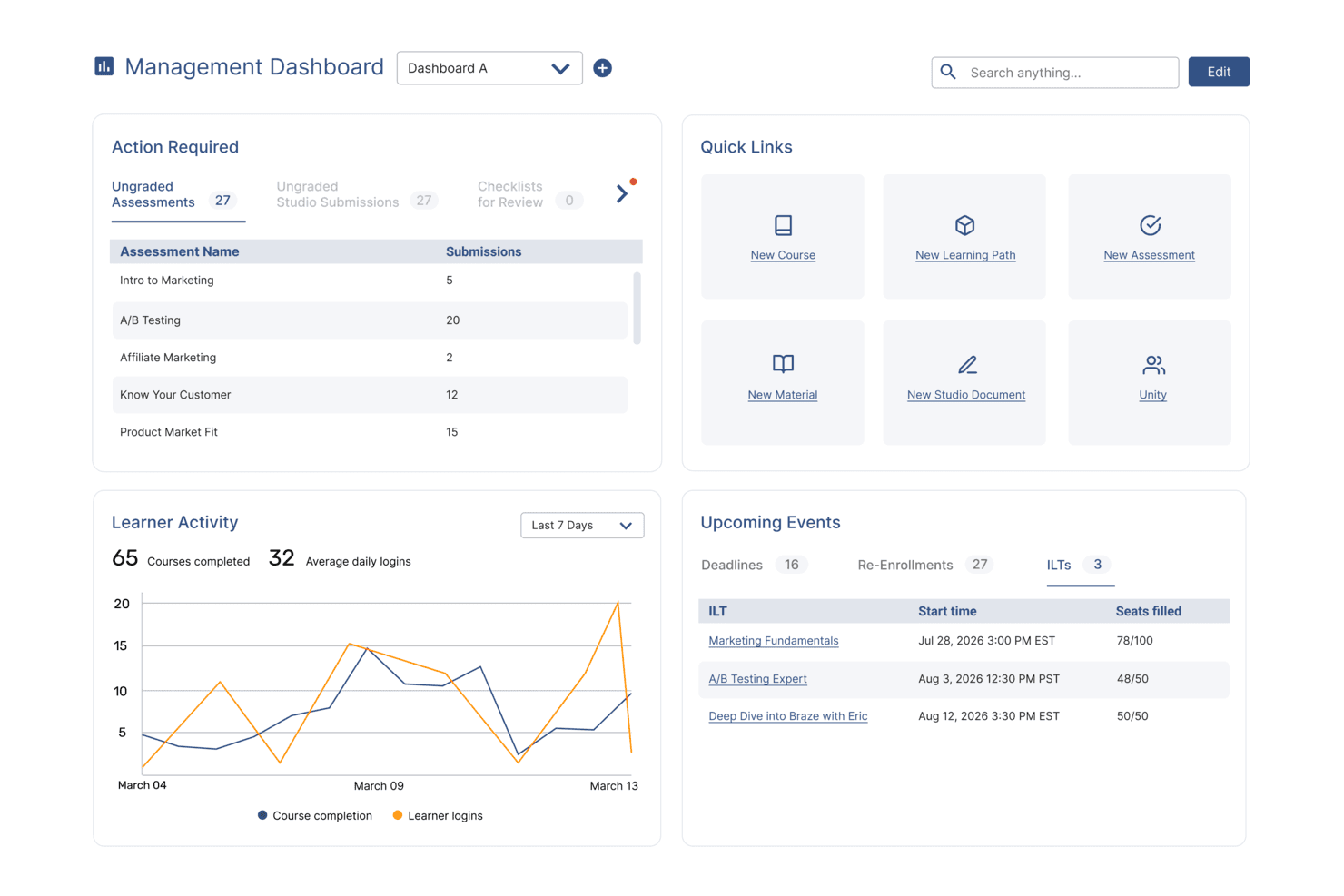
SkyPrep's management dashboard displays learner activity, upcoming events, and quick links. SkyPrep is an online training platform tailored for small businesses, offering a comprehensive suite of tools to enhance your team's onboarding experience. It appeals to businesses across various industries looking to simplify their onboarding process with features designed to engage new hires and streamline training. By addressing challenges like knowledge retention and training consistency, SkyPrep ensures that your team is well-prepared and aligned with company objectives from day one.
Why I Picked SkyPrep
I picked SkyPrep because it offers a user-friendly platform that significantly reduces training time by utilizing advanced learning methods. With features like automated workflow management and detailed reporting, you can efficiently track onboarding progress and ensure compliance with company standards. Additionally, its integration with popular HR systems like ADP and Workday simplifies user record management, making it an ideal choice for small businesses aiming to enhance their onboarding processes.
SkyPrep Key Features
In addition to its core functionalities, SkyPrep offers several features that enhance its value as an onboarding tool:
- Single Sign-On (SSO): Allows your team to log in using existing cloud account credentials, simplifying the access process.
- Content Management: Create courses and content using various formats, including documents, images, and videos, providing a dynamic learning experience.
- Webinar Tools: Supports platforms like Zoom and Microsoft Teams, making it easier to conduct live training sessions.
- Learning Paths: Structured training journeys guide new hires through onboarding, ensuring all required steps are completed.
- Manager Dashboards: Provide visibility into employee progress, enabling managers to identify and address support needs.
SkyPrep Integrations
Integrations include Zoom, GoToMeeting, Cisco Webex, Microsoft Teams, ClickMeeting, BigBlueButton, ADP, Workday, Salesforce, and HubSpot.
Pros and Cons
Pros:
- Built-in e-signatures
- Real-time dashboards
- Automated role-based enrollments
Cons:
- Reporting customization may be limited
- Pricing not publicly available
Learn more about SkyPrep: Best for documenting repeatable onboarding workflows
- Free demo available
- Pricing upon request
Visit WebsiteCustomer Rating:4.7/5
Trainual helps businesses document processes and manage consistent onboarding. Trainual is a training and onboarding platform aimed at small businesses. It allows users to document processes, policies, and procedures, ensuring consistency and clarity for new hires.
Why I picked Trainual: It excels in training with its easy-to-use templates and customization options. You can quickly set up training modules tailored to your team's needs. The platform offers quizzes and tests to ensure understanding and retention. This focus on structured training helps you maintain high standards as your business grows.
Standout features and integrations:
Features include customizable templates for creating training manuals and onboarding guides. The platform allows you to incorporate multimedia elements such as videos and images into your training materials. Quizzes and tests help ensure that your team understands the content and retains the information.
Integrations include Zapier, Slack, Google Data Studio, Microsoft Entra, QuickBooks, BambooHR, and more.
Pros and Cons
Pros:
- Quick setup process
- Multimedia support
- Customizable training templates
Cons:
- Manual upkeep required as processes change
- Not a full HRIS — lacks payroll and compliance automation
 8Best for document management
GoCo
- Free demo available
- Pricing upon request
Visit WebsiteCustomer Rating:4.6/5
GoCo supports HR, benefits, and onboarding tasks for small businesses. GoCo is an HR and benefits management platform that caters to small businesses looking to simplify their HR processes. It offers tools for onboarding, benefits administration, and document management, making it easier for you to manage your workforce.
Why I picked GoCo: It excels in document management, providing features like digital signatures and secure document storage. You can easily upload and organize employee files, ensuring everything is accessible and compliant. This focus on document management ensures your HR operations run smoothly and efficiently.
Standout features and integrations:
Features include digital signatures, which make it easy for you to handle contracts and agreements. Secure document storage ensures that all your files are organized and protected. Automated reminders help you keep track of important tasks and deadlines, reducing the risk of oversight.
Integrations include QuickBooks, Slack, JazzHR, Greenhouse, Checkr, Workable, and more.
Pros and Cons
Pros:
- Automated task reminders
- Secure file storage
- Digital signature support
Cons:
- May not be ideal for large enterprises
- Limited advanced features
Learn more about GoCo: Best for global HR practices
- 7-day free trial
- From $2/user/month (billed annually)
Visit WebsiteCustomer Rating:4.5/5
peopleHum supports teams with recruitment, engagement, and performance tools. peopleHum is a dedicated HR platform designed for businesses looking to manage their workforce globally. It offers features for recruitment, employee engagement, and performance management, providing a holistic approach to human resources.
Why I picked peopleHum: It’s ideal for global HR practices, offering tools that support multi-country operations and compliance. Features such as automated workflows and detailed analytics help you manage complex HR tasks. The platform’s focus on global reach ensures you can effectively manage a diverse workforce.
Standout features and integrations:
Features include automated workflows to simplify HR processes and reduce manual tasks. The platform provides detailed analytics to help you make informed decisions about your workforce. Employee engagement tools are also available to help you maintain a motivated and productive team.
Integrations include Microsoft Teams, Slack, Google Workspace, and more.
Pros and Cons
Pros:
- Detailed analytics available
- Automated HR workflows
- Supports global operations
Cons:
- Advanced modules often require higher-tier plans
- Broader HR suite may feel oversized for small teams
Learn more about peopleHum: Best for integration with the Zoho suite
- 30-day free trial + free demo available
- From $1.25/user/month (billed annually)

Zoho People supports HR tasks and time tracking for growing teams. Zoho People is an HR management platform that serves businesses looking to simplify their HR processes and integrate them with other business functions. It provides tools for employee onboarding management, time tracking, and performance evaluation, making it easier for your team to manage HR tasks.
Why I picked Zoho People: Its integration with the Zoho suite is a key differentiator, allowing you to connect HR functions with tools such as CRM and finance. This integration capability enhances overall business productivity.
Standout features and integrations:
Features include time off management, which helps you track employee leave and approvals efficiently. Performance appraisal tools allow you to evaluate and manage employee performance regularly. The platform also offers automation for routine HR tasks, reducing manual effort and errors.
Integrations include Zoho CRM, Zoho Books, Zoho Payroll, QuickBooks, Microsoft Teams, Slack, Zapier, Xero, and more.
Pros and Cons
Pros:
- Supports HR task automation
- Time off management
- Native integration with Zoho products
Cons:
- Strongest value comes when using the full Zoho ecosystem
- The interface can feel dense for first-time HR users
Learn more about Zoho People:
Küçük İşletmeler için Diğer İşe Alıştırma Yazılımları
İşe alıştırma yazılımı için kısa listeme girmeyen ancak yine de göz atmaya değer bazı ek seçenekler şunlardır:
How I Evaluate Onboarding Software for Small Business
I check for baseline must-haves—digital I-9s, e-signed offer letters, and task workflows—then I look at the differentiators that make one tool a better fit for a lean HR team than another.
Core Functionality (Table Stakes For This List)
When I'm selecting tools for my list, I rank each one on a scale from 0 (does not offer the functionality) to 5 (excels in this area) for each core functionality listed below. Then, I calculate the tool's total score into a percentage. Each tool needs to achieve a minimum total score of 65% to be considered for inclusion.
- Digital Document Management: I look at whether new hires can e-sign offer letters, NDAs, and policy acknowledgments directly in the platform instead of printing, scanning, or toggling to a separate tool.
- Compliance Forms Handling: Built-in I-9 and W-4 support with field validation matters here, since a missed signature block or incorrect SSN format can delay payroll and create audit risk.
- Onboarding Workflows & Checklists: I evaluate whether HR can build role-specific task sequences—like assigning IT setup to a manager and benefits enrollment to the new hire—with clear ownership and due dates.
- New Hire Self-Service Portal: A dedicated portal where new employees complete forms, review the employee handbook, and check their task progress before day one keeps HR out of the middle.
- HRIS/Payroll Integration: I check for native connections to payroll providers popular with small businesses, like Gusto, QuickBooks, ADP Run, and Paychex, so employee data flows without re-keying.
- Automated Notifications & Reminders: The tool should send deadline-driven reminders to new hires, managers, and HR—like nudging a manager to complete a welcome checklist two days before a start date.
Once I have a list of tools that meet this criteria, I consider what sets each platform apart.
Differentiating Factors (What Sets Vendors Apart)
Here's how I compare and contrast different vendors:
Standout Features
Preboarding engagement is a big differentiator. I look for tools that let you send welcome videos, team intros, and culture content between offer acceptance and day one—this window is where early attrition starts. Org-wide task automation also matters because onboarding isn't just HR's job. A good tool can assign laptop provisioning to IT and benefits enrollment to finance within the same workflow. Built-in training modules round things out by letting you attach learning paths and policy quizzes directly to the onboarding journey.
Beyond Features
Pricing transparency is one of the first things I check. Small businesses need to know what they're paying per employee without discovering hidden fees for e-signatures or compliance add-ons mid-rollout. Implementation speed is equally important—if an office manager can't get the tool running within a few days using pre-built templates and a setup wizard, it's going to sit unused. I also evaluate integration depth with small business payroll tools like Gusto, QuickBooks, and Paychex, plus Slack or Google Workspace connectivity for task notifications where your team already works.
Küçük İşletmeler için İşe Alıştırma Yazılımı Nasıl Seçilir
Uzun özellik listeleri ve karmaşık fiyatlandırma yapıları arasında kaybolmak kolaydır. Kendinize özgü yazılım seçimi sürecinizi yürütürken odağınızı korumanıza yardımcı olmak için aklınızda bulundurmanız gereken faktörlerin kontrol listesi aşağıdadır:
| Faktör | Dikkat Edilmesi Gerekenler |
|---|---|
| FaktörÖlçeklenebilirlik | Dikkat Edilmesi GerekenlerYazılım işletmenizle birlikte büyüyebilir mi? Daha fazla kullanıcıyı veya veriyi sorunsuz bir şekilde işleyip işleyemeyeceğini değerlendirin. Gerektiğinde ölçeği artırmayı veya azaltmayı destekleyen çözümleri tercih edin. |
| FaktörEntegrasyonlar | Dikkat Edilmesi GerekenlerMevcut araçlarınıza bağlanabiliyor mu? Slack veya Google Workspace gibi hâlihazırda kullandığınız İK platformları ya da iletişim araçlarıyla uyumluluğunu kontrol edin. |
| FaktörÖzelleştirilebilirlik | Dikkat Edilmesi Gerekenlerİş süreçlerinize uyacak şekilde uyarlayabilir misiniz? İşletmenizin ihtiyaçlarına uyacak iş akışlarını ve formları özelleştirmenize olanak tanıyan yazılımları tercih edin. |
| FaktörKullanım kolaylığı | Dikkat Edilmesi GerekenlerEkibinizdeki herkes için kullanıcı dostu mu? Arayüzün sezgisel olduğundan ve kullanımı öğrenmek için kapsamlı bir eğitim gerektirmediğinden emin olun. |
| FaktörUygulama ve işe alıştırma | Dikkat Edilmesi GerekenlerKurulum ne kadar hızlı? Yazılımı uygulamak ve ekibinizi kullanıma hazırlamak için gereken süreyi ve kaynakları değerlendirin. Sorunsuz bir işe alıştırma sürecine sahip araçları tercih edin. |
| FaktörMaliyet | Dikkat Edilmesi GerekenlerBütçenize uygun mu? Fiyatlandırma planlarını karşılaştırın ve gizli ücretler de dâhil olmak üzere maliyetin sunulan değerle uyumlu olup olmadığını belirleyin. |
| FaktörGüvenlik önlemleri | Dikkat Edilmesi GerekenlerVerileriniz ne kadar güvende? Yazılımın güçlü şifreleme, düzenli güvenlik güncellemeleri ve veri koruma mevzuatına uyumluluk sunduğundan emin olun. |
| FaktörDestek erişilebilirliği | Dikkat Edilmesi GerekenlerHangi destek seçenekleri sunuluyor? Sohbet veya telefon gibi erişilebilir destek kanallarını arayın ve gerekirse 7/24 yardım sunulup sunulmadığını değerlendirin. |
Küçük İşletmeler İçin İşe Alıştırma Yazılımı Nedir?
Küçük işletmeler için işe alıştırma yazılımı, yeni işe alınan çalışanların bir şirkete dâhil edilmesi sürecini yönetmeye ve düzenlemeye yardımcı olan dijital bir çözümdür. Genellikle İK uzmanları ve yöneticiler tarafından kullanılan bu araçlar, görevleri otomatikleştirip bilgileri düzenleyerek zamandan tasarruf sağlar ve işe alıştırma deneyimini iyileştirir. Görev otomasyonu, belge yönetimi ve eğitim modülleri; verimli işe alıştırma, mevzuata uyumluluk ve çalışan memnuniyetine yardımcı olur. Genel olarak bu araçlar, işe alıştırma sürecini geliştirerek hem işverenler hem de çalışanlar için daha düzenli ve verimli hâle getirir.
Özellikler
Küçük bir işletme için geliştirilen iyi bir işe alıştırma yazılımının sahip olması gereken temel özellikler şunlardır:
- Görev otomasyonu: Tekrarlanan görevleri otomatikleştirerek İK ekiplerinin zamandan tasarruf etmesini ve manuel hataları azaltmasını sağlar.
- Belge yönetimi: Çalışan belgelerini güvenli bir şekilde düzenler ve saklar; kolay erişim ve mevzuata uyumluluk sağlar.
- Eğitim modülleri: Yeni işe alınan çalışanların şirket politikalarını ve prosedürlerini anlamasına yardımcı olacak yapılandırılmış öğrenme yolları sunar.
- Özelleştirilebilir iş akışları: İşletmelerin işe alıştırma süreçlerini kendilerine özgü ihtiyaç ve gereksinimlere uyacak şekilde uyarlamasına olanak tanır.
- Dijital imzalar: Sözleşmelerin ve anlaşmaların güvenli ve kâğıtsız bir şekilde imzalanmasını sağlayarak işe alıştırma sürecini hızlandırır.
- Performans değerlendirme araçları: Yeni işe alınan çalışanların ilerlemesinin ve ekibe uyumunun izlenmesine ve değerlendirilmesine yardımcı olur.
- İzin yönetimi: Çalışan izin taleplerini ve onaylarını verimli bir şekilde yönetir ve kayıtları düzenli tutar.
- Entegrasyon olanakları: Mevcut İK ve iletişim araçlarına bağlanarak bilgilerin sorunsuz bir şekilde aktarılmasını sağlar.
- Mobil erişim: İK ekiplerine ve yeni işe alınan çalışanlara işe alıştırma materyallerine hareket hâlindeyken erişme esnekliği sunar.
- Mevzuata uyumluluk takibi: Yasal gerekliliklere ve düzenlemelere uyulmasını sağlayarak işletme açısından riskleri en aza indirir.
Faydalar
Küçük işletmeler için işe alıştırma yazılımının uygulanması, ekibiniz ve işletmeniz açısından çeşitli faydalar sağlar. Yararlanabileceğiniz avantajlardan bazıları şunlardır:
- Zaman tasarrufu: Tekrarlanan görevleri otomatikleştirerek İK ekiplerinin daha stratejik faaliyetlere odaklanmasını sağlar.
- Geliştirilmiş düzen: Çalışan belgelerini ve işe alıştırma materyallerini düzenli ve kolay erişilebilir durumda tutar.
- Geliştirilmiş mevzuata uyumluluk: Yasal gereklilikleri ve düzenlemeleri izleyerek uyumsuzluk riskini azaltır.
- Daha iyi çalışan deneyimi: Yapılandırılmış eğitim ve net yönlendirme sunarak yeni işe alınan çalışanların desteklendiğini ve ekibe dâhil olduğunu hissetmesine yardımcı olur.
- Artırılmış verimlilik: E-imza ve mobil erişim gibi dijital çözümler sunarak işe alıştırma sürecini hızlandırır.
- Özelleştirme: İşe alıştırma iş akışlarının işletmenizin özel ihtiyaçlarına ve kültürüne uyacak şekilde uyarlanmasına olanak tanır.
- Veriye dayalı içgörüler: İşe alıştırma süreci ve performansı hakkında analizler sunarak gelecekte işe alınacak çalışanlar için süreçlerin iyileştirilmesine yardımcı olur.
Maliyetler ve Fiyatlandırma
Küçük bir işletme için işe alıştırma yazılımı seçmek, mevcut çeşitli fiyatlandırma modellerini ve planları anlamayı gerektirir. Maliyetler özelliklere, ekip büyüklüğüne, eklentilere ve daha fazlasına göre değişir. Aşağıdaki tablo, küçük işletmelere yönelik işe alıştırma yazılımı çözümlerinde yaygın planları, ortalama fiyatlarını ve genellikle sunulan özellikleri özetlemektedir:
Küçük İşletmelere Yönelik İşe Alıştırma Yazılımı İçin Plan Karşılaştırma Tablosu
| Plan Türü | Ortalama Fiyat | Yaygın Özellikler |
|---|---|---|
| Plan TürüÜcretsiz Plan | Ortalama Fiyat$0 | Yaygın ÖzelliklerTemel işe alıştırma özellikleri, sınırlı belge depolama alanı ve minimum düzeyde destek. |
| Plan TürüBireysel Plan | Ortalama Fiyat$5-$25/kullanıcı/ay | Yaygın ÖzelliklerGörev otomasyonu, belge yönetimi ve temel analizler. |
| Plan Türüİşletme Planı | Ortalama Fiyat$30-$60/kullanıcı/ay | Yaygın ÖzelliklerÖzelleştirilebilir iş akışları, elektronik imzalar, entegrasyon özellikleri ve gelişmiş uyumluluk araçları. |
| Plan TürüKurumsal Plan | Ortalama Fiyat$70+/kullanıcı/ay | Yaygın ÖzelliklerGelişmiş analizler, özel destek, sınırsız belge depolama alanı ve tam özelleştirme seçenekleri. |
SSS
Küçük işletmelere yönelik işe alıştırma yazılımı hakkında sık sorulan bazı soruların yanıtlarını burada bulabilirsiniz:
Hangi tür işletmeler işe alıştırma yazılımından en çok faydalanır?
Küçük ve orta ölçekli işletmeler işe alıştırma yazılımından en çok faydalanır. Bu araçlar, kaynakların sınırlı olduğu durumlarda kritik önem taşıyan yeni çalışanları işe entegre etme sürecini optimize etmeye yardımcı olur. Bir girişim veya büyüyen bir şirket işletiyorsanız, işe alıştırma yazılımı zamandan tasarruf etmenizi ve tutarlılığı sağlamanızı sağlayabilir. Ayrıca uyumluluk ve belgelerin yönetilmesine yardımcı olarak İK ekibinizin idari yükünü azaltır. Uzaktan çalışan veya farklı konumlara dağılmış ekipleri olan işletmeler, konumdan bağımsız olarak tutarlı bir işe alıştırma deneyimi sunulmasını sağladıkları için bu araçları özellikle yararlı bulacaktır.
İşe yeni alınan çalışanların işe alıştırılması sırasında işe alıştırma yazılımı ekibimin zamandan tasarruf etmesine nasıl yardımcı olabilir?
İşe alıştırma yazılımı; belge yönetimi, eğitim takibi ve elektronik imzaların toplanması gibi görevleri düzenler. Bu, manuel işe alıştırma sürecine kıyasla ekibinizin saatlerce zamandan tasarruf etmesini sağlar. Hatırlatıcıları otomatikleştirebilir, görevler atayabilir ve kaynakları tek bir yerden paylaşabilirsiniz.
İşe alıştırma yazılımı mevcut İK sistemleriyle entegre olabilir mi?
Evet, çoğu işe alıştırma yazılımı mevcut İK sistemleriyle entegre olabilir. Bu özellik, işe alıştırma sürecinizi maaş bordrosu veya performans yönetimi sistemleri gibi hâlihazırda kullandığınız araçlara bağlamanızı sağlar. Satın almadan önce yazılımın mevcut araçlarınızla entegrasyonu destekleyip desteklemediğini kontrol edin. Bu, bilgilerin sorunsuz bir şekilde aktarılmasına ve veri giriş hatalarının azaltılmasına yardımcı olur. Geçişi kolaylaştırmak için API erişimi veya popüler İK sistemleriyle önceden oluşturulmuş entegrasyonlar sunan platformları tercih edin.
Çalışan verilerinin depolanması için işe alıştırma yazılımı ne kadar güvenlidir?
İşe alıştırma yazılımı, çalışan verilerinin depolanması açısından genellikle güvenlidir. Çoğu sağlayıcı, hassas bilgileri korumak için şifreleme kullanır ve sektör standartlarına uyar. Seçenekleri değerlendirirken veri şifreleme, erişim denetimleri ve GDPR gibi düzenlemelere uyumluluk gibi güvenlik önlemlerini sorun. Yazılım sağlayıcısının güvenlik protokollerini düzenli olarak güncellediğinden ve veri ihlalleri durumunda destek sunduğundan emin olmak önemlidir. Güçlü güvenlik belgelerine sahip saygın bir sağlayıcı seçmek içinizinizi rahatlatacaktır.
Küçük bir ekip için işe alıştırma yazılımını uygulamak ne kadar zordur?
Küçük işletmelere yönelik seçeneklerin çoğu hızlı kurulum için tasarlanmıştır ve genellikle çok az BT desteğine ihtiyaç duyar veya hiç duymaz. Birçok çözüm, işe alıştırma sürecinizi birkaç gün içinde kullanıma sunabilmeniz için şablonlar ve adım adım kılavuzlar sunar.
İşe alıştırma iş akışlarını özelleştirmek mümkün mü?
Evet, birçok işe alıştırma yazılımı çözümü özelleştirilebilir iş akışları sunar. Bu özellik, işe alıştırma sürecini şirketinizin özel ihtiyaçlarına ve kültürüne uyacak şekilde düzenlemenizi sağlar. Her yeni çalışan için kişiselleştirilmiş bir deneyim sunmak amacıyla farklı roller veya departmanlar için farklı iş akışları oluşturabilirsiniz. Özelleştirme seçenekleri genellikle otomatik görevlerin ayarlanmasını, özgün eğitim modüllerinin tasarlanmasını ve iletişim şablonlarının düzenlenmesini kapsar. Karar vermeden önce mevcut özelleştirme düzeyini ve bu özelliklerin İK ekibiniz için kullanıcı dostu olup olmadığını kontrol edin.