

10 Trainual Alternatives for Employee Onboarding in 2026

Best Trainual Alternatives Shortlist


If you're finding Trainual isn't quite meeting your needs, you're not alone. Many HR professionals face challenges such as limited customization or specific industry requirements. Employee training software can help by offering tailored solutions for your team.
In my experience, exploring Trainual alternatives can open up possibilities you hadn't considered. You might be looking for better scalability, industry-specific features, or compliance with regulations.
I'll guide you through the top Trainual alternatives, showing you the unique benefits that might just fit your business needs. Whether you're seeking enhanced collaboration or more efficient onboarding, I've got the insights to help you make an informed decision.
What Is Trainual?
Trainual is an employee training software designed to help businesses organize and automate their training processes. It's often used by HR professionals, managers, and team leaders who need a straightforward way to onboard and educate their teams. Features such as process documentation, role-specific training, and progress tracking help with improving the training experience and ensuring consistency across your organization. Overall, Trainual offers a practical solution for businesses looking to simplify and improve their training efforts.
Trainual Alternatives Comparison Table
This comparison table summarizes pricing details for my top Trainual alternative selections.
| Tool | Best For | Trial Info | Price | ||
|---|---|---|---|---|---|
| 1 | Best for AI roleplay-led compliance training | Free demo available | Pricing upon request | Website | |
| 2 | Best for scalable online training | Free plan + free demo available | From $119/month (billed annually) | Website | |
| 3 | Best for rapid LMS implementation and onboarding | Free trial available | From $6.91/user/month (billed annually) | Website | |
| 4 | Best for creating step-by-step guides | Free plan + free demo available | From $12/seat/month (billed annually) | Website | |
| 5 | Best for client training setups | Free demo available | From $250/month | Website | |
| 6 | Best for quick team training | Free plan available | From $100/month | Website | |
| 7 | Best for compliance operations | Free demo available | Pricing upon request | Website | |
| 8 | Best for flexible employee training | Free demo available | Pricing upon request | Website | |
| 9 | Best for fast knowledge access | Free demo available | Pricing upon request | Website | |
| 10 | Best for tasks plus training | Free plan available | From $7/user/month (billed annually) | Website |


Why Trust Our Software Recommendations
Our team has been testing and reviewing software since 2012. As HR experts ourselves, we know how difficult—and important—it is to choose the right software.
For this guide, we evaluated tools using hands-on testing and independent research, scoring tools using our selection criteria. We also draw on insights from industry thought leaders and practicing HR experts.
Our reviews reflect our human editorial judgment, not a sales pitch.
Expert reviewers:
Best Trainual Alternatives Reviews
Below are my detailed summaries of the best Trainual alternatives that made it onto my shortlist. My reviews offer a detailed look at the key features, pros and cons, integrations, and ideal use cases of each tool to help you find the best one for you.

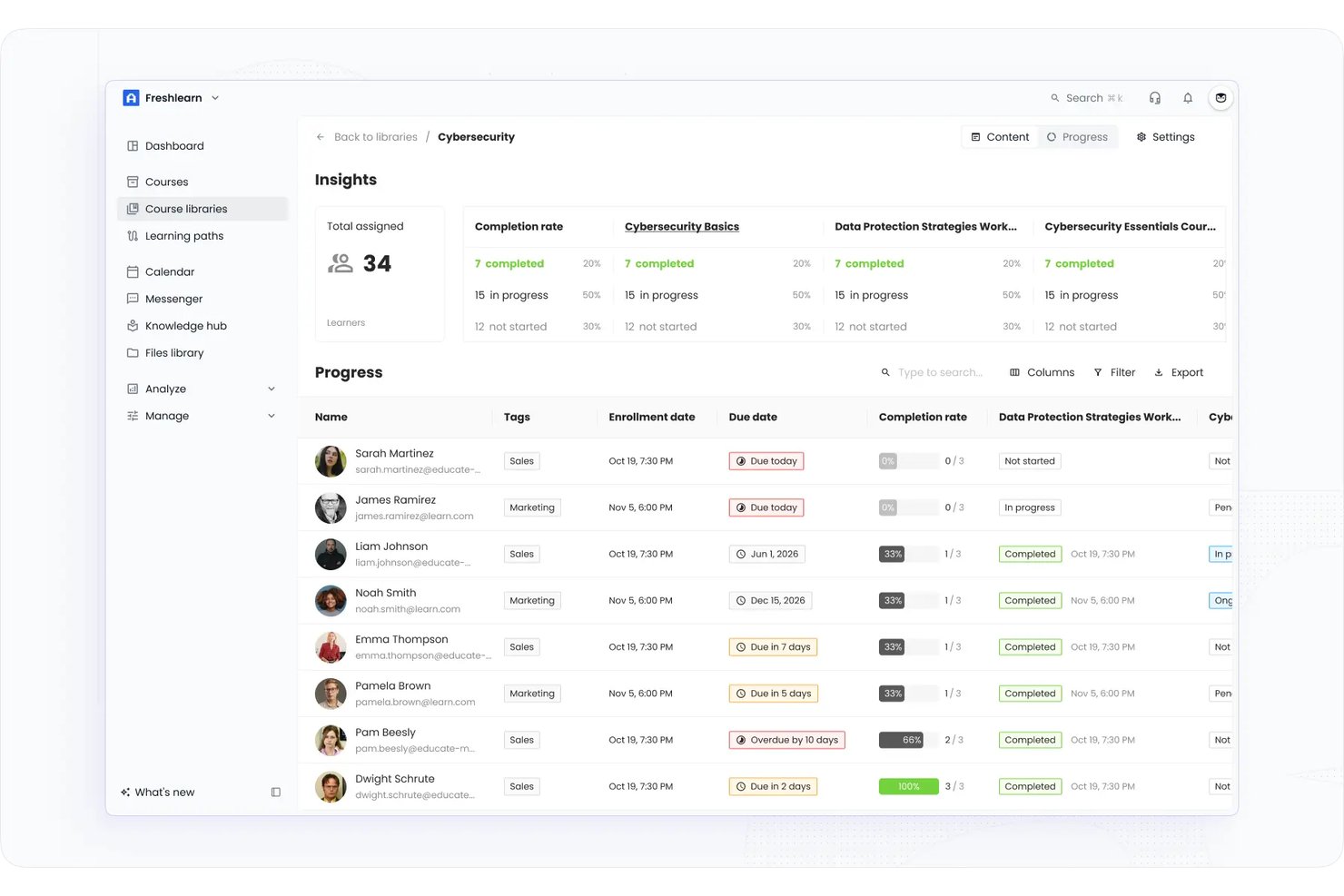
EducateMe LMS offers a learning management platform built for HR teams and compliance managers who want to modernize training with practical, scenario-based learning modules tailored to evolving workplace challenges.
Who Is EducateMe LMS Best For?
HR teams and compliance managers who want practical, scenario-driven learning modules that keep pace with modern workplace challenges.
Why EducateMe LMS Is a Good Best Trainual Alternatives Reviewed
I picked EducateMe LMS as one of the best because I can build scenario-driven compliance modules using AI-powered roleplay. My team uses its dynamic branching scenarios and realistic workplace situations to let employees practice responding to compliance challenges before they face them on the job.
EducateMe LMS Key Features
- Customizable course templates: Build and update training modules with drag-and-drop templates tailored to your organization’s needs.
- Multimedia content support: Upload videos, audio, documents, and quizzes to create engaging learning experiences.
- Progress and completion tracking: Monitor learner status with dashboards for both individual and group performance analytics.
- Integration with HR systems: Sync data and automate user management by connecting with popular HR platforms.
EducateMe LMS Integrations
Native integrations are not clearly documented. The tool supports integrations via API for custom connections.
Pros and Cons
Pros:
- Customizable course templates for HR-led training
- Offers dynamic branching for real-life situations
- Enables AI-powered roleplay for compliance scenarios
Cons:
- Detailed pricing information is not transparent
- Native integrations are not clearly documented

Best for scalable online training

TalentLMS is a cloud-based learning management system used by businesses of all sizes to deliver training programs. It serves HR professionals, trainers, and educators by offering tools to create, manage, and track online courses.
Why TalentLMS is a good Trainual alternative: TalentLMS provides scalable training solutions that can grow with your organization. Its course management features allow you to tailor training content to specific needs, making it adaptable for various industries. The platform's reporting tools give you insights into learner progress and outcomes. These capabilities support employee training and development goals as your business expands.
Standout features and integrations:
Features include course authoring tools that let you create custom content, mobile learning capabilities for training on-the-go, and gamification elements to increase learner engagement.
Integrations include Zoom, Salesforce, Slack, Shopify, Zapier, Microsoft Teams, LinkedIn Learning, PayPal, Stripe, and more.
Pros and Cons
Pros:
- Cloud-based learning management system
- Engaging gamification elements
- Scalable training solutions
Cons:
- Steep learning curve for new users
- No custom reports on the lower plan
New Product Updates from TalentLMS
TalentLMS Adds Learning Paths, AI Video, and Learner Experience Updates
TalentLMS introduced updates across learning management, content creation, and learner experience, including Learning Paths for Groups, AI video generation in TalentCraft, video bookmarking, and expanded administration tools. For more information, visit TalentLMS’s official site.

Best for rapid LMS implementation and onboarding
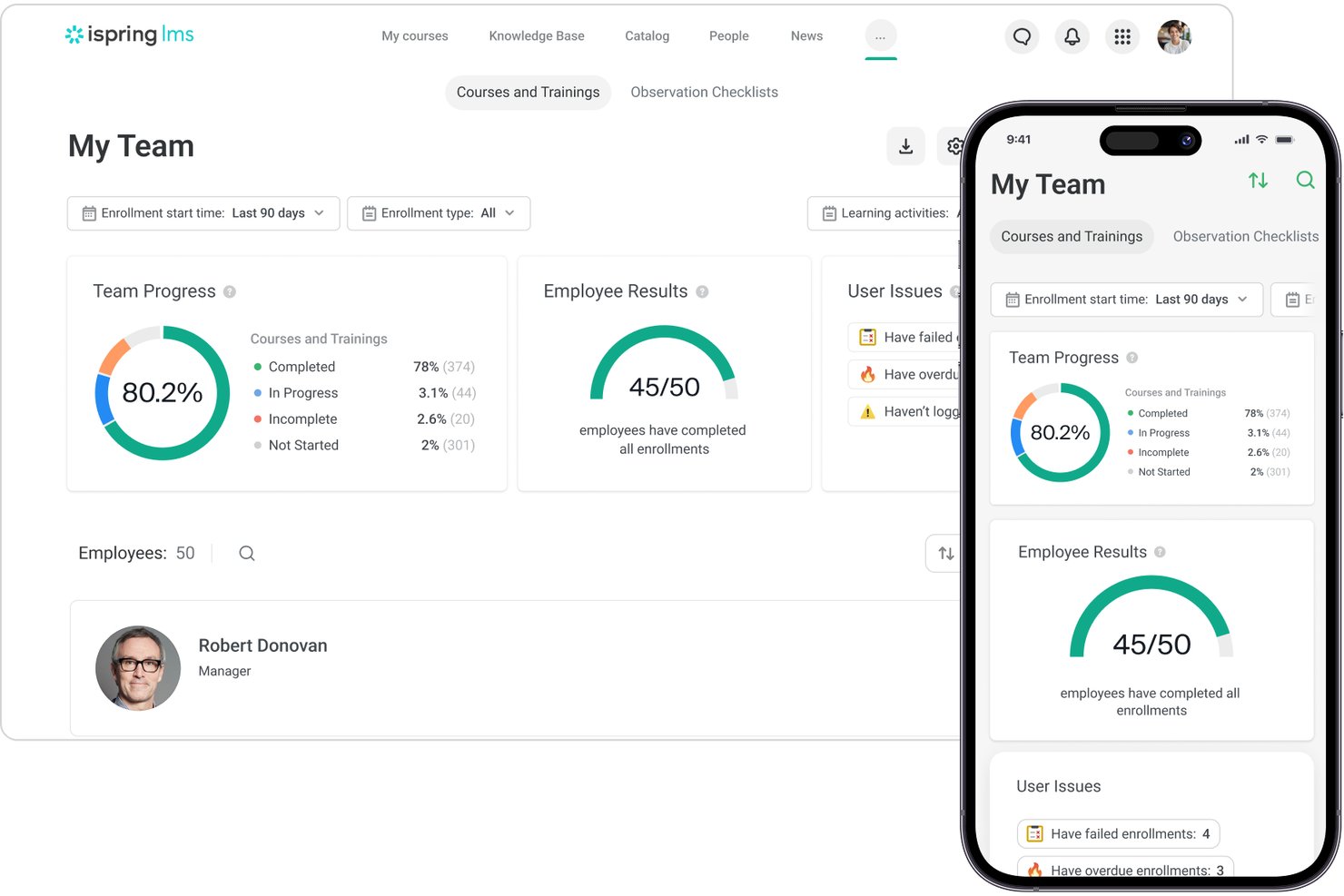
iSpring LMS is a course-based training platform built for HR and L&D teams that need to run structured onboarding, compliance training, and employee development without heavy IT involvement or lengthy setup.
Who Is iSpring LMS Best For?
iSpring LMS suits SMB and mid-market companies scaling their training programs and needing a full LMS without the cost or complexity of enterprise platforms.
Why iSpring LMS Is a Good Trainual Alternative
I picked iSpring LMS as one of the best because it gets teams trained faster than almost any other platform I've reviewed. Individual onboarding plans let you assign role-specific learning tracks from day one, and automated enrollment means new hires land in the right courses without any manual setup. I also appreciate the on-the-job training checklists, which let managers verify that what's learned in a course actually carries over into real work.
iSpring LMS Key Features
- PowerPoint-based course authoring: Create interactive eLearning content directly in PowerPoint and publish it as SCORM-compliant courses.
- Integrated knowledge base: Store and organize SOPs, policies, and training materials in a searchable central hub.
- Mobile app with offline access: Enable employees to complete training on the go, even without an internet connection.
- Automated compliance certificate management: Track certificate expiries and auto-assign mandatory re-training to maintain regulatory compliance.
iSpring LMS Integrations
iSpring LMS offers native integrations with BambooHR, Salesforce, Microsoft 365, and Zoom. An API is available for custom integrations.
Pros and Cons
Pros:
- Granular learner progress and compliance reporting
- Built-in PowerPoint to SCORM authoring
- Fast setup with pre-built onboarding templates
Cons:
- No e-signature for policy acknowledgments
- Limited SOP and process documentation tools
New Product Updates from iSpring LMS

iSpring LMS Adds Multiple Observations to OJT Sessions
iSpring LMS now lets managers log multiple observations within one OJT session, grouping visits and auto-generating summary stats like averages, criterion results, and comparisons. For more information, visit iSpring LMS's official site.

Scribe
Best for creating step-by-step guides

Scribe is a software tool designed to create step-by-step guides, primarily used by operations, HR, and IT teams. It helps with documenting processes, training, and onboarding new hires.
Why Scribe is a good Trainual alternative: Scribe excels in creating detailed visual guides with AI-driven automation. The ability to create visual guides enhances training and onboarding processes. This makes Scribe an excellent choice for teams looking to synchronize workflow documentation, accuracy, and speed.
Standout features and integrations:
Features include AI-powered workflow optimization that helps your team improve efficiency, visual guide creation that incorporates screenshots and annotations, and automatic process documentation to save time on repetitive tasks.
Integrations include Slack, Microsoft Teams, Confluence, Salesforce, Notion, Zendesk, and more.
Pros and Cons
Pros:
- Automatic process capture
- Visual elements in documentation
- AI-driven workflow optimization
Cons:
- Security and privacy options limited
- Poor customer service

Best for client training setups

AcademyOcean is a learning management system built to support growing teams by delivering personalized training that adapts to diverse training needs. It's used by HR teams, trainers, and small businesses to create engaging educational content and track learner progress.
Why AcademyOcean is a good Trainual alternative: AcademyOcean offers personalized learning paths that enhance the training experience. Its interactive content features, such as quizzes and multimedia lessons, improve user experience and encourage ongoing engagement. The platform's analytics provide insights into learner performance, helping you adjust training as needed. Combined with a scalable pricing model, these features make AcademyOcean a practical choice for businesses seeking an adaptable and efficient training solution.
Standout features and integrations:
Features include a content library with ready-to-use resources, customizable courses that fit your branding, and gamified learning elements to boost engagement and retention.
Integrations include Zapier, Slack, Google Analytics, HubSpot, Salesforce, PayPal, Microsoft Teams, and more.
Pros and Cons
Pros:
- SSO and two-factor authentication are available
- Multilingual course translation
- Personalized learning paths
Cons:
- Few template options
- Limited SEO options

Best for quick team training

Coassemble is a learning management system (LMS) designed for organizations looking to scale their training efforts. It is primarily used by HR teams, trainers, and educators to build structured training modules that address evolving training needs.
Why Coassemble is a good Trainual alternative: Coassemble offers flexible course creation tools that allow you to design training programs tailored to your team's needs and onboard new employees. Its interactive content options make learning engaging and effective, while the platform's analytics help you track learner progress and course impact. Coassemble's scalability ensures your training can grow with your organization, making it a strong alternative for businesses aiming to expand their educational efforts.
Standout features and integrations:
Features include a drag-and-drop course builder that simplifies content creation, customizable templates to fit your branding, and interactive quizzes to enhance learner engagement.
Integrations include Zapier, Google Drive, Dropbox, Slack, Stripe, BambooHR, Loom, and more.
Pros and Cons
Pros:
- Detailed analytics
- Interactive content options
- Flexible content creation tools
Cons:
- Permissions and role controls are limited
- No built-in e-commerce tools

Best for compliance operations

Process Street is a compliance operations platform used by industries such as healthcare, finance, and technology. It serves teams focused on operations, compliance, and customer management, helping automate business processes and enforce policies.
Why Process Street is a good Trainual alternative: Process Street offers AI-driven compliance tools that help your team automate complex processes. Its focus on risk through document management and workflow automation makes it ideal for industries where compliance is key. These features align with your need for a tool that emphasizes compliance operations.
Standout features and integrations:
Features include AI-powered workflows that automate routine tasks, risk management tools that help with compliance, and document management for organized and accessible records.
Integrations include Zapier, Slack, Salesforce, Jira, Microsoft Teams, HubSpot, Google Drive, monday.com, and more.
Pros and Cons
Pros:
- Enhances operational consistency
- Strong risk management features
- Automates complex processes
Cons:
- Abrupt or large price increases
- Limited automation

Best for flexible employee training

Trakstar Learn is a learning management system designed to help businesses deliver flexible and engaging employee training programs. It's used by HR professionals and trainers to create, assign, and track employee training.
Why Trakstar Learn is a good Trainual alternative: Trakstar Learn offers extensive customization options that let you tailor training programs to your team's specific needs. Its user-friendly course builder and focus on ease of use help you create engaging and interactive content, while the platform's reporting tools provide insights into learner progress and course effectiveness. These features support your training goals by allowing flexibility and adaptability.
Standout features and integrations:
Features include content library access that provides ready-to-use training materials, mobile support for flexible learning, and assessment tools to evaluate learner understanding.
Integrations include Salesforce, Slack, Zoom, Microsoft Teams, Google Workspace, BambooHR, ADP, Shopify, Paylocity, Workday, and more.
Pros and Cons
Pros:
- Unlimited courses
- Auto-enroll features for employee onboarding
- Supports mobile learning
Cons:
- Workflow pop-ups disrupt progress
- Outdated training videos

Guru
Best for fast knowledge access
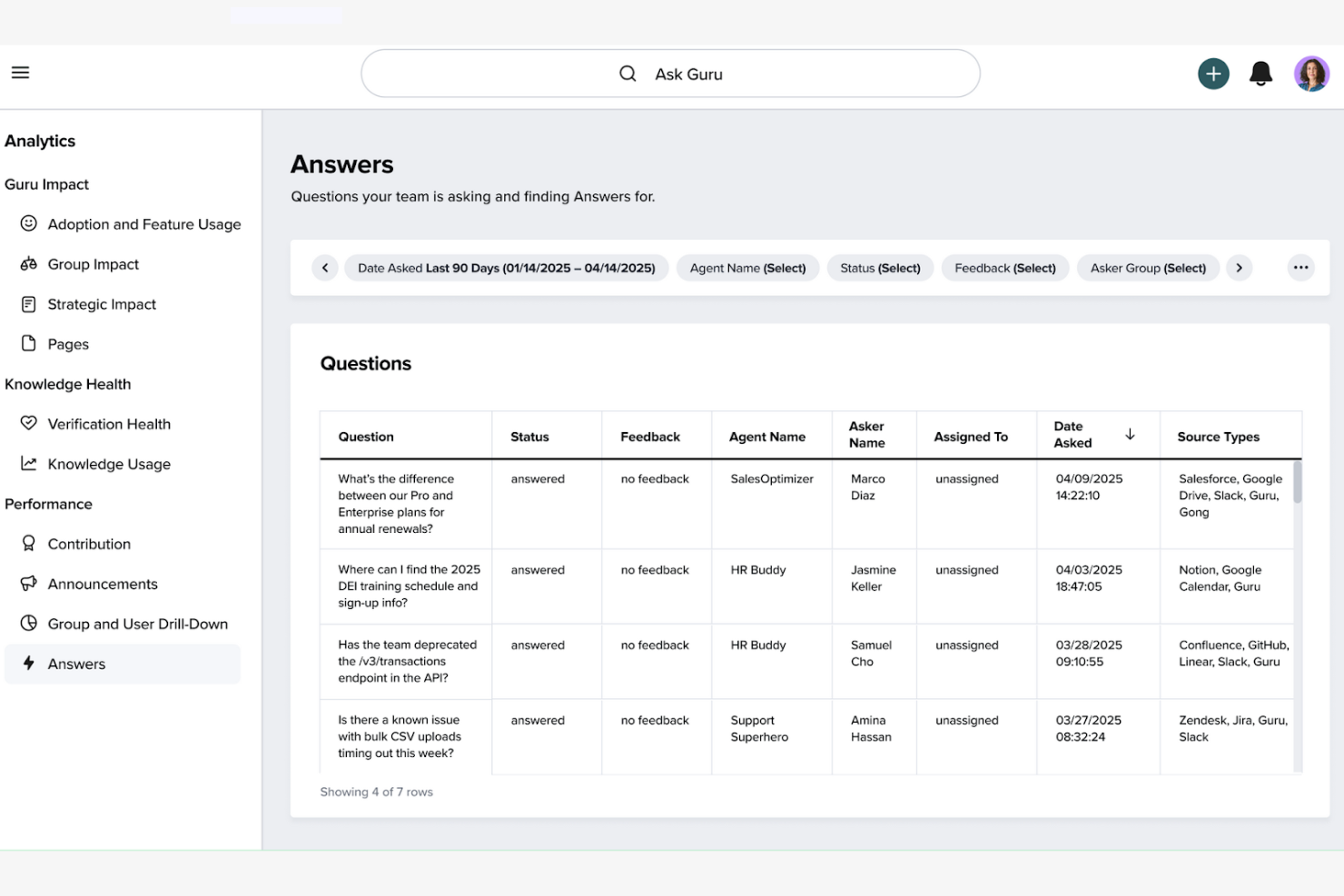
Guru is a knowledge management platform designed to help teams capture and share information efficiently. It's primarily used by customer support, sales, and marketing teams to ensure that accurate information is readily accessible.
Why Guru is a good Trainual alternative: Guru offers AI-driven suggestions to enhance the relevance and accuracy of your team's documentation and onboarding materials. Its verification feature ensures that content stays up to date, which is important for teams relying on accurate information. The platform's flexible API integrations mean teams can access knowledge within the tools they already use. These features make Guru a reliable tool for small businesses and growing teams needing efficient knowledge management systems.
Standout features and integrations:
Features include real-time knowledge updates that keep your team informed, a browser extension for easy access to information, and a verification system to ensure content accuracy.
Integrations include Slack, Microsoft Teams, Salesforce, Zendesk, Intercom, Google Drive, Chrome, Outlook, HubSpot, and more.
Pros and Cons
Pros:
- Browser extension for easy access
- Effective verification system
- AI-powered content suggestions
Cons:
- Browser compatibility issues
- Formatting limitations


ClickUp is a project management and productivity platform designed to help teams collaborate and maintain clear processes. It's used by professionals across various industries to organize workflows and create internal documents.
Why ClickUp is a good Trainual alternative: ClickUp offers customizable task templates that make it easy for your team to create step-by-step guides. You can create detailed timelines and track your progress to keep your team on schedule. The platform's collaborative features allow team members to share insights and updates. These functionalities make ClickUp a practical choice for teams needing structured training, guidance, and collaboration.
Standout features and integrations:
Features include goal tracking that keeps your team aligned, time management tools to optimize productivity, and a document editor for content creation and sharing within one dashboard.
Integrations include Slack, Google Drive, Dropbox, Microsoft Teams, Zoom, HubSpot, Outlook, GitHub, Evernote, Salesforce, and more.
Pros and Cons
Pros:
- All-in-one platform to manage workflows
- Integrated document editor
- Goal tracking capabilities
Cons:
- Some features require upgrades
- App dashboard has limited functionality
Other Trainual Alternatives
Here are some additional Trainual alternatives that didn’t make it onto my shortlist but are still worth checking out:
- Seismic
For sales training and coaching
- Tovuti LMS
For deep learning paths
- Document360
For AI-driven documentation
- Absorb
For large team learning
- KnowledgeOwl
For customizable help centers
- ProProfs Training Maker
For creating online courses
- eFront
For enterprise training
- Slite
For remote team collaboration
- Travitor
For corporate training programs
- Adobe Learning Manager
For multimedia learning experiences


How I Evaluate Trainual Alternatives
I look at two layers: whether a tool can actually handle role-based onboarding and SOP documentation, and then the differentiators that separate a solid pick from the right one.
Core Functionality (Table Stakes For This List)
When I'm selecting tools for my list, I rank each one on a scale from 0 (does not offer the functionality) to 5 (excels in this area) for each core functionality listed below. Then, I calculate the tool's total score into a percentage. Each tool needs to achieve a minimum total score of 65% to be considered for inclusion.
- Process & SOP Documentation: I evaluate how each tool handles structured documentation—things like searchable knowledge bases, version history, and rich formatting for writing up step-by-step procedures.
- Employee Onboarding Workflows: Each platform should let you build assignable onboarding sequences tied to specific roles, so a new sales hire and a new ops hire get different tracks.
- Training Course Builder: I look for a course editor that supports multimedia—video, images, embeds—organized into lessons or learning paths rather than loose files in a folder.
- Assignments & Role-Based Access: The ability to assign content by team, department, or job title matters here, along with permissions that control who sees what across the organization.
- Testing & Knowledge Checks: Quizzes and assessments are how you confirm employees actually absorbed the material, so I check for multiple question types and scoring capabilities.
- Progress Tracking & Reporting: Admins need clear visibility into who has completed what, so I evaluate each tool's dashboards, completion tracking, and exportable compliance reports.
Once I have a list of tools that meet this criteria, I consider what sets each platform apart.
Differentiating Factors (What Sets Vendors Apart)
Here's how I compare and contrast different vendors:
Standout Features
HRIS and SSO integrations matter a lot here—when a tool syncs with platforms like BambooHR or Gusto, new hires get auto-provisioned into the right training tracks without manual data entry. I also look for AI content generation, which helps lean HR teams draft SOPs and training modules faster instead of starting from a blank page. For organizations with deskless or frontline workers, mobile and offline access determines whether training actually reaches every employee.
Beyond Features
Pricing structure is a big differentiator—some tools charge per user while others offer flat-rate plans, and that choice shapes how affordable the platform stays as your headcount grows. I also evaluate implementation and content migration, since most teams are switching from Google Docs or Notion and need a realistic path to move existing SOPs over. Compliance and security standards like SOC 2 and GDPR readiness matter too, especially when the platform houses sensitive employee policies and training records.
Why Look For A Trainual Alternative?
While Trainual is a good choice of employee training software, there are a number of reasons why some users seek out alternative solutions. You might be looking for a Trainual alternative because…
- You need more customization options
- Your team is growing rapidly
- You're operating in multiple countries
- You require advanced analytics
- Your budget is limited
- You need offline access
If any of these sound like you, you’ve come to the right place. My list contains several employee training software options that are better suited for teams facing these challenges with Trainual and looking for alternative solutions.
Trainual Key Features
Here are some of the key features of Trainual, to help you contrast and compare what alternative solutions offer:
- Centralized documentation: Create and organize SOPs, policies, and training materials in one place.
- Customizable training paths: Tailor training based on roles, teams, or locations with automated paths and sequential assignments.
- Real-time collaboration: Edit, comment, and approve updates with your team.
- Progress tracking: Use progress bars, completion reports, and interactive knowledge checks for accountability.
- Integration capabilities: Sync with existing HRIS, payroll systems, and communication tools such as Slack.
- Compliance management: Keep policies clear and audit-ready with built-in e-signatures and completion certificates.
- Efficiency gains: Reduce onboarding time and improve retention and productivity, leading to significant cost savings.