

10 Best Corporate Learning Management Systems of 2026

10 Best Corporate Learning Management Systems Shortlist


The best corporate learning management systems help HR and learning professionals deliver consistent, scalable training across the organization—whether it's onboarding new hires, maintaining compliance, or developing employee skills for long-term growth.
If you're still relying on spreadsheets, email reminders, or outdated tools to manage training, you’re likely struggling with inefficiencies, poor engagement, and limited visibility into learning outcomes. Or maybe you already have an LMS, but it’s clunky, hard to customize, and not delivering the results your team needs.
In this guide, I’ll share the best corporate learning management systems based on my hands-on experience managing internal training programs for 9 years and evaluating L&D tools for 3+ years. My goal is to help you cut through the noise and find a solution that truly meets your learning and development needs.
Why Trust Our Software Recommendations
Our team has been testing and reviewing software since 2012. As HR experts ourselves, we know how difficult—and important—it is to choose the right software.
For this guide, we evaluated tools using hands-on testing and independent research, scoring tools using our selection criteria. We also draw on insights from industry thought leaders and practicing HR experts.
Our reviews reflect our human editorial judgment, not a sales pitch.
Expert reviewers:
Corporate LMS Systems Comparison Table
This comparison table summarizes pricing details for my top corporate LMS systems selections:
| Tool | Best For | Trial Info | Price | ||
|---|---|---|---|---|---|
| 1 | Best for HR-native compliance and onboarding training | Free demo available | Pricing upon request | Website | |
| 2 | Best AI-powered learning management system for global teams | Free demo available | From $5/user/month | Website | |
| 3 | Best for customized LMS solutions | Free demo available | Pricing upon request | Website | |
| 4 | Best for role-based training delivery | Free plan + free demo available | From $119/month (billed annually) | Website | |
| 5 | Best for dynamic content creation workflows | Free demo available | Pricing upon request | Website | |
| 6 | Best for role-specific training for performance | Free trial available | From $6.91/user/month (billed annually) | Website | |
| 7 | Best for a holistic learning management software solution | Free demo available | Pricing upon request | Website | |
| 8 | Best cloud-based LMS with an auto-enrollment feature | Free demo available | Pricing upon request | Website | |
| 9 | Best corporate learning management system for ease of use | 14-day free trial | Pricing upon request | Website | |
| 10 | Best for AI roleplay coaching | Free demo available | Pricing upon request | Website |


Best Corporate Learning Management System Reviews
Explore each LMS in detail to find the best fit for your training goals. I’ve highlighted top use cases, standout features, and user interface snapshots to help you compare tools at a glance.

Rippling
Best for HR-native compliance and onboarding training
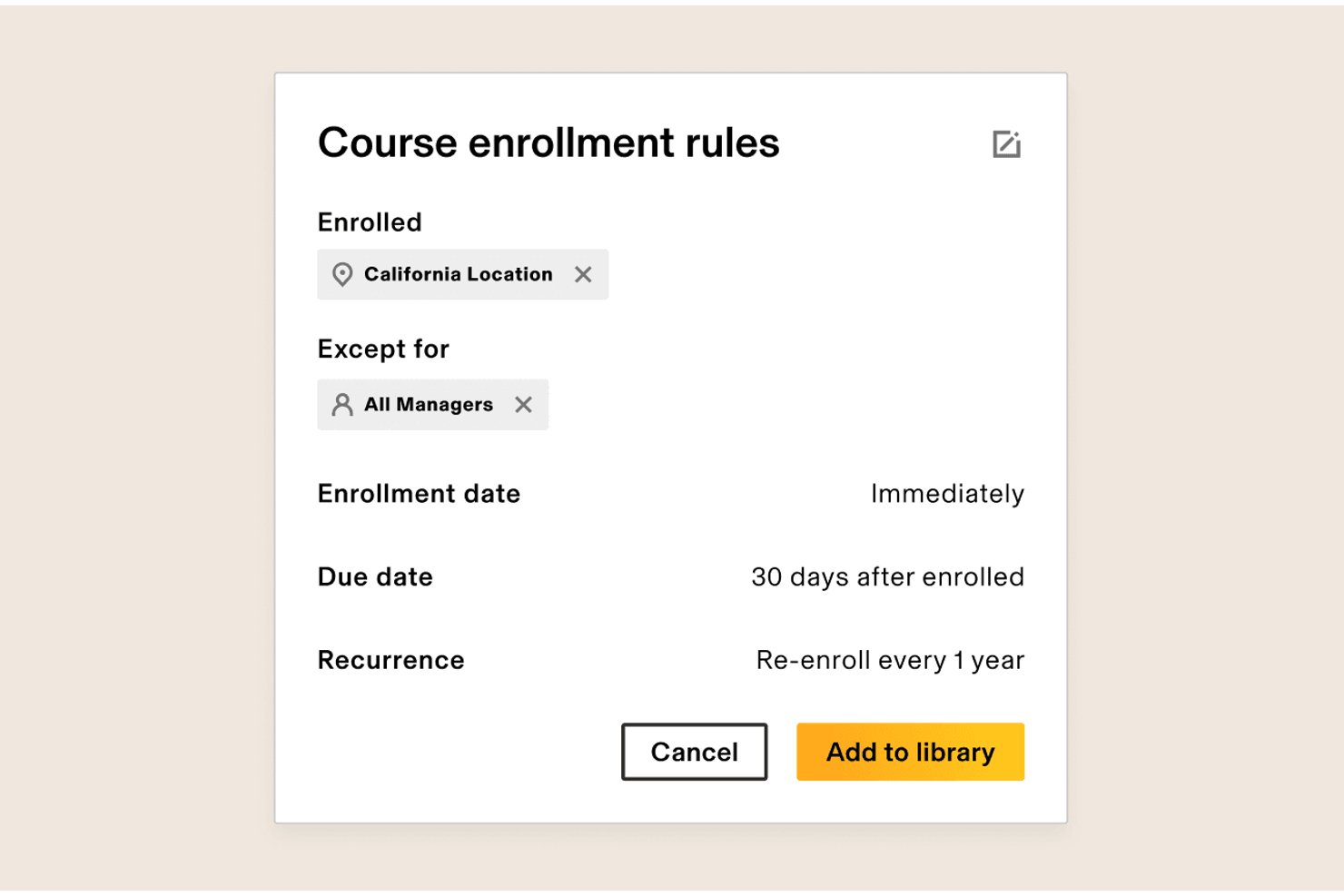
Rippling is an HR-native LMS module that combines drag-and-drop course authoring, a 80,000+ course library via Go1, automated compliance training enrollment, and real-time reporting—all built directly on top of its own HRIS.
Who Is Rippling Best For?
Rippling's LMS is a strong fit for HR operations teams that already use—or plan to use—Rippling as their core HR system and need compliance and onboarding training to run on autopilot.
Why I Picked Rippling
Rippling earns its spot on my shortlist because its LMS is built directly on its own HRIS, which means compliance training enrollment happens automatically based on real HR data like role, location, and tenure. I love that when a new hire joins, a single workflow can trigger app access, MFA setup, and cybersecurity training simultaneously. Automated location-based compliance bundles, like harassment training, remove the manual work HR teams usually dread.
Rippling Key Features
- Go1 content library: Access more than 80,000 ready-made courses through Rippling's built-in Go1 integration, searchable with AI.
- Drag-and-drop course builder: Create custom courses using a visual editor that supports videos, images, quizzes, and case studies.
- Role- and location-based auto-enrollment: Automatically assign courses to employees based on HR attributes like department, tenure, and geography.
- Real-time reporting dashboard: Track completions, overdue training, and team progress through custom dashboards powered by Rippling Analytics and AI.
Rippling Integrations
Rippling supports more than 650 integrations, including Slack, Microsoft Teams, and Salesforce. Its native HRIS and identity workflows connect training with employee records, onboarding, and access management.
Pros and Cons
Pros:
- Onboarding workflows connect training and access
- Go1 provides over 80,000 courses
- HR data automates compliance enrollment
Cons:
- Certification renewal workflows remain unclear
- Advanced assessment tools remain limited
New Product Updates from Rippling

Rippling Expands Automated Compliance With AI Workflows
Rippling expands Automated Compliance with multi-framework support, AI workflows, an audit portal, and trust centers. These updates help GRC teams manage compliance work and audits. For more information, visit Rippling’s official site.

Deel HR
Best AI-powered learning management system for global teams

Deel HR gives global organizations a unified platform to manage employee learning, compliance, and HR processes, making it easier for distributed teams to deliver, track, and optimize corporate training across multiple countries and languages.
Who Is Deel HR Best For?
Deel HR is a strong fit for mid-size to enterprise companies managing internationally distributed workforces who need learning and HR tools that work across borders.
Why I Picked Deel HR
I've included Deel HR in my top picks because I love how its AI-powered LMS is built directly into the same platform your team already uses for HR, payroll, and onboarding. The AI course builder lets you generate a first draft of a training course in minutes—just describe the topic, and Deel HR scaffolds the content for you, which I find genuinely useful when you're rolling out compliance training across multiple countries at once. What I also appreciate is the automated course assignment logic: you set rules based on hire date, role, or department, and the right training reaches the right people without any manual follow-up. For global HR teams, that kind of automation across 150+ countries is where Deel HR really earns its place on this list.
Deel HR Key Features
- OpenSesame course library integration: Connect your OpenSesame account to access thousands of ready-made courses directly alongside your custom content in one place.
- Multi-format course builder: Build courses using a drag-and-drop editor that supports video, quizzes, PDFs, tasks, surveys, and PowerPoint files in a single course.
- Learning analytics dashboard: Track completion rates, active learning time, quiz pass/fail rates, and assessment scores across your entire workforce.
- Self-directed learning access: Let employees browse the learning library, enroll in courses independently, and track their own progress from their Deel home page.
Deel HR Integrations
Integrations include FaceUp, Snowflake, DefensX, Microsoft Finance, Kintsugi, ReFresh OS, Revo.ai, Keeper, Human Interest, and Everyminute.
Pros and Cons
Pros:
- Performance/career modules may require extra setup effort
- All-in-one suite may be more than needed for simple LMS only
- Provides dashboards for learning completion and skills gaps
- Combines learning, performance and career planning in one tool
- Automates training assignments based on hire date or role
New Product Updates from Deel HR

Deel Expands Stablecoin Wallet to 80+ Countries
Deel expands its Stablecoin Wallet to 80+ countries with dollar-backed balances and optional rewards. This gives eligible contractors more ways to hold and manage earnings inside Deel. For more information, visit Deel’s official site.
 .
.

Synergy Learning partners with organizations that need a tailored approach to corporate learning, helping HR teams and L&D professionals deliver engaging, scalable training experiences that fit unique business requirements.
Who Is Synergy Learning Best For?
Synergy Learning is a strong fit for mid-size to enterprise organizations that need a fully customized LMS built around their specific workflows, branding, and compliance requirements.
Why I Picked Synergy Learning
I've included Synergy Learning in my top picks because its level of customization goes well beyond what most off-the-shelf LMS platforms can deliver. Rather than fitting your organization into a fixed template, Synergy Learning works with you to design the platform around your specific workflows, branding, and learning goals. I particularly like the Spark LMS theme, which lets teams apply full custom branding without bespoke development. The bespoke development service also means you can build custom workflows and personalized learning pathways—something I've found especially useful when onboarding across multiple departments with different training requirements.
Synergy Learning Key Features
- Compliance training automation: Set up automated enrolment, reminders, and deadline alerts to keep learners on track with mandatory training requirements.
- Multi-tenancy support: Create separate learning environments for different departments, divisions, or subsidiaries within a single platform instance.
- Custom report builder: Schedule and automatically deliver tailored reports to decision-makers using Moodle Workplace's built-in tools.
- AI-assisted content creation: Generate text and images directly in the LMS editor, with learner-created content logged automatically for admin review.
Synergy Learning Integrations
Integrations include Moodle, Totara, and LearnUpon, and an API is available for custom connections.

Best for role-based training delivery

TalentLMS is a cloud-based learning management system built for businesses that need to deliver, track, and manage corporate training across different teams, departments, or locations.
Who Is TalentLMS Best For?
TalentLMS is suitable for mid-sized businesses and growing companies that need to train multiple employee groups with different learning needs.
Why I Picked TalentLMS
TalentLMS stands out for handling role-based training delivery at scale. I particularly like the Branches feature, which lets me create separate training environments for different departments or teams, each with its own branded portal, content, and user base, all managed from one central admin view. Custom roles and permissions let me give instructors, managers, and learners exactly the access they need without overlap. With group-based course assignments, rolling out targeted training to specific employee segments is straightforward.
TalentLMS Key Features
- SCORM and xAPI support: Import and run SCORM, xAPI, and cmi5 content packages directly within the platform.
- Automated course completion rules: Set conditions that automatically mark courses complete based on learner activity or assessment scores.
- Built-in assessment builder: Create tests, quizzes, and surveys directly in the platform without needing a third-party tool.
- Gamification: Add points, badges, leaderboards, and levels to training courses to drive learner engagement.
TalentLMS Integrations
Integrations include BambooHR, Salesforce, ADP Workforce Now, Zoom, Microsoft Teams, GoTo, Shopify, WooCommerce, LinkedIn Learning, and OpenSesame.
Pros and Cons
Pros:
- Automation rules reduce repetitive administrative training tasks significantly.
- User groups and branches support complex organizational hierarchies well.
- Clear course structure helps teams follow assigned learning paths easily.
Cons:
- Video hosting relies on external storage for larger media files.
- Visual course editor feels limited compared with modern drag-and-drop tools.
New Product Updates from TalentLMS
TalentLMS Adds Learning Paths, AI Video, and Learner Experience Updates
TalentLMS introduced updates across learning management, content creation, and learner experience, including Learning Paths for Groups, AI video generation in TalentCraft, video bookmarking, and expanded administration tools. For more information, visit TalentLMS’s official site.

Continu
Best for dynamic content creation workflows
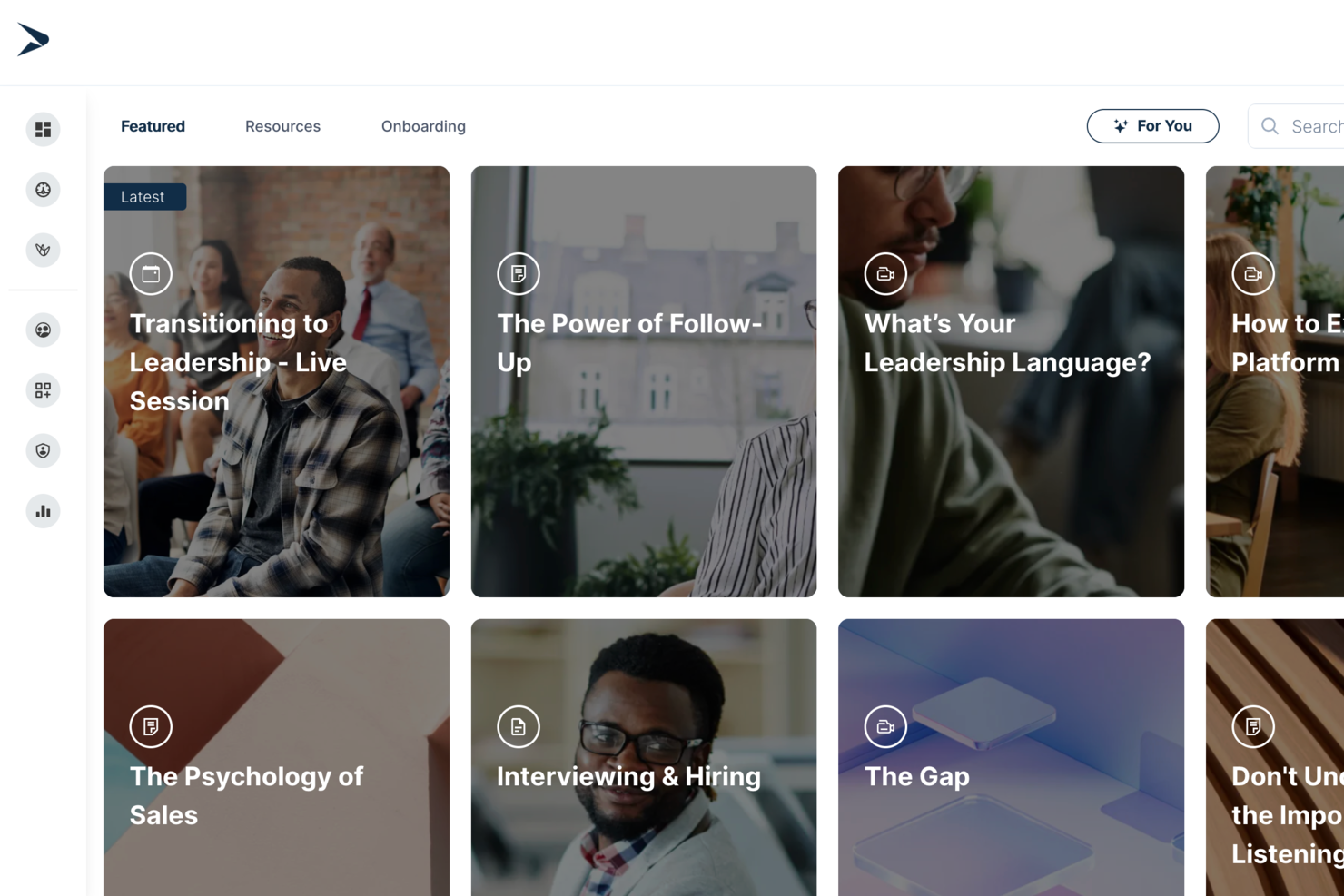
Continu is a corporate learning management system that lets teams author, organize, deliver, and track training content with interactive modules, analytics, onboarding workflows, and support for various learning formats.
Who Is Continu Best For?
Continu is a strong fit for mid-sized to enterprise companies that need a centralized platform to manage employee training, onboarding, and continuous learning programs.
Why I Picked Continu
I've included Continu in my top picks because its content authoring workflow is genuinely built for L&D teams who need to move fast. I love that subject matter experts can build, preview, and publish courses directly in the platform using a WYSIWYG editor without looping in designers. The AI-assisted authoring generates outlines, adjusts tone, and auto-tags content on publish. When a policy changes, you update once and it deploys across every Learning Track or Journey instantly.
Continu Key Features
- Smart Segmentation™: Set rules-based filters to automatically deliver the right training content to the right learners by role, region, or product line.
- Badges and certifications: Award learners digital credentials upon course or program completion to validate knowledge and track compliance.
- Workshops: Schedule and host in-person or virtual instructor-led training sessions directly within Continu, with support for Zoom, Microsoft Teams, and Google Meet.
- Learning Tracks: Group multiple content types into structured, course-style paths that learners move through in a defined sequence.
Continu Integrations
Continu offers native integrations with Workday, BambooHR, Rippling, UKG, Okta, Microsoft Teams, Slack, Zoom, SAP SuccessFactors, and Google Workspace. An API is available for custom integrations.
Pros and Cons
Pros:
- Seamless HRIS and collaboration tool integrations
- Real-time analytics dashboard for engagement insights
- Automated training assignment via smart segmentation
Cons:
- Fewer prebuilt content templates than some rivals
- Some advanced analytics require higher-tier plans
New Product Updates from Continu
Continu Adds Smarter Content Management
Continu adds Intelligent Tagging and Descriptions and richer content details to improve how learning content is organized and maintained. These updates reduce manual work and give teams more consistent, detailed content records. For more information, visit Continu’s official site.
 .
.
Best for role-specific training for performance
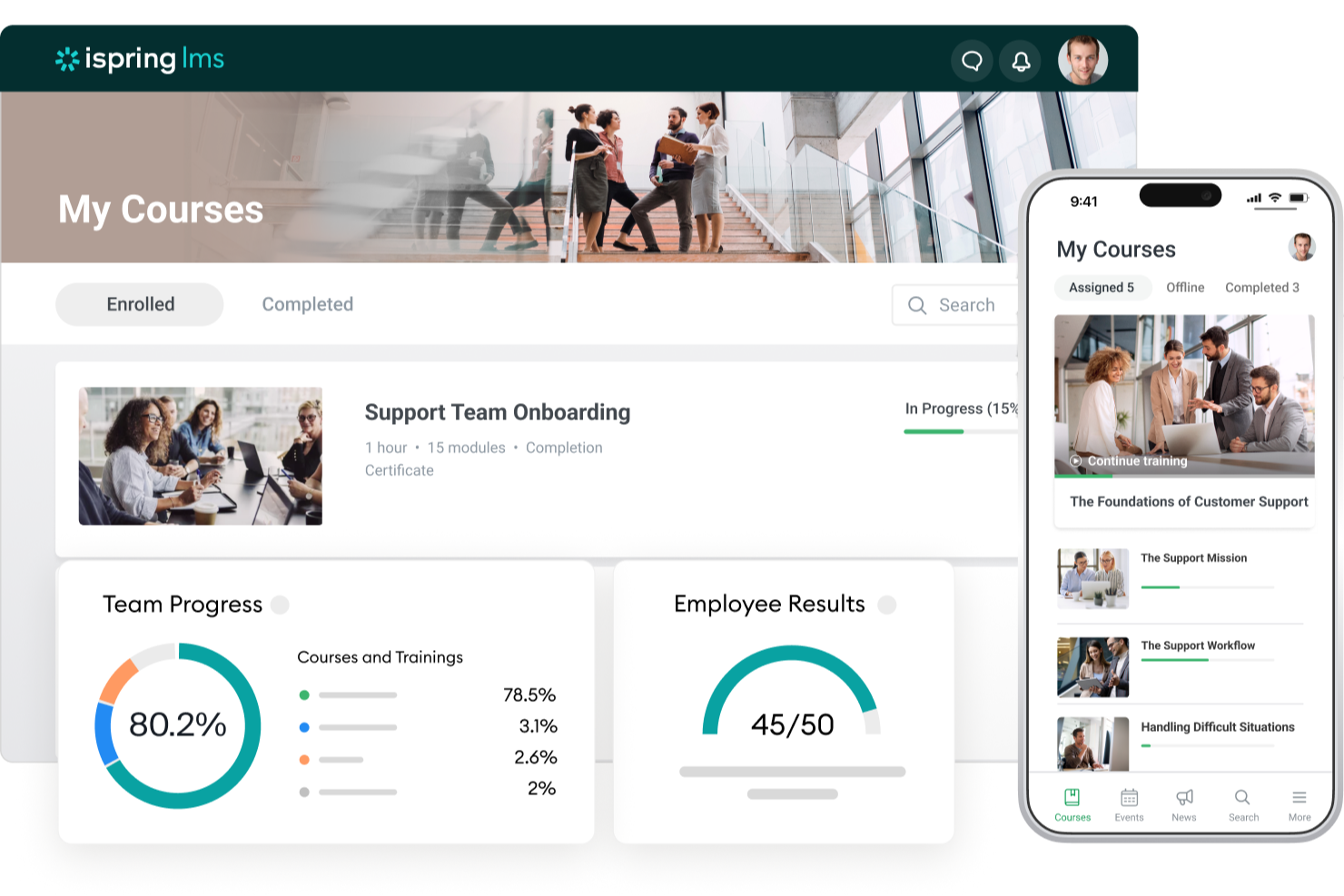
iSpring LMS gives HR teams and business leaders a platform to deliver, track, and manage corporate training programs tailored to different roles, making it easier to support compliance, onboarding, and ongoing employee development.
Who Is iSpring LMS Best For?
iSpring LMS is a strong fit for mid-sized to large organizations that need structured, role-based training programs across departments like sales, customer service, and operations.
Why I Picked iSpring LMS
iSpring LMS earns its spot on my shortlist because of how well it connects role-specific learning paths to actual performance outcomes. I like that you can assign training tracks based on job role, department, or position, so a new sales rep and a compliance officer aren't sitting through the same generic content. The built-in performance review tools let me tie learning progress directly to employee goals, which makes it easier to see whether training is actually moving the needle. I also use the detailed reporting to track completion rates and assessment scores by role, which gives me real data to bring into performance conversations.
iSpring LMS Key Features
- AI-powered course authoring: Build scrollable courses with AI-generated text, quiz questions, images, and translations directly inside the LMS—no technical skills needed.
- Gamification: Employees earn points and badges and track their progress on leaderboards to reinforce engagement during training.
- Knowledge base: Store corporate guides, FAQs, and resources in a centralized, cloud-based hub with role-based access controls.
- Mobile app: A native iOS and Android app lets learners complete training offline, with progress automatically synced when they reconnect.
iSpring LMS Integrations
Integrations include Salesforce, MS Azure, MS Exchange, BambooHR, Udemy, Go1, LinkedIn Learning, and other popular course libraries.
Pros and Cons
Pros:
- Strong reporting for tracking lesson-level engagement
- Learning paths enforce structured, sequential training progression
- Includes iSpring Suite for advanced course and quiz creation
Cons:
- Custom branding options cost extra on lower-tier plans
- Limited native integrations compared to larger enterprise LMS platforms
New Product Updates from iSpring LMS

iSpring LMS Adds Multiple Observations to OJT Sessions
iSpring LMS now lets managers log multiple observations within one OJT session, grouping visits and auto-generating summary stats like averages, criterion results, and comparisons. For more information, visit iSpring LMS's official site.

Absorb
Best for a holistic learning management software solution

Absorb LMS gives HR teams and corporate trainers a flexible platform to deliver, track, and manage employee learning, compliance, and development programs across industries and business sizes.
Who Is Absorb LMS Best For?
Absorb LMS is a strong fit for mid-size to enterprise organizations that need a scalable learning platform to support both employee training and extended enterprise use cases.
Why I Picked Absorb LMS
Absorb LMS earns its spot as one of the best on my shortlist because it covers the full learning lifecycle in a single platform—from AI-powered course creation to compliance tracking to extended enterprise training. What I like most is Absorb Create, which uses generative AI to build entire courses, complete with quizzes, narration, and videos, in minutes. That saves time when my team needs to roll out training across multiple departments on tight timelines. I also rely heavily on the reporting suite—pre-built templates for learner progress, course completions, and certifications mean I can schedule automated reports straight to department heads without any manual data pulls.
Absorb LMS Key Features
- Learner portal: A personalized, branded homepage where employees can browse, enroll in, and track their assigned and elective courses.
- Observation checklists: Managers can assess and verify hands-on skills by completing structured, in-person evaluation forms directly within the platform.
- eCommerce tools: Sell and distribute training content externally with built-in course catalog, payment processing, and enrollment management.
- Multilingual support: Deliver training in multiple languages to support global workforces and regional compliance requirements.
Absorb LMS Integrations
Integrations include Salesforce, ADP, BambooHR, Namely, Okta, Microsoft Teams, Zoom, LinkedIn Learning, SAP SuccessFactors, and Workday.
Pros and Cons
Pros:
- Automation reduces repetitive admin and learner management tasks
- Multi-portal setup keeps audiences separate but centrally managed
- Supports both internal and external training in one ecosystem
Cons:
- Pricing requires a custom quote and can be higher than basic LMS tools
- Custom reporting for niche metrics may require extra configuration
New Product Updates from Absorb
Absorb Expands Instructor-Led Course Session Management
Absorb adds multi-class sessions, recurring classes, conflict indicators, and learner enrollment during setup for instructor-led courses. These updates give admins more control over scheduling and session management. For more information, visit Absorb’s official site.
 .
.
Best cloud-based LMS with an auto-enrollment feature

Mitratech Perform is a cloud-based learning management system for HR teams and corporate trainers managing employee development, compliance, and ongoing training across growing organizations.
Who Is Mitratech Perform Best For?
Mitratech Perform is a strong fit for mid-sized to large organizations that need a scalable way to manage employee training, compliance, and performance development in one place.
Why I Picked Mitratech Perform
I picked Mitratech Perform as one of the best because of how its auto-enrollment feature removes one of the most tedious parts of running a corporate training program. Instead of manually assigning courses one by one, you can enroll your entire workforce and filter by role, department, or tenure. New hires get automatically enrolled from the moment of hire, so onboarding training starts without any manual intervention. I also like that completed courses and earned certifications sync directly to employee performance reviews, which links learning activity to the broader performance management picture — a capability most standalone LMS tools lack.
Mitratech Perform Key Features
- Quizzes and assessments: Build interactive quizzes using multiple-choice, short answer, and matching formats to test employee comprehension after completing a course.
- Course creation tools: Create and update multimedia course content; integrates with Microsoft Office, Canva, YouTube, Vimeo, and supports HTML-based formats.
- Upskilling program management: Assign self-directed courses to employees by role or department to support ongoing skill development outside of onboarding.
- Compliance reporting: Generate real-time reports on course completions, test scores, and training timelines to document compliance and track workforce-wide progress.
Mitratech Perform Integrations
No native integrations are listed.
Pros and Cons
Pros:
- Works internationally, across languages and regions
- Lets you monitor completion and compliance across large workforces
- Automatically assigns training based on role changes or additions
Cons:
- Deep customisation (branding, UI) may require additional configuration

SkyPrep
Best corporate learning management system for ease of use

SkyPrep is a cloud-based learning management system built for HR teams and business leaders who need to deliver, track, and manage employee training, compliance, and onboarding across a range of industries.
Who Is SkyPrep Best For?
SkyPrep is a strong fit for small to mid-sized businesses that need a straightforward LMS without a steep learning curve or lengthy implementation.
Why I Picked SkyPrep
I picked SkyPrep as one of the best corporate LMS options because it's quick to set up and straightforward to run day-to-day. I like that course auto-enrollment and automated alerts handle many administrative tasks that would otherwise fall on your HR team. The course builder lets you put together assessments, checklists, and knowledge checks without any technical background. Out-of-the-box reporting lets my team pull training completion data without first configuring reports.
SkyPrep Key Features
- Gamification: Add points, badges, and leaderboards to courses to keep learners engaged throughout their training.
- Multi-tenant LMS: Manage separate training platforms for different clients, brands, or branches from a single account.
- Custom branding: Personalize your platform with your company's logos, colors, certificates, and email templates.
- AI-powered content creation: Use built-in AI tools to simplify and speed up the process of building new training content.
SkyPrep Integrations
Integrations include ADP, Workday, BambooHR, Salesforce, HubSpot, Zoom, Microsoft Teams, Stripe, PayPal, and GoToMeeting.

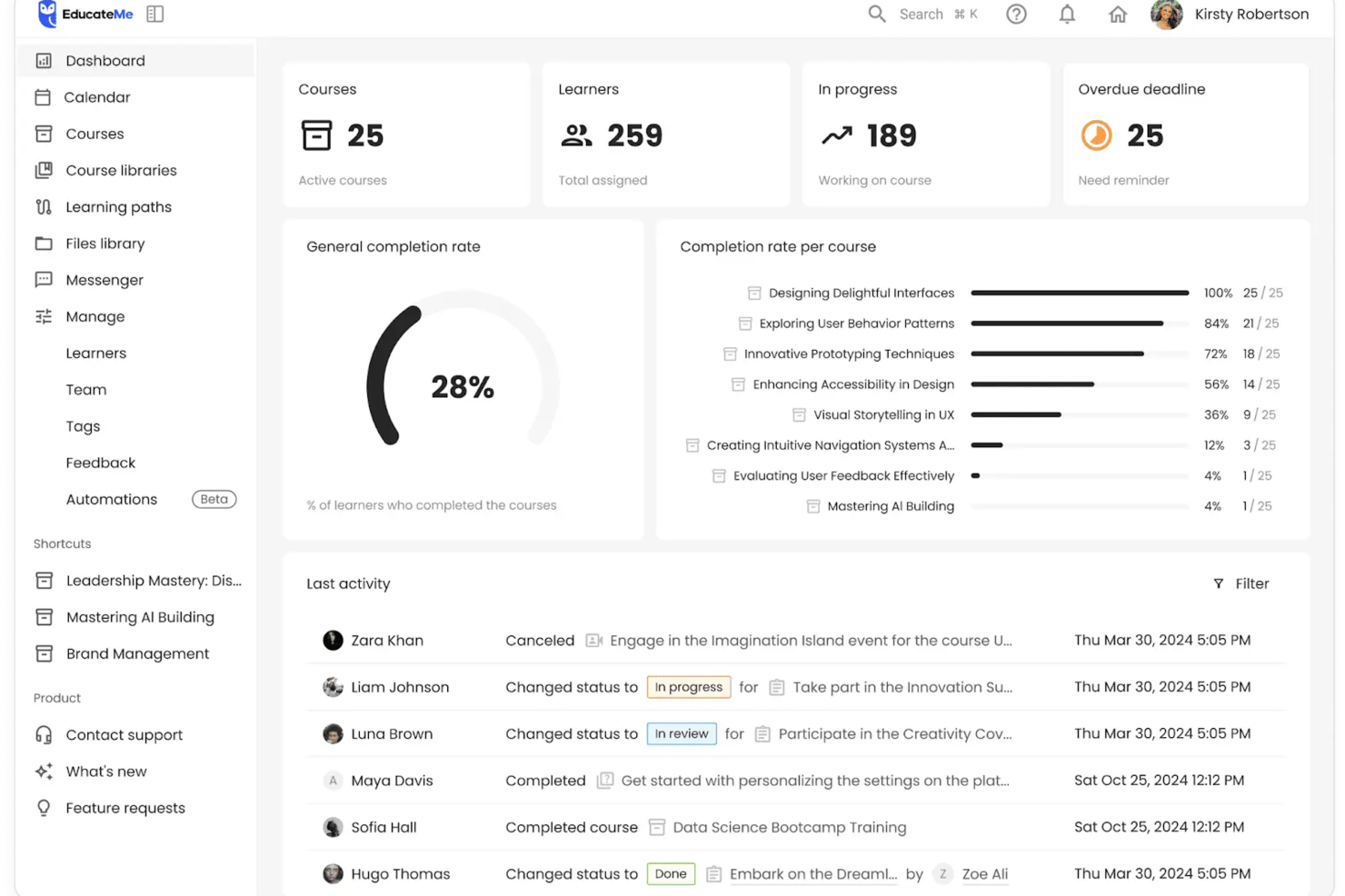
EducateMe LMS offers a transformative approach to corporate training by integrating AI-driven tools to enhance learning experiences. Tailored for businesses aiming to optimize employee development, it provides intuitive content creation and real-world practice simulations, addressing the need for engaging and effective training solutions. This platform is ideal for corporations seeking to streamline onboarding and compliance training while improving learner engagement and organizational efficiency.
Why I Picked EducateMe LMS
I picked EducateMe LMS because of its innovative AI roleplay coaching feature, which provides realistic practice environments crucial for effective corporate training. This tool's analytics capabilities allow your team to gain insights into learner performance, helping to identify and address skill gaps promptly. Additionally, the seamless integration with various platforms through its API reduces administrative workload, making it a strategic choice for organizations looking to enhance training efficiency.
EducateMe LMS Key Features
In addition to its unique AI-driven functionalities, I also found several other features that make EducateMe LMS a valuable tool for corporate learning management:
- Course Builder and Content Management: Create structured courses with quizzes, assignments, live sessions, embedded content, and SCORM file support, while organizing materials within centralized course libraries.
- AI Assistant and Roleplays: Generate or update lessons and activities using AI support, and enable simulated workplace scenarios with automated feedback for applied skill development.
- Learning Paths and Automation: Guide learners through step-by-step training journeys, configure automated enrollments and reminders, and manage certifications within structured workflows.
- Analytics, Customization, and Multi-Tenancy: Monitor engagement and completion through real-time dashboards, customize branded portals, and create separate training environments for departments or client groups.
EducateMe LMS Integrations
Integrations include Zoom, MS Teams, Google Calendar, Slack, Salesforce, and an API for custom integrations.
Pros and Cons
Pros:
- White-label branding with SSO
- Strong analytics for skill gaps
- AI roleplay coaching for practice
Cons:
- Limited advanced gamification features
- Lack of a dedicated mobile application
Other Corporate LMS Systems
Here are a few more options that didn’t make the best corporate LMS software list but are still worth considering:
- Tovuti
Corporate training LMS with an extensive, built-in course library
- WeSchool
Learning management system to simplify corporate training
- Kallidus Learn
For a combined learning, HR, and performance management platform
- Docebo
For maximizing user engagement
- EdCast
Talent experience platform for attracting, training, and retaining employees
- eloomi
For an all-in-one learning and people development platform
- Cornerstone OnDemand
For creating personalized learning experiences
- Bridge
For advanced course authoring
- SAP SuccessFactors
For building a continuous learning culture
- Constructor Tech
For fostering active learning across complex topics
- LMS365
Learning platform built into Microsoft Office 365 and Microsoft Teams
- Brainier LMS
For a customizable corporate training & learning platform
- Learn Amp
For a comprehensive LMS with tailored learning pathways
- Qooper
A corporate learning, mentorship, and coaching platform
- Connecteam
For evaluation quizzes, recognition, and rewards
- ClearCo
For extensive course offerings
- Exec
For AI-powered personalized learning
- SAI360
For industry-specific compliance training and reporting
- ProProfs Training Maker
For corporate learning with an emphasis on OSHA training
- eFront
For supporting complex learning ecosystems


Related HR Software Reviews
If you still haven't found what you're looking for here, check out these other related tools that we've tested and evaluated:
- HR Software
- Payroll Software
- Recruiting Software
- Employer of Record Services
- Applicant Tracking Systems
- Workforce Management Software
How I Evaluate Corporate Learning Management Systems
I split my evaluation into baseline requirements—like course authoring, compliance tracking, and HRIS sync—and the differentiators that separate a great LMS from a good one.
Core Functionality (Table Stakes For This List)
When I'm selecting tools for my list, I rank each one on a scale from 0 (does not offer the functionality) to 5 (excels in this area) for each core functionality listed below. Then, I calculate the tool's total score into a percentage. Each tool needs to achieve a minimum total score of 75% to be considered for inclusion.
- Course Authoring & Content Management: I check whether you can build courses natively and import SCORM or xAPI packages—say, uploading a vendor-provided safety training module alongside an internally authored onboarding course.
- Learning Path & Curriculum Design: Each platform should let you sequence courses into structured programs tied to roles or teams, like a 90-day onboarding track for new managers that includes prerequisites.
- Progress Tracking & Reporting: I look for dashboards that give L&D managers real-time visibility into completions and scores, plus exportable reports they can hand to leadership during quarterly reviews.
- Compliance & Certification Management: Recurring training cycles, expiration tracking, and automated renewal reminders matter here—think annual data privacy certifications that auto-reassign when they lapse.
- Employee & Learner Management: The platform should handle role-based permissions and group segmentation, and I evaluate how well it syncs employee data with HRIS platforms to avoid manual user provisioning.
- Assessments & Knowledge Checks: Built-in quizzing with multiple question types is essential. I look at whether you can create randomized question banks for post-training evaluations that verify real comprehension.
Once I have a list of tools that meet the criteria, I consider what sets each platform apart.
Differentiating Factors (What Sets Vendors Apart)
Here's how I compare and contrast different vendors:
Standout Features
Skills and competency mapping is where I see the biggest variation between platforms. I look for tools that connect course completions to a skills taxonomy so HR teams can identify gaps and guide internal mobility decisions. Mobile and offline access also carries weight—organizations with frontline or field-based workers need learners to download modules and complete training without a Wi-Fi connection. AI-powered recommendations add depth by surfacing relevant courses based on a learner's role, progress, and development goals.
Beyond Features
HRIS integration depth matters here. I evaluate whether a platform connects natively with systems like Workday or BambooHR so employee records stay in sync without manual imports after every new hire. Compliance and security certifications are another key factor—organizations in regulated industries need SOC 2 or GDPR compliance and audit-ready reporting baked in. I also consider pricing transparency, checking whether per-user costs scale predictably as headcount grows and whether content libraries are included or sold separately.
What is a Corporate Learning Management System?
A corporate learning management system (LMS) is a digital tool that companies use to create, deliver, track, and manage employee training programs.
HR teams and L&D professionals use LMS platforms to improve onboarding, ensure compliance, and upskill staff more efficiently. By centralizing training content and automating reporting, LMS software reduces manual admin work, improves knowledge retention, and scales learning across the organization.
In addition to course authoring and management tools, corporate LMS also support flexible learning on mobile devices, and include post-training assessment tools to measure information retention.
Features of Corporate Learning Management Systems
When selecting corporate learning management systems, keep an eye out for the following key features:
- Course management: This lets you create, organize, and schedule training modules effortlessly. You can assign courses, track completions, and update content as your training needs change.
- User management: Easily manage learners, instructors, and groups in one platform. You can enroll new employees, set permissions, and personalize learning paths based on roles or departments.
- Assessment and quizzes: Test knowledge retention and progress through customizable quizzes and assessments. Automated grading saves you time, while instant feedback helps learners focus on improvement.
- Progress tracking and reporting: Monitor individual and team performance through dashboards and reports. Quickly spot skill gaps or high achievers so you can tailor follow-up training accordingly.
- Integration capabilities: Connect your LMS with HR software, productivity tools, or communication platforms you already use. This streamlines onboarding, performance reviews, and internal communication.
- Gamification: Motivate employees with badges, leaderboards, and reward systems built into training modules. Friendly competition can boost engagement and encourage continuous learning.
- Mobile accessibility: Learners can access courses anytime and anywhere from their smartphones or tablets. This supports remote work and just-in-time learning—great for employees with busy or non-traditional schedules.
- Content library: Tap into a range of built-in content, templates, and resources. Having ready-made materials means you spend less time creating training from scratch.
Common Corporate Learning Management Systems AI Features
Beyond the standard corporate learning management systems features listed above, many of these solutions are incorporating AI with features like:
- Chatbot support: AI chatbots can answer learner questions, offer reminders, and unlock just-in-time help—freeing you from routine support tasks and making learning more accessible for everyone.
- Personalized learning recommendations: AI analyzes each employee’s history and preferences to suggest relevant courses, so your team always has access to upskilling that truly fits.
- Automated content curation: The LMS can sift through mountains of resources, handpicking and updating training material based on trends, skill gaps, or individual progress.
- Intelligent assessment analysis: AI-powered tools offer deeper insights into quiz results and progress, spotting patterns that help you understand where employees struggle and where they excel.
- Predictive analytics: Anticipate future training needs by having the system forecast skill gaps and learning trends based on user data—so you’re always a step ahead in workforce development.
Benefits of a Corporate LMS
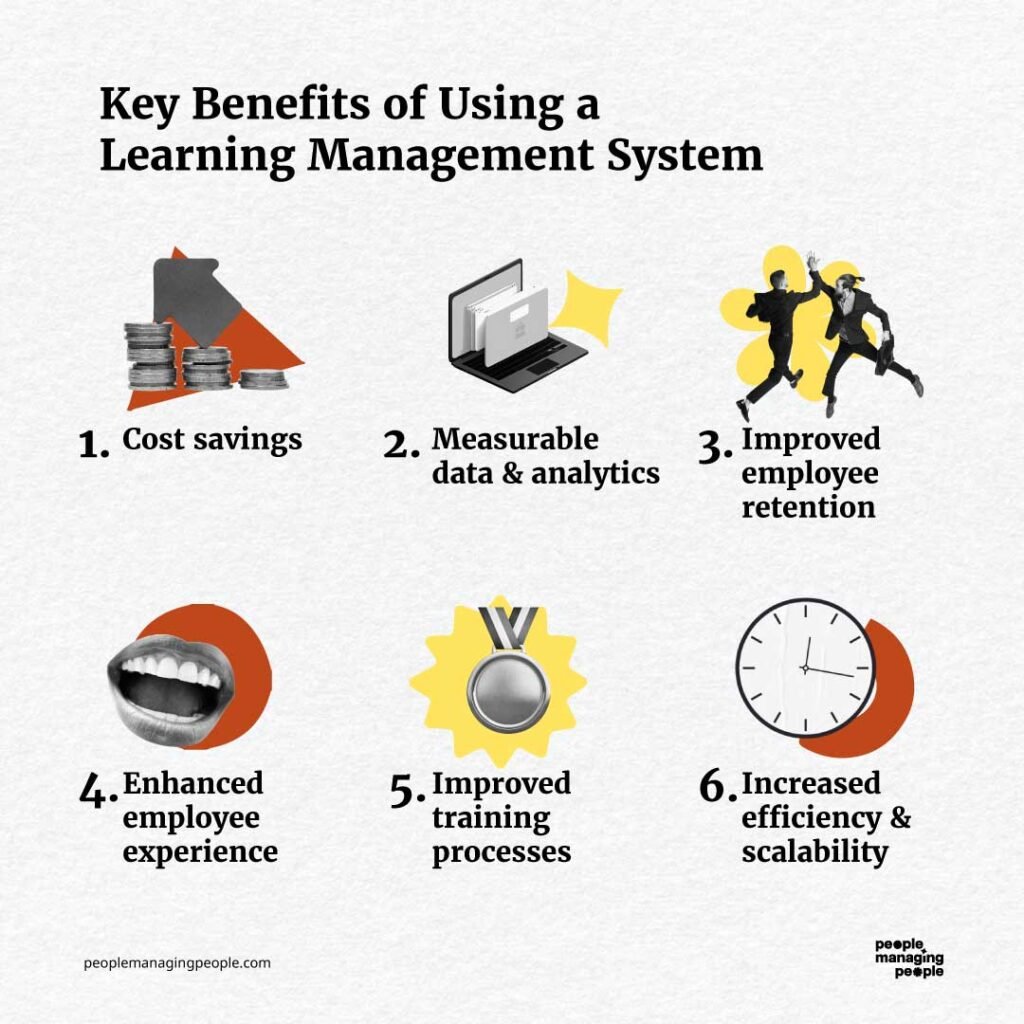
Corporate learning management systems are powerful tools for enhancing employee development and organizational growth. Overall, they help streamline training, improve engagement, and ensure compliance while providing measurable results.
Here are several benefits you can expect to gain by implementing a corporate LMS:
- Scalable learning programs: By using a corporate LMS, organizations can deliver training to a growing workforce without increasing administrative overhead, ensuring consistent learning experiences across teams.
- Improved employee engagement: Interactive features like gamification, quizzes, and multimedia content keep employees motivated and invested in their learning journeys.
- Enhanced compliance tracking: For organizations or industries that require specific training, automated tracking ensures employees complete mandatory training on time, reducing the risk of regulatory penalties while maintaining industry standards.
- Global accessibility: Mobile compatibility and multi-language support enable employees in different locations to access training, fostering inclusivity and supporting a diverse workforce.
- Cost-effective training delivery: Virtual training reduces travel expenses, venue costs, and printed materials, making professional development more accessible and affordable.
These are just a few benefits LMS systems offer, though there are certainly more! If you want more firepower to convince your higher ups that a corporate LMS is really worth the investment, have a read through this comprehensive list of LMS features and benefits too.
Essentially, by investing in an LMS, organizations can foster a culture of continuous learning and position themselves for long-term success.
Costs & Pricing for a Corporate LMS
Corporate learning management systems are typically offered in tiered pricing models to suit different organizational needs, from small businesses to large enterprises. Understanding these options can help you choose a plan that aligns with your budget and training goals.
Here is a breakdown of common plans and pricing options, including features provided at each level.
Plan Comparison Table for Corporate LMSs
| Plan | Average Price | Common Features |
|---|---|---|
| Free Option | $0 | Basic course management, limited users, progress tracking, minimal reporting, and community support |
| Basic Plan | $5–$15 per user/month | Course creation, user management, compliance tracking, mobile access, and basic integrations |
| Standard Plan | $20–$50 per user/month | Advanced reporting, customizable learning paths, gamification, and integrations with HR tools |
| Enterprise Plan | Custom pricing | Unlimited users, branding, API access, multi-language support, dedicated account manager, and analytics |
Each plan offers varying levels of functionality and scalability. Buyers should consider their organization's size, training needs, and budget when selecting the right plan to ensure they get the best value for their investment.
FAQs About Corporate Learning Management Systems
Here are some answers to frequently asked questions you may have about corporate LMS systems and how they work:
How do I choose the right LMS for my organization’s needs?
Start by mapping your learning goals and user requirements. Look for LMS platforms that align with your training objectives, preferred delivery formats, and reporting needs. Test different platforms with free trials or demos and involve key stakeholders and a sample of end-users to gather feedback. Check for scalability and reliable customer support to ensure your LMS can grow with your company.
What's the difference between an LMS and a Training Management System?
A Learning Management System (LMS) is designed to deliver, track, and manage online learning and e-learning content for your employees. It supports features like course creation, assessments, progress tracking, and reporting for digital learning experiences.
In contrast, a Training Management System (TMS) is focused on organizing and administrating instructor-led training, workshops, and classroom events (both in-person and virtual). A TMS handles logistics like scheduling, venue management, registrations, and resource allocation.
Some platforms combine both LMS and TMS features, but they serve different primary purposes: LMS for digital learning delivery, TMS for managing live training logistics.
What integrations should I look for in a corporate LMS?
Focus on LMS integrations that connect with your HRIS, payroll, and performance management systems, allowing you to link learning with broader HR processes. Prioritize single sign-on for easy access, as well as integrations with popular tools like Microsoft Teams, Slack, Google Workspace, and video conferencing apps.
Seamless integrations save time by syncing user data, reducing manual work for admins, automating workflows, and tracking learning progress alongside other business metrics for a smooth learning experience.
How can I ensure high user adoption for a new LMS?
Build buy-in early by involving employees and managers in platform selection and pilot testing. Offer comprehensive onboarding, with hands-on training sessions, quick reference guides, and accessible help resources.
Choose an LMS with a clean, user-friendly interface and strong mobile access. Encourage regular use by promoting executive sponsorship, sharing success stories, and recognizing training milestones through certificates or internal rewards.
Is it possible to customize training programs with most corporate LMS platforms?
Yes, nearly all leading corporate LMS platforms let you fully customize courses and learning paths. You can upload your own presentations, videos, and assessments, mix in third-party content, and design role-specific or department-specific tracks.
Many systems support branded portals and adaptable learning modules, so you can match the platform to your company’s culture and skill development objectives.
How can I measure the ROI of my LMS investment?
Track analytics like training completion rates, test scores, time spent learning, and post-training performance metrics. Use the LMS’s built-in reporting tools to spot gaps, identify trends, and compare learning results to organizational goals such as reduced onboarding time, improved compliance rates, or higher employee engagement.
You can also survey learners and managers to capture feedback and measure qualitative improvements alongside business KPIs.