
35 Best Staffing Software of 2026 for Sourcing Top Talent

20 Best Staffing Software Shortlist
Here's my pick of the 20 best software from the 35 tools reviewed.


The best staffing software helps you manage candidates, clients, and compliance efficiently—so you can focus on filling roles faster and building stronger relationships.
When you’re juggling multiple hiring needs, manual tracking can lead to errors, delays, and lost opportunities. The right platform centralizes your recruiting data, automates key workflows, and gives you visibility across every stage of the hiring process.
Drawing on my experience testing and reviewing staffing platforms, I’ve curated a list of the top staffing software that’s intuitive, reliable, and built to scale with your business. In this guide, you’ll find solutions that streamline operations, reduce administrative work, and help your team recruit smarter.
Why Trust Our Software Reviews
We’ve been testing and reviewing HR software systems since 2019. As HR experts ourselves, we know how critical and difficult it is to make the right decision when selecting software.
We invest in deep research to help our audience make better software purchasing decisions. We’ve tested more than 2,000 tools for different HR management use cases and written over 1,000 comprehensive software reviews. Learn how we stay transparent & our software review methodology.
Best Staffing Software Summary
This comparison chart summarizes pricing details for my top staffing software selections to help you find the best one for your budget and business needs.
| Tool | Best For | Trial Info | Price | ||
|---|---|---|---|---|---|
| 1 | Best for global staffing | Free demo available | From $5/employee/month | Website | |
| 2 | Best for recruiting and executive search firms | 14-day free trial + free demo | From $99/user/month | Website | |
| 3 | Best with integrated ATS and CRM | 14-day free trial | From $15/user/month | Website | |
| 4 | Best for recruitment agencies | Free trial + free demo available | From $85/user/month (billed annually) | Website | |
| 5 | Best staffing software for staffing agencies | 15-day free trial + free plan available | From $25/user/month (billed annually) | Website | |
| 6 | Best for AI-powered background screening | Free demo available | From $29.99/report | Website | |
| 7 | Best for employee onboarding automation | Free demo available | Pricing upon request | Website | |
| 8 | Best for automated screening and interview scheduling | Free demo available | Pricing upon request | Website | |
| 9 | Best for remote onboarding from mobile devices | Free demo available | Pricing upon request | Website | |
| 10 | Best for 3rd party integration options | Free demo available | Pricing upon request | Website | |
| 11 | Best for recruiting and staffing hourly workers | Free demo available | Pricing upon request | Website | |
| 12 | Best staffing software with business intelligence (BI) | Free demo available | Pricing upon request | Website | |
| 13 | Best staffing software with job board integrations | Free demo available | From $175/user/month | Website | |
| 14 | Best staffing software with payroll & billing | Free trial + free demo available | Pricing upon request | Website | |
| 15 | Best for AI-powered candidate scoring | Free trial available | From $4.99/month (billed annually) | Website | |
| 16 | Best for NGO & grant staffing | Free trial for 10 users and 10 programs | From $1,000/year for 500 users | Website | |
| 17 | Best AI talent intelligence with actionable market analytics | Not available | Pricing upon request | Website | |
| 18 | Best staffing project management software with Gantt charts | 14-day free trial + free demo available | From $7/user/month (billed annually) | Website | |
| 19 | Best for managing short-term staffing, plus onboarding & offboarding workflows | 14-day free trial + free demo | Pricing upon request | Website | |
| 20 | Best for outbound recruiting with access to 800+ million candidates | Free demo available | Pricing upon request | Website |

-

Checkr
Visit WebsiteThis is an aggregated rating for this tool including ratings from Crozdesk users and ratings from other sites.4.5 -
Kudoboard
Visit WebsiteThis is an aggregated rating for this tool including ratings from Crozdesk users and ratings from other sites.4.8 -
Native Teams
Visit WebsiteThis is an aggregated rating for this tool including ratings from Crozdesk users and ratings from other sites.4.6




Best Staffing Software Reviews
Below are my detailed summaries of the best staffing software that made it onto my shortlist. My reviews offer a detailed look at the key features, pros & cons, integrations, and ideal use cases of each tool to help you find the best one for you.


Deel is a global HR and payroll solution designed for businesses looking to hire internationally. It supports businesses of all sizes by managing employees and contractors in over 150 countries, with core capabilities in payroll, compliance, and global hiring.
Why I picked Deel: Deel excels in international hiring by offering localized contracts and compliance management. It provides onboarding services in over 150 countries, ensuring your team meets local regulations.
Deel's payroll processing is tailored for both employees and contractors, making it versatile for diverse hiring needs. Its white label solutions for Employer of Record (EOR) services add flexibility for businesses expanding globally.
Standout features & integrations:
Features include global onboarding, compliance tracking, and payroll management. You can easily manage hiring across borders without worrying about local laws. Deel also offers contract structuring and benefits administration for a complete HR solution.
Pros and Cons
Pros:
- Wide geographic coverage
- Flexible EOR services
- Localized contract options
Cons:
- Occasional support delays
- Complex setup for some regions
New Product Updates from Deel HR

Deel HR Introduces AI-Powered ATS for Hiring
Deel HR introduces an AI-powered ATS built into its platform. This update enhances hiring efficiency by automating sourcing, screening, and workflows across the recruitment process. For more information, visit Deel HR’s official site.
 .
.
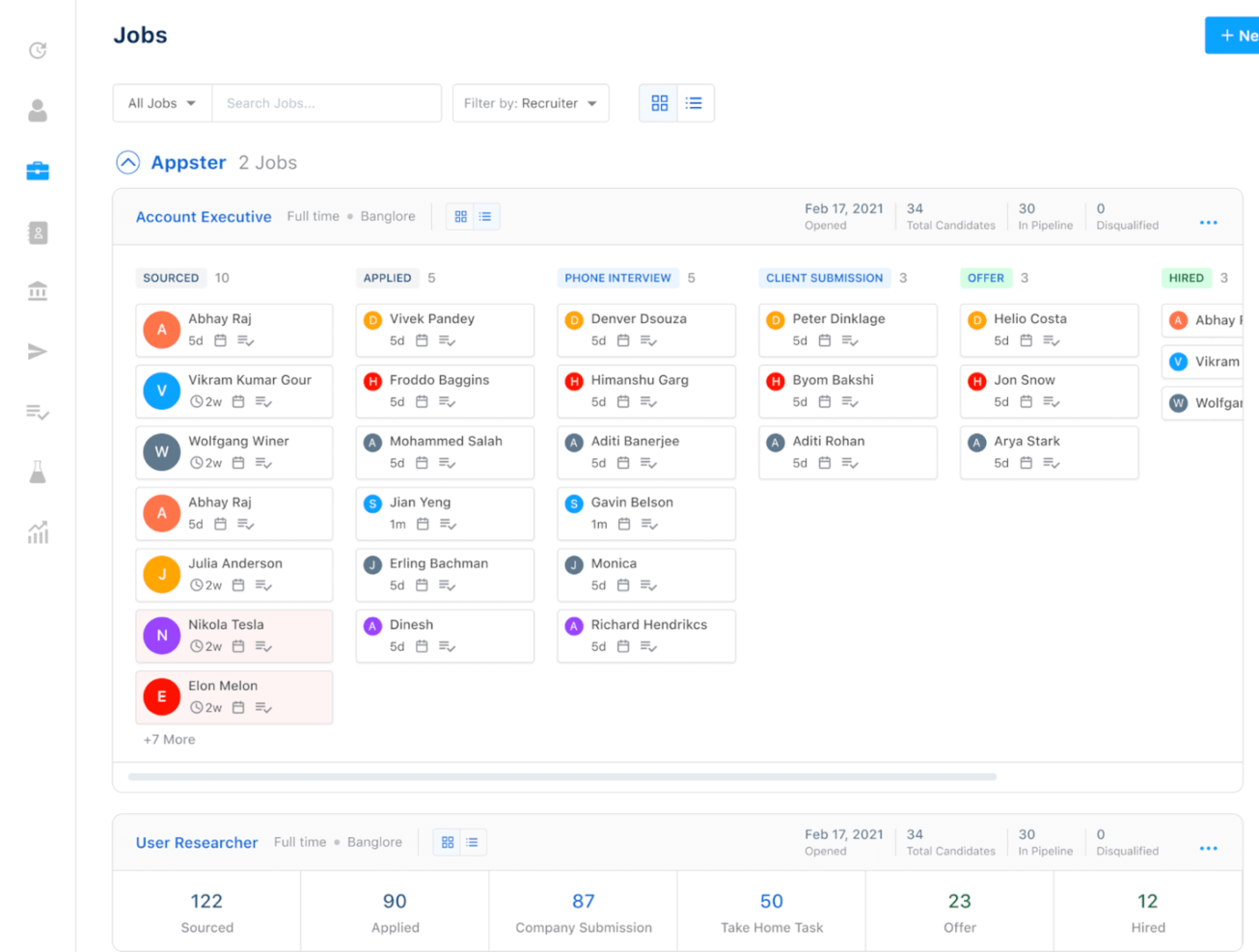
Recruiterflow is a recruitment software designed specifically for agencies and staffing firms. It facilitates candidate management, job posting, and client relationship management, enhancing the recruitment process for its users.
Why I picked Recruiterflow: Recruiterflow is tailored for recruitment agencies, providing features like pipeline automation and candidate sourcing. Its email and calendar sync help you stay organized with minimal effort.
The software’s drag-and-drop interface simplifies managing candidates and tracking their progress. Its client management tools make it easy to handle multiple clients with transparency.
Standout features & integrations:
Features include advanced reporting capabilities, allowing you to track recruitment metrics effortlessly. You can customize workflows to fit your agency's needs, ensuring flexibility. Recruiterflow also offers resume parsing, speeding up the candidate data entry process.
Integrations include LinkedIn, Gmail, Outlook, Slack, Mailchimp, Zapier, Google Calendar, Microsoft Teams, WhatsApp, and Zoom.
Pros and Cons
Pros:
- Strong email integration
- Drag-and-drop interface
- Easy client management
Cons:
- Advanced reporting needs improvement
- Occasional feature glitches

Manatal is an AI-driven recruitment software tailored for recruitment agencies, large organizations, and small to medium-sized businesses. It enhances the hiring process with features like applicant tracking and candidate sourcing, focusing on recruitment efficiency and employer branding.
Why I picked Manatal: Manatal leverages AI in its integrated ATS and CRM to enrich candidate profiles and offer smart recommendations, setting it apart in AI-driven recruitment. Its AI tools help you find the best candidates by analyzing data from social media and other sources.
The tool’s customizable recruitment pipeline and Kanban board make tracking candidates straightforward. Manatal supports job posting on over 2,500 job boards, helping you reach a wider audience.
Standout features & integrations:
Features include customizable career pages, a mobile application for on-the-go access, and comprehensive reporting and analytics. You can also manage onboarding and placement, ensuring a smooth candidate experience. Manatal's collaboration tools enhance teamwork within your hiring team.
Integrations include LinkedIn, Indeed, ZipRecruiter, Facebook Jobs, Google for Jobs, Monster, Glassdoor, Slack, Microsoft Teams, and Gmail.
Pros and Cons
Pros:
- Easy job board posting
- Customizable recruitment workflows
- AI-driven candidate recommendations
Cons:
- Some features require technical knowledge
- Limited customization for small teams
New Product Updates from Manatal

Manatal Launches AI Interviewer
Manatal introduces AI Interviewer, an AI-powered agent for automating first-round candidate screenings. Recruiters get standardized assessments to focus on top candidates. For more information, visit Manatal's official site.
 .
.
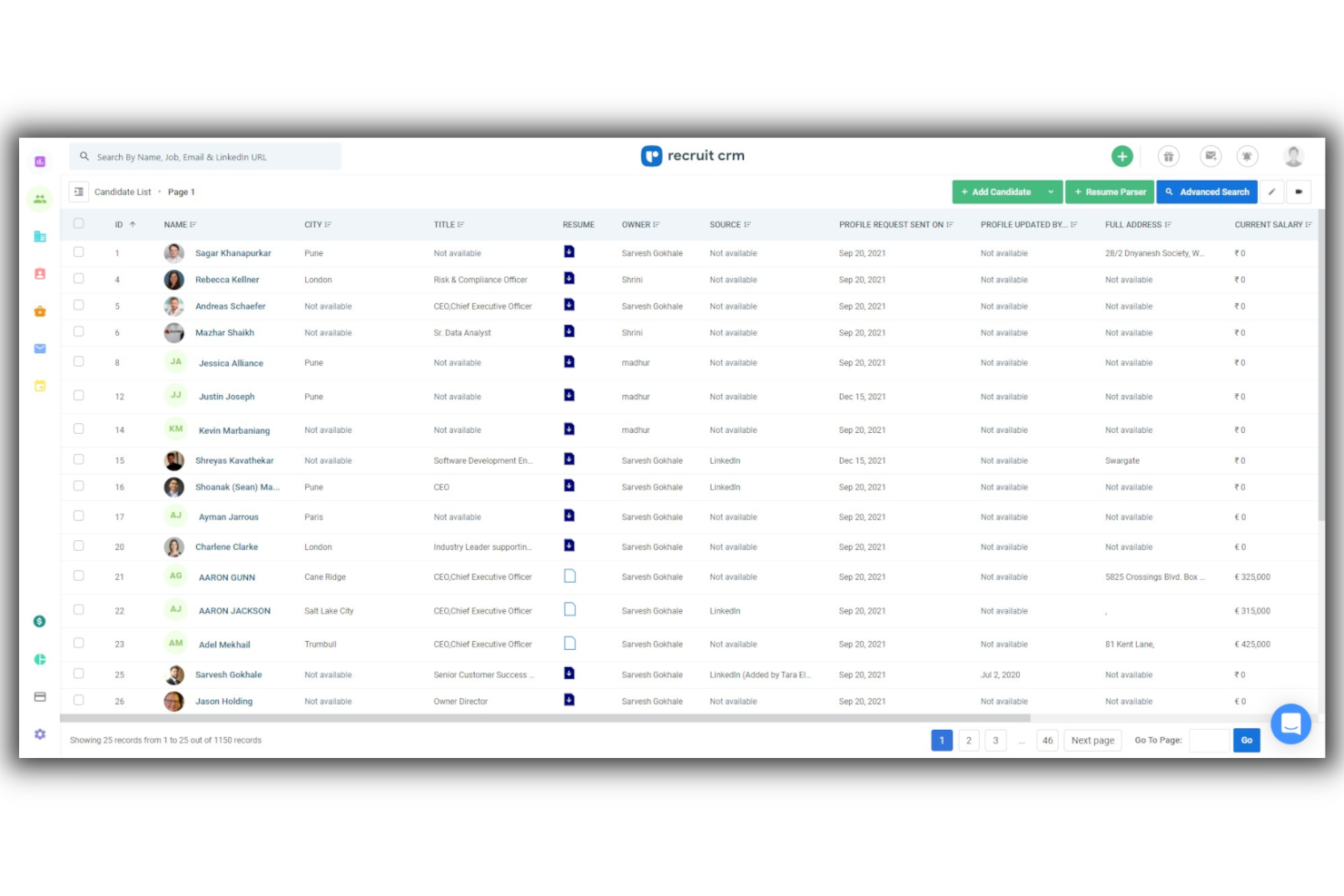
Recruit CRM is an AI-powered recruitment software tailored for recruitment agencies and executive search firms. It combines applicant tracking and client management to enhance the recruitment process for its users.
Why I picked Recruit CRM: Recruit CRM is designed for executive search firms, offering AI sourcing to quickly find candidates using natural prompts. Its workflow automation simplifies hiring processes without the need for coding.
The software’s job multiposting feature lets you post jobs to over 5,000 job boards from a single platform. Recruit CRM also provides advanced analytics to gain insights from recruitment data.
Standout features & integrations:
Features include mobile optimization, allowing you to manage tasks on the go with a mobile app. The candidate submission feature lets you submit candidates through reports or client portals for real-time feedback. Recruit CRM's Chrome extension helps source candidates with one click, eliminating manual data entry.
Integrations include LinkedIn, Gmail, Outlook, Slack, Mailchimp, Zapier, Google Calendar, Microsoft Teams, WhatsApp, and Zoom.
Pros and Cons
Pros:
- GDPR compliant
- Extensive job board posting
- AI-driven candidate sourcing
Cons:
- Occasional delays in feature updates
- Limited customizability for niche needs
New Product Updates from Recruit CRM

Recruit CRM Adds AI Candidate Matching and Resume Parsing
Recruit CRM Recruit CRM introduces AI candidate matching and enhanced resume parsing. These updates help recruiters identify candidates faster and improve screening accuracy. For more information, visit Recruit CRM's official site.
 .
.
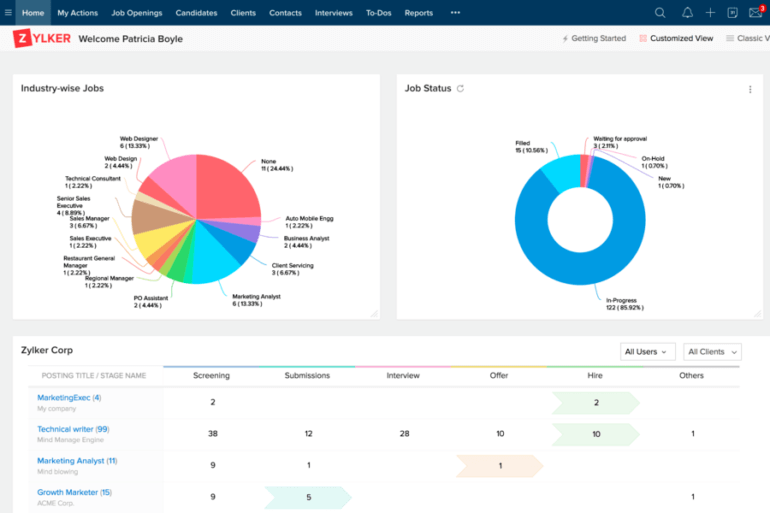
Zoho Recruit is a cloud-based recruitment software solution designed for small businesses and staffing agencies. It offers applicant tracking, candidate management, and interview scheduling to streamline the hiring process.
Why I picked Zoho Recruit: Zoho Recruit caters to small businesses with its flexible pricing and customizable workflows. It lets you automate repetitive tasks, freeing up your time for more strategic work.
The tool’s resume parsing feature speeds up the candidate data entry process, making recruitment more efficient. Zoho Recruit also provides a career portal to help you attract and manage candidates easily.
Standout features & integrations:
Features include a customizable career site that lets you showcase your brand and attract candidates. The candidate assessment tools allow you to evaluate applicants effectively before making a decision. You can also automate emails and notifications to keep everyone updated during the recruitment process.
Integrations include LinkedIn, Indeed, Google Workspace, Slack, Mailchimp, Zapier, Microsoft Outlook, QuickBooks, Salesforce, and DocuSign.
Pros and Cons
Pros:
- Career portal for branding
- Automation of repetitive tasks
- Strong candidate assessment tools
Cons:
- Limited support for large enterprises
- Basic reporting capabilities
New Product Updates from Zoho Recruit

Zoho Recruit Introduces Block Candidates
Zoho Recruit now allows recruiters to block specific candidates from applying to future jobs, ensuring a compliant hiring process. For more information, visit Zoho Recruit's official site.
 .
.
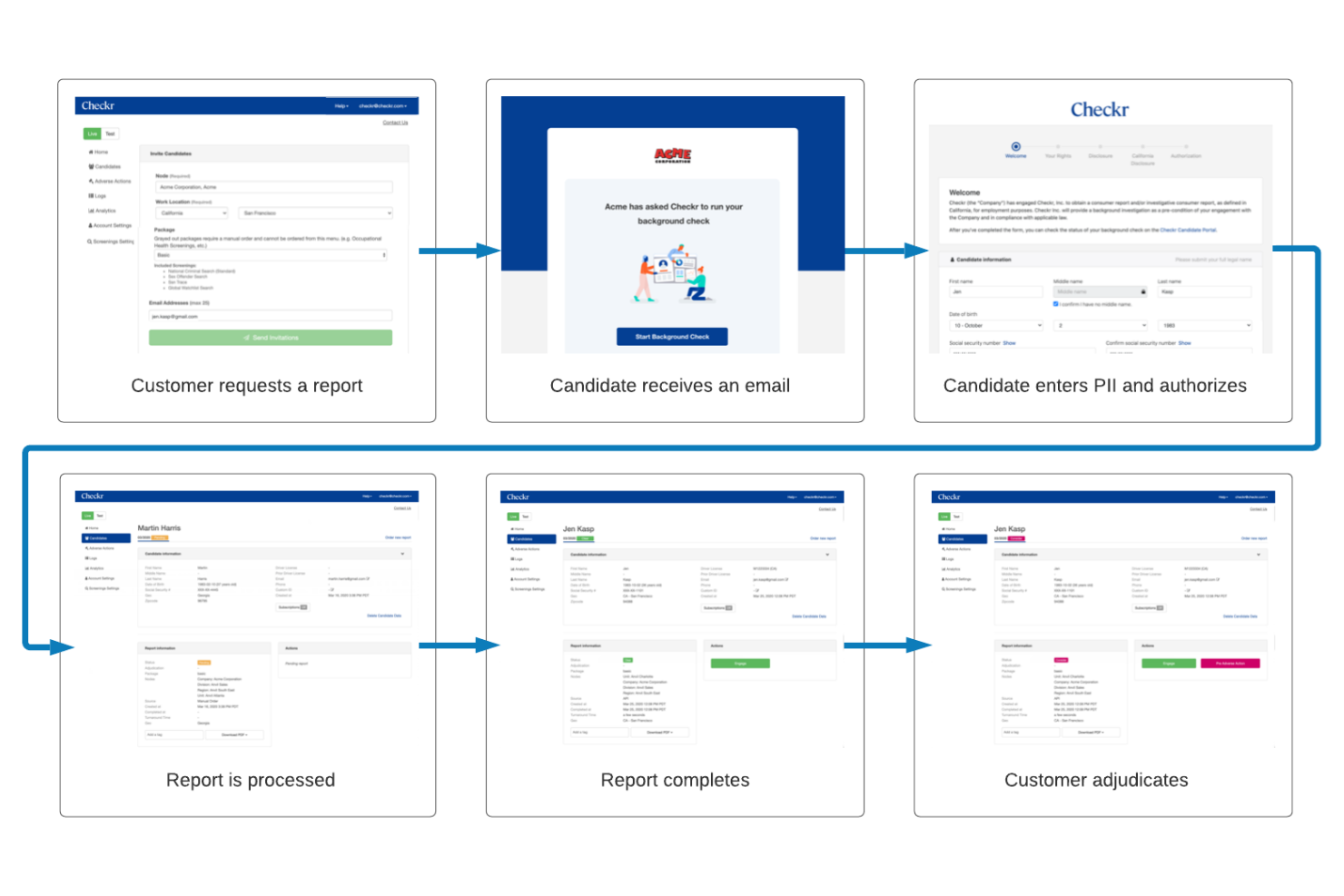
A core part of many staffing criteria includes background checks, and while Checkr doesn’t offer a full suite of staffing features, it handles this part of the hiring process particularly well. The platform, which can be integrated with your existing platform using its API, focuses on fast, compliant background screening and includes tools like a customer portal that makes it easier to manage checks, review results, and keep hiring workflows organized. For teams that need a reliable way to vet candidates as part of their staffing process, Checkr provides a focused solution that helps reduce the time and effort involved in background screening.
Why I Picked Checkr
I picked Checkr for its AI-powered background screening capabilities that help improve the speed and accuracy of the hiring process. Its adjudication tools support compliance by standardizing how teams review screening results and apply hiring guidelines. Checkr also offers continuous checks that monitor employee records over time and alert your team to new reportable events. Together, these features help organizations manage background screening more efficiently while maintaining visibility into potential risks.
Checkr Key Features
In addition to its standout adjudication tools, here are some other features your team might find beneficial:
- Candidate Portal: This feature allows candidates to track the progress of their background checks, enhancing transparency and communication.
- Analytics Tools: Provides detailed insights into your background check operations, helping you make data-driven decisions.
- Identity Verification: Ensures that the candidate's identity is accurately verified, reducing the risk of fraud.
- API and Embedded Solutions: Offers flexible integration options with your existing systems, making it easy to incorporate Checkr's capabilities into your workflows.
Checkr Integrations
Integrations include Gusto, iCIMS, Workday, Greenhouse, BambooHR, Rippling, Planning Center, Zenefits, Lever, and JazzHR.
Pros and Cons
Pros:
- Continuous checks can enhance security by monitoring records over time
- Strong integrations with ATS and HR platforms supporting automated hiring workflows
- Fast turnaround for background checks helping speed up hiring decisions
Cons:
- Limited functionality outside background screening compared with full staffing software
- Pricing per background check can become expensive for high-volume hiring teams


Rippling offers a dynamic solution for businesses seeking a unified approach to manage HR, payroll, IT, and finance. For companies aiming to streamline their staffing processes, Rippling's platform stands out by providing automation of repetitive tasks and empowering employees with smart access controls. Whether you're a startup or a global enterprise, Rippling helps you make informed decisions with advanced analytics and custom reports, addressing the complexities of managing a diverse workforce.
Why I Picked Rippling
I picked Rippling because it excels in automating the staffing process, making it an ideal choice for businesses looking to enhance their HR operations. The platform's global payroll feature ensures seamless payment processing for employees and contractors worldwide, which is crucial for companies with a diverse workforce. Additionally, its employee onboarding automation reduces the time and effort required to integrate new hires, allowing your HR team to focus on more strategic tasks. These features, combined with integrated spend management, address key challenges in staffing and resource allocation.
Rippling Key Features
In addition to its automation capabilities, Rippling also offers:
- Global HRIS: Centralize all employee data, dynamically localized based on work location to support global teams.
- Advanced Analytics: Generate custom reports and insights to drive informed decision-making across your organization.
- Smart Access Controls: Empower employees with role-based access to resources, enhancing productivity and security.
- Integrated Spend Management: Control and automate company costs with detailed spend management tools.
Rippling Integrations
Rippling supports over 600 native integrations, including popular tools like GitHub, Jira, Salesforce, QuickBooks, HubSpot, Zendesk, Slack, Asana, Google Workspace, and Microsoft Teams. These integrations ensure your systems are always in sync, enhancing productivity across HR, IT, and finance operations.
Pros and Cons
Pros:
- Extensive third party app integrations
- Global hiring and payroll support
- Recruitment automation with job boards
Cons:
- Not dedicated diversity recruiting software
- Navigation complexity affects user experience
New Product Updates from Rippling

Rippling Adds New Device Buyback Feature
Rippling has unveiled Device Buyback in its Inventory Management, allowing IT teams to retire and recycle hardware securely, with proceeds credited to future invoices. For more information, visit Rippling's official site.
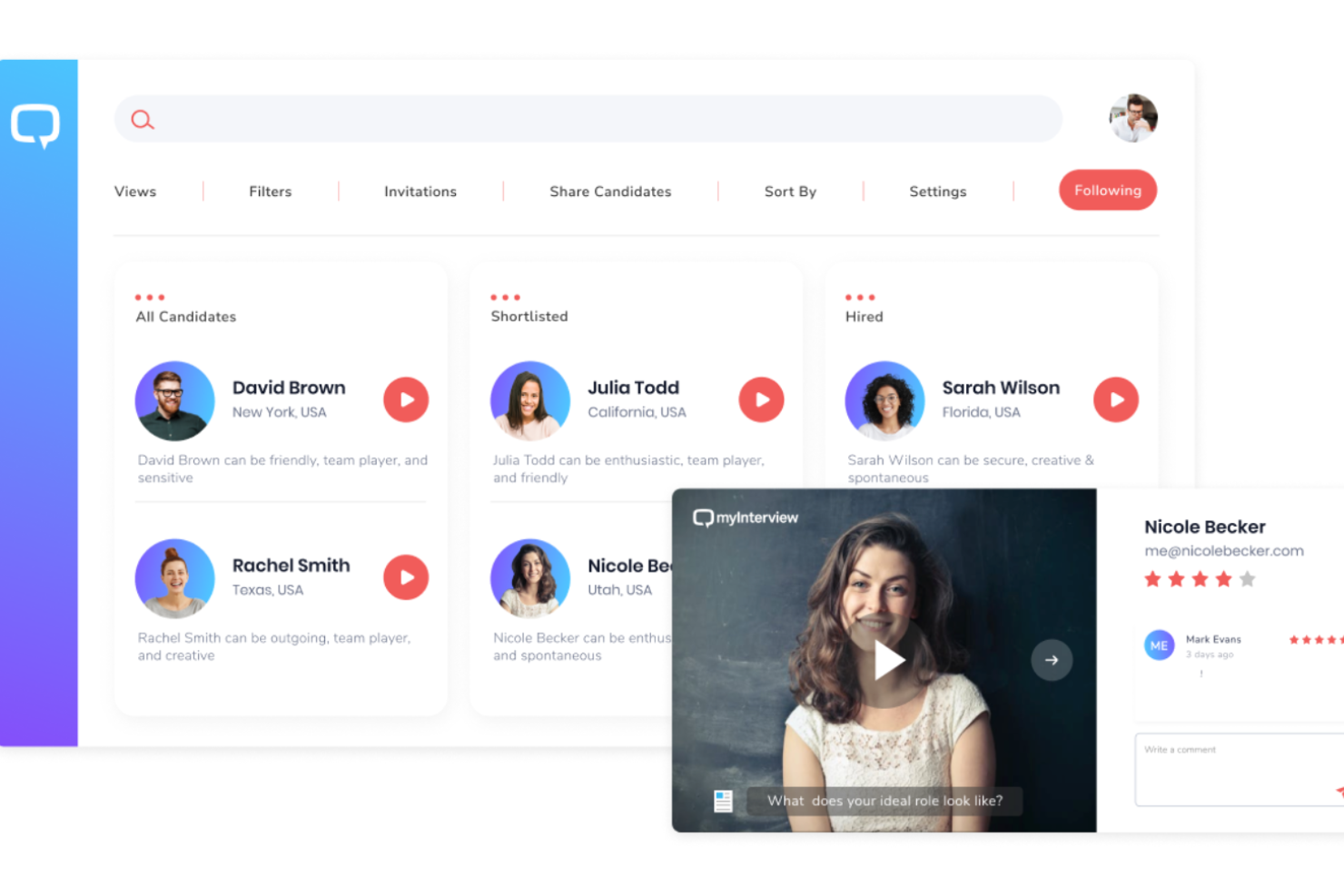
myInterview is a video interviewing platform designed for businesses seeking to enhance their recruitment process through visual assessments. It caters to companies of all sizes, providing tools for conducting and evaluating video interviews.
Why I picked myInterview: myInterview focuses on video interviewing, making it stand out for visual assessments. Its one-way video interviews allow candidates to record responses at their convenience, which helps you save time.
The platform offers customizable interview templates to align with your company's needs. It also provides AI-driven insights to help you evaluate candidates more effectively.
Standout features & integrations:
Features include automatic video transcription, which helps you review interviews without watching the entire video. You can also brand your interview portal to provide a consistent candidate experience. The platform supports unlimited video storage, ensuring you have access to all past interviews whenever needed.
Integrations include LinkedIn, Indeed, Workable, Greenhouse, SmartRecruiters, Zapier, BambooHR, Lever, Recruitee, and JobAdder.
Pros and Cons
Pros:
- Unlimited video storage
- Supports asynchronous interviews
- Customizable interview templates
Cons:
- Requires stable internet connection
- Limited text-based communication

WorkBright is an onboarding software solution designed for businesses that need to manage remote or distributed teams. It simplifies the onboarding process by allowing employees to complete paperwork and training online before their first day.
Why I picked WorkBright: WorkBright is tailored for remote onboarding, ensuring that new hires can complete necessary paperwork digitally. It allows you to collect and store documents securely, which is crucial for maintaining compliance.
The platform also offers electronic signature functionality, reducing the need for physical paperwork. WorkBright's mobile-friendly design ensures that employees can complete onboarding tasks from any device, making it accessible and convenient.
Standout features & integrations:
Features include automated reminders, which help keep new hires on track with their onboarding tasks. The platform supports document uploads, allowing employees to submit necessary forms and identification securely. WorkBright also offers customizable onboarding workflows, so you can tailor the process to fit your organization's unique needs.
Integrations include ADP, BambooHR, Paychex, QuickBooks, Gusto, Paylocity, Rippling, Zenefits, SAP SuccessFactors, and Workday.
Pros and Cons
Pros:
- Secure document handling
- Automated task reminders
- Mobile-friendly interface
Cons:
- Potential learning curve for new users
- Limited advanced reporting

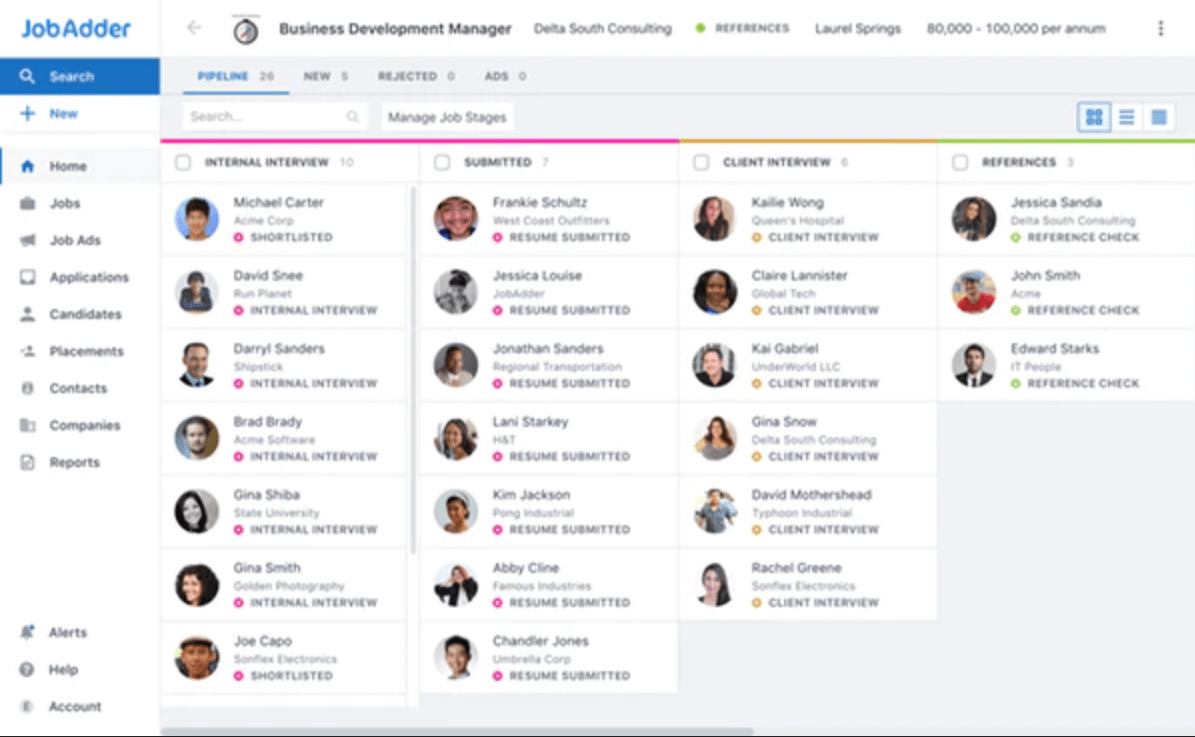
JobAdder is a recruitment software platform aimed at staffing agencies and in-house recruitment teams. It provides tools for job posting, candidate management, and recruitment automation to improve hiring efficiency.
Why I picked JobAdder: JobAdder excels in recruitment automation, offering features that reduce manual work and speed up the hiring process. Its job posting capabilities allow you to post to multiple job boards with a single click.
The platform's candidate management system centralizes all candidate information, making it easy to track and evaluate applicants. JobAdder's automated workflows streamline repetitive tasks, freeing up time for your team to focus on strategic recruitment activities.
Standout features & integrations:
Features include a mobile app that keeps you connected to your recruitment tasks on the go. The platform offers analytics tools to help you measure recruitment performance and identify areas for improvement. JobAdder also provides a customizable dashboard, allowing you to tailor the interface to suit your team's needs.
Integrations include LinkedIn, SEEK, Indeed, Gmail, Outlook, Xero, Slack, Mailchimp, Zapier, and MYOB.
Pros and Cons
Pros:
- Efficient job posting capabilities
- Customizable dashboard options
- Centralized candidate management
Cons:
- Some learning curve for new users
- Requires ongoing internet access

Mitratech TalentReef is a staffing software solution focused on managing the hourly workforce. It caters to industries like retail, hospitality, and food service, offering tools for recruitment, onboarding, and compliance management.
Why I picked Mitratech TalentReef: Mitratech TalentReef specializes in the hourly workforce, addressing the unique needs of these industries. Its mobile-first approach allows you to reach candidates where they're most active.
The platform's compliance management helps ensure you're adhering to industry regulations. TalentReef's onboarding tools streamline the hiring process, making it easier to bring new hires up to speed quickly.
Standout features & integrations:
Features include a streamlined application process that reduces candidate drop-off rates. The software offers automated communication tools to keep candidates engaged throughout the hiring process. Additionally, TalentReef provides comprehensive analytics to help you track recruitment metrics effectively.
Integrations include ADP, Ceridian, Kronos, Paychex, Paycor, Paylocity, SAP SuccessFactors, Ultimate Software, Workday, and UKG Pro.
Pros and Cons
Pros:
- Comprehensive analytics tools
- Streamlined onboarding process
- Mobile-first candidate engagement
Cons:
- Some setup complexity
- Limited features for salaried positions

Bullhorn is a cloud-based staffing and recruitment software designed for large enterprises and staffing agencies. It offers applicant tracking, CRM, and operations management to streamline the recruitment process and enhance client relationships.
Why I picked Bullhorn: Bullhorn is ideal for large enterprises due to its scalability and comprehensive CRM capabilities. It allows you to manage extensive candidate databases efficiently.
The software’s reporting and analytics tools provide insights to help you make data-driven decisions. Bullhorn's mobile capabilities ensure that you can access your recruitment data from anywhere, keeping your team connected.
Standout features & integrations:
Features include a robust reporting system that provides insights into your recruitment processes. The software also offers pipeline management, which helps you track candidates through every stage. Bullhorn's mobile app allows you to manage recruitment tasks on the go, ensuring flexibility for your team.
Integrations include LinkedIn, Indeed, Monster, Daxtra, Microsoft Outlook, Gmail, TextUs, Herefish, CloudCall, and Cube19.
Pros and Cons
Pros:
- Extensive candidate database management
- Strong mobile functionality
- Comprehensive CRM capabilities
Cons:
- Occasional system slowdowns
- Higher cost for small teams


TargetRecruit is a cloud-based staffing and recruitment software built on the Salesforce platform. It serves staffing and recruitment agencies by providing applicant tracking, client management, and operations management functionalities.
Why I picked TargetRecruit: TargetRecruit excels with its seamless Salesforce integration, making it a preferred choice for those already using Salesforce. It offers a customizable dashboard that lets you tailor the interface to your needs.
The tool’s advanced reporting capabilities provide insights into recruitment metrics, aiding in data-driven decision-making. TargetRecruit's mobile access ensures you can manage recruitment tasks from anywhere, enhancing flexibility for your team.
Standout features & integrations:
Features include a robust reporting system that helps you analyze recruitment data effectively. The software also offers customizable workflows, allowing you to adapt processes to fit your business needs. Additionally, TargetRecruit provides a comprehensive candidate portal, improving communication and engagement with applicants.
Integrations include DocuSign, LinkedIn, ZipRecruiter, Indeed, Monster, CareerBuilder, Mailchimp, Microsoft Outlook, QuickBooks, and ADP.
Pros and Cons
Pros:
- Comprehensive candidate portal
- Mobile access for flexibility
- Customizable dashboards
Cons:
- Requires Salesforce knowledge
- Complex initial setup


Avionté is a staffing and recruiting software tailored for staffing agencies and recruitment firms. It provides end-to-end solutions for applicant tracking, payroll, and client management, helping agencies streamline their operations and improve efficiency.
Why I picked Avionté: Avionté is designed specifically for staffing agencies, offering features that cater to their unique needs. It includes an integrated payroll system, which simplifies managing employee payments.
The platform’s customizable dashboards allow you to tailor the interface to fit your agency's workflow. Avionté's reporting tools provide insights into recruitment metrics, aiding in strategic decision-making.
Standout features & integrations:
Features include a robust time and attendance tracking system, which helps you manage employee hours efficiently. The platform offers a mobile app, enabling recruiters to access information on the go. Avionté also provides compliance management tools to ensure your agency adheres to industry regulations.
Integrations include QuickBooks, ADP, Indeed, LinkedIn, Monster, CareerBuilder, ZipRecruiter, Microsoft Dynamics 365, Google Workspace, and Salesforce.
Pros and Cons
Pros:
- Mobile app for recruiters
- Strong reporting capabilities
- Integrated payroll system
Cons:
- Higher cost for advanced features
- Limited offline features

Unnanu Hire is a recruitment software designed specifically for tech startups and small businesses. It offers tools for applicant tracking, candidate management, and interview scheduling to streamline hiring processes.
Why I picked Unnanu Hire: Unnanu Hire is tailored for tech startups, offering flexibility and scalability as your business grows. It provides a user-friendly interface that simplifies the recruitment process.
The platform’s customizable workflows allow you to adapt the software to fit your team's specific needs. Unnanu Hire also includes real-time analytics to help you make informed hiring decisions.
Standout features & integrations:
Features include a mobile-friendly design, ensuring you can manage recruitment tasks on the go. The software offers automated communication tools to keep candidates engaged throughout the process. Additionally, Unnanu Hire provides customizable career pages to help you attract the right talent.
Integrations include LinkedIn, Indeed, Google Workspace, Slack, Microsoft Teams, Mailchimp, Zoom, Zapier, BambooHR, and Greenhouse.
Pros and Cons
Pros:
- Real-time analytics available
- Flexible, scalable platform
- Ideal for tech startup needs
Cons:
- Requires stable internet connection
- Limited features for large enterprises


SmarterSelect is an application management software designed for organizations that handle numerous applications for grants, scholarships, and other programs. It streamlines the application process by offering tools for application creation, submission tracking, and review management.
Why I picked SmarterSelect: SmarterSelect is tailored for application management, making it easy to create and manage application forms. It provides customizable templates, allowing you to build forms that fit your specific needs.
The tool’s submission-tracking feature lets you monitor application progress in real time. SmarterSelect also offers review management tools, simplifying the evaluation process for your team.
Standout features & integrations:
Features include automated notifications to keep applicants informed about their application status. The platform offers detailed reporting tools that help you gain insights into application trends and outcomes. SmarterSelect also supports multiple user roles, allowing you to assign different levels of access to your team members.
Integrations include Salesforce, Google Workspace, Microsoft Office 365, Dropbox, Box, Zapier, PayPal, Stripe, QuickBooks, and Slack.
Pros and Cons
Pros:
- Supports multiple user roles
- Review management tools
- Real-time submission tracking
Cons:
- Learning curve for new users
- Limited advanced features


ENGAGE is a talent analytics platform designed for businesses looking to enhance their workforce planning and recruitment strategies. It serves companies of all sizes by providing insights into talent acquisition and workforce trends.
Why I picked ENGAGE: ENGAGE specializes in talent analytics, offering deep insights into workforce data to help you make informed hiring decisions. The platform's predictive analytics tools forecast talent availability and demand.
You can also track competitor hiring trends, giving you a competitive edge. ENGAGE's customizable dashboards let you visualize data in a way that supports your strategic goals.
Standout features & integrations:
Features include real-time data analysis that helps you stay updated with the latest workforce trends. The platform offers benchmarking tools to compare your hiring metrics against industry standards. ENGAGE also provides workforce planning features, enabling you to anticipate future hiring needs effectively.
Integrations include SAP SuccessFactors, Workday, Oracle HCM, ADP, LinkedIn, Indeed, Taleo, Cornerstone OnDemand, Jobvite, and iCIMS.
Pros and Cons
Pros:
- Real-time workforce trend updates
- Customizable data visualization
- Competitor hiring trend tracking
Cons:
- Initial setup complexity
- Requires data literacy


GanttPRO is a project management software designed for teams looking to enhance their project planning and execution. It serves a wide range of industries, offering tools for task management, resource allocation, and timeline visualization.
Why I picked GanttPRO: GanttPRO is ideal for project planning, providing an intuitive Gantt chart interface that helps you visualize project timelines. Its task management features allow you to assign tasks and set deadlines easily.
The platform's resource allocation tools ensure that your team is working efficiently without overloading anyone. GanttPRO's timeline visualization aids in tracking project progress and identifying potential bottlenecks.
Standout features & integrations:
Features include customizable templates that help you get started with project planning quickly. The platform offers collaboration tools, enabling your team to communicate and share updates in real-time. GanttPRO also provides detailed time tracking to ensure projects stay on schedule.
Integrations include Google Drive, Dropbox, Slack, Trello, Jira, Basecamp, Microsoft Teams, Asana, Monday.com, and GitHub.
Pros and Cons
Pros:
- Customizable project templates
- Strong resource allocation tools
- Intuitive Gantt chart interface
Cons:
- Higher cost for advanced features
- Some learning curve for new users

Teamtailor
Best for managing short-term staffing, plus onboarding & offboarding workflows

Teamtailor is a recruitment and employer branding software aimed at businesses looking to enhance their hiring process and company image. It provides tools for creating attractive career pages, managing candidates, and building a strong employer brand.
Why I picked Teamtailor: Teamtailor excels in employer branding, offering features that help you showcase your company culture and attract top talent. It allows you to create visually appealing career pages that reflect your brand identity.
The software’s candidate management tools simplify tracking and communication, ensuring a smooth recruitment process. Teamtailor's analytics provide insights into candidate engagement, helping you refine your branding strategy.
Standout features & integrations:
Features include customizable job ads that help you attract the right candidates. The platform offers automated workflows to streamline recruitment tasks and improve efficiency. Teamtailor also provides a mobile app, allowing you to manage recruitment activities from anywhere.
Integrations include LinkedIn, Indeed, Google for Jobs, Slack, Microsoft Teams, Zapier, Mailchimp, BambooHR, Workday, and Greenhouse.
Pros and Cons
Pros:
- Mobile app availability
- Automated recruitment workflows
- Customizable career pages
Cons:
- Higher cost for advanced features
- Learning curve for new users

hireEZ
Best for outbound recruiting with access to 800+ million candidates

hireEZ is a recruitment software focused on candidate sourcing for hiring teams and recruitment agencies. It offers tools for sourcing, engagement, and recruitment marketing to enhance the hiring process.
Why I picked hireEZ: hireEZ is exceptional for sourcing candidates, providing access to a vast database of potential hires. Its AI-powered search capabilities help you find the right candidates quickly.
The platform's engagement tools allow you to nurture relationships with passive candidates. hireEZ’s recruitment marketing features help you build a strong employer brand to attract top talent.
Standout features & integrations:
Features include detailed candidate profiles that give you insights into skills and experience. The platform offers automated email campaigns to maintain engagement with potential hires. hireEZ also provides analytics tools to measure the effectiveness of your sourcing efforts.
Integrations include LinkedIn, Bullhorn, Lever, Greenhouse, iCIMS, Workday, SmartRecruiters, Jobvite, SAP SuccessFactors, and Oracle Taleo.
Pros and Cons
Pros:
- Detailed candidate profiling
- Automated engagement tools
- AI-powered candidate search
Cons:
- Initial setup complexity
- Some learning curve for beginners
Other Staffing Software
Here are some additional staffing software options that didn’t make it onto my shortlist, but are still worth checking out:
- Connecteam
Staffing software for drag-and-drop scheduling and employee task management
- Tracker
With CRM and reporting
- Mitratech Perform
Staffing software for collaborative hiring
- Greenhouse
For structured hiring approaches
- CEIPAL
Hiring & recruiting process management tool with relationship management features.
- BambooHR®
HR software that has tools for preparing compensation & building culture.
- PCRecruiter
CRM + ATS software with a browser tool to scrape and store data off any webpage.
- SmartRecruiters
Staffing & ATS for talent sourcing and engagement
- Crelate
Easy staffing software with drag & drop dashboards and user-friendly UI for beginners.
- Fetcher
Full-service recruiting automation platform with live talent profiles.
- Mindscope
All-in-one applicant tracking system + CRM with recruitment marketing built-in.
- FirstScreen
Recruitment software with automated interviews & response grading.
- StaffingSoft
Staffing solution with automation for basic data entry + customizable job postings.
- AkkenCloud
Staffing software with a comprehensive module dedicated to healthcare staffing needs.
- Apptrino
Staffing & recruitment SaaS with a resume manager, CRM, and time sheets.


Staffing Software Selection Criteria
When selecting the best staffing software to include in this list, I considered common buyer needs and pain points like managing candidate pipelines and ensuring compliance with labor regulations. I also used the following framework to keep my evaluation structured and fair:
Core Functionality (25% of total score)
To be considered for inclusion in this list, each solution had to fulfill these common use cases:
- Candidate tracking
- Resume parsing
- Interview scheduling
- Compliance management
- Job posting integration
Additional Standout Features (25% of total score)
To help further narrow down the competition, I also looked for unique features, such as:
- Advanced analytics
- AI-driven candidate matching
- Customizable workflows
- Mobile app access
- Automated communication tools
Usability (10% of total score)
To get a sense of the usability of each system, I considered the following:
- Intuitive interface design
- Easy navigation
- Minimal training requirements
- Responsive design
- User feedback options
Onboarding (10% of total score)
To evaluate the onboarding experience for each platform, I considered the following:
- Availability of training videos
- Interactive product tours
- Access to templates
- Onboarding webinars
- Supportive chatbots
Customer Support (10% of total score)
To assess each software provider’s customer support services, I considered the following:
- 24/7 availability
- Multiple support channels
- Response time
- Knowledgeable staff
- Comprehensive help center
Value For Money (10% of total score)
To evaluate the value for money of each platform, I considered the following:
- Competitive pricing
- Feature set vs. cost
- Transparent pricing structure
- Flexible payment options
- Return on investment
Customer Reviews (10% of total score)
To get a sense of overall customer satisfaction, I considered the following when reading customer reviews:
- Commonly reported issues
- Overall satisfaction ratings
- Feedback on customer service
- Ease of implementation
- Feature effectiveness
How to Choose Staffing Software
It’s easy to get bogged down in long feature lists and complex pricing structures. To help you stay focused as you work through your unique software selection process, here’s a checklist of factors to keep in mind:
| Factor | What to Consider |
|---|---|
| Scalability | Will the software grow with your business? Ensure it can handle increased users, data, and processes without performance issues. Look for testimonials or case studies. |
| Integrations | Does it integrate with your existing tools? Check compatibility with your HR systems, calendars, and communication platforms to avoid siloed data and manual workarounds. |
| Customizability | Can you tailor the software to fit your processes? Look for flexible settings and user permissions to adapt it to your team's workflows and preferences. |
| Ease of use | Is the interface intuitive? A complex system can slow adoption. Test it with potential users to gauge their comfort level and ease of navigation. |
| Implementation and onboarding | How long will it take to get up and running? Consider the time and resources needed for setup, data migration, and training. Ask about vendor support during this phase. |
| Cost | Does the pricing fit your budget? Compare the value of features against cost. Watch for hidden fees or charges for essential services like support. |
| Security safeguards | How does it protect your data? Evaluate encryption, user access controls, and compliance with data protection regulations to avoid breaches and legal issues. |
What Is Staffing Software?
Staffing software is a tool that helps organizations manage their recruitment and hiring processes. HR professionals and recruiters use these tools to efficiently track candidates, manage job postings, and ensure compliance with hiring regulations. Features like applicant tracking, interview scheduling, and resume parsing help with organizing recruitment tasks and improving hiring efficiency. Overall, these tools save time and improve the quality of hires by simplifying and automating the recruitment process.
Features
When selecting staffing software, keep an eye out for the following key features:
- Applicant tracking: Manages candidate information and application progress to streamline the hiring process.
- Resume parsing: Automatically extracts candidate information from resumes, saving time on data entry.
- Interview scheduling: Coordinates interview times and dates, reducing back-and-forth communication.
- Compliance management: Ensures hiring practices adhere to labor laws and regulations, minimizing legal risks.
- Job posting integration: Connects with job boards to distribute job listings widely and attract more candidates.
- Candidate engagement: Provides tools for maintaining communication with applicants to keep them informed and interested.
- Performance analytics: Offers insights into recruitment metrics to help improve hiring strategies and outcomes.
- Customizable workflows: Allow tailoring of processes to fit the specific needs of your organization, enhancing efficiency.
- Mobile access: Enables recruiters to manage tasks on the go, ensuring flexibility and accessibility.
- Onboarding tools: Supports new hire integration with training and documentation management, easing the transition.
Benefits
Implementing staffing software provides several benefits for your team and your business. Here are a few you can look forward to:
- Improved efficiency: Automates repetitive tasks like resume parsing and interview scheduling, freeing up time for more strategic activities.
- Enhanced compliance: Helps manage and track compliance with labor laws, reducing the risk of legal issues.
- Better candidate experience: Streamlines communication and engagement with candidates, keeping them informed and interested throughout the hiring process.
- Informed decision-making: Provides analytics and insights into recruitment metrics, allowing for data-driven improvements in hiring strategies.
- Customizable processes: Offers the flexibility to tailor workflows to match your organization's specific needs, improving overall effectiveness.
- Increased accessibility: Mobile access ensures recruiters can manage tasks and communicate with candidates from anywhere, enhancing flexibility.
- Smooth onboarding: Supports new hires with tools for training and documentation, making their transition into the company easier.
Costs & Pricing
Selecting staffing software requires an understanding of the various pricing models and plans available. Costs vary based on features, team size, add-ons, and more. The table below summarizes common plans, their average prices, and typical features included in staffing software solutions:
Plan Comparison Table for Staffing Software
| Plan Type | Average Price | Common Features |
|---|---|---|
| Free Plan | $0 | Basic applicant tracking, limited job postings, and basic candidate management. |
| Personal Plan | $5-$25/user/month | Enhanced resume parsing, interview scheduling, and basic analytics. |
| Business Plan | $30-$60/user/month | Advanced compliance management, customizable workflows, and candidate engagement tools. |
| Enterprise Plan | $75-$150/user/month | Comprehensive performance analytics, full mobile access, and advanced onboarding features. |
Staffing Software FAQs
Here are some answers to common questions about staffing software:
Is data security a concern with staffing software?
Yes, data security is crucial when using staffing software. Ensure the software provider complies with data protection regulations and offers features like encryption and access controls. This protects sensitive candidate and company information, reducing the risk of data breaches. Ask about the provider’s security measures during your evaluation process.
Who uses staffing software?
Staffing agencies are obviously one of the most likely candidates to use staffing software. But many larger corporations with robust HR departments and large recruitment tams may also use staffing software to handle their own internal staffing initiatives. Even still, sometimes organizations use a mix of internal hiring and recruiting agency help.
Temporary staffing software may be used by staffing firms to source temp or contract-based workers, too. Temporary staffing may be facilitated alongside permanent staffing solutions to boost workforce support.
Why use staffing software vs going through a staffing agency?
By choosing staffing software over an external software agency, you become completely in control of your hiring process. Additionally, any time or money you put into the recruitment tools will stay with your company for future hiring processes. A recruiting firm handles hiring for many different clients, so you might not get the one-on-one support you need.
How long does it take to implement staffing software?
Implementation time varies depending on the software’s complexity and your team’s readiness. Some solutions can be set up quickly, while others may require more time for customization and data migration. Plan for a transition period and allocate resources for training to ensure a smooth implementation and adoption by your team.
What’s Next:
If you're in the process of researching staffing software, connect with a SoftwareSelect advisor for free recommendations.
You fill out a form and have a quick chat where they get into the specifics of your needs. Then you'll get a shortlist of software to review. They'll even support you through the entire buying process, including price negotiations.