

Los 10 mejores programas de gestión de la formación de 2026

10 Mejor selección de software de gestión de la formación


Gestionar la formación de los empleados puede ser un quebradero de cabeza. Hay que coordinar horarios, hacer un seguimiento del progreso e intentar demostrar el retorno de la inversión. No es de extrañar que busques un software que te ayude.
Según mi experiencia, el software de gestión de la formación adecuado puede marcar una gran diferencia. Mantiene a tu equipo organizado y garantiza que todos estén al tanto. Ahorrarás tiempo y reducirás el estrés.
He revisado y probado innumerables opciones para ofrecerte las mejores. Este artículo te guiará por las principales opciones y detallará las funciones y ventajas clave. Encontrarás una solución que se adapte a las necesidades de tu equipo.
Por qué confiar en nuestras reseñas de software
Nuestro equipo lleva probando y evaluando software desde 2012. Como expertos en RR. HH., sabemos lo difícil —y lo importante— que es elegir el software adecuado.
Para esta guía, evaluamos las herramientas mediante pruebas prácticas e investigación independiente, puntuando las herramientas según nuestros criterios de selección. También nos basamos en la experiencia de líderes de opinión del sector y de profesionales de RR. HH. en activo.
Nuestras reseñas reflejan nuestro criterio editorial humano, no un discurso de ventas.
Revisores expertos:
Resumen del mejor software de gestión de la formación
Esta tabla comparativa resume los detalles de precios de mis principales selecciones de software de gestión de la formación para ayudarte a encontrar la mejor opción para tu presupuesto y las necesidades de tu empresa.
| Tool | Best For | Trial Info | Price | ||
|---|---|---|---|---|---|
| 1 | El mejor software de gestión de formación con capacidades potenciadas por IA | Demo gratuita disponible | Desde $5/empleado/mes | Website | |
| 2 | Mejor experiencia para usuario y administrador | Prueba gratuita de 30 días + demo gratis disponible | Desde $3.97/usuario/mes | Website | |
| 3 | El mejor software de gestión de formación para capacitación interna | Demostración gratuita + prueba gratuita disponible | Precio a consultar | Website | |
| 4 | Ideal para asignación de formación basada en roles | Plan gratuito + demo gratuita disponible | Desde $119/mes (facturado anualmente) | Website | |
| 5 | Ideal para desarrollar habilidades dentro de un LMS nativo de RR. HH. | Demostración gratuita disponible | Desde $8/usuario/mes | Website | |
| 6 | Ideal para capacitación en nuevos procesos/sistemas | Demostración gratuita disponible | Precios disponible bajo solicitud | Website | |
| 7 | Mejor para entrenamiento con simulaciones de roles con IA | Prueba gratuita disponible | Desde $239/mes (80 usuarios) | Website | |
| 8 | Ideal para la programación automática de cursos | Prueba gratuita disponible | Desde $162/usuario/mes (facturado anualmente) | Website | |
| 9 | Ideal para crear programas de onboarding y rutas de aprendizaje | Demo gratuita disponible | Precio a consultar | Website | |
| 10 | Mejor para entrega de cursos multilingües | Demostración gratuita disponible | Precio a consultar | Website |


Reseñas del mejor software de gestión de la formación
A continuación encontrarás mis resúmenes detallados del mejor software de gestión de la formación que llegó a mi selección. Mis reseñas ofrecen un análisis detallado de las funciones clave, ventajas y desventajas, integraciones y casos de uso ideales de cada herramienta para ayudarte a encontrar la mejor opción para ti.

Deel HR
El mejor software de gestión de formación con capacidades potenciadas por IA

Deel HR ayuda a los equipos de RR.HH. globales y a los líderes de personas a gestionar la formación de empleados, el cumplimiento normativo y el desarrollo de habilidades en una sola plataforma, facilitando la mejora de competencias de equipos distribuidos y el seguimiento del progreso en múltiples ubicaciones.
¿Para quién es mejor Deel HR?
Deel HR es ideal para equipos de RR.HH. en empresas medianas y grandes que gestionan la formación y el desarrollo en plantillas internacionales o remotas.
Por qué elegí Deel HR
He incluido Deel HR entre mis mejores opciones porque sus capacidades de IA van mucho más allá de la automatización básica: están integradas directamente en el flujo de trabajo de formación y gestión del talento. Me gusta especialmente cómo Deel AI puede crear bibliotecas de competencias, contenidos de formación y retroalimentación en minutos, a partir de una base de conocimientos elaborada por expertos en RR.HH. y cumplimiento normativo de más de 150 países. Esto es una verdadera ventaja cuando necesitas desarrollar programas de aprendizaje para equipos distribuidos y no quieres empezar desde cero cada vez. El módulo Engage también conecta el aprendizaje directamente con las evaluaciones de desempeño, los planes de carrera y los OKR, evitando que la formación quede aislada del resto de tu estrategia de personas.
Características clave de Deel HR
- Asignación de rutas de aprendizaje: Asigna trayectorias de formación estructuradas a empleados según el rol, la ubicación o el departamento.
- Seguimiento de formación en cumplimiento: Supervisa la finalización de cursos y certificaciones obligatorios de cumplimiento en toda tu plantilla.
- Portal de autoservicio para empleados: Permite a los empleados acceder a materiales de formación, seguir su propio progreso y actualizar sus perfiles de forma independiente.
- Panel de análisis de personas: Visualiza datos de formación, brechas de habilidades y tendencias de desarrollo del equipo en una vista centralizada de reportes.
Integraciones de Deel HR
Las integraciones incluyen FaceUp, Snowflake, DefensX, Microsoft Finance, Kintsugi, ReFresh OS, Revo.ai, Keeper, Human Interest y Everyminute.
Pros and Cons
Pros:
- Integración perfecta con Deel HR
- Automatiza flujos de trabajo de formación
- Interfaz intuitiva de arrastrar y soltar
Cons:
- Curva de aprendizaje para usuarios nuevos
- Podría ofrecer más opciones de personalización
New Product Updates from Deel HR

Deel Expands Stablecoin Wallet to 80+ Countries
Deel expands its Stablecoin Wallet to 80+ countries with dollar-backed balances and optional rewards. This gives eligible contractors more ways to hold and manage earnings inside Deel. For more information, visit Deel’s official site.
 .
.
Mejor experiencia para usuario y administrador

iSpring LMS es una plataforma de gestión de formación en la nube para organizaciones que desean desarrollar las habilidades de sus empleados mediante cursos interactivos, rutas de aprendizaje automatizadas y seguimiento del progreso en tiempo real.
¿Para Quién Es Mejor iSpring LMS?
iSpring LMS es ideal para medianas y grandes empresas que necesitan una plataforma sencilla para impartir y gestionar programas de desarrollo de habilidades para empleados a gran escala.
Por Qué Elegí iSpring LMS
iSpring LMS se gana un lugar en mi lista corta por el equilibrio que logra entre la experiencia del usuario y la del administrador, sin sacrificar profundidad. Me gusta mucho el panel de control para administradores: te da una visión clara de las tasas de finalización de los cursos, el progreso individual de los alumnos y el rendimiento a nivel de departamento, todo en un mismo sitio. Por parte de los usuarios, la app móvil permite a los miembros del equipo retomar la formación a mitad de curso en cualquier dispositivo, lo que facilita el desarrollo de habilidades incluso fuera de la oficina. Las reglas de inscripción automatizadas son otra función en la que confío, ya que me permiten asignar rutas de aprendizaje específicas según el puesto o departamento sin necesidad de configurarlo manualmente cada vez.
Características Clave de iSpring LMS
- Planes de desarrollo individuales: Crea planes personalizados de desarrollo de habilidades específicos para cada puesto, asignando tareas y objetivos a cada empleado.
- Evaluación 360 grados: Recoge retroalimentación estructurada sobre el rendimiento de compañeros, gerentes y subordinados para evaluar competencias e identificar brechas de habilidades.
- Gamificación: Otorga puntos y medallas y muestra el progreso de los alumnos en tablas de clasificación para fomentar la finalización de cursos y la participación en el desarrollo de habilidades.
- Creación de cursos con IA: Genera texto para cursos, preguntas de exámenes e imágenes utilizando un asistente de IA integrado directamente en el LMS.
Integraciones de iSpring LMS
Las integraciones incluyen Salesforce, MS Azure, MS Exchange, BambooHR, Udemy, Go1, LinkedIn Learning y otras bibliotecas populares de cursos.
Pros and Cons
Pros:
- Funciona en dispositivos móviles tanto en línea como sin conexión
- Fácil creación de flujos de incorporación
- Incluye una base de conocimientos
Cons:
- Se agradecerían más integraciones de software
- Estructura de precios complicada (muchas opciones adicionales)
New Product Updates from iSpring LMS

iSpring LMS Adds Multiple Observations to OJT Sessions
iSpring LMS now lets managers log multiple observations within one OJT session, grouping visits and auto-generating summary stats like averages, criterion results, and comparisons. For more information, visit iSpring LMS's official site.

Absorb
El mejor software de gestión de formación para capacitación interna

Absorb es una plataforma de gestión de aprendizaje diseñada para organizaciones que buscan ofrecer, monitorear y administrar programas de desarrollo de habilidades para empleados, socios o clientes en diferentes industrias.
¿Para quién es Absorb?
Absorb es ideal para organizaciones medianas hasta empresas grandes con equipos de formación y desarrollo (L&D) dedicados que gestionan programas de capacitación interna estructurados a gran escala.
Por qué elegí Absorb
Absorb es una de las plataformas más completas que he visto para gestionar formación interna a gran escala. Lo que más me gusta es Absorb Skills, que permite a los empleados autoevaluarse en 200 competencias y miles de habilidades, asignando automáticamente cursos para cerrar las brechas detectadas. Ese tipo de ruta de aprendizaje basada en el rol y alineada con objetivos es exactamente lo que necesitan los equipos internos de formación cuando buscan mejorar las capacidades de la plantilla. También me gusta la función Intelligent Assist, que permite a los administradores generar informes usando instrucciones en lenguaje natural; en vez de buscar en paneles, puedes escribir 'muéstrame todos los usuarios que no completaron la formación en liderazgo' y recibir un informe pre-llenado.
Características clave de Absorb
- Herramientas de creación de cursos: Crea y publica contenido de formación directamente en la plataforma usando un conjunto integrado para el diseño de cursos.
- Inscripción automatizada: Asigna cursos automáticamente a los aprendices según el rol, departamento o reglas personalizadas.
- Gestión de certificaciones: Emite, monitorea y renueva certificaciones con recordatorios automáticos de vencimiento.
- Aprendizaje móvil: Los aprendices pueden acceder al contenido de formación en cualquier dispositivo, incluso sin conexión mediante la app móvil.
Integraciones de Absorb
Las integraciones incluyen ADP, BambooHR, Namely, Workday, SAP SuccessFactors, UKG Pro, Dayforce, Salesforce, HubSpot y Zoom.
Pros and Cons
Pros:
- Aprendizaje offline y online
- Excelentes opciones de personalización y localización
- Atención al cliente receptiva
Cons:
- Los filtros de búsqueda no son muy específicos
- El sistema tiene una curva de aprendizaje
New Product Updates from Absorb
Absorb Aura Adds Claude and ChatGPT Connections
Absorb Aura now connects to Claude or ChatGPT via MCP, enabling users to ask questions about their learning and the LMS directly inside the AI tool after a simple setup. For more information, visit Absorb's official site.
 .
.
Ideal para asignación de formación basada en roles
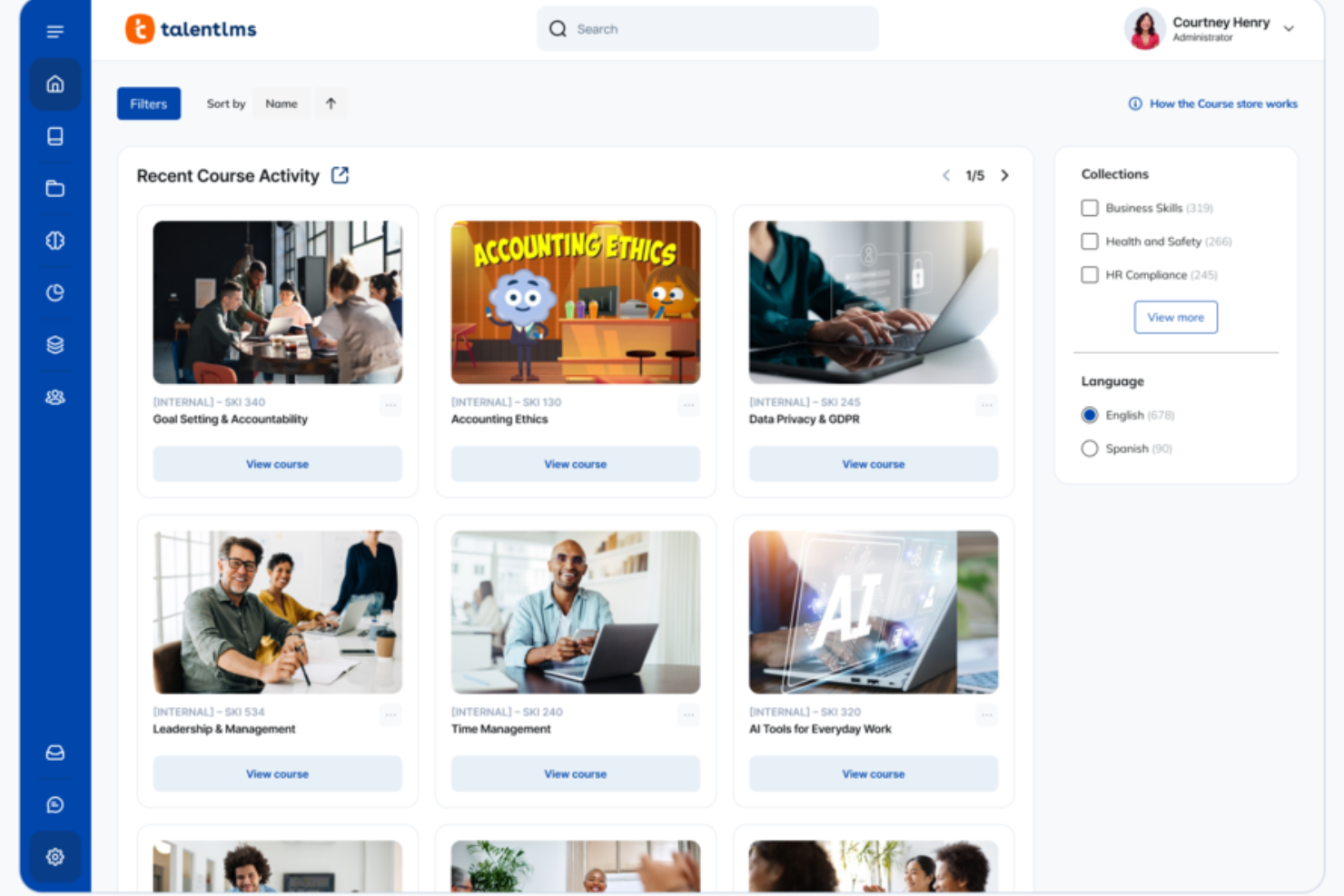
TalentLMS brinda a los equipos de RR. HH. y gerentes de capacitación una plataforma flexible para crear, impartir y hacer seguimiento a programas de desarrollo de habilidades para empleados, socios o clientes, lo que permite a RR. HH. gestionar el aprendizaje a gran escala en distintos roles y departamentos.
¿Para quién es mejor TalentLMS?
TalentLMS es ideal para empresas medianas que necesitan capacitar a varios grupos de empleados, como equipos de ventas, personal de soporte al cliente o nuevos integrantes, todo dentro de un solo sistema.
Por qué elegí TalentLMS
TalentLMS ocupa un lugar en mi lista por la eficacia con la que gestiona asignaciones de formación según roles a gran escala. Me gusta especialmente la función Branches, que permite crear portales de capacitación separados para diferentes equipos o departamentos, de modo que los equipos de ventas y soporte al cliente tengan cada uno un entorno de aprendizaje construido en torno a sus necesidades de habilidades específicas, todo gestionado desde una vista central de administración. El sistema de roles y permisos personalizados te permite controlar exactamente lo que cada tipo de usuario ve y realiza, manteniendo la capacitación enfocada y relevante. El mapeo de habilidades impulsado por IA lo integra todo al emparejar automáticamente los cursos con las carencias de habilidades, evitando que debas determinar manualmente las necesidades de formación.
Características clave de TalentLMS
- Gamificación: Añade puntos, insignias, niveles y clasificaciones a los cursos para fomentar la motivación y el compromiso de los aprendices durante los programas formativos.
- Evaluaciones y certificaciones: Crea cuestionarios, encuestas y tareas para medir el progreso de habilidades, y emite certificados personalizados que pueden configurarse para caducar y renovarse.
- Automatizaciones: Activa acciones de capacitación automáticamente según el comportamiento del usuario, como la finalización de cursos, la inactividad o la expiración de certificaciones.
- TalentLibrary: Accede a una biblioteca incorporada de más de 1,000 cursos creados por expertos que los aprendices pueden usar para adquirir habilidades relevantes para el trabajo de inmediato.
Integraciones de TalentLMS
Las integraciones incluyen BambooHR, Salesforce, TalentHR, Sage People, Intercom, ADP Workforce Now, Zendesk Chat, Zoom, Microsoft Teams y GoTo.
Pros and Cons
Pros:
- Las evaluaciones integradas respaldan la medición de habilidades y la certificación.
- Las herramientas de IA aceleran la creación de cursos para necesidades de formación de rápida evolución.
- Las funciones de agrupación de alumnos facilitan estructuras de formación complejas.
Cons:
- Los archivos multimedia grandes pueden requerir soluciones de alojamiento externas.
- Las herramientas de colaboración integradas son básicas en comparación con comunidades de aprendizaje dedicadas.
New Product Updates from TalentLMS
TalentLMS Adds Learning Paths, AI Video, and Learner Experience Updates
TalentLMS introduced updates across learning management, content creation, and learner experience, including Learning Paths for Groups, AI video generation in TalentCraft, video bookmarking, and expanded administration tools. For more information, visit TalentLMS’s official site.

Ideal para desarrollar habilidades dentro de un LMS nativo de RR. HH.
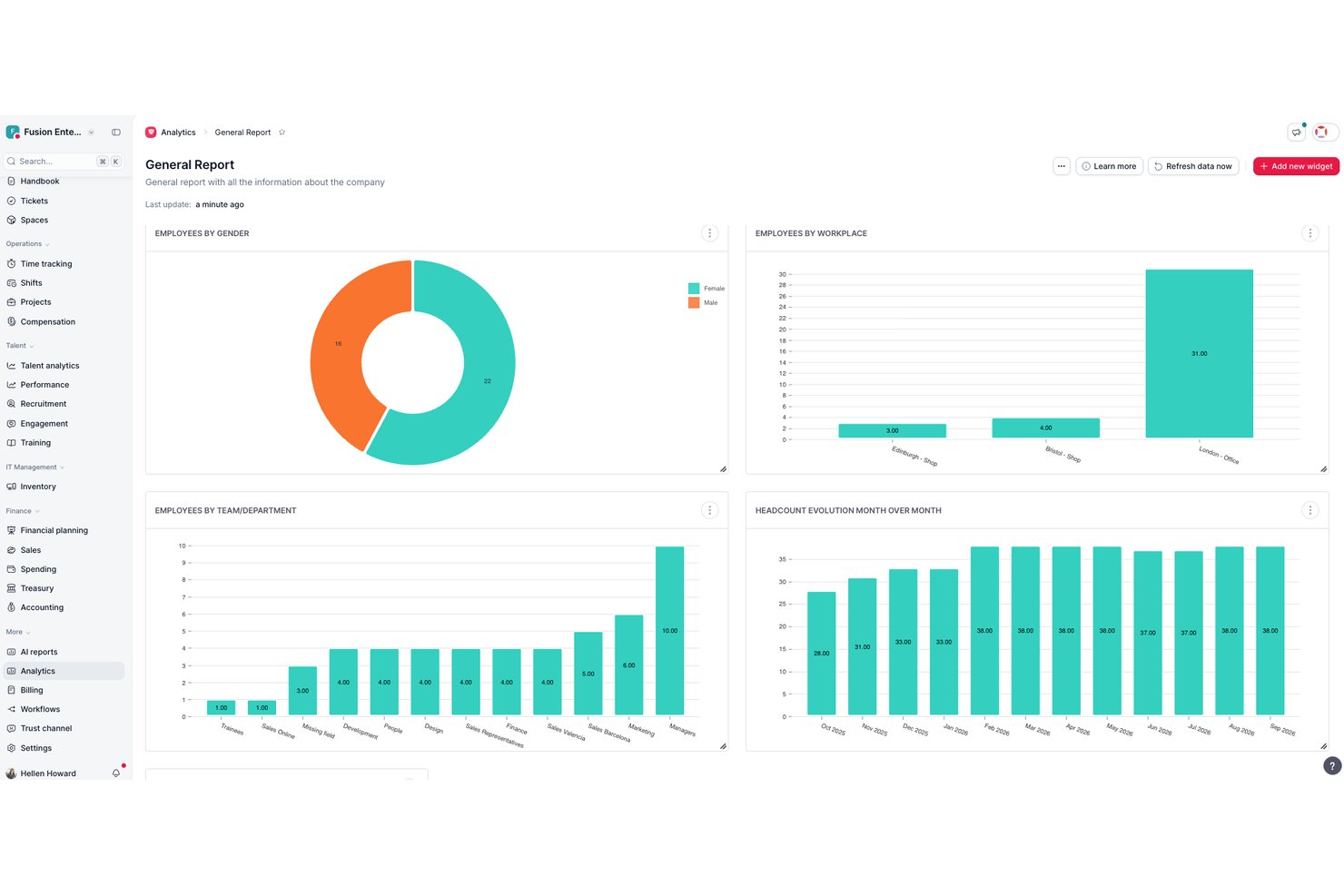
Factorial es una plataforma de RR. HH. con un módulo integrado de gestión de la formación que abarca la programación de cursos, la automatización de inscripciones, la compatibilidad con contenido SCORM, la creación de cursos impulsada por IA, el seguimiento de competencias y las encuestas posteriores a la formación para evaluar su eficacia.
¿Para quién es más adecuado Factorial?
Factorial es adecuado para equipos dirigidos por RR. HH. en empresas pequeñas y medianas que quieren integrar la formación y el desarrollo de habilidades directamente en sus flujos de trabajo principales de RR. HH.
Por qué elegí Factorial
Elegí Factorial como una de las mejores opciones porque su módulo de formación se encuentra integrado de forma nativa en el mismo sistema de RR. HH. que gestiona los registros de los empleados, los perfiles de competencias y las evaluaciones de desempeño. Me gusta especialmente cómo la inscripción automática basada en reglas mantiene actualizadas las listas de participantes sin necesidad de mantenimiento manual, y cómo la creación de cursos impulsada por IA convierte los archivos PDF existentes en módulos de aprendizaje estructurados con evaluaciones. El seguimiento de competencias está directamente vinculado a la planificación de la formación, por lo que las brechas de habilidades identificadas durante un ciclo de desempeño pueden abordarse de inmediato con cursos específicos.
Características principales de Factorial
- Importación de contenido SCORM: Los administradores pueden cargar cursos basados en SCORM directamente en el módulo de formación de Factorial para utilizarlos en ordenadores y dispositivos móviles.
- Biblioteca de cursos Factorial Campus: Una colección integrada de cursos preparados y listos para activar reduce la carga de creación de contenido para los equipos pequeños de aprendizaje y desarrollo.
- Seguimiento de los costes de formación: Los administradores pueden supervisar el gasto y los presupuestos de formación por entidad jurídica, con políticas de aprobación de gastos integradas en la plataforma.
- Integración con Microsoft Power BI: Conecta los datos de finalización y eficacia de la formación con Power BI para crear paneles de informes avanzados y personalizables.
Integraciones de Factorial
Factorial ofrece integraciones nativas con QuickBooks y Monday.com, además de Sage, DATEV, Microsoft Business Central y Microsoft Power BI. También proporciona una API REST pública, webhooks y conectividad con Zapier para integraciones personalizadas.
Pros and Cons
Pros:
- Los datos de formación y de RR. HH. están completamente unificados
- Las listas de participantes se actualizan automáticamente según los atributos de los empleados
- Compatible con SCORM y con la creación de cursos impulsada por IA
Cons:
- No permite realizar un seguimiento del vencimiento o la renovación de certificaciones
- Carece de integraciones nativas con herramientas de videoconferencia

SkyPrep
Ideal para capacitación en nuevos procesos/sistemas

SkyPrep es una plataforma de gestión de formación en la nube diseñada para equipos de RRHH y líderes empresariales que necesitan impartir, hacer seguimiento y gestionar programas de desarrollo de habilidades para empleados que se adaptan a nuevos roles, herramientas o procesos.
¿Para quién es mejor SkyPrep?
SkyPrep es una excelente opción para organizaciones medianas que necesitan una forma sencilla de capacitar a empleados de distintos departamentos sin depender de un equipo de aprendizaje y desarrollo dedicado.
Por qué elegí SkyPrep
Elegí SkyPrep como uno de los mejores porque gestiona la capacitación en nuevos procesos y sistemas de una manera diseñada específicamente para el cambio operativo. Me gusta cómo puedes crear rutas de aprendizaje estructuradas que guían a los empleados paso a paso a través de una nueva herramienta o flujo de trabajo, incluyendo cuestionarios y evaluaciones para confirmar la comprensión antes de avanzar. Mi equipo también utiliza la función de asignaciones automáticas de capacitación, que activa el curso adecuado para el empleado correcto en cuanto se registra un cambio de rol o proceso—sin necesidad de seguimiento manual.
Características clave de SkyPrep
- Gamificación: Añade puntos, insignias y clasificaciones a los cursos para mantener a los estudiantes motivados durante los programas de formación.
- Informes y analíticas: Accede a paneles predefinidos que muestran el progreso de los alumnos, tasas de finalización de cursos y resultados de evaluaciones.
- Creación de contenido impulsada por IA: Utiliza las herramientas de IA de SkyPrep para generar y perfeccionar contenido de cursos directamente en la plataforma.
- LMS multiinquilino: Administra portales de capacitación separados para diferentes departamentos, marcas o grupos de clientes desde una sola cuenta.
Integraciones de SkyPrep
Las integraciones incluyen ADP, Workday, BambooHR, Salesforce, HubSpot, Zoom, Microsoft Teams, Stripe, PayPal y GoToMeeting.
Pros and Cons
Pros:
- Excelentes herramientas de creación de cursos
- Atención al cliente muy receptiva
- Fácil de configurar y usar
Cons:
- Subtítulos automáticos de video solo en el plan más caro
- Planes de precios no disponibles públicamente


EducateMe LMS es una plataforma de gestión de formación para organizaciones y educadores que ofrece experiencias de aprendizaje interactivas, enfocadas en el desarrollo de habilidades, y hace un seguimiento del progreso de los empleados o alumnos en tiempo real.
¿Para quién es mejor EducateMe LMS?
EducateMe LMS es ideal para equipos de formación y desarrollo (L&D) y responsables de formación en empresas medianas que necesitan una forma estructurada y escalable de crear y entregar programas de aprendizaje basados en habilidades.
Por qué elegí EducateMe LMS
EducateMe LMS se gana su lugar en mi lista porque su entrenador de roles impulsado por IA gestiona muy bien los escenarios prácticos que las plataformas LMS tradicionales no pueden replicar. Me gusta que puedas generar un escenario completo de simulación de roles a partir de una sola indicación, ya sea una conversación de objeciones en ventas, una discusión delicada entre gerente y empleado, o una sesión de preparación para entrevista laboral. El entrenador con IA se mantiene en el tema gracias a barreras configurables y lógica ramificada, por lo que los alumnos no solo actúan de manera mecánica. El sistema de retroalimentación basado en rúbricas proporciona a los estudiantes comentarios consistentes y específicos sobre su desempeño, en lugar de la retroalimentación variable de los revisores humanos.
Características clave de EducateMe LMS
- Rutas de aprendizaje: Crea secuencias de cursos estructuradas y paso a paso que guían a los alumnos en el desarrollo de habilidades en un orden definido.
- Constructor de programas: Combina cuestionarios, tarjetas de memorización y tareas en un solo programa interactivo usando un editor basado en bloques.
- Automatización: Configura recordatorios automáticos, inscripciones y asignación de cursos para reducir trabajo administrativo manual.
- Seguimiento de progreso y analíticas: Visualiza informes y paneles detallados sobre la actividad de los alumnos, finalización de cursos y desempeño en programas de formación.
Integraciones de EducateMe LMS
Las integraciones incluyen Notion, Loom y Zoom, así como una API robusta para soluciones personalizadas.
Pros and Cons
Pros:
- Simulaciones de coaching con role playing impulsadas por IA
- Admite contenido de cursos compatible con SCORM
- Acceso API e inicio de sesión único
Cons:
- Requisito mínimo de usuarios para la tarifa
- La configuración avanzada puede requerir soporte
Ideal para la programación automática de cursos
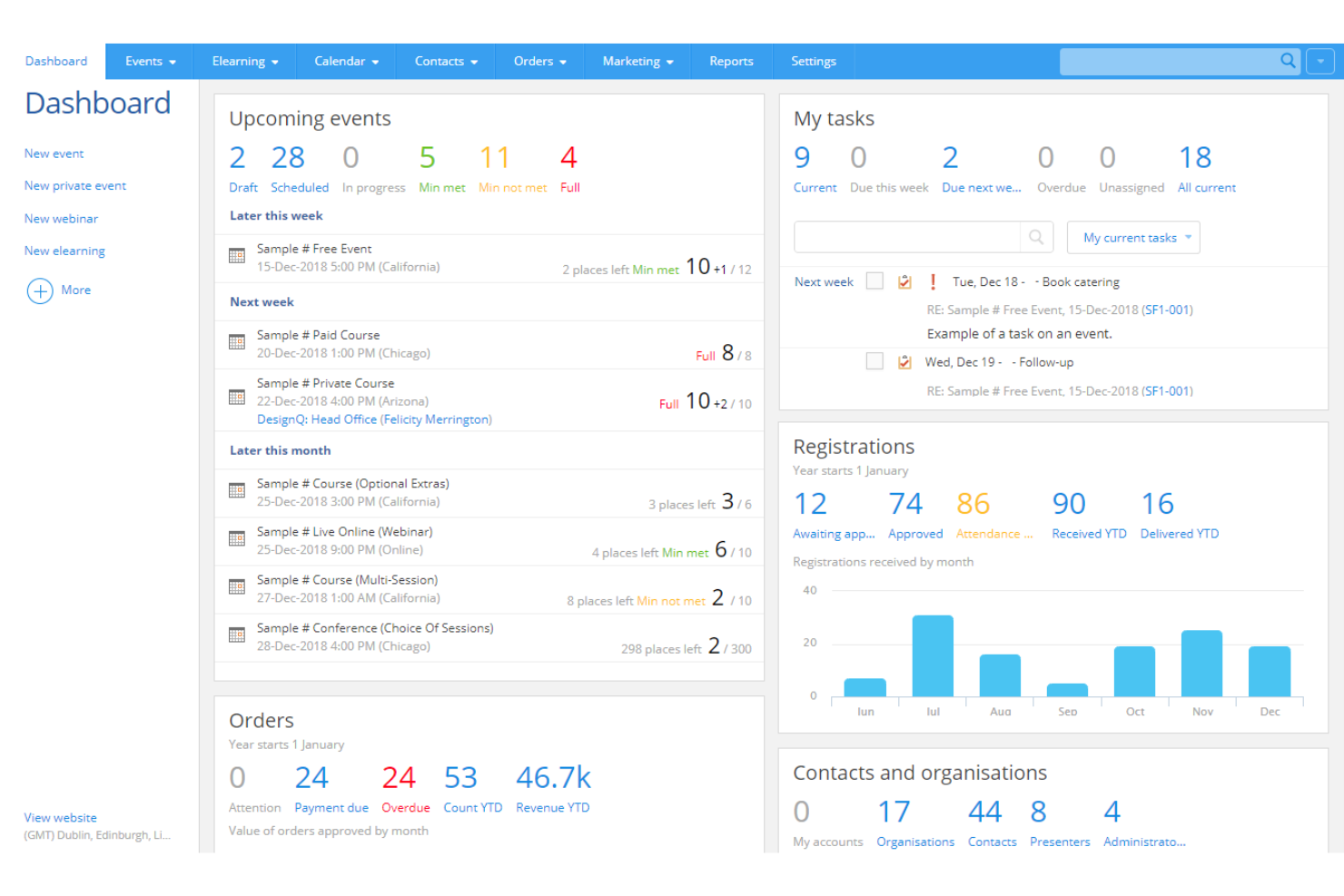
El software de gestión de formación Arlo ayuda a proveedores de formación, equipos corporativos de L&D y educadores profesionales a gestionar, impartir y realizar el seguimiento de cursos dirigidos por instructores, organizando programas de desarrollo de habilidades y agilizando el proceso formativo.
¿Para quién es ideal el software de gestión de formación Arlo?
Arlo es una excelente opción para proveedores de formación y equipos corporativos de L&D que imparten grandes volúmenes de cursos presenciales y necesitan una plataforma dedicada para gestionar la programación, registro y comunicaciones con los alumnos.
Por qué elegí el software de gestión de formación Arlo
Arlo merece estar en mi lista por lo eficaz que es a la hora de gestionar la programación automatizada de cursos para equipos que ejecutan múltiples programas presenciales a la vez. Me gusta que se puedan configurar cursos recurrentes con plantillas predefinidas, de manera que programar un nuevo grupo no requiere reconstruir todo desde cero. Arlo también automatiza la gestión de listas de espera y las comunicaciones con los alumnos, enviando confirmaciones de inscripción y recordatorios sin necesidad de seguimiento manual. Esta automatización resulta muy útil cuando se coordinan programas de desarrollo de habilidades en diferentes ubicaciones, instructores y zonas horarias.
Características clave del software de gestión de formación Arlo
- Entrega de aprendizaje combinado: Combina sesiones presenciales, seminarios en vivo y módulos de aprendizaje en línea en un solo curso de varias sesiones, con programación y registro unificados.
- Gestión de certificaciones y licencias: Aprueba y renueva certificaciones y licencias para todos los formatos de formación, con recordatorios automáticos antes de que caduquen.
- Control de asistencia móvil: Los instructores pueden registrar la asistencia, calificar y consultar los detalles de los inscritos en tiempo real desde la app móvil de Arlo.
- Autoría de contenido eLearning con IA: Crea cursos interactivos a partir de indicaciones o documentos existentes usando flujos de trabajo con IA, además de cuestionarios de arrastrar y soltar y contenido multimedia.
Integraciones del software de gestión de formación Arlo
Las integraciones incluyen Moodle, Wordpress, Xero, AccountsIQ, Authorize.Net, Campaign Monitor, CourseCheck, GoToWebinar, Salesforce y Zoom.
Pros and Cons
Pros:
- Flujos de trabajo automáticos para reservas, recordatorios y certificados
- Informes en tiempo real y CRM que ofrecen información sobre el desempeño
- Programación centralizada de cursos y eventos con plantillas
Cons:
- La configuración inicial puede ser compleja
- No incluye soporte interno para interfaz en varios idiomas

Ideal para crear programas de onboarding y rutas de aprendizaje

Mitratech Perform es una plataforma en línea que permite a los gerentes rastrear y monitorear el desempeño de los empleados a lo largo de sus carreras. Ayuda a las organizaciones a establecer objetivos, brindar retroalimentación sobre el desempeño y desarrollar las habilidades de los empleados.
Por qué elegí Mitratech Perform: Mitratech Perform proporciona un conjunto integral de funciones para apoyar el desarrollo y la retención de empleados en cualquier organización, sin importar su tamaño. Su plataforma permite a los usuarios desarrollar planes de aprendizaje personalizados adaptados a las necesidades individuales, medir el progreso y asignar tareas de manera rápida y sencilla. Al crear planes de aprendizaje personalizados para cada empleado, puedes asegurar que tus empleados aprovechen al máximo su experiencia de capacitación mientras avanzan hacia los objetivos organizacionales.
Mitratech Funciones destacadas e integraciones de Perform
La función de creación de cursos multimedia es una herramienta muy eficaz que permite crear y adaptar fácilmente los programas de estudio. A través de su plataforma intuitiva, Mitratech Perform simplifica el proceso de creación de cursos proporcionando plantillas, funciones de arrastrar y soltar y diapositivas interactivas. Aquellos que crean el curso pueden personalizar el aspecto y la experiencia de las lecciones mientras incorporan puntos clave de enseñanza. Esto les brinda mayor control sobre la calidad del aprendizaje en esos cursos.
La función de cumplimiento SCORM de Mitratech Perform ofrece una manera eficiente y eficaz de integrar cursos de formación de fuentes externas en su software de gestión de formación en línea. SCORM es un estándar para empaquetar, lanzar, rastrear y reportar contenido utilizado dentro del software. Permite a los usuarios integrar contenido de aprendizaje electrónico de terceros en su plataforma existente y asegurar que los datos de progreso del curso y las puntuaciones se sincronicen entre diferentes proveedores.
Integraciones disponibles con sistemas de RR. HH. y software CRM, y con herramientas de creación de contenido como Canva, Vimeo y HTML, lo que permite a los diseñadores instruccionales crear experiencias de aprendizaje enriquecedoras y motivadoras que satisfacen las necesidades de alumnos de todos los niveles.
Pros and Cons
Pros:
- El progreso de la formación puede vincularse a objetivos de desempeño específicos del empleado
- Fácil de integrar contenido SCORM de proveedores externos
- Se integra con otros módulos de Mitratech Perform para flujos de trabajo de onboarding fáciles
Cons:
- Pequeña lista de integraciones preconfiguradas
- Los detalles de precios y las características de los planes no son transparentes

Continu
Mejor para entrega de cursos multilingües

Continu es una plataforma de software de gestión de formación para empresas que reúne en un solo sistema la creación de cursos, compatibilidad con SCORM, herramientas de informes y gestión de recursos.
¿Para quién es mejor Continu?
Continu es ideal para organizaciones medianas y grandes con equipos de L&D dedicados que necesitan una plataforma escalable para gestionar la formación de empleados, socios y clientes.
Por qué elegí Continu
Incluí Continu entre mis mejores elecciones porque gestiona la entrega de cursos multilingües de forma nativa a través de su función Extend. Cada portal con marca blanca puede ofrecer contenido en varios idiomas, ya sea traducido automáticamente o manualmente, lo que significa que un equipo global que gestiona la formación de socios en más de 20 países no tiene que duplicar portales ni crear soluciones alternativas. También me gusta cómo Smart Segmentation™ se añade a esto, permitiendo dirigir a los estudiantes por región para que el contenido en el idioma correcto llegue automáticamente a la audiencia adecuada.
Principales características de Continu
- Continu Insights: Un panel analítico donde se pueden realizar preguntas en lenguaje sencillo sobre los datos de aprendizaje y obtener respuestas instantáneas sin necesidad de SQL ni informes manuales.
- Rutas de Aprendizaje: Crea itinerarios de cursos estructurados y multicontenidos que combinan videos, artículos, archivos SCORM y evaluaciones en una secuencia definida.
- Insignias y certificaciones: Premia a los estudiantes con credenciales digitales o certificados al completar cursos o demostrar competencias específicas.
- Auditoría de cumplimiento: Visualiza informes en tiempo real que muestran qué estudiantes no han completado la formación obligatoria, con recordatorios automáticos a través de Slack, MS Teams o correo electrónico.
Integraciones de Continu
Continu ofrece integraciones nativas con Salesforce, Slack, Microsoft Teams, Zoom y Google Workspace. También proporciona una API para integraciones personalizadas.
Pros and Cons
Pros:
- Integraciones nativas con Salesforce, Slack y Teams
- Smart Segmentation para asignación de rutas de formación
- Portales externos personalizados para formación de socios
Cons:
- Pocas opciones de biblioteca de contenido listo para usar
- No tiene aplicación móvil para formación en movimiento
New Product Updates from Continu
Continu Adds Smarter Content Management
Continu adds Intelligent Tagging and Descriptions and richer content details to improve how learning content is organized and maintained. These updates reduce manual work and give teams more consistent, detailed content records. For more information, visit Continu’s official site.
 .
.Otro software de gestión de la formación
Aquí tienes algunas opciones adicionales de software de gestión de la formación que no llegaron a mi selección, pero que aun así merece la pena considerar:
- Looop
La mejor gestión de capacitación para itinerarios de aprendizaje automatizados
- LearnUpon
Mejor software de gestión de formación para comercio electrónico
- Guidde
Ideal para videotutoriales basados en IA
- WeSchool
La mejor solución para simplificar la formación corporativa
- Docebo
Mejor software de gestión de formación para empresas
- eloomi
Mejor software de gestión de formación para aprendizaje y desarrollo personalizados
- Bridge
Ideal para la autoría avanzada de cursos
- Litmos LMS
El mejor software de gestión de formación para capacitación corporativa
- Constructor Tech
El mejor software de gestión de formación que promueve el aprendizaje activo
- Seismic’s Lessonly
Mejor software de gestión de formación para equipos de ventas


Cómo evalúo el software de gestión de capacitación
Divido mi evaluación en dos capas: los elementos básicos imprescindibles (como la programación de sesiones y el seguimiento de cumplimiento) y los diferenciadores que separan las buenas herramientas de las excelentes.
Funcionalidad central (Requisitos mínimos para esta lista)
Cuando selecciono herramientas para mi lista, califico cada una en una escala de 0 (no ofrece la funcionalidad) a 5 (destaca en esta área) para cada funcionalidad central que enumero a continuación. Luego, calculo la puntuación total de la herramienta como un porcentaje. Cada herramienta debe lograr una puntuación total mínima del 65% para ser considerada.
- Programación de cursos y sesiones: Verifico si se puede crear un catálogo de cursos, asignar instructores y programar sesiones recurrentes en modalidades presenciales, virtuales y mixtas.
- Gestión de inscripciones y matriculación: La autoinscripción, aprobación por parte de los gerentes, listas de espera y la matriculación grupal son aspectos que busco al evaluar cómo una herramienta gestiona la admisión de los participantes.
- Registros de capacitación y expedientes: Cada herramienta debe mantener un historial centralizado de los participantes, por lo que evalúo cómo registra las finalizaciones, asistencia y puntuaciones en expedientes auditables.
- Certificación y seguimiento de cumplimiento: Busco alertas automáticas de vencimiento y flujos de recertificación, especialmente para equipos que administran certificaciones de seguridad o capacitaciones regulatorias obligatorias.
- Informes y análisis: Ya sea extrayendo tasas de finalización por departamento o siguiendo capacitaciones de cumplimiento pendientes, evalúo la profundidad y flexibilidad de los reportes de cada herramienta.
- Comunicación y notificaciones: Las confirmaciones automáticas de inscripción, recordatorios de sesiones y alertas de plazos son importantes, así que verifico cuán configurables son los flujos de notificación de cada herramienta.
Una vez que tengo una lista de herramientas que cumplen los criterios, considero qué distingue a cada plataforma del resto.
Factores diferenciadores (Lo que distingue a los proveedores)
Así es como comparo y contrasto a los diferentes proveedores:
Características destacadas
La asignación de habilidades y competencias es un gran diferenciador que busco, porque permite que los responsables de formación vinculen los cursos con roles laborales específicos e identifiquen brechas entre equipos. La creación de contenidos nativa es otro aspecto que vale la pena evaluar, especialmente para equipos que necesitan desarrollar cursos personalizados con cuestionarios y paquetes SCORM sin depender de otra herramienta aparte. También considero si una plataforma permite vender cursos externamente mediante funciones de comercio electrónico integradas, lo cual es importante para organizaciones que monetizan sus programas de capacitación.
Más allá de las funcionalidades
La integración con sistemas de gestión de recursos humanos (HRIS) es una de las primeras cosas que reviso, porque sincronizar los datos de empleados desde plataformas como Workday o BambooHR elimina la gestión manual de registros. El ajuste a la normativa específica de la industria también es relevante, especialmente para equipos en sanidad o manufactura que necesitan marcos predefinidos para formación en OSHA o HIPAA. También evalúo la escalabilidad, revisando si la plataforma admite capacitación en varios idiomas y modelos de licenciamiento flexibles que no penalicen cuando el número de empleados crece en distintas regiones.
Cómo elegir un software de gestión de la formación
Es fácil perderse entre largas listas de funciones y estructuras de precios complejas. Para ayudarte a mantener la concentración mientras avanzas en tu proceso único de selección de software, aquí tienes una lista de factores que debes tener en cuenta:
| Factor | Qué debes considerar |
|---|---|
| Escalabilidad | ¿Puede el software crecer junto con tu equipo? Considera las necesidades futuras y si la herramienta puede gestionar un aumento de usuarios y datos sin costes adicionales ni problemas de rendimiento. |
| Integraciones | ¿Funciona con tus sistemas actuales? Comprueba la compatibilidad con recursos humanos, nóminas y otras herramientas para evitar silos de datos y agilizar los flujos de trabajo. |
| Personalización | ¿Puedes adaptarlo para que encaje con tus procesos? Busca opciones para personalizar paneles, informes y roles de usuario según las necesidades de tu equipo. |
| Facilidad de uso | ¿Lo utilizará tu equipo con confianza? Evalúa la interfaz y la navegación. Un diseño sencillo e intuitivo reduce el tiempo de formación y aumenta la adopción. |
| Implementación e incorporación | ¿Con qué rapidez puedes empezar? Evalúa la asistencia para la configuración, los recursos de formación y el tiempo o esfuerzo que tu equipo deberá dedicar para poner en funcionamiento el software. |
| Coste | ¿Cuál es el coste total de propiedad? No te fijes solo en el precio. Ten en cuenta las cuotas de suscripción, los costes de configuración y cualquier cargo oculto para obtener una visión financiera clara. |
| Medidas de seguridad | ¿Qué grado de seguridad tienen tus datos? Asegúrate de que el software cumple las normas de protección de datos y ofrece cifrado, controles de acceso y actualizaciones de seguridad periódicas. |
¿Qué es un software de gestión de la formación?
El software de gestión de la formación es una herramienta que ayuda a organizar, impartir y hacer un seguimiento de los programas de formación de los empleados. Los profesionales de RR. HH., los coordinadores de formación y los gerentes suelen utilizar estas herramientas para mejorar el aprendizaje y el desarrollo. La programación, el seguimiento del progreso y la generación de informes ayudan a gestionar la formación de manera eficiente y a cumplir los objetivos de la organización. En general, estas herramientas simplifican los procesos de formación y mejoran el desarrollo de la fuerza laboral.
Características
Al seleccionar un software de gestión de la formación, presta atención a las siguientes características clave:
- Programación: Permite planificar y organizar las sesiones de formación de manera eficiente, garantizando que no haya solapamientos ni conflictos.
- Seguimiento del progreso: Supervisa el progreso y el rendimiento de los alumnos, proporcionando información sobre la eficacia de la formación y las áreas que necesitan mejoras.
- Informes y análisis: Genera informes detallados para ayudar a evaluar el impacto de la formación y tomar decisiones fundamentadas.
- Impartición de contenidos: Admite varios formatos para impartir materiales de formación, adaptándose a diferentes estilos de aprendizaje.
- Integraciones: Se conecta con los sistemas existentes de RR. HH. y nóminas para agilizar el flujo de datos y mejorar la funcionalidad.
- Personalización: Ofrece opciones para adaptar los paneles, los informes y los roles de usuario a las necesidades específicas de la organización.
- Acceso móvil: Permite a los alumnos acceder a los materiales de formación desde cualquier lugar, aumentando la flexibilidad y la participación.
- Medidas de seguridad: Protege los datos confidenciales mediante cifrado y controles de acceso, garantizando el cumplimiento de las normas de protección de datos.
- Interfaz fácil de usar: Proporciona un diseño intuitivo que simplifica la navegación y reduce la curva de aprendizaje de los usuarios.
- Asistencia para la incorporación: Incluye recursos como vídeos de formación y recorridos interactivos para facilitar una implementación y adopción fluidas.
Beneficios
La implementación de un software de gestión de la formación ofrece varios beneficios para tu equipo y tu empresa. Estos son algunos de los que puedes esperar:
- Mejor organización: Las funciones de programación e impartición de contenidos mantienen los programas de formación bien organizados y fáciles de gestionar.
- Seguimiento mejorado: El seguimiento del progreso y los informes proporcionan información sobre el rendimiento de los alumnos, lo que ayuda a identificar áreas de mejora.
- Ahorro de tiempo: La automatización de tareas administrativas, como la programación y la elaboración de informes, libera tiempo para actividades más estratégicas.
- Mayor accesibilidad: El acceso móvil permite a los alumnos utilizar los materiales de formación desde cualquier lugar, aumentando la flexibilidad y la participación.
- Mejor integración de datos: Las integraciones con los sistemas existentes garantizan un flujo fluido de información entre plataformas y reducen los silos de datos.
- Mayor seguridad: Las medidas de seguridad protegen la información confidencial y garantizan el cumplimiento de las normativas de protección de datos.
- Experiencia personalizable: La personalización permite adaptar el software a tus procesos específicos, mejorando la satisfacción de los usuarios.
Costos & precios
Seleccionar un software de gestión de la formación requiere comprender los distintos modelos de precios y planes disponibles. Los costos varían según las funciones, el tamaño del equipo, los complementos y otros factores. La siguiente tabla resume los planes habituales, sus precios promedio y las funciones que suelen incluir las soluciones de software de gestión de la formación:
Tabla comparativa de planes de software de gestión de la formación
| Tipo de plan | Precio promedio | Funciones habituales |
|---|---|---|
| Plan gratuito | $0 | Programación básica, informes limitados y asistencia de la comunidad. |
| Plan personal | $5-$25/user/month | Seguimiento mejorado, acceso móvil y asistencia por correo electrónico. |
| Plan empresarial | $30-$75/user/month | Análisis avanzados, integraciones y personalización. |
| Plan corporativo | $100+/user/month | Seguridad integral, personalización completa y gestión de cuentas específica. |
Preguntas frecuentes sobre el software de gestión de la formación
Estas son algunas respuestas a preguntas frecuentes sobre el software de gestión de la formación:
¿Puede el software de gestión de la formación gestionar alumnos externos o personas que no sean empleados (p. ej., contratistas o socios)?
Sí, muchos sistemas permiten asignar formación a usuarios externos mediante la creación de cuentas de invitados o el uso de portales independientes. Puedes controlar los niveles de acceso, realizar un seguimiento de su progreso por separado del personal interno y proporcionar certificados al finalizar. Esto facilita incluir a contratistas, proveedores o socios en tu flujo de formación sin mezclarlos con los registros de tus empleados.
¿Qué tipo de informes y análisis puede proporcionar el software de gestión de la formación para mi equipo?
El software de gestión de la formación suele ofrecer paneles e informes sobre las formaciones completadas por los alumnos, los cursos atrasados y el rendimiento de los cursos. Puede ayudar a identificar a los alumnos que no han completado las sesiones obligatorias y destacar los cursos que podrían necesitar una actualización. Puedes utilizar estos datos para orientar tu calendario de formación y realizar un seguimiento del cumplimiento o del progreso del desarrollo.
¿Cuánto tiempo se tarda en implementar el software de gestión de la formación?
El tiempo de implementación varía en función de la complejidad del software y de la preparación de tu equipo. Los sistemas sencillos pueden tardar unos días, mientras que las configuraciones más complejas pueden requerir semanas. Planifica sesiones de formación y asigna recursos para garantizar una transición fluida. Considera comenzar con un grupo piloto para resolver cualquier problema.
¿Necesito conocimientos técnicos para utilizar el software de gestión de la formación?
No, la mayoría de los programas de gestión de la formación están diseñados para usuarios sin conocimientos técnicos. Normalmente ofrecen interfaces fáciles de usar y recursos de asistencia, como tutoriales y atención al cliente. Sin embargo, contar con alguien con conocimientos técnicos puede ser útil durante la configuración inicial o si tienes previsto integrar el sistema con otros sistemas.
Qué sigue:
Si estás investigando software de gestión de la formación, ponte en contacto gratuitamente con un asesor de SoftwareSelect para obtener recomendaciones.
Rellenas un formulario y mantienes una breve conversación en la que se profundiza en los detalles de tus necesidades. Después recibirás una lista reducida de programas para revisar. Además, te ayudarán durante todo el proceso de compra, incluidas las negociaciones de precios.