

I 10 migliori software per manuali dei dipendenti del 2026

10 Elenco dei migliori software per manuali dei dipendenti


Creare e gestire un manuale dei dipendenti può essere un'attività dispendiosa in termini di tempo e stressante, soprattutto se si utilizzano metodi obsoleti o si fatica a garantire la conformità all'interno di un team in crescita. Tuttavia, trovare il software giusto per i manuali dei dipendenti può sembrare complicato, poiché molti sistemi affermano di offrire la soluzione perfetta.
È qui che entra in gioco questa guida. Ho raccolto questo elenco dei migliori software per manuali dei dipendenti per aiutarti a risparmiare tempo, migliorare la comunicazione delle policy e garantire che la tua organizzazione rimanga conforme, senza il fastidio di procedere per tentativi. Questi strumenti sono progettati per semplificare la creazione delle policy, automatizzare gli aggiornamenti e assicurarsi che i dipendenti abbiano a portata di mano le informazioni di cui hanno bisogno.
Basandomi sui miei anni di esperienza nella gestione e distribuzione dei documenti relativi alle policy aziendali, condividerò anche suggerimenti pratici per aiutarti a ottenere il massimo da questo software. Che tu debba gestire aggiornamenti manuali delle policy o abbia difficoltà con il controllo delle versioni, questa guida ti fornirà le conoscenze necessarie per superare queste sfide.
Ora esploriamo le migliori opzioni per affrontare le tue esigenze relative alle policy delle risorse umane.
Perché fidarsi delle nostre recensioni sui software
Il nostro team testa e recensisce software dal 2012. In quanto esperti HR noi stessi, sappiamo quanto sia difficile — e importante — scegliere il software giusto.
Per questa guida, abbiamo valutato gli strumenti attraverso test pratici e ricerche indipendenti, assegnando un punteggio agli strumenti in base ai nostri criteri di selezione. Ci basiamo inoltre sulle competenze di leader di pensiero del settore e di professionisti HR attivi.
Le nostre recensioni riflettono il nostro giudizio editoriale umano, non un discorso di vendita.
Revisori esperti:
Tabella comparativa dei software per manuali dei dipendenti
Questa tabella comparativa riassume i prezzi di ciascuna delle mie migliori selezioni di software per manuali dei dipendenti:
| Tool | Best For | Trial Info | Price | ||
|---|---|---|---|---|---|
| 1 | Il miglior software di manuale aziendale per lavoratori senza scrivania o sul campo | Prova gratuita di 14 giorni + demo gratuita disponibili | Da $29/mese (fatturazione annuale) | Website | |
| 2 | Ideale per mantenere i manuali dei dipendenti conformi | Demo gratuita disponibile | Prezzo su richiesta | Website | |
| 3 | Ideale per la creazione di politiche aziendali e la conformità | Nessuna prova gratuita disponibile | A partire da $161,93/mese (fatturazione annuale) | Website | |
| 4 | Ideale per organizzazioni USA in settori fortemente regolamentati | Dimostrazione gratuita disponibile | Da $100/mese (utenti illimitati) | Website | |
| 5 | Il miglior software per manuali dei dipendenti e collaborazione tra team da remoto | Prova gratuita di 14 giorni | Da $10/utente/mese (fatturato annualmente) | Website | |
| 6 | Il miglior software per manuali dei dipendenti con funzioni di design di alta qualità | Prova gratuita di 30 giorni + piano free disponibile | Da $9.99/mese | Website | |
| 7 | Il miglior software per manuali del dipendente con funzionalità di presentazione professionale | Prova gratuita di 14 giorni + piano gratuito disponibile | Da $12.25/utente/mese (fatturato annualmente) | Website | |
| 8 | Il miglior software per il manuale del dipendente per importare le tue policy esistenti | Prova gratuita di 7 giorni | Da $149/utente/mese | Website | |
| 9 | Ideale per creare manuali dei dipendenti digitali e scaricabili | Prova gratuita di 14 giorni | Da $1.300/anno per 50 utenti | Website | |
| 10 | Miglior software per manuali del personale per accesso in mobilità | Versione gratuita disponibile | Da $23.88/utente/mese (fatturazione annuale) | Website |
Recensioni dei migliori software per manuali dei dipendenti
Ecco le mie sintesi dettagliate dei migliori software per manuali dei dipendenti inclusi nella mia lista dei 10 migliori, con note sul motivo per cui li ho scelti. Ogni recensione offre uno sguardo dettagliato alle funzionalità principali, ai pro e contro, alle integrations e agli scenari d’uso ideali di ogni sistema, per aiutarti a trovare l’opzione migliore per te.

Il miglior software di manuale aziendale per lavoratori senza scrivania o sul campo
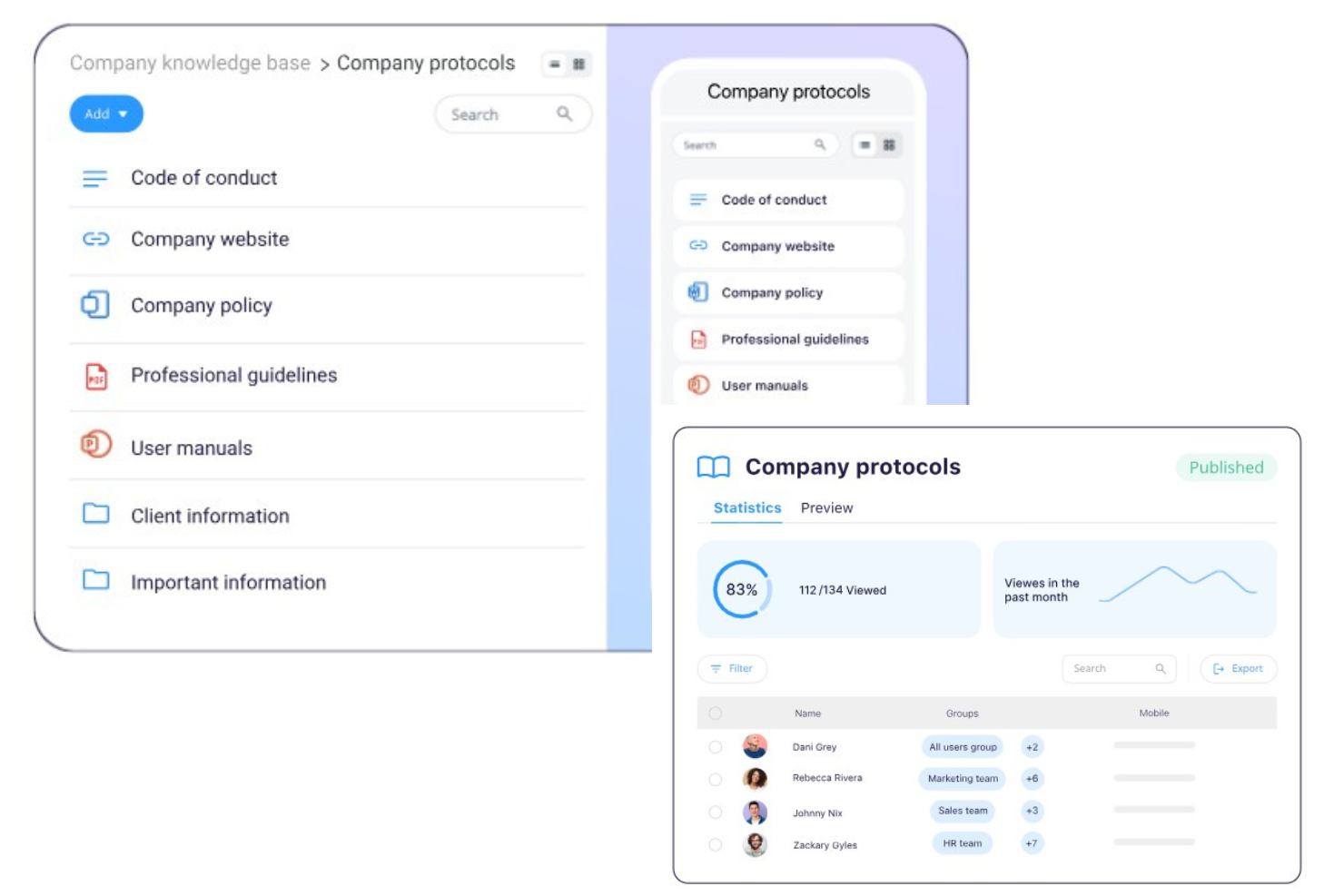
Connecteam è un'app di gestione del personale tutto-in-uno, progettata specificamente per gestire le operazioni quotidiane, le comunicazioni e le attività delle risorse umane per i team senza scrivania.
Grazie al suo approccio pensato per il lavoro da remoto, l'app funziona efficacemente anche come manuale digitale per i dipendenti e base di conoscenza portatile, offrendo ai tuoi collaboratori l'accesso a tutte le informazioni aziendali fondamentali di cui hanno bisogno, ovunque si trovino.
Perché ho scelto Connecteam: La struttura della loro base di conoscenza digitale è facile da usare, con cartelle e sottocartelle illimitate per organizzare le informazioni come preferisci. Connecteam dispone anche di una funzione di ricerca potente che aiuta i dipendenti a trovare rapidamente ciò che cercano e consente di allegare file o link a documenti specifici anche nelle chat o nelle assegnazioni di compiti all'interno dell'app.
Dal punto di vista dell'amministratore HR, Connecteam offre un controllo semplice sui permessi di gestione dei file oltre ad analisi specifiche per documento. Questo significa che il tuo team HR può monitorare facilmente quali dipendenti hanno letto ogni documento e inviare promemoria tramite l'app a chi non lo ha fatto, per garantire la conformità.
Per questo motivo, penso anche che il loro software sia una soluzione particolarmente indicata per i dipendenti sul campo nei settori con forti esigenze di salute, sicurezza e conformità.
Caratteristiche e integrazioni di spicco di Connecteam:
Caratteristiche di spicco del loro modulo di gestione della conoscenza includono organizzazione intuitiva dei file, modifica drag & drop, scorciatoie ai documenti in-app, ricerca nei documenti, analisi specifiche per file, funzioni di monitoraggio della conformità, limiti al download dei dati per prevenire fughe di informazioni, e controlli di accesso chiari.
Connecteam offre anche monitoraggio delle presenze, pianificazione dei turni, gestione delle attività, moduli e checklist, e integrazioni con sistemi di payroll, tutte funzioni essenziali per la gestione operativa. Inoltre, la loro app rispetta certificazioni GDPR, ISO 27001, SOC 2 e HIPAA, rendendola una scelta affidabile e sicura per aziende di diversi settori.
Le integrazioni includono Paychex, Xero, Gusto, QuickBooks Payroll (online + desktop), Zapier, Google Calendar, accesso API e altre ancora.
Pros and Cons
Pros:
- Molto intuitivo, anche per utenti non esperti
- Offre numerose altre funzioni per una gestione completa del personale
- Strumenti di comunicazione integrati che migliorano l'engagement e la coesione del team
Cons:
- Potrebbero essere utili ulteriori integrazioni software
- Nessuna funzione payroll integrata
New Product Updates from Connecteam

Connecteam Expands Break and Timesheet Controls
Connecteam adds flexible break thresholds, personalized policies, auto-end options, a centralized exceptions report, and improved timesheet issue visibility to help teams manage breaks and timesheets more effectively. For more information, visit Connecteam’s official site.
 .
.
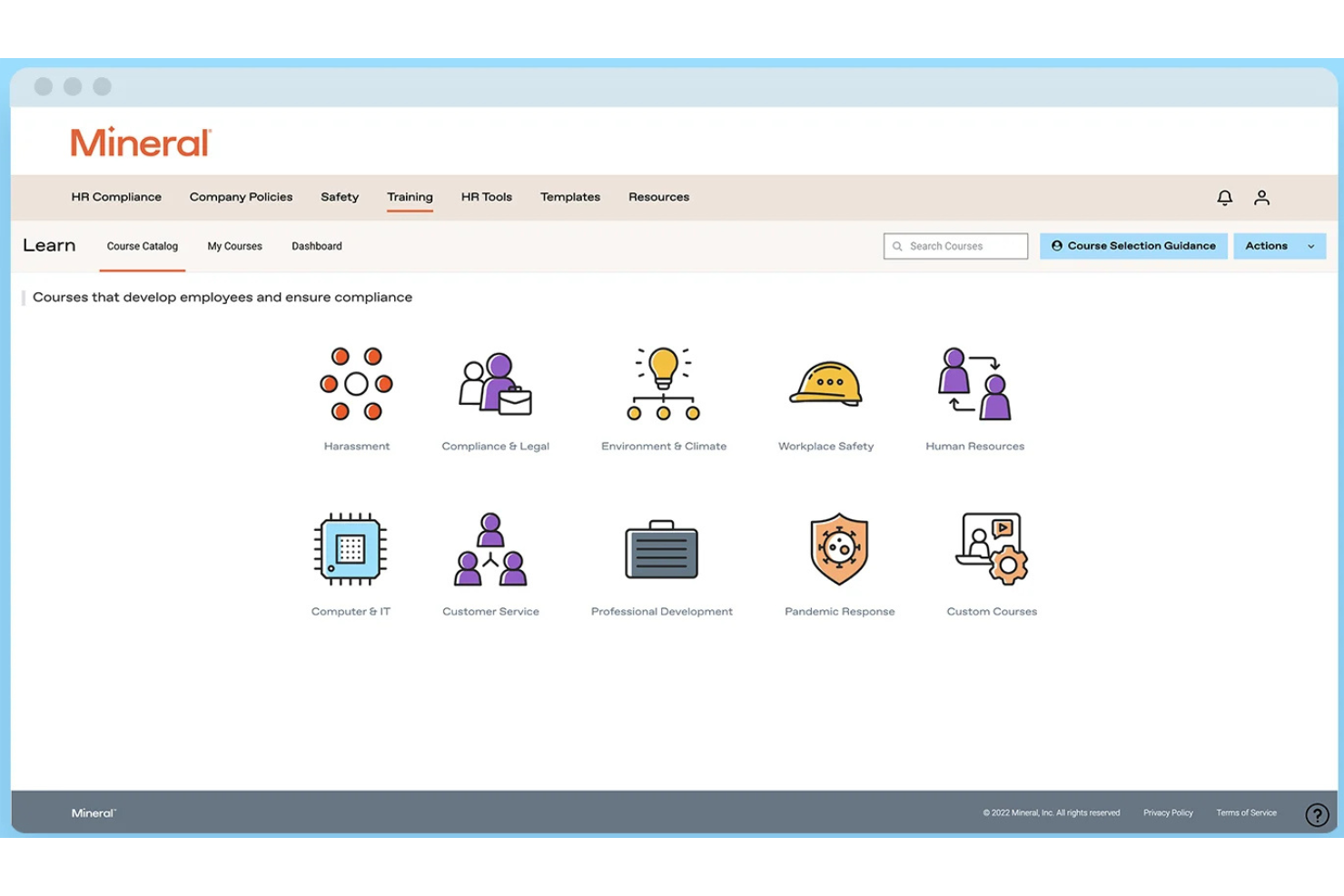
Mitratech Mineral è una piattaforma di conformità HR che aiuta le organizzazioni a creare, mantenere e aggiornare i manuali per i dipendenti tramite un costruttore guidato, aggiornamenti automatici delle politiche, avvisi di conformità e accesso a esperti HR.
Per chi è ideale Mitratech Mineral?
Mitratech Mineral è particolarmente indicato per piccole e medie imprese che hanno bisogno di realizzare manuali per i dipendenti conformi alle normative, senza dover mantenere un team HR o legale interno.
Perché ho scelto Mitratech Mineral
Ho scelto Mitratech Mineral perché semplifica il lavoro continuo di mantenere i manuali dei dipendenti conformi alle normative. Invece di monitorare manualmente i cambiamenti nelle leggi sul lavoro, la piattaforma avvisa quando è necessario aggiornare le politiche e fornisce testi rivisti da avvocati che possono essere aggiunti direttamente al manuale. Apprezzo anche il fatto che siano disponibili esperti HR per rispondere a domande di conformità più complesse, offrendo ulteriore sicurezza alle squadre quando aggiornano le politiche aziendali.
Caratteristiche principali di Mitratech Mineral
- Costruttore guidato del manuale: Genera manuali dei dipendenti conformi tramite un processo basato su questionario.
- Gestione delle politiche multi-stato: Crea manuali che rispettano i requisiti occupazionali federali e multi-statali.
- Libreria di politiche: Accedi a modelli di politiche pre-scritti che coprono benefit, permessi, sicurezza sul lavoro e altri temi HR.
- Libreria di conformità HR: Ricerca linee guida in materia di diritto del lavoro, risorse per la conformità e best practice HR per supportare l’aggiornamento dei manuali.
Integrazioni di Mitratech Mineral
Mitratech Mineral opera principalmente tramite partnership con fornitori di servizi paga, broker assicurativi, PEO e piattaforme HCM piuttosto che tramite un tradizionale marketplace di integrazioni. Le partnership documentate includono QuickBooks Payroll e ContinuumCloud. Al momento non sono documentati supporti per Public API o Zapier.
Pros and Cons
Pros:
- Accesso a esperti HR
- Aggiornamenti automatici delle politiche
- Forte conformità multi-statale
Cons:
- Gli strumenti per i manuali possono avere un costo aggiuntivo
- Integrazioni software limitate

Ideale per la creazione di politiche aziendali e la conformità

Citazione Canada aiuta i team delle risorse umane e i leader aziendali in Canada a creare, aggiornare e gestire i manuali dei dipendenti mantenendo la conformità alle normative in evoluzione, offrendo una piattaforma centralizzata per la gestione e la distribuzione delle politiche aziendali.
Per chi è più indicata Citazione Canada?
La soluzione Citazione Canada è particolarmente adatta ai professionisti HR canadesi e alle piccole e medie imprese che hanno bisogno di rimanere aggiornati sulla conformità alle normative lavorative provinciali e federali.
Perché ho scelto Citazione Canada
Ho scelto Citazione Canada tra le migliori opzioni per quanto semplifica la creazione delle politiche per i team HR canadesi. La piattaforma offre l'accesso a oltre 3.000 politiche HR personalizzabili, modelli e documenti per il manuale del dipendente—tutti realizzati per riflettere la normativa sul lavoro canadese in tutte le 14 giurisdizioni. Mi piace che sia possibile selezionare una politica, aggiungere il proprio branding aziendale con pochi clic e inserirla direttamente nella libreria di documenti Atlas. Il Compliance Centre monitora gli aggiornamenti legislativi, segnala le prossime modifiche con le relative date di entrata in vigore e ti permette di aggiungere queste date direttamente al tuo calendario, così non sfugge nulla.
Funzionalità principali di Citazione Canada
- Strumento di confronto delle giurisdizioni: Confronta gli standard occupazionali fianco a fianco tra tutte le 14 giurisdizioni federali e provinciali canadesi per garantire che le politiche del tuo manuale siano accurate a livello regionale.
- Linea di consulenza HR dal vivo: Contatta consulenti HR certificati telefonicamente, tramite appuntamento programmato o con una richiamata durante l'orario lavorativo per ricevere consulenza su attuazione delle politiche e tematiche legate alle relazioni con i dipendenti.
- Avvisi automatici sulle modifiche legislative: Ricevi notifiche quando cambiano le leggi sul lavoro, così da poter aggiornare le politiche del manuale interessate prima che entrino in vigore le nuove regole.
- Libreria di documenti HR: Accedi a migliaia di documenti, checklist e modelli HR scaricabili che puoi aggiungere direttamente alla composizione del tuo manuale.
Integrazioni di Citazione Canada
Le integrazioni native non sono attualmente elencate.
Pros and Cons
Pros:
- Forte creazione di policy con manuali personalizzabili
- Aiuta ad allineare i contenuti di conformità HR e sicurezza
- Accesso facile a risorse di conformità e relative alle politiche aziendali
Cons:
- Contenuti di conformità globale limitati al di fuori del Canada
- Alcuni clienti trovano la personalizzazione limitata

Ideale per organizzazioni USA in settori fortemente regolamentati

SixFifty Employee Handbook aiuta i team delle risorse umane e i professionisti legali a creare, aggiornare e gestire manuali per i dipendenti conformi, personalizzati secondo le leggi sul lavoro degli Stati Uniti e le normative statali in continua evoluzione.
Per chi è pensato SixFifty Employee Handbook?
SixFifty Employee Handbook è particolarmente indicato per aziende con sede negli Stati Uniti che operano in settori regolamentati, dove rimanere aggiornati sulle normative statali in materia di lavoro è un requisito fondamentale.
Perché ho scelto SixFifty Employee Handbook
SixFifty Employee Handbook si guadagna un posto nella mia lista ristretta perché è sviluppato specificamente per la conformità statunitense, un vero elemento distintivo per le organizzazioni attive in settori altamente regolamentati come quello sanitario, finanziario o degli appalti governativi. Apprezzo il fatto che la piattaforma utilizzi un linguaggio giuridico redatto da avvocati e specifico per ogni stato; così, quando il mio team crea un manuale per dipendenti distribuiti in più stati, ciascuna versione riflette i reali requisiti legali di quella giurisdizione. Gli avvisi automatizzati di aggiornamento delle politiche sono inoltre una caratteristica di spicco: quando cambiano le leggi sul lavoro statali, ricevo una notifica e posso inviare gli aggiornamenti direttamente tramite la piattaforma invece di monitorare manualmente i cambiamenti normativi.
Funzionalità principali di SixFifty Employee Handbook
- Libreria di politiche: Scegli tra oltre 100 politiche opzionali da aggiungere al tuo manuale oltre a quelle obbligatorie specifiche per ogni stato.
- Portale dipendenti: I membri del team possono accedere, consultare e firmare digitalmente il manuale, con le firme tracciate per la responsabilità.
- Generazione di addenda statali: Crea addenda specifiche per ogni stato per integrare un manuale esistente senza doverlo ricostruire da zero.
- Salvataggio profilo aziendale: Conserva i dettagli della tua azienda e la posizione dei dipendenti per generare documenti più rapidamente in futuro.
Integrazioni SixFifty Employee Handbook
Le integrazioni nativamente disponibili non sono attualmente elencate.
Pros and Cons
Pros:
- Ampio volume di modelli HR, inclusi accordi con dipendenti e altri documenti legali
- Lo strumento Addenda Stato genera un elenco dei requisiti se espandi l'attività in uno stato nuovo
- Il grafico di confronto delle politiche evidenzia le principali differenze tra le politiche
Cons:
- Le informazioni sulle integrazioni software non sono trasparenti
- Progettato solo per organizzazioni con sede negli USA

Slite
Il miglior software per manuali dei dipendenti e collaborazione tra team da remoto

Slite è una piattaforma collaborativa per la documentazione, progettata per i team delle risorse umane e le organizzazioni che devono creare, gestire e aggiornare manuali e policy per i dipendenti in uno spazio centralizzato e facile da navigare.
Per chi è più adatto Slite?
Slite è particolarmente adatto ai team distribuiti e che operano principalmente da remoto, che hanno bisogno di uno spazio condiviso per creare e mantenere la documentazione interna senza dover fare affidamento su file sparsi o conversazioni via email.
Perché ho scelto Slite
Ho scelto Slite come una delle migliori soluzioni perché aiuta i team HR distribuiti a mantenere accurati e accessibili i contenuti del manuale. Apprezzo la funzione di verifica dei documenti: le risorse umane possono contrassegnare le policy come verificate, così i dipendenti da remoto sanno sempre di stare leggendo la versione attuale e non qualcosa di obsoleto di due anni fa. Utilizzo regolarmente anche l'integrazione con Slack, che consente ai membri del team di consultare direttamente il manuale da Slack senza aprire una scheda separata. Inoltre, la funzione Ask di Slite permette ai dipendenti di digitare una domanda in linguaggio naturale e ricevere una risposta tratta dai contenuti verificati del manuale, riducendo i messaggi ripetitivi del tipo 'dove trovo la policy sulle ferie?' che i team HR ricevono.
Funzionalità principali di Slite
- Modifica collaborativa: Più membri del team possono scrivere e modificare contemporaneamente i documenti del manuale in tempo reale.
- Modelli personalizzabili: I modelli predefiniti per le risorse umane e le policy offrono una base strutturata per creare i contenuti del manuale.
- Autorizzazioni granulari: Imposta l'accesso in visualizzazione o modifica a livello di documento o canale per controllare chi può modificare i contenuti sensibili delle policy.
- Ricerca in tutti i documenti: Una funzione di ricerca a testo completo consente ai dipendenti di trovare sezioni specifiche del manuale o termini delle policy senza dover navigare manualmente.
Integrazioni di Slite
Le integrazioni includono Slack, Google Drive, Jira, Asana, Figma, Notion, Trello, Monday.com, Miro e GitHub.
Pros and Cons
Pros:
- Prendere appunti è semplice e naturale
- Ampio numero di integrazioni
- Ben organizzato e intuitivo
Cons:
- Occasionali problemi del software
- Gamma limitata di funzionalità
Il miglior software per manuali dei dipendenti con funzioni di design di alta qualità
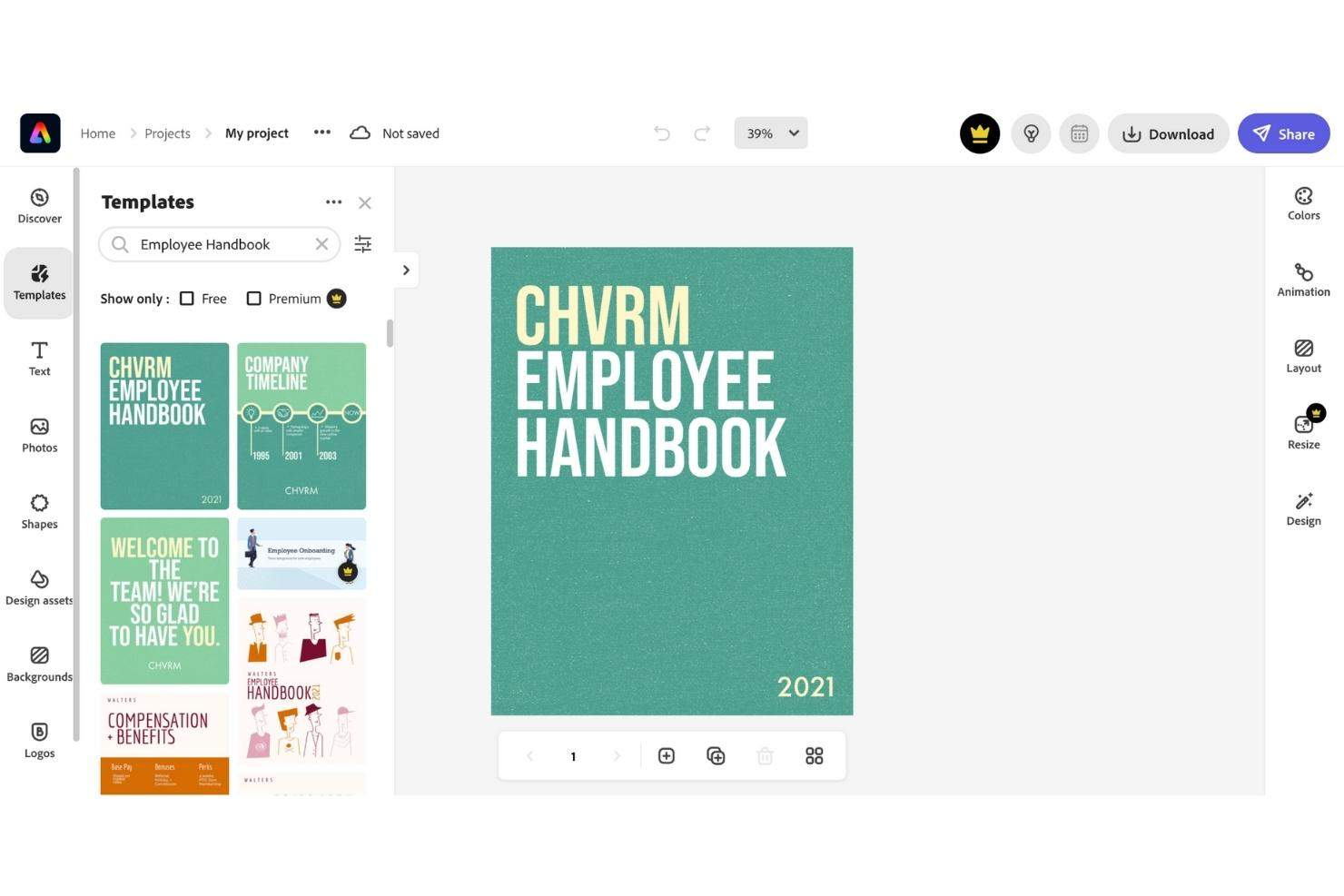
Adobe Express offre ai team delle risorse umane e ai leader aziendali un modo semplice per creare manuali dei dipendenti visivamente accattivanti, aiutando le organizzazioni a presentare politiche e cultura in un formato sia professionale che accessibile.
Per chi è Adobe Express?
Adobe Express è perfetto per piccole e medie imprese e team HR che desiderano realizzare manuali dei dipendenti curati e in linea con il brand senza dipendere da un designer dedicato.
Perché ho scelto Adobe Express
Adobe Express si guadagna un posto nella mia lista dei migliori grazie alla qualità di design che mette a disposizione senza il bisogno di un grafico. Apprezzo molto la libreria di modelli di manuali professionali che puoi personalizzare con i colori, il logo e i font del tuo brand in pochi clic. La funzione brand kit è particolarmente utile—applica automaticamente gli elementi del tuo marchio a tutto il documento, così ogni pagina risulta coerente. Utilizzo anche lo strumento di ridimensionamento per produrre sia una versione in formato lettera per la stampa che un pratico tascabile dallo stesso progetto.
Funzionalità chiave di Adobe Express
- Editor drag-and-drop: Costruisci e riorganizza le pagine del manuale con un editor visuale che non richiede competenze di design o di codifica.
- Librerie di foto e icone: Accedi a una libreria integrata di foto stock, icone e grafiche per supportare visivamente il contenuto del manuale.
- Strumenti di collaborazione: Invita i membri del team a revisionare e modificare le bozze del manuale in tempo reale all’interno della piattaforma.
- Esportazione PDF e condivisione via link: Esporta il manuale finito in PDF o condividilo tramite link diretto per una distribuzione facile.
Integrazioni di Adobe Express
Le integrazioni includono Adobe Creative Cloud, Adobe Experience Manager Assets, Adobe Acrobat, Marketo Engage, Salesforce, Google Drive, Microsoft OneDrive, Dropbox, TikTok, Instagram e Facebook.
Pros and Cons
Pros:
- Molto personalizzabile
- Ampia gamma di modelli
- Design a livello professionale
Cons:
- L’app mobile è lenta
- Meno intuitivo rispetto ad altri strumenti
Visme
Il miglior software per manuali del dipendente con funzionalità di presentazione professionale
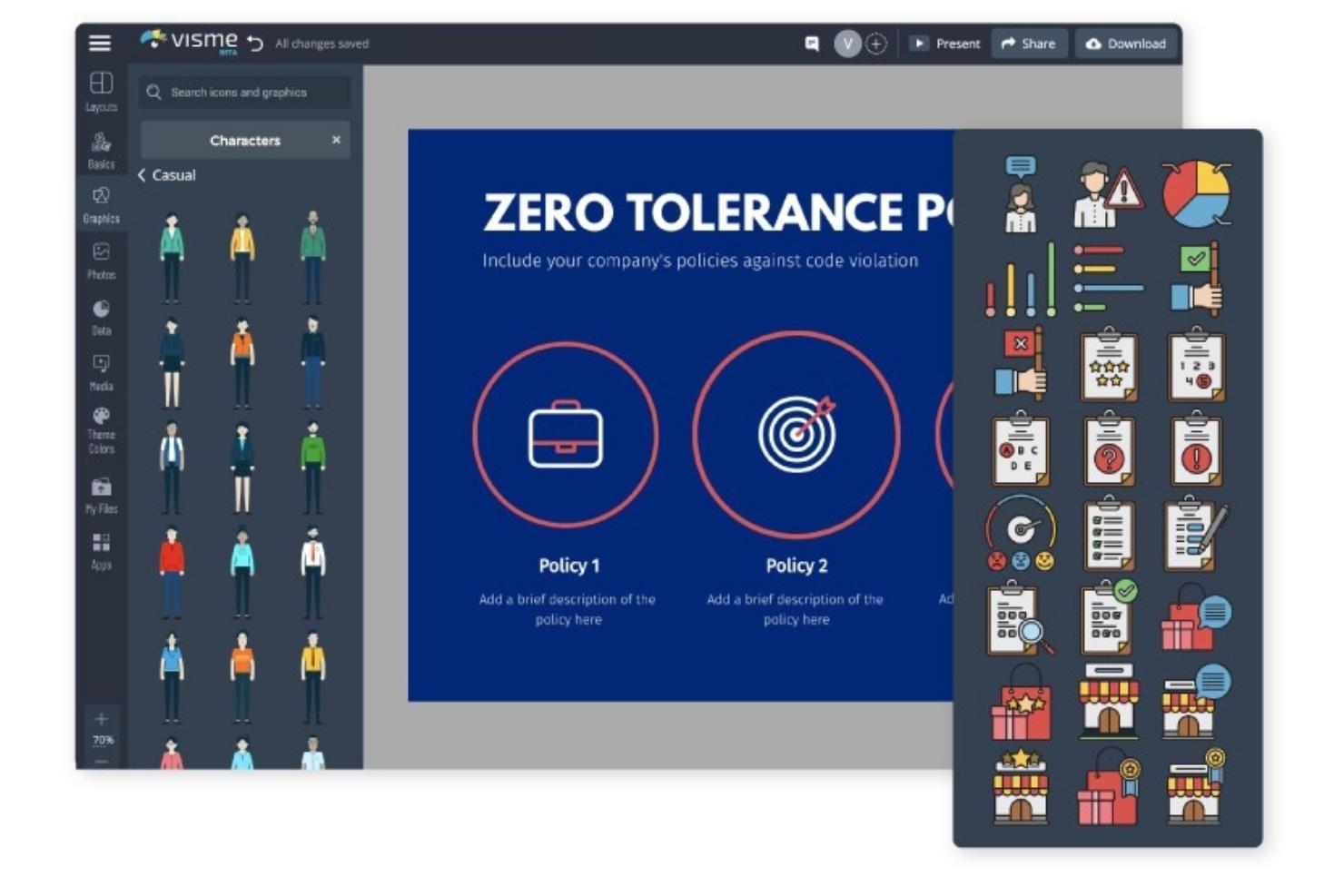
Visme ha la missione di aiutare chi non è designer a creare manuali per dipendenti di qualità con un impatto visivo. Grazie al builder di Visme, chiunque può realizzare un documento coinvolgente e piacevole rapidamente e con facilità.
Perché ho scelto Visme: Partendo da un modello di presentazione professionale, i creatori possono selezionare gli elementi principali e adattarli secondo le necessità. Tutte le componenti sono personalizzabili per rispecchiare l'organizzazione in questione. È semplice caricare e aggiungere font, colori, immagini e loghi aziendali.
Il builder include una selezione di personaggi animati e icone che arricchiscono le informazioni e danno vita al manuale. I creatori possono rappresentare la cultura aziendale personalizzando i personaggi in diverse pose accanto a caselle di testo e visualizzazioni di dati.
Caratteristiche distintive e integrazioni di Visme
Caratteristiche includono diagrammi di flusso, un pianificatore social, interattività e uno studio professionale per le presentazioni.
Integrazioni disponibili nativamente includono Dropbox, GIPHY, Google Drive, HubSpot, JotForm, Salesforce, Typeform, Unsplash, Vimeo e YouTube.
Pros and Cons
Pros:
- Video tutorial utili
- Ampia libreria multimediale
- Eccellenti elementi grafici
Cons:
- Più costoso rispetto alle alternative
- Modifica delle immagini limitata
AirMason
Il miglior software per il manuale del dipendente per importare le tue policy esistenti
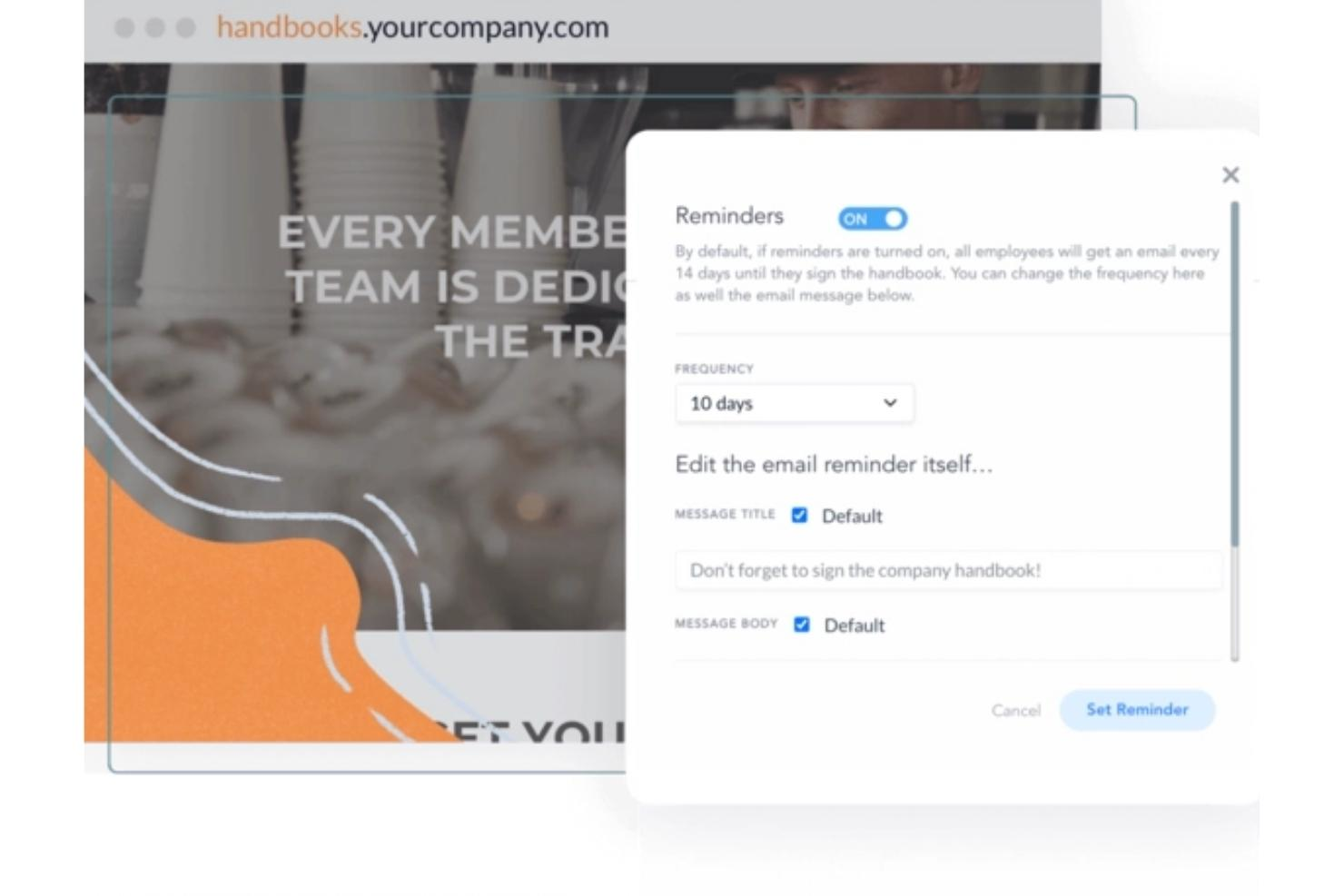
AirMason è una piattaforma digitale per la gestione dei manuali del dipendente, pensata per i team HR e i leader aziendali che desiderano creare, aggiornare e distribuire manuali coinvolgenti e conformi, ai quali i dipendenti possono accedere e dare conferma online.
Per Chi è Ideale AirMason?
AirMason è indicato per i team HR di aziende di piccole e medie dimensioni che necessitano di uno strumento dedicato alla creazione e gestione di manuali del dipendente raffinati e brandizzati.
Perché Ho Scelto AirMason
Ho scelto AirMason tra i migliori perché facilita notevolmente il passaggio da vecchi documenti Word e PDF a un manuale digitale moderno. Puoi caricare direttamente il tuo manuale esistente sulla piattaforma e il team interno di designer di AirMason può riformattarlo in un documento interattivo e brandizzato senza dover partire da zero. Inoltre, ciò che apprezzo è che, una volta importate le policy, il controllo versioni e la modifica in tempo reale permettono di pubblicare sempre i contenuti più aggiornati—basta inviare PDF aggiornati via email o chiedersi quale versione hanno letto i dipendenti. Il monitoraggio automatico degli aggiornamenti normativi, infine, segnala i cambiamenti rilevanti a livello statale e federale così che le policy importate rimangono sempre attuali dopo la pubblicazione.
Funzionalità Principali di AirMason
- Raccolta di firme elettroniche: I dipendenti possono firmare direttamente all’interno del manuale digitale, con un’opzione che richiede loro di arrivare alla fine prima di firmare.
- Permessi automatici e distribuzione: Assegna i documenti a specifici gruppi di dipendenti in base a criteri come sede o reparto, così ogni persona vede solo le informazioni pertinenti.
- AirAssist AI HR assistant: Un chatbot AI formato sulle policy aziendali che risponde in tempo reale alle domande dei dipendenti ed eventualmente coinvolge il team HR.
- Incorporamento di contenuti multimediali: Aggiungi video, GIF e immagini personalizzate direttamente nelle pagine del manuale per renderlo più coinvolgente.
Integrazioni AirMason
Le integrazioni includono BambooHR, ADP, Workday, UKG, Gusto, Rippling, Okta, Google Workspace e Microsoft Azure Active Directory.
Pros and Cons
Pros:
- Completamente personalizzabile
- Visivamente accattivante
- Favorevole al coinvolgimento dei dipendenti
Cons:
- Nessuna possibilità di esportare in PDF
- Opzioni di design della cornice limitate
MyHub
Ideale per creare manuali dei dipendenti digitali e scaricabili

MyHub è una piattaforma intranet basata sul cloud pensata per i team HR e i leader aziendali che necessitano di una soluzione centralizzata per creare, gestire e condividere manuali dei dipendenti e documenti fondamentali per il luogo di lavoro.
A chi è rivolto MyHub?
MyHub è particolarmente indicato per piccole e medie imprese che cercano un modo semplice per creare e distribuire documentazione interna senza avere un team IT dedicato.
Perché ho scelto MyHub
Ho scelto MyHub tra i migliori strumenti per la gestione completa del ciclo di vita di un manuale del dipendente: dalla creazione all’aggiornamento nel tempo. Apprezzo il fatto che il builder drag-and-drop permetta ai team HR di strutturare i contenuti del manuale in sezioni chiaramente definite e ricercabili, così i dipendenti possono passare subito alla policy che cercano senza dover scorrere un unico documento. Ciò consente al mio team di aggiornare facilmente solo una sezione specifica, ad esempio una policy aggiornata sulle ferie, senza dover intervenire sulle altre parti del manuale. Il modulo di condivisione file consente anche di archiviare versioni scaricabili direttamente sull’intranet, così i dipendenti possono ottenere una copia PDF ogni volta che ne hanno bisogno.
Funzionalità principali di MyHub
- Letture obbligatorie e avvisi: Contrassegna pagine specifiche del manuale o aggiornamenti di policy come letture obbligatorie, così i dipendenti sono tenuti a prenderne visione prima di proseguire.
- Moduli automatizzati: Crea moduli digitali direttamente all’interno dell’intranet per raccogliere firme o conferme dei dipendenti legate ai contenuti del manuale.
- Libreria modelli: Accedi a oltre 60 template preconfezionati per strutturare rapidamente le sezioni del manuale senza partire da zero.
- Metriche di utilizzo: Traccia quali pagine del manuale vengono visitate dai dipendenti e con quale frequenza, così puoi individuare eventuali lacune nell’attenzione verso le policy principali.
Integrazioni di MyHub
Le integrazioni includono Microsoft 365, Google Workspace, Canva e i più diffusi provider di single sign-on come Okta e Azure Active Directory.
Pros and Cons
Pros:
- Offre modelli personalizzabili per soddisfare le diverse esigenze aziendali
- Consente personalizzazioni per il branding aziendale
- La piattaforma è scalabile da piccole a grandi organizzazioni
Cons:
- Il requisito minimo di 50 utenti potrebbe non essere adatto a team più piccoli
- Integrazioni limitate con software di terze parti
ProProfs
Miglior software per manuali del personale per accesso in mobilità
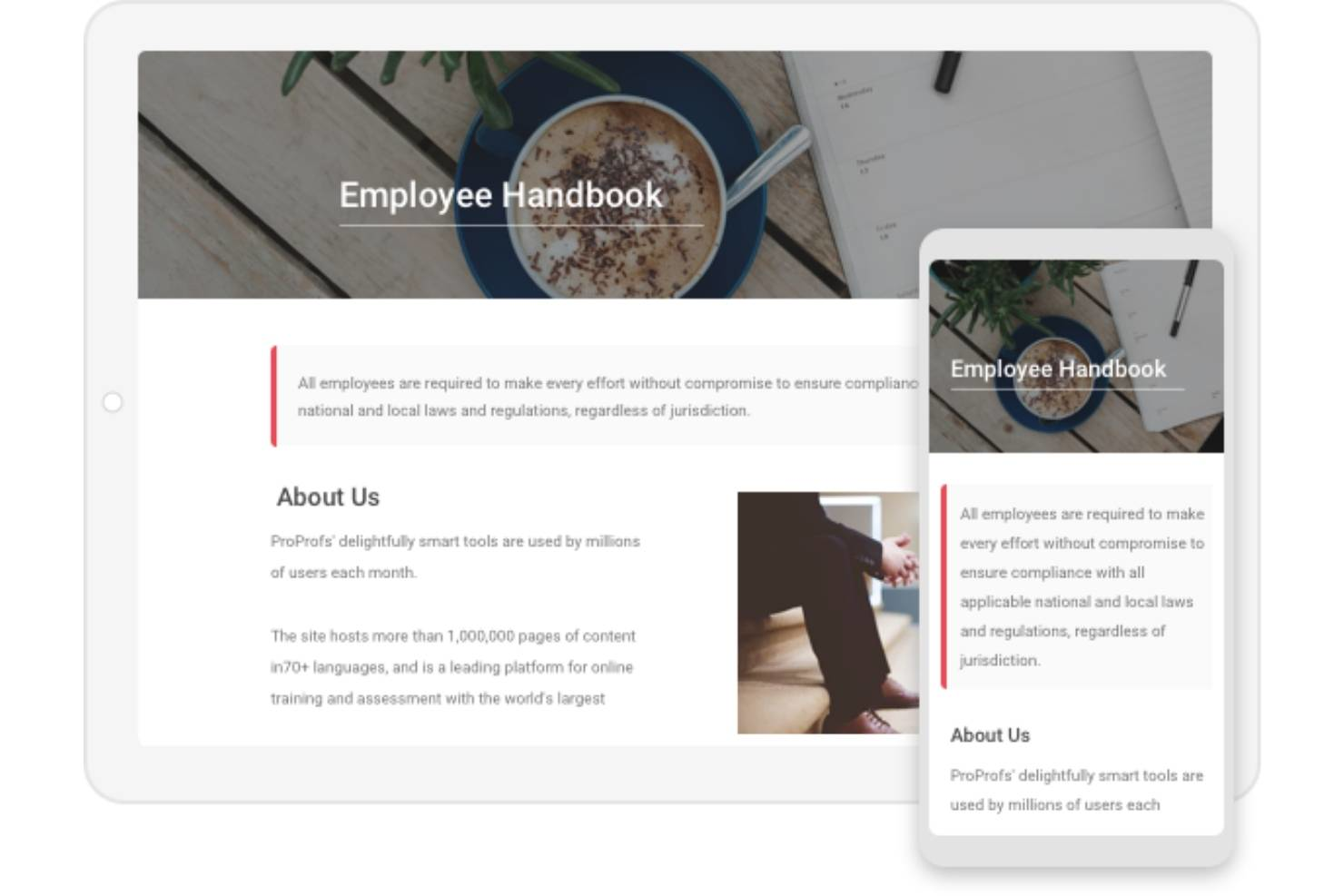
ProProfs aiuta i team HR e i dirigenti aziendali a creare, gestire e condividere manuali digitali per i dipendenti che possono essere aggiornati senza competenze tecniche e sono accessibili su qualsiasi dispositivo, mantenendo le policy sempre aggiornate e il personale informato.
Per chi è ProProfs?
ProProfs è adatto per piccole e medie imprese che hanno bisogno di una soluzione semplice per creare e distribuire manuali per i dipendenti senza una grande curva di apprendimento.
Perché ho scelto ProProfs
ProProfs si guadagna un posto tra i migliori nella mia lista per la gestione efficace dell'accesso in mobilità a beneficio di personale distribuito o senza postazione fissa. Mi piace che i dipendenti possano consultare il manuale da qualsiasi dispositivo—telefono, tablet o desktop—senza dover scaricare nulla o effettuare l'accesso ad un'app separata. Il formato web-based significa che un neoassunto in magazzino o un collaboratore remoto in viaggio tra vari siti può verificare una policy in pochi secondi. Apprezzo anche le regole di accesso condizionale, che mi permettono di controllare esattamente chi può vedere cosa, così che le sezioni sensibili rimangano protette anche quando il manuale è accessibile ovunque.
Funzionalità chiave di ProProfs
- Controllo delle versioni: Tieni traccia delle modifiche ai contenuti, confronta le versioni degli articoli e ripristina versioni precedenti per garantire che il manuale sia sempre accurato.
- Template personalizzabili: Scegli tra oltre 25 modelli di pagina predefiniti e applica logo, font e branding aziendali al manuale.
- Permessi basati sui ruoli: Assegna ruoli di amministratore, collaboratore, autore o editor per controllare chi può creare, modificare o pubblicare i contenuti del manuale.
- Workflow e approvazione degli articoli: Imposta status personalizzati del flusso di lavoro e fai transitare i contenuti del manuale attraverso revisioni e approvazioni prima della pubblicazione.
Integrazioni ProProfs
Le integrazioni native non sono attualmente elencate.
Pros and Cons
Pros:
- Privato e sicuro
- Progettato per l'uso in mobilità
- Supporto multi-dispositivo
Cons:
- Funzionalità di design limitate
- Offre un solo template
Altri strumenti per manuali dei dipendenti
Ecco alcune altre opzioni che non sono entrate nell'elenco dei migliori software per manuali dei dipendenti:
- Confluence
Il miglior software per manuali dei dipendenti per chi già utilizza Atlassian
- Guru
Il miglior software per manuali dei dipendenti per creare manuali digitali in stile wiki
- SHRM Employee Handbook Builder
Il miglior software per manuali del dipendente con strumento di creazione delle politiche drag-and-drop
- Waybook
Ideale per gestire politiche, formazione e onboarding in un unico posto
- Compass
Ideale per la gestione centralizzata dei documenti
- Employee Manual Builder
Il miglior software per manuali che include politiche specifiche per stato
- Blissbook
Il miglior software per manuali del dipendente con gestione progetti integrata
- Handbooks.io
Il miglior software per manuali con politiche pre-caricate e linguaggio approvato HR
- Trupeer
Ideale per la documentazione a doppio formato


Recensioni correlate dei software per le risorse umane
Se non hai ancora trovato quello che cerchi, dai un'occhiata a questi altri strumenti correlati che abbiamo testato e valutato:
- Software per le risorse umane
- Software per la gestione delle paghe
- Software per il recruiting
- Servizi per datori di lavoro registrati
- Sistemi di monitoraggio dei candidati
- Software per la gestione della forza lavoro
Come Valuto i Software per Manuali Aziendali
Valuto questi strumenti su due livelli: le capacità di base che devono avere—come le librerie di politiche supportate legalmente e il tracciamento delle firme elettroniche—e i fattori differenzianti che rendono un'opzione più adatta rispetto a un'altra.
Funzionalità di Base (Requisiti Fondamentali per Questa Lista)
Quando seleziono gli strumenti per la mia lista, valuto ciascuno su una scala da 0 (non offre la funzionalità) a 5 (eccelle in quest'area) per ogni funzionalità di base elencata di seguito. Poi calcolo il punteggio totale dello strumento in percentuale. Ogni strumento deve raggiungere un punteggio totale minimo del 65% per essere considerato per l'inclusione.
- Modelli e Generatore di Manuali: Cerco generatori guidati e modelli preimpostati che permettono di assemblare un manuale in base alla dimensione, al settore e alla struttura della tua azienda.
- Libreria di Politiche Conforme: La libreria di politiche di ciascuno strumento dovrebbe includere contenuti verificati legalmente che coprano argomenti di diritto del lavoro come PTO, anti-molestie e permessi.
- Firma Elettronica e Tracciamento delle Adozioni: Verifico se lo strumento cattura le firme dei dipendenti con data, ora e tracciabilità degli audit che si possono consultare durante una revisione di conformità.
- Controllo Versioni e Aggiornamenti: Quando le politiche cambiano, valuto come ogni strumento gestisce le revisioni, traccia cosa è cambiato e attiva i flussi di lavoro di ri-approvazione.
- Distribuzione Digitale e Accesso: I dipendenti dovrebbero poter accedere al manuale tramite web o mobile senza difficoltà o dover richiedere un PDF alle Risorse Umane.
- Personalizzazione Multi-Giurisdizionale: Per i team distribuiti, valuto se la piattaforma supporta variazioni di politiche basate sulla posizione tra stati o regioni.
Una volta ottenuta una lista di strumenti che soddisfano i criteri, considero cosa distingue ciascuna piattaforma.
Fattori Differenzianti (Cosa Distingue i Fornitori)
Ecco come confronto diversi fornitori:
Funzionalità Distintive
Presto molta attenzione a se una piattaforma offre la redazione di politiche assistita dall'intelligenza artificiale, il che può risparmiare ore nella creazione iniziale del manuale. L'accesso alla revisione da parte di un avvocato è un altro grande fattore differenziante—alcuni strumenti ti collegano con avvocati del lavoro che verificano le tue politiche prima della pubblicazione. Anche le integrazioni native con sistemi HRIS e payroll sono rilevanti, poiché distribuire automaticamente i manuali ai nuovi assunti durante l'onboarding elimina il follow-up manuale. I cruscotti di conformità che evidenziano le mancate adesioni completano ciò che cerco.
Oltre le Funzionalità
La copertura legale ha importanza—valuto se la libreria di politiche di un fornitore è mantenuta da avvocati del lavoro e quanto spesso gli aggiornamenti riflettono le nuove normative. Anche l'adattabilità alla dimensione e al settore della tua azienda è rilevante, poiché una startup di 20 persone e una società di ospitalità con 500 dipendenti hanno esigenze di manuale molto diverse. Il supporto all'implementazione è un altro fattore che considero. Alcune piattaforme offrono la creazione del manuale "chiavi in mano", mentre altre sono totalmente self-service, e l'approccio giusto dipende dalla disponibilità del tuo team.
Che cos'è un software per manuali dei dipendenti?
Il software per i manuali dei dipendenti è uno strumento digitale per creare, aggiornare e distribuire i manuali aziendali e i documenti relativi alle politiche a tutti i dipendenti. Sostituisce i processi manuali obsoleti e garantisce una comunicazione efficiente e coerente delle politiche, delle procedure e degli aggiornamenti aziendali, con funzionalità integrate di monitoraggio della conformità per verificare quando il personale ha letto le informazioni.
Il software per i manuali dei dipendenti rende il processo di creazione di nuove politiche o di aggiornamento di quelle esistenti molto più rapido, aumentando l'efficienza del reparto Risorse umane. Offre inoltre una modalità più coerente e accessibile per trasmettere le informazioni aziendali ai dipendenti, creando un'esperienza migliore.
A seconda del settore, un altro grande vantaggio è rappresentato dalle funzionalità integrate di monitoraggio della conformità e conservazione dei registri, che dimostrano che i dipendenti hanno letto e sottoscritto le informazioni obbligatorie: una caratteristica molto importante per i settori sensibili alla sicurezza.
Funzionalità
Creare, gestire e distribuire i manuali dei dipendenti non deve essere complicato. Il software giusto può semplificare l'intero processo, garantendo conformità, accessibilità e coerenza. Ecco le funzionalità più importanti da cercare quando si valuta un software per i manuali dei dipendenti:
- Gestione centralizzata dei documenti: Un archivio centralizzato conserva tutte le versioni del manuale in un unico luogo, così i dipendenti e il personale delle Risorse umane possono accedere facilmente alle politiche più recenti.
- Creazione del manuale: Gli utenti dovrebbero poter creare facilmente un manuale dei dipendenti da zero utilizzando una procedura guidata integrata.
- Modelli personalizzabili: Per risparmiare tempo nella creazione di un manuale da zero, lo strumento dovrebbe offrire modelli personalizzabili con il marchio aziendale e altri dettagli essenziali.
- Modifica: Qualsiasi strumento software per i manuali dei dipendenti dovrebbe consentire di aggiornare le informazioni in modo rapido e semplice.
- Controllo delle versioni delle politiche: Il controllo delle versioni aiuta a monitorare le modifiche nel tempo, garantendo accuratezza e coerenza negli aggiornamenti delle politiche.
- Strumenti di collaborazione: Questi strumenti consentono ai team delle Risorse umane e alle parti interessate di lavorare insieme senza problemi, facilitando la revisione, la modifica e l'approvazione degli aggiornamenti del manuale.
- Condivisione: Dovrebbero esserci diversi modi per condividere il manuale con i dipendenti, anche attraverso i social network.
- Notifiche: Tutti i dipendenti devono ricevere notifiche quando il manuale viene aggiornato.
- Aggiornamenti sulla conformità: Il monitoraggio integrato della conformità garantisce che il manuale rimanga aggiornato rispetto alle leggi e ai regolamenti sul lavoro, riducendo il rischio di problemi legali.
- Contenuti ricercabili: La funzionalità di ricerca consente ai dipendenti di trovare rapidamente informazioni specifiche, migliorando l'utilizzo del manuale e riducendo le domande ripetitive rivolte alle Risorse umane.
Trovare un software con queste funzionalità renderà più semplice gestire in modo efficiente il manuale dei dipendenti, garantendo al contempo che rimanga accessibile, accurato e conforme. Lo strumento giusto può trasformare un'attività scoraggiante in un processo semplificato, mantenendo la squadra informata e allineata.
Domande frequenti
Ecco alcune risposte alle domande comuni riguardanti il software per i manuali dei dipendenti e il suo funzionamento:
Perché il software per i manuali dei dipendenti è importante?
Scegliere il software giusto per i manuali dei dipendenti è una decisione importante per qualsiasi organizzazione. È essenziale che tutti i lavoratori siano sulla stessa linea, comprendano i valori fondamentali dell'azienda e lavorino per raggiungere gli stessi obiettivi.
Un manuale dei dipendenti è uno strumento fondamentale per raggiungere questo obiettivo, poiché raccoglie tutte le informazioni necessarie in un unico documento che può essere condiviso con tutte le parti interessate. Tuttavia, i manuali tradizionali presentano dei limiti. Che siano cartacei o in formato PDF, diventano rapidamente obsoleti e spesso vengono dimenticati e trascurati.
Il software per i manuali dei dipendenti risolve questo problema rendendo molto più semplice creare, aggiornare e condividere i manuali aziendali.
Quali sono i principali vantaggi di un manuale dei dipendenti?
Un manuale dei dipendenti aggiornato e gestito correttamente offre numerosi vantaggi, tra cui:
- Inserimento migliorato: inserimento e formazione più rapidi ed efficienti di tutti i nuovi assunti
- Un'unica fonte affidabile: una fonte condivisa di informazioni aziendali che elimina la confusione
- Consultazione: tutti i dipendenti dovrebbero avere un accesso rapido alle informazioni critiche quando ne hanno bisogno
- Conformità: conferma dei dettagli precisi su questioni essenziali come le politiche e le procedure operative standard
- Protezione: un manuale dei dipendenti ben strutturato riduce il rischio di controversie legali dovute a dipendenti non adeguatamente informati
Quali sezioni o argomenti chiave dovrebbe includere un manuale del dipendente?
Un buon manuale del dipendente includerà sezioni dedicate a:
- Nozioni di base sul rapporto di lavoro
- Aspettative sul luogo di lavoro
- Codice di condotta
- Pari opportunità di lavoro
- Retribuzione e sviluppo
- Benefit e vantaggi
- Assicurazione sanitaria e congedo per motivi di salute
- Codice di abbigliamento
- Politiche sul lavoro da remoto
- Dimissioni e licenziamento dei dipendenti
- Orario di lavoro, permessi retribuiti e ferie
Per aiutarti a iniziare, dai un'occhiata ai nostri articoli che presentano un elenco delle politiche e procedure HR essenziali e altri esempi di politiche HR.
Altre risorse
Se hai trovato utile questo articolo, potrebbe interessarti leggere anche articoli simili sul nostro sito, come Il caso a favore di un nuovo manuale del dipendente (e cosa includere) e La guida definitiva ai manuali del dipendente (+ un modello gratuito).
Inoltre, ti consiglio di familiarizzare anche con queste migliori pratiche per i manuali del dipendente.
Se hai bisogno di aiuto per gestire più delle sole politiche HR (come, ad esempio, le politiche in materia di salute e sicurezza o le procedure di lavoro sicuro), potresti scoprire che il software per la gestione delle politiche è più adatto, poiché può essere utilizzato in modo più ampio.