

Le 10 migliori piattaforme di apprendimento online nel 2026

Elenco delle migliori piattaforme per l'apprendimento online


Le piattaforme per l'apprendimento online sono strumenti digitali che consentono di accedere a corsi, formazione e risorse educative da qualsiasi luogo. Se stai cercando le migliori piattaforme per l'apprendimento online, probabilmente vuoi sviluppare nuove competenze, sostenere la crescita del tuo team o trovare modi flessibili per imparare nuovi argomenti. Con così tante opzioni disponibili, è difficile sapere quali piattaforme offrano la giusta combinazione di contenuti di qualità, esperienza utente e funzionalità adatte alle tue esigenze. Questa guida ti aiuterà a confrontare le principali piattaforme, a capire cosa distingue ciascuna di esse e a fare una scelta consapevole in linea con i tuoi obiettivi di apprendimento nel 2026.
Perché fidarsi delle nostre recensioni sui software
Il nostro team testa e recensisce software dal 2012. In quanto esperti HR noi stessi, sappiamo quanto sia difficile — e importante — scegliere il software giusto.
Per questa guida, abbiamo valutato gli strumenti attraverso test pratici e ricerche indipendenti, assegnando un punteggio agli strumenti in base ai nostri criteri di selezione. Ci basiamo inoltre sulle competenze di leader di pensiero del settore e di professionisti HR attivi.
Le nostre recensioni riflettono il nostro giudizio editoriale umano, non un discorso di vendita.
Revisori esperti:
Tabella comparativa delle piattaforme per l'apprendimento online
Questa tabella comparativa riassume i dettagli sui prezzi delle mie migliori selezioni di piattaforme per l’apprendimento online:
| Tool | Best For | Trial Info | Price | ||
|---|---|---|---|---|---|
| 1 | Gestione dell'apprendimento semplice e flessibile per team e aziende | Piano gratuito + demo gratuita disponibile | A partire da $119/mese (fatturato annualmente) | Website | |
| 2 | Ideale per la distribuzione rapida di contenuti formativi | Prova gratuita di 30 giorni + demo gratuita disponibile | Da $3,97/utente/mese | Website | |
| 3 | Marketplace molto vasto di corsi per lo sviluppo professionale e personale | Prova gratuita disponibile | Da $35/mese | Website | |
| 4 | Piattaforma di apprendimento potenziata dall'IA per la formazione aziendale | Demo gratuita disponibile | Prezzo su richiesta | Website | |
| 5 | Piattaforma tutto-in-uno per corsi online e membership | Prova gratuita di 14 giorni disponibile | Da $71/mese (fatturato annualmente) | Website | |
| 6 | Creazione e vendita di corsi semplice per individui e aziende | Prova gratuita disponibile | Da $29/mese | Website | |
| 7 | Corsi di sviluppo professionale integrati con i profili LinkedIn | Prova gratuita disponibile | A partire da $39.99/mese | Website | |
| 8 | Piattaforma di apprendimento collaborativo per team moderni | Demo gratuita disponibile | Da $8/utente/mese (fatturazione annuale) | Website | |
| 9 | Corsi universitari da istituzioni di eccellenza | Piano gratuito disponibile | Prezzo su richiesta | Website | |
| 10 | Apprendimento gratuito e basato sulla padronanza per tutte le età | Piano gratuito disponibile | Da $4/mese | Website |


Recensioni delle migliori piattaforme per l'apprendimento online
Di seguito sono riportati i miei riepiloghi dettagliati delle migliori piattaforme per l’apprendimento online incluse nel mio elenco. Le mie recensioni offrono una panoramica approfondita delle funzionalità, dei casi d’uso ideali e dei prezzi di ciascuna piattaforma, per aiutarti a trovare quella più adatta a te.

Gestione dell'apprendimento semplice e flessibile per team e aziende
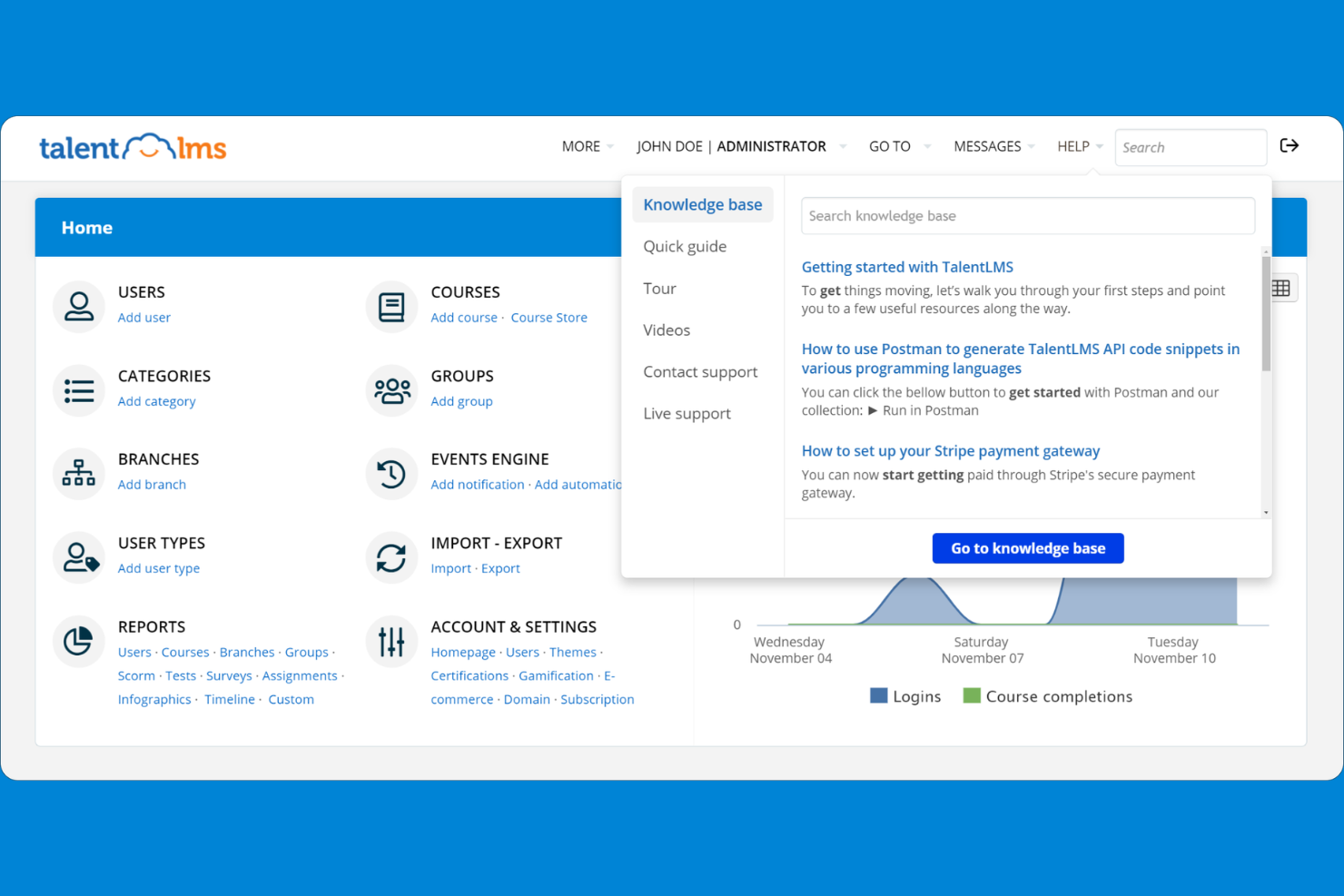
TalentLMS è un sistema di gestione dell'apprendimento basato su cloud, progettato per aziende e organizzazioni che desiderano erogare formazione su larga scala. È ideale per i team HR e i formatori che cercano strumenti personalizzabili per la creazione di corsi, la gestione degli utenti e la reportistica.
Per chi è più indicato TalentLMS?
TalentLMS è ideale per i team HR e i formatori di piccole e medie imprese che cercano soluzioni di formazione online scalabili.
Perché ho scelto TalentLMS
Ho scelto TalentLMS perché offre un'esperienza di gestione dell'apprendimento semplice e flessibile, adatta alle esigenze di team in crescita. Mi piace poter creare e assegnare rapidamente corsi a diversi gruppi di utenti e monitorare i loro progressi in tempo reale. I percorsi personalizzabili e i portali di apprendimento su misura della piattaforma aiutano il mio team a offrire una formazione mirata per i vari reparti. In pratica, questa flessibilità ci permette di adattare i nostri programmi di formazione man mano che l'azienda evolve.
Caratteristiche principali di TalentLMS
- Supporto SCORM e xAPI: Importa ed eroga contenuti formativi interattivi conformi agli standard.
- Motore di valutazione: Crea quiz, test e sondaggi direttamente nei corsi.
- Integrazione per videoconferenze: Collegati a Zoom, Microsoft Teams e Webex per sessioni dal vivo.
- App mobile per l'apprendimento: Gli utenti possono accedere a corsi e materiali da dispositivi iOS e Android.
Integrazioni di TalentLMS
Le integrazioni comprendono BambooHR, Salesforce, Zoom, Microsoft Teams, GoTo, ADP Workforce Now, Intercom, Sage People, Shopify e LinkedIn Learning.
Pros and Cons
Pros:
- Supporta gli standard di contenuto SCORM, xAPI e cmi5
- Offre strumenti avanzati di reportistica e analisi
- Si integra con le principali piattaforme HR e video
Cons:
- Funzionalità di gamification avanzata limitate
- L'app mobile manca di alcune funzionalità della versione desktop
New Product Updates from TalentLMS
TalentLMS Adds Learning Paths, AI Video, and Learner Experience Updates
TalentLMS introduced updates across learning management, content creation, and learner experience, including Learning Paths for Groups, AI video generation in TalentCraft, video bookmarking, and expanded administration tools. For more information, visit TalentLMS’s official site.

Ideale per la distribuzione rapida di contenuti formativi

iSpring LMS è una piattaforma di apprendimento online dotata di una suite di creazione corsi integrata, strumenti per la creazione di contenuti tramite intelligenza artificiale, percorsi di apprendimento, gamification e strumenti per la valutazione delle performance, tutto in un unico luogo.
Per chi è ideale iSpring LMS?
iSpring LMS è particolarmente indicato per i team HR e L&D (formazione e sviluppo) di aziende di medie dimensioni che devono creare, gestire e monitorare la formazione dei dipendenti senza un lungo processo di configurazione.
Perché ho scelto iSpring LMS
iSpring LMS è una delle mie scelte principali perché apprezzo la rapidità con cui si passa da zero a una formazione attiva. Il creatore di corsi AI integrato permette di caricare i propri file, descrivere l’argomento e ottenere una bozza di corso completa con verifiche delle conoscenze in qualsiasi lingua. Inoltre, la libreria di corsi pronta all’uso di iSpring Academy consente di assegnare immediatamente formazione su compliance, vendita o leadership, senza dover creare nulla da zero. Le regole di auto-iscrizione si occupano poi di assegnare automaticamente i corsi ai partecipanti giusti.
Funzionalità principali di iSpring LMS
- Percorsi di apprendimento: Organizza i corsi in sequenze strutturate con capitoli, scadenze e prerequisiti per guidare gli utenti lungo un percorso definito.
- App mobile per l’apprendimento: Gli utenti possono accedere ai corsi su iOS e Android, con una modalità offline che sincronizza i progressi alla riconnessione.
- Gamification: Assegna punti, badge e posizionamenti in classifica agli utenti man mano che completano corsi e valutazioni.
- Importazione contenuti SCORM/xAPI: Carica pacchetti SCORM 1.2, SCORM 2004, xAPI e cmi5 prodotti esternamente direttamente nell’LMS.
Integrazioni di iSpring LMS
iSpring LMS offre integrazioni native con Zoom, Microsoft Teams, Google Meet, BambooHR, OrangeHRM, Salesforce, Microsoft Outlook, Microsoft Entra ID, Shopify, Udemy, Go1, LinkedIn Learning e GoodHabitz, tra gli altri. Si collega anche con Albato per l’automazione dei flussi di lavoro e dispone di una REST API per integrazioni personalizzate.
Pros and Cons
Pros:
- Include un toolkit di creazione corsi integrato
- App mobile offline per iOS e Android
- Implementazione rapida con configurazione minima
Cons:
- Opzioni di personalizzazione di branding e interfaccia basilari
- Libreria di corsi pronti limitata
New Product Updates from iSpring LMS

iSpring LMS Adds Multiple Observations to OJT Sessions
iSpring LMS now lets managers log multiple observations within one OJT session, grouping visits and auto-generating summary stats like averages, criterion results, and comparisons. For more information, visit iSpring LMS's official site.

Marketplace molto vasto di corsi per lo sviluppo professionale e personale
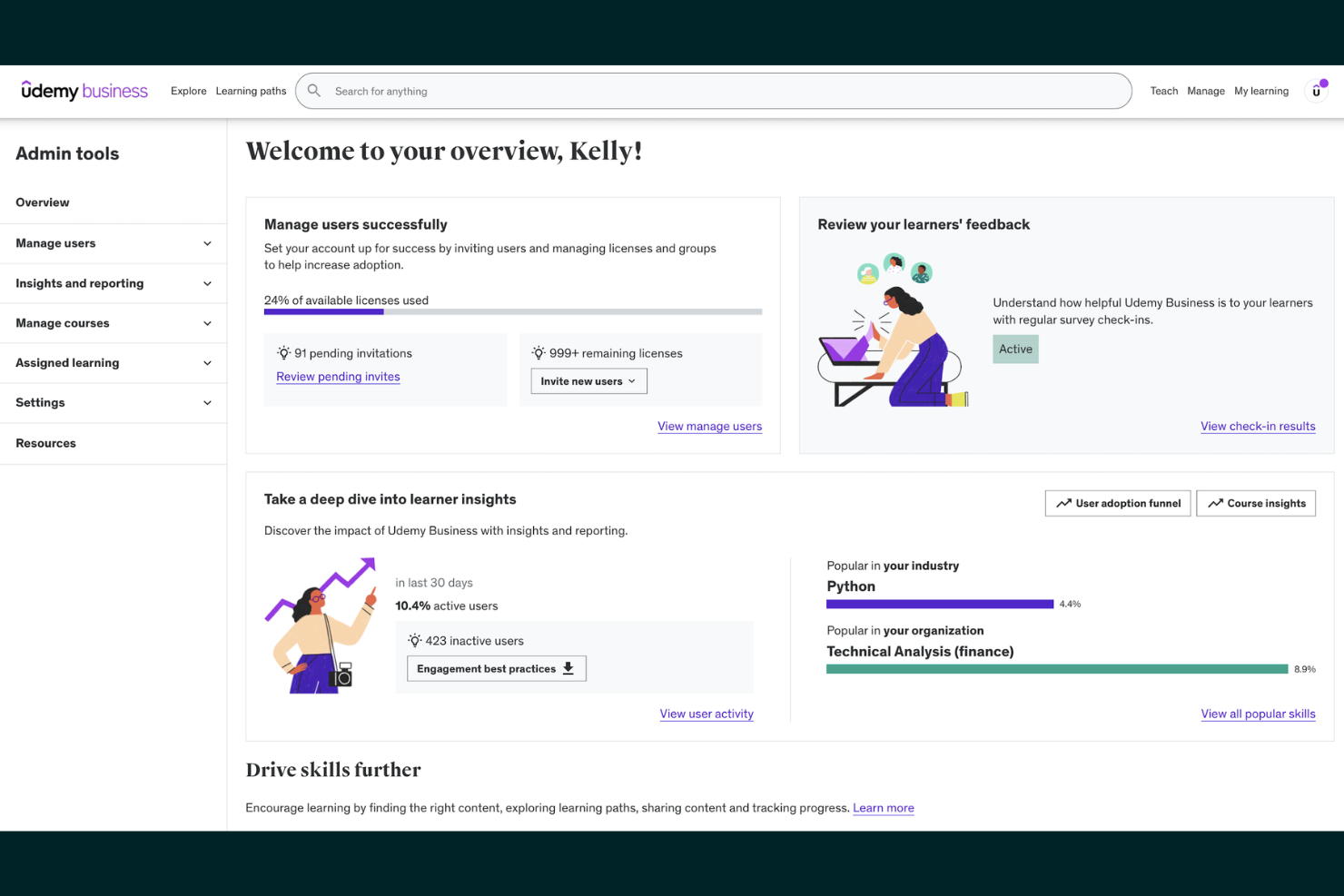
Udemy offre un vasto marketplace di corsi online progettato per professionisti, team e organizzazioni che cercano uno sviluppo delle competenze flessibile. È una soluzione ideale per le aziende che vogliono offrire ai dipendenti l'accesso a una vasta gamma di corsi tecnici e sulle soft skill.
Per chi è più indicato Udemy?
Udemy è adatto a team HR e responsabili aziendali di organizzazioni di qualsiasi dimensione che desiderano offrire ai dipendenti opzioni di apprendimento diversificate e on demand.
Perché ho scelto Udemy
Ho scelto Udemy perché offre un marketplace di corsi molto ampio che copre sia argomenti di sviluppo professionale che personale. Il mio team può trovare rapidamente corsi su tutto, dal project management al benessere, tutto in un unico posto. Apprezzo che i docenti provenienti da vari settori contribuiscano regolarmente con contenuti nuovi e aggiornati. In pratica, questo significa che non siamo mai limitati dal tema o dal livello di difficoltà nel momento in cui assegniamo la formazione.
Funzionalità principali di Udemy
- Monitoraggio dei progressi nei corsi: Gli utenti possono tenere sotto controllo i propri progressi in ogni corso tramite indicatori visivi.
- Accesso tramite app mobile: Gli utenti possono visualizzare e completare i corsi su dispositivi iOS e Android.
- Percorsi di apprendimento personalizzati: Gli amministratori possono assegnare raccolte di corsi curati a individui o team.
- Certificato di completamento: Gli utenti ricevono un certificato digitale al termine del corso.
Integrazioni di Udemy
Le integrazioni includono Microsoft Teams, Slack, LinkedIn Learning, Cornerstone, Degreed e altre ancora.
Pros and Cons
Pros:
- Formati di corso autonomi e con istruttore
- Certificati disponibili per i corsi completati
- L'app mobile consente l'accesso ai corsi offline
Cons:
- I certificati non sono accreditati né standardizzati
- Pochissime integrazioni native con piattaforme HR
Docebo
Piattaforma di apprendimento potenziata dall'IA per la formazione aziendale
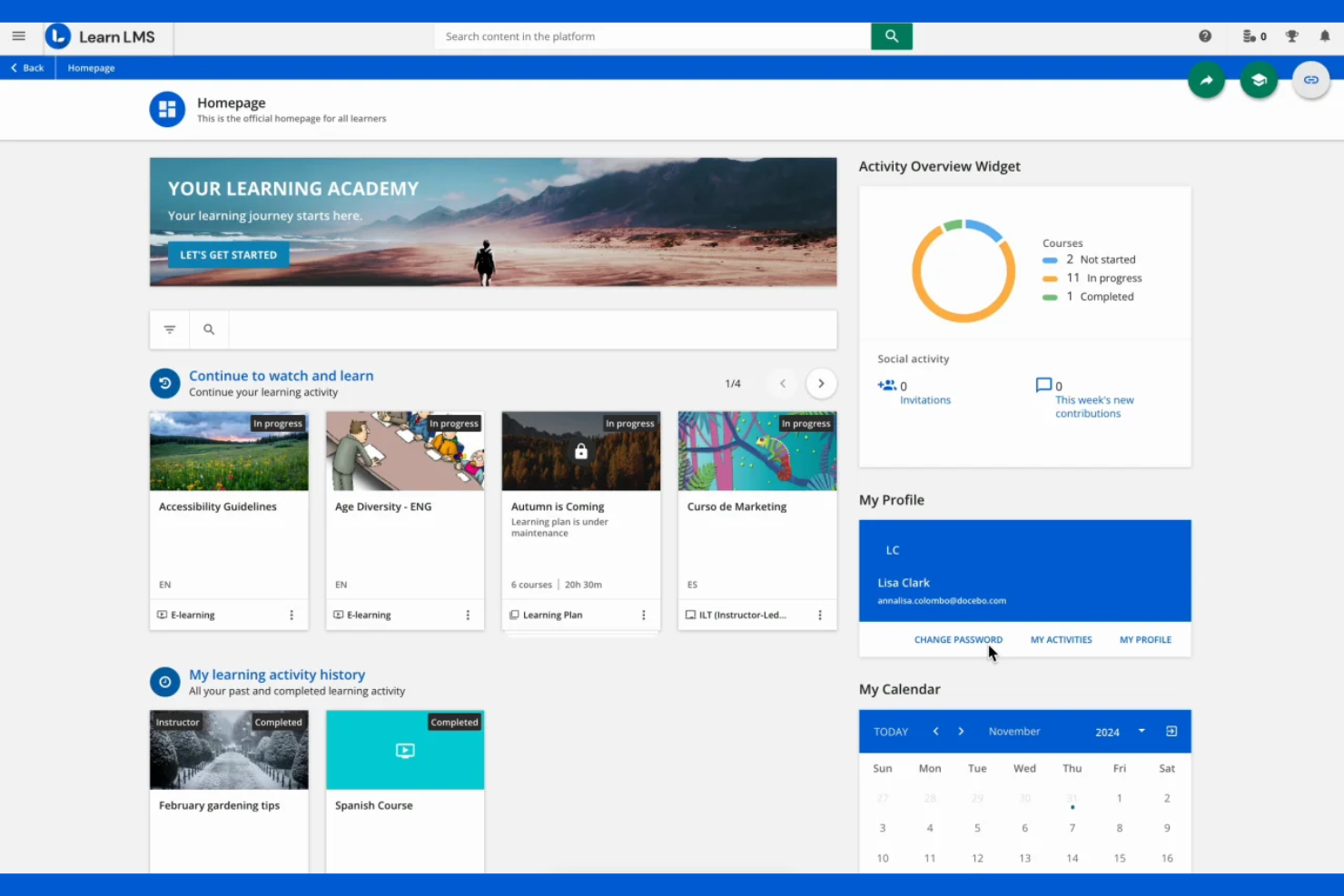
Docebo è una piattaforma di apprendimento basata su cloud progettata per le aziende che necessitano di fornire, gestire e monitorare la formazione dei dipendenti su larga scala. Si rivolge alle organizzazioni che cercano automazione avanzata, gestione dei contenuti e esperienze di apprendimento personalizzate.
Per chi è Docebo?
Docebo è adatto ai team HR e L&D di grandi imprese che richiedono soluzioni di formazione e conformità scalabili e basate sull'intelligenza artificiale.
Perché ho scelto Docebo
Ho scelto Docebo perché la sua piattaforma di apprendimento potenziata dall'IA aiuta il mio team ad automatizzare le raccomandazioni dei contenuti e a personalizzare i percorsi formativi per ogni discente. Mi piace che possiamo utilizzare il suo coach virtuale per rispondere in tempo reale alle domande dei partecipanti. Le avanzate analisi della piattaforma ci permettono di monitorare il coinvolgimento e misurare l'impatto della formazione tra i vari reparti. In pratica, questo significa offrire una formazione mirata e scalabile che si adatta alle esigenze della nostra organizzazione.
Caratteristiche principali di Docebo
- Marketplace di contenuti: Accesso a corsi già pronti forniti da terze parti direttamente sulla piattaforma.
- Gestione delle aule ILT: Pianifica, monitora e gestisci le sessioni di formazione guidate da istruttori.
- Gestione multi-dominio: Crea e gestisci ambienti formativi separati per pubblici o brand differenti.
- Motore di report personalizzati: Crea ed esporta report su misura sui progressi degli utenti e sulle performance dei corsi.
Integrazioni di Docebo
Le integrazioni includono Salesforce, Microsoft Teams, HubSpot, Dropbox, Facebook, Accredible, ADP Workforce Now, BambooHR, Amazon S3 e OpenSesame.
Pros and Cons
Pros:
- Supporta gli standard di contenuto SCORM, xAPI e cmi5
- Offre strumenti avanzati di reportistica e analisi
- Si integra con le principali piattaforme HR e video
Cons:
- La gestione degli utenti può essere complessa per le grandi organizzazioni
- L'app mobile non ha tutte le funzionalità della versione desktop

Kajabi
Piattaforma tutto-in-uno per corsi online e membership

Kajabi offre a creatori, coach e piccole imprese un modo per creare, promuovere e vendere corsi online e prodotti digitali da un'unica piattaforma. È ideale per chi desidera gestire contenuti, pagamenti e coinvolgimento della community senza dover utilizzare più strumenti diversi.
Per chi è ideale Kajabi?
Kajabi è adatto a creatori singoli, coach e piccole imprese che vogliono monetizzare corsi online, membership e prodotti digitali.
Perché ho scelto Kajabi
Ho scelto Kajabi perché permette al mio team di gestire corsi online, membership e prodotti digitali tutto in un unico luogo. Mi piace che possiamo creare landing page, automatizzare il marketing email e gestire i pagamenti senza strumenti di terze parti. L'approccio tutto-in-uno della piattaforma ci evita di dover gestire molteplici abbonamenti o integrazioni. In pratica, questo ci aiuta a lanciare e scalare rapidamente le nostre offerte di formazione online.
Caratteristiche principali di Kajabi
- Spazi community: Crea community online private o pubbliche per gli studenti.
- Quiz e valutazioni: Crea quiz interattivi per valutare le conoscenze e monitorare i progressi.
- Programmazione rilascio contenuti: Rilascia automaticamente i moduli del corso secondo un calendario prestabilito.
- App mobile: Fornisce agli utenti l'accesso a corsi e contenuti sui dispositivi iOS e Android.
Integrazioni di Kajabi
Le integrazioni includono Stripe, PayPal, Mailchimp, ConvertKit, ActiveCampaign, Aweber, Google Analytics, Facebook Pixel, Zapier e ClickFunnels.
Pros and Cons
Pros:
- Website builder e landing page integrati
- Funzionalità di gestione community e membership
- App mobile per studenti e creatori
Cons:
- Nessun marketplace per corsi integrato per la scoperta
- Opzioni limitate per report avanzati e analytics

Creazione e vendita di corsi semplice per individui e aziende

Teachable offre ai creatori, coach e imprenditori una piattaforma per creare e vendere corsi online, coaching e download digitali. È ideale per chi desidera monetizzare le proprie competenze grazie a una consegna dei contenuti flessibile e un sistema di pagamento integrato.
Per chi è ideale Teachable?
Teachable è adatto a creatori singoli, coach e piccole imprese che vogliono lanciare e vendere corsi online o programmi di coaching.
Perché ho scelto Teachable
Ho scelto Teachable perché permette al mio team di creare e vendere corsi rapidamente senza dover aver competenze tecniche. Mi piace che possiamo offrire coaching, download digitali e corsi da un'unica dashboard. Gli strumenti integrati per vendite e checkout rendono semplice monetizzare i contenuti. In pratica, questo significa che possiamo lanciare nuove offerte e gestire i pagamenti senza necessità di plug-in o servizi aggiuntivi.
Funzionalità principali di Teachable
- Controlli di conformità dei corsi: Imposta i requisiti per il completamento delle lezioni e applica la progressione dei contenuti.
- Quiz integrati: Aggiungi quiz valutati o non valutati ai moduli del corso.
- Monitoraggio del progresso degli studenti: Controlla in tempo reale l'attività degli studenti e i tassi di completamento.
- Certificati personalizzati: Rilascia automaticamente certificati di completamento con il tuo brand agli studenti.
Integrazioni di Teachable
Le integrazioni comprendono Mailchimp, ConvertKit, Google Analytics, Segment, Zapier, Facebook Pixel, Sumo, Circle, Accredible e Shopify.
Pros and Cons
Pros:
- Website builder e landing page integrati
- Gestione della community e delle membership
- App mobile per studenti e creatori
Cons:
- Meno integrazioni native rispetto ad alcuni concorrenti
- Non supporta contenuti SCORM o xAPI

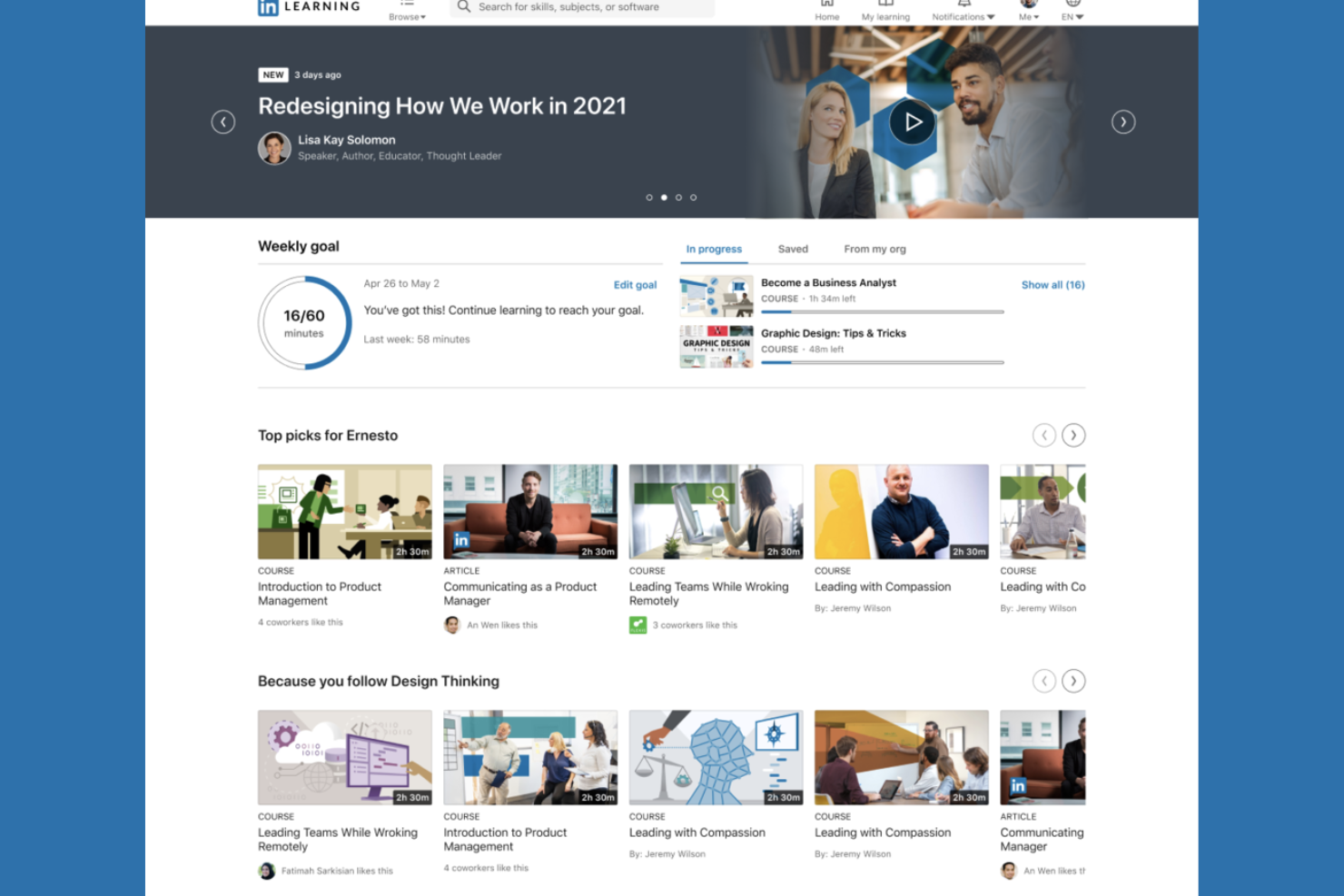
LinkedIn Learning offre una libreria curata di corsi professionali progettati per organizzazioni e individui che desiderano sviluppare competenze in ambito business, tecnologico e creativo. È una scelta solida per i team HR e i leader aziendali che cercano contenuti formativi in linea con la crescita professionale e le tendenze del settore.
A Chi È Rivolto LinkedIn Learning?
Team HR e leader aziendali che cercano contenuti di sviluppo professionale collegati ai profili LinkedIn e alla crescita di carriera.
Perché Ho Scelto LinkedIn Learning
Ho scelto LinkedIn Learning perché collega lo sviluppo professionale direttamente ai profili LinkedIn degli utenti, rendendo visibile il potenziamento delle competenze a datori di lavoro e colleghi. Apprezzo la possibilità che il mio team possa assegnare corsi e monitorare i completamenti all'interno della piattaforma. L'integrazione con la rete LinkedIn fa sì che i risultati ottenuti siano automaticamente mostrati. Questo favorisce concretamente una cultura della crescita e dell'avanzamento di carriera in tutta l'organizzazione.
Caratteristiche Principali di LinkedIn Learning
- Percorsi di apprendimento curati: Gli utenti possono seguire sequenze di corsi strutturate su competenze o ruoli specifici.
- Valutazioni delle competenze: Gli utenti possono testare le proprie conoscenze prima e dopo i corsi.
- Accesso tramite app mobile: I corsi sono disponibili su dispositivi iOS e Android per apprendere ovunque.
- Dashboard di analisi per gli amministratori: Gli amministratori possono visualizzare dati di utilizzo e metriche di coinvolgimento nei corsi.
Integrazioni LinkedIn Learning
Non sono attualmente elencate integrazioni native.
Pros and Cons
Pros:
- Formati di corso flessibili: autonomi e con istruttore
- Certificati disponibili per i corsi completati
- L'app mobile supporta l'accesso ai corsi offline
Cons:
- Qualità dei corsi variabile a seconda dell'istruttore
- Opzioni limitate per sessioni live e interattive

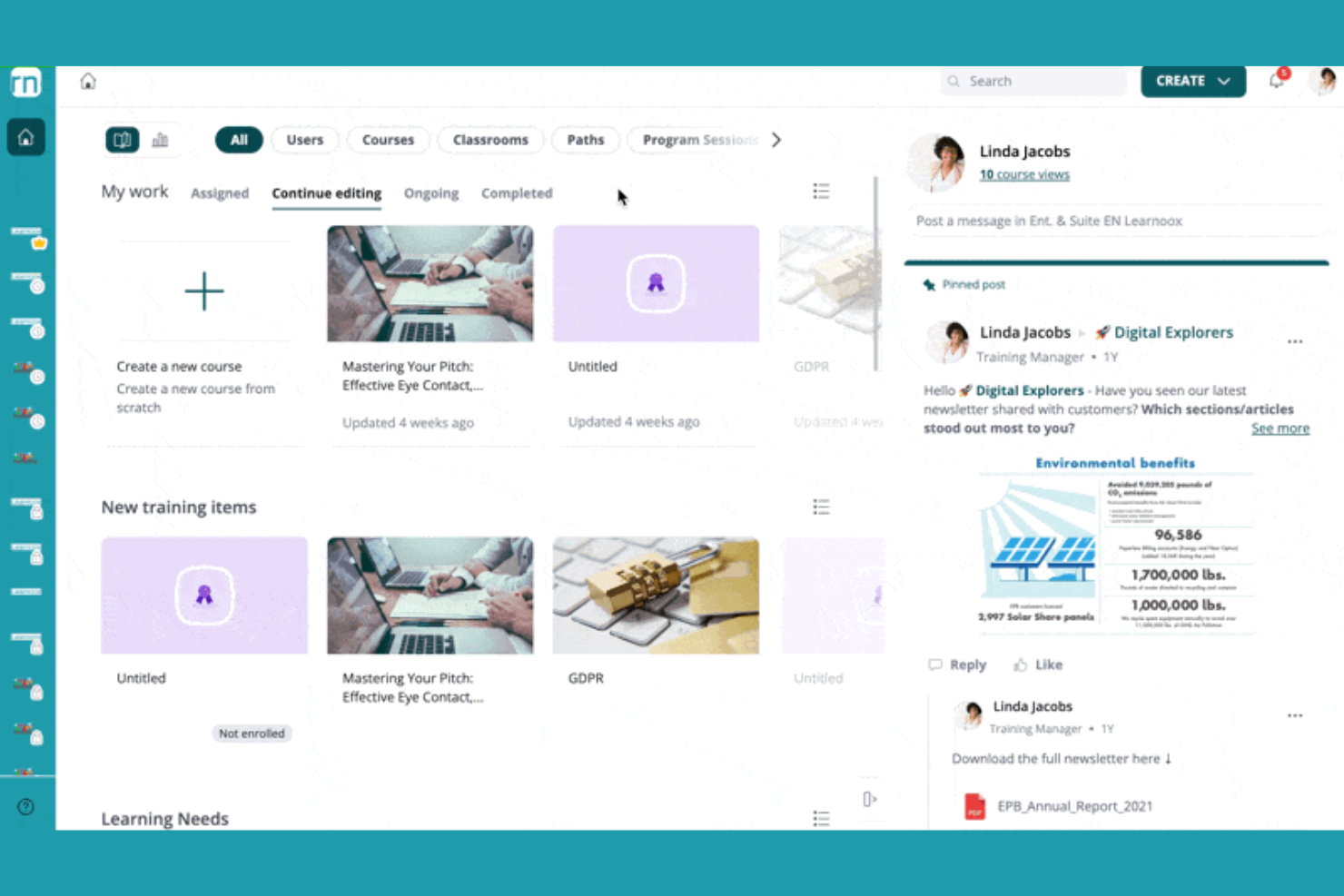
360Learning offre una piattaforma di apprendimento collaborativo progettata per le organizzazioni che desiderano creare, condividere e gestire programmi di formazione su larga scala. Si rivolge ai team HR e ai professionisti della formazione e sviluppo (L&D) che vogliono aumentare il coinvolgimento e la condivisione della conoscenza tra i dipendenti.
Per chi è ideale 360Learning?
360Learning è adatto ai team HR e L&D di organizzazioni di medie e grandi dimensioni focalizzate sulla formazione collaborativa dei dipendenti.
Perché ho scelto 360Learning
Ho scelto 360Learning perché mette l’apprendimento collaborativo al centro della nostra strategia formativa. Mi piace che il mio team possa co-creare i corsi, raccogliere feedback tra pari ed aggiornare rapidamente i contenuti secondo le necessità. I forum di discussione integrati e le funzioni di reazione della piattaforma ci aiutano a raccogliere conoscenze da tutta l’organizzazione. In pratica, questo significa che possiamo mantenere la formazione rilevante e incoraggiare la partecipazione attiva da ogni reparto.
Funzionalità principali di 360Learning
- Percorsi di apprendimento automatizzati: Assegna e ordina i corsi per diversi ruoli o team.
- Costruttore di valutazioni integrato: Crea quiz e test di verifica della conoscenza all’interno dei corsi.
- App mobile per l’apprendimento: Consente ai partecipanti di accedere alla formazione su dispositivi iOS e Android.
- Dashboard di analisi: Monitora i progressi degli utenti, il completamento dei corsi e le metriche di coinvolgimento.
Integrazioni di 360Learning
Le integrazioni includono BambooHR, Salesforce, Slack, Microsoft Teams, LinkedIn Learning, Coursera, Google Drive, Canva, SAP SuccessFactors e Snowflake.
Pros and Cons
Pros:
- Creazione collaborativa di corsi per i team
- Strumenti integrati per feedback tra pari e discussioni
- Percorsi di apprendimento automatizzati per formazione basata sui ruoli
Cons:
- Nessun marketplace integrato per la scoperta dei corsi
- Il supporto SCORM e xAPI richiede componenti aggiuntivi

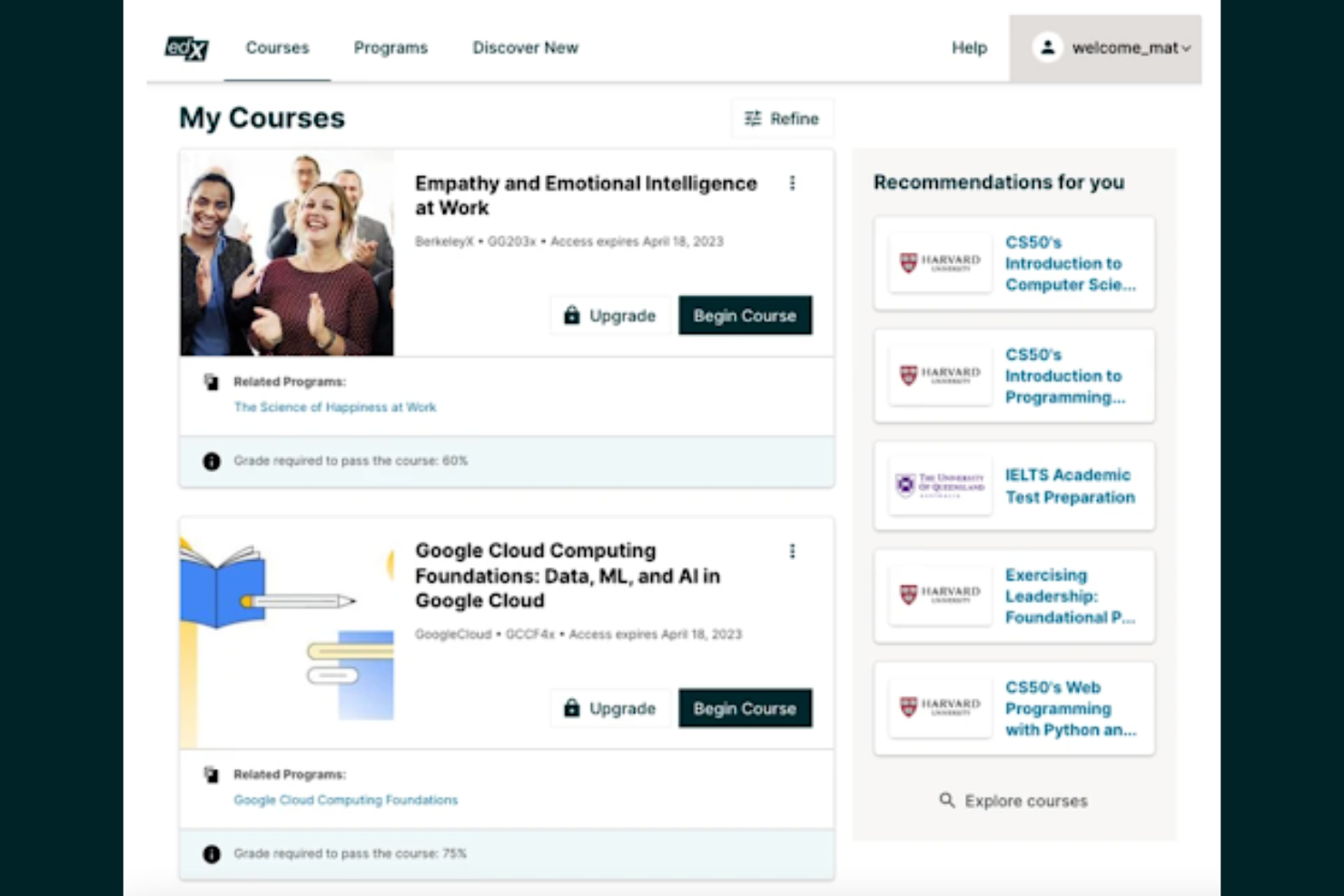
edX offre accesso a corsi universitari progettati per professionisti, studenti e organizzazioni che cercano un'istruzione online di alta qualità e flessibile. È una scelta solida se desideri imparare da istituti di alto livello o hai bisogno di credenziali riconosciute per avanzamento di carriera.
Per chi è più adatto edX?
Professionisti e studenti che cercano corsi di livello universitario da istituzioni di prestigio su una vasta gamma di materie.
Perché ho scelto edX
Ho scelto edX perché offre al mio team la possibilità di accedere a corsi universitari da istituzioni di eccellenza, cosa rara tra le piattaforme di apprendimento online. Apprezzo il fatto che possiamo iscriverci direttamente a programmi MicroMasters e ai certificati professionali delle università. La piattaforma offre anche certificati verificati, facilitando la valorizzazione delle competenze acquisite. In pratica, ciò significa che possiamo ottenere credenziali riconosciute senza doverci spostare dalla scrivania.
Caratteristiche principali di edX
- Apprendimento self-paced: Gli utenti possono iniziare i corsi in qualsiasi momento e procedere con il proprio ritmo.
- Forum di discussione dei corsi: Gli studenti interagiscono con colleghi e docenti attraverso le bacheche di discussione integrate.
- Accesso tramite app mobile: Corsi e materiali sono disponibili tramite app iOS e Android.
- Opzione audit track: Gli utenti possono accedere gratuitamente ai contenuti dei corsi senza ricevere un certificato.
Integrazioni di edX
Le integrazioni includono Single Sign-On, Blackboard, Canvas, Cornerstore, Degreed, EdCast, Moodle e altro ancora.
Pros and Cons
Pros:
- Corsi da università e istituzioni prestigiose
- Ampia scelta di materie e discipline
- Certificati verificati per i corsi completati
Cons:
- Interazione limitata con i docenti nella maggior parte dei corsi
- I certificati richiedono il pagamento anche dopo il completamento


Khan Academy offre una piattaforma di apprendimento online senza scopo di lucro con una vasta gamma di lezioni interattive ed esercizi pratici. È una soluzione ideale per educatori, responsabili della formazione e organizzazioni che cercano un apprendimento accessibile e autodidattico per team diversificati.
A chi è più adatta Khan Academy?
Khan Academy è adatta a educatori e organizzazioni che desiderano un apprendimento online gratuito, basato sulla padronanza, per gruppi di età differenti.
Perché ho scelto Khan Academy
Ho scelto Khan Academy perché offre davvero un apprendimento gratuito e basato sulla padronanza per tutte le età, una rarità tra le piattaforme di apprendimento online. Mi piace che il mio team possa assegnare esercizi interattivi e monitorare i progressi su una vasta gamma di materie. Il sistema di padronanza garantisce che gli studenti costruiscano delle solide basi prima di avanzare. In pratica, questo ci aiuta a supportare uno sviluppo continuo e autodidattico per tutti.
Caratteristiche principali di Khan Academy
- Dashboard insegnante: Consente agli educatori di assegnare contenuti e monitorare i progressi degli studenti.
- Quiz interattivi: Fornisce feedback immediato sulle domande di esercitazione.
- Lezioni video: Offre migliaia di video didattici su diversi argomenti.
- Percorsi di apprendimento personalizzati: Adatta i contenuti al ritmo e al livello di competenza di ogni studente.
Integrazioni di Khan Academy
Le integrazioni native attualmente non sono elencate.
Pros and Cons
Pros:
- Completamente gratuito per studenti ed educatori
- Progressione basata sulla padronanza rafforza la memorizzazione dei concetti
- Ampia copertura di materie, inclusi matematica e scienze
Cons:
- I certificati non sono riconosciuti dall'industria
- La profondità dei contenuti varia a seconda della materia
Altre piattaforme per l'apprendimento online
Ecco alcune altre piattaforme per l’apprendimento online che non sono state incluse nel mio elenco, ma che vale comunque la pena prendere in considerazione:
- FutureLearn
Corsi accreditati delle principali università e istituzioni
- Top Hat
Piattaforma didattica interattiva per l'istruzione superiore
- Class
Software per aula virtuale costruito su Zoom


Come valuto le piattaforme di apprendimento online
Valuto le piattaforme di apprendimento online su due livelli: i requisiti di base che ogni strumento deve soddisfare e i fattori differenzianti che determinano la scelta migliore per i team L&D che gestiscono onboarding e sviluppo delle competenze.
Funzionalità di base (requisiti minimi per questa lista)
Quando seleziono gli strumenti per la mia lista, assegno a ciascuno un punteggio da 0 (non offre la funzionalità) a 5 (eccelle in questa area) per ogni funzionalità di base elencata di seguito. Successivamente, calcolo il punteggio totale dello strumento in percentuale. Ogni strumento deve raggiungere un punteggio minimo totale del 65% per poter essere preso in considerazione.
- Creazione corsi & gestione dei contenuti: Verifico se è possibile creare corsi in modo nativo, caricare file SCORM/xAPI e organizzare una libreria di contenuti, ad esempio ospitando video sulla conformità insieme a presentazioni gestite dai responsabili.
- Monitoraggio del progresso degli studenti: Il tracciamento deve mostrare chi ha iniziato, chi ha concluso e dove gli utenti si bloccano, in modo che un responsabile L&D possa individuare un team in ritardo sui moduli di onboarding richiesti.
- Valutazioni & certificazioni: Valuto come la piattaforma gestisce quiz, verifiche di conoscenza e rilascio dei certificati—soprattutto i promemoria automatici per la ricertificazione su temi come la formazione annuale sulla sicurezza.
- Percorsi formativi & assegnazioni corsi: Ogni strumento dovrebbe permettere di creare percorsi sequenziali e assegnarli in base a ruolo, reparto o sede, come l’iscrizione automatica dei nuovi assunti a un programma strutturato di 30-60-90 giorni.
- Reportistica & analisi: I report devono andare oltre le semplici completion. Cerco dashboard che evidenzino le tendenze nella formazione, permettano di filtrare per team o area geografica ed esportare i dati per le revisioni della leadership.
- Integrazione con HRIS & sistemi HR: La piattaforma deve sincronizzarsi con il tuo HRIS così che i dati dei dipendenti, i ruoli e le modifiche dell’organizzazione fluiscano senza necessità di aggiornamenti manuali—piattaforme come BambooHR, Workday o SAP SuccessFactors.
Una volta individuati gli strumenti che soddisfano i criteri, considero cosa distingue ciascuna piattaforma dalle altre.
Fattori differenzianti (cosa distingue i fornitori)
Ecco come confronto e metto a confronto i diversi fornitori:
Funzionalità distintive
La mappatura delle competenze e delle capacità è un grande elemento differenziante—cerco piattaforme che colleghino direttamente i corsi ai profili di competenza in modo che gli specialisti dello sviluppo dei talenti possano individuare le lacune nei vari team. La personalizzazione basata sull’intelligenza artificiale aggiunge un altro livello, raccomandando contenuti in base a ruolo, obiettivi o attività pregressa invece di affidarsi solo ad assegnazioni manuali. L’apprendimento mobile con accesso offline è importante soprattutto per organizzazioni con lavoratori in prima linea che devono completare la formazione lontano dalla scrivania.
Oltre le funzionalità
L’accesso a una libreria di contenuti è fondamentale—verifico se una piattaforma include corsi integrati o si integra con fornitori come LinkedIn Learning o OpenSesame, poiché creare ogni corso da zero non è realistico per i piccoli team L&D. Gli standard di conformità e sicurezza hanno davvero importanza, in particolare la conformità a SOC 2 e GDPR, perché queste piattaforme conservano dati sensibili dei dipendenti. Valuto anche la trasparenza dei prezzi, analizzando se i fornitori prevedono tariffe per utente, per utente attivo o a forfait, e se i costi di implementazione o dei contenuti sono chiaramente indicati.
Come scegliere le piattaforme per l'apprendimento online
È facile perdersi in lunghi elenchi di funzionalità e strutture tariffarie complesse. Per aiutarti a rimanere concentrato mentre affronti il tuo specifico processo di selezione del software, ecco una lista di fattori da tenere presenti:
| Fattore | Cosa considerare |
|---|---|
| Scalabilità | La piattaforma è in grado di gestire il numero attuale e previsto di utenti in apprendimento senza problemi di prestazioni o costi aggiuntivi? |
| Integrazioni | Si connette nativamente al tuo HRIS, CRM o alle librerie di contenuti per evitare l'inserimento manuale dei dati e lacune nei flussi di lavoro? |
| Possibilità di personalizzazione | Puoi adattare il branding, la struttura dei corsi e i ruoli degli utenti alle esigenze e alle politiche della tua organizzazione? |
| Facilità d'uso | Amministratori e utenti in apprendimento capiranno rapidamente come navigare e utilizzare la piattaforma con una formazione minima? |
| Implementazione e avvio | Quanto tempo occorrerà per il lancio e quali risorse o forme di supporto fornisce il fornitore durante la configurazione e la migrazione? |
| Costo | I livelli di prezzo sono chiari e sono in linea con i tuoi modelli di utilizzo, il numero di utenti e le funzionalità indispensabili? |
| Misure di sicurezza | La piattaforma offre SSO, crittografia dei dati e conformità agli standard di privacy pertinenti per la tua regione o il tuo settore? |
| Disponibilità dell'assistenza | Quali canali di assistenza e tempi di risposta vengono offerti e sono in linea con le esigenze del tuo team per il supporto continuo? |
Cosa sono le piattaforme per l'apprendimento online?
Le piattaforme per l'apprendimento online sono sistemi digitali che consentono alle organizzazioni di creare, distribuire e gestire contenuti didattici per gli utenti in apprendimento. Queste piattaforme supportano la creazione dei corsi, l'iscrizione degli utenti, il monitoraggio dei progressi e le valutazioni in un ambiente centralizzato. I team delle risorse umane e gli educatori le utilizzano per fornire formazione, sviluppo professionale e formazione sulla conformità su larga scala, spesso con strumenti per la collaborazione e la reportistica.
Funzionalità delle piattaforme per l'apprendimento online
Quando selezioni piattaforme di apprendimento online, presta attenzione alle seguenti funzionalità chiave:
- Strumenti per la creazione dei corsi: Crea, modifica e organizza i moduli di formazione utilizzando contenuti multimediali, quiz ed elementi interattivi all'interno della piattaforma.
- Gestione delle iscrizioni dei discenti: Assegna i corsi a singoli utenti o gruppi, automatizza le iscrizioni e gestisci l'accesso degli utenti in base ai ruoli o ai reparti.
- Monitoraggio dei progressi: Monitora l'attività dei discenti, i tassi di completamento dei corsi e il tempo dedicato alla formazione tramite pannelli di controllo e report.
- Valutazioni e quiz: Crea test, quiz e verifiche delle conoscenze per valutare la comprensione e la memorizzazione da parte dei discenti.
- Gestione delle certificazioni: Rilascia, monitora e gestisci i certificati relativi al completamento dei corsi o ai requisiti di conformità.
- Report e analisi: Genera report dettagliati sul coinvolgimento dei discenti, sulle prestazioni e sull'efficacia della formazione per le parti interessate.
- Accessibilità da dispositivi mobili: Consenti ai discenti di accedere ai corsi e ai materiali da smartphone o tablet, supportando ambienti di apprendimento flessibili.
- Forum di discussione: Abilita l'interazione tra pari, le domande e risposte e la condivisione delle conoscenze all'interno dei corsi o dell'intera piattaforma.
- Funzionalità di integrazione: Collega la piattaforma ai sistemi HR, alle librerie di contenuti o agli strumenti di comunicazione per semplificare i flussi di lavoro e la condivisione dei dati.
Funzionalità AI comuni nelle piattaforme di apprendimento online
Oltre alle funzionalità standard delle piattaforme di apprendimento online elencate sopra, molte di queste soluzioni stanno integrando l'AI con funzionalità come:
- Raccomandazioni personalizzate per l'apprendimento: Suggerisce corsi e risorse ai discenti in base ai loro interessi, ruoli e attività passate, utilizzando algoritmi basati sull'AI.
- Etichettatura automatica dei contenuti: Utilizza l'AI per analizzare e categorizzare i materiali dei corsi, facilitando l'organizzazione e la ricerca dei contenuti pertinenti.
- Generazione intelligente di quiz: Crea automaticamente quiz e valutazioni a partire dai contenuti dei corsi, facendo risparmiare tempo ai formatori e garantendo l'allineamento con gli obiettivi di apprendimento.
- Analisi dei discenti basata sull'AI: Identifica gli schemi nel comportamento dei discenti e prevede quali utenti potrebbero essere a rischio, aiutando gli amministratori a intervenire tempestivamente per migliorare i risultati.
- Chatbot in linguaggio naturale: Fornisce supporto immediato basato sull'AI ai discenti, rispondendo alle domande e guidando gli utenti attraverso la piattaforma o i materiali del corso.
Vantaggi delle piattaforme di apprendimento online
L'implementazione di piattaforme di apprendimento online offre diversi vantaggi al tuo team e alla tua azienda. Eccone alcuni:
- Gestione centralizzata della formazione: Gestisci tutti i corsi, i progressi dei discenti e i report da un'unica piattaforma organizzata.
- Formazione scalabile: Eroga facilmente la formazione a team di qualsiasi dimensione, distribuiti in più sedi o reparti.
- Accesso flessibile: Consenti ai discenti di completare i corsi secondo i propri tempi e da qualsiasi dispositivo, supportando il lavoro da remoto e ibrido.
- Informazioni basate sui dati: Utilizza le funzionalità di analisi e reportistica per monitorare il coinvolgimento, individuare le lacune nelle competenze e misurare l'efficacia della formazione.
- Esperienza di apprendimento coerente: Standardizza i contenuti e le valutazioni per garantire che ogni discente riceva la stessa qualità di formazione.
- Onboarding e sviluppo delle competenze più rapidi: Semplifica la formazione dei nuovi assunti e lo sviluppo continuo con percorsi di apprendimento automatizzati e risorse accessibili.
- Collaborazione potenziata: Promuovi l'apprendimento tra pari e la condivisione delle conoscenze tramite forum di discussione ed elementi interattivi dei corsi.
Costi e prezzi delle piattaforme di apprendimento online
La selezione delle piattaforme di apprendimento online richiede la comprensione dei diversi modelli di prezzo e dei piani disponibili. I costi variano in base alle funzionalità, alle dimensioni del team, agli elementi aggiuntivi e ad altri fattori. La tabella seguente riassume i piani più comuni, i relativi prezzi medi e le funzionalità tipicamente incluse nelle soluzioni di piattaforme di apprendimento online:
Tabella comparativa dei piani per le piattaforme di apprendimento online
| Tipo di piano | Prezzo medio | Funzionalità comuni |
|---|---|---|
| Piano gratuito | $0 | Creazione di corsi di base, numero limitato di utenti, report semplici e supporto della community. |
| Piano personale | $10-$30/user/month | Accesso individuale ai corsi, monitoraggio dei progressi, certificati e supporto via email. |
| Piano aziendale | $25-$60/user/month | Gestione dei team, analisi avanzate, integrazioni, branding personalizzato e supporto prioritario. |
| Piano aziendale | $60-$120/user/month | Utenti illimitati, account manager dedicato, integrazioni personalizzate, sicurezza avanzata e supporto con SLA. |
Domande frequenti sulle piattaforme di apprendimento online
Ecco alcune risposte alle domande comuni sulle piattaforme di apprendimento online:
In che modo le piattaforme di apprendimento online supportano la formazione sulla conformità?
Le piattaforme di apprendimento online consentono di assegnare corsi obbligatori, monitorare il completamento e generare report sulla conformità. Questo aiuta i team delle risorse umane a garantire che i dipendenti rispettino i requisiti normativi e rende più semplici gli audit grazie a registri centralizzati.
Le piattaforme di apprendimento online possono integrarsi con i sistemi delle risorse umane?
Sì, la maggior parte delle piattaforme di apprendimento online offre integrazioni con HRIS, sistemi di gestione delle paghe e altri sistemi aziendali. Ciò consente il provisioning automatico degli utenti, report semplificati e una gestione più agevole dei dati dei dipendenti tra le piattaforme.
Cosa devo considerare quando migro a una nuova piattaforma di apprendimento online?
Pianifica la migrazione dei dati, l’inserimento degli utenti e il trasferimento dei contenuti. Verifica se la nuova piattaforma offre strumenti di importazione, assistenza per la migrazione e risorse formative per ridurre al minimo le interruzioni e aiutare gli utenti ad adattarsi rapidamente.
Le piattaforme di apprendimento online sono adatte ai team da remoto o ibridi?
Sì, queste piattaforme sono progettate per le forze lavoro distribuite. Offrono accesso da dispositivi mobili, apprendimento asincrono e strumenti di collaborazione, consentendo ai dipendenti di imparare ovunque e secondo i propri ritmi.
Come posso misurare l'efficacia dei miei programmi di apprendimento online?
Come posso misurare l’efficacia dei miei programmi di apprendimento online?