

I 10 migliori software per basi di conoscenza recensiti nel 2026

10 Il miglior software per basi di conoscenza: selezione


Il miglior software per basi di conoscenza aiuta il tuo team a raccogliere, organizzare e condividere le informazioni senza difficoltà, così che tutti possano accedere alle risposte di cui hanno bisogno, quando ne hanno bisogno.
Senza un sistema centralizzato, le conoscenze preziose spesso si perdono tra e-mail, chat o documenti individuali, causando inefficienze e attività ripetute. La piattaforma giusta migliora la collaborazione, accelera l'inserimento dei nuovi dipendenti e aumenta la produttività, mantenendo le conoscenze dell'organizzazione facili da trovare e aggiornare.
Basandomi sulla mia esperienza nel testare strumenti per le risorse umane e la gestione dell'apprendimento, ho esaminato e confrontato i migliori software per basi di conoscenza disponibili oggi. In questa guida troverai le migliori piattaforme per migliorare l'accessibilità alle informazioni, supportare la collaborazione del team e creare un ambiente di lavoro più intelligente e connesso.
Perché fidarsi delle nostre recensioni sui software
Il nostro team testa e recensisce software dal 2012. In quanto esperti HR noi stessi, sappiamo quanto sia difficile — e importante — scegliere il software giusto.
Per questa guida, abbiamo valutato gli strumenti attraverso test pratici e ricerche indipendenti, assegnando un punteggio agli strumenti in base ai nostri criteri di selezione. Ci basiamo inoltre sulle competenze di leader di pensiero del settore e di professionisti HR attivi.
Le nostre recensioni riflettono il nostro giudizio editoriale umano, non un discorso di vendita.
Revisori esperti:
Tabella comparativa: software per basi di conoscenza
Questa tabella comparativa riassume i dettagli dei prezzi delle mie migliori selezioni di software per basi di conoscenza.
| Tool | Best For | Trial Info | Price | ||
|---|---|---|---|---|---|
| 1 | Ideale per contenuti di knowledge base potenziati dall'IA | Prova gratuita di 14 giorni + demo gratuita disponibile | Prezzi su richiesta | Website | |
| 2 | Ideale per portali personalizzabili | Prova gratuita di 14 giorni + demo gratuita disponibile | Da $19/agente/mese (fatturazione annuale) | Website | |
| 3 | Ideale per la gestione delle conoscenze HR con un motore di aggiornamento | Demo gratuita disponibile | Prezzi su richiesta | Website | |
| 4 | Ideale per basi di conoscenza interattive | Prova gratuita di 14 giorni disponibile | Prezzo su richiesta | Website | |
| 5 | Ideale per eliminare i silos nell'organizzazione delle informazioni | Prova gratuita di 30 giorni + demo gratuita disponibile | Da $3,97/utente/mese | Website | |
| 6 | Ideale per combinare intelligenza artificiale e self-service | Prova gratuita di 15 giorni + demo gratuita disponibile | Da $7/utente/mese (fatturazione annuale) | Website | |
| 7 | Ideale per trasformare i ticket in articoli di aiuto | Prova gratuita di 21 giorni + piano gratuito + demo gratuita disponibile | Da $12/agente/mese (fatturato annualmente) | Website | |
| 8 | Ideale per i modelli predefiniti | Piano gratuito disponibile | A partire da $49/autore/mese (con fatturazione annuale) | Website | |
| 9 | Ideale per la gestione della conoscenza potenziata dall’IA | Prova gratuita di 14 giorni | A partire da $9/postazione/mese (fatturato annualmente) | Website | |
| 10 | Ideale per la collaborazione di squadra | Prova gratuita di 7 giorni + piano gratuito disponibile | Da $5.42/utente/mese | Website |


Recensione dei migliori software per basi di conoscenza
Di seguito trovi le mie analisi dettagliate dei migliori software per basi di conoscenza interne inclusi nella mia selezione. Le mie recensioni offrono una panoramica dettagliata delle funzionalità principali, dei pro e dei contro, delle integrazioni e dei casi d’uso ideali di ogni strumento, per aiutarti a trovare quello più adatto a te.

Ideale per contenuti di knowledge base potenziati dall'IA
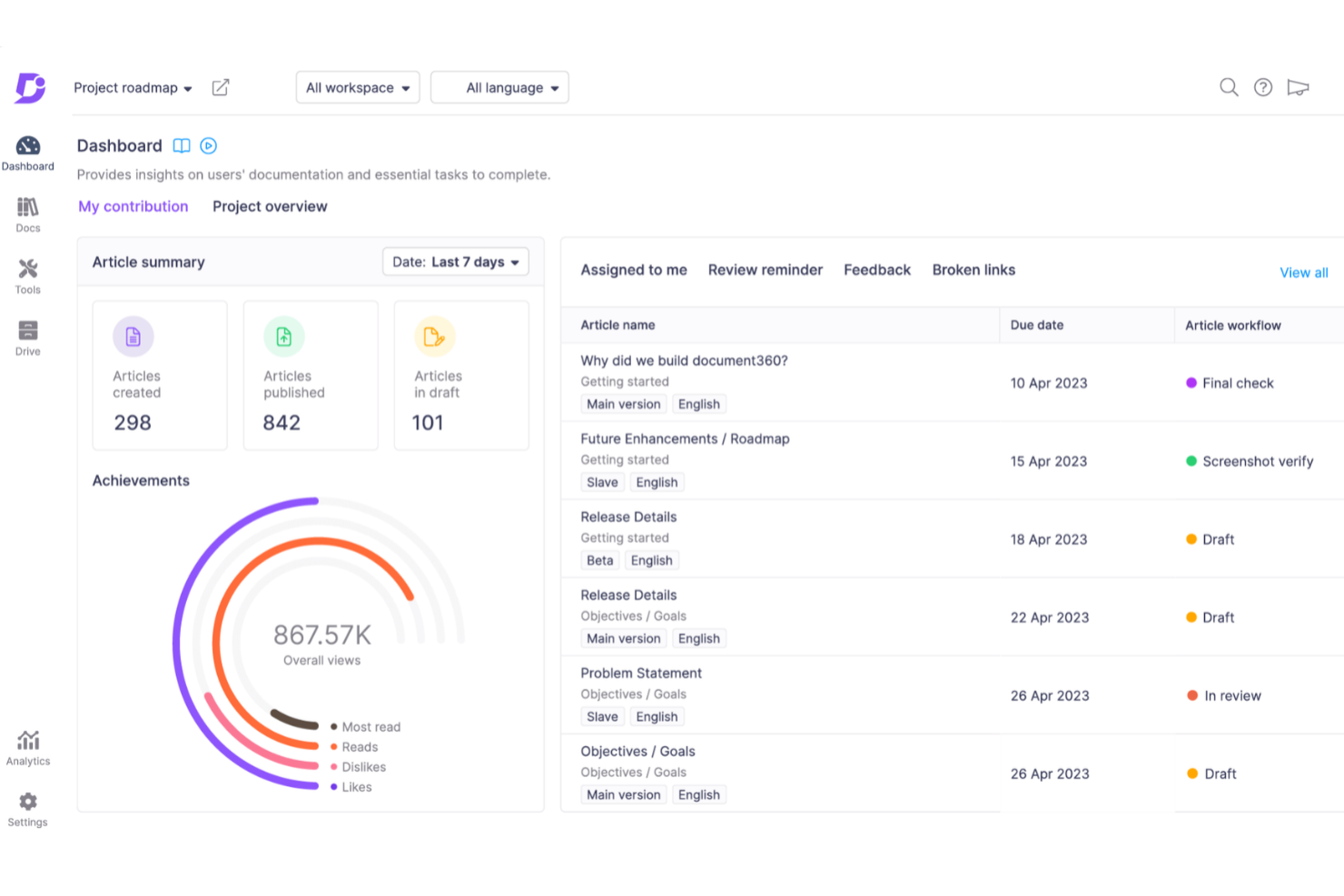
Document360 è una piattaforma di knowledge base progettata per team e aziende che necessitano di creare, organizzare e condividere documentazione interna o esterna, con funzionalità avanzate di gestione dei contenuti e collaborazione.
Per chi è ideale Document360?
Document360 è adatto ai team di prodotto e assistenza di aziende di medie e grandi dimensioni che necessitano di una piattaforma dedicata per costruire e mantenere knowledge base rivolte ai clienti o interne.
Perché ho scelto Document360
Ho scelto Document360 perché le sue funzionalità di intelligenza artificiale si estendono anche al processo di creazione dei contenuti. L'agente di scrittura AI—chiamato Eddy AI—può prendere un video di presentazione del prodotto, un file audio o anche un semplice prompt testuale e trasformarlo in un articolo di knowledge base completamente strutturato e ottimizzato SEO, completo di screenshot, tag e meta descrizioni. Apprezzo anche la funzione di rilevamento dei contenuti duplicati, che evidenzia i paragrafi ripetuti tra gli articoli, permettendo al mio team di mantenere la knowledge base ordinata senza dover revisionare manualmente ogni pagina. Il generatore di glossari AI costruisce inoltre automaticamente le definizioni dei termini tecnici direttamente dai contenuti esistenti.
Caratteristiche principali di Document360
- Automazione personalizzata dei workflow: Configura flussi di revisione e approvazione a più step che assegnano automaticamente compiti, inviano notifiche e spostano gli articoli da bozza a pubblicato.
- Gestore delle categorie: Organizza i contenuti usando una struttura a categorie con drag-and-drop che supporta fino a sei livelli di categorie e sottocategorie.
- Cronologia delle versioni e ripristino: Visualizza la cronologia completa delle modifiche di ogni articolo e ripristina istantaneamente una versione precedente senza tracciamento manuale.
- Traduzione automatica AI: Localizza la tua knowledge base in oltre 50 lingue utilizzando la traduzione AI contestuale direttamente all'interno della piattaforma.
Integrazioni di Document360
Le integrazioni includono Zendesk, Freshdesk, Intercom, Drift, Slack, Microsoft Teams, GitHub, Google Analytics, Crowdin e Disqus.
Pros and Cons
Pros:
- Gestione intelligente dei file
- Propone funzionalità avanzate di reportistica e analisi
- Offre un solido controllo delle versioni con audit trail
Cons:
- La maggior parte delle integrazioni è disponibile solo nei piani di livello superiore
- Il supporto per file multimediali di grandi dimensioni deve essere migliorato
New Product Updates from Document360

Document360 Adds Bulk Mirroring, Eddy AI Citations, and Unified SSO
Document360 adds bulk article mirroring, citations in Eddy AI chatbot responses, and a unified Enterprise SSO setup. These updates improve content reuse, answer verification, and access management. For more information, visit Document360’s official site.
 .
.
Ideale per portali personalizzabili

Freshdesk offre ai team di supporto e alle aziende a contatto con i clienti un modo per creare basi di conoscenza organizzate e ricercabili che aiutano gli utenti a trovare risposte più rapidamente e riducono le richieste di supporto ripetitive.
Per chi è ideale Freshdesk?
Freshdesk è particolarmente indicato per piccole e medie imprese che necessitano di una piattaforma di supporto clienti con funzionalità di knowledge base integrate per promuovere l'autoservizio.
Perché ho scelto Freshdesk
Ho scelto Freshdesk tra i migliori per quanto si possa personalizzare il portale ben oltre il semplice branding di base. La maggior parte degli strumenti di knowledge base consente solo di inserire un logo e scegliere uno schema di colori—Freshdesk, invece, offre un editor di codice adatto agli sviluppatori che permette di personalizzare singolarmente tutte e 17 le pagine del portale, dalla home delle soluzioni e la vista dell’articolo fino alla pagina di login e al modulo di invio ticket. Mi piace il fatto che sia possibile modificare intestazioni, piè di pagina e layout delle pagine utilizzando tag di template, il che significa che il mio team può costruire un portale che rispecchi davvero il nostro marchio invece di applicare solo una 'pelle' su un modello generico. Il supporto multilingue per la knowledge base aggiunge un ulteriore livello, permettendoci di servire diversi segmenti di clientela tramite lo stesso portale senza dover duplicare tutta la configurazione.
Caratteristiche principali di Freshdesk
- Versionamento degli articoli: Tieni traccia delle modifiche agli articoli della knowledge base nel tempo e ripristina versioni precedenti all’occorrenza.
- Impostazioni SEO per gli articoli: Aggiungi titoli meta, descrizioni e tag a ciascun articolo per migliorarne la visibilità nei motori di ricerca.
- Widget per feedback: Consenti ai lettori di votare se un articolo è stato utile oppure no, fornendo così dati utili al tuo team per stabilire la priorità degli aggiornamenti dei contenuti.
- Suggerimento automatico degli articoli: Mostra automaticamente agli utenti gli articoli rilevanti della knowledge base mentre scrivono un ticket di supporto, riducendo il volume delle richieste inviate.
Integrazioni di Freshdesk
Le integrazioni includono Slack, MS Teams, Shopify, Salesforce, Jira, Playvox e app connettore per integrazioni personalizzate tramite API.
Pros and Cons
Pros:
- Le regole di automazione riducono l'instradamento ripetitivo dei ticket e le attività di follow-up
- Portali di supporto personalizzabili organizzano i contenuti di aiuto per esigenze differenti dei clienti
- Gli articoli della knowledge base permettono risposte self-service alle domande frequenti dei clienti
Cons:
- L’app mobile manca di alcune funzionalità chiave di supporto e gestione
- Non dispone della gestione integrata di asset rispetto agli strumenti IT dedicati
New Product Updates from Freshdesk
Freshdesk Adds Analytics Charts to Team Dashboards
Freshdesk now lets teams add existing Analytics report charts to custom team dashboards from the same configuration pane used for live widgets. For more information, visit Freshdesk's official site.

Haystack
Ideale per la gestione delle conoscenze HR con un motore di aggiornamento
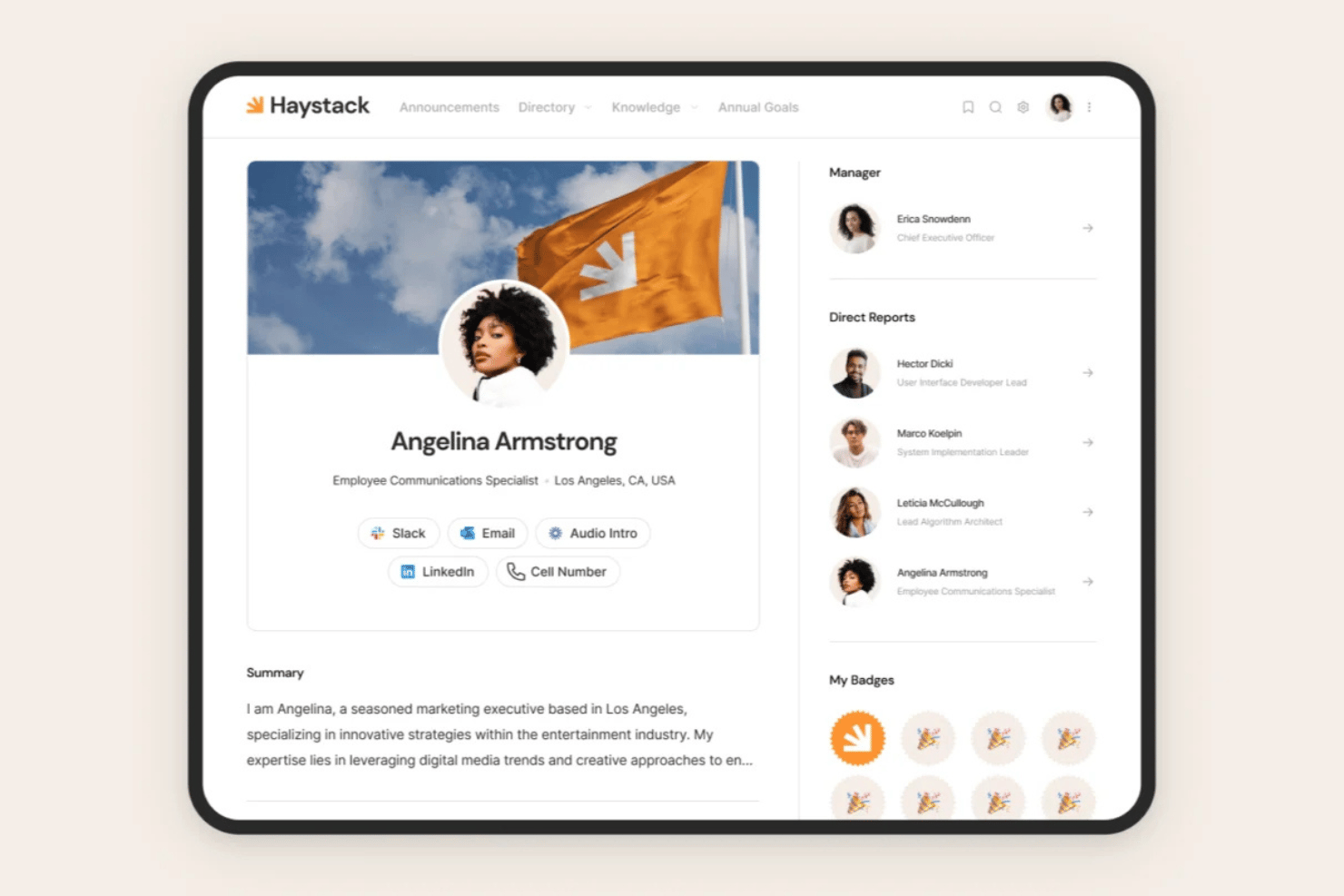
Haystack è una piattaforma per l'esperienza dei dipendenti con una base di conoscenze integrata che centralizza le policy HR, gli hub per l'onboarding e le risorse aziendali, insieme a un motore di ricerca universale, domande e risposte basate sull'intelligenza artificiale e un motore di aggiornamento dei contenuti.
Per chi è più indicato Haystack?
Haystack è particolarmente adatto ai team HR di organizzazioni di medie e grandi dimensioni che hanno bisogno di un punto centrale per i contenuti relativi a policy, onboarding e benefit, soprattutto quando gestiscono personale distribuito o multilingue.
Perché ho scelto Haystack
Ho scelto Haystack come una delle soluzioni migliori perché il suo motore di aggiornamento risolve un problema che la maggior parte delle basi di conoscenze HR ignora: il deterioramento dei contenuti. Invece di aspettare che qualcuno si accorga che una policy è obsoleta, Haystack segnala automaticamente gli articoli datati e invita i responsabili a esaminarli prima che diventino obsoleti. Mi piace anche il fatto che l'intelligenza artificiale di Haystack permetta ai dipendenti di porre domande in linguaggio naturale e ottenere risposte immediate ricavate da contenuti HR verificati, riducendo così le domande ripetitive sulle policy rivolte al team HR.
Funzionalità principali di Haystack
- Ricerca universale: indicizza i contenuti presenti in Haystack e nelle piattaforme integrate come Google Workspace, Microsoft 365, Slack e Confluence, mostrando in un'unica ricerca risultati basati sulle autorizzazioni.
- Traduzione multilingue basata sull'intelligenza artificiale: traduce automaticamente i contenuti informativi in decine di lingue, consentendo ai team distribuiti e multilingue di accedere alle risorse HR nella lingua preferita.
- Controlli per la distribuzione sicura: applica filigrane uniche per dipendente, note legali personalizzate e restrizioni al download ai documenti HR sensibili, come le policy relative a retribuzioni e provvedimenti disciplinari.
- Hub per l'onboarding dei dipendenti: hub strutturati dedicati riuniscono policy, organigrammi, un glossario aziendale e un gioco dei nomi in un'unica destinazione per l'autonomia dei nuovi assunti.
Integrazioni di Haystack
Haystack si integra con Workday, Google Workspace, Microsoft 365, Slack, Microsoft Teams, Confluence, Jira, Zoom, Box e Dropbox. Un'API supporta le integrazioni personalizzate.
Pros and Cons
Pros:
- Il motore di aggiornamento segnala e ripropone i contenuti HR obsoleti
- Autorizzazioni granulari per i documenti HR sensibili
- L'intelligenza artificiale multilingue traduce gli articoli della base di conoscenze
Cons:
- Nessuna cronologia formale delle versioni o funzione di ripristino
- La ricerca restituisce talvolta risultati non pertinenti

Stonly
Ideale per basi di conoscenza interattive
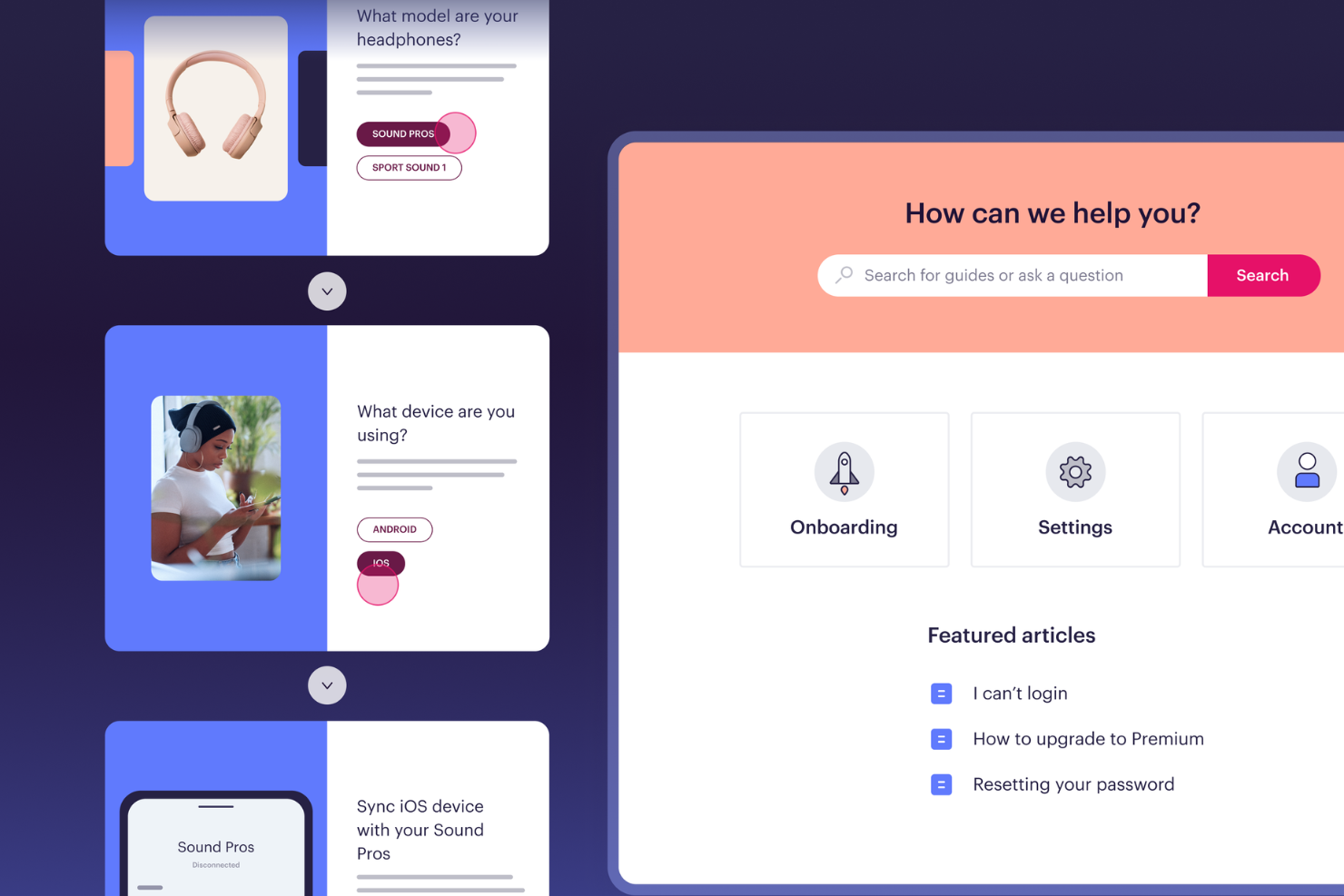
Stonly offre ai team dell'assistenza clienti, IT e HR un modo per creare basi di conoscenza interattive e guidate passo dopo passo che aiutano gli utenti a risolvere i problemi in autonomia e riducono le richieste ripetitive.
Per chi è più adatto Stonly?
Stonly è ideale per i team di supporto clienti e enablement che devono guidare gli utenti attraverso processi complessi senza affidarsi a documentazione statica.
Perché ho scelto Stonly
Stonly merita un posto nella mia shortlist perché permette di creare contenuti per la base di conoscenza che si adattano davvero al lettore. Invece di articoli 'taglia unica', apprezzo come Stonly usi guide ramificate e passo dopo passo affinché gli utenti seguano un percorso basato sulla propria situazione specifica. Ho utilizzato il formato ad albero decisionale per accompagnare gli utenti in flussi di troubleshooting laddove una FAQ statica non sarebbe stata sufficiente. Il widget integrabile consente inoltre al mio team di mostrare la guida giusta direttamente all'interno di un prodotto o portale di supporto, senza dover indirizzare gli utenti a un centro assistenza separato.
Funzionalità chiave di Stonly
- Suggerimenti di risposta basati su AI: Stonly mostra automaticamente contenuti di guida pertinenti in base a ciò che un utente digita nella barra di ricerca.
- Supporto multilingue: Pubblica contenuti della base di conoscenza in più lingue per supportare utenti globali o multilingue.
- Analisi delle guide: Tieni traccia di come gli utenti si muovono tra le guide, inclusi i punti in cui abbandonano o richiedono ulteriore assistenza.
- Base di conoscenza interna per agenti: Crea una base di conoscenza interna separata che gli operatori possono usare per trovare risposte e condividere guide durante le interazioni live.
Integrazioni di Stonly
Le integrazioni includono Zendesk, Salesforce, Freshdesk e ServiceNow.
Pros and Cons
Pros:
- L'aiuto contestuale porta la conoscenza direttamente nelle web app.
- La ricerca AI individua i passaggi esatti invece che l'articolo intero.
- Le guide interattive adattano le istruzioni alla situazione di ogni utente.
Cons:
- Risposte AI e integrazioni help desk sono limitate al piano enterprise.
- La creazione di guide può essere complessa per flussi condizionali molto articolati.

Ideale per eliminare i silos nell'organizzazione delle informazioni
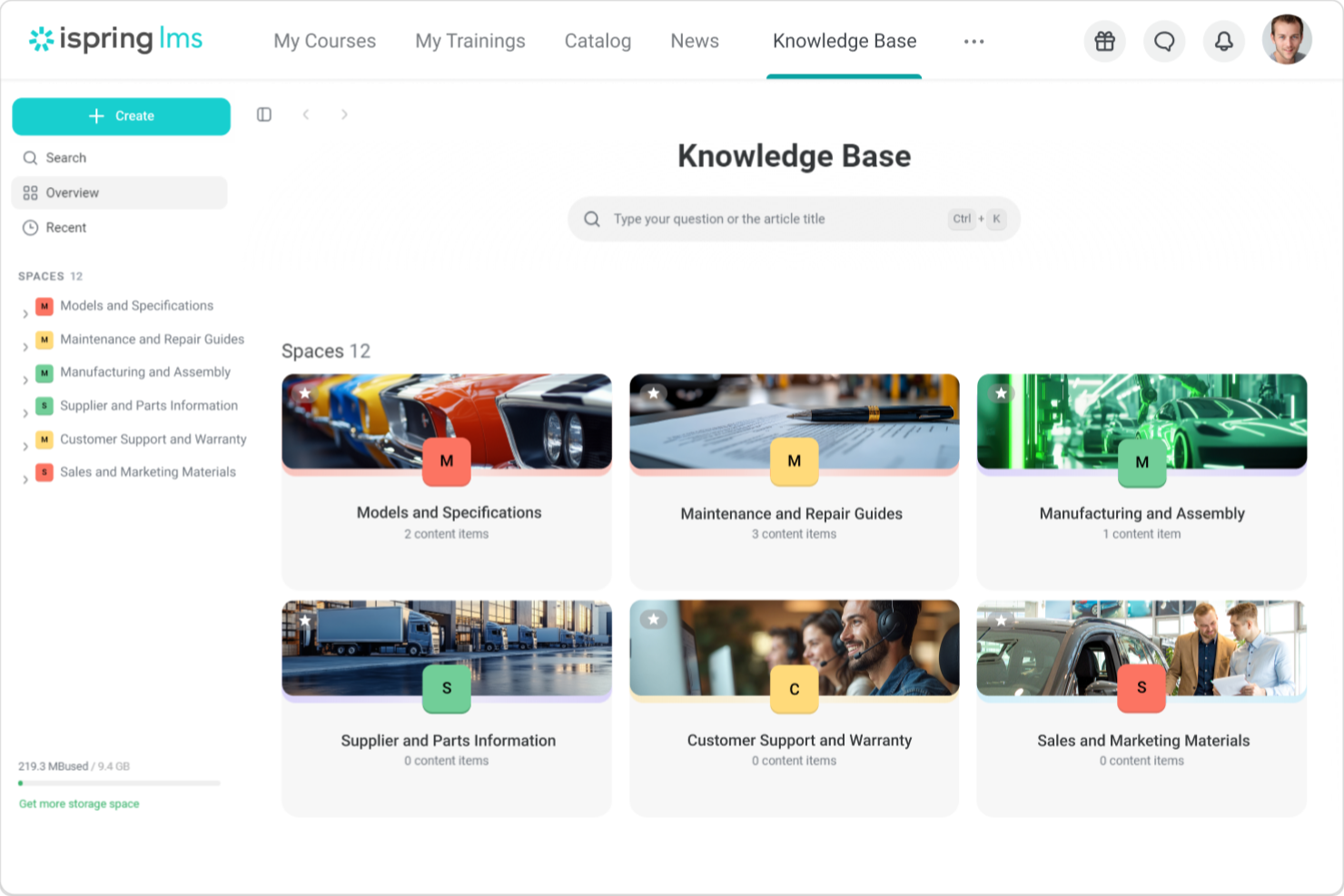
iSpring LMS offre ai team HR e ai leader aziendali una piattaforma centralizzata per organizzare, condividere e gestire le conoscenze aziendali, rendendo più facile mantenere le informazioni accessibili e aggiornate per tutti i membri dell'organizzazione.
Per chi è ideale iSpring LMS?
iSpring LMS è particolarmente adatto per organizzazioni di medie e grandi dimensioni con più reparti o team che necessitano di un unico spazio strutturato dove archiviare e condividere conoscenze.
Perché ho scelto iSpring LMS
iSpring LMS si guadagna un posto nella mia shortlist perché affronta direttamente il problema delle conoscenze sparse in vari luoghi all'interno di un'organizzazione. Apprezzo soprattutto la funzione integrata della knowledge base, che mantiene guide aziendali, FAQ e risorse in un unico hub cloud con controlli di accesso basati sui ruoli—così ogni dipendente vede solo ciò che è rilevante per la propria posizione. Trovo inoltre davvero utile la struttura dei gruppi basati sui reparti: puoi organizzare i dipendenti per team e assegnare contenuti mirati a ciascun gruppo, evitando che vendite, HR e operazioni debbano cercare materiali tra loro non pertinenti. La combinazione di percorsi formativi strutturati e di un hub centralizzato di conoscenze è ciò che secondo me lo distingue dagli altri.
Funzionalità principali di iSpring LMS
- Creazione di corsi supportata da AI: Crea corsi scorrevoli con un assistente AI che genera testi, domande a quiz, immagini e traduzioni del corso direttamente sulla piattaforma.
- Gamification: Premia i partecipanti con punti, badge e classifiche per monitorare e celebrare i progressi.
- Valutazione a 360 gradi: Raccogli feedback sulle prestazioni in modo strutturato da colleghi, manager e collaboratori diretti per valutare le competenze dei dipendenti in tutta l'organizzazione.
- App mobile con accesso offline: Un'app gratuita per iOS e Android consente agli utenti di completare la formazione anche senza connessione internet, sincronizzando automaticamente i progressi una volta tornati online.
Integrazioni di iSpring LMS
Le integrazioni includono Salesforce, MS Azure, MS Exchange, BambooHR, Udemy, Go1, LinkedIn Learning e altre librerie di corsi popolari.
Pros and Cons
Pros:
- I percorsi formativi aiutano a organizzare le conoscenze sul prodotto per ruolo o pubblico
- Un motore di ricerca intelligente rende veloce e facile individuare le risorse giuste
- I portali pubblici e privati consentono l'accesso a clienti o partner
Cons:
- Nessuna interfaccia knowledge base indipendente
- Personalizzazione visiva limitata
New Product Updates from iSpring LMS

iSpring LMS Adds Multiple Observations to OJT Sessions
iSpring LMS now lets managers log multiple observations within one OJT session, grouping visits and auto-generating summary stats like averages, criterion results, and comparisons. For more information, visit iSpring LMS's official site.

Ideale per combinare intelligenza artificiale e self-service
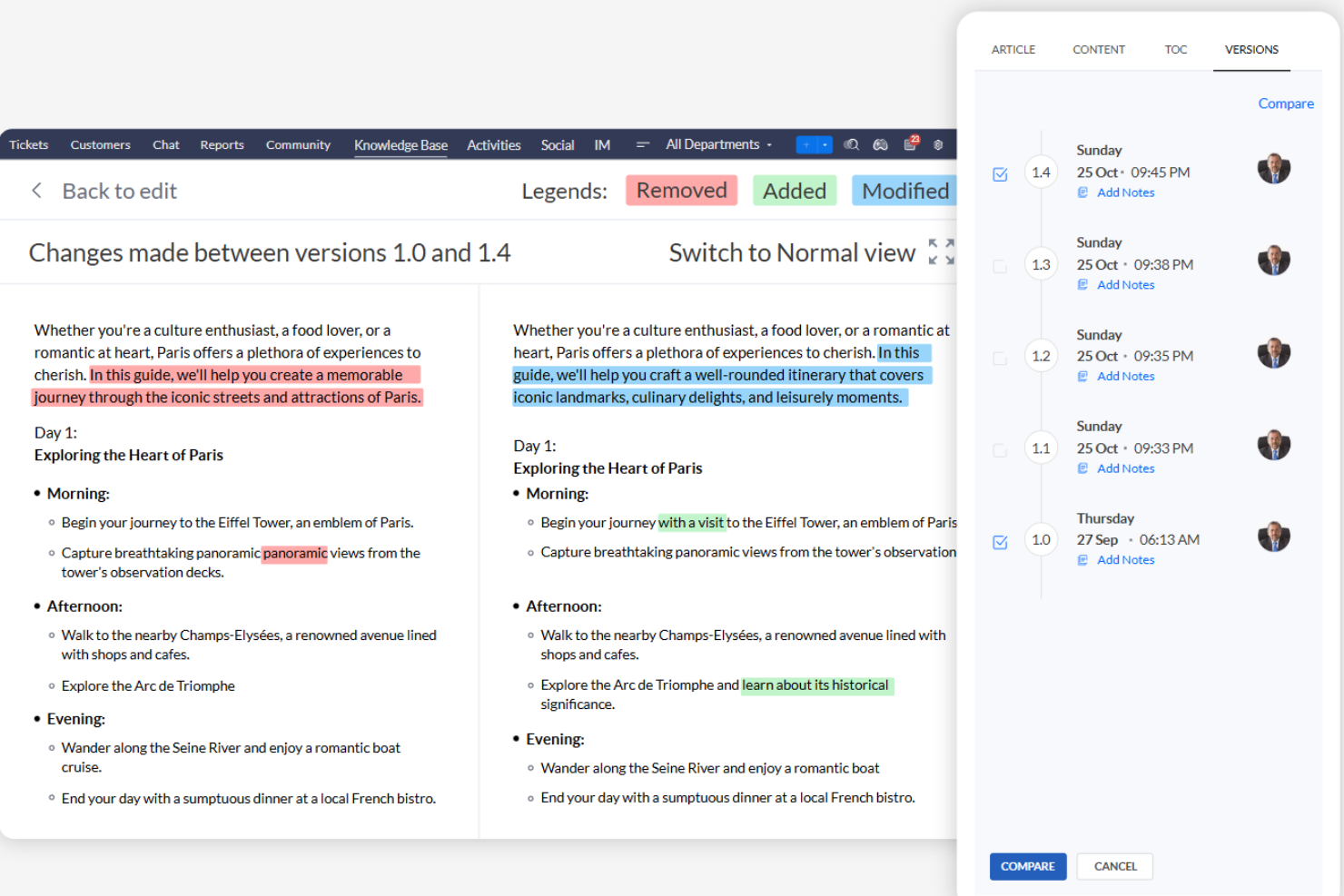
Zoho Desk offre ai team di supporto e alle aziende a contatto con i clienti un modo per creare, organizzare e condividere contenuti della knowledge base collegando gli articoli di aiuto con strumenti di ticketing e self-service.
Per Chi è Ideale Zoho Desk?
Zoho Desk è particolarmente adatto a team di assistenza clienti di piccole e medie dimensioni che necessitano di una knowledge base perfettamente integrata con i flussi di lavoro di help desk e gestione ticket.
Perché Ho Scelto Zoho Desk
Ho scelto Zoho Desk tra i migliori per l'efficacia del suo assistente AI, Zia, che lavora insieme al portale self-service. Zia suggerisce agli utenti articoli pertinenti della knowledge base prima ancora che inviino un ticket, riducendo così le richieste ripetitive di supporto. Mi piace anche che gli operatori ricevano suggerimenti automatici di articoli durante la gestione dei ticket, così possono rispondere più rapidamente o segnalare eventuali lacune nei contenuti esistenti. Il portale self-service è completamente personalizzabile, permettendo al mio team di costruire un help center con il proprio brand connesso direttamente alla knowledge base.
Caratteristiche Principali di Zoho Desk
- Help center multilingue: Pubblica e gestisci articoli della knowledge base in oltre 50 lingue per supportare clienti a livello globale.
- Widget di aiuto ASAP: Integra un widget self-service direttamente sul tuo sito web o app che unisce l’accesso alla knowledge base con il supporto di agenti live.
- Conversazioni guidate: Crea chat flow senza codice che guidano i clienti attraverso passaggi di troubleshooting utilizzando i contenuti della knowledge base.
- Portale self-service per dipendenti: Crea una knowledge base interna separata con articoli e materiali di formazione per gli operatori del supporto.
Integrazioni di Zoho Desk
Le integrazioni includono Zoho CRM, Jira, Slack, Salesforce, Trello, Microsoft Teams, HubSpot, Asana, Mailchimp e Pipedrive.
Pros and Cons
Pros:
- Forte integrazione con Zoho e applicazioni di terze parti.
- Flussi di lavoro e dashboard personalizzabili per esigenze aziendali specifiche.
- Assistenza AI con Zia per una gestione proattiva delle problematiche.
Cons:
- La maggior parte delle funzionalità Zia sono limitate al piano enterprise.
- Problemi occasionali di performance delle funzionalità in caso di traffico elevato.

Desk365
Ideale per trasformare i ticket in articoli di aiuto

Desk365 offre ai team di supporto e alle aziende in crescita un modo per costruire una knowledge base ricercabile che si collega direttamente al loro sistema di ticketing, aiutando gli utenti a trovare risposte e riducendo le richieste di supporto ripetitive.
Per chi è ideale Desk365?
Desk365 è adatto a team di supporto di piccole e medie dimensioni che desiderano un help desk e una knowledge base in un unico posto senza dover gestire strumenti separati.
Perché ho scelto Desk365
Ho scelto Desk365 perché collega la risoluzione dei ticket alla creazione della knowledge base. Adoro la funzione basata sull'intelligenza artificiale che genera automaticamente articoli strutturati direttamente dalle conversazioni dei ticket: così quando il mio team risolve un problema ricorrente, quella soluzione non si perde in un ticket chiuso, ma diventa un articolo ricercabile. Gli agenti possono anche inserire articoli della knowledge base direttamente nelle risposte ai ticket senza lasciare l'interfaccia, mantenendo così le risposte coerenti. L'editor WYSIWYG supporta immagini, GIF, tabelle e HTML, quindi gli articoli sono facili da formattare e utili da leggere.
Caratteristiche principali di Desk365
- Categorizzazione articoli e cartelle: Organizza i contenuti di aiuto in categorie e cartelle nidificate in modo che i lettori possano sfogliare gli argomenti senza dover usare la ricerca.
- Supporto multilingue: Pubblica articoli della knowledge base in diverse lingue per servire una base utenti diversificata o globale.
- Branding personalizzato: Applica il tuo logo, i tuoi colori e il tuo dominio al portale della knowledge base per un'esperienza coerente con il tuo marchio.
- Feedback e valutazione articoli: Consenti ai lettori di votare positivamente o negativamente gli articoli per identificare i contenuti che necessitano di aggiornamento o ampliamento.
Integrazioni Desk365
Le integrazioni includono Microsoft Teams, Microsoft 365 Copilot e una API Desk365 per connessioni personalizzate.
Pros and Cons
Pros:
- L'AI crea automaticamente articoli dettagliati per la knowledge base
- Impostazioni della visibilità dei contenuti altamente flessibili
- Solido supporto WYSIWYG e markdown
Cons:
- Mancanza di analisi approfondite sulle performance degli articoli
- Accessibilità mobile limitata

Ideale per i modelli predefiniti
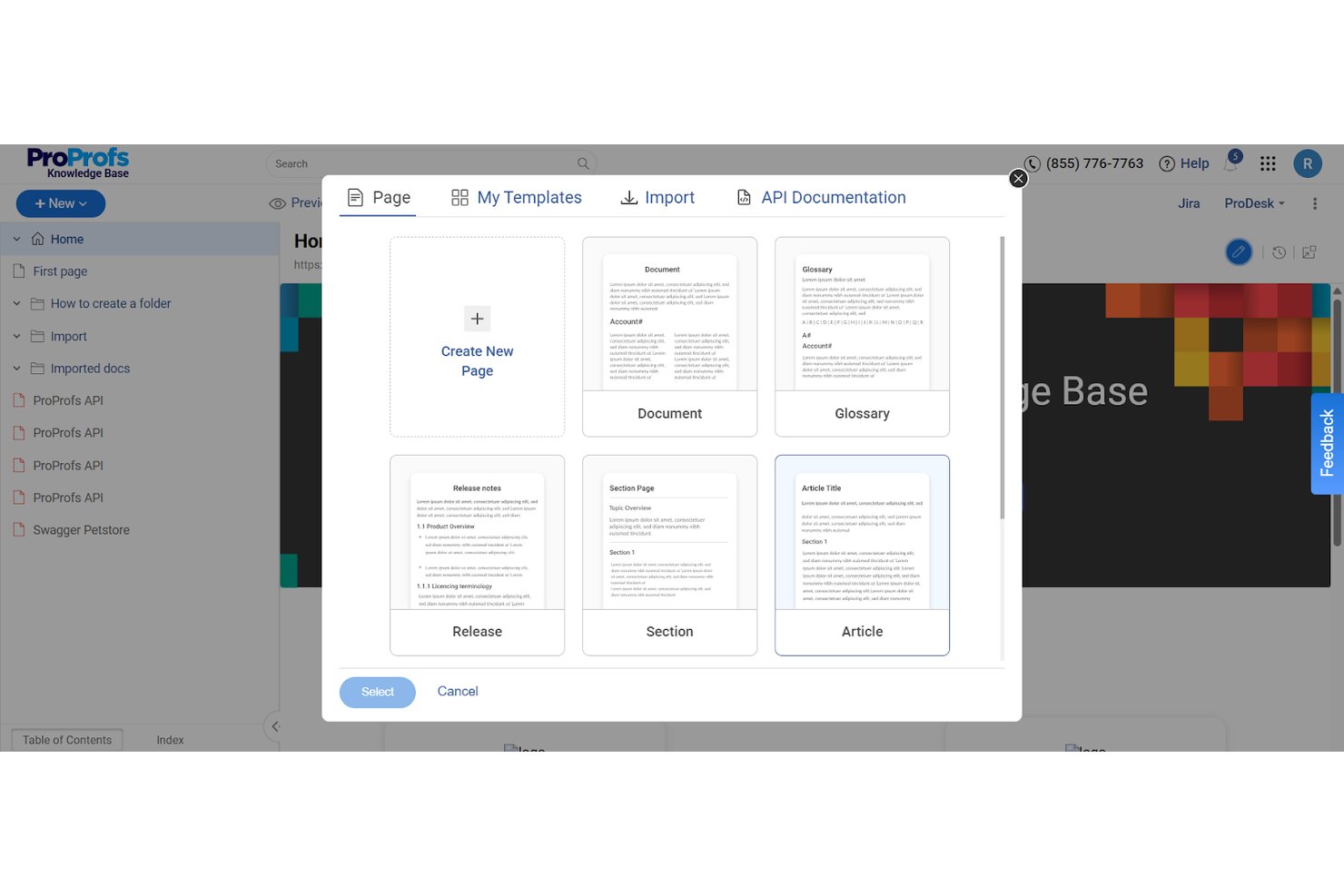
ProProfs Knowledge Base è una piattaforma di gestione della conoscenza basata sull'intelligenza artificiale che consente ai team di creare sia centri assistenza rivolti al pubblico sia basi di conoscenza interne private, complete di strumenti per la creazione dei contenuti, ricerca basata sull'intelligenza artificiale, controlli di accesso e localizzazione, tutto da un unico account.
Per chi è più adatta ProProfs Knowledge Base?
È particolarmente adatta ai team delle risorse umane e delle operazioni aziendali di medie e grandi imprese che gestiscono sia la documentazione interna per i dipendenti sia i contenuti di assistenza rivolti ai clienti.
Perché ho scelto ProProfs Knowledge Base
Ho scelto ProProfs Knowledge Base come una delle migliori soluzioni perché la sua libreria di modelli predefiniti include documenti specifici per le risorse umane già pronti all'uso, tra cui manuali per i dipendenti, guide per l'inserimento e manuali di formazione. Apprezzo particolarmente il modo in cui lo Scrittore IA può generare e compilare questi modelli con un intervento manuale minimo. I flussi di approvazione e la cronologia delle versioni rendono molto più semplice, nella pratica, mantenere i documenti sulle procedure pronti per le verifiche.
Funzionalità principali di ProProfs Knowledge Base
- Assistente di ricerca basato sull'intelligenza artificiale: fornisce risposte immediate dagli articoli della knowledge base utilizzando query in linguaggio naturale.
- Controlli di accesso granulari: assegna autorizzazioni dettagliate a livello di utente, gruppo, pagina o cartella, incluso il supporto per SSO e SCIM.
- Analisi dello stato dei contenuti: monitora le tendenze di ricerca, identifica gli articoli obsoleti e segnala i collegamenti non funzionanti.
- Localizzazione multilingue: traduce automaticamente le basi di conoscenza delle risorse umane in oltre 60 lingue per i team internazionali.
Integrazioni di ProProfs Knowledge Base
ProProfs Knowledge Base offre integrazioni native con Freshdesk, Salesforce, Zendesk, Jira, Tidio, Slack e altri ancora. È disponibile un'API per le integrazioni personalizzate.
Pros and Cons
Pros:
- I modelli predefiniti per le risorse umane accelerano la creazione dei contenuti
- La ricerca basata sull'intelligenza artificiale fornisce risposte senza dover inviare richieste di assistenza
- Supporta oltre 60 lingue per i team internazionali delle risorse umane
Cons:
- Le opzioni di personalizzazione del design del portale disponibili sono limitate
- I report analitici sono meno granulari rispetto a quelli dei concorrenti
Ideale per la gestione della conoscenza potenziata dall’IA
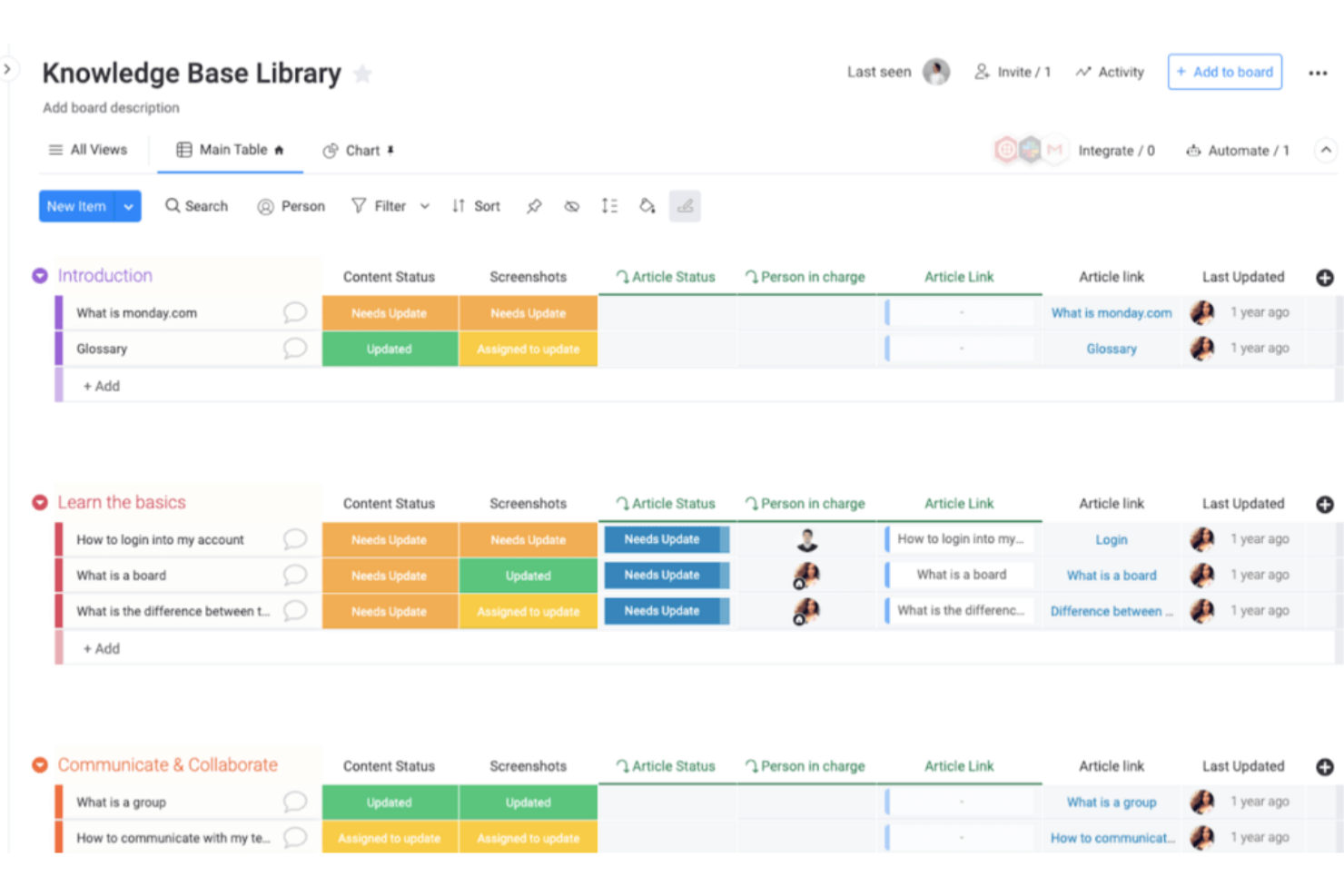
monday service è una piattaforma di base di conoscenza progettata per team e organizzazioni che desiderano centralizzare le informazioni, ottimizzare l'assistenza interna e aiutare i dipendenti a trovare risposte e condividere competenze.
Per chi è più adatto monday service?
monday service è particolarmente indicato per team di medie e grandi dimensioni che necessitano di una base di conoscenza centralizzata e potenziata dall’intelligenza artificiale, integrata in una piattaforma più ampia di servizi e operazioni.
Perché ho scelto monday service
Ho scelto monday service tra i migliori perché apprezzo come l’intelligenza artificiale sia integrata direttamente nel flusso di lavoro della gestione della conoscenza, invece di essere aggiunta in un secondo momento. L'agente di servizio AI si collega alla tua base di conoscenza e alla cronologia dei ticket per risolvere automaticamente le richieste ripetitive—così, quando viene posta per la cinquantesima volta la stessa domanda sull'onboarding, il mio team non deve rispondere manualmente. Mi affido inoltre alla ricerca AI personalizzata, che mostra i risultati più pertinenti tra ticket di assistenza, documentazione e strumenti collegati, fornendo agli utenti il contesto necessario per agire immediatamente. Gli assistenti digitali AI monitorano costantemente i contenuti della base di conoscenza e segnalano gli articoli obsoleti, quindi il mio team non deve correre a verificare manualmente i documenti ogni trimestre.
Funzionalità principali di monday service
- Portale clienti: Un hub self-service in cui dipendenti o clienti possono inviare richieste, monitorare lo stato dei ticket e consultare articoli della base di conoscenza senza contattare un agente.
- Colonna SLA: Un timer attivo che traccia il tempo di risoluzione di ciascun ticket, con pausa automatica fuori dagli orari lavorativi e indicatori visivi per ticket a rischio o fuori SLA.
- Bacheche dei ticket: Spazi di lavoro dedicati per la gestione delle richieste in ingresso che raccolgono tutta la comunicazione e gli aggiornamenti di stato dei ticket in un'unica posizione.
- Gestione degli incidenti: Una bacheca collegata che raggruppa i ticket correlati per aiutare i team a identificare, categorizzare e risolvere problemi ricorrenti o complessi.
Integrazioni con monday service
Le integrazioni includono Salesforce, QuickBooks, HubSpot, Zendesk, Active Directory, GitHub, GitLab, Slack, Gmail e Microsoft Teams.
Pros and Cons
Pros:
- Le bacheche visuali aiutano gli utenti a monitorare facilmente l’avanzamento dei progetti
- Integrazione con numerose applicazioni di terze parti
- Possibilità di personalizzare flussi di lavoro e dashboard
Cons:
- Mancano alcune funzioni di report avanzate
- Il costo può essere superiore rispetto ad altri strumenti

Confluence
Ideale per la collaborazione di squadra
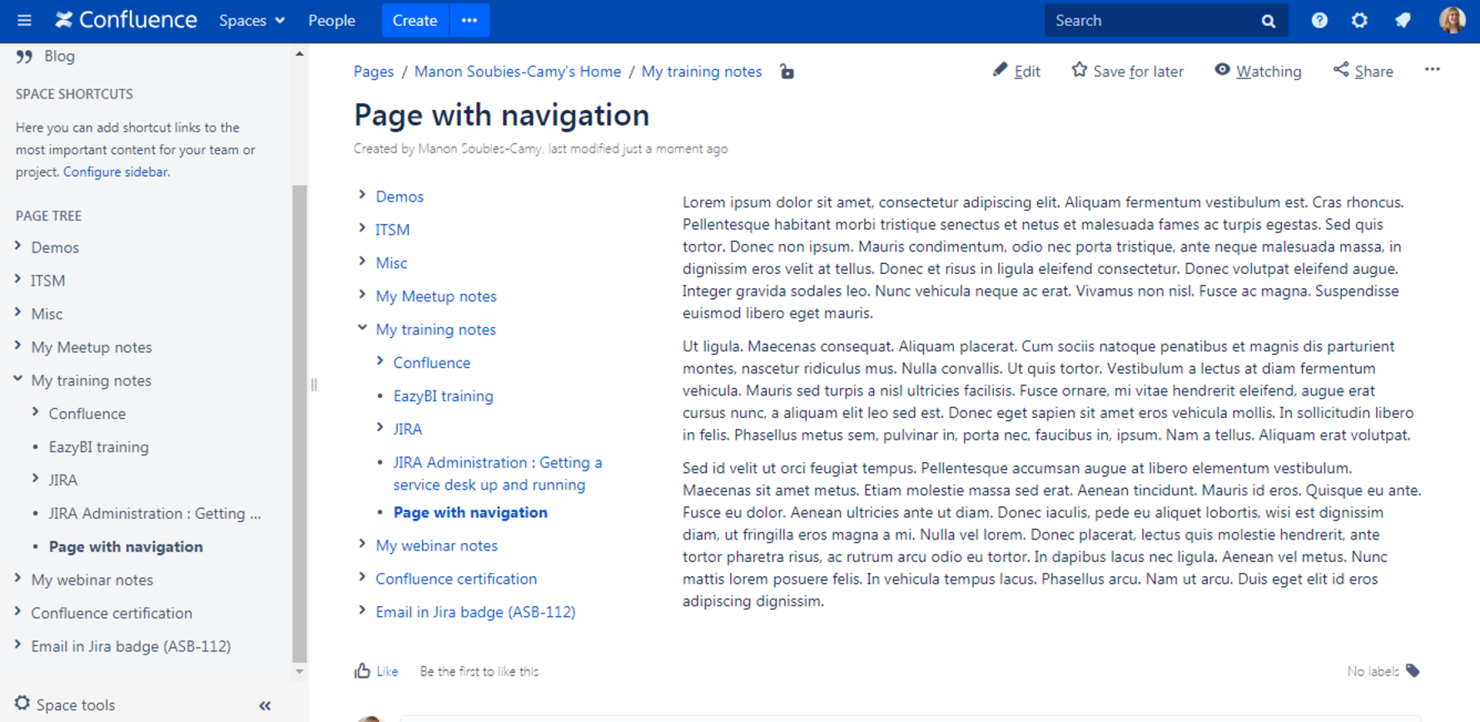
Confluence è una piattaforma di knowledge base che aiuta i team di tecnologia, finanza e di altri settori a organizzare, documentare e condividere informazioni in un unico hub centrale, così i team possono catturare le competenze e mantenere tutti allineati.
Per chi è ideale Confluence?
Confluence è una scelta eccellente per team tecnologici e di sviluppo software di medie e grandi dimensioni che necessitano di uno spazio strutturato e ricercabile per gestire la documentazione interna e la conoscenza tecnica.
Perché ho scelto Confluence
Confluence si guadagna il suo posto tra i migliori della mia lista grazie all’eccellente supporto alla collaborazione in tempo reale all’interno di una knowledge base strutturata. Adoro la funzione dei documenti in tempo reale, che permette a tutto il mio team di modificare la stessa pagina contemporaneamente—nessun conflitto di versione, nessuna attesa perché qualcuno “carichi” un file. I commenti in linea e le @menzioni permettono di dare feedback direttamente sul contenuto, senza perdere il contesto in altre conversazioni. Gli Spazi di Confluence permettono inoltre ai team di organizzare la conoscenza per progetto, reparto o obiettivo, mantenendo la documentazione strutturata man mano che il team cresce.
Funzionalità chiave di Confluence
- Versionamento delle pagine: Traccia l’intera cronologia delle modifiche di una pagina, confronta le versioni fianco a fianco e torna a una versione precedente quando necessario.
- Modelli di best practice: Accedi a una raccolta di modelli predefiniti per documenti come requisiti di prodotto, note riunione e piani di progetto per velocizzare la creazione dei contenuti.
- Database Confluence: Aggrega e visualizza informazioni da Jira e app di terze parti in visualizzazione tabellare, a schede o a bacheca all’interno della tua knowledge base.
- Statistiche delle pagine: Visualizza le analisi di coinvolgimento sulle singole pagine, tra cui visualizzazioni di pagina e utenti, per vedere quali contenuti vengono utilizzati.
Integrazioni di Confluence
Le integrazioni includono Jira, Jira Service Management, Trello, Loom, Bitbucket, Rovo, Compass, Focus, Talent e Jira Align.
Pros and Cons
Pros:
- Supporta la modifica in tempo reale
- Modelli personalizzabili
- Comunicazione efficace all'interno del team
Cons:
- Configurazione complessa per i nuovi utenti
- Potrebbe richiedere plugin aggiuntivi
Altri software per basi di conoscenza
Ecco alcune opzioni aggiuntive di software per basi di conoscenza che non sono entrate nella mia selezione, ma che vale comunque la pena prendere in considerazione:
- Knowmax
Ideale per la gestione della conoscenza guidata dall'IA
- Helprace
Ideale per la gestione del feedback
- Odoo
Ideale per utenti open-source
- Guru
Ideale per la ricerca tramite AI
- Glean
Ideale per l'unificazione della ricerca aziendale
- Help Scout
Ideale per integrazione con email
- ManageEngine
Ideale per grandi imprese
- KnowledgeBase
Ideale per le piccole imprese
- LiveAgent
Ideale per la gestione di più knowledge base
- Zendesk
Ideale per insight sulle performance dei contenuti
- Axero
Ideale per il self-service dei dipendenti
- Attio
Ideale per l'integrazione CRM
- Hub
Ideale per la distribuzione mirata dei contenuti
- Trupeer
Ideale per la ricerca video AI


Cómo evalúo el software de gestión de ausencias
Divido mi evaluación en dos niveles: la funcionalidad básica que una herramienta debe tener, como flujos de aprobación multinivel y seguimiento de acumulaciones, y los factores diferenciadores que separan las mejores herramientas del resto.
Funcionalidad básica (requisitos esenciales para esta lista)
Cuando selecciono herramientas para mi lista, califico cada una en una escala del 0 (no ofrece la funcionalidad) al 5 (sobresale en esta área) para cada funcionalidad básica que aparece a continuación. Luego, calculo la puntuación total de la herramienta en un porcentaje. Cada herramienta debe conseguir una puntuación total mínima del 65% para ser considerada para su inclusión.
- Solicitudes y flujos de aprobación de ausencias: Evalúo si la herramienta permite cadenas de aprobación multinivel, delegación por parte de los gerentes y aprobaciones desde dispositivos móviles, para que las solicitudes no se atasquen cuando alguien está fuera de la oficina.
- Seguimiento de acumulaciones y saldos: Cada herramienta debe manejar fórmulas de acumulación para distintos tipos de ausencia como PTO, enfermedad y licencias parentales, incluyendo reglas según la antigüedad y límites para el traspaso de días.
- Configuración de políticas de ausencia: Verifico si los equipos de RRHH pueden definir políticas distintas según departamento, ubicación o puesto, en lugar de imponer un único conjunto de reglas para toda la organización.
- Calendario de equipo y visibilidad: Busco calendarios compartidos de ausencias que permitan a los gerentes identificar solapamientos y vacíos de cobertura antes de aprobar las solicitudes.
- Cumplimiento normativo e informes: Los informes deben ir más allá de las exportaciones básicas, por lo que busco herramientas que ofrezcan plantillas listas para cumplir con la normativa y registros de auditoría ligados a las regulaciones legales de ausencias.
- Integración con nómina y HRIS: Evalúo qué tan bien sincroniza la plataforma los datos de ausencias aprobadas con las herramientas de nómina y recursos humanos para evitar errores de reingreso manual durante los ciclos de pago.
Una vez que tengo una lista de herramientas que cumplen con los criterios, considero qué hace único a cada plataforma.
Factores diferenciadores (lo que distingue a los proveedores)
Así comparo y contrasto diferentes proveedores:
Características destacadas
El soporte multinacional es importante cuando tu equipo abarca varias regiones, así que busco herramientas que apliquen automáticamente los tipos de ausencia requeridos por ley según la ubicación del empleado. La integración con Slack o Teams es otro factor que valoro, ya que permite a los gerentes aprobar solicitudes sin cambiar de aplicación. También evalúo paneles de analítica de ausencias que muestran patrones como picos recurrentes en un determinado departamento, otorgando a los equipos de RRHH datos para actuar y no solo para registrar.
Más allá de las características
La transparencia de precios es algo que evalúo detenidamente, ya que algunos proveedores cobran extra por integraciones o soporte premium que los equipos de RRHH más pequeños asumen que están incluidos. También considero la rapidez con la que se puede implementar una plataforma. Una empresa de 20 personas necesita configuración autoservicio, mientras que una organización multi-entidad requerirá migración guiada y acompañamiento en la puesta en marcha. Las certificaciones de cumplimiento como SOC 2 y la preparación para GDPR también influyen, especialmente cuando los registros de ausencias contienen datos sensibles de salud de los empleados.
Come scegliere il software per basi di conoscenza
È facile perdersi in lunghi elenchi di funzionalità e strutture tariffarie complesse. Per aiutarti a rimanere concentrato mentre affronti il tuo processo di selezione del software, ecco una lista di fattori da tenere a mente:
| Fattore | Cosa considerare |
|---|---|
| Scalabilità | Il software crescerà insieme al tuo team? Considera l'espansione futura e se lo strumento è in grado di gestire senza problemi una quantità maggiore di dati e utenti. |
| Integrazioni | Funziona con gli strumenti che già utilizzi? Assicurati che sia compatibile con piattaforme come Slack, sistemi CRM e altre applicazioni da cui dipendi. |
| Personalizzazione | Puoi adattarlo alle tue esigenze? Cerca opzioni per modificare struttura, identità visiva e flussi di lavoro in base ai tuoi processi specifici. |
| Facilità d'uso | È semplice da utilizzare per tutti gli utenti? Un'interfaccia intuitiva può ridurre i tempi di formazione e favorire l'adozione da parte del team. Verifica la facilità d'uso prima di prendere una decisione. |
| Implementazione e inserimento | Quanto velocemente puoi iniziare? Valuta il tempo e le risorse necessari per la configurazione, incluso il supporto per la migrazione dei dati e la formazione degli utenti. |
| Costo | Rientra nel tuo budget? Confronta i piani tariffari, incluse eventuali commissioni nascoste o spese per funzionalità aggiuntive. Cerca una prova gratuita per valutarne il valore. |
| Misure di sicurezza | I tuoi dati sono protetti? Verifica la presenza di crittografia, controlli degli accessi e conformità alle normative sulla protezione dei dati come il GDPR. |
| Disponibilità dell'assistenza | Che tipo di aiuto puoi aspettarti? Considera le opzioni di assistenza del fornitore, i tempi di risposta e l'eventuale disponibilità di supporto 24 ore su 24, 7 giorni su 7, per maggiore tranquillità. |
Che cos'è il software per basi di conoscenza?
Il software per basi di conoscenza è uno strumento che aiuta le organizzazioni a memorizzare, organizzare e condividere le informazioni internamente ed esternamente. Viene comunemente utilizzato dai team dell'assistenza clienti, dai reparti delle risorse umane e dai professionisti IT per fornire un accesso rapido alle informazioni e migliorare l'efficienza. Le funzionalità di ricerca, le opzioni per i feedback degli utenti e il supporto multimediale aiutano a organizzare e recuperare facilmente le informazioni. Questi strumenti migliorano la collaborazione e garantiscono che tutti abbiano accesso alle informazioni di cui hanno bisogno quando ne hanno bisogno.
Funzionalità
Quando scegli un software per basi di conoscenza, presta attenzione alle seguenti funzionalità chiave:
- Funzionalità di ricerca: consente agli utenti di trovare rapidamente le informazioni di cui hanno bisogno effettuando ricerche efficienti nella base di conoscenza.
- Categorizzazione dei contenuti: aiuta a organizzare le informazioni in sezioni facili da navigare, rendendo semplice per gli utenti individuare i contenuti pertinenti.
- Controlli di accesso degli utenti: permettono agli amministratori di impostare le autorizzazioni, garantendo che le informazioni sensibili siano accessibili solo agli utenti autorizzati.
- Modelli personalizzabili: forniscono layout predefiniti che possono essere adattati al tuo marchio, velocizzando il processo di creazione dei contenuti.
- Analisi e report: offrono informazioni su come gli utenti interagiscono con la base di conoscenza, consentendo ai team di ottimizzare i contenuti per un maggiore coinvolgimento.
- Guide interattive: facilitano istruzioni dettagliate che coinvolgono gli utenti, rendendo più semplici da seguire i processi complessi.
- Raccolta dei feedback: consente agli utenti di fornire contributi direttamente all'interno della base di conoscenza, aiutando i team a raccogliere informazioni e migliorare i contenuti.
- Forum della comunità: incoraggiano l'interazione degli utenti e il contributo ai contenuti, arricchendo la base di conoscenza con informazioni provenienti dalla comunità.
- Supporto multilingue: garantisce che i contenuti siano accessibili agli utenti in lingue diverse, ampliando la portata della base di conoscenza.
- Controllo delle versioni dei contenuti: tiene traccia delle modifiche e degli aggiornamenti ai contenuti, consentendo ai team di gestire le revisioni e mantenere l'accuratezza.
Vantaggi
L'implementazione di un software per basi di conoscenza offre diversi vantaggi al tuo team e alla tua azienda. Ecco alcuni dei vantaggi che puoi aspettarti:
- Accesso migliorato alle informazioni: grazie alle funzionalità di ricerca e alla categorizzazione dei contenuti, gli utenti possono trovare rapidamente le informazioni di cui hanno bisogno, riducendo il tempo dedicato alla ricerca.
- Produttività maggiore: centralizzando le informazioni e fornendo controlli di accesso agli utenti, i team possono concentrarsi sulle attività senza interruzioni o confusione sull'accesso ai documenti.
- Esperienza di assistenza coerente: le guide interattive e la raccolta dei feedback garantiscono che gli utenti ricevano indicazioni accurate e chiare, migliorando la qualità complessiva dell'assistenza.
- Maggiore collaborazione: i forum della comunità e i modelli personalizzabili consentono ai membri del team e agli utenti di contribuire e condividere informazioni, favorendo un ambiente collaborativo.
- Migliore processo decisionale: le analisi e i report offrono informazioni sulle prestazioni dei contenuti, aiutando i team a prendere decisioni consapevoli per ottimizzare la base di conoscenza.
- Scalabilità: il supporto multilingue garantisce che, con la crescita dell'azienda, la base di conoscenza possa soddisfare le diverse esigenze degli utenti.
- Accuratezza dei contenuti: il controllo delle versioni dei contenuti aiuta a mantenere informazioni aggiornate e accurate, riducendo errori e informazioni errate.
Costi e prezzi
La scelta di un software per basi di conoscenza richiede la comprensione dei vari modelli di prezzo e dei piani disponibili. I costi variano in base alle funzionalità, alle dimensioni del team, agli strumenti aggiuntivi e ad altro ancora. La tabella seguente riassume i piani più comuni, i relativi prezzi medi e le funzionalità tipicamente incluse nelle soluzioni software per basi di conoscenza:
Tabella di confronto dei piani per software per basi di conoscenza
| Tipo di piano | Prezzo medio | Funzionalità comuni |
|---|---|---|
| Piano gratuito | $0 | Ricerca di base, spazio di archiviazione limitato e assistenza della comunità. |
| Piano personale | $5-$25/utente/mese | Ricerca avanzata, modelli personalizzabili e analisi. |
| Piano aziendale | $30-$60/utente/mese | Supporto multilingue, sicurezza avanzata e opzioni di integrazione. |
| Piano per grandi aziende | $70-$150/utente/mese | Account manager dedicato, analisi avanzate e opzioni di personalizzazione complete. |
Domande frequenti sul software per basi di conoscenza
Ecco alcune risposte alle domande più comuni sul software per basi di conoscenza:
Il software per basi di conoscenza può integrarsi con altri strumenti?
Sì, la maggior parte delle piattaforme per basi di conoscenza si integra con strumenti come CRM, HRIS, sistemi di assistenza e app per la collaborazione. Ciò consente al team di importare dati, automatizzare i flussi di lavoro e collegare le informazioni tra i sistemi, per operazioni quotidiane più efficienti.
Quanto sono sicuri i miei dati in un software per basi di conoscenza?
La sicurezza dei dati varia a seconda del fornitore, ma la maggior parte dei software per basi di conoscenza offre solide funzionalità di sicurezza. Cerca soluzioni che offrano crittografia, backup regolari e controlli dettagliati degli accessi degli utenti per l’uso interno. Alcuni fornitori offrono anche la conformità a standard come GDPR o HIPAA. Esamina sempre le funzionalità di sicurezza e le policy aziendali del software che stai valutando, per assicurarti che i tuoi dati rimangano protetti.
In che modo una base di conoscenza migliora l'efficienza dei dipendenti e dei clienti?
Una base di conoscenza fornisce a team e clienti risposte immediate, riducendo il tempo dedicato alla ricerca delle informazioni. Le risorse umane, l’assistenza o le vendite possono gestire le richieste più rapidamente, condividere aggiornamenti e ridurre le domande ripetitive, liberando tempo per attività di maggior valore.
È facile aggiornare i contenuti in un software per basi di conoscenza?
Sì, la maggior parte delle piattaforme offre strumenti intuitivi per la modifica e la collaborazione, così puoi aggiungere, rivedere o organizzare rapidamente gli articoli. Il controllo delle versioni, i modelli e i flussi di approvazione mantengono i contenuti accurati e aggiornati.
Qual è la differenza tra un software per basi di conoscenza interno ed esterno?
Le basi di conoscenza interne aiutano i dipendenti a trovare procedure, policy e informazioni aziendali. Le basi di conoscenza esterne sono rivolte al pubblico e vengono utilizzate dai clienti per le domande frequenti e l’assistenza self-service.
Come posso incoraggiare i dipendenti ad adottare la nostra base di conoscenza?
Puoi favorire l’adozione coinvolgendo i team nella configurazione, offrendo formazione e rendendo la piattaforma facile da usare. Metti in evidenza i primi risultati positivi e chiedi feedback, così i dipendenti vedranno il valore concreto del suo utilizzo quotidiano.