

I 10 migliori sistemi di gestione dell’apprendimento aziendale del 2026

10 Elenco dei migliori sistemi aziendali per la gestione della formazione


I migliori sistemi aziendali per la gestione della formazione aiutano i professionisti delle risorse umane e della formazione a erogare una formazione coerente e scalabile in tutta l'organizzazione, sia che si tratti di inserire nuovi assunti, mantenere la conformità o sviluppare le competenze dei dipendenti per una crescita a lungo termine.
Se ti affidi ancora a fogli di calcolo, promemoria via e-mail o strumenti obsoleti per gestire la formazione, probabilmente stai affrontando inefficienze, scarso coinvolgimento e visibilità limitata sui risultati dell'apprendimento. Oppure potresti avere già un LMS, ma è macchinoso, difficile da personalizzare e non produce i risultati di cui il tuo team ha bisogno.
In questa guida condividerò i migliori sistemi aziendali per la gestione della formazione sulla base della mia esperienza diretta nella gestione di programmi di formazione interna per 9 anni e nella valutazione di strumenti L&D per oltre 3 anni. Il mio obiettivo è aiutarti a fare chiarezza e trovare una soluzione che soddisfi davvero le tue esigenze di formazione e sviluppo.
Perché fidarsi delle nostre recensioni sui software
Il nostro team testa e recensisce software dal 2012. In quanto esperti HR noi stessi, sappiamo quanto sia difficile — e importante — scegliere il software giusto.
Per questa guida, abbiamo valutato gli strumenti attraverso test pratici e ricerche indipendenti, assegnando un punteggio agli strumenti in base ai nostri criteri di selezione. Ci basiamo inoltre sulle competenze di leader di pensiero del settore e di professionisti HR attivi.
Le nostre recensioni riflettono il nostro giudizio editoriale umano, non un discorso di vendita.
Revisori esperti:
Tabella comparativa dei sistemi LMS aziendali
Questa tabella comparativa riassume i dettagli dei prezzi delle mie migliori selezioni di sistemi LMS aziendali:
| Tool | Best For | Trial Info | Price | ||
|---|---|---|---|---|---|
| 1 | Miglior sistema di gestione dell’apprendimento con IA per team globali | Demo gratuita disponibile | A partire da $5/dipendente/mese | Website | |
| 2 | Ideale per la formazione sulla conformità e l'inserimento dei dipendenti integrati nativamente nelle risorse umane | Demo gratuita disponibile | Prezzi su richiesta | Website | |
| 3 | Ideale per soluzioni LMS personalizzate | Demo gratuita disponibile | Prezzi su richiesta | Website | |
| 4 | Ideale per la formazione basata sui ruoli | Piano gratuito + demo gratuita disponibile | A partire da $119/mese (fatturazione annuale) | Website | |
| 5 | Ideale per flussi dinamici di creazione contenuti | Demo gratuita disponibile | Prezzi su richiesta | Website | |
| 6 | Ideale per la formazione specifica per ruolo orientata alle performance | Prova gratuita di 30 giorni | Da $2.88/utente/mese | Website | |
| 7 | Ideale come soluzione olistica per la gestione dell'apprendimento aziendale | Prova gratuita + demo gratuita | Prezzo su richiesta | Website | |
| 8 | Miglior LMS basato su cloud con funzione di auto-iscrizione | Demo gratuita disponibile | Prezzo su richiesta | Website | |
| 9 | Il miglior sistema di gestione della formazione aziendale per facilità d'uso | Demo gratuita disponibile | Prezzo su richiesta | Website | |
| 10 | Ideale per il coaching con roleplay IA | Prova gratuita disponibile | Da $239/mese (80 utenti) | Website |


Recensioni dei migliori sistemi aziendali per la gestione della formazione
Esamina ogni LMS in dettaglio per trovare la soluzione più adatta ai tuoi obiettivi formativi. Ho evidenziato i principali casi d’uso, le funzionalità distintive e schermate dell’interfaccia utente per aiutarti a confrontare gli strumenti a colpo d’occhio.

Deel HR
Miglior sistema di gestione dell’apprendimento con IA per team globali

Deel HR offre alle organizzazioni globali una piattaforma unificata per gestire l'apprendimento dei dipendenti, la conformità e i processi HR, rendendo più semplice per i team distribuiti fornire, monitorare e ottimizzare la formazione aziendale in più paesi e lingue.
Per chi è più indicato Deel HR?
Deel HR è particolarmente adatto per aziende di medie e grandi dimensioni che gestiscono una forza lavoro distribuita a livello internazionale e necessitano di strumenti per la formazione e le risorse umane che funzionino oltre i confini nazionali.
Perché ho scelto Deel HR
Ho inserito Deel HR tra le mie prime scelte perché apprezzo come il suo LMS alimentato dall’IA sia integrato direttamente nella stessa piattaforma che il tuo team già utilizza per HR, pagamenti e onboarding. Il generatore di corsi basato sull’IA permette di creare una bozza iniziale di un corso di formazione in pochi minuti: basta descrivere l’argomento e Deel HR struttura per te i contenuti, una funzione che trovo davvero utile quando occorre distribuire formazione di conformità in più paesi contemporaneamente. Apprezzo anche la logica di assegnazione automatica dei corsi: puoi impostare regole in base alla data di assunzione, al ruolo o al dipartimento, e la formazione giusta arriva alle persone giuste senza necessità di follow-up manuali. Per i team HR globali, questo livello di automazione disponibile in oltre 150 paesi è ciò che fa davvero guadagnare a Deel HR il suo posto in questa lista.
Caratteristiche principali di Deel HR
- Integrazione con la libreria di corsi OpenSesame: Collega il tuo account OpenSesame per accedere a migliaia di corsi preconfezionati direttamente insieme ai tuoi contenuti personalizzati, tutto in un unico posto.
- Builder di corsi multi-formato: Crea corsi utilizzando un editor drag-and-drop che supporta video, quiz, PDF, attività, sondaggi e file PowerPoint in un solo corso.
- Dashboard di analisi dell’apprendimento: Monitora tassi di completamento, tempo di apprendimento attivo, risultati di quiz (superato/non superato) e punteggi delle valutazioni per l’intera forza lavoro.
- Accesso all’apprendimento autodiretto: Consenti ai dipendenti di sfogliare la libreria formativa, iscriversi in autonomia ai corsi e monitorare i propri progressi dalla home page di Deel.
Integrazioni Deel HR
Le integrazioni includono FaceUp, Snowflake, DefensX, Microsoft Finance, Kintsugi, ReFresh OS, Revo.ai, Keeper, Human Interest ed Everyminute.
Pros and Cons
Pros:
- Automatizza l’assegnazione della formazione in base a data di assunzione o ruolo
- Combina apprendimento, performance e pianificazione della carriera in un unico strumento
- Fornisce dashboard per completamento della formazione e gap di competenze
- La suite all-in-one potrebbe essere eccessiva per chi necessita solo di un semplice LMS
- I moduli per performance/carriera possono richiedere configurazioni aggiuntive
New Product Updates from Deel HR

Deel Expands Stablecoin Wallet to 80+ Countries
Deel expands its Stablecoin Wallet to 80+ countries with dollar-backed balances and optional rewards. This gives eligible contractors more ways to hold and manage earnings inside Deel. For more information, visit Deel’s official site.
 .
.
Rippling
Ideale per la formazione sulla conformità e l'inserimento dei dipendenti integrati nativamente nelle risorse umane
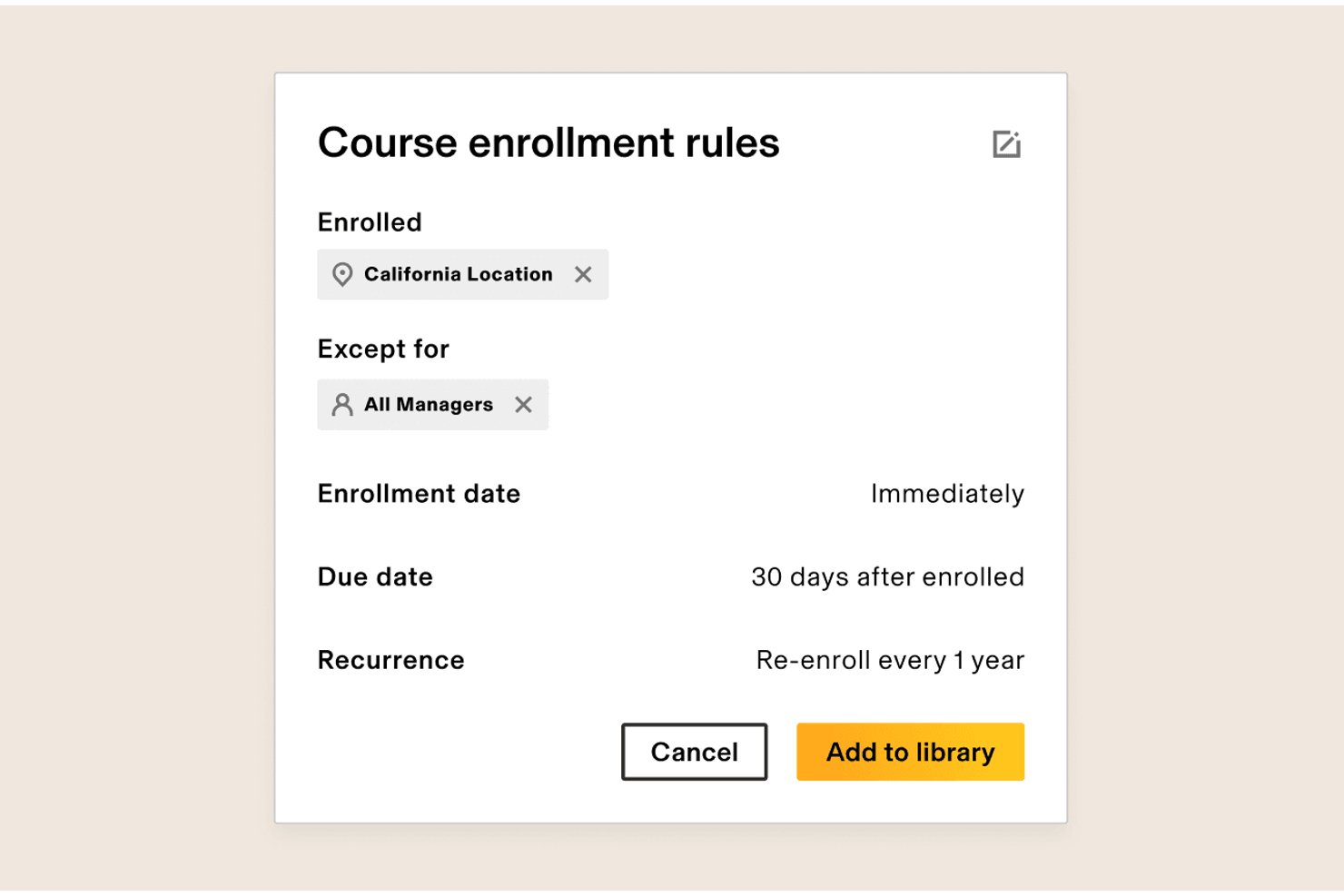
Rippling è un modulo LMS nativo per le risorse umane che combina la creazione di corsi tramite trascinamento, una libreria con oltre 80.000 corsi tramite Go1, l'iscrizione automatizzata alla formazione sulla conformità e resoconti in tempo reale, il tutto integrato direttamente nel proprio HRIS.
Per chi è più adatto Rippling?
L'LMS di Rippling è particolarmente adatto ai team operativi delle risorse umane che già utilizzano, o prevedono di utilizzare, Rippling come sistema HR principale e hanno bisogno che la formazione sulla conformità e quella per l'inserimento dei nuovi dipendenti funzionino automaticamente.
Perché ho scelto Rippling
Rippling è entrato nella mia lista ristretta perché il suo LMS è integrato direttamente nel proprio HRIS, il che significa che l'iscrizione alla formazione sulla conformità avviene automaticamente sulla base di dati HR reali come ruolo, sede e anzianità. Mi piace il fatto che, quando entra un nuovo dipendente, un unico flusso di lavoro possa attivare contemporaneamente l'accesso alle app, la configurazione dell'MFA e la formazione sulla sicurezza informatica. I pacchetti automatizzati per la conformità in base alla sede, come la formazione sulle molestie, eliminano il lavoro manuale che i team HR solitamente temono.
Funzionalità principali di Rippling
- Libreria di contenuti Go1: Accedi a oltre 80.000 corsi pronti all'uso tramite l'integrazione di Go1, con ricerca basata sull'AI.
- Strumento di creazione dei corsi tramite trascinamento: Crea corsi personalizzati utilizzando uno strumento visivo che supporta video, immagini, quiz e casi di studio.
- Iscrizione automatica basata su ruolo e sede: Assegna automaticamente i corsi ai dipendenti in base ad attributi HR come reparto, anzianità e area geografica.
- Pannello di controllo per i resoconti in tempo reale: Monitora i completamenti, la formazione in ritardo e i progressi del team tramite pannelli di controllo personalizzati basati su Rippling Analytics e AI.
Integrazioni di Rippling
Rippling supporta oltre 650 integrazioni, tra cui Slack, Microsoft Teams e Salesforce. Il suo HRIS nativo e i flussi di lavoro per la gestione delle identità collegano la formazione ai dati dei dipendenti, all'inserimento e alla gestione degli accessi.
Pros and Cons
Pros:
- I dati HR automatizzano l'iscrizione alla formazione sulla conformità
- Go1 offre oltre 80.000 corsi
- I flussi di lavoro per l'inserimento collegano formazione e accesso
Cons:
- Gli strumenti avanzati di valutazione restano limitati
- I flussi di lavoro per il rinnovo delle certificazioni restano poco chiari
New Product Updates from Rippling

Rippling Expands Automated Compliance With AI Workflows
Rippling expands Automated Compliance with multi-framework support, AI workflows, an audit portal, and trust centers. These updates help GRC teams manage compliance work and audits. For more information, visit Rippling’s official site.

Synergy Learning collabora con le organizzazioni che necessitano di un approccio personalizzato alla formazione aziendale, aiutando i team HR e i professionisti della formazione e sviluppo (L&D) a offrire esperienze di apprendimento coinvolgenti e scalabili che si adattano alle esigenze aziendali specifiche.
Per chi è consigliato Synergy Learning?
Synergy Learning è particolarmente indicato per organizzazioni di medie e grandi dimensioni che necessitano di un LMS completamente su misura in base ai propri flussi di lavoro, branding e requisiti di conformità.
Perché ho scelto Synergy Learning
Ho incluso Synergy Learning tra le mie scelte migliori perché il suo livello di personalizzazione va ben oltre quanto offerto dalla maggior parte delle piattaforme LMS pronte all’uso. Invece di adattare la tua organizzazione a un modello predefinito, Synergy Learning lavora insieme a te per progettare la piattaforma attorno ai flussi di lavoro, al marchio e agli obiettivi formativi specifici. Trovo particolarmente interessante il tema Spark LMS, che permette ai team di applicare la completa personalizzazione del branding senza sviluppo su misura. Inoltre, il servizio di sviluppo personalizzato consente di creare flussi di lavoro dedicati e percorsi di apprendimento personalizzati—una risorsa che ho trovato molto utile in fase di onboarding tra reparti diversi con necessità formative differenti.
Caratteristiche principali di Synergy Learning
- Automazione della formazione obbligatoria: Imposta iscrizione automatica, promemoria e avvisi di scadenza per mantenere i partecipanti aggiornati sui requisiti formativi obbligatori.
- Supporto multi-tenancy: Crea ambienti di apprendimento separati per diversi dipartimenti, divisioni o filiali all’interno di una singola istanza della piattaforma.
- Generatore di report personalizzati: Pianifica e invia automaticamente report su misura ai decisori utilizzando gli strumenti integrati di Moodle Workplace.
- Creazione di contenuti assistita dall’IA: Genera testo e immagini direttamente all’interno dell’editor LMS, con i contenuti creati dagli utenti automaticamente registrati per la revisione da parte dell’amministratore.
Integrazioni Synergy Learning
Le integrazioni includono Moodle, Totara e LearnUpon, ed è disponibile un’API per connessioni personalizzate.

Ideale per la formazione basata sui ruoli
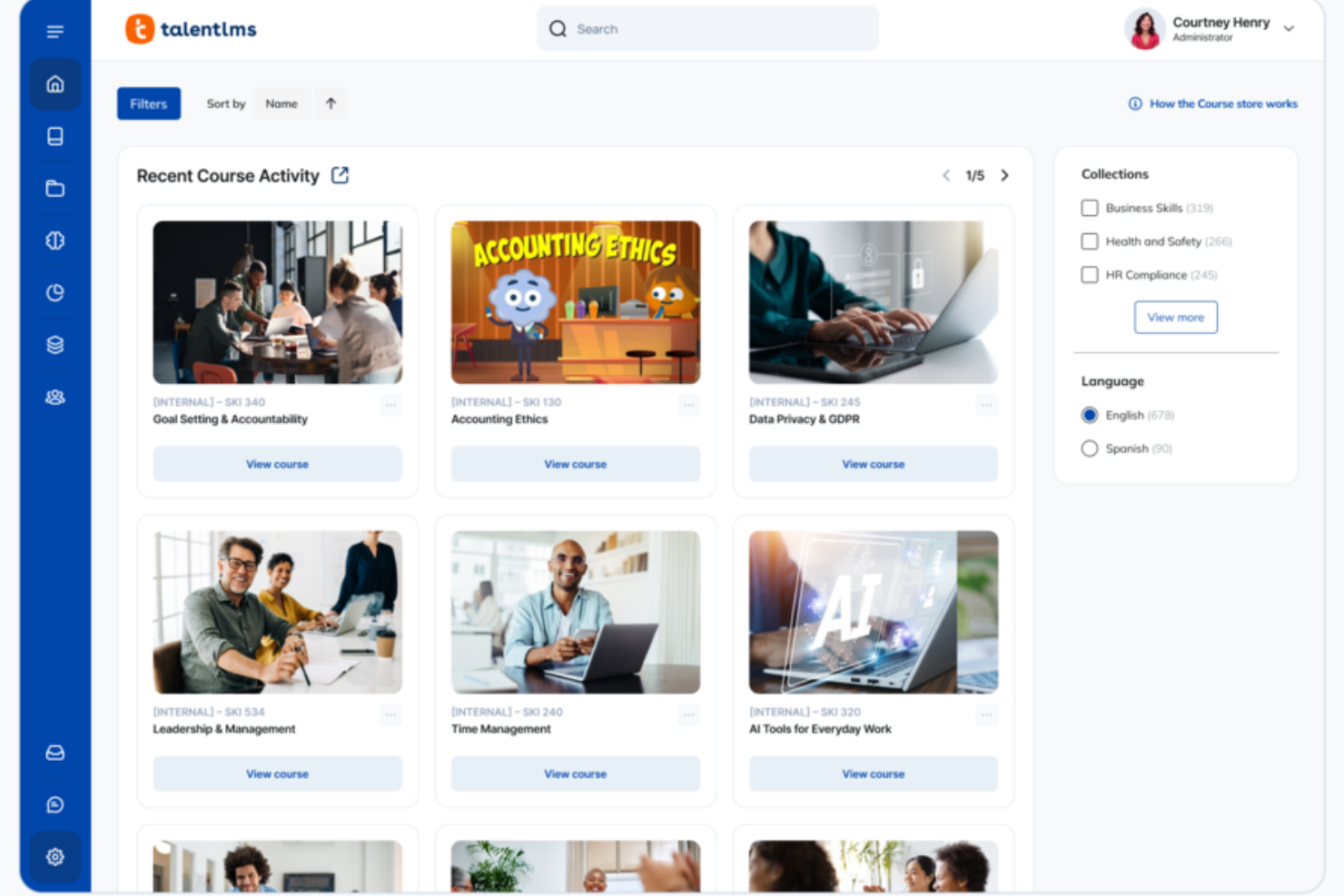
TalentLMS è un sistema di gestione dell'apprendimento basato su cloud, progettato per le aziende che hanno bisogno di erogare, monitorare e gestire la formazione aziendale tra diversi team, reparti o sedi.
Per chi è più adatto TalentLMS?
TalentLMS è adatto ad aziende di medie dimensioni e realtà in crescita che necessitano di formare diversi gruppi di dipendenti con esigenze didattiche differenti.
Perché ho scelto TalentLMS
TalentLMS si distingue per la sua capacità di gestire la formazione in base ai ruoli su larga scala. Apprezzo in particolare la funzione Branches, che mi consente di creare ambienti di formazione separati per diversi reparti o team, ognuno con il proprio portale personalizzato, contenuti e base utenti, il tutto gestito da una vista amministrativa centrale. Ruoli e permessi personalizzati mi permettono di assegnare a formatori, responsabili e utenti esattamente le autorizzazioni di cui hanno bisogno senza sovrapposizioni. Con l'assegnazione di corsi basata su gruppi, fornire una formazione mirata a specifici segmenti di dipendenti è semplice.
Caratteristiche principali di TalentLMS
- Supporto SCORM e xAPI: Importa ed esegue pacchetti di contenuti SCORM, xAPI e cmi5 direttamente sulla piattaforma.
- Regole automatiche per il completamento dei corsi: Imposta condizioni che segnano automaticamente i corsi come completati in base alle attività dell'utente o ai punteggi delle valutazioni.
- Strumento valutazioni integrato: Crea test, quiz e sondaggi direttamente sulla piattaforma senza bisogno di strumenti esterni.
- Gamification: Aggiungi punti, badge, classifiche e livelli ai corsi di formazione per incentivare il coinvolgimento degli utenti.
Integrazioni di TalentLMS
Le integrazioni includono BambooHR, Salesforce, ADP Workforce Now, Zoom, Microsoft Teams, GoTo, Shopify, WooCommerce, LinkedIn Learning e OpenSesame.
Pros and Cons
Pros:
- La struttura chiara dei corsi aiuta i team a seguire facilmente i percorsi di apprendimento assegnati.
- I gruppi di utenti e le filiali supportano bene strutture organizzative complesse.
- Le regole di automazione riducono significativamente le attività amministrative ripetitive legate alla formazione.
Cons:
- L'editor visivo dei corsi risulta limitato rispetto ai moderni strumenti drag-and-drop.
- L'hosting video si affida a soluzioni di archiviazione esterne per file multimediali di grandi dimensioni.
New Product Updates from TalentLMS
TalentLMS Adds Learning Paths, AI Video, and Learner Experience Updates
TalentLMS introduced updates across learning management, content creation, and learner experience, including Learning Paths for Groups, AI video generation in TalentCraft, video bookmarking, and expanded administration tools. For more information, visit TalentLMS’s official site.

Continu
Ideale per flussi dinamici di creazione contenuti

Continu è un sistema di gestione dell'apprendimento aziendale che consente ai team di creare, organizzare, distribuire e tracciare contenuti formativi tramite moduli interattivi, analisi, flussi di onboarding e supporto per vari formati didattici.
Per chi è ideale Continu?
Continu è particolarmente indicato per aziende di medie e grandi dimensioni che necessitano di una piattaforma centralizzata per gestire la formazione dei dipendenti, l'onboarding e programmi di apprendimento continuo.
Perché ho scelto Continu
Ho incluso Continu tra le mie scelte principali perché il suo flusso di creazione dei contenuti è davvero pensato per i team L&D che devono agire rapidamente. Trovo molto efficace che gli esperti di settore possano creare, visualizzare in anteprima e pubblicare corsi direttamente sulla piattaforma con un editor WYSIWYG senza coinvolgere i designer. L'autore assistito dall'IA genera scalette, adatta il tono e assegna automaticamente i tag ai contenuti al momento della pubblicazione. Quando cambia una policy, la si aggiorna una sola volta e viene distribuita istantaneamente su tutti i Percorsi o i Viaggi Formativi.
Funzionalità chiave di Continu
- Smart Segmentation™: Imposta filtri basati su regole per consegnare automaticamente il giusto contenuto formativo ai giusti utenti in base a ruolo, area geografica o linea di prodotto.
- Badge e certificazioni: Assegna credenziali digitali agli utenti al completamento di corsi o programmi per validare le conoscenze e monitorare la conformità.
- Workshops: Pianifica e ospita formazioni in presenza o sessioni virtuali guidate da istruttore direttamente in Continu, con supporto per Zoom, Microsoft Teams e Google Meet.
- Percorsi Formativi: Raggruppa diversi tipi di contenuti in percorsi strutturati simili a corsi che gli utenti seguono in una sequenza definita.
Integrazioni di Continu
Continu offre integrazioni native con Workday, BambooHR, Rippling, UKG, Okta, Microsoft Teams, Slack, Zoom, SAP SuccessFactors e Google Workspace. È disponibile un'API per integrazioni personalizzate.
Pros and Cons
Pros:
- Assegnazione automatica della formazione tramite smart segmentation
- Dashboard di analisi in tempo reale per dati di coinvolgimento
- Integrazioni fluide con HRIS e strumenti di collaborazione
Cons:
- Alcune analisi avanzate richiedono piani di livello superiore
- Meno template di contenuti predefiniti rispetto ad alcuni concorrenti
New Product Updates from Continu
Continu Adds Smarter Content Management
Continu adds Intelligent Tagging and Descriptions and richer content details to improve how learning content is organized and maintained. These updates reduce manual work and give teams more consistent, detailed content records. For more information, visit Continu’s official site.
 .
.
Ideale per la formazione specifica per ruolo orientata alle performance
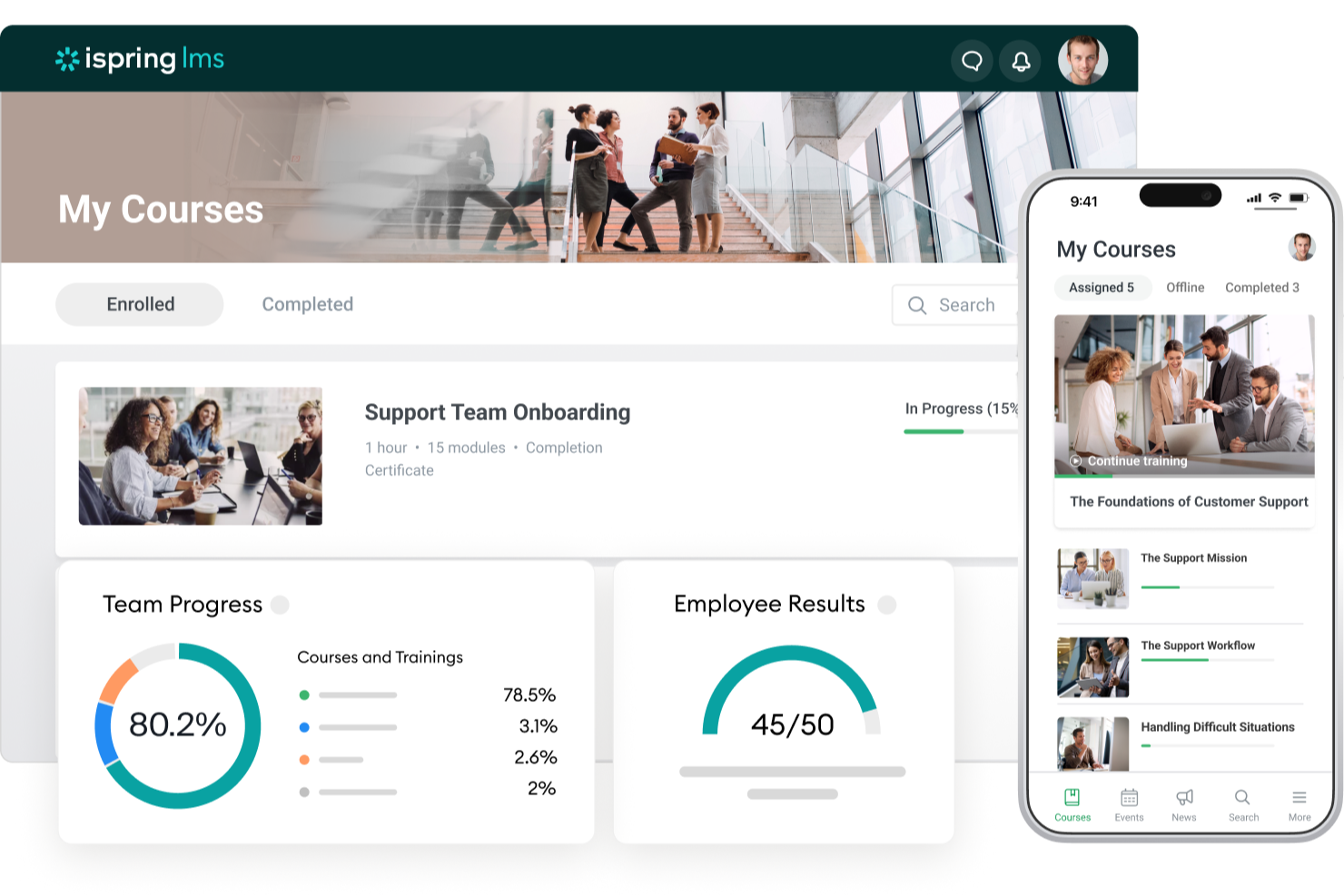
iSpring LMS offre ai team HR e ai leader aziendali una piattaforma per erogare, monitorare e gestire programmi di formazione aziendale personalizzati per diversi ruoli, facilitando la conformità, l'onboarding e lo sviluppo continuo dei dipendenti.
Per chi è adatto iSpring LMS?
iSpring LMS è particolarmente indicato per organizzazioni di medie e grandi dimensioni che necessitano di programmi di formazione strutturati e basati sui ruoli in reparti come vendite, assistenza clienti e operazioni.
Perché ho scelto iSpring LMS
iSpring LMS si è guadagnato un posto nella mia selezione grazie all'efficacia con cui collega i percorsi formativi specifici per ruolo ai risultati di performance reali. Mi piace che si possano assegnare percorsi di formazione in base a ruolo, reparto o posizione, così un nuovo rappresentante di vendita e un responsabile della conformità non devono seguire lo stesso contenuto generico. Gli strumenti di valutazione delle performance integrati permettono di collegare direttamente i progressi nell'apprendimento agli obiettivi dei dipendenti, rendendo più semplice verificare se la formazione produce realmente risultati. Inoltre, utilizzo i report dettagliati per monitorare i tassi di completamento e i punteggi delle valutazioni per ruolo, ottenendo dati concreti da portare nei colloqui sulle performance.
Caratteristiche principali di iSpring LMS
- Creazione corsi con intelligenza artificiale: Crea corsi scorrevoli con testo, domande per quiz, immagini e traduzioni generate dall'IA direttamente all'interno del LMS—senza competenze tecniche richieste.
- Gamification: I dipendenti guadagnano punti e badge e possono monitorare i loro progressi in classifiche per aumentare il coinvolgimento durante la formazione.
- Base di conoscenza: Conserva guide aziendali, FAQ e risorse in un hub centralizzato su cloud, con controlli di accesso basati sui ruoli.
- App mobile: Un'app nativa per iOS e Android consente agli utenti di completare la formazione offline, con sincronizzazione automatica dei progressi al momento della riconnessione.
Integrazioni di iSpring LMS
Le integrazioni includono Salesforce, MS Azure, MS Exchange, BambooHR, Udemy, Go1, LinkedIn Learning e altre popolari librerie di corsi.
Pros and Cons
Pros:
- Include iSpring Suite per la creazione avanzata di corsi e quiz
- I percorsi di apprendimento garantiscono una formazione strutturata e sequenziale
- Report avanzati per monitorare il coinvolgimento a livello di lezione
Cons:
- Integrazioni native limitate rispetto alle piattaforme LMS aziendali più grandi
- L'opzione di personalizzazione del marchio ha un costo extra nei piani di fascia bassa
New Product Updates from iSpring LMS

iSpring LMS Adds Multiple Observations to OJT Sessions
iSpring LMS now lets managers log multiple observations within one OJT session, grouping visits and auto-generating summary stats like averages, criterion results, and comparisons. For more information, visit iSpring LMS's official site.

Absorb
Ideale come soluzione olistica per la gestione dell'apprendimento aziendale

Absorb offre ai team HR e ai formatori aziendali una piattaforma flessibile per erogare, monitorare e gestire programmi di formazione, conformità e sviluppo dei dipendenti attraverso settori e dimensioni aziendali diversi.
Per chi è ideale Absorb?
Absorb è particolarmente indicato per organizzazioni di medie e grandi dimensioni che necessitano di una piattaforma di apprendimento scalabile, in grado di supportare sia la formazione interna dei dipendenti sia casi d'uso estesi all'ecosistema aziendale.
Perché ho scelto Absorb
Absorb si guadagna la sua posizione tra i migliori della mia shortlist perché copre l'intero ciclo di apprendimento in un'unica piattaforma: dalla creazione di corsi guidata dall'IA, al monitoraggio della conformità, fino alla formazione estesa esterna. Ciò che apprezzo di più è Absorb Create, che utilizza l'intelligenza artificiale generativa per costruire corsi completi, con quiz, narrazione e video, in pochi minuti. Questo fa risparmiare tempo quando il mio team deve avviare rapidamente corsi di formazione in più reparti con scadenze ravvicinate. Mi affido inoltre molto al pacchetto di reportistica: i modelli preimpostati per il progresso degli utenti, il completamento dei corsi e le certificazioni mi permettono di programmare l'invio automatico di report ai responsabili di reparto, senza dover estrarre manualmente i dati.
Funzionalità principali di Absorb
- Portale degli utenti: Una homepage personalizzata e con branding aziendale dove i dipendenti possono consultare, iscriversi e monitorare i propri corsi obbligatori ed elettivi.
- Checklist di osservazione: I manager possono valutare e verificare le capacità pratiche compilando direttamente sulla piattaforma moduli strutturati di valutazione in presenza.
- Strumenti eCommerce: Vendita e distribuzione esterna dei contenuti formativi grazie al catalogo corsi integrato, gestione dei pagamenti e iscrizioni.
- Supporto multilingue: Eroga formazione in diverse lingue per supportare team globali ed esigenze di conformità regionale.
Integrazioni di Absorb
Le integrazioni includono Salesforce, ADP, BambooHR, Namely, Okta, Microsoft Teams, Zoom, LinkedIn Learning, SAP SuccessFactors e Workday.
Pros and Cons
Pros:
- Supporta formazione sia interna che esterna in un unico ecosistema
- La configurazione multi-portale mantiene separati i gruppi di utenti ma con gestione centralizzata
- L'automazione riduce le attività amministrative e di gestione degli utenti ripetitive
Cons:
- La reportistica personalizzata per metriche di nicchia può richiedere configurazioni aggiuntive
- La tariffazione richiede un preventivo personalizzato e può essere superiore rispetto a tool LMS di base
New Product Updates from Absorb
Absorb Expands Instructor-Led Course Session Management
Absorb adds multi-class sessions, recurring classes, conflict indicators, and learner enrollment during setup for instructor-led courses. These updates give admins more control over scheduling and session management. For more information, visit Absorb’s official site.
 .
.
Miglior LMS basato su cloud con funzione di auto-iscrizione

Mitratech Perform è un sistema di gestione dell'apprendimento (LMS) basato su cloud, pensato per i team HR e i formatori aziendali che gestiscono lo sviluppo dei dipendenti, la conformità e la formazione continua nelle organizzazioni in crescita.
Per chi è ideale Mitratech Perform?
Mitratech Perform è particolarmente adatto a organizzazioni di medie e grandi dimensioni che hanno bisogno di una soluzione scalabile per gestire formazione, conformità e sviluppo delle prestazioni dei dipendenti in un unico posto.
Perché ho scelto Mitratech Perform
Ho selezionato Mitratech Perform tra i migliori grazie alla sua funzione di auto-iscrizione, che elimina una delle parti più noiose nella gestione di un programma di formazione aziendale. Invece di assegnare manualmente i corsi uno a uno, puoi iscrivere l'intera forza lavoro e filtrare per ruolo, dipartimento o anzianità. I nuovi assunti vengono iscritti automaticamente fin dal momento dell'assunzione, così la formazione introduttiva parte senza interventi manuali. Apprezzo anche che i corsi completati e le certificazioni ottenute vengano sincronizzati direttamente nelle valutazioni delle prestazioni dei dipendenti, collegando così le attività formative alla gestione delle performance — una capacità che manca alla maggior parte degli LMS standalone.
Funzionalità principali di Mitratech Perform
- Quiz e valutazioni: Crea quiz interattivi utilizzando domande a scelta multipla, risposte brevi e associazioni per testare la comprensione dei dipendenti dopo il completamento di un corso.
- Strumenti di creazione corsi: Crea e aggiorna contenuti multimediali per i corsi; si integra con Microsoft Office, Canva, YouTube, Vimeo e supporta formati basati su HTML.
- Gestione dei programmi di upskilling: Assegna corsi autogestiti ai dipendenti in base a ruolo o dipartimento per supportare lo sviluppo continuo delle competenze oltre il periodo di onboarding.
- Reportistica sulla conformità: Genera report in tempo reale su completamento corsi, punteggi dei test e cronologie formative per documentare la conformità e monitorare l'avanzamento dell'intera forza lavoro.
Integrazioni di Mitratech Perform
Non sono elencate integrazioni native.
Pros and Cons
Pros:
- Assegna automaticamente la formazione in base a cambi di ruolo o nuove aggiunte
- Permette di monitorare completamento e conformità in grandi organizzazioni
- Funziona a livello internazionale, tra lingue e regioni
Cons:
- Una personalizzazione approfondita (branding, interfaccia) può richiedere configurazioni aggiuntive

SkyPrep
Il miglior sistema di gestione della formazione aziendale per facilità d'uso
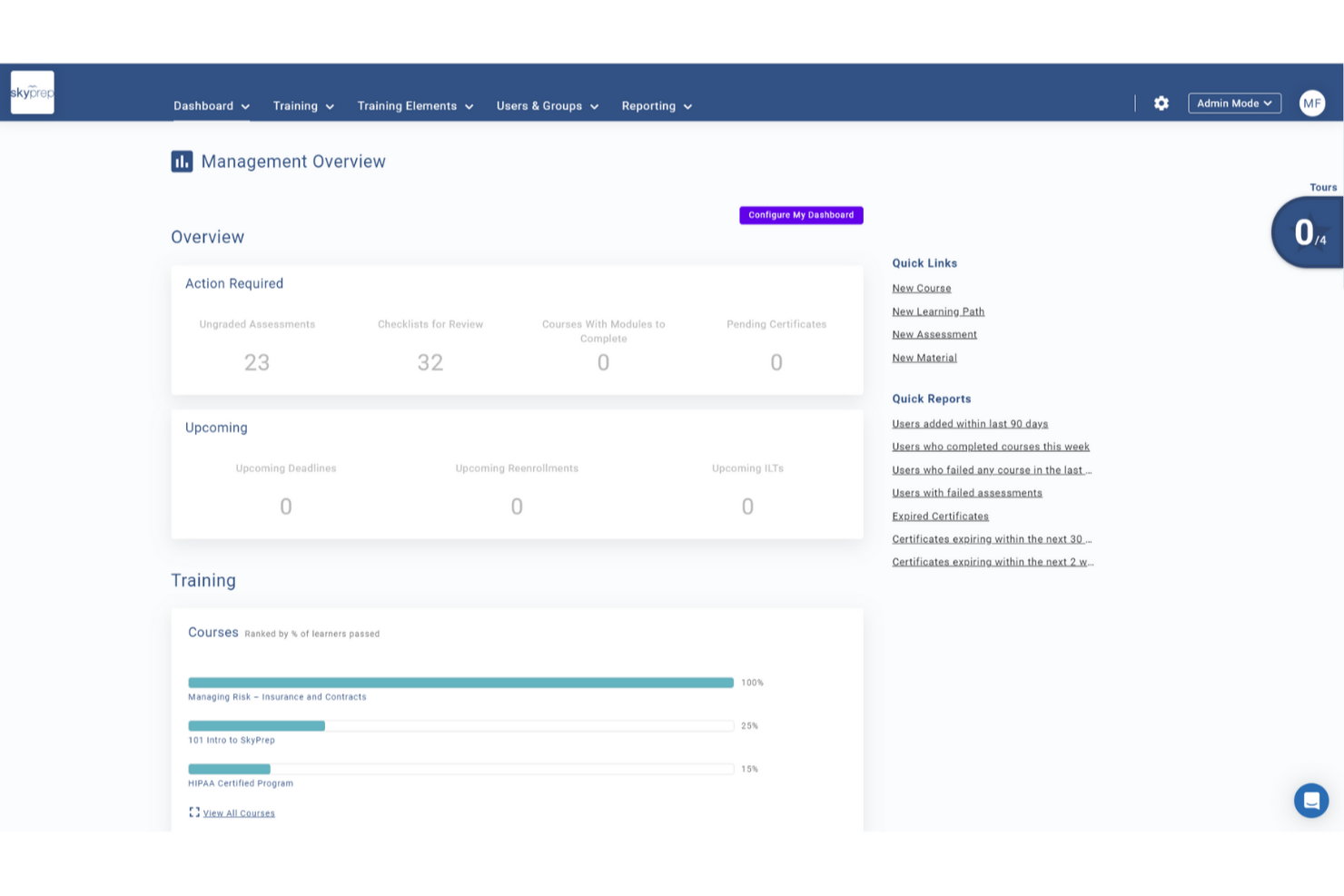
SkyPrep è un sistema di gestione dell'apprendimento basato su cloud pensato per i team HR e i leader aziendali che hanno bisogno di erogare, monitorare e gestire la formazione, la conformità e l'onboarding dei dipendenti in una vasta gamma di settori.
Per chi è ideale SkyPrep?
SkyPrep è particolarmente adatto per le piccole e medie imprese che cercano un LMS semplice da usare, senza una curva di apprendimento ripida o implementazioni complicate.
Perché ho scelto SkyPrep
Ho scelto SkyPrep come una delle migliori soluzioni LMS aziendali perché si configura rapidamente ed è semplice da gestire nel quotidiano. Apprezzo il fatto che l'auto-iscrizione ai corsi e gli avvisi automatici gestiscano molte attività amministrative che altrimenti peserebbero sul team HR. Il costruttore di corsi permette di creare valutazioni, checklist e verifiche senza alcuna competenza tecnica. I report pronti all'uso consentono al mio team di estrarre dati sul completamento della formazione senza dover prima configurare i report.
Caratteristiche principali di SkyPrep
- Gamification: Aggiungi punti, badge e classifiche ai corsi per mantenere alta la motivazione dei partecipanti durante la formazione.
- LMS multi-tenant: Gestisci piattaforme di formazione separate per diversi clienti, marchi o filiali da un unico account.
- Branding personalizzato: Personalizza la piattaforma con il logo aziendale, colori, certificati e modelli email della tua azienda.
- Creazione di contenuti con intelligenza artificiale: Utilizza strumenti AI integrati per semplificare e velocizzare la creazione di nuovi contenuti formativi.
Integrazioni SkyPrep
Le integrazioni includono ADP, Workday, BambooHR, Salesforce, HubSpot, Zoom, Microsoft Teams, Stripe, PayPal e GoToMeeting.


EducateMe LMS offre un approccio trasformativo alla formazione aziendale integrando strumenti guidati dall'IA per migliorare l'esperienza di apprendimento. Pensato per le aziende che mirano a ottimizzare lo sviluppo dei dipendenti, fornisce una creazione intuitiva dei contenuti e simulazioni pratiche di situazioni reali, rispondendo all'esigenza di soluzioni formative coinvolgenti ed efficaci. Questa piattaforma è ideale per le imprese che desiderano semplificare l'onboarding e la formazione in materia di conformità, migliorando allo stesso tempo il coinvolgimento dei discenti e l'efficienza organizzativa.
Perché ho scelto EducateMe LMS
Ho scelto EducateMe LMS per la sua innovativa funzionalità di coaching con roleplay basato sull'IA, che offre ambienti di pratica realistici fondamentali per una formazione aziendale efficace. Le capacità analitiche di questo strumento permettono al tuo team di ottenere informazioni sulle prestazioni degli apprendenti, facilitando l'identificazione e la risoluzione tempestiva delle lacune di competenza. Inoltre, l'integrazione fluida con diverse piattaforme tramite API riduce il carico amministrativo, rendendolo una scelta strategica per le organizzazioni che vogliono migliorare l'efficienza formativa.
Caratteristiche principali di EducateMe LMS
Oltre alle sue funzionalità esclusive basate sull'IA, ho riscontrato anche altre caratteristiche che rendono EducateMe LMS uno strumento prezioso per la gestione della formazione aziendale:
- Strumento di creazione corsi e gestione contenuti: Crea corsi strutturati con quiz, compiti, sessioni live, contenuti incorporati e supporto per file SCORM, organizzando i materiali all'interno di librerie centralizzate dei corsi.
- Assistente AI e roleplay: Genera o aggiorna lezioni e attività tramite supporto IA e consenti scenari simulati di ambiente lavorativo con feedback automatico per lo sviluppo di competenze pratiche.
- Percorsi di apprendimento e automazione: Guida gli utenti attraverso percorsi formativi passo-passo, configura iscrizioni e promemoria automatici e gestisci le certificazioni all'interno di workflow strutturati.
- Analisi, personalizzazione e multi-tenancy: Monitora coinvolgimento e completamento tramite dashboard in tempo reale, personalizza portali a marchio, e crea ambienti formativi separati per reparti o gruppi di clienti.
Integrazioni di EducateMe LMS
Le integrazioni includono Zoom, MS Teams, Google Calendar, Slack, Salesforce e un'API per integrazioni personalizzate.
Pros and Cons
Pros:
- Coaching tramite roleplay IA per esercitazioni pratiche
- Solide analisi per identificare le lacune di competenza
- Branding white-label con SSO
Cons:
- Mancanza di un'applicazione mobile dedicata
- Caratteristiche avanzate di gamification limitate
Altri sistemi LMS aziendali
Ecco alcune altre opzioni che non sono entrate nell’elenco dei migliori software LMS aziendali, ma che vale comunque la pena prendere in considerazione:
- Tovuti
Il miglior LMS per la formazione aziendale con una vasta libreria di corsi integrata
- WeSchool
Miglior sistema di gestione dell'apprendimento per semplificare la formazione aziendale
- Kallidus Learn
Ideale per una piattaforma integrata di apprendimento, HR e gestione delle performance
- Docebo
Ideale per massimizzare il coinvolgimento degli utenti
- EdCast
Migliore piattaforma per l’esperienza del talento per attrarre, formare e trattenere i dipendenti
- eloomi
Ideale per una piattaforma tutto-in-uno per formazione e sviluppo delle persone
- Cornerstone OnDemand
Ideale per creare esperienze di apprendimento personalizzate
- Bridge
Ideale per la creazione avanzata di corsi
- SAP SuccessFactors
Ideale per creare una cultura di apprendimento continuo
- Constructor Tech
Ideale per favorire l'apprendimento attivo su argomenti complessi
- LMS365
La migliore piattaforma di apprendimento integrata in Microsoft Office 365 e Microsoft Teams
- Brainier LMS
Ideale per una piattaforma aziendale di formazione e apprendimento personalizzabile
- Learn Amp
Ideale per chi cerca un LMS completo con percorsi di apprendimento personalizzati
- Qooper
Una piattaforma per la formazione aziendale, il mentoring e il coaching
- Connecteam
Ideale per quiz di valutazione, riconoscimenti e premi
- ClearCo
Ideale per l'ampia offerta di corsi
- Exec
Ideale per l'apprendimento personalizzato alimentato dall'IA
- SAI360
Ideale per la formazione sulla conformità e la reportistica specifica per settore


Recensioni correlate di software per le risorse umane
Se non hai ancora trovato ciò che stai cercando, dai un'occhiata a questi altri strumenti correlati che abbiamo testato e valutato:
- Software per le risorse umane
- Software per le paghe
- Software per il reclutamento
- Servizi di datore di lavoro registrato
- Sistemi di gestione dei candidati
- Software per la gestione della forza lavoro
Come valuto i sistemi di gestione dell’Apprendimento aziendale
Suddivido la mia valutazione tra i requisiti di base—come l’autore di corsi, il monitoraggio della conformità e la sincronizzazione con l’HRIS—e i fattori differenzianti che distinguono un ottimo LMS da uno semplicemente buono.
Funzionalità di base (requisiti fondamentali per questa lista)
Quando seleziono gli strumenti per la mia lista, li valuto su una scala da 0 (non offre la funzionalità) a 5 (eccelle in quest’area) per ogni funzionalità di base elencata di seguito. Poi calcolo il punteggio totale dello strumento trasformandolo in percentuale. Ogni strumento deve raggiungere un punteggio minimo totale del 75% per essere inserito nella selezione.
- Autore di corsi e gestione dei contenuti: Verifico se è possibile creare corsi nativamente e importare pacchetti SCORM o xAPI, ad esempio caricando un modulo sulla sicurezza fornito da un fornitore insieme a un corso di onboarding scritto internamente.
- Percorsi di apprendimento e progettazione dei curricoli: Ogni piattaforma dovrebbe permettere di organizzare i corsi in programmi strutturati legati a ruoli o team, come un percorso di onboarding di 90 giorni per i nuovi manager che includa prerequisiti.
- Monitoraggio dei progressi e reportistica: Cerco dashboard che offrano ai responsabili L&D una visibilità in tempo reale su completamenti e punteggi, oltre a report esportabili da condividere con la leadership durante le revisioni trimestrali.
- Gestione della conformità e delle certificazioni: Qui sono importanti cicli di formazione ricorrenti, monitoraggio delle scadenze e promemoria automatici per i rinnovi—ad esempio le certificazioni annuali sulla privacy dei dati che vengono riassegnate in automatico alla scadenza.
- Gestione di dipendenti e discenti: La piattaforma dovrebbe gestire permessi basati sui ruoli e segmentazione dei gruppi; valuto anche l’efficacia della sincronizzazione dei dati dipendente con le piattaforme HRIS per evitare l’inserimento manuale degli utenti.
- Valutazioni e verifiche delle conoscenze: Quiz integrati con varie tipologie di domande sono essenziali. Verifico la possibilità di creare banche di domande casuali per le valutazioni post-formazione che accertino una reale comprensione.
Una volta stilata una lista di strumenti che soddisfano i criteri, considero cosa distingue ogni piattaforma.
Fattori differenzianti (cosa rende un vendor unico)
Ecco come metto a confronto i diversi vendor:
Funzionalità distintive
Il mappare competenze e skill è l’ambito in cui noto le maggiori differenze tra le piattaforme. Cerco strumenti che colleghino il completamento dei corsi a una tassonomia delle competenze, così che l’HR possa individuare gap e guidare la mobilità interna. Anche l’accesso da mobile e offline pesa—organizzazioni con dipendenti sul campo o in prima linea hanno bisogno che i discenti possano scaricare i moduli e completare la formazione anche senza connessione Wi-Fi. Le raccomandazioni alimentate da AI aggiungono valore proponendo corsi pertinenti in base al ruolo, al progresso e agli obiettivi di sviluppo del discente.
Oltre le funzionalità
Qui è importante la profondità di integrazione con i sistemi HRIS. Valuto se una piattaforma si collega nativamente con sistemi come Workday o BambooHR così che i dati dei dipendenti restino sincronizzati senza import manuali dopo ogni nuova assunzione. La conformità e le certificazioni sulla sicurezza sono un ulteriore fattore chiave—le aziende regolamentate necessitano della conformità a SOC 2 o GDPR e di una reportistica predisposta per le verifiche. Considero anche la trasparenza dei prezzi, verificando se i costi per utente crescono in modo prevedibile all’aumentare del personale e se le librerie di contenuti sono incluse o vendute separatamente.
Che cos'è un sistema aziendale per la gestione della formazione?
Un sistema aziendale per la gestione della formazione (LMS) è uno strumento digitale che le aziende utilizzano per creare, erogare, monitorare e gestire i programmi di formazione dei dipendenti.
I team delle risorse umane e i professionisti L&D utilizzano le piattaforme LMS per migliorare l'inserimento dei nuovi dipendenti, garantire la conformità e sviluppare le competenze del personale in modo più efficiente. Centralizzando i contenuti formativi e automatizzando la reportistica, i software LMS riducono il lavoro amministrativo manuale, migliorano la conservazione delle conoscenze e rendono la formazione scalabile in tutta l'organizzazione.
Oltre agli strumenti per la creazione e la gestione dei corsi, gli LMS aziendali supportano anche l'apprendimento flessibile sui dispositivi mobili e includono strumenti di valutazione post-formazione per misurare la conservazione delle informazioni.
Funzionalità dei sistemi aziendali per la gestione della formazione
Quando selezioni i sistemi aziendali per la gestione della formazione, presta attenzione alle seguenti funzionalità chiave:
- Gestione dei corsi: consente di creare, organizzare e programmare facilmente i moduli di formazione. Puoi assegnare i corsi, monitorare i completamenti e aggiornare i contenuti in base all'evoluzione delle esigenze formative.
- Gestione degli utenti: gestisci facilmente studenti, istruttori e gruppi su un'unica piattaforma. Puoi iscrivere nuovi dipendenti, impostare le autorizzazioni e personalizzare i percorsi di apprendimento in base ai ruoli o ai reparti.
- Valutazioni e quiz: verifica la memorizzazione delle conoscenze e i progressi attraverso quiz e valutazioni personalizzabili. La correzione automatizzata ti fa risparmiare tempo, mentre il riscontro immediato aiuta gli studenti a concentrarsi sui miglioramenti.
- Monitoraggio dei progressi e report: monitora le prestazioni individuali e di squadra attraverso cruscotti e report. Individua rapidamente le lacune nelle competenze o i dipendenti più meritevoli, così puoi personalizzare di conseguenza la formazione successiva.
- Funzionalità di integrazione: collega il tuo LMS al software per le risorse umane, agli strumenti di produttività o alle piattaforme di comunicazione che già utilizzi. Questo semplifica l'inserimento dei nuovi dipendenti, le valutazioni delle prestazioni e la comunicazione interna.
- Elementi di gioco: motiva i dipendenti con badge, classifiche e sistemi di ricompensa integrati nei moduli di formazione. Una competizione amichevole può aumentare il coinvolgimento e incoraggiare l'apprendimento continuo.
- Accessibilità da dispositivi mobili: gli studenti possono accedere ai corsi in qualsiasi momento e da qualsiasi luogo tramite smartphone o tablet. Questo supporta il lavoro da remoto e l'apprendimento al momento del bisogno, ideale per i dipendenti con orari impegnativi o non convenzionali.
- Libreria dei contenuti: accedi a un'ampia gamma di contenuti, modelli e risorse integrati. Avere materiali pronti all'uso significa dedicare meno tempo alla creazione della formazione da zero.
Funzionalità comuni di intelligenza artificiale nei sistemi aziendali di gestione dell'apprendimento
Oltre alle funzionalità standard dei sistemi aziendali di gestione dell'apprendimento elencate sopra, molte di queste soluzioni stanno integrando l'intelligenza artificiale con funzionalità come:
- Supporto tramite assistenti conversazionali: gli assistenti conversazionali basati sull'intelligenza artificiale possono rispondere alle domande degli studenti, fornire promemoria e offrire assistenza al momento del bisogno, liberandoti dalle attività di supporto di routine e rendendo l'apprendimento più accessibile a tutti.
- Raccomandazioni personalizzate per l'apprendimento: l'intelligenza artificiale analizza la cronologia e le preferenze di ogni dipendente per suggerire corsi pertinenti, così il tuo team ha sempre accesso a opportunità di aggiornamento realmente adatte alle proprie esigenze.
- Selezione automatizzata dei contenuti: l'LMS può esaminare enormi quantità di risorse, selezionando e aggiornando i materiali formativi in base alle tendenze, alle lacune nelle competenze o ai progressi individuali.
- Analisi intelligente delle valutazioni: gli strumenti basati sull'intelligenza artificiale offrono informazioni più approfondite sui risultati dei quiz e sui progressi, individuando schemi che aiutano a capire in quali ambiti i dipendenti incontrano difficoltà e in quali eccellono.
- Analisi predittiva: anticipa le future esigenze formative facendo prevedere al sistema le lacune nelle competenze e le tendenze dell'apprendimento sulla base dei dati degli utenti, così sarai sempre un passo avanti nello sviluppo della forza lavoro.
Vantaggi di un LMS aziendale
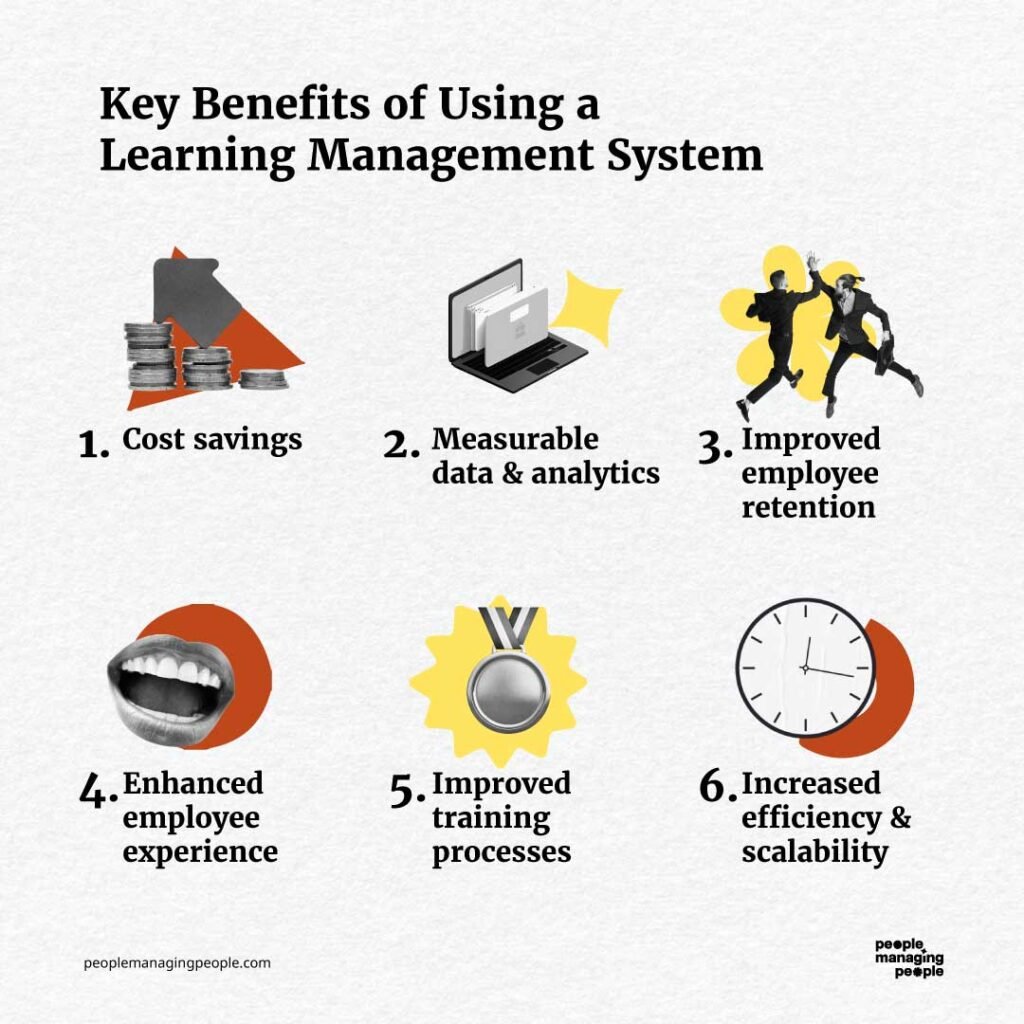
I sistemi aziendali di gestione dell'apprendimento sono strumenti potenti per migliorare lo sviluppo dei dipendenti e la crescita dell'organizzazione. Nel complesso, aiutano a semplificare la formazione, migliorare il coinvolgimento e garantire la conformità, fornendo al contempo risultati misurabili.
Ecco alcuni vantaggi che puoi ottenere implementando un LMS aziendale:
- Programmi di apprendimento scalabili: utilizzando un LMS aziendale, le organizzazioni possono erogare formazione a una forza lavoro in crescita senza aumentare il carico amministrativo, garantendo esperienze di apprendimento coerenti tra i team.
- Maggiore coinvolgimento dei dipendenti: funzionalità interattive come gli elementi di gioco, i quiz e i contenuti multimediali mantengono i dipendenti motivati e partecipi nei loro percorsi di apprendimento.
- Monitoraggio della conformità migliorato: per le organizzazioni o i settori che richiedono una formazione specifica, il monitoraggio automatizzato garantisce che i dipendenti completino in tempo la formazione obbligatoria, riducendo il rischio di sanzioni normative e mantenendo al contempo gli standard del settore.
- Accessibilità globale: la compatibilità con i dispositivi mobili e il supporto multilingue consentono ai dipendenti di diverse sedi di accedere alla formazione, promuovendo l'inclusività e sostenendo una forza lavoro diversificata.
- Erogazione della formazione conveniente: la formazione virtuale riduce le spese di viaggio, i costi delle sedi e dei materiali stampati, rendendo lo sviluppo professionale più accessibile e conveniente.
Questi sono solo alcuni dei vantaggi offerti dai sistemi LMS, ma ce ne sono sicuramente altri! Se vuoi avere argomenti più convincenti per dimostrare ai tuoi superiori che un LMS aziendale vale davvero l'investimento, dai un'occhiata anche a questo elenco completo delle funzionalità e dei vantaggi degli LMS.
In sostanza, investendo in un LMS, le organizzazioni possono promuovere una cultura dell'apprendimento continuo e prepararsi al successo a lungo termine.
Costi e prezzi di un LMS aziendale
I sistemi di gestione dell'apprendimento aziendale sono generalmente offerti con modelli di prezzo a livelli, per soddisfare le diverse esigenze organizzative, dalle piccole imprese alle grandi aziende. Comprendere queste opzioni può aiutarti a scegliere un piano in linea con il tuo budget e i tuoi obiettivi di formazione.
Ecco una panoramica dei piani e delle opzioni di prezzo più comuni, comprese le funzionalità fornite a ogni livello.
Tabella di confronto dei piani per LMS aziendali
| Piano | Prezzo medio | Funzionalità comuni |
|---|---|---|
| Opzione gratuita | $0 | Gestione di base dei corsi, numero limitato di utenti, monitoraggio dei progressi, reportistica minima e supporto della community |
| Piano base | $5–$15 per utente/mese | Creazione di corsi, gestione degli utenti, monitoraggio della conformità, accesso da dispositivi mobili e integrazioni di base |
| Piano standard | $20–$50 per utente/mese | Reportistica avanzata, percorsi di apprendimento personalizzabili, gamification e integrazioni con strumenti per le risorse umane |
| Piano aziendale | Prezzo personalizzato | Utenti illimitati, branding, accesso API, supporto multilingue, account manager dedicato e analisi |
Ogni piano offre livelli diversi di funzionalità e scalabilità. Al momento di selezionare il piano più adatto, gli acquirenti dovrebbero considerare le dimensioni della propria organizzazione, le esigenze formative e il budget, per assicurarsi di ottenere il miglior valore dal proprio investimento.
Domande frequenti sui sistemi di gestione dell'apprendimento aziendale
Ecco alcune risposte alle domande frequenti che potresti avere sui sistemi LMS aziendali e sul loro funzionamento:
Come scelgo l'LMS giusto per le esigenze della mia organizzazione?
Inizia definendo i tuoi obiettivi di apprendimento e i requisiti degli utenti. Cerca piattaforme LMS in linea con i tuoi obiettivi formativi, i formati di erogazione preferiti e le esigenze di reportistica. Prova diverse piattaforme con versioni di prova gratuite o demo e coinvolgi le parti interessate principali e un campione di utenti finali per raccogliere feedback. Verifica la scalabilità e l’affidabilità dell’assistenza clienti per assicurarti che il tuo LMS possa crescere insieme alla tua azienda.
Qual è la differenza tra un LMS e un sistema di gestione della formazione?
A sistema di gestione dell’apprendimento (LMS) è progettato per erogare, monitorare e gestire l’apprendimento online e i contenuti di formazione digitale per i dipendenti. Supporta funzionalità come la creazione di corsi, le valutazioni, il monitoraggio dei progressi e la reportistica per le esperienze di apprendimento digitale.
Al contrario, un sistema di gestione della formazione (TMS) è incentrato sull’organizzazione e l’amministrazione della formazione condotta da docenti, dei workshop e degli eventi in aula (sia in presenza sia virtuali). Un TMS gestisce aspetti logistici come la programmazione, la gestione delle sedi, le iscrizioni e l’allocazione delle risorse.
Alcune piattaforme combinano funzionalità LMS e TMS, ma hanno finalità principali diverse: l’LMS per l’erogazione dell’apprendimento digitale, il TMS per la gestione della logistica della formazione dal vivo.
Quali integrazioni dovrei cercare in un LMS aziendale?
Concentrati sulle integrazioni LMS che si collegano ai tuoi sistemi HRIS, di gestione delle paghe e di gestione delle performance, consentendoti di collegare l’apprendimento ai processi HR più ampi. Dai priorità all’accesso singolo per semplificare l’accesso, nonché alle integrazioni con strumenti diffusi come Microsoft Teams, Slack, Google Workspace e le app per videoconferenze.
Le integrazioni fluide fanno risparmiare tempo sincronizzando i dati degli utenti, riducendo il lavoro manuale degli amministratori, automatizzando i flussi di lavoro e monitorando i progressi dell’apprendimento insieme ad altre metriche aziendali, per un’esperienza di apprendimento uniforme.
Come posso garantire un'elevata adozione da parte degli utenti per un nuovo LMS?
Ottieni il consenso fin dalle prime fasi coinvolgendo dipendenti e manager nella selezione della piattaforma e nei test pilota. Offri un onboarding completo, con sessioni di formazione pratica, guide rapide di riferimento e risorse di assistenza facilmente accessibili.
Scegli un LMS con un’interfaccia chiara e intuitiva e un accesso mobile efficace. Incoraggia l’uso regolare promuovendo il sostegno dei dirigenti, condividendo storie di successo e riconoscendo le tappe della formazione tramite certificati o premi interni.
È possibile personalizzare i programmi di formazione con la maggior parte delle piattaforme LMS aziendali?
Sì, quasi tutte le principali piattaforme LMS aziendali consentono di personalizzare completamente corsi e percorsi di apprendimento. Puoi caricare presentazioni, video e valutazioni personalizzati, integrare contenuti di terze parti e progettare percorsi specifici per ruolo o dipartimento.
Molti sistemi supportano portali con il tuo marchio e moduli di apprendimento adattabili, permettendoti di allineare la piattaforma alla cultura della tua azienda e ai tuoi obiettivi di sviluppo delle competenze.
Come posso misurare il ROI del mio investimento in un LMS?
Monitora dati analitici come i tassi di completamento della formazione, i punteggi dei test, il tempo dedicato all’apprendimento e le metriche delle performance successive alla formazione. Utilizza gli strumenti di reportistica integrati nell’LMS per individuare le lacune, identificare le tendenze e confrontare i risultati dell’apprendimento con gli obiettivi organizzativi, come la riduzione dei tempi di onboarding, il miglioramento dei tassi di conformità o un maggiore coinvolgimento dei dipendenti.
Puoi anche sottoporre sondaggi a partecipanti e manager per raccogliere feedback e misurare i miglioramenti qualitativi insieme ai KPI aziendali.