

10 migliori LMS per la formazione nelle piccole imprese nel 2026

10 Elenco dei migliori LMS per piccole imprese


Il miglior LMS per le piccole imprese ti aiuta a centralizzare la formazione, monitorare i progressi dei dipendenti e supportare lo sviluppo professionale, il tutto senza aggiungere ulteriore lavoro amministrativo.
Hai bisogno di un sistema facile da usare, conveniente e sufficientemente flessibile da crescere insieme al tuo team, offrendo al contempo gli strumenti per erogare una formazione efficace e coinvolgente.
In base alla mia esperienza nella gestione di programmi di formazione come responsabile delle risorse umane in una startup e alla mia attività di valutazione dei software HR negli ultimi 4 anni, ho selezionato le migliori soluzioni LMS progettate appositamente per le piccole imprese.
Perché fidarsi delle nostre recensioni sui software
Il nostro team testa e recensisce software dal 2012. In quanto esperti HR noi stessi, sappiamo quanto sia difficile — e importante — scegliere il software giusto.
Per questa guida, abbiamo valutato gli strumenti attraverso test pratici e ricerche indipendenti, assegnando un punteggio agli strumenti in base ai nostri criteri di selezione. Ci basiamo inoltre sulle competenze di leader di pensiero del settore e di professionisti HR attivi.
Le nostre recensioni riflettono il nostro giudizio editoriale umano, non un discorso di vendita.
Revisori esperti:
Tabella comparativa: LMS per piccole imprese
Questa tabella comparativa riassume i dettagli dei prezzi delle migliori soluzioni LMS che ho selezionato per le piccole imprese:
| Tool | Best For | Trial Info | Price | ||
|---|---|---|---|---|---|
| 1 | Miglior LMS per team con esigenze di formazione globale | Demo gratuita disponibile | A partire da $5/dipendente/mese | Website | |
| 2 | Ideale per la formazione guidata dall’AI | Prova gratuita disponibile | Da $239/mese (80 utenti) | Website | |
| 3 | Ideale per il monitoraggio efficace delle prestazioni | 30 giorni di prova gratuita | Da $3.66/utente attivo/anno | Website | |
| 4 | Ideale per la creazione di programmi di onboarding personalizzati e percorsi di apprendimento | Demo gratuita disponibile | Prezzi su richiesta | Website | |
| 5 | Ideale per una configurazione rapida della formazione | Piano gratuito + demo gratuita disponibile | A partire da $69 USD/mese per un massimo di 40 utenti | Website | |
| 6 | Ideale per UX e supporto clienti | Prova gratuita di 14 giorni | Prezzi su richiesta | Website | |
| 7 | Migliore LMS per la formazione di dipendenti senza postazione fissa | Prova gratuita di 14 giorni + demo gratuita disponibile | Da $29/mese (fatturato annualmente) | Website | |
| 8 | Ideale come piattaforma IA per il business | Demo gratuita disponibile | A partire da $8 per utente al mese | Website | |
| 9 | Ideale per la libreria di corsi integrata e l'amministratore HR autonomo | Piano gratuito disponibile | A partire da $8/utente/mese (con fatturazione annuale) | Website | |
| 10 | Ideale per un sistema di formazione dei dipendenti basato su email | Disponibile piano gratuito | Da $29/mese | Website |


Recensioni dei migliori LMS per piccole imprese
Di seguito troverai una breve descrizione di ogni LMS per piccole imprese, con le principali funzionalità dello strumento e schermate che mostrano l’interfaccia utente.

Deel HR
Miglior LMS per team con esigenze di formazione globale

Deel Engage offre alle piccole imprese un modo per gestire attività di HR, onboarding e formazione su un'unica piattaforma, aiutando i team a occuparsi della conformità e dello sviluppo dei dipendenti senza dover utilizzare più sistemi.
Per chi è ideale Deel Engage?
Deel è una soluzione adatta alle piccole imprese che gestiscono team distribuiti o internazionali e hanno bisogno che HR e formazione dei dipendenti siano gestiti in un unico posto.
Perché ho scelto Deel Engage
Ho incluso Deel tra le mie scelte migliori perché apprezzo molto le sue funzionalità di automazione della formazione, che eliminano il lavoro manuale che di solito rallenta i piccoli team HR. La funzione che mi ha colpito di più è l'assegnazione automatica dei corsi: si impostano regole basate su criteri come la data di inizio, il ruolo o il dipartimento, e Deel HR assegna automaticamente i corsi appropriati ai dipendenti. Per una piccola azienda che inserisce una nuova risorsa, significa che la formazione sulla conformità, i corsi specifici per il ruolo e i contenuti di onboarding vengono programmati e consegnati automaticamente fin dal primo giorno. Mi piace anche il generatore di corsi con intelligenza artificiale, che permette al mio team di creare contenuti formativi in pochi minuti tramite drag and drop, combinando poi formati come quiz, video, compiti e documenti in un unico corso. È un vero risparmio di tempo quando non si dispone di un team L&D dedicato. Il modulo di apprendimento si trova all'interno di Deel Engage insieme a valutazioni delle prestazioni, obiettivi e sviluppo di carriera, così i dati sulla formazione sono collegati direttamente ai piani di crescita dei dipendenti invece che vivere in un sistema separato.
Funzionalità chiave di Deel Engage
- Cicli di valutazione delle prestazioni: Gestisci cicli di valutazione a 360° personalizzabili con tempistiche, scale di valutazione e opzioni di feedback anonime o aperte configurabili.
- Framework di sviluppo di carriera: Definisci librerie di competenze specifiche per ogni ruolo e percorsi di crescita che mostrano ai dipendenti cosa è richiesto a ciascun livello.
- Sondaggi periodici ai dipendenti: Crea e invia sondaggi ricorrenti con dashboard centralizzati di analisi per monitorare coinvolgimento, soddisfazione e esigenze di sviluppo nel tempo.
- Monitoraggio OKR e obiettivi: Imposta OKR aziendali, di team e individuali con monitoraggio dei progressi in tempo reale e cicli regolabili per mantenere tutti allineati.
Integrazioni Deel Engage
Le integrazioni includono Deel HR, BambooHR, Workday, Slack (tramite plugin), oltre ad altre soluzioni HRIS, paghe e piattaforme di gestione del personale disponibili tramite il Deel App Store.
Pros and Cons
Pros:
- Automatizza l'assegnazione dei corsi sulla base dei dati reali dei team
- Permette di combinare media, quiz e compiti nei corsi
- Monitora i progressi degli utenti e i risultati delle valutazioni
Cons:
- La reportistica avanzata può richiedere tempo di configurazione
- Il modulo LMS è legato al pacchetto più ampio Engage
New Product Updates from Deel HR

Deel Expands Stablecoin Wallet to 80+ Countries
Deel expands its Stablecoin Wallet to 80+ countries with dollar-backed balances and optional rewards. This gives eligible contractors more ways to hold and manage earnings inside Deel. For more information, visit Deel’s official site.
 .
.

EducateMe LMS offre alle piccole imprese una piattaforma flessibile per creare programmi di formazione interattivi, aiutando i team a sviluppare competenze pratiche e a monitorare i progressi in tempo reale.
Per chi è indicato EducateMe LMS?
EducateMe LMS è adatto alle piccole imprese che devono formare i dipendenti con apprendimento pratico e basato su scenari piuttosto che su contenuti passivi.
Perché ho scelto EducateMe LMS
EducateMe LMS merita il suo posto nella mia selezione grazie all’efficacia con cui il suo AI Roleplay Coach trasforma i contenuti di formazione in esercitazioni pratiche. Mi piace che sia possibile generare uno scenario a partire da un semplice prompt—ad esempio, una discussione su una valutazione delle prestazioni difficile o una telefonata con un cliente che solleva obiezioni—e la persona AI resta sul tema e risponde in modo realistico per tutta la sessione. La logica ramificata e i parametri di controllo mi permettono di configurare esattamente come si svilupperà ogni scenario, mantenendo le simulazioni aderenti alle situazioni che il mio team affronta realmente. I feedback basati su rubriche forniti dal coach AI al termine di ogni sessione danno ai corsisti indicazioni specifiche e coerenti invece che valutazioni vaghe.
Caratteristiche principali di EducateMe LMS
- Percorsi di apprendimento: crea percorsi di corso sequenziali che guidano i partecipanti attraverso l’onboarding o lo sviluppo di competenze in un ordine stabilito, con monitoraggio dei progressi a ogni fase.
- Automazione: imposta trigger per iscrizioni automatiche, promemoria e assegnazioni di corsi per ridurre il lavoro amministrativo manuale per i piccoli team HR.
- Eventi live: pianifica e ospita sessioni di formazione in diretta con integrazione a Zoom, registrazione automatica e gestione dei partecipanti inclusa.
- Dashboard analytics: visualizza report in tempo reale su tassi di completamento, coinvolgimento e risultati delle valutazioni per tutti i programmi di formazione.
Integrazioni EducateMe LMS
Nessuna integrazione nativa elencata.
Pros and Cons
Pros:
- Inclusi scenari di formazione tramite roleplay AI
- Branding white-label per piccoli team
- Analisi in tempo reale delle prestazioni dei partecipanti
Cons:
- Nessuna app mobile dedicata
- Mancanza di gamification

Ideale per il monitoraggio efficace delle prestazioni
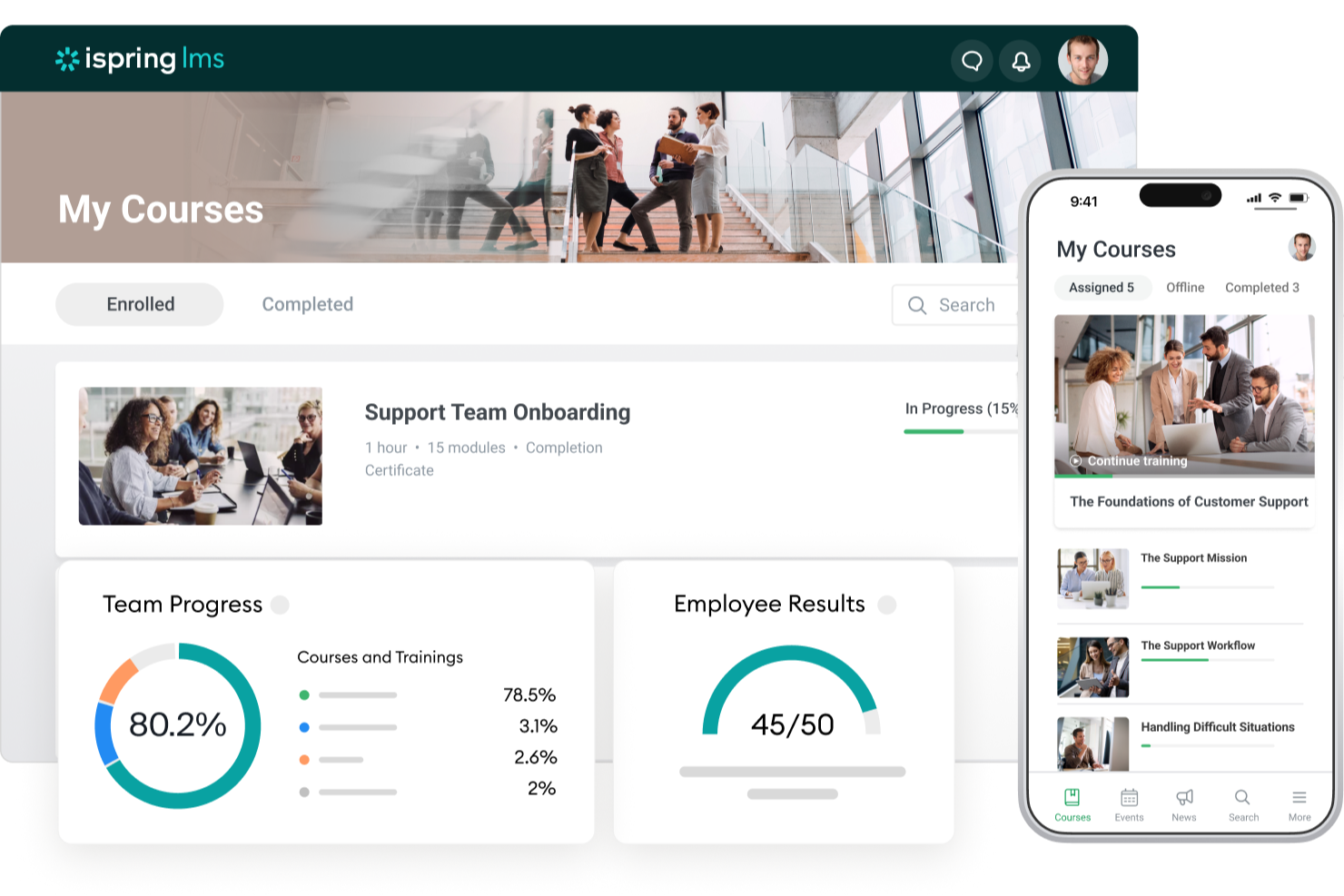
iSpring LMS offre alle piccole imprese un modo semplice per creare, erogare e gestire la formazione online, aiutando i team a sviluppare competenze e monitorare i progressi nell'apprendimento senza una curva di apprendimento ripida.
Per chi è ideale iSpring LMS?
iSpring LMS è una soluzione perfetta per le piccole imprese che necessitano di una piattaforma intuitiva per formare i dipendenti, integrare i nuovi assunti e monitorare i progressi nell'apprendimento in un unico posto.
Perché ho scelto iSpring LMS
iSpring LMS si è guadagnato un posto nella mia selezione grazie al modo completo in cui gestisce il monitoraggio delle prestazioni senza richiedere un team L&D dedicato per interpretare i dati. Apprezzo particolarmente la funzione di valutazione a 360 gradi, che raccoglie feedback strutturati da tutto il contesto lavorativo del dipendente—manager, colleghi e collaboratori diretti—offrendo una visione reale della posizione di ciascuno, non solo dei risultati dei quiz. Inoltre, i report sulle persone mi permettono di vedere come stanno progredendo i singoli corsisti e i gruppi, e come la loro formazione si traduce nelle prestazioni sul lavoro. Per le piccole imprese che devono dimostrare il ROI della formazione senza creare dashboard complesse da zero, questa combinazione è molto utile.
Funzionalità principali di iSpring LMS
- Percorsi di apprendimento: Combina corsi, valutazioni e altri materiali in percorsi di apprendimento strutturati e sequenziali pensati per ruoli o team specifici.
- Gamification: Premia i corsisti con punti, badge e classifiche per incentivare il completamento dei corsi e il coinvolgimento continuo.
- Formazione conforme con riattribuzione automatica: Riassegna automaticamente i corsi di certificazione prima della loro scadenza, affinché il tuo team rimanga conforme senza necessità di un monitoraggio manuale.
- App mobile: Consenti ai dipendenti di completare la formazione su iOS o Android, con accesso offline che sincronizza i progressi una volta tornati online.
Integrazioni di iSpring LMS
Le integrazioni includono Salesforce, MS Azure, MS Exchange, BambooHR, Udemy, Go1, LinkedIn Learning e altre popolari librerie di corsi.
New Product Updates from iSpring LMS

iSpring LMS Adds Multiple Observations to OJT Sessions
iSpring LMS now lets managers log multiple observations within one OJT session, grouping visits and auto-generating summary stats like averages, criterion results, and comparisons. For more information, visit iSpring LMS's official site.

Ideale per la creazione di programmi di onboarding personalizzati e percorsi di apprendimento

Mitratech Perform offre alle piccole imprese una piattaforma flessibile per gestire l'apprendimento dei dipendenti, monitorare i progressi e creare programmi di formazione su misura per le loro esigenze specifiche.
Per chi è ideale Mitratech Perform?
Mitratech Perform è adatto ai team HR e ai responsabili delle piccole imprese che necessitano di un sistema strutturato per l'inserimento dei nuovi assunti e lo sviluppo dei dipendenti nel tempo.
Perché ho scelto Mitratech Perform
Ho scelto Mitratech Perform perché le sue funzioni di onboarding e i percorsi di apprendimento lavorano bene insieme. Quando un nuovo assunto viene aggiunto tramite Trakstar Hire, puoi iscriverlo automaticamente a un programma di onboarding personalizzato. Mi piace che sia possibile creare questi programmi utilizzando una combinazione di presentazioni PowerPoint, video, file audio e documenti testuali, così i contenuti riflettono il modo in cui lavora il tuo team. La funzione di auto-iscrizione consente inoltre di segmentare la formazione per ruolo, dipartimento o anzianità, in modo che ogni dipendente riceva un percorso formativo pertinente al suo ruolo, dipartimento o anzianità.
Caratteristiche principali di Mitratech Perform
- Quiz e valutazioni: Crea quiz interattivi utilizzando formati a scelta multipla, risposta breve e abbinamento per verificare la comprensione dei dipendenti al termine di un corso.
- Corsi di upskilling: Offri ai dipendenti l'accesso a corsi autodidattici che possono essere completati su qualsiasi dispositivo, in qualsiasi momento, per sviluppare nuove competenze al proprio ritmo.
- Reportistica e monitoraggio della conformità: Genera report in tempo reale su completamenti dei corsi, punteggi dei test e tempistiche di formazione per monitorare i progressi e documentare la conformità.
- Libreria di corsi eLearning: Accedi a una libreria integrata di corsi predefiniti che trattano argomenti come diritto del lavoro, DEI, etica, sicurezza informatica e salute e sicurezza sul lavoro.
Integrazioni di Mitratech Perform
Le integrazioni includono ADP Workforce Now, Paylocity, BambooHR, UKG Pro, Ramco, Syntrio, Azure, Okta, Google Workspace e Slack.

Ideale per una configurazione rapida della formazione
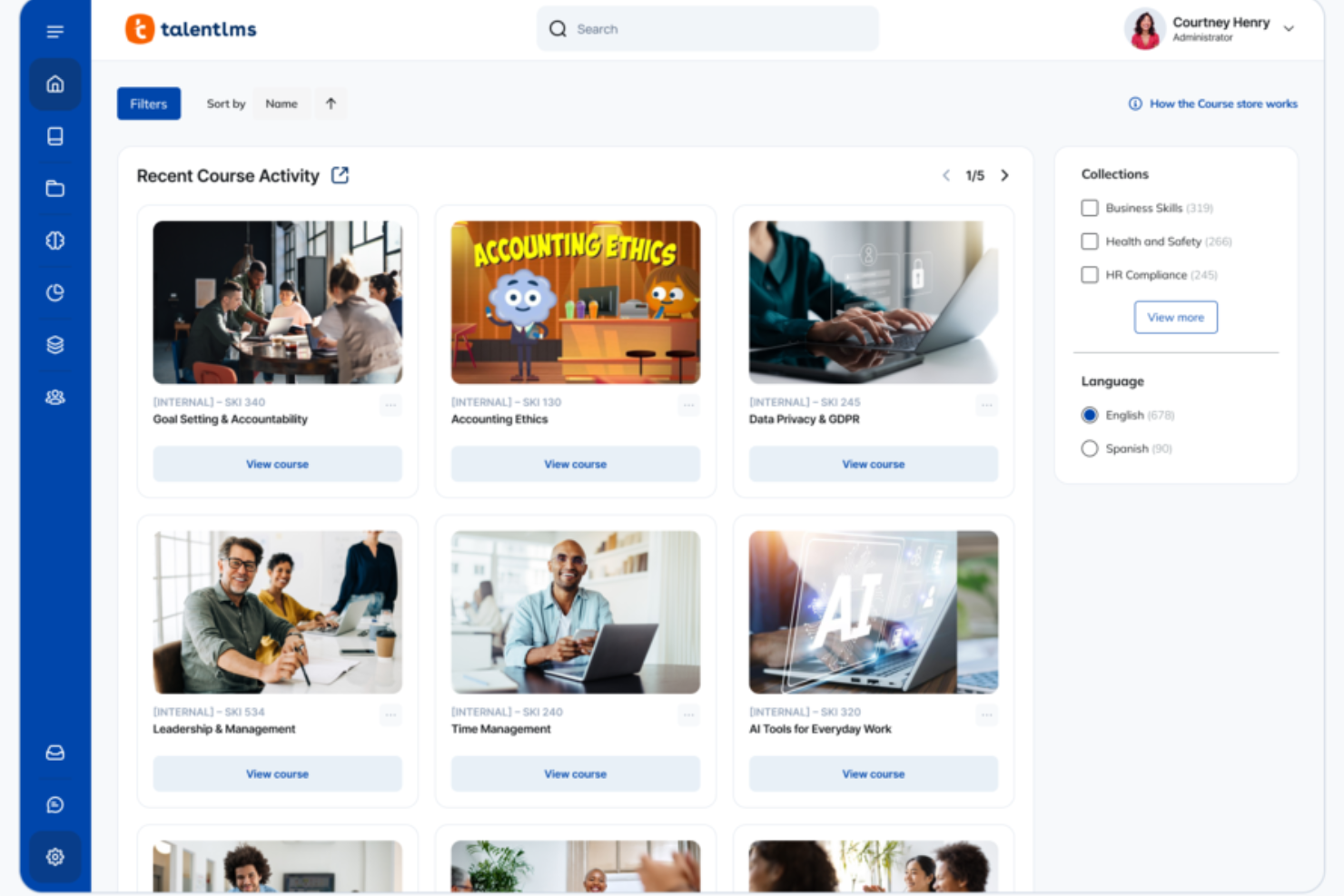
TalentLMS offre alle piccole imprese un modo semplice per creare, erogare e monitorare la formazione online, consentendo ai team di avviare programmi di onboarding, conformità e sviluppo delle competenze senza problemi tecnici.
Per chi è TalentLMS?
TalentLMS è perfetto per piccole e medie imprese che devono formare dipendenti, clienti o partner senza un team di formazione dedicato.
Perché ho scelto TalentLMS
TalentLMS si guadagna un posto nella mia lista perché permette di passare dall'iscrizione all'erogazione della formazione in un solo giorno. Ho creato e lanciato corsi nello stesso giorno usando il generatore di corsi basato su intelligenza artificiale, che trasforma i materiali esistenti in contenuti strutturati senza dover partire da zero. TalentLibrary™ è un'altra funzione a cui torno spesso: offre accesso immediato a oltre 1.000 corsi pronti su temi come conformità e soft skills, così non devi aspettare che venga creato nuovo materiale per iniziare la formazione. Per le piccole imprese senza un team dedicato alla formazione, questa combinazione di creazione assistita e contenuti preimpostati è davvero difficile da replicare.
Funzionalità principali di TalentLMS
- Percorsi di apprendimento: Guida i partecipanti attraverso una sequenza strutturata di corsi, sbloccando i contenuti in un ordine preciso per rafforzare la conoscenza nel tempo.
- Gamification: Motiva i partecipanti con badge, punti, livelli e classifiche che puoi personalizzare secondo i tuoi obiettivi formativi.
- Filiali: Crea ambienti formativi separati e personalizzati per team o reparti diversi, gestendo tutto da un unico account amministratore.
- Automazioni: Attiva in automatico azioni formative in base al comportamento degli utenti, come completamento dei corsi, inattività o scadenza delle certificazioni.
Integrazioni di TalentLMS
Le integrazioni includono BambooHR, Salesforce, Zoom, Microsoft Teams, GoTo, ADP Workforce Now, Intercom, Sage People, Shopify e LinkedIn Learning.
Pros and Cons
Pros:
- Funzioni chiare di raggruppamento degli utenti supportano anche strutture formative complesse.
- Gli strumenti di intelligenza artificiale velocizzano la creazione dei corsi per esigenze formative in rapido cambiamento.
- Valutazioni integrate supportano la misurazione delle competenze e la certificazione.
Cons:
- Gli strumenti di collaborazione integrati sono basici rispetto a community di apprendimento dedicate.
- File multimediali di grandi dimensioni potrebbero necessitare di soluzioni di hosting esterne.
New Product Updates from TalentLMS
TalentLMS Adds Learning Paths, AI Video, and Learner Experience Updates
TalentLMS introduced updates across learning management, content creation, and learner experience, including Learning Paths for Groups, AI video generation in TalentCraft, video bookmarking, and expanded administration tools. For more information, visit TalentLMS’s official site.

SkyPrep
Ideale per UX e supporto clienti

SkyPrep è un LMS basato sul cloud progettato per le piccole imprese che necessitano di un modo semplice per erogare, monitorare e gestire la formazione dei dipendenti senza complessità tecniche.
Per Chi è Ideale SkyPrep?
SkyPrep è particolarmente adatto a piccole e medie imprese che desiderano un LMS facile da implementare, con una configurazione minima e supporto diretto da parte del fornitore.
Perché Ho Scelto SkyPrep
SkyPrep si guadagna un posto nella mia selezione perché l'esperienza sia per i discenti che per gli amministratori è sinceramente una delle più pulite che abbia mai visto in questa categoria. Mi piace come il costruttore di corsi consenta al mio team di caricare contenuti già esistenti—PDF, video, file SCORM—e trasformarli in un corso strutturato senza alcuna complicazione tecnica. Le funzionalità di iscrizione automatica e monitoraggio dei progressi fanno sì che non debba più inseguire manualmente i completamenti. Il maggiore punto di forza di SkyPrep è la qualità dell'assistenza clienti—account manager dedicati e tempi di risposta rapidi fanno davvero la differenza per i piccoli team senza un amministratore LMS interno.
Caratteristiche Principali di SkyPrep
- Gamification: Aggiungi punti, badge e classifiche ai corsi per mantenere alto l'engagement dei partecipanti durante la formazione.
- Personalizzazione del branding: Applica logo, colori e design dei certificati della tua azienda direttamente sulla piattaforma.
- Creazione di contenuti tramite AI: Utilizza strumenti AI integrati per semplificare e velocizzare lo sviluppo dei contenuti formativi.
- Costruttore di valutazioni: Crea quiz, verifiche della conoscenza e checklist all’interno dei corsi per misurare la comprensione degli utenti.
Integrazioni SkyPrep
Le integrazioni includono Salesforce, HubSpot, Zoom, GoToMeeting, Microsoft Teams, ADP, Workday, BambooHR, Stripe e PayPal.
Pros and Cons
Pros:
- Navigazione chiara che riduce il tempo di configurazione e gestione giornaliera per gli amministratori
- Account manager dedicato per il successo dei clienti
- La creazione dei corsi funziona bene anche per i responsabili formazione senza competenze tecniche
Cons:
- Personalizzazione avanzata dei report limitata
- Meno strumenti di authoring rispetto a piattaforme LMS orientate alle grandi imprese

Migliore LMS per la formazione di dipendenti senza postazione fissa

Connecteam è un sistema di gestione dell'apprendimento mobile-first pensato per le piccole imprese che devono formare, inserire e aggiornare le competenze dei dipendenti che non lavorano a una scrivania, come i team di vendita al dettaglio, dell'ospitalità e dei servizi sul campo.
Per chi è ideale Connecteam?
Connecteam è particolarmente indicato per le piccole imprese in settori come l'edilizia, il commercio al dettaglio e l'ospitalità che si affidano fortemente a lavoratori in prima linea o sul campo.
Perché ho scelto Connecteam
Connecteam si è guadagnato un posto nella mia selezione perché è una delle poche soluzioni LMS progettate fin dall'inizio per i lavoratori che non sono mai alla scrivania. Adoro il Creatore di Corsi con Intelligenza Artificiale: descrivi un argomento di formazione e genera automaticamente un corso completo di moduli. Il mio team può poi caricare video girati con smartphone, PDF o immagini, il che significa che non dipendiamo da costosi servizi di produzione per fornire la formazione. Mi piace anche molto il monitoraggio della conformità: la dashboard amministrativa mostra esattamente chi ha completato ogni corso e vengono inviati promemoria automatici a chi non l'ha ancora fatto, un vero vantaggio quando si gestiscono i requisiti di certificazione per team distribuiti sul territorio.
Funzionalità principali di Connecteam
- Generatore di quiz: Crea verifiche delle conoscenze con domande a scelta multipla per testare la comprensione dei dipendenti dopo aver completato un modulo di formazione.
- Chat in-app: Invia messaggi diretti o di gruppo ai dipendenti senza la necessità di uno strumento di messaggistica separato.
- Moduli digitali e checklist: Crea moduli personalizzati per l'onboarding, i controlli di sicurezza o la conferma di attività giornaliere da completare tramite smartphone.
- Timbro orario: Permetti ai dipendenti di timbrare entrata e uscita direttamente dall'app con la geolocalizzazione per verificare la posizione.
Integrazioni di Connecteam
Le integrazioni includono QuickBooks, Gusto, Xero, ADP, Zapier, Wix, Lightspeed, PrismHR, Square e BambooHR.
Pros and Cons
Pros:
- Crea e distribuisci formazione per dispositivi mobili
- Traccia i progressi e i punteggi dei quiz per verificare la comprensione
- Combina formazione, comunicazione e pianificazione
Cons:
- Le analisi sulla formazione possono risultare basilari
- Non ideale se servono funzionalità LMS complesse
New Product Updates from Connecteam

Connecteam Expands Break and Timesheet Controls
Connecteam adds flexible break thresholds, personalized policies, auto-end options, a centralized exceptions report, and improved timesheet issue visibility to help teams manage breaks and timesheets more effectively. For more information, visit Connecteam’s official site.
 .
.
Ideale come piattaforma IA per il business
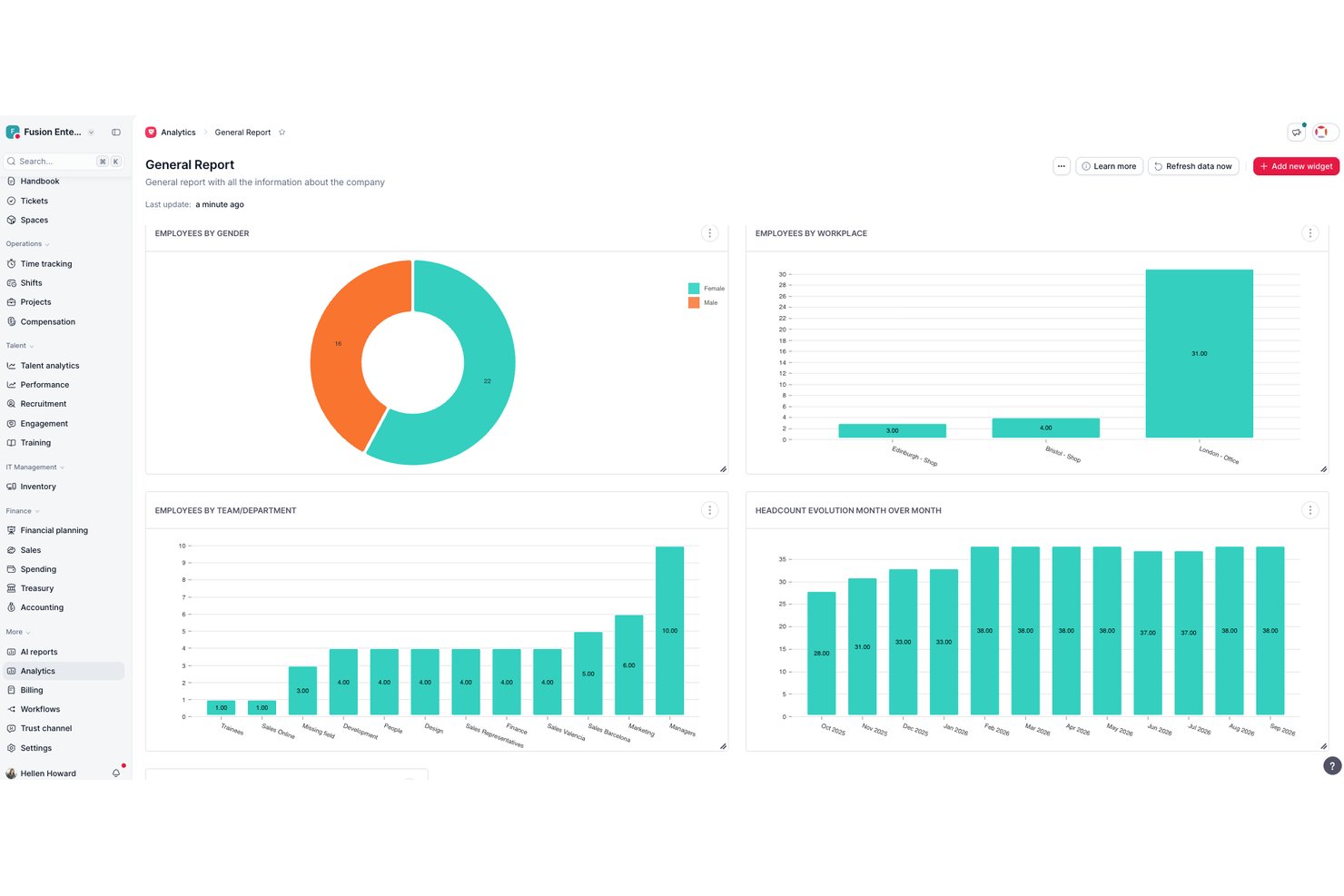
Factorial è una piattaforma di gestione aziendale basata sull'IA, con un LMS integrato che comprende la creazione di corsi, l'importazione di contenuti SCORM, l'iscrizione automatica, il monitoraggio dei progressi e la generazione di certificati.
Per chi è più adatto Factorial?
Factorial è particolarmente adatto ai team HR e ai responsabili operativi che desiderano gestire formazione, monitoraggio della conformità e flussi di lavoro HR quotidiani all'interno di un'unica piattaforma basata sull'IA.
Perché ho scelto Factorial
Factorial si è guadagnato un posto nella mia lista ristretta perché è stato progettato come un'IA per il business, il che significa che l'IA non è stata aggiunta in un secondo momento, ma aiuta attivamente nelle operazioni quotidiane, ad esempio pianificando gli orari, generando report e rispondendo alle domande dei dipendenti sulle policy aziendali. Apprezzo particolarmente il modo in cui l'iscrizione automatica assegna la formazione obbligatoria ai nuovi assunti nel momento stesso in cui entrano in azienda e in cui i certificati di completamento vengono generati e inviati senza alcun follow-up manuale.
Funzionalità principali di Factorial
- Importazione di corsi SCORM: Carica i pacchetti SCORM esistenti direttamente nel modulo Formazione di Factorial, dove il completamento e i risultati superato/non superato vengono monitorati automaticamente.
- Test delle conoscenze: Crea valutazioni a livello di corso con punteggi di superamento configurabili, che possono variare tra diversi corsi di formazione.
- Accesso alla formazione da dispositivi mobili: I dipendenti possono visualizzare i corsi, monitorare i progressi, confermare la partecipazione e completare la formazione SCORM tramite le app Factorial per iOS e Android.
- Report della formazione esportabili: Scarica i dati sulla formazione dei dipendenti dalla tabella della formazione per esaminare i tassi di completamento e individuare i corsi da rinnovare.
Integrazioni di Factorial
Factorial offre integrazioni tramite marketplace con Slack, Okta, LinkedIn, Recruitee, Monday e Microsoft Power BI. Si connette inoltre a Microsoft Business Central, SAP Business One e Sage 100, oltre che a Zapier, e mette a disposizione un'API per integrazioni personalizzate.
Pros and Cons
Pros:
- I nuovi assunti possono ricevere la formazione automaticamente
- I corsi SCORM da dispositivi mobili sono adatti ai team distribuiti
- La formazione è integrata nei flussi di lavoro HR principali
Cons:
- I costi possono aumentare quando i team aggiungono moduli
- I report della formazione offrono opzioni limitate di filtraggio personalizzato
GoSkills
Ideale per la libreria di corsi integrata e l'amministratore HR autonomo
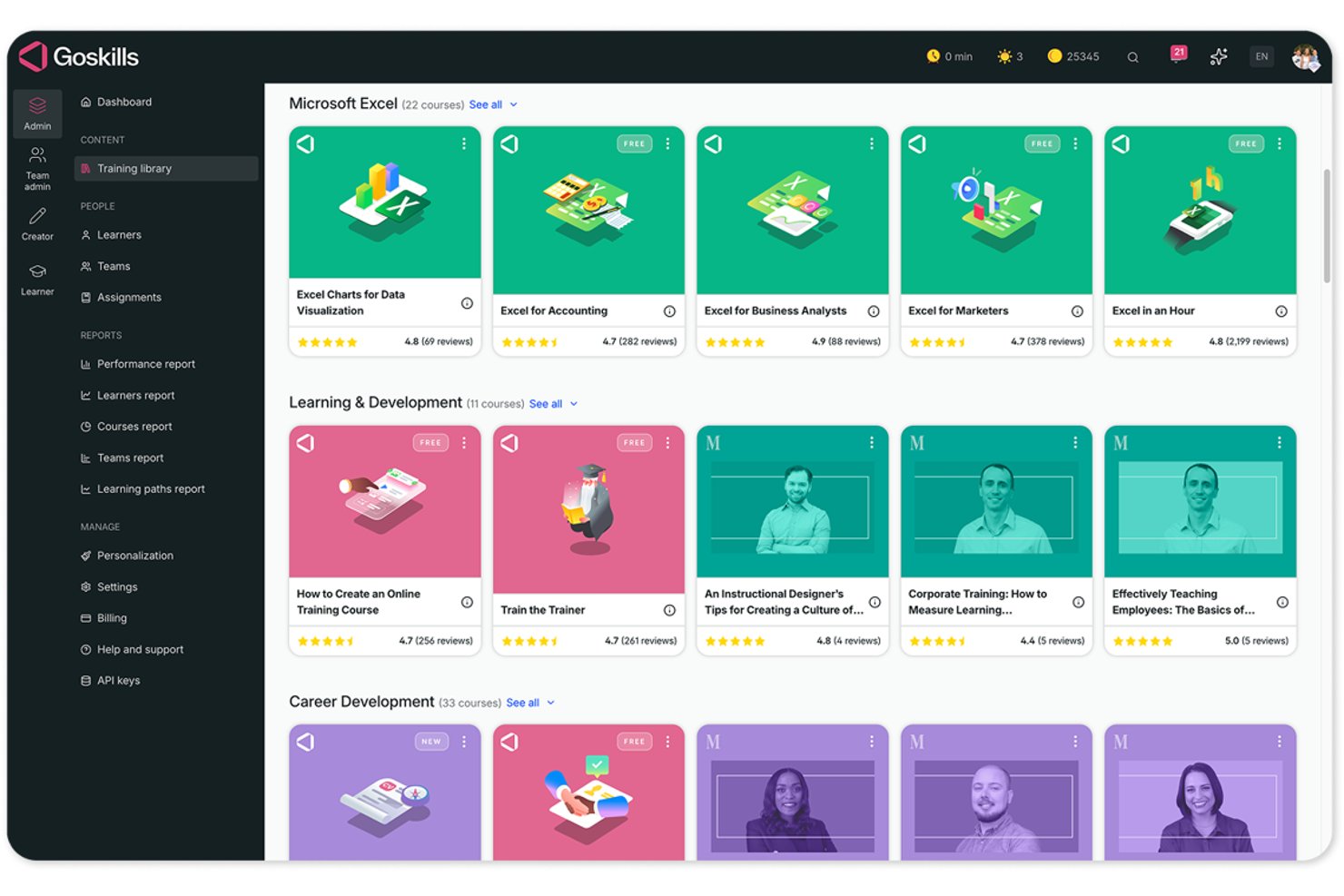
GoSkills è un LMS basato sul cloud che consente di creare e distribuire corsi personalizzati, gestire le assegnazioni dei discenti e monitorare completamenti e certificazioni, oltre a offrire una libreria integrata di oltre 500 corsi aziendali tenuti da esperti.
A chi è più adatto GoSkills?
GoSkills è una soluzione adatta ai professionisti generalisti delle risorse umane e ai responsabili di piccole aziende che devono gestire la formazione autonomamente, senza un team L&D dedicato.
Perché ho scelto GoSkills
GoSkills si è guadagnato un posto nella mia rosa ristretta perché è una delle poche opzioni LMS che abbina una libreria integrata di oltre 500 corsi tenuti da esperti a uno strumento per creare corsi senza codice, rendendolo davvero gestibile per un amministratore HR che opera in autonomia. Mi piace il fatto che si possano assegnare corsi di inserimento o sulla consapevolezza della sicurezza informatica dalla libreria già pronta fin dal primo giorno, per poi creare i propri corsi interni usando modelli e strumenti di creazione assistita dall'IA, senza coinvolgere uno sviluppatore. Le pianificazioni ricorrenti dei corsi di aggiornamento con promemoria automatici fanno sì che la formazione sulla conformità si gestisca da sola una volta configurata.
Funzionalità principali di GoSkills
- Importazione di corsi SCORM e xAPI: Carica direttamente nella piattaforma corsi esistenti nei formati SCORM, xAPI, AICC o CMI5.
- Certificati di completamento personalizzabili: Crea e rilascia certificati personalizzati con il tuo marchio che i discenti ricevono automaticamente al termine di un corso.
- Report sui discenti e sui team: Filtra ed esporta i report sui progressi in base a discente, team, data o corso in un foglio di calcolo Excel.
- Strumenti di gioco: I discenti guadagnano monete, costruiscono serie di risultati e compaiono nelle classifiche per mantenere alta la motivazione durante la formazione.
Integrazioni di GoSkills
GoSkills offre integrazioni native con Google, Okta e Microsoft per l'accesso singolo (SSO). Offre inoltre un'API per integrazioni personalizzate.
Pros and Cons
Pros:
- I recensori apprezzano la configurazione rapida e la navigazione intuitiva
- I recensori apprezzano i corsi già pronti e le lezioni brevi
- I recensori apprezzano l'assegnazione dei corsi e il monitoraggio dei discenti
Cons:
- Alcuni recensori desiderano una copertura più ampia dei corsi specialistici
- I recensori segnalano preoccupazioni sui costi per i team più piccoli
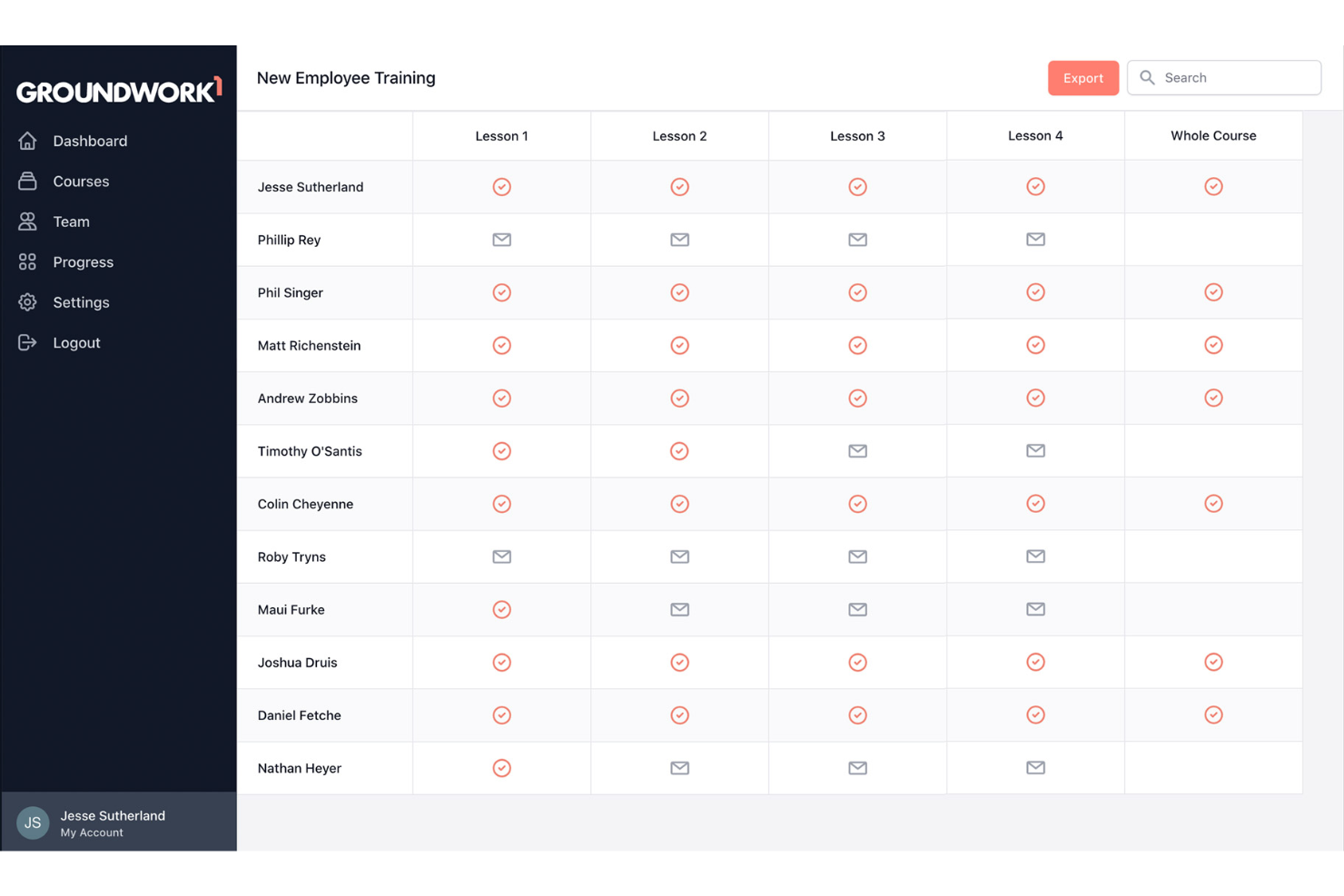
Groundwork1 è un sistema di gestione dell'apprendimento pensato per le piccole imprese che desiderano offrire formazione ai dipendenti tramite corsi semplici e accessibili via email, senza la necessità di scaricare app o affrontare procedure di onboarding complesse.
A chi è destinato Groundwork1?
Groundwork1 è adatto a titolari di piccole imprese e responsabili delle risorse umane che cercano un modo pratico e poco complicato per formare i dipendenti, senza bisogno di supporto IT dedicato o di un software complesso da configurare.
Perché ho scelto Groundwork1
Ho scelto Groundwork1 come uno dei migliori perché propone un approccio realmente diverso alla formazione dei dipendenti—consegna i contenuti dei corsi direttamente nelle caselle email dei lavoratori invece di chiedere loro di accedere a una piattaforma separata. Mi piace come i responsabili possano costruire sequenze di formazione che vengono inviate gradualmente, così i nuovi assunti ricevono le lezioni poco alla volta, invece di dover affrontare tutto in una sola volta. Il mio team riesce a monitorare facilmente chi ha aperto, completato e risposto a ciascuna lezione senza dover rincorrere nessuno. Questo modello di consegna nativo via email è particolarmente pratico per le piccole aziende che devono formare lavoratori in prima linea o che non stanno tutto il giorno davanti a un computer.
Funzionalità principali di Groundwork1
- Pagine di atterraggio delle lezioni personalizzate: I dipendenti accedono ai contenuti dei corsi tramite pagine personalizzate collegate dalla loro email, senza bisogno di login o password.
- Editor drag-and-drop delle lezioni: Crea e organizza i contenuti dei corsi usando un editor drag-and-drop, con la possibilità di suddividere le lezioni su più email programmate.
- Firme digitali: Raccogli dichiarazioni e conferme dei dipendenti direttamente all'interno di una lezione grazie a caselle di conferma o firme elettroniche.
- Report sul progresso: Esporta rapporti di completamento o visualizza i progressi dei singoli dipendenti attraverso la dashboard di avanzamento del team.
Integrazioni di Groundwork1
Al momento non sono elencate integrazioni native.
Altri software LMS per piccole imprese
Ecco alcune altre opzioni LMS che non sono entrate nell’elenco dei migliori sistemi di gestione dell’apprendimento:
- 360Learning
Il miglior LMS con creazione di contenuti flessibile e strumenti di feedback degli utenti
- TeachFloor
Miglior sistema di gestione dell’apprendimento per formazione su coorte e apprendimento tra pari
- LearnUpon
Miglior sistema LMS con portali di apprendimento distinti per differenti gruppi di dipendenti
- Tovuti
Migliore piattaforma LMS per funzionalità avanzate di coinvolgimento dei dipendenti
- Easy LMS
Miglior LMS e Academy per la formazione economici, disponibili in più lingue
- WeSchool
La migliore combinazione tra LMS e software di formazione per piccole imprese
- isEazy LMS
Miglior LMS per opzioni di personalizzazione basate sui ruoli lavorativi dei dipendenti
- eloomi
Piattaforma tutto-in-uno per la formazione e lo sviluppo dei dipendenti
- Workleap
Il miglior LMS per valutazioni automatiche dei partecipanti e funzionalità di certificazione
- Constructor Tech
Il miglior LMS semplice da usare per un approccio multimediale e interattivo all’apprendimento


Recensioni correlate sui software HR
Se non hai ancora trovato ciò che cerchi, dai un’occhiata a questi altri strumenti correlati che abbiamo testato e valutato:
- Software HR
- Software per la gestione delle buste paga
- Software per il reclutamento
- Servizi di datore di lavoro ufficiale
- Sistemi di tracciamento dei candidati
- Software per la gestione della forza lavoro
Come valuto gli LMS per le piccole imprese
Penso agli LMS per le piccole imprese su due livelli: le funzionalità imprescindibili che permettono a uno strumento di entrare in questa lista e i fattori differenzianti che mi aiutano a distinguere le migliori opzioni dal resto.
Funzionalità di base (Requisiti fondamentali per questa lista)
Queste capacità di base rappresentano i criteri di ammissione per essere inclusi nella mia selezione di LMS per le piccole imprese:
- Strumenti di creazione dei corsi: Controllo se è possibile costruire un corso completo—video, quiz, moduli SCORM—all'interno della piattaforma senza dover utilizzare software di authoring separati.
- Gestione degli utenti: Le opzioni di iscrizione sono importanti, dai caricamenti massivi all'assegnazione dei corsi per gruppi e percorsi di apprendimento che si adattano a una struttura di team snella.
- Monitoraggio dei progressi e dei completamenti: Valuto la dashboard dei report per la visibilità su punteggi dei quiz, tassi di completamento e tempistiche dei singoli utenti a colpo d'occhio.
- Supporto per conformità e certificazione: Cerco l'emissione automatica dei certificati, il monitoraggio delle scadenze e i promemoria per la ricertificazione—essenziali per la formazione sulla sicurezza sul lavoro o in ambito alimentare.
- Prezzi e scalabilità adatti alle PMI: I livelli di prezzo devono essere adatti a numeri ridotti di personale, senza nascondere funzionalità fondamentali dietro piani enterprise o richiedere contratti a lungo termine in anticipo.
- Integrazioni e libreria di contenuti: Considero le connessioni native con strumenti come BambooHR o Google Workspace e se una libreria di corsi già pronta può colmare rapidamente lacune di contenuto.
Valuto ogni fornitore su una scala da 0 (non offre la funzionalità) a 5 (eccelle in questo ambito) per ciascun criterio.
I fornitori devono raggiungere un punteggio medio minimo per essere presi in considerazione nella mia lista. Da lì, valuto cosa differenzia ciascuna piattaforma.
Fattori differenzianti (Cosa distingue i fornitori)
Dopo aver selezionato la mia lista, ecco come confronto tra loro i vari fornitori nell'ambito LMS per piccole imprese:
Funzionalità distintive
Le app di apprendimento mobile possono facilitare l'accesso alla formazione da parte di dipendenti operativi o team remoti in movimento, fondamentale per settori come la vendita al dettaglio e l'ospitalità. Cerco anche costruttori di corsi basati su AI che raccolgano contenuti, quiz e moduli da documenti caricati o prompt, poiché possono far risparmiare molto tempo nella creazione dei contenuti a team di piccole dimensioni. Le componenti di gamification, come badge e classifiche, sono un altro elemento che fa la differenza per mantenere gli utenti coinvolti—anche in assenza di una figura dedicata allo sviluppo e alla formazione interna.
Oltre le funzionalità
La trasparenza sui prezzi qui è molto importante. Valuto se il fornitore offre una fatturazione per utente attivo o piani a tariffa fissa che crescono con l'organico di un piccolo team—non contratti enterprise che vincolano a lungo termine. Il tempo per ottenere valore è un altro fattore rilevante; cerco configurazioni self-service con modelli e procedure guidate di onboarding in modo che un'azienda di 20 persone non debba aspettare settimane per avviare la formazione. Anche l'adattabilità al settore è importante, soprattutto quando una piattaforma offre contenuti di conformità preconfigurati per ambiti regolamentati come quello sanitario o della ristorazione.
Come scegliere un sistema di gestione dell’apprendimento
Un sistema di gestione dell’apprendimento può aiutarti a centralizzare le risorse formative interne e a creare esperienze di apprendimento più flessibili per i tuoi dipendenti, in base alle loro esigenze.
Per capire quale LMS soddisfa meglio le esigenze della tua piccola impresa, tieni presenti i seguenti aspetti:
- Quali difficoltà di apprendimento o formazione stai cercando di risolvere? Identificare le difficoltà attuali ti guiderà nella scelta di un nuovo LMS con le caratteristiche e le funzionalità necessarie per superarle. Ad esempio, se i tuoi dipendenti hanno difficoltà a completare i materiali di formazione perché spesso si trovano fuori dall'ufficio, sarebbe saggio cercare un sistema di formazione orientato innanzitutto ai dispositivi mobili che supporti l'apprendimento in pillole e la formazione in mobilità.
- Quali risultati sono importanti e come misurerai il successo? Agisci in modo proattivo e decidi in anticipo quali risultati ti aspetti affinché il tuo nuovo LMS possa essere considerato un successo. Ad esempio, potresti voler offrire esperienze di apprendimento in formati più flessibili, ottenere strumenti più efficaci per monitorare i progressi o migliorare i tassi di conformità per la formazione interna. Essere chiari fin dall'inizio sui risultati desiderati è fondamentale per evitare di sprecare tempo prezioso.
- Quali sono i tuoi principali gruppi di utenti? Considera chi utilizzerà il software, quali sono i tuoi diversi gruppi di utenti e di quante licenze avrai bisogno. Per un sistema di gestione dell'apprendimento, probabilmente vorrai garantire l'accesso a tutta la forza lavoro, con accessi speciali per gli amministratori delle risorse umane e i responsabili. Una volta chiarito questo aspetto, è inoltre utile elencare le esigenze dei diversi gruppi di utenti (ovvero utenti avanzati, responsabili e dipendenti), per assicurarti che siano tutte soddisfatte.
- Di quali integrazioni software hai bisogno? Chiarisci se il tuo nuovo sistema LMS sostituirà alcuni strumenti esistenti o dovrà integrarsi con essi, come i sistemi di gestione delle risorse umane, i sistemi di gestione delle prestazioni e gli strumenti di comunicazione come Slack e Microsoft Teams. Sarebbe possibile sostituire più strumenti con una piattaforma completa per l'apprendimento e lo sviluppo dei dipendenti?
- Il nuovo LMS soddisferà i tuoi requisiti tecnici? Considera la scelta del software insieme ai flussi di lavoro e ai sistemi esistenti. Il software offre un'app mobile complementare per migliorare l'esperienza degli studenti? Il nuovo software si integrerà con il sistema operativo che utilizzi per il lavoro, come Microsoft 365 o Google Workspace?
Ricorda che ogni azienda è diversa: non dare per scontato che un sistema di gestione dell'apprendimento funzioni per la tua organizzazione solo perché è popolare. Basa invece la tua decisione sulle caratteristiche e sulle funzionalità offerte da ciascun sistema LMS e sulla capacità di soddisfare le esigenze degli utenti e i requisiti tecnici.
Tendenze degli LMS per le piccole imprese nel 2026
A partire dal 2026, il mercato degli LMS per le piccole imprese ha mostrato diverse tendenze emergenti, determinate dai progressi tecnologici e da una crescente consapevolezza di come migliorare il coinvolgimento, lo sviluppo delle competenze e la fidelizzazione dei dipendenti attraverso strategie di apprendimento efficaci.
Ecco alcuni dei modi in cui questi sistemi si stanno evolvendo per rispondere meglio alle esigenze mutevoli delle aziende e della loro forza lavoro:
- Maggiore personalizzazione e integrazione: Le piattaforme LMS stanno iniziando a offrire opzioni di personalizzazione più ampie e capacità di integrazione con strumenti di terze parti, aiutando le aziende ad adattare le esperienze di apprendimento alle esigenze specifiche e a migliorare i risultati formativi.
- Apprendimento mobile e accessibilità: Con la diffusione degli ambienti di lavoro ibridi e da remoto, l'apprendimento mobile e le funzionalità avanzate di accessibilità stanno diventando sempre più importanti. Questa tendenza risponde alla necessità di opzioni di apprendimento flessibili, adatte ai dipendenti che lavorano da luoghi diversi. Le piattaforme LMS ottimizzate per i dispositivi mobili garantiscono continuità nell'apprendimento e nello sviluppo, indipendentemente dalla posizione fisica del dipendente.
- Microapprendimento e contenuti in pillole: Anche la possibilità di fornire i contenuti dei corsi in formati rapidi, digeribili e suddivisi in brevi unità è diventata più importante. Questo spostamento verso il microapprendimento riflette una crescente comprensione dei tempi di attenzione e della necessità di moduli formativi flessibili e concisi. I contenuti di microapprendimento sono inoltre più facili da integrare in un'agenda piena e da fruire sui dispositivi mobili.
- Contenuti interattivi avanzati: Si punta a contenuti dei corsi più interattivi e coinvolgenti, inclusi quiz, elementi multimediali e altri componenti interattivi, per migliorare l'esperienza di apprendimento e aumentare il coinvolgimento degli studenti.
- Ludicizzazione: L'integrazione nel processo di apprendimento di elementi simili a quelli dei giochi, come punti, distintivi e classifiche, per motivare e coinvolgere gli studenti sta diventando sempre più diffusa. È stato dimostrato che questo approccio aumenta la produttività e la soddisfazione dei dipendenti.
Queste tendenze riflettono un cambiamento più ampio verso esperienze di apprendimento più flessibili, accessibili e interattive, che soddisfano le esigenze delle piccole imprese e dei loro dipendenti. Concentrandosi sul coinvolgimento degli utenti, sulle capacità di integrazione e sull'accessibilità mobile, i fornitori di LMS aiutano le piccole imprese a creare programmi di apprendimento e sviluppo più efficaci ed efficienti.
Cosa sono gli LMS per le piccole imprese?
Un LMS per le piccole imprese è una piattaforma digitale che funge da centro centralizzato per la creazione, l'erogazione e il monitoraggio di tutte le iniziative interne di formazione e apprendimento e sviluppo. Gli LMS presenti in questo elenco sono stati scelti per soddisfare le esigenze specifiche delle piccole imprese, come il rapporto costi-efficacia, la facilità d'uso e la scalabilità.
Un LMS offre numerosi vantaggi alle piccole imprese, tra cui processi di formazione più efficienti, un'esperienza di apprendimento coerente per tutti i dipendenti e metodi di erogazione flessibili, che consentono ai dipendenti di apprendere secondo i propri ritmi e programmi. Gli LMS offrono inoltre alle organizzazioni strumenti per monitorare il completamento della formazione ai fini della conformità, nonché la possibilità di monitorare i progressi e le prestazioni dei dipendenti e identificare le aree di miglioramento.
La combinazione di un LMS solido con piattaforme HR per le piccole imprese può semplificare la formazione e la gestione dei dipendenti.
Funzionalità
Ecco le funzionalità principali che qualsiasi ottimo LMS per le piccole imprese dovrebbe offrire:
- Gestione centralizzata della formazione: un LMS efficace consente di archiviare tutti i materiali formativi—video, documenti, quiz e corsi—in un unico luogo, così la squadra può accedere a tutto ciò di cui ha bisogno senza dover cercare tra file o e-mail sparsi.
- Monitoraggio dei progressi dei dipendenti: gli strumenti LMS per le piccole imprese facilitano il monitoraggio dell’attività degli utenti, dei tassi di completamento, dei punteggi dei quiz e delle aree in cui i dipendenti potrebbero aver bisogno di ulteriore supporto. Una visione chiara dei progressi aiuta a mantenere i programmi di formazione in linea con gli obiettivi.
- Percorsi di apprendimento personalizzati: adatta le sequenze formative a ruoli specifici, nuovi assunti, responsabili o reparti. I percorsi di apprendimento personalizzati assicurano che ogni dipendente riceva la formazione giusta al momento giusto.
- Creazione semplice dei corsi: molte piattaforme LMS includono strumenti integrati per la creazione di corsi o modelli che semplificano la realizzazione dei contenuti formativi. Questo aiuta le piccole squadre a produrre rapidamente moduli di inserimento, sessioni di sviluppo delle competenze o corsi sulla conformità.
- Strumenti di valutazione e certificazione: quiz, valutazioni delle competenze e certificazioni automatizzate aiutano a verificare che i dipendenti comprendano il materiale del corso. Questi strumenti sono particolarmente preziosi nei settori sensibili alla sicurezza o soggetti a rigorosi requisiti di conformità.
- Apprendimento ottimizzato per i dispositivi mobili: la compatibilità con i dispositivi mobili assicura che i dipendenti possano completare la formazione in qualsiasi momento e ovunque si trovino—ideale per i lavoratori da remoto, le squadre sul campo o i dipendenti che preferiscono imparare mentre sono in movimento.
- Supporto per l’inserimento: un buon LMS semplifica l’inserimento riunendo moduli, moduli formativi, politiche aziendali e apprendimento specifico per il ruolo in un flusso di lavoro fluido e automatizzato per i nuovi assunti.
- Gestione dei contenuti & aggiornamenti semplici: spesso le piccole imprese devono modificare rapidamente la formazione. L’LMS giusto consente aggiornamenti rapidi, controllo delle versioni e distribuzione senza interruzioni dei materiali aggiornati.
- Strumenti per il coinvolgimento: funzionalità come la ludicizzazione, le classifiche, i forum di discussione, i sondaggi e i badge aiutano a motivare i dipendenti e rendono l’apprendimento più interattivo e piacevole.
- Reportistica & analisi: le analisi integrate forniscono informazioni sull’efficacia dei corsi, sulle prestazioni dei dipendenti, sulle lacune formative e sullo stato della conformità, aiutandoti a prendere decisioni sulla formazione basate sui dati.
Funzionalità comuni degli LMS per le piccole imprese basate sull’IA
Le moderne piattaforme di apprendimento spesso includono funzionalità basate sull’IA per migliorare l’esperienza e l’efficienza della formazione, ad esempio:
- Raccomandazioni di apprendimento personalizzate: l’IA suggerisce corsi e percorsi di apprendimento in base al ruolo, alle lacune nelle competenze, alle prestazioni e alla cronologia formativa del dipendente, accelerandone lo sviluppo.
- Assistenza automatizzata nella creazione dei contenuti: l’IA aiuta a generare quiz, riepiloghi formativi, moduli di microapprendimento o persino modelli completi per la formazione, risparmiando tempo e migliorando la qualità dei corsi.
- Mappatura intelligente delle competenze: l’IA analizza le competenze dei dipendenti e i dati sulle prestazioni per individuare le lacune, consigliare opportunità di apprendimento e supportare la pianificazione dello sviluppo della forza lavoro a lungo termine.
- Motori di apprendimento adattivo: l’IA modifica la difficoltà del corso o il flusso dei contenuti in base al rendimento del dipendente, offrendo un’esperienza di apprendimento più personalizzata.
- Promemoria e sollecitazioni intelligenti: l’IA invia automaticamente promemoria per la formazione in ritardo, le scadenze imminenti o i nuovi corsi assegnati, mantenendo i dipendenti responsabili senza necessità di verifiche manuali.
- Ricerca e recupero delle conoscenze basati sull’IA: i dipendenti possono trovare rapidamente i materiali formativi giusti utilizzando strumenti di ricerca potenziati dall’IA, in grado di interpretare le query in linguaggio naturale.
- Analisi dell’impatto dell’apprendimento: l’IA mette in evidenza informazioni più approfondite su come la formazione influisce su prestazioni, fidelizzazione, coinvolgimento e produttività, aiutando le piccole imprese a misurare il ROI con maggiore precisione.
- Gestione automatizzata delle certificazioni: l’IA monitora le date di rinnovo, invia promemoria e aggiorna i registri delle certificazioni senza supervisione manuale.
Vantaggi
Un LMS scelto con cura può fungere da elemento portante per l'ambiente di sviluppo dei dipendenti e di formazione aziendale, fornendo gli strumenti necessari per erogare, monitorare e gestire i programmi di formazione interna. Investendo nell'LMS più adatto alle proprie esigenze, è possibile ottenere i seguenti vantaggi:
- Risorse di apprendimento centralizzate: centralizzare tutto il materiale didattico nel proprio LMS contribuisce a migliorare la facilità di accesso ai corsi e ai contenuti per gli utenti. Ciò elimina la frustrazione comune legata alla ricerca tra risorse sparse, consentendo al contempo di risparmiare tempo e garantendo un'esperienza di apprendimento coerente.
- Formazione conveniente: riducendo la necessità di sessioni di formazione in presenza, le aziende possono risparmiare sui costi di viaggio, sui compensi degli istruttori e sulle spese per le sedi. Le organizzazioni possono invece allocare le proprie risorse in modo più efficiente, investendo in formazione online di alta qualità che produca risultati misurabili.
- Gestione migliorata della conformità: tenere traccia della formazione sulla conformità diventa più semplice quando si utilizza un LMS con promemoria automatici e funzioni integrate di monitoraggio. Ciò garantisce che tutti i dipendenti rispettino gli standard normativi necessari, un aspetto particolarmente importante nei settori sensibili alla sicurezza.
- Monitoraggio e reportistica migliorati: le piattaforme LMS forniscono strumenti avanzati per monitorare i progressi degli utenti e misurare l'efficacia dei programmi di formazione. Questo aiuta le aziende a prendere decisioni basate sui dati e ad apportare miglioramenti per garantire il raggiungimento degli obiettivi di apprendimento.
- Maggiore coinvolgimento e ritenzione degli utenti: le funzioni interattive, i contenuti multimediali e i percorsi di apprendimento personalizzati all'interno delle piattaforme LMS coinvolgono gli utenti in modo più efficace rispetto ai metodi di formazione tradizionali. Questo porta a tassi più elevati di ritenzione delle informazioni, garantendo che gli utenti non solo completino i corsi, ma assimilino e applichino anche le conoscenze acquisite.
Come si può vedere, investire in un sistema di gestione dell'apprendimento offre vantaggi che vanno oltre la semplice logistica della formazione, tra cui una migliore ritenzione e un maggiore coinvolgimento degli utenti, oltre alla conformità. Questi sistemi possono aiutare a sbloccare il pieno potenziale della forza lavoro e a favorire il successo operativo, senza incidere significativamente sul budget.
Costi e prezzi
Le soluzioni LMS offrono diverse opzioni di prezzo per soddisfare le esigenze diversificate delle piccole imprese. Questi piani variano generalmente dalle versioni gratuite di base ai pacchetti più avanzati con funzioni aggiuntive. Comprendere le specifiche di ciascun piano aiuterà a scegliere l'opzione più adatta alle esigenze e al budget della propria azienda.
Tabella comparativa dei piani per LMS destinati alle piccole imprese
| Tipo di piano | Prezzo medio | Funzioni comuni |
|---|---|---|
| Gratuito | $0 | Gestione di base dei corsi, strumenti limitati per la creazione dei corsi e accesso al supporto della community |
| Base | $5 - $10 per utente/mese | Gestione avanzata dei corsi, branding personalizzato, quiz e sondaggi e supporto via e-mail |
| Standard | $10 - $20 per utente/mese | Tutte le funzioni del piano Base, oltre a percorsi di apprendimento, certificazioni, strumenti di reportistica e supporto tramite chat dal vivo |
| Premium | $20 - $35 per utente/mese | Tutte le funzioni del piano Standard, oltre ad analisi avanzate, integrazioni, coaching personale e supporto 24/7 |
Quando si valuta quale LMS sia più adatto, è necessario considerare sia le esigenze specifiche di formazione della propria organizzazione sia il budget disponibile. Iniziare con un piano gratuito è un modo conveniente per valutare quanto uno specifico LMS possa funzionare per la propria azienda. Se lo si prova e lo si apprezza, è sempre possibile passare in futuro a un piano più avanzato qualora le esigenze di formazione aumentino.
Domande frequenti
Ecco alcune risposte alle domande più frequenti che potresti avere sui sistemi di gestione dell’apprendimento, sul loro funzionamento e sul valore che possono aggiungere alle iniziative interne di apprendimento e formazione delle risorse umane:
Perché i sistemi di gestione dell'apprendimento sono importanti?
I sistemi di gestione dell’apprendimento sono importanti per molti motivi. Il software LMS ti aiuta a centralizzare le iniziative interne di apprendimento e formazione della tua organizzazione. Inoltre, migliorerà il coinvolgimento dei dipendenti e aumenterà la capacità di conservazione delle informazioni da parte dei tuoi dipendenti. Le analisi avanzate relative a L&D renderanno inoltre più semplice monitorare la conformità alla formazione.
Con l’apprendimento e lo sviluppo (L&D) in crescita, avere un LMS dedicato per le piccole imprese potrebbe rappresentare una svolta per la tua azienda. Dedica un po’ di tempo a esaminare le opzioni sopra elencate e trova quella più adatta a te.
Qual è la differenza tra un sistema di gestione dell'apprendimento e un sistema di gestione della formazione?
I termini “apprendimento” e “formazione” sono spesso usati in modo intercambiabile, sebbene dal punto di vista tecnico abbiano una portata diversa.
La formazione costituisce una parte di un programma di gestione dell’apprendimento, ma si concentra sull’insegnamento all’utente di un’attività specifica e sul modo corretto di svolgerla. Le procedure di salute & sicurezza o altre competenze tecniche sono esempi comuni di questo tipo di formazione.
L’apprendimento, d’altra parte, mira ad ampliare, sviluppare o migliorare le competenze di chi apprende ed è maggiormente incentrato sullo sviluppo professionale a lungo termine. In questa categoria rientrano la formazione su argomenti più trasversali, come le competenze manageriali, o un corso su come diventare un mentore efficace.
La formazione e l’apprendimento sono entrambi importanti e, per questo motivo, la maggior parte dei sistemi LMS presenti in questo elenco li integra entrambi nel proprio software di gestione dell’apprendimento. Mentre un vero sistema di gestione della formazione si concentrerebbe esclusivamente sulla formazione procedurale, i sistemi di gestione dell’apprendimento tendono ad avere un approccio più ampio e completo.
Se ti interessa la distinzione dettagliata tra formazione e apprendimento, dai un’occhiata a Apprendimento e formazione: qual è la differenza e perché è importante conoscerla, dell’Academy to Innovate HR.
Un programma interno di apprendimento e sviluppo può influire positivamente sulla fidelizzazione dei dipendenti?
Sì, un programma interno di apprendimento e sviluppo può avere un impatto significativo sulla fidelizzazione dei dipendenti. Quando i dipendenti vedono che la loro crescita è una priorità, si sentono apprezzati e più connessi all’organizzazione. Le opportunità di apprendimento dimostrano che l’azienda investe nel loro potenziale e nella loro carriera, rafforzando il coinvolgimento e la lealtà.
È più probabile che i dipendenti rimangano in un’azienda che sostiene attivamente il loro sviluppo professionale rispetto a una che non lo fa, poiché ciò è in linea con i loro obiettivi e le loro ambizioni personali. A dimostrazione di ciò, uno studio di Microsoft ha rilevato che il 76% dei dipendenti rimarrebbe più a lungo in un’azienda se potesse beneficiare del supporto all’apprendimento e allo sviluppo.
Un programma di apprendimento strutturato contribuisce inoltre a creare percorsi chiari di avanzamento, fornendo ai dipendenti le competenze necessarie per assumere nuove responsabilità. Ciò non solo rafforza il team, ma riduce anche il ricambio del personale creando un forte senso di scopo e appartenenza. Quando i dipendenti vedono un futuro nell’azienda e si sentono preparati a crescere, sono più propensi a impegnarsi a lungo termine, creando un ciclo virtuoso di sviluppo e fidelizzazione.