

I 10 migliori sistemi di gestione dell’apprendimento aziendale del 2026

10 Selezione dei migliori sistemi di gestione dell'apprendimento aziendale


I migliori sistemi di gestione dell'apprendimento aziendale (LMS) ti aiutano a erogare, monitorare e ampliare i programmi di formazione dei dipendenti, così puoi sviluppare le competenze della tua forza lavoro e favorire la crescita aziendale con facilità.
Quando gestisci la formazione su larga scala, materiali frammentati e il monitoraggio manuale possono portare a esperienze di apprendimento incoerenti, scarso coinvolgimento e mancato rispetto dei requisiti di conformità. Un LMS solido centralizza i contenuti dei corsi, automatizza la reportistica e offre informazioni sui progressi dei dipendenti, tutto in un'unica piattaforma.
Dopo anni di progettazione e gestione di programmi di formazione aziendale, ho valutato le migliori soluzioni LMS aziendali, potenti, flessibili e progettate per supportare esigenze organizzative complesse.
In questa guida troverai le migliori piattaforme per migliorare lo sviluppo delle competenze, la formazione sulla conformità e la condivisione delle conoscenze all'interno dell'intero team.
Perché fidarsi delle nostre recensioni sui software
Il nostro team testa e recensisce software dal 2012. In quanto esperti HR noi stessi, sappiamo quanto sia difficile — e importante — scegliere il software giusto.
Per questa guida, abbiamo valutato gli strumenti attraverso test pratici e ricerche indipendenti, assegnando un punteggio agli strumenti in base ai nostri criteri di selezione. Ci basiamo inoltre sulle competenze di leader di pensiero del settore e di professionisti HR attivi.
Le nostre recensioni riflettono il nostro giudizio editoriale umano, non un discorso di vendita.
Revisori esperti:
Tabella comparativa dei sistemi di gestione dell'apprendimento aziendale
Questa tabella comparativa riassume i dettagli dei prezzi delle mie migliori selezioni tra i sistemi di gestione dell’apprendimento aziendale:
| Tool | Best For | Trial Info | Price | ||
|---|---|---|---|---|---|
| 1 | Ideale per team distribuiti a livello globale | Demo gratuita disponibile | A partire da $5/dipendente/mese | Website | |
| 2 | Il migliore con automazione dei flussi di lavoro integrata | Demo gratuita disponibile | Prezzo su richiesta | Website | |
| 3 | Ideale per soluzioni LMS su misura | Demo gratuita disponibile | Prezzi su richiesta | Website | |
| 4 | Ideale per il rollout rapido e la formazione multi-pubblico | Piano gratuito + demo gratuita disponibile | Da $119/mese (fatturato annualmente) | Website | |
| 5 | Ideale per le funzionalità di gamification | Demo gratuita + prova gratuita disponibile | Prezzo su richiesta | Website | |
| 6 | Ideale per formati di contenuti flessibili | Demo gratuita disponibile | Prezzo su richiesta | Website | |
| 7 | Ideale per gestire l’intero ciclo di formazione | Prova gratuita di 30 giorni + demo gratuita disponibile | Da $3,97/utente/mese | Website | |
| 8 | Ideale per fornire analisi in tempo reale | Prova gratuita disponibile | Da $239/mese (80 utenti) | Website | |
| 9 | Ideale per esperienza utente e supporto | Demo gratuita disponibile | Prezzo su richiesta | Website | |
| 10 | Ideale per l'assistenza nella creazione di corsi generati dall'IA | Demo gratuita disponibile | Prezzi su richiesta | Website |


Recensione dei migliori sistemi di gestione dell'apprendimento aziendale
Di seguito trovi i miei riepiloghi dettagliati dei migliori sistemi di gestione dell’apprendimento aziendale entrati nella mia selezione. Le mie recensioni offrono un’analisi approfondita delle funzionalità principali, dei vantaggi e degli svantaggi, delle integrazioni e dei casi d’uso ideali di ogni strumento, per aiutarti a trovare quello più adatto a te.

Deel HR
Ideale per team distribuiti a livello globale
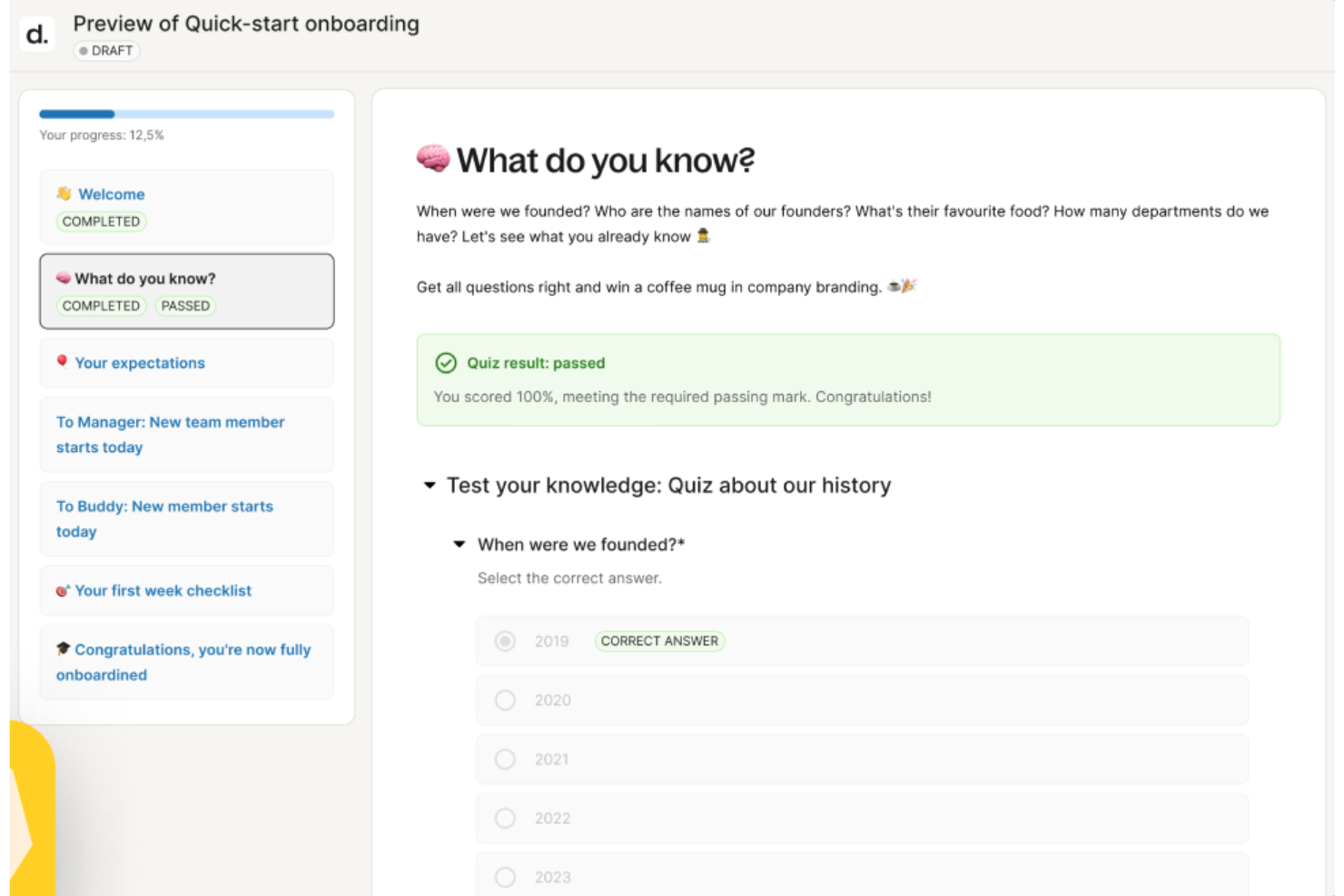
Deel Engage è pensato per le grandi organizzazioni che desiderano un unico luogo dove gestire apprendimento, performance e sviluppo della carriera. È ideale se il tuo team necessita di flussi di lavoro formativi automatizzati, assegnazioni di corsi basate sui ruoli e supporto per programmi di apprendimento a livello globale.
Perché ho scelto Deel Engage
Ho scelto Deel Engage perché aiuta le grandi aziende a offrire una formazione uniforme a team complessi senza aggiungere lavoro amministrativo extra. Puoi automatizzare le iscrizioni in base a ruolo, data di inizio o posizione, assicurando che i dipendenti ricevano sempre i corsi giusti al momento giusto.
Il suo costruttore di corsi assistito dall’IA ti aiuta a produrre rapidamente lezioni multimediali e quiz, particolarmente utile quando si devono lanciare formazioni frequenti o su larga scala. Apprezzo anche la possibilità di collegare i risultati formativi ai dati di performance, offrendo una visione più chiara di come la formazione influenzi la crescita dei dipendenti.
Queste funzionalità rendono Deel Engage una scelta ideale per le organizzazioni che necessitano di allineare apprendimento, performance e sviluppo di carriera.
Caratteristiche principali di Deel Engage
Ecco alcune funzionalità di spicco da evidenziare:
- Strumenti di Feedback 360°: Raccogli valutazioni di manager, colleghi e autovalutazioni per supportare dialoghi continui sulle performance.
- Framework per lo Sviluppo di Carriera: Mappa competenze, livelli e percorsi di crescita, così i dipendenti capiscono come progredire.
- Libreria di Risorse Formative: Offri al tuo team l’accesso a una combinazione di contenuti didattici interni ed esterni.
- Dashboard Analitiche: Monitora i progressi degli apprendenti, tassi di completamento e tendenze di performance tra team o regioni.
Integrazioni di Deel Engage
Le integrazioni includono BambooHR, Slack, Workday, Greenhouse, Okta, Microsoft Teams, Google Workspace, Zapier e Jira.
Pros and Cons
Pros:
- Assegnazioni di corsi di formazione automatizzate
- Creazione di corsi con drag-and-drop
- Analisi delle performance integrate
Cons:
- Curva di apprendimento per i nuovi utenti
- Potrebbe avere più opzioni di personalizzazione
New Product Updates from Deel HR

Deel Expands Stablecoin Wallet to 80+ Countries
Deel expands its Stablecoin Wallet to 80+ countries with dollar-backed balances and optional rewards. This gives eligible contractors more ways to hold and manage earnings inside Deel. For more information, visit Deel’s official site.
 .
.
Continu
Il migliore con automazione dei flussi di lavoro integrata
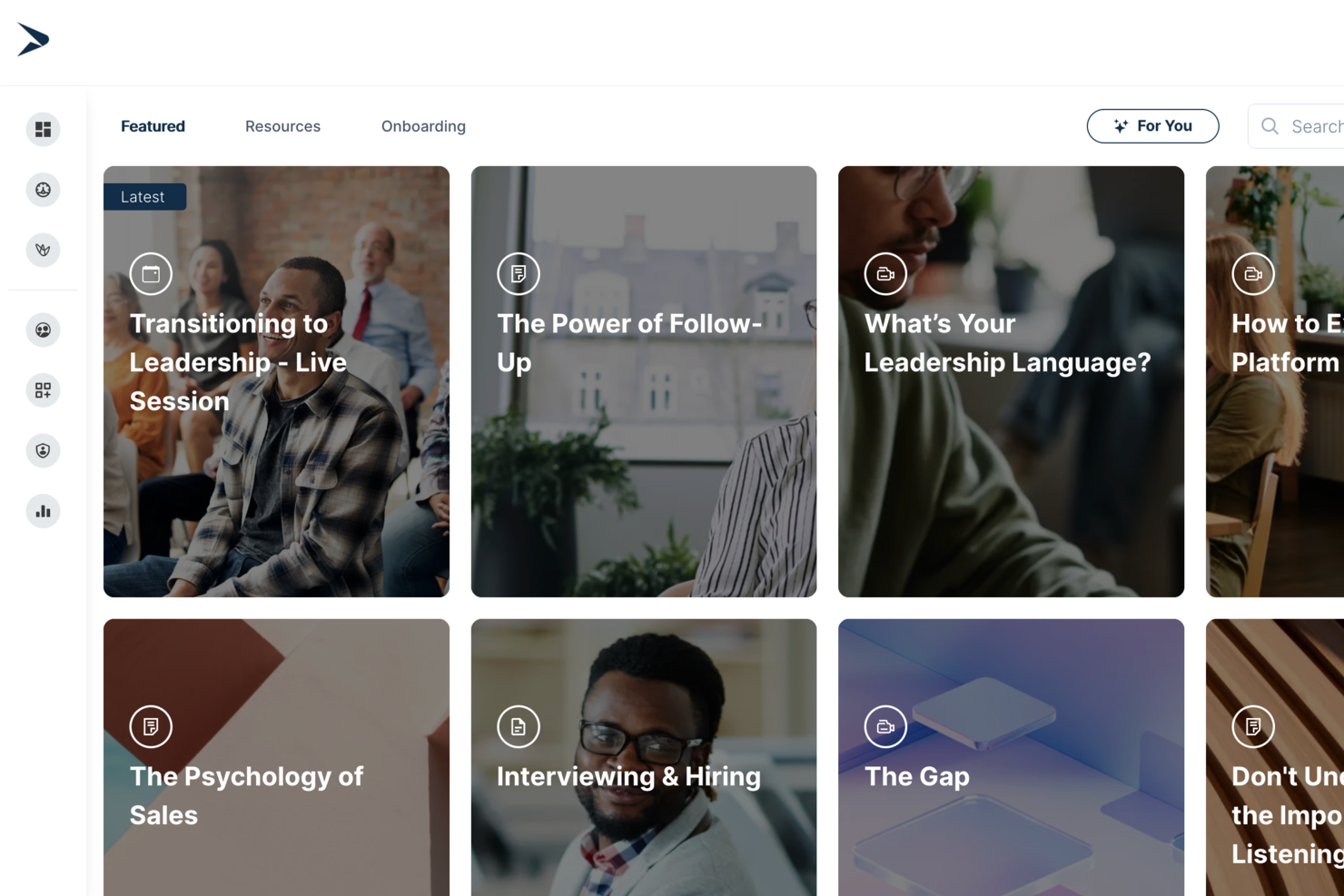
Continu è un sistema di gestione dell'apprendimento aziendale che offre creazione di corsi, automazione dei flussi di lavoro, analisi avanzate, percorsi di apprendimento personalizzati e supporto per contenuti multilingue.
Per chi è più adatto Continu?
Continu è particolarmente indicato per medie e grandi aziende che necessitano di formare e sviluppare team distribuiti tra diversi reparti o sedi.
Perché ho scelto Continu
Ho scelto Continu come uno dei migliori perché la sua automazione dei flussi di lavoro va ben oltre i semplici promemoria. Il motore di regole consente di attivare assegnazioni in base a ruolo, livello di partner, regione o qualsiasi attributo di CRM o HRIS: così, quando una nuova risorsa viene assunta o un partner passa a un livello superiore, la formazione corretta viene assegnata automaticamente. Apprezzo anche i flussi di escalation, che avvisano i manager quando le assegnazioni sono in ritardo senza alcun intervento manuale da parte del tuo team.
Caratteristiche principali di Continu
- Segmentazione intelligente: Imposta filtri basati su regole per fornire automaticamente contenuti mirati ai discenti in base a ruolo, regione o linea di prodotto.
- Continu Insights: Crea dashboard personalizzate e usa richieste in linguaggio naturale per ottenere report in tempo reale dai dati di apprendimento senza bisogno di SQL o supporto di analisti.
- Badge e certificazioni: Premia i discenti con badge digitali o certificati al completamento dei corsi o al raggiungimento di competenze specifiche.
- Supporto SCORM/xAPI: Importa file eLearning creati esternamente direttamente in Continu per gestirli insieme a contenuti creati in piattaforma.
Integrazioni di Continu
Continu offre integrazioni native con Salesforce, Workday, Okta e Google Workspace. È disponibile una API per integrazioni personalizzate.
Pros and Cons
Pros:
- Automazione robusta per i flussi di lavoro HR e formazione
- Reportistica completa per esigenze di conformità aziendale
- Team di supporto e successo clienti reattivi
Cons:
- Libreria di contenuti precostituiti limitata rispetto ai concorrenti
- Nessuna app mobile per accesso offline ai corsi
New Product Updates from Continu
Continu Adds Smarter Content Management
Continu adds Intelligent Tagging and Descriptions and richer content details to improve how learning content is organized and maintained. These updates reduce manual work and give teams more consistent, detailed content records. For more information, visit Continu’s official site.
 .
.

Synergy Learning è un noto fornitore di sistemi di gestione dell'apprendimento (LMS) aziendali, riconosciuto per la capacità di personalizzare soluzioni in base alle esigenze specifiche di settori come il non profit, la sanità, i servizi finanziari e la pubblica amministrazione.
Perché ho scelto Synergy Learning: In quanto partner certificato di Moodle e Totara, Synergy Learning offre piattaforme come Moodle LMS e Totara Suite, che aiutano le organizzazioni a fornire, gestire e tracciare efficacemente programmi educativi e formativi. L'enfasi sullo sviluppo su misura e sul design dell'esperienza utente contribuisce a creare un'interfaccia intuitiva che aumenta il coinvolgimento degli utenti. I servizi di hosting gestito garantiscono prestazioni costanti della piattaforma, mentre la consulenza e la formazione aiutano le organizzazioni a massimizzare le potenzialità del proprio LMS.
Funzionalità distintive e integrazioni di Synergy Learning:
Le funzionalità distintive includono il tema Spark LMS che offre una vasta gamma di integrazioni, un design intuitivo e componenti aggiuntivi premium, consentendo un'esperienza LMS personalizzata. Synergy Learning propone anche un approccio flessibile ai contenuti formativi con servizi di sviluppo di contenuti e digitalizzazione o ampliamento dei contenuti educativi esistenti.
Le integrazioni comprendono HubSpot, Power BI, Google Apps, Microsoft Office 365, SAP, Oracle, Salesforce, Stripe, PayPal e Zoom.
Pros and Cons
Pros:
- Sistemi di gestione dell'apprendimento altamente personalizzabili
- Offre servizi di hosting gestito e consulenza
- Approccio orientato al cliente per soluzioni su misura
Cons:
- Potrebbe non essere ideale per chi cerca una soluzione pronta all’uso
- Le opzioni di personalizzazione possono richiedere ulteriore sviluppo

Ideale per il rollout rapido e la formazione multi-pubblico
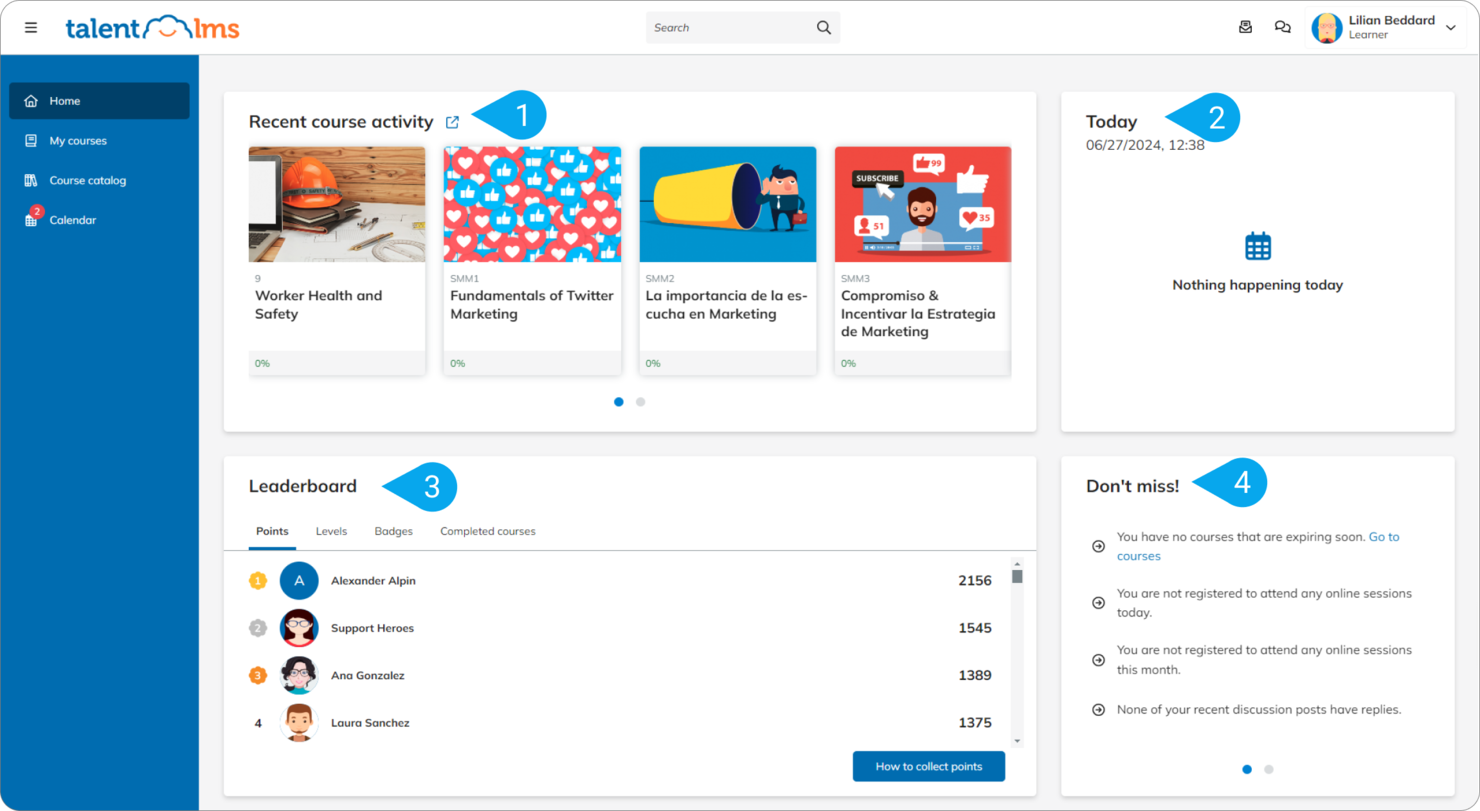
TalentLMS è progettato per le organizzazioni che devono implementare rapidamente la formazione su più pubblici—dipendenti, partner e clienti. Offre ambienti ramificati, creazione facile dei corsi e opzioni di erogazione flessibili, così puoi fornire esperienze di apprendimento diverse mantenendo tutto centralizzato.
Perché ho scelto TalentLMS
Ho scelto TalentLMS perché permette al tuo team di lanciare programmi di formazione aziendale in pochi giorni invece che settimane. Puoi creare corsi utilizzando strumenti integrati o caricare contenuti SCORM, xAPI e cmi5, rendendo flessibile la costruzione e la gestione dell'apprendimento.
La sua gestione dei rami consente di gestire portali formativi separati per diversi gruppi, ciascuno con un proprio branding e permessi, controllando comunque tutto da un unico account. Mi piace anche la possibilità di automatizzare le iscrizioni e le azioni, riducendo il lavoro amministrativo con l'aumentare degli utenti. Inoltre, l'app mobile con accesso offline assicura che i team distribuiti possano completare la formazione ovunque si trovino.
Caratteristiche principali di TalentLMS
Ecco alcune caratteristiche fondamentali da evidenziare:
- Gestione dei rami: Crea portali di formazione segmentati con branding e permessi personalizzati.
- Strumenti di gamification: Utilizza badge, punti e classifiche per incentivare il coinvolgimento degli utenti.
- Reportistica personalizzata: Crea report che tracciano avanzamento, tassi di completamento e tendenze di apprendimento.
- Automazioni: Attiva iscrizioni, promemoria o azioni in base al comportamento degli utenti.
Integrazioni di TalentLMS
Le integrazioni includono Salesforce, Slack, Microsoft Teams, BambooHR, WordPress, Zoom, GoTo Webinar, Zendesk e Google Workspace.
Pros and Cons
Pros:
- Configurazione rapida per aiutare le aziende a implementare velocemente la formazione
- La gamification supporta l'engagement di team numerosi o distribuiti
- La ramificazione ti permette di gestire pubblici separati da un'unica piattaforma
Cons:
- Limitate funzioni di authoring integrate
- Le analisi non offrono approfondimenti predittivi avanzati
New Product Updates from TalentLMS
TalentLMS Adds Learning Paths, AI Video, and Learner Experience Updates
TalentLMS introduced updates across learning management, content creation, and learner experience, including Learning Paths for Groups, AI video generation in TalentCraft, video bookmarking, and expanded administration tools. For more information, visit TalentLMS’s official site.

Absorb
Ideale per le funzionalità di gamification
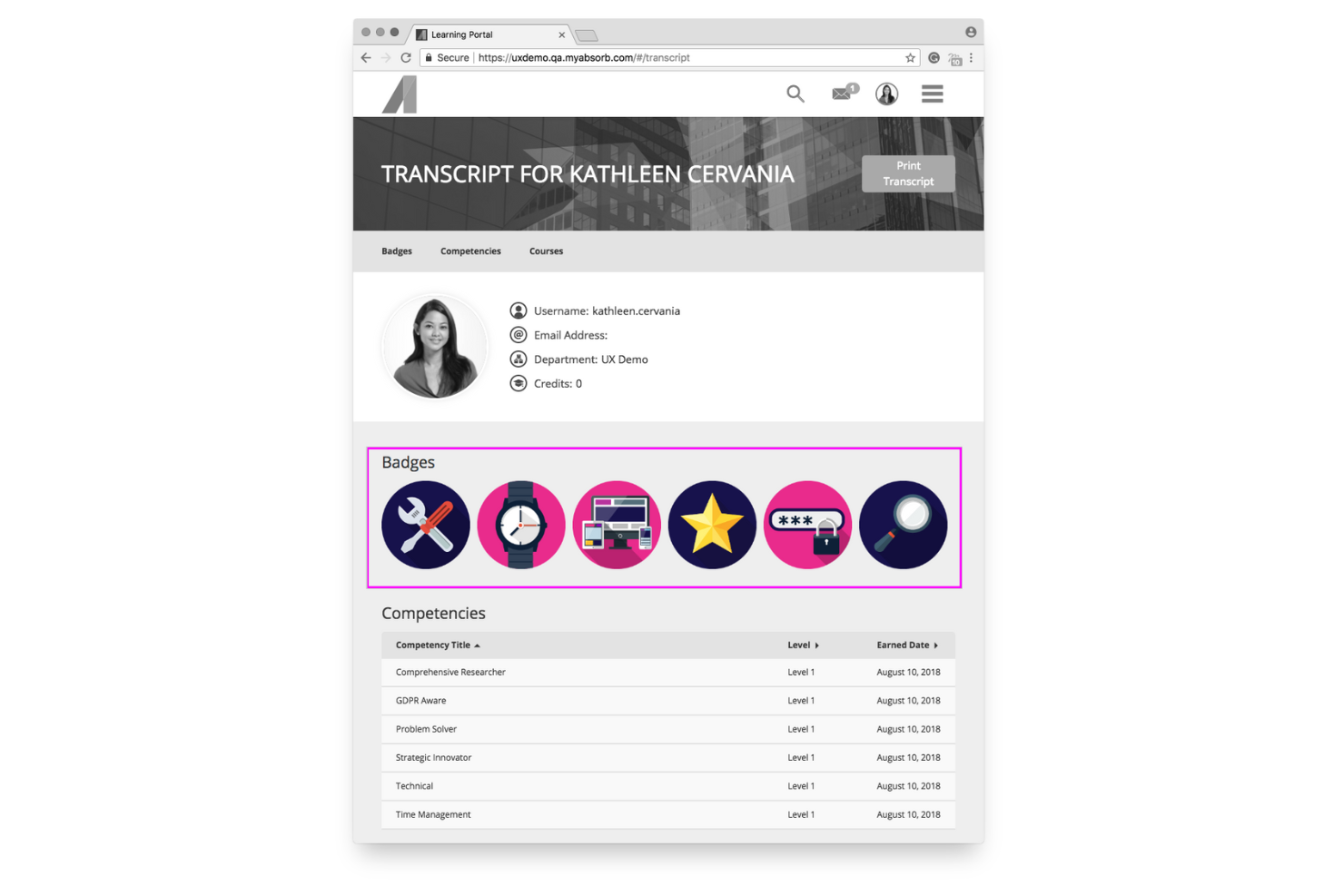
Absorb MS è pensato per le organizzazioni che desiderano motivare i propri apprendenti attraverso obiettivi strutturati e percorsi formativi coinvolgenti. È ideale per team di medie e grandi dimensioni che necessitano di un monitoraggio dettagliato dei progressi e di un ambiente di apprendimento flessibile, in grado di supportare una vasta gamma di formati di formazione.
Perché ho scelto Absorb
Ho scelto Absorb per il suo approccio efficace al coinvolgimento degli utenti, soprattutto se il tuo team trae vantaggio da traguardi chiari e dalla motivazione competitiva. I suoi strumenti di gamification—come badge, punti e classifiche—offrono ai dipendenti feedback immediato e incentivano la partecipazione costante.
È inoltre possibile creare percorsi di apprendimento personalizzati che si adattano al ruolo o al livello di competenza di ciascun dipendente, mantenendo così la formazione pertinente. Apprezzo anche la gestione centralizzata che permette agli amministratori di gestire profili utenti, permessi e iscrizioni da un'unica dashboard, riducendo il lavoro ripetitivo.
Infine, gli strumenti di authoring integrati nella piattaforma consentono di creare corsi multimediali e quiz senza la necessità di software esterni.
Caratteristiche principali di Absorb
Ecco alcune funzionalità di spicco da evidenziare:
- Percorsi di apprendimento adattivi: Crea sequenze formative guidate su misura per ruoli, obiettivi o certificazioni.
- Gestione utenti centralizzata: Controlla permessi, profili e livelli di accesso da un pannello amministrativo unificato.
- Strumenti di creazione contenuti: Crea quiz, moduli e corsi multimediali direttamente dalla piattaforma.
- Analisi e reportistica: Monitora i progressi degli utenti, il completamento dei corsi e le eventuali lacune formative con report esportabili.
Integrazioni di Absorb
Le integrazioni includono ADP, Box, Google Workspace, Microsoft 365, Salesforce, Shopify, Slack, Microsoft Teams, Twitter e Zendesk.
Pros and Cons
Pros:
- Supporta un elevato numero di utenti per implementazioni su scala enterprise
- Le funzioni di gamification incentivano la partecipazione costante
- Strumenti integrati per la creazione di contenuti formativi multimediali
Cons:
- Personalizzazione limitata per alcuni elementi della dashboard
- Alcune analisi avanzate richiedono livelli superiori o componenti aggiuntivi
New Product Updates from Absorb
Absorb Aura Adds Claude and ChatGPT Connections
Absorb Aura now connects to Claude or ChatGPT via MCP, enabling users to ask questions about their learning and the LMS directly inside the AI tool after a simple setup. For more information, visit Absorb's official site.
 .
.
Ideale per formati di contenuti flessibili
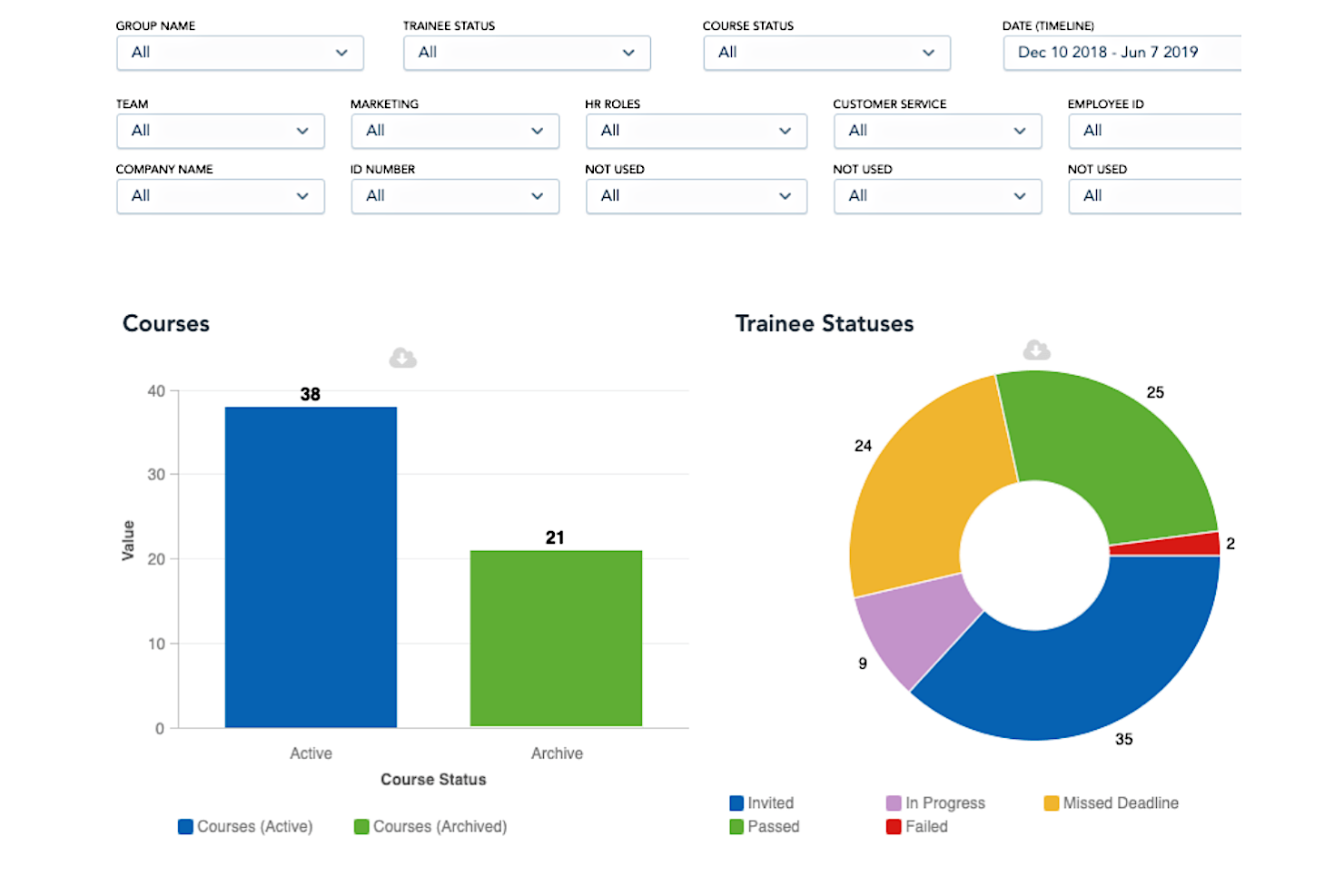
Mitratech Perform Learn è pensato per le organizzazioni che desiderano offrire una formazione ai dipendenti coerente e accessibile in tutte le sedi. È particolarmente indicato per i team HR e L&D che necessitano di formati di apprendimento flessibili, visibilità chiara sull’andamento della formazione e iscrizione automatica per workforce numerose o in crescita.
Perché ho scelto Mitratech Perform
Ho scelto Mitratech Perform perché offre al tuo team un modo flessibile di erogare la formazione tramite corsi on-demand, sessioni live e strumenti di social learning. Ad esempio, puoi creare i tuoi corsi o utilizzare quelli presenti nella loro libreria, facilitando l’avvio rapido di programmi senza dover partire da zero.
Apprezzo inoltre che i suoi strumenti di reportistica ti mostrino cosa hanno appreso i dipendenti e dove stanno riscontrando difficoltà, offrendo indicazioni chiare sui prossimi passi per migliorare i tuoi contenuti. La funzione di auto-iscrizione, in particolare, è molto utile per team numerosi: iscrive i dipendenti in base alle regole che imposti, evitandoti il lavoro ripetitivo di assegnare manualmente i corsi.
Nel complesso, queste caratteristiche lo rendono una scelta valida per le aziende che desiderano una formazione strutturata senza un’amministrazione onerosa.
Funzionalità principali di Mitratech Perform
Ecco alcune funzionalità di rilievo da sottolineare:
- Dashboard di formazione in tempo reale: Monitora i progressi dei partecipanti, i tassi di completamento e le lacune di competenze a colpo d’occhio.
- Authoring integrato di corsi: Crea corsi personalizzati con i tuoi video, documenti e valutazioni.
- Opzioni di apprendimento gamificato: Aggiungi badge, punti ed elementi interattivi per aumentare il coinvolgimento degli utenti.
- Percorsi di apprendimento basati sul ruolo: Assegna corsi automaticamente in base al ruolo lavorativo, dipartimento o sede.
Integrazioni di Mitratech Perform
Le integrazioni includono ADP Workforce Now, Azure Active Directory, BambooHR, Google Workspace, Microsoft 365, Okta, OneLogin, Paylocity, Salesforce e Zoom.
Pros and Cons
Pros:
- Gli utenti possono apprendere ovunque grazie all’erogazione cloud
- Dispone di numerose integrazioni
- Include la possibilità di creare corsi personalizzati
Cons:
- I dettagli sui prezzi non sono trasparenti
- Sarebbe utile una funzionalità integrata di organigramma

Ideale per gestire l’intero ciclo di formazione
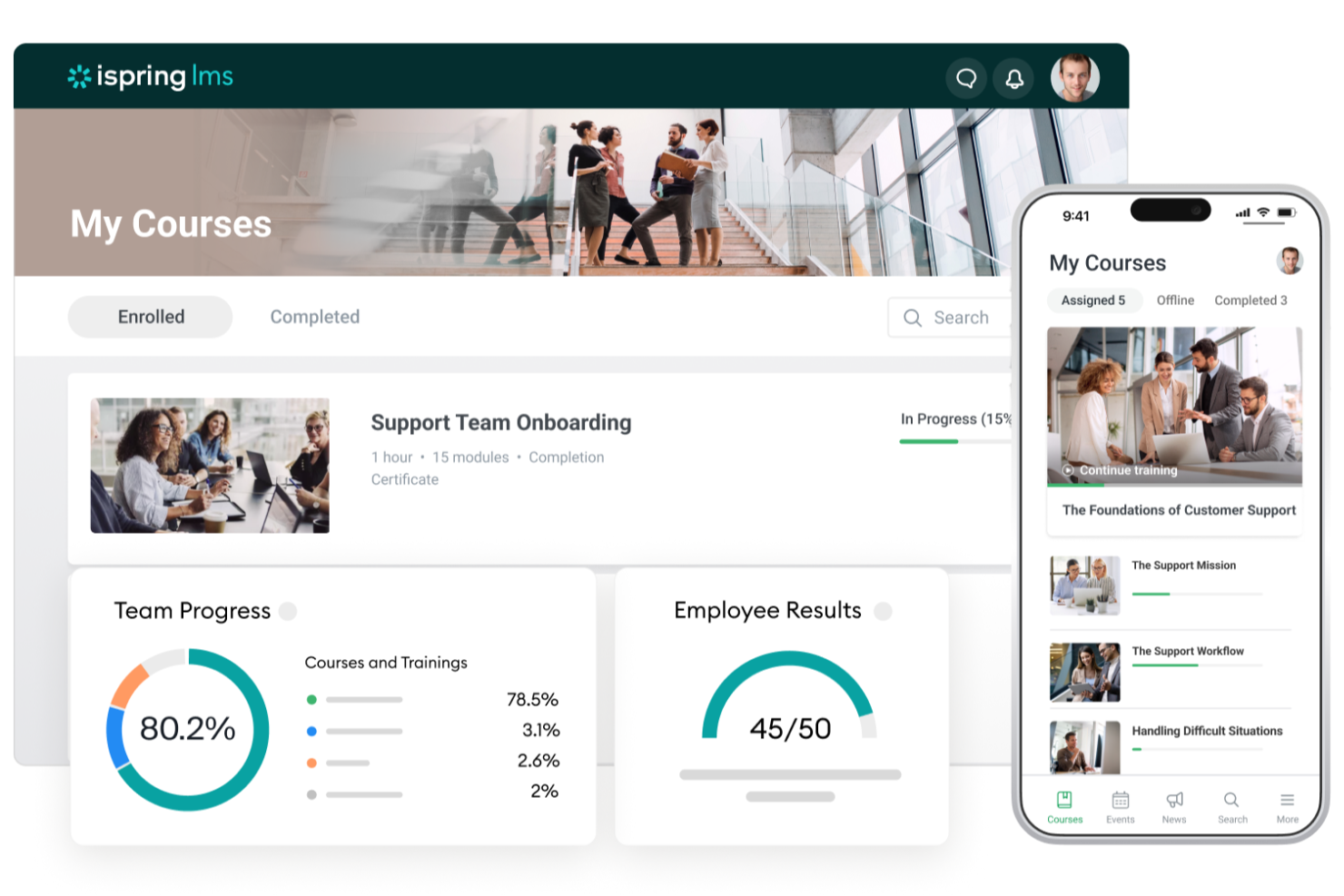
iSpring LMS è progettato per le aziende che desiderano gestire l'intero ciclo di formazione dei dipendenti in un unico posto, dall'onboarding allo sviluppo continuo delle competenze. È particolarmente adatto ai team HR e L&D che hanno bisogno di percorsi formativi strutturati, tracciamento affidabile e un modo semplice per fornire corsi su larga scala.
Perché ho scelto iSpring LMS
Ho scelto iSpring LMS perché automatizza molte attività formative ripetitive, così il tuo team non deve gestirle manualmente. Ad esempio, puoi impostare regole che iscrivono i dipendenti ai corsi giusti, inviano promemoria e tracciano i completamenti, garantendo che tutto funzioni senza intoppi — anche in una grande organizzazione.
Apprezzo anche il modo in cui raggruppa automaticamente gli utenti in base a località, ruolo o dipartimento, facilitando l'assegnazione di contenuti pertinenti. La piattaforma supporta la gestione della formazione a ciclo completo, dalla creazione di moduli eLearning con lo strumento di authoring integrato al monitoraggio dei progressi con dati dettagliati sulle performance. Inoltre, con la possibilità di installazione on-premise, puoi implementare l’LMS sui tuoi server per avere pieno controllo su sicurezza dei dati, infrastruttura e requisiti di conformità.
Queste capacità lo rendono particolarmente utile per organizzazioni che formano team numerosi o distribuiti.
Caratteristiche chiave di iSpring LMS
Ecco alcune funzionalità di rilievo da evidenziare:
- Percorsi Formativi e Piani di Sviluppo: Crea percorsi di formazione passo dopo passo che guidano i dipendenti attraverso i corsi richiesti e assicurano una formazione mirata.
- Organigramma & Profili: Visualizza le linee gerarchiche e conserva gli storici formativi dei dipendenti in un unico posto.
- Newsfeed Aziendale: Condividi aggiornamenti o metti in evidenza programmi di formazione importanti per tenere informati i team.
- Reportistica Dettagliata: Monitora i progressi, i tassi di completamento e le lacune di conoscenza con report mirati.
Integrazioni di iSpring LMS
Le integrazioni includono Microsoft Teams, Zoom, Google Calendar, Apple Calendar, Outlook Calendar, Salesforce, Albato e GoToMeeting.
Pros and Cons
Pros:
- L’opzione di installazione on-premise offre pieno controllo sull’infrastruttura formativa
- Report dettagliati sui completamenti mettono in evidenza le lacune di competenze in modo chiaro
- I percorsi formativi aiutano a strutturare programmi di formazione su più fasi
Cons:
- Opzioni di gamification limitate
- Meno integrazioni native rispetto ad alcuni concorrenti
New Product Updates from iSpring LMS

iSpring LMS Adds Multiple Observations to OJT Sessions
iSpring LMS now lets managers log multiple observations within one OJT session, grouping visits and auto-generating summary stats like averages, criterion results, and comparisons. For more information, visit iSpring LMS's official site.

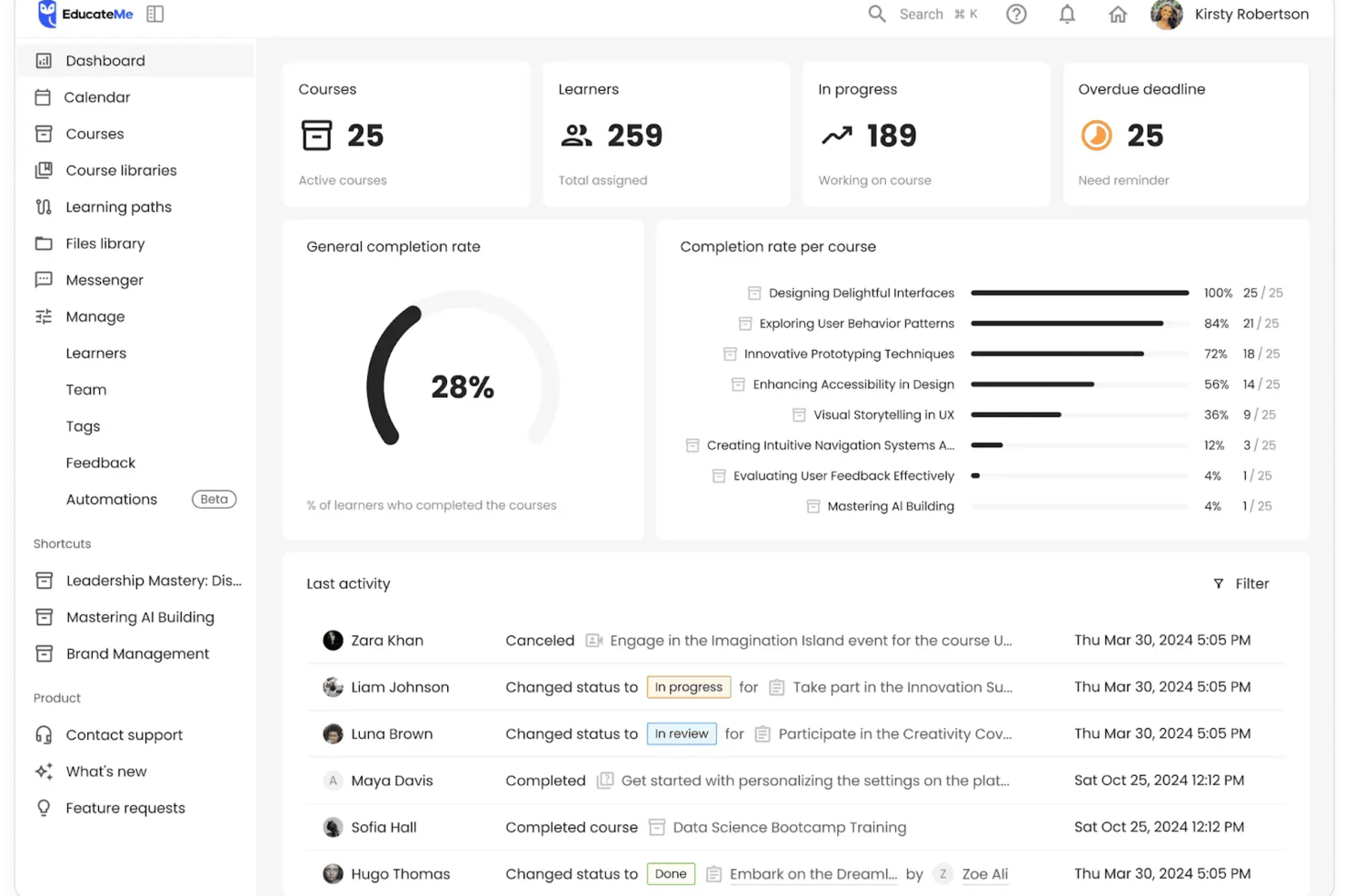
EducateMe offre una soluzione dinamica per le organizzazioni che desiderano migliorare le proprie iniziative di apprendimento e sviluppo tramite una piattaforma guidata dall’intelligenza artificiale. Creata su misura per soddisfare le esigenze diversificate di settori come aziende, accademie e agenzie formative, affronta le sfide della formazione dei dipendenti, dell’onboarding e della conformità normativa. Concentrandosi sull’apprendimento collaborativo e integrando analisi avanzate, EducateMe consente al tuo team di creare e gestire esperienze educative d’impatto.
Perché ho scelto EducateMe
Ho scelto EducateMe perché risponde all’esigenza delle aziende di prendere decisioni basate sui dati. Il suo motore di reportistica permette a leader e manager di vedere in tempo reale dove i dipendenti incontrano difficoltà, invece di aspettare la fine dei corsi per le valutazioni. Questo livello di supervisione è fondamentale per mantenere il ROI della formazione e l’efficienza operativa. Inoltre, possiede una funzione unica di coaching tramite roleplay guidato dall’IA, offrendo esperienze di apprendimento interattive e personalizzate.
Caratteristiche principali di EducateMe
Oltre al coaching tramite roleplay basato sull’IA e alle analisi avanzate, ho individuato altre caratteristiche che aumentano il valore della piattaforma per le aziende:
- Strumenti per la creazione di contenuti: Consentono al tuo team di sviluppare e personalizzare i corsi, assicurando che i materiali formativi siano in linea con gli obiettivi organizzativi.
- Opzioni white-label: Permettono di personalizzare il marchio della piattaforma LMS, rafforzando la coerenza dell’identità aziendale.
- Apprendimento collaborativo: Favorisce l’interazione e la discussione di gruppo, promuovendo una cultura dell’apprendimento continuo e della condivisione delle conoscenze.
- Automazione: Consente di automatizzare attività ripetitive come iscrizioni, promemoria e assegnazione dei corsi tramite un semplice workflow builder.
Integrazioni EducateMe
Le integrazioni includono Google Workspace, Slack, Zoom, Salesforce, Figma, Calendly e altro ancora. Inoltre, EducateMe offre accesso API per integrazioni personalizzate.
Pros and Cons
Pros:
- Dashboard di coinvolgimento in tempo reale
- Interfaccia pulita e moderna
- Strumenti di IA generativa integrati
Cons:
- Opzioni di gamification limitate
- Nessuna app mobile nativa

SkyPrep
Ideale per esperienza utente e supporto
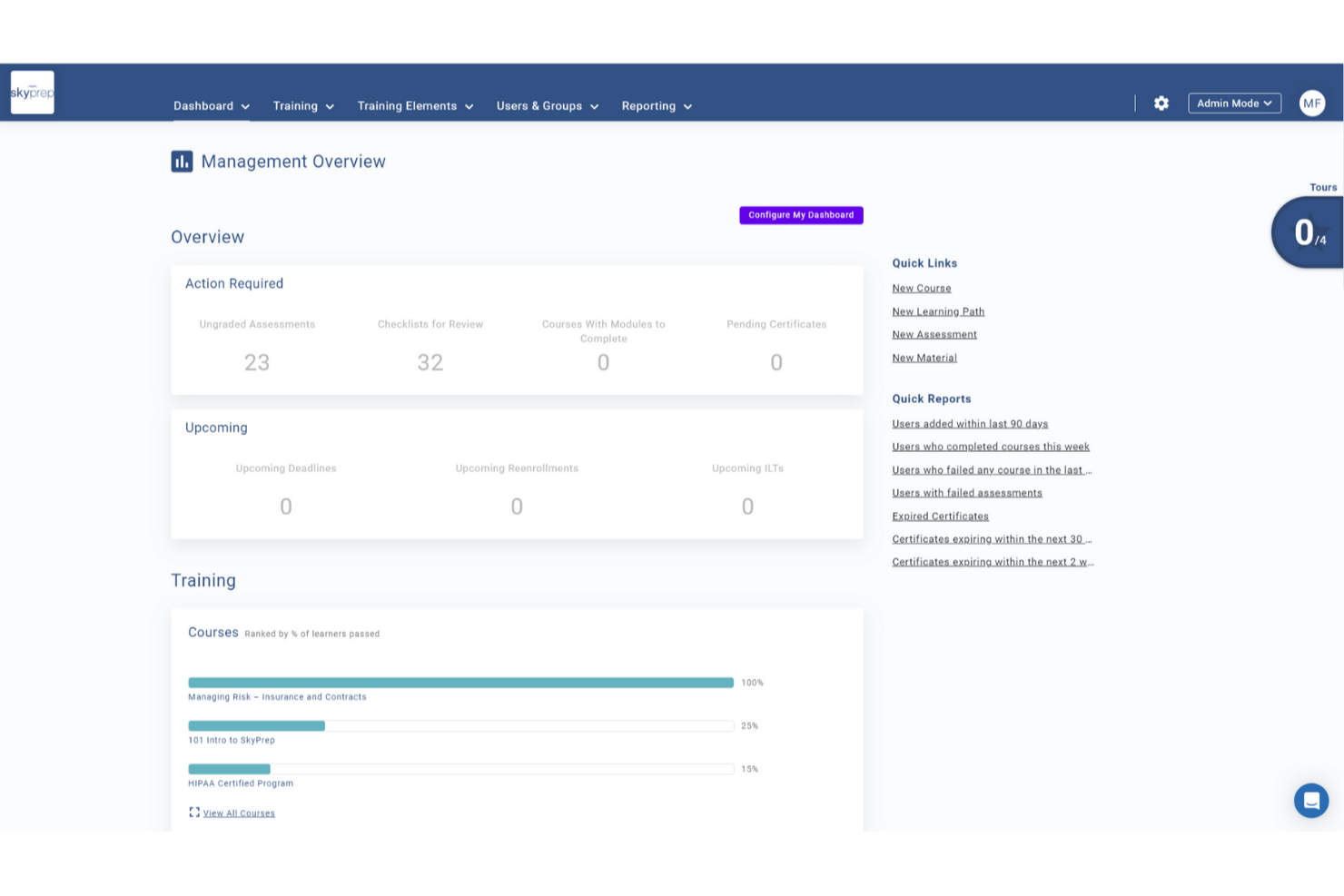
SkyPrep è pensato per le aziende che desiderano un modo semplice per creare e gestire la formazione dei dipendenti senza una curva di apprendimento ripida. È particolarmente indicato per i team che devono erogare corsi in modo rapido, mantenere alto il coinvolgimento dei discenti e monitorare i progressi in modo chiaro e utile.
Perché ho scelto SkyPrep
Ho scelto SkyPrep perché offre strumenti pratici per costruire programmi di formazione che vengono effettivamente completati. Puoi creare corsi utilizzando video, quiz e altri contenuti interattivi, facilmente accessibili dal tuo team senza bisogno di ulteriori indicazioni.
Apprezzo anche la possibilità di impostare percorsi formativi automatizzati, in modo che i nuovi assunti o specifici reparti ricevano i contenuti giusti al momento opportuno. Le funzionalità di classifica e badge mantengono l'apprendimento coinvolgente aggiungendo una sana competizione all'interno del team, mentre il monitoraggio integrato dei progressi aiuta a identificare chi ha bisogno di supporto e quali corsi potrebbero richiedere aggiornamenti.
Funzionalità principali di SkyPrep
Ecco alcune funzionalità distintive che meritano attenzione:
- Automazioni basate sul ruolo: Assegna automaticamente i corsi in base al ruolo lavorativo, alla sede o al dipartimento.
- Costruttore di corsi personalizzato: Unisci video, documenti, quiz e valutazioni in un unico percorso di apprendimento guidato.
- Monitoraggio avanzato dei progressi: Visualizza a colpo d'occhio i tassi di completamento dei corsi, le prestazioni nei quiz e le attività dei discenti.
- Strumenti per ospitare webinar: Collega sessioni dal vivo ai tuoi corsi utilizzando le opzioni di meeting virtuale integrate.
Integrazioni di SkyPrep
Le integrazioni includono Okta, SAML, OneLogin, ADP, Workday, Salesforce, HubSpot, Zoom, Webex e G Suite.
Pros and Cons
Pros:
- Percorsi di apprendimento automatizzati riducono il lavoro manuale di amministrazione
- Strumenti ecommerce per monetizzare i corsi
- Mantiene i contenuti quando aggiorni i piani
Cons:
- Nessuna generazione automatica dei certificati
- Impossibile salvare i progressi con alcuni tipi di documenti
Tovuti
Ideale per l'assistenza nella creazione di corsi generati dall'IA
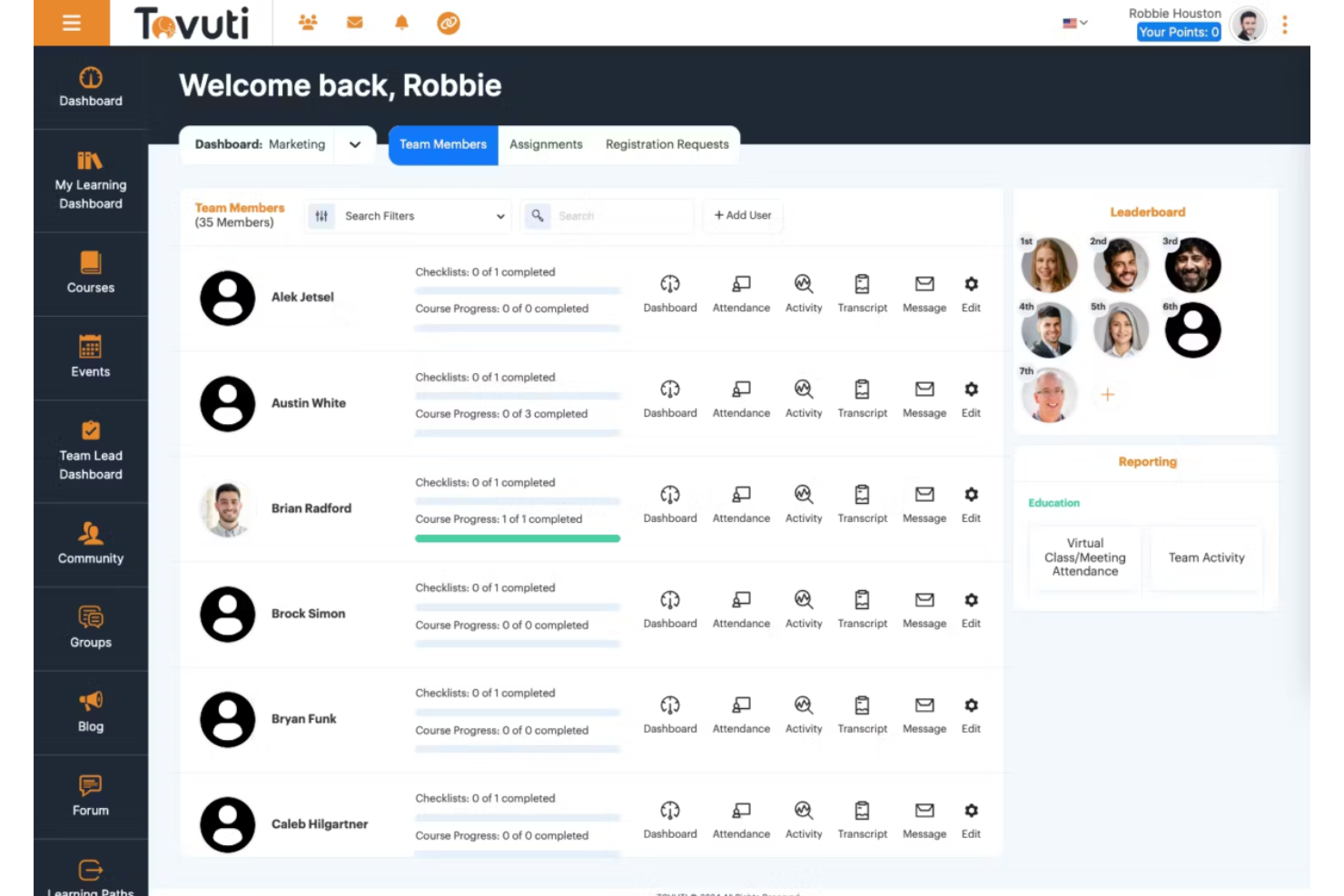
Tovuti è un sistema completo di gestione dell'apprendimento (LMS) progettato per soddisfare un'ampia gamma di esigenze educative e formative delle aziende. In quanto solida piattaforma online, Tovuti offre strumenti per creare, erogare e gestire contenuti formativi, rendendolo una soluzione ideale per la formazione aziendale, gli istituti scolastici e i programmi di sviluppo professionale.
Perché ho scelto Tovuti: Apprezzo particolarmente l'assistente IA di Tovuti, Dizi, che consente agli utenti di creare interi corsi, quiz e lezioni con pochi clic, rendendolo estremamente efficiente per le esigenze di formazione e sviluppo aziendale. Inoltre, l'ampia gamma di strumenti di gestione LMS di Tovuti, tra cui la gestione degli utenti, la reportistica e l'analisi, garantisce alle aziende la possibilità di supervisionare efficacemente i propri programmi formativi. La scalabilità della piattaforma e le opzioni di personalizzazione aiutano ulteriormente le grandi organizzazioni con esigenze formative complesse.
Funzionalità distintive e integrazioni di Tovuti:
Tra le funzionalità distintive figurano la piattaforma per l'esperienza di apprendimento (LXP), che offre a ogni utente un percorso di apprendimento personalizzato, favorendo il coinvolgimento e la fidelizzazione. Offre inoltre un programma di onboarding per aiutare gli utenti a configurare la piattaforma, inclusi video passo passo. Tovuti dispone anche di oltre 30.000 corsi predefiniti, un'app mobile per l'apprendimento in mobilità e vari strumenti ludicizzati e interattivi.
Le integrazioni includono Salesforce, Zoom, Google Workspace, Microsoft Teams, LinkedIn Learning, PayPal, Stripe, Zapier, Slack, Shopify, HubSpot, Mailchimp e BambooHR.
Pros and Cons
Pros:
- Ampie opzioni di personalizzazione
- Ampia gamma di funzionalità, tra cui ludicizzazione e apprendimento sociale
- Buona esperienza di apprendimento mobile
Cons:
- Il backend del sistema può essere complesso
- La configurazione e l'implementazione iniziali possono richiedere molto tempo
Altri sistemi di gestione dell'apprendimento aziendale
Ecco alcune ulteriori opzioni di sistemi di gestione dell’apprendimento aziendale che non sono entrate nella mia selezione, ma che vale comunque la pena valutare:
- Kallidus Learn
Ideale per tracciare e analizzare le metriche degli utenti
- Docebo
Miglior sistema di gestione dell'apprendimento basato su AI con soluzioni per l'accessibilità
- eloomi
Migliore piattaforma tutto-in-uno per apprendimento e sviluppo
- MedTrainer
Ideale per la formazione specifica in ambito sanitario
- Litmos LMS
Miglior sistema scalabile di gestione dell'apprendimento
- Moodle LMS
LMS con app mobile personalizzata
- SAP Enterprise Learning
Il miglior LMS per un ambiente di authoring avanzato dei contenuti
- Cornerstone LMS
Miglior sistema di gestione dell'apprendimento unificato
- Seismic Enablement Cloud
Miglior sistema di gestione dell'apprendimento per i team a contatto con i clienti
- CYPHER Learning
Ideale per una guida esperta tramite i Solutions Architects
- Brainier LMS
Il miglior sistema di gestione dell'apprendimento per l'accesso mobile-friendly
- Connecteam
Ideale per creare corsi di formazione interna ottimizzati per dispositivi mobili
- Exec
Ideale per roleplay con IA


Come Valuto i Sistemi di Gestione dell'Apprendimento Aziendale
Divido la mia valutazione in requisiti fondamentali che ogni LMS aziendale deve soddisfare—automazione della conformità, provisioning utenti su larga scala, supporto SCORM—e nei fattori di differenziazione che determinano la miglior scelta.
Funzionalità di Base (Requisiti Indispensabili per Questa Lista)
Quando seleziono gli strumenti per la mia lista, valuto ciascuno su una scala da 0 (non offre la funzionalità) a 5 (eccelle in quest'area) per ogni funzionalità chiave elencata di seguito. Poi, calcolo il punteggio totale dello strumento in percentuale. Ogni strumento deve ottenere un punteggio totale minimo del 65% per essere preso in considerazione.
- Creazione Corsi e Gestione dei Contenuti: Verifico se la piattaforma supporta import SCORM e xAPI insieme all'autore di corsi integrato, affinché le squadre possano combinare contenuti di terzi con moduli personalizzati in un'unica libreria.
- Progettazione Percorsi Formativi e Curriculum: La capacità di ogni strumento di sequenziare corsi in percorsi basati sui ruoli con prerequisiti è fondamentale—come i percorsi di onboarding che si ramificano per dipartimento o livello lavorativo.
- Gestione Utenti su Scala Aziendale: Valuto come la piattaforma gestisce il provisioning in massa, amministrazione delegata e configurazioni multi-tenant per organizzazioni che gestiscono discenti su decine di unità aziendali.
- Tracciamento della Conformità e delle Certificazioni: Promemoria automatici di rinnovo, workflow su scadenza e log pronti per audit sono ciò che cerco, soprattutto per squadre che gestiscono corsi ricorrenti su sicurezza o conformità normativa.
- Reportistica e Analisi dell'Apprendimento: La piattaforma dovrebbe offrire dashboard configurabili e report esportabili che vadano oltre i semplici tassi di completamento per mostrare la performance delle valutazioni e i progressi per gruppo.
- Integrazioni HRIS e Sistemi Aziendali: Qui sono importanti i connettori nativi ai principali HCM e fornitori SSO, oltre alle API aperte che permettono di sincronizzare i dati dei discenti senza import manuali.
Una volta ottenuta la lista degli strumenti che soddisfano questi criteri, considero cosa distingue ogni piattaforma.
Fattori di Differenziazione (Cosa Distingue i Fornitori)
Ecco come metto a confronto i vari fornitori:
Caratteristiche Distintive
Mappatura di competenze e abilità è un forte elemento distintivo. Cerco piattaforme che colleghino il completamento dei corsi a profili di abilità basati sui ruoli, così i team L&D possono individuare con precisione i gap e focalizzare l'upskilling. Anche i suggerimenti di contenuti guidati dall'IA sono importanti, soprattutto quando i discenti appartengono a molti dipartimenti e percorsi di carriera. Per organizzazioni con personale sul campo o senza scrivania, app mobili con accesso offline fanno davvero la differenza. Valuto anche i portali enterprise estesi che consentono di formare partner o clienti tramite esperienze separate e brandizzate.
Oltre le Caratteristiche
I roll-out di LMS aziendali spesso coinvolgono migliaia di utenti, quindi valuto il supporto all'implementazione di ogni fornitore—programmi di onboarding strutturati e servizi di migrazione possono determinare il successo o meno dell'adozione. Le certificazioni di sicurezza e privacy dei dati come SOC 2 Type II e ISO 27001 sono altrettanto importanti, soprattutto quando i registri di apprendimento dei dipendenti transitano tra sistemi diversi. Valuto anche la trasparenza dei prezzi, verificando se implementazione, supporto e l'accesso alla marketplace dei contenuti sono compresi o fatturati come extra che aumentano il costo di proprietà nel tempo.
Come scegliere i sistemi di gestione dell'apprendimento aziendale
È facile perdersi in lunghi elenchi di funzionalità e strutture tariffarie complesse. Per aiutarti a rimanere concentrato mentre affronti il tuo processo di selezione del software, ecco un elenco di fattori da tenere a mente:
| Fattore | Che cosa considerare |
|---|---|
| Scalabilità | Il sistema può crescere insieme al tuo team? Cerca soluzioni che supportino un numero crescente di utenti e corsi senza un aumento significativo dei costi o della complessità. |
| Integrazioni | Funziona con gli strumenti che già utilizzi? Assicurati che sia compatibile con i sistemi HR, le piattaforme di comunicazione e altri software essenziali per semplificare i flussi di lavoro. |
| Personalizzazione | Puoi adattare il sistema alle tue esigenze? Valuta se la piattaforma consente di modificare il branding, i contenuti dei corsi e i ruoli degli utenti in base agli obiettivi della tua organizzazione. |
| Semplicità d'uso | È intuitivo per utenti con qualsiasi livello di competenza? Considera la curva di apprendimento sia per gli amministratori sia per i partecipanti e cerca interfacce facili da usare. |
| Implementazione e onboarding | Quanto velocemente puoi iniziare? Valuta il tempo e le risorse necessari per la configurazione, inclusi la formazione e i materiali di supporto forniti dal fornitore. |
| Costo | Qual è il costo totale di gestione? Non limitarti al prezzo iniziale, ma includi anche eventuali componenti aggiuntivi, costi di manutenzione e costi di rinnovo per evitare sorprese sul budget. |
| Misure di sicurezza | I dati e la privacy degli utenti sono protetti? Verifica la conformità agli standard di settore, come il GDPR, e informati sulla crittografia dei dati e sui controlli degli accessi. |
| Requisiti di conformità | Il sistema soddisfa le normative specifiche del settore? Assicurati che supporti la formazione e la reportistica necessarie per la conformità nel tuo settore. |
Che cos'è un sistema di gestione dell'apprendimento aziendale?
Un sistema di gestione dell'apprendimento aziendale è uno strumento che aiuta le grandi aziende a erogare, gestire e monitorare i propri programmi interni di formazione e istruzione da un'unica piattaforma. Le funzionalità principali includono strumenti per la creazione e la gestione dei corsi, librerie di contenuti multimediali, strumenti di valutazione e report sui progressi.
Vengono generalmente utilizzati da grandi aziende, enti governativi e istituti di istruzione per semplificare il processo di apprendimento di dipendenti, studenti o membri.
Un LMS aziendale può semplificare tutti gli aspetti del processo di formazione interna, dall'erogazione dei corsi online al monitoraggio dei progressi, rispondendo al contempo alle diverse esigenze di apprendimento e agli obiettivi di sviluppo professionale degli utenti.
Funzionalità principali
Quando scegli i sistemi di gestione dell'apprendimento aziendale, presta attenzione alle seguenti funzionalità principali:
- Gestione dei corsi: Organizza, eroga e monitora un'ampia gamma di corsi e materiali didattici in tutta l'organizzazione, così che i dipendenti possano accedere facilmente alla formazione quando e dove ne hanno bisogno.
- Gestione degli utenti e dei ruoli: Configura i profili degli utenti, assegna percorsi di apprendimento in base ai ruoli o ai reparti e controlla gli accessi, assicurandoti che le persone giuste ricevano la formazione giusta, senza dover gestire infiniti fogli di calcolo.
- Strumenti di valutazione e verifica: Crea quiz, esami e verifiche delle competenze per misurare i progressi nell'apprendimento e capire quali conoscenze vengono realmente assimilate (e dove potrebbero essere necessarie sessioni di aggiornamento).
- Report e analisi: Genera report dettagliati sul completamento dei corsi, sui progressi dei partecipanti e sul coinvolgimento, così puoi capire che cosa funziona o individuare quando qualcuno è discretamente bloccato.
- Integrazione dei contenuti: Importa facilmente SCORM, xAPI e altri formati di contenuti standard, così puoi utilizzare i materiali esistenti o aggiungere contenuti nuovi e interattivi come preferisci.
- Accessibilità da dispositivi mobili: Dai al tuo team la flessibilità di accedere ai moduli formativi da smartphone o tablet, così l'onboarding e l'aggiornamento delle competenze non restano mai bloccati alla scrivania.
- Gestione della conformità: Monitora la formazione obbligatoria, automatizza i promemoria per le certificazioni e conserva registri completi per superare facilmente gli audit, senza più corse dell'ultimo minuto per la conformità.
- Strumenti di collaborazione: Abilita bacheche di discussione, lavori di gruppo e progetti condivisi per una collaborazione concreta che aiuti il team ad apprendere e a creare connessioni allo stesso tempo.
- Integrazione con strumenti HR e di produttività: Collega altre piattaforme (come software HR o app di produttività), rendendo la formazione parte del tuo flusso di lavoro integrato anziché un'attività isolata.
Funzionalità comuni dei sistemi di gestione dell'apprendimento aziendale basate sull'IA
Oltre alle funzionalità standard dei sistemi di gestione dell'apprendimento aziendale elencate sopra, molte di queste soluzioni integrano l'IA con funzionalità come:
- Percorsi di apprendimento personalizzati: Utilizza l'IA per consigliare corsi e risorse su misura per ogni discente, adattando i contenuti in base ai progressi, agli obiettivi e alle lacune nelle competenze: in pratica, offrendo a ogni dipendente un piano di formazione personalizzato.
- Selezione automatizzata dei contenuti: Lascia che l'IA analizzi e organizzi vaste raccolte di contenuti, mettendo a disposizione i materiali più pertinenti e mantenendo aggiornate le risorse formative senza doverle cercare manualmente.
- Analisi intelligente delle valutazioni: Sfrutta l'IA per esaminare le risposte a quiz e test, individuando schemi ricorrenti negli errori o nei punti di forza, così da fornire un feedback mirato e migliorare i risultati dell'apprendimento in modo più efficiente.
- Chatbot in linguaggio naturale: Offri assistenza immediata basata sull'IA per aiutare i discenti a trovare risposte, risolvere problemi o seguire passo dopo passo i moduli, senza dover attendere l'intervento umano per ogni piccola domanda.
- Analisi predittiva: L'IA analizza i dati relativi al coinvolgimento e alle prestazioni per prevedere le future esigenze formative o segnalare i dipendenti che rischiano di rimanere indietro, consentendoti di intervenire prima che i problemi si aggravino.
Vantaggi
L'implementazione di un sistema di gestione dell'apprendimento aziendale offre numerosi vantaggi al tuo team e alla tua azienda. Eccone alcuni:
- Maggiore efficienza della formazione: Automatizza l'erogazione e il monitoraggio dei corsi, facendo risparmiare tempo e risorse al tuo team di formazione.
- Conformità migliorata: Garantisce che la tua organizzazione rispetti gli standard del settore grazie alle funzionalità di monitoraggio della conformità.
- Esperienze di apprendimento personalizzate: I percorsi di apprendimento personalizzabili rispondono alle esigenze individuali, aumentando il coinvolgimento e la soddisfazione dei discenti.
- Informazioni basate sui dati: Report e analisi forniscono informazioni utili per perfezionare e migliorare i programmi di formazione.
- Flessibilità e accessibilità: L'accesso da dispositivi mobili consente ai discenti di consultare i contenuti in qualsiasi momento, rendendo l'apprendimento più pratico.
- Maggiore coinvolgimento: I contenuti interattivi mantengono i discenti motivati e partecipi alla loro formazione.
- Gestione centralizzata: Riunisce i materiali formativi e i dati degli utenti in un'unica piattaforma, semplificando l'amministrazione e la supervisione.
Costi e prezzi
La scelta di un sistema di gestione dell'apprendimento aziendale richiede la comprensione dei diversi modelli e piani tariffari disponibili. I costi variano in base alle funzionalità, alle dimensioni del team, ai componenti aggiuntivi e ad altri fattori. La tabella seguente riassume i piani più comuni, i relativi prezzi medi e le funzionalità generalmente incluse nelle soluzioni di sistema di gestione dell'apprendimento aziendale:
Tabella di confronto dei piani per il sistema di gestione dell'apprendimento aziendale
| Tipo di piano | Prezzo medio | Funzionalità comuni |
|---|---|---|
| Piano gratuito | $0 | Creazione limitata di corsi, gestione di base degli utenti e reportistica minima. |
| Piano personale | $5-$25/utente/mese | Accesso a librerie di corsi standard, analisi di base e accesso da dispositivi mobili. |
| Piano aziendale | $25-$50/utente/mese | Reportistica avanzata, funzionalità di integrazione, percorsi di apprendimento personalizzabili e contenuti interattivi. |
| Piano aziendale completo | $50-$100/utente/mese | Monitoraggio completo della conformità, supporto personalizzato, numerose integrazioni e opzioni complete di personalizzazione. |
Domande frequenti sui sistemi di gestione dell'apprendimento aziendale
Ecco alcune risposte alle domande più comuni sui sistemi di gestione dell’apprendimento aziendale:
Qual è la differenza tra un LMS aziendale e un LMS standard?
\u003cp data-start=\u0022257\u0022 data-end=\u0022536\u0022\u003e\u003cstrong data-start=\u0022257\u0022 data-end=\u0022275\u0022\u003eLMS aziendale\u003c/strong\u003e è progettato per organizzazioni di grandi dimensioni con esigenze formative complesse, più dipartimenti, attività globali e requisiti di scalabilità. In genere offre integrazioni avanzate (HRIS, CRM, ERP), supporto multi-tenant, reportistica avanzata e monitoraggio della conformità. Un \u003cstrong data-start=\u0022539\u0022 data-end=\u0022554\u0022\u003eLMS standard\u003c/strong\u003e è più basilare e si concentra sulle funzioni formative fondamentali, come la creazione di corsi, la gestione degli utenti e il monitoraggio dei progressi, in genere per aziende di piccole e medie dimensioni.\u003c/p\u003e
Come si misura il ROI di un LMS aziendale?
\u003cp data-start=\u0022693\u0022 data-end=\u00221293\u0022 data-is-last-node=\u0022\u0022 data-is-only-node=\u0022\u0022\u003eIl ROI di un LMS aziendale viene generalmente misurato valutando l’impatto della formazione su \u003cstrong data-start=\u0022784\u0022 data-end=\u0022855\u0022\u003eprestazioni, produttività, fidelizzazione dei dipendenti e tassi di conformità\u003c/strong\u003e. Le organizzazioni monitorano metriche come la riduzione dei costi di formazione, tempi di inserimento più rapidi, il miglioramento delle prestazioni di vendita o la diminuzione delle violazioni della conformità. Le piattaforme LMS avanzate forniscono analisi che collegano i risultati dell’apprendimento ai principali KPI aziendali, facilitando la dimostrazione di un valore aziendale concreto. Nel tempo, il ROI può essere valutato anche attraverso un maggiore coinvolgimento dei dipendenti e una riduzione del turnover, grazie a migliori opportunità di sviluppo professionale.\u003c/p\u003e
Qual è la differenza tra un ERP e un LMS?
\u003cp data-start=\u002260\u0022 data-end=\u0022633\u0022\u003eUn sistema di \u003cstrong data-start=\u002263\u0022 data-end=\u0022101\u0022\u003epianificazione delle risorse aziendali (ERP)\u003c/strong\u003e è una piattaforma centralizzata che gestisce i principali processi aziendali, come finanza, risorse umane, catena di approvvigionamento e attività operative. Al contrario, un \u003cstrong data-start=\u0022235\u0022 data-end=\u0022271\u0022\u003esistema di gestione dell’apprendimento (LMS)\u003c/strong\u003e è progettato specificamente per erogare, monitorare e gestire i programmi di formazione e sviluppo dei dipendenti. Mentre gli ERP si concentrano sull’efficienza operativa e sulla gestione delle risorse, le piattaforme LMS si concentrano sul miglioramento delle competenze dei dipendenti, sulla conformità e sulle conoscenze organizzative. Alcuni ERP possono integrarsi con le piattaforme LMS per allineare i dati sulla formazione alla gestione complessiva della forza lavoro.\u003c/p\u003e