

I 10 migliori software per conferenze virtuali del 2026

10 Elenco dei migliori software per conferenze virtuali


Nel mondo frenetico di oggi, i professionisti delle risorse umane come te devono affrontare la sfida di mantenere i team connessi, indipendentemente da dove si trovino. Il software per conferenze virtuali può essere una vera salvezza, aiutando il tuo team a rimanere coinvolto e produttivo.
Ho dedicato del tempo a testare e recensire diverse soluzioni software, concentrandomi su ciò che conta davvero per i team delle risorse umane. Hai bisogno di strumenti affidabili e facili da usare, adatti alle tue esigenze specifiche, e sono qui per guidarti.
In questo articolo condividerò le mie migliori scelte di software per conferenze virtuali. Illustrerò funzionalità, vantaggi e potenziali svantaggi, così potrai prendere una decisione informata. Troviamo la soluzione giusta per supportare il tuo team e migliorare la collaborazione.
Perché fidarsi delle nostre recensioni sui software
Il nostro team testa e recensisce software dal 2012. In quanto esperti HR noi stessi, sappiamo quanto sia difficile — e importante — scegliere il software giusto.
Per questa guida, abbiamo valutato gli strumenti attraverso test pratici e ricerche indipendenti, assegnando un punteggio agli strumenti in base ai nostri criteri di selezione. Ci basiamo inoltre sulle competenze di leader di pensiero del settore e di professionisti HR attivi.
Le nostre recensioni riflettono il nostro giudizio editoriale umano, non un discorso di vendita.
Revisori esperti:
Tabella comparativa dei software per conferenze virtuali
Questa tabella comparativa riassume i dettagli dei prezzi delle mie migliori selezioni di software per conferenze virtuali:
| Tool | Best For | Trial Info | Price | ||
|---|---|---|---|---|---|
| 1 | Ideale per eventi digitali interattivi e senza interruzioni, con funzionalità avanzate e scalabilità | Prova gratuita di 14 giorni + demo gratuita disponibile | Da $30/utente/mese (fatturato annualmente) | Website | |
| 2 | Favorisci il networking tra i partecipanti con matching basato sull’IA | Demo gratuita disponibile | Prezzi su richiesta | Website | |
| 3 | Metti in evidenza marchi, prodotti o servizi con stand virtuali | Demo gratuita disponibile | Prezzi su richiesta | Website | |
| 4 | Ideale per audio WAV non compresso | Piano gratuito disponibile | Da $24/mese (fatturazione annuale) | Website | |
| 5 | Metti alla prova la tua tecnologia e prepara gli ospiti nel backstage | Soluzione gratuita per sempre fino a 50 partecipanti a riunione | A partire da $50/mese | Website | |
| 6 | Ideale per ospitare riunioni fino a 100 partecipanti | Prova gratuita di 7 giorni disponibile | Da $19/utente/mese + $5/utente aggiuntivo | Website | |
| 7 | Attira potenziali clienti con live streaming | Versione gratuita per sempre fino a 100 partecipanti per riunione. | A partire da $3/host/mese | Website | |
| 8 | Aumenta il coinvolgimento dei partecipanti tramite la gamification | Prova gratuita di 30 giorni | Da $30/licenza/mese | Website | |
| 9 | Crea conferenze interattive con widget utili | Demo gratuita disponibile | Prezzi su richiesta | Website | |
| 10 | Ideal para colaboración en tareas y documentos | Demostración gratuita disponible | Precio disponible por solicitud | Website |
I migliori software per conferenze virtuali
Ecco una breve descrizione di ogni soluzione software per conferenze virtuali, per mostrare il caso d’uso migliore di ciascuno strumento, oltre ad alcune funzionalità degne di nota e schermate che offrono una panoramica dell’interfaccia utente.

Ideale per eventi digitali interattivi e senza interruzioni, con funzionalità avanzate e scalabilità

RingCentral Webinar è un software per conferenze virtuali progettato per rendere gli eventi digitali molto più semplici. Fa parte della suite RingCentral, nota per i suoi strumenti di comunicazione e collaborazione.
Ho scelto RingCentral Webinar per le sue funzionalità robuste e l'interfaccia intuitiva. Non si tratta solo di ospitare un webinar o una conferenza virtuale, ma di creare un'esperienza coinvolgente e interattiva per i partecipanti. Ed è proprio questo che RingCentral Webinar ti aiuta a fare.
Una delle caratteristiche di spicco di RingCentral Webinar è la sua scalabilità. Puoi organizzare webinar fino a 10.000 partecipanti e 500 presentatori, il che è davvero notevole. Offre anche video e audio in HD, condivisione dello schermo e sondaggi interattivi, che possono davvero migliorare l'esperienza complessiva dei tuoi eventi digitali. In più, dispone della funzione 'alza la mano' che permette ai partecipanti di interagire e fare domande durante il webinar. Apprezzo anche il fatto che offra analisi dettagliate dopo il webinar, utili per comprendere il comportamento dei partecipanti e migliorare gli eventi futuri.
Le integrazioni includono Marketo e dispongono di una propria API.
I prezzi partono da $20/utente/mese e offrono una prova gratuita di 30 giorni.

Zuddl
Favorisci il networking tra i partecipanti con matching basato sull’IA
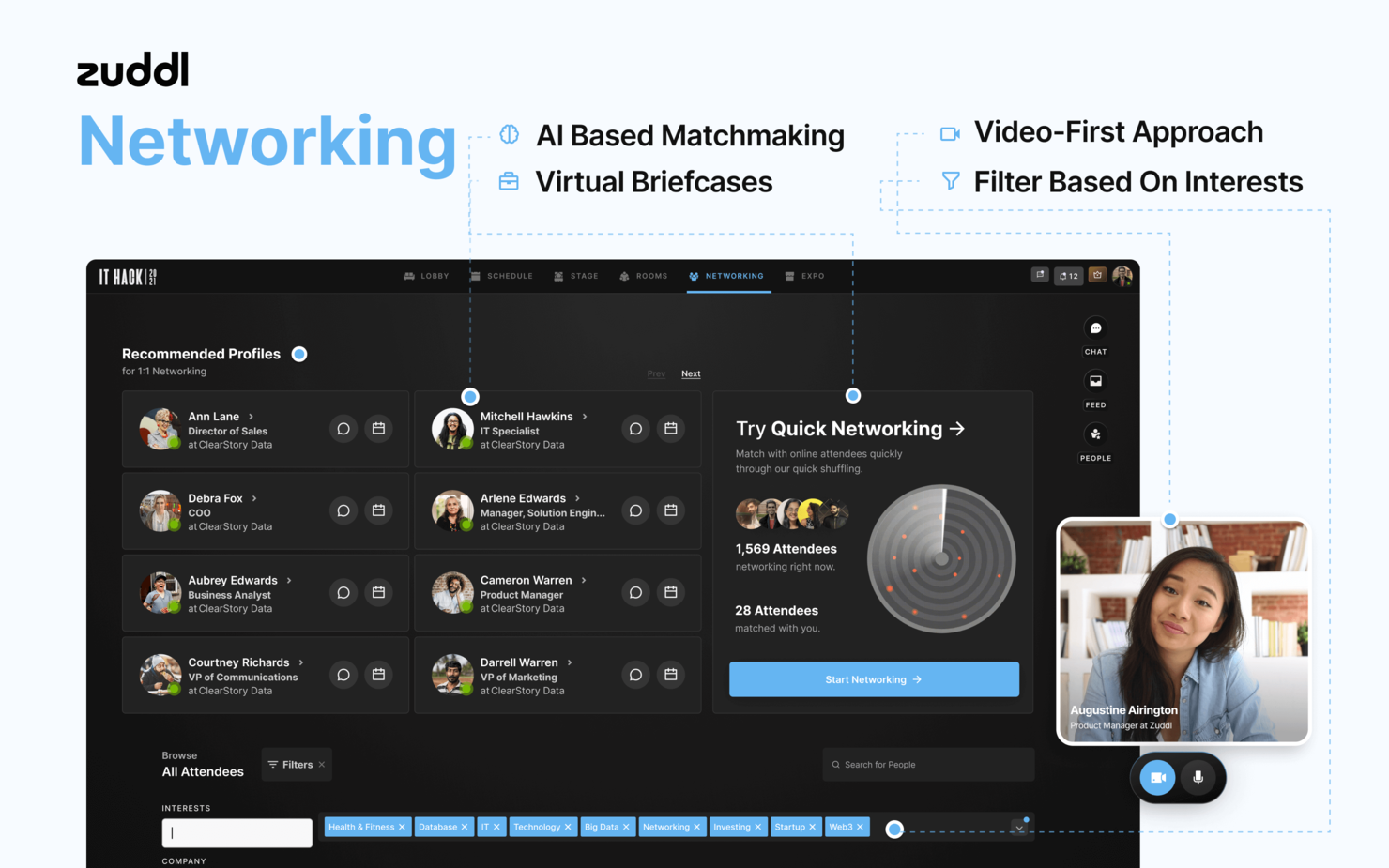
Zuddl è una piattaforma per eventi virtuali che ti aiuta a creare conferenze online o ibride memorabili per più di 100.000 partecipanti. La soluzione è personalizzabile, permettendoti di personalizzare la tua sede, le lounge per il networking e i materiali rivolti ai partecipanti come landing page ed email.
Questo software si distingue grazie alle sue funzionalità di networking intelligenti. L’intelligenza artificiale della piattaforma abbina i partecipanti agli eventi in base ai loro interessi, consentendo loro di connettersi con persone affini. Puoi anche organizzare giochi di networking e cacce al tesoro.
Zuddl si integra con molte app, tra cui Drift, Mailchimp, Pipedrive, Stripe, Typeform, Vimeo e YouTube.
Zuddl offre prezzi personalizzati su richiesta. Puoi anche prenotare una demo personalizzata gratuita.

Hubilo
Metti in evidenza marchi, prodotti o servizi con stand virtuali

Hubilo è uno strumento di videoconferenza che aiuta le aziende a creare eventi facili da navigare e che favoriscono l'interazione attraverso la personalizzazione e la gamification. Il pannello di controllo della piattaforma presenta un layout semplice, rendendo facile l'impostazione e la gestione di ogni evento.
Una delle cose che ho apprezzato di questo software è la facilità con cui è possibile creare stand personalizzati per sponsor e fornitori. Puoi modificare l'aspetto di ogni stand virtuale, mettendo in evidenza marchi, prodotti o servizi.
Hubilo si integra con molteplici app, tra cui Captello, HubSpot, KUDO, Mailchimp, Marketo, Salesforce e Slido.
Hubilo offre un prezzo personalizzato su richiesta. È inoltre possibile richiedere una demo gratuita.
Ideale per audio WAV non compresso

Riverside aiuta i team a produrre conferenze virtuali con video e audio di qualità da studio, rendendolo una valida opzione per le aziende che necessitano di eventi online professionali. La piattaforma è facile da usare e supporta un'ampia gamma di utenti, dai responsabili marketing agli educatori, grazie allo streaming live integrato e agli strumenti di editing basati su intelligenza artificiale. Semplificando la registrazione, il montaggio e la distribuzione, Riverside risponde alla sfida comune di mantenere alta la qualità e il coinvolgimento del pubblico negli ambienti virtuali.
Perché ho scelto Riverside
Ho scelto Riverside per la sua capacità di registrare video in 4K di alta qualità e audio WAV non compresso, fondamentale per le conferenze virtuali che richiedono un aspetto curato e professionale. I suoi strumenti di editing guidati dall’IA semplificano la post produzione automatizzando i compiti di routine e supportando modifiche creative senza richiedere competenze tecniche avanzate. Riverside offre anche lo streaming live su più piattaforme contemporaneamente, aiutandoti a raggiungere un pubblico più ampio e favorendo il coinvolgimento in tempo reale.
Caratteristiche principali di Riverside
Oltre all’eccellente qualità video e audio, Riverside offre diverse funzionalità che migliorano l’esperienza delle conferenze virtuali:
- Trascrizione automatica: Converte facilmente il parlato in testo per una maggiore accessibilità e presa di appunti.
- Tracce audio/video separate: Registra ogni partecipante su tracce individuali per un montaggio e un mixaggio più precisi.
- Simulcasting: Trasmetti in diretta il tuo evento su più piattaforme come YouTube e LinkedIn per massimizzare la copertura del pubblico.
- Note automatiche con IA: Genera automaticamente riassunti concisi delle tue conferenze, risparmiando tempo sulla presa di appunti manuale.
Integrazioni Riverside
Riverside al momento non segnala integrazioni native.
Pros and Cons
Pros:
- Supporta registrazione e streaming in 4K
- Strumenti di trascrizione ed editing IA
- Registrazione di tracce audio e video separate
Cons:
- Nessuna integrazione nativa attualmente disponibile
- Chrome necessario per prestazioni ottimali

FLOOR
Metti alla prova la tua tecnologia e prepara gli ospiti nel backstage

Floor è un software per riunioni virtuali che consente alle aziende di ospitare eventi digitali. La piattaforma aiuta a creare eventi interattivi con sessioni, discorsi principali, sale per gruppi di lavoro, networking e chat. Con Floor, puoi personalizzare la maggior parte degli aspetti del tuo evento. Puoi creare aree reception e spazi espositivi con il tuo marchio e integrare materiale sponsorizzato nella presentazione.
Una delle cose che ho apprezzato di questo software è la funzione Backstage. Questa funzione ti permette di avere un dietro le quinte, proprio come in un evento reale. Gli organizzatori possono utilizzare quest’area per testare i microfoni e le slide dei relatori o per preparare gli ospiti.
Il prezzo di Floor parte da $50/mese. La piattaforma offre una soluzione gratuita per sempre fino a 50 partecipanti a riunione.
Ideale per ospitare riunioni fino a 100 partecipanti

TalkRoute è un sistema telefonico virtuale progettato per le aziende, che offre una piattaforma unificata per chiamate, messaggistica e riunioni. È pensato per le aziende che cercano una gestione efficiente delle chiamate, dei messaggi di testo e delle funzionalità di videoconferenza.
Se stai cercando un software di conferenza virtuale, la funzione di videoconferenza di TalkRoute sarà molto utile al tuo team. Permette di organizzare riunioni con fino a 100 partecipanti, ideale per discussioni di gruppo numerose o webinar. La condivisione dello schermo e la lavagna sono perfetti per la collaborazione, consentendo a tutti di vedere presentazioni o di fare brainstorming in tempo reale.
Un'altra caratteristica che spicca è l'accesso multipiattaforma di TalkRoute. Tu e il tuo team potete effettuare e ricevere chiamate da desktop, web o dispositivi mobili, quindi non è necessario essere legati alla scrivania. Questa flessibilità è particolarmente vantaggiosa se il tuo team lavora da remoto o è spesso in movimento. Sia che tu sia in ufficio o fuori sede, puoi rimanere connesso senza bisogno di apparecchiature aggiuntive.
Le integrazioni includono Gmail, Discord, Asana, Slack, Mailchimp e Shopify.
I prezzi partono da $19/utente/mese + $5/utente aggiuntivo. È disponibile anche una prova gratuita di 7 giorni.

Attira potenziali clienti con live streaming
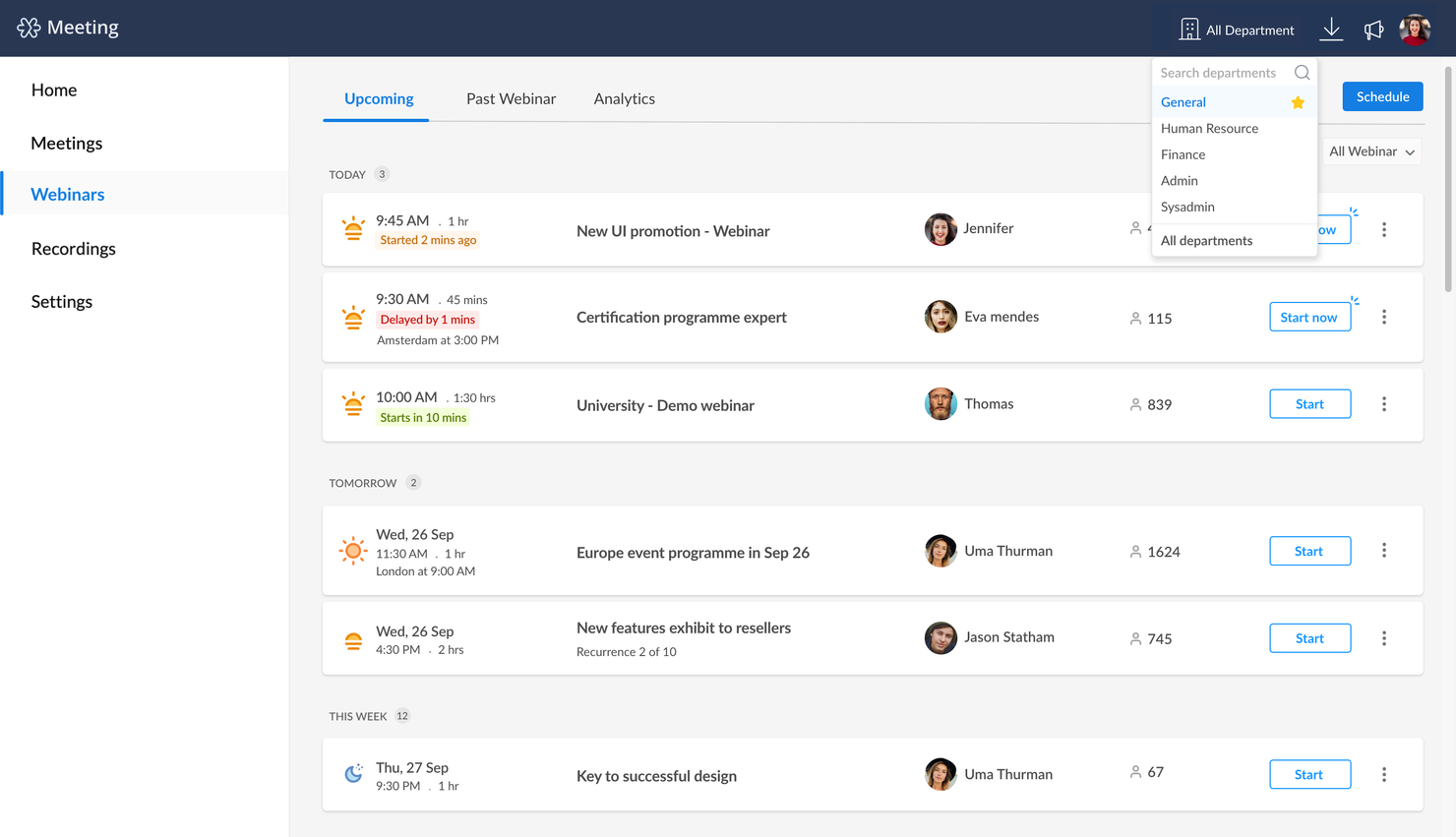
Zoho Meeting è una piattaforma di conferenze virtuali che aiuta le aziende a dimostrare i propri prodotti o servizi a potenziali clienti online. Il software è basato su cloud, quindi tu e i partecipanti alla riunione non dovete scaricare nulla per partecipare alla conferenza o al webinar. Per gli utenti mobili che lo utilizzano frequentemente, la soluzione offre app per iOS e Android.
Questa soluzione si distingue dalla concorrenza grazie alle sue capacità di live streaming. La piattaforma consente di trasmettere facilmente in diretta i tuoi eventi web a grandi gruppi di persone, permettendoti di gestire webinar senza difficoltà.
Zoho Meeting si integra con diverse soluzioni, tra cui Zoho CRM, Gmail, Microsoft Outlook, Microsoft Teams e Slack.
Zoho Meeting ha un costo a partire da $3/host/mese. La piattaforma offre una versione gratuita per sempre fino a 100 partecipanti per riunione.
Webex
Aumenta il coinvolgimento dei partecipanti tramite la gamification
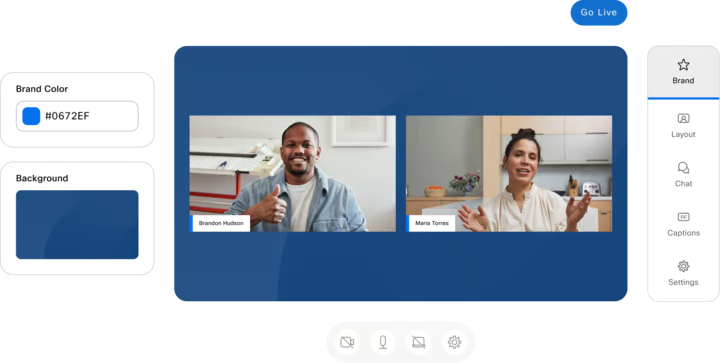
Webex Events è un software di gestione eventi che aiuta le aziende a organizzare conferenze in presenza, ibride e online con ambienti virtuali personalizzabili. Il software è ben strutturato ed è semplice da configurare.
Uno degli aspetti che rendono questo software unico sono le sue funzionalità per l'interazione con i partecipanti. La piattaforma promuove il coinvolgimento dei partecipanti attraverso la gamification. Come organizzatore, puoi creare sfide per ispirare i partecipanti ad agire e premiare coloro che lo fanno con punti e premi.
Webex Events (precedentemente chiamato Socio) si integra con decine di soluzioni, tra cui Hubspot, Microsoft Teams, Notion, Salesforce, Slack e Slido.
Webex Events offre prezzi personalizzati su richiesta, oltre a una demo gratuita. Puoi anche accedere a una versione gratuita a tempo indeterminato con funzionalità limitate.

ON24
Crea conferenze interattive con widget utili
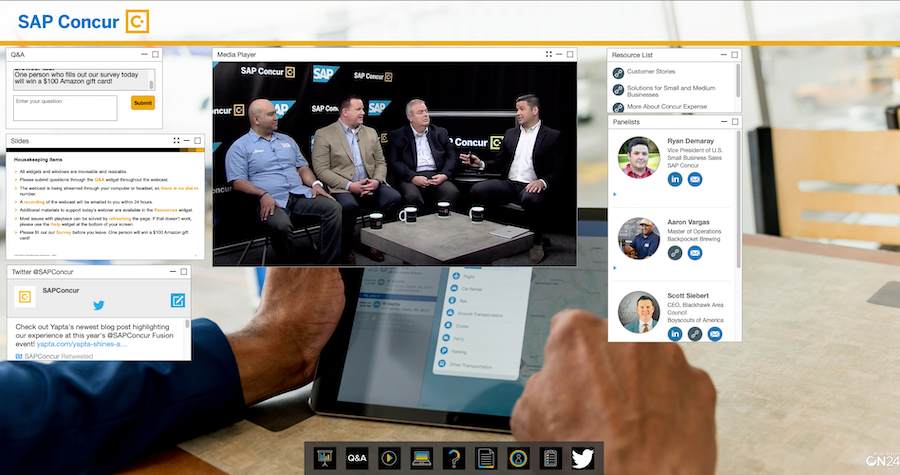
ON24 è una piattaforma per conferenze virtuali che aiuta a creare presentazioni dinamiche con funzionalità di networking e gamification. La piattaforma offre buone opzioni di personalizzazione degli eventi, permettendoti di adattare tutto l’ambiente virtuale al tuo brand.
Questa soluzione è stata inserita nell’elenco grazie ai suoi webinar interattivi. La finestra del webinar utilizza widget per creare spazi separati per domande e risposte, elenco delle risorse, presentazione dei relatori, feed dei social media e presentazione. Questo aiuta il tuo pubblico a sfruttare l’evento online per conoscere meglio la tua azienda e il tema trattato.
ON24 si integra con diverse soluzioni tramite Zapier.
ON24 offre prezzi personalizzati su richiesta. Puoi anche richiedere una demo gratuita.

GoTo Webinar
Ideal para colaboración en tareas y documentos
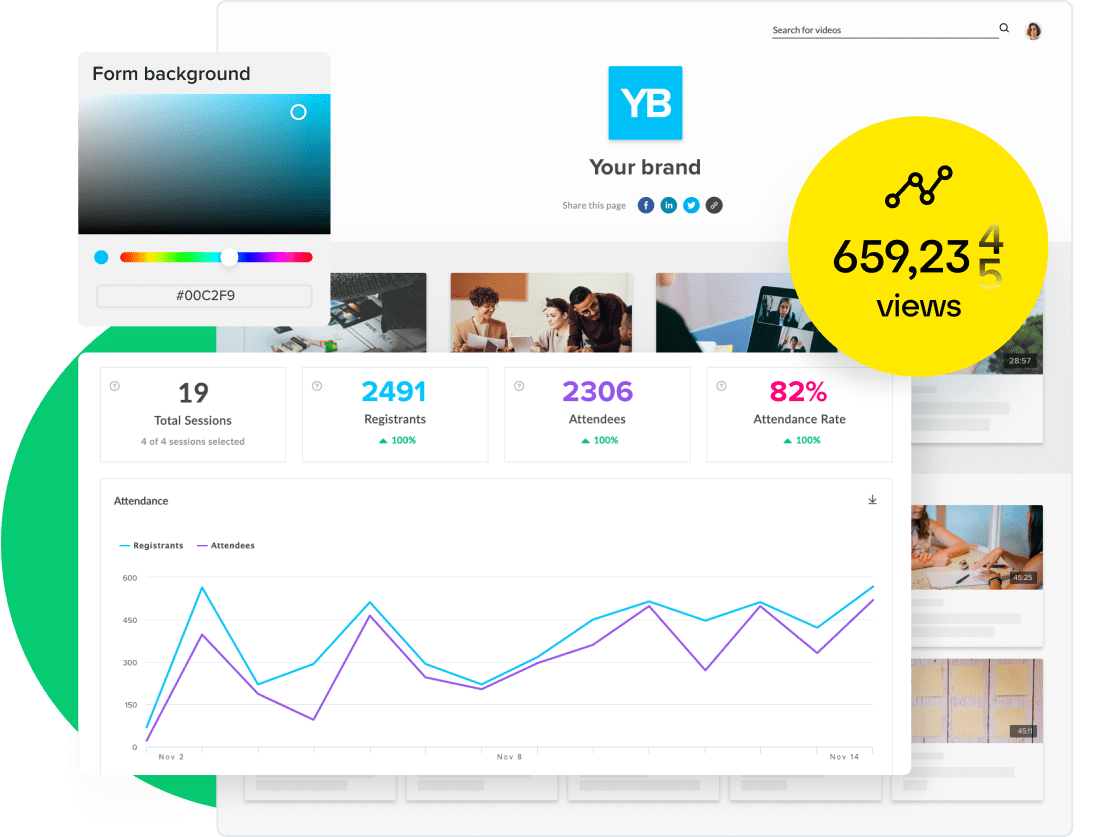
8am MyCase ayuda a pequeños despachos de abogados a organizar documentos de casos, comunicaciones con clientes, fechas límite, registros de tiempo y facturación sin tener que cambiar entre sistemas separados. Su gestión de documentos vinculados a los expedientes y flujos de trabajo legales integrados la hacen ideal para abogados independientes y equipos jurídicos pequeños que buscan una plataforma integral de gestión de despachos.
¿Para Quién es Mejor 8am?
8am es una buena opción para abogados autónomos y firmas pequeñas que necesitan una única plataforma para gestionar casos, documentos y la comunicación con el cliente sin tener que utilizar varias herramientas.
Por Qué Elegí 8am
Elegí 8am MyCase porque conecta documentos, tareas, fechas límite y la actividad de los clientes dentro de cada expediente, ayudando a los despachos pequeños a evitar cambiar entre sistemas separados. Tu equipo puede asignar tareas junto a los archivos relevantes, lo que facilita entender qué necesita atención y por qué. La automatización de flujos de trabajo puede crear tareas y documentos cuando un caso alcanza una etapa específica, reduciendo pasos omitidos en procesos legales repetitivos. También me gusta que MyCase Drive sincroniza los cambios realizados en archivos de escritorio con la nube, así los miembros del equipo pueden trabajar siempre sobre la versión más actualizada del documento.
Funciones Clave de 8am
- Automatización de documentos: Genera documentos aptos para el tribunal a partir de plantillas de Word predefinidas y completadas con datos del caso y del cliente.
- Firma electrónica ilimitada: Envía documentos para firma electrónica directamente desde la plataforma sin necesidad de una herramienta de terceros.
- Portal seguro para clientes: Comparte documentos del caso con los clientes a través de un portal cifrado donde pueden ver y subir archivos.
- Búsqueda de texto completo en documentos: Ubica cualquier archivo en tu biblioteca de casos mediante una búsqueda por palabras clave alimentada por escaneo OCR.
Integraciones de 8am
Las integraciones incluyen Dropbox, NetDocuments, Gmail, Microsoft Outlook, Google Calendar, QuickBooks Online, Mailchimp, LawToolBox, InfoTrack y Lawmatics.
Pros and Cons
Pros:
- MyCase Drive sincroniza las ediciones de escritorio directamente con los archivos en la nube
- Organiza documentos, tareas y comunicaciones dentro del registro de cada caso
- El portal seguro para clientes permite compartir documentos y obtener firmas electrónicas
Cons:
- Las carpetas de casos grandes pueden cargar lentamente en computadoras menos potentes
- La edición simultánea de documentos puede crear versiones conflictivas o desactualizadas
Altri software per conferenze virtuali
Ecco alcune altre opzioni che non sono rientrate nell’elenco dei migliori software per conferenze virtuali:
- SpatialChat
Ideale per esperienze audio spaziali
- vFairs
Offri esperienze immersive con personalizzazione e gamification
- BigMarker
Promuovi e vendi prodotti grazie a potenti funzionalità di marketing
- Inpixon
Crea eventi ibridi interattivi con concorsi per tutti i partecipanti
- Expo Pass Old
Rendi i tuoi contenuti accessibili anche dopo la fine della conferenza


Come Valuto il Software per Conferenze Virtuali
Valuto queste piattaforme su due livelli: i requisiti di base come la trasmissione multi-sessione e la gestione dei partecipanti, e i fattori differenzianti come l’abbinamento tramite intelligenza artificiale e le integrazioni con HRIS.
Funzionalità Core (Requisiti Fondamentali per Questa Lista)
Quando seleziono gli strumenti per la mia lista, valuto ciascuno su una scala da 0 (non offre la funzionalità) a 5 (eccelle in quest’area) per ogni funzionalità fondamentale elencata di seguito. Quindi, calcolo il punteggio totale trasformandolo in una percentuale. Ogni strumento deve raggiungere un punteggio totale minimo del 65% per poter essere incluso.
- Trasmissione Live Multi-Sessione: Verifico se una piattaforma può gestire tracce simultanee, come una sessione plenaria e sessioni parallele allo stesso tempo, con streaming HD stabile.
- Strumenti Interattivi per il Coinvolgimento del Pubblico: Sondaggi dal vivo, domande e risposte moderate e chat durante la sessione sono elementi che cerco, soprattutto per mantenere attivo il pubblico durante grandi riunioni plenarie.
- Networking e Stanze Breakout: Valuto come i partecipanti possono connettersi uno a uno o in piccoli gruppi, importante per le fiere del lavoro dove i candidati hanno bisogno di tempo diretto con i recruiter.
- Stand Virtuali e Spazi Expo: Aree espositive brandizzate con video integrati, risorse scaricabili e rappresentanti dal vivo sono fondamentali per eventi come fiere interne sui benefit aziendali.
- Registrazione e Gestione dei Partecipanti: Pagine di registrazione personalizzate, conferme automatiche e controlli della lista partecipanti sono tutti aspetti considerati, soprattutto per i gruppi ricorrenti di onboarding.
- Analisi e Reportistica del Coinvolgimento: I dati post-evento su partecipazione, coinvolgimento nelle sessioni e risposte ai sondaggi aiutano i team HR a misurare la partecipazione e giustificare l’investimento sull’evento.
Una volta che ho una lista di strumenti che soddisfano questi criteri, considero cosa distingue ciascuna piattaforma.
Fattori di Differenziazione (Cosa Distingue i Fornitori)
Ecco come confronto i diversi fornitori:
Funzionalità Distintive
L’abbinamento tramite intelligenza artificiale è un differenziatore importante per i team di acquisizione talenti che organizzano job fair virtuali, dove candidati e recruiter devono essere abbinati in base alle competenze e al ruolo. Valuto anche la trascrizione dal vivo e la traduzione multilingue, aspetti rilevanti quando la forza lavoro si estende su più regioni e lingue. I contenuti on-demand prolungano la vita di summit formativi e sessioni di onboarding, permettendo ai dipendenti di rivedere il materiale registrato anche molto tempo dopo la conclusione dell’evento dal vivo.
Oltre le Funzionalità
Valuto quanto bene una piattaforma si integra con il tuo attuale stack tecnologico HR. Sincronizzare i dati dei partecipanti con il tuo ATS dopo una fiera del lavoro o inviare i completamenti delle sessioni al tuo LMS fa risparmiare ore di lavoro manuale. Sicurezza e conformità sono inoltre fattori fondamentali, specialmente per gli eventi HR interni dove vengono condivisi dati sensibili dei dipendenti. Verifico la conformità SOC 2, il supporto SSO e i controlli di accesso basati sui ruoli. La personalizzazione del brand completa il quadro, poiché le tue grandi riunioni periodiche e gli eventi di recruiting devono riflettere la brand identity del datore di lavoro, non quella della piattaforma.
Come scegliere un software per conferenze virtuali
È facile perdersi in lunghi elenchi di funzionalità e strutture tariffarie complesse. Per aiutarti a rimanere concentrato mentre affronti il tuo esclusivo processo di selezione del software, ecco una lista di controllo dei fattori da tenere presenti:
| Fattore | Cosa considerare |
|---|---|
| Scalabilità | Il software può crescere insieme alla tua organizzazione? Considera i limiti relativi agli utenti e se supporta riunioni o eventi di grandi dimensioni con l'espandersi delle tue esigenze. |
| Integrazioni | Verifica se funziona con gli strumenti che già utilizzi, come le app di calendario e i sistemi CRM. Questo può far risparmiare tempo e ridurre l'inserimento manuale dei dati. |
| Personalizzazione | Ti consente di adattare l'interfaccia o le funzionalità al flusso di lavoro del tuo team? Cerca pannelli di controllo personalizzabili o opzioni di personalizzazione del marchio. |
| Facilità d'uso | L'interfaccia è intuitiva per tutti gli utenti? Evita gli strumenti che richiedono una formazione approfondita o presentano una curva di apprendimento ripida. |
| Implementazione e inserimento | In quanto tempo il tuo team può diventare operativo? Cerca strumenti con risorse formative chiare, come video e guide, per agevolare la transizione. |
| Costo | Confronta i livelli tariffari con il tuo budget. Fai attenzione ai costi nascosti e verifica se è disponibile una prova gratuita da effettuare prima di impegnarti. |
| Misure di sicurezza | Assicurati che il software soddisfi i tuoi standard di sicurezza. Cerca funzionalità come la crittografia da un capo all'altro e la conformità alle normative sulla protezione dei dati. |
Che cos'è un software per conferenze virtuali?
Il software per conferenze virtuali è uno strumento che consente di organizzare riunioni, webinar ed eventi online tramite comunicazioni video e audio. Viene comunemente utilizzato da professionisti delle risorse umane, dell'istruzione e dei settori aziendali per mettere in contatto team e pubblico in luoghi diversi. La condivisione dello schermo, la funzionalità di chat e le stanze separate favoriscono la collaborazione e il coinvolgimento. In generale, questi strumenti facilitano la comunicazione e la collaborazione efficace tra i team, indipendentemente dalla loro posizione.
Funzionalità
Quando selezioni un software per conferenze virtuali, presta attenzione alle seguenti funzionalità principali:
- Videoconferenza: Consente la comunicazione faccia a faccia per riunioni e presentazioni.
- Condivisione dello schermo: Permette ai partecipanti di condividere i propri schermi per discussioni e dimostrazioni collaborative.
- Funzionalità di chat: Offre ai partecipanti un modo per comunicare tramite testo durante le riunioni.
- Stanze separate: Offrono la possibilità di organizzare discussioni in gruppi più piccoli all'interno di una riunione più ampia, per favorire conversazioni mirate.
- Funzionalità di registrazione: Consentono agli utenti di registrare le sessioni per consultarle in futuro o distribuirle a chi non ha potuto partecipare.
- Identità visiva personalizzata: Permette alle organizzazioni di personalizzare l'interfaccia con i propri loghi e colori.
- Supporto per le integrazioni: Collega altri strumenti, come applicazioni di calendario e sistemi CRM, per un flusso di lavoro senza interruzioni.
- Funzionalità di sicurezza: Garantiscono la protezione dei dati tramite la crittografia e la conformità alle normative.
- Sondaggi e domande e risposte: Coinvolgono i partecipanti con elementi interattivi per raccogliere feedback e rispondere alle domande.
- Sfondi virtuali: Offrono la possibilità di cambiare o sfocare lo sfondo per motivi di privacy o di identità visiva.
Vantaggi
L'implementazione di un software per conferenze virtuali offre diversi vantaggi al tuo team e alla tua azienda. Ecco alcuni dei vantaggi che puoi aspettarti:
- Maggiore accessibilità: Le riunioni virtuali consentono ai partecipanti di collegarsi da qualsiasi luogo, riducendo i costi e i tempi di viaggio.
- Collaborazione migliorata: Funzionalità come la condivisione dello schermo e la chat consentono ai team di lavorare insieme in modo più efficiente.
- Flessibilità nella pianificazione: Grazie al supporto per le integrazioni, è facile coordinare riunioni in diversi fusi orari e calendari.
- Maggiore coinvolgimento: Strumenti interattivi come i sondaggi e le domande e risposte mantengono i partecipanti coinvolti e attivi durante le sessioni.
- Scalabilità per gli eventi: Che si tratti di una riunione di un piccolo team o di un webinar di grandi dimensioni, il software può supportare gruppi di varie dimensioni.
- Soluzioni convenienti: Riducendo la necessità di spazi fisici per le riunioni, le aziende possono risparmiare sui costi generali.
- Sicurezza dei dati: Le funzionalità di sicurezza integrate proteggono le informazioni sensibili durante le riunioni e gli eventi virtuali.
Costi e prezzi
La selezione di un software per conferenze virtuali richiede la comprensione dei vari modelli e piani tariffari disponibili. I costi variano in base alle funzionalità, alle dimensioni del team, agli extra e ad altri fattori. La tabella seguente riassume i piani più comuni, i relativi prezzi medi e le funzionalità generalmente incluse nelle soluzioni software per conferenze virtuali:
Tabella comparativa dei piani per il software per conferenze virtuali
| Tipo di piano | Prezzo medio | Funzionalità comuni |
|---|---|---|
| Piano gratuito | $0 | Videoconferenze di base, durata limitata delle riunioni e funzionalità di chat essenziali. |
| Piano personale | $5-$25/user/month | Durata delle riunioni più lunga, condivisione dello schermo e integrazioni di base. |
| Piano aziendale | $25-$50/user/month | Integrazioni avanzate, funzionalità di registrazione e identità visiva personalizzabile. |
| Piano per grandi aziende | $50+/user/month | Set completo di funzionalità, opzioni di sicurezza avanzate e assistenza dedicata. |
Domande frequenti
Come posso garantire la sicurezza della mia conferenza virtuale?
Sì, la maggior parte dei software per conferenze virtuali offre funzionalità di sicurezza come la crittografia e la protezione tramite password. Scegli strumenti conformi alle normative sulla protezione dei dati e che offrano l’autenticazione a più fattori. Aggiorna regolarmente il software per correggere eventuali vulnerabilità e forma il tuo team sulle pratiche di utilizzo sicuro per prevenire gli accessi non autorizzati.
Quale velocità di connessione Internet mi serve per una conferenza virtuale senza problemi?
Avrai bisogno di una connessione Internet stabile con almeno 1,5 Mbps per le videochiamate standard. Per i video HD, punta a 3-5 Mbps. Verifica la connessione prima delle riunioni importanti e valuta l’utilizzo di una connessione cablata o il passaggio a un piano Internet più veloce se riscontri frequenti ritardi o disconnessioni.
Posso utilizzare un software per conferenze virtuali sui dispositivi mobili?
Sì, molti strumenti per conferenze virtuali offrono app per dispositivi mobili o siti web ottimizzati per i dispositivi mobili. Ciò consente ai partecipanti di prendere parte alle riunioni ovunque si trovino, rendendo il lavoro da remoto o gli spostamenti più pratici. Verifica che il software supporti sia i dispositivi iOS sia quelli Android per garantire la compatibilità con tutti i membri del team.
Posso registrare le riunioni virtuali per guardarle in seguito?
Sì, la maggior parte dei software per conferenze virtuali consente di registrare le riunioni. Questa funzionalità è utile per condividere le sessioni con chi non ha potuto partecipare o per rivedere discussioni importanti. Assicurati di avere spazio di archiviazione sufficiente e verifica le politiche di conservazione del software per i contenuti registrati.