

10 migliori software per la programmazione delle riunioni del 2026

10 Elenco dei migliori software per la pianificazione delle riunioni


Gestire le riunioni può essere una vera seccatura. Che tu debba coordinarti con team che lavorano da remoto o destreggiarti tra più fusi orari, è facile sentirsi sopraffatti. Il software per la pianificazione delle riunioni può essere la soluzione ideale, aiutandoti a gestire il tempo del tuo team in modo più efficace.
Ho trascorso anni nel settore della gestione delle risorse umane, testando e recensendo software in modo indipendente. Comprendo le difficoltà che affronti e come lo strumento giusto possa alleviarle. Nella mia esperienza, questi strumenti possono trasformare il modo in cui organizzi le riunioni, facendoti risparmiare tempo e riducendo lo stress.
In questo articolo condividerò le mie migliori scelte per il software di pianificazione delle riunioni. Troverai una recensione imparziale e approfondita, incentrata sulle funzionalità che contano per te. Esaminiamo le opzioni che potrebbero rendere un po' più semplice la tua vita lavorativa.
Perché fidarsi delle nostre recensioni sui software
Il nostro team testa e recensisce software dal 2012. In quanto esperti HR noi stessi, sappiamo quanto sia difficile — e importante — scegliere il software giusto.
Per questa guida, abbiamo valutato gli strumenti attraverso test pratici e ricerche indipendenti, assegnando un punteggio agli strumenti in base ai nostri criteri di selezione. Ci basiamo inoltre sulle competenze di leader di pensiero del settore e di professionisti HR attivi.
Le nostre recensioni riflettono il nostro giudizio editoriale umano, non un discorso di vendita.
Revisori esperti:
Tabella comparativa dei migliori software per la pianificazione delle riunioni
Questa tabella comparativa riassume i dettagli dei prezzi delle mie migliori selezioni di software per la pianificazione delle riunioni.
| Tool | Best For | Trial Info | Price | ||
|---|---|---|---|---|---|
| 1 | Ideale per facilità d'uso | Prova gratuita di 14 giorni + piano gratuito + demo gratuita disponibile | Da $10/postazione/mese (fatturati annualmente) | Website | |
| 2 | Ideale per la gestione dei fusi orari | Prova gratuita di 14 giorni e piano gratuito disponibile | Da $14.40/utente/mese | Website | |
| 3 | Ideale per la gestione dei clienti | Demo gratuita + prova gratuita di 7 giorni disponibile | Da $29/mese (fatturazione annuale) | Website | |
| 4 | Ideale per la programmazione di gruppo | Piano gratuito disponibile | Da $6,95/utente/mese (fatturato annualmente) | Website | |
| 5 | Ideale per i team di vendita | Demo gratuita disponibile | Da $30/utente/mese + $150 di quota piattaforma | Website | |
| 6 | Ideale per la qualificazione dei lead | Prova gratuita di 14 giorni + piano gratuito + demo gratuita disponibile | Da $10/postazione/mese (fatturazione annuale) | Website | |
| 7 | Ideale per gli utenti Zoho | Prova gratuita di 14 giorni + piano gratuito + demo gratuita disponibili | A partire da $1/host/mese (fatturato annualmente) | Website | |
| 8 | Ideale per utenti Microsoft 365 | Prova gratuita di 1 mese disponibile | A partire da $6/utente/mese per aziende (fatturato annualmente) | Website | |
| 9 | Ideale per integrazione con Zoom | Prova gratuita di 14 giorni | $4/mese/utente (fatturato annualmente) oppure $5.99/mese/utente (fatturato mensilmente) | Website | |
| 10 | Ideale per una pianificazione semplice | Prova gratuita di 14 giorni + piano gratuito disponibile | Da $9.99/utente/mese (fatturazione annuale) | Website |
Recensioni dei migliori software per la pianificazione delle riunioni
Di seguito trovi i miei riepiloghi dettagliati dei migliori software per la pianificazione delle riunioni inclusi nel mio elenco ristretto. Le mie recensioni offrono un’analisi approfondita delle funzionalità principali, dei vantaggi e degli svantaggi, delle integrazioni e dei casi d’uso ideali di ogni strumento, per aiutarti a trovare quello più adatto a te.

Calendly
Ideale per facilità d'uso

Calendly semplifica la prenotazione degli appuntamenti sia in presenza che online per singoli utenti e team. È progettato per chi desidera un modo rapido e semplice per fissare e gestire appuntamenti senza infiniti scambi di email.
Perché ho scelto Calendly: Calendly offre un'interfaccia intuitiva che rende semplice l'autogestione degli appuntamenti, limitando a orari specifici in cui sia tu che gli altri invitati siete disponibili per organizzare riunioni. È inoltre possibile impostare facilmente le proprie preferenze di disponibilità, rendendo semplice per gli altri prenotare un incontro con te.
Il rilevamento automatico del fuso orario di Calendly garantisce che le riunioni siano pianificate con precisione. Lo strumento fornisce inoltre notifiche personalizzabili e promemoria automatici per mantenere informati te e i tuoi invitati.
Caratteristiche distintive e integrazioni:
Funzionalità: diversi tipi di evento per vari formati d'incontro, inclusi strumenti per videoconferenze, possibilità di integrazione diretta nei siti web per la prenotazione da parte dei clienti e automazione dei flussi di lavoro per promemoria e follow-up tramite email. Calendly offre anche strumenti di analisi per monitorare l'attività degli incontri e ottimizzare la pianificazione.
Integrazioni: Google Calendar, Google Meet, Microsoft Outlook, Apple iCloud, Salesforce, Slack, Zoom, Microsoft Teams, Webex, HubSpot e Stripe.
Pros and Cons
Pros:
- Rilevamento automatico del fuso orario
- Notifiche personalizzabili
- Incorporabile nei siti web
Cons:
- Opzioni di assistenza clienti limitate
- Le opzioni avanzate richiedono un abbonamento

Ideale per la gestione dei fusi orari
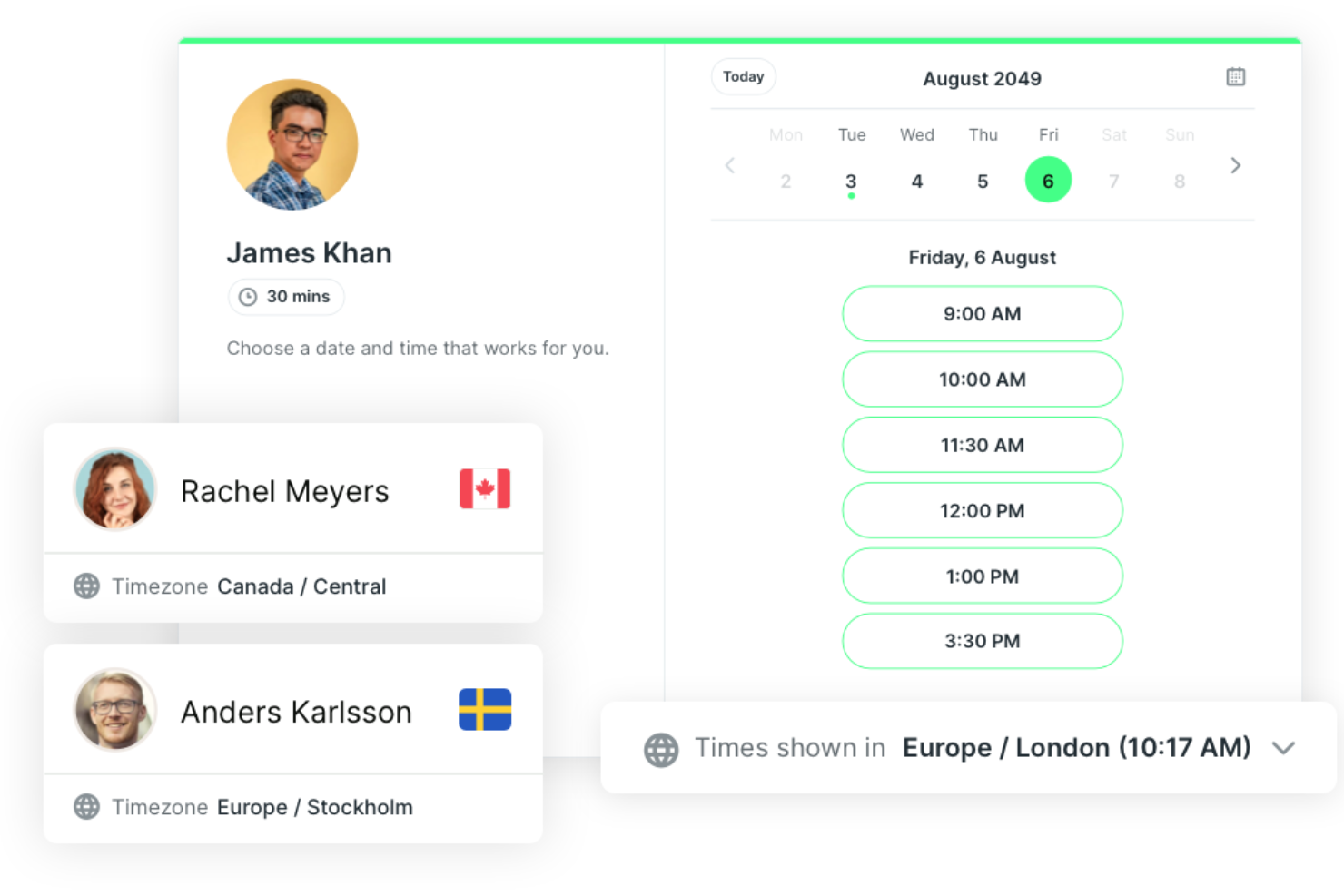
YouCanBookMe è uno strumento di pianificazione progettato per singoli e team che devono coordinare riunioni tra diversi fusi orari. Semplifica il processo di prenotazione permettendo agli utenti di gestire la propria disponibilità e organizzare appuntamenti in modo efficiente.
Perché ho scelto YouCanBookMe: YouCanBookMe semplifica la pianificazione globale gestendo automaticamente le differenze di fuso orario. Supporta pagine di prenotazione personalizzabili, conferme con marchio e notifiche automatiche tramite email e SMS. Lo strumento consente inoltre agli utenti di accettare o rifiutare le prenotazioni e di inviare messaggi di follow-up dopo gli incontri.
Funzionalità e integrazioni di rilievo:
Le funzionalità includono tempi di buffer tra gli appuntamenti, link di prenotazione personalizzati, moduli di prenotazione configurabili, prenotazioni di gruppo e riscossione dei pagamenti tramite Stripe. I report sono disponibili tramite l'esportazione dei dati di prenotazione.
Le integrazioni includono Google Calendar, Microsoft Office 365, Zoom, Zapier, Slack, Salesforce, HubSpot, Stripe, PayPal e Mailchimp.
Pros and Cons
Pros:
- Rilevamento automatico del fuso orario
- Promemoria via email e SMS
- Pagine di prenotazione personalizzabili
Cons:
- I report sono limitati all'esportazione in CSV
- Può risultare complesso per i nuovi utenti

Ideale per la gestione dei clienti

HoneyBook aiuta i liberi professionisti e le piccole imprese a gestire gli incontri con i clienti e a ottimizzare l'intero flusso di lavoro. Combina programmazione appuntamenti, comunicazione con i clienti e gestione dei progetti in un'unica piattaforma.
Perché ho scelto HoneyBook: HoneyBook si distingue per l'integrazione della pianificazione direttamente nella sua suite di gestione clienti. Puoi inviare proposte, contratti e fatture insieme alle richieste di appuntamento, mantenendo tutte le interazioni con i clienti in un unico posto. La piattaforma offre anche automazione dei flussi di lavoro e pagamenti integrati, risultando particolarmente utile per i professionisti dei servizi che gestiscono più clienti.
Funzionalità principali & integrazioni:
Funzionalità includono tipi di sessione personalizzabili, pagine di prenotazione con marchio e strumenti di intelligenza artificiale che riassumono le informazioni sui clienti prima delle riunioni. Gli utenti possono aggiungere tempi di buffer, raccogliere dettagli tramite moduli di accoglienza e permettere ai clienti di riprogrammare o pagare le sessioni online.
Integrazioni includono QuickBooks, Google Calendar, Gmail, Zoom, Zapier, Mailchimp, Calendly, Slack, Stripe e Square.
Pros and Cons
Pros:
- Strumenti di gestione clienti integrati
- Ampia integrazione con terze parti
- Interfaccia intuitiva
Cons:
- Prezzo più alto rispetto alle alternative di base
- Personalizzazione limitata

Doodle
Ideale per la programmazione di gruppo

Doodle aiuta team e organizzazioni a trovare rapidamente un orario comune per le riunioni. È progettato per la pianificazione di gruppo, eliminando le lunghe catene di email nella coordinazione tra più partecipanti o fusi orari diversi.
Perché ho scelto Doodle: La programmazione basata su sondaggi di Doodle semplifica la ricerca del momento migliore per tutti i partecipanti. Gli organizzatori possono creare sondaggi con disponibilità, condividerli tramite link e i partecipanti votano per gli orari preferiti. Lo strumento supporta praticamente ogni tipo di riunione, dagli incontri individuali, alle conferenze, fino alle riunioni di grandi team e altro ancora. È facile attivare promemoria e la sincronizzazione con il calendario per evitare prenotazioni doppie e riunioni perse.
Funzionalità principali & integrazioni:
Funzionalità: sondaggi di gruppo, pagine di prenotazione personalizzabili, regolazione automatica del fuso orario e promemoria per ridurre le assenze. Doodle Professional aggiunge branding, raccolta pagamenti e pianificazione senza pubblicità.
Integrazioni: Google Calendar, Microsoft Outlook, Apple Calendar, Slack, Zoom, Microsoft Teams, Webex, Trello, Zapier e Asana.
Pros and Cons
Pros:
- Verifica della disponibilità tramite sondaggi
- Opzioni di sincronizzazione del calendario
- Regolazione automatica del fuso orario
Cons:
- Occasionali problemi di sincronizzazione
- Le funzionalità avanzate richiedono un abbonamento

Ideale per i team di vendita

Chili Piper è un software di pianificazione progettato per i team di vendita che hanno bisogno di ottimizzare le prenotazioni dei meeting e la distribuzione dei lead. Aiuta a gestire gli appuntamenti e a semplificare il processo di connessione con i potenziali clienti.
Perché ho scelto Chili Piper: Chili Piper unisce la pianificazione e l'instradamento intelligente dei lead in un unico strumento, rendendolo ideale per i team di vendita dinamici. Permette agli utenti di assegnare automaticamente riunioni e lead in base ai dati di Salesforce, come il territorio o il titolare dell’account. Instant Booker e i modelli di meeting semplificano il processo di prenotazione, monitoraggio e ottimizzazione di ogni interazione con il cliente.
Funzionalità principali e integrazioni:
Funzionalità includono Instant Booker per la pianificazione delle riunioni con un solo clic, modelli di meeting dinamici che riempiono automaticamente dettagli come titolo e luogo e regole di instradamento automatizzato dei lead che assegnano i lead al rappresentante corretto. Altre funzionalità includono promemoria via email e SMS, riprogrammazione semplificata e monitoraggio delle assenze direttamente in Salesforce.
Integrazioni includono Salesforce, HubSpot, Google Calendar, Microsoft Outlook, Zoom, Slack, Zapier, Microsoft Teams, Webex e Mailchimp.
Pros and Cons
Pros:
- Instradamento automatico dei lead
- Promemoria via email e SMS
- Estesa integrazione con Salesforce
Cons:
- Richiede tempo di configurazione
- Costo elevato per esigenze base

OnceHub
Ideale per la qualificazione dei lead

OnceHub aiuta i team a pianificare e gestire le interazioni con i lead in modo più efficace. È progettato per i team di vendita e marketing che devono qualificare i potenziali clienti e convertirli più rapidamente attraverso la pianificazione automatizzata.
Perché ho scelto OnceHub: OnceHub si distingue per la sua attenzione alla qualificazione dei lead e alla pianificazione intelligente. Puoi creare regole di prenotazione personalizzate e moduli che filtrano e indirizzano automaticamente i lead ai membri giusti del team. Offre anche strumenti di pianificazione conversazionale che valutano l’urgenza e lo scopo di un lead prima che una riunione venga confermata, facendo risparmiare tempo per interazioni ad alto valore.
Caratteristiche principali & integrazioni:
Funzionalità includono la possibilità di creare moduli di prenotazione personalizzati che raccolgono le informazioni essenziali sui lead. Puoi automatizzare i flussi di lavoro di pianificazione per risparmiare tempo e ridurre l’inserimento manuale dei dati. OnceHub offre anche una dashboard centralizzata per gestire tutte le tue prenotazioni in un unico luogo, migliorando la produttività del tuo team.
Integrazioni includono Google Calendar, Microsoft Outlook, Salesforce, HubSpot, Zoom, Microsoft Teams, Webex, Zapier, Slack e Mailchimp.
Pros and Cons
Pros:
- Strumenti avanzati per la qualificazione e l'instradamento dei lead
- Flussi di lavoro di pianificazione automatizzati
- Monitoraggio del coinvolgimento e analisi
Cons:
- Funzionalità limitate per la vendita esterna
- Opzioni di design di base

Ideale per gli utenti Zoho
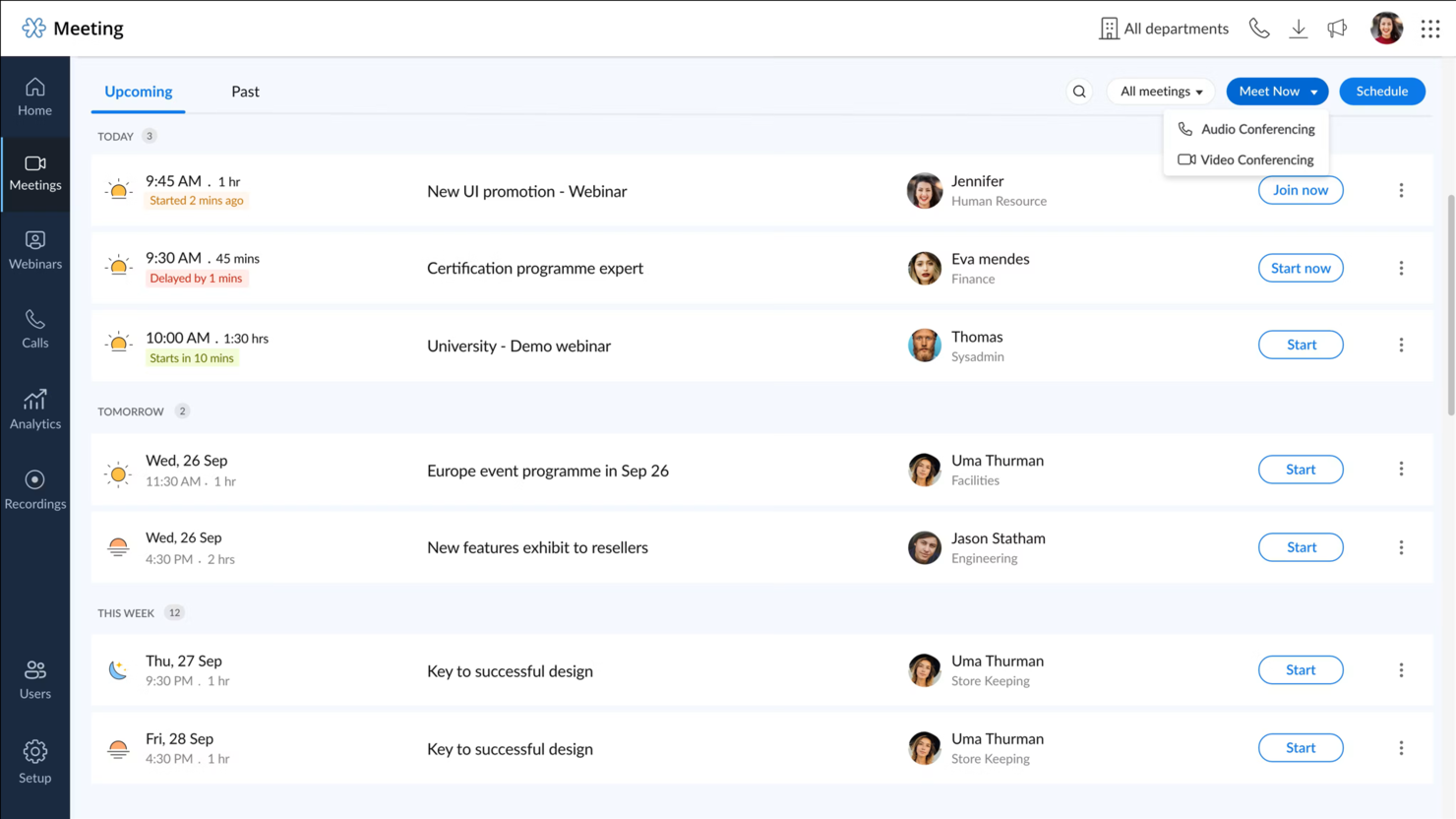
Zoho Meeting è una piattaforma per riunioni online basata sul web progettata per le aziende che utilizzano la suite di applicazioni Zoho. Offre strumenti per videoconferenze, webinar e riunioni online, rendendolo una scelta versatile per le esigenze di comunicazione.
Perché ho scelto Zoho Meeting: Zoho Meeting si integra perfettamente con le altre applicazioni Zoho, offrendo un'esperienza coesa agli utenti già presenti nell'ecosistema Zoho. Puoi programmare e avviare riunioni direttamente da Zoho Calendar, garantendo una coordinazione fluida.
La piattaforma supporta la registrazione e la condivisione delle riunioni, ideale per i team che necessitano di rivedere le sessioni in seguito. Inoltre, offre funzionalità webinar, ampliando la sua utilità oltre le semplici riunioni.
Funzionalità e integrazioni di spicco:
Funzionalità includono la condivisione dello schermo, che permette di presentare documenti e applicazioni durante le riunioni. Puoi anche condurre sondaggi e sessioni di domande e risposte per coinvolgere attivamente i partecipanti. Zoho Meeting offre analytics delle riunioni, fornendo dati utili sull'engagement dei partecipanti e l'efficacia delle riunioni.
Integrazioni includono Zoho CRM, Zoho Projects, Zoho Calendar, Zoho Connect, Zoho Mail, Google Calendar, Microsoft Outlook, Slack e Zapier.
Pros and Cons
Pros:
- Integrazione semplice con le app Zoho
- Supporto alla gestione di webinar
- Registrazione e condivisione delle riunioni
Cons:
- Limitato al di fuori dell'ecosistema Zoho
- Mancano funzionalità avanzate di reportistica


Microsoft Bookings è uno strumento di pianificazione progettato per gli utenti Microsoft 365. Semplifica la gestione degli appuntamenti per team e singoli integrandosi nell'ecosistema Microsoft.
Perché ho scelto Microsoft Bookings: Microsoft Bookings si integra perfettamente con Microsoft 365, consentendo agli utenti di gestire appuntamenti, calendari e promemoria senza uscire da Outlook o Teams. Ogni prenotazione si sincronizza automaticamente tra i calendari, aiutando a evitare sovrapposizioni. Le pagine di prenotazione personalizzabili facilitano la definizione di disponibilità e servizi, mentre le notifiche automatiche riducono le mancate presenze.
Funzionalità e integrazioni di spicco:
Funzionalità includono calendari per più membri del personale, pagine di prenotazione personalizzabili con branding e raccolta dati dei clienti al momento della prenotazione. Supporta conferme automatiche, opzioni di riprogrammazione e integrazione con Microsoft Teams per riunioni virtuali.
Integrazioni includono Microsoft Outlook, Microsoft Teams, Microsoft Excel, Microsoft Word, Microsoft PowerPoint, Microsoft OneNote, Microsoft SharePoint, Microsoft OneDrive, Microsoft Dynamics 365 e Azure.
Pros and Cons
Pros:
- Interfaccia intuitiva
- Gestisce più calendari
- Raccoglie dati dei clienti
Cons:
- Richiede un abbonamento Microsoft 365
- Mancano report avanzati


Zoom Scheduler è un'app per la pianificazione creata per utenti che fanno affidamento su Zoom per le riunioni. Aiuta singoli e team a condividere la propria disponibilità e a prenotare fasce orarie direttamente tramite Zoom, riducendo al minimo il coordinamento avanti e indietro.
Perché ho scelto Zoom Scheduler: Zoom Scheduler si integra direttamente con Zoom Meetings, Zoom Mail e Zoom Calendar, rendendolo ideale per gli utenti già abituati al sistema Zoom. Puoi condividere la tua disponibilità tramite un semplice link, permettendo agli altri di programmare riunioni senza alcuna difficoltà. Le conferme personalizzabili e i promemoria della piattaforma aiutano a ridurre le assenze agli appuntamenti, in linea con il suo punto di forza di essere il migliore per l'integrazione con Zoom. Lo strumento supporta anche varie opzioni di pianificazione, come incontri uno-a-uno o riunioni di gruppo, offrendo flessibilità per diverse esigenze di meeting.
Caratteristiche e integrazioni principali:
Funzionalità includono branding personalizzabile per le pagine di prenotazione, raccolta dati dei partecipanti tramite campi personalizzati e varie opzioni di pianificazione come riunioni uno-a-uno o per più persone. Puoi anche inviare promemoria automatici via email o SMS, aiutando a ridurre le assenze agli appuntamenti.
Integrazioni includono Zoom Meetings, Zoom Mail e Calendar, Google Calendar, Microsoft 365, Microsoft Teams, Google Workspace e altro ancora.
Pros and Cons
Pros:
- Opzioni di pianificazione personalizzate
- Promemoria automatici
- Raccoglie informazioni dei partecipanti
Cons:
- Limitato al di fuori di Zoom
- Privo di funzionalità avanzate


SimplyMeet.me è uno strumento di prenotazione pensato per singoli e piccoli team che hanno bisogno di una soluzione semplice per gestire gli appuntamenti. Fornisce funzionalità essenziali di pianificazione senza sopraffare l'utente con la complessità.
Perché ho scelto SimplyMeet.me: SimplyMeet.me offre una pianificazione intuitiva con una configurazione minima, rendendolo accessibile a chi desidera iniziare rapidamente. Puoi personalizzare la tua disponibilità e condividere facilmente i link per la prenotazione.
L'interfaccia pulita dello strumento garantisce che sia tu che i tuoi clienti possiate navigare il processo di prenotazione senza confusione. Offre anche promemoria automatici per ridurre le assenze e mantenere organizzata la tua agenda.
Funzionalità e integrazioni principali:
Funzionalità includono la possibilità di sincronizzare i calendari per evitare doppie prenotazioni. Puoi impostare tempi di buffer tra le riunioni per assicurarti il tempo necessario alla preparazione. SimplyMeet.me permette anche la pianificazione di gruppo, così da accogliere più partecipanti nello stesso slot.
Integrazioni includono Google Calendar, Microsoft Outlook, Zoom, Microsoft Teams, Slack, Zapier, Webex, Stripe e PayPal.
Pros and Cons
Pros:
- Richiede una configurazione minima
- Permette la pianificazione di gruppo
- Si sincronizza con più calendari
Cons:
- Personalizzazione e automazione limitate
- Nessun report avanzato integrato
Altri software per la pianificazione delle riunioni
Ecco alcune opzioni aggiuntive di software per la pianificazione delle riunioni che non sono entrate nel mio elenco ristretto, ma che vale comunque la pena prendere in considerazione:
- MeetingBooster
Ideale per la produttività delle riunioni
- Carly AI
Ideale per estrarre dettagli delle riunioni
- GoodTime Meet
Ideale per la pianificazione dei colloqui


Come valuto i software per la programmazione di riunioni
Valuto questi strumenti su due livelli: i requisiti fondamentali come la sincronizzazione del calendario e i link per l'auto-prenotazione, e i fattori differenzianti che sono importanti per i team HR che coordinano colloqui su larga scala.
Funzionalità di base (requisiti indispensabili per questa lista)
Quando seleziono gli strumenti per la mia lista, valuto ciascuno su una scala da 0 (non offre la funzionalità) a 5 (eccelle in quest'area) per ogni funzionalità di base elencata di seguito. Poi, calcolo il punteggio totale dello strumento in percentuale. Ogni strumento deve raggiungere un punteggio totale minimo del 65% per essere preso in considerazione.
- Sincronizzazione del calendario & rilevamento dei conflitti: Verifico se lo strumento offre una sincronizzazione bidirezionale con Google Calendar e Outlook, in particolare il supporto multi-calendar per consentire ai recruiter che gestiscono calendari personali e di team di evitare prenotazioni doppie.
- Link di prenotazione self-service: Ogni strumento dovrebbe permettere agli utenti di condividere pagine di prenotazione personalizzate dove candidati o dipendenti scelgono le fasce orarie disponibili, eliminando le catene di email che rallentano il coordinamento dei colloqui.
- Pianificazione di gruppi & panel: Cerco l'assegnazione round-robin e la raccolta collettiva delle disponibilità, elementi essenziali quando si organizzano colloqui panel tra più manager assuntori.
- Gestione automatica dei fusi orari: Lo strumento deve rilevare e adattarsi automaticamente al fuso orario di ciascun partecipante, così il recruiter che programma un colloquio con un candidato in altre regioni non deve calcolare manualmente le differenze orarie.
- Notifiche & promemoria: Valuto se la piattaforma invia conferme e promemoria personalizzabili tramite email o SMS, poiché le assenze durante i colloqui fanno perdere tempo a tutti.
- Integrazione con la videoconferenza: I link per le riunioni Zoom, Microsoft Teams o Google Meet dovrebbero essere generati automaticamente al momento della prenotazione, eliminando il passaggio extra di creare e allegare i link manualmente.
Una volta stilata la lista degli strumenti che soddisfano questi criteri, considero ciò che distingue ciascuna piattaforma.
Fattori di differenziazione (cosa distingue i fornitori)
Ecco come confronto e metto in risalto i diversi fornitori:
Funzionalità distintive
L'integrazione con ATS è fondamentale. Gli strumenti che si collegano nativamente a piattaforme come Greenhouse o Lever permettono ai recruiter di avviare la pianificazione dei colloqui direttamente dalla fase della pipeline del candidato. Cerco anche il bilanciamento del carico degli intervistatori, che distribuisce i colloqui tra i membri della commissione di assunzione in base al carico di lavoro e alle disponibilità. Le analisi sulla pianificazione completano il quadro. Dashboard che mostrano tempi di pianificazione e tassi di assenze forniscono ai team di recruiting operations i dati di cui hanno bisogno per individuare colli di bottiglia nei loro processi.
Oltre le funzionalità
La conformità e la sicurezza dei dati sono molto importanti quando i dati personali dei candidati transitano attraverso uno strumento di pianificazione. Verifico la conformità SOC 2, l'adeguatezza al GDPR e i controlli di accesso basati sui ruoli che garantiscono che le informazioni sensibili dei colloqui siano visibili solo alle persone autorizzate. Anche la scalabilità è un fattore che valuto, soprattutto per i team che gestiscono cicli di recruiting universitario o picchi stagionali dove il volume di pianificazioni aumenta rapidamente. Anche la trasparenza dei prezzi conta. Valuto se i modelli a pagamento per utente o basati sull'utilizzo sono coerenti con il modo in cui team HR di diverse dimensioni usano realmente la piattaforma.
Come scegliere il software per la pianificazione delle riunioni
È facile perdersi in lunghi elenchi di funzionalità e strutture tariffarie complesse. Per aiutarti a rimanere concentrato mentre affronti il tuo processo di selezione del software, ecco una lista di fattori da tenere presenti:
| Fattore | Cosa considerare |
|---|---|
| Scalabilità | Valuta se il software può crescere insieme al tuo team. Sarà in grado di gestire più utenti o riunioni con l'espansione della tua attività? Cerca soluzioni che offrano piani utente flessibili. |
| Integrazioni | Verifica se il software si integra con gli strumenti che già utilizzi, come calendari ed e-mail, in modo da sincronizzare i dettagli delle riunioni su un'unica piattaforma. La mancanza di integrazioni può comportare attività manuali e inefficienze. |
| Personalizzazione | Valuta quanto puoi adattare il software ai tuoi flussi di lavoro. Puoi modificare le impostazioni, il marchio o le notifiche in base alle tue esigenze? |
| Facilità d'uso | Esamina l'interfaccia utente e l'esperienza complessiva. È intuitivo per il tuo team imparare a usarlo quotidianamente? Uno strumento complicato può ostacolare l'efficienza. |
| Implementazione e avvio | Esamina i requisiti di configurazione iniziale e formazione. Sono disponibili risorse come tutorial o supporto per facilitare la transizione del tuo team? |
| Costo | Confronta il prezzo del software con il tuo budget. Considera eventuali costi o commissioni nascosti per le funzionalità aggiuntive. È disponibile una prova per effettuare dei test prima di sottoscrivere un abbonamento? |
| Misure di sicurezza | Assicurati che il software includa funzionalità per la protezione dei dati. È conforme agli standard del settore? Valuta la crittografia e i controlli di accesso degli utenti. |
| Disponibilità del supporto | Determina il livello di assistenza clienti offerto. È disponibile un supporto 24 ore su 24, 7 giorni su 7, o un account manager dedicato? Un'assistenza rapida può risolvere i problemi più velocemente. |
Cos'è il software per la pianificazione delle riunioni?
Il software per la programmazione delle riunioni è uno strumento che aiuta a organizzare e gestire appuntamenti e riunioni in modo efficiente. Solitamente utilizzato da professionisti come manager, coordinatori e responsabili di team, offre valore facendo risparmiare tempo e riducendo i conflitti di programmazione. Funzionalità come la sincronizzazione del calendario, i promemoria automatici e le pagine di prenotazione personalizzabili aiutano nella gestione del tempo e nel coordinamento. Nel complesso, questi strumenti aumentano la produttività semplificando il processo di programmazione.
Funzionalità
Quando scegli il software per la programmazione delle riunioni, presta attenzione alle seguenti funzionalità chiave:
- Sincronizzazione del calendario: aggiorna automaticamente il calendario con le riunioni programmate, evitando doppie prenotazioni e mantenendo organizzati gli impegni.
- Promemoria automatici: invia notifiche ai partecipanti prima delle riunioni, riducendo le assenze e garantendo che tutti siano preparati.
- Pagine di prenotazione personalizzabili: consentono di adattare l'interfaccia di prenotazione per riflettere il proprio marchio e offrire un aspetto professionale.
- Gestione dei fusi orari: adatta gli orari delle riunioni in base alla posizione dei partecipanti, garantendo una programmazione precisa nelle diverse aree geografiche.
- Funzionalità di integrazione: si collega ad altri strumenti come i sistemi di posta elettronica e CRM, ottimizzando i flussi di lavoro e aumentando la produttività.
- Analisi delle riunioni: fornisce informazioni sulla frequenza delle riunioni e sul coinvolgimento dei partecipanti, aiutando a ottimizzare la strategia di programmazione.
- Programmazione di gruppo: facilita l'organizzazione di riunioni con più partecipanti individuando rapidamente gli orari disponibili in comune.
- Disponibilità di un'app mobile: consente di programmare e gestire le riunioni anche in movimento, offrendo flessibilità e comodità ai professionisti impegnati.
- Misure di sicurezza: garantisce la protezione dei dati mediante crittografia e controlli degli accessi, tutelando la privacy e la conformità agli standard.
Vantaggi
L'implementazione di un software per la programmazione delle riunioni offre diversi vantaggi al tuo team e alla tua azienda. Ecco alcuni dei benefici che puoi aspettarti:
- Risparmio di tempo: automatizza le attività di programmazione, riducendo il tempo dedicato alle comunicazioni via e-mail e liberando spazio nell'agenda del team.
- Migliore organizzazione: mantiene sincronizzati i calendari e aggiorna automaticamente i dettagli delle riunioni, aiutando tutti a rimanere concentrati sulle attività previste.
- Maggiore produttività: riduce i conflitti di programmazione e le assenze grazie ai promemoria automatici, permettendo al team di concentrarsi sulle attività principali.
- Immagine professionale: le pagine di prenotazione personalizzabili consentono di presentare un'immagine curata a clienti e partner, rafforzando il marchio.
- Maggiore flessibilità: l'accesso tramite app mobile permette di gestire le riunioni in qualsiasi momento e luogo, adattandosi a impegni intensi o mutevoli.
- Informazioni basate sui dati: le analisi delle riunioni forniscono dati preziosi sui modelli delle riunioni e sul coinvolgimento dei partecipanti, aiutando a perfezionare il proprio approccio.
- Collaborazione migliore: le funzionalità di programmazione di gruppo facilitano il coordinamento con più partecipanti, favorendo il lavoro di squadra e la comunicazione.
Costi e prezzi
La scelta di un software per la programmazione delle riunioni richiede la comprensione dei diversi modelli e piani tariffari disponibili. I costi variano in base alle funzionalità, alle dimensioni del team, ai componenti aggiuntivi e ad altri fattori. La tabella seguente riassume i piani più comuni, i relativi prezzi medi e le funzionalità tipicamente incluse nelle soluzioni software per la programmazione delle riunioni:
Tabella comparativa dei piani per il software di programmazione delle riunioni
| Tipo di piano | Prezzo medio | Funzionalità comuni |
|---|---|---|
| Piano gratuito | $0 | Programmazione di base, sincronizzazione del calendario e notifiche via e-mail. |
| Piano personale | $1-$29/utente/mese | Pagine di prenotazione personalizzabili, promemoria automatici e gestione dei fusi orari. |
| Piano aziendale | $10-$49/utente/mese | Programmazione di gruppo, analisi avanzate e integrazione con altri strumenti aziendali. |
| Piano per grandi aziende | $14-$110/utente/mese | Assistenza prioritaria, misure di sicurezza avanzate e sviluppo di funzionalità personalizzate. |
FAQ sul software di pianificazione delle riunioni
Ecco alcune risposte alle domande frequenti sul software di pianificazione delle riunioni:
Quali sono gli svantaggi della pianificazione computerizzata?
Gli svantaggi includono la potenziale mancanza di aggiornamenti in tempo reale, che può causare confusione, e la scalabilità limitata, che può rappresentare un problema nella gestione di molti appuntamenti. Inoltre, i processi manuali possono causare errori umani, problemi di comunicazione e inefficienze se il sistema non è automatizzato adeguatamente.
In che modo il software di pianificazione migliora l'efficienza?
Il software di pianificazione automatizza il processo di prenotazione, riducendo la necessità di comunicazioni ripetute. Si sincronizza con i calendari per evitare doppie prenotazioni e invia promemoria per ridurre le assenze. Questa automazione fa risparmiare tempo e aiuta il tuo team a concentrarsi sulle attività più importanti.
Quanto è sicuro il software di pianificazione delle riunioni?
La sicurezza varia in base al fornitore, ma la maggior parte offre crittografia e controlli degli accessi per proteggere i dati. Cerca un software conforme agli standard del settore e che fornisca aggiornamenti di sicurezza regolari. Valuta l’informativa sulla privacy del fornitore per assicurarti che i tuoi dati siano gestiti responsabilmente.
Il software di pianificazione delle riunioni è adatto alle grandi organizzazioni?
Sì, molte soluzioni sono scalabili e possono gestire le esigenze delle grandi organizzazioni. Offrono funzionalità come la pianificazione di gruppo e analisi avanzate. Quando scegli il software, assicurati che possa supportare le dimensioni e la complessità della tua organizzazione senza compromettere le prestazioni.