

I 10 migliori software per la pianificazione dei turni dei vigili del fuoco nel 2026

Elenco dei migliori software di pianificazione per i vigili del fuoco


Il software di pianificazione per i vigili del fuoco consente di automatizzare, organizzare e monitorare i turni delle squadre, le richieste di permesso, gli straordinari e le complesse assegnazioni dei turni in un unico posto. Se stai cercando soluzioni che ti facciano risparmiare ore nella pianificazione, mantengano la tua agenzia conforme alle normative e garantiscano la copertura di ogni turno, probabilmente devi gestire volumi di chiamate imprevedibili, vincoli di personale e normative sul lavoro. In questa guida troverai le mie migliori scelte per 2026: strumenti progettati per rispondere alle esigenze quotidiane dei servizi antincendio, ridurre gli errori manuali e mantenere le tue squadre concentrate su ciò che conta di più.
Perché fidarsi delle nostre recensioni sui software
Il nostro team testa e recensisce software dal 2012. In quanto esperti HR noi stessi, sappiamo quanto sia difficile — e importante — scegliere il software giusto.
Per questa guida, abbiamo valutato gli strumenti attraverso test pratici e ricerche indipendenti, assegnando un punteggio agli strumenti in base ai nostri criteri di selezione. Ci basiamo inoltre sulle competenze di leader di pensiero del settore e di professionisti HR attivi.
Le nostre recensioni riflettono il nostro giudizio editoriale umano, non un discorso di vendita.
Riepilogo dei migliori software di pianificazione per i vigili del fuoco
Questa tabella comparativa riassume i dettagli sui prezzi delle mie migliori selezioni di software di pianificazione per i vigili del fuoco, per aiutarti a trovare quello più adatto al tuo budget e alle esigenze della tua attività.
| Tool | Best For | Trial Info | Price | ||
|---|---|---|---|---|---|
| 1 | Ideale per la copertura di turni rotativi 24/7 | Demo gratuita disponibile | Prezzo su richiesta | Website | |
| 2 | Ideale per automazione straordinari e assenze | Demo gratuita disponibile | Prezzo su richiesta | Website | |
| 3 | Ideale per la scalabilità della pianificazione in sede | Prova gratuita di 30 giorni | A partire da $450/pianificatore/anno (fatturato annualmente) | Website | |
| 4 | Ideale per la copertura automatica dei turni di emergenza | Demo gratuita disponibile | Prezzo su richiesta | Website | |
| 5 | Ideale per la gestione integrata di interventi e personale | Demo gratuita disponibile | Prezzi su richiesta | Website | |
| 6 | Ideale per la conformità con leggi sui turni complesse | Prova gratuita di 30 giorni disponibile | Da $6/utente/mese | Website | |
| 7 | Ideale per tracciati di controllo e report dettagliati | Demo gratuita disponibile | Prezzi su richiesta | Website | |
| 8 | Ideale per integrazioni con il settore pubblico a livello aziendale | Demo gratuita disponibile | Prezzi su richiesta | Website | |
| 9 | Ideale per un utilizzo scalabile su più dimensioni di reparto | Prova gratuita disponibile | Prezzo su richiesta | Website | |
| 10 | Ideale per la copertura di posizioni in base al grado | Prova gratuita + demo gratuita disponibili | Da $50/utente/anno | Website |
Recensioni dei migliori software di pianificazione per i vigili del fuoco
Di seguito trovi i miei riepiloghi dettagliati dei migliori software di pianificazione per i vigili del fuoco inclusi nel mio elenco ristretto. Le mie recensioni offrono una panoramica dettagliata delle funzionalità, dei casi d’uso ideali e delle integrazioni di ogni software, per aiutarti a trovare quello più adatto a te.

Aladtec
Ideale per la copertura di turni rotativi 24/7
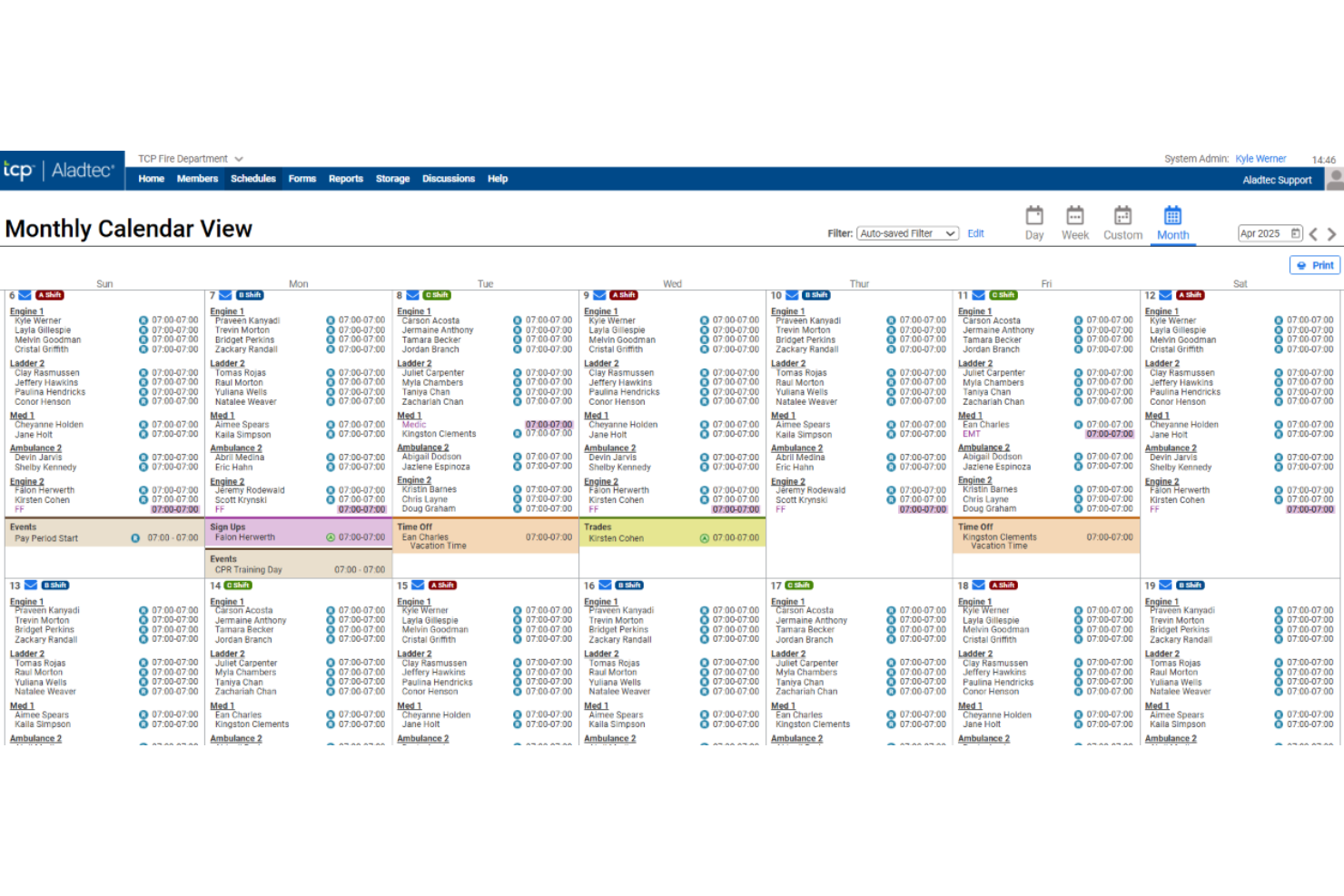
Aladtec è un software cloud per la programmazione delle squadre dei vigili del fuoco, progettato per gestire i turni del personale, automatizzare l'assegnazione dei turni e monitorare la disponibilità dello staff per enti antincendio e servizi di emergenza.
A chi è rivolto Aladtec?
I vigili del fuoco e i servizi di emergenza che necessitano di un sistema centralizzato per comandare più turni rotativi e gestire grandi squadre.
Perché ho scelto Aladtec
Ho scelto Aladtec tra i migliori perché posso assegnare e gestire rapidamente i modelli di turno 24/7, impostare template di rotazione personalizzati e intervenire su variazioni di orario in tempo reale senza interruzioni—fondamentale per la copertura continua dei servizi antincendio ed EMS.
Funzionalità principali di Aladtec
- Gestione delle richieste di assenza: Il personale può inserire e monitorare i permessi retribuiti o non retribuiti direttamente tramite la piattaforma.
- Monitoraggio delle certificazioni: I responsabili tengono sotto controllo le certificazioni del personale e ricevono notifiche sulle scadenze in arrivo.
- App mobile per i turni: Programmatori e operatori accedono e aggiornano i turni da qualsiasi smartphone o tablet.
- Flussi di approvazione per scambio turni: I membri del team possono richiedere scambi di turno con controlli di approvazione integrati per i manager.
Integrazioni di Aladtec
Le integrazioni includono Workday, Oracle, ADP, PeopleSoft, Ellucian, BambooHR, Paycor, Paychex, QuickBooks e Sage.
Pros and Cons
Pros:
- Supporta impostazioni illimitate di turni rotativi
- Evidenzia i turni che violano le normative sul lavoro
- Avvisi mobili per certificati in scadenza
Cons:
- Ogni scambio turno necessita approvazione manuale
- I template dei turni richiedono una configurazione iniziale manuale

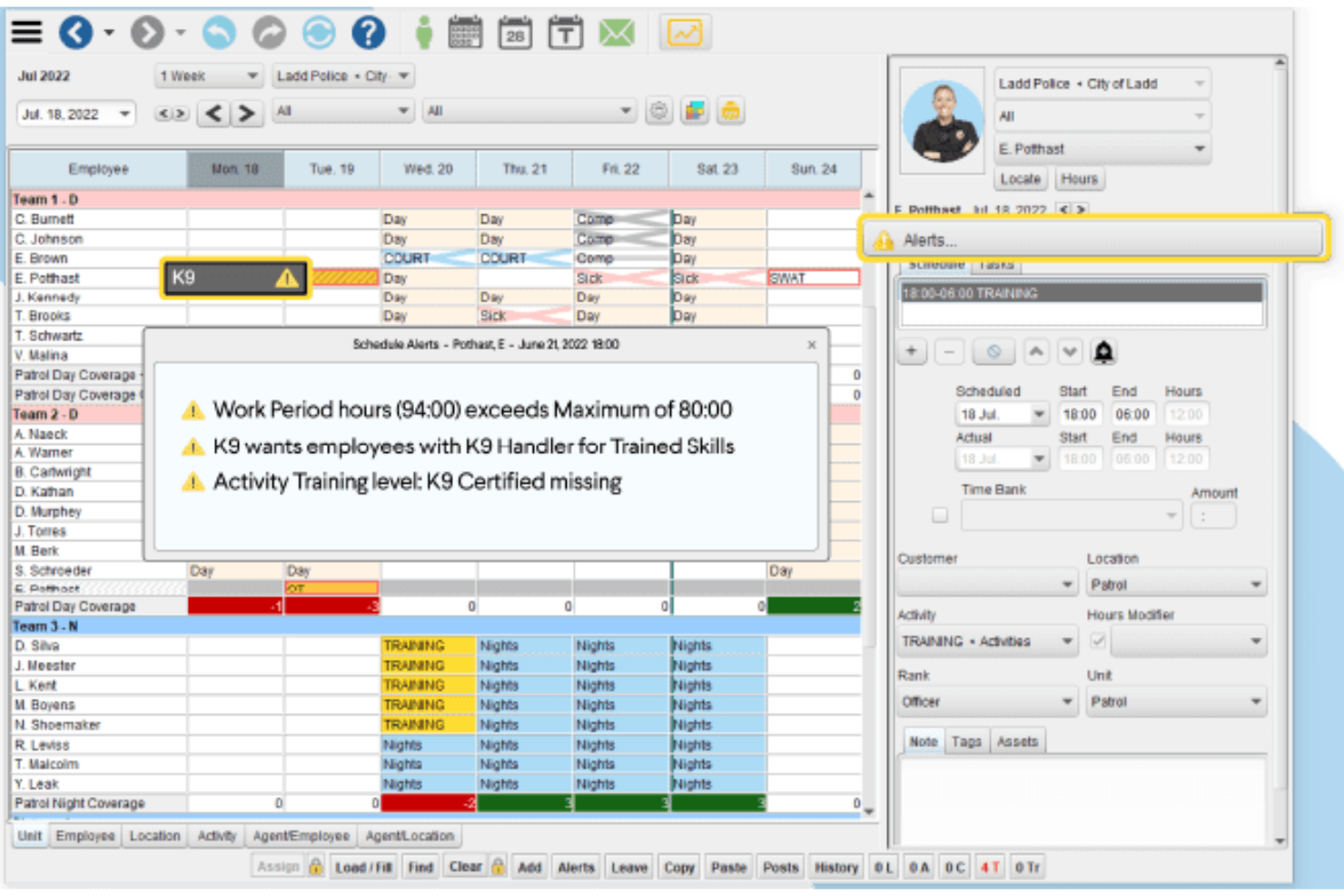
InTime è una piattaforma di pianificazione per dipartimenti dei vigili del fuoco che permette di gestire l'assegnazione dei turni, automatizzare gli straordinari e le assenze, gestire il rilevamento delle presenze e controllare complesse regole di gestione del personale.
A Chi è Destinato InTime?
Capi dei vigili del fuoco, responsabili delle operazioni e team HR di dipartimenti dei vigili del fuoco di grandi o medie dimensioni che cercano un controllo avanzato su politiche di turnazione, straordinari e assenze.
Perché Ho Scelto InTime
Ho scelto InTime come uno dei migliori perché posso impostare regole complesse per gli straordinari, automatizzare l'approvazione delle assenze e utilizzare il sistema di richiamo automatico per coprire subito le assenze. Il mio team si affida a questi processi per mantenere la copertura dei turni conforme e prevedibile.
Caratteristiche Principali di InTime
- Offerte di turno in tempo reale: Consenti al personale di inviare richieste di turno direttamente dalla piattaforma.
- App mobile: Accedi a orari e notifiche su dispositivi Android e iOS.
- Strumenti per l’export paghe: Genera dati sulle paghe già formattati per i sistemi contabili più diffusi.
- Tracciamento audit trail: Monitora tutte le modifiche e approvazioni degli orari ai fini della conformità.
Integrazioni InTime
Le integrazioni includono PeopleSoft, Munis, Eden, Tyler, ADP, QuickBooks, SAP, Ceridian, Springbrook Software e Greentree.
Pros and Cons
Pros:
- Richiami automatici per coprire turni scoperti
- Blocca il personale non qualificato dal candidarsi ai turni
- Automatizza i calcoli di equità sugli straordinari
Cons:
- Richiede moduli separati per la gestione delle attrezzature
- Richiede codice personalizzato per la gestione delle offerte non basate sull’anzianità

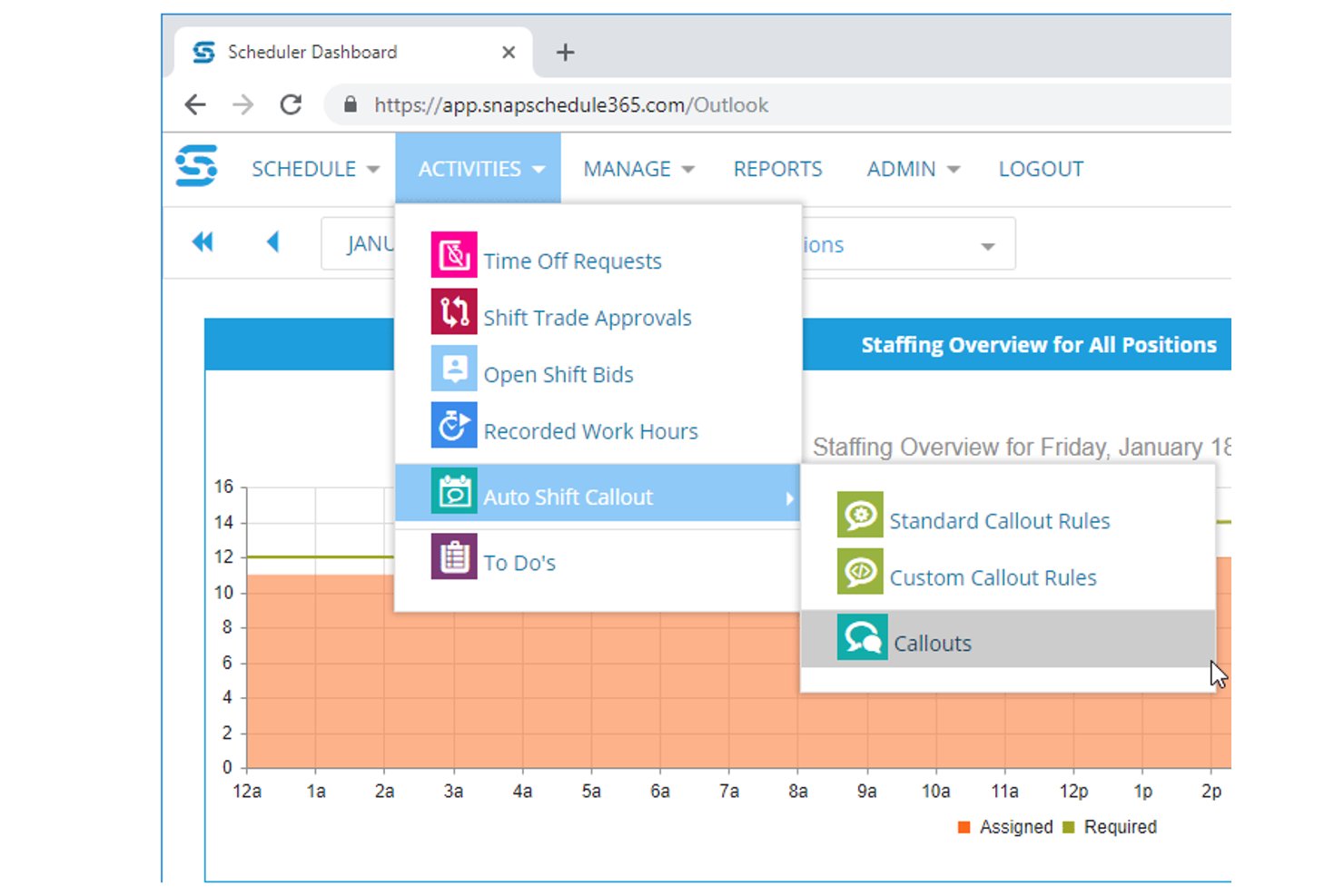
Snap Schedule è una piattaforma di pianificazione dei turni intersettoriale con supporto dedicato ai vigili del fuoco, che offre gestione delle rotazioni dei turni, flussi di lavoro automatizzati per le convocazioni, monitoraggio delle certificazioni, gestione delle assenze e strumenti per la conformità del lavoro, sia per implementazioni nel cloud sia in sede.
Per chi è più adatto Snap Schedule?
Snap Schedule è particolarmente adatto ai vigili del fuoco municipali che necessitano di opzioni di implementazione in sede e di un'automazione delle richiamate altamente configurabile e basata su regole, in linea con i requisiti dei contratti sindacali.
Perché ho scelto Snap Schedule
Snap Schedule si è guadagnato un posto nella mia rosa ristretta perché è una delle poche piattaforme che offre una vera opzione di implementazione in sede oltre al prodotto cloud, un aspetto importante per i vigili del fuoco con rigorosi requisiti di sovranità dei dati. Apprezzo particolarmente il suo motore automatizzato per le convocazioni, che consente di codificare direttamente nel sistema il linguaggio effettivo del proprio CBA, inclusi l'ordine basato sull'anzianità, l'equalizzazione degli straordinari e l'escalation obbligatoria delle richiamate. Questo livello di configurabilità significa che un vigile del fuoco che opera con una rotazione 48/96 può automatizzare un elenco di richiamata che altrimenti richiederebbe a un supervisore un'ora di lavoro manuale.
Funzionalità principali di Snap Schedule
- Monitoraggio di competenze e certificazioni: Mantiene registri centralizzati delle certificazioni con avvisi di scadenza e collega direttamente le qualifiche all'idoneità alla pianificazione per i ruoli specializzati.
- App mobile self-service: Consente ai dipendenti di visualizzare i turni, inviare richieste di PTO, candidarsi ai turni disponibili e registrare entrata e uscita tramite iOS o Android con supporto GPS/delimitazione geografica.
- Gestione della conformità e del lavoro: Fa rispettare le regole sindacali come i limiti agli straordinari, i periodi di riposo e i limiti di durata dei turni, con avvisi in tempo reale quando una pianificazione supera una soglia configurata.
- Flussi di lavoro per scambi e candidature ai turni: Consente ai dipendenti di avviare scambi di turno, cessioni e candidature ai turni disponibili tramite il portale, con regole di approvazione del responsabile configurabili integrate.
Integrazioni di Snap Schedule
Snap Schedule non dispone di integrazioni native con ADP Workforce Now, Workday o SAP. Supporta esportazioni di file e connessioni personalizzate tramite la sua API documentata Snap Schedule 365 v2.
Pros and Cons
Pros:
- Regole di richiamata basate sul contratto con tracciati di audit
- Le certificazioni limitano le assegnazioni ai turni specializzati
- L'implementazione in sede supporta il controllo da parte del dipartimento
Cons:
- La terminologia generalista non tiene conto dei flussi di lavoro specifici degli automezzi
- Secondo i recensori, l'interfaccia appare datata


Vector Scheduling è un software di pianificazione dei turni per i vigili del fuoco basato su cloud che fornisce pianificazione automatica dei turni, gestione dinamica dei roster, notifiche in tempo reale e regole di organico configurabili per le squadre di primi soccorritori.
A chi è rivolto Vector Scheduling?
Vector Scheduling è particolarmente adatto ai reparti dei vigili del fuoco e alle agenzie EMS di medie e grandi dimensioni che necessitano di gestione automatizzata dei turni e regole di organico configurabili.
Perché ho scelto Vector Scheduling
Vector Scheduling si è guadagnato il suo posto tra i migliori della mia lista perché posso automatizzare flussi di lavoro complessi relativi all’organico applicando regole personalizzate per ruoli, competenze e livelli minimi di personale. È davvero ideale per flussi di lavoro automatizzati basati su regole.
Funzionalità principali di Vector Scheduling
- Notifiche in tempo reale: Avvisa istantaneamente lo staff di cambi turno o incarichi aperti tramite SMS, email o notifiche push dell’app.
- Accesso tramite app mobile: Permette ai membri del team di visualizzare i turni, fare richieste e ricevere aggiornamenti da qualsiasi dispositivo.
- Flusso di richiesta ferie: Consente al personale di inviare, tracciare e gestire le richieste di permesso direttamente dalla piattaforma.
- Tracciamento degli straordinari: Registra e segnala automaticamente le ore di straordinario per ciascun utente, in linea con le politiche di reparto e le esigenze di payroll.
Integrazioni di Vector Scheduling
Le integrazioni includono ImageTrend ed Emergency Reporting.
Pros and Cons
Pros:
- Applica automaticamente i livelli minimi di personale
- Notifiche in tempo reale per cambi di organico
- Invia notifiche di richiamo istantanee per coprire le assenze
Cons:
- Occasionali ritardi nell'approvazione delle richieste di ferie segnalate
- Manca di funzionalità avanzate di gestione delle risorse umane

First Due è una piattaforma di gestione del personale e pianificazione per dipartimenti dei vigili del fuoco che riunisce in un unico sistema il monitoraggio degli interventi, la gestione delle assenze, degli straordinari, delle certificazioni e dei dati di risposta in tempo reale.
Per chi è ideale First Due?
First Due è adatto ad agenzie di pubblica sicurezza di medie e grandi dimensioni che desiderano avere pianificazione, report degli interventi e tracciamento delle risposte in una suite integrata.
Perché ho scelto First Due
Ho scelto First Due tra i migliori perché consente di coordinare i turni del personale, monitorare i dati sugli interventi in tempo reale e gestire le certificazioni su un'unica piattaforma. La sua integrazione nativa tra disponibilità del personale e gestione degli interventi mi permette di prendere decisioni di dispiegamento in tempo reale.
Funzionalità principali di First Due
- Notifiche di turno automatiche: Invia avvisi per assegnazioni e cambi di turno tramite mobile e web.
- Flussi di richiesta ferie: Permette ai membri del team di richiedere ferie tramite flussi di approvazione configurabili.
- Gestione degli straordinari: Traccia e gestisce l'idoneità, le assegnazioni e i registri degli straordinari.
- Monitoraggio delle certificazioni: Monitora certificazioni in scadenza, attuali e necessarie del personale.
Integrazioni di First Due
Le integrazioni includono Pulsara, Hexagon, Esri, CentralSquare, GeoComm, OneDose, CRG, TargetSolutions, Action Training Systems e E-9 Corporation.
Pros and Cons
Pros:
- Gestione integrata degli interventi insieme alla pianificazione
- Collega le ispezioni antincendio ai turni del personale
- Generazione automatica di report degli interventi antincendio precompilati
Cons:
- Richiede aggiornamenti frequenti
- Non sincronizza i contatti a livello globale


Hero Schedule è un software di pianificazione dei turni per vigili del fuoco basato su cloud, progettato per gestire la programmazione delle squadre, le richieste di permesso, la gestione degli straordinari, l'esportazione dei dati per il libro paga, il tracciamento degli eventi e regole di turno personalizzate.
Per chi è ideale Hero Schedule?
Hero Schedule è adatto ai reparti dei vigili del fuoco negli Stati Uniti che devono gestire normative sul lavoro e complessi accordi sindacali in operazioni a più turni e 24 ore su 24.
Perché ho scelto Hero Schedule
Ho scelto Hero Schedule tra i migliori perché posso configurare strutture di turni che rispecchiano regole complesse su lavoro e sindacati. Lo strumento mi permette di automatizzare la gestione degli straordinari basata su regole, i periodi di riposo e la conformità FLSA direttamente in fase di creazione dei turni.
Caratteristiche principali di Hero Schedule
- Approvazione scambi turno: Permette agli amministratori di revisionare e approvare le richieste di cambio turno da un'unica dashboard.
- Notifiche mobile: Invia avvisi mobili in tempo reale per modifiche ai turni e permessi.
- Strumenti di esportazione libro paga: Prepara i dati retributivi per il caricamento sui software di gestione paghe.
- Calendario eventi: Tiene traccia di formazione, riunioni ed eventi di reparto insieme agli orari.
Integrazioni di Hero Schedule
Supporta integrazioni personalizzate tramite API.
Pros and Cons
Pros:
- Calcola automaticamente gli straordinari in base alle regole FLSA
- Visualizza il carico di lavoro settimanale medio per offerte di turno
- Modelli turno personalizzati illimitati
Cons:
- Nessun monitoraggio nativo delle performance individuali
- Nessun tracciamento veicoli integrato
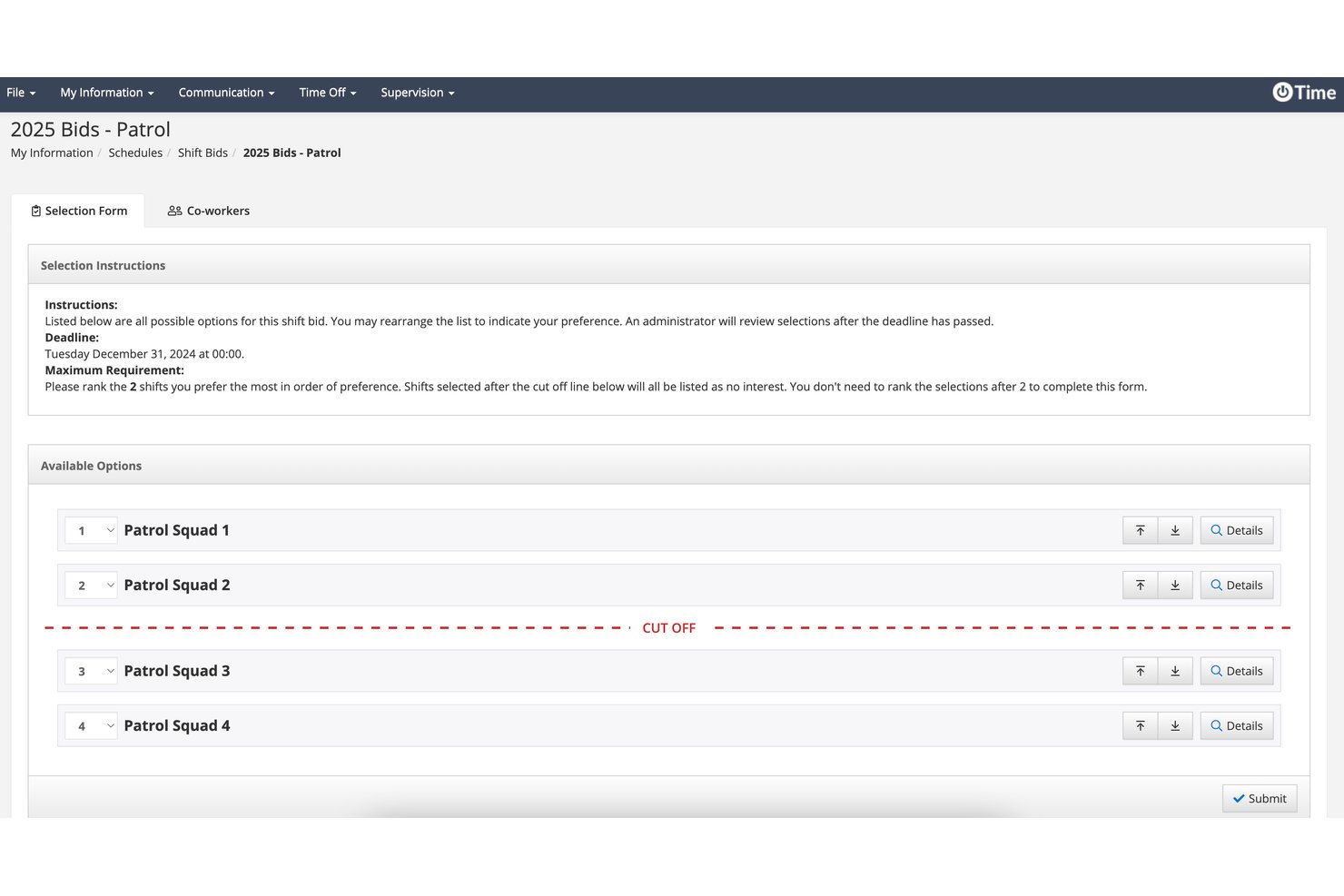
PowerTime è una piattaforma di pianificazione e gestione della forza lavoro incentrata sulla sicurezza pubblica, che gestisce modelli di turnazione a rotazione, il monitoraggio degli straordinari, i fogli presenze, la gestione dei congedi e l'applicazione dei requisiti minimi di organico in più stazioni e mezzi.
Per chi è più adatto PowerTime?
PowerTime è particolarmente adatto ai responsabili dei vigili del fuoco e ai coordinatori municipali della forza lavoro che necessitano di tracciati di controllo inattaccabili e di registri difendibili per ogni decisione relativa alla pianificazione.
Perché ho scelto PowerTime
PowerTime si è guadagnato un posto nella mia selezione perché attribuisce grande importanza ai tracciati di controllo. Ogni modifica alla pianificazione, approvazione e sostituzione viene registrata con data e ora in un registro non modificabile, un aspetto fondamentale quando viene presentato un reclamo o un arbitrato sindacale richiede di dimostrare chi ha approvato cosa e quando. Apprezzo anche il fatto che le iscrizioni agli straordinari siano registrate con data e ora nel momento stesso in cui un vigile del fuoco le invia, creando un registro difendibile per garantire l'equità senza alcun monitoraggio manuale. Se si aggiungono oltre 200 report configurabili, si ottiene una documentazione completa e verificabile.
Funzionalità principali di PowerTime
- Modelli di turnazione a rotazione: Supporta modelli predefiniti e personalizzati per turnazioni 24/48, 48/96, giorni Kelly e turni a plotone in più stazioni e mezzi.
- Accesso mobile alla pianificazione: Le app native per iOS e Android consentono ai vigili del fuoco di visualizzare i turni, richiedere permessi, scambiarsi i turni e iscriversi ai turni disponibili da qualsiasi luogo.
- Applicazione dei requisiti minimi di organico: Gli avvisi in tempo reale notificano ai supervisori quando la copertura scende al di sotto dei livelli richiesti e pubblicano automaticamente i turni disponibili affinché il personale possa richiederli.
- Regole per la gestione della stanchezza: L'applicazione automatizzata delle regole sul riposo impedisce di programmare turni che porterebbero il personale al di sotto delle soglie minime di riposo tra un turno e l'altro.
Integrazioni di PowerTime
PowerTime dispone di integrazioni documentate con PowerDMS per la gestione delle policy, la gestione degli accreditamenti e la gestione della formazione, oltre che con PowerReady e PowerDetails. Sono supportate le esportazioni verso i sistemi paghe, ma non sono documentate integrazioni specifiche con sistemi paghe, CAD, RMS e NFIRS.
Pros and Cons
Pros:
- Tracciati di controllo dettagliati supportano la difesa in caso di reclami
- Gestisce modelli complessi di turnazione dei vigili del fuoco
- Le iscrizioni agli straordinari con data e ora registrate favoriscono l'equità
Cons:
- Il monitoraggio delle certificazioni richiede moduli separati
- Il volume di recensioni specifiche su PowerTime rimane limitato

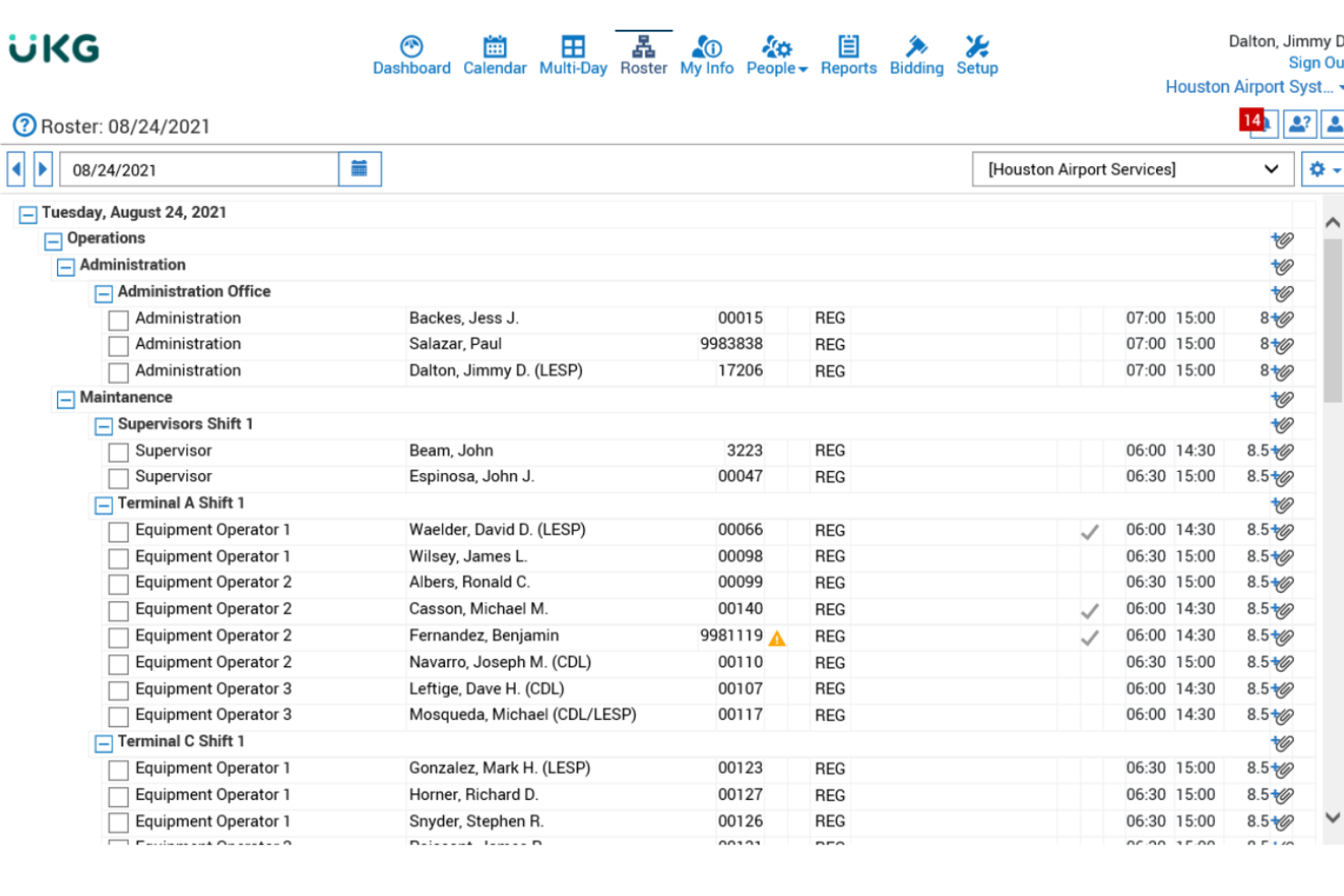
UKG TeleStaff è una piattaforma di gestione della pianificazione del personale e delle risorse umane per i dipartimenti dei vigili del fuoco, progettata per le agenzie del settore pubblico. Offre assegnazioni di turni automatizzate, gestione delle assenze e monitoraggio della conformità.
Per chi è più adatto UKG TeleStaff?
Grandi dipartimenti pubblici di vigili del fuoco e agenzie EMS che necessitano di una pianificazione automatizzata, basata su politiche e di una forte integrazione con sistemi HR o gestionali delle buste paga.
Perché ho scelto UKG TeleStaff
Ho scelto UKG TeleStaff perché consente di sincronizzare la pianificazione con i database di buste paga e HR, applicare automaticamente le regole sindacali e delle agenzie, e gestire risorse del settore pubblico su più sedi a livello aziendale.
Funzionalità principali di UKG TeleStaff
- Offerta turni automatizzata: Permette al personale di inviare preferenze dei turni in formato digitale.
- Monitoraggio delle credenziali: Controlla le certificazioni dei vigili del fuoco e le date di rinnovo.
- Aggiornamenti in tempo reale delle presenze: Riflette immediatamente i cambi di programma per tutto il personale.
- Gestione ferie e permessi: Consente al personale di richiedere e visualizzare con sicurezza le proprie assenze.
Integrazioni di UKG TeleStaff
Le integrazioni includono NetSuite, Equifax, Salesforce, Cornerstone, Deltek, Microsoft, QuickBooks, Concur, Jobvite e IBM.
Pros and Cons
Pros:
- Sincronizza la pianificazione con database HR
- Applica in automatico le regole sindacali e delle agenzie
- Copre automaticamente le assenze tramite regole basate sull'anzianità
Cons:
- Tempo iniziale elevato di formazione per gli amministratori
- Non dispone di un costruttore di report personalizzati
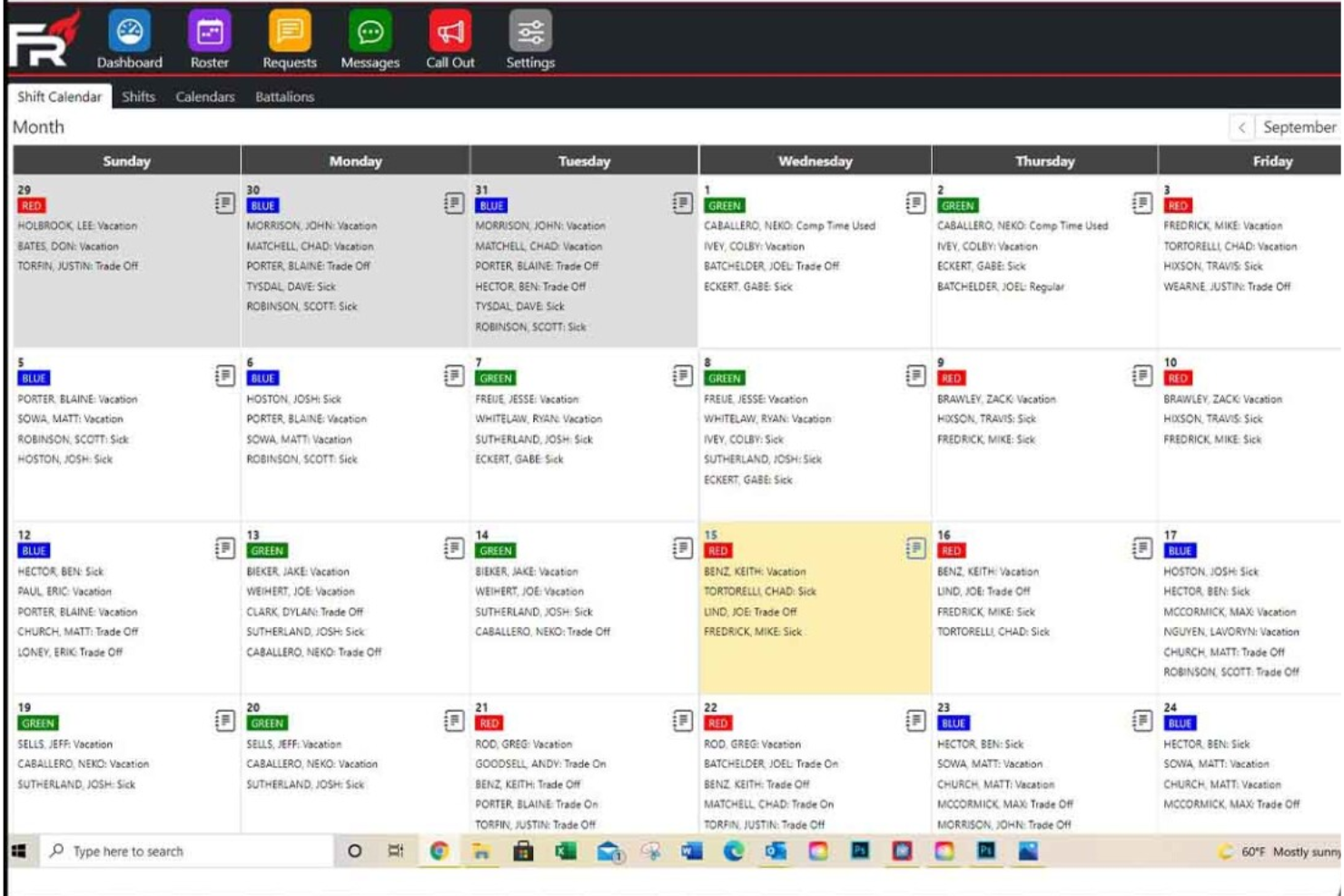
FireRoster è un software di programmazione per i vigili del fuoco basato su cloud che supporta la gestione automatizzata dei turni, il monitoraggio della disponibilità dell'equipaggio, la pianificazione degli eventi, le richieste di permessi e ferie, e la reportistica per la conformità.
Per chi è più indicato FireRoster?
FireRoster è adatto a reparti dei vigili del fuoco e squadre di servizi di emergenza di qualsiasi dimensione che necessitano di una pianificazione flessibile e di una supervisione dell'equipaggio in tempo reale.
Perché ho scelto FireRoster
Ho scelto FireRoster perché posso impostare regole di programmazione per reparti piccoli o multi-stazione, vedere e gestire gli scambi di turno in tempo reale e personalizzare le comunicazioni in base alle esigenze di turnazione—rendendolo adatto ad agenzie di qualsiasi dimensione.
Caratteristiche principali di FireRoster
- Gestione automatica degli straordinari: Tiene traccia, calcola e visualizza gli straordinari idonei per ogni vigile del fuoco.
- Monitoraggio delle competenze del personale: Conserva i registri delle certificazioni individuali e delle relative scadenze.
- Workflow per ferie e permessi: Permette al personale di inviare, approvare e gestire le richieste di permesso direttamente dall'app.
- Integrazione mappatura degli incidenti: Associa le posizioni degli incidenti e i dati di mappatura ai registri degli eventi.
Integrazioni di FireRoster
Supporta integrazioni personalizzate tramite API.
Pros and Cons
Pros:
- Visualizza in tempo reale gli organici della stazione sulle dashboard
- Ordina il personale giornaliero in base all'unità assegnata
- Aggiorna le bacheche digitali della stazione in tempo reale
Cons:
- Nessun accesso offline per gli utenti mobile
- Richiede l'inserimento manuale dei dati per la gestione paghe esterna

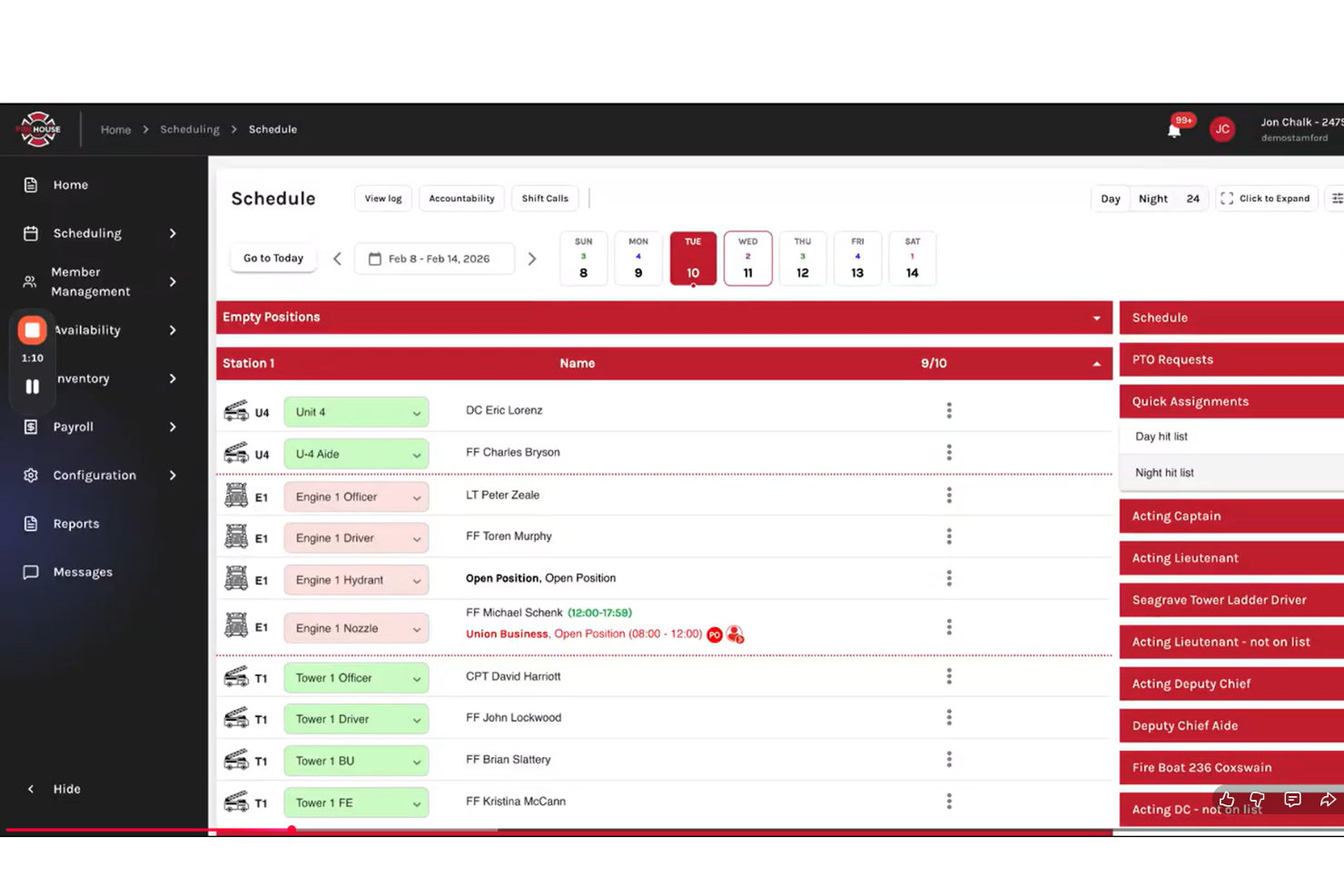
Firehouse247 è una soluzione di pianificazione per vigili del fuoco basata su cloud che unisce in un’unica piattaforma la programmazione dei turni della squadra, la copertura delle risorse, il monitoraggio dell’accountability, l’accesso mobile e la gestione dei turni di reperibilità.
A chi è più indicato Firehouse247?
Firehouse247 è adatto ai corpi dei vigili del fuoco che necessitano di strumenti di pianificazione dettagliati basati sul grado per gestire ruoli, posizioni e coperture sia per squadre professionali che volontarie.
Perché ho scelto Firehouse247
Ho scelto Firehouse247 perché posso assegnare rapidamente i turni disponibili in base al grado, all’anzianità o alle qualifiche e coprire automaticamente le posizioni sia per il personale fisso che volontario. Il sistema rende semplice per il mio team garantire la copertura dei gradi e il rispetto delle regole.
Funzionalità principali di Firehouse247
- Richieste di ferie: Consente al personale di inviare e monitorare online le richieste di permesso.
- Accesso tramite app mobile: La gestione della pianificazione e gli avvisi sono disponibili da qualsiasi dispositivo.
- Monitoraggio della disponibilità dei vigili del fuoco: Visualizza e aggiorna in tempo reale chi è disponibile o indisponibile per i turni.
- Notifiche di stato di servizio: Invia notifiche istantanee per cambi turno e assegnazioni.
Integrazioni Firehouse247
Le integrazioni includono CAD, Payroll, RMS, EMS e NFIRS.
Pros and Cons
Pros:
- Monitoraggio in tempo reale della disponibilità dei vigili del fuocoSegnala le ispezioni dell’attrezzatura scadute insieme alla formazione
- Segnala le ispezioni dell’attrezzatura scadute insieme alla formazione
- Assegnazioni automatiche che tengono conto sia del grado che delle qualifiche
Cons:
- Interfaccia senza opzione modalità scura
- Nessun monitoraggio integrato della manutenzione dell’attrezzatura
Altri software di pianificazione per i vigili del fuoco
Ecco alcune opzioni aggiuntive di software di pianificazione per i vigili del fuoco che non sono entrate nel mio elenco ristretto, ma che vale comunque la pena valutare:
- ESO
Ideale per il monitoraggio integrato delle certificazioni
- eSchedule
Ideale per staffing misto di volontari
- Pace Scheduler
Ideale per gestire i flussi di lavoro delle offerte di turni direttamente nell'app


Come valuto il software di pianificazione per i Vigili del Fuoco
Sudo la mia valutazione in criteri di base—come il supporto alla rotazione dei turni e la conformità alla FLSA 7(k)—e in fattori distintivi che differenziano uno strumento dall'altro.
Funzionalità di base (requisiti fondamentali per questa lista)
Quando seleziono gli strumenti per la mia lista, valuto ciascuno su una scala da 0 (non offre la funzionalità) a 5 (eccelle in quest'area) per ogni funzionalità di base indicata di seguito. Poi calcolo il punteggio totale dello strumento in percentuale. Ogni strumento deve raggiungere un punteggio totale minimo del 55% per essere preso in considerazione.
- Supporto alla rotazione dei turni dei vigili del fuoco: Verifico se una piattaforma può generare automaticamente rotazioni di turni come 24/48, 48/96 e cicli Kelly Day su più stazioni.
- Gestione degli straordinari e delle richieste di rientro: La distribuzione equa degli straordinari è importante, quindi cerco elenchi di richiamo automatici che rispettino le regole di anzianità e di equa ripartizione sindacale.
- Scambi di turno e richieste di ferie: I vigili del fuoco hanno bisogno di scambiare i turni e fare offerte per le ferie, quindi lo strumento deve gestire richieste self-service con flussi di approvazione.
- Minimi di personale e copertura delle assenze: Valuto quanto bene ogni strumento applica i minimi giornalieri per grado e mezzo, e se segnala o copre automaticamente le postazioni scoperte.
- Monitoraggio certificazioni e formazione: Certificazioni EMT o materiali pericolosi in scadenza influenzano chi può lavorare, quindi cerco strumenti che colleghino lo stato delle certificazioni alla pianificazione.
- Gestione paghe e conformità alla FLSA: I vigili del fuoco operano con periodi lavorativi FLSA 7(k), e verifico che lo strumento calcoli le maturazioni degli straordinari ed esporti i dati paghe di conseguenza.
Una volta che ho una lista di strumenti che rispettano i criteri, considero cosa rende unica ogni piattaforma.
Fattori di differenziazione (cosa distingue i fornitori)
Ecco come confronto e distinguo i diversi fornitori:
Funzionalità distintive
Un motore automatico di richiamo risparmia ore quando un vigile chiama in malattia alle 2 di notte: gli strumenti che chiamano o inviano SMS automaticamente al personale fuori servizio in ordine di grado fino a riempire il turno sono chiaramente superiori rispetto agli alberi telefonici manuali. Cerco anche un motore di regole contrattuali sindacali che consenta di codificare livelli di anzianità e formule di equa ripartizione senza sviluppo personalizzato. Anche un'app mobile potente è importante, poiché le squadre devono poter vedere i turni, accettare straordinari e inviare richieste di scambio ovunque si trovino.
Oltre le funzionalità
Valuto se un fornitore è specializzato nella pubblica sicurezza o semplicemente ha aggiunto la pianificazione dei turni dei vigili a un generico strumento di gestione del personale. Un fornitore con solide radici nel servizio antincendio conosce subito le strutture di squadra e le gerarchie di grado. Anche le integrazioni sono importanti: la piattaforma dovrebbe connettersi con i sistemi paghe comunali e con piattaforme CAD/RMS come ESO o ImageTrend in modo che i dati fluiscano senza reinserimento manuale. La flessibilità nei prezzi è un altro fattore che considero, poiché un dipartimento volontario di tre persone e un'agenzia metropolitana da 500 membri hanno bisogno di contratti molto diversi.
Come scegliere un software di pianificazione per i vigili del fuoco
È facile perdersi in lunghi elenchi di funzionalità e strutture di prezzo complesse. Per aiutarti a rimanere concentrato mentre affronti il tuo processo di selezione del software, unico per le tue esigenze, ecco una lista di controllo dei fattori da tenere a mente:
| Fattore | Cosa considerare |
| Scalabilità | Il software sarà in grado di gestire il tuo dipartimento man mano che cresce? Verifica i limiti relativi a utenti, sedi e volume dei turni. |
| Integrazioni | Si collega ai sistemi paghe, di segnalazione degli incidenti o delle risorse umane che già utilizzi? Verifica la disponibilità di integrazioni integrate nativamente. |
| Personalizzazione | È possibile adattare turni, ruoli e notifiche alle politiche del tuo dipartimento e alle regole sindacali? |
| Facilità d'uso | La tua squadra lo adotterà rapidamente? Prova dimostrazioni pratiche per verificare se l'interfaccia è intuitiva per tutti. |
| Implementazione e avviamento | Quanto tempo servirà per essere operativi? Informati sull'assistenza alla migrazione, sulle risorse formative e sulle fasi di configurazione. |
| Costo | I livelli di prezzo sono trasparenti e prevedibili? Cerca eventuali costi aggiuntivi per funzionalità di cui potresti avere bisogno in futuro. |
| Misure di sicurezza | La piattaforma protegge i dati sui turni e le informazioni personali tramite crittografia, registri di controllo e controlli degli accessi? |
| Disponibilità dell'assistenza | È disponibile un aiuto in tempo reale quando si verificano emergenze relative ai turni? Verifica gli orari dell'assistenza, i tempi di risposta e le procedure di escalation. |
Che cos'è un software di pianificazione per i vigili del fuoco?
Il software di pianificazione per i vigili del fuoco è uno strumento digitale che automatizza la pianificazione delle squadre, gestisce le assegnazioni dei turni, monitora le certificazioni e tiene traccia delle richieste di permesso per i dipartimenti dei vigili del fuoco. Aiuta a garantire un organico adeguato, il rispetto delle politiche del dipartimento e una migliore comunicazione tra i membri della squadra, sia per le squadre professionali sia per quelle di volontari.
Funzionalità
Quando selezioni un software per la programmazione dei turni dei vigili del fuoco, presta attenzione alle seguenti funzionalità chiave:
- Automazione della programmazione dei turni: consente di configurare turni a rotazione, fissi o personalizzati e di gestire automaticamente i turni ricorrenti e ad hoc per tutto il personale.
- Monitoraggio della disponibilità: consente ai membri del team di comunicare in anticipo la propria disponibilità, facilitando la copertura dei turni e riducendo i conflitti di programmazione.
- Gestione degli scambi di turno: supporta gli scambi di turno tra colleghi o approvati dagli amministratori, mantenendo la conformità alle regole del dipartimento e alle esigenze di copertura.
- Gestione delle richieste di permesso: fornisce un flusso di lavoro per richiedere, monitorare e approvare ferie, congedi per malattia o altri tipi di assenza.
- Verifica del grado e delle qualifiche: garantisce che solo il personale qualificato o con il grado appropriato venga assegnato a posizioni specifiche o a turni critici in base alle certificazioni o all'anzianità.
- Notifiche in tempo reale: invia avvisi importanti sui turni disponibili, sulle modifiche alla programmazione e sulle esigenze urgenti di personale tramite app mobile, SMS o e-mail.
- Report e analisi: genera report dettagliati sui modelli di programmazione, sugli straordinari, sulle presenze e sulla conformità per la revisione da parte della dirigenza e per gli audit.
- Accesso da dispositivi mobili: consente sia ai responsabili sia al personale di visualizzare e gestire i turni, inviare richieste e ricevere avvisi da qualsiasi dispositivo.
- Monitoraggio delle credenziali e delle certificazioni: tiene sotto controllo le licenze e le certificazioni del personale, segnalando quando sono necessari rinnovi o quando cambiano i requisiti.
- Misure di conformità: contribuisce a garantire che la programmazione rispetti le leggi sul lavoro, gli obblighi contrattuali e i regolamenti del dipartimento.
Vantaggi
L'implementazione di un software per la programmazione dei turni dei vigili del fuoco offre numerosi vantaggi al tuo team e alla tua azienda. Ecco alcuni dei vantaggi che puoi aspettarti:
- Migliore copertura dei turni: la programmazione automatizzata contribuisce a garantire che il personale adeguato sia sempre assegnato a ogni turno e riduce le lacune nella copertura manuale.
- Copertura più rapida dei turni: il monitoraggio della disponibilità e le notifiche mobili aiutano a coprire rapidamente i turni disponibili, anche in caso di modifiche dell'ultimo minuto.
- Maggiore garanzia di conformità: i controlli integrati aiutano a mantenere la conformità alle leggi sul lavoro, ai contratti sindacali e alle regole del dipartimento.
- Riduzione del carico di lavoro amministrativo: i flussi di lavoro automatizzati per gli scambi, le richieste di permesso e gli straordinari riducono il tempo dedicato alle attività manuali di programmazione.
- Comunicazione più chiara: gli avvisi in tempo reale e l'accesso da dispositivi mobili mantengono tutti aggiornati sulle modifiche ai turni, sulle assegnazioni e sulle esigenze urgenti di personale.
- Migliore gestione delle credenziali: il monitoraggio delle certificazioni consente di assegnare le posizioni richieste solo al personale qualificato e di mantenere aggiornati i registri.
- Informazioni utili per le decisioni: i report e le analisi forniscono alla dirigenza dati preziosi per la pianificazione delle risorse, la gestione del budget e gli audit di conformità.
Costi e prezzi
La scelta di un software per la programmazione dei turni dei vigili del fuoco richiede la comprensione dei vari modelli e piani tariffari disponibili. I costi variano in base alle funzionalità, alle dimensioni del team, ai componenti aggiuntivi e ad altri fattori. Passare da un foglio di calcolo manuale a un sistema digitale di rilevazione delle ore può migliorare la fidelizzazione e il benessere del personale offrendo un'esperienza utente migliore. La tabella seguente riassume i piani più comuni, i relativi prezzi medi e le funzionalità generalmente incluse nelle soluzioni software per la programmazione dei turni dei vigili del fuoco:
Tabella di confronto dei piani
| Tipo di piano | Prezzo medio | Funzionalità comuni |
| Piano gratuito | $0 | Programmazione di base dei turni, numero limitato di utenti, accesso da dispositivi mobili e report semplici. |
| Piano personale | $5-$15/utente/mese | Scambi di turno, richieste di permesso, notifiche mobili e monitoraggio di base della disponibilità. |
| Piano aziendale | $20-$40/utente/mese | Programmazione avanzata, monitoraggio delle credenziali, gestione degli straordinari, strumenti di reportistica e assegnazioni basate sui ruoli. |
| Piano aziendale avanzato | $40-$80/utente/mese | Flussi di lavoro personalizzati, accesso API, funzionalità di conformità, supporto dedicato, onboarding prioritario e analisi avanzate. |
Domande frequenti sul software di pianificazione dei turni dei vigili del fuoco
Ecco alcune risposte alle domande frequenti sul software di pianificazione dei turni dei vigili del fuoco:
In che modo il software di pianificazione dei turni dei vigili del fuoco gestisce la copertura 24 ore su 24, 7 giorni su 7?
Il software di pianificazione dei turni dei vigili del fuoco crea modelli di turni automatizzati, a rotazione o fissi, che contribuiscono a mantenere una copertura continua. È possibile configurare regole avanzate per gli straordinari e le richiamate e garantire che personale qualificato sia sempre assegnato a ogni turno, anche in caso di operazioni complesse o con più stazioni. Il sistema di gestione giusto può ottimizzare il modo in cui si organizzano i turni dei dipendenti per i turni prolungati.
Il software di pianificazione dei turni dei vigili del fuoco può monitorare certificazioni e formazione?
Sì, la maggior parte delle soluzioni consente di caricare e monitorare le certificazioni e i registri della formazione, nonché di impostare avvisi per le certificazioni in scadenza. Questo aiuta ad assegnare alle posizioni richieste solo personale adeguatamente qualificato e a essere pronti per audit o verifiche di conformità. La gestione dell’accumulo delle ore di formazione garantisce il costante rispetto degli standard di protezione antincendio.
È possibile integrare il software di pianificazione con i sistemi paghe o di segnalazione degli incidenti?
Sì, molte piattaforme offrono integrazioni native o accesso API per sincronizzare i dati di pianificazione con il software paghe e gli strumenti di segnalazione degli incidenti. Questo semplifica la rilevazione delle ore e contribuisce a risparmiare tempo riducendo l’inserimento manuale dei dati. Prima di procedere, è sempre opportuno verificare la compatibilità con i sistemi attualmente in uso.
Che tipo di assistenza dovrei aspettarmi dai fornitori?
Dovresti aspettarti diversi canali di assistenza, come chat dal vivo, email e un numero di telefono diretto, oltre a FAQ approfondite. Informati sui tempi di risposta, sulla disponibilità dell’assistenza 24 ore su 24, 7 giorni su 7 per le emergenze e sulle risorse per la configurazione iniziale e la risoluzione dei problemi.
Questi strumenti funzionano sia per i vigili del fuoco volontari sia per i vigili del fuoco professionisti?
Sì, il software di pianificazione dei turni dei vigili del fuoco può essere utilizzato sia dai vigili del fuoco volontari sia dai vigili del fuoco professionisti. La maggior parte delle piattaforme consente di creare diversi modelli di personale, gestire livelli variabili di disponibilità e personalizzare le autorizzazioni o i ruoli secondo necessità.