

I 10 migliori software per il monitoraggio delle presenze recensiti per il 2026

10 Elenco dei migliori software per il monitoraggio delle presenze


I migliori software per il monitoraggio delle presenze ti aiutano a registrare con precisione le ore lavorate, gestire assenze e permessi e semplificare l'elaborazione delle buste paga, offrendo al contempo diversi punti di forza in termini di automazione, facilità d'uso e conformità, per adattarsi alle esigenze della tua organizzazione.
A seconda delle dimensioni del tuo team, della complessità della pianificazione o del livello di reportistica e supervisione di cui hai bisogno, alcune piattaforme possono offrire maggiore chiarezza, flessibilità o scalabilità a lungo termine.
Basandomi sulla mia esperienza pratica con decine di sistemi per il monitoraggio delle presenze utilizzati da team di ogni dimensione, ho analizzato e confrontato le migliori opzioni disponibili oggi. In questa guida troverai strumenti di spicco con funzionalità essenziali, casi d'uso pratici e prezzi chiari, così potrai scegliere con sicurezza il software per il monitoraggio delle presenze più adatto alla tua forza lavoro e ai tuoi flussi operativi.
Perché fidarsi delle nostre recensioni sui software
Il nostro team testa e recensisce software dal 2012. In quanto esperti HR noi stessi, sappiamo quanto sia difficile — e importante — scegliere il software giusto.
Per questa guida, abbiamo valutato gli strumenti attraverso test pratici e ricerche indipendenti, assegnando un punteggio agli strumenti in base ai nostri criteri di selezione. Ci basiamo inoltre sulle competenze di leader di pensiero del settore e di professionisti HR attivi.
Le nostre recensioni riflettono il nostro giudizio editoriale umano, non un discorso di vendita.
Revisori esperti:
Tabella comparativa delle soluzioni software per il monitoraggio delle presenze
Questa tabella comparativa riassume i dettagli di base di ciascuna delle mie migliori selezioni di software per il monitoraggio delle presenze:
| Tool | Best For | Trial Info | Price | ||
|---|---|---|---|---|---|
| 1 | Ideale per gestione integrata di paghe e supporto HR | Demo gratuita disponibile | Da $8/utente/mese + $50/mese quota base | Website | |
| 2 | Ideale per la rilevazione presenze basata su GPS | Prova gratuita di 14 giorni + demo gratuita disponibile | Da $47/mese/fino a 50 utenti | Website | |
| 3 | La migliore soluzione di IA per le aziende | Demo gratuita disponibile | A partire da $8/utente/mese | Website | |
| 4 | Il miglior software per il monitoraggio delle presenze con servizi aggiuntivi di controllo per team remoti | Prova gratuita di 7 giorni + demo gratuita disponibile | Da $8/postazione/mese | Website | |
| 5 | Miglior software gratuito per il monitoraggio delle presenze | Piano gratuito disponibile | A partire da $2/utente/mese (fatturato annualmente) | Website | |
| 6 | Ideale per la gestione delle richieste di assenza | 14 giorni di prova gratuita | Da $29.99/mese/fino a 4 utenti | Website | |
| 7 | Ideale per report sulle presenze approfonditi | Prova gratuita disponibile | A partire da $99/mese | Website | |
| 8 | Ideale per monitorare le attività senza connessione insieme alle ore lavorate | Prova gratuita di 14 giorni + dimostrazione gratuita disponibile | A partire da $6.42/utente/mese (con fatturazione annuale) | Website | |
| 9 | Ideale per il monitoraggio presenze HR integrato | Prova gratuita di 14 giorni | Prezzi su richiesta | Website | |
| 10 | Ideale per la funzionalità di timbratura in entrata/uscita | Prova gratuita di 21 giorni + demo gratuita disponibile | A partire da $2.93/utente/mese (fatturazione annuale) | Website |


Recensioni dei migliori software per il monitoraggio delle presenze
Ecco una breve descrizione del caso d’uso migliore e delle funzionalità più interessanti di ciascuna soluzione per il monitoraggio delle presenze. Ho incluso anche schermate per offrirti una panoramica della loro interfaccia utente:

Ideale per gestione integrata di paghe e supporto HR
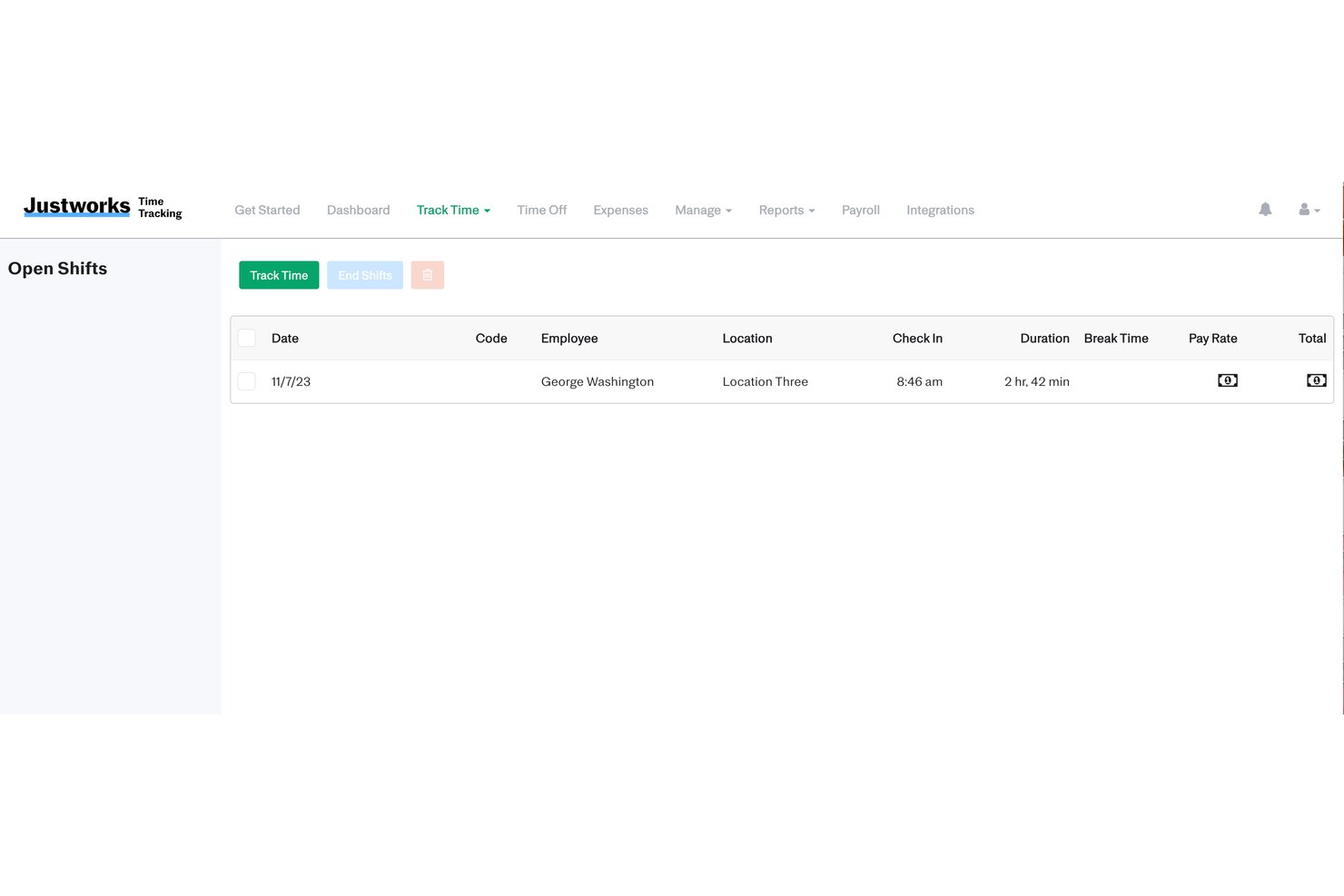
Justworks è una piattaforma tutto-in-uno per la gestione di HR, paghe e rilevazione presenze, pensata per i team che desiderano gestire orari, permessi, conformità e retribuzioni in un unico ambiente software.
Per chi è Justworks?
Piccole e medie imprese negli Stati Uniti che cercano una soluzione integrata per HR, paghe e rilevazione presenze.
Perché ho scelto Justworks
Ho scelto Justworks tra i migliori perché uso la funzione integrata di rilevazione presenze per sincronizzare le ore di lavoro e i permessi direttamente con il sistema paghe e posso accedere al supporto HR direttamente dal dashboard per domande complesse riguardanti la conformità.
Caratteristiche chiave di Justworks
- Portale self-service per i dipendenti: Il personale può timbrare entrata e uscita, visualizzare gli orari e accedere ai dettagli della busta paga da un unico posto.
- Calcolo automatico degli straordinari: Il sistema calcola gli straordinari in base alle politiche aziendali configurate e alle normative sul lavoro.
- Accantonamenti personalizzabili per PTO: Imposta politiche personalizzate per i permessi e automatizza gli accantonamenti per ferie, malattia e altri tipi di assenza.
- Registri presenze pronti per audit: Mantieni registri sicuri ed esportabili dei dati di presenza per supportare audit interni o la conformità legale.
Integrazioni di Justworks
Justworks offre oltre 20 integrazioni, tra cui QuickBooks, Xero, NetSuite, Sage Intacct, Greenhouse, JazzHR, Lever, 15Five, Leapsome, Carta, Brex e Vanta.
Pros and Cons
Pros:
- Consente l'accesso alla timbratura solo in determinati luoghi tramite geofencing
- Invia avvisi proattivi per pasti e pause
- Accesso a consulenti HR e compliance
Cons:
- Richiede un componente aggiuntivo a pagamento per la rilevazione presenze
- Le opzioni di reportistica sono meno personalizzabili

Ideale per la rilevazione presenze basata su GPS
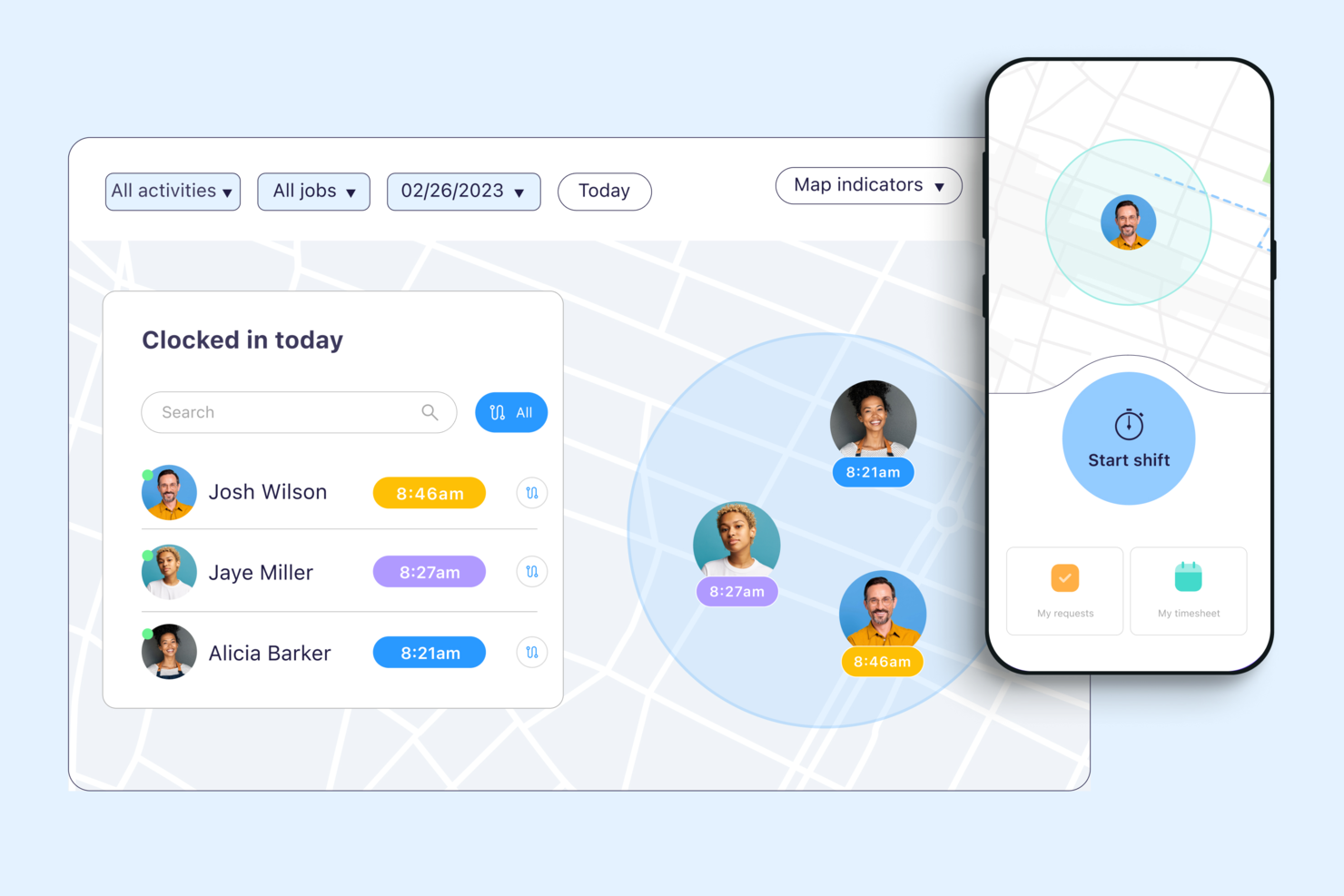
Connecteam è una piattaforma di rilevamento presenze mobile-first progettata per le aziende con team senza postazione fissa che hanno bisogno di gestire la rilevazione delle presenze, la programmazione dei turni e la comunicazione del team in un unico luogo.
Per chi è ideale Connecteam?
Connecteam è particolarmente indicato per piccole e medie imprese nei settori operativi come edilizia, vendita al dettaglio e ospitalità che devono gestire lavoratori a ore o a turni.
Perché ho scelto Connecteam
Connecteam si guadagna un posto nella mia lista grazie alla sua capacità di gestire il rilevamento delle presenze tramite GPS e le assenze per team che lavorano su più cantieri. Apprezzo che i responsabili possano impostare delle zone di timbratura georeferenziate, così i dipendenti possono timbrare solo quando sono fisicamente sul posto—evitando così timbrature per conto di altri o correzioni manuali. Inoltre, la chat integrata di Connecteam permette di contattare singoli o interi gruppi di turno direttamente dall’app, mantenendo così tutte le comunicazioni relative alle presenze in un unico posto, invece di doverle gestire tramite sms ed email sparsi.
Funzionalità chiave di Connecteam
- Programmazione turni drag-and-drop: Costruisci e pubblica i turni dei dipendenti in modo visivo, con possibilità di assegnare i turni in base a ruolo, sede o disponibilità.
- Fogli presenze digitali: Generazione automatica dei fogli ore a partire dai dati di timbratura, che i manager possono rivedere e approvare prima del pagamento.
- Gestione delle assenze: I dipendenti possono inviare richieste di assenza direttamente dall’app, e i responsabili possono approvarle o rifiutarle con un solo tocco.
- Gestione delle attività: Assegna compiti a singoli dipendenti o squadre, con scadenze, checklist e monitoraggio dello stato integrati.
Integrazioni di Connecteam
Le integrazioni includono QuickBooks, Gusto, Xero, ADP, Wix, Lightspeed, PrismHR, Square, BambooHR e Accu-Time Systems.
Pros and Cons
Pros:
- Le geofence impediscono timbrature fuori sede
- Modalità chiosco supporta allegati fotografici
- Uscita automatica alla partenza dal sito
Cons:
- Mancano funzionalità di elaborazione paghe native
- Nessuna funzionalità di rilevamento presenze offline
New Product Updates from Connecteam

Connecteam Expands Break and Timesheet Controls
Connecteam adds flexible break thresholds, personalized policies, auto-end options, a centralized exceptions report, and improved timesheet issue visibility to help teams manage breaks and timesheets more effectively. For more information, visit Connecteam’s official site.
 .
.
La migliore soluzione di IA per le aziende
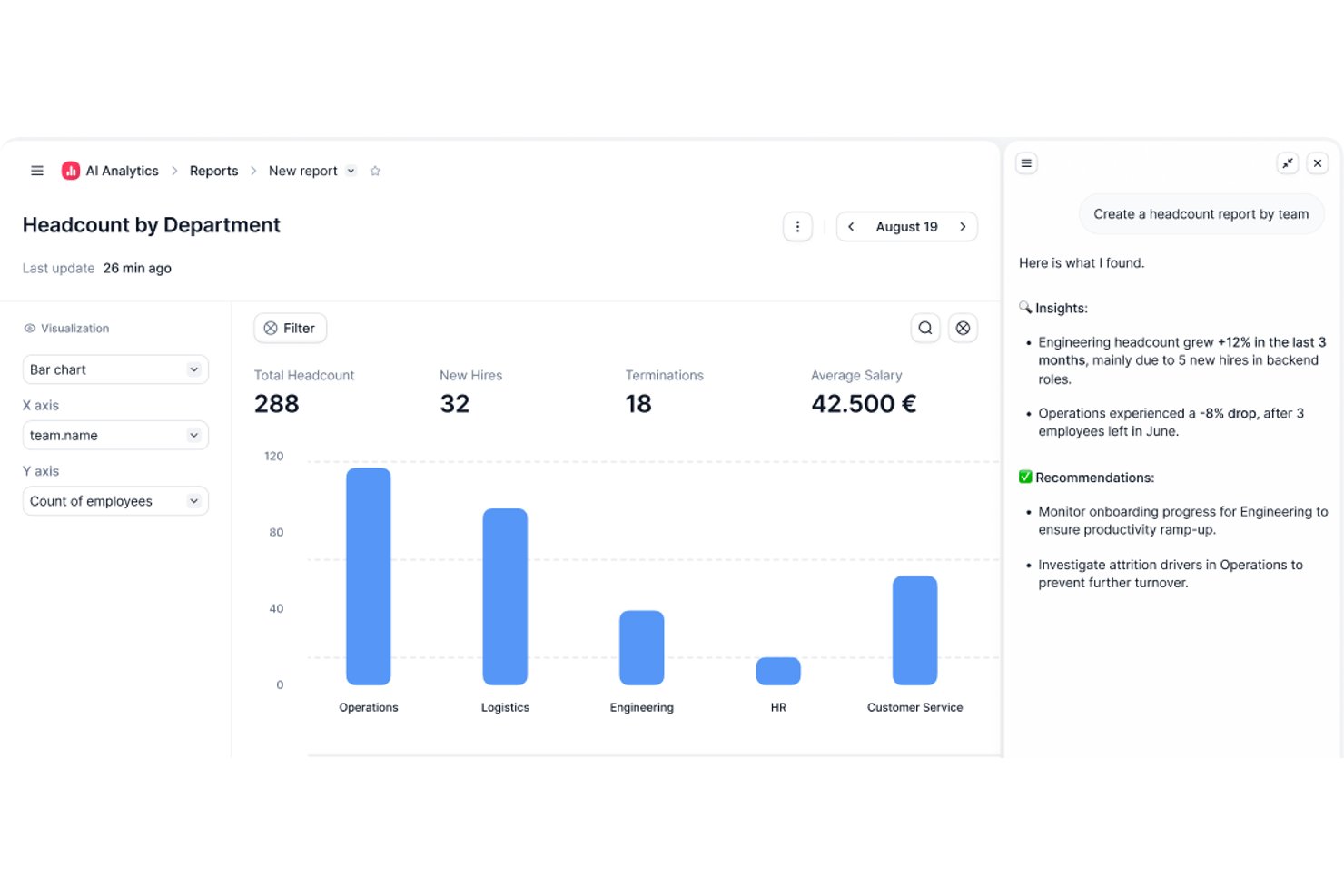
Factorial è una piattaforma per le risorse umane e le aziende alimentata dall'IA che gestisce il monitoraggio delle presenze, la pianificazione dei turni, la gestione delle ferie e i resoconti sulla forza lavoro tra squadre e sedi.
Per chi è più adatto Factorial?
Factorial è ideale per titolari di piccole e medie imprese e responsabili delle risorse umane che desiderano un'unica piattaforma alimentata dall'IA per gestire il monitoraggio del tempo, la pianificazione e le operazioni quotidiane relative alla forza lavoro.
Perché ho scelto Factorial
Ho scelto Factorial come una delle migliori soluzioni perché il suo posizionamento come strumento di IA per le aziende va oltre il semplice monitoraggio del tempo: l'agente di IA di Factorial, One, può generare resoconti sulle presenze, rispondere alle domande dei dipendenti sulle politiche relative alle ferie e contribuire a pianificare gli orari senza continui scambi manuali. Apprezzo anche il fatto che le squadre possano registrare l'ingresso tramite web, app per dispositivi mobili, codice QR o geolocalizzazione, con etichette relative al luogo di lavoro (ufficio, casa o trasferta di lavoro) visualizzate direttamente nei fogli presenze e nelle esportazioni.
Funzionalità principali di Factorial
- Pianificazione dei turni: Assegna giorni e orari di lavoro, definisce le politiche dei turni e gestisce turni automatizzati, collettivi e a rotazione per tutta la squadra.
- Portale autonomo per i dipendenti: Consente ai dipendenti di visualizzare i saldi delle ferie, inviare richieste di assenza, scambiarsi i turni e registrare l'ingresso da sedi esterne.
- Integrazione con i terminali ZKTeco: Sincronizza le registrazioni degli ingressi, le pause e le uscite dai terminali fisici ZKTeco direttamente in Factorial.
- Flusso di approvazione dei fogli presenze: I responsabili possono esaminare e approvare i fogli presenze, mentre un blocco paghe impedisce di modificare le presenze una volta iniziata l'elaborazione.
Integrazioni di Factorial
Factorial offre integrazioni tramite il mercato delle integrazioni con ZKTeco, Primavera, DATEV LODAS, Sage 200, SAP Business One e Microsoft Power BI per i flussi di lavoro relativi a presenze, paghe e resoconti. Offre inoltre un'API pubblica, webhook e SDK, oltre alla connettività con Zapier.
Pros and Cons
Pros:
- I recensori elogiano la registrazione degli ingressi tramite dispositivi mobili per le squadre da remoto
- Gli utenti apprezzano la visibilità combinata su presenze e assenze
- Il personale può richiedere ferie e controllare i saldi
Cons:
- Le paghe richiedono ancora controlli manuali degli straordinari
- I resoconti offrono possibilità limitate di personalizzazione e dettagli sugli avvisi

Il miglior software per il monitoraggio delle presenze con servizi aggiuntivi di controllo per team remoti
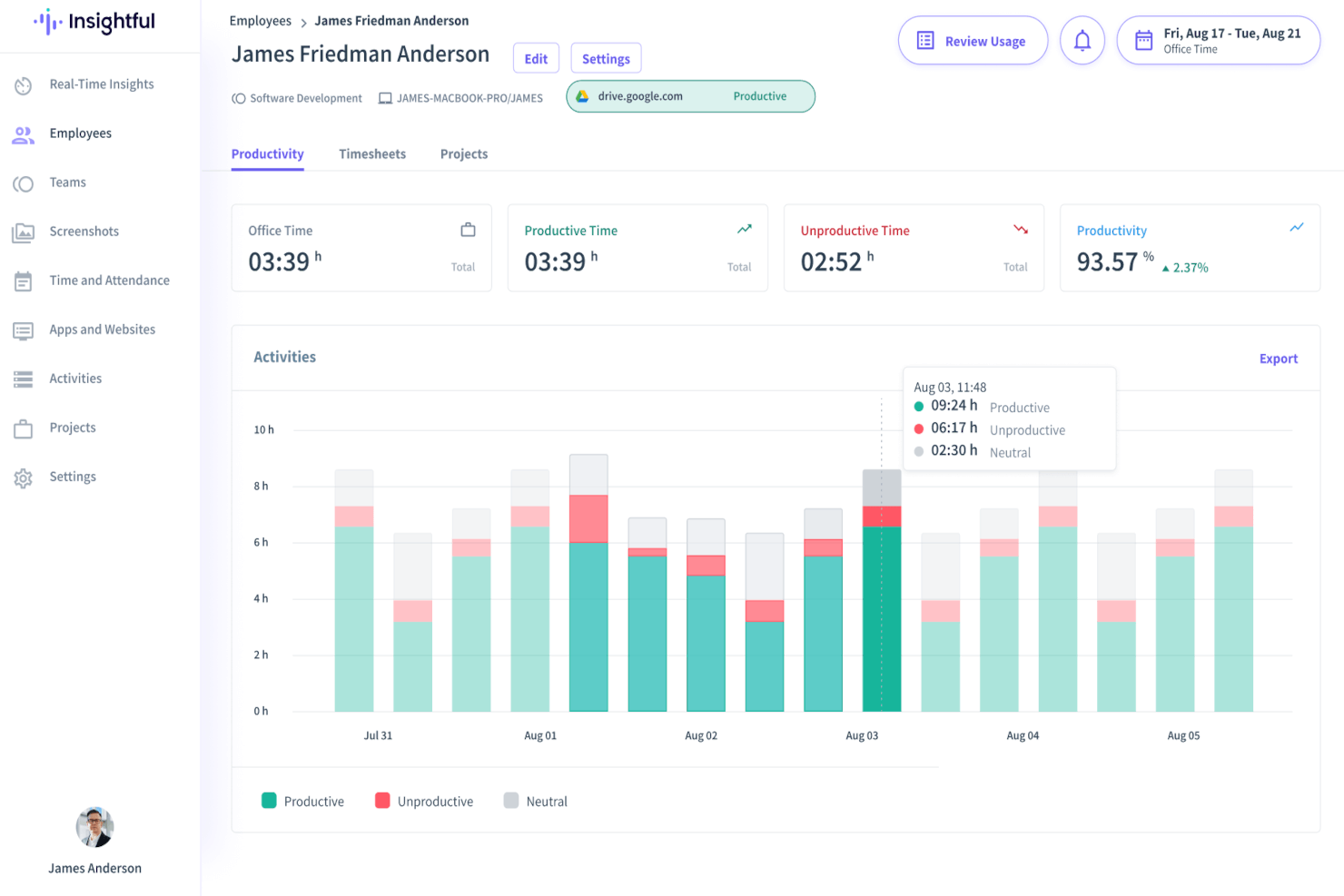
Insightful è una piattaforma di analisi della forza lavoro progettata per i team HR e i leader aziendali che necessitano di monitorare la presenza, controllare la produttività e gestire team remoti o ibridi con report dettagliati e automazione.
Per chi è ideale Insightful?
Insightful è particolarmente adatto per aziende di medie e grandi dimensioni che gestiscono una forza lavoro distribuita o remota e hanno bisogno di visibilità sia sulla presenza sia sulle attività quotidiane dei dipendenti.
Perché ho scelto Insightful
Insightful si guadagna un posto nella mia lista perché va oltre il semplice rilevamento di entrata/uscita, offrendo ai team remoti una vera visibilità su come viene svolto il lavoro. Mi piace che combini il monitoraggio automatico delle presenze con l’analisi in tempo reale delle attività, così posso vedere non solo quando qualcuno è collegato, ma anche quali app e siti web utilizza durante l’orario di lavoro. La funzione di screenshot e le etichette di produttività mi permettono di categorizzare le attività come produttive, neutre o improduttive, aggiungendo un contesto significativo ai dati di presenza. Questa combinazione rende Insightful uno dei pochi strumenti che affrontano davvero il problema della supervisione nella gestione di team distribuiti.
Funzionalità chiave di Insightful
- Fogli ore automatici: Insightful genera automaticamente fogli ore basati sulle sessioni di lavoro rilevate, eliminando la necessità di inserimento manuale del tempo.
- Pianificazione dei turni: Imposta e gestisci i turni dei dipendenti direttamente nella piattaforma per allineare il monitoraggio delle presenze con le ore di lavoro pianificate.
- Monitoraggio assenze e permessi: Registra e controlla assenze, ritardi e richieste di permesso dei dipendenti insieme ai dati di presenza.
- Report personalizzati: Crea ed esporta report su presenze e produttività filtrati per team, persona o periodo.
Integrazioni di Insightful
Le integrazioni includono Jira, Trello, Asana, Aha, ClickUp, Zoho BugTracker, Azure DevOps, Basecamp, BitBucket e GitHub.
Pros and Cons
Pros:
- Screenshot in tempo reale delle attività dei dipendenti
- Monitora i log di utilizzo di siti web e applicazioni
- Configurazione semplice per un onboarding veloce
Cons:
- Nessuna app mobile
- Costo per postazione elevato per startup
New Product Updates from Insightful
Insightful Expands MCP and HRIS Integrations
Insightful adds OAuth connections for ChatGPT and Microsoft Copilot Studio through its MCP Server, while HRIS integrations gain manager scope syncing in Beta. These updates expand AI access and automate permission management. For more information, visit Insightful’s official site.
 .
.
Miglior software gratuito per il monitoraggio delle presenze
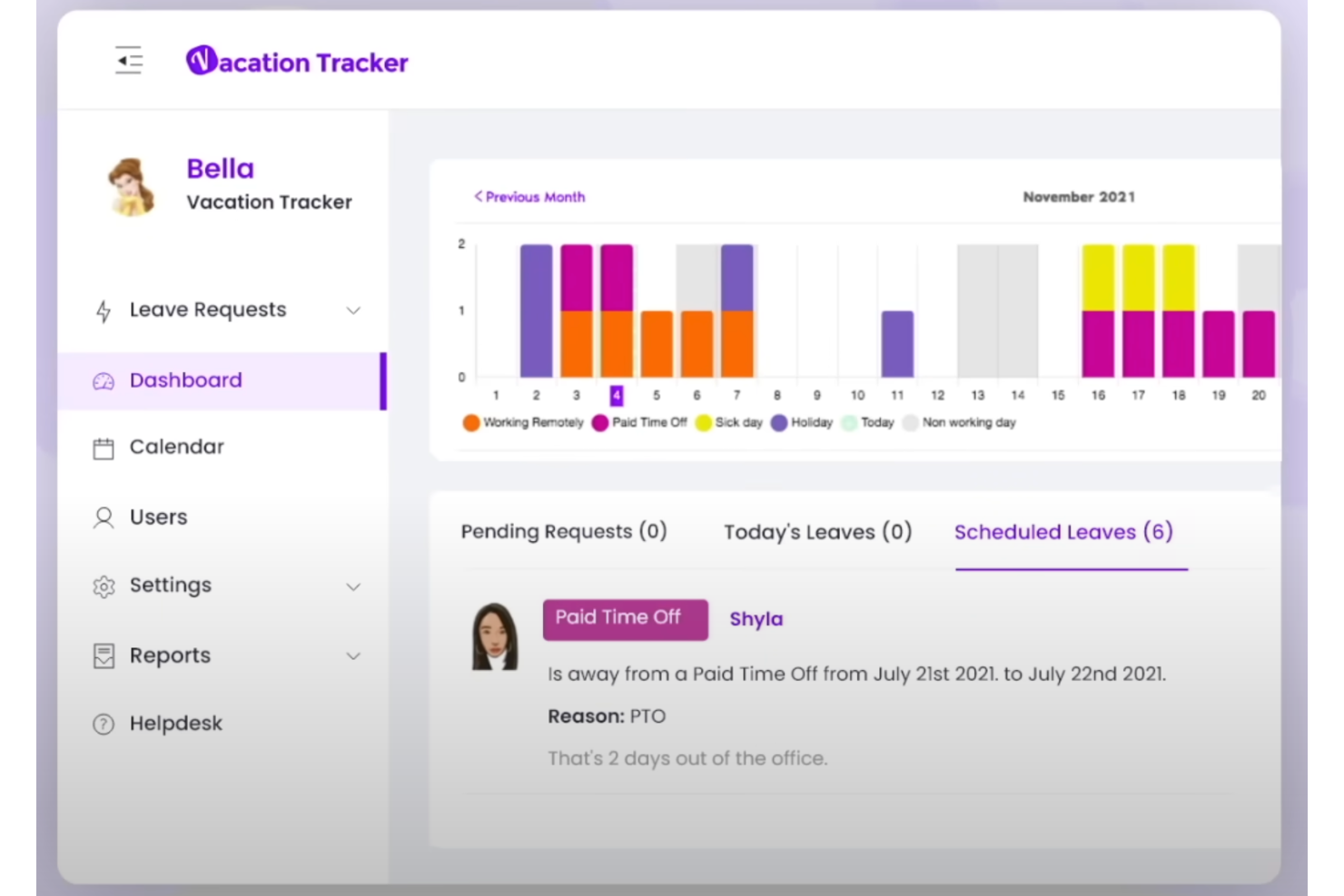
Vacation Tracker aiuta i team e le piccole aziende a gestire presenze, richieste di permesso e assenze direttamente in Slack, Microsoft Teams o Google Workspace, consentendo ai team di monitorare le assenze e mantenere tutti sincronizzati.
Per chi è più adatto Vacation Tracker?
Vacation Tracker è ideale per team di piccole e medie dimensioni che svolgono già il lavoro quotidiano in Slack, Microsoft Teams o Google Workspace.
Perché ho scelto Vacation Tracker
Ho incluso Vacation Tracker tra le mie migliori scelte perché offre un piano gratuito realmente utilizzabile, che copre le principali esigenze di monitoraggio delle presenze della maggior parte dei piccoli team. Con il piano gratuito puoi monitorare i permessi, utilizzare un calendario condiviso delle assenze e gestire flussi di approvazione di base senza incontrare alcun limite a pagamento. Apprezzo anche il fatto che il piano gratuito non sia una semplice versione dimostrativa limitata: consente ai team di monitorare diversi tipi di permesso e configurare la visibilità a livello di reparto fin dal primo giorno. Una funzionalità pronta all'uso di questo tipo, senza costi, è rara in questa categoria.
Funzionalità principali di Vacation Tracker
- Automazione della maturazione: Calcola e aggiorna automaticamente i saldi dei permessi retribuiti in base alle regole di maturazione configurate, eliminando la necessità di un monitoraggio manuale.
- Monitoraggio dei permessi a ore: Monitora le assenze con incrementi orari anziché per giornate intere, offrendo registri delle presenze più precisi ai team con orari flessibili.
- Regole di riporto: Applica automaticamente le politiche di trasferimento alla fine di ogni periodo, così i saldi dei permessi non utilizzati vengono riportati senza necessità di modifiche manuali.
- Tipi di permesso personalizzabili: Consente di creare e configurare diverse categorie di permesso, come malattia, lavoro da remoto o permesso non retribuito, con regole specifiche per ciascun tipo.
Integrazioni di Vacation Tracker
Le integrazioni includono Slack, Microsoft Teams e Google Workspace.
Pros and Cons
Pros:
- Il piano gratuito supporta un numero illimitato di utenti
- Automatizza i calcoli della maturazione dei permessi retribuiti
- Si sincronizza con i calendari aziendali esterni
Cons:
- Non dispone di funzionalità per il monitoraggio dei turni a ore
- Non è disponibile alcuna applicazione mobile
Ideale per la gestione delle richieste di assenza

Buddy Punch è una piattaforma di rilevazione presenze basata su cloud, pensata per le aziende che necessitano di strumenti semplici e flessibili per gestire il tempo, la pianificazione e le assenze dei dipendenti in team in presenza, da remoto o ibridi.
Per chi è più indicato Buddy Punch?
Buddy Punch è particolarmente adatto per piccole e medie imprese che desiderano un metodo semplice per tracciare le presenze e gestire l’orario dei dipendenti senza una curva di apprendimento ripida.
Perché ho scelto Buddy Punch
Ho scelto Buddy Punch tra i migliori per la sua capacità di gestire le richieste di ferie dalla presentazione all’approvazione. I dipendenti possono inviare richieste direttamente tramite l’app, e i manager ricevono notifiche immediate per approvarle o rifiutarle—il tutto senza dover cercare tra email o fogli di calcolo. Apprezzo anche che le assenze approvate vengano sincronizzate automaticamente con il calendario, eliminando lacune o doppie prenotazioni da gestire manualmente. Il monitoraggio integrato del maturato ferie permette al mio team di conoscere sempre l’esatto saldo residuo prima di inviare una nuova richiesta.
Funzionalità principali di Buddy Punch
- Monitoraggio GPS: Verifica le posizioni dei dipendenti all’orario di entrata e uscita utilizzando coordinate GPS o limiti di geofencing.
- Timbratura con riconoscimento facciale: I dipendenti timbrano l’ingresso tramite riconoscimento facciale per evitare il fenomeno del buddy punching.
- Pianificazione drag-and-drop: Crea e modifica i turni dei dipendenti trascinando visivamente gli orari su un calendario.
- Avvisi per straordinari: Imposta soglie personalizzate e ricevi notifiche automatiche quando i dipendenti stanno per raggiungere o superare i limiti di straordinario.
Integrazioni di Buddy Punch
Le integrazioni includono QuickBooks Online, QuickBooks Desktop, ADP Workforce Now, Gusto, Paychex, Paycor, Paylocity, Workday, Rippling e Justworks.
Pros and Cons
Pros:
- Metodi flessibili di timbratura si adattano a varie modalità di lavoro
- Le richieste di ferie vengono inviate direttamente ai responsabili per un’approvazione rapida
- GPS e geofencing riducono i problemi di timbratura fuori sede
Cons:
- Non include una funzione di pianificazione integrata rispetto ad alcuni concorrenti
- Le integrazioni personalizzate dipendono da un abbonamento Zapier esterno

Ideale per report sulle presenze approfonditi

Workable HR offre ai team HR e ai responsabili aziendali una piattaforma centralizzata per monitorare le presenze, gestire i turni dei dipendenti e gestire le richieste di permesso, aiutando le organizzazioni a mantenere registri accurati e a migliorare la supervisione della forza lavoro.
Per chi è ideale Workable HR?
Workable HR è particolarmente indicato per piccole e medie imprese che necessitano di una piattaforma HR completa per gestire sia le assunzioni che le presenze dei dipendenti in un unico posto.
Perché ho scelto Workable HR
Ho scelto Workable HR tra i finalisti per il livello di dettaglio che fornisce nei suoi report sulle presenze. Mi piace che sia possibile suddividere i dati sulle presenze per reparto, sede o singolo dipendente: questo rende facile individuare modelli ricorrenti come ritardi cronici o assenze non pianificate in eccesso. Il mio team utilizza anche le funzionalità di monitoraggio dei permessi per incrociare le ferie approvate con le presenze effettive, così le discrepanze non sfuggono. Questa profondità di reporting lo rende particolarmente utile per i team HR che necessitano di una visione più approfondita rispetto al semplice conteggio delle presenze.
Funzionalità principali di Workable HR
- Timbratura in ingresso/uscita con geolocalizzazione: Registra le ore di lavoro dei dipendenti con strumenti di timbratura specifici per posizione tramite l'app mobile Workable.
- Gestione dei turni: Visualizza e gestisci i turni, le sedi e gli orari di lavoro dei dipendenti da un unico Work Calendar.
- Politiche di permesso personalizzate: Configura diverse politiche di permesso con cicli di maturazione, workflow di approvazione e monitoraggio dei saldi per differenti tipologie di dipendenti o sedi.
- Reportistica paga con un clic: Genera report paga personalizzati su più cicli e esportali direttamente per i fornitori di servizi paghe.
Integrazioni Workable HR
Le integrazioni includono ADP, Xero, BambooHR, Greenhouse, Lever, Namely, Rippling, Sapling e Zenefits.
Pros and Cons
Pros:
- Semplifica la generazione dei report paghe
- Supporta orari di lavoro personalizzati
- Centralizza i dati HR principali
Cons:
- Nessuna opzione di timbratura tramite chiosco o biometria
- Prezzo elevato per i componenti aggiuntivi

DeskTime
Ideale per monitorare le attività senza connessione insieme alle ore lavorate
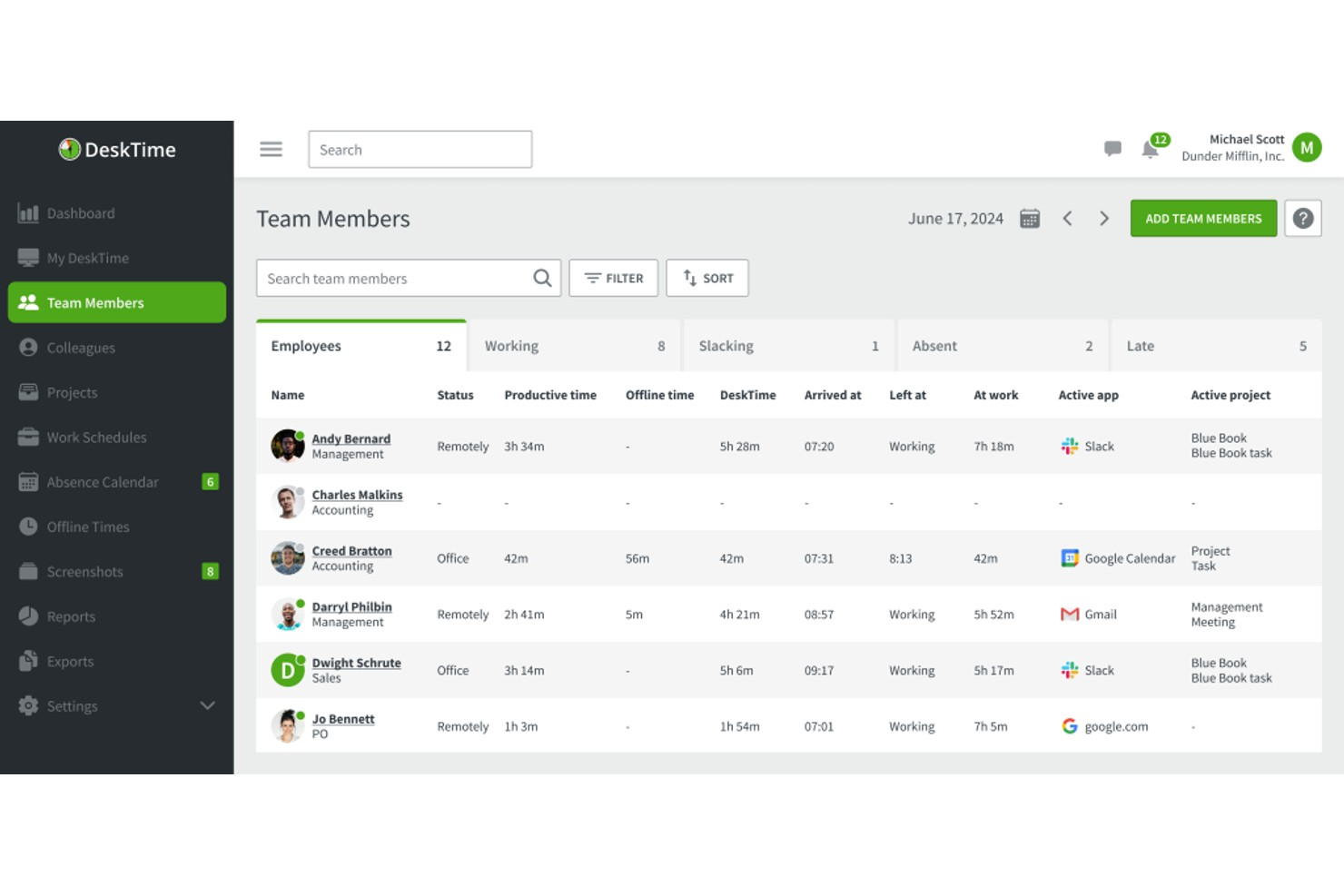
DeskTime è una piattaforma per il monitoraggio automatico del tempo e delle presenze che registra le ore lavorate, tiene traccia dell'utilizzo di applicazioni e URL, gestisce le assenze dei dipendenti e organizza i turni.
Progettato per i gruppi che necessitano della registrazione automatica delle ore, DeskTime è uno strumento per il monitoraggio delle presenze che include il controllo degli ingressi e delle uscite, la gestione delle assenze, la pianificazione dei turni e il monitoraggio del tempo dedicato ai progetti.
DeskTime combina il monitoraggio automatico delle presenze con il controllo della produttività, offrendo visibilità sulle ore lavorate, sull'utilizzo di applicazioni e URL, sul tempo non connesso, sui turni dei dipendenti e sui registri delle assenze.
Per chi è più adatto DeskTime?
DeskTime è una soluzione adatta ai gruppi di piccole e medie dimensioni che necessitano di un monitoraggio semplice e automatico delle presenze e del tempo, senza una configurazione complessa.
Perché ho scelto DeskTime
Ho incluso DeskTime tra le mie scelte principali per la sua capacità di gestire efficacemente il tempo non connesso insieme alle ore monitorate dal computer. La maggior parte degli strumenti per le presenze registra solo ciò che accade sullo schermo, mentre il monitoraggio manuale del tempo di DeskTime consente ai dipendenti di registrare il tempo trascorso in riunioni, al telefono o in sedi esterne. È possibile contrassegnare queste voci come produttive, non produttive o neutre, così da includerle nello stesso calcolo della produttività applicato alle attività monitorate dal computer. In questo modo, i dati sulle presenze e sulle prestazioni rimangono completi, anche quando il lavoro viene svolto lontano dalla scrivania.
Funzionalità principali di DeskTime
- Calendario delle assenze: Registra e gestisci i tipi di congedo dei dipendenti, comprese ferie, assenze per malattia e categorie di assenza personalizzate, in una vista condivisa della squadra.
- Pianificazione dei turni: Imposta l'orario di lavoro previsto per i dipendenti e confronta il tempo programmato con i dati effettivi di ingresso e uscita.
- Rilevamento del tempo di inattività: Segnala automaticamente i periodi di inattività, così che i registri delle presenze riflettano il tempo effettivamente lavorato e non solo il tempo di connessione.
- Monitoraggio della posizione tramite IP: Identifica se i dipendenti effettuano l'ingresso da sedi aziendali autorizzate o lavorano da remoto.
Integrazioni di DeskTime
DeskTime offre un numero limitato di integrazioni native, tra cui Google Calendar, Outlook Calendar, Trello, GitLab, Asana e Jira, e si collega a Zapier. È inoltre disponibile un'API per le integrazioni personalizzate.
Pros and Cons
Pros:
- Il monitoraggio automatico inizia all'accensione del computer
- Classifica le applicazioni come produttive o non produttive
- Monitora la posizione dei dipendenti da remoto e in ufficio
Cons:
- L'applicazione mobile offre funzionalità di monitoraggio limitate
- A volte non riesce a registrare il lavoro senza connessione alla scrivania

Sloneek
Ideale per il monitoraggio presenze HR integrato
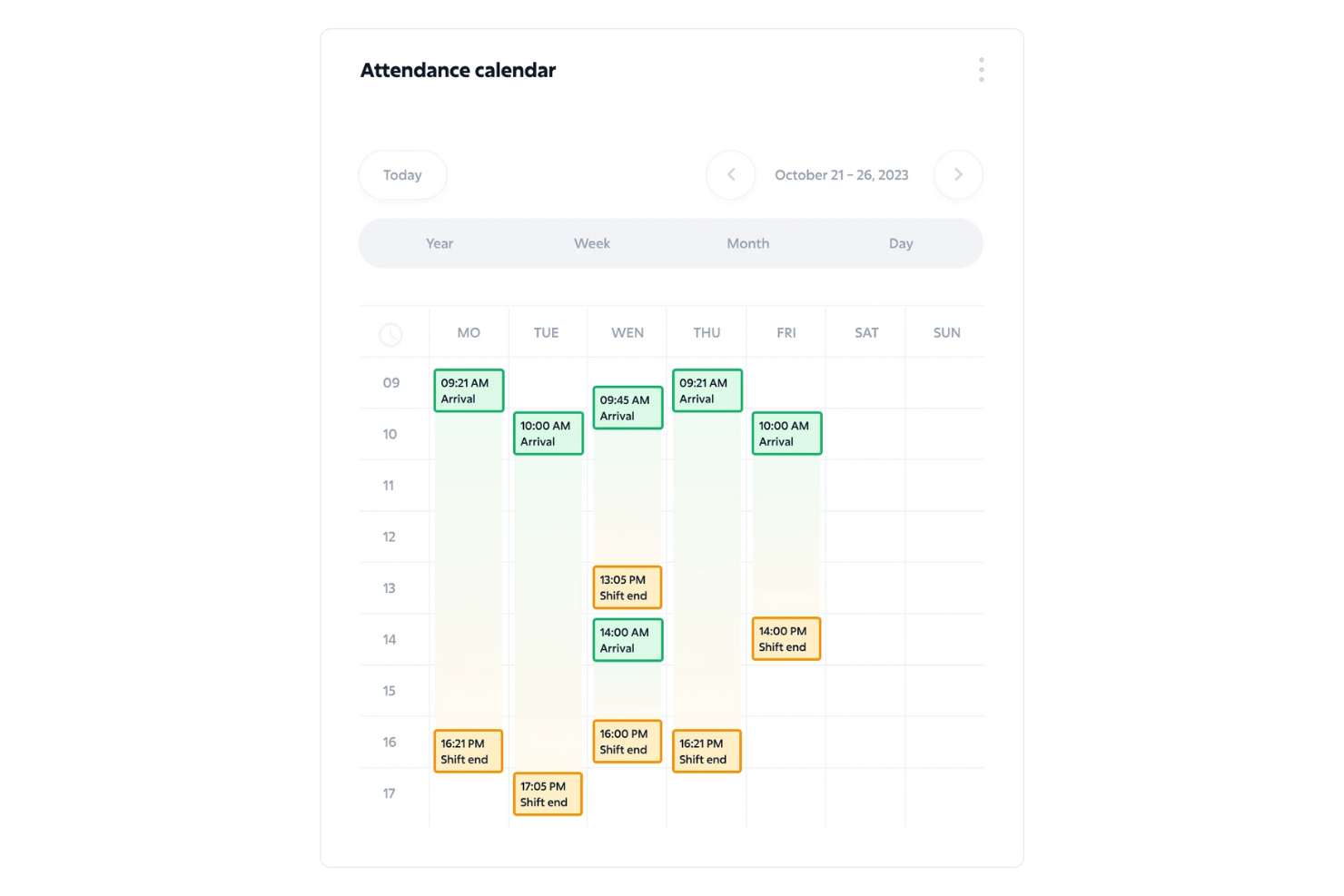
Sloneek è una piattaforma HR progettata per le organizzazioni che desiderano gestire presenze, assenze e orari di lavoro collegando questi dati a processi e documentazione HR più ampi.
Per chi è ideale Sloneek?
Sloneek è adatto a piccole e medie imprese che vogliono monitorare le presenze all'interno di un sistema HR più ampio, invece di gestirle come uno strumento separato.
Perché ho scelto Sloneek
Sloneek merita un posto nella mia shortlist perché il monitoraggio delle presenze non è isolato dal resto dell’ambiente HR—è integrato direttamente nella stessa piattaforma in cui si gestiscono i dati dei dipendenti, le assenze e la preparazione delle buste paga. Mi piace che il modulo delle presenze si sincronizzi automaticamente con i dati sulle assenze: quando un dipendente invia una richiesta di permesso e questa viene approvata, la modifica viene subito riflessa nel suo calendario delle presenze senza necessità di riconciliazione manuale. Trovo davvero utile anche la funzione di blocco mensile: una volta che un responsabile chiude il mese, i dati delle presenze vengono congelati e sono pronti per l'elaborazione delle paghe, riducendo così le contestazioni e le correzioni dell’ultimo minuto. Inoltre, la geolocalizzazione GPS e il riconoscimento facciale opzionale al terminale delle presenze offrono opzioni di timbratura flessibili sia per team che lavorano in ufficio, a turni o da remoto.
Funzionalità principali di Sloneek
- Gestione delle assenze: Traccia e approva le assenze dei dipendenti con una visualizzazione calendario configurabile, supporto agli allegati e report dettagliati.
- Calendario presenze del team: Visualizza arrivi, uscite e stato delle presenze dell’intera squadra in un layout calendario condiviso.
- Monitoraggio delle presenze da mobile: I dipendenti possono timbrare entrate e uscite, gestire le assenze e consultare i propri dati di presenza direttamente dall’app mobile di Sloneek.
- Report per le paghe: Genera documenti di supporto per l’elaborazione delle buste paga in base a presenze, assenze e ore lavorate, con accesso diretto ai report per i commercialisti.
Integrazioni Sloneek
Le integrazioni includono Google Workspace, Microsoft 365, Slack, Asana, Trello, Jira, Zapier, Okta, Personio e un’API per integrazioni personalizzate.
Pros and Cons
Pros:
- Il calendario presenze offre visibilità chiara sia settimanale che mensile
- Policy personalizzate per i permessi mantengono coerenza tra i team
- Statistiche utili aiutano a individuare precocemente i pattern di assenteismo
Cons:
- Nessuna funzione GPS o di geolocalizzazione integrata per i team che lavorano sul campo
- Le integrazioni native con le paghe sono limitate e potrebbero richiedere esportazioni manuali

Agendrix
Ideale per la funzionalità di timbratura in entrata/uscita

Agendrix è una piattaforma per la pianificazione dei turni e il monitoraggio delle presenze, pensata per le aziende che gestiscono team orari. Aiuta i responsabili a semplificare la programmazione dei turni, a monitorare le presenze e a gestire le richieste di ferie e permessi in un unico luogo.
Per chi è ideale Agendrix?
Agendrix è particolarmente indicato per i responsabili nei settori retail, alberghiero e sanitario che supervisionano team che lavorano a turni e necessitano di strumenti affidabili per tracciare gli orari di inizio e fine turno dei dipendenti.
Perché ho scelto Agendrix
Agendrix è nella mia lista perché offre una robusta funzionalità di timbratura in entrata/uscita. Apprezzo che i dipendenti possano timbrare in diversi modi—tramite un chiosco tablet, l'app mobile, una linea fissa o un lettore biometrico—così non si è vincolati a un solo metodo. Le ore timbrate vengono trasferite automaticamente nei fogli presenze, quindi il mio team non deve più riconciliare manualmente i dati delle timbrature con i turni programmati a fine periodo paga. Agendrix supporta anche la timbratura geolocalizzata, così quando i dipendenti timbrano dall'app mobile, è possibile verificare che siano realmente sul posto di lavoro.
Caratteristiche principali di Agendrix
- Gestione di assenze e permessi: I dipendenti possono inviare richieste di ferie o permessi direttamente dall'app, e i responsabili possono approvarle o rifiutarle dalla stessa interfaccia.
- Visibilità in tempo reale del calendario: Visualizza chi è in turno, in ritardo o assente in qualsiasi momento da una dashboard delle presenze in tempo reale.
- Generazione automatica dei fogli presenze: Le ore programmate ed effettive vengono raccolte automaticamente nei fogli presenze, pronti per l'esportazione ai fini paghe.
- Strumenti per la sostituzione dei turni: I responsabili possono pubblicare turni disponibili e i dipendenti possono prenderli, riducendo i tempi nella ricerca di coperture dell'ultimo minuto.
Integrazioni di Agendrix
Le integrazioni includono ADP Workforce Now, Ceridian e Sage; un'API consente integrazioni personalizzate.
Pros and Cons
Pros:
- Individua preventivamente conflitti di pianificazione
- Calcola automaticamente i supplementi turno
- Supporta timbrature tramite linea fissa
Cons:
- Modifica poco flessibile dei turni ricorrenti
- Integrazioni limitate con paghe di terze parti
Altri software per il monitoraggio delle presenze
Ecco alcune altre opzioni valide che non sono entrate nell’elenco dei migliori software per il monitoraggio delle presenze:
- When I Work
Ideale per orologi marcatempo flessibili
- Clockify
Ideale per la rilevazione oraria su più app
- Jibble
Ideale per il monitoraggio delle presenze tramite riconoscimento facciale
- ClockShark
Il miglior software per la rilevazione delle presenze per dipendenti o servizi sul campo
- edays
Ideale per la personalizzazione dei tipi di assenza
- Ubeya
Miglior gestione della forza lavoro per il settore degli eventi
- Deltek Replicon Time
Gestione globale di tempi e presenze, turni, conformità normativa e retribuzione
- Sage HR
Ideale per la gestione presenze con una piattaforma HR completa di funzionalità
- Arcoro
Ideale per aziende di costruzione
- ExakTime
Ideale per monitorare le presenze delle squadre sul campo
- Google Meet Attendance Tracker
Ideale per monitorare la presenza su Google Meet
- Nowsta
Il miglior software di monitoraggio presenze per organizzazioni con esigenze di personale per eventi
- Synerion
Miglior software per il monitoraggio delle presenze per l'automazione del controllo della conformità
- Rippling
Il miglior software di rilevazione presenze con funzione di check-in tramite selfie per dipendenti sul campo o lavoratori da remoto
- Deel HR
Migliore tracciamento delle presenze all'interno di un sistema di gestione globale dei dipendenti


Recensioni correlate di software per le risorse umane
Se non hai ancora trovato quello che cerchi, dai un'occhiata a questi altri strumenti correlati che abbiamo testato e valutato:
- Software per le risorse umane
- Software per l'elaborazione delle buste paga
- Software per il reclutamento
- Servizi di datore di lavoro legale
- Sistemi di tracciamento dei candidati
- Software per la gestione della forza lavoro
Come Valuto i Software di Monitoraggio delle Presenze
Valuto gli strumenti per la gestione delle presenze su due livelli: le funzionalità fondamentali, come l'automazione dei fogli presenze e i metodi di timbratura, e i fattori differenzianti che rendono una soluzione adatta per team orari o distribuiti.
Funzionalità Principali (Requisiti Indispensabili per Questa Lista)
Quando seleziono gli strumenti per la mia lista, valuto ciascuno su una scala da 0 (non offre la funzionalità) a 5 (eccelle in quest'area) per ognuna delle funzionalità principali elencate di seguito. Poi, calcolo il punteggio totale dello strumento come percentuale. Ogni strumento deve raggiungere un punteggio minimo totale del 65% per essere preso in considerazione.
- Metodi di Rilevazione delle Presenze: Verifico se uno strumento supporta più opzioni di timbratura come web, mobile, chiosco o biometrico, in modo che i team in loco e in ufficio possano registrare l’ingresso ovunque lavorino.
- Registri delle Presenze & Fogli Orari: Ogni strumento dovrebbe generare automaticamente i fogli presenza con flussi di modifica e approvazione, così che i manager non debbano riconciliare manualmente le ore a fine periodo di paga.
- Gestione Ferie & Permessi: Cerco flussi di richiesta e approvazione integrati, tracciamento degli accantonamenti e configurazione delle policy che permettano all’HR di gestire ferie, malattie e tipi di permesso personalizzati in un unico posto.
- Tracciamento Assenze & Ritardi: La piattaforma dovrebbe segnalare automaticamente arrivi in ritardo, uscite anticipate o assenze ingiustificate invece di affidarsi ai manager per individuare modelli nei dati grezzi dei fogli presenza.
- Integrazioni con Payroll & HR: Valuto se i dati di presenza si sincronizzano con i provider paghe e le piattaforme HRIS, così da evitare di reinserire le ore o esportare file CSV ad ogni ciclo di paga.
- Report & Analisi delle Presenze: I report dovrebbero andare oltre le semplici esportazioni di dati, offrendo dashboard che evidenziano tendenze come assenze ricorrenti di lunedì o picchi di straordinari tra i reparti.
Dopo aver selezionato gli strumenti che soddisfano i criteri, considero quali elementi distinguono ogni piattaforma.
Fattori Differenzianti (Cosa Distingue i Fornitori)
Ecco come confronto i diversi fornitori:
Funzionalità Distintive
Geofencing e tracciamento GPS sono cruciali per i team con lavoratori sul campo o su più sedi. Cerco strumenti che limitano le timbrature ai siti di lavoro approvati, così i manager non devono verificare manualmente le posizioni. La verifica biometrica è un altro elemento chiave, soprattutto in ambienti con molti turni dove il "buddy punching" è un reale problema. Valuto anche se la piattaforma offre avvisi automatici di conformità che segnalano rischi di straordinario o pause mancate prima che diventino violazioni.
Oltre le Funzionalità
Valuto quanto bene una piattaforma si adatta a specifici tipi di forza lavoro. Uno strumento creato per i team di ufficio a stipendio fisso non servirà allo stesso modo una catena retail con turni orari rotativi. Anche la conformità e la sicurezza dei dati pesano molto: verifico la presenza di audit trail e certificazioni come SOC 2 che diano fiducia all’HR nella gestione dei registri. Anche la trasparenza nei prezzi è importante: verifico se i costi crescono in modo prevedibile per dipendente e se hardware come scanner biometrici o chioschi possono aggiungere spese impreviste con la crescita del team.
Come scegliere il software per il monitoraggio delle presenze
Il software per il monitoraggio delle presenze può aiutarti a controllare con precisione le assenze dei dipendenti e a individuare eventuali tendenze nei tassi di assenteismo. Per capire quale software per il monitoraggio delle presenze risponde meglio alle tue esigenze, devi innanzitutto individuare gli utenti principali e documentare le loro difficoltà specifiche.
Mentre affronti il tuo personale processo di selezione del software, tieni a mente i seguenti punti:
- Quale problema stai cercando di risolvere - Inizia identificando le difficoltà che stai cercando di superare. Questo ti aiuterà a chiarire le caratteristiche e le funzionalità che il software per il monitoraggio delle presenze deve offrire.
- Chi dovrà utilizzarlo - Per valutare costi e requisiti, considera chi utilizzerà il software e di quante licenze avrai bisogno. Per il software di monitoraggio delle presenze, probabilmente vorrai limitare l'accesso amministrativo agli amministratori delle risorse umane, con un livello di accesso separato per manager e dipendenti. Una volta chiarito questo aspetto, è utile anche classificare le esigenze dei diversi utenti per individuare le priorità principali per gli utenti avanzati, i manager e i dipendenti, assicurandoti che siano tutte soddisfatte.
- Con quali altri strumenti deve funzionare - Chiarisci quali strumenti stai sostituendo, quali rimarranno in uso e con quali strumenti dovrai effettuare l'integrazione, come sistemi di gestione delle risorse umane, software per le paghe, sistemi di gestione delle prestazioni e strumenti di comunicazione come Slack e Microsoft Teams. Dovrai decidere se gli strumenti dovranno integrarsi tra loro oppure, in alternativa, se puoi sostituire più strumenti con una piattaforma completa di gestione della forza lavoro.
- Quali risultati sono importanti - Esamina le funzionalità che vuoi ottenere o migliorare e il modo in cui misurerai il successo. Ad esempio, potresti voler eliminare un processo manuale di riconciliazione tra gli attuali sistemi di rilevazione delle presenze e di gestione delle paghe, oppure semplicemente digitalizzare un processo di monitoraggio delle presenze basato su carta o Excel. Potresti confrontare le funzionalità dei software fino allo sfinimento, ma se non stai pensando ai risultati che vuoi raggiungere, potresti sprecare molto tempo prezioso.
- Come funzionerebbe all'interno della tua organizzazione - Considera la scelta del software insieme ai flussi di lavoro e ai sistemi esistenti. Valuta cosa funziona bene e quali sono gli aspetti che causano problemi e devono essere affrontati.
Ricorda che ogni azienda è diversa: non dare per scontato che un sistema software per il monitoraggio delle presenze funzionerà per la tua organizzazione solo perché è popolare.
Tendenze nei software per il monitoraggio delle presenze
Gli strumenti di gestione delle presenze sono diventati più sofisticati e ricchi di funzionalità, spinti dalla necessità di adattarsi alle dinamiche in evoluzione del luogo di lavoro e dal desiderio di integrare i nuovi progressi tecnologici nella loro esperienza utente. Ecco alcune tendenze in sviluppo che stanno attualmente plasmando il futuro della gestione delle presenze dei dipendenti:
- Accessibilità mobile e geofencing: la rapida evoluzione delle app mobili con funzionalità di geofencing evidenzia la domanda di flessibilità nel monitoraggio delle presenze. Queste funzionalità consentono alle aziende di gestire in modo più efficace i dipendenti da remoto o sul campo, garantendo dati precisi sulle presenze e offrendo al contempo ai dipendenti la comodità dell'accesso da dispositivi mobili.
- Integrazione con dispositivi indossabili: i sistemi di monitoraggio delle presenze sono sempre più compatibili con i dispositivi indossabili, consentendo un rilevamento più flessibile e accurato della presenza dei dipendenti, soprattutto in contesti lavorativi dinamici o non tradizionali.
- Riconoscimento facciale e funzionalità biometriche: l'adozione del riconoscimento facciale e dei dati biometrici per il monitoraggio delle presenze è tra le tendenze più innovative. Questa tecnologia offre un metodo altamente accurato e senza contatto per registrare le presenze, riducendo il rischio di furti di tempo e di timbrature effettuate per conto di colleghi.
- Rilevamento delle anomalie basato sull'intelligenza artificiale: alcuni sistemi di monitoraggio delle presenze ora includono il rilevamento delle anomalie basato sull'intelligenza artificiale, che identifica schemi di presenza insoliti e avvisa i manager. Questa funzionalità è particolarmente utile per prevenire potenziali problemi, come il burnout o gli straordinari non autorizzati.
Queste tendenze evidenziano diverse tecnologie avanzate che stabiliscono nuovi standard di efficienza, accuratezza e analisi avanzata dei dati nel luogo di lavoro moderno.
Che cos'è il software per il monitoraggio delle presenze?
Il software per il monitoraggio delle presenze è uno strumento digitale utilizzato dalle aziende per registrare e gestire le presenze dei dipendenti. Automatizza il processo di monitoraggio delle ore lavorate, delle assenze e dei permessi, contribuendo a elaborare correttamente le paghe e garantendo il rispetto degli orari e delle politiche di lavoro.
Le funzionalità principali includono l'integrazione con i sistemi di rilevazione delle ore per una registrazione precisa del tempo, la gestione delle assenze e dei permessi per monitorare il tempo libero dei dipendenti, la creazione di turni per organizzare i periodi di lavoro, il monitoraggio delle presenze in tempo reale, strumenti di reportistica e analisi, la compatibilità con i dispositivi mobili per l'accesso da remoto e l'integrazione con i sistemi di gestione delle paghe.
A volte il software per il monitoraggio delle presenze è un programma autonomo, mentre in altri casi puoi trovare le stesse funzionalità all'interno di una suite software più ampia, come un sistema di gestione delle risorse umane completo (HRIS, HCM, HRMS) o un sistema di gestione delle paghe. Puoi inoltre monitorare le presenze utilizzando anche app mobili per il monitoraggio delle ore e delle presenze.
Funzionalità
Ecco le funzionalità fondamentali che ogni ottimo software per il monitoraggio delle presenze dovrebbe offrire:
- Monitoraggio in tempo reale: Il software per la gestione delle presenze registra istantaneamente le entrate e le uscite dei dipendenti, tramite app mobili, chioschi o computer fissi. La visibilità in tempo reale garantisce registrazioni accurate delle ore lavorate e supporta un'elaborazione delle buste paga fluida e puntuale.
- Gestione delle assenze & dei permessi: Gli strumenti integrati semplificano la richiesta, l'approvazione e il monitoraggio delle assenze. I responsabili possono esaminare i motivi dei permessi e individuare le tendenze dell'assenteismo, contribuendo a prevenire problemi di organico e a migliorare la pianificazione della forza lavoro.
- Pianificazione dei turni: Molti sistemi di gestione delle presenze includono funzionalità di pianificazione che consentono ai responsabili di creare, assegnare e modificare i turni. Una pianificazione accurata aiuta a prevenire carenze di personale, lacune nella copertura e imprevisti deficit di manodopera.
- Politiche personalizzabili: I sistemi flessibili per la gestione delle presenze consentono alle aziende di personalizzare le regole relative a straordinari, pause, ritardi e penalità per le assenze. Le politiche su misura garantiscono che il software rispecchi le norme interne e sia conforme alle leggi locali sul lavoro.
- Monitoraggio della conformità: Gli strumenti per la gestione delle presenze aiutano a garantire che gli orari dei dipendenti siano conformi alle normative sul lavoro, ai limiti orari specifici del settore e agli accordi sui livelli di servizio. Ciò riduce i rischi di non conformità e mantiene la coerenza operativa.
- Servizi autonomi per i dipendenti: Un portale per i servizi autonomi consente ai dipendenti di visualizzare i registri delle presenze, controllare gli orari, richiedere permessi e aggiornare le informazioni personali, riducendo le attività amministrative ripetitive delle risorse umane.
- Avvisi & notifiche: Gli avvisi automatici segnalano ritardi, timbrature mancanti, assenze non pianificate o potenziali violazioni delle politiche. I responsabili ricevono aggiornamenti tempestivi per affrontare i problemi prima che incidano sulle attività operative.
- Compatibilità con i dispositivi mobili: I sistemi per la gestione delle presenze ottimizzati per i dispositivi mobili consentono ai dipendenti di registrare entrate e uscite da qualsiasi luogo, rendendoli ideali per le squadre ibride, il personale da remoto e i lavoratori sul campo.
- Tracciamento GPS + delimitazione geografica (facoltativo): Questi strumenti verificano che i dipendenti si trovino nelle sedi di lavoro autorizzate quando registrano l'entrata. Ciò aiuta a prevenire le frodi sulle ore lavorate e garantisce l'accuratezza dei dati sulle presenze.
- Tracciamento biometrico (facoltativo): Tecnologie come il riconoscimento delle impronte digitali o del volto eliminano le timbrature effettuate per conto di altri e garantiscono che tutti i registri delle presenze siano sicuri, autentici e a prova di manomissione.
Funzionalità comuni dell'AI nei software per il monitoraggio delle presenze
Molte piattaforme per il monitoraggio delle presenze includono ora l'AI per migliorare accuratezza, conformità e automazione, ad esempio:
- Rilevamento delle anomalie basato sull'AI: L'AI identifica modelli di presenza insoliti, come ritardi ripetuti, orari irregolari o timbrature mancanti, e avvisa tempestivamente i responsabili.
- Informazioni predittive sulle assenze: L'AI analizza i dati storici sulle presenze per prevedere le tendenze dell'assenteismo, i periodi di picco dei permessi e i rischi legati alla pianificazione, aiutando i responsabili a pianificare in modo proattivo.
- Ottimizzazione automatica della pianificazione: L'AI crea o modifica gli orari in base alla disponibilità dei dipendenti, alla cronologia lavorativa, alle prestazioni e alle regole di conformità, per ridurre al minimo i conflitti e le carenze di personale.
- Algoritmi di prevenzione delle frodi: L'AI monitora i dati biometrici, GPS e delle timbrature per rilevare attività sospette, come posizioni falsificate, credenziali condivise o tentativi di timbratura per conto di altri.
- Monitoraggio intelligente della conformità: L'AI verifica continuamente le attività relative alle presenze rispetto alle regole sugli straordinari, ai requisiti sulle pause e alle normative sul lavoro, avvisando l'utente in caso di potenziali violazioni della conformità.
- Strumenti di supporto in linguaggio naturale: Gli assistenti basati sull'AI aiutano i dipendenti a controllare gli orari, richiedere permessi o visualizzare lo storico delle presenze utilizzando semplici comandi conversazionali.
- Analisi basate sull'AI: L'AI migliora i pannelli di reportistica con informazioni più approfondite, identificando colli di bottiglia nella produttività, correlazioni nelle presenze e tendenze della forza lavoro che i responsabili potrebbero altrimenti non rilevare.
- Promemoria automatici dei flussi di lavoro: L'AI attiva promemoria per l'approvazione dei fogli presenze, gli aggiornamenti degli orari, le timbrature mancanti o le conferme delle politiche, mantenendo fluidi i processi.
Funzionalità comuni dell'AI nei software per il monitoraggio delle presenze
Molti moderni sistemi per la gestione delle presenze integrano funzionalità di AI per migliorare accuratezza, efficienza e conformità, ad esempio:
- Rilevamento delle anomalie basato sull'AI: L'AI identifica comportamenti insoliti, come ritardi ripetuti, timbrature mancanti, orari incoerenti o attività imprevista in determinate posizioni, aiutando i responsabili a intervenire tempestivamente.
- Informazioni predittive sulle presenze: L'AI analizza i modelli storici delle presenze per prevedere i periodi ad alto rischio di assenteismo, stimare le tendenze degli straordinari e contribuire a ottimizzare la pianificazione.
- Automazione intelligente della pianificazione: L'AI crea o modifica gli orari dei turni in base alla disponibilità dei dipendenti, alle competenze, alle regole di conformità e ai carichi di lavoro previsti, riducendo il tempo dedicato alla pianificazione manuale.
- Prevenzione delle frodi basata sull'IA: Monitorando i modelli biometrici, i dati GPS e il comportamento di timbratura, l'IA può rilevare attività sospette, come potenziali timbrature per conto di colleghi, posizioni falsificate o uso improprio dei dispositivi.
- Classificazione automatizzata delle ore: L'IA può classificare automaticamente le ore come ordinarie, straordinarie, maggiorate o relative a giorni festivi, in base alle normative locali e alle politiche aziendali personalizzate.
- Avvisi di conformità: L'IA monitora continuamente le modifiche alla normativa del lavoro, le soglie dell'orario lavorativo e i requisiti relativi alle pause, avvisando i datori di lavoro delle potenziali violazioni prima che si verifichino.
- Reportistica potenziata dall'IA: L'IA riassume le analisi delle presenze, mette in evidenza le tendenze e fornisce raccomandazioni pratiche per migliorare la produttività della forza lavoro e ridurre l'assenteismo. Supporta pratiche lavorative eque e contribuisce alla produttività complessiva della forza lavoro.
Vantaggi
Il software per il monitoraggio delle presenze è uno strumento moderno che aiuta le aziende a monitorare la presenza dei dipendenti, gestire le assenze e garantire la conformità alle leggi sul lavoro. Digitalizzando questi processi, è possibile ottenere una maggiore efficienza operativa ed eliminare la possibilità di errori.
Investendo nel miglior software per il monitoraggio delle presenze in base alle proprie esigenze specifiche, è possibile ottenere i seguenti vantaggi:
- Maggiore precisione: Automatizzando il processo di monitoraggio delle presenze, le aziende possono assicurarsi che le ore dei dipendenti vengano registrate con precisione, riducendo la probabilità di errori manuali che possono causare discrepanze e controversie relative alle buste paga. Inoltre, il collegamento con le piattaforme cloud per le risorse umane può semplificare la gestione delle presenze integrandola direttamente negli strumenti per paghe e performance.
- Maggiore produttività: Automatizzare il monitoraggio delle presenze dei dipendenti libera i team delle risorse umane e della gestione, permettendo loro di concentrarsi su attività più strategiche e aumentando così la produttività complessiva dell'organizzazione.
- Conformità migliorata: Il software per il monitoraggio delle presenze può essere configurato per verificare la conformità a diverse leggi sul lavoro, requisiti normativi e politiche organizzative. Questo aiuta le aziende a evitare sanzioni legali e a mantenere un ambiente di lavoro equo.
- Processo decisionale più efficace basato sui dati: Grazie alle funzionalità complete di analisi e reportistica, questi sistemi offrono informazioni sui modelli di presenza, sulle tendenze e sulle anomalie. Ciò aiuta i responsabili a individuare problemi come l'assenteismo cronico o la carenza di personale, consentendo loro di affrontarli in modo proattivo e migliorando la gestione e la pianificazione della forza lavoro.
- Dipendenti più autonomi: La maggior parte dei sistemi di monitoraggio delle presenze include un portale autonomo in cui i dipendenti possono controllare i propri dati di presenza, richiedere permessi o segnalare assenze. In questo modo, i dipendenti hanno accesso diretto alle proprie informazioni sulle presenze, aumentando la trasparenza dei dati.
Come si può vedere, il software per il monitoraggio delle presenze offre molteplici vantaggi che vanno oltre la semplice conservazione dei registri. Per le organizzazioni che desiderano ottimizzare la gestione della forza lavoro e l'efficienza operativa, investire in una soluzione solida per il monitoraggio delle presenze è una scelta strategica che può generare rendimenti significativi.
Costi e prezzi
A volte tutto si riduce ai costi. Per questo è importante avere una conoscenza realistica del proprio budget prima di dedicare troppo tempo all'analisi dei software per la gestione delle presenze.
Il software per il monitoraggio delle presenze offre generalmente una serie di piani per soddisfare le diverse esigenze e dimensioni delle organizzazioni, dalle startup alle grandi imprese. Per i titolari di aziende che gestiscono piccoli team, potrebbe essere sufficiente utilizzare un piano freemium. Tuttavia, i piani a pagamento offriranno sempre un ritorno sull'investimento migliore, se ci si può permettere di acquistarne uno.
Di seguito ho suddiviso le opzioni di piano più comuni, includendo un'opzione gratuita per chi ha esigenze di base, per aiutarti a valutare le possibilità con maggiore chiarezza.
Tabella comparativa dei piani per il software di monitoraggio delle presenze
| Tipo di piano | Prezzo medio | Funzionalità comuni |
|---|---|---|
| Gratuito | $0 | Monitoraggio di base delle presenze, report limitati e accesso per un numero limitato di utenti |
| Base | $10 - $20 per utente/mese | Monitoraggio avanzato delle presenze, reportistica in tempo reale, supporto per più sedi e assistenza via e-mail |
| Standard | $20 - $40 per utente/mese | Tutte le funzionalità del piano Base, oltre a pianificazione, gestione dei permessi, accesso da dispositivi mobili e assistenza telefonica |
| Premium | $40 - $60 per utente/mese | Tutte le funzionalità del piano Standard, oltre ad analisi avanzate, accesso API, inserimento personalizzato e assistenza 24 ore su 24, 7 giorni su 7 |
Scegliere il piano software giusto richiede di bilanciare le esigenze specifiche della tua organizzazione con il tuo budget. Prima di impegnarti a firmare un contratto, cerca innanzitutto di ottenere una prova gratuita. In questo modo potrai farti un'idea diretta del funzionamento del software prima di implementarlo per il resto del tuo personale.
Domande frequenti
Ecco alcune risposte alle domande frequenti che potresti avere sul software per il monitoraggio delle presenze e sul suo funzionamento:
Perché è importante monitorare le presenze?
Secondo il Bureau of Labor Statistics degli Stati Uniti, circa il 3% della forza lavoro di un datore di lavoro è assente in un determinato giorno. Ciò significa che spesso le aziende operano al di sotto della loro capacità ottimale e perdono opportunità di crescita perché non dispongono di risorse umane sufficienti.
Le assenze possono essere dovute a una miriade di ragioni diverse, da problemi di salute e problemi personali fino a stress o ferie programmate. Con l’aiuto di un software per il monitoraggio delle presenze, le aziende possono monitorare la presenza dei dipendenti e tenere meglio traccia delle assenze previste e impreviste.
Quali aspetti della presenza dei dipendenti dovrei monitorare?
Gli aspetti principali della presenza dei dipendenti che vorrai acquisire sono:
- Qualsiasi tipo di assenza dal lavoro (ad es. ferie, congedo per malattia, congedo per lutto, congedo per responsabilità familiari, ecc.)
- Schemi ricorrenti di assenza (ad es. segnali che evidenziano schemi come quello di un dipendente che si dichiara malato ogni lunedì)
- Orari di inizio e fine lavoro dei dipendenti, soprattutto per i lavoratori pagati a ore o per le aziende che fatturano le ore lavorabili
- Requisiti di conformità, come i limiti al numero di ore consecutive che un dipendente può lavorare o al numero di giorni consecutivi in cui può lavorare
Il software per il monitoraggio delle presenze è diverso dal software per il monitoraggio del tempo?
In apparenza, il monitoraggio delle presenze e il monitoraggio del tempo sono diversi. Il primo, nel senso più puro del termine, tiene traccia del fatto che i dipendenti si presentino o meno al lavoro ogni giorno, mentre il secondo registra le ore esatte (e talvolta le attività esatte) su cui lavorano. Tuttavia, scoprirai che la maggior parte dei sistemi software ha integrato queste funzionalità in “moduli di monitoraggio del tempo e delle presenze” completi, che svolgono entrambe le funzioni nella stessa interfaccia.
A seconda della complessità della struttura aziendale e delle attività lavorative, potresti non aver bisogno di una soluzione software complessa per il monitoraggio delle presenze. Se devi solo monitorare i giorni lavorativi rispetto a qualsiasi tipo di congedo, probabilmente sarà sufficiente qualcosa di semplice e conveniente. Tuttavia, per la maggior parte delle aziende, probabilmente vorrai una soluzione con un po’ più di profondità. Le funzionalità più avanzate che combinano il monitoraggio delle presenze e del tempo includono il monitoraggio dettagliato delle attività, le ore fatturabili rispetto a quelle non fatturabili e funzionalità avanzate di timbratura in entrata/uscita (ad es. biometriche, selfie, GPS o geofencing).
Perché l'accessibilità da dispositivi mobili è importante per il software di monitoraggio delle presenze?
Spesso i dipendenti non lavorano in ufficio. Possono invece lavorare da remoto, in una fabbrica, sul campo o in ruoli di assistenza mobile. Per questo è importante prendere in considerazione un software per il monitoraggio delle presenze che includa app mobili o almeno funzionalità ottimizzate per dispositivi mobili.
I sistemi software presenti in questo elenco offrono app mobili compatibili con dispositivi Android e iOS (Mac), oltre a versioni desktop basate sul cloud. Alcuni offrono anche funzionalità avanzate, come le modalità chiosco (ideali per magazzini e altre sedi operative), la timbratura tramite riconoscimento facciale o selfie oppure funzionalità di monitoraggio delle presenze tramite GPS e geofencing.
Il software per il monitoraggio delle presenze può aiutare a garantire la conformità alle leggi sul lavoro?
Assolutamente, il software per il monitoraggio delle presenze può essere un valido alleato per garantire la conformità alle leggi sul lavoro. Conserva registri precisi delle ore lavorate, degli straordinari, dei congedi e delle assenze, facilitando il rispetto delle normative relative al salario minimo, alla retribuzione degli straordinari e alle pause obbligatorie.
Automatizzando il monitoraggio e la reportistica, riduce il rischio di errori umani e di non conformità. Inoltre, spesso include funzionalità che segnalano potenziali problemi di conformità prima che diventino problematici. È come avere un responsabile della conformità sempre vigile integrato nel software, che tiene costantemente d’occhio l’orologio e il calendario al posto tuo.
In che modo questi software gestiscono i diversi fusi orari per i team globali?
Alcuni strumenti per il monitoraggio delle presenze sono progettati specificamente per team globali e distribuiti. La maggior parte di queste soluzioni dispone di funzionalità per gestire in modo più efficace i diversi fusi orari. Consentono ai dipendenti di timbrare l’entrata e l’uscita in base al proprio fuso orario locale, permettendo contemporaneamente ai manager di visualizzare e gestire questi dati da una posizione centrale, utilizzando se necessario un fuso orario unificato.
Questa flessibilità garantisce un monitoraggio accurato delle ore lavorate tra i diversi continenti e aiuta a coordinare in modo più efficace gli orari dei team, le scadenze e le riunioni. È come avere un orologio universale che mantiene tutti sincronizzati, indipendentemente dal luogo in cui si trovano nel mondo.
Quali sono le opzioni self-service per i dipendenti in questi sistemi?
Nel software per il monitoraggio delle presenze, le opzioni self-service per i dipendenti sono molto utili, poiché contribuiscono ad alleggerire il carico degli amministratori e del personale delle risorse umane. In genere, i dipendenti possono svolgere attività tramite i portali self-service, come:
- Timbrare l’entrata e l’uscita
- Richiedere permessi o ferie
- Visualizzare i propri orari
- Controllare il saldo dei propri congedi
È come avere il potere del dipartimento delle risorse umane in tasca. Questa autonomia non solo dà maggiore potere ai dipendenti, ma riduce anche il carico amministrativo dei team HR, rendendo tutto più efficiente. Inoltre, mantiene tutti aggiornati e garantisce la trasparenza a ogni livello.
- Assistenza ai dipendenti in linguaggio naturale: I chatbot basati sull'IA aiutano i dipendenti a controllare i turni, richiedere permessi, aggiornare la propria disponibilità o risolvere istantaneamente dubbi sulle presenze senza l'intervento delle risorse umane.
- Avvisi di conformità: L'IA monitora continuamente le modifiche alla normativa del lavoro, le soglie dell'orario lavorativo e i requisiti relativi alle pause, avvisando i datori di lavoro delle potenziali violazioni prima che si verifichino.
- Reportistica potenziata dall'IA: L'IA riassume le analisi delle presenze, mette in evidenza le tendenze e fornisce raccomandazioni pratiche per migliorare la produttività della forza lavoro e ridurre l'assenteismo. Supporta pratiche lavorative eque e contribuisce alla produttività complessiva della forza lavoro.
Vantaggi
Il software per il monitoraggio delle presenze è uno strumento moderno che aiuta le aziende a monitorare la presenza dei dipendenti, gestire le assenze e garantire la conformità alle leggi sul lavoro. Digitalizzando questi processi, è possibile ottenere una maggiore efficienza operativa ed eliminare la possibilità di errori.
Investendo nel miglior software per il monitoraggio delle presenze in base alle proprie esigenze specifiche, è possibile ottenere i seguenti vantaggi:
- Maggiore precisione: Automatizzando il processo di monitoraggio delle presenze, le aziende possono assicurarsi che le ore dei dipendenti vengano registrate con precisione, riducendo la probabilità di errori manuali che possono causare discrepanze e controversie relative alle buste paga. Inoltre, il collegamento con le piattaforme cloud per le risorse umane può semplificare la gestione delle presenze integrandola direttamente negli strumenti per paghe e performance.
- Maggiore produttività: Automatizzare il monitoraggio delle presenze dei dipendenti libera i team delle risorse umane e della gestione, permettendo loro di concentrarsi su attività più strategiche e aumentando così la produttività complessiva dell'organizzazione.
- Conformità migliorata: Il software per il monitoraggio delle presenze può essere configurato per verificare la conformità a diverse leggi sul lavoro, requisiti normativi e politiche organizzative. Questo aiuta le aziende a evitare sanzioni legali e a mantenere un ambiente di lavoro equo.
- Processo decisionale più efficace basato sui dati: Grazie alle funzionalità complete di analisi e reportistica, questi sistemi offrono informazioni sui modelli di presenza, sulle tendenze e sulle anomalie. Ciò aiuta i responsabili a individuare problemi come l'assenteismo cronico o la carenza di personale, consentendo loro di affrontarli in modo proattivo e migliorando la gestione e la pianificazione della forza lavoro.
- Dipendenti più autonomi: La maggior parte dei sistemi di monitoraggio delle presenze include un portale autonomo in cui i dipendenti possono controllare i propri dati di presenza, richiedere permessi o segnalare assenze. In questo modo, i dipendenti hanno accesso diretto alle proprie informazioni sulle presenze, aumentando la trasparenza dei dati.
Come si può vedere, il software per il monitoraggio delle presenze offre molteplici vantaggi che vanno oltre la semplice conservazione dei registri. Per le organizzazioni che desiderano ottimizzare la gestione della forza lavoro e l'efficienza operativa, investire in una soluzione solida per il monitoraggio delle presenze è una scelta strategica che può generare rendimenti significativi.
Costi e prezzi
A volte tutto si riduce ai costi. Per questo è importante avere una conoscenza realistica del proprio budget prima di dedicare troppo tempo all'analisi dei software per la gestione delle presenze.
Il software per il monitoraggio delle presenze offre generalmente una serie di piani per soddisfare le diverse esigenze e dimensioni delle organizzazioni, dalle startup alle grandi imprese. Per i titolari di aziende che gestiscono piccoli team, potrebbe essere sufficiente utilizzare un piano freemium. Tuttavia, i piani a pagamento offriranno sempre un ritorno sull'investimento migliore, se ci si può permettere di acquistarne uno.
Di seguito ho suddiviso le opzioni di piano più comuni, includendo un'opzione gratuita per chi ha esigenze di base, per aiutarti a valutare le possibilità con maggiore chiarezza.
Tabella comparativa dei piani per il software di monitoraggio delle presenze
| Tipo di piano | Prezzo medio | Funzionalità comuni |
|---|---|---|
| Gratuito | $0 | Monitoraggio di base delle presenze, report limitati e accesso per un numero limitato di utenti |
| Base | $10 - $20 per utente/mese | Monitoraggio avanzato delle presenze, reportistica in tempo reale, supporto per più sedi e assistenza via e-mail |
| Standard | $20 - $40 per utente/mese | Tutte le funzionalità del piano Base, oltre a pianificazione, gestione dei permessi, accesso da dispositivi mobili e assistenza telefonica |
| Premium | $40 - $60 per utente/mese | Tutte le funzionalità del piano Standard, oltre ad analisi avanzate, accesso API, inserimento personalizzato e assistenza 24 ore su 24, 7 giorni su 7 |
Scegliere il piano software giusto richiede di bilanciare le esigenze specifiche della tua organizzazione con il tuo budget. Prima di impegnarti a firmare un contratto, cerca innanzitutto di ottenere una prova gratuita. In questo modo potrai farti un'idea diretta del funzionamento del software prima di implementarlo per il resto del tuo personale.
Domande frequenti
Ecco alcune risposte alle domande frequenti che potresti avere sul software per il monitoraggio delle presenze e sul suo funzionamento:
Perché è importante monitorare le presenze?
Secondo il Bureau of Labor Statistics degli Stati Uniti, circa il 3% della forza lavoro di un datore di lavoro è assente in un determinato giorno. Ciò significa che spesso le aziende operano al di sotto della loro capacità ottimale e perdono opportunità di crescita perché non dispongono di risorse umane sufficienti.
Le assenze possono essere dovute a una miriade di ragioni diverse, da problemi di salute e problemi personali fino a stress o ferie programmate. Con l’aiuto di un software per il monitoraggio delle presenze, le aziende possono monitorare la presenza dei dipendenti e tenere meglio traccia delle assenze previste e impreviste.
Quali aspetti della presenza dei dipendenti dovrei monitorare?
Gli aspetti principali della presenza dei dipendenti che vorrai acquisire sono:
- Qualsiasi tipo di assenza dal lavoro (ad es. ferie, congedo per malattia, congedo per lutto, congedo per responsabilità familiari, ecc.)
- Schemi ricorrenti di assenza (ad es. segnali che evidenziano schemi come quello di un dipendente che si dichiara malato ogni lunedì)
- Orari di inizio e fine lavoro dei dipendenti, soprattutto per i lavoratori pagati a ore o per le aziende che fatturano le ore lavorabili
- Requisiti di conformità, come i limiti al numero di ore consecutive che un dipendente può lavorare o al numero di giorni consecutivi in cui può lavorare
Il software per il monitoraggio delle presenze è diverso dal software per il monitoraggio del tempo?
In apparenza, il monitoraggio delle presenze e il monitoraggio del tempo sono diversi. Il primo, nel senso più puro del termine, tiene traccia del fatto che i dipendenti si presentino o meno al lavoro ogni giorno, mentre il secondo registra le ore esatte (e talvolta le attività esatte) su cui lavorano. Tuttavia, scoprirai che la maggior parte dei sistemi software ha integrato queste funzionalità in “moduli di monitoraggio del tempo e delle presenze” completi, che svolgono entrambe le funzioni nella stessa interfaccia.
A seconda della complessità della struttura aziendale e delle attività lavorative, potresti non aver bisogno di una soluzione software complessa per il monitoraggio delle presenze. Se devi solo monitorare i giorni lavorativi rispetto a qualsiasi tipo di congedo, probabilmente sarà sufficiente qualcosa di semplice e conveniente. Tuttavia, per la maggior parte delle aziende, probabilmente vorrai una soluzione con un po’ più di profondità. Le funzionalità più avanzate che combinano il monitoraggio delle presenze e del tempo includono il monitoraggio dettagliato delle attività, le ore fatturabili rispetto a quelle non fatturabili e funzionalità avanzate di timbratura in entrata/uscita (ad es. biometriche, selfie, GPS o geofencing).
Perché l'accessibilità da dispositivi mobili è importante per il software di monitoraggio delle presenze?
Spesso i dipendenti non lavorano in ufficio. Possono invece lavorare da remoto, in una fabbrica, sul campo o in ruoli di assistenza mobile. Per questo è importante prendere in considerazione un software per il monitoraggio delle presenze che includa app mobili o almeno funzionalità ottimizzate per dispositivi mobili.
I sistemi software presenti in questo elenco offrono app mobili compatibili con dispositivi Android e iOS (Mac), oltre a versioni desktop basate sul cloud. Alcuni offrono anche funzionalità avanzate, come le modalità chiosco (ideali per magazzini e altre sedi operative), la timbratura tramite riconoscimento facciale o selfie oppure funzionalità di monitoraggio delle presenze tramite GPS e geofencing.
Il software per il monitoraggio delle presenze può aiutare a garantire la conformità alle leggi sul lavoro?
Assolutamente, il software per il monitoraggio delle presenze può essere un valido alleato per garantire la conformità alle leggi sul lavoro. Conserva registri precisi delle ore lavorate, degli straordinari, dei congedi e delle assenze, facilitando il rispetto delle normative relative al salario minimo, alla retribuzione degli straordinari e alle pause obbligatorie.
Automatizzando il monitoraggio e la reportistica, riduce il rischio di errori umani e di non conformità. Inoltre, spesso include funzionalità che segnalano potenziali problemi di conformità prima che diventino problematici. È come avere un responsabile della conformità sempre vigile integrato nel software, che tiene costantemente d’occhio l’orologio e il calendario al posto tuo.
In che modo questi software gestiscono i diversi fusi orari per i team globali?
Alcuni strumenti per il monitoraggio delle presenze sono progettati specificamente per team globali e distribuiti. La maggior parte di queste soluzioni dispone di funzionalità per gestire in modo più efficace i diversi fusi orari. Consentono ai dipendenti di timbrare l’entrata e l’uscita in base al proprio fuso orario locale, permettendo contemporaneamente ai manager di visualizzare e gestire questi dati da una posizione centrale, utilizzando se necessario un fuso orario unificato.
Questa flessibilità garantisce un monitoraggio accurato delle ore lavorate tra i diversi continenti e aiuta a coordinare in modo più efficace gli orari dei team, le scadenze e le riunioni. È come avere un orologio universale che mantiene tutti sincronizzati, indipendentemente dal luogo in cui si trovano nel mondo.
Quali sono le opzioni self-service per i dipendenti in questi sistemi?
Nel software per il monitoraggio delle presenze, le opzioni self-service per i dipendenti sono molto utili, poiché contribuiscono ad alleggerire il carico degli amministratori e del personale delle risorse umane. In genere, i dipendenti possono svolgere attività tramite i portali self-service, come:
- Timbrare l’entrata e l’uscita
- Richiedere permessi o ferie
- Visualizzare i propri orari
- Controllare il saldo dei propri congedi
È come avere il potere del dipartimento delle risorse umane in tasca. Questa autonomia non solo dà maggiore potere ai dipendenti, ma riduce anche il carico amministrativo dei team HR, rendendo tutto più efficiente. Inoltre, mantiene tutti aggiornati e garantisce la trasparenza a ogni livello.