

I 10 migliori strumenti online per la pianificazione dei turni dei dipendenti per il 2026

10 Elenco dei migliori software online per la gestione dei turni dei dipendenti


Tenere il team organizzato e i programmi sotto controllo può essere davvero complicato. Coordinare i turni, gestire le disponibilità e assicurarsi che tutti siano sulla stessa lunghezza d’onda richiede tempo e impegno. È qui che il software online per la gestione dei turni dei dipendenti si rivela utile. È progettato per semplificarti la vita e aiutare il team a lavorare senza intoppi.
In base alla mia esperienza, avere gli strumenti giusti può trasformare il modo in cui affronti le difficoltà legate alla programmazione. Ho testato e recensito diverse opzioni per aiutarti a trovare quella più adatta alle tue esigenze. Avrai una panoramica imparziale delle mie scelte migliori, insieme ad approfondimenti sulle loro funzionalità e sui vantaggi.
Continuando a leggere, scoprirai quali soluzioni software possono davvero fare la differenza per te e il tuo team.
Perché fidarsi delle nostre recensioni sui software
Il nostro team testa e recensisce software dal 2012. In quanto esperti HR noi stessi, sappiamo quanto sia difficile — e importante — scegliere il software giusto.
Per questa guida, abbiamo valutato gli strumenti attraverso test pratici e ricerche indipendenti, assegnando un punteggio agli strumenti in base ai nostri criteri di selezione. Ci basiamo inoltre sulle competenze di leader di pensiero del settore e di professionisti HR attivi.
Le nostre recensioni riflettono il nostro giudizio editoriale umano, non un discorso di vendita.
Revisori esperti:
Riepilogo dei migliori software online per la gestione dei turni dei dipendenti
Questa tabella comparativa riassume i dettagli sui prezzi delle mie migliori selezioni di software online per la gestione dei turni dei dipendenti, per aiutarti a trovare quello più adatto al tuo budget e alle esigenze della tua attività.
| Tool | Best For | Trial Info | Price | ||
|---|---|---|---|---|---|
| 1 | Ideale per i lavoratori senza scrivania che hanno bisogno di informazioni sui turni facilmente accessibili | 14 giorni di prova gratuita | A partire da $35/mese (fatturazione mensile) fino a 200 membri dello staff | Website | |
| 2 | Ideale per creare fogli presenze da integrare con il sistema paghe | Demo gratuita disponibile | A partire da $8/utente/mese | Website | |
| 3 | I migliori flussi di lavoro personalizzati per la pianificazione dei team | Prova gratuita di 14 giorni | A partire da $8/utente/mese | Website | |
| 4 | Ideale se hai bisogno di una piattaforma HR completa online | Piano gratuito + prova gratuita di 14 giorni disponibile | Dispone di un piano gratuito utilizzabile con un numero illimitato di dipendenti | Website | |
| 5 | Il miglior rilevatore presenze online con gestione turni | 14 giorni di prova gratuita | A partire da $25.99/mese | Website | |
| 6 | Il migliore per le PMI a turni in Canada | Prova gratuita di 21 giorni + demo gratuita disponibile | Da $2,93/utente/mese (fatturazione annuale) | Website | |
| 7 | Ideale per ristoranti | Prova gratuita di 14 giorni | Da $19.99/mese/sede (fatturato mensilmente) | Website | |
| 8 | Ideale per aziende di servizi sul campo o edilizia | Prova gratuita di 14 giorni + demo gratuita disponibile | Da $40/mese | Website | |
| 9 | Ideale per la gestione delle assenze | Demo gratuita disponibile | Prezzo su richiesta | Website | |
| 10 | Ideale per agenzie orientate ai progetti | Prova gratuita di 7 giorni disponibile | Da $9/utente/mese (fatturazione annuale) | Website |


Recensioni dei migliori software online per la gestione dei turni dei dipendenti
Segue una breve panoramica di ogni software online per la gestione dei turni dei dipendenti incluso nella mia lista dei 10 migliori. Per i miei 10 preferiti, ho spiegato per cosa si distinguono e incluso uno screenshot di ciascuno per mostrare le loro funzionalità in azione. Inoltre, qui sotto trovi altre 20 opzioni se desideri prendere in considerazione ancora più possibilità.

Ideale per i lavoratori senza scrivania che hanno bisogno di informazioni sui turni facilmente accessibili

Hai bisogno di più di un semplice software per la pianificazione del personale? Connecteam è una piattaforma completa di gestione del lavoro utilizzata dai responsabili di tutti i settori per gestire le operazioni quotidiane, la programmazione, le comunicazioni interne e la formazione dei dipendenti.
Le sue funzionalità di monitoraggio del tempo includono la geolocalizzazione, che garantisce che il tuo team sia nel posto giusto e non possa timbrare quando si trova fuori dal sito di lavoro designato. Moduli digitali, checklist e notifiche push o promemoria sono punti extra che la rendono una buona scelta per i lavoratori senza scrivania.
Le integrazioni includono Paychex, Xero, Gusto, QuickBooks Payroll (online + desktop), Zapier, Google Calendar, accesso API e altri.
New Product Updates from Connecteam

Connecteam Expands Break and Timesheet Controls
Connecteam adds flexible break thresholds, personalized policies, auto-end options, a centralized exceptions report, and improved timesheet issue visibility to help teams manage breaks and timesheets more effectively. For more information, visit Connecteam’s official site.
 .
.
Ideale per creare fogli presenze da integrare con il sistema paghe
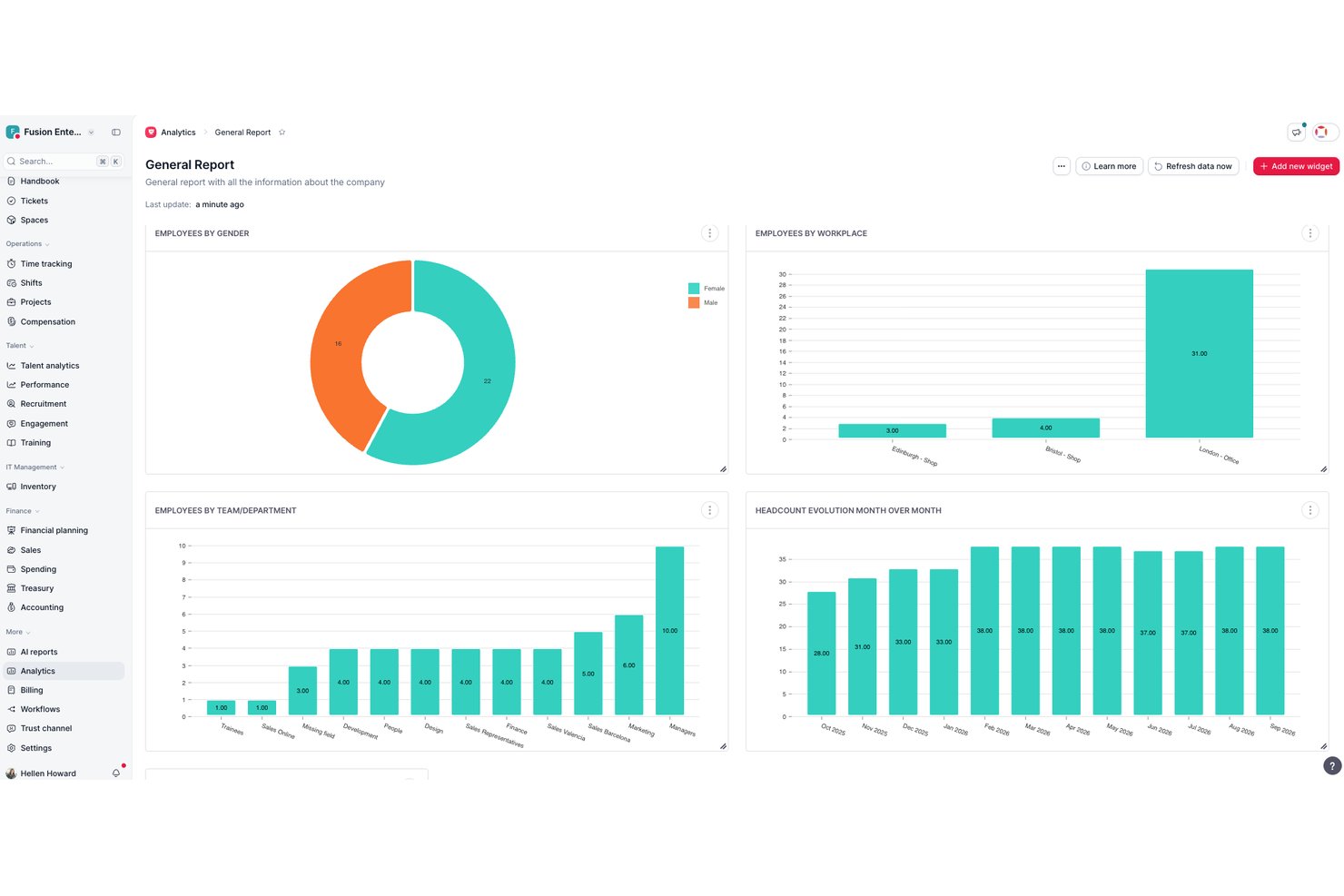
Factorial è un software online pensato per aiutare le aziende a gestire il proprio personale in modo più efficiente. Ho scelto Factorial perché, ammettiamolo, la pianificazione dei turni può essere davvero complicata. Cercavo qualcosa che potesse semplificare il processo e aiutarmi a tenere traccia di chi fa cosa e quando. Factorial sembrava soddisfare tutti i requisiti. È facile da usare, offre numerose funzionalità interessanti ed è progettato specificamente per aziende di qualsiasi dimensione.
Ciò che distingue davvero Factorial dalla concorrenza sono le sue funzionalità. Dispone di una fantastica visualizzazione del calendario che consente di vedere a colpo d'occhio il programma dell'intero team. È possibile aggiungere facilmente i turni, assegnare attività e persino impostare promemoria. Inoltre, include una funzione di rilevazione delle presenze molto utile per tenere sotto controllo quanto tempo ciascuno dedica alle proprie attività. Ma la mia funzionalità preferita in assoluto deve essere la gestione delle assenze. Consente di gestire tutti i tipi di assenza, dalle ferie ai giorni di malattia, tutto in un unico posto.
Factorial si distingue ulteriormente dando priorità al benessere dei dipendenti attraverso un modulo dedicato che consente loro di fornire commenti anonimi, segnalare problemi e suggerire miglioramenti. Questo modulo offre uno spazio sicuro in cui i dipendenti possono esprimere le proprie opinioni senza timore di ritorsioni, favorendo una cultura della comunicazione aperta e trasparente. Include anche funzionalità di analisi del tono emotivo che aiutano le squadre delle risorse umane a individuare le tendenze e ad affrontare proattivamente i potenziali problemi.
Le integrazioni includono Sage, Gmail, Payflow, Dynamics 365, LinkedIn, TravelPerk, PowerBI, Indeed, Recruitee, Slack e altri.

I migliori flussi di lavoro personalizzati per la pianificazione dei team
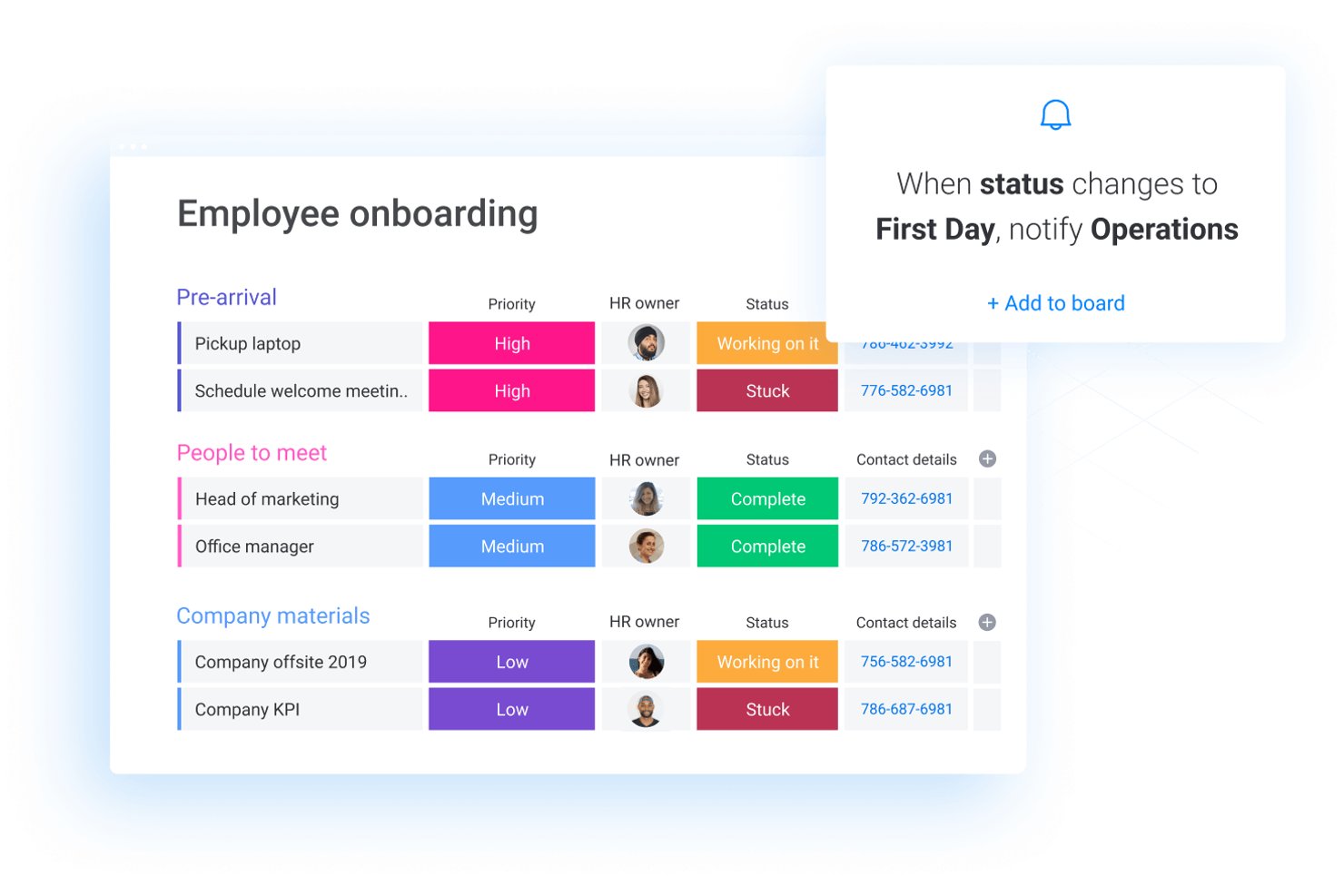
monday AI Workspace è una piattaforma di gestione del lavoro personalizzabile che consente ai team di creare flussi di lavoro di pianificazione, gestire attività e risorse, automatizzare processi e coordinare il lavoro su progetti diversi utilizzando bacheche, linee temporali e strumenti potenziati dall'intelligenza artificiale.
Per chi è ideale monday AI Workspace?
Si adatta particolarmente bene ai team operativi e di progetto di organizzazioni di medie e grandi dimensioni che necessitano di creare flussi di lavoro di pianificazione personalizzati tra più reparti.
Perché ho scelto monday AI Workspace
monday AI Workspace si guadagna un posto nella mia shortlist grazie alla flessibilità che offre nel costruire un flusso di lavoro di pianificazione personalizzato senza scrivere una sola riga di codice. Utilizzo il sistema a bacheca e colonne per creare turni che notificano automaticamente i membri del team quando cambiano le assegnazioni, tramite trigger di automazione collegati alle colonne di stato. Trovo particolarmente utile sovrapporre le viste Timeline e Calendario sulla stessa bacheca, così da vedere a colpo d’occhio le coperture mancanti e i carichi di lavoro individuali.
Funzionalità principali di monday AI Workspace
- Gestione delle risorse: Assegna, bilancia e visualizza i carichi di lavoro dei dipendenti su più progetti utilizzando widget della dashboard e strumenti per la capacità.
- Costruttore di automazioni: Imposta trigger personalizzati che automatizzano aggiornamenti di pianificazione, notifiche e cambi di stato nei flussi di lavoro.
- Colonna per monitoraggio del tempo: Registra le ore spese sulle attività assegnate direttamente dalle bacheche per una semplice registrazione e riconciliazione delle ore.
- Viste calendario e timeline: Visualizza il lavoro programmato, filtra per team o individuo e confronta incarichi sovrapposti tramite un calendario interattivo o un'interfaccia stile Gantt.
Integrazioni di monday AI Workspace
monday.com offre centinaia di integrazioni tramite le sue soluzioni incorporate e il marketplace, includendo strumenti come Slack, Salesforce, HubSpot, Google Workspace, Microsoft Teams e Zoom. Supporta anche Zapier e offre un'API per integrazioni personalizzate.
Pros and Cons
Pros:
- Costruttore di flussi di lavoro per turni altamente personalizzabile
- Viste delle bacheche flessibili per visualizzare la copertura del team
- Potenti strumenti di automazione riducono le attività di pianificazione manuale
Cons:
- Nessun sistema nativo di conformità normativa o motore di regole
- Funzionalità limitate per la sostituzione turni e disponibilità integrate
New Product Updates from monday AI Workspace
monday AI Workspace Adds Human Approval Routing
monday AI Workspace adds a human-in-the-loop approval block to AI Workflows, sending approval requests and routing workflow paths based on responses. For more information, visit monday AI Workspace's official site.

Homebase
Ideale se hai bisogno di una piattaforma HR completa online
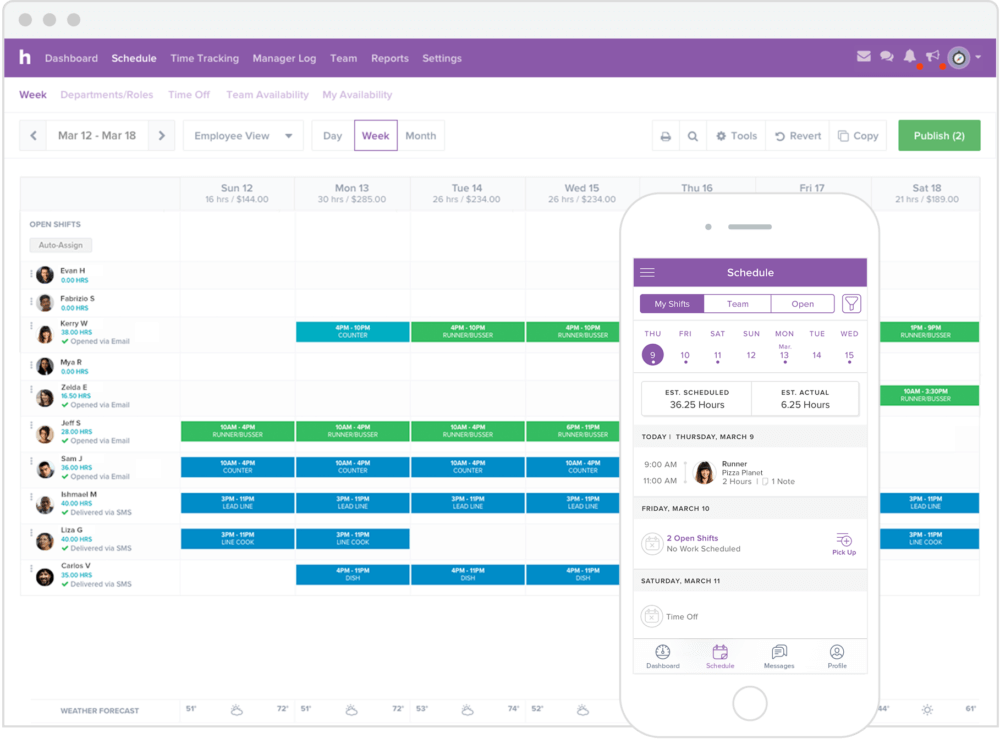
Il software di pianificazione dei turni Homebase è utilizzato principalmente da piccole imprese come negozi, saloni di bellezza o centri fitness, e altri fornitori di servizi. La piattaforma offre un set completo di funzionalità che permette di gestire tutte le attività HR dall'inizio alla fine, inclusi l'assunzione e l'onboarding, la pianificazione dei turni, la rilevazione delle presenze, la comunicazione tra i membri del team e molto altro.
La sua semplicità e la vasta gamma di funzionalità gli hanno fatto ottenere numerosi riconoscimenti, come “Miglior Software per la Rilevazione delle Presenze” da The Blueprint e una valutazione di 5 stelle su QuickBooks Apps.
Homebase offre un piano gratuito che puoi usare con un numero illimitato di dipendenti, ma con meno funzionalità avanzate. Questo sostituisce la prova gratuita.

Il miglior rilevatore presenze online con gestione turni
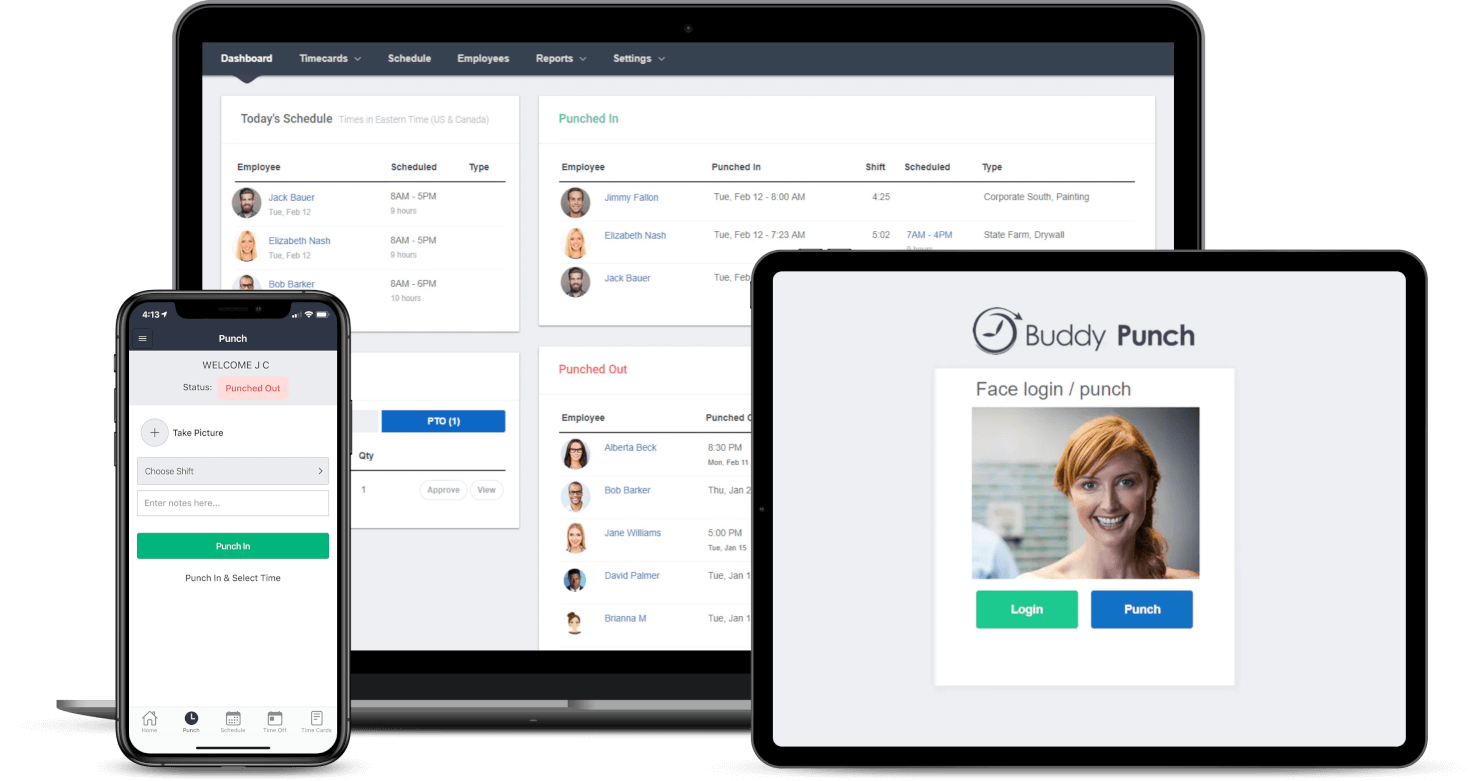
Buddy Punch è un software di rilevazione presenze e gestione turni basato sul web. I tuoi dipendenti possono visualizzare il proprio cartellino attuale, richiedere permessi, segnalare un errore di timbratura o persino inviare il cartellino per l'approvazione — tutto senza mai uscire dall'app Buddy Punch. L'interfaccia è stata progettata per garantire una navigazione semplice e intuitiva, con la creazione dei turni tramite drag-and-drop e la possibilità di creare turni ricorrenti o ripetuti.
Le principali funzionalità di Buddy Punch aiutano a mantenere il team responsabile e onesto. Grazie al rilevamento GPS, puoi monitorare la posizione dello staff ogni volta che timbra l'entrata/uscita. Altre funzionalità includono il riconoscimento facciale e la foto alla timbratura, che eseguono una scansione biometrica del volto per verificare chi sta tentando di timbrare. Inoltre, Buddy Punch si integra con QuickBooks, ADP, Gusto, Paychex, Paylocity, PayPlus, SurePayroll e Workday. Con un account Zapier, avrai accesso a migliaia di altre app e strumenti.
Buddy Punch ha un costo a partire da $3.49/utente/mese più una quota base di $19/mese per il pacchetto Standard di gestione presenze. Le aziende con più di 200 dipendenti possono richiedere un preventivo gratuito. È disponibile anche una prova gratuita di 14 giorni.

Agendrix
Il migliore per le PMI a turni in Canada
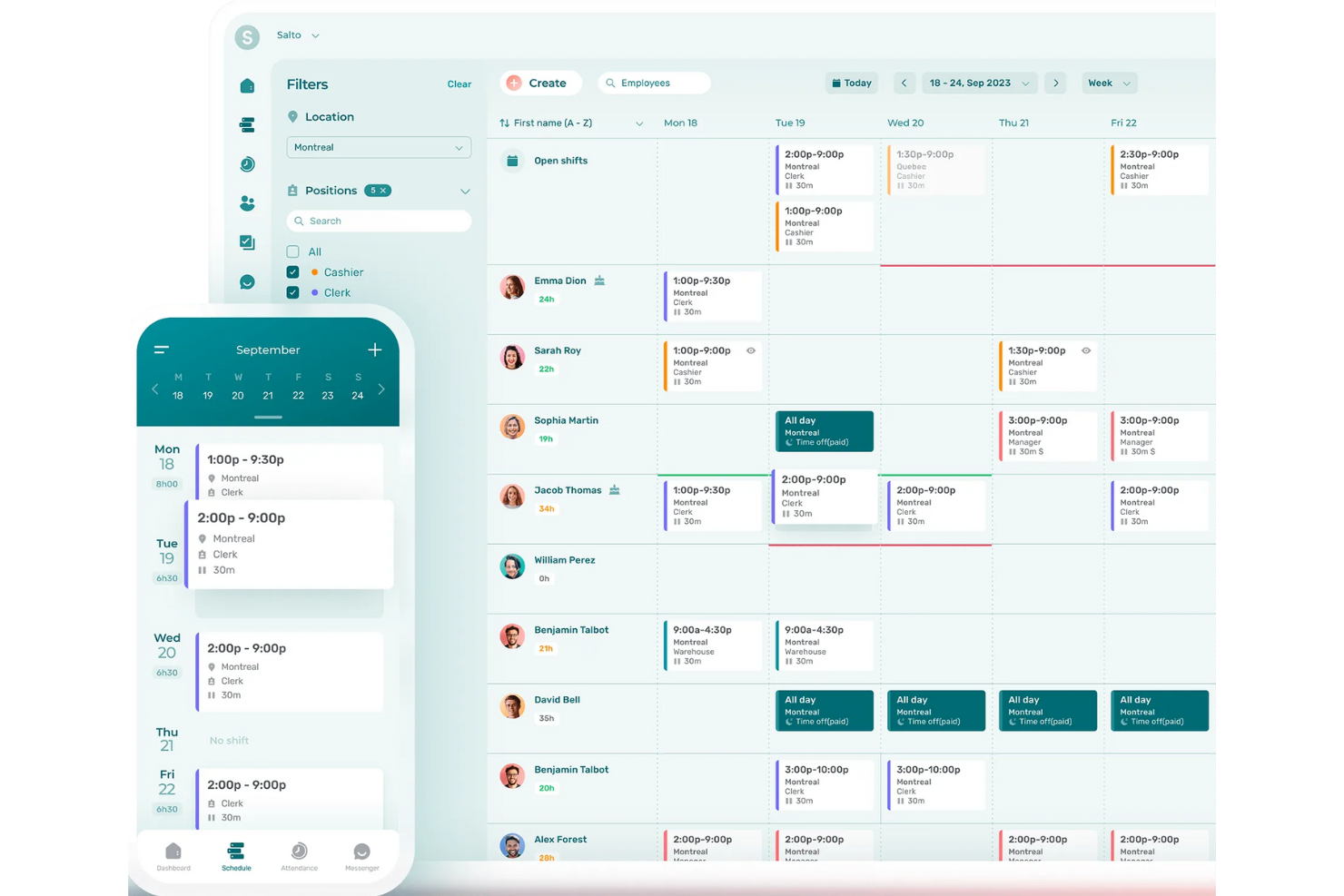
Agendrix è una piattaforma canadese che aiuta le piccole e medie imprese con turni a gestire orari del personale, rilevamento delle presenze e comunicazione tra dipendenti. Il suo software di pianificazione online supporta esigenze di programmazione complesse su più sedi, ruoli e livelli di disponibilità. La piattaforma e l'app mobile offrono supporto bilingue in inglese e francese, rendendolo uno strumento accessibile per team diversificati.
Ho scelto Agendrix perché è stato sviluppato considerando le reali esigenze del lavoro a turni, soprattutto per i piccoli team che devono gestire disponibilità variabili. È possibile creare manualmente gli orari o lasciare che il sistema li compili automaticamente in base a disponibilità, ferie e carichi di lavoro. Mi piace che supporti sedi multiple e consenta ai manager di avere permessi di accesso specifici, il che lo rende più gestibile per team in crescita. Anche l'app mobile è ben fatta: i dipendenti possono consultare i turni, confermare le presenze o richiedere cambi senza dover usare un computer.
Inoltre, i responsabili possono vedere se un dipendente ha visualizzato il turno assegnato e richiedere conferme di turno, aggiungendo un livello di responsabilità. Agendrix permette inoltre di allegare elenchi di compiti ai turni, aiutando a chiarire e controllare le responsabilità quotidiane.
Pianificazione automatizzata dei turni, tracciamento delle conferme di turno, interfaccia bilingue (inglese/francese), assegnazione di compiti per turno, pianificazione su più sedi, gestione di ruoli e disponibilità, messaggistica integrata nel team e documenti elettronici per le risorse umane.
EmployerD, Nethris, Sage 50, Acomba, QuickBooks, Ceridian Powerpay, ADP Workforce Now, Payworks, Lightspeed, Azur, Easypay, BeLocum, Hopem e Folks HR.
7shifts
Ideale per ristoranti
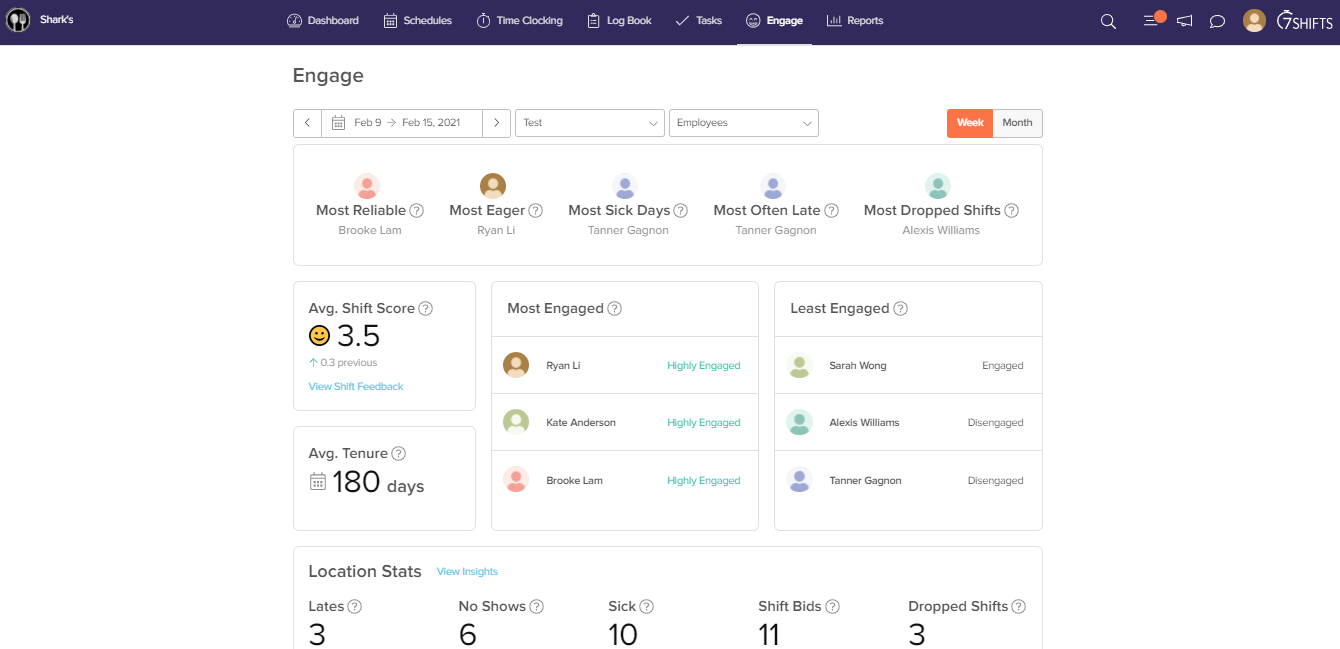
Gestisci un ristorante? 7shifts è la soluzione preferita da marchi noti come Five Guys o Sambo’s, ma anche i piccoli ristoranti con servizio completo ne traggono grande vantaggio. Il sistema basato su IA per la creazione degli orari supporta la generazione e l’ottimizzazione automatica dei turni, così puoi soddisfare le richieste in tempo reale.
I dipendenti possono notificare ai manager le variazioni di disponibilità direttamente dall’app, favorendo un sistema collaborativo bidirezionale efficiente. Per sincronizzare i dati di vendita e di forza lavoro con i salari, 7shifts si integra con decine di soluzioni POS e pagamenti tra le più conosciute.
Il piano a pagamento di 7shifts costa $24.99/mese/sede, ma puoi scegliere la prova gratuita di 14 giorni oppure utilizzare il piano gratuito con le funzionalità di programmazione di base.

Ideale per aziende di servizi sul campo o edilizia

ClockShark è un software online per la programmazione dei turni dei dipendenti che include fogli presenze e rilevamento delle ore di lavoro, ideale per le aziende che operano nel settore dei servizi sul campo e delle costruzioni. I dipendenti possono registrare l'orario di entrata e uscita direttamente dagli smartphone e tutti i dati relativi al costo del lavoro vengono registrati nell'app, rendendoli accessibili per una semplice gestione di buste paga e fatturazione. Hai diverse opzioni per consentire l'accesso a ClockShark ai dipendenti: tramite browser web, app mobile o anche tramite un «chiosco» ClockShark utilizzando un tablet. Puoi sfruttare strumenti di riconoscimento facciale e PIN individuali per garantire la massima sicurezza, indipendentemente dal metodo di accesso al software.
La gestione del personale è semplice grazie al calendario di pianificazione dei turni di ClockShark. Puoi creare e assegnare turni, codificare le voci con colori diversi e utilizzare il drag-and-drop per apportare rapidamente modifiche. Le notifiche avviseranno in tempo reale tutte le persone coinvolte se il loro turno viene modificato in qualsiasi modo (annullato, ridotto, scambiato, ecc.). ClockShark include anche funzionalità GPS e geofencing, così puoi vedere dove e quando le persone stanno effettuando il check-in.
Nel complesso, ClockShark è un software di programmazione dei turni online indispensabile per le aziende attive nei servizi sul campo o nelle costruzioni, al fine di semplificare e velocizzare i flussi di lavoro dal foglio presenze alla busta paga.
ClockShark si integra con QuickBooks, Sage 100 Contractor, Xero, ADP, Paychex e altre applicazioni.
ClockShark ha un costo a partire da $7/utente/mese più una tariffa base di $16/mese. È inoltre disponibile una prova gratuita di 14 giorni.

edays
Ideale per la gestione delle assenze

Navigare tra le complessità della pianificazione del personale può essere un compito arduo, ma edays offre una soluzione pensata per soddisfare le esigenze delle aziende che cercano efficienza nella gestione della forza lavoro. Progettato per organizzazioni di tutte le dimensioni, incluse quelle con presenza globale, edays fornisce strumenti per affrontare diverse sfide di pianificazione, come la gestione delle assenze e il monitoraggio delle ferie. Offrendo una piattaforma che si integra perfettamente con i sistemi HR esistenti, edays risponde alla necessità di un approccio centralizzato alla gestione delle pianificazioni dei dipendenti, migliorando così la produttività e la conformità a tutti i livelli.
Perché ho scelto edays
Ho scelto edays per il suo approccio unico alla pianificazione dei dipendenti online, concentrandosi su una gestione completa delle assenze. Con funzionalità come tipologie di ferie personalizzabili e calendari condivisi di team, edays ti permette di gestire facilmente scenari di pianificazione complessi. La capacità della piattaforma di automatizzare i trigger di assenza e offrire visibilità in tempo reale sulla disponibilità dei dipendenti lo rende uno strumento prezioso per qualsiasi organizzazione che voglia ottimizzare i propri processi di pianificazione. Dal mio punto di vista, l’integrazione di queste funzionalità con strumenti di conformità garantisce che il tuo team sia sempre aggiornato sia sugli aspetti della pianificazione sia su quelli normativi.
Funzionalità principali di edays
Oltre alle sue straordinarie capacità di pianificazione, edays offre anche altre funzionalità:
- Prenotazione ferie self-service: I dipendenti possono richiedere le ferie comodamente da un modulo web o mobile.
- Monitoraggio dei diritti maturati: Questa funzione consente di controllare le ferie utilizzate, quelle residue e quelle in attesa di approvazione.
- Importazione giorni festivi: Importa oltre 200 festività regionali oppure personalizza le tue in base alle esigenze della tua organizzazione.
- Banca ore (Time Off in Lieu - TOIL): Monitora e richiedi automaticamente le ore di straordinario maturate, offrendo flessibilità nella gestione dell’orario di lavoro.
Integrazioni edays
Le integrazioni includono SAP SuccessFactors, ADP, Workday, Microsoft Outlook, Google Calendar, Microsoft Teams, Slack, Xero, BambooHR e Sage.
Pros and Cons
Pros:
- Gestione robusta di assenze e ferie
- Solide integrazioni con i sistemi HR
- Conformità globale e supporto regionale
Cons:
- La configurazione iniziale può sembrare complessa
- L’interfaccia dei report può risultare confusa

Ideale per agenzie orientate ai progetti
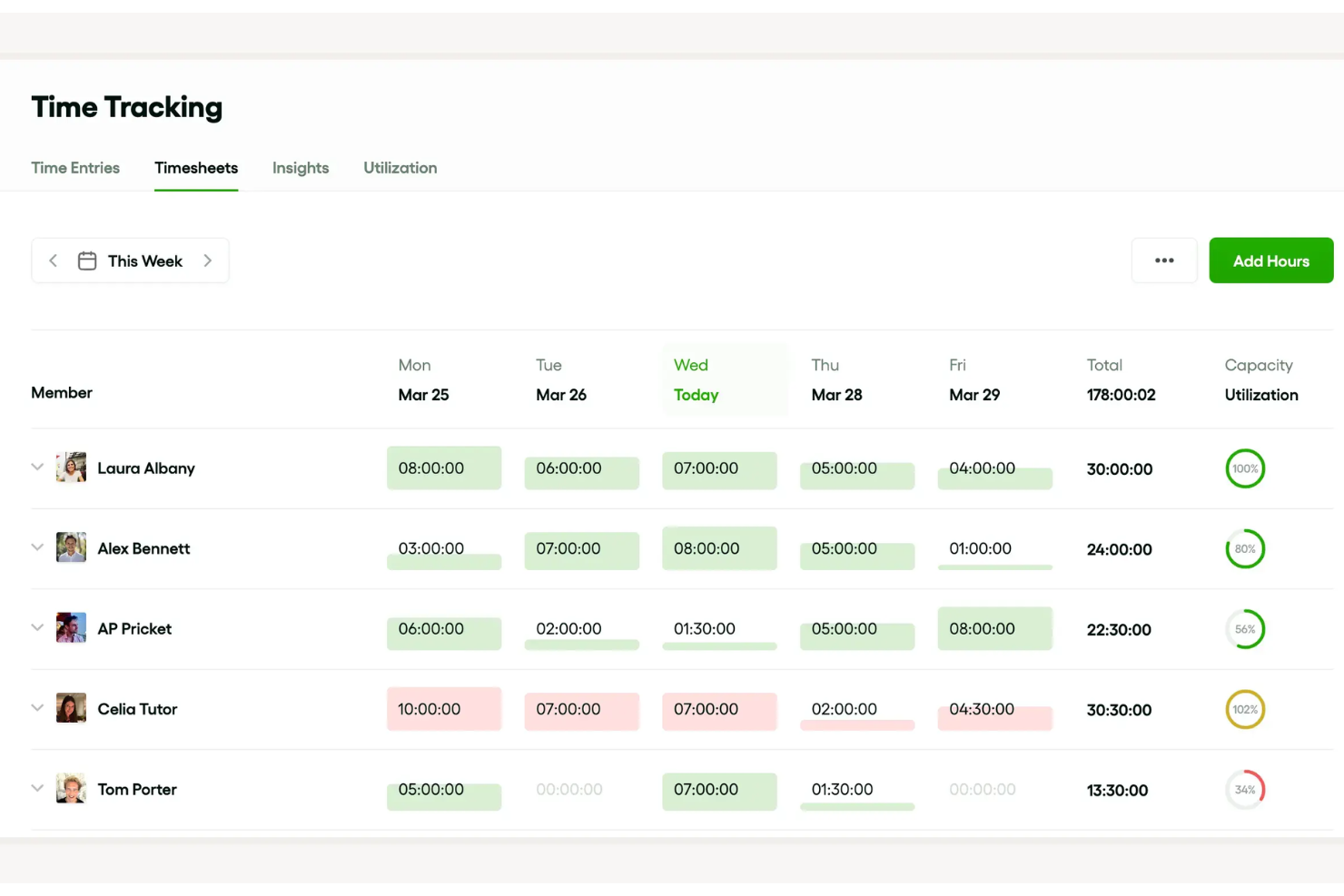
Bonsai Agency Software è una piattaforma di gestione aziendale all-in-one progettata per agenzie, società di consulenza e fornitori di servizi professionali. Riunisce gestione dei progetti, relazioni con i clienti e monitoraggio finanziario in un unico sistema integrato.
La funzione di pianificazione delle risorse consente di assegnare i compiti in base alla capacità del tuo team, garantendo che nessuno sia sovraccarico mentre altri sono sottoutilizzati. Mantenendo un carico di lavoro equilibrato, puoi preservare la produttività ed evitare il burnout. Questa funzione rende anche più semplice vedere chi è disponibile per nuovi progetti, così non devi improvvisare quando le scadenze sono strette.
Grazie agli aggiornamenti in tempo reale, puoi modificare i programmi al volo, il che aiuta a gestire cambiamenti imprevisti nelle tempistiche dei progetti. Un'altra funzione degna di nota è la funzionalità di monitoraggio del tempo. Fornisce informazioni in tempo reale su quanto tempo il tuo team dedica ai vari compiti. È ottimo per capire dove vengono spese le ore e aiuta a ottimizzare la produttività.
Le integrazioni includono QuickBooks Online, Zapier, Calendly, Xero, Google Sheets, ClickUp, Mailchimp e Slack.
Altri software online per la gestione dei turni dei dipendenti
Ecco altre app che non sono entrate nell’elenco dei migliori software online per la gestione dei turni dei dipendenti, ma che vale la pena provare:
- Ubeya
Ideale per la pianificazione dei turni basata su intelligenza artificiale
- Sage HR
Ideale per piccole e medie imprese
- eResource Scheduler
Ideale per gestire pianificazioni, fogli presenze e aspetti finanziari
- Shiftboard
Ideale per settori altamente regolamentati dove è necessario rispettare diversi standard di sicurezza e leggi sul lavoro
- Shiftbase
Ideale per una pianificazione dei turni semplice
- Schedule360
Ideale per i fornitori di servizi sanitari
- Insightful
Ideale per la pianificazione dei turni con monitoraggio integrato dei dipendenti
- Resource Guru
Ideale per pianificare il personale nelle agenzie
- BambooHR®
Ideale per la gestione dei dipendenti durante l'intero ciclo di vita
- Workforce.com
Ideale per la previsione del fabbisogno di personale con intelligenza artificiale
- Justworks
Ideale per gestire una forza lavoro distribuita
- Wrike
Ideale per aziende che desiderano una pianificazione delle risorse abbinata a potenti funzionalità di project management
- Paylocity
Ideale per l’efficienza della programmazione guidata dall’IA
- TimeTrex
Ideale per la programmazione automatica dei turni
- Parim
Ideale per la pianificazione di eventi e sicurezza
- TimeClock Plus
Ideale per la gestione dei turni
- Hub Planner by Milient
Ideale per l'allocazione delle risorse e la mappatura della disponibilità


Come valuto i software di pianificazione turni online per dipendenti
Divido la mia valutazione in due livelli: la base che qualsiasi strumento di pianificazione deve coprire—come la creazione dei turni e l'accesso mobile—e i fattori che distinguono una buona soluzione da quella più adatta.
Funzionalità chiave (requisiti di base per questo elenco)
Quando seleziono gli strumenti per il mio elenco, valuto ciascuno su una scala da 0 (non offre la funzionalità) a 5 (eccelle in quest'area) per ogni funzionalità chiave elencata di seguito. Successivamente, calcolo il punteggio totale dello strumento in percentuale. Ogni strumento deve raggiungere un punteggio totale minimo del 65% per essere preso in considerazione per l'inclusione.
- Creazione programma dei turni: Cerco strumenti con builder drag-and-drop o modelli preimpostati che permettano ai manager di assegnare i turni per ruolo, reparto o sede senza dover ricostruire la settimana da zero.
- Gestione disponibilità & permessi: I dipendenti dovrebbero poter indicare le proprie finestre di disponibilità e inviare richieste di ferie direttamente, e i manager devono disporre di workflow di approvazione chiari—specialmente nei casi di scambio turni.
- Accesso mobile per i dipendenti: Un'app mobile nativa è essenziale perché il personale a ore e sul campo raramente lavora da una scrivania. Controllo se i dipendenti possono visualizzare i turni, prendere turni disponibili e ricevere notifiche push tramite il loro telefono.
- Monitoraggio orario e presenze: Che si tratti di una funzione di timbratura integrata o di una stretta integrazione con uno strumento di rilevazione oraria, valuto quanto bene le ore programmate coincidano con quelle effettivamente lavorate.
- Regole di conformità del lavoro: Esamino come la piattaforma gestisce soglie di straordinari, pause obbligatorie e leggi sulla programmazione predittiva—in particolare se le regole possono essere configurate per regione o ruolo.
- Strumenti di comunicazione del team: I cambi di turno devono raggiungere rapidamente il personale. Valuto se lo strumento offre messaggistica in-app, notifiche di turno o funzioni di annuncio che evitino ai manager di dover rincorrere i dipendenti tramite messaggi o email.
Dopo aver creato una lista di strumenti che soddisfano i criteri, considero cosa distingue ciascuna piattaforma.
Fattori differenzianti (cosa distingue i fornitori)
Ecco come metto a confronto i vari fornitori:
Funzionalità distintive
La previsione basata sulla domanda è un fattore fortemente differenziante—verifico se lo strumento integra dati di vendita o affluenza per suggerire i livelli di personale invece di lasciare ai manager il compito di indovinare. La gestione multi-sede è importante per i team che condividono lo staff tra più sedi, e valuto come una piattaforma gestisce la visibilità incrociata senza duplicare i record. Anche i marketplace per turni aperti meritano attenzione, perché permettono ai dipendenti idonei di auto-assegnarsi i turni vacanti, riducendo i passaggi aggiuntivi in caso di coperture dell'ultimo minuto.
Oltre le funzionalità
Le integrazioni con Payroll e HRIS sono prioritarie—i dati di pianificazione devono fluire in sistemi come ADP, Gusto o QuickBooks senza esportazioni manuali. Valuto anche la compatibilità settoriale, poiché uno strumento pensato per l'ospitalità potrebbe non essere adatto a team sanitari che gestiscono personale qualificato. Anche la struttura dei prezzi ha il suo peso. Controllo se i modelli per utente o per sede scalano in modo equo con la crescita dell'organico, soprattutto per le aziende che aggiungono nuove sedi o assumono personale stagionale.
Come scegliere un software online per la gestione dei turni dei dipendenti
È facile perdersi in lunghi elenchi di funzionalità e strutture tariffarie complesse. Per aiutarti a rimanere concentrato mentre affronti il tuo processo di selezione del software, unico per le tue esigenze, ecco un elenco di fattori da tenere a mente:
| Fattore | Cosa considerare |
|---|---|
| Scalabilità | Il software può crescere insieme al tuo team? Considera la crescita futura e valuta se la piattaforma è in grado di gestire un numero maggiore di utenti o una complessità di pianificazione crescente. |
| Integrazioni | Funziona con gli strumenti che già utilizzi, come i sistemi paghe o le piattaforme di comunicazione? Assicurati che il flusso di dati tra i sistemi sia fluido. |
| Personalizzazione | Puoi adattare il software alle tue esigenze specifiche? Cerca impostazioni flessibili e modelli personalizzabili in linea con il tuo flusso di lavoro. |
| Facilità d'uso | L'interfaccia è intuitiva per il tuo team? Scegli una soluzione che riduca al minimo il tempo necessario per la formazione e la curva di apprendimento per tutti gli utenti. |
| Implementazione e inserimento | Quanto velocemente puoi iniziare a utilizzarlo? Valuta la disponibilità di risorse per la formazione e di assistenza durante la fase di configurazione. |
| Costo | Il prezzo rientra nel tuo budget? Confronta i piani di abbonamento, verifica la presenza di costi nascosti e considera i costi a lungo termine rispetto ai vantaggi. |
| Misure di sicurezza | I tuoi dati e le informazioni sui dipendenti sono protetti? Cerca crittografia, autorizzazioni utente e conformità alle normative sulla protezione dei dati. |
| Disponibilità dell'assistenza | Riceverai aiuto quando ne avrai bisogno? Verifica la disponibilità dell'assistenza clienti, inclusi chat dal vivo, supporto telefonico e tempi di risposta. |
Che cos'è il software online per la pianificazione dei dipendenti?
Il software online per la pianificazione dei dipendenti è uno strumento digitale che aiuta le aziende a creare, gestire e ottimizzare i turni di lavoro dei dipendenti. I professionisti delle risorse umane, i manager e i responsabili dei team utilizzano generalmente questi strumenti per semplificare la pianificazione, ridurre i conflitti e migliorare la comunicazione. Funzionalità come lo scambio dei turni, il monitoraggio della disponibilità e l'accesso da dispositivi mobili aiutano a gestire i turni in modo efficiente e a mantenere tutti informati. Nel complesso, questi strumenti fanno risparmiare tempo e migliorano la produttività sul posto di lavoro.
Funzionalità
Quando scegli un software online per la pianificazione dei dipendenti, presta attenzione alle seguenti funzionalità chiave:
- Scambio dei turni: consente ai dipendenti di scambiarsi facilmente i turni, riducendo i conflitti di pianificazione e aumentando la flessibilità.
- Monitoraggio della disponibilità: aiuta i manager a sapere quando i dipendenti sono disponibili a lavorare, rendendo la pianificazione più efficiente.
- Accesso da dispositivi mobili: consente ai dipendenti di controllare i turni e apportare modifiche in mobilità, aumentando l'accessibilità.
- Integrazione con il sistema paghe: collega la pianificazione ai sistemi paghe per garantire pagamenti accurati e puntuali.
- Monitoraggio della conformità: monitora la conformità alle leggi sul lavoro, aiutando le aziende a evitare problemi legali.
- Modelli personalizzabili: offre modelli di pianificazione predefiniti che possono essere adattati alle esigenze specifiche dell'azienda.
- Aggiornamenti in tempo reale: fornisce modifiche istantanee ai turni e notifiche, mantenendo tutti informati.
- Suggerimenti basati sull'IA: utilizza l'intelligenza artificiale per consigliare una pianificazione ottimale basata sui dati passati.
- Strumenti di comunicazione: si integra con le piattaforme di messaggistica per migliorare la comunicazione e la collaborazione del team.
- Report e analisi: fornisce informazioni sui modelli di pianificazione e sui costi del lavoro, favorendo il processo decisionale strategico.
Vantaggi
L'implementazione di un software online per la pianificazione dei dipendenti offre diversi vantaggi al tuo team e alla tua azienda. Ecco alcuni dei vantaggi che puoi aspettarti:
- Risparmio di tempo: automatizzare la creazione e gli aggiornamenti dei turni riduce il tempo dedicato alle attività di pianificazione manuale.
- Comunicazione migliorata: gli strumenti di messaggistica integrati assicurano che tutti siano informati sulle modifiche e sugli aggiornamenti dei turni.
- Maggiore flessibilità: funzionalità come lo scambio dei turni e l'accesso da dispositivi mobili consentono ai dipendenti di gestire più facilmente i propri turni.
- Efficienza dei costi: l'integrazione con il sistema paghe e gli strumenti di reportistica aiutano a controllare i costi del lavoro e a evitare un'eccessiva assegnazione dei turni.
- Maggiore conformità: il monitoraggio automatizzato della conformità aiuta a garantire il rispetto delle leggi e delle normative sul lavoro.
- Migliore processo decisionale: le analisi e i report forniscono informazioni sulle tendenze della pianificazione e sull'impiego della forza lavoro, supportando la pianificazione strategica.
- Soddisfazione dei dipendenti: consentire ai dipendenti di partecipare alla pianificazione aumenta la soddisfazione e riduce il turnover.
Costi e prezzi
La scelta di un software online per la pianificazione dei dipendenti richiede la comprensione dei diversi modelli e piani tariffari disponibili. I costi variano in base alle funzionalità, alle dimensioni del team, agli extra e ad altri fattori. La tabella seguente riassume i piani più comuni, i relativi prezzi medi e le funzionalità tipicamente incluse nelle soluzioni software online per la pianificazione dei dipendenti:
Tabella comparativa dei piani per il software online di pianificazione dei dipendenti
| Tipo di piano | Prezzo medio | Funzionalità comuni |
|---|---|---|
| Piano gratuito | $0 | Pianificazione di base, accesso limitato degli utenti e accesso all'app mobile. |
| Piano personale | $5-$15/utente/mese | Opzioni di pianificazione avanzate, monitoraggio della disponibilità e scambio dei turni. |
| Piano aziendale | $20-$40/utente/mese | Integrazione con le buste paga, monitoraggio della conformità e modelli personalizzabili. |
| Piano aziendale | $50+/utente/mese | Pianificazione basata sull'intelligenza artificiale, analisi dettagliate e assistenza clienti dedicata. |
Domande frequenti
Quanto è sicuro il software online di pianificazione dei dipendenti?
Sì, il software online di pianificazione dei dipendenti è generalmente sicuro. La maggior parte dei fornitori utilizza la crittografia e rispetta le normative sulla protezione dei dati per mantenere al sicuro le tue informazioni. Quando scegli una soluzione, verifica che sia conforme a standard come il GDPR o l’HIPAA, se applicabili al tuo settore. Assicurati sempre che il tuo team utilizzi password complesse e segua le migliori pratiche di sicurezza.
Il software online di pianificazione dei dipendenti può integrarsi con altri sistemi?
Sì, molti strumenti online di pianificazione dei dipendenti si integrano con altri sistemi. Puoi collegarli alle piattaforme per le buste paga, le risorse umane e la comunicazione per semplificare i processi. Prima dell’acquisto, assicurati che il software supporti le integrazioni di cui hai bisogno. Questo ti farà risparmiare tempo e ridurrà l’inserimento manuale dei dati.
È necessaria una formazione per utilizzare il software online di pianificazione dei dipendenti?
La formazione è spesso utile, ma non sempre necessaria. Molti strumenti sono progettati per essere intuitivi e facili da usare. Tuttavia, offrire sessioni di formazione o tutorial può aiutare il tuo team a sfruttare al meglio il software. Cerca fornitori che offrano supporto per l’avvio, video formativi o guide interattive.
Qual è il prossimo passo:
Se stai cercando un software online di pianificazione dei dipendenti, contatta gratuitamente un consulente SoftwareSelect per ricevere consigli.
Compili un modulo e fai una breve conversazione durante la quale il consulente approfondirà le tue esigenze specifiche. Poi riceverai una selezione ristretta di software da valutare. Ti assisterà anche durante l'intero processo di acquisto, comprese le trattative sul prezzo.