

I 10 migliori software di pianificazione dei turni dei dipendenti per le piccole imprese

10 Elenco dei migliori software di pianificazione dei dipendenti per piccole imprese


Gestire i turni dei dipendenti può essere difficile, soprattutto quando si devono coordinare più attività. Vuoi mantenere il tuo team soddisfatto e produttivo, ma la pianificazione manuale può causare errori e conflitti. È qui che entra in gioco il software di pianificazione dei dipendenti.
Nella mia esperienza, questi strumenti ti aiutano a risparmiare tempo, ridurre gli errori e migliorare la comunicazione del team. Grazie alla mia profonda esperienza nella gestione delle risorse umane, ho testato diverse soluzioni per offrirti una valutazione imparziale delle migliori opzioni disponibili.
In questo articolo ti guiderò alla scoperta delle migliori soluzioni, adatte alle esigenze della tua azienda. Che si tratti di gestire gli scambi di turno o di garantire la conformità normativa, troverai una soluzione adatta a te. Scopriamo insieme qual è lo strumento giusto per il tuo team.
Perché fidarsi delle nostre recensioni sui software
Il nostro team testa e recensisce software dal 2012. In quanto esperti HR noi stessi, sappiamo quanto sia difficile — e importante — scegliere il software giusto.
Per questa guida, abbiamo valutato gli strumenti attraverso test pratici e ricerche indipendenti, assegnando un punteggio agli strumenti in base ai nostri criteri di selezione. Ci basiamo inoltre sulle competenze di leader di pensiero del settore e di professionisti HR attivi.
Le nostre recensioni riflettono il nostro giudizio editoriale umano, non un discorso di vendita.
Revisori esperti:
Tabella comparativa dei software di pianificazione dei dipendenti
Questa tabella comparativa riassume i dettagli dei prezzi delle mie migliori selezioni di software di pianificazione dei dipendenti per piccole imprese.
| Tool | Best For | Trial Info | Price | ||
|---|---|---|---|---|---|
| 1 | Ideale per pianificare, distribuire e scambiare turni in tempo reale | 14 giorni di prova gratuita | Da $39/mese | Website | |
| 2 | Ideale per la gestione di politiche sugli orari | Demo gratuita disponibile | Da $5/dipendente/mese | Website | |
| 3 | Il miglior software di pianificazione per la gestione completa del team | Piano gratuito + prova gratuita di 14 giorni disponibile | Da $20/mese/sede | Website | |
| 4 | Ideale per flussi di lavoro integrati per documenti e firme | Demo gratuita disponibile | A partire da $8/utente/mese | Website | |
| 5 | Miglior timbratore online per piccole imprese | 14 giorni di prova gratuita | Da $25.99/mese | Website | |
| 6 | Ideale per piccole imprese canadesi che gestiscono turni | Prova gratuita di 21 giorni + demo gratuita disponibile | Da $2,93/utente/mese (fatturato annualmente) | Website | |
| 7 | Ideale per modelli di turno self-service | Prova gratuita di 14 giorni + demo gratuita disponibile | Da £24/mese/azienda | Website | |
| 8 | Il miglior software di pianificazione dei turni per il personale nell'industria della ristorazione | Prova gratuita di 14 giorni + piano gratuito disponibile | Da $17.99 al mese | Website | |
| 9 | Ideale per aziende di servizi sul campo o costruzioni | Prova gratuita di 14 giorni + demo gratuita disponibile | Da $40/mese | Website | |
| 10 | Il miglior software per l'organizzazione della forza lavoro nel settore eventi | Demo gratuita disponibile | Da $49/mese | Website |

Recensioni dei migliori software di pianificazione dei dipendenti per piccole imprese
Di seguito trovi i miei riepiloghi dettagliati dei migliori software di pianificazione dei dipendenti per piccole imprese inclusi nel mio elenco. Le mie recensioni offrono un’analisi dettagliata delle funzionalità principali, dei vantaggi & degli svantaggi, delle integrazioni e dei casi d’uso ideali di ogni strumento, per aiutarti a trovare quello più adatto a te.

Ideale per pianificare, distribuire e scambiare turni in tempo reale
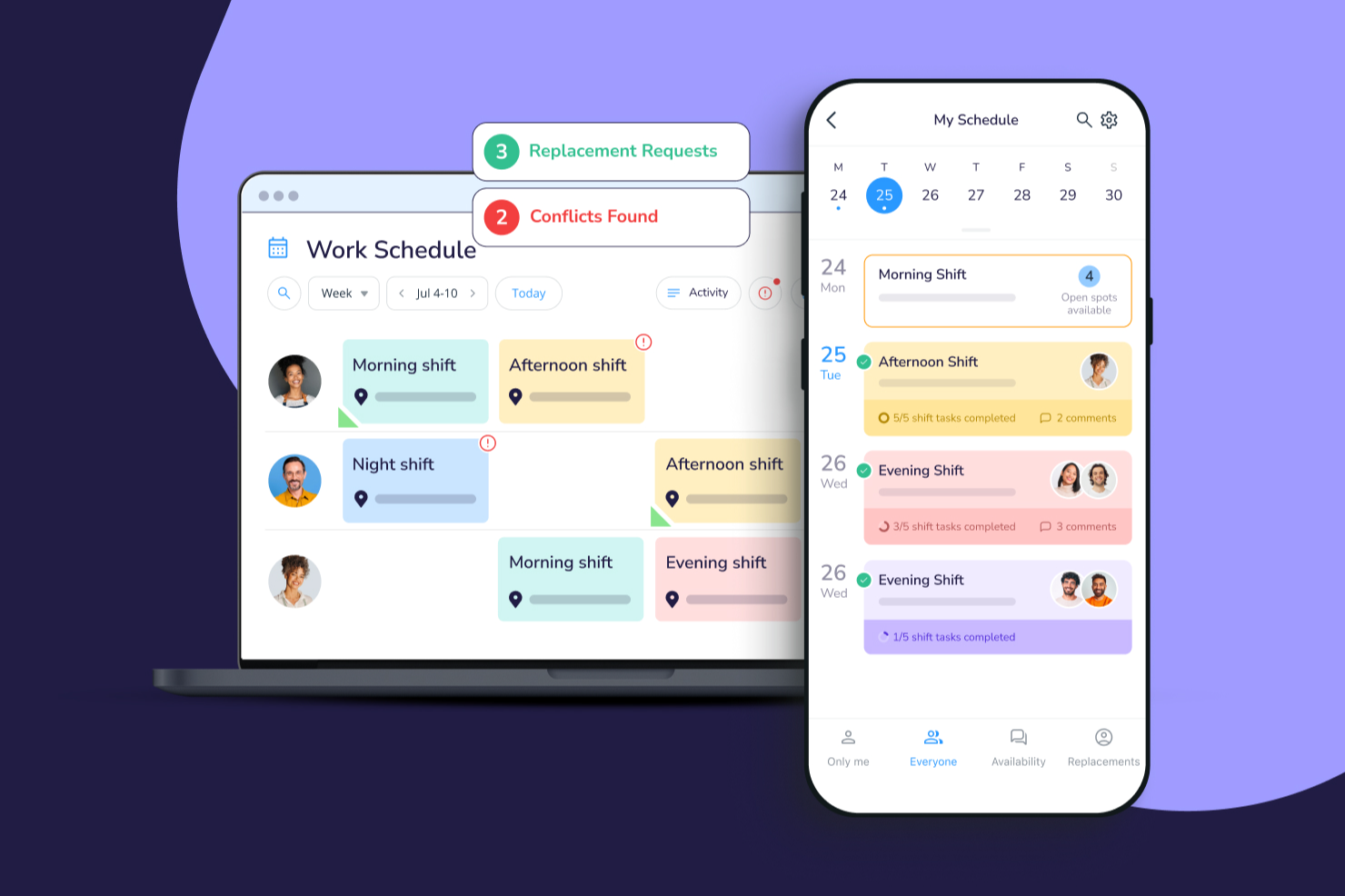
Connecteam offre alle piccole imprese e ai team senza scrivania una piattaforma mobile-first per gestire la programmazione dei turni, il monitoraggio delle presenze e la comunicazione relativa ai turni, aiutando titolari e manager a mantenere tutti organizzati e connessi.
Per chi è più indicata Connecteam?
Connecteam è la soluzione ideale per le piccole imprese con personale a ore o basato su turni, in particolare nei settori come retail, ospitalità e servizi sul campo.
Perché ho scelto Connecteam
Ho scelto Connecteam tra le migliori soluzioni per la sua capacità di gestire l'intero ciclo della pianificazione: dalla creazione dei turni fino alla loro comunicazione in tempo reale ai dipendenti. Apprezzo molto la funzione dei turni aperti, che consente ai manager di pubblicare turni non assegnati che i dipendenti possono prenotare in base all’ordine di richiesta, eliminando la necessità di assegnazioni manuali tramite continui scambi di messaggi. Anche il flusso di sostituzione turni è un punto di forza: i dipendenti possono liberare un turno direttamente dall'app, i colleghi idonei possono prenderlo, e i manager possono richiedere un'approvazione prima della conferma. In pratica, il mio team riesce a coprire delle assenze dell’ultimo minuto senza dover fare nemmeno una telefonata.
Funzionalità chiave di Connecteam
- Programmatore turni drag-and-drop: Crea e modifica i turni settimanali spostando visivamente i turni su una timeline.
- Orologio con GPS: I dipendenti timbrano entrata e uscita dal proprio smartphone, con verifica della posizione per confermare la presenza in sede.
- Gestione disponibilità e assenze: Il personale può inviare direttamente nell'app finestre di disponibilità e richieste di ferie o permesso, che i manager possono approvare.
- Chat in-app: Invia messaggi diretti o annunci di gruppo per mantenere i team turnisti connessi senza necessità di strumenti di messaggistica separati.
Integrazioni di Connecteam
Le integrazioni includono QuickBooks, Gusto, Xero, ADP, Wix, Lightspeed, PrismHR, Square, BambooHR e Accu-Time Systems.
New Product Updates from Connecteam

Connecteam Expands Break and Timesheet Controls
Connecteam adds flexible break thresholds, personalized policies, auto-end options, a centralized exceptions report, and improved timesheet issue visibility to help teams manage breaks and timesheets more effectively. For more information, visit Connecteam’s official site.
 .
.
Deel HR
Ideale per la gestione di politiche sugli orari
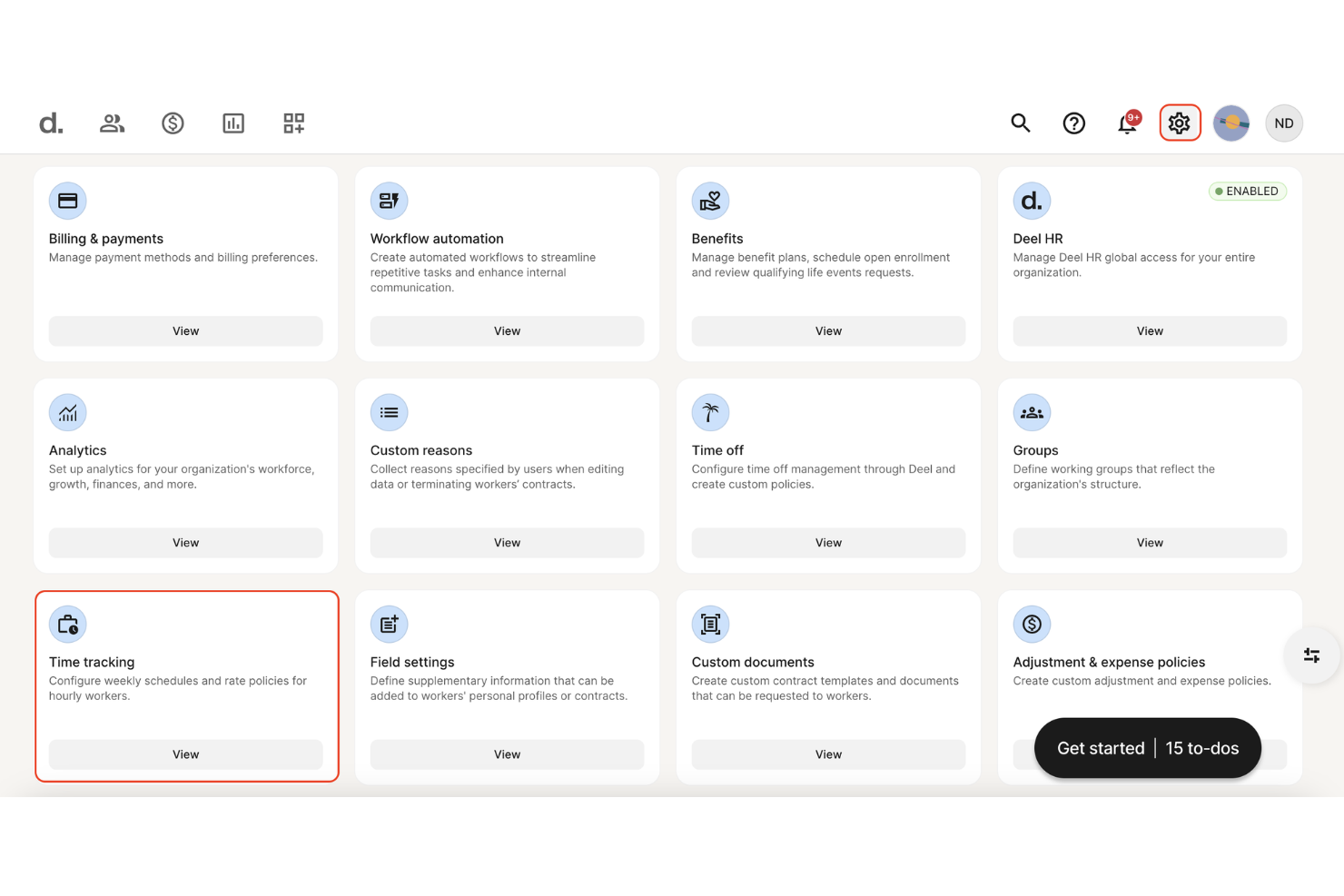
Deel HR offre alle piccole imprese e ai team distribuiti un modo per gestire orari dei dipendenti, conformità e processi HR in un'unica piattaforma, aiutandoti a gestire permessi, politiche sui turni e documentazione della forza lavoro in diverse sedi.
Per chi è ideale Deel HR?
Deel HR è particolarmente adatto alle piccole imprese che gestiscono team remoti o internazionali e che hanno bisogno di strumenti HR centralizzati e di pianificazione degli orari su più sedi.
Perché ho scelto Deel HR
Deel HR merita un posto nella mia shortlist per la sua efficacia nella gestione delle politiche sugli orari per le piccole imprese che gestiscono dipendenti in diverse sedi o fusi orari. Mi piace la possibilità di impostare politiche personalizzate per i permessi, flussi di approvazione e orari di lavoro che si applicano automaticamente in base alla posizione o al tipo di contratto del dipendente. In pratica, significa che il mio team può configurare regole di pianificazione differenti per dipendenti a tempo pieno, part-time e collaboratori senza dover gestire manualmente delle eccezioni. L'approccio basato sulle politiche mantiene la pianificazione coerente e conforme senza la necessità di un costante controllo da parte dell'HR.
Caratteristiche principali di Deel HR
- Generatore di flussi di lavoro automatizzati: Crea flussi per onboarding, offboarding e conformità senza bisogno di codice, senza limiti al numero di flussi che puoi costruire.
- Assistente HR alimentato da IA (Deel AI): Fai domande su HR e conformità e ricevi risposte basate su dati di esperti legali e di risorse umane in oltre 150 paesi.
- Archivio centralizzato dei dipendenti (HRIS): Conserva e gestisci tutti i dati delle persone, documenti e la storia occupazionale in un unico posto come fonte unica e veritiera.
- Analisi e reportistica della forza lavoro: Crea report e dashboard personalizzati usando qualsiasi punto dati interno a Deel per monitorare organico, costi e trend della forza lavoro.
Integrazioni Deel HR
Le integrazioni includono FaceUp, Snowflake, DefensX, Microsoft Finance, Kintsugi, ReFresh OS, Revo.ai, Keeper, Human Interest ed Everyminute.
New Product Updates from Deel HR

Deel Expands Stablecoin Wallet to 80+ Countries
Deel expands its Stablecoin Wallet to 80+ countries with dollar-backed balances and optional rewards. This gives eligible contractors more ways to hold and manage earnings inside Deel. For more information, visit Deel’s official site.
 .
.
Homebase
Il miglior software di pianificazione per la gestione completa del team

Homebase offre alle piccole imprese nei settori della vendita al dettaglio, dell'ospitalità e dei servizi un modo per gestire la programmazione dei dipendenti, il monitoraggio delle presenze e la comunicazione del team da un'unica piattaforma, aiutando titolari e responsabili a mantenere organizzati i turni e connessi i team.
Per chi è ideale Homebase?
Homebase è una soluzione ideale per i titolari di piccole aziende nei settori con lavoro orario come la ristorazione, il commercio al dettaglio e la sanità che hanno bisogno di gestire team organizzati su turni senza un reparto HR dedicato.
Perché ho scelto Homebase
Ho scelto Homebase perché va oltre la semplice pianificazione e copre quasi ogni aspetto della gestione di un team a orario in un unico posto. La programmazione si collega direttamente al monitoraggio delle presenze e alle buste paga: quando il mio team timbra entrata e uscita, quelle ore confluiscono nei registri e si trasformano automaticamente in salari senza inserimento manuale dei dati. La messaggistica integrata del team significa che non ho bisogno di un'app separata per inviare promemoria sui turni o richieste di copertura dell’ultimo minuto. Il forecasting dei costi del lavoro è utile—puoi visualizzare le ore pianificate rispetto ai dati di vendita per capire se sei sotto- o sovrastaffato ancora prima che inizi la settimana.
Funzionalità principali di Homebase
- Assunzione e tracciamento delle candidature: Pubblica offerte di lavoro su più portali contemporaneamente e gestisci tutte le candidature da un’unica dashboard, con domande filtro integrate e pianificazione dei colloqui.
- Auto-onboarding dei dipendenti: Invia ai nuovi assunti un kit di benvenuto digitale con i moduli W-4, I-9 e per il bonifico bancario da compilare e firmare digitalmente prima del primo giorno.
- Timbratura con GPS: Consenti ai dipendenti di timbrare entrata e uscita dal proprio telefono, con verifica della posizione per confermare che siano in sede quando iniziano il turno.
- Gestione PTO e permessi: Imposta date di blocco, limiti alle richieste e regole di preavviso così che i dipendenti possano fare richiesta di permessi direttamente dall’app.
Integrazioni di Homebase
Le integrazioni includono Square, Toast, Clover, Shopify, Lightspeed, QuickBooks, Gusto, ADP, Paychex e Revel.

Ideale per flussi di lavoro integrati per documenti e firme
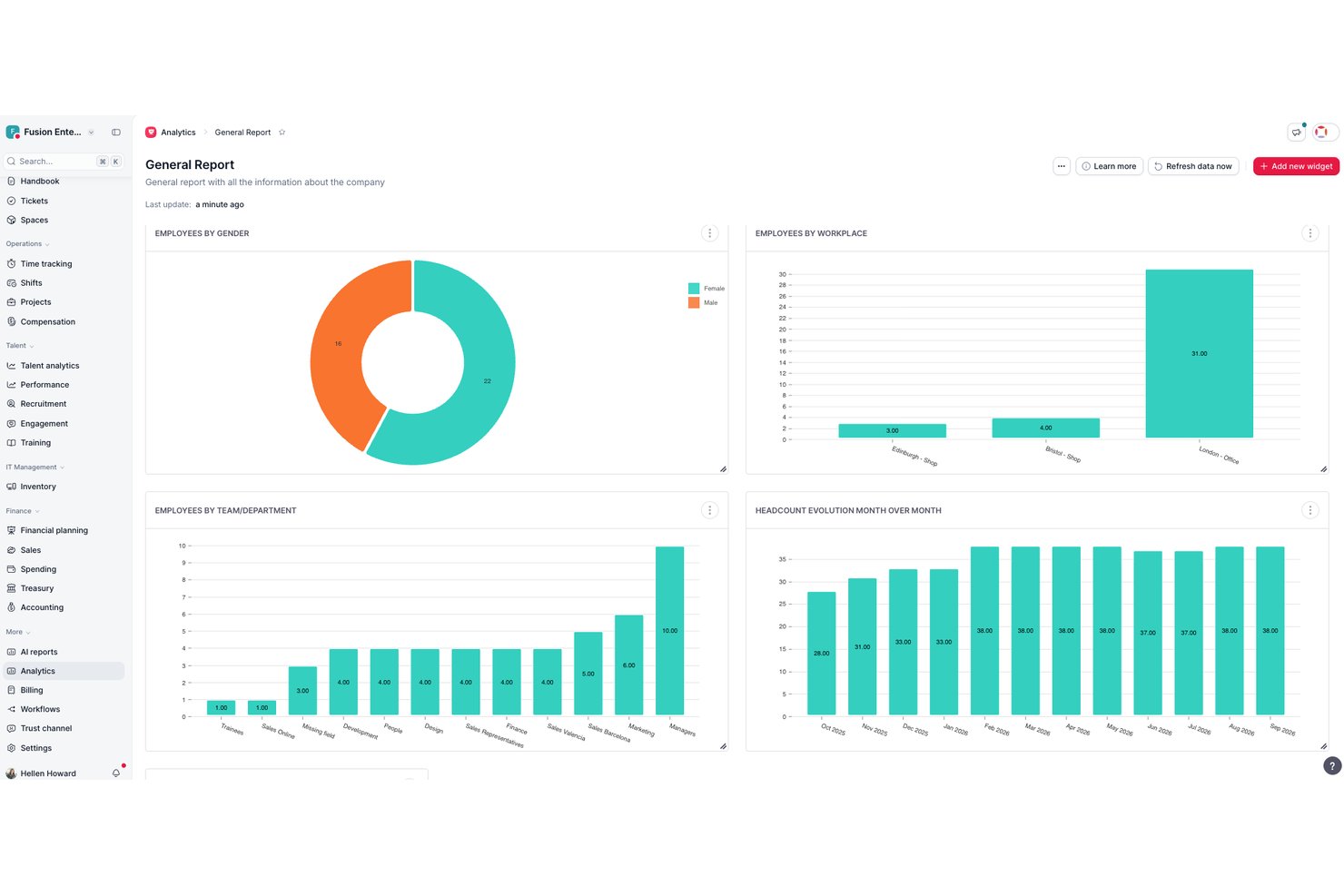
Factorial è una piattaforma HR pensata per le piccole imprese, che riunisce in un unico sistema la pianificazione dei turni, il monitoraggio delle ore, la gestione delle ferie e dei permessi e l'elaborazione delle buste paga.
A chi è più adatto Factorial?
Factorial è adatto ai titolari di piccole imprese e ai responsabili delle risorse umane che hanno bisogno di un'unica piattaforma per gestire sia le attività relative al personale sia la pianificazione della forza lavoro organizzata su turni.
Perché ho scelto Factorial
Factorial è entrato nella mia lista ristretta perché i suoi strumenti per documenti e firme sono inclusi in ogni piano, invece di essere venduti come funzionalità aggiuntive. Apprezzo in particolare la possibilità di inviare in blocco i contratti di inserimento, gli accordi sui turni e i documenti relativi alle risorse umane. Le firme elettroniche legalmente valide sono integrate, così i dipendenti possono firmare e restituire tutto senza uscire dalla piattaforma. I PDF compilabili consentono al mio team di standardizzare documenti come i moduli di presa visione dei turni senza aver bisogno di uno strumento separato.
Funzionalità principali di Factorial
- Modelli di pianificazione dei turni: Crea e riutilizza i programmi dei turni con modelli per ruoli o reparti diversi.
- Rilevazione delle ore da dispositivi mobili: I dipendenti possono registrare entrate e uscite utilizzando un'app mobile con il monitoraggio della geolocalizzazione.
- Assegnazione dei turni in blocco: Assegna e duplica i turni in blocco per gruppi di dipendenti, velocizzando la pianificazione.
- Monitoraggio delle assenze: I responsabili impostano politiche personalizzate per ferie e permessi e gestiscono le richieste nella stessa dashboard utilizzata per la pianificazione.
Integrazioni di Factorial
Factorial offre integrazioni native con Slack, Google Calendar, Microsoft Outlook e Zapier, oltre a un'API per integrazioni personalizzate.
Pros and Cons
Pros:
- Firme elettroniche integrate per gli accordi sui turni
- Risorse umane e pianificazione in un'unica piattaforma
- L'invio in blocco dei documenti riduce i tempi di inserimento
Cons:
- Gli strumenti di pianificazione sono meno avanzati rispetto alle app dedicate
- L'app mobile offre funzionalità offline limitate

Miglior timbratore online per piccole imprese
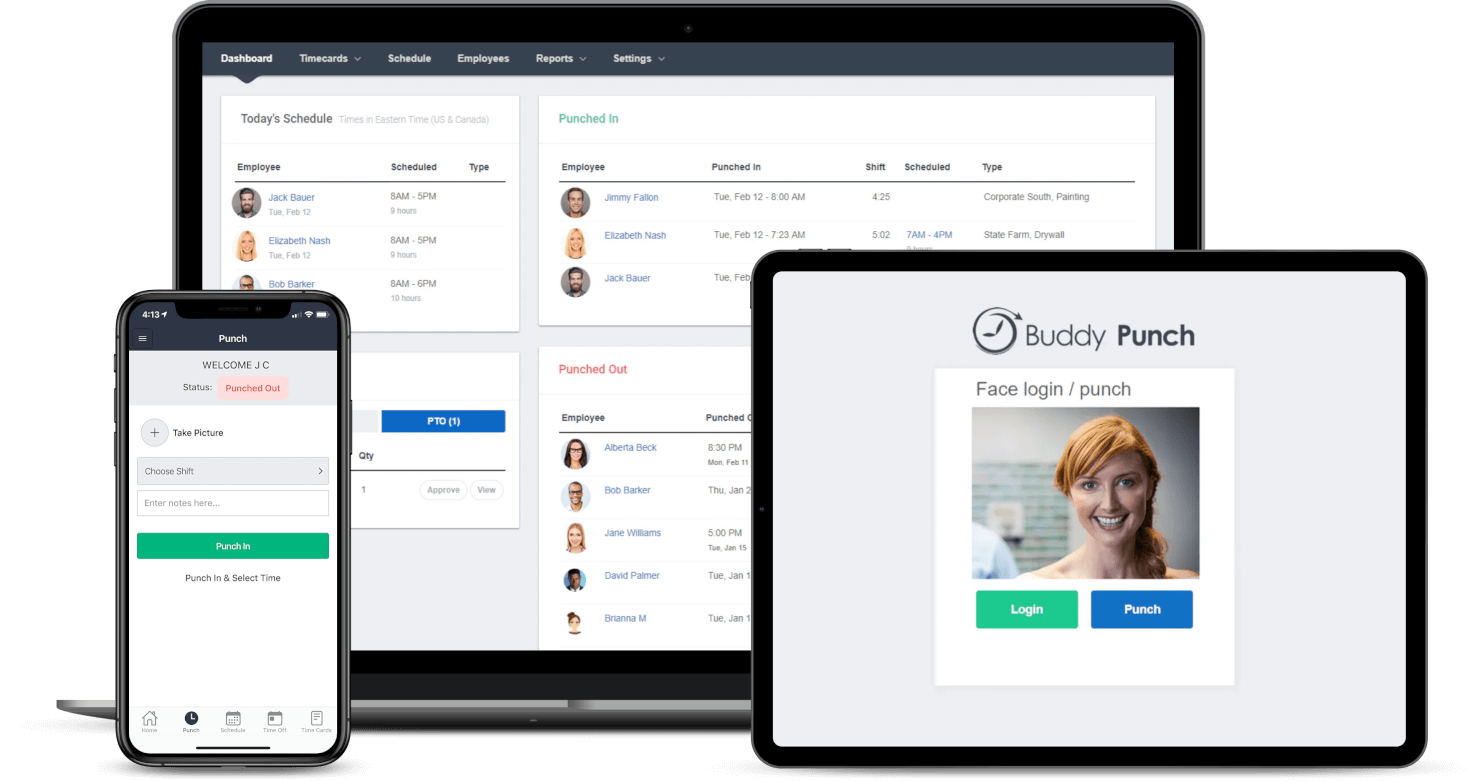
Buddy Punch è uno strumento di pianificazione dei turni e di rilevazione delle presenze basato su cloud, pensato per le piccole imprese che necessitano di modi semplici e precisi per gestire i turni, tracciare la presenza e gestire le richieste di permesso senza fogli di calcolo o scartoffie manuali.
Per chi è più indicato Buddy Punch?
Buddy Punch è particolarmente adatto per titolari di piccole imprese e manager nei settori della vendita al dettaglio, dell’ospitalità e della sanità che cercano un modo semplice per pianificare i dipendenti a ore e tracciare le presenze.
Perché ho scelto Buddy Punch
Buddy Punch si guadagna un posto tra i migliori secondo la mia selezione perché il suo sistema di timbratura online è realmente concepito pensando alle piccole imprese. Mi piace che i dipendenti possano timbrare l’ingresso tramite browser web, app mobile o anche un chiosco condiviso, con il tracciamento GPS e la verifica tramite webcam per confermare chi sta effettivamente timbrando. Il mio team può impostare recinzioni geografiche così che i dipendenti possano timbrare solo quando sono fisicamente in sede, riducendo il fenomeno dello scambio di badge senza bisogno di costose apparecchiature. Gli avvisi automatici per gli straordinari sono un’altra funzionalità su cui faccio affidamento per tenere sotto controllo i costi del lavoro prima che diventino un problema.
Funzionalità principali di Buddy Punch
- Pianificazione drag-and-drop: Crea e pubblica facilmente i turni dei dipendenti in modo visivo, con la possibilità di copiare turni dalle settimane precedenti.
- Gestione delle ferie: I dipendenti possono inviare richieste di permesso direttamente dall’app, e i responsabili possono approvarle o rifiutarle con un solo clic.
- Reportistica per paghe: Esporta i fogli presenze con calcolo di ore ordinarie, straordinari e ore di ferie pronte per l’elaborazione paghe.
- Notifiche sui turni: Invia automaticamente notifiche ai dipendenti via email o push quando il loro turno viene pubblicato o modificato.
Integrazioni di Buddy Punch
Le integrazioni includono QuickBooks Online, QuickBooks Desktop, ADP Workforce Now, Gusto, Paychex, Paylocity, Paycor, Rippling, Workday e Justworks.

Agendrix
Ideale per piccole imprese canadesi che gestiscono turni
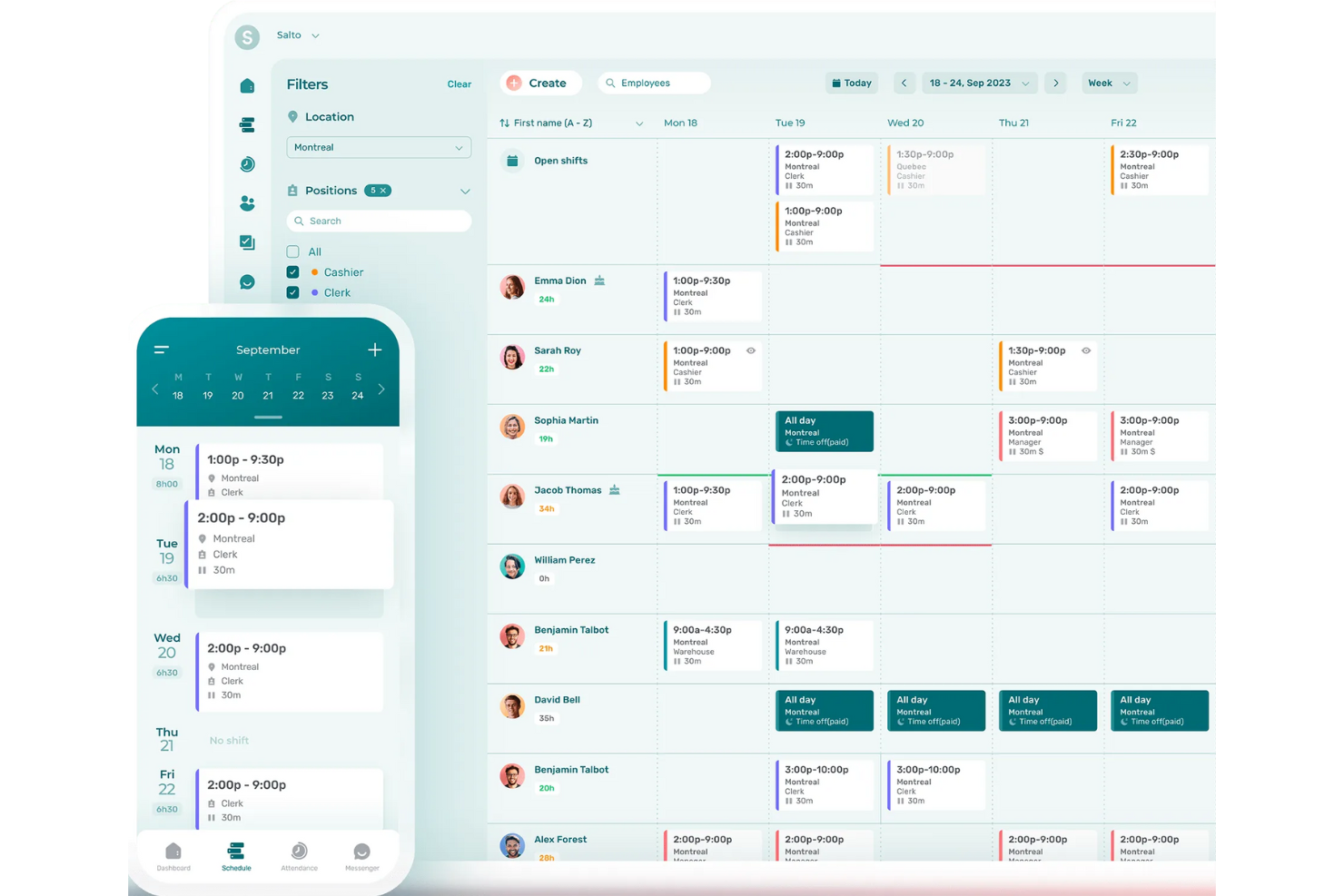
Agendrix è una piattaforma di pianificazione orari e rilevazione delle presenze pensata per le piccole imprese che devono gestire personale a ore, semplificare la programmazione dei turni e gestire le richieste di permessi riducendo la comunicazione superflua.
Per chi è ideale Agendrix?
Agendrix è perfetto per le piccole aziende nei settori della vendita al dettaglio, dell’accoglienza e della sanità che gestiscono squadre di dipendenti a turni o a ore.
Perché ho scelto Agendrix
Agendrix merita un posto nella mia selezione perché è stato creato appositamente per la pianificazione dei turni che le piccole imprese canadesi affrontano ogni giorno. Apprezzo in particolare il supporto in lingua francese e l’interfaccia bilingue, che lo rende davvero pratico per le aziende che operano in Quebec o con team bilingui. Inoltre la piattaforma gestisce bene la conformità alle normative provinciali sul lavoro: i manager possono impostare i turni rispettando le regole su straordinari e i requisiti di riposo senza la necessità di controlli manuali. Uso regolarmente anche le funzionalità di richiesta permessi e scambio turno, che riducono lo scambio di messaggi che di solito porta via molto tempo ai responsabili.
Funzionalità principali di Agendrix
- Pianificatore a trascinamento: Crea e modifica visivamente i turni settimanali spostando direttamente i turni sulla linea del dipendente.
- Timbratura tramite mobile: I dipendenti possono timbrare l’entrata e l’uscita dal telefono, con verifica GPS per confermare la presenza in sede.
- Messaggistica tra dipendenti: Invia comunicazioni o messaggi diretti allo staff direttamente dalla piattaforma, mantenendo tutte le conversazioni relative ai turni in un unico posto.
- Esportazione per il payroll: Esporta ore lavorate e dati di presenza in formati compatibili con gli strumenti di gestione paghe, per ridurre l’inserimento manuale dei dati.
Integrazioni Agendrix
Le integrazioni includono ADP Workforce Now, Ceridian e Sage. È inoltre disponibile un’API per integrazioni personalizzate.
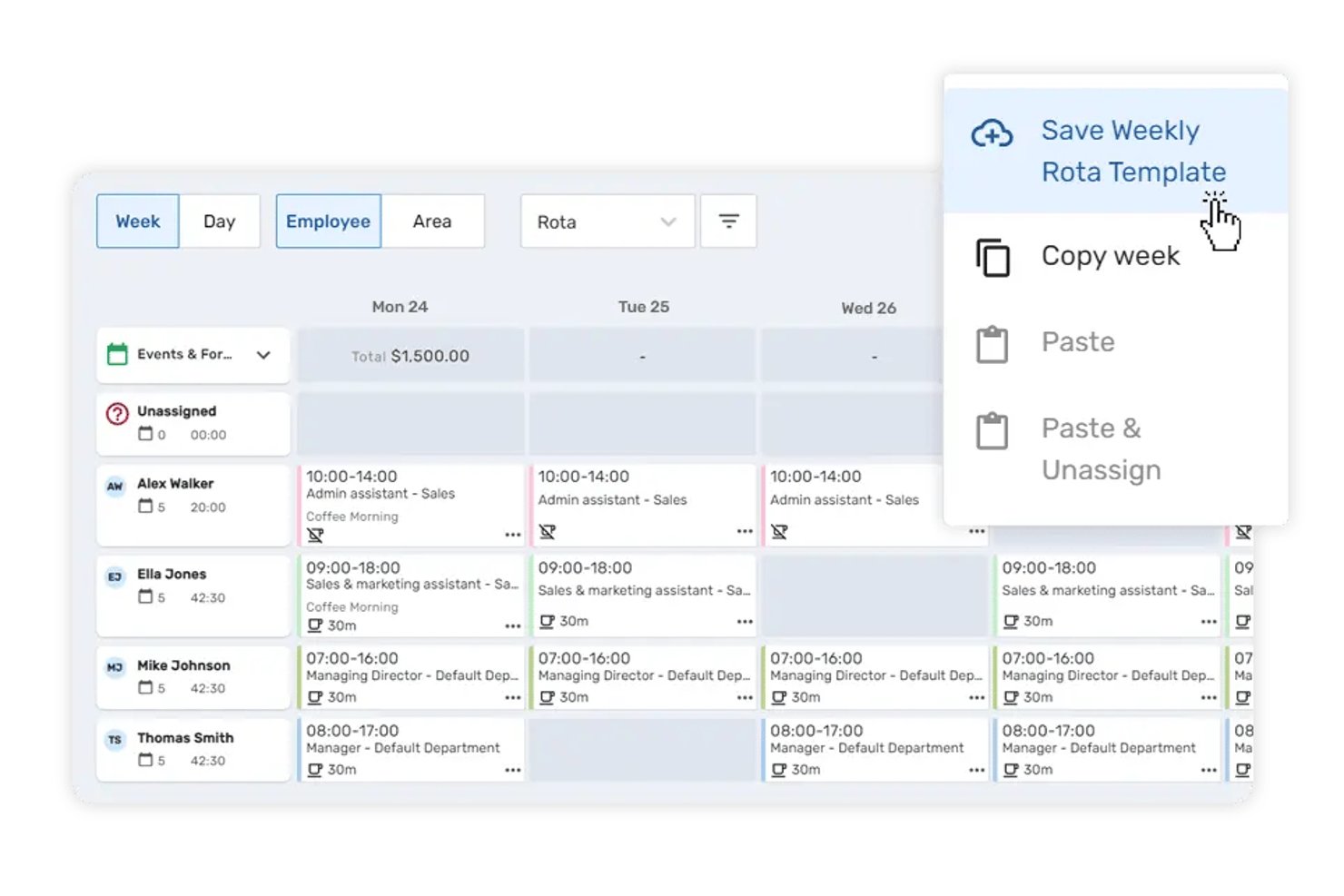
Breathe HR è una piattaforma di gestione del personale e pianificazione dei turni per piccole imprese che combina un generatore di turni drag-and-drop, modelli di turno riutilizzabili, rilevazione delle presenze e gestione delle assenze in un unico sistema.
Per chi è ideale Breathe HR?
Breathe HR è particolarmente adatto per piccole imprese con sede nel Regno Unito fino a 250 dipendenti, attive in settori con molti turni come ospitalità, vendita al dettaglio e assistenza sociale.
Perché ho scelto Breathe HR
Ho scelto Breathe HR tra i migliori perché i suoi modelli di turno riutilizzabili permettono ai team in crescita di creare nuove pianificazioni in pochi minuti invece di ricominciare da zero ogni settimana. Mi piace che i dipendenti possano proporre, scambiare e prendere turni autonomamente tramite l'app mobile, mantenendo sempre il controllo di approvazione da parte dei responsabili. Gli avvisi di sovrapposizione dei turni e le visualizzazioni personalizzate della pianificazione aggiungono un livello di precisione molto utile quando si gestiscono ruoli o sedi multiple.
Funzionalità principali di Breathe HR
- Localizzazione per il rilevamento delle presenze: Il personale può timbrare entrata e uscita utilizzando dispositivi mobili o tablet con geolocalizzazione assegnati a ciascuna sede lavorativa.
- Gestione multilocation: Gestione di orari, personale e presenze in diverse sedi all'interno di un unico account.
- Monitoraggio ferie e malattie: Flussi di lavoro integrati consentono ai dipendenti di richiedere permessi e segnalare assenze, tutto tracciato nello stesso sistema.
- Gestione documentale con firma elettronica: Conservazione sicura dei documenti dei dipendenti e raccolta di firme digitali grazie al monitoraggio integrato dei documenti.
Integrazioni di Breathe HR
Le integrazioni native includono Xero, Sage Payroll e Natural HR. È disponibile un'API per integrazioni personalizzate.
Pros and Cons
Pros:
- Modelli di turno riutilizzabili riducono il tempo di pianificazione
- Scambi di turno self-service tramite mobile
- Ferie e malattia tracciate insieme agli orari
Cons:
- Automazione della pianificazione limitata
- Gli strumenti di reportistica sono poco approfonditi sui costi del lavoro
7shifts
Il miglior software di pianificazione dei turni per il personale nell'industria della ristorazione
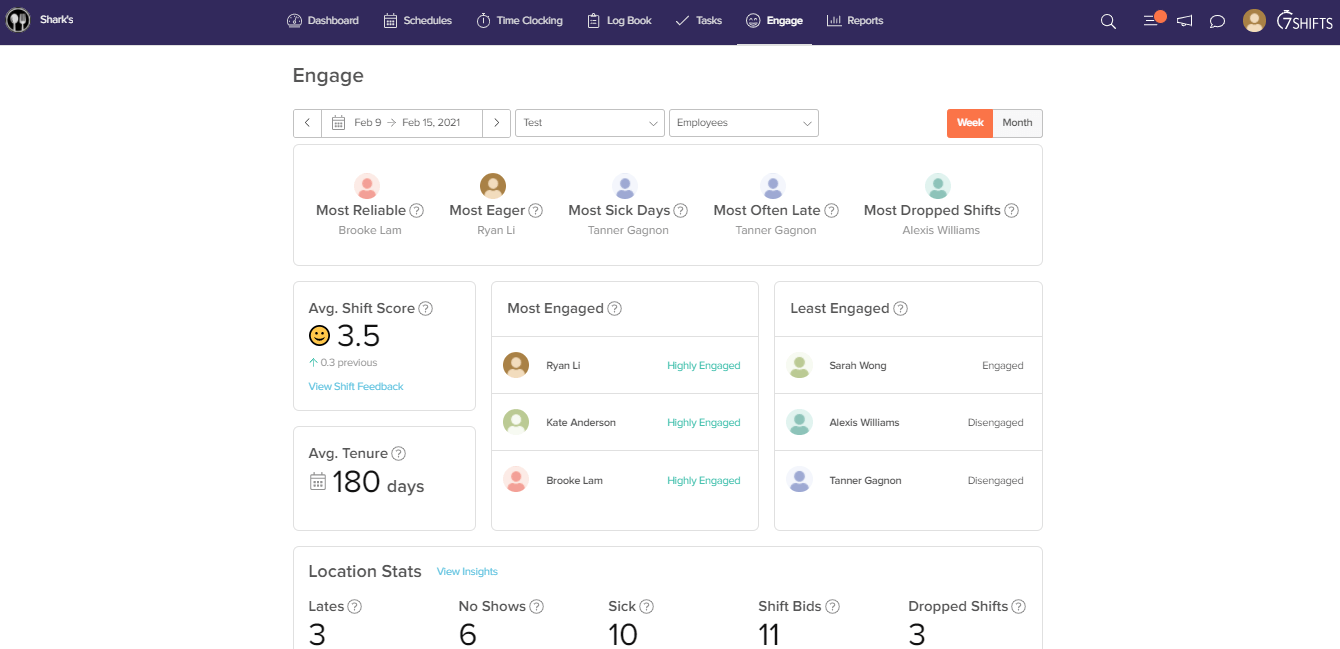
7shifts è una piattaforma di gestione dei turni e della forza lavoro progettata per proprietari e gestori di ristoranti che devono organizzare i turni, monitorare le presenze e semplificare la comunicazione del team in ambienti ospitali ad alto ritmo.
Per Chi È Ideale 7shifts?
7shifts è particolarmente adatto per piccoli e indipendenti gestori di ristoranti che necessitano di strumenti di pianificazione costruiti sulle reali esigenze del lavoro a turni e a ore dei ristoranti.
Perché Ho Scelto 7shifts
7shifts merita il suo posto tra i migliori della mia lista perché è costruito esclusivamente per i ristoranti—non adattato da uno strumento generico di gestione dei turni. Mi piace che le previsioni di vendita guidate dall’IA integrino i dati del tuo POS per raccomandare esattamente quante persone pianificare per turno, un vero vantaggio quando si cerca di rispettare i target di costo del lavoro con margini stretti. Anche gli strumenti di conformità al lavoro sono davvero specifici per i ristoranti: ricevi avvisi in tempo reale per i turni 'clopen', applicazione automatica delle pause e restrizioni per minorenni integrate direttamente nel pianificatore dei turni. Inoltre, la funzione Shift Pool permette al team di organizzare gli scambi di turno in autonomia mantenendo però la supervisione e l’approvazione dei manager—un aspetto molto importante in ambienti ristorativi soggetti ad alto turnover.
Funzionalità Chiave di 7shifts
- Rilevazione presenze: Il personale può timbrare l’entrata e l’uscita direttamente dall’app 7shifts o da un tablet condiviso all’ingresso.
- Messaggistica del team: La chat integrata consente a manager e staff di comunicare per ruolo, sede o individualmente senza uscire dall’app.
- Ripartizione delle mance: Calcola e distribuisce automaticamente le mance tra il tuo team in base alle ore lavorate o secondo regole personalizzate.
- Monitoraggio del coinvolgimento: Controlla il sentiment del team con sondaggi periodici inviati direttamente al personale tramite l’app mobile.
Integrazioni di 7shifts
Le integrazioni includono Toast, Square, Lightspeed, Clover, Revel, Aloha POS, ADP Workforce Now, QuickBooks, Heartland e Micros.

Ideale per aziende di servizi sul campo o costruzioni
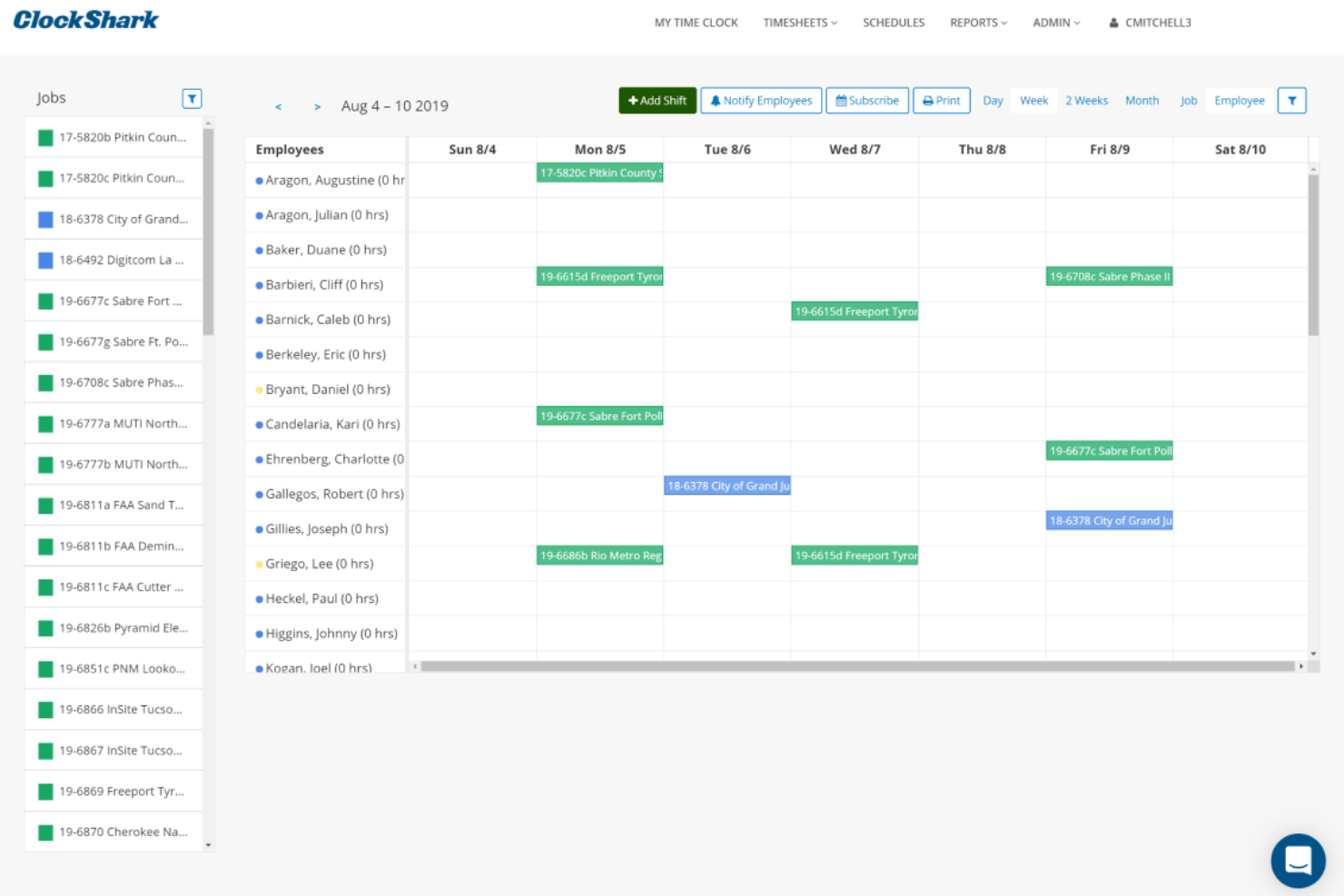
ClockShark è una piattaforma di pianificazione e monitoraggio delle presenze progettata per le piccole imprese che gestiscono team mobili o sul campo, facilitando la coordinazione dei turni, la registrazione delle ore e la semplificazione delle paghe con funzionalità GPS e di assegnazione dei lavori.
Per chi è ideale ClockShark?
ClockShark è perfetto per piccole imprese nei settori delle costruzioni, dei servizi sul campo e in altri ambiti dove i dipendenti lavorano su più cantieri.
Perché ho scelto ClockShark
ClockShark merita un posto nella mia lista perché è stato concepito appositamente per i team delle costruzioni e dei servizi sul campo, non semplicemente adattato a loro. Apprezzo particolarmente il rilevamento presenze con GPS, che registra la posizione dell'impiegato ogni volta che effettua l'entrata o l'uscita e crea una traccia delle sue attività nei vari cantieri. La funzione di geofencing va oltre, creando un confine virtuale attorno a ciascun cantiere e invitando automaticamente i lavoratori a timbrare quando arrivano e a timbrare quando se ne vanno. Per le piccole imprese di costruzione o servizi sul campo che gestiscono più squadre su sede diverse, questa combinazione elimina molta della gestione manuale che solitamente ricade sui responsabili.
Funzionalità principali di ClockShark
- Pianificazione dei dipendenti tramite drag-and-drop: Crea e modifica visivamente i turni delle squadre, riassegnando lavori e turni con pochi clic.
- Calcolo dei costi dei lavori: Traccia le ore lavorate e i costi per lavoro e mansione, con la possibilità per i dipendenti di caricare le foto delle ricevute direttamente dall'app.
- Chiusura turno e moduli di conformità: Crea domande personalizzate all'uscita per raccogliere report di fine turno, dichiarazioni di infortunio o note sull'esposizione a rischi.
- Conversazioni: Invia e ricevi messaggi specifici sul lavoro tra il personale d'ufficio e le squadre sul campo, mantenendo tutti aggiornati sullo stato d'avanzamento.
Integrazioni di ClockShark
Le integrazioni includono QuickBooks, QuickBooks Online, ADP Workforce Now, RUN Powered by ADP, Sage 100 Contractor, Xero, Simpro, Paychex, Gusto e MYOB.

Ubeya
Il miglior software per l'organizzazione della forza lavoro nel settore eventi
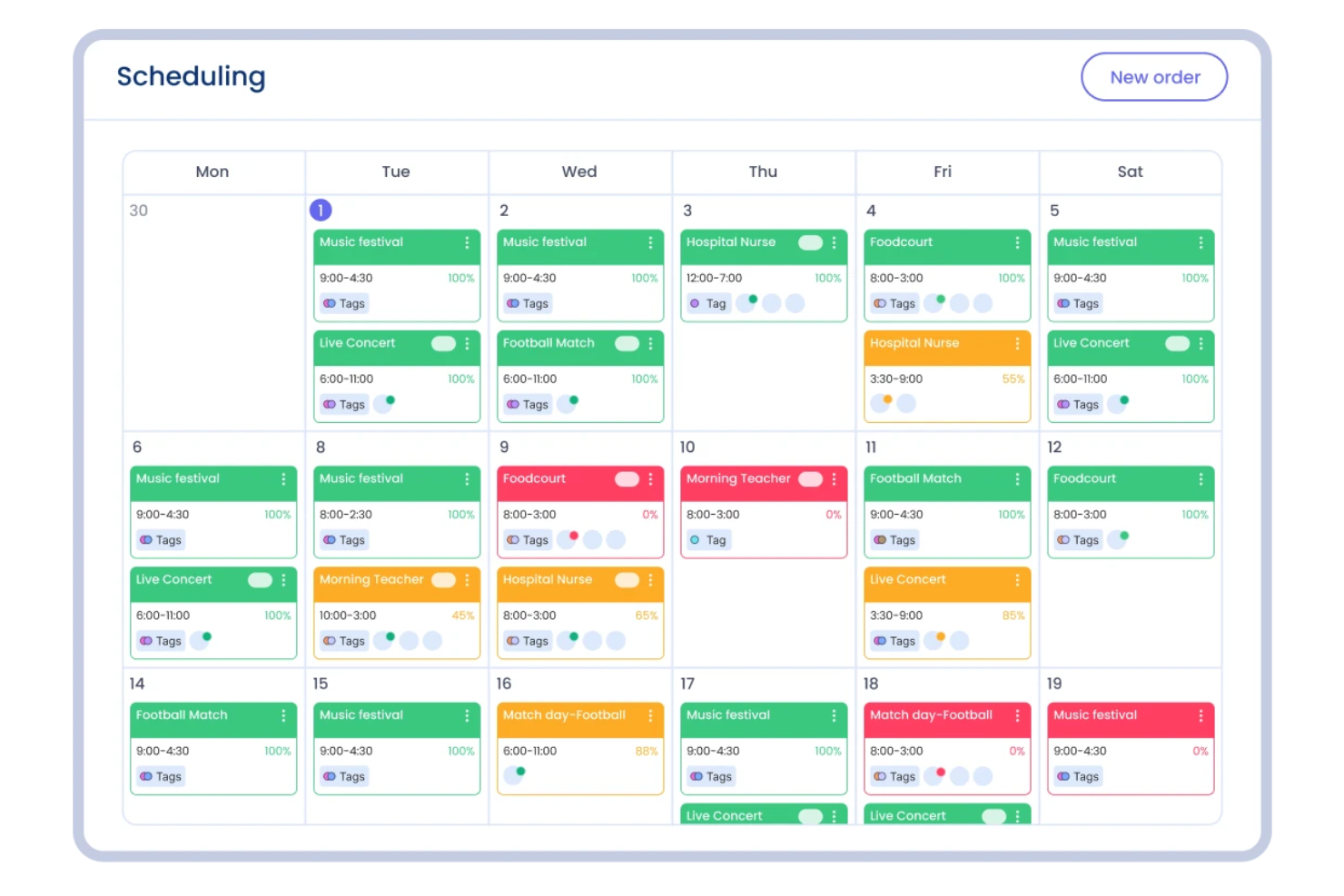
Ubeya è una piattaforma di gestione della forza lavoro per piccole imprese nei settori hospitality, eventi e staffing che necessitano di pianificare, comunicare e gestire team orari o su turni.
Per chi è ideale Ubeya?
Ubeya è particolarmente indicato per piccole imprese attive nell'organizzazione di eventi, catering e hospitality che si affidano a una forza lavoro flessibile, basata su turni.
Perché ho scelto Ubeya
Ho scelto Ubeya perché risponde concretamente alle esigenze della gestione del personale negli eventi. Mi piace che permetta di pianificare eventi multi-ruolo in un'unica schermata: se stai organizzando un catering con baristi, camerieri e personale di cucina nella stessa serata, puoi assegnare e monitorare ogni ruolo senza cambiare strumento. Apprezzo anche l'abbinamento dei turni tramite IA, che incrocia disponibilità, competenze e regole lavorative per suggerire la persona giusta per ogni mansione. La funzione di conferma automatica dell'arrivo invia check-in in tempo reale prima e durante i turni, molto utile quando gestisci staff su più sedi e non puoi essere ovunque.
Funzionalità principali di Ubeya
- Monitoraggio ore e presenze: I lavoratori timbrano tramite l'app mobile, con verifica GPS per confermare la presenza in sede.
- Calcolo automatico delle retribuzioni: Ubeya calcola le paghe in base alle ore lavorate, tariffe e regole sugli straordinari, pronto per l'esportazione verso il payroll.
- Gestione della disponibilità del personale: I lavoratori comunicano la loro disponibilità direttamente dall'app, così pianifichi solo chi è realmente libero.
- Messaggistica in app: Invia messaggi broadcast o diretti ai singoli lavoratori o ai gruppi di turno direttamente dalla piattaforma.
Integrazioni di Ubeya
Le integrazioni comprendono Teamtailor, SAP SuccessFactors, ADP, QuickBooks, Xero, BambooHR, Gusto, Workday, Paychex e un'API aperta per personalizzazioni.
Altri software di pianificazione dei dipendenti per piccole imprese
Ecco altre valide opzioni per la pianificazione dei turni da prendere in considerazione. Non sono rientrate nella mia top 10, ma vale comunque la pena esaminarle:
- ezClocker
Il miglior software di monitoraggio presenze con GPS
- Sage HR
Miglior gestione delle assenze dei dipendenti per piccole imprese
- eResource Scheduler
Ideale per la gestione di risorse umane e non umane
- ABC Roster
Ideale per la gestione dei dipendenti e dei vincoli di turnazione
- monday AI Workspace
Il miglior strumento di visualizzazione dei turni per piccoli team
- Resource Guru
Ideale per una pianificazione efficiente nelle piccole agenzie
- BambooHR®
Il miglior sistema di tracciamento dei candidati per le piccole imprese
- WebWork Time Tracker
Ideale per monitorare presenze e turni
- Justworks
Il miglior software per la pianificazione dei turni con supporto 24/7 da un team di esperti HR
- Wrike
Ideale per le aziende che desiderano visibilità sulla disponibilità di ciascun membro del team
- TimeTrex
Ideale per pianificazione dei turni automatizzata
- Zoho Shifts
Ideale per programmazione turni e rilevazione presenze in un'unica soluzione
- TimeClock Plus
Ideale per la gestione dei turni


Come valuto il software per la programmazione dei dipendenti
Il software per la programmazione dei dipendenti è la spina dorsale operativa per le forze lavoro basate su turni, i responsabili retail che gestiscono lavoratori part-time su più reparti, o i supervisori che abbinano il personale ai turni in base alla domanda. Quando valuto gli strumenti in questo settore, divido la mia analisi in due livelli: ciò che ogni prodotto deve fare in modo affidabile solo per essere incluso nell'elenco, e ciò che differenzia davvero una soluzione dall'altra.
Funzionalità di base (requisiti fondamentali per questa lista)
Per il software di programmazione dei dipendenti, valuto le seguenti funzionalità di base:
- Creazione dei turni: Cerco strumenti con pianificatori drag-and-drop che permettano ai responsabili di assegnare turni per ruolo, sede e reparto, oltre a modelli riutilizzabili per schemi ricorrenti.
- Programmazione automatica: Lo strumento dovrebbe generare i turni in base a disponibilità, competenze e richieste di lavoro, non solo su slot vuoti. Controllo come gestisce la logica dei vincoli.
- Self-service per i dipendenti: Scambi di turno, presa in carico di turni disponibili, aggiornamento della disponibilità e richieste di ferie dovrebbero essere gestibili da un'unica piattaforma accessibile dal telefono dei dipendenti.
- Rilevazione di presenze e orari: L'ingresso/uscita tramite mobile, chiosco o web con GPS o geofencing è fondamentale, specialmente per i team multi-sede, dove la verifica della posizione è imprescindibile.
- Rispetto delle norme: Valuto se lo strumento segnala violazioni di straordinari, mancato rispetto delle pause obbligatorie e sanzioni per pianificazione predittiva prima che un responsabile pubblichi la turnazione.
- Accesso da mobile: I lavoratori senza scrivania necessitano di app native per iOS e Android che offrano funzionalità complete, non solo la visualizzazione. Mi aspetto scambi turni, timbrature e messaggistica direttamente dall'app.
- Integrazione con l'elaborazione paghe: I fogli presenze approvati devono essere trasferiti direttamente in sistemi come ADP, Gusto o QuickBooks senza inserimenti manuali o esportazione di file CSV.
- Notifiche in tempo reale: Modifiche agli orari, nuovi turni disponibili e conferme di scambi dovrebbero essere comunicate istantaneamente tramite push, SMS o avvisi in-app.
Uno strumento deve offrire la maggior parte di queste funzionalità per meritare un posto in questa lista. Da lì valuto cosa contraddistingue ogni soluzione.
Funzionalità distintive (cosa distingue le scelte)
Per le funzionalità distintive, cerco strumenti di pianificazione specifici per settore che permettano, ad esempio, ai sistemi sanitari di abbinare le qualifiche richieste ai turni, o ai ristoranti di integrarsi con il loro sistema POS. La previsione della forza lavoro supportata da AI o machine learning aiuta i responsabili ad anticipare i picchi di domanda e ottimizzare lo staff per grandi eventi. Cerco inoltre API aperte che rendano semplice sincronizzare i turni con sistemi paghe, HRIT o strumenti personalizzati: questo è fondamentale quando team più grandi hanno bisogno di flessibilità.
Criteri oltre le funzionalità
La struttura dei prezzi è molto importante. Controllo se il fornitore applica costi per dipendente, per sede o per responsabile, perché la dinamica dei prezzi cambia rapidamente con la scala. Anche l’adozione è un fattore fondamentale. Se i lavoratori in prima linea non utilizzano l’app, i responsabili tornano a usare messaggi e fogli di calcolo. Valuto anche quanto velocemente i team piccoli possano attivarsi in autonomia rispetto al fatto che grandi aziende abbiano bisogno di supporto dedicato all’implementazione e risorse per la gestione del cambiamento nel rollout su decine di sedi.
Come scegliere un software di pianificazione dei dipendenti per piccole imprese
È facile perdersi in lunghi elenchi di funzionalità e strutture tariffarie complesse. Per aiutarti a rimanere concentrato mentre affronti il tuo esclusivo processo di selezione del software, ecco un elenco dei fattori da tenere a mente:
| Fattore | Che cosa considerare |
|---|---|
| Scalabilità | Lo strumento può crescere insieme alla tua azienda? Cerca opzioni che supportino l'aggiunta di più utenti o sedi senza costi aggiuntivi. Evita gli strumenti che limitano la crescita con piani restrittivi. |
| Integrazioni | Si collega ai sistemi che già utilizzi? Verifica la compatibilità con gli strumenti per buste paga, risorse umane e comunicazione, per garantire un flusso di dati fluido ed evitare l'inserimento manuale dei dati. |
| Personalizzazione | Puoi adattarlo ai tuoi flussi di lavoro? Assicurati che il software consenta di utilizzare campi, report e impostazioni personalizzati, in linea con le tue specifiche esigenze di pianificazione. |
| Semplicità d'uso | È semplice da usare per il tuo team? Cerca interfacce intuitive e una navigazione agevole, per ridurre al minimo il tempo di formazione e la frustrazione degli utenti. |
| Implementazione e inserimento | Quanto velocemente puoi iniziare a utilizzarlo? Considera il tempo e le risorse necessari per la configurazione. Gli strumenti con guide chiare e assistenza possono contribuire ad accelerare il processo. |
| Costo | Rientra nel tuo budget? Confronta i piani tariffari e presta attenzione ai costi nascosti. Considera i costi a lungo termine e gli eventuali sconti per gli abbonamenti annuali. |
| Misure di sicurezza | I tuoi dati sono protetti? Assicurati che il software disponga di crittografia, controlli di accesso sicuri e sia conforme alle normative pertinenti sulla protezione dei dati, per salvaguardare le informazioni sensibili. |
| Disponibilità dell'assistenza | Riceverai aiuto quando ne avrai bisogno? Verifica le opzioni di assistenza 24 ore su 24, 7 giorni su 7 e la qualità del servizio clienti. Tempi di risposta rapidi possono essere fondamentali in caso di problemi. |
Che cos'è il software di pianificazione dei dipendenti per le piccole imprese?
Il software di pianificazione dei dipendenti per le piccole imprese è uno strumento che aiuta a gestire e automatizzare la pianificazione dei turni e delle ore di lavoro del personale. Questi strumenti sono generalmente utilizzati da manager, professionisti delle risorse umane e responsabili di team per risparmiare tempo e ridurre i conflitti nella pianificazione. Le funzioni di pianificazione automatizzata, scambio dei turni e invio di notifiche aiutano a gestire e comunicare in modo efficiente. Nel complesso, questi strumenti migliorano la produttività e riducono il carico di lavoro amministrativo per le piccole imprese.
Funzionalità
Quando scegli un software di pianificazione dei dipendenti per una piccola impresa, presta attenzione alle seguenti funzionalità chiave:
- Pianificazione automatizzata: crea e modifica automaticamente i piani in base alla disponibilità dei dipendenti e alle esigenze aziendali, risparmiando tempo e riducendo gli errori.
- Scambio dei turni: consente ai dipendenti di scambiarsi facilmente i turni, offrendo flessibilità e riducendo i conflitti nella pianificazione.
- Notifiche e avvisi: invia aggiornamenti e avvisi tempestivi ai dipendenti sulle modifiche ai turni, assicurandosi che tutti siano informati.
- Possibilità di integrazione: si collega senza problemi ai sistemi esistenti per le buste paga e le risorse umane, garantendo un flusso di dati fluido e riducendo l'inserimento manuale.
- Accesso da dispositivi mobili: consente ai dipendenti di visualizzare e gestire i propri turni ovunque si trovino, aumentando l'accessibilità e la praticità.
- Report personalizzati: genera report su misura per analizzare i dati relativi alla pianificazione e prendere decisioni consapevoli.
- Gestione di più sedi: gestisce la pianificazione in più sedi aziendali, semplificando le operazioni delle imprese in crescita.
- Rilevazione delle ore: monitora con precisione le ore e le presenze dei dipendenti, facilitando l'elaborazione delle buste paga e la conformità normativa.
- Interfaccia intuitiva: assicura che il software sia facile da utilizzare, riducendo al minimo il tempo di formazione e migliorando l'esperienza dell'utente.
- Misure di sicurezza: protegge i dati sensibili dei dipendenti con la crittografia e controlli di accesso sicuri, garantendo la conformità alle normative.
Vantaggi
L'implementazione di un software di pianificazione dei dipendenti per una piccola impresa offre numerosi vantaggi al tuo team e alla tua azienda. Eccone alcuni:
- Risparmio di tempo: la pianificazione automatizzata riduce il tempo dedicato alla creazione e alla modifica manuale dei turni.
- Comunicazione migliorata: notifiche e avvisi tengono tutti informati sulle modifiche ai turni, migliorando la comunicazione del team.
- Flessibilità: le funzioni di scambio dei turni offrono ai dipendenti la flessibilità necessaria per gestire i propri turni, aumentando il morale.
- Maggiore precisione: la rilevazione delle ore assicura un monitoraggio preciso delle ore lavorate, facilitando un'elaborazione accurata delle buste paga.
- Migliore gestione delle risorse: la gestione di più sedi consente di pianificare in modo efficiente presso sedi diverse, ottimizzando l'allocazione delle risorse.
- Decisioni basate sui dati: i report personalizzati forniscono informazioni sui modelli di pianificazione, aiutando a prendere decisioni aziendali consapevoli.
- Accessibilità migliorata: l'accesso da dispositivi mobili consente ai dipendenti di gestire i propri turni ovunque si trovino, aumentando la praticità e il coinvolgimento.
Costi e prezzi
La scelta di un software per la pianificazione dei turni dei dipendenti per una piccola impresa richiede la comprensione dei vari modelli e piani tariffari disponibili. I costi variano in base alle funzionalità, alle dimensioni del team, ai componenti aggiuntivi e ad altro ancora. La tabella seguente riassume i piani più comuni, i relativi prezzi medi e le funzionalità tipicamente incluse nelle soluzioni software per la pianificazione dei turni dei dipendenti per piccole imprese:
Tabella di confronto dei piani per i software di pianificazione dei turni dei dipendenti per piccole imprese
| Tipo di piano | Prezzo medio | Funzionalità comuni |
|---|---|---|
| Piano gratuito | $0 | Pianificazione di base, scambio dei turni e assistenza limitata agli utenti. |
| Piano personale | $5-$15/utente/mese | Pianificazione automatizzata, accesso da dispositivi mobili, notifiche e reportistica di base. |
| Piano aziendale | $20-$40/utente/mese | Reportistica avanzata, integrazioni, gestione di più sedi e assistenza clienti potenziata. |
| Piano per grandi aziende | $50-$100/utente/mese | Funzionalità personalizzabili, responsabile dell'account dedicato, sicurezza avanzata e analisi complete. |
Domande frequenti
Prima di concludere, desideravo rispondere e discutere alcune domande frequenti relative ai software per la pianificazione dei turni dei dipendenti per piccole imprese. Ecco alcune risposte alle domande comuni che ho ricevuto:
Questi strumenti possono integrarsi con il mio attuale sistema paghe?
Sì, molte soluzioni software per la pianificazione dei turni dei dipendenti offrono funzionalità di integrazione con i sistemi paghe più diffusi. Prima dell’acquisto, verifica la compatibilità del software con il tuo sistema attuale. In questo modo garantisci un trasferimento fluido dei dati e riduci il lavoro manuale, risparmiando tempo ed evitando errori.
È difficile implementare un software per la pianificazione dei turni dei dipendenti?
No, la maggior parte degli strumenti moderni per la pianificazione dei turni è progettata per un’implementazione semplice. Spesso include guide, tutorial e assistenza clienti per aiutarti a iniziare rapidamente. Cerca un software con interfacce intuitive e risorse complete per l’inserimento degli utenti, così da rendere agevole la transizione per il tuo team.
Ho bisogno di competenze tecniche per utilizzare questi strumenti?
No, non sono necessarie competenze tecniche per utilizzare la maggior parte dei software per la pianificazione dei turni dei dipendenti. In genere sono progettati con interfacce intuitive e una navigazione semplice. Tuttavia, alcune competenze informatiche di base possono essere utili. La maggior parte dei fornitori offre assistenza e risorse formative per supportare gli utenti di qualsiasi livello.