

I 10 migliori software di selezione dei curriculum con IA recensiti nel 2026

10 Elenco dei migliori software di screening dei curriculum con IA


Trovare i talenti giusti è difficile e passare al setaccio innumerevoli curriculum può essere opprimente. Vuoi assicurarti di effettuare le assunzioni giuste, ma l'enorme quantità di candidature può essere scoraggiante.
Il software di screening dei curriculum con IA può aiutarti. Questi strumenti utilizzano algoritmi avanzati per individuare i candidati migliori, facendoti risparmiare tempo e fatica. Analizzano rapidamente i curriculum, concentrandosi sulle competenze e sull'esperienza che contano per il tuo team.
Ho esaminato e testato diversi strumenti di screening dei curriculum con IA, utilizzando la mia esperienza nella gestione delle risorse umane per fornire un'analisi imparziale. In questo articolo condividerò le mie scelte migliori, concentrandomi sulle loro funzionalità di IA e sui vantaggi che possono offrirti. Iniziamo per trovare la soluzione più adatta alle tue esigenze.
Perché fidarsi delle nostre recensioni sui software
Il nostro team testa e recensisce software dal 2012. In quanto esperti HR noi stessi, sappiamo quanto sia difficile — e importante — scegliere il software giusto.
Per questa guida, abbiamo valutato gli strumenti attraverso test pratici e ricerche indipendenti, assegnando un punteggio agli strumenti in base ai nostri criteri di selezione. Ci basiamo inoltre sulle competenze di leader di pensiero del settore e di professionisti HR attivi.
Le nostre recensioni riflettono il nostro giudizio editoriale umano, non un discorso di vendita.
Revisori esperti:
Tabella comparativa dei software di screening dei curriculum con IA
Questa tabella comparativa riassume i dettagli sui prezzi delle mie migliori selezioni di software di screening dei curriculum con IA:
| Tool | Best For | Trial Info | Price | ||
|---|---|---|---|---|---|
| 1 | Ideale per analisi di recruiting personalizzate | Demo gratuita disponibile | Prezzo su richiesta | Website | |
| 2 | Ideale per la preselezione ad alto volume collegata ai risultati | Demo gratuita disponibile | Prezzi su richiesta | Website | |
| 3 | Ideale per strumenti di onboarding integrati | Demo gratuita disponibile | A partire da $8/utente/mese | Website | |
| 4 | Ideale per flussi di lavoro personalizzati nella valutazione dei CV | Prova gratuita di 14 giorni + piano gratuito disponibile | Da $9/utente/mese (fatturazione annuale) | Website | |
| 5 | Ideale per screening dei candidati multi-fase | Prova gratuita di 7 giorni + demo gratuita disponibile | Da $99/mese (fatturazione annuale) | Website | |
| 6 | Ideale per l’abbinamento dei talenti | Demo gratuita disponibile | Prezzo su richiesta | Website | |
| 7 | Ideale per l'assunzione collaborativa | Prova gratuita di 15 giorni + demo gratuita disponibile | Da $299/mese (fatturato annualmente) | Website | |
| 8 | Ideale per società di selezione | Piano gratuito disponibile | Da $29.98/mese (fatturato trimestralmente) | Website | |
| 9 | Ideale per IA conversazionale | Demo gratuita disponibile | Prezzo su richiesta | Website | |
| 10 | Ideale per assunzioni ad alto volume | Demo gratuita disponibile | Prezzo su richiesta | Website |

Recensione dei migliori software di screening dei curriculum con IA
Di seguito sono riportati i miei riepiloghi dettagliati dei migliori software di screening dei curriculum con IA inclusi nel mio elenco. Le mie recensioni offrono uno sguardo approfondito alle funzionalità principali, ai pro e contro, alle integrazioni e ai casi d’uso ideali di ogni strumento, per aiutarti a trovare quello più adatto a te.

Ideale per analisi di recruiting personalizzate
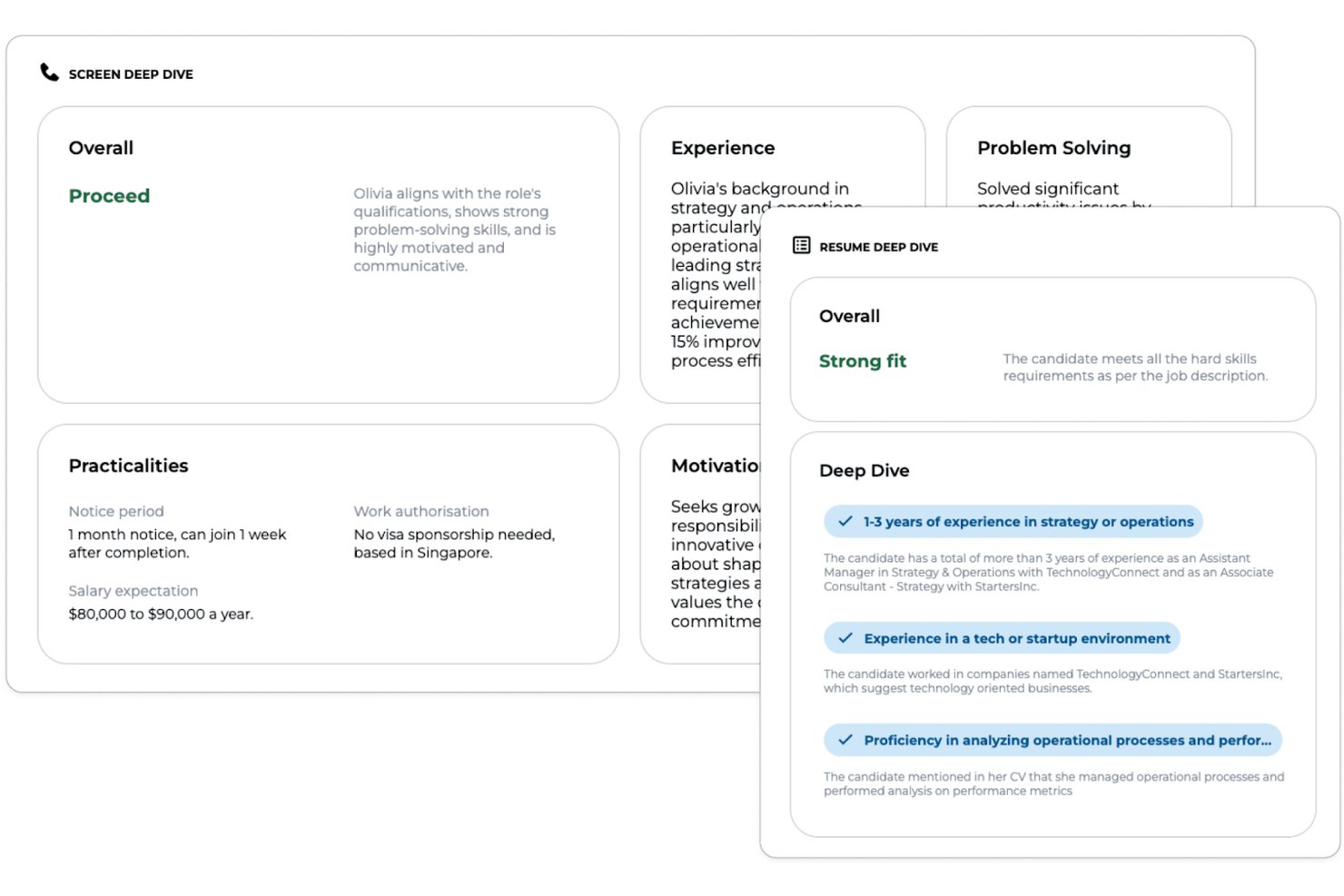
Greenhouse è una piattaforma di recruiting enterprise che offre analisi dei CV tramite intelligenza artificiale personalizzabile, strumenti avanzati per la valutazione dei candidati, moduli DE&I e integrazioni fluide per le organizzazioni che desiderano ottimizzare i flussi di lavoro per l’acquisizione di talenti.
Per chi è Greenhouse?
Greenhouse è una scelta eccellente per team di selezione di medie e grandi dimensioni che necessitano di flussi di lavoro personalizzabili e un’integrazione profonda con i sistemi HR esistenti.
Perché ho scelto Greenhouse
Ho scelto Greenhouse perché utilizzo il suo potente suite di reportistica per monitorare ogni fase dell’assunzione, creare dashboard analitiche personalizzate e approfondire i dati del funnel di selezione per ottenere informazioni granulari sui talenti. L’API di reporting permette al mio team di collegare direttamente le analisi agli strumenti di BI.
Caratteristiche chiave di Greenhouse
- Analisi CV tramite AI: Estrae dati dei candidati da diversi tipi di file usando il processamento del linguaggio naturale.
- Schede di valutazione candidati personalizzabili: Consentono ai team di selezione di creare modelli di valutazione basati sui requisiti di lavoro.
- Flussi di lavoro di colloquio strutturati: Guidano gli utenti attraverso processi di colloquio standardizzati per valutazioni eque dei candidati.
- Azioni di massa sui candidati: Permettono lo spostamento, la comunicazione e la gestione di grandi pool di candidati in modo collettivo.
Integrazioni di Greenhouse
Greenhouse offre oltre 400 integrazioni native, tra cui Workday, ADP, SAP SuccessFactors, Oracle, UKG, LinkedIn, DocuSign, Zoom, Slack, BambooHR e Google Workspace. È disponibile un’API per integrazioni personalizzate.
Pros and Cons
Pros:
- Analisi personalizzate per ogni fase del recruiting
- Strumenti avanzati di configurazione dei punteggi candidato
- Flussi di lavoro potenti per screening ad alto volume
Cons:
- Il matching AI nativo richiede componenti aggiuntivi di terze parti
- L’automazione dell’onboarding può risultare complessa
New Product Updates from Greenhouse

Greenhouse Opens Candidate Insights and Talent Matching Assistants to Beta
Greenhouse opens Candidate Insights and Talent Matching assistants to beta for candidate questions and natural-language search. This helps recruiters review candidates and build searches faster. For more information, visit Greenhouse’s official site.
 .
.
Ideale per la preselezione ad alto volume collegata ai risultati
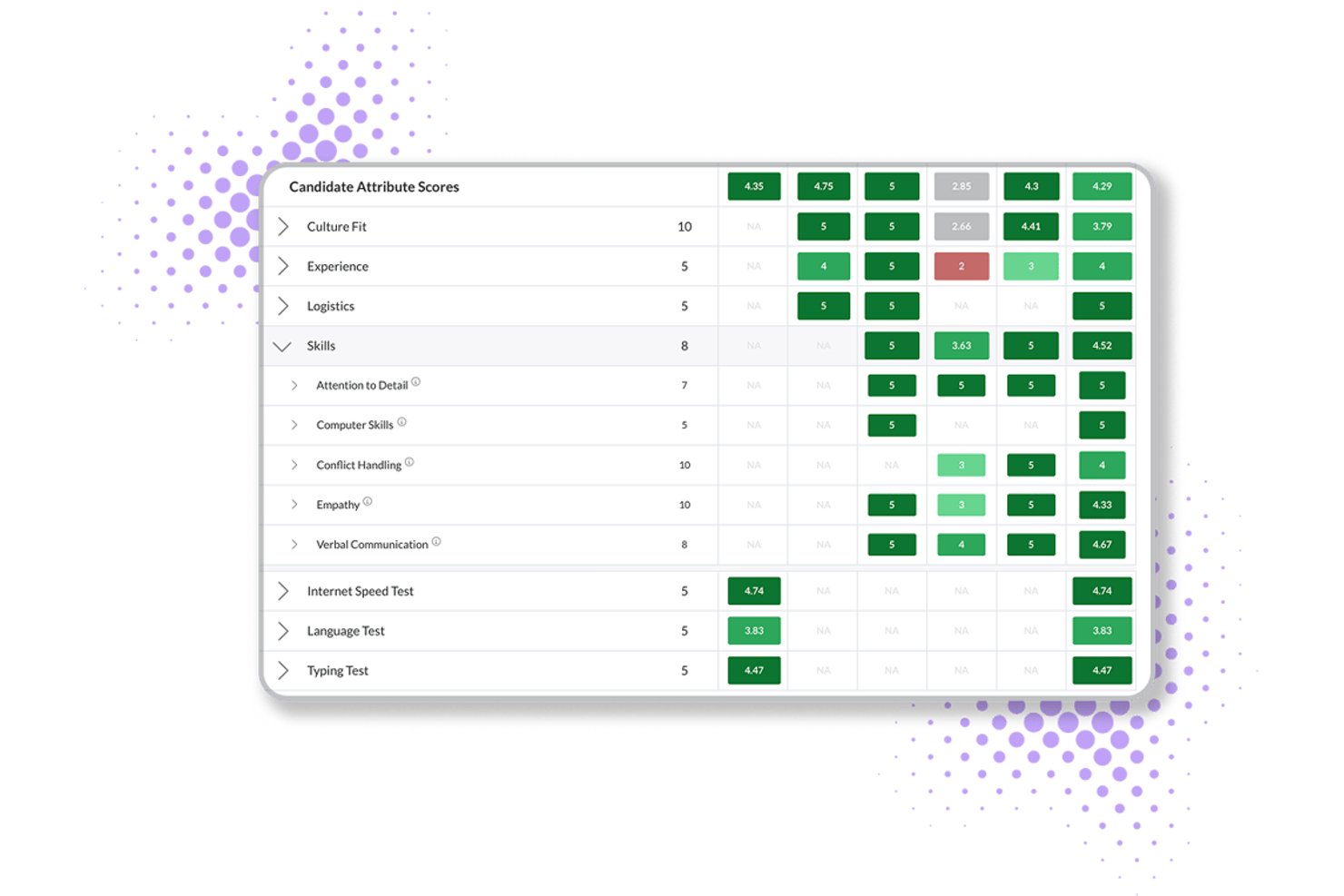
Journeyfront è un ATS basato sull'intelligenza artificiale che combina la valutazione dei curriculum, le valutazioni comportamentali, l'analisi predittiva e la gestione delle classi di assunzione per le operazioni di selezione del personale ad alto volume.
Per chi è più adatto Journeyfront?
Journeyfront è progettato per i gruppi che gestiscono assunzioni ad alto volume in ambienti BPO, centri di contatto e magazzini e che devono collegare le decisioni di preselezione ai risultati concreti successivi all'assunzione.
Perché ho scelto Journeyfront
Ho scelto Journeyfront come uno dei migliori perché è l'unico strumento della mia lista che chiude il ciclo tra le decisioni di preselezione e i risultati concreti successivi all'assunzione. La sua revisione dei curriculum basata sull'intelligenza artificiale assegna un punteggio ai curriculum in base a criteri specifici per il ruolo e alimenta una scheda di valutazione unificata insieme ai risultati delle valutazioni e dei colloqui. Nelle assunzioni ad alto volume in ambito BPO o nei centri di contatto, questo significa che una classe di assunzione creata oggi in Journeyfront può essere collegata ai dati sulla permanenza e sulle prestazioni a 90 giorni disponibili domani.
Funzionalità principali di Journeyfront
- Valutazioni comportamentali predittive: I candidati completano valutazioni del rischio di abbandono che prevedono l'attrition a 30, 60, 90 e 180 giorni prima dell'assunzione.
- Test linguistici basati sull'intelligenza artificiale: I test integrati di competenza linguistica utilizzano una valutazione tramite intelligenza artificiale allineata ai livelli CEFR, eliminando la necessità di uno strumento di valutazione linguistica di terze parti.
- Segnalazione del rilevamento delle frodi: La piattaforma segnala automaticamente l'utilizzo di VPN, gli indirizzi IP duplicati e i cambiamenti di posizione per individuare attività sospette dei candidati durante la preselezione ad alto volume.
- Messaggistica bidirezionale tramite SMS e WhatsApp: I responsabili della selezione possono inviare e ricevere messaggi dai candidati direttamente nella piattaforma tramite SMS o WhatsApp senza passare a uno strumento di comunicazione separato.
Integrazioni di Journeyfront
Journeyfront elenca un ecosistema di oltre 400 fornitori, tra cui Workday, Oracle, UKG Pro, BambooHR, Checkr, Sterling, SHL e Versant. Un'API aperta supporta le integrazioni personalizzate, mentre le integrazioni con ATS e HRIS sono disponibili come componenti aggiuntivi.
Pros and Cons
Pros:
- Collega direttamente la preselezione ai risultati successivi all'assunzione
- Punteggi dell'intelligenza artificiale spiegabili con possibilità di correzione manuale
- Rilevamento delle frodi integrato per le assunzioni ad alto volume
Cons:
- La funzionalità di revisione dei curriculum tramite intelligenza artificiale è ancora in versione di prova
- Nessuna verifica pubblica dei pregiudizi condotta da terze parti disponibile

Ideale per strumenti di onboarding integrati
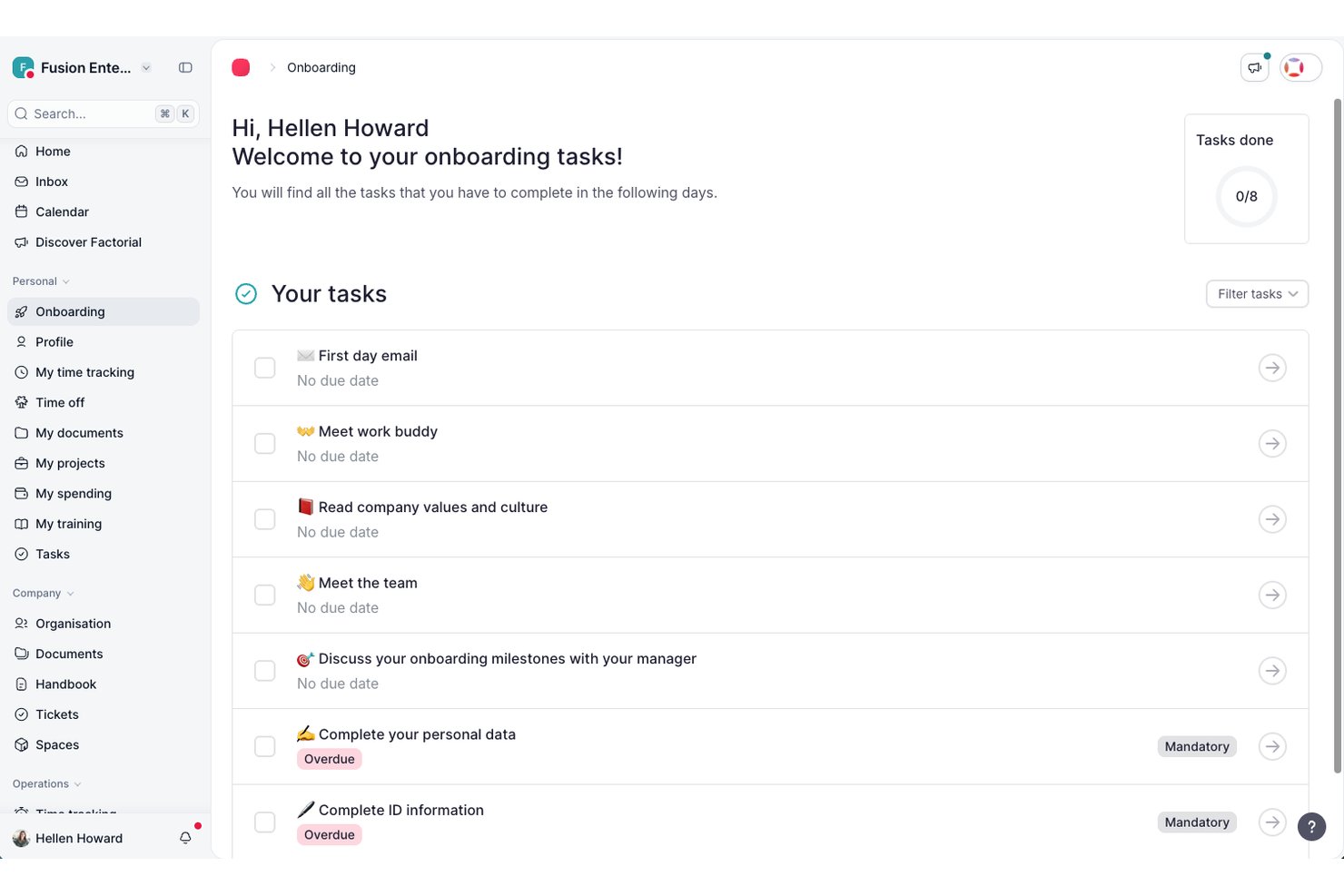
Factorial è una piattaforma completa per la gestione delle risorse umane e dell'attività aziendale che include un ATS integrato con analisi dei curriculum basata sull'IA, screening dei CV, valutazione dei candidati e gestione del processo di selezione, oltre a strumenti HR più ampi.
Per chi è più adatto Factorial?
Factorial è una soluzione adatta alle piccole e medie imprese che desiderano gestire il recruiting e le attività HR su un'unica piattaforma.
Perché ho scelto Factorial
Ho incluso Factorial tra le mie soluzioni preferite perché i suoi strumenti ATS e di onboarding condividono un'unica piattaforma, quindi il passaggio da candidato assunto a dipendente attivo non richiede di cambiare sistema o reinserire i dati. Ciò che apprezzo di più è il modo in cui le funzionalità di recruiting basate sull'IA, come il filtraggio dei CV e i suggerimenti sulle competenze, si collegano direttamente ai flussi di lavoro di onboarding. Una volta assunto un candidato, puoi avviare subito la raccolta dei documenti, le firme elettroniche e le checklist delle attività. Questo stretto collegamento tra recruiting e onboarding è una caratteristica che molti strumenti autonomi di screening basati sull'IA semplicemente non offrono.
Funzionalità principali di Factorial
- Valutazione dei candidati tramite IA: l'IA di Factorial classifica i candidati in base a quanto i loro profili corrispondono ai requisiti del ruolo che hai definito.
- Fasi personalizzate del processo di selezione: crea e modifica le fasi di selezione per ogni ruolo, con aggiornamenti automatici dello stato dei candidati a ogni passaggio.
- Gestione del bacino di talenti: archivia i profili dei candidati e riproponili quando si apre una nuova posizione pertinente.
- Distribuzione degli annunci di lavoro: pubblica le posizioni aperte su più bacheche di annunci direttamente dalla piattaforma senza uscire dall'ATS.
Integrazioni di Factorial
Factorial offre oltre 90 integrazioni tramite il suo marketplace, tra cui LinkedIn, Slack, Okta, Teamtailor, Workable, Google Workspace e Microsoft Outlook. Si collega inoltre a Zapier e dispone di un'API pubblica per le integrazioni personalizzate.
Pros and Cons
Pros:
- I dati dei candidati confluiscono direttamente nell'onboarding
- Controlli integrati per la conformità al GDPR e la conservazione dei dati
- Gestisce il recruiting insieme a paghe e performance
Cons:
- Le funzionalità di recruiting sono disponibili solo tramite un componente aggiuntivo premium
- Opzioni di personalizzazione limitate per i report

Ideale per flussi di lavoro personalizzati nella valutazione dei CV
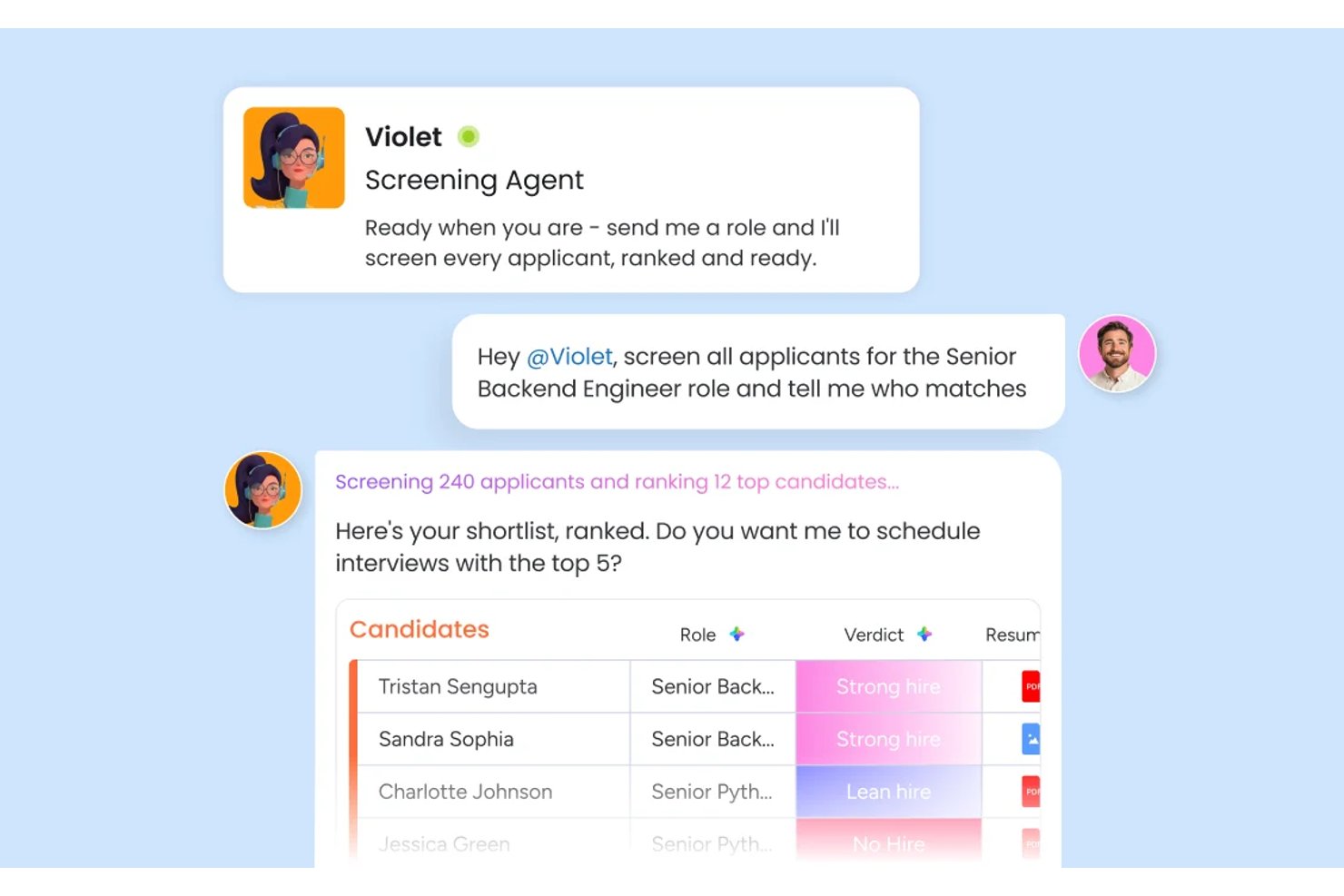
monday AI Workspace è un sistema operativo da lavoro configurabile che consente ai team di selezione del personale di creare pipeline di screening dei candidati personalizzate e potenziate dall'IA, utilizzando la lettura automatica dei CV, il punteggio dei candidati e flussi di lavoro di assunzione trasversali ai team.
Per chi è ideale monday AI Workspace?
È particolarmente indicato per i team HR di aziende di medie dimensioni che desiderano progettare e gestire in autonomia i propri flussi di selezione, invece di adattarsi a un ATS preimpostato e rigido.
Perché ho scelto monday AI Workspace
Ho scelto monday AI Workspace per l'estrema flessibilità che offre al mio team nel definire cosa significa 'qualificato' per ogni ruolo. L'agente di screening valuta ogni candidatura in base ai criteri che imposto, e l'azione AI Estrai Informazioni trasferisce i dati strutturati del CV direttamente nelle colonne della mia board. Trovo particolarmente utile la possibilità di creare azioni AI personalizzate in linguaggio naturale, come chiedere allo strumento di confrontare un curriculum con una specifica descrizione di lavoro e segnalare automaticamente le eventuali lacune di competenze.
Funzionalità principali di monday AI Workspace
- Agente di coordinamento dei colloqui: Gestisce la pianificazione, i promemoria e le notifiche per i colloqui con i candidati in tutti i fusi orari mondiali.
- AI Sidekick: Fornisce un assistente integrato che riassume i profili dei candidati e supporta le decisioni in tempo reale.
- Dashboard di assunzione personalizzabili: Permette ai team di visualizzare lo stato della pipeline, le fasi e il carico di lavoro attraverso widget drag-and-drop.
- Flussi di lavoro di comunicazione automatizzata: Invia email predefinite e aggiornamenti sullo stato dei candidati in base alle azioni di screening o agli spostamenti dei candidati.
Integrazioni di monday AI Workspace
monday AI Workspace offre centinaia di integrazioni native, tra cui Slack, Google Workspace, Microsoft 365, Salesforce, Jira, GitHub, Zoom, Dropbox, HubSpot e Zendesk. Supporta inoltre Zapier e mette a disposizione un'API per integrazioni personalizzate.
Pros and Cons
Pros:
- Punteggio dei candidati personalizzabile senza codice
- L'IA supporta flussi di assunzione multi-fase
- Dashboard visiva che consente di monitorare immediatamente lo stato della pipeline
Cons:
- Può risultare complesso per team di piccole dimensioni
- La configurazione dell'automazione richiede ripetuti prompt manuali
New Product Updates from monday AI Workspace
monday AI Workspace Adds Human Approval Routing
monday AI Workspace adds a human-in-the-loop approval block to AI Workflows, sending approval requests and routing workflow paths based on responses. For more information, visit monday AI Workspace's official site.

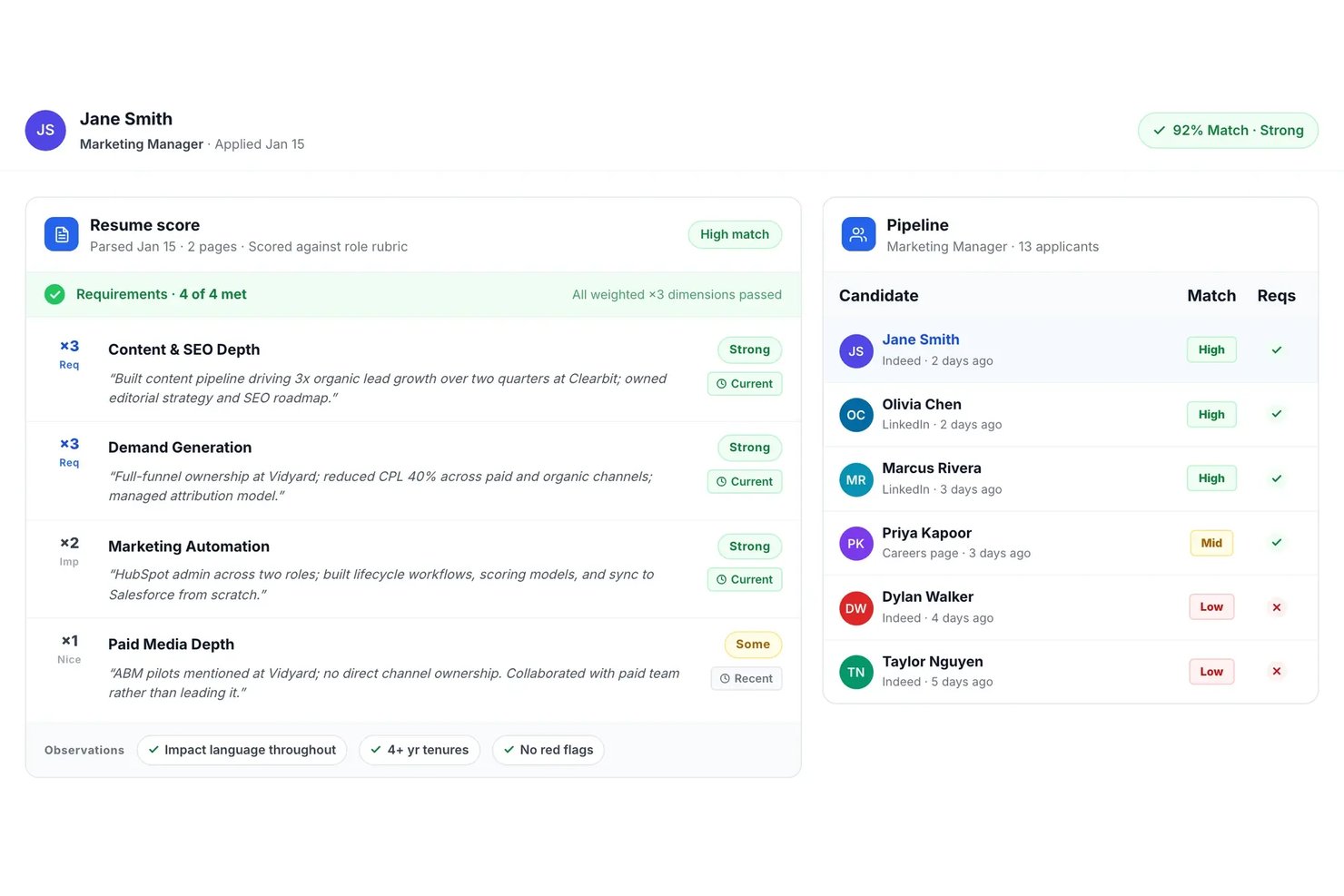
Truffle è una piattaforma di screening dei curriculum guidata dall'IA che analizza automaticamente, valuta, classifica e abbina i candidati alle descrizioni delle posizioni con strumenti di screening multi-fase integrati per team di selezione ad alto volume.
Per chi è ideale Truffle?
Truffle è adatto a selezionatori che gestiscono un alto volume di candidature e team HR in startup e aziende di medie dimensioni che svolgono assunzioni per ruoli in più sedi o unità aziendali.
Perché ho scelto Truffle
Ho scelto Truffle tra i migliori perché permette di lanciare screening multi-fase dei candidati con un solo clic per ogni posizione aperta. Il mio team ottiene classifiche supportate dall'IA, riepiloghi strutturati e immediati delle shortlist, oltre a strumenti integrati di colloquio e valutazione delle competenze asincroni in un unico flusso.
Funzionalità principali di Truffle
- Screening dei curriculum alla cieca: Nasconde automaticamente gli identificatori personali dei candidati per favorire una valutazione imparziale.
- Punteggi di abbinamento IA collegati alle evidenze: Presenta punteggi di corrispondenza che includono collegamenti diretti ai dettagli e ai criteri riscontrati nel curriculum.
- Caricamento massivo dei curriculum: Permette agli utenti di caricare ed elaborare centinaia di curriculum simultaneamente per ciascuna posizione.
- Integrazioni ATS e HRIS: Si collega ai principali sistemi come Ashby, Breezy HR e altri tramite Zapier e API aperta.
Integrazioni di Truffle
Truffle offre integrazioni native con Ashby, Breezy HR e Indeed e può essere collegato con Zapier. È disponibile un'API aperta per integrazioni personalizzate.
Pros and Cons
Pros:
- Shortlist automatica con punteggi IA collegati alle evidenze
- Screening integrato delle competenze e dei colloqui asincroni
- Elaborazione rapida in blocco per ruoli ad alto volume
Cons:
- Strumenti limitati per reportistica e analisi avanzata
- Nessun supporto per l'analisi multilingue dei curriculum

Ideale per l’abbinamento dei talenti
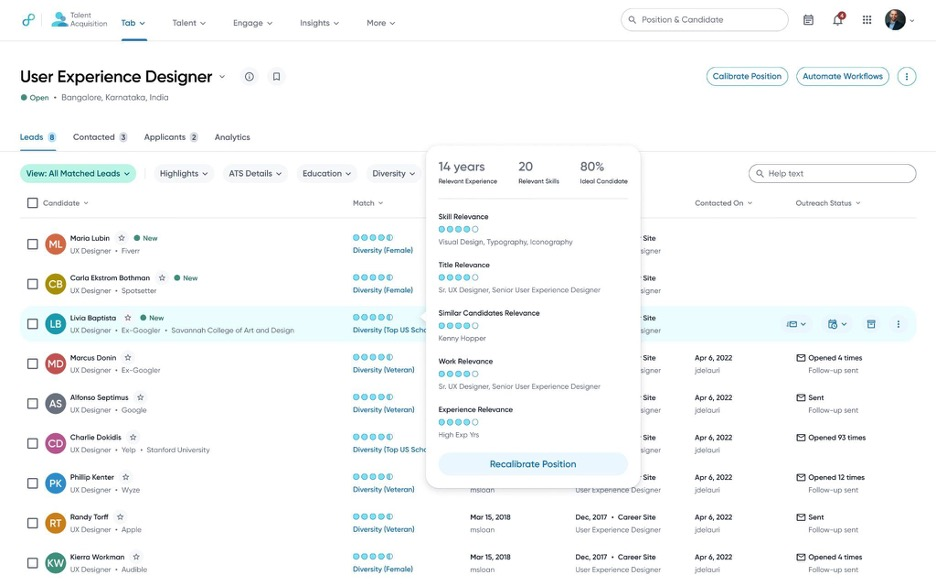
Eightfold AI ha attirato la mia attenzione perché utilizza l’IA per analizzare a fondo le competenze e le esperienze dei candidati, concentrandosi sull’idoneità reale al lavoro invece che su una semplice corrispondenza di parole chiave. Questa piattaforma è adatta alle aziende con esigenze di assunzione ad alto volume o complesse, dove è davvero importante individuare rapidamente i talenti più forti e pertinenti.
Apprezzo il modo in cui mette in relazione le competenze esistenti con i ruoli aperti e i percorsi di mobilità interna, facilitando decisioni più chiare sul talento.
Eightfold AI è ideale per
- Grandi organizzazioni con necessità di screening di molti CV
- Aziende che puntano su abbinamento dei talenti e mobilità interna
Eightfold AI non è adatto per
- Piccole aziende con esigenze di screening di base
- Team che desiderano automazioni dei flussi di lavoro profonde e personalizzabili
Cosa distingue Eightfold AI
Eightfold AI si basa sull’idea che competenze ed esperienza reale debbano guidare le assunzioni, non solo la corrispondenza di parole chiave sul CV. In pratica, setaccia grandi volumi di candidati e mette in evidenza persone che hanno dimostrato capacità in linea con le posizioni aperte. A differenza dei semplici strumenti di screening o delle funzionalità di recruiting di piattaforme come Workday, Eightfold si aspetta che tu ti fidi della sua IA per proporre candidati pertinenti che potresti non individuare con un filtraggio manuale.
Compromessi con Eightfold AI
Eightfold AI ottimizza l’abbinamento automatizzato basato sulle competenze, ma si rinuncia a un controllo manuale dettagliato e alla personalizzazione del processo di screening. Se desideri modificare ogni filtro nel dettaglio, probabilmente ti sentirai limitato.
Pros and Cons
Pros:
- L’IA rivela il pieno potenziale dei candidati
- Rende le decisioni di assunzione più diversificate
- Centralizza i dati della pianificazione della forza lavoro
Cons:
- Complesso per le piccole organizzazioni
- Funziona meglio con HR strutturato

Workable si distingue per me quando l'assunzione diventa collaborativa e i volumi di curriculum diventano schiaccianti. Mi piace il modo in cui la sua IA filtra i pool di candidati e mette in evidenza le corrispondenze migliori direttamente all'interno dei tuoi flussi di lavoro collaborativi per l'assunzione. I team possono commentare, valutare e far avanzare i candidati insieme, tutto in un unico posto.
Apprezzo come la valutazione dei candidati sia trasparente e si integri con il feedback reale del team, riducendo così i cicli di revisione avanti e indietro.
A chi è più adatto Workable
- Team di assunzione collaborativi che devono analizzare grandi volumi di curriculum
- Organizzazioni che desiderano una valutazione dei candidati tramite IA con input trasparente del team
A chi non è adatto Workable
- Aziende che gestiscono assunzioni sporadiche o una tantum
- Team che necessitano di ricerca approfondita di candidati o gestione avanzata della relazione con i candidati
Cosa distingue Workable
Workable sviluppa il processo di selezione attorno alla collaborazione e alla trasparenza piuttosto che alla sola automazione. Diversamente da strumenti come Lever, che si concentrano molto sull'analisi del flusso di candidati, Workable prevede che tu coinvolga diversi portatori di interesse nella valutazione e preselezione dei candidati direttamente sulla piattaforma. Questo funziona al meglio quando vuoi che responsabili delle assunzioni e intervistatori siano coinvolti nella revisione dei curriculum e nel feedback, e non solo i recruiter.
Compromessi con Workable
Workable è ottimizzato per le assunzioni collaborative, ma le capacità avanzate di ricerca di candidati o di marketing della selezione sono meno evidenti. Ci perdi se il tuo processo dipende dal coinvolgimento diretto e da pipeline di talenti a lungo termine.
Pros and Cons
Pros:
- Piattaforma unificata per assunzioni e HR
- L'IA aiuta nella ricerca e nella valutazione
- I team collaborano in modo più efficace
Cons:
- Le funzionalità variano a seconda del piano
- È necessaria una configurazione manuale per le integrazioni


Jobscan si guadagna il suo posto per come automatizza il controllo dei curriculum grazie a un abbinamento di competenze e parole chiave con la qualità di un recruiter. Quando le agenzie si trovano a gestire grandi volumi o esigenze complesse dei clienti, vedo che usano l’ottimizzazione ATS di Jobscan per allineare i curriculum ai reali requisiti di ciascuna posizione.
Mi piace poter confrontare fianco a fianco quanto bene il curriculum di un candidato corrisponde ai requisiti fondamentali. Questo focus sull’adeguatezza concreta accelera la selezione iniziale quando è l’accuratezza a contare di più.
Jobscan è ideale per
- Società di selezione che gestiscono grandi volumi di candidati
- Agenzie che necessitano di un abbinamento preciso dei curriculum tramite ATS
Jobscan non è l’ideale per
- Team HR interni che selezionano pochi candidati
- Aziende che cercano funzionalità avanzate di colloquio AI o valutazione
Cosa distingue Jobscan
Jobscan è progettato per abbinare i curriculum alle descrizioni di lavoro utilizzando una logica simile a quella dei recruiter, invece di filtrare solo su parole chiave generiche come fanno gli strumenti ATS di base. Nella pratica, funziona al meglio per agenzie o team di assunzione che gestiscono enormi pool di candidati e hanno bisogno di far emergere corrispondenze oggettive basate sulle competenze prima di approfondire la valutazione.
A differenza di LinkedIn Recruiter, che si concentra su ricerca e costruzione di relazioni, Jobscan si focalizza sull’ottimizzazione di ogni curriculum in funzione di uno specifico ruolo e dei suoi reali requisiti.
Compromessi con Jobscan
Jobscan è ottimizzato per uno screening accurato e ad alto volume, ma si rinuncia a funzionalità più ampie di interazione con i candidati o di gestione del processo di colloquio, quindi sarà necessario uno strumento aggiuntivo per una selezione end-to-end.
Pros and Cons
Pros:
- Aiuta a individuare parole chiave mancanti
- Include un builder di curriculum compatibile con ATS
- Offre analisi di curriculum e LinkedIn
Cons:
- Si concentra sui singoli candidati
- Funzionalità limitate per i recruiter

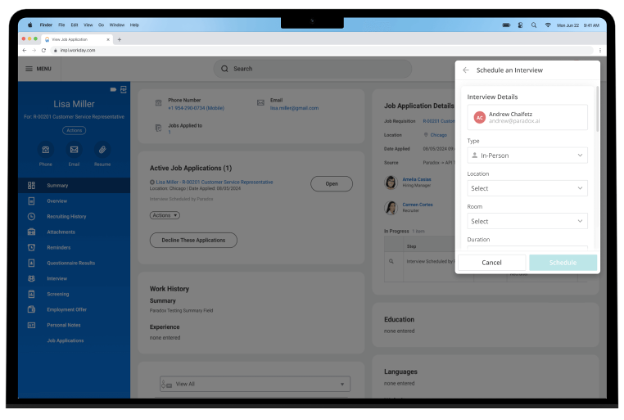
Paradox è la mia scelta qui grazie all’IA conversazionale integrata nell’esperienza di screening e programmazione dei colloqui. Quando valuto gli strumenti di screening del CV basati sull’IA per assunzioni su larga scala, ciò che distingue Paradox è l’uso della chat AI per valutare i candidati in tempo reale, rispondere alle domande e portare direttamente le persone idonee alla fase successiva. Mi piace che i team possano automatizzare l’engagement iniziale e individuare i profili più adatti senza aggiungere passaggi o ritardi.
Paradox è ideale per
- Team di recruiting ad alto volume che usano la chat AI per il screening
- Organizzazioni che automatizzano la scrematura e la pianificazione iniziale dei candidati
Paradox non è adatto per
- Aziende che necessitano di valutazioni avanzate delle competenze
- Team che richiedono un’analisi manuale dettagliata dei curriculum
Cosa rende Paradox unico
Paradox è unico perché costruisce l’intera esperienza di screening attorno all’IA conversazionale. Invece di aspettare che i recruiter esaminino i CV direttamente, il sistema conduce colloqui guidati tramite chat che imitano l’interazione tra candidato e recruiter. Ho visto che funziona bene quando le organizzazioni vogliono automatizzare lo screening su larga scala dei curriculum, mantenendo però una sensazione di interazione bidirezionale.
Pro e contro di Paradox
Paradox punta sull’automazione rapida del screening tramite linguaggio naturale, ma si rischia di perdere profondità e sfumature dell’analisi tradizionale del curriculum, il che significa che alcuni dettagli o contesti possono essere persi nelle prime fasi.
Pros and Cons
Pros:
- Candidature accessibili da diverse piattaforme
- Programmazione dei colloqui istantanea
- Funziona in diversi fusi orari
Cons:
- I flussi di chat richiedono una configurazione
- Sono ancora necessari recruiter umani per le fasi finali

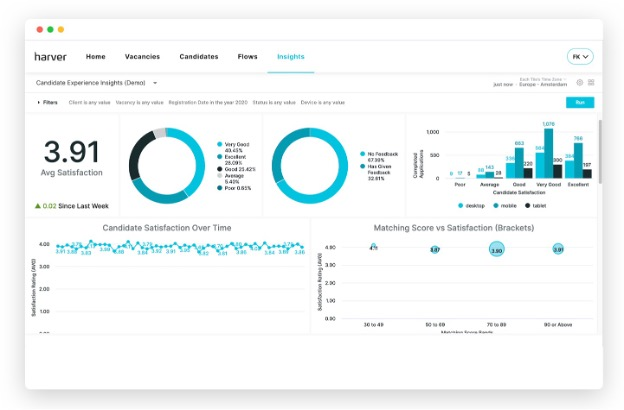
Harver è la soluzione ideale per assunzioni ad alto volume, soprattutto quando serve un mix tra automazione e decisioni strutturate. L'ho incluso in questo elenco perché il suo motore di screening AI pre-seleziona i candidati su larga scala, presentando solo quelli che soddisfano i tuoi criteri.
Apprezzo i suoi flussi di lavoro basati su assessment: i team possono valutare rapidamente grandi pool di talenti e poi filtrare i candidati per idoneità e disponibilità da un'unica piattaforma.
Harver è ideale per
- Recruiter che gestiscono screening di migliaia di candidati
- Team che necessitano di valutazioni e filtraggio automatizzati dei candidati prima dell'assunzione
Harver non è indicato per
- Piccole aziende con un basso volume di candidature
- Team che desiderano una revisione dettagliata e manuale dei CV
Cosa rende Harver unico
Harver è costruito attorno a uno screening automatizzato su larga scala—diversamente dagli strumenti per i CV che ti chiedono di esaminare in dettaglio ogni candidato. In pratica, imposti valutazioni e regole all'inizio, poi la piattaforma esamina i candidati e mette in cima i migliori abbinamenti. Rispetto a soluzioni come Greenhouse o Lever, Harver punta su un filtraggio affidato ai dati e poco manuale.
Compromessi con Harver
Harver ottimizza lo screening rapido e automatizzato di grandi volumi, ma perdi la possibilità di analizzare i dettagli di ogni candidato o di fare valutazioni personalizzate e approfondite nelle prime fasi del processo.
Pros and Cons
Pros:
- Gestisce efficacemente il reclutamento di grandi volumi
- Offre approfondimenti sul recruiting basati sui dati
- Valutazioni personalizzabili per diversi ruoli
Cons:
- Migliore per strutture enterprise
- Personalizzazione limitata per selezioni di nicchia
Altri software di screening dei curriculum con IA
Ecco alcune altre opzioni di software di screening dei curriculum con IA che non sono entrate nel mio elenco, ma che vale comunque la pena prendere in considerazione:
- Alex
Ideale per l’analisi intelligente dei CV
- Covey
Ideale per il coinvolgimento dei candidati
- Pesto
Ideale per il recruiting tecnologico
- HaiTalent
Ideale per assunzioni veloci
- ResumeScreening.ai
Ideale per feedback in tempo reale
- Brainner
Ideale per la valutazione automatica dei candidati
- Manatal
Ideale per il recruiting sui social media


Come Valuto i Software di Screening CV con Intelligenza Artificiale
Qualsiasi strumento presente in questa lista deve offrire di più che un semplice filtro basato su parole chiave etichettato come "AI"—deve realmente ridurre i tempi di screening e far emergere candidati più adatti da pool di applicanti ad alto volume. Suddivido la mia valutazione in funzionalità essenziali che ogni strumento deve possedere per qualificarsi e fattori differenzianti che distinguono le buone opzioni da quelle eccellenti.
Funzionalità Essenziali (Requisiti Minimi per questa Lista)
Quando seleziono gli strumenti per la mia lista, ne valuto ognuno su una scala da 0 (non offre la funzionalità) a 5 (eccelle in quest'area) per ciascuna delle funzionalità essenziali elencate di seguito. Successivamente, calcolo il punteggio totale di ciascuno in una percentuale. Ogni strumento deve raggiungere un punteggio minimo totale del 65% per essere considerato incluso.
- Parsing CV con AI: Controllo se lo strumento è in grado di estrarre dati strutturati—competenze, titoli di lavoro, formazione, certificazioni—da CV in vari formati come PDF e DOCX con elevata precisione.
- Punteggio e Classifica dei Candidati: Ogni strumento dovrebbe generare punteggi di corrispondenza tramite AI e fornire shortlist ordinate, così i recruiter che valutano oltre 500 candidati possono focalizzarsi rapidamente sui migliori profili.
- Abbinamento Semantico con la Descrizione del Lavoro: Cerco corrispondenze che vadano oltre la sovrapposizione di parole chiave per comprendere il contesto, come riconoscere che un "responsabile delle operazioni delle risorse umane" si allinea a un ruolo da "HR manager".
- Controlli per la Riduzione dei Bias: Funzionalità come screening anonimo, anonimizzazione dei dati demografici o punteggi spiegabili mi aiutano a valutare quanto seriamente una piattaforma affronta la questione dell'equità nelle decisioni automatizzate.
- Elaborazione Massiva dei CV: I team di selezione ad alto volume devono esaminare migliaia di CV per singolo ruolo, quindi valuto se lo strumento gestisce grandi quantità senza rallentamenti o necessità di soluzioni manuali.
- Integrazione con ATS e HRIS: Lo strumento dovrebbe collegarsi a piattaforme come Greenhouse, Workday o iCIMS, così che i candidati selezionati fluiscano direttamente nei flussi di lavoro di recruiting esistenti.
Una volta stilata la lista degli strumenti che soddisfano questi requisiti, considero cosa distingue ogni piattaforma.
Fattori Differenzianti (Cosa Distingue i Fornitori)
Ecco come confronto i diversi fornitori:
Funzionalità Distintive
L'inferenza delle competenze è un grande elemento differenziante—gli strumenti che identificano capacità non dichiarate sulla base dello storico lavorativo dei candidati scovano talenti che il matching puramente basato su parole chiave non evidenzierebbe. Valuto anche se una piattaforma permette ai team di recruiting di addestrare modelli di AI personalizzati sui propri dati di assunzione e profili di successo. Le analisi predittive sulle assunzioni aggiungono un ulteriore livello, offrendo ai responsabili dell'acquisizione talenti visibilità su trend relativi alla qualità delle assunzioni e alla salute del pipeline nel tempo.
Oltre le Funzionalità
Conformità normativa e governance dell'AI sono aspetti fondamentali: verifico se i fornitori pubblicano audit sui bias e supportano normative in evoluzione come il Regolamento Europeo sull'Intelligenza Artificiale o la legge locale 144 di New York City. L'adeguatezza rispetto al volume di assunzioni è altrettanto importante, poiché uno strumento pensato per il recruiting BPO di grandi aziende spesso non si adatta a team di medie dimensioni che devono coprire pochi ruoli altamente specializzati. Guardo anche al time-to-value, incluso quanto rapidamente i team possono calibrare i modelli di scoring e connettersi al loro ATS già in uso.
Come scegliere un software di screening dei curriculum con IA
È facile perdersi in lunghi elenchi di funzionalità e strutture tariffarie complesse. Per aiutarti a rimanere concentrato mentre affronti il tuo processo unico di selezione del software, ecco una lista di controllo dei fattori da tenere a mente:
| Fattore | Cosa considerare |
| Scalabilità | Il software può crescere insieme alla tua azienda? Assicurati che possa gestire un aumento del volume dei curriculum senza problemi di prestazioni man mano che le tue esigenze di assunzione aumentano. |
| Integrazioni | Funziona con i sistemi che già utilizzi? Verifica la compatibilità con il tuo ATS, HRIS e gli altri strumenti essenziali per evitare interruzioni del flusso di lavoro. |
| Personalizzazione | Puoi adattarlo alle tue esigenze? Cerca opzioni per modificare impostazioni, flussi di lavoro e report in base ai tuoi processi di assunzione. |
| Facilità d'uso | L'interfaccia è intuitiva? Un design facile da usare riduce i tempi di formazione e gli errori, favorendo la produttività del tuo team fin dal primo giorno. |
| Implementazione e onboarding | Quanto tempo serve per essere operativi? Considera il tempo e le risorse necessari per la configurazione, la formazione e la migrazione dei dati. |
| Costo | Rientra nel tuo budget? Confronta i piani tariffari e fai attenzione ai costi nascosti. Assicurati che le funzionalità giustifichino il costo per il tuo team. |
| Misure di sicurezza | I dati dei tuoi candidati sono protetti? Cerca crittografia, conformità alle normative sulla privacy dei dati e aggiornamenti regolari della sicurezza per proteggere le informazioni sensibili. |
| Disponibilità dell'assistenza | L'aiuto è disponibile quando serve? Verifica la presenza di opzioni di assistenza 24 ore su 24, 7 giorni su 7 e di responsabili degli account dedicati che possano aiutarti nei momenti critici. |
Che cos'è un software di screening dei curriculum con IA?
Il software di screening dei curriculum con IA è uno strumento che automatizza il processo di revisione e valutazione dei curriculum dei candidati utilizzando l'intelligenza artificiale. I professionisti delle risorse umane e i recruiter utilizzano questi strumenti per identificare rapidamente i candidati qualificati, riducendo i tempi di assunzione e migliorando l'efficienza del processo di selezione.
Funzionalità come l'analisi delle parole chiave, la classificazione dei candidati e il filtraggio automatizzato aiutano ad abbinare i candidati ai requisiti del lavoro, migliorando il processo di selezione.
Nel complesso, questi strumenti fanno risparmiare tempo e migliorano la qualità delle assunzioni sfruttando le capacità dell'IA.
Funzionalità
Ecco le funzionalità principali che dovrebbe avere qualsiasi ottimo software di screening dei curriculum con IA:
- Analisi delle parole chiave: identifica le parole chiave pertinenti nei curriculum per abbinare in modo efficiente i candidati alle descrizioni delle posizioni.
- Classificazione dei candidati: classifica automaticamente i candidati in base alle loro qualifiche e all'idoneità al ruolo, facendo risparmiare tempo nel processo di selezione.
- Filtraggio automatizzato: esclude i candidati non qualificati utilizzando criteri predefiniti, consentendo ai recruiter di concentrarsi sui migliori talenti.
- Valutazioni delle competenze: valuta le competenze tecniche e trasversali dei candidati attraverso test basati sull'IA, garantendo una buona corrispondenza con la posizione.
- Analisi predittiva: fornisce indicazioni sul potenziale dei candidati e sulle loro prestazioni future, supportando decisioni di assunzione consapevoli.
- Flussi di lavoro personalizzabili: consentono ai team di adattare il processo di selezione alle proprie esigenze specifiche, migliorando l'efficienza.
- Feedback in tempo reale: offre un feedback immediato sui curriculum, aiutando i candidati a migliorare le proprie candidature.
- Analisi della diversità e dell'inclusione: analizza le pratiche di assunzione per promuovere una forza lavoro diversificata e inclusiva.
- Analisi dei curriculum: estrae e organizza rapidamente le informazioni dai curriculum, riducendo l'inserimento manuale dei dati.
- Pianificazione dei colloqui: automatizza la pianificazione dei colloqui, semplificando il coordinamento tra candidati e recruiter.
Vantaggi
L'implementazione di un software di screening dei curriculum con IA offre diversi vantaggi al tuo team e alla tua azienda. Eccone alcuni:
- Risparmio di tempo: automatizza il processo di revisione dei curriculum, liberando tempo del team per altre attività importanti.
- Migliore qualità dei candidati: utilizza funzionalità dell'IA come la classificazione dei candidati per garantire che vengano presi in considerazione solo i candidati più adatti.
- Migliore processo decisionale: fornisce analisi predittive che offrono indicazioni sul potenziale dei candidati, contribuendo a fare scelte di assunzione migliori.
- Riduzione dei pregiudizi: promuove assunzioni eque utilizzando criteri basati sull'IA, riducendo al minimo i pregiudizi umani nel processo di selezione.
- Efficienza dei costi: riduce il costo per assunzione automatizzando le attività e migliorando l'efficacia delle strategie di selezione.
- Scalabilità: gestisce facilmente volumi crescenti di curriculum, risultando adatto alle aziende in crescita con esigenze di assunzione in espansione.
- Migliore esperienza per i candidati: offre feedback in tempo reale e comunicazioni efficienti, migliorando l'esperienza complessiva dei candidati.
Costi e prezzi
La scelta di un software di screening dei curriculum con IA richiede la comprensione dei vari modelli e piani tariffari disponibili. I costi variano in base alle funzionalità, alle dimensioni del team, ai componenti aggiuntivi e ad altri fattori. La tabella seguente riassume i piani più comuni, i relativi prezzi medi e le funzionalità tipicamente incluse nelle soluzioni software di screening dei curriculum con IA:
Tabella di confronto dei piani per il software di screening dei curriculum con IA
| Tipo di piano | Prezzo medio | Funzionalità comuni |
| Piano gratuito | $0 | Analisi di base dei curriculum, abbinamento limitato dei candidati e accesso limitato alle analisi. |
| Piano personale | $29.99 - 299/utente/mese | Analisi delle parole chiave, classificazione dei candidati e strumenti di reportistica di base. |
| Piano aziendale | $100-$359/utente/mese | Filtraggio avanzato, valutazioni delle competenze e integrazione con i sistemi ATS. |
| Piano per grandi aziende | $199- $500/utente/mese | Flussi di lavoro personalizzabili, analisi predittiva e assistenza clienti dedicata. |
Domande frequenti
Ecco alcune risposte alle domande più comuni sul software di selezione dei curriculum con IA:
Quanto sono trasparenti le decisioni dell’IA nella selezione dei curriculum?
La maggior parte degli strumenti non spiega completamente perché un candidato si posizioni più in alto o più in basso, e questo può essere frustrante. Cerca piattaforme che mostrino quali competenze o parole chiave hanno influenzato le loro decisioni. Questo aiuta il tuo team a comprendere il ragionamento dell’IA e a fidarsi delle sue raccomandazioni.
Cosa succede se il tuo strumento di IA valuta troppo poco un candidato valido?
Anche gli strumenti migliori possono non riconoscere talenti con esperienze insolite o curriculum creativi. Dovresti sempre prevedere una “seconda valutazione” umana per i candidati che potrebbero sfuggire alla selezione. È una buona rete di sicurezza.
Quanto sono accurati questi strumenti di IA rispetto alla selezione umana?
Sono veloci e coerenti, ma non sono perfetti. Un’eccessiva dipendenza dalle parole chiave o dai modelli significa che i candidati validi potrebbero essere trascurati. Ti servirà un mix di IA e giudizio umano.
Lo strumento si adatta nel tempo o è necessario ricalibrarlo continuamente?
Sì, si adattano. Ma poiché i mercati del lavoro e le competenze evolvono, dovrebbero evolversi anche i tuoi criteri. Dovresti rivedere e aggiornare le impostazioni, le soglie e i filtri almeno ogni pochi mesi per mantenere la selezione efficace.
E per i curriculum che non hanno un aspetto standard o non seguono un formato tipico: l’IA riesce comunque a individuarli?
Non sempre. Se un curriculum ha un layout creativo, utilizza una formattazione insolita o non contiene le parole chiave previste, l’IA potrebbe avere difficoltà ad analizzarlo correttamente. Per le assunzioni più insolite, potresti avere ancora bisogno di un supervisore umano.