

I 10 migliori software self-service per dipendenti recensiti nel 2026

Elenco dei migliori software self-service per dipendenti


Gestire le attività quotidiane delle risorse umane può diventare estenuante, soprattutto quando il tuo team è coinvolto in direzioni diverse. Attività come aggiornare i dati dei dipendenti, rispondere alle stesse domande e gestire le richieste di routine possono facilmente occupare tutta la giornata. Ecco perché gli strumenti che consentono ai dipendenti di gestire autonomamente le proprie informazioni possono fare una grande differenza: liberano tempo e aiutano a lavorare in modo più fluido.
Nella mia esperienza come recensore indipendente di software, ho visto come questi strumenti possano trasformare il modo in cui gestisci le attività quotidiane delle risorse umane. Consentono ai dipendenti di accedere alle proprie informazioni e gestirle autonomamente, riducendo il carico di lavoro dei professionisti delle risorse umane.
In questo articolo condividerò le mie migliori scelte tra i software self-service per dipendenti disponibili sul mercato. Troverai recensioni imparziali e approfondite che possono aiutarti a decidere quale soluzione soddisfa meglio le esigenze specifiche del tuo team. Iniziamo e troviamo lo strumento giusto per semplificare i tuoi processi HR.
Perché fidarsi delle nostre recensioni sui software
Il nostro team testa e recensisce software dal 2012. In quanto esperti HR noi stessi, sappiamo quanto sia difficile — e importante — scegliere il software giusto.
Per questa guida, abbiamo valutato gli strumenti attraverso test pratici e ricerche indipendenti, assegnando un punteggio agli strumenti in base ai nostri criteri di selezione. Ci basiamo inoltre sulle competenze di leader di pensiero del settore e di professionisti HR attivi.
Le nostre recensioni riflettono il nostro giudizio editoriale umano, non un discorso di vendita.
Revisori esperti:
Tabella di confronto dei software self-service per dipendenti
Questa tabella di confronto riassume i dettagli sui prezzi delle mie migliori selezioni di software self-service per dipendenti:
| Tool | Best For | Trial Info | Price | ||
|---|---|---|---|---|---|
| 1 | Ideale per l'integrazione delle paghe | Prezzo su richiesta | Website | ||
| 2 | Ideale per l'onboarding di forza lavoro globale | Demo gratuita disponibile | Da $5/dipendente/mese | Website | |
| 3 | Ideale per l'autogestione dei benefit sanitari ICHRA | Demo gratuita disponibile | A partire da $45/utente/mese | Website | |
| 4 | Ideale per precisione unificata di presenza e paghe | Prova gratuita di 30 giorni + demo gratuita disponibile | Da $50/mese | Website | |
| 5 | Ideale per la collaborazione in team | Demo gratuita disponibile | Prezzi disponibili su richiesta | Website | |
| 6 | Ideale per le piccole imprese | Prova gratuita disponibile | Da $10/dipendente/mese | Website | |
| 7 | Ideale per helpdesk basati sull'IA | Demo gratuita disponibile | Prezzi su richiesta | Website | |
| 8 | Ideale per la gestione semplice delle attività HR | Prova gratuita di 30 giorni | Da $1.25/utente/mese (fatturato annualmente) | Website | |
| 9 | Ideale per servizi self service per i dipendenti focalizzati sulle paghe | Demo gratuita disponibile | Prezzo su richiesta | Website | |
| 10 | Ideale per la personalizzazione dei flussi di lavoro | Prova gratuita di 14 giorni | Da $2.8/utente/mese (fatturazione annuale) | Website |

Recensione dei migliori software self-service per dipendenti
Di seguito trovi i miei riepiloghi dettagliati dei migliori software self-service per dipendenti inclusi nel mio elenco. Le mie recensioni offrono uno sguardo approfondito alle funzionalità principali, ai pro e contro, alle integrazioni e ai casi d’uso ideali di ogni strumento, per aiutarti a trovare quello più adatto a te.

Paycom
Ideale per l'integrazione delle paghe
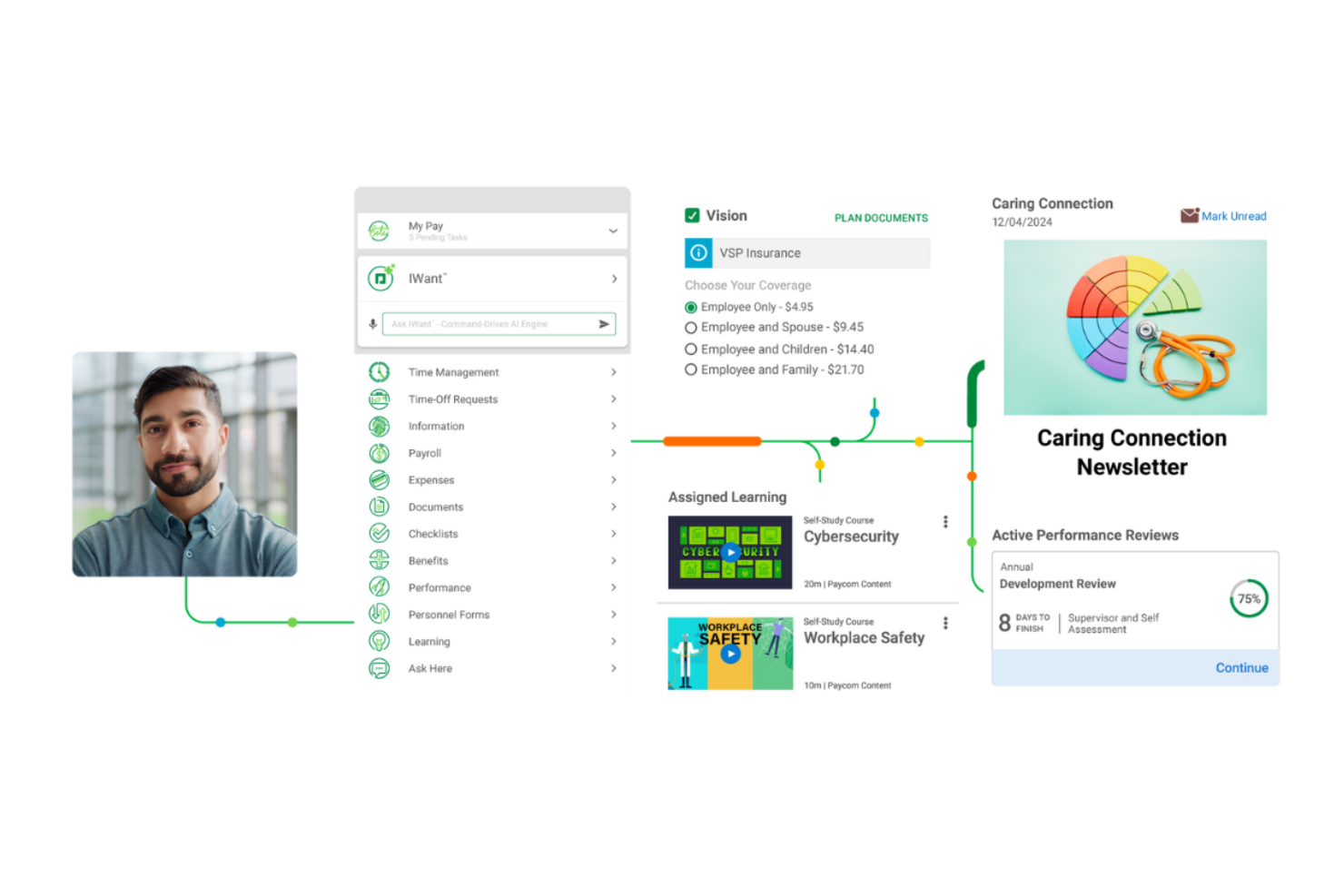
Paycom è uno strumento completo di gestione delle risorse umane progettato per aziende di tutte le dimensioni, con un focus su funzioni di gestione delle paghe e self-service per i dipendenti. Serve ai team HR e ai responsabili finanziari semplificando i processi di gestione delle paghe e migliorando l'accessibilità ai dati. I suoi strumenti puntano sull'autogestione delle buste paga da parte dei dipendenti, sulla rilevazione delle presenze e sull'amministrazione dei benefit.
Perché ho scelto Paycom: Paycom eccelle nell'integrazione delle paghe, offrendo un sistema di gestione paghe automatizzato chiamato Beti® che consente ai dipendenti di gestire autonomamente la propria busta paga. Il design a database unico elimina la necessità di effettuare più accessi, permettendo un flusso dati senza interruzioni tra le diverse funzioni. Il motore IWant® basato su intelligenza artificiale supporta una navigazione veloce e il recupero dei dati all'interno della piattaforma. Il team di supporto dedicato assicura assistenza personalizzata quando necessario.
Caratteristiche e integrazioni di spicco:
Caratteristiche includono decisioni automatizzate sulle ferie tramite GONE®, monitoraggio in tempo reale del ROI tramite Direct Data Exchange®, e solide misure di sicurezza dei dati. Paycom offre inoltre strumenti self-service mobile, amministrazione dei benefit, gestione delle presenze e dei permessi, e gestione sicura dei documenti.
Integrazioni sono fornite principalmente tramite la suite HR e paghe nativa di Paycom, che comprende strumenti integrati per la gestione dei talenti, rilevazione delle presenze, amministrazione dei benefit e self-service dei dipendenti all'interno di un unico database.
Pros and Cons
Pros:
- Sistema a database unico
- Gestione delle paghe affidata ai dipendenti
- Accesso rapido ai dati grazie all'IA
Cons:
- Opzioni di integrazione con terze parti limitate
- Interfaccia macchinosa e navigazione poco intuitiva

Deel HR
Ideale per l'onboarding di forza lavoro globale
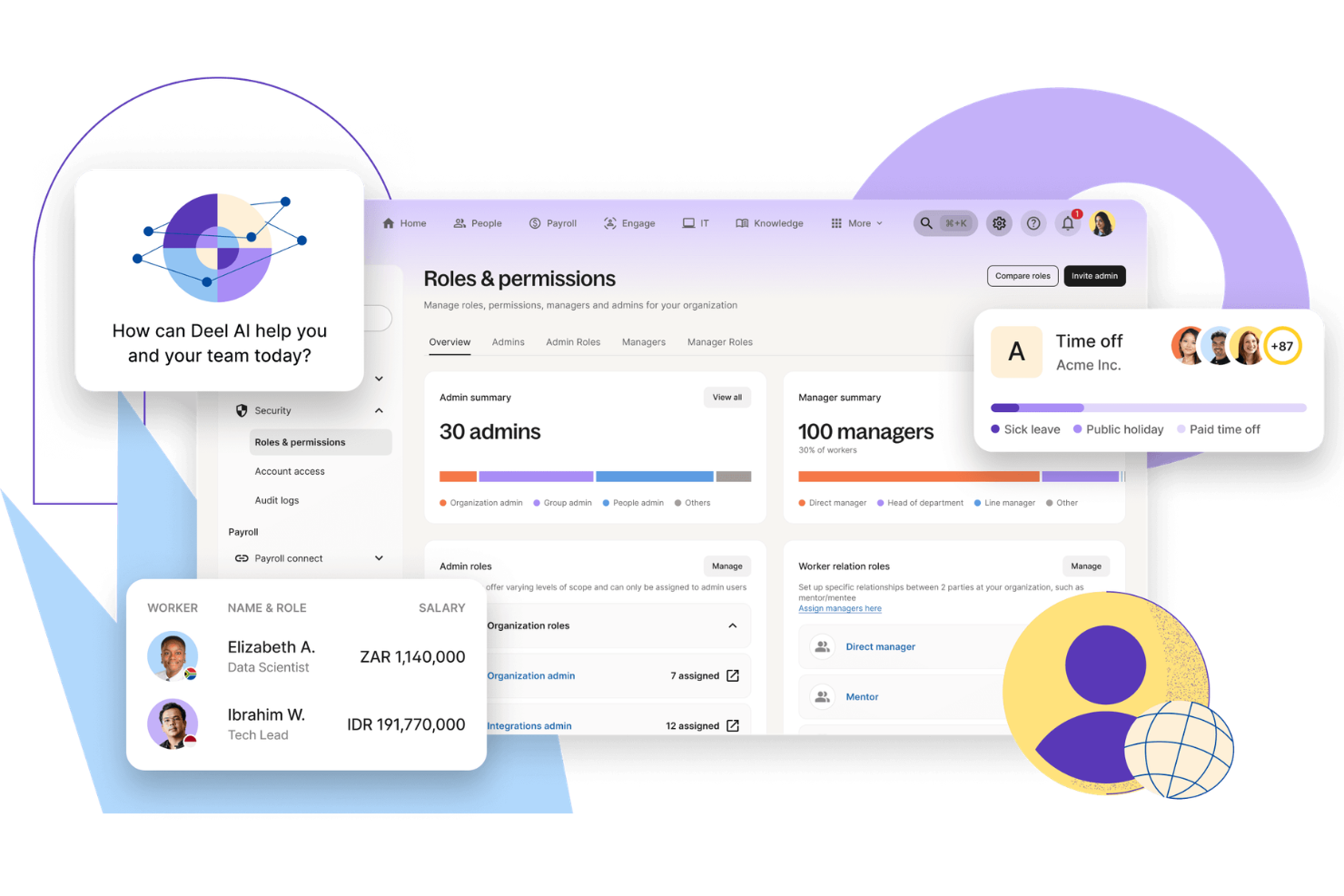
Deel è stato creato per le aziende che gestiscono team globali e hanno bisogno di un modo affidabile per assumere, integrare e pagare dipendenti e collaboratori oltre confine. Supporta le organizzazioni con forza lavoro remota o internazionale, aiutandole a destreggiarsi tra leggi sul lavoro locali, contratti e requisiti di buste paga. Con strumenti integrati per la conformità e funzionalità di pagamento localizzate, Deel può ridurre la complessità amministrativa dell'impiego globale.
Perché ho scelto Deel
Ho scelto Deel per la sua capacità di semplificare l'onboarding e la gestione delle buste paga globali mantenendo la conformità al centro. Se stai assumendo in più paesi, Deel ti consente di inserire nuovi membri in oltre 150 giurisdizioni con contratti conformi alle normative locali e workflow guidati. Inoltre, apprezzo il supporto per buste paga in più valute e metodi di pagamento flessibili, che rendono più pratico gestire la compensazione internazionale. Per le aziende che costruiscono team distribuiti, queste funzionalità aiutano a mantenere la conformità senza aggiungere inutili oneri operativi.
Caratteristiche principali di Deel
Oltre alle sue capacità di onboarding e gestione payroll, ho riscontrato anche diverse altre funzionalità che potenziano l'usabilità di Deel:
- Strumenti di conformità integrati: Deel offre controlli automatici di conformità per garantire che tutti i contratti di lavoro rispettino le leggi locali sul lavoro.
- Gestione globale dei collaboratori: Gestisci facilmente i tuoi collaboratori internazionali, compresi la generazione dei contratti e l'elaborazione dei pagamenti.
- Servizi di Employer of Record: Deel agisce come datore di lavoro legale, occupandosi di tutte le responsabilità HR per il tuo team globale.
- Supporto multi-valuta: Paga i tuoi dipendenti nella loro valuta locale, riducendo la complessità delle buste paga internazionali.
Integrazioni Deel
Le integrazioni includono Stripe, QuickBooks, Xero, NetSuite, BambooHR, Greenhouse, Workable, Lever, Gusto e l'API Deel per integrazioni personalizzate.
Pros and Cons
Pros:
- Payroll globale in 150 paesi
- Gestione integrata della conformità e dei contratti
- Si integra con i principali sistemi HR
Cons:
- Le funzionalità di reportistica mancano di filtri avanzati
- Opzioni limitate di personalizzazione della directory
New Product Updates from Deel HR

Deel Expands Stablecoin Wallet to 80+ Countries
Deel expands its Stablecoin Wallet to 80+ countries with dollar-backed balances and optional rewards. This gives eligible contractors more ways to hold and manage earnings inside Deel. For more information, visit Deel’s official site.
 .
.
Thatch
Ideale per l'autogestione dei benefit sanitari ICHRA
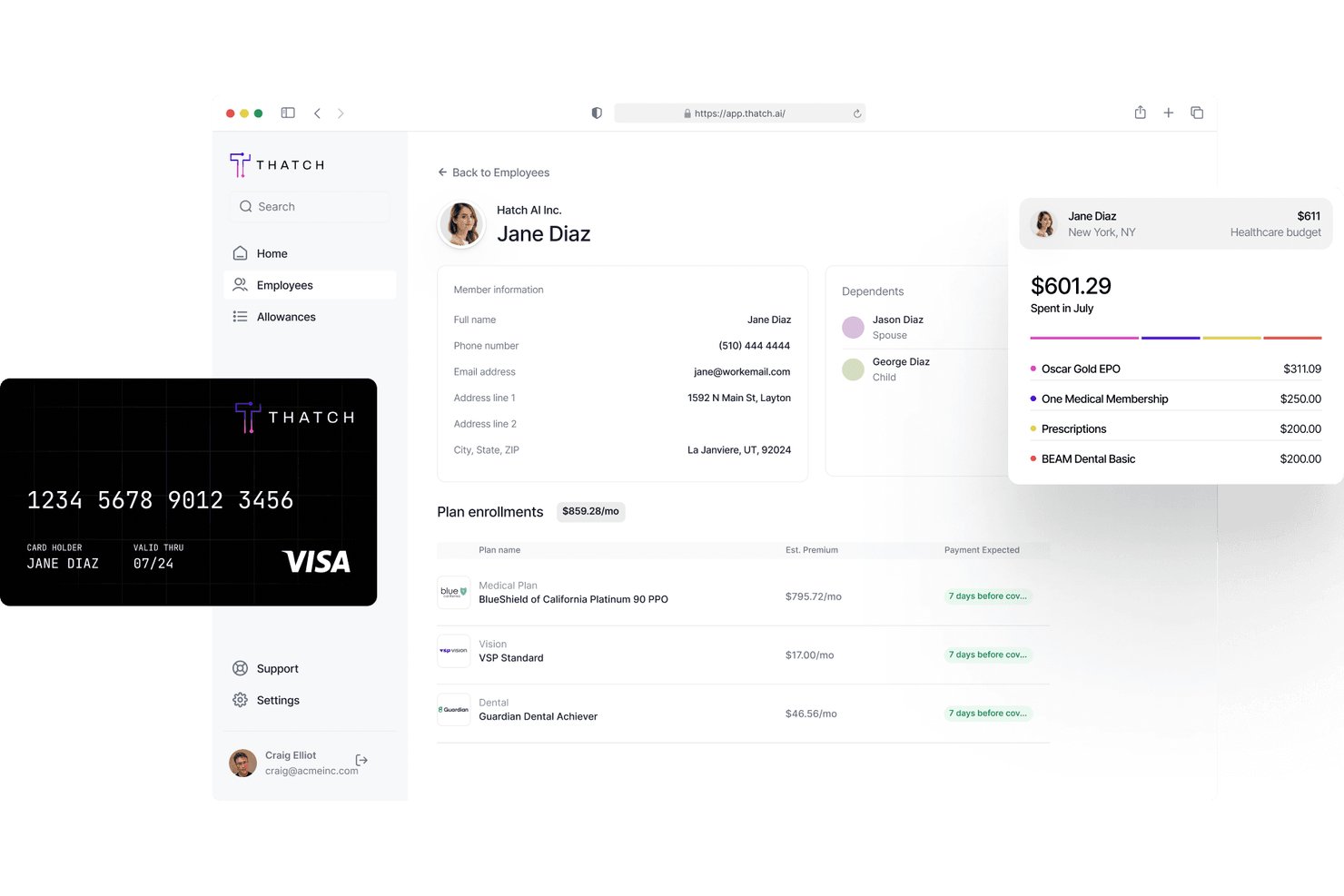
Thatch è una piattaforma di amministrazione ICHRA che consente ai dipendenti di cercare e gestire i propri piani di assicurazione sanitaria individuale utilizzando le indennità assegnate dal datore di lavoro.
Per chi è più adatto Thatch?
Thatch è una soluzione particolarmente adatta ai datori di lavoro di piccole e medie dimensioni che desiderano offrire benefit sanitari attraverso un modello ICHRA senza gestire l'iscrizione ai singoli piani per conto dei dipendenti.
Perché ho scelto Thatch
Thatch si è guadagnato un posto nella mia lista ristretta perché è progettato appositamente per l'amministrazione ICHRA, un settore di nicchia che la maggior parte delle piattaforme ESS generiche non gestisce bene. Mi piace molto il fatto che i dipendenti possano consultare e selezionare i propri piani di assicurazione sanitaria individuale direttamente tramite la piattaforma, utilizzando l'indennità stabilita dal datore di lavoro senza il coinvolgimento delle risorse umane. Thatch gestisce inoltre automaticamente il monitoraggio dei rimborsi, eliminando la necessità di una riconciliazione manuale nel back-end.
Funzionalità principali di Thatch
- Pannello del saldo dell'indennità: I dipendenti possono visualizzare in tempo reale l'importo residuo della propria indennità ICHRA, senza dover contattare le risorse umane.
- Strumento di confronto dei piani: I dipendenti possono confrontare affiancati i piani di assicurazione sanitaria individuale in base ai premi, alle franchigie e ai dettagli della copertura.
- Verifica dell'idoneità: La piattaforma verifica e conferma automaticamente l'idoneità dei dipendenti a partecipare all'ICHRA prima dell'inizio dell'iscrizione.
- Invio delle richieste di rimborso: I dipendenti possono inviare direttamente tramite la piattaforma le richieste di rimborso delle spese sostenute, per la revisione e l'elaborazione.
Integrazioni di Thatch
Thatch offre integrazioni native con ADP RUN, QuickBooks Payroll e Deel ed è progettato per funzionare immediatamente con tutti i principali fornitori di servizi paghe e compagnie assicurative. È disponibile anche un'API che consente ai partner di integrare nelle proprie piattaforme la preventivazione ICHRA, l'onboarding e le detrazioni in busta paga.
Pros and Cons
Pros:
- I dipendenti possono scegliere i piani utilizzando l'indennità
- Il monitoraggio dei rimborsi è completamente automatizzato
- Pannello del saldo dell'indennità ICHRA in tempo reale
Cons:
- Non è disponibile una prova gratuita
- Richiede una struttura di benefit sanitari specifica per l'ICHRA

TimeTrex
Ideale per precisione unificata di presenza e paghe

TimeTrex offre un'esperienza unificata di gestione della forza lavoro, consentendo al tuo team di gestire rilevazione presenze, programmazione, paghe e compiti HR da un'unica piattaforma, semplificando le operazioni quotidiane senza dover passare da un sistema all'altro. Se sei responsabile delle risorse umane o dell'elaborazione paghe e desideri che i dipendenti gestiscano autonomamente le proprie informazioni—dal visualizzare le buste paga all'inviare richieste di ferie—TimeTrex permette loro di farlo tramite un portale self-service collegato direttamente alle principali funzioni amministrative.
Perché ho scelto TimeTrex
Ho scelto TimeTrex perché il collegamento nativo tra self-service dei dipendenti e paghe garantisce che le ore rilevate e verificate dal tuo team confluiscano direttamente nei calcoli salariali senza esportazioni manuali o problemi di sincronizzazione. Puoi consentire ai dipendenti di inviare e revisionare i propri fogli presenze e accedere a buste paga o moduli fiscali tramite il portale, riducendo così solleciti e richieste amministrative. L'integrazione di programmazione e richieste di ferie nello stesso sistema implica anche meno lavoro di riconciliazione su chi lavora quando prima dell'elaborazione delle paghe.
Caratteristiche principali di TimeTrex
Oltre al collegamento tra self-service e paghe, TimeTrex offre:
- Rilevazione presenze biometrica: Migliora la sicurezza e l'accuratezza nella rilevazione delle presenze utilizzando dati biometrici per timbrature di entrata e uscita.
- Accesso mobile: Il tuo personale può consultare i turni, registrare le presenze e richiedere permessi direttamente da dispositivi iOS e Android.
- Monitoraggio spese: Tieni traccia delle spese aziendali con un sistema integrato che semplifica i processi di rimborso.
- Rilevazione dei costi dei lavori: Assegna ore con una visione chiara dei costi per massimizzare l'efficienza.
Integrazioni TimeTrex
TimeTrex offre un'integrazione API personalizzata per collegarsi con altri sistemi.
Pros and Cons
Pros:
- Supporta timbrature biometriche per ridurre le frodi sulle presenze.
- I dati dei dipendenti centralizzati semplificano i compiti HR.
- Include rilevazione presenze dettagliata con supporto GPS e mobile.
Cons:
- Integrazioni native limitate possono richiedere soluzioni API personalizzate.
- L'interfaccia utente può sembrare datata o disordinata.
New Product Updates from TimeTrex
TimeTrex Adds Quick Punch App With Offline and QR Support
TimeTrex adds a new Quick Punch app, offline punching, QR code scanning, punch images, configurable messages, and punch warnings or lockouts to improve employee clock-ins across browsers and local computers. For more information, visit TimeTrex’s official site.
 .
.
HR Cloud
Ideale per la collaborazione in team
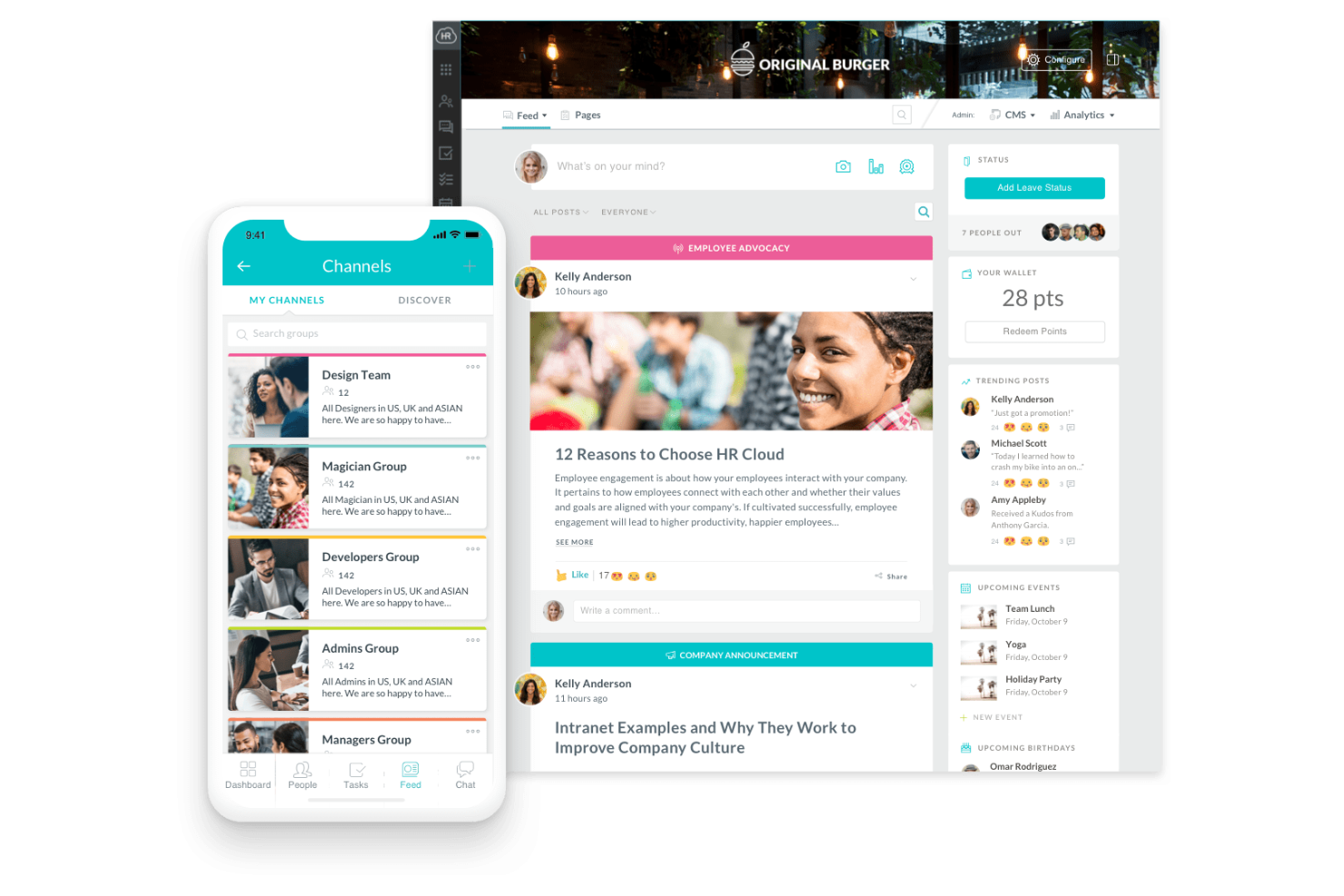
HR Cloud è un software per la gestione delle risorse umane pensato per le aziende che desiderano migliorare la collaborazione tra i team e il coinvolgimento dei dipendenti. Serve i team HR offrendo funzionalità come l’onboarding, strumenti di riconoscimento dei dipendenti e strumenti di comunicazione interna.
Perché ho scelto HR Cloud: HR Cloud si distingue nell’agevolare la collaborazione del team grazie alla sua intranet sociale, Workmates, che migliora la comunicazione e il coinvolgimento. Questo strumento include funzionalità di riconoscimento che aumentano il morale e favoriscono un ambiente di lavoro positivo. Il modulo di onboarding aiuta i nuovi assunti a integrarsi rapidamente, mentre i flussi di lavoro personalizzabili permettono ai team HR di adattare i processi all’organizzazione. Queste capacità rendono HR Cloud particolarmente utile per i team che fanno affidamento su una comunicazione continua e su un impegno culturale intenso.
Funzionalità e integrazioni principali:
Funzionalità includono una directory dei dipendenti che facilita la ricerca e la connessione con i colleghi. HR Cloud offre anche programmi di riconoscimento, assegnazione di compiti per l’onboarding e feed di comunicazione per sostenere le interazioni quotidiane del team. Inoltre, HR Cloud mette a disposizione un’app mobile, garantendo l’accesso agli strumenti HR anche in mobilità.
Integrazioni includono G Suite, Microsoft Office 365, Slack, Zoom, ADP, QuickBooks, BambooHR, Salesforce, Okta e Xero.
Pros and Cons
Pros:
- Offre strumenti di riconoscimento dei dipendenti
- Flussi di lavoro personalizzabili
- Disponibilità di app mobile
Cons:
- Le funzioni Timesheets e Recognition necessitano di un add-on
- Il processo di onboarding è un po' disorganizzato e richiede tempo

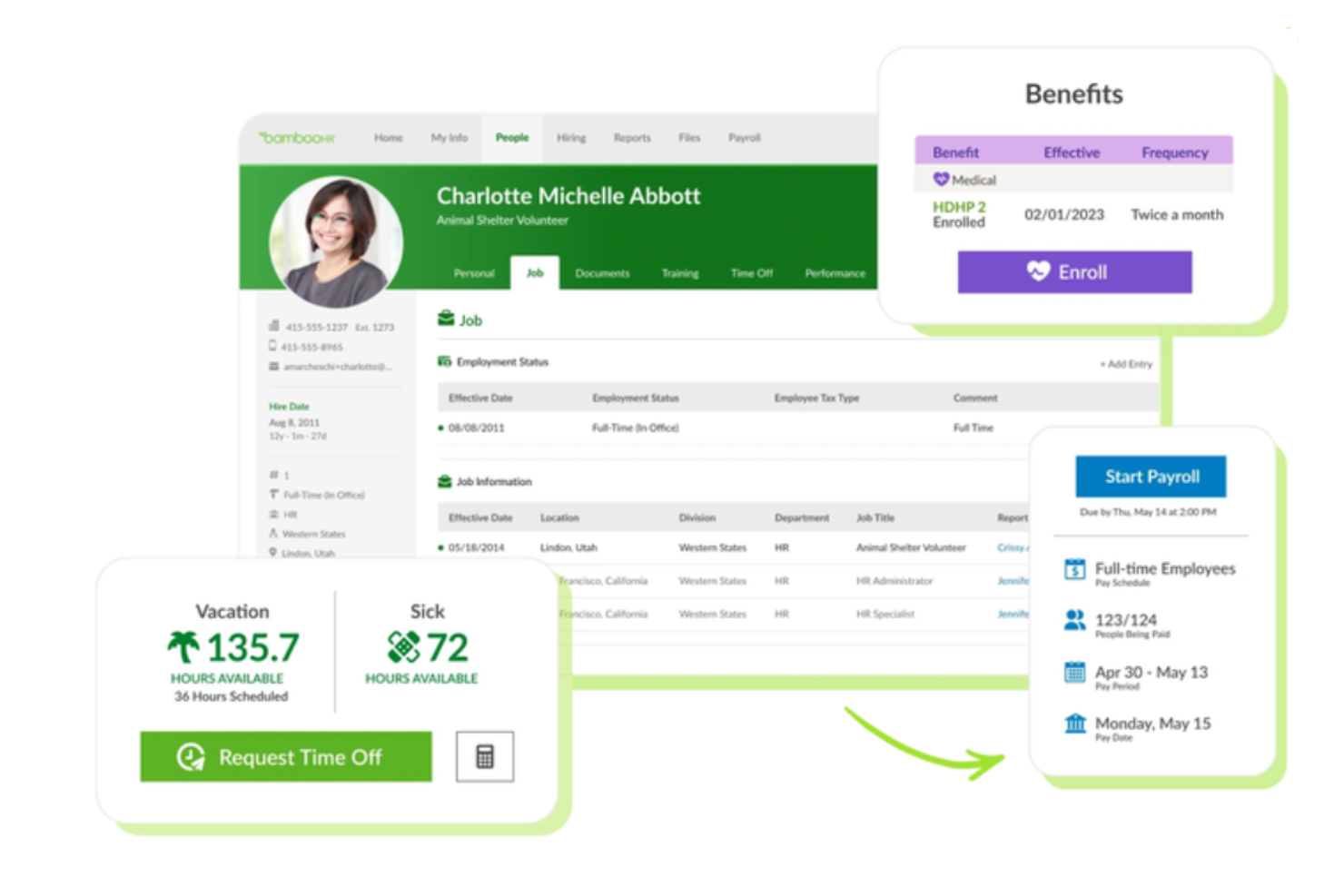
BambooHR è un software di gestione delle risorse umane progettato principalmente per le piccole e medie imprese, con l'obiettivo di semplificare le attività HR e migliorare l'esperienza dei dipendenti. Offre funzionalità come la gestione dei dati dei dipendenti, il rilevamento delle presenze e le valutazioni delle prestazioni.
Perché ho scelto BambooHR: BambooHR è pensato per le piccole imprese, offrendo un'interfaccia intuitiva che rende gestibili le attività HR senza la necessità di conoscenze tecniche approfondite. Presenta flussi di lavoro personalizzabili che ti consentono di adattare i processi alle esigenze del tuo team, migliorando l'efficienza. Gli strumenti di gestione delle prestazioni del software facilitano la crescita dei dipendenti grazie al monitoraggio degli obiettivi e dei feedback. I dashboard dei report offrono visibilità sulle tendenze della forza lavoro, permettendo ai piccoli team di prendere decisioni informate senza configurazioni complesse.
Funzionalità e integrazioni principali:
Funzionalità includono portali self-service personalizzabili per i dipendenti, che consentono al team di gestire autonomamente le proprie informazioni. Il sistema di tracciamento dei candidati semplifica i processi di selezione, permettendoti di individuare rapidamente i migliori talenti. BambooHR include anche strumenti per l'onboarding, l'archiviazione dei documenti e opzioni di gestione paghe (solo per gli Stati Uniti).
Integrazioni includono QuickBooks, Xero, Slack, G Suite, Microsoft Office 365, Okta, Zapier, Expensify, Greenhouse e Indeed.
Pros and Cons
Pros:
- Solidi strumenti per la gestione delle prestazioni
- Funzionalità di reporting approfondite
- Funzionalità di firma elettronica
Cons:
- Gli strumenti per la gestione paghe sono limitati senza upgrade
- Scalabilità limitata per grandi aziende

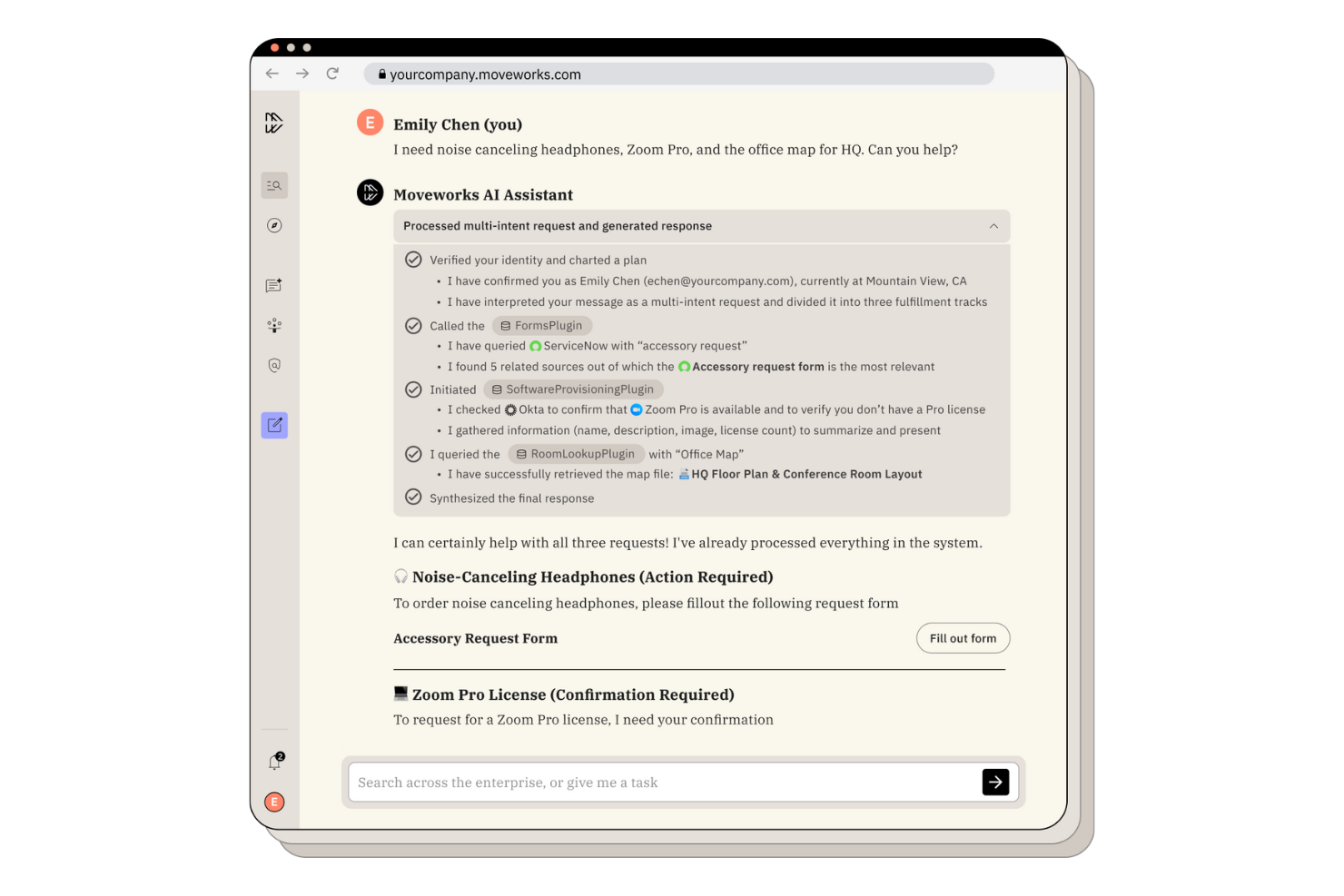
Moveworks è una soluzione di helpdesk HR basata sull'intelligenza artificiale progettata per le aziende che desiderano migliorare il coinvolgimento dei dipendenti e l'efficienza operativa. Supporta i team HR automatizzando le attività di routine e fornendo assistenza multilingue per semplificare i processi.
Perché ho scelto Moveworks: Moveworks eccelle nell'offrire assistenza basata sull'IA, automatizzando i processi HR e supportando i dipendenti in oltre 100 lingue. L'Assistente AI facilita un rapido onboarding e attività self-service come le richieste di ferie, rendendolo uno strumento prezioso per i team globali. Moveworks offre inoltre automazione dei flussi di lavoro per HR e IT, aiutando i team a standardizzare i processi mantenendo controllo su sicurezza e conformità.
Funzionalità principali e integrazioni:
Funzionalità includono strumenti per il coinvolgimento dei dipendenti come la prenotazione delle ferie e l'accesso a gruppi di risorse per dipendenti, automazione della conformità per le attività HR di routine e sicurezza aziendale per la protezione dei dati sensibili. La piattaforma supporta anche il recupero delle conoscenze e la risoluzione automatizzata dei ticket nei sistemi HR e IT. La piattaforma supporta anche il recupero delle conoscenze e la risoluzione automatizzata dei ticket nei sistemi HR e IT.
Integrazioni includono Microsoft Teams, Slack, ServiceNow, Workday, Microsoft Office 365, Okta, Salesforce, Zoom, Google Workspace e SAP.
Pros and Cons
Pros:
- Supporto multilingue disponibile
- Automatizza i processi HR di routine
- Funzionalità di conformità avanzate
Cons:
- Richiede configurazione del sistema prima della distribuzione
- Dipendenza da piattaforme di integrazione

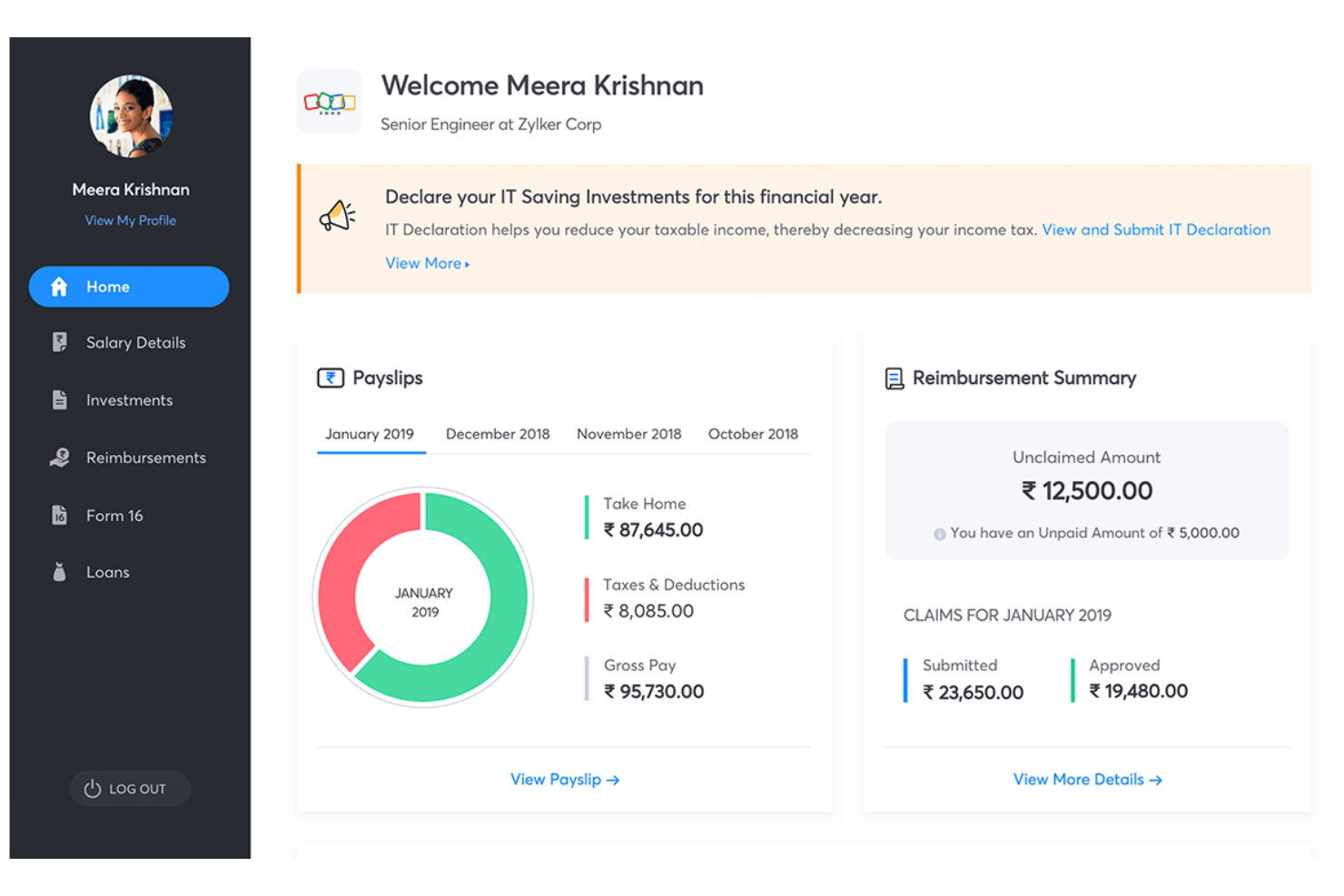
Zoho People è una piattaforma HR basata su cloud pensata per organizzazioni di piccole e medie dimensioni, che aiuta i team HR a gestire i dati dei dipendenti, le assenze e la rilevazione delle presenze in un unico posto. Serve i professionisti delle risorse umane offrendo strumenti essenziali per l’onboarding, la gestione delle ferie e il monitoraggio delle performance di base.
Perché ho scelto Zoho People: Puoi configurare profili dei dipendenti, automatizzare le approvazioni delle assenze e tracciare orari e presenze con una formazione minima. Dispone di app mobili così il tuo team può accedere ai dati e inviare richieste ovunque si trovi. I workflow personalizzati permettono di automatizzare i processi di routine, mentre Zia, l’assistente AI di Zoho, supporta i dipendenti con risposte rapide e gestione di compiti semplici.
Funzionalità e integrazioni principali:
Funzionalità includono portali self-service per i dipendenti, che così possono aggiornare in autonomia i propri dati e richiedere ferie, registrazione delle presenze tramite check-in web o mobile, e template di valutazione delle performance di base personalizzabili. La piattaforma offre anche task di onboarding, gestione dei documenti e programmazione dei turni integrata.
Integrazioni includono Zoho CRM, Zoho Books, QuickBooks, Slack, Zapier, G Suite, Microsoft Office 365, Adobe Sign, Docusign e Mailchimp.
Pros and Cons
Pros:
- Ampie opzioni di integrazione
- Database centralizzato dei dipendenti
- Potenti strumenti di valutazione delle performance
Cons:
- Le funzionalità aggiuntive richiedono componenti extra
- L'installazione richiede un processo di importazione dati complesso

Ideale per servizi self service per i dipendenti focalizzati sulle paghe

Il servizio self service per i dipendenti di AAB Payroll fa parte di una piattaforma più ampia per la gestione delle paghe e della forza lavoro che consente ai dipendenti di accedere e gestire i dati legati al lavoro direttamente dai propri dispositivi, inclusa la visualizzazione dei dettagli della busta paga e la consultazione degli orari tramite telefono o computer, contribuendo a ridurre le domande di routine per il team.
Perché ho scelto AAB Payroll: AAB Payroll offre uno strumento self service integrato nel proprio sistema di gestione paghe e presenze, permettendo ai team di gestire retribuzioni e presenze da un'unica piattaforma. I dipendenti possono visualizzare le buste paga, accedere ai moduli W-2, controllare i propri orari e aggiornare i dati personali senza dover cambiare strumento, riducendo così le richieste di routine. Lo stesso portale consente la timbratura di ingresso e uscita e la gestione delle assenze, mantenendo tutte le attività quotidiane in un unico flusso di lavoro. L’accesso da dispositivi mobili permette ai dipendenti di utilizzarlo ovunque lavorino.
Funzionalità e integrazioni principali:
Funzionalità includono report dettagliati sulle paghe che offrono una visione approfondita sulle operazioni finanziarie. Il software propone modelli di busta paga personalizzabili in linea con l’identità aziendale. AAB Payroll supporta inoltre più calendari di pagamento per rispondere alle esigenze di una forza lavoro variegata.
Integrazioni disponibili con Xero, QuickBooks, Sage, Microsoft Dynamics, Oracle, SAP, NetSuite, Workday, BambooHR e Salesforce.
Pros and Cons
Pros:
- Forte attenzione alla conformità nel Regno Unito
- Calcolo automatico delle imposte
- Aggiornamenti delle paghe in tempo reale
Cons:
- Controllo manuale ridotto sui dati sensibili e sulla tempistica precisa dei pagamenti
- Flessibilità limitata per funzioni paghe specifiche o atipiche in azienda

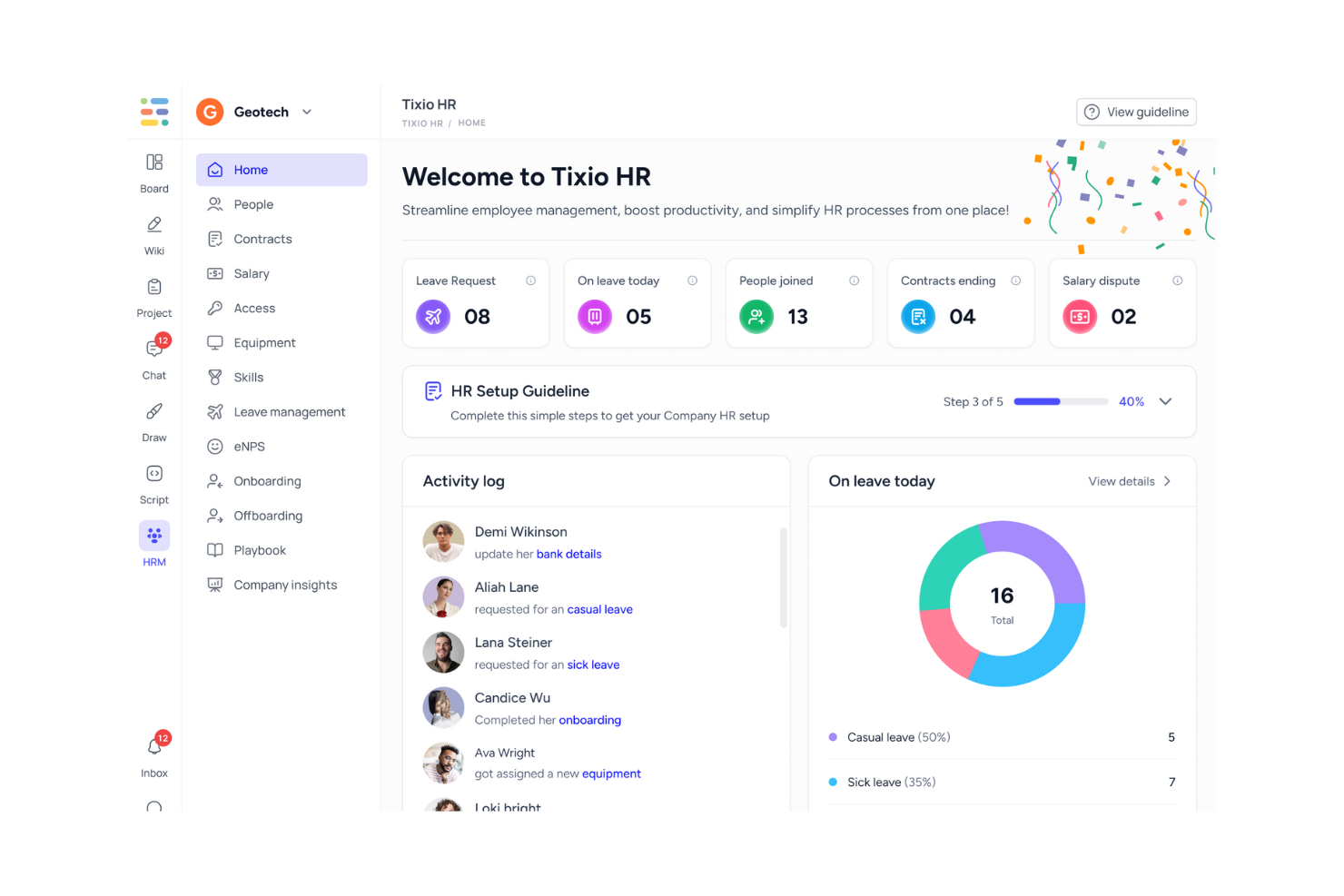
Tixio HR è una piattaforma di gestione delle risorse umane pensata per i team moderni, con un focus sull'automazione delle attività HR e sulla personalizzazione dei flussi di lavoro. Serve ai professionisti delle risorse umane offrendo strumenti per la gestione dei dati dei dipendenti, il monitoraggio delle presenze e la gestione dei contratti.
Perché ho scelto Tixio HR: Tixio HR offre un'ampia personalizzazione dei flussi di lavoro, permettendo al tuo team di adattare i processi alle esigenze specifiche. Il portale Employee Self Service (ESS) consente ai dipendenti di gestire autonomamente le proprie informazioni, riducendo notevolmente il carico amministrativo. Funzionalità come monitoraggio delle presenze e gestione delle assenze sono progettate per gestire le operazioni in modo efficiente. L'integrazione dell'automazione guidata dall'AI di Tixio migliora ulteriormente l'efficienza e l'adattabilità dei processi.
Funzionalità e integrazioni principali:
Funzionalità includono strumenti per la collaborazione visiva e la gestione dei progetti, che aiutano il tuo team a rimanere organizzato e produttivo. Tixio HR offre inoltre una funzione di knowledge base, che consente una facile documentazione e condivisione delle informazioni. La piattaforma comprende anche l'archiviazione dei contratti e flussi di approvazione personalizzabili per semplificare le attività HR.
Integrazioni includono altri prodotti Tixio, automazione AI e risorse aggiuntive per vari team e settori.
Pros and Cons
Pros:
- Automazione dei flussi di lavoro guidata dall'AI
- Strumenti per la collaborazione visiva
- Supporta la conformità globale
Cons:
- Accesso API limitato al livello Enterprise
- Funzionalità HR avanzate limitate
Altri software self-service per dipendenti
Ecco alcune ulteriori opzioni di software self-service per dipendenti che non sono state incluse nel mio elenco, ma che vale comunque la pena prendere in considerazione:
- Gusto
Ideale per le piccole imprese
- HiBob
Ideale per aziende in crescita
- ADP Workforce Now
Ideale per la competenza nelle paghe
- SP Employee Hub
Ideale per l'integrazione con SharePoint


Come Valuto i Software di Self-Service per Dipendenti
Valuto gli strumenti su due livelli: le capacità fondamentali di self-service che ogni piattaforma deve garantire—ferie, documenti retributivi, iscrizione ai benefit—e i fattori distintivi che differenziano le migliori opzioni.
Funzionalità Principali (Requisiti Necessari per Questo Elenco)
Quando seleziono gli strumenti per la mia lista, attribuisco a ciascuno un punteggio da 0 (non offre la funzionalità) a 5 (eccelle in quest’area) per ogni funzionalità chiave indicata sotto. Successivamente, calcolo il punteggio totale dello strumento trasformandolo in percentuale. Ogni strumento deve raggiungere un punteggio totale minimo del 75% per essere preso in considerazione.
- Gestione dei Dati Personali: Controllo se i dipendenti possono aggiornare da soli indirizzo, coordinate bancarie, contatti di emergenza e trattenute fiscali—oppure se tali modifiche richiedono ancora l’intervento dell’amministratore HR.
- Accesso a Documenti Retributivi e Fiscali: I dipendenti si aspettano di visualizzare una busta paga o scaricare un modulo fiscale in autonomia, quindi cerco piattaforme con storico delle paghe consultabile e download di documenti sicuri.
- Self-Service per Ferie e Permessi: Valuto quanto bene ogni strumento gestisce l’intero ciclo delle richieste di permesso—inserimento, tracciamento, visualizzazione dei saldi e sincronizzazione delle approvazioni—senza costringere i manager alle classiche discussioni via email.
- Iscrizione Autonoma ai Benefit: L’apertura delle iscrizioni ai benefit è il vero banco di prova, quindi analizzo se i dipendenti possono confrontare i piani, aggiungere familiari e gestire eventi qualificanti direttamente sulla piattaforma.
- Repository di Documenti e Policy: Un buon strumento offre ai dipendenti un unico luogo dove trovare il regolamento, firmare le policy aggiornate e accedere ai moduli di onboarding—con il tracciamento per permettere alle risorse umane di sapere chi ha preso visione di cosa.
- Accesso Mobile al Self-Service: Valuto se l’esperienza mobile permette di svolgere attività reali come approvare una richiesta di ferie o aggiornare l’IBAN, e non solo di visualizzare una versione limitata rispetto al desktop.
Una volta identificati gli strumenti che soddisfano questi criteri, considero ciò che rende unica ogni piattaforma.
Fattori Differenzianti (Cosa Distingue i Fornitori)
Ecco come confronto e metto a paragone i diversi fornitori:
Funzionalità Distintive
Il self-service manageriale è un importante elemento di differenziazione. Cerco piattaforme in cui i manager possano approvare richieste di permesso, vedere la composizione del team e generare report dalla propria dashboard senza coinvolgere le risorse umane. Un assistente HR AI è rilevante quando può rispondere a domande di routine come "quanti giorni di ferie mi restano?" e indirizzare i dipendenti alla policy corretta senza aprire ticket. Presto molta attenzione anche alle notifiche personalizzate: i promemoria automatici sulle scadenze di iscrizione ai benefit o sui documenti non firmati favoriscono l’adozione e tengono in linea le attività di compliance.
Oltre le Funzionalità
La profondità dell’integrazione è molto importante: verifico se una piattaforma si collega nativamente al proprio provider payroll e ai carrier dei benefit, oppure se serve utilizzare middleware per mantenere i dati allineati. Un’altra area che valuto da vicino è la sicurezza, specialmente i controlli di accesso basati sui ruoli che limitano chi può visualizzare dati sensibili come stipendi o coordinate bancarie. Considero inoltre quanto un tool si adatti alle dimensioni dell’azienda, poiché una piattaforma progettata per grandi organizzazioni può sopraffare un team di 50 persone con complessità e costi non necessari.
Come scegliere un software self-service per dipendenti
È facile perdersi in lunghi elenchi di funzionalità e strutture di prezzo complesse. Per aiutarti a rimanere concentrato mentre affronti il tuo specifico processo di selezione del software, ecco una lista di controllo dei fattori da tenere presenti:
| Fattore | Cosa considerare |
|---|---|
| Scalabilità | Il software è in grado di crescere insieme alla tua azienda? Valuta se può gestire un numero maggiore di utenti o funzionalità aggiuntive con l'espansione del tuo team. |
| Integrazioni | Verifica se il software si integra con i sistemi esistenti, come gli strumenti per la gestione delle buste paga o delle risorse umane. La compatibilità con gli strumenti che già utilizzi può farti risparmiare tempo e ridurre gli errori. |
| Personalizzazione | Puoi adattare il software ai tuoi flussi di lavoro specifici? Cerca opzioni che consentano di modificare le impostazioni in base ai tuoi processi e alle tue preferenze. |
| Semplicità d'uso | Quanto è intuitivo il software per il tuo team? Valuta l'interfaccia utente e considera la rapidità con cui il tuo team può imparare a utilizzare il sistema senza una formazione approfondita. |
| Costi | Comprendi il costo complessivo, incluse le tariffe di configurazione, le tariffe mensili e gli eventuali costi aggiuntivi per funzionalità o assistenza supplementari. Assicurati che rientri nei limiti del tuo budget. |
| Misure di sicurezza | Verifica che il software soddisfi gli standard di sicurezza del settore. Controlla la crittografia dei dati e i controlli degli accessi per proteggere le informazioni sensibili dei dipendenti. |
| Requisiti di conformità | Il software supporta la conformità alle normative locali e agli standard di settore? Assicurati che ti aiuti a rispettare gli obblighi di legge e a ridurre i rischi di non conformità. |
Che cos'è il software per l'autogestione dei dipendenti?
Il software per l'autogestione dei dipendenti è uno strumento che consente ai dipendenti di gestire autonomamente le proprie attività relative alle risorse umane, come l'aggiornamento dei dati personali e l'accesso ai dettagli delle buste paga. I professionisti delle risorse umane e i responsabili utilizzano generalmente questi strumenti per ridurre il carico amministrativo e migliorare l'accuratezza dei dati.
Funzionalità come il monitoraggio delle ore, la gestione dei benefit e l'accesso ai documenti contribuiscono all'efficienza, all'accuratezza e all'autonomia dei dipendenti. Nel complesso, questi strumenti migliorano la produttività e la soddisfazione dei dipendenti semplificando i processi delle risorse umane.
Funzionalità
Quando selezioni un software per l'autogestione dei dipendenti, presta attenzione alle seguenti funzionalità chiave:
- Gestione dei dati dei dipendenti: consente ai dipendenti di aggiornare i propri dati personali, garantendo che i registri siano accurati e aggiornati.
- Elaborazione delle buste paga: automatizza i calcoli delle buste paga e la presentazione delle dichiarazioni fiscali, riducendo gli errori e facendo risparmiare tempo.
- Monitoraggio delle ore: monitora le ore lavorate e le presenze dei dipendenti, contribuendo all'accuratezza delle buste paga e alla gestione della forza lavoro.
- Amministrazione dei benefit: semplifica la gestione e l'iscrizione ai benefit dei dipendenti, migliorando la soddisfazione e la conformità.
- Accesso ai documenti: offre una posizione centralizzata in cui i dipendenti possono accedere ai documenti importanti, come i cedolini e i moduli fiscali.
- Flussi di lavoro personalizzabili: consente di personalizzare i processi delle risorse umane in base alle esigenze specifiche dell'azienda, aumentando l'efficienza.
- Accesso da dispositivi mobili: consente ai dipendenti di gestire le attività relative alle risorse umane dai propri dispositivi mobili, offrendo praticità e flessibilità.
- Monitoraggio della conformità: contribuisce a garantire il rispetto delle normative e degli standard di legge, riducendo al minimo i rischi di non conformità.
- Portali per l'autogestione: consentono ai dipendenti di gestire autonomamente le proprie attività relative alle risorse umane, riducendo il carico di lavoro amministrativo.
Vantaggi
L'implementazione di un software per l'autogestione dei dipendenti offre diversi vantaggi al tuo team e alla tua azienda. Ecco alcuni dei vantaggi che puoi aspettarti:
- Riduzione del carico di lavoro amministrativo: consentendo ai dipendenti di gestire autonomamente le proprie attività relative alle risorse umane, il tuo team può concentrarsi su attività più strategiche.
- Migliore accuratezza dei dati: l'aggiornamento autonomo delle informazioni da parte dei dipendenti garantisce che i dati siano aggiornati e riduce al minimo gli errori.
- Maggiore soddisfazione dei dipendenti: il facile accesso alle informazioni su buste paga e benefit dà maggiore autonomia ai dipendenti e ne migliora il morale.
- Maggiore efficienza: i processi automatizzati, come l'elaborazione delle buste paga e il monitoraggio delle ore, fanno risparmiare tempo e riducono le attività manuali.
- Migliore conformità: le funzionalità che monitorano le normative di legge aiutano la tua azienda a rispettare gli standard di settore.
- Maggiore flessibilità: l'accesso da dispositivi mobili consente ai dipendenti di gestire le proprie attività relative alle risorse umane in qualsiasi momento e ovunque si trovino.
- Risparmio sui costi: processi delle risorse umane più efficienti possono portare a una riduzione delle spese generali e dei costi operativi.
Costi e prezzi
La scelta di un software per l'autogestione dei dipendenti richiede la comprensione dei diversi modelli di prezzo e dei piani disponibili. I costi variano in base alle funzionalità, alle dimensioni del team, ai componenti aggiuntivi e ad altri fattori. La tabella seguente riassume i piani più comuni, i relativi prezzi medi e le funzionalità generalmente incluse nelle soluzioni software per l'autogestione dei dipendenti:
Tabella comparativa dei piani per il software per l'autogestione dei dipendenti
| Tipo di piano | Prezzo medio | Funzionalità comuni |
|---|---|---|
| Piano gratuito | $0 | Gestione di base dei dati dei dipendenti, accesso limitato al self-service e report semplici. |
| Piano personale | $1-$6/utente/mese | Portali self-service per i dipendenti, elaborazione di base delle buste paga e monitoraggio delle ore lavorate. |
| Piano aziendale | $3-$12/utente/mese | Amministrazione avanzata dei benefit, monitoraggio della conformità e accesso da dispositivi mobili. |
| Piano per aziende | $4.50-$22/utente/mese | Flussi di lavoro personalizzabili, analisi approfondite, assistenza dedicata e integrazione con altri strumenti. |
Domande frequenti sul software self-service per i dipendenti
Ecco alcune risposte alle domande più comuni sul software self-service per i dipendenti:
Quanto funziona bene il sistema quando i dipendenti hanno livelli diversi di esperienza tecnologica?
La maggior parte degli strumenti è progettata con una navigazione semplice, quindi anche i dipendenti che non hanno dimestichezza con la tecnologia possono utilizzarli. Di solito è sufficiente una breve spiegazione per consentire a tutti di acquisire familiarità con il sistema.
Il software self-service per i dipendenti può integrarsi con i sistemi esistenti?
Sì, la maggior parte dei software self-service per i dipendenti può integrarsi con sistemi esistenti come strumenti per le buste paga, le risorse umane e la contabilità. Le integrazioni aiutano a semplificare il flusso dei dati tra i sistemi, riducendo l’inserimento manuale e gli errori. Quando scegli il software, verifica la compatibilità con i sistemi già utilizzati dal tuo team per garantire una transizione fluida e funzionalità avanzate.
Quanto è sicuro il software self-service per i dipendenti?
Il livello di sicurezza varia a seconda del fornitore, ma la maggior parte dei software self-service per i dipendenti include funzionalità come la crittografia dei dati, i controlli degli accessi e aggiornamenti regolari della sicurezza. Quando valuti le opzioni, cerca un software conforme agli standard di sicurezza del settore e dotato di funzionalità che proteggano i dati sensibili dei dipendenti. Assicurati che il fornitore abbia una solida reputazione per la tutela della privacy e della sicurezza dei dati.
Il software self-service per i dipendenti è adatto alle piccole imprese?
Sì, il software self-service per i dipendenti può essere molto utile per le piccole imprese. Aiuta ad automatizzare le attività amministrative di routine delle risorse umane, permettendo ai piccoli team di concentrarsi sulla crescita e sulle iniziative strategiche. Cerca un software con piani tariffari scalabili e funzionalità adatte alle dimensioni e alle esigenze della tua azienda. Molti fornitori offrono pacchetti pensati per le piccole imprese, rendendo queste soluzioni convenienti e accessibili.