

10 beste gratisprogrammer for medarbeiderengasjement i 2026

Beste gratis programvare for medarbeiderengasjement – kortliste


Gratis programvare for medarbeiderengasjement gir deg tilgang til verktøy for å forbedre medarbeidertilfredshet, kommunikasjon og anerkjennelse uten kostnader på forhånd – enten gjennom en gratis plan eller en gratis prøveperiode. Hvis du leter etter måter å knytte teamet bedre sammen på, støtte prestasjoner eller fremme en positiv arbeidsplasskultur, er det et smart sted å begynne å velge gratis programvare for medarbeiderengasjement. Med riktig verktøy kan du teste funksjoner som tilbakemeldingsundersøkelser og programmer for kollegaanerkjennelse før du inngår noen økonomisk forpliktelse. På denne listen finner du de beste plattformene som er kostnadsfrie eller tilbyr prøveperioder, slik at du kan sammenligne hva som fungerer best for teamets unike behov.
Hvorfor du kan stole på våre programvareanbefalinger
Teamet vårt har testet og anmeldt programvare siden 2012. Vi er selv HR-eksperter, så vi vet hvor vanskelig og hvor viktig det er å velge riktig programvare.
I denne guiden har vi vurdert verktøyene gjennom praktisk testing og uavhengig research og gitt dem poeng ut fra våre utvelgelseskriterier. Vi bygger også på innsikt fra ledende eksperter i bransjen og erfarne HR-eksperter.
Anmeldelsene våre bygger på vår egen redaksjonelle vurdering. De er ikke et salgsargument.
Ekspertanmeldere:
Sammenligningstabell for gratis programvare for medarbeiderengasjement
Denne sammenligningstabellen fremhever prisdetaljene for mine beste utvalgte gratisløsninger for medarbeiderengasjement.
| Tool | Best For | Trial Info | Price | ||
|---|---|---|---|---|---|
| 1 | Best for points-based employee rewards | Free plan available | From $2.50/user/month (billed annually) | Website | |
| 2 | Best for mobile-first feedback and communication | Free plan available | From $29/month (billed annually) | Website | |
| 3 | Best for Microsoft Teams and Outlook integration | Free plan + 30-day free trial + free demo available | From $7/user/month (billed annually) | Website | |
| 4 | Best for conversational survey experiences | Free plan available | From $19/user/month (billed annually) | Website | |
| 5 | Best with multilingual surveys for global teams | Free trial available | From $2/user/month (billed annually) | Website | |
| 6 | Best for regular pulse surveys | 30-day free trial + free demo available | From $2/user/month (billed annually) | Website | |
| 7 | Best for surveys with real-time analytics | Free demo available | Pricing upon request | Website | |
| 8 | Best for AI-driven survey question generation | Free plan + 14-day free trial + free demo available | From $3/user/month (billed annually) | Website | |
| 9 | Best for public peer recognition via Slack | 14-day free trial + free plan + free demo available | From $1/user/month (billed annually) | Website | |
| 10 | Best for engagement analytics dashboards | Free plan + free trial + free demo available | From $4/user/month (billed annually) | Website |

Anmeldelser av gratis programvare for medarbeiderengasjement
Nedenfor finner du mine detaljerte sammendrag av den gratis programvaren for medarbeiderengasjement som kom med på kortlisten min. Anmeldelsene mine gir et detaljert innblikk i funksjonene, prisene og de beste bruksområdene for hver plattform, slik at du kan finne den beste løsningen for deg.
Bonusly
Best for points-based employee rewards
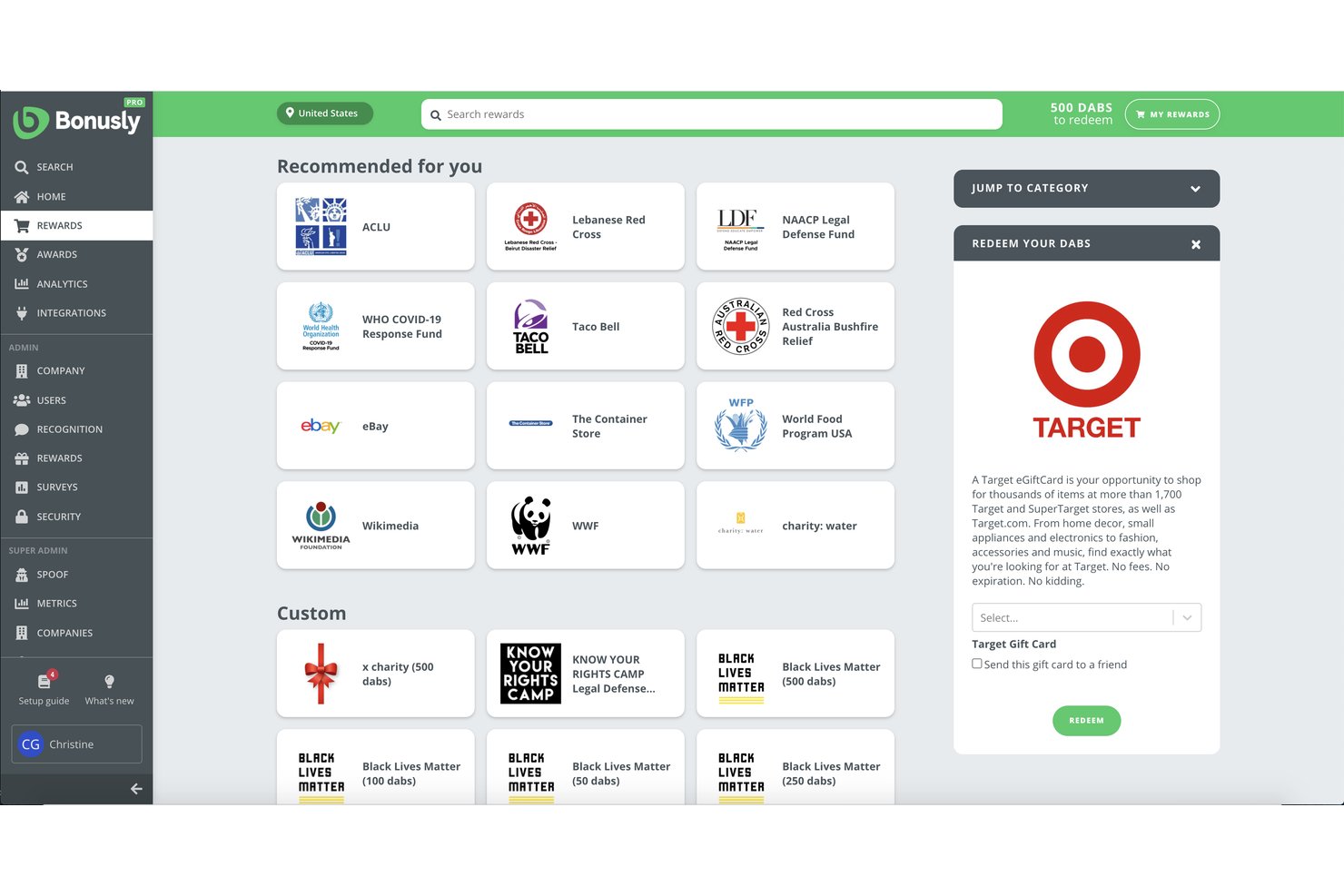
Bonusly is a peer recognition and rewards platform that lets employees give points-based shoutouts, redeem a global rewards catalog, and gives managers tools for check-ins, milestone celebrations, and people analytics.
Who Is Bonusly Best For?
Bonusly is a strong fit for people ops and HR teams at SMBs that want to build a culture of peer recognition and make rewards a regular part of daily work.
Why I Picked Bonusly
I picked Bonusly as one of the best because its points-based recognition system is genuinely different from a simple shoutout feed. Each employee gets a monthly allowance of points to give to peers, and those points redeem against a real global rewards catalog covering gift cards, cash, and custom company swag. Automated milestone recognition for birthdays, work anniversaries, and team wins means the recognition habit runs consistently, even when no one remembers to trigger it manually.
Bonusly Key Features
- People analytics dashboard: Visualize engagement, recognition patterns, and participation over time across teams and departments.
- Automated milestone celebrations: Schedule automatic shoutouts for birthdays, work anniversaries, and major wins.
- HRIS and SSO integrations: Sync employee profiles and access controls with major HR systems and identity providers.
- In-app check-ins and 1:1s: Run lightweight feedback loops and recurring conversations between managers and team members within the platform.
Bonusly Integrations
Bonusly offers native integrations with Slack, Microsoft Teams, Google Chat, BambooHR, Workday, Rippling, ADP, and more. An API is available for custom integrations.
What's Free?
Bonusly has a free-forever plan that includes core peer recognition features and works with Slack and Microsoft Teams. It has no user cap, but advanced features like in-depth analytics, check-ins, 1:1s, and manager tools are locked behind paid tiers.
Pros and Cons
Pros:
- Automated milestone recognition runs without manual prompting
- Global rewards catalog with real redemption options
- Points-based recognition drives consistent peer participation
Cons:
- Unspent recognition points expire instead of carrying forward
- Survey tools absent from the free plan
Best for mobile-first feedback and communication
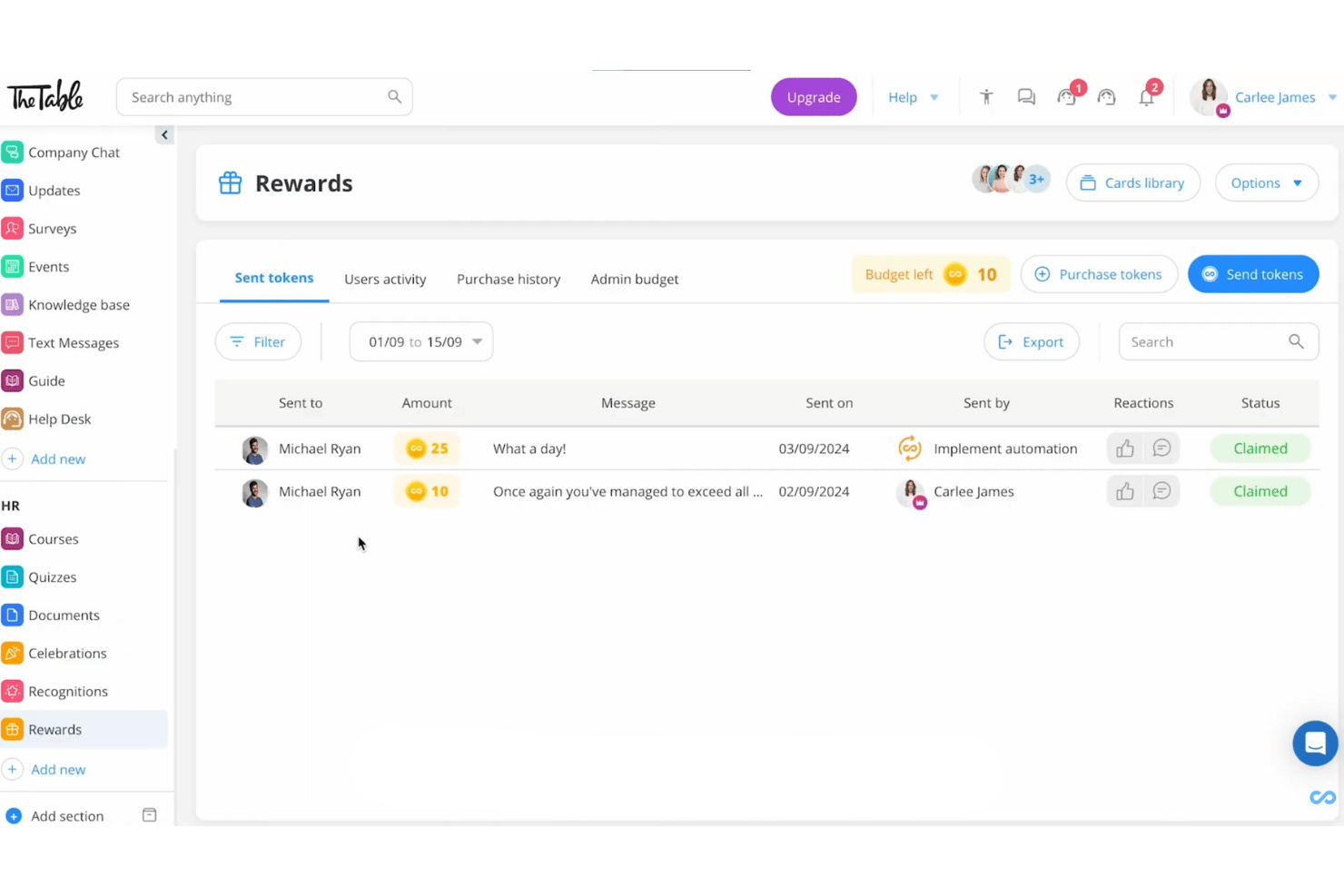
Connecteam is a mobile-first employee management app that combines internal communication, recognition and rewards, pulse surveys, and training tools in a single platform built for deskless and distributed teams.
Who Is Connecteam Best For?
Connecteam is a strong fit for small businesses in industries like retail, hospitality, construction, and field services that manage hourly or frontline workers.
Why I Picked Connecteam
I picked Connecteam because it's one of the few free engagement tools built from the ground up for mobile, not just adapted for it. The Updates feed lets managers push company-wide announcements directly to employees' phones, with real-time reactions and comments from the team. I also like that Surveys, including anonymous ones, are fully functional on mobile, which matters most when your workforce is never at a desk.
Connecteam Key Features
- Recognition and rewards: Celebrate milestones or performance with digital badges, points, and customizable rewards directly from the app.
- Suggestion box: Allow employees to submit ideas or concerns anonymously anytime within the mobile platform.
- Engagement timeline: Track and visualize company events, birthdays, and work anniversaries for team visibility.
- Custom document storage: Upload, organize, and share internal HR or company documents for easy mobile access.
Connecteam Integrations
Connecteam offers native integrations with Gusto, QuickBooks Online, Xero, Paychex, ADP, and BambooHR. It also connects with Zapier and provides an API for custom integrations.
What's Free?
Connecteam offers a free-forever Small Business Plan for teams of up to 10 users, with full access to its Operations, Communications, and HR and Skills hubs, including surveys, recognition, and the Updates feed. Once your team exceeds 10 users, you'll need to move to a paid plan.
Pros and Cons
Pros:
- Recognition features included without paid upgrade
- Anonymous survey responses available on free tier
- Built for mobile-first deskless workforces
Cons:
- Engagement analytics lack depth versus competitors
- Free plan capped at 10 users
New Product Updates from Connecteam

Connecteam Expands Break and Timesheet Controls
Connecteam adds flexible break thresholds, personalized policies, auto-end options, a centralized exceptions report, and improved timesheet issue visibility to help teams manage breaks and timesheets more effectively. For more information, visit Connecteam’s official site.
 .
.
Best for Microsoft Teams and Outlook integration
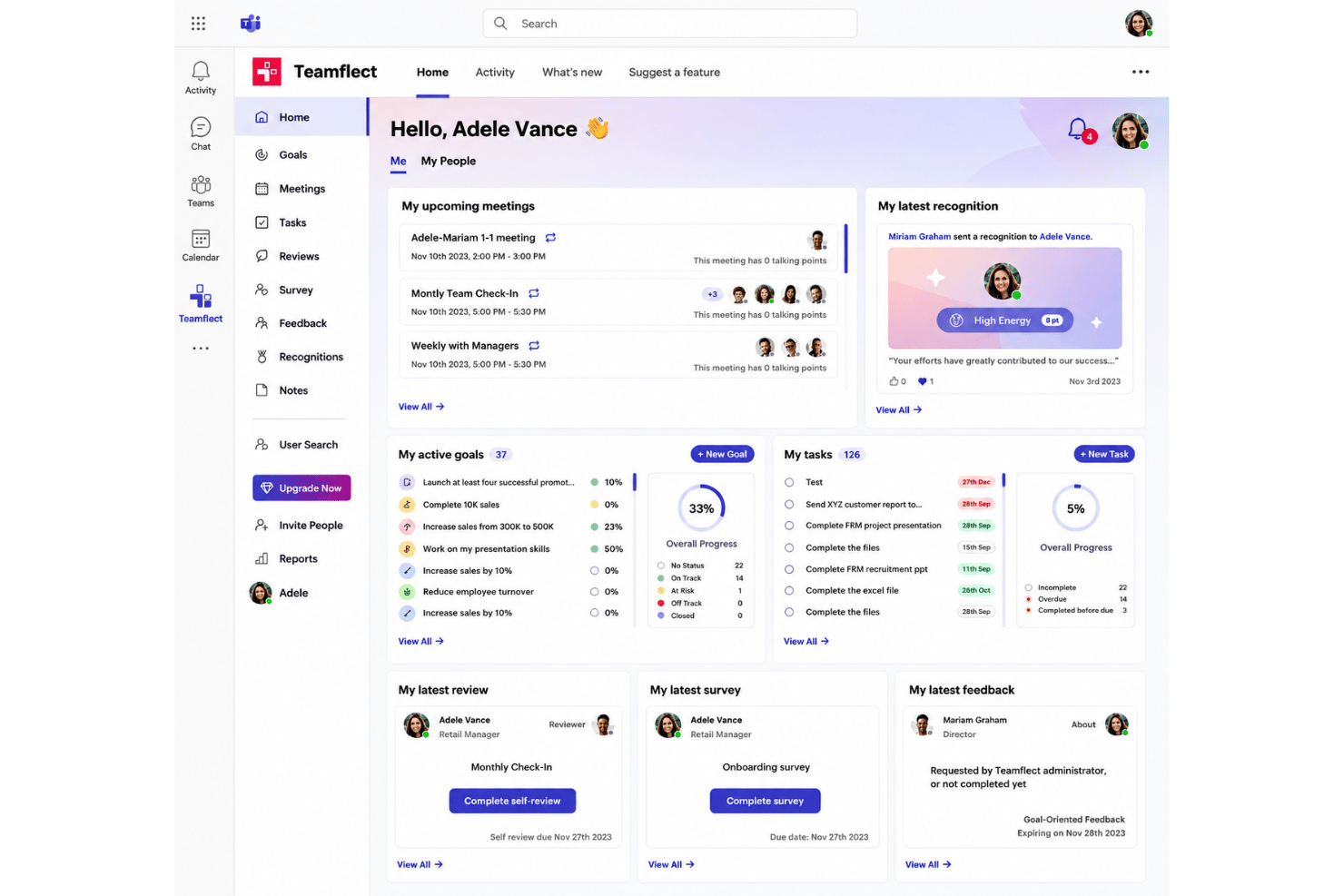
Teamflect is a free employee engagement and performance management platform that combines pulse surveys, peer recognition, anonymous feedback, OKR tracking, and 1-on-1 meeting tools in one place.
Who Is Teamflect Best For?
Teamflect is a strong fit for small HR teams and people ops managers at SMBs already standardized on Microsoft 365.
Why I Picked Teamflect
Teamflect earns its spot on my shortlist because the entire engagement experience runs natively inside Microsoft Teams. I can send pulse surveys, give recognition badges, and collect anonymous feedback without anyone leaving their Teams workspace. The Outlook calendar sync for 1-on-1 meetings is a particularly nice touch, automatically pulling scheduled check-ins into structured agendas with shared talking points and collaborative notes.
Teamflect Key Features
- Recognition points and rewards catalog: Employees earn points for recognition which can be redeemed for gift cards, prepaid Visas, or charity donations.
- Custom pulse and engagement surveys: HR teams can deploy recurring and customizable surveys to collect structured feedback from employees.
- Anonymous suggestion box: Employees can safely submit ideas or concerns through a dedicated, confidential channel.
- Power BI integration: Connect engagement and performance data to custom dashboards for deeper analytics and reporting.
Teamflect Integrations
Teamflect has native integrations across the Microsoft ecosystem, including Microsoft Teams, Outlook, Microsoft Planner, To-Do, Power BI, and Entra ID. It also provides integrations with HRIS tools like BambooHR, HiBob, and offers an API for custom integrations.
What's Free?
Teamflect offers a free-forever Starter plan capped at 10 users. It includes surveys, pulse surveys, anonymous feedback, recognition, 1-on-1 meetings, OKR tracking, and Microsoft Teams and Outlook integration, but usage analytics, data export, HRIS integrations, and API access are gated behind paid plans.
Pros and Cons
Pros:
- Structured 1-on-1 meeting agendas in free plan
- Anonymous feedback channel on free tier
- Surveys, recognition, and OKRs all included free
Cons:
- Requires active Microsoft Teams ecosystem to function
- Enforces per-user monthly billing after user threshold
Best for conversational survey experiences
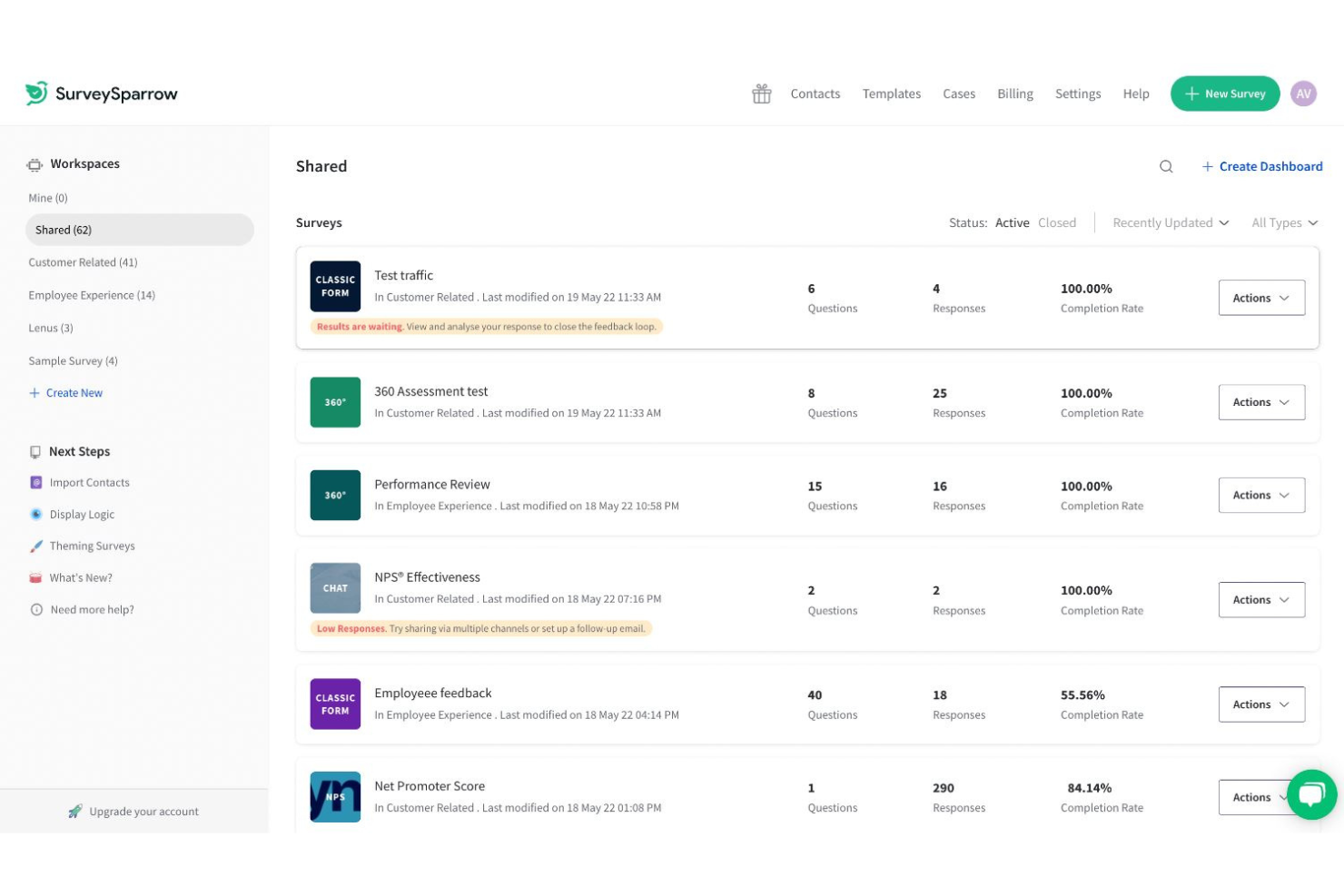
SurveySparrow is a feedback and survey platform that delivers employee pulse surveys, eNPS, and recurring engagement surveys through a chat-like, conversational interface with built-in analytics and workflow automation.
Who Is SurveySparrow Best For?
SurveySparrow suits HR teams at small to mid-sized organizations that prioritize high survey response rates and want to run recurring pulse or eNPS programs without heavy setup.
Why I Picked SurveySparrow
I've included SurveySparrow in my top picks because its chat-like survey format genuinely changes how employees respond to pulse surveys. Instead of a static form, respondents move through questions one at a time in a conversational flow, which SurveySparrow says drives up to 40% higher completion rates. I also like the recurring survey automation, where I can configure a quarterly engagement pulse once and let it run without revisiting it.
SurveySparrow Key Features
- Executive dashboard: Visualize participation, sentiment trends, and survey results with customizable charts and widgets.
- Ticket management: Convert survey responses into actionable tickets that can be assigned, tracked, and prioritized.
- Multi-language surveys: Distribute surveys in over 130 languages with auto-translation to support global teams.
- Slack integration: Share surveys and collect responses directly within Slack for higher engagement.
SurveySparrow Integrations
SurveySparrow offers native integrations with Slack, HubSpot, Salesforce, Intercom, Zendesk, Google Sheets, Microsoft Teams, and Power BI. It also connects with Zapier and provides an API for custom integrations.
What's Free?
SurveySparrow offers a free-forever plan that includes up to 3 active surveys, 10 questions per survey, and 75 responses per quarter. It's a meaningful starting point for small teams testing the platform, but the response cap is quite restrictive for ongoing employee engagement programs.
Pros and Cons
Pros:
- Recurring survey scheduling runs on autopilot
- eNPS tracking built into the free plan
- Conversational survey format lifts response rates
Cons:
- No peer recognition or rewards features
- Free plan response cap limits ongoing programs
Best with multilingual surveys for global teams
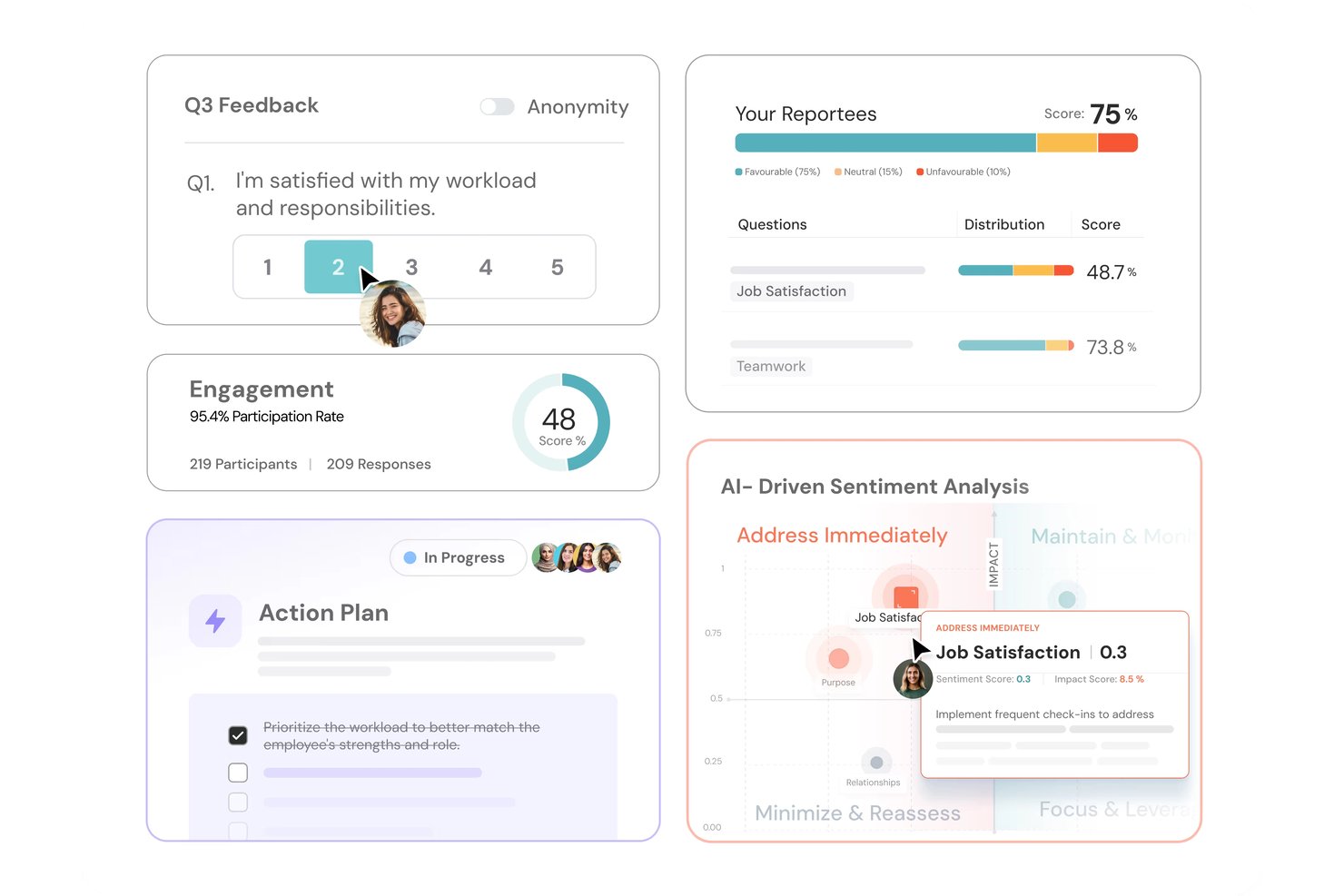
ThriveSparrow is an AI-native employee engagement platform that combines pulse surveys, eNPS tracking, peer recognition, rewards, and engagement analytics in one place.
Who Is ThriveSparrow Best For?
ThriveSparrow suits HR teams at SMBs managing distributed or international workforces who need to run structured engagement programs across multiple languages and regions.
Why I Picked ThriveSparrow
ThriveSparrow earns its spot on my shortlist because of how it handles multilingual survey delivery. I can send pulse surveys and eNPS questionnaires in over 100 languages, and open-text responses are translated back instantly, so I'm not losing nuance in what employees are actually saying. I also like that Infer AI scans those translated responses for early signals of disengagement or burnout, giving me a read on regional team health that goes beyond just participation rates.
ThriveSparrow Key Features
- Kudos rewards marketplace: Lets employees redeem points for gift cards from a catalog of 800+ options.
- AI action plans: Automatically generates trackable follow-up steps based on survey results.
- Heatmap dashboards: Visualizes engagement and performance trends by team, department, or manager.
- Jira integration for OKRs: Syncs goals and objectives directly with Jira for streamlined progress tracking.
ThriveSparrow Integrations
ThriveSparrow offers native integrations with Slack, Microsoft Teams, Google Workspace, SAP, HiBob, and Jira.
What's Free?
ThriveSparrow offers a 14-day free trial, not a free-forever plan. The trial gives you access to the platform's core features, but you'll need to move to a paid plan (starting at $3/user/month, billed annually) to continue using it after the trial period ends.
Pros and Cons
Pros:
- Points-based rewards catalog drives recognition habits
- AI detects disengagement in survey responses
- Surveys available in over 100 languages
Cons:
- Reporting features take time to configure
- No free-forever plan for long-term use
Best for regular pulse surveys
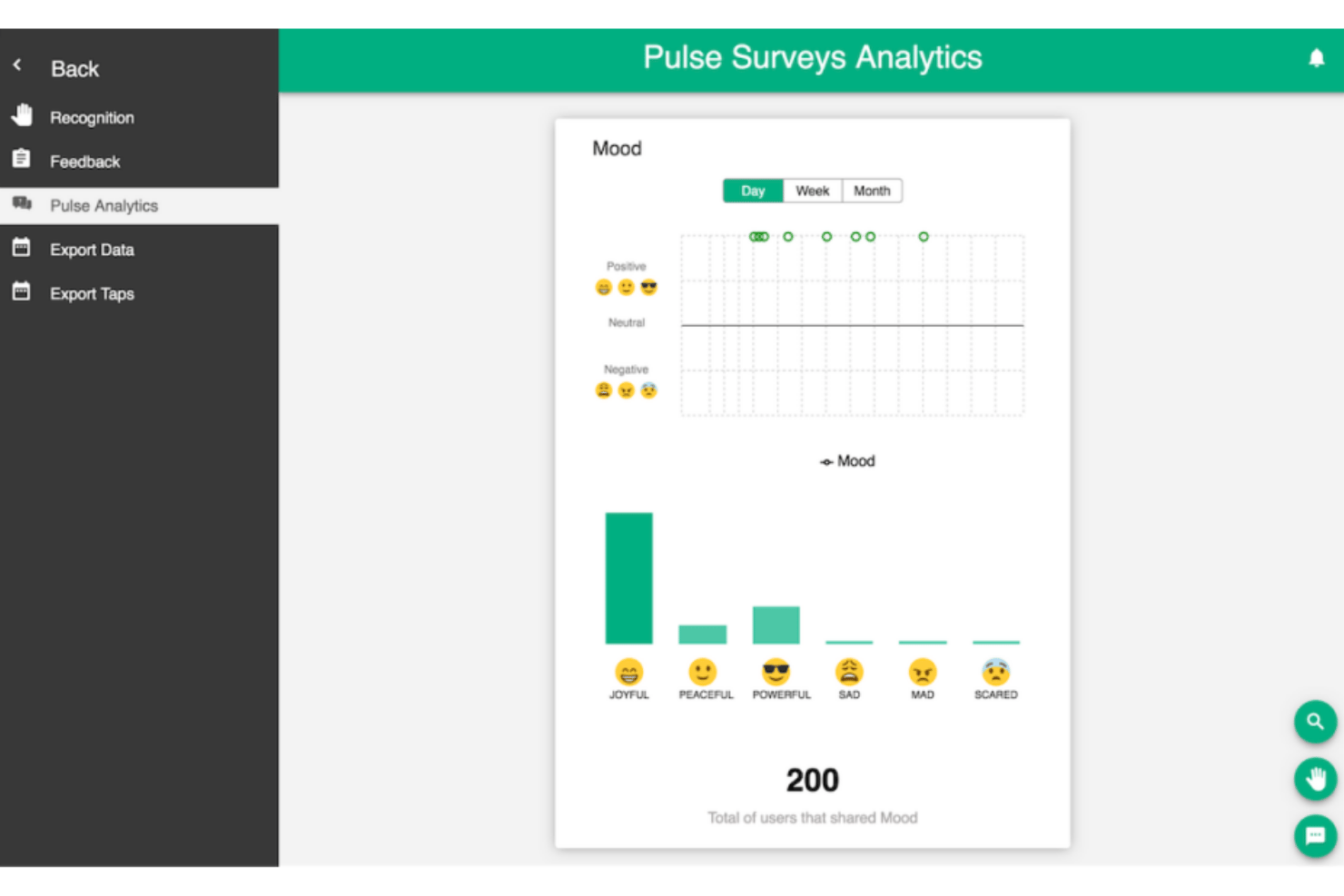
Tap My Back is an employee engagement platform that combines pulse surveys, peer recognition, mood tracking, 360° feedback, and eNPS measurement in one tool.
Who Is Tap My Back Best For?
It's a good fit for HR teams at small to mid-sized companies that want a structured way to run regular employee check-ins alongside recognition.
Why I Picked Tap My Back
I've included Tap My Back in my top picks because its pulse survey setup is genuinely built for consistency. The automated weekly or bi-weekly cadence pairs with smart question rotation, so employees aren't seeing the same prompts on repeat, which keeps response quality up over time. I also like the mood check-in feature, which surfaces early burnout signals so my team can act before engagement visibly drops.
Tap My Back Key Features
- Peer-to-peer recognition feed: Publicly celebrates individual and team achievements within a social-like interface.
- Customizable badge system: Lets you design and assign unique badges for workplace milestones or behaviors.
- 360° feedback: Enables multi-source feedback collection from peers, managers, and direct reports.
- Integration with Slack and Microsoft Teams: Connects recognition and surveys directly to your team’s daily workflow.
Tap My Back Integrations
Tap My Back offers native integrations with Slack, Microsoft Teams, Google Workspace, and Chrome. An API is available for custom integrations.
What's Free?
Tap My Back doesn't offer a free-forever plan. All paid plans come with a 30-day free trial, and no credit card is required to get started.
Pros and Cons
Pros:
- eNPS measurement built into the core platform
- Combines recognition and mood check-ins natively
- Automated pulse cadence with rotating questions
Cons:
- Recognition rewards limited to badges only
- Reporting lacks advanced segmentation options
Empuls
Best for surveys with real-time analytics
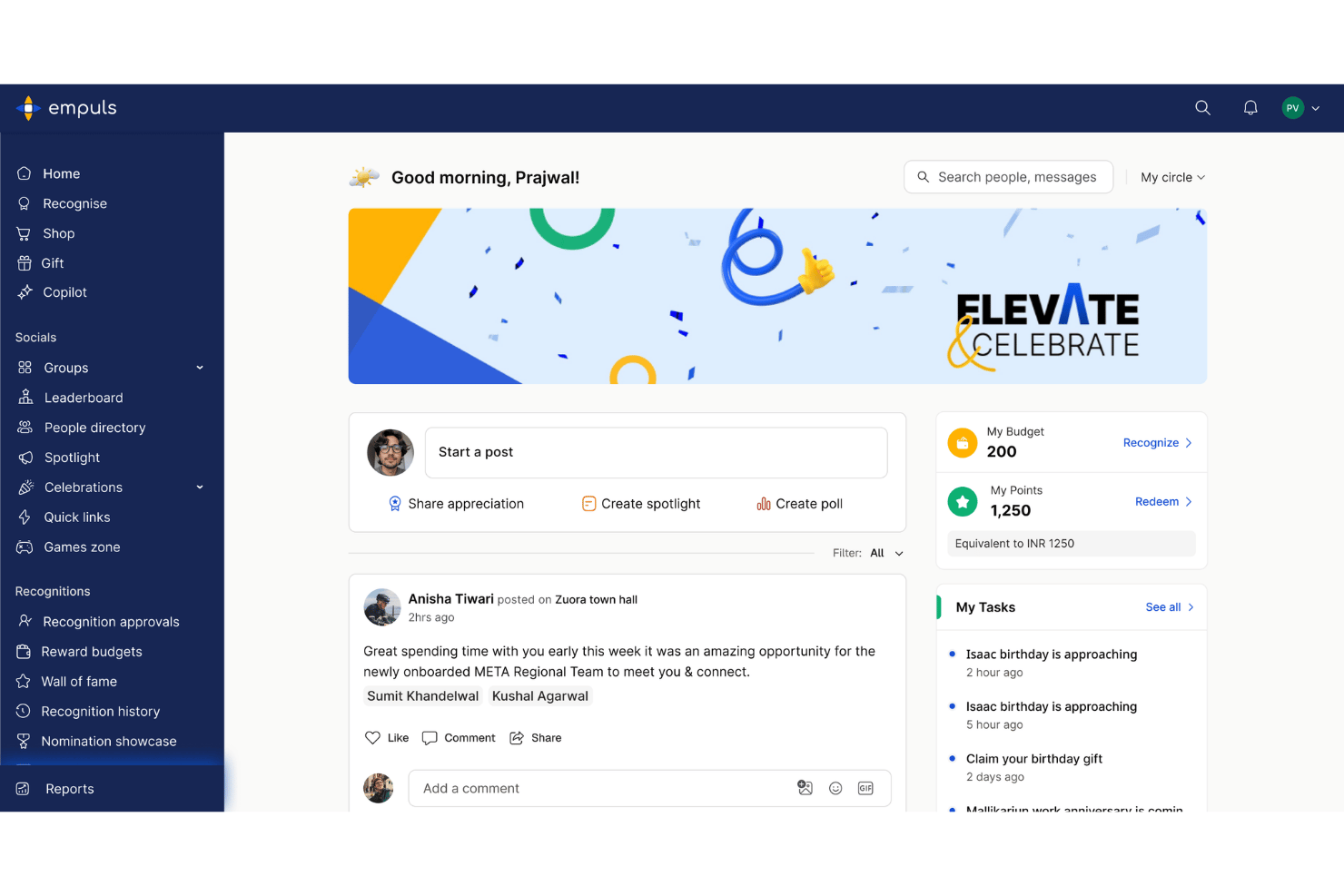
Empuls is a modular employee engagement platform that combines peer recognition, rewards, pulse surveys, anonymous feedback, and a social intranet for distributed teams.
Who Is Empuls Best For?
Empuls is a strong fit for HR and people ops teams at mid-size to large organizations managing distributed or global workforces.
Why I Picked Empuls
I picked Empuls as one of the best because its Employee Listening module covers eNPS, lifecycle surveys, and 360° feedback, all feeding into real-time dashboards with AI-driven sentiment analysis. What I find especially useful is that the AI agent translates shifting sentiment signals into specific action recommendations, so you're not left interpreting raw scores on your own.
Empuls Key Features
- Social intranet: Empuls includes a company feed, groups, polls, and town halls within a moderated platform for cross-team employee engagement.
- Rewards marketplace: The platform offers a global rewards catalog with gift cards, experiences, and merchandise across 150+ countries.
- Automated nudges: AI-powered notifications prompt participation in surveys, recognitions, and campaigns directly in employees’ work tools.
- Multi-channel integrations: Empuls connects natively with Slack, Microsoft Teams, Outlook, Google Workspace, and HRIS systems to deliver engagement activities where employees work.
Empuls Integrations
Empuls offers native integrations with Slack, Microsoft Teams, Outlook, Google Workspace, Zoom, Workday, SAP SuccessFactors, Personio, and has an API for custom integrations.
What's Free?
Empuls offers a free trial with no credit card required, giving your team access to the platform before committing to a paid plan. There's no free-forever tier, so you'll need to move to a paid plan after the trial period ends.
Pros and Cons
Pros:
- Peer recognition tied to company values
- Built-in eNPS with lifecycle survey tracking
- AI-driven sentiment analysis on survey results
Cons:
- Excludes pulse surveys from entry-level tier
- Non-changeable point conversion value set at sign-up

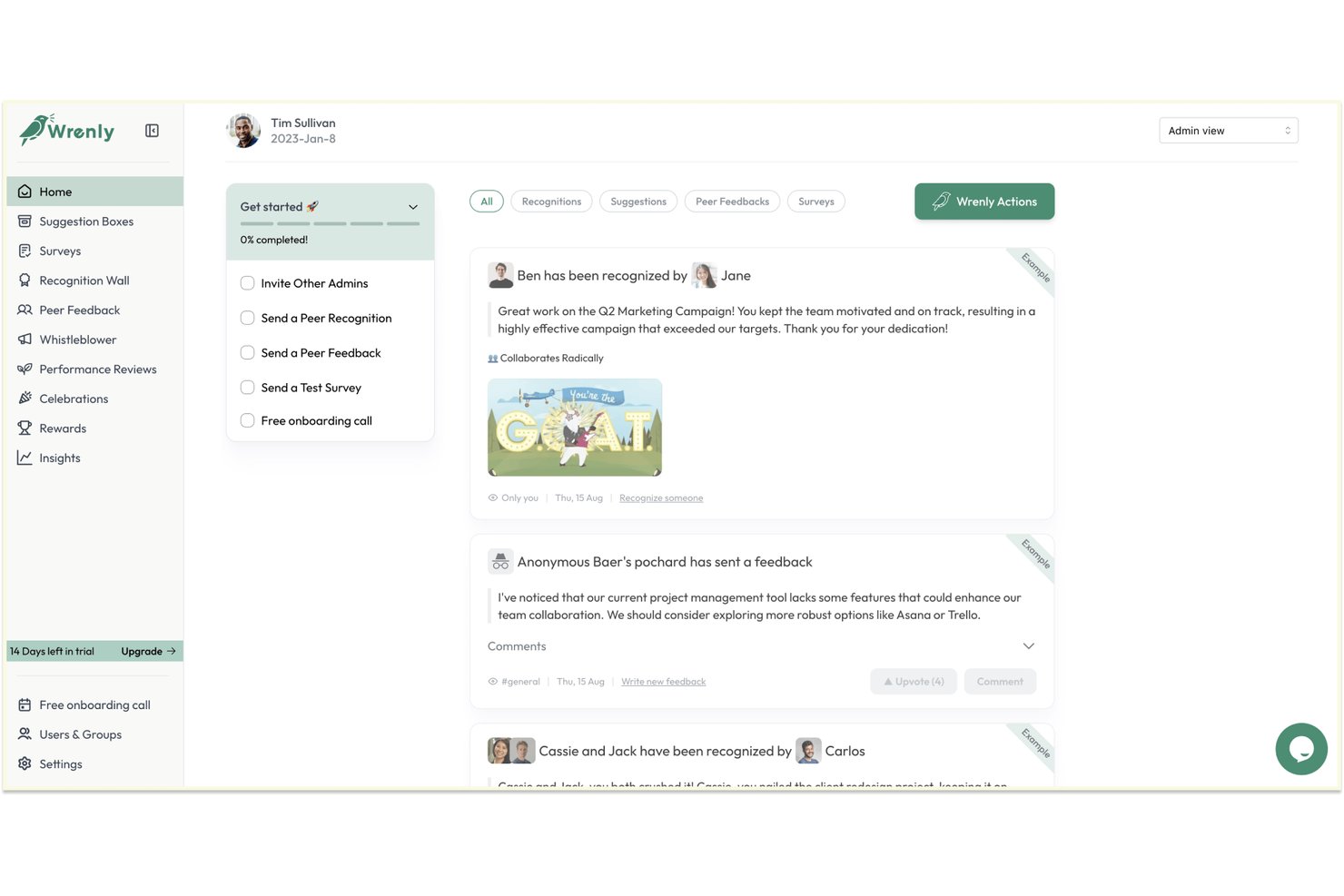
Wrenly is a free employee engagement platform that combines peer recognition, anonymous suggestion boxes, engagement surveys, and AI-driven insights inside Slack and Microsoft Teams.
Who Is Wrenly Best For?
Wrenly is a strong fit for small and mid-sized teams where a single HR generalist or people ops manager owns recognition, feedback, and engagement without a dedicated tool for each.
Why I Picked Wrenly
Wrenly earns its spot on my shortlist because the AI survey builder generates questions based on what you're actually trying to measure, whether that's onboarding friction or manager effectiveness, rather than handing you a blank template. I also like how the AI automatically categorizes and groups open-text responses, surfacing a synthesized culture score instead of leaving me to comb through raw comments. The whistleblower portal is a genuinely uncommon addition that most free engagement tools skip entirely.
Wrenly Key Features
- Peer recognition feed: Share public kudos and rewards to teammates directly in Slack or Teams.
- Suggestion boxes: Collect continuous, anonymous input from employees through digital suggestion forms.
- Engagement dashboards: Review participation rates, sentiment scores, and historical survey data in one place.
- Basic admin controls: Assign a platform admin to manage access, surveys, and recognition settings for your team.
Wrenly Integrations
Wrenly offers native integrations with Slack, Microsoft Teams, Workday, and Google Workspace, and more.
What's Free?
Wrenly offers a free-forever plan that includes up to 10 peer recognitions per month, basic anonymous feedback, and one admin seat. Paid modules (Engage, Recognize, and Perform) each start at $3–$5/user/month and unlock unlimited features, additional admins, analytics, and data exports.
Pros and Cons
Pros:
- Covers recognition, surveys, and reviews in one free app
- Anonymous suggestion box includes a whistleblower portal
- AI groups and themes open-text survey responses automatically
Cons:
- Free plan limits surveys, feedback, and recognitions per month
- Analytics fall short of dedicated engagement platforms

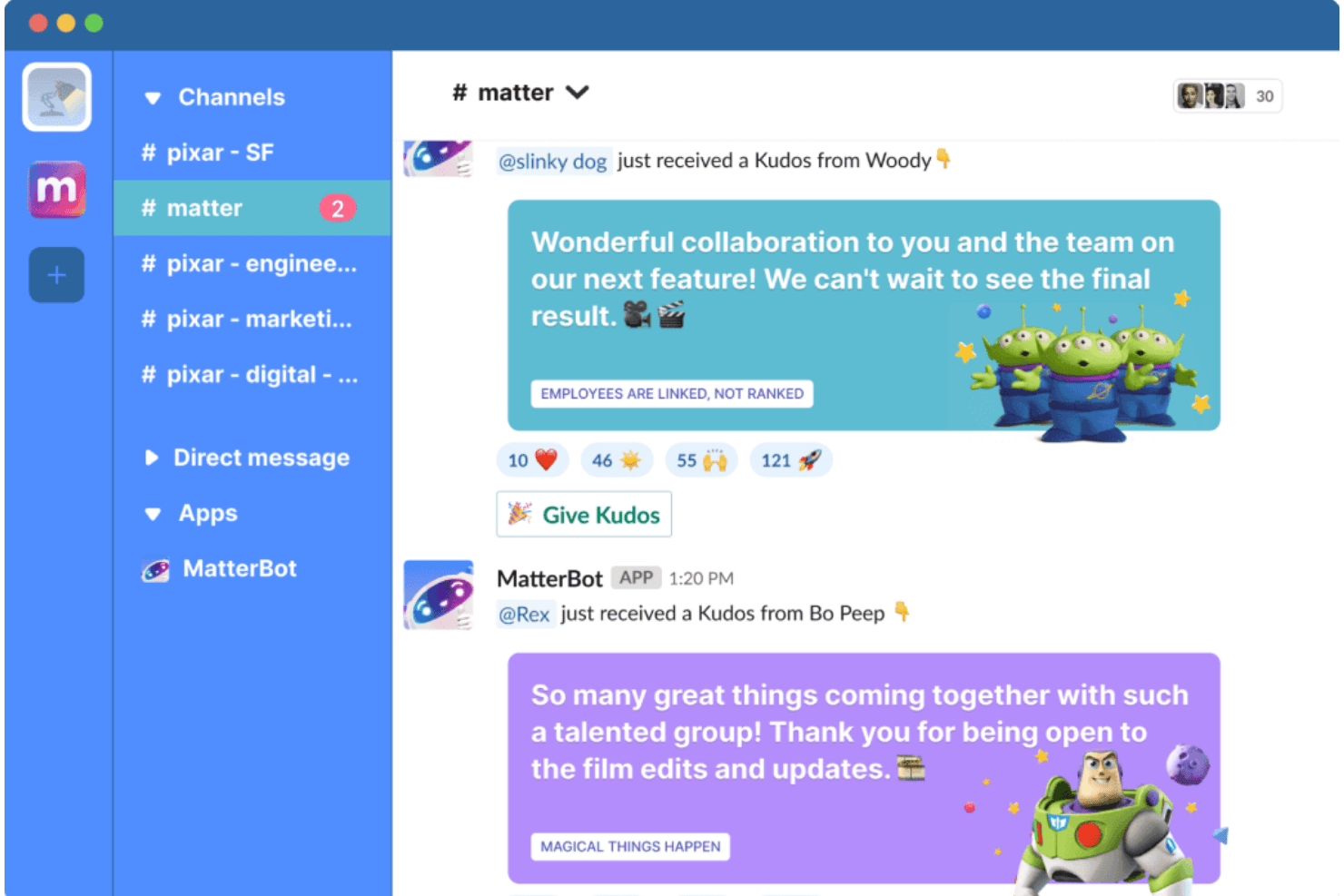
Matter is a recognition-first employee engagement platform built natively for Slack and Microsoft Teams, combining peer kudos, coins-based rewards, pulse surveys, and automated milestone celebrations.
Who Is Matter Best For?
Matter is a great fit for people operations teams at small and mid-sized companies that run primarily on Slack and want to build a recognition culture without a dedicated HR tech budget.
Why I Picked Matter
I picked Matter as one of the best because of how naturally it embeds public peer recognition into Slack. Its Feedback Friday feature automatically prompts employees each week to recognize a colleague in a shared channel, keeping recognition habits consistent without HR having to chase it. The company values kudos cards tie those shoutouts to specific behaviors your team has defined, making each post in #general visible and values-aligned.
Matter Key Features
- Matter coins and rewards catalog: Employees can exchange recognition coins for eGift cards, swag, or charitable donations across 200+ countries.
- Customizable survey templates: Offers a library of survey templates for pulse, onboarding, and eNPS surveys within Slack or Teams.
- Automated celebrations: Tracks and announces birthdays and work anniversaries directly in team channels for added visibility.
- Real-time engagement dashboards: Managers get dashboards to track recognition activity, survey participation, and engagement trends by team.
Matter Integrations
Matter offers native integrations with Slack and Microsoft Teams. An API is available for custom integrations.
What's Free?
Matter offers a free-forever plan that includes kudos recognition, a kudos template library, and Feedback Friday. The free plan is designed for small teams and has no user cap, but it doesn't include celebrations, analytics, custom kudos tied to company values, or rewards, which are gated behind paid tiers.
Pros and Cons
Pros:
- Free plan has no user seat cap
- Kudos cards tied to specific company values
- Feedback Friday builds consistent weekly recognition habits
Cons:
- Rewards redemption gated behind paid plans
- Analytics unavailable on the free tier

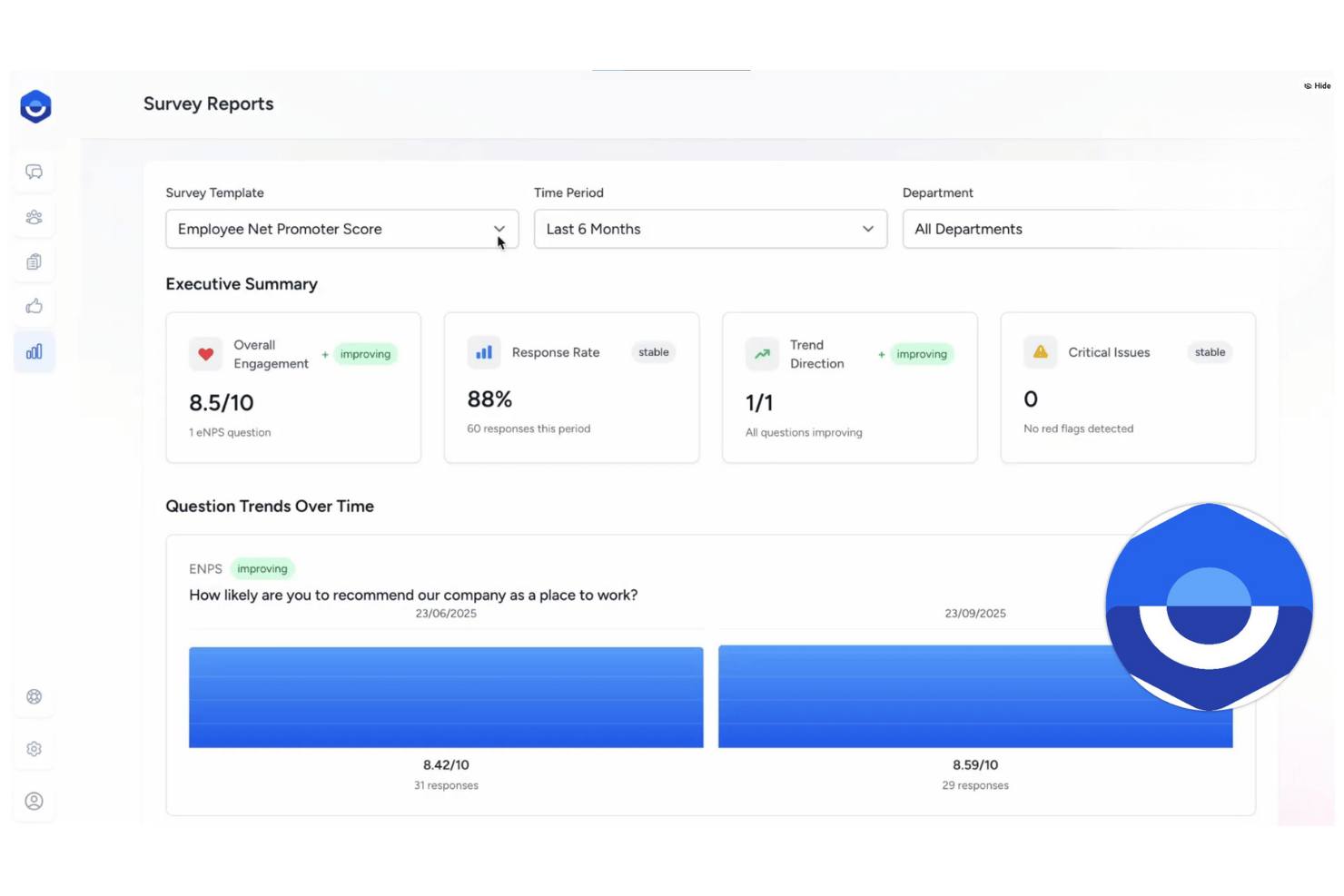
FeedbackPulse is an employee engagement platform that combines pulse surveys, eNPS tracking, anonymous feedback collection, peer recognition, and engagement analytics dashboards in a single tool.
Who Is FeedbackPulse Best For?
FeedbackPulse is a good fit for small to mid-sized teams where a People lead or HR generalist owns engagement without a large dedicated HR function behind them.
Why I Picked FeedbackPulse
FeedbackPulse earns its spot on my shortlist because the analytics dashboards go deeper than what I typically see in free-tier engagement tools. I can filter trend lines by department, tenure, and location, and the AI analysis layer identifies which specific survey statements are most strongly linked to overall engagement scores. The built-in eNPS benchmarks span 18 industry categories and 65 countries, so I'm not reading my numbers in a vacuum.
FeedbackPulse Key Features
- Kudos recognition wall: Teammates can post public kudos and shoutouts to a shared recognition feed.
- Configurable anonymity thresholds: Survey results stay hidden until a minimum number of responses are received, protecting respondent identities.
- Lifecycle survey templates: Built-in surveys for onboarding, exit, and milestone events help teams gather targeted feedback across the employee journey.
- Slack integration: Sends surveys, reminders, and notifications directly into Slack so teams can respond within their daily workflow.
FeedbackPulse Integrations
FeedbackPulse offers native integrations with Slack, Google, and Microsoft for single sign-on and survey delivery. An API is available for custom integrations.
What's Free?
FeedbackPulse offers a free-forever plan for teams of up to 10 people, which includes pulse surveys, eNPS surveys, kudos recognition, anonymous feedback, and basic dashboards. The free plan is capped at five active and scheduled surveys combined, and advanced analytics, performance reviews, and 360 feedback are reserved for paid tiers.
Pros and Cons
Pros:
- Built-in AI summaries of open-text responses
- Combines surveys, reviews, and recognition
- Peer review visibility controls protect fairness
Cons:
- Limited third-party native integrations available
- No mobile app currently offered
Annen gratis programvare for medarbeiderengasjement
Her er noen flere gratis alternativer for medarbeiderengasjement som ikke kom med på kortlisten min, men som likevel er verdt å undersøke:
- Geekbot
For automated team sentiment check-ins
- Leapsome
For unified goal and feedback cycles
- QuestionPro Employee Experience
For survey question customization options
- OpenCulture
For anonymous culture feedback via Slack


How I Evaluate Free Employee Engagement Software
First, I define what counts as free. For employee engagement software, that means a free-forever plan—a time-limited trial can't sustain the ongoing pulse surveys and recognition habits these tools are built around. From there, I evaluate each platform across two layers: core functionality every tool must cover, and the differentiators that set the best options apart.
Core Functionality (Table Stakes for This List)
In addition to my free offer requirements, I also use a scoring system to select tools for my list. Here's how it works:
I rank each one on a scale from 0 (does not offer the functionality) to 5 (excels in this area) for each core functionality listed below. Then, I calculate the tool's total score into a percentage. Each tool needs to achieve a minimum total score of 75% to be considered for inclusion.
- Employee Surveys: I look for pulse and engagement survey options with at least basic customization, like editing questions or adjusting frequency for recurring check-ins.
- Recognition Tools: Whether it's peer shoutouts tied to company values or kudos in a shared feed, I check that teams can celebrate wins without needing a paid upgrade.
- Anonymous Feedback: Employees need a safe way to raise concerns. I evaluate whether the platform supports anonymous survey responses and, ideally, two-way anonymous replies.
- Engagement Analytics: Dashboards should show more than raw response counts. I look for participation breakdowns and score trends that help HR spot patterns across teams.
- Action Planning: Survey data is only useful if you can act on it. I check for follow-up features like comment threads, task assignments, or basic action item tracking tied to results.
- Work Tool Integrations: Platforms that connect to Slack or Microsoft Teams for survey delivery and recognition tend to drive higher participation, so I confirm which integrations the free plan includes.
Once I have a list of tools that meet the criteria, I consider what sets each platform apart.
Differentiating Factors (What Sets Vendors Apart)
Here's how I compare and contrast different vendors:
Standout Features
Pulse surveys stand out when they're short, recurring, and easy to schedule—so HR can track sentiment shifts on topics like workload or morale without creating survey fatigue. I also look for a peer recognition feed that works like a social timeline, where shoutouts are visible across the team in real time. eNPS tracking is another differentiator I value, since it gives you a single benchmark score to measure employee loyalty trends over time without building custom surveys from scratch.
Beyond Features
Free plan limits matter a lot here. I check whether the cap on users or survey responses can realistically support your team size, and whether historical data stays accessible if you eventually upgrade. Data privacy is equally important—I look for clear anonymization thresholds and compliance certifications that give employees confidence their feedback can't be traced. Since free-tier users rarely get a dedicated support contact, I also evaluate self-service resources like template libraries, knowledge bases, and community forums that help HR generalists launch credible surveys on their own.
Slik velger du gratis programvare for medarbeiderengasjement
Det er lett å gå seg vill i lange funksjonslister og kompliserte prisstrukturer. For å hjelpe deg med å holde fokus mens du arbeider deg gjennom den unike prosessen med å velge programvare, får du her en sjekkliste over faktorer du bør ha i bakhodet:
| Faktor | Hva du bør vurdere |
|---|---|
| Skalerbarhet | Vil grensene for gratis brukere eller undersøkelser støtte teamet ditt når det vokser, eller vil du raskt nå en grense og måtte lete etter en ny løsning? |
| Integrasjoner | Kobler verktøyet seg til de viktigste arbeidsappene dine (Slack, Teams, Google Workspace) uten begrensninger, eller er viktige integrasjoner betalingsbelagte eller utilgjengelige? |
| Tilpasningsmuligheter | Kan du tilpasse undersøkelsesplaner og anerkjennelsesordninger slik at de gjenspeiler kulturen din, eller er du begrenset til generiske, faste maler i gratisplanen? |
| Brukervennlighet | Er plattformen intuitiv nok til at HR og medarbeiderne kan bruke den uten opplæring eller involvering fra IT? Se etter veiledet oppsett eller tydelige innføringsprosesser. |
| Implementering og innføring | Hvor raskt kan du lansere den første undersøkelsen eller anerkjenningsinnlegget? Passer prosessen inn i HRs kapasitet, eller vil den kreve ekstern hjelp eller mange timer? |
| Sikkerhetstiltak | Tilbyr plattformen sterke personvernordninger for anonyme tilbakemeldinger og undersøkelsesdata, med tydelige terskler og sertifiseringer du kan stole på? |
| Kostnad | Er verktøyet virkelig gratis for alltid, eller mister du viktige data eller funksjoner hvis du vokser ut av gratisnivået? Vær oppmerksom på feller som prøveperioder som utløper. |
| Tilgjengelig brukerstøtte | Er hjelperessurser, veiledninger og brukerfora omfattende nok til å støtte deg uten betalt kundestøtte eller teknisk direktestøtte? |
Hva er gratis programvare for medarbeiderengasjement?
Gratis programvare for medarbeiderengasjement er en digital plattform som hjelper HR-team med å gjennomføre undersøkelser, samle inn anonyme tilbakemeldinger og støtte anerkjennelse, resultatstyring og kommunikasjon gjennom en kostnadsfri plan uten tidsbegrensning. Disse verktøyene kan støtte OKR-er gjennom hele medarbeiderlivssyklusen, bidra til økt engasjement og bedre medarbeiderbevaring, samtidig som de følger med på stemningen og styrker en positiv kultur. Plattformer som Achievers er eksempler på den bredere kategorien programvare for medarbeiderengasjement.
Funksjoner i gratis programvare for medarbeiderengasjement
La oss gå gjennom funksjonene som vanligvis finnes i programvare for medarbeiderengasjement, og se hvilke som vanligvis er inkludert i gratis- kontra betalingsplaner.
Funksjoner som vanligvis er gratis i programvare for medarbeiderengasjement
- Korte pulsmålinger: Korte, tilbakevendende spørreskjemaer som gir tilbakemeldinger i sanntid om medarbeidernes arbeidsmoral, arbeidsmengde og tilfredshet på arbeidsplassen.
- Grunnleggende kollegaanerkjennelse: Offentlige heiarop eller ros, noen ganger ved hjelp av enkel spillifisering for å oppmuntre til deltakelse og anerkjenne bidrag.
- Anonyme tilbakemeldinger: En kanal der medarbeidere kan dele tilbakemeldinger, bekymringer eller ideer konfidensielt, slik at HR kan avdekke problemer på en ærlig måte.
- Enkle engasjementsdashbord: Visuelle sammendrag av deltakelse, svarprosent for undersøkelser og sporing av stemning for å følge utviklingen i engasjementet.
- Grunnleggende integrasjoner: Koblinger til verktøy som Slack eller e-post, slik at team kan sende undersøkelser og dele anerkjennelse direkte i eksisterende arbeidsflyter.
- Ferdig utformede undersøkelsesmaler: Ferdige spørreskjemaer for vanlige temaer knyttet til engasjement, slik at HR kan starte undersøkelser uten å bygge dem fra grunnen av.
- Responsanalyse: Samlet rapportering som viser overordnede resultater og trender uten avansert segmentering eller filtrering.
- Varslingsinnstillinger: Kontroller som lar brukere motta varsler om nye undersøkelser, anerkjennelser eller tilbakemeldingsaktivitet.
Funksjoner som vanligvis er inkludert i betalingsplaner for programvare for medarbeiderengasjement
- Avansert tilpasning av undersøkelser: Full kontroll over formuleringen av spørsmål, forgreningslogikk og planlegging, samt flere undersøkelsestyper for ulike mål knyttet til engasjement.
- Belønnings- og poengsystemer: Anerkjennelse fra kolleger og ledere knyttet til opptjening av poeng og gavekataloger, noe som tilfører insentiver til positive tilbakemeldinger.
- Analyse på ledernivå: Detaljert rapportering som bryter ned engasjementsdata etter team, avdeling eller sted for målrettede tiltak.
- Verktøy for tiltaksplanlegging: Funksjoner som hjelper ledere og HR med å tildele tiltak, følge fremdriften og følge opp direkte i plattformen.
- Verktøy for resultatstyring: Koblinger til programvare for resultatstyring, slik at innsikt om engasjement kan knyttes til mål, evalueringer og medarbeiderutvikling.
- Læringsintegrasjoner: Koblinger til et læringsstyringssystem for å støtte opplæring og utvikling basert på medarbeidernes behov.
- Sammenligning og trendanalyse: Sammenlign måltallene dine med bransje- eller geografiske referanseverdier, og se historiske trender for dypere innsikt.
- Toveis anonym meldingsutveksling: Mulighet til å svare på anonyme tilbakemeldinger og føre løpende konfidensielle dialoger mellom HR og medarbeidere.
- HRIS- og SSO-integrasjoner: Direkte koblinger til HR-systemer for synkronisering av medarbeiderdata og sikker enkel pålogging for enklere tilgang.
- Prioritert støtte og opplæring: Tilgang til dedikerte supportteam, introduksjonsøkter og veiledning i beste praksis, noe som ikke er tilgjengelig i de fleste gratisplaner.
Fordeler med gratis programvare for medarbeiderengasjement
Implementering av gratis programvare for medarbeiderengasjement gir flere fordeler for teamet og virksomheten din. Her er noen av fordelene du kan se frem til:
- Kontinuerlig tilbakemelding fra ansatte: Regelmessige undersøkelser, anonyme kanaler og 360-graders tilbakemeldinger lar deg følge med på arbeidsmoralen og innhente innspill fra flere perspektiver før bekymringer vokser.
- Rimelig anerkjennelseskultur: Innebygde heiarop og anerkjennelser bidrar til å fremme verdsettelse og støtte mellom kolleger uten ekstra HR-budsjett.
- Rask implementering: Gratisabonnementer med selvbetjent oppsett og maler lar teamet ditt lansere engasjementsprogrammer med liten eller ingen involvering fra IT.
- Tilgjengelige engasjementsmålinger: Enkle dashbord, rapporter og varmekart gir deg innsikt i teamets holdninger og deltakelsestrender helt fra første dag.
- Fleksible integrasjoner for arbeidsplassen: Koblinger til Slack, Teams eller e-post gjør det enklere å møte ansatte der de allerede kommuniserer og samarbeider.
- Ingen langsiktig binding: Gratisabonnementer uten tidsbegrensning lar deg prøve nye verktøy og prosesser uten risiko, med mulighet til å skalere når virksomhetens behov endrer seg.
- Støtte for små team: Brukergrensene i gratisabonnementer passer ofte for små bedrifter som ønsker å bygge engasjementsvaner med et begrenset budsjett.
Kostnader og priser for programvare for medarbeiderengasjement
Jeg forstår at du kom til denne artikkelen på jakt etter de beste gratisalternativene for programvare for medarbeiderengasjement. Ettersom gratisabonnementer bare tilbyr begrensede funksjoner, er det imidlertid en god sjanse for at du må oppgradere abonnementet ditt i fremtiden.
Tabellen nedenfor oppsummerer vanlige abonnementer, gjennomsnittsprisene deres og typiske funksjoner som inngår i programvare for medarbeiderengasjement:
Sammenligningstabell for abonnementer på programvare for medarbeiderengasjement
| Abonnementstype | Gjennomsnittspris | Vanlige funksjoner |
|---|---|---|
| Gratisabonnement | $0 | Grunnleggende pulsmålinger, anerkjennelse mellom kolleger, anonyme tilbakemeldinger, ferdiglagde maler, enkel analyse og begrensede integrasjoner. |
| Personlig abonnement | $5-$10/bruker/måned | Flere typer undersøkelser, noe tilpasning, grunnleggende handlingsplanlegging, begrenset rapportering og standardintegrasjoner. |
| Forretningsabonnement | $10-$25/bruker/måned | Avansert undersøkelseslogikk, sporing av eNPS, analyse for ledere, verktøy for handlingsplanlegging og de fleste integrasjoner. |
| Virksomhetsabonnement | $25-$50/bruker/måned | Tilpasset merkevarebygging, full API-tilgang, avansert sikkerhet, HRIS og SSO, referansemåling, prioritert kundestøtte og funksjoner for overholdelse av regelverk. |
Vanlige spørsmål om gratis programvare for medarbeiderengasjement
Her er noen svar på vanlige spørsmål om gratis programvare for medarbeiderengasjement:
Hva er de viktigste begrensningene ved gratis programvare for medarbeiderengasjement?
De fleste gratisabonnementer begrenser antallet brukere, undersøkelser eller svar du kan samle inn hver måned. Avansert analyse, integrasjoner og tilpasningsmuligheter er ofte begrenset eller bare tilgjengelige i betalte nivåer.
Kan jeg eksportere data fra et gratis verktøy for medarbeiderengasjement?
Ja, de fleste plattformer tillater grunnleggende dataeksport, for eksempel undersøkelsessvar eller sammendragsrapporter, selv om noen kan begrense eksportformatene eller historiske data i gratisversjonen.
Er tilbakemeldinger fra ansatte virkelig anonyme i gratisabonnementer?
Ja, de fleste programvarer anonymiserer svar i gratisnivåer, men sjekk at det finnes tydelige minimumsgrenser for antall svar for å unngå utilsiktet identifisering i små team.
Kan gratis verktøy for medarbeiderengasjement integreres med Slack eller Teams?
Noen kan det, men integrasjoner i gratisabonnementer kan være begrenset til grunnleggende varsler eller distribusjon av undersøkelser. Mer avanserte arbeidsflytkoblinger krever vanligvis et betalt abonnement.
Hvordan velger jeg riktig gratis programvare for medarbeiderengasjement for teamet mitt?
Vurder teamets størrelse, ønskede funksjoner, personvernbehov og hvilke integrasjoner som er viktigst. Test brukervennligheten og se hvilke støtteressurser som er tilgjengelige før du bestemmer deg.