

10 beste programmer for bemanningsplanlegging i bygg og anlegg, vurdert i 2026

Beste programvare for skiftplanlegging av ansatte i byggebransjen – kortliste


Å administrere arbeidsplanen til byggearbeiderne dine kan føles som et puslespill som aldri tar slutt. Det er ikke enkelt å balansere prosjektfrister, arbeidernes tilgjengelighet og uventede endringer. Det er her programvare for skiftplanlegging av ansatte i byggebransjen kommer inn i bildet.
Basert på min erfaring hjelper disse verktøyene byggefirmaer med å forenkle planleggingsoppgaver, redusere konflikter og forbedre kommunikasjonen i teamet. De lar deg fokusere på det som virkelig betyr noe: å fullføre prosjekter effektivt og på en god måte.
Jeg har testet og vurdert flere løsninger uavhengig for å gi deg en objektiv oversikt over de beste tilgjengelige alternativene. Du finner detaljert informasjon om funksjonene, fordelene og ulempene ved hvert verktøy. Enten du administrerer et lite team eller en stor arbeidsstyrke, finnes det noe her som passer behovene dine.
Why Trust Our Software Recommendations
Our team has been testing and reviewing software since 2012. As HR experts ourselves, we know how difficult—and important—it is to choose the right software.
For this guide, we evaluated tools using hands-on testing and independent research, scoring tools using our selection criteria. We also draw on insights from industry thought leaders and practicing HR experts.
Our reviews reflect our human editorial judgment, not a sales pitch.
Expert reviewers:
Sammenligningstabell for programvare for skiftplanlegging av ansatte i byggebransjen
Denne sammenligningstabellen oppsummerer prisopplysningene for mine beste utvalgte programmer for skiftplanlegging av ansatte i byggebransjen:
| Tool | Best For | Trial Info | Price | ||
|---|---|---|---|---|---|
| 1 | Best with biometric facial recognition clocks | 30-day free trial + free demo available | From $50/user/month | Website | |
| 2 | Best for small contractor teams | Free demo available | Pricing upon request | Website | |
| 3 | Best for shift scheduling flexibility | 14-day free trial + free demo available | From $5/user/month | Website | |
| 4 | Best for project management integration | Free demo available | Pricing upon request | Website | |
| 5 | Best for on-site task management | Free plan available | From $39/user/month (billed annually) | Website | |
| 6 | Best for team communication tools | Free trial + free plan available | From $1.70/user/month (billed annually) | Website | |
| 7 | Best for precise labor cost tracking | 14-day free trial + free demo available | From $6/user/month (billed annually) | Website | |
| 8 | Best for easy schedule sharing | 30-day free trial + free demo available | From $10/month | Website | |
| 9 | Best for automated scheduling features | 30-day free trial | From $450/scheduler/year (billed annually) | Website | |
| 10 | Best for remote workforce management | 14-day free trial + free demo available | Pricing upon request | Website |
Gjennomgang av den beste programvaren for skiftplanlegging av ansatte i byggebransjen
Nedenfor finner du mine detaljerte sammendrag av den beste programvaren for skiftplanlegging av ansatte i byggebransjen som kom med på kortlisten min. Omtalene mine gir et detaljert innblikk i de viktigste funksjonene, fordelene og ulempene, integrasjonene og ideelle bruksområdene for hvert verktøy, slik at du kan finne det som passer best for deg.

TimeTrex
Best with biometric facial recognition clocks
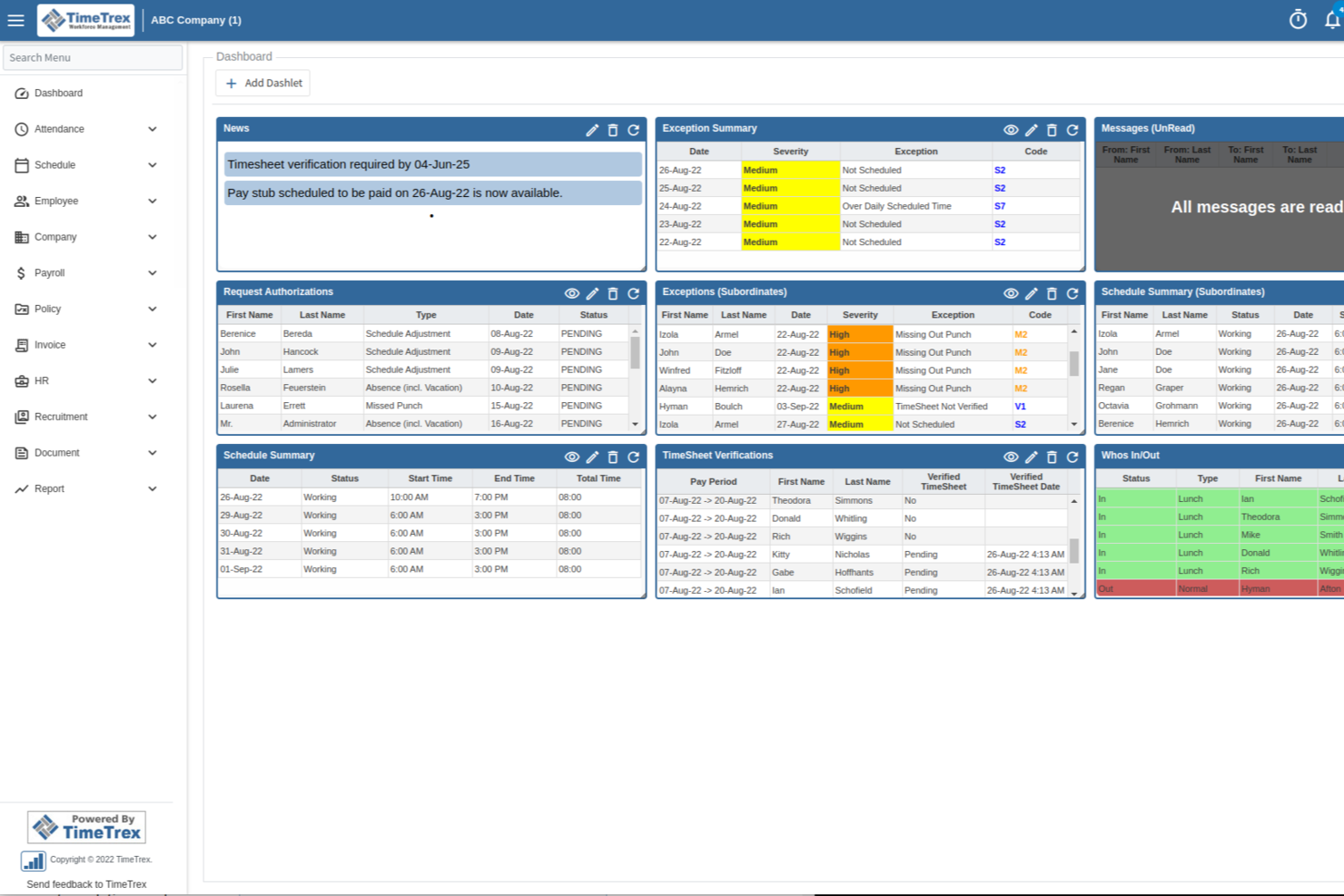
TimeTrex is a workforce management platform for construction teams that combines employee scheduling, time and attendance tracking, payroll, and HR management in one system.
Who Is TimeTrex Best For?
TimeTrex is a good fit for construction companies that need to manage hourly workers, complex shifts, and payroll across multiple job sites.
Why I Picked TimeTrex
I picked TimeTrex as one of the best because I can set up biometric facial recognition clocks at job sites, which helps my team track attendance without relying on manual punch-ins. I like that the system captures real-time clock-ins and outs, reducing buddy punching and time theft. My team is able to manage large crews across multiple locations and always knows who’s on-site, even when schedules change at the last minute.
TimeTrex Key Features
- Shift scheduling: Build and assign shifts for crews across multiple job sites.
- Job costing: Track labor hours and costs by project or task for accurate reporting.
- Mobile app: Allow workers to view schedules, clock in, and request time off from their phones.
- Payroll processing: Automate payroll calculations and generate pay stubs directly from tracked hours.
TimeTrex Integrations
TimeTrex offers native integrations with QuickBooks, ADP, Paychex, Ceridian, and Sage for payroll processing. An API is available for custom integrations with HR, payroll, and accounting systems.
Pros and Cons
Pros:
- Includes geofencing for job site attendance
- Provides automated overtime and break calculations
- Handles multi-country payroll and compliance
Cons:
- Reporting customization requires technical knowledge
- Interface can feel dated and cluttered
New Product Updates from TimeTrex
TimeTrex Adds Quick Punch App With Offline and QR Support
TimeTrex adds a new Quick Punch app, offline punching, QR code scanning, punch images, configurable messages, and punch warnings or lockouts to improve employee clock-ins across browsers and local computers. For more information, visit TimeTrex’s official site.
 .
.
Best for small contractor teams
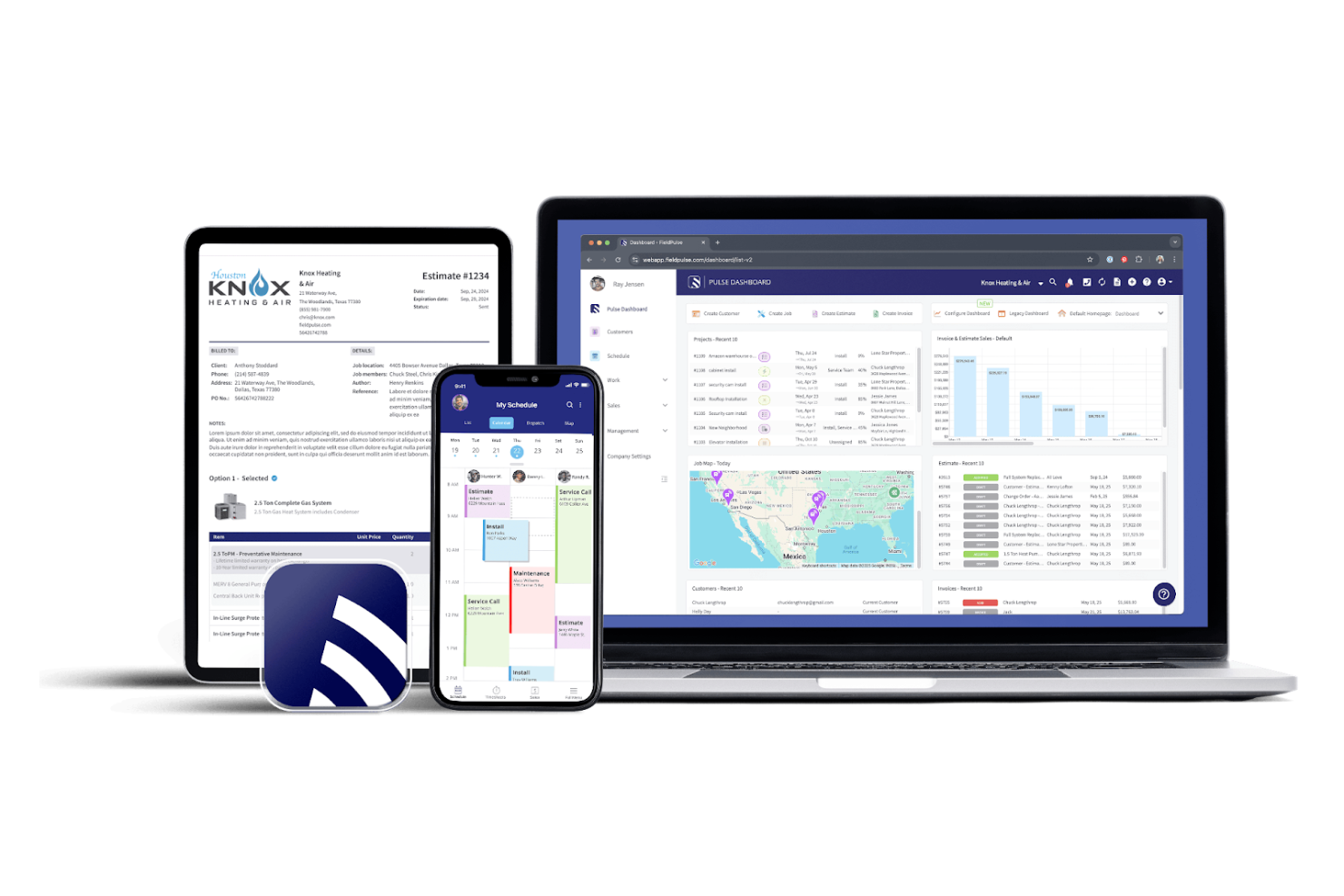
FieldPulse is a field service management software tailored for small contractor teams. It offers scheduling, dispatching, and customer management features to help small businesses operate smoothly.
Why I picked FieldPulse: Ideal for small teams, FieldPulse offers flexible scheduling and dispatching tools so you can manage jobs and track team availability with ease. The mobile app lets your team update job statuses remotely, and customer management tools help you maintain strong client relationships.
Standout Features and Integrations:
Features include a mobile app for on-the-go updates, invoicing tools to optimize billing, and customer management features to organize client information. You can smoothly assign tasks to team members and track their progress. The software’s reporting tools also give you insights into your business’s performance.
Integrations include QuickBooks, NiceJob, Xero, Square, and more.
Pros and Cons
Pros:
- Suitable for small teams
- Integrated customer management tools
- Built-in Invoicing and billing features
Cons:
- Customer support can be slow
- Mobile app can be laggy

Deputy
Best for shift scheduling flexibility
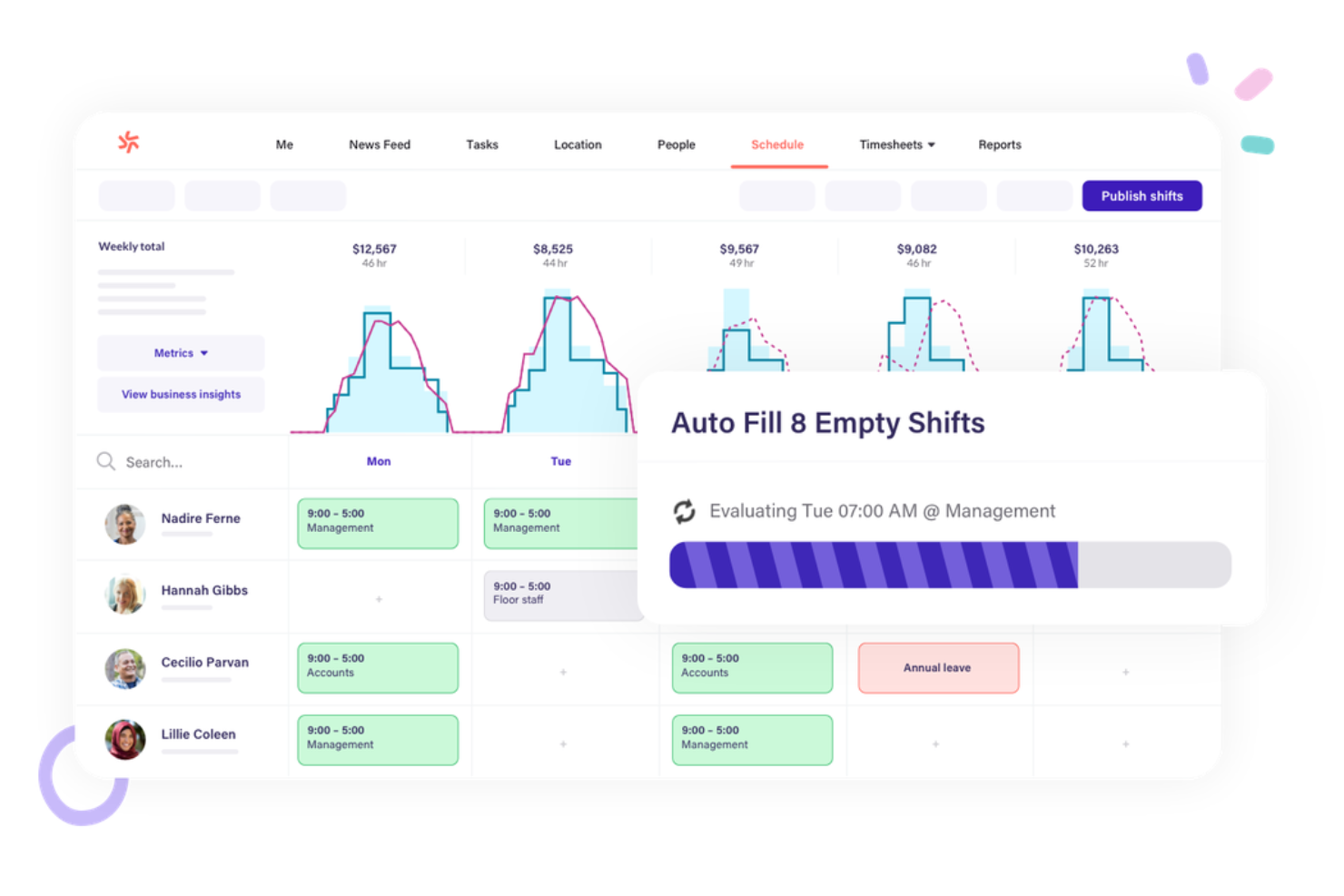
Deputy is a workforce management software designed for businesses that prioritize efficient scheduling and time tracking. It caters to managers and employees by simplifying shift planning and attendance monitoring.
Why I picked Deputy: Deputy’s flexible shift scheduler is a highlight. With it, you can create and adjust schedules to fit your team’s needs. Real-time notifications keep everyone informed of updates, and the mobile app lets your team view their shifts and swap with coworkers.
Standout Features and Integrations:
Features include a time clock to track hours accurately, task management to assign and monitor duties, and compliance tools to keep everything straightforward. You can also generate reports to analyze workforce data. The software offers a mobile app for on-the-go access.
Integrations include ADP (Workforce Now and Run), Xero, Gusto, and more.
Pros and Cons
Pros:
- Compliance tracking tools
- Mobile-friendly workforce management app accessibility
- Flexible shift management
Cons:
- Frequent notification glitches
- Advanced reporting and analytics can be complex

Procore
Best for project management integration
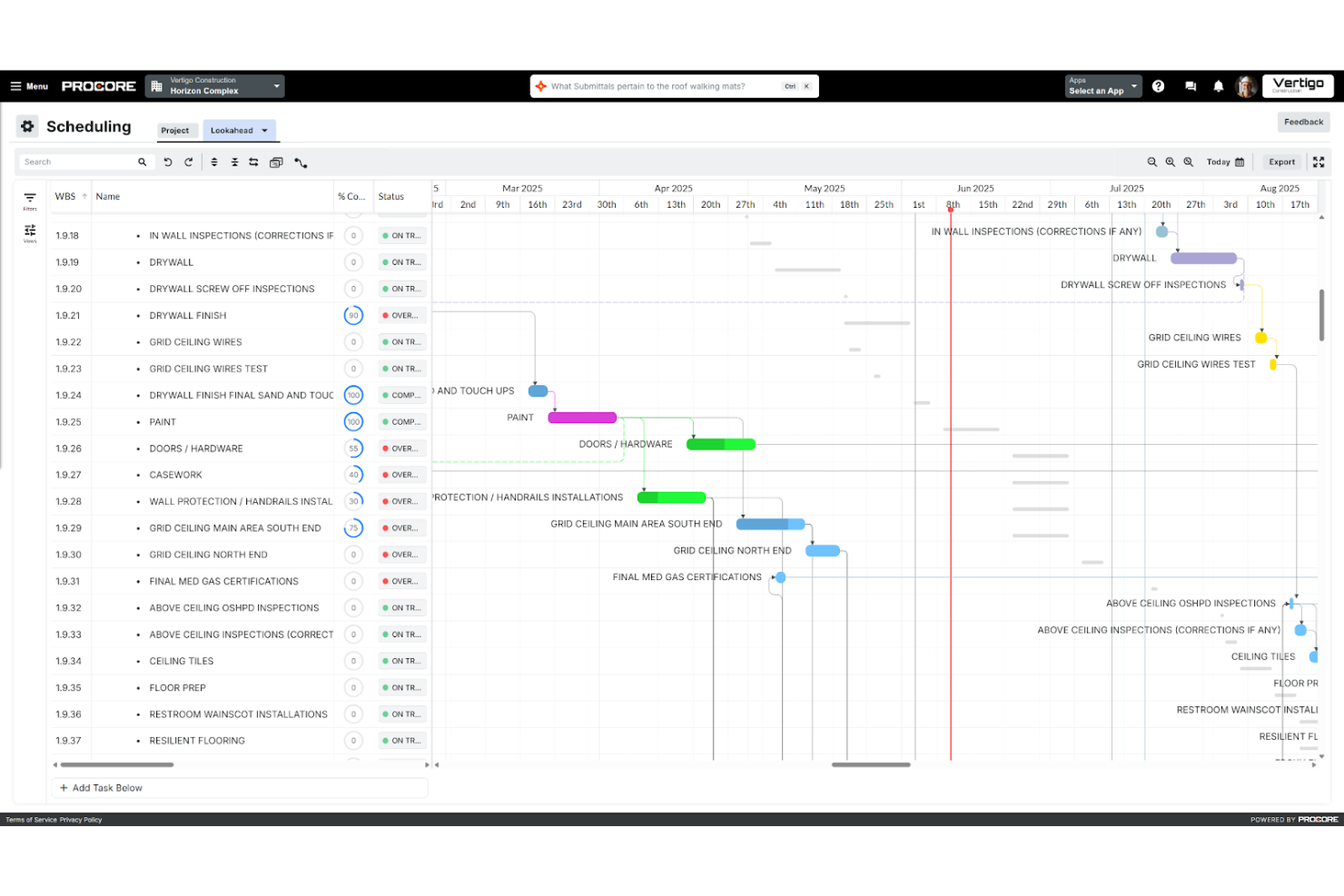
Procore is a construction project management software aimed at contractors and supervisors. It helps you organize project documentation, manage timesheets, and communicate with subcontractors and stakeholders.
Why I picked Procore: Project management integration is where Procore shines. Its all-in-one platform lets you manage documents and workflows efficiently in one location. You can track project dependencies, critical paths, and budgets with ease, and the communication tools keep your team connected and informed throughout the project lifecycle.
Standout Features and Integrations:
Features include a centralized dashboard for project visibility, document management for easy access to files, and budgeting tools to track finances. You can generate detailed reports to analyze project performance. The software also offers quality and safety management features to prevent issues before they become a problem.
Integrations include QuickBooks, Sage 300 CRE, Sage 100 Contractor, and more.
Pros and Cons
Pros:
- Real-time budget and cost tracking
- Secure document handling
- Centralized project management
Cons:
- High system requirements
- Complex configuration for large teams

Best for on-site task management
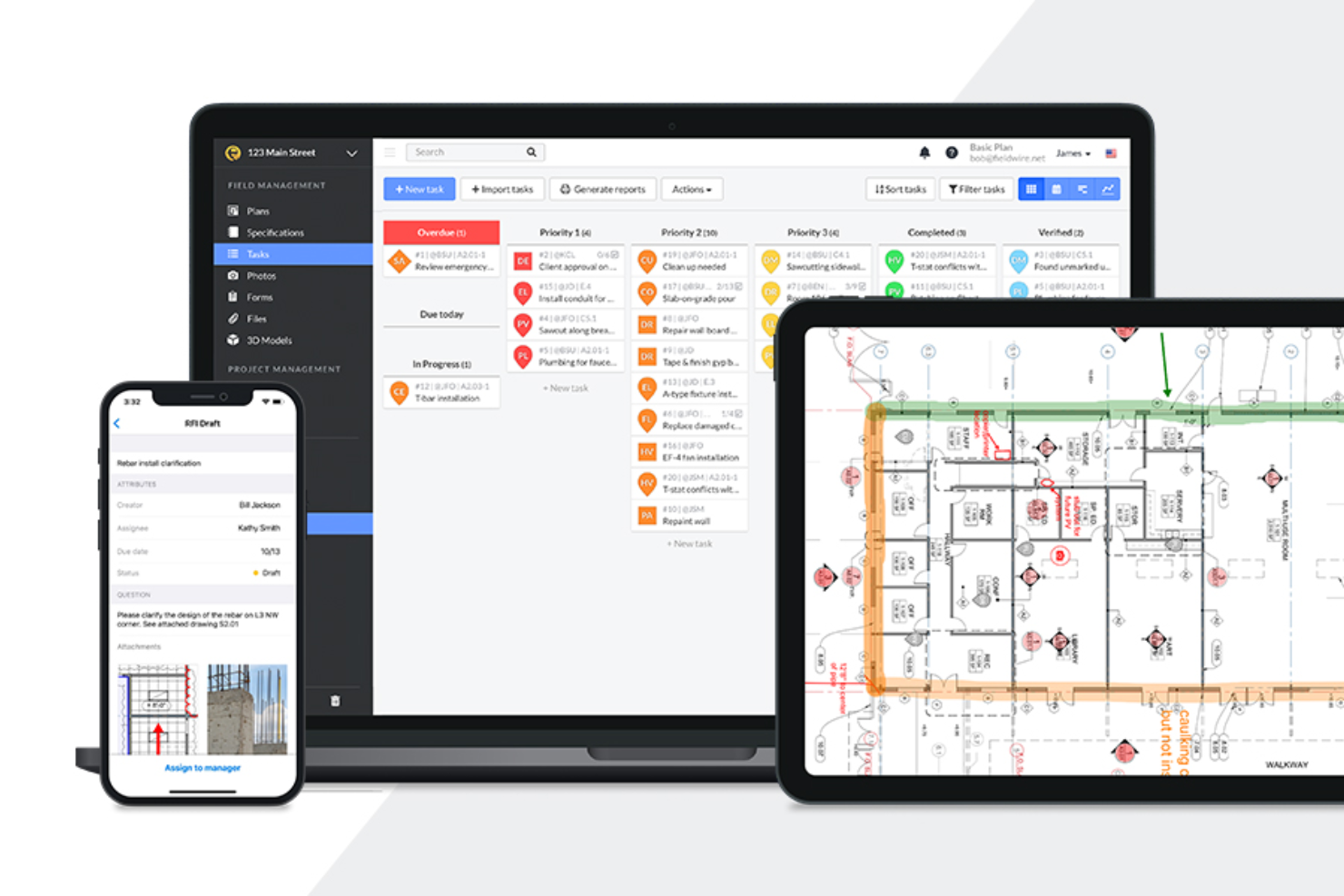
Fieldwire is a construction management software that helps project managers oversee tasks, work schedules, and blueprints, boosting on-site productivity and coordination.
Why I picked Fieldwire: Task management is at the core of Fieldwire’s offerings. You can schedule projects using Kanban boards and Gantt charts, as well as assign tasks with due dates and priorities directly on blueprints. The real-time messaging feature keeps everyone connected, and mobile accessibility lets your team update tasks anytime, anywhere.
Standout Features and Integrations:
Features such as mobile plan viewing, real-time messaging, and digitized forms simplify on-site operations, while task reports ensure your field crew is meeting milestones.
Integrations include Dropbox, Box, Microsoft OneDrive, Google Drive, Egnyte, and more.
Pros and Cons
Pros:
- Mobile-friendly interface
- Easy blueprint navigation
- Real-time task updates
Cons:
- Device compatibility limitations
- Limited offline functionality

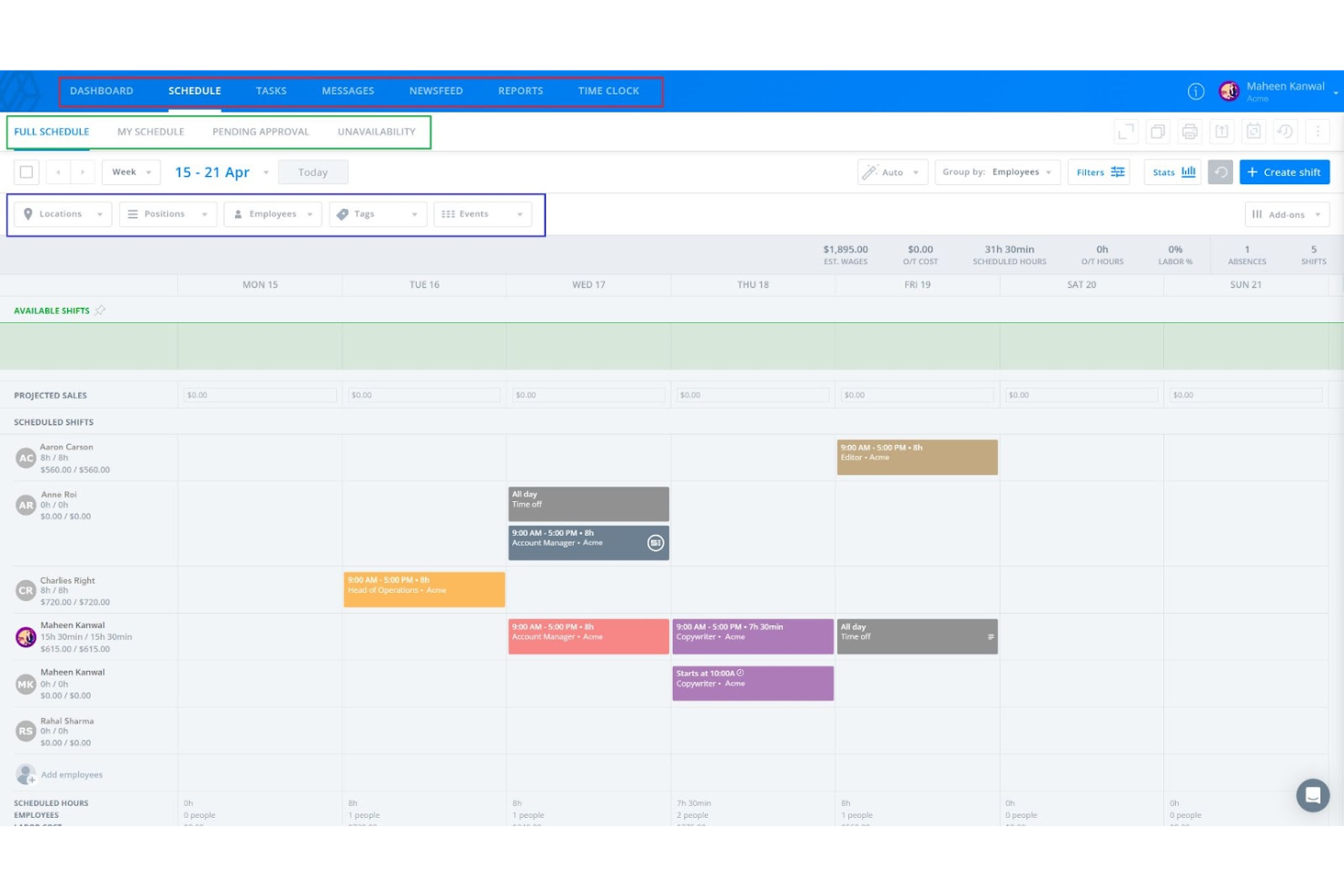
Sling is a scheduling and communication software designed for businesses looking to manage shifts and improve team collaboration. It focuses on helping managers and employees coordinate schedules and communicate effectively.
Why I picked Sling: Team communication tools are a highlight of Sling. You can send messages to individuals or groups, keeping everyone in the loop, and the newsfeed feature lets you share important updates with your team. You can also create and assign group tasks to increase collaboration.
Standout Features and Integrations:
Features include a built-in time clock to track hours, task management for assigning duties, and a newsfeed for sharing updates. You can create and rearrange shift schedules with its drag-and-drop interface, and you can import employee data from spreadsheet files directly onto the platform. The software also offers reporting tools to analyze workforce data.
Integrations include Shopify, Square, Gusto, Toast, and more.
Pros and Cons
Pros:
- Drag-and-drop scheduling
- Built-in time clock
- Instant team messaging
Cons:
- Notification settings are confusing
- Mobile app can be laggy at times

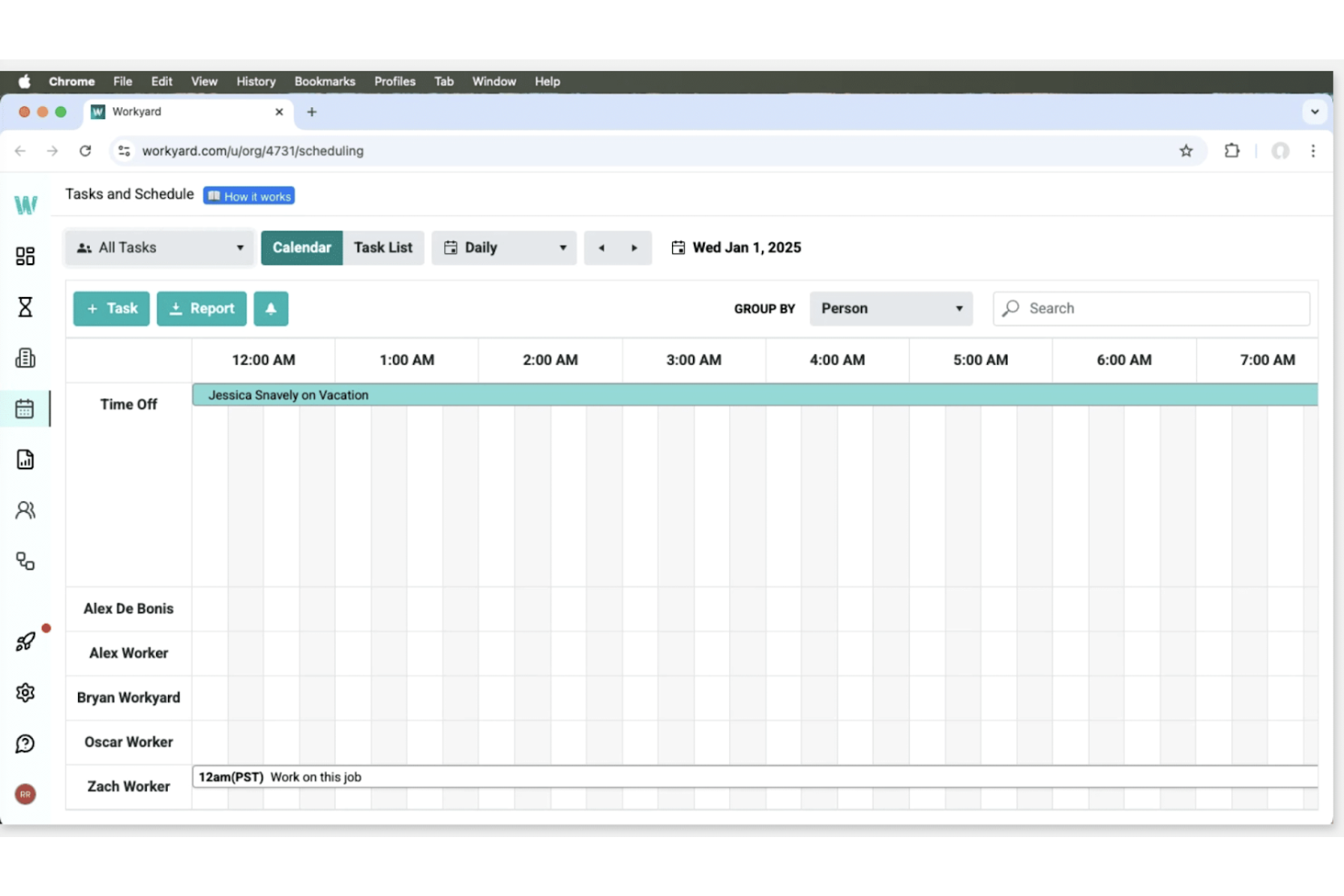
Workyard is a construction workforce management software tailored for contractors and field teams. It focuses on time tracking, job management, and expense management to improve project efficiency.
Why I picked Workyard: Workyard excels at precise labor cost monitoring. Its GPS-verified time tracking accurately logs your team’s hours, while real-time project scheduling helps you allocate resources effectively. Its expense management tools let you monitor project costs to stay within your budget. Workyard is also fully mobile-friendly, with dedicated apps for Android, iOS, and iPad (Kiosk mode), allowing field teams to track time, submit reports, and view schedules from anywhere.
Standout Features and Integrations:
Features include GPS-verified time tracking, mobile smart forms for easy data entry, real-time project scheduling to optimize resource management, and expense management tools to track costs efficiently. These features work together to give you detailed insights into your projects.
Integrations include ADP Run, ADP Workforce Now, QuickBooks, and more.
Pros and Cons
Pros:
- Mobile smart forms and expense tools
- Live crew visibility for managers
- GPS-verified time tracking
Cons:
- Some advanced features require higher-tier plans
- Reporting can be overwhelming for small teams

Best for easy schedule sharing
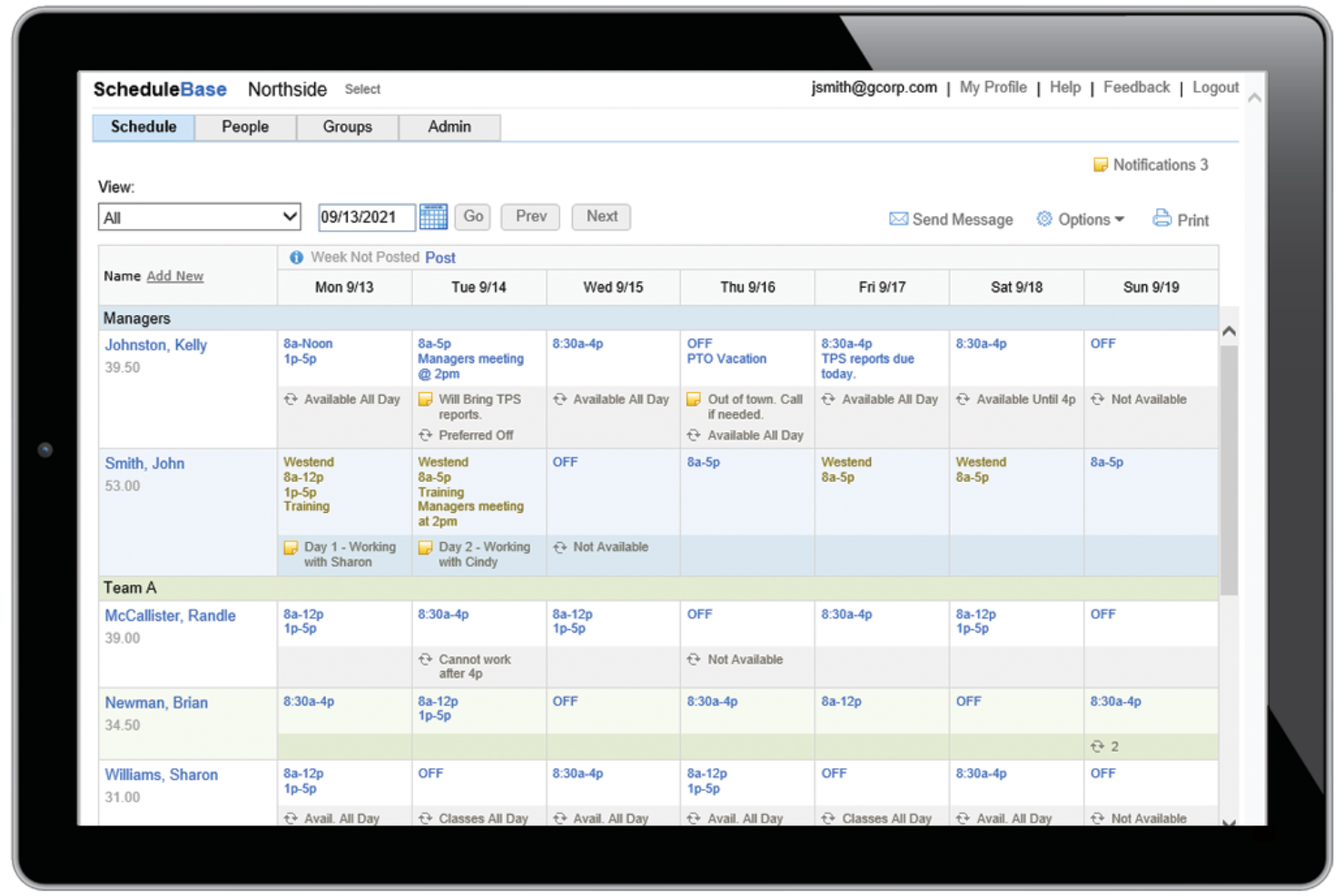
ScheduleBase is an online employee scheduling software designed for businesses that need simple and effective solutions. It helps managers create schedules and share them with employees without extra bells and whistles.
Why I picked ScheduleBase: ScheduleBase’s biggest appeal is its no-frills schedule sharing. You can send schedules to your team via email or text, so everyone stays informed. The software also lets you make last-minute changes and notify your team quickly. It’s straightforward and doesn’t require extensive training, making it ideal for busy managers. Plus, you can try it for a month with no credit card required.
Standout Features and Integrations:
Features include customizable scheduling templates to save time, real-time updates to keep schedules current, and the ability to manage multiple locations from one account. You can track employee availability and preferences, and the software includes reporting tools to analyze scheduling patterns.
Integrations include Microsoft Excel, Google Sheets, Outlook, and more.
Pros and Cons
Pros:
- Customizable templates
- Email and text notifications
- Quick schedule updates
Cons:
- Feature set is too simple for big teams
- Lacks built-in payroll processing

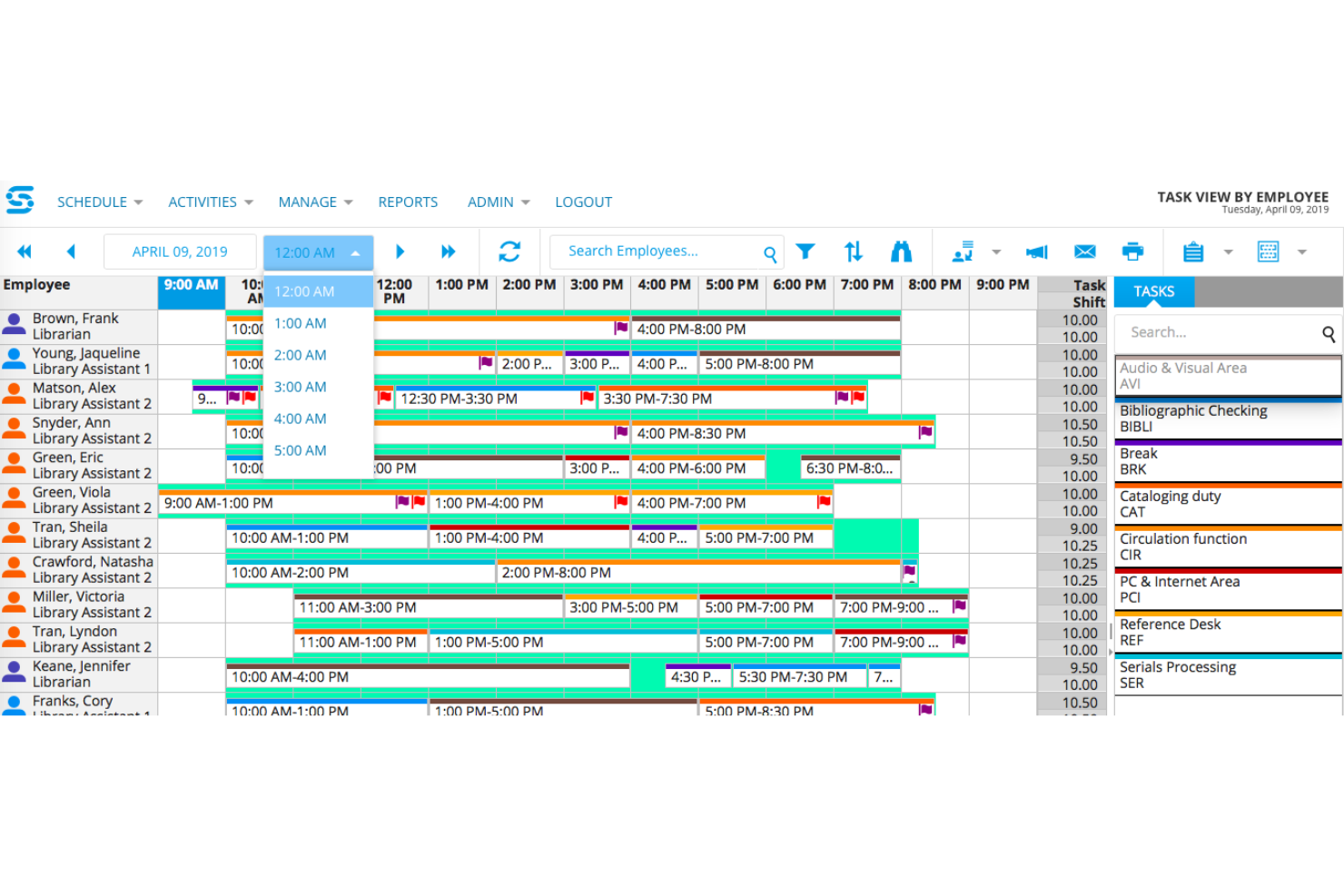
Snap Schedule is an employee scheduling software designed for businesses that need efficient, automated scheduling solutions. It gives managers tools for shift planning, time tracking, and workforce management.
Why I picked Snap Schedule: Automated scheduling features are a highlight of Snap Schedule. You can use templates to quickly generate schedules, saving time and reducing errors. The software also alerts potential scheduling conflicts. With its built-in automation, you can simplify scheduling and free up time to tackle more important tasks.
Standout Features and Integrations:
Features include drag-and-drop scheduling for ease of use, reporting tools to analyze workforce data, and shift assignment alerts to prevent conflicts. With Snap Schedule’s Calendar View, you can track employee availability and preferences, as well as manage PTO and absences.
Integrations include ADP Workforce Now, SAP, Microsoft Outlook, Google Calendar, and more.
Pros and Cons
Pros:
- Drag-and-drop interface
- Shift conflict alerts
- Automated scheduling templates
Cons:
- Interface can feel cluttered
- Limited custom reporting options
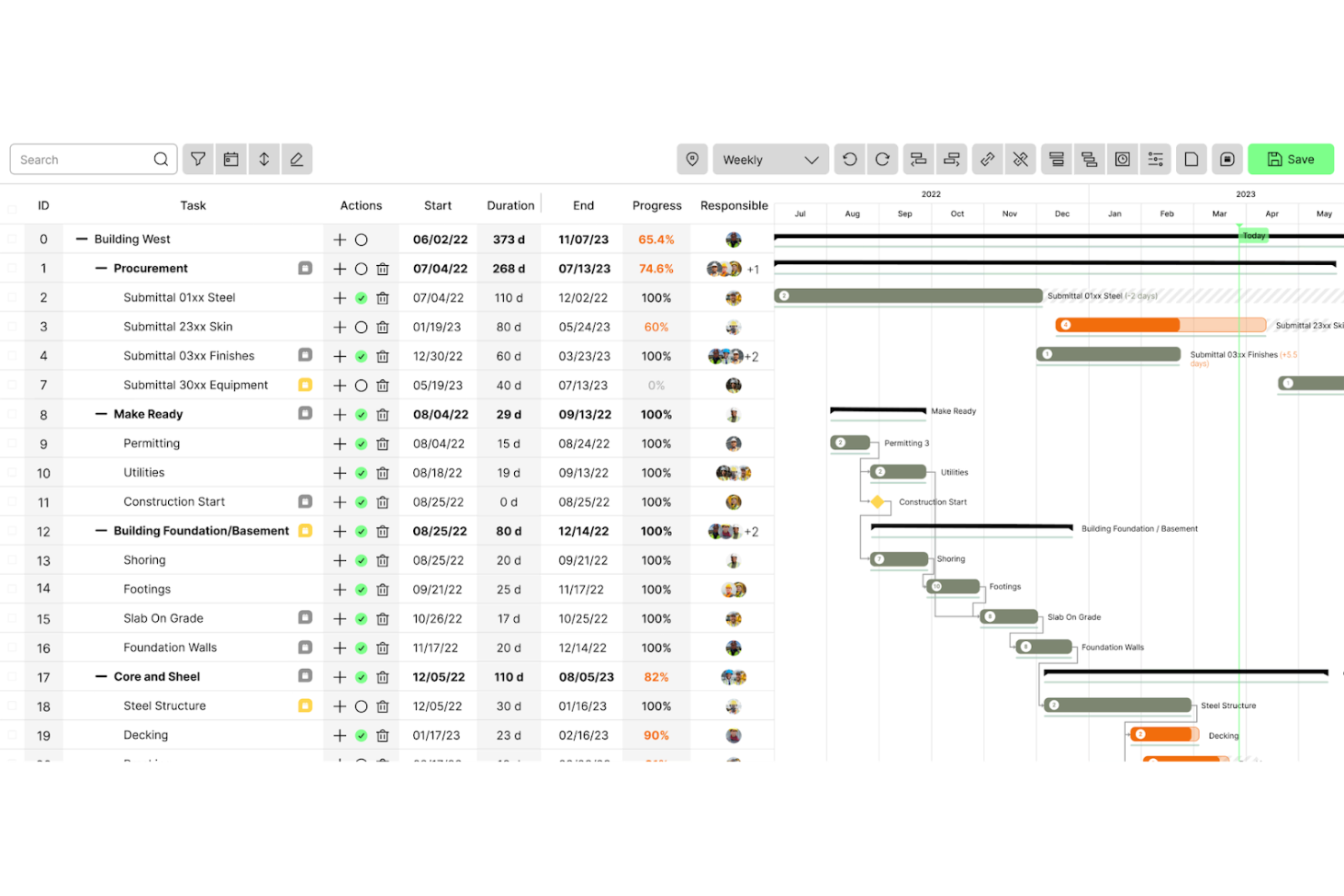
Outbuild is a construction scheduling and planning software tailored for project managers and field coordinators. It focuses on developing project management tools such as master schedules, risk management resources, and performance analytics.
Why I picked Outbuild: Outbuild’s key strength is its remote workforce management tools. The master schedule allows for quick updates, keeping everyone informed. Risk management tools help you anticipate and mitigate challenges, while real-time analytics help you make informed decisions.
Standout Features and Integrations:
Features include a company dashboard for project progress, lookahead scheduling to plan upcoming tasks, and weekly work plans to keep your team organized. You can customize the software to fit your needs. Outbuild also offers informational resources such as webinars and case studies.
Integrations include Procore, Autodesk, and more.
Pros and Cons
Pros:
- Detailed performance analytics
- Supports remote workforce
- Effective risk management tools
Cons:
- Occasional lag with large datasets
- Limited integrations beyond major platforms
Annen programvare for skiftplanlegging av ansatte i byggebransjen
Her er noen flere alternativer for programvare for skiftplanlegging av ansatte i byggebransjen som ikke kom med på kortlisten min, men som likevel er verdt å ta en titt på:
- Truein
For attendance with face recognition
- Plaky
For small team collaboration
- TCP Software
For compliance management
- Buildxact
For cost estimation tools


How I Evaluate Construction Employee Scheduling Software
I split my evaluation into two layers: core capabilities every tool must have—like job-site crew scheduling and GPS time tracking—and differentiators like certified payroll or Procore integration.
Core Functionality (Table Stakes For This List)
When I'm selecting tools for my list, I rank each one on a scale from 0 (does not offer the functionality) to 5 (excels in this area) for each core functionality listed below. Then, I calculate the tool's total score into a percentage. Each tool needs to achieve a minimum total score of 65% to be considered for inclusion.
- Crew & Job Site Scheduling: I evaluate how each tool handles assigning workers and crews to specific projects, looking for multi-site calendar views and conflict detection when the same electrician gets booked on two sites.
- Skills & Certification Tracking: Each platform should store trade licenses and safety certs, and I check whether it can flag when a welder's certification expires before their next scheduled shift.
- Mobile Field Access: Field crews need to pull up schedules from a muddy job site, so I look for native mobile apps with shift confirmation, offline access, and push notifications for last-minute changes.
- Time & Attendance Tracking: GPS or geofence-based clock-in/out tied to specific job codes matters here, especially for crews moving between sites where hours need to map back to the right project.
- Real-Time Schedule Updates: When a concrete pour gets delayed, the scheduler needs to reassign a crew fast. I evaluate how quickly changes push out via SMS, in-app alerts, or group messages.
- Labor Compliance & Reporting: I look at each tool's ability to generate reports on overtime, certification status, and prevailing wage requirements, particularly for contractors managing public works projects.
Once I have a list of tools that meet this criteria, I consider what sets each platform apart.
Differentiating Factors (What Sets Vendors Apart)
Here's how I compare and contrast different vendors:
Standout Features
Job costing integration is a major differentiator. I look for tools that tie scheduled labor hours to project cost codes so your PM team can track budget burn without toggling between platforms. Subcontractor scheduling matters just as much, since most GCs run a mix of direct-hire crews and specialty subs across sites. A multilingual mobile interface is another factor I weigh heavily, because field adoption drops fast when workers can't navigate the app in their primary language.
Beyond Features
Construction tech stack integrations are a big one. I check whether a tool connects natively to platforms like Procore, Sage 300 CRE, or Viewpoint, since manual data entry between scheduling and project management systems wastes hours every week. Pricing structure also matters for this industry, where seasonal labor swings can double your headcount in summer. I evaluate whether per-user pricing scales reasonably or punishes you for workforce fluctuations. Finally, I consider offline mobile performance, because rural job sites with poor connectivity still need functioning schedule access.
Slik velger du programvare for skiftplanlegging av ansatte i byggebransjen
Det er lett å gå seg vill i lange funksjonslister og kompliserte prisstrukturer. For å hjelpe deg med å holde fokus mens du går gjennom den unike prosessen med å velge programvare, har jeg laget en sjekkliste over faktorer du bør ha i tankene:
| Faktor | Hva bør du vurdere |
|---|---|
| Skalerbarhet | Vil programvaren vokse sammen med virksomheten din? Vurder om den kan håndtere flere brukere eller prosjekter etter hvert som virksomheten utvides. Se etter fleksible alternativer som kan tilpasses over tid. |
| Integrasjoner | Fungerer den med verktøyene du allerede bruker? Sjekk kompatibiliteten med lønns-, HR- og kommunikasjonsplattformer du bruker i dag. Unngå kompliserte, manuelle dataoverføringer. |
| Tilpasningsmuligheter | Kan du tilpasse programvaren til arbeidsflytene dine? Sørg for at du kan justere innstillinger og opprette egendefinerte felt som passer teamets behov. |
| Brukervennlighet | Er brukergrensesnittet intuitivt? Se etter programvare som krever minimalt med opplæring. Et rent og enkelt design gjør det lettere for teamet å ta den i bruk raskt. |
| Implementering og innføring | Hvor enkelt er det å komme i gang? Vurder tiden og ressursene som kreves for å sette opp systemet og lære opp teamet. Se etter programvare med veiledede innføringsprosesser. |
| Kostnad | Passer prisene budsjettet ditt? Sammenlign kostnaden med funksjonene som tilbys. Ta hensyn til eventuelle skjulte gebyrer eller langsiktige avtaler som kan påvirke beslutningen din. |
| Sikkerhetstiltak | Er dataene dine beskyttet? Sørg for at programvaren har kryptering, regelmessige sikkerhetskopier og samsvar med personvernregler for å holde informasjonen din sikker. |
| Tilgjengelig kundestøtte | Kan du få hjelp når du trenger det? Se etter kundestøtte døgnet rundt og flere kontaktalternativer, for eksempel chat, telefon og e-post, slik at problemer kan løses raskt. |
Hva er programvare for skiftplanlegging av ansatte i bygg og anlegg?
Programvare for skiftplanlegging av ansatte i bygg og anlegg er et verktøy som er utviklet for å hjelpe med å administrere og organisere arbeidsplaner for ansatte i bygg- og anleggsbransjen. Slike verktøy brukes vanligvis av prosjektledere og byggeplassledere for å sikre effektiv fordeling av arbeidskraft og god tidsstyring. Funksjoner for planlegging, tidsregistrering og bytte av skift bidrar til å håndtere arbeidskostnader og forbedre prosjektets tidsplaner. Alt i alt gir disse verktøyene verdi ved å øke produktiviteten og redusere planleggingskonflikter i bygge- og anleggsprosjekter.
Funksjoner
Når du velger programvare for skiftplanlegging av ansatte i bygg og anlegg, bør du se etter følgende viktige funksjoner:
- Skiftplanlegging: Lar ledere opprette og justere arbeidsplaner for ansatte.
- Tidsregistrering: Overvåker de ansattes arbeidstid, noe som bidrar til nøyaktig lønnsberegning og lavere arbeidskostnader.
- Bytte av skift: Lar ansatte bytte skift med hverandre, noe som gir fleksibilitet og reduserer planleggingskonflikter.
- Tilgang via mobil: Lar brukere få tilgang til arbeidsplaner og oppdateringer på mobile enheter.
- Varsler og meldinger: Sender påminnelser og oppdateringer om endringer i arbeidsplanen til teammedlemmene.
- GPS-posisjonssporing: Bekrefter de ansattes posisjon når de stempler inn, noe som øker ansvarligheten og forhindrer at ansatte stempler inn på vegne av hverandre.
- Rapporteringsverktøy: Gir innsikt i planleggingsmønstre og arbeidskostnader, og legger til rette for datadrevne beslutninger.
- Samsvarsadministrasjon: Sikrer at arbeidsplanene følger arbeidslover og forskrifter, slik at risikoen for manglende samsvar reduseres.
- Tilpassbare maler: Tilbyr ferdiglagde og justerbare maler for arbeidsplaner.
- Integrasjonsmuligheter: Kobler seg til eksisterende lønns- og HR-systemer og forenkler datahåndtering på tvers av plattformer.
Fordeler
Implementering av programvare for planlegging i bygg og anlegg gir flere fordeler for teamet og virksomheten din. Her er noen av fordelene du kan se frem til:
- Forbedret effektivitet: Automatisering av planlegging og tidsregistrering reduserer manuelle feil og sparer tid for ledere.
- Kostnadsbesparelser: Nøyaktig tidsregistrering og skiftadministrasjon bidrar til å redusere arbeidskostnadene ved å forhindre overbemanning og uautorisert overtid.
- Bedre kommunikasjon: Varsler og meldinger holder alle oppdatert om endringer i arbeidsplanen og forbedrer koordineringen i teamet.
- Økt fleksibilitet: Funksjoner for bytte av skift lar ansatte administrere arbeidsplanene sine, noe som gir høyere jobbtilfredshet.
- Bedre samsvar: Samsvarsadministrasjon sikrer at teamet følger arbeidslover og forskrifter for bygg- og anleggsbransjen, og minimerer juridisk ansvar.
- Datadrevne beslutninger: Rapporteringsverktøy gir verdifull innsikt i arbeidsmønstre og hjelper ledere med å ta velinformerte beslutninger.
- Fjerntilgang: Tilgang via mobil lar teammedlemmer se arbeidsplaner og oppdateringer hvor som helst, noe som fremmer produktiviteten.
Kostnader og priser
Ved valg av programvare for skiftplanlegging av ansatte i bygg og anlegg er det viktig å forstå de ulike prismodellene og abonnementene som er tilgjengelige. Kostnadene varierer basert på funksjoner, teamstørrelse, tillegg og mer. Tabellen nedenfor oppsummerer vanlige abonnementer, gjennomsnittsprisene deres og typiske funksjoner som er inkludert i løsninger for skiftplanlegging av ansatte i bygg og anlegg:
Sammenligningstabell for programvare for planlegging av ansatte i byggebransjen
| Plantype | Gjennomsnittspris | Vanlige funksjoner |
|---|---|---|
| Gratisabonnement | $0 | Grunnleggende skiftplanlegging, tidsregistrering og begrenset rapportering. |
| Personlig abonnement | $1.70-$39/bruker/måned | Avansert planlegging, tilgang til mobilapp og varsler. |
| Bedriftsabonnement | $9-$64/bruker/måned | Omfattende rapportering, samsvarsadministrasjon og integrasjonsmuligheter. |
| Virksomhetsabonnement | $60+/bruker/måned | Tilpassbare maler, dedikert brukerstøtte og oppgraderte sikkerhetsfunksjoner. |
Vanlige spørsmål om programvare for planlegging av ansatte i byggebransjen
Her er noen svar på vanlige spørsmål om programvare for planlegging av ansatte i byggebransjen:
Hvordan velger jeg riktig programvare for planlegging av ansatte i byggebransjen?
Identifiser først teamets spesifikke behov, for eksempel størrelsen på arbeidsstyrken og eventuelle unike krav til samsvar. Vurder brukervennlighet, integrasjon med de eksisterende systemene dine og nivået på brukerstøtten du får. Se etter programvare som tilbyr en gratis prøveperiode, slik at du kan prøve den før du bestemmer deg. Å lese brukeranmeldelser og sammenligne prisplaner kan også hjelpe deg med å ta en informert beslutning.
Kan programvare for planlegging av ansatte i byggebransjen integreres med andre verktøy?
Ja, mange verktøy for planlegging av ansatte i byggebransjen kan integreres med andre systemer, for eksempel programvare for lønn, HR og tidsregistrering. Integrasjoner hjelper deg med å optimalisere datahåndteringen og redusere tiden som brukes på manuell registrering av data. Før du kjøper programvaren, bør du bekrefte at den kan kobles til verktøyene du allerede bruker. Integrasjonsmulighetene varierer, så sjekk leverandørens nettsted for å se hvilke systemer den støtter.
Kreves det opplæring for å bruke programvare for planlegging av ansatte i byggebransjen?
Det meste av programvaren er utviklet for å være brukervennlig, men noe opplæring kan være nødvendig, spesielt hvis teamet ditt ikke har brukt digitale planleggingsverktøy før. Leverandører tilbyr ofte ressurser som veiledninger, webinarer og hjelpesentre for å bistå med innføringen. Vurder programvare med intuitive grensesnitt og enkel navigering for å minimere læringskurven.
Kan jeg tilpasse planleggingsmalene i programvaren?
Ja, mange planleggingsverktøy lar deg tilpasse maler etter dine spesifikke behov. Du kan justere felt, legge til notater og endre oppsett for å tilpasse dem til prosjektkravene dine. Tilpassbare maler sparer deg for tid og sikrer konsistens på tvers av prosjekter. Kontroller om programvaren støtter det tilpasningsnivået teamet ditt trenger, før du kjøper den.