

10 beste programmer for ansattes tidsregistrering gjennomgått i 2026

Beste programvare for tidsregistrering av ansatte – kortliste


Programvare for tidsregistrering av ansatte gir en sømløs løsning for å registrere arbeidstimer, administrere arbeidsplaner og sikre nøyaktig lønnskjøring. Det kan imidlertid virke utfordrende å finne riktig programvare for å administrere teamets arbeidstimer, særlig fordi det finnes mange alternativer på markedet.
Med utgangspunkt i min erfaring med HR-programvare har jeg testet og vurdert mange av de beste programmene for tidsregistrering av ansatte for å hjelpe team med å finne de beste løsningene. I de grundige vurderingene nedenfor går jeg gjennom disse løsningene og fremhever de viktigste funksjonene, brukervennligheten og kostnadseffektiviteten. Enten du driver en liten bedrift eller en stor virksomhet, er jeg sikker på at du vil kunne finne din neste løsning for tidsregistrering i denne artikkelen.
Hvorfor du kan stole på våre programvareanbefalinger
Teamet vårt har testet og anmeldt programvare siden 2012. Vi er selv HR-eksperter, så vi vet hvor vanskelig og hvor viktig det er å velge riktig programvare.
I denne guiden har vi vurdert verktøyene gjennom praktisk testing og uavhengig research og gitt dem poeng ut fra våre utvelgelseskriterier. Vi bygger også på innsikt fra ledende eksperter i bransjen og erfarne HR-eksperter.
Anmeldelsene våre bygger på vår egen redaksjonelle vurdering. De er ikke et salgsargument.
Ekspertanmeldere:
Sammenligningstabell for programvare for tidsregistrering av ansatte
Denne sammenligningstabellen oppsummerer prisdetaljene for mine beste utvalgte programmer for tidsregistrering av ansatte:
| Tool | Best For | Trial Info | Price | ||
|---|---|---|---|---|---|
| 1 | Best for direct data connection to payroll | Free demo available | Pricing upon request | Website | |
| 2 | Best for AI-driven compliance monitoring | Free demo available | Pricing upon request | Website | |
| 3 | Best for GPS tracking and geofencing | Free plan + 14-day free trial + free demo available | From $29/month (billed annually) | Website | |
| 4 | Best as AI for business | Free demo available | From $8/user/month | Website | |
| 5 | Best for mobile clock-in options | Free plan + 14-day free trial available | From $24/location/month (billed annually) | Website | |
| 6 | Best for tracking hours across multiple countries | Free demo available | From $5/employee/month | Website | |
| 7 | Best for customizable reports | Free trial available | From $5.99/user/month | Website | |
| 8 | Best for shift-based SMBs in Canada | Free 21-day trial + free demo available | From $2.93/user/month (billed annually) | Website | |
| 9 | Best for automatic productivity monitoring | Free trial available | From $6.42/user/month (billed annually) | Website | |
| 10 | Best for intuitive multi-device time tracking | Free plan available; 30-day free trial; Free demo available | From $9/user/month | Website |


Vurderinger av den beste programvaren for tidsregistrering av ansatte
Her er min grundige analyse og oversikt over hvert program for tidsregistrering av ansatte. Dette gir deg en gjennomgang av fordeler og ulemper ved hvert verktøy, funksjonene deres og hvilke bruksområder de egner seg best til.

Paycom
Best for direct data connection to payroll
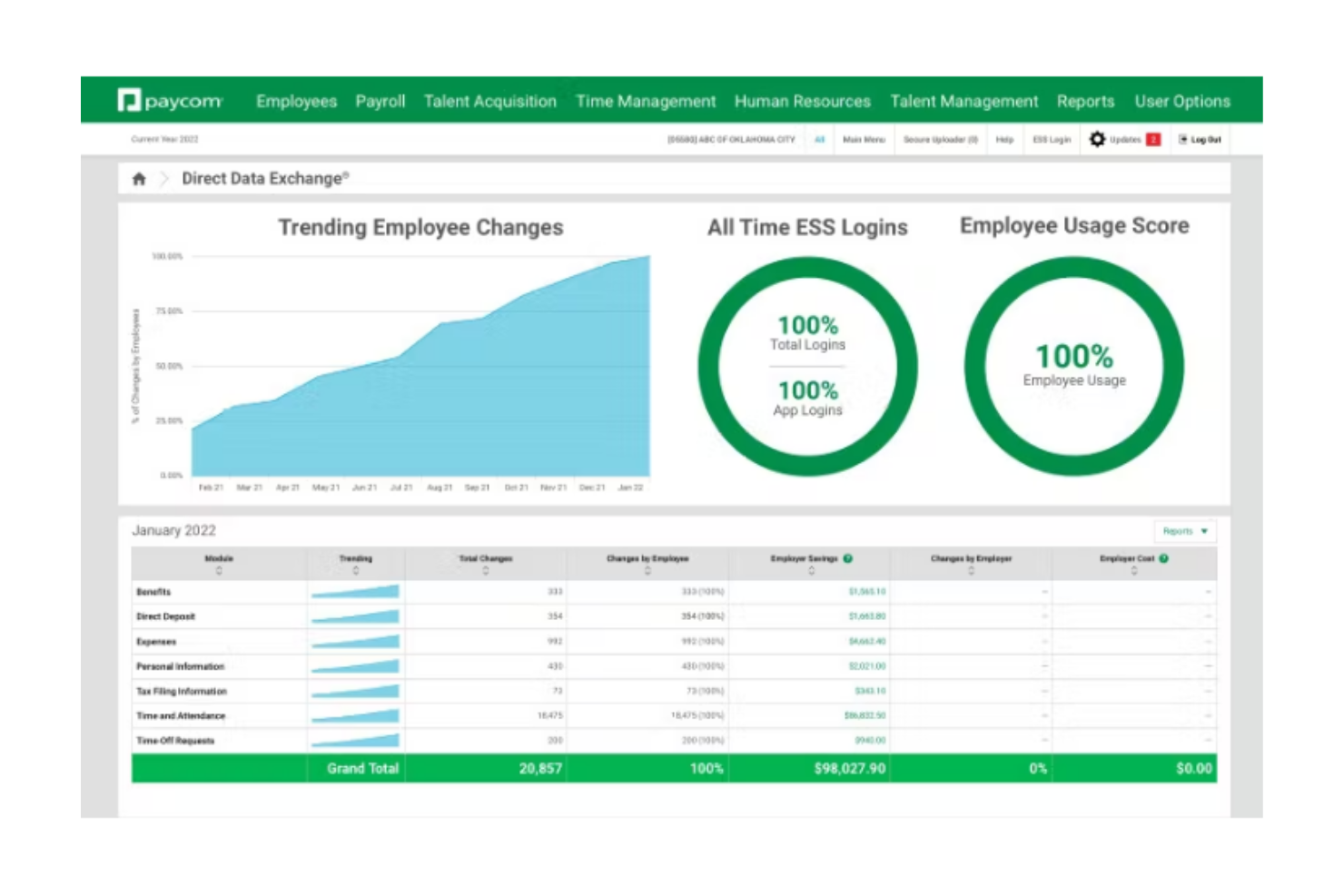
Paycom is a single-database HR and payroll platform with a built-in time and attendance module that supports time tracking, scheduling, geofencing, punch edits, and automatic timecard-to-payroll data flow.
Who Is Paycom Best For?
Paycom is best suited for mid-to-large organizations that want time tracking, HR, and payroll managed in one unified system rather than syncing separate tools.
Why I Picked Paycom
I picked Paycom because its time clock data flows directly into payroll without exports or manual reconciliation. Since everything runs on a single database, employee punches, overtime calculations, and labor allocations automatically populate payroll. The Beti® feature adds another layer by allowing employees to review and verify their pay before processing, which helps catch time-related errors early.
Paycom Key Features
- Geofencing and Microfence technology: Restricts clock-ins to approved GPS locations.
- Multiple clock-in methods: Web, mobile app, biometric, badge, and kiosk options.
- Manager on-the-Go approvals: Mobile timecard and punch edit approvals.
- GONE automated time-off decisions: Applies preset PTO rules for automatic approvals or denials.
Paycom Integrations
Paycom integrates with tools like Indeed and select accounting platforms such as NetSuite and QuickBooks Online for general ledger mapping. API access is available for authorized customers, though public open API documentation is limited.
Pros and Cons
Pros:
- Time punches feed directly into payroll without reentry
- Strong geofencing controls for location-based clock-ins
- Multiple clock-in options for different workforce types
Cons:
- GPS-based clock-ins may occasionally experience accuracy issues
- Limited open third-party integrations compared to standalone time clock tools

UKG
Best for AI-driven compliance monitoring
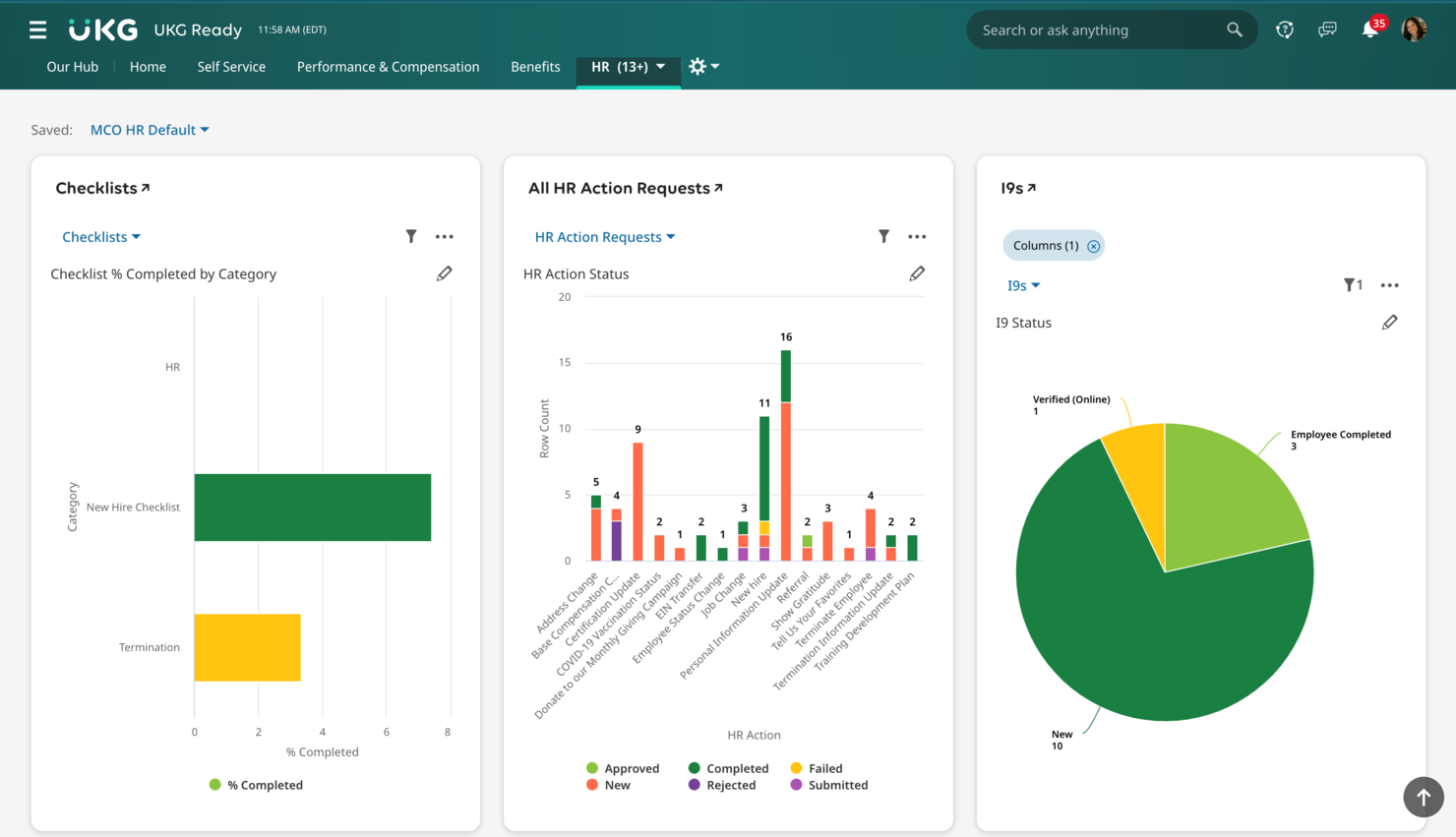
UKG is a workforce management and time tracking platform that brings together biometric time clocks, mobile clock-in, attendance policy enforcement, labor forecasting, and AI-powered compliance tools across the employee lifecycle.
Who Is UKG Best For?
UKG is a strong fit for mid-to-large enterprises with complex workforce needs, multiple locations, and hourly or shift-based employees across industries like healthcare, retail, and manufacturing.
Why I Picked UKG
I've included UKG in my top picks because its AI-driven compliance monitoring sets it apart from most time clock platforms. UKG Bryte AI uses agentic AI to automatically handle compliance risk across time, pay, and tax, which means your team isn't manually tracking regulatory changes across locations. I especially like how this pairs with UKG's continuous timesheet readiness processing, which flags issues before payroll runs rather than after, catching things like missed punches or unapproved overtime before they become legal exposure.
UKG Key Features
- Biometric time clock hardware: The UKG InTouch DX terminal supports facial recognition, fingerprint scanning, and badge tap for physical punch capture at the clock.
- Geofencing for mobile clock-in: GPS-based location boundaries prevent employees from clocking in outside designated job sites directly from the mobile app.
- Exception-based manager alerts: Automated notifications flag attendance exceptions like late arrivals, early departures, or missed punches for manager review and approval.
- Absence and leave tracking: Employees can submit time-off requests and managers can track accruals, balances, and leave history alongside daily attendance records.
UKG Integrations
UKG offers 400+ partner integrations through the UKG Marketplace, including marketplace integrations with Slack, Oracle NetSuite, SAP, Microsoft Active Directory, and G-P (Globalization Partners). UKG Flow for Slack gives employees quick access to timekeeping and scheduling features directly from Slack. UKG also provides an open API through its Developer Hub for custom integrations, plus UKG Flow for prebuilt, event-driven connectors to third-party systems.
Pros and Cons
Pros:
- Payroll error alerts during timecard processing
- Offline time tracking for remote locations
- Biometric and touchless clock-in options
Cons:
- Custom reports often cost extra
- Implementation can take over a year
Best for GPS tracking and geofencing

Connecteam is a mobile-first employee time clock platform built for businesses with deskless, field, or mobile teams who need to track hours, manage shifts, and simplify payroll with location-based controls.
Who Is Connecteam Best For?
Connecteam is a great fit for small to mid-sized businesses in industries like construction, retail, hospitality, and healthcare that rely on hourly or field-based workers.
Why I Picked Connecteam
I picked Connecteam as one of the best because of how well its GPS and geofencing features work together for field-based teams. The geofencing tool lets you draw a radius around a job site, and employees can only clock in when they're physically within that boundary—they're also automatically clocked out when they leave. I also like the breadcrumbs feature, which logs an employee's location trail throughout their entire shift, so you can see exactly where someone was at any given time while clocked in. That level of location visibility is genuinely useful when you're managing crews across multiple job sites and need to verify hours without being on-site yourself.
Connecteam Key Features
- Kiosk mode: Set up a shared device as a clock-in station so employees can punch in and out from a single tablet at a fixed location.
- Timesheet management: Review, edit, and approve employee timesheets directly in the app before exporting them to payroll.
- Shift scheduling: Build and publish employee schedules, assign shifts by role or location, and send notifications when shifts are updated.
- Overtime and break tracking: Configure automatic break deductions and overtime rules to keep time records accurate and compliant.
Connecteam Integrations
Integrations include QuickBooks, Gusto, Xero, ADP, Zapier, Wix, Lightspeed, PrismHR, Square, and BambooHR.
Pros and Cons
Pros:
- Highly customizable features for different industries
- GPS tracking and geofencing improve accountability
- Easy-to-use mobile app for on-the-go access
Cons:
- Geolocation tools may struggle in remote areas
- Learning curve for new admins due to many features
New Product Updates from Connecteam

Connecteam Expands Break and Timesheet Controls
Connecteam adds flexible break thresholds, personalized policies, auto-end options, a centralized exceptions report, and improved timesheet issue visibility to help teams manage breaks and timesheets more effectively. For more information, visit Connecteam’s official site.
 .
.
Best as AI for business
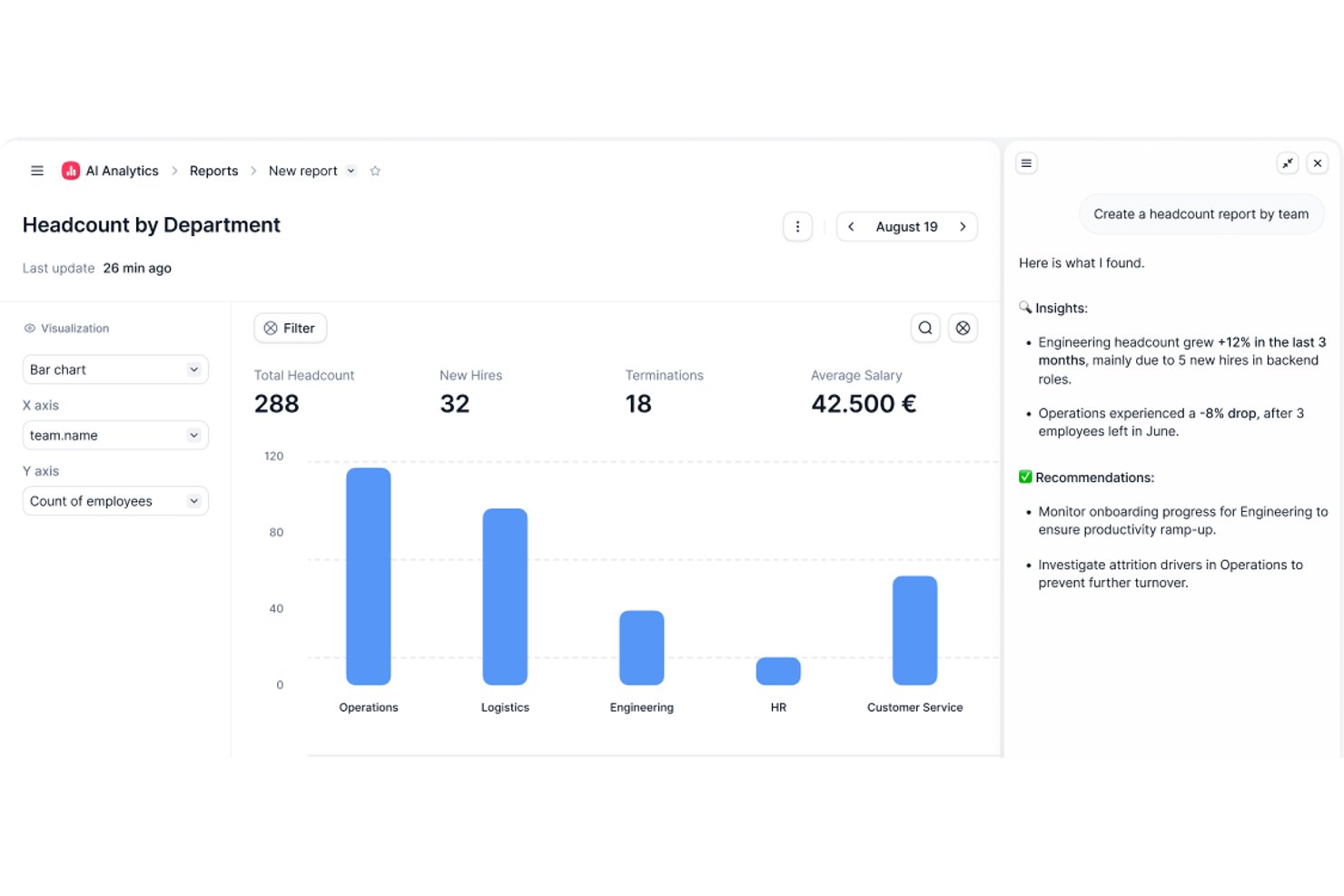
Factorial is an AI-powered HR and business operations platform that covers time and attendance tracking, shift scheduling, timesheet generation, and absence management alongside broader HR workflows.
Who Is Factorial Best For?
Factorial suits small and growing businesses that want one platform to handle time tracking, scheduling, and broader HR workflows without juggling multiple tools.
Why I Picked Factorial
I've included Factorial in my top picks because it brings AI directly into everyday time tracking operations, from planning timetables to generating reports and answering employee questions about policies. I particularly like that its AI agent works with your actual company data, so when a manager needs a breakdown of worked hours across shifts, it can surface that analysis without manual digging. The mobile clock-in with geolocation and offline sync support makes it practical for teams spread across multiple sites.
Factorial Key Features
- QR-code clock-in: Employees scan a QR code at a physical location to register their work hours without using the mobile app.
- Geofencing for time tracking: Administrators can set location boundaries so clock-ins are only valid when employees are within a defined area.
- Break policy rules: Managers can configure duration-based break thresholds, with the system automatically applying the highest applicable rule during a shift.
- Project-based time tracking: Employees can clock in against specific assigned projects, letting managers track hours by project across the team.
Factorial Integrations
Factorial has marketplace integrations with ZKTeco, Suprema, a3innuva Nómina, DATEV LODAS, Sage 200 & Sage Despachos, and Silae. It also offers an API, webhooks, SDKs, an MCP server, and Zapier.
Pros and Cons
Pros:
- Offline punches sync after connectivity returns
- Timesheets and absence records stay together
- Mobile clock-ins suit remote and moving teams
Cons:
- No documented biometric or photo verification
- Payroll handoffs can require manual checks

Homebase
Best for mobile clock-in options

Homebase gives small businesses and hourly teams a way to track employee time, manage schedules, and handle payroll compliance all in one platform, helping owners and managers simplify workforce management and reduce manual admin work.
Who Is Homebase Best For?
Homebase is a great fit for small businesses in retail, hospitality, and food service that rely on hourly workers and need simple, accessible tools for scheduling and time tracking.
Why I Picked Homebase
I included Homebase on my shortlist because it handles mobile clock-in well for teams on the move. Employees can clock in directly from their phones using the Homebase app, and GPS tracking confirms they're at the right location when they do. The photo capture feature flags potential buddy punching without expensive hardware. The app also works offline, so a spotty Wi-Fi connection at a job site won't break your time tracking.
Homebase Key Features
- Automatic timesheet generation: Homebase converts clock-in and clock-out data, including breaks and overtime, directly into timesheets ready for payroll processing.
- Break tracking and compliance: The app tracks paid, unpaid, missed, and waived meal and rest breaks to help you stay aligned with local labor laws.
- Late clock-in alerts: Managers receive real-time notifications when an employee hasn't clocked in for their scheduled shift, so you can act before it becomes a problem.
- PTO and time-off management: Employees can submit time-off requests through the app, and managers can set blackout dates, request limits, and advance notice requirements.
Homebase Integrations
Integrations include Square, Toast, Clover, Shopify, QuickBooks, Gusto, ADP, Paychex, Heartland, and Revel.
Pros and Cons
Pros:
- Built-in reporting for labor costs, employee hours, and productivity
- efficient clock-in/out system with location tracking
- easy to set up and navigate, making it accessible for users
Cons:
- Only shows clock-in/out locations, not real-time employee whereabouts
- Lacks notifications for entering geofenced areas

Deel HR
Best for tracking hours across multiple countries

Deel HR gives businesses a way to track employee hours, attendance, and time off across multiple countries, helping HR teams manage compliance and payroll for distributed workforces.
Who Is Deel HR Best For?
Deel HR is a strong fit for HR teams managing remote or globally distributed employees across multiple countries and time zones.
Why I Picked Deel HR
I picked Deel HR as one of the best because it's one of the few time clock and attendance tools built specifically for teams spread across multiple countries. I like that the HRIS includes country-specific time-off rules and attendance policies for 150+ countries, so when my team has employees in Germany, Brazil, and the Philippines, each person's time data is governed by the right local rules automatically. The platform also lets employees submit time off requests and managers approve them directly in Slack or Microsoft Teams, which means my team isn't chasing down approvals across time zones. I also use the mobile app for on-the-go access, which is genuinely useful when managing a workforce that doesn't share a single office or even a single continent.
Deel HR Key Features
- Automated timesheets: Deel HR auto-generates timesheets based on tracked hours, reducing manual data entry for HR teams.
- Overtime tracking: The platform monitors and flags overtime hours according to each employee's local labor regulations.
- Employee self-service portal: Employees can view their own attendance records, hours worked, and time-off balances in one place.
- Payroll integration: Tracked time data feeds directly into Deel's payroll engine to support accurate, on-time pay runs.
Deel HR Integrations
Integrations include FaceUp, Snowflake, DefensX, Microsoft Finance, Kintsugi, ReFresh OS, Revo.ai, Keeper, Human Interest, and Everyminute.
Pros and Cons
Pros:
- Mobile app available
- Good payroll automation features
- Emphasizes global compliance
Cons:
- Could offer the ability to write more detailed notes for different work periods
- Reports could be more customizable
New Product Updates from Deel HR

Deel Expands Stablecoin Wallet to 80+ Countries
Deel expands its Stablecoin Wallet to 80+ countries with dollar-backed balances and optional rewards. This gives eligible contractors more ways to hold and manage earnings inside Deel. For more information, visit Deel’s official site.
 .
.
Best for customizable reports

Buddy Punch is an online time clock platform built for businesses that need simple, flexible ways to track employee hours, manage scheduling, and handle time-off requests across different locations or remote teams.
Who Is Buddy Punch Best For?
Buddy Punch is a good fit for small to mid-sized businesses that need an accessible, no-fuss time tracking solution without a steep learning curve.
Why I Picked Buddy Punch
Buddy Punch earns its spot on my shortlist because of how much control it gives you over reporting. I like that you can build custom reports by filtering on specific date ranges, departments, or individual employees, then export them directly to payroll. The payroll summary report is especially useful—it pulls regular hours, overtime, and PTO into one clean view without any manual sorting. I've also found the punch audit trail helpful for catching discrepancies before they become payroll errors.
Buddy Punch Key Features
- GPS tracking: Verify employee locations at the time of each punch using GPS coordinates captured on clock-in and clock-out.
- Scheduling tools: Build and publish employee schedules, assign shifts, and let employees view their upcoming shifts from the mobile app.
- PTO management: Track vacation, sick time, and other leave types with configurable accrual rules and an approval workflow.
- Webcam photo capture: Automatically take a photo of the employee at punch time to verify identity and reduce buddy punching.
Buddy Punch Integrations
Integrations include QuickBooks Online, QuickBooks Desktop, ADP Workforce Now, Gusto, Paychex, Paylocity, Paycor, Rippling, Workday, and Justworks.
Pros and Cons
Pros:
- Real-time monitoring
- GPS tracking
- Customizable reports
Cons:
- Basic mobile app
- No offline mode
Agendrix
Best for shift-based SMBs in Canada

Agendrix is a time clock and scheduling platform built for shift-based teams, helping small and mid-sized businesses manage attendance, track hours, and simplify payroll with digital tools designed for hourly workforces.
Who Is Agendrix Best For?
Agendrix is a strong fit for Canadian SMBs in retail, hospitality, and healthcare that rely on hourly or shift-based staff scheduling and need simple, compliant time tracking.
Why I Picked Agendrix
I picked Agendrix as one of the best because it's purpose-built for the kind of shift-based SMBs that are most common in Canada—think independent restaurants, retail chains, and healthcare clinics managing hourly staff across one or more locations. The time clock and scheduling features are fully connected: when an employee clocks in via the tablet kiosk or mobile app, their timesheet updates automatically and any variance from the scheduled shift is immediately visible. I also appreciate the geolocated punch-in option, which is useful for businesses with remote or multi-site staff who can't all clock in from a shared device. Additionally, Agendrix integrates directly with Canadian payroll providers like Ceridian Powerpay, Nethris, and Payworks, so approved timesheets flow straight into payroll without manual re-entry.
Agendrix Key Features
- Automated timesheet generation: Timesheets populate automatically from employee clock-ins and clock-outs, with overtime, premiums, and PTO calculated based on your configured rules.
- Shift task assignments: Attach a daily task list and instructions directly to individual shifts, so employees know exactly what's expected when they clock in.
- Open shift management: Publish unfilled shifts so eligible employees can volunteer on a first-come, first-served or seniority basis, with automatic notifications sent to qualifying staff.
- Time bank tracking: Log overtime as banked time or use time banks to round off timesheets, giving managers a clear view of each employee's hour balance.
Agendrix Integrations
Integrations include Sage, Ceridian, ADP Workforce Now, Nethris, Desjardins, Employer D, DLGL, and an API is available for custom integrations.
Pros and Cons
Pros:
- Integrates with major Canadian payroll systems
- Supports printable, email, and mobile schedule sharing
- Built-in messaging and notifications
Cons:
- Certain integrations may require manual setup
- Limited customization options for reports and analytics

DeskTime
Best for automatic productivity monitoring
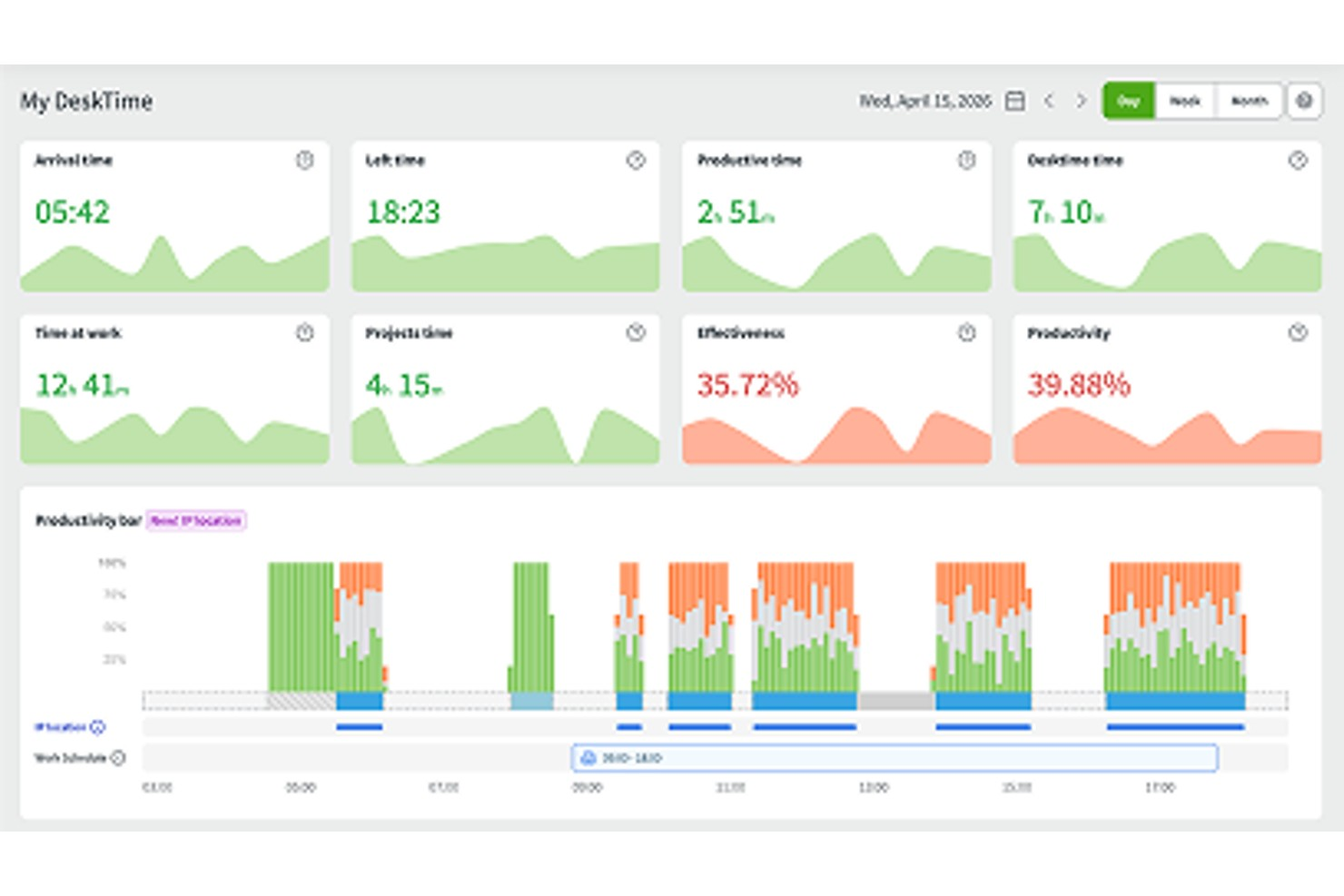
DeskTime is an automatic employee time tracking app that monitors app and URL usage, calculates productivity, tracks offline activity, logs clock-in/clock-out times, and includes shift scheduling and an absence calendar.
Who Is DeskTime Best For?
DeskTime is a good fit for small to mid-sized teams with desk-based or remote workers, where managers need visibility into how work hours are actually spent.
Why I Picked DeskTime
DeskTime is one of my top picks because I love how it handles productivity monitoring without requiring anyone on your team to do anything manually. The moment someone turns on their computer, DeskTime starts tracking, logging every app and URL used throughout the day. What I find especially useful is the productivity calculation feature, where you categorize apps and URLs as productive, unproductive, or neutral per team, so your marketing team's social media time counts differently than everyone else's.
DeskTime Key Features
- Shift scheduling: Build and assign employee schedules directly in DeskTime, with visibility into who's working and when.
- Absence calendar: Log and track employee time off, sick days, and other absence types in a shared team calendar.
- Project time tracking: Assign tracked time to specific projects and tasks so you can see exactly where billable or budgeted hours are going.
- Automatic screenshots: Capture optional, timed screenshots of employee screens during work hours for an additional layer of time verification.
DeskTime Integrations
DeskTime offers a small set of native integrations, including Google Calendar, Outlook Calendar, Trello, GitLab, Asana, and Jira, and it connects with Zapier. An API is also available for custom integrations.
Pros and Cons
Pros:
- Logs specific document titles per activity
- Admins can customize app productivity categories
- Automatic time tracking needs no manual input
Cons:
- Auto-start on boot is sometimes unreliable
- Mobile and leave tracking need improvement
Toggl
Best for intuitive multi-device time tracking
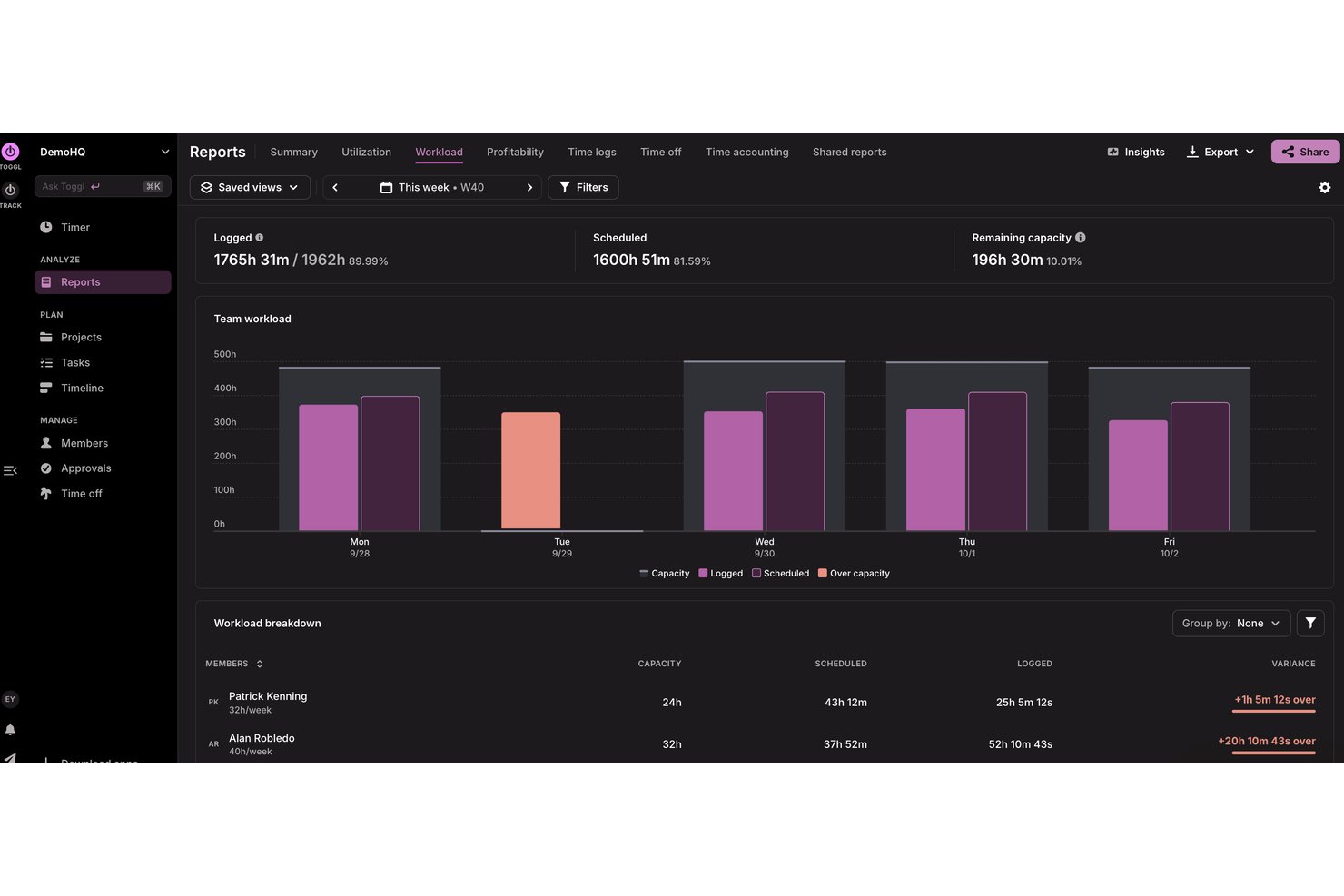
Toggl is a time tracking platform that combines one-click timers, automated desktop and browser-based tracking, and project-level reporting across web, desktop, and mobile apps.
Who Is Toggl Best For?
Toggl is a natural fit for small to mid-sized teams in professional services, consulting, or agency work where accurate billable time tracking is a daily priority.
Why I Picked Toggl
Toggl is one of my top picks because I love how the running timer syncs in real time across every device without any manual intervention. If I start a timer on my desktop and switch to mobile, the entry picks up exactly where it left off. I also like the automated desktop activity tracking, which logs apps and websites used for over 10 seconds, so my team never loses billable minutes to context switching.
Toggl Key Features
- Timesheet approvals: Review and approve submitted timesheets to manage payroll accuracy and compliance.
- Billable rates: Set billable rates by project, user, client, or workspace to track revenue.
- Calendar integrations: Connect Google and Outlook calendars to turn events into trackable time entries.
- Custom reporting: Build detailed reports with multiple grouping, filtering, and export options.
Toggl Integrations
Toggl offers native integrations with Google Calendar, Outlook Calendar, Asana, Jira, Salesforce, Slack, and QuickBooks.
Pros and Cons
Pros:
- Calendar view for visual time planning
- Automated idle time and activity detection
- Real-time sync across all devices
Cons:
- Project tracking limited on starter plans
- No built-in employee scheduling feature
Annen programvare for tidsregistrering av ansatte
Nedenfor finner du en liste over ytterligere programmer for tidsregistrering av ansatte som jeg valgte ut. Selv om de ikke kom med blant de ti beste, er de fortsatt verdifulle og verdt å undersøke nærmere.
- Sloneek
For HR time and absence management
- When I Work
For geofencing time accuracy
- Clockify
For browser extension time tracking
- Jibble
For free time tracking with face recognition
- OnTheClock
For small business time tracking
- edays
For tracking employee clock-in/clock-out
- Bonsai Agency Software
For project-driven agencies
- Ubeya
For AI-powered shift scheduling
- ClockInEasy
For face recognition
- WebHR
For all-in-one HR automation
- Open Time Clock
For multiple clock-in methods
- Time Clock Wizard
For affordable time tracking
- Rhumbix
For construction timekeeping and payroll
- Lathem
For remote team management
- Vericlock
For real-time labor cost monitoring


Relaterte vurderinger av HR-programvare
Hvis du fortsatt ikke har funnet det du ser etter her, kan du se på disse andre relaterte verktøyene som vi har testet og vurdert:
- HR-programvare
- Lønnsprogramvare
- Rekrutteringsprogramvare
- Tjenester for juridisk arbeidsgiver
- Systemer for søkersporing
- Programvare for personaladministrasjon
How I Evaluate Employee Time Clock Software
I split my evaluation into two layers: the baseline any time clock tool must clear—like accurate punch tracking and payroll sync—and the differentiators that set the best picks apart.
Core Functionality (Table Stakes For This List)
When I'm selecting tools for my list, I rank each one on a scale from 0 (does not offer the functionality) to 5 (excels in this area) for each core functionality listed below. Then, I calculate the tool's total score into a percentage. Each tool needs to achieve a minimum total score of 65% to be considered for inclusion.
- Clock-In and Clock-Out Methods: I look for multiple punch options—web, mobile app, kiosk, and biometric—so teams in offices, job sites, and remote setups all have a reliable way to log time.
- Timesheet Generation & Approval: Each tool should auto-generate timesheets from punch data and support an approval workflow, so managers can review, edit, and sign off before payroll runs.
- Payroll System Integration: I check whether the platform syncs with payroll providers like ADP, QuickBooks, or Paychex, since manual exports add errors and eat into payroll deadlines.
- Overtime & Break Tracking: The tool needs configurable overtime rules and break enforcement, especially for organizations managing workers across multiple regions with different labor regulations.
- Attendance Reporting: I evaluate report depth—pre-built views for tardiness, absences, and hours worked are baseline, but filtering by department, location, or date range matters for larger teams.
- Fraud Prevention Controls: Features like GPS geofencing, photo capture, or biometric verification help prevent buddy punching, which is particularly important for field crews and distributed workforces.
Once I have a list of tools that meet the criteria, I consider what sets each platform apart.
Differentiating Factors (What Sets Vendors Apart)
Here's how I compare and contrast different vendors:
Standout Features
Built-in shift scheduling is a big differentiator—platforms like When I Work and Homebase let managers build schedules and track punches in one place, reducing the need to jump between separate tools. Job costing matters for teams that allocate hours to specific projects or clients, which is common in construction and professional services. I also look for integrated PTO management, where accruals and leave requests feed directly into timesheet data without manual updates.
Beyond Features
Labor law compliance is a factor I weigh carefully. Tools that support configurable overtime and break rules across multiple jurisdictions help HR teams stay audit-ready without manual tracking. I also evaluate the integration ecosystem, since a time clock that doesn't connect to your existing HRIS or payroll system creates more work than it solves. Pricing transparency matters too—I check whether vendors clearly disclose per-employee costs and any additional fees for hardware or premium support tiers.
Slik velger du programvare for tidsregistrering av ansatte
Mens du arbeider deg gjennom din egen unike prosess for valg av programvare, bør du ha følgende punkter i mente:
- Brukervennlighet: Programvaren bør være intuitiv og brukervennlig for både administratorer og ansatte. Et komplekst grensesnitt kan føre til feil og frustrasjon, noe som reduserer systemets samlede effektivitet.
- Integrasjonsmuligheter: Sørg for at programvaren kan integreres sømløst med eksisterende systemer, for eksempel verktøy for lønn, HR og prosjektstyring. Dette er viktig for å opprettholde en strømlinjeformet arbeidsflyt og unngå datasiloer.
- Mobiltilgjengelighet: I dagens mobilorienterte verden er det avgjørende å ha programvare for tidsregistrering som tilbyr mobiltilgang. Dette er særlig viktig for virksomheter med fjernarbeidende ansatte eller ansatte som arbeider ute i felt, og som trenger å stemple inn og ut fra ulike steder.
- Rapportering og analyse: Muligheten til å generere detaljerte rapporter om ansattes arbeidstimer, overtid og oppmøte er avgjørende for å kunne ta informerte forretningsbeslutninger. Se etter programvare som tilbyr tilpassbare rapporteringsalternativer for å dekke dine spesifikke behov.
- Sikkerhetsfunksjoner: Det er svært viktig å beskytte ansattes data. Velg programvare for tidsregistrering som tilbyr sterke sikkerhetstiltak, for eksempel datakryptering, sikker innlogging og overholdelse av personvernregler.
Trender innen programvare for ansattes tidsregistrering
Her er noen trender jeg har lagt merke til innen programvare for ansattes tidsregistrering, samt hva de kan bety for fremtiden. Jeg har gått gjennom utallige produktoppdateringer, pressemeldinger og lanseringslogger for å trekke frem de viktigste innsiktene.
- Biometrisk autentisering: Biometrisk autentisering blir stadig mer utbredt, ettersom den styrker sikkerheten ved å bruke unike biologiske kjennetegn. Dette reduserer risikoen for tidstyveri.
- Mobilintegrasjon: Mobilintegrasjon gjør det mulig for ansatte å stemple inn og ut via smarttelefoner. Denne trenden støtter fjernarbeid og fleksible arbeidstider, og forenkler også tidsregistreringen for feltarbeidere.
- KI-drevet analyse: KI-drevet analyse gir innsikt i arbeidsmønstre. Dette bidrar til å optimalisere arbeidsplaner og forbedre produktiviteten, og hjelper også med å identifisere potensielle problemer før de eskalerer.
- Skybaserte løsninger: Skybaserte løsninger gir tilgang til sanntidsdata fra hvor som helst. Dette er avgjørende for virksomheter med flere lokasjoner. Det sikrer også at data lagres trygt og er lett tilgjengelige.
- Geografisk gjerding: Teknologi for geografisk gjerding sørger for at ansatte bare kan stemple inn når de befinner seg på det angitte stedet. Dette hindrer falsk innstempling og er særlig nyttig for virksomheter med flere arbeidssteder.
Etter hvert som teknologien utvikler seg, fortsetter programvare for ansattes tidsregistrering å bli videreutviklet og tilbyr stadig mer avanserte funksjoner. Disse trendene forbedrer ikke bare nøyaktigheten og sikkerheten, men effektiviserer også personaladministrasjonen, noe som gjør det enklere for virksomheter å tilpasse seg fleksible arbeidsordninger og fjernarbeid.
Hva er programvare for ansattes tidsregistrering?
Programvare for ansattes tidsregistrering er et verktøy som hjelper virksomheter med å registrere og administrere de ansattes arbeidstimer. Den brukes vanligvis av HR-avdelinger, ledere og ansatte for å sikre nøyaktig tidsregistrering, lønnsbehandling og overholdelse av arbeidslovgivningen.
Programvaren omfatter vanligvis funksjoner som tidsregistrering, oppfølging av oppmøte og rapportering. Den kan også integreres med lønnssystemer, noe som muliggjør smidig dataoverføring og reduserer feil ved manuell registrering.
Funksjoner i programvare for ansattes tidsregistrering
Å velge riktig app for ansattes tidsregistrering kan ha stor innvirkning på lønnsberegningens nøyaktighet, overholdelsen av arbeidslovgivningen og den generelle driftseffektiviteten. Her er noen av de viktigste funksjonene du bør se etter når du skal velge programvare for ansattes tidsregistrering:
- Nøyaktig tidsregistrering: Nøyaktig tidsregistrering sikrer at de ansattes arbeidstimer registreres presist, noe som reduserer feil i lønnsberegningen og forhindrer tidsregistreringssvindel.
- Biometrisk autentisering: Biometriske systemer, som fingeravtrykkskanning eller ansiktsgjenkjenning, gir en sikker og nøyaktig metode for at ansatte kan stemple inn og ut, og eliminerer kompisstempling og tidsregistreringssvindel.
- Mobil tilgjengelighet: Mobilfunksjonalitet gjør det mulig for ansatte å stemple inn og ut ved hjelp av mobile enheter, noe som gjør det enklere å registrere arbeidstid for fjernarbeidere eller feltarbeidere.
- Integrasjon med lønnssystemer: Integrasjon med lønnssystemer automatiserer overføringen av tidsdata, reduserer feil ved manuell registrering og effektiviserer lønnsprosessen.
- Brukervennlig grensesnitt: Et intuitivt og brukervennlig grensesnitt sikrer at ansatte raskt kan lære seg og bruke systemet, noe som reduserer opplæringstiden og øker bruken.
- Rapportering og analyse: Avanserte funksjoner for rapportering og analyse gir innsikt i ansattes oppmøte, overtid og produktivitet, og hjelper ledere med å ta informerte beslutninger.
- Tilpassbare innstillinger: Tilpasningsmuligheter gjør det mulig for virksomheter å skreddersy programvaren etter sine spesifikke behov, inkludert å angi regler for overtid, pauser og forespørsler om fravær.
- Geogjerder og GPS-sporing: Geogjerder og GPS-sporing sikrer at ansatte stempler inn fra godkjente steder, noe som er spesielt nyttig for virksomheter med mobile eller fjernarbeidende medarbeidere.
- Etterlevelsesstyring: Funksjoner for etterlevelse hjelper virksomheter med å følge arbeidslover og forskrifter ved automatisk å beregne overtid, pauser og andre arbeidsrelaterte regler.
- Sanntidsvarsler: Sanntidsvarsler gjør ledere oppmerksomme på problemer som manglende stemplinger, sene ankomster eller overtid, slik at de raskt kan iverksette tiltak for å håndtere eventuelle avvik.
Valg av riktig programvare for tidsregistrering av ansatte innebærer å vurdere funksjoner som forbedrer nøyaktighet, sikkerhet og brukervennlighet. Ved å fokusere på disse nøkkelfunksjonene kan virksomheter forbedre prosessene for tidsregistrering, sikre etterlevelse og øke den samlede produktiviteten.
Fordeler med programvare for tidsregistrering av ansatte
Programvare for tidsregistrering av ansatte gir en rekke fordeler for både brukere og organisasjoner, effektiviserer tidsstyringen og forbedrer produktiviteten. Nedenfor finner du noen ytterligere primære fordeler du kan oppleve ved bruk av programvare for tidsregistrering av ansatte.
- Nøyaktig tidsregistrering: Programvaren sørger for presis registrering av de ansattes arbeidstimer, noe som reduserer feil og avvik i lønnsbehandlingen.
- Økt produktivitet: Ved å automatisere tidsregistreringen kan ansatte fokusere mer på oppgavene sine, noe som fører til høyere effektivitet og bedre resultater.
- Forbedret etterlevelse: Programvaren hjelper organisasjoner med å følge arbeidslover og forskrifter ved å opprettholde nøyaktige oversikter over arbeidstimer og overtid.
- Kostnadsbesparelser: Automatisert tidsregistrering reduserer behovet for manuell registrering og administrative oppgaver, noe som sparer tid og reduserer arbeidskostnadene.
- Bedre ansvarlighet blant ansatte: Programvaren gir åpenhet rundt arbeidstimer, oppmuntrer ansatte til å følge arbeidsplanene sine og forbedrer den generelle ansvarligheten.
Investering i programvare for tidsregistrering av ansatte kan gi organisasjoner betydelige fordeler ved å forbedre nøyaktighet, produktivitet, etterlevelse, kostnadseffektivitet og ansvarlighet. Disse fordelene gjør programvaren til et verdifullt verktøy for virksomheter som ønsker å optimalisere arbeidsstyringen.
Kostnader og priser for programvare for tidsregistrering av ansatte
Valg av riktig programvare for tidsregistrering av ansatte kan være viktig for effektiv arbeidsstyring. Det finnes flere tilgjengelige abonnementer, som hver dekker ulike behov og budsjetter.
Her er en oversikt over typiske abonnementsalternativer og prisene deres, slik at du kan ta en informert beslutning.
Sammenligningstabell for programvare for tidsregistrering av ansatte
| Abonnementstype | Gjennomsnittspris | Vanlige funksjoner |
| Gratisabonnement | $0 | Grunnleggende tidsregistrering, begrenset antall brukere og mobilapp |
| Grunnleggende abonnement | $10/user/month | Tidsregistrering, arbeidsplanlegging for ansatte og rapporter |
| Standardabonnement | $20/user/month | Alle funksjoner i Grunnleggende, avansert planlegging, GPS-sporing og integrasjoner |
| Premiumabonnement | $30/user/month | Alle funksjoner i Standard, administrasjon av betalt fri (PTO) og biometrisk verifisering |
| Virksomhetsabonnement | Tilpasset pris | Alle Premium-funksjoner, tilpassede integrasjoner og dedikert kundestøtte |
Når du velger en plan, bør du ta hensyn til størrelsen på teamet ditt og de spesifikke funksjonene du trenger. Ved å sammenligne ulike alternativer kan virksomheter finne en programvare for tidsregistrering som passer budsjettbegrensningene deres, samtidig som den forbedrer arbeidsstyringen og produktiviteten.
Vanlige spørsmål om programvare for tidsregistrering av ansatte
Her er svar på vanlige spørsmål jeg har fått om programvare for tidsregistrering av ansatte.
Hvordan kan programvare for tidsregistrering av ansatte integreres med lønnssystemer?
Programvare for tidsregistrering av ansatte kan integreres med lønnssystemer gjennom API-er eller innebygde koblinger. Denne integrasjonen gjør det mulig å overføre tids- og oppmøtedata automatisk til lønnssystemet, noe som reduserer feil ved manuell registrering og sikrer nøyaktig lønnsbehandling. Noen programvareløsninger tilbyr ferdigbygde integrasjoner med populære lønnssystemer, mens andre kan kreve spesialutvikling.
Hvilke krav til overholdelse gjelder ved bruk av programvare for tidsregistrering av ansatte?
Kravene omfatter overholdelse av arbeidslover og forskrifter knyttet til tidsregistrering, overtid og pauser. Programvaren bør støtte nøyaktig dokumentasjon og rapportering for å oppfylle lovpålagte krav. I tillegg bør den tilby funksjoner som revisjonsspor og sikker datalagring for å beskytte ansattinformasjon og sikre overholdelse av personvernregler.
Kan programvare for tidsregistrering av ansatte håndtere flere lokasjoner og fjernarbeidere?
Ja, mange løsninger for tidsregistrering av ansatte er utviklet for å håndtere flere lokasjoner og fjernarbeidere. De tilbyr ofte mobilapper eller nettbaserte portaler som gjør det mulig for ansatte å stemple inn og ut hvor som helst. Funksjoner for GPS-sporing og geogjerder kan sikre at ansatte stempler inn fra godkjente lokasjoner.
Hvordan håndterer programvare for tidsregistrering av ansatte skiftplanlegging og endringer?
Programvare for tidsregistrering av ansatte inkluderer vanligvis funksjoner for skiftplanlegging, slik at ledere enkelt kan opprette, endre og tildele skift. Ansatte kan se timeplanene sine, be om endringer og bytte skift gjennom programvaren. Varsler og meldinger kan settes opp for å informere ansatte om planendringer i sanntid.
Hvilke datasikkerhetstiltak finnes i programvare for tidsregistrering av ansatte?
Datasikkerhetstiltak i programvare for tidsregistrering av ansatte omfatter kryptering av data under overføring og ved lagring, sikker brukerautentisering og rollebaserte tilgangskontroller. Regelmessige sikkerhetsrevisjoner og overholdelse av bransjestandarder som GDPR eller CCPA er også viktig for å sikre beskyttelsen av sensitive opplysninger om ansatte.
Hvilke alternativer for brukerstøtte og opplæring er tilgjengelige for programvare for tidsregistrering av ansatte?
Alternativene for brukerstøtte og opplæring varierer fra leverandør til leverandør, men omfatter ofte nettbaserte ressurser som brukerveiledninger, videoveiledninger og vanlige spørsmål. Mange leverandører tilbyr også direkte brukerstøtte via telefon, e-post eller chat. Noen kan tilby opplæring på stedet eller nettseminarer for å hjelpe organisasjoner med å få mest mulig ut av programvaren.
Hvordan kan programvare for tidsregistrering av ansatte tilpasses spesifikke forretningsbehov?
Tilpasningsmulighetene i programvare for tidsregistrering av ansatte kan omfatte konfigurerbare innstillinger for regler for tidsregistrering, beregning av overtid og rapportformater. Noen programvareløsninger tilbyr spesialutvikling for å lage funksjoner som er tilpasset spesifikke forretningskrav. I tillegg tillater mange plattformer integrasjon med tredjepartsverktøy og -applikasjoner for å utvide funksjonaliteten.