

De 10 beste programvarene for vaktplanlegging for små bedrifter

10 Liste over beste programvare for vaktplanlegging av ansatte for små bedrifter


Det kan være krevende å administrere arbeidsplaner for ansatte, spesielt når du må håndtere flere oppgaver samtidig. Du ønsker å holde teamet fornøyd og produktivt, men manuell planlegging kan føre til feil og konflikter. Det er her programvare for vaktplanlegging av ansatte kommer inn.
Etter min erfaring hjelper disse verktøyene deg med å spare tid, redusere feil og forbedre kommunikasjonen i teamet. Som en person med inngående kjennskap til HR-administrasjon har jeg testet ulike løsninger for å gi deg en objektiv vurdering av de beste alternativene på markedet.
I denne artikkelen veileder jeg deg gjennom de beste alternativene som dekker virksomhetens behov. Enten det gjelder bytte av vakter eller å sikre at regelverket følges, finner du en løsning som passer. La oss se nærmere på alternativene og finne det rette verktøyet for teamet ditt.
Why Trust Our Software Recommendations
Our team has been testing and reviewing software since 2012. As HR experts ourselves, we know how difficult—and important—it is to choose the right software.
For this guide, we evaluated tools using hands-on testing and independent research, scoring tools using our selection criteria. We also draw on insights from industry thought leaders and practicing HR experts.
Our reviews reflect our human editorial judgment, not a sales pitch.
Expert reviewers:
Sammenligningstabell for programvare for vaktplanlegging av ansatte
Denne sammenligningstabellen oppsummerer prisopplysningene for mine beste utvalgte programmer for vaktplanlegging av ansatte for små bedrifter.
| Tool | Best For | Trial Info | Price | ||
|---|---|---|---|---|---|
| 1 | Best for planning, distributing & swapping shifts in real time | 14-day free trial | From $29/month (billed annually) | Website | |
| 2 | Best for schedule policies | Free demo available | From $5/user/month | Website | |
| 3 | Best as AI for business | Free demo available | From $8/user/month | Website | |
| 4 | Best online time clock for small businesses | 14-day free trial + free demo available | From $4.99/user/month + $19/month base fee (billed annually) | Website | |
| 5 | Best for Canadian small businesses managing shifts | Free 21-day trial + free demo available | From $2.93/user/month (billed annually) | Website | |
| 6 | Best employee shift scheduling software for the restaurant industry | 14-day free trial + free plan available | From $39.99/month | Website | |
| 7 | Best for field service or construction businesses | 14-day free trial + free demo available | From $40/month | Website | |
| 8 | Best workforce ops software for the event industry | Free demo available | From $49/month | Website | |
| 9 | Best GPS-enabled time tracking software | 30-day free trial | From $15/month (billed annually) | Website | |
| 10 | Best employee leave management for small businesses | 30-day free trial | From $6/employee/month | Website |

Vurderinger av beste programvare for vaktplanlegging av ansatte for små bedrifter
Nedenfor finner du mine detaljerte sammendrag av de beste programmene for vaktplanlegging av ansatte for små bedrifter som kom med på kortlisten min. Vurderingene mine gir et detaljert innblikk i de viktigste funksjonene, fordeler & ulemper, integrasjoner og ideelle bruksområder for hvert verktøy, slik at du kan finne det som passer best for deg.
Best for planning, distributing & swapping shifts in real time
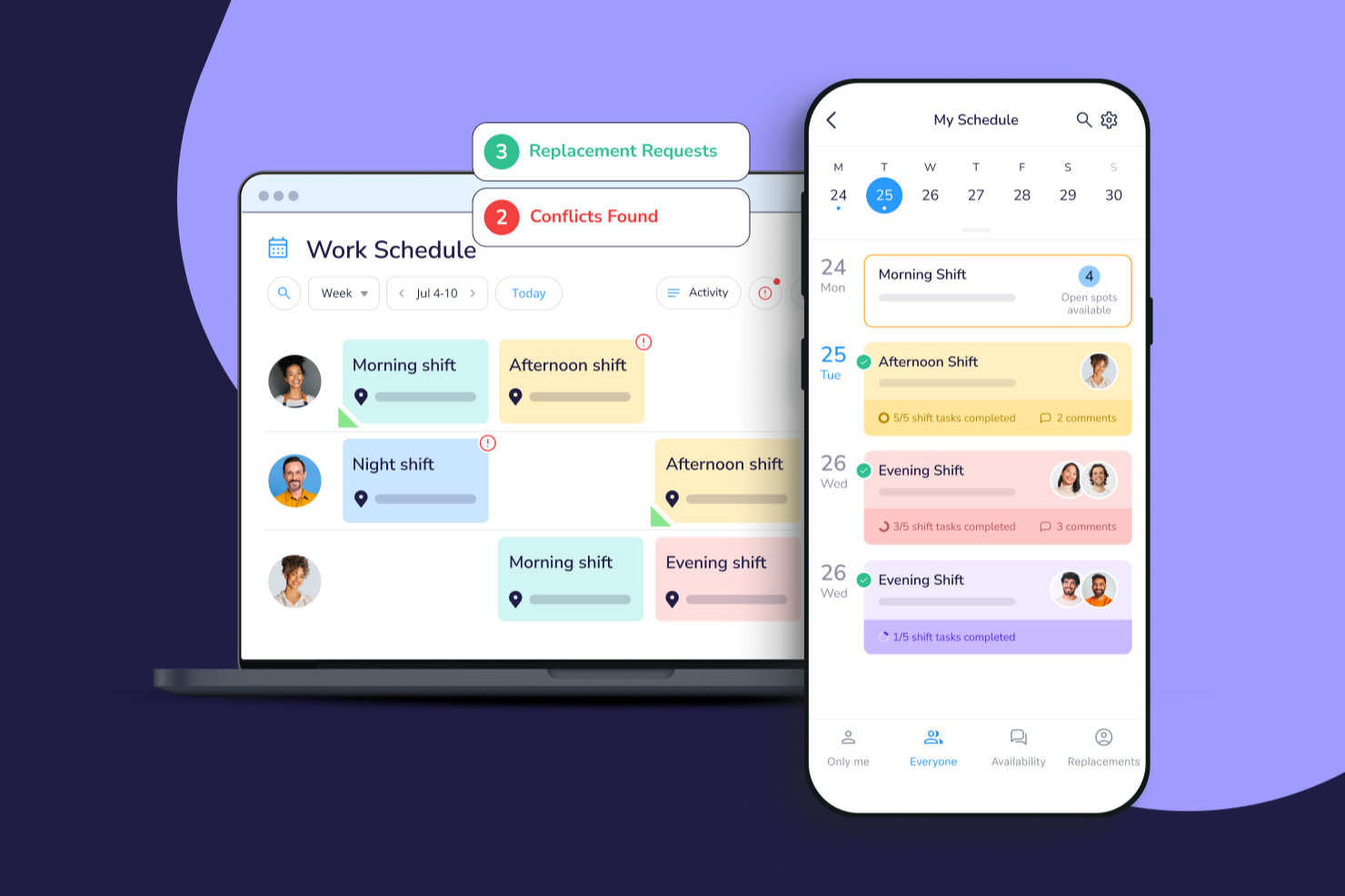
Connecteam gives small businesses and deskless teams a mobile-first platform to handle employee scheduling, time tracking, and shift communication, helping owners and managers keep everyone organized and connected.
Who Is Connecteam Best For?
Connecteam is a great fit for small businesses with hourly or shift-based workforces, particularly in industries like retail, hospitality, and field services.
Why I Picked Connecteam
I picked Connecteam as one of the best because of how well it handles the full scheduling cycle—from building shifts to getting them in front of employees in real time. I love the open shifts feature, which lets managers post unassigned shifts that employees can claim on a first-come, first-served basis, cutting out the back-and-forth of manual assignment. The shift replacement workflow is another highlight: employees can release a shift directly in the app, qualified teammates can pick it up, and managers can require approval before it's confirmed. In practice, my team can respond to last-minute coverage gaps without a single phone call.
Connecteam Key Features
- Drag-and-drop schedule builder: Create and edit weekly schedules visually by dragging shifts across a timeline view.
- GPS time clock: Employees clock in and out from their phones, with location verification to confirm they're on-site.
- Availability and time-off management: Staff can submit availability windows and time-off requests directly in the app for managers to approve.
- In-app chat: Send direct messages or group announcements to keep shift-based teams connected without needing a separate messaging tool.
Connecteam Integrations
Integrations include QuickBooks, Gusto, Xero, ADP, Wix, Lightspeed, PrismHR, Square, BambooHR, and Accu-Time Systems.
New Product Updates from Connecteam

Connecteam Expands Break and Timesheet Controls
Connecteam adds flexible break thresholds, personalized policies, auto-end options, a centralized exceptions report, and improved timesheet issue visibility to help teams manage breaks and timesheets more effectively. For more information, visit Connecteam’s official site.
 .
.
Deel HR
Best for schedule policies

Deel HR gives small businesses and distributed teams a way to manage employee schedules, compliance, and HR processes in one platform, helping you handle time-off, shift policies, and workforce documentation across locations.
Who Is Deel HR Best For?
Deel HR is a strong fit for small businesses managing remote or international teams who need centralized HR and scheduling tools across multiple locations.
Why I Picked Deel HR
Deel HR earns its spot on my shortlist because of how well it handles schedule policies for small businesses managing employees across different locations or time zones. I like that you can set up custom time-off policies, approval workflows, and work schedules that automatically apply based on an employee's location or contract type. In practice, that means my team can configure different scheduling rules for full-time, part-time, and contractor staff without manually tracking exceptions. The policy-based approach keeps scheduling consistent and compliant without requiring constant HR oversight.
Deel HR Key Features
- Automated workflow builder: Create onboarding, offboarding, and compliance workflows without coding, with no limits on the number of workflows you can build.
- AI-powered HR assistant (Deel AI): Ask HR and compliance questions and get answers trained on data from legal and HR experts across 150+ countries.
- Centralized employee records (HRIS): Store and manage all people data, documents, and employment history in one place as a single source of truth.
- Workforce analytics and reporting: Build custom reports and dashboards using any data point within Deel to track headcount, costs, and workforce trends.
Deel HR Integrations
Integrations include FaceUp, Snowflake, DefensX, Microsoft Finance, Kintsugi, ReFresh OS, Revo.ai, Keeper, Human Interest, and Everyminute.
New Product Updates from Deel HR

Deel Expands Stablecoin Wallet to 80+ Countries
Deel expands its Stablecoin Wallet to 80+ countries with dollar-backed balances and optional rewards. This gives eligible contractors more ways to hold and manage earnings inside Deel. For more information, visit Deel’s official site.
 .
.
Best as AI for business
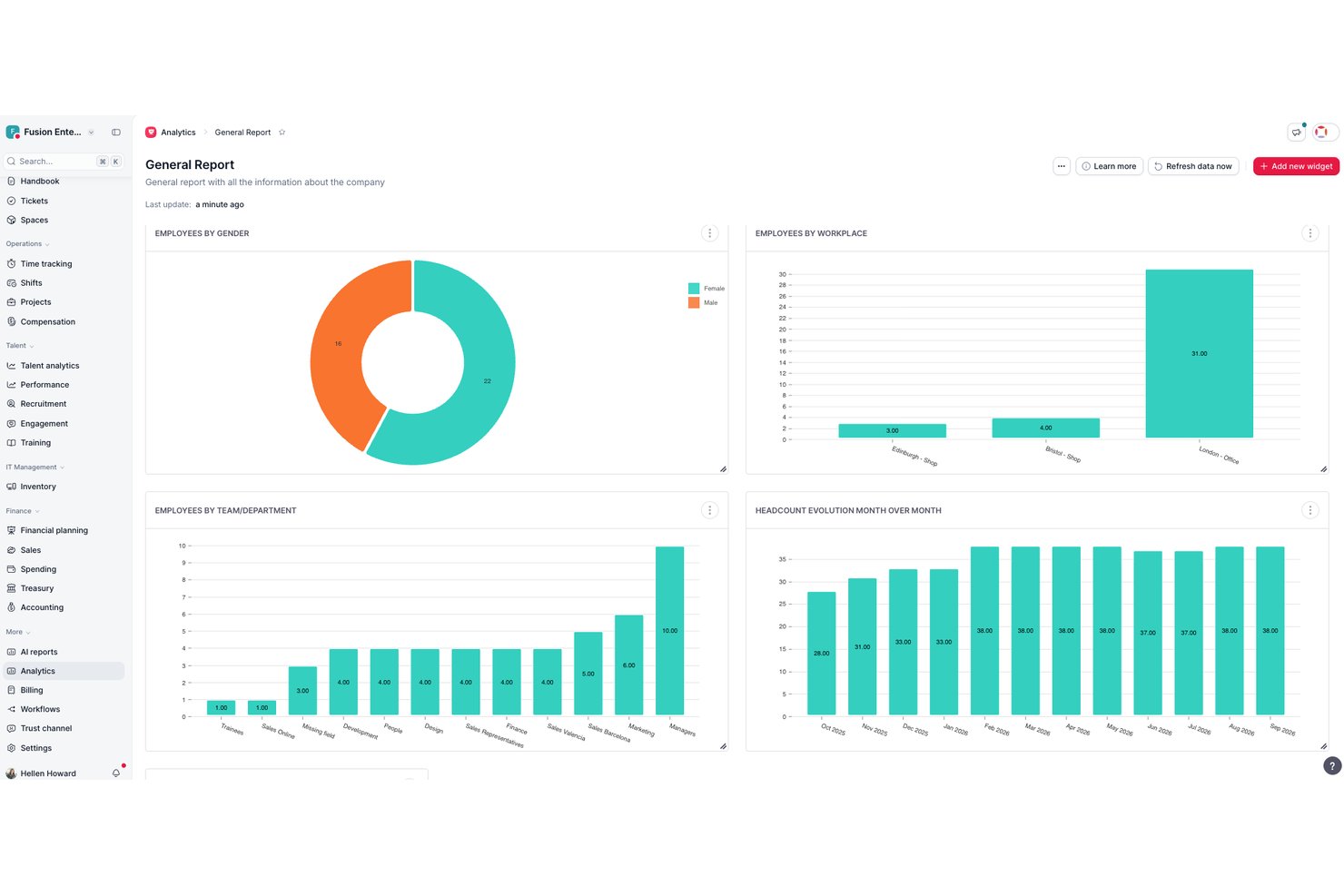
Factorial is an AI-driven HR platform that handles employee scheduling, shift planning, time tracking, and workforce management for small businesses.
Who Is Factorial Best For?
Factorial fits HR managers and operations managers who want a single AI-driven platform to handle scheduling, reporting, and employee policy questions across their day-to-day workflows.
Why I Picked Factorial
I've included Factorial in my top picks because its AI for business approach means it's doing more than just generating a schedule—it's helping you plan timetables, pull workforce reports, and answer employee policy questions automatically. I like that managers can drag and drop shifts, copy entire schedule periods, and resolve flagged conflicts before publishing, all without bouncing between tools. Employees can request swaps directly from the mobile app, keeping last-minute coverage changes contained in one place.
Factorial Key Features
- Shift conflict review: Factorial flags scheduling conflicts and requires managers to resolve them before a schedule can be published.
- Mobile shift swap requests: Employees can request shift swaps directly from the app, with colleague acceptance triggering a manager approval notification.
- Time-off calendar: Team absences and approved time-off requests appear in a centralized calendar so managers can see coverage gaps at a glance.
- GPS clock-in: The mobile app records GPS coordinates at clock-in and clock-out, giving managers location context for each time entry.
Factorial Integrations
Factorial lists marketplace integrations with Google Workspace, Slack, Microsoft Power BI, LinkedIn, Recruitee, and payroll tools including DATEV LODAS and Sage 200. It also supports REST APIs, webhooks, SDKs, OAuth 2.0, API keys, and Zapier.
Pros and Cons
Pros:
- AI assists timetable planning and reporting
- Reviewers praise centralized leave and time tracking
- Managers can copy schedules and resolve conflicts
Cons:
- Automatic shift planning requires Enterprise access
- No documented employee availability checks

Best online time clock for small businesses

Buddy Punch is a cloud-based employee scheduling and time tracking tool built for small businesses that need simple, accurate ways to manage shifts, track attendance, and handle time-off requests without manual spreadsheets or paperwork.
Who Is Buddy Punch Best For?
Buddy Punch is a strong fit for small business owners and managers in industries like retail, hospitality, and healthcare who need a straightforward way to schedule hourly workers and track time.
Why I Picked Buddy Punch
Buddy Punch earns its spot as one of the best on my shortlist because its online time clock is genuinely built with small businesses in mind. I like that employees can clock in via web browser, mobile app, or even a shared kiosk, with GPS tracking and webcam verification to confirm who's actually punching in. My team is able to set up geofencing so employees can only clock in when they're physically on-site, which cuts down on buddy punching without requiring expensive hardware. The automatic overtime alerts are another feature I rely on to keep labor costs in check before they become a problem.
Buddy Punch Key Features
- Drag-and-drop scheduling: Build and publish employee schedules visually, with the ability to copy shifts from previous weeks.
- PTO tracking: Employees can submit time-off requests directly in the app, and managers can approve or deny them in one click.
- Payroll reporting: Export timesheets with calculated regular, overtime, and PTO hours ready for payroll processing.
- Shift notifications: Automatically alert employees via email or push notification when their schedule is published or changed.
Buddy Punch Integrations
Integrations include QuickBooks Online, QuickBooks Desktop, ADP Workforce Now, Gusto, Paychex, Paylocity, Paycor, Rippling, Workday, and Justworks.

Agendrix
Best for Canadian small businesses managing shifts

Agendrix is a scheduling and time tracking platform built for small businesses that need to manage hourly staff, simplify shift planning, and handle time-off requests with less back-and-forth.
Who Is Agendrix Best For?
Agendrix is a great fit for small businesses in retail, hospitality, and healthcare that manage hourly or shift-based teams.
Why I Picked Agendrix
Agendrix earns its spot on my shortlist because it's purpose-built for the kind of shift-based scheduling that small Canadian businesses deal with every day. I particularly like the French-language support and bilingual interface, which makes it genuinely practical for businesses operating in Quebec or across bilingual teams. The platform also handles provincial labor compliance well—managers can set up schedules that respect overtime rules and rest period requirements without manually tracking them. I also use the time-off request and shift swap features regularly, and they cut down on the usual back-and-forth that eats up a manager's time.
Agendrix Key Features
- Drag-and-drop schedule builder: Create and adjust weekly schedules visually by dragging shifts directly onto an employee's row.
- Mobile time clock: Employees can clock in and out from their phones, with GPS verification to confirm on-site attendance.
- Employee messaging: Send announcements or direct messages to staff from within the platform, keeping shift-related communication in one place.
- Payroll export: Export hours and attendance data in formats compatible with payroll tools to reduce manual data entry.
Agendrix Integrations
Integrations include ADP Workforce Now, Ceridian, and Sage. An API is also available for custom integrations.
7shifts
Best employee shift scheduling software for the restaurant industry

7shifts is a scheduling and labor management platform designed for restaurant owners and managers who need to organize shifts, track attendance, and simplify team communication in fast-paced hospitality environments.
Who Is 7shifts Best For?
7shifts is a great fit for small and independent restaurant operators who need scheduling tools built around the realities of shift-based, hourly restaurant work.
Why I Picked 7shifts
7shifts earns its spot as one of the best on my shortlist because it's built exclusively for restaurants—not adapted from a generic scheduling tool. I love that the AI-driven sales forecasting pulls in your POS data to recommend exactly how many staff to schedule per shift, which is a real advantage when you're trying to hit labor cost targets on a tight margin. The labor compliance tools are also genuinely restaurant-specific: you get real-time alerts for "clopen" shifts, automated break enforcement, and minor scheduling restrictions built right into the schedule builder. On top of that, the Shift Pool feature lets your team self-manage swaps while keeping managers in the approval seat—something that matters a lot in high-turnover restaurant environments.
7shifts Key Features
- Time clocking: Staff can clock in and out directly from the 7shifts app or a shared tablet at the point of entry.
- Team messaging: Built-in chat lets managers and staff communicate by role, location, or individual without leaving the app.
- Tip pooling: Automatically calculate and distribute tips across your team based on hours worked or custom rules.
- Engagement tracking: Monitor team sentiment through regular pulse surveys sent directly to staff via the mobile app.
7shifts Integrations
Integrations include Toast, Square, Lightspeed, Clover, Revel, Aloha POS, ADP Workforce Now, QuickBooks, Heartland, and Micros.

Best for field service or construction businesses
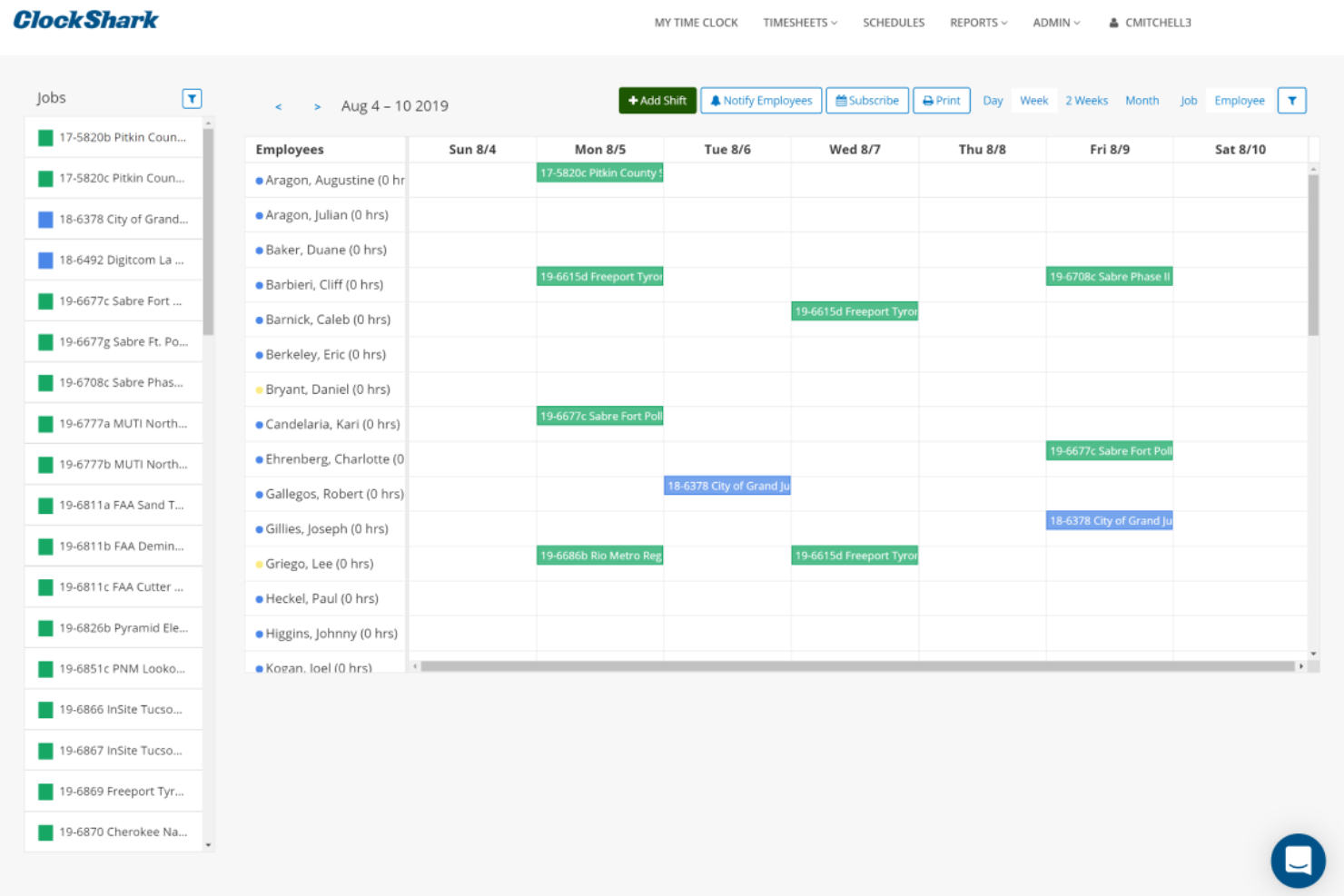
ClockShark is a scheduling and time tracking platform built for small businesses that manage mobile or field-based teams, helping you coordinate shifts, track hours, and simplify payroll with GPS and job assignment features.
Who Is ClockShark Best For?
ClockShark is a great fit for small businesses in construction, field service, and other industries where employees work across multiple job sites.
Why I Picked ClockShark
ClockShark earns its spot on my shortlist because it's purpose-built for field service and construction teams—not just adapted for them. I particularly like the GPS time clock, which logs employee location every time they clock in or out and generates a breadcrumb trail of their workday across job sites. The geofencing feature takes this further by creating a virtual boundary around each job site, automatically prompting workers to clock in when they arrive and clock out when they leave. For small construction or field service businesses juggling multiple crews across multiple locations, that combination removes a lot of the manual follow-up that typically falls on managers.
ClockShark Key Features
- Drag-and-drop employee scheduling: Build and adjust crew schedules visually, reassigning jobs and shifts in just a few clicks.
- Job costing: Track labor hours and costs per job and task, with employees able to upload receipt photos directly in the app.
- Shift wrap-up and compliance forms: Create custom clock-out questions to capture end-of-shift reports, injury disclosures, or hazard exposure notes.
- Conversations: Send and receive job-specific messages between office staff and field crews, keeping everyone updated on job progress.
ClockShark Integrations
Integrations include QuickBooks, QuickBooks Online, ADP Workforce Now, RUN Powered by ADP, Sage 100 Contractor, Xero, Simpro, Paychex, Gusto, and MYOB.

Ubeya
Best workforce ops software for the event industry

Ubeya is a workforce management platform for small businesses in hospitality, events, and staffing that need to schedule, communicate with, and manage hourly or shift-based teams.
Who Is Ubeya Best For?
Ubeya is a strong fit for small businesses in event production, catering, and hospitality that rely on flexible, shift-based workforces.
Why I Picked Ubeya
I chose Ubeya because it's built around the realities of event-based workforce management. I love that it handles multi-position event scheduling in one view—so if you're running a catering event with bartenders, servers, and kitchen staff all on the same night, you can assign and track each role without jumping between tools. I also like the AI-powered shift matching, which cross-references worker availability, skills, and labor rules to suggest the right people for each job. The auto arrival confirmation feature sends real-time check-ins before and during a shift, which is useful when you're managing staff across multiple event locations and can't be everywhere at once.
Ubeya Key Features
- Time and attendance tracking: Workers clock in and out via the mobile app, with GPS verification to confirm on-site presence.
- Automated payroll calculations: Ubeya calculates pay based on hours worked, rates, and overtime rules, ready for export to payroll.
- Staff availability management: Workers submit their availability directly in the app, so you're only scheduling people who are free.
- In-app messaging: Send broadcast messages or direct messages to individual workers or entire shift groups from within the platform.
Ubeya Integrations
Integrations include Teamtailor, SAP SuccessFactors, ADP, QuickBooks, Xero, BambooHR, Gusto, Workday, Paychex, and an open API for custom integrations.
Best GPS-enabled time tracking software

ezClocker is a scheduling and time tracking app designed for small businesses and hourly teams who need a simple way to manage shifts, track attendance, and handle payroll from anywhere.
Who Is ezClocker Best For?
ezClocker is a strong fit for small businesses with mobile or field-based hourly workers, such as those in construction, cleaning, landscaping, or home services.
Why I Picked ezClocker
I picked ezClocker as one of the best because of how well its GPS time tracking works for small businesses managing workers across multiple job sites. Every time an employee clocks in or out via the mobile app, their GPS location is automatically stamped and saved—so I can pull up a map view and confirm my crew is on-site without calling anyone or driving out to check. I also like that shift scheduling syncs directly to employees' phones, including location details and daily notes, so workers always know where to be and what to expect. The one-click timesheet export lets you send accurate hours straight to an accountant without using a spreadsheet.
ezClocker Key Features
- Employee scheduling: Create and publish shifts from the web or mobile app, with employees receiving instant notifications when their schedule is updated.
- Timesheet management: View and edit employee timesheets in one place, with automatic calculations for regular and overtime hours.
- Payroll export: Download timesheet data as a CSV or Excel file to share directly with your payroll provider.
- Multiple job site support: Assign employees to different job sites and track time separately across each location.
ezClocker Integrations
ADP Workforce Now, Gusto, ACS Technologies, and Paychex.
Sage HR
Best employee leave management for small businesses

Sage HR helps small businesses manage employee schedules, track time off, and handle shift changes, so managers and teams stay organized and reduce scheduling headaches.
Who Is Sage HR Best For?
Sage HR is a strong fit for small businesses that need a straightforward HR and scheduling tool without the complexity of enterprise-grade systems.
Why I Picked Sage HR
Leave management is baked into Sage HR's core plan, not bolted on as an afterthought—which is a major reason I recommend it. I like that employees can request time off directly from the mobile app, and managers get instant notifications to approve or decline without logging into a desktop. The shared leave calendar is especially useful for small teams, since you can see at a glance who's off and plan shifts around it. I also find the ability to track absence trends over time genuinely helpful for spotting patterns before they become a staffing problem.
Sage HR Key Features
- Drag-and-drop shift scheduling: Build and adjust shift schedules using an interactive visual planner that updates employees automatically when changes are made.
- Timesheet tracking: Employees clock in and out via the dashboard or mobile app and submit timesheets to managers for approval.
- Employee self-service portal: Staff can view their schedules, submit expense claims, request feedback, and access payslips directly from the app.
- Performance management: Set goals and OKRs, schedule one-to-ones, and collect 360° feedback from teammates and managers.
Sage HR Integrations
Integrations include Sage Payroll, Sage 50 Payroll, Outlook, Slack, Google Calendar, Xero, Zapier, and an open API for custom integrations.
Annen programvare for vaktplanlegging av ansatte for små bedrifter
Her er noen andre gode alternativer for vaktplanlegging du bør vurdere. De kom ikke med på topp 10-listen min, men er likevel verdt å se nærmere på:
- eResource Scheduler
For managing both human and non-human resources
- ABC Roster
For employee and shift constraint management
- monday AI Workspace
Schedule visualization tool for small teams
- Resource Guru
For efficient scheduling at small agencies
- BambooHR®
Applicant tracking system for small businesses
- WebWork Time Tracker
For tracking attendance and shifts
- Justworks
Employee scheduling software with 24/7 HR expert support team
- Wrike
For companies wanting visibility into each team member's availability
- TimeTrex
For automated scheduling
- Zoho Shifts
For scheduling and time-tracking in one
- Homebase
Scheduling software for all-in-one team management
- TimeClock Plus
For shift management
- Breathe HR
With self-service shift templates
- When I Work
Employee shift scheduling software for shift trading features
- Zoho People
Free cloud-based scheduling app for small business owners
- Hubstaff
Time tracking software for remote teams
- Skedulo
Scheduling automation engine
- Calendly
Free meeting scheduler for small business owners
- Schedule It
Resource management software for remote teams
- Shiftboard
Employee shift-scheduling software for mission-critical


How I Evaluate Employee Scheduling Software
I evaluate these tools in two layers: baseline must-haves like shift building, availability management, and mobile access, then differentiators like labor cost controls and payroll integrations.
Core Functionality (Table Stakes For This List)
When I'm selecting tools for my list, I rank each one on a scale from 0 (does not offer the functionality) to 5 (excels in this area) for each core functionality listed below. Then, I calculate the tool's total score into a percentage. Each tool needs to achieve a minimum total score of 75% to be considered for inclusion.
- Shift Scheduling & Assignment: I look for drag-and-drop builders, recurring templates, and conflict detection—things that matter when you're filling a 50-person rotating roster across multiple departments.
- Availability & Time-Off Management: Employees should be able to set recurring availability and submit PTO requests that feed directly into the schedule, so managers aren't cross-referencing spreadsheets.
- Shift Swapping & Self-Service: I check whether employees can pick up open shifts or initiate swaps on their own, with guardrails like role eligibility filters and manager approval workflows built in.
- Time & Attendance Tracking: The tool should connect scheduled shifts to actual clock-in data, whether through a built-in time clock, kiosk mode, or a native integration with a dedicated T&A system.
- Labor Compliance & Rules: I evaluate how the platform handles overtime thresholds, mandatory rest periods, and break rules—especially for teams managing minors or workers across multiple jurisdictions.
- Mobile Access & Notifications: Frontline workers rarely sit at a desk, so I look for a native mobile app with push notifications for new schedules, shift changes, and swap requests.
Once I have a list of tools that meet the criteria, I consider what sets each platform apart.
Differentiating Factors (What Sets Vendors Apart)
Here's how I compare and contrast different vendors:
Standout Features
AI demand forecasting is a major differentiator—tools that pull historical data to predict staffing needs save managers hours of guesswork during peak seasons. I also evaluate labor cost controls, particularly real-time budget tracking that flags when a draft schedule trends over target before it's published. For organizations running multiple sites, multi-location management matters. Being able to share staff across locations and view all schedules from one dashboard makes a real difference for regional managers juggling coverage gaps.
Beyond Features
Payroll and HRIS integrations are one of the first things I check. A scheduling tool that syncs hours directly to platforms like ADP, Gusto, or BambooHR eliminates double entry and reduces payroll errors. Pricing transparency also matters—I look for clear per-user or per-location models so growing teams can forecast costs as they scale. Finally, I consider industry fit. A tool built with healthcare credentialing workflows or retail fair workweek templates baked in will save your team significant configuration time compared to a generic platform.
Slik velger du programvare for vaktplanlegging av ansatte for små bedrifter
Det er lett å gå seg vill i lange funksjonslister og kompliserte prismodeller. For å hjelpe deg med å holde fokus mens du arbeider deg gjennom den unike prosessen med å velge programvare, har jeg laget en sjekkliste over faktorer du bør ha i tankene:
| Faktor | Hva du bør vurdere |
|---|---|
| Skalerbarhet | Kan verktøyet vokse med virksomheten din? Se etter alternativer som støtter flere brukere eller lokasjoner uten ekstra kostnader. Unngå verktøy som begrenser veksten med restriktive abonnementer. |
| Integrasjoner | Kan det kobles til de eksisterende systemene dine? Kontroller kompatibilitet med lønns-, HR- og kommunikasjonsverktøy for å sikre god dataflyt og unngå manuell dataregistrering. |
| Tilpasningsmuligheter | Kan du tilpasse det til arbeidsflytene dine? Sørg for at programvaren tillater egendefinerte felt, rapporter og innstillinger som passer til de spesifikke behovene dine for vaktplanlegging. |
| Brukervennlighet | Er det enkelt for teamet ditt å bruke? Se etter intuitive grensesnitt og enkel navigering for å minimere opplæringstiden og redusere frustrasjon blant brukerne. |
| Implementering og oppstart | Hvor raskt kan du begynne å bruke det? Ta hensyn til tiden og ressursene som kreves for oppsettet. Verktøy med tydelige veiledninger og brukerstøtte kan bidra til å fremskynde prosessen. |
| Kostnad | Passer det inn i budsjettet ditt? Sammenlign prisplaner og vær oppmerksom på skjulte gebyrer. Ta hensyn til langsiktige kostnader og eventuelle rabatter for årsabonnementer. |
| Sikkerhetstiltak | Er dataene dine beskyttet? Sørg for at programvaren har kryptering, sikre tilgangskontroller og overholder relevante regler for databeskyttelse for å beskytte sensitiv informasjon. |
| Tilgjengelig brukerstøtte | Får du hjelp når du trenger det? Se etter brukerstøtte døgnet rundt og vurder kvaliteten på kundeservicen. Rask responstid kan være avgjørende når det oppstår problemer. |
Hva er programvare for vaktplanlegging av ansatte for små virksomheter?
Programvare for vaktplanlegging av ansatte for små virksomheter er et verktøy som hjelper med å administrere og automatisere planleggingen av de ansattes vakter og arbeidstimer. Disse verktøyene brukes vanligvis av ledere, HR-medarbeidere og teamledere for å spare tid og redusere planleggingskonflikter. Funksjoner for automatisert planlegging, bytte av vakter og varsler bidrar til effektiv administrasjon og kommunikasjon. Alt i alt øker disse verktøyene produktiviteten og reduserer den administrative arbeidsmengden for små virksomheter.
Funksjoner
Når du velger programvare for vaktplanlegging av ansatte i en liten virksomhet, bør du se etter følgende viktige funksjoner:
- Automatisert planlegging: Opprett og juster vaktplaner automatisk basert på de ansattes tilgjengelighet og virksomhetens behov, slik at du sparer tid og reduserer feil.
- Bytte av vakter: La de ansatte enkelt bytte vakter, noe som gir fleksibilitet og reduserer planleggingskonflikter.
- Varsler og påminnelser: Send oppdateringer og varsler i tide til de ansatte om endringer i vaktplanen, slik at alle er informert.
- Integrasjonsmuligheter: Koble sømløst til eksisterende lønns- og HR-systemer for å sikre god dataflyt og redusere manuell registrering.
- Mobiltilgang: Gjør det mulig for de ansatte å se og administrere vaktplanene sine mens de er på farten, noe som øker tilgjengeligheten og brukervennligheten.
- Tilpasset rapportering: Generer tilpassede rapporter for å analysere planleggingsdata og ta velinformerte beslutninger.
- Administrasjon av flere lokasjoner: Håndter vaktplanlegging på tvers av flere virksomhetslokasjoner og effektiviser driften i virksomheter i vekst.
- Tidsregistrering: Overvåk de ansattes arbeidstimer og oppmøte nøyaktig, noe som bidrar til lønnsbehandling og etterlevelse av regler.
- Brukervennlig grensesnitt: Sørg for at programvaren er enkel å navigere i, slik at opplæringstiden minimeres og brukeropplevelsen forbedres.
- Sikkerhetstiltak: Beskytt sensitive personopplysninger om ansatte med kryptering og sikre tilgangskontroller, og sørg for at reglene overholdes.
Fordeler
Implementering av programvare for vaktplanlegging av ansatte i en liten virksomhet gir flere fordeler for teamet og virksomheten din. Her er noen av fordelene du kan se frem til:
- Tidsbesparelser: Automatisert planlegging reduserer tiden som brukes på å opprette og justere vaktplaner manuelt.
- Bedre kommunikasjon: Varsler og påminnelser holder alle informert om endringer i vaktplanen og forbedrer kommunikasjonen i teamet.
- Fleksibilitet: Funksjoner for bytte av vakter gir de ansatte fleksibilitet til å administrere vaktplanene sine, noe som styrker arbeidsmoralen.
- Økt nøyaktighet: Tidsregistrering sikrer nøyaktig overvåking av arbeidstimene og bidrar til korrekt lønnsbehandling.
- Bedre ressursstyring: Administrasjon av flere lokasjoner muliggjør effektiv planlegging på tvers av ulike steder og optimaliserer ressursfordelingen.
- Datadrevne beslutninger: Tilpasset rapportering gir innsikt i planleggingsmønstre og bidrar til velinformerte forretningsbeslutninger.
- Bedre tilgjengelighet: Mobiltilgang lar de ansatte administrere vaktplanene sine hvor som helst, noe som øker brukervennligheten og engasjementet.
Kostnader og priser
Ved valg av programvare for ansattplanlegging for en liten bedrift er det nødvendig å forstå de ulike prismodellene og abonnementene som er tilgjengelige. Kostnadene varierer basert på funksjoner, teamstørrelse, tillegg og mer. Tabellen nedenfor oppsummerer vanlige abonnementer, gjennomsnittsprisene deres og typiske funksjoner som er inkludert i løsninger med programvare for ansattplanlegging for små bedrifter:
Sammenligningstabell for programvare for ansattplanlegging for små bedrifter
| Abonnementstype | Gjennomsnittspris | Vanlige funksjoner |
|---|---|---|
| Gratisabonnement | $0 | Grunnleggende planlegging, bytte av vakter og begrenset brukerstøtte. |
| Personlig abonnement | $5-$15/bruker/måned | Automatisert planlegging, mobiltilgang, varsler og grunnleggende rapportering. |
| Bedriftsabonnement | $20-$40/bruker/måned | Avansert rapportering, integrasjoner, administrasjon av flere lokasjoner og utvidet kundestøtte. |
| Abonnement for store virksomheter | $50-$100/bruker/måned | Tilpassbare funksjoner, dedikert kundeansvarlig, avansert sikkerhet og omfattende analyse. |
Vanlige spørsmål
Før jeg avslutter, ønsket jeg å ta opp og diskutere noen vanlige spørsmål knyttet til programvare for ansattplanlegging for små bedrifter. Her er noen svar på vanlige spørsmål jeg har fått:
Kan disse verktøyene integreres med det nåværende lønnssystemet mitt?
Ja, mange løsninger med programvare for ansattplanlegging tilbyr integrasjonsmuligheter med populære lønnssystemer. Kontroller programvarens kompatibilitet med det nåværende systemet ditt før du kjøper. Dette sikrer smidig dataoverføring og reduserer manuelt arbeid, slik at du sparer tid og unngår feil.
Er programvare for ansattplanlegging vanskelig å implementere?
Nei, de fleste moderne planleggingsverktøy er utviklet for enkel implementering. De leveres ofte med veiledninger, opplæringsmateriell og kundestøtte som hjelper deg raskt i gang. Se etter programvare med brukervennlige grensesnitt og omfattende ressurser for innføring, slik at overgangen blir smidig for teamet ditt.
Trenger jeg teknisk ekspertise for å bruke disse verktøyene?
Nei, du trenger ikke teknisk ekspertise for å bruke de fleste løsninger med programvare for ansattplanlegging. De er vanligvis utviklet med intuitive grensesnitt og enkel navigering. Det er likevel en fordel å ha grunnleggende datakunnskaper. De fleste leverandører tilbyr støtte og opplæringsressurser for å hjelpe brukere på alle nivåer.