

10 beste programvarer for fraværshåndtering i 2026 for sporing av betalt fri

10 Kortliste over den beste programvaren for permisjonshåndtering


Den beste programvaren for permisjonshåndtering gjør det enklere å holde oversikt over ferie, sykefravær og forespørsler om fri ved å automatisere hele prosessen fra start til slutt. Mange HR-eksperter er fortsatt avhengige av manuelle prosesser eller utdaterte verktøy, noe som fører til feil, risiko for manglende overholdelse av regler og bortkastede timer på håndtering av regneark. Hvis dette høres kjent ut, er du ikke alene.
Disse verktøyene er utviklet for å hjelpe deg med å godkjenne forespørsler raskere, opprettholde nøyaktige permisjonssaldoer, forutse bemanningsmangler og gi ansatte tydelig oversikt over hvor mye fri de har tilgjengelig.
Som en som har brukt flere år på å undersøke HR-teknologi og evaluere programvareløsninger, har jeg samlet de beste systemene for permisjonshåndtering for å hjelpe deg med å spare tid, redusere manuelt administrativt arbeid og etablere en mer rettferdig og transparent permisjonsprosess.
Why Trust Our Software Recommendations
Our team has been testing and reviewing software since 2012. As HR experts ourselves, we know how difficult—and important—it is to choose the right software.
For this guide, we evaluated tools using hands-on testing and independent research, scoring tools using our selection criteria. We also draw on insights from industry thought leaders and practicing HR experts.
Our reviews reflect our human editorial judgment, not a sales pitch.
Expert reviewers:
Sammenligningstabell for programvare for permisjonshåndtering
Denne sammenligningstabellen oppsummerer pris, prøveperiode og demodetaljer for mine beste utvalg av programvare for permisjonshåndtering.
| Tool | Best For | Trial Info | Price | ||
|---|---|---|---|---|---|
| 1 | Best with 24/7 customer support for HR tasks | Not available | From $599/employee/month | Website | |
| 2 | Best for managing leave across multiple countries | Free demo available | From $5/user/month | Website | |
| 3 | Best as AI for business | Free demo available | From $8/user/month | Website | |
| 4 | Best for integration with MS Teams and Slack | 14-day free trial | From $2/user/month | Website | |
| 5 | Best from a mobile device | 14-day free trial | From $29/month (billed annually) | Website | |
| 6 | Best leave management within a complete HRMS | Free trial available | From $10/employee/month | Website | |
| 7 | Best PTO time tracking and leave management for SMBs | 14-day free trial + free demo available | From $4.99/user/month + $19/month base fee (billed annually) | Website | |
| 8 | Best for businesses looking for simple, stress-free leave management | Free plan available | From $1.50/user/month (billed annually) | Website | |
| 9 | Best for tailoring to unique business needs | Free trial + free plan available | From $1/employee/month | Website | |
| 10 | Best for multilevel approval processes | 14-day free trial | From $2/employee/month | Website |


Anmeldelser av den beste programvaren for permisjonshåndtering
Nedenfor finner du korte beskrivelser av hver programvare for permisjonshåndtering, med fokus på hva hvert system egner seg best til, fremtredende funksjoner samt fordeler & ulemper, i tillegg til noen ekstra anbefalinger nederst på listen.

Best with 24/7 customer support for HR tasks
Justworks is an HR and payroll platform that offers PTO tracking, leave management, benefits administration, and time tracking designed for teams looking for an all-in-one solution.
Who Is Justworks Best For?
Small to midsize companies that want a centralized HR platform with PTO and leave management plus bundled payroll and benefits.
Why I Picked Justworks
I picked Justworks as one of the best because I can get answers on leave or PTO issues any time with 24/7 support, set custom leave policies, and approve requests straight from the platform. That level of hands-on help is rare for tracking PTO.
Justworks Key Features
- Time tracking add-on: Monitor employee work hours and attendance in one system.
- Integrated payroll processing: Sync approved PTO directly with payroll runs.
- Mobile app access: Employees can request and view PTO from any device.
- Customizable leave policies: Configure accruals, carryover, and multiple leave types for different teams.
Justworks Integrations
Justworks offers native integrations with QuickBooks Online and Xero for payroll and accounting. An API is available for custom integrations.
Pros and Cons
Pros:
- PTO balances visible to employees any time
- Simple PTO request and approval workflow
- 24/7 live chat and phone support
Cons:
- Reporting lacks advanced filtering options
- Limited custom PTO accrual rules

Deel HR
Best for managing leave across multiple countries

Deel HR lets HR teams and business leaders manage PTO and leave tracking in one place, with automated workflows and integrations that help distributed and global teams stay organized and compliant.
Who Is Deel HR Best For?
Deel HR is a strong fit for HR teams at mid-size to large companies managing distributed or global workforces who need centralized leave tracking across multiple regions.
Why I Picked Deel HR
Deel HR earns its spot on my shortlist because of how well its Slack integration fits into the day-to-day rhythm of leave management. Employees can submit time off requests directly from Slack without opening a separate HR portal, and managers receive instant notifications to approve or decline in the same channel. I also use Deel HR's automated leave balance tracking, which updates in real time so my team knows how much PTO is available without contacting HR.
Deel HR Key Features
- Customizable leave policies: Set up and manage different leave types, accrual rules, and regional policies to match your organization's needs.
- Employee self-service portal: Employees can view leave balances, submit requests, and track approval status without involving HR directly.
- Leave reporting and analytics: Generate reports on PTO usage, absence trends, and team availability across your workforce.
- Automated approval workflows: Route leave requests to the right managers automatically based on team structure or location.
Deel HR Integrations
Integrations include FaceUp, Snowflake, DefensX, Microsoft Finance, Kintsugi, ReFresh OS, Revo.ai, Keeper, Human Interest, and Everyminute.
Pros and Cons
Pros:
- Burnout indicator helps managers track well-being trends
- Automatic team notifications improve visibility
- Slack-based PTO requests reduce app switching for teams
Cons:
- Limited customization for PTO policies in some countries
- May not be suitable for those not using Slack
New Product Updates from Deel HR

Deel Expands Stablecoin Wallet to 80+ Countries
Deel expands its Stablecoin Wallet to 80+ countries with dollar-backed balances and optional rewards. This gives eligible contractors more ways to hold and manage earnings inside Deel. For more information, visit Deel’s official site.
 .
.
Best as AI for business
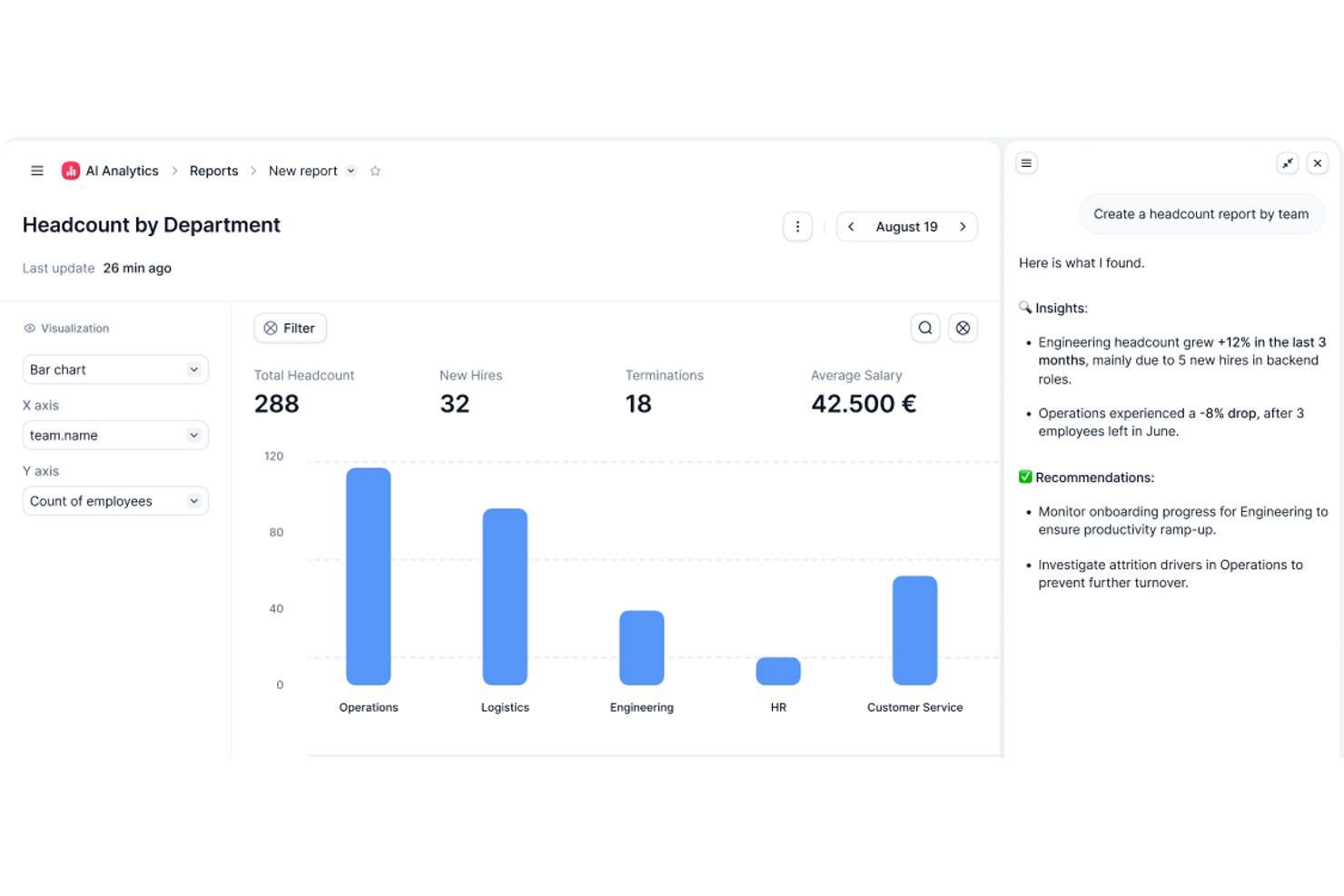
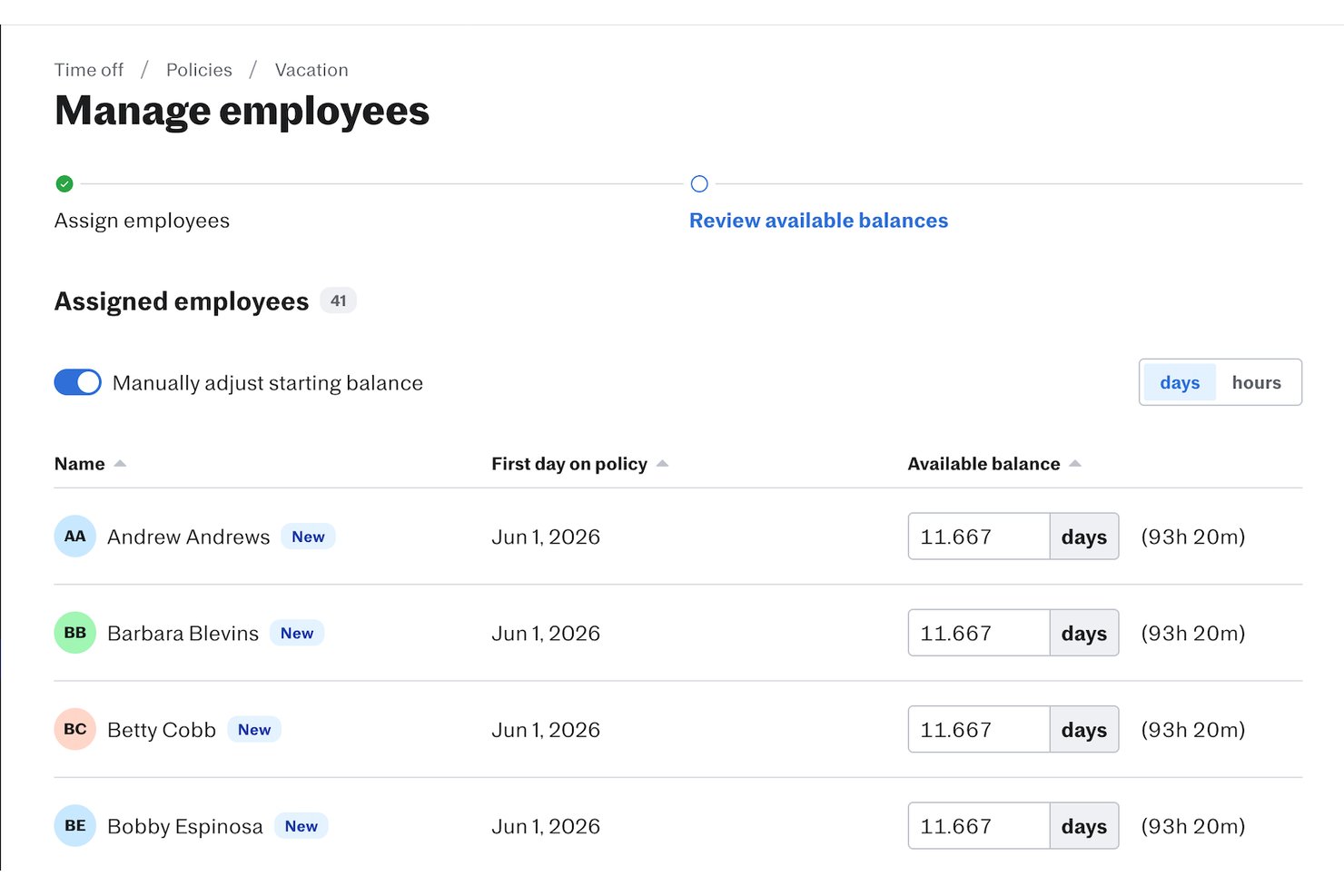
Factorial is an AI-powered HR platform that centralizes leave requests, absence tracking, time-off approvals, and employee self-service across your organization.
Who Is Factorial Best For?
Factorial is a strong fit for small business owners who want AI-assisted HR operations—including time-off tracking, timetable planning, and policy Q&A—without managing multiple tools.
Why I Picked Factorial
I picked Factorial as one of the best because its AI for business positioning goes beyond basic HR software—Factorial's AI agent, One, can answer employee questions about time-off policies, generate absence reports from live company data, and help plan timetables, all without pulling your HR team into every request. I especially like that employees can submit leave requests and managers can approve or decline them from mobile, while accrual rules, carryover limits, and blackout dates are enforced automatically by configurable policies.
Factorial Key Features
- Configurable absence types: Admins can create distinct absence categories—each with its own name and rules—so your team tracks vacation, sick leave, and other time off separately.
- Team absence calendar: A shared calendar displays current and upcoming absences, making it easier to spot overlaps and plan coverage before approving requests.
- Location and contract-based policies: Time-off policies can be tailored by location or contract type, so different rules apply automatically to different employee groups.
- Employee time-off data export: Managers can export employee time-off records directly from the platform for payroll reconciliation or external reporting.
Factorial Integrations
Factorial offers marketplace integrations with Silae, DATEV LODAS, Sage 200, Sage 100, Microsoft Power BI, Slack, and Google Workspace. It also provides a public API with OAuth 2.0, webhooks, SDKs, and Zapier connectivity.
Pros and Cons
Pros:
- AI answers employee questions about policies
- Shared calendar helps teams plan coverage
- Centralized leave requests, approvals, and balances
Cons:
- Policy workflows have configuration limits
- Limited custom leave reporting and analytics

Best for integration with MS Teams and Slack
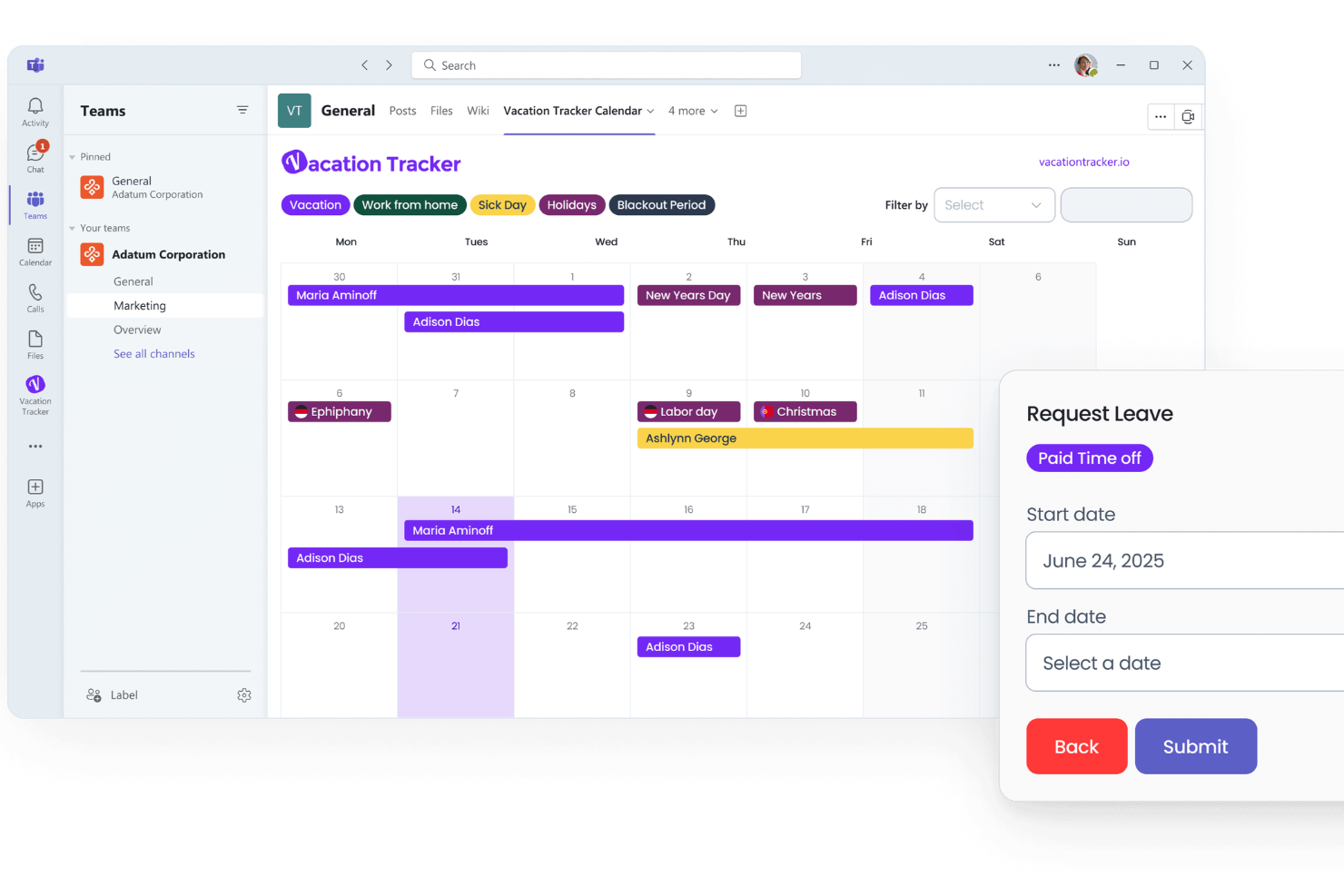
Vacation Tracker is a leave management platform for teams that manage PTO, sick days, and other absences directly within their existing collaboration tools, so HR professionals and managers can track time off and automate approval workflows.
Who Is Vacation Tracker Best For?
Vacation Tracker is a strong fit for small to mid-sized teams that run their day-to-day work in Microsoft Teams or Slack and want leave tracking built into those same tools.
Why I Picked Vacation Tracker
Vacation Tracker earns its spot on my shortlist because it brings leave management directly into Microsoft Teams and Slack, so my team never has to leave the tools we're already working in. I like that employees can submit PTO requests and managers can approve or deny them right inside a Teams channel or Slack workspace, without logging into a separate platform. The built-in leave calendar also gives me a real-time view of who's out and when, which makes scheduling and coverage planning much easier. I've also found the automated notifications genuinely useful—my team gets reminders about upcoming time off without me having to chase anyone down.
Vacation Tracker Key Features
- Custom leave types: Create and configure your own leave categories beyond standard PTO, such as parental leave, volunteer days, or sabbaticals.
- Leave accruals: Set up automatic accrual rules so employee PTO balances update based on tenure, hours worked, or custom schedules.
- Department-level reporting: Generate leave reports filtered by team or department to track absence patterns across your organization.
- Multi-location support: Assign different public holiday schedules and leave policies to employees across multiple offices or regions.
Vacation Tracker Integrations
Integrations include Slack, Microsoft Teams, and Google Workspace.
Pros and Cons
Pros:
- Calendar sync shows team availability
- Custom leave types and quotas
- Free plan covers full PTO requests, approvals, and basic notifications
Cons:
- Multi-level approval workflows not as configurable as competitors
- Limited native HRIS integrations

Best from a mobile device

Connecteam is a workforce management platform for businesses with deskless or mobile teams that need an easy way to track PTO, manage leave requests, and keep everyone connected on the go.
Who Is Connecteam Best For?
Connecteam is a strong fit for small to mid-sized businesses in industries like retail, hospitality, and construction, where most employees work without a desk or computer.
Why I Picked Connecteam
Connecteam earns its spot on my shortlist because of how well it handles PTO tracking from a mobile device. I like that employees can submit leave requests directly from the app, and managers get an instant notification to approve or deny them—no desktop required. My team is able to see a real-time view of who's off and when through the shared time off calendar, which is especially useful when coordinating shifts for field-based or hourly workers. The mobile-first design means nothing gets lost in email chains or sticky notes.
Connecteam Key Features
- Customizable leave approvals: Create and configure different leave categories—such as sick leave, vacation, or unpaid time off—to match your company's specific PTO policy.
- Accrual tracking: Set up automatic PTO accrual rules so employee balances update based on hours worked or tenure.
- Time clock with GPS: Employees can clock in and out from their mobile device, with location tracking to verify where they were when they logged hours.
- Shift scheduling: Build and publish employee schedules that automatically reflect approved time off to avoid conflicts.
Connecteam Integrations
Integrations include QuickBooks, Gusto, Xero, ADP, Zapier, Wix, Lightspeed, PrismHR, Square, BambooHR, Accu-Time Systems, Synel, and Clover.
Pros and Cons
Pros:
- PTO requests sync with scheduling so you avoid double-booking staff
- Mobile app lets non-desk employees request leave
- Supports accrual- and hourly-based PTO policies for different user types
Cons:
- Customization depth may lag more specialized tools
- Some advanced features (bulk actions, policy setup) may require training
New Product Updates from Connecteam

Connecteam Expands Break and Timesheet Controls
Connecteam adds flexible break thresholds, personalized policies, auto-end options, a centralized exceptions report, and improved timesheet issue visibility to help teams manage breaks and timesheets more effectively. For more information, visit Connecteam’s official site.
 .
.
Best leave management within a complete HRMS

BambooHR gives HR teams and growing businesses a centralized platform to manage PTO requests, track leave balances, and automate approvals, to manage time-off policies and ensure accurate records across the organization.
Who Is BambooHR Best For?
BambooHR is a great fit for small to mid-sized businesses that want to manage leave tracking as part of a broader HR system, rather than as a standalone tool.
Why I Picked BambooHR
BambooHR earns its spot on my shortlist because it handles leave management as a native part of a full HRMS, not a bolted-on feature. I like that PTO tracking connects directly to employee records, so when someone's leave balance changes, everything else updates in sync. My team can set up custom leave types, configure accrual rules, and allow employees to submit time-off requests through a self-service portal—all without switching tools. The built-in approval workflows also mean managers get notified automatically, and I can see team availability at a glance on a shared calendar.
BambooHR Key Features
- Who's Out calendar: A shared calendar that shows which employees are away on any given day, giving managers and HR instant visibility into team availability.
- Payroll sync for time off: PTO, sick leave, and holiday pay sync with BambooHR Payroll, removing the need for manual data entry.
- Automated compliance tracking: BambooHR automatically tracks overtime and PTO to help maintain compliance with labor regulations across all 50 US states.
- Mobile app access: Employees and managers can submit, review, and approve time-off requests from the BambooHR mobile app, without being at a desk.
BambooHR Integrations
Integrations include Slack, Checkr, Remote, Evolia, and custom integrations are available via the BambooHR API.
Pros and Cons
Pros:
- Lots of integrations available
- Built-in communications hub
- Helpful employee self-service portals
Cons:
- Pricing is not transparent
- Some features come as paid add-ons
New Product Updates from BambooHR®

BambooHR Expands Compensation Benchmarking Data
BambooHR adds monthly-refreshed compensation benchmarks, additional data sources, and clearer job match indicators. This gives teams more context when comparing pay data and selecting relevant benchmarks. For more information, visit BambooHR’s official site.
 .
.
Best PTO time tracking and leave management for SMBs

Buddy Punch is a cloud-based leave management platform built for small and midsize businesses that need simple PTO tracking, automated accruals, and easy time-off request workflows for both employees and managers.
Who Is Buddy Punch Best For?
Buddy Punch is a strong fit for small and midsize businesses that need an approachable, no-fuss way to manage employee time off without a dedicated HR team.
Why I Picked Buddy Punch
I picked Buddy Punch because it handles the full PTO cycle without a dedicated HR team. Accrual rules can run automatically, so PTO balances update without manual adjustments each pay period. When an employee's time-off request is approved, Buddy Punch adds those hours to the timesheet and reflects the absence on the upcoming schedule. End-to-end automation helps SMBs where one person often juggles payroll, scheduling, and leave tracking.
Buddy Punch Key Features
- Leave type customization: Create and configure multiple leave categories—such as sick, vacation, and personal—with individual rules and limits.
- Manager approval workflows: Managers receive notifications for pending time-off requests and can approve or deny them directly from the dashboard.
- Employee self-service portal: Employees can submit time-off requests, view their PTO balances, and check request statuses without contacting HR.
- Payroll reporting: Generate reports that summarize time-off usage and balances to support payroll processing.
Buddy Punch Integrations
Integrations include QuickBooks Online, QuickBooks Desktop, ADP Workforce Now, Gusto, Paychex, Paylocity, Paycor, Justworks, Rippling, and Workday.
Pros and Cons
Pros:
- Wide range of integrations
- User-friendly interface
- Facial recognition technology
Cons:
- Payroll module only available for the U.S.
- Expensive
Best for businesses looking for simple, stress-free leave management
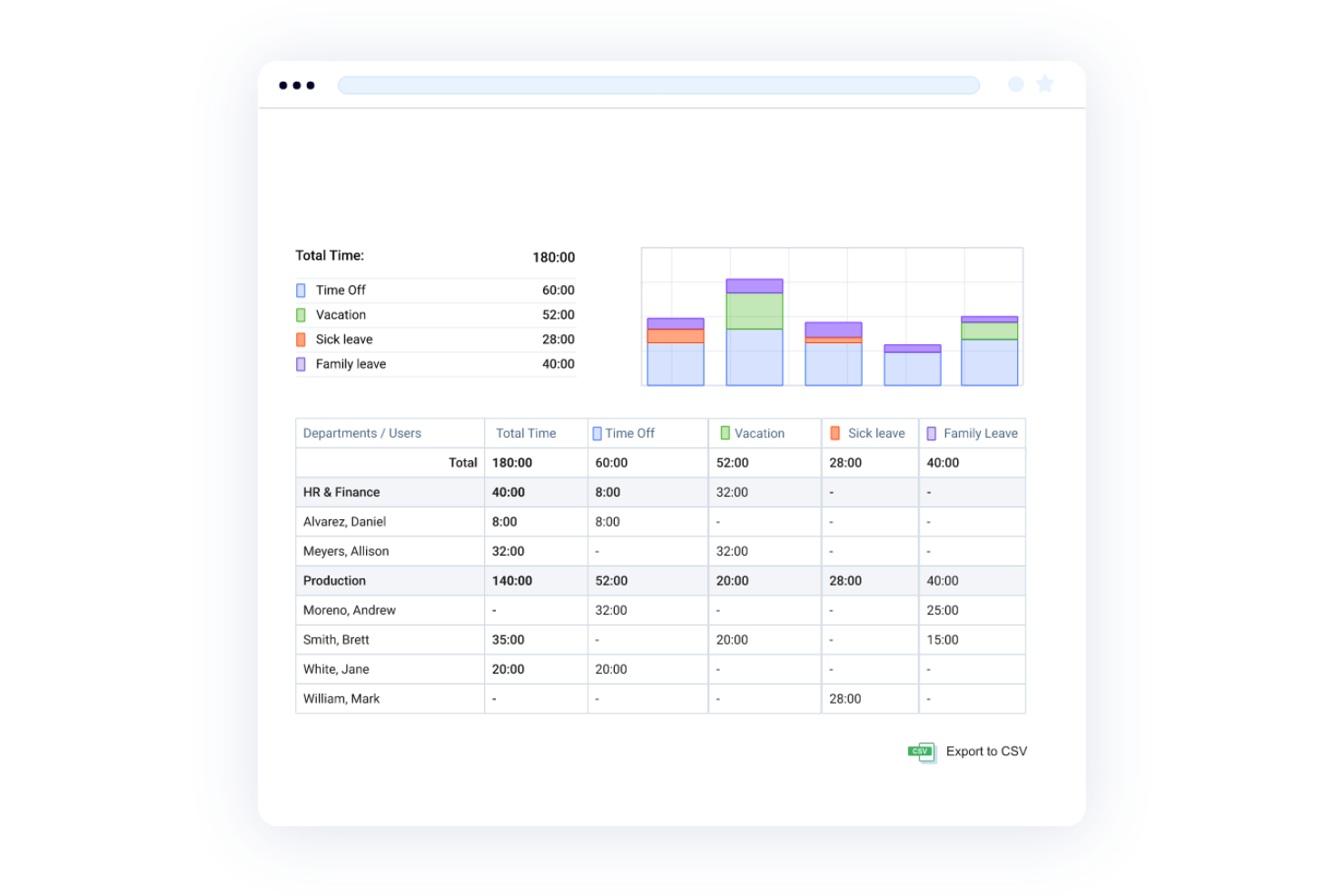
actiPLANS gives HR teams and managers a straightforward way to track PTO, manage leave requests, and keep everyone in the loop with clear absence calendars and automated balance calculations.
Who Is actiPLANS Best For?
actiPLANS is a great fit for small to mid-sized businesses that want a no-fuss leave management tool without the complexity of a full HR suite.
Why I Picked actiPLANS
actiPLANS earns its spot on my shortlist because it strips leave management down to what most businesses need. I like how the leave request and approval workflow is built to be quick—employees submit requests, managers get notified, and balances update automatically without anyone having to chase down spreadsheets. I also find the visual absence calendar useful for spotting coverage gaps at a glance, especially during busy periods like summer or the holidays. The automated PTO accrual rules are another feature I keep coming back to, since you can set them up once and let the system handle the math.
actiPLANS Key Features
- Custom leave types: Create unlimited leave categories to track every type of absence, from sick days to parental leave, with individual approval workflows for each.
- PTO blackout days: Block out specific dates when time off isn't permitted, so employees can see restricted periods directly in the leave calendar.
- Role-based permissions: Control which employees can view or manage leave data using configurable user access settings.
- Absence reports: Generate and export staff absence reports as CSV or PDF files, with filtering options to analyze trends by team or time period.
actiPLANS Integrations
Native integrations are not currently listed.
Pros and Cons
Pros:
- User-friendly interface
- Comprehensive reporting
- Customizable PTO accrual rules
Cons:
- Can’t edit requests
- Limited integrations

Best for tailoring to unique business needs

Leave Dates gives HR teams and managers a clear way to track PTO, manage leave requests, and visualize team availability, making it easier for businesses of all sizes to handle complex time-off policies and reduce scheduling conflicts.
Who Is Leave Dates Best For?
Leave Dates is a good fit for small to mid-sized businesses that need a straightforward, flexible leave tracking tool without the complexity of a full HR suite.
Why I Picked Leave Dates
Leave Dates earns its spot on my shortlist because of how much flexibility it gives you when setting up leave policies. I like that you can create custom leave types beyond the standard vacation and sick day categories—things like volunteer days, study leave, or sabbaticals—and configure unique accrual rules for each one. My team is also able to set different policies per department or location, which is genuinely useful when managing staff across multiple regions with different entitlement rules. That level of configurability is hard to find in tools at this price point.
Leave Dates Key Features
- Shared wall chart: A live, visual calendar showing your whole team's availability and approved leave at a glance.
- Leave balance tracking: Employees and managers can check remaining entitlements and leave history at any time.
- Time off in lieu (TOIL) tracking: Team members can log overtime hours via the mobile app or desktop to build and redeem TOIL balances.
- Public holiday support: Automatically accounts for public holidays across 150+ countries for globally distributed teams.
Leave Dates Integrations
Integrations include Google Calendar, Outlook, and Slack. An API is also available for custom integrations.
Pros and Cons
Pros:
- Calendar integration
- Free tier
- Intuitive interface
Cons:
- Inability to add back leave
- Limited features

Calamari
Best for multilevel approval processes

Calamari is a leave management platform designed for HR teams and managers who need to track PTO, automate leave policies, and simplify employee requests across growing organizations.
Who Is Calamari Best For?
Calamari is a good fit for small to mid-sized businesses that need a dedicated leave management tool without the complexity of a full HR suite.
Why I Picked Calamari
Calamari earns its spot on my shortlist because of how well it handles multilevel approval workflows for leave requests. I like that you can configure approval chains with multiple managers or HR reviewers in sequence, which is particularly useful when a single sign-off isn't enough—like when both a direct manager and a department head need to approve extended leave. My team can set different approval rules per leave type or team, so the process stays flexible without becoming chaotic. Calamari's leave calendar gives everyone visibility into who's out and when, which keeps approvals from happening in a vacuum.
Calamari Key Features
- Custom leave types: Define and configure your own leave categories, including accrual rules, limits, and eligibility conditions.
- Employee self-service portal: Employees can submit leave requests, check balances, and view their leave history without HR involvement.
- Automated accruals: Set up automatic PTO accrual schedules based on tenure, work schedule, or custom rules.
- Absence reporting: Generate reports on leave usage, absenteeism trends, and team availability across your organization.
Calamari Integrations
Integrations include Slack, Microsoft Teams, Asana, Jira, Google Workspace, Office 365, Basecamp, Toggl, QuickBooks, and Okta.
Pros and Cons
Pros:
- Helpful support team
- Affordable
- Easy to navigate
Cons:
- Can’t edit existing time off requests
- Hard to track vacation days on mobile app
Annen programvare for permisjonshåndtering
Her er noen flere alternativer som ikke kom med på listen over den beste programvaren for permisjonshåndtering. Jeg hadde ikke plass til en fullstendig anmeldelse av hver av disse, men de er likevel verdt å vurdere:
- edays
For global leave tracking
- Day Off
For real-time notifications
- Absence.io
For simplifying absence management internationally for businesses of all sizes
- Deltek Replicon Time
For managing global time off policies
- FoxHire
For PTO and sick leave
- LeaveBoard
For growing teams
- ADP Total Absence Management
For managing employee leave for large businesses
- PurelyHR Time Off
Leave management for automated processes and custom policies
- Pause
For handling leave requests and capacity planning for startups
- EasyTimeOff
Efficient leave management with customizable policies
- Planleave
For streamlined PTO tracking and automation
- Insightful
Leave management in a productivity platform
- TalentHR
With AI-assisted leave request workflows
- Homebase
Team communication app for small businesses
- Kissflow Workflow
Customizable leave management for HR workflows


Relaterte anmeldelser av HR-programvare
Hvis du fortsatt ikke har funnet det du ser etter her, kan du ta en titt på disse andre relaterte verktøyene som vi har testet og evaluert:
- HR-programvare
- Lønnsprogramvare
- Rekrutteringsprogramvare
- Tjenester for registrert arbeidsgiver
- Systemer for kandidatsporing
- Programvare for arbeidsstyring
How I Evaluate Leave Management Software
I split my evaluation into two layers: the baseline functionality a tool must have—like multi-level approval workflows and accrual tracking—and differentiating factors that separate the stronger tools from the rest.
Core Functionality (Table Stakes For This List)
When I'm selecting tools for my list, I rank each one on a scale from 0 (does not offer the functionality) to 5 (excels in this area) for each core functionality listed below. Then, I calculate the tool's total score into a percentage. Each tool needs to achieve a minimum total score of 65% to be considered for inclusion.
- Leave Request & Approval Workflows: I evaluate whether a tool supports multi-level approval chains, manager delegation, and mobile approvals so requests don't stall when someone's out of office.
- Accrual & Balance Tracking: Each tool should handle accrual formulas across leave types like PTO, sick, and parental leave, including tenure-based rules and carryover caps.
- Leave Policy Configuration: I check whether HR teams can define distinct policies by department, location, or role rather than forcing a single ruleset across the organization.
- Team Calendar & Visibility: Shared absence calendars that let managers spot overlap and coverage gaps before approving requests are a key area I look for.
- Compliance & Reporting: Reporting should go beyond basic exports, so I look for tools that offer compliance-ready templates and audit trails tied to statutory leave regulations.
- Payroll & HRIS Integration: I evaluate how well each platform syncs approved leave data with payroll and HRIS tools to prevent manual re-entry errors during pay cycles.
Once I have a list of tools that meet the criteria, I consider what sets each platform apart.
Differentiating Factors (What Sets Vendors Apart)
Here's how I compare and contrast different vendors:
Standout Features
Multi-country support matters when your team spans multiple regions, so I look for tools that auto-apply local statutory leave types based on employee location. Slack or Teams integration is another factor I weigh, since managers can approve requests without switching apps. I also evaluate absence analytics dashboards that surface patterns like recurring spikes in a specific department, giving HR teams data to act on rather than just track.
Beyond Features
Pricing transparency is something I evaluate closely, since some vendors charge extra for integrations or premium support that smaller HR teams assume are included. I also consider how quickly a platform can be implemented. A 20-person company needs self-serve setup, while a multi-entity org may need guided migration and dedicated onboarding. Compliance certifications like SOC 2 and GDPR readiness also factor in, especially when leave records contain sensitive employee health data.
Hva er programvare for permisjonshåndtering?
Programvare for permisjonshåndtering er et system som automatiserer ansattes forespørsler om permisjon, godkjenninger og registrering for å erstatte feilutsatte regneark og e-poster. HR-eksperter og ledere bruker det til å håndtere ferie, sykefravær og annet fravær, samtidig som de sikrer overholdelse av interne retningslinjer og arbeidsrettslige bestemmelser.
Ved å samle permisjonsdata på ett sted reduserer det administrativt arbeid, forhindrer planleggingskonflikter og gir sanntidsinnsikt i medarbeidernes tilgjengelighet, noe som gjør bemanningsplanlegging enklere og mer nøyaktig.
Funksjoner i programvare for permisjonshåndtering
Håndtering av ansattes forespørsler om permisjon og godkjenninger er en viktig del av å holde team organiserte og sikre effektivitet på arbeidsplassen. Programvare for permisjonshåndtering bidrar til å effektivisere denne prosessen, redusere feil og forvirring samt sikre overholdelse av virksomhetens retningslinjer.
Her er de viktigste funksjonene du bør se etter når du velger programvare for permisjonsadministrasjon, slik at forespørsler og godkjenninger håndteres effektivt:
- Sentralisert dashbord: Et samlet dashbord gir en tydelig oversikt over permisjonsforespørsler, saldoer og godkjenninger, slik at ledere raskt kan ta informerte beslutninger.
- Selvbetjeningsportal: En selvbetjeningsportal lar ansatte sende inn permisjonsforespørsler, sjekke saldoer og se godkjenninger, noe som reduserer den administrative arbeidsmengden for HR-teamene.
- Automatiserte godkjenningsprosesser: Automatiserte arbeidsflyter sørger for at forespørsler sendes til riktige godkjennere, noe som sparer tid og eliminerer flaskehalser i godkjenningsprosessen.
- Tilpasning av permisjonsregler: Tilpassbare regler gjør det mulig for bedrifter å tilpasse programvaren til sine spesifikke permisjonsregler, slik at de sikrer konsekvent praksis og overholdelse av regelverket.
- Varsler i sanntid: Umiddelbare varsler holder både ansatte og ledere informert om statusen til permisjonsforespørsler, slik at ingenting blir oversett.
- Mobil tilgjengelighet: Mobilvennlig programvare gjør det mulig for ansatte og ledere å håndtere permisjonsforespørsler mens de er på farten, noe som øker responsevnen og fleksibiliteten.
- Kalenderintegrasjon: Integrasjon med delte kalendere hjelper team med å holde oversikt over fravær, slik at de sikrer tilstrekkelig bemanning og reduserer planleggingskonflikter.
- Rapportering og analyse: Detaljert rapportering gir innsikt i permisjonstrender, slik at bedrifter kan identifisere mønstre og ta bedre beslutninger om bemanningsplanlegging.
- Støtte for flere språk og valutaer: Støtte for flere språk og valutaer er viktig for globale team, slik at man sikrer tilgjengelighet og nøyaktighet på tvers av regioner.
- Overholdelse av regelverk: Innebygde funksjoner for overholdelse av regelverk hjelper bedrifter med å følge arbeidslover og forskrifter, og minimerer risikoen for juridiske problemer.
Ved å velge programvare for permisjonsadministrasjon med disse funksjonene får du en smidigere og mer effektiv prosess for håndtering av ansattes fravær. Det gjør hverdagen enklere for ansatte, ledere og HR-team, samtidig som alt holdes i tråd med bedriftens retningslinjer og mål.
Kostnader og priser for programvare for permisjonsadministrasjon
Programvare for permisjonsadministrasjon tilbys med ulike prisnivåer som passer til forskjellige organisatoriske behov og budsjetter. Abonnementene varierer vanligvis fra gratisversjoner med grunnleggende funksjoner til premiumalternativer med avanserte verktøy for større eller mer komplekse team. Ved å forstå hva hvert abonnement inkluderer og hvilke kostnader som er knyttet til det, kan du velge det riktige alternativet for organisasjonen din.
Sammenligningstabell for abonnementer for programvare for permisjonsadministrasjon
| Abonnement | Gjennomsnittspris | Best for | Funksjoner |
|---|---|---|---|
| Gratis | $0 per bruker/måned | Små team eller oppstartsbedrifter | Grunnleggende arbeidsflyter for permisjonsforespørsler og godkjenninger, enkel PTO-registrering, begrenset rapportering, tilgang for én administrator. |
| Grunnleggende | $2-5 per bruker/måned | Små og mellomstore bedrifter | Tilpasning av permisjonstyper, mobiltilgang, kalenderintegrasjoner, automatisert opptjening av permisjon. |
| Standard | $6-10 per bruker/måned | Voksende team med komplekse behov | Avansert rapportering, verktøy for overholdelse av regelverk, permisjonsregler for flere lokasjoner, integrasjon med lønns- og HR-programvare. |
| Premium | $11-20 per bruker/måned | Store team eller organisasjoner i flere land | AI-drevet analyse, regionale varsler om regelverksetterlevelse, API-tilgang, rollebaserte tillatelser, tilpassede arbeidsflyter. |
| Bedrift | Tilpasset pris | Organisasjoner i stor skala | Egen kundeansvarlig, ubegrensede integrasjoner, SLA-garantier, personlig tilpasset implementering, tilpassede permisjonsregler. |
Når du velger et abonnement, bør du ta hensyn til teamets størrelse, hvor komplekse permisjonsreglene dine er, og eventuelle spesifikke behov for overholdelse av regelverk eller integrasjoner, slik at du investerer i en løsning som samsvarer med målene dine.
Ofte stilte spørsmål
Her er noen svar på vanlige spørsmål om programvare for permisjonsadministrasjon og hvordan den fungerer:
Hvordan velger jeg riktig programvare for permisjonsadministrasjon for teamet mitt?
Start med å liste opp funksjonene du må ha, for eksempel automatiserte godkjenninger, mobiltilgang eller tilpasning av retningslinjer. Les brukeranmeldelser og be om demonstrasjoner fra de beste leverandørene for å se om arbeidsflytene deres passer til prosessene dine. Prioriter verktøy som tilbyr enkel oppstart, god kundestøtte og solid rapportering for å spare tid både for deg og teamet ditt.
Kan programvare for permisjonsadministrasjon integreres med lønns- og HR-systemene mine?
Ja, de fleste løsninger for permisjonsadministrasjon tilbyr integrasjoner med populære lønnsplattformer og HRIS-systemer. Sjekk hver leverandørs liste over integrasjoner for å bekrefte at de støtter verktøyene du allerede bruker, som ADP, BambooHR eller Gusto. Dette gjør synkroniseringen av permisjonsdata sømløs og automatiserer viktige lønnsberegninger, noe som reduserer manuelt arbeid og feil.
Hvordan bidrar programvare for permisjonsadministrasjon til å opprettholde samsvar med arbeidsmiljølovgivningen?
Programvare for permisjonsadministrasjon bruker innebygde regler for samsvar, slik at den automatisk følger arbeidsmiljølovgivningen og virksomhetens retningslinjer. Den oppdaterer opptjening av permisjon, beregner saldoer og varsler deg om mulige brudd på retningslinjene. Dette hjelper deg med å unngå kostbare feil og sikrer at ansatte mottar lovpålagte rettigheter uten manuelle kontroller.
Hvor enkelt er det å sette opp og begynne å bruke programvare for permisjonsadministrasjon?
De fleste verktøy for permisjonsadministrasjon er skybaserte og tilbyr veiledninger for oppstart eller kundestøtte som hjelper deg raskt i gang. Du kan vanligvis importere ansattdata, sette opp retningslinjer og invitere teamet ditt i løpet av noen timer. Se etter plattformer som får gode omtaler for intuitive oversikter og responsiv kundestøtte hvis du ønsker en smidig lansering.
Hvilke rapporterings- og analysefunksjoner tilbyr verktøy for permisjonsadministrasjon?
Verktøy for permisjonsadministrasjon tilbyr oversikter og nedlastbare rapporter om permisjonssaldoer, trender for fravær og behandlingstider for godkjenninger. Disse rapportene lar deg oppdage mønstre, som perioder med høyt uttak eller hyppig fravær. Du kan bruke disse dataene til å lage bedre bemanningsplaner eller oppdage nye problemer før de påvirker produktiviteten.
Hvilke typer permisjon tar ansatte oftest?
De vanligste typene permisjon ansatte tar, omfatter ferie eller årlig ferie, sykefravær, fødsels-/foreldrepermisjon, helligdager, velferdspermisjon, permisjon ved dødsfall og ulønnet permisjon, for eksempel sabbatsår eller permisjon fra arbeidet av personlige eller yrkesmessige grunner.
Andre legitime, men mindre vanlige, typer permisjon for ansatte omfatter permisjon til religiøs utøvelse, jurytjeneste, militærpermisjon eller fri for å stemme på valgdagen.