

10 beste programmer for ressursstyring i 2026

Beste programvare for ressursstyring


Programvare for ressursstyring hjelper deg med å tildele, følge opp og optimalisere hvordan teamet ditt bruker tid, ferdigheter og verktøy på tvers av prosjekter. Hvis du sliter med overbelastning, motstridende tidsplaner eller underutnyttet kompetanse, er det avgjørende å finne den rette løsningen for å få prosjekter levert og teamene fornøyde. I denne veiledningen får du en kortfattet sammenligning av de beste verktøyene for ressursstyring, hva som gjør hvert av dem unikt, og hvordan de kan passe inn i den praktiske arbeidsflyten din. Når du er ferdig, vet du nøyaktig hvilke produkter som fortjener en plass på kortlisten din, og hvorfor.
Hvorfor du kan stole på våre programvareanbefalinger
Teamet vårt har testet og anmeldt programvare siden 2012. Vi er selv HR-eksperter, så vi vet hvor vanskelig og hvor viktig det er å velge riktig programvare.
I denne guiden har vi vurdert verktøyene gjennom praktisk testing og uavhengig research og gitt dem poeng ut fra våre utvelgelseskriterier. Vi bygger også på innsikt fra ledende eksperter i bransjen og erfarne HR-eksperter.
Anmeldelsene våre bygger på vår egen redaksjonelle vurdering. De er ikke et salgsargument.
Ekspertanmeldere:
Sammenligningstabell for programvare for ressursstyring
Denne sammenligningstabellen oppsummerer prisopplysninger for mine beste utvalgte programmer for ressursstyring.
| Tool | Best For | Trial Info | Price | ||
|---|---|---|---|---|---|
| 1 | Best for agency resource and financial planning | Free demo available | Pricing upon request | Website | |
| 2 | Best for fast team scheduling at scale | Free trial available | From $5/user/month (billed annually) | Website | |
| 3 | Best for linking budgets with staff allocation | 14-day free trial + free demo available | From $10/user/month (billed annually) | Website | |
| 4 | Best for combining project tracking with billing | 14-day free trial + free demo available | From $17/user/month | Website | |
| 5 | Best for optimizing multi-project environments | 30-day free trial + free demo available | From €22.5/month (billed annually) | Website | |
| 6 | Best for live project timeline visualization | 30-day free trial | From $7/user/month | Website | |
| 7 | Best for visual planning across global teams | 14-day free trial | From $5.27/resource/year (billed annually) | Website | |
| 8 | Best for aligning resources to revenue goals | Free demo available | Pricing upon request | Website | |
| 9 | Best for real-time scenario planning | 30-day free trial | From $7/user/month | Website | |
| 10 | Best for AI-driven workload balancing | Free demo | Pricing upon request | Website |


Anmeldelser av den beste programvaren for ressursstyring
Nedenfor finner du mine detaljerte oppsummeringer av den beste programvaren for ressursstyring som kom med på kortlisten min. Anmeldelsene mine gir en grundig gjennomgang av funksjonene, integrasjonene og de beste bruksområdene for hver plattform, slik at du kan finne den som passer best for deg.

Best for agency resource and financial planning
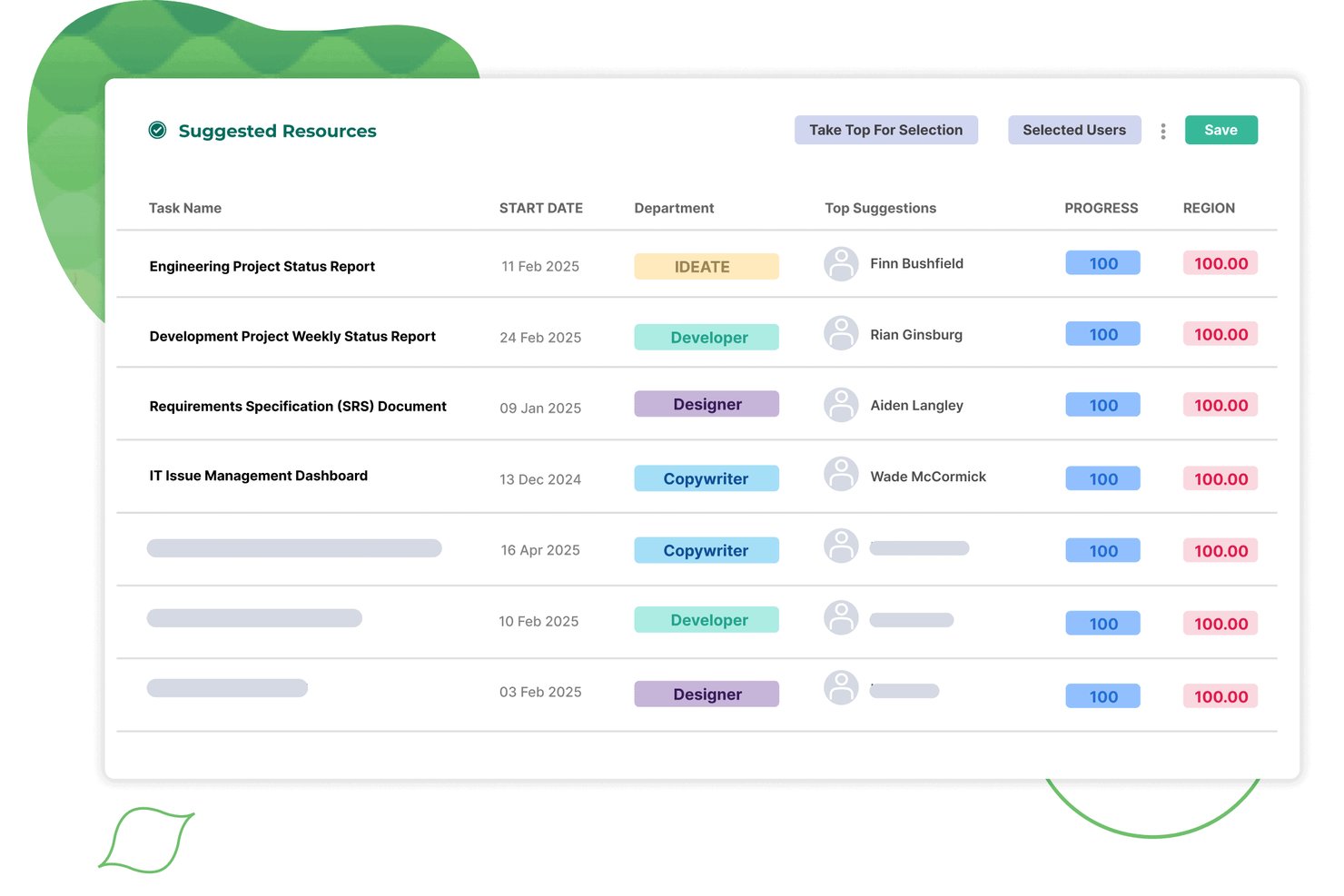
Screendragon is a resource management platform built for agency and client-services teams, combining capacity planning, resource allocation, utilization reporting, integrated timesheets, and demand forecasting in a single system.
Who Is Screendragon Best For?
Screendragon is a strong fit for mid-to-large agency and client-services teams that need resource planning, utilization tracking, and financial forecasting in one connected platform.
Why I Picked Screendragon
Screendragon earns its spot on my shortlist because it connects resource planning directly to financial outcomes, which most resource management tools don't do. I like how one-click planning converts a project plan into a full resource plan, with auto-assignment by skillset and live utilization reporting tied to revenue forecasting. In practice, that means agency teams can spot a capacity gap and model its financial impact without switching tools.
Screendragon Key Features
- Integrated timesheets: Timesheets link directly to live project plans and resource bookings, capturing both billable and non-project time like leave and training.
- AI-assisted resourcing: Embedded AI agents automate task assignment, optimize resource decisions, and log every action in a full audit trail.
- Pipeline-connected capacity forecasting: Future capacity views pull in pipeline data to surface demand gaps before projects are confirmed.
- Customizable KPI dashboards: Planners can build personalized dashboards that auto-aggregate portfolio data and schedule reports directly to stakeholders.
Screendragon Integrations
Screendragon offers native integrations with Microsoft Power BI, Jira Software, Slack, Microsoft Teams, NetSuite, SAP, Salesforce, Microsoft Dynamics 365, and PeopleSoft. Its Universal API Connector and developer portal support custom integrations.
Pros and Cons
Pros:
- Custom KPI dashboards for resource planners
- Utilization and revenue forecasting in one view
- One-click skill-based resource assignment
Cons:
- Lacks headcount scenario and hiring planning
- Designed for 30-plus user organizations
New Product Updates from Screendragon
Screendragon Unveils New AI Hub
Screendragon introduced AI Hub, a new capability that lets teams build and manage AI agents directly within workflows. The update helps marketing teams automate tasks, maintain governance controls, and scale AI-driven operations more efficiently. For more information, visit Screendragon's official site.

Best for fast team scheduling at scale
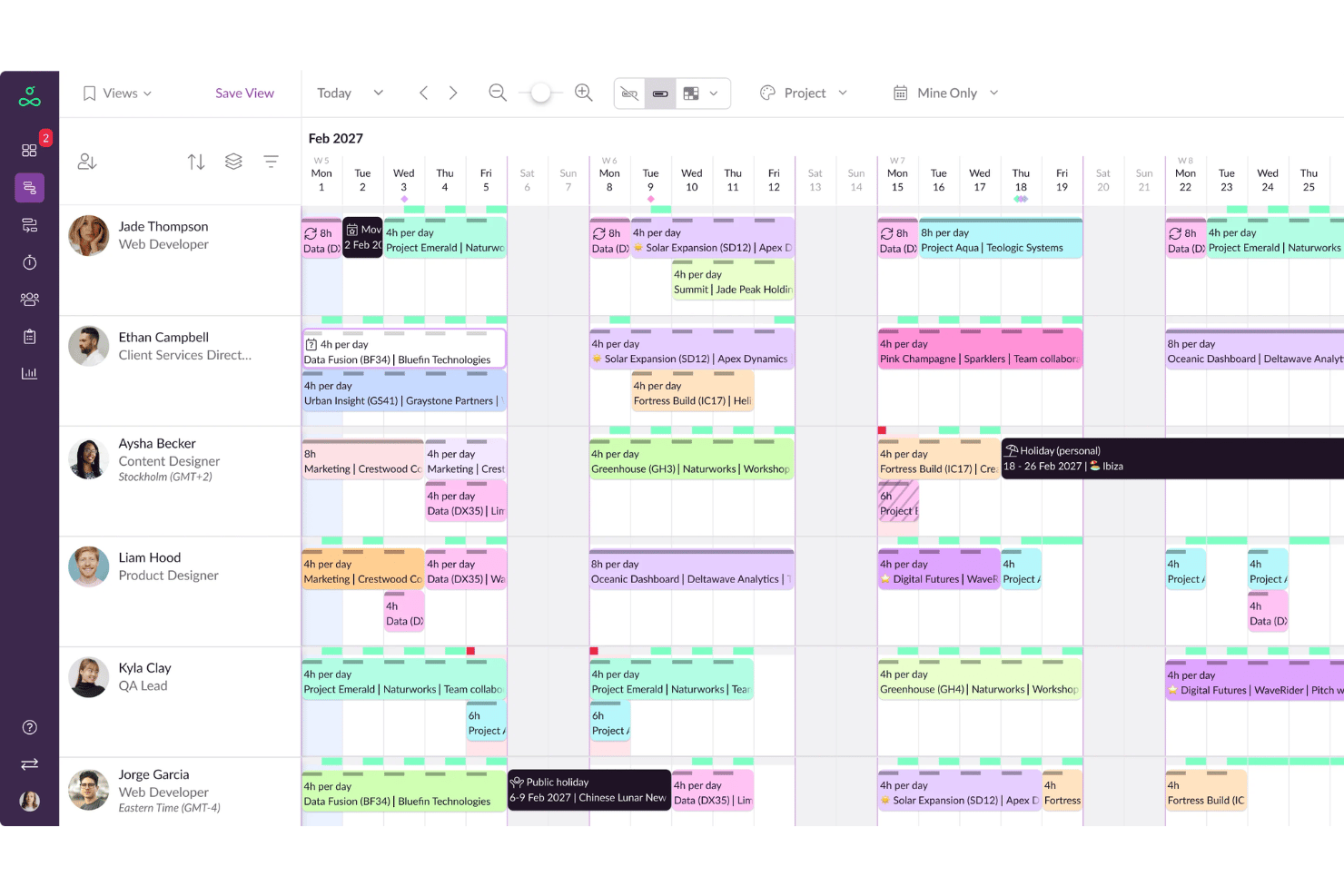
Resource Guru is a dedicated resource scheduling and capacity planning platform with drag-and-drop scheduling, availability tracking, leave management, utilization reporting, and timesheets.
Who Is Resource Guru Best For?
It's a strong fit for agencies, consultancies, and IT services teams that need clear visibility into who's available and when across multiple concurrent projects.
Why I Picked Resource Guru
Resource Guru earns its spot on my shortlist because of how fast scheduling moves across large teams. I like the real-time clash management, which flags overbooking the moment you make an assignment rather than after the fact. The waiting list feature is what sets it apart: when a resource hits full capacity, incoming bookings queue automatically instead of creating silent scheduling conflicts.
Resource Guru Key Features
- Project-level Gantt charts: Visualize project timelines and dependencies for easy tracking.
- Custom availability fields: Define unique working patterns or roles for people and resources.
- Integrated timesheets: Log and review hours worked directly within the scheduling interface.
- Leave management module: Track PTO, holidays, and sick days for accurate capacity planning.
Resource Guru Integrations
Resource Guru offers native integrations with Google Calendar, Outlook Calendar, Slack, Microsoft Teams, and Trello. It connects with Salesforce, Workday, Basecamp, QuickBooks, Google Sheets, and Zapier. An API is available for custom integrations.
Pros and Cons
Pros:
- Flexible resource types including equipment and rooms
- Instant conflict alerts for double-bookings
- Great for tracking availability across departments
Cons:
- Reporting is basic compared to enterprise tools
- Limited native skills or competency tracking
New Product Updates from Resource Guru

Resource Guru Adds More Control Over Calendar Sync
Resource Guru adds more control over Google and Outlook Calendar sync, including source calendar selection and destination calendar options. These updates help users manage external events and Resource Guru bookings with less clutter. For more information, visit Resource Guru’s official site.
 .
.
Best for linking budgets with staff allocation
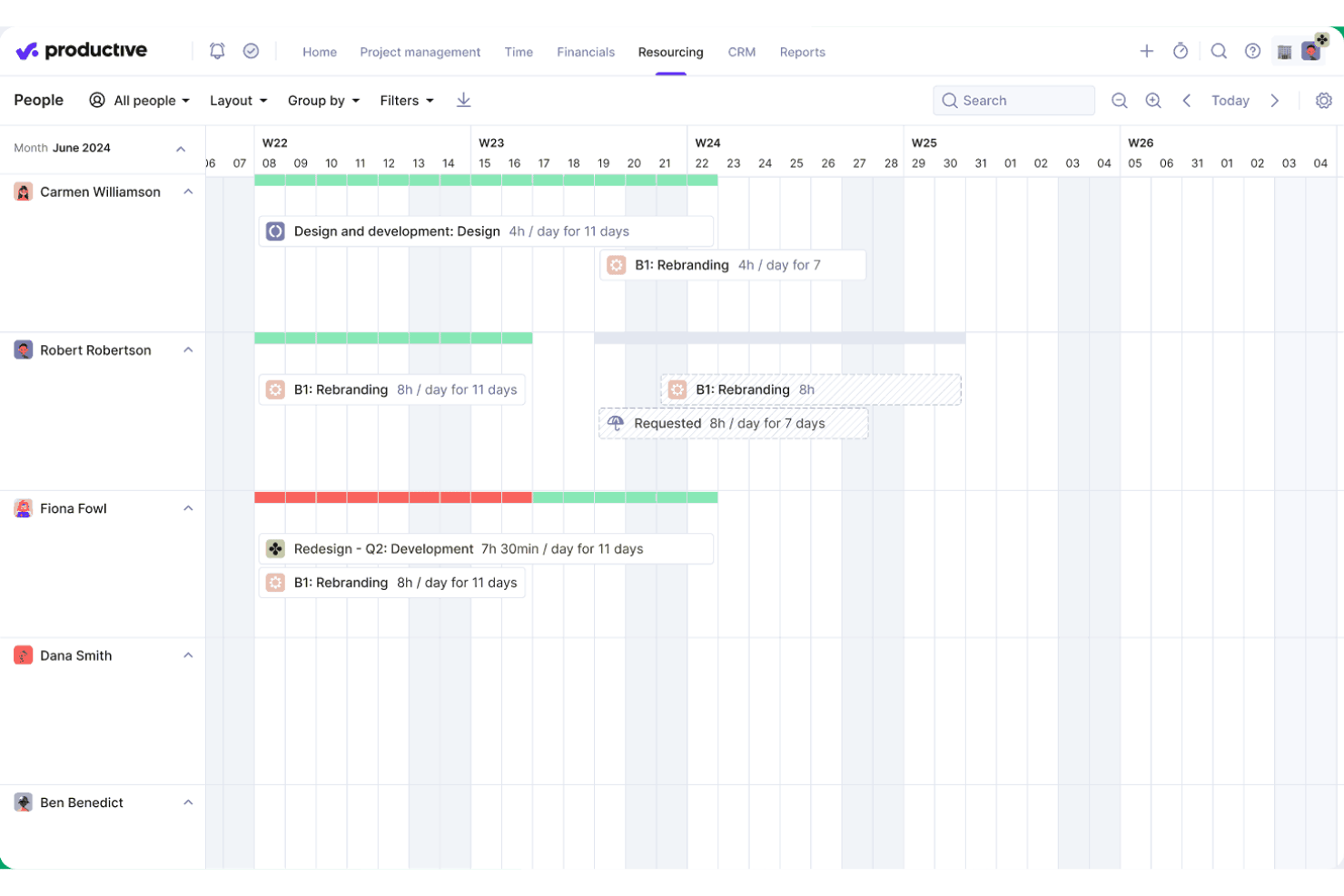
Productive is an agency-focused platform that brings resource planning, project management, time tracking, budgeting, and utilization reporting together in one system.
Who Is Productive Best For?
Productive is a strong fit for agencies and professional services firms that need to manage billable staff across multiple client projects at once.
Why I Picked Productive
I've included Productive in my top picks because no other tool I've used ties scheduled staff hours directly to live budget and profitability data the way it does. When my team books someone onto a project in the Resource Planner, that allocation immediately updates our cost forecasts and margin projections. The Scenario Builder then lets us model different staffing configurations before committing, so we can see the budget impact of each option side by side.
Productive Key Features
- AI-driven resource requests: Automatically suggests the best available team members for upcoming projects based on skill and availability.
- Skills database: Lets you maintain a structured inventory of staff skills, certifications, and proficiencies.
- Integrated time off tracking: Approved PTO and holiday requests immediately sync to resource planning views.
- Advanced reporting intelligence: Delivers detailed, customizable analytics on team utilization, capacity, and project metrics.
Productive Integrations
Productive offers native integrations with Jira, HubSpot, Xero, QuickBooks, Sage, BambooHR, hiBob, Personio, Slack, and Google Calendar. It also supports Zapier and provides an API for custom integrations.
Pros and Cons
Pros:
- Skills matrix for talent deployment
- Scenario modeling for staffing allocation
- Real-time project budget impact tracking
Cons:
- Limited workforce planning outside billable projects
- Designed primarily for agency workflows
New Product Updates from Productive
Productive Adds Voice Dictation, Slack Connector, Proposals, and Overtime
Productive adds voice dictation, a Slack Connector, proposal controls, and overtime tracking. These updates support faster AI interactions, client proposals, and time management. For more information, visit Productive’s official site.

Scoro
Best for combining project tracking with billing
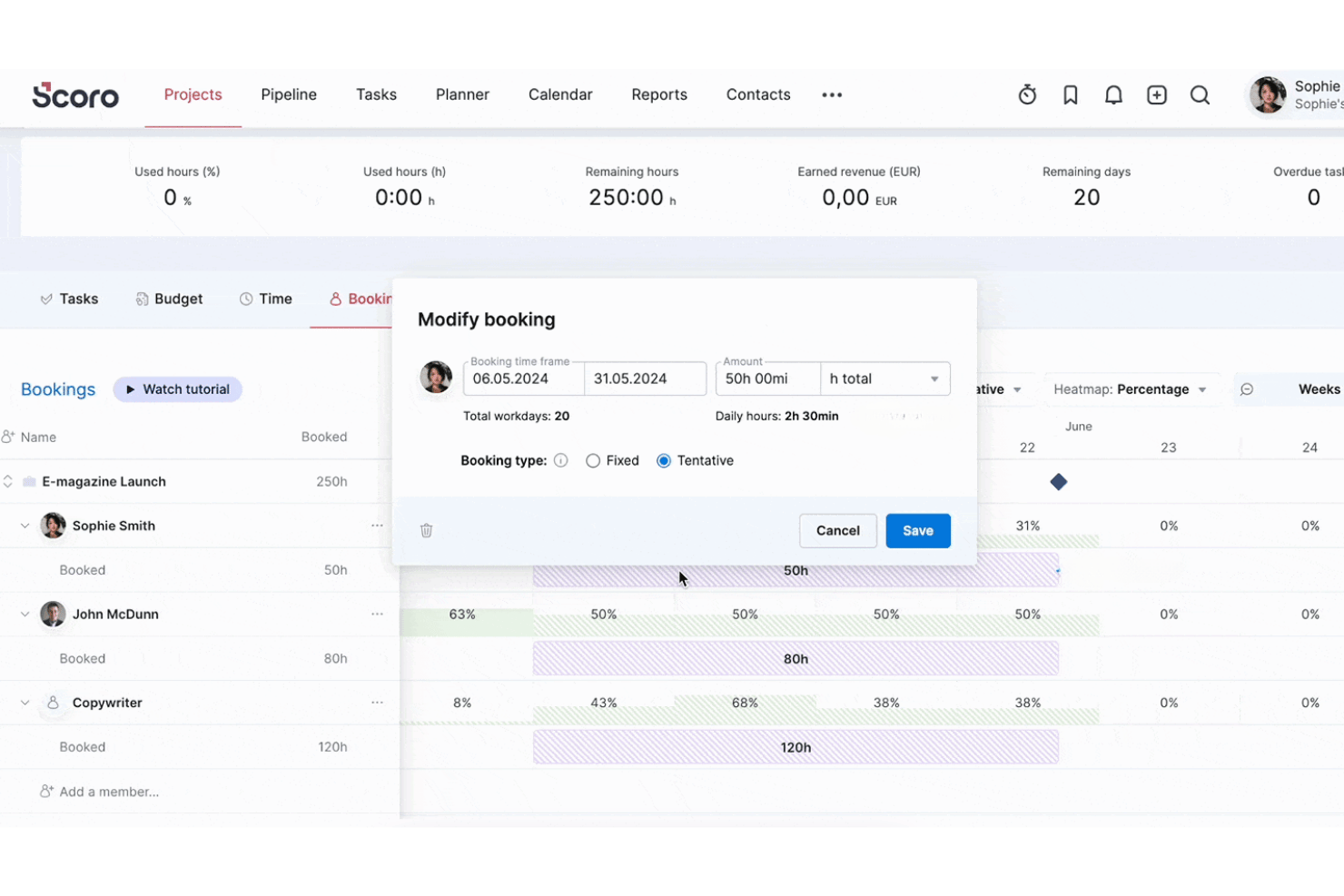
Scoro is a professional services automation platform that brings together resource planning, capacity forecasting, time tracking, project management, and invoicing in a single connected system.
Who Is Scoro Best For?
Scoro is a strong fit for agencies, consultancies, and other project-based services firms that need to manage resourcing and project finances in one place.
Why I Picked Scoro
I've included Scoro in my top picks because it's one of the few resource management tools that directly connects resourcing to billing. When I schedule a team member in the Planner, that time feeds straight into invoicing, whether the project runs on a fixed fee, time-and-materials, or retainer basis. I also like that cost and profit forecasts update in real time as bookings change, so I can see margin impact before I commit a resource to a project.
Scoro Key Features
- Role-based resource planning: Assign team members to roles and track their availability and workload across multiple projects.
- Utilization reporting dashboard: Monitor billable and non-billable hours, with built-in filters for teams, roles, and periods.
- Time off and holiday management: Track staff absences and holidays to keep scheduling accurate.
- Integrated project Gantt charts: Visualize all tasks and dependencies in a timeline view for better project coordination.
Scoro Integrations
Scoro offers native integrations with Google Calendar, Apple Calendar, MS Exchange, Google Drive, Dropbox, HubSpot, Salesforce, QuickBooks, Xero, Exact Online, Expensify, and Stripe. It also connects with Zapier and provides an API for custom integrations.
Pros and Cons
Pros:
- Built-in utilization and workload heatmaps
- Real-time margin and profit forecasting tools
- Links resource planning directly to project billing
Cons:
- Lacks HRIS or workforce analytics features
- No structured skills or competency matrix
New Product Updates from Scoro

Scoro Adds Time Mobile App and ELI Improvements
Scoro adds the Scoro Time mobile app for iOS/Android to track time anywhere and expands ELI with attachments, smarter filtering, and trigger-based actions. For more information, visit Scoro's official site.

Epicflow
Best for optimizing multi-project environments
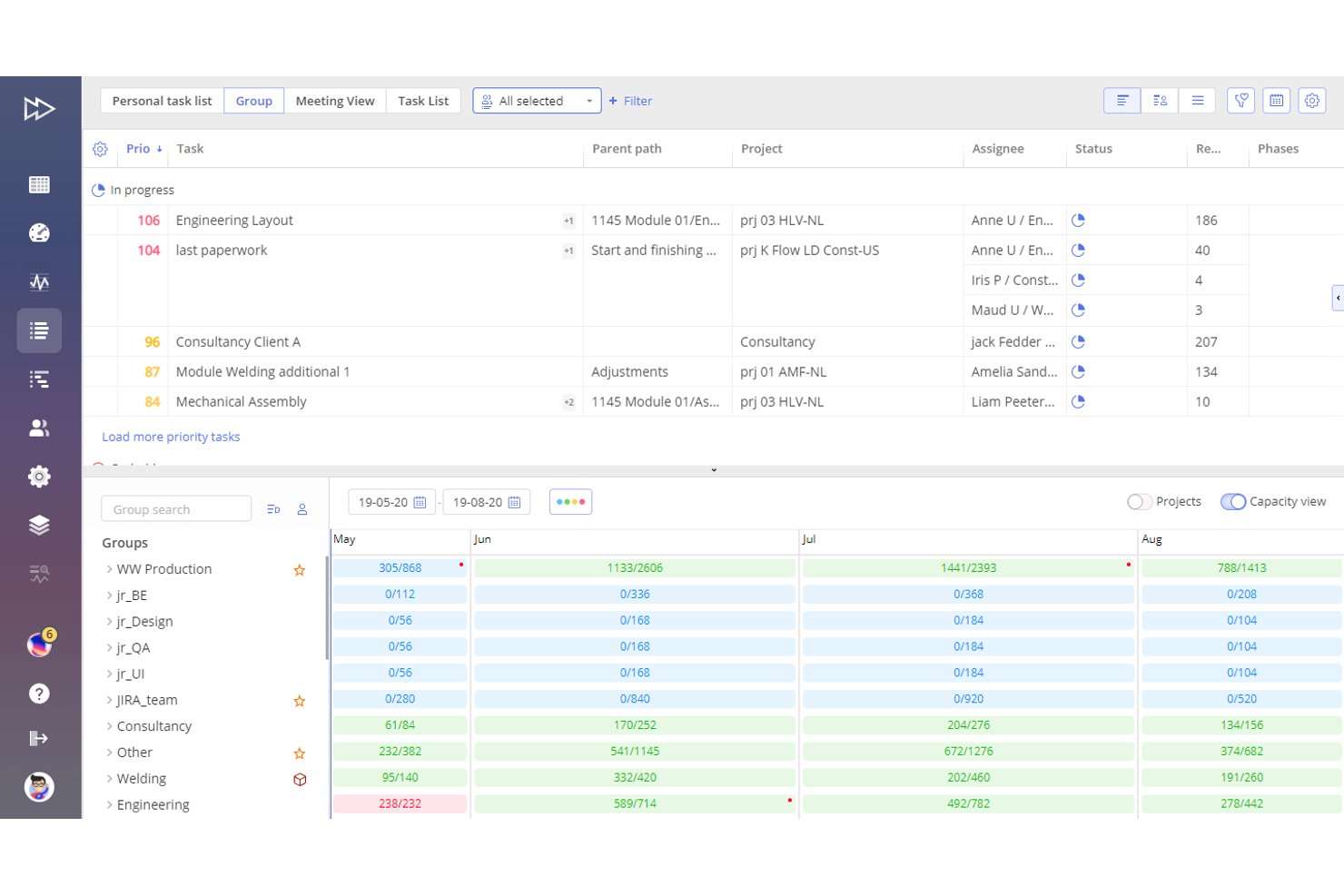
Epicflow is an AI-powered resource management and portfolio optimization platform built on the Theory of Constraints that combines multi-project scheduling, workload balancing, capacity planning, and skills-based resource allocation.
Who Is Epicflow Best For?
Epicflow is a strong fit for portfolio managers and PMO leaders in engineering, defence, and manufacturing organizations running large volumes of interconnected projects with shared specialist resources.
Why I Picked Epicflow
I picked Epicflow as one of the best because no other tool handles overlapping projects across a shared resource pool quite like it. The What-If Analysis lets me simulate the downstream impact of shifting one project's priority before committing to the change, which matters when a key engineer is already spread across four active workstreams. The Future Load Graph then surfaces capacity bottlenecks weeks in advance, so I can rebalance assignments before they become delivery risks.
Epicflow Key Features
- Epica AI Assistant: An integrated AI tool that provides insights, warnings, notifications, and step-by-step process guidance.
- Task list with auto-prioritization: Automatically creates and adjusts a prioritized task list based on real-time project data and resource constraints.
- Competence and attribute management: Allows you to match tasks to resources using a structured database of skills, competencies, and attributes.
- Integration with PM and ERP tools: Connects with Jira, SAP, MS Project, Oracle Primavera, and other platforms through APIs and CSV import/export.
Epicflow Integrations
Epicflow offers native integrations with Jira, Microsoft Project, SAP, Oracle Primavera, and Workfront, and provides an API for custom integrations. CSV import and export are also supported.
Pros and Cons
Pros:
- Auto-prioritizes tasks by portfolio demand
- Advanced workload forecasting and bottleneck prediction
- Handles overlapping projects with shared resources
Cons:
- Limited HR or payroll system connectivity
- No built-in PTO or leave tracking

Float
Best for live project timeline visualization
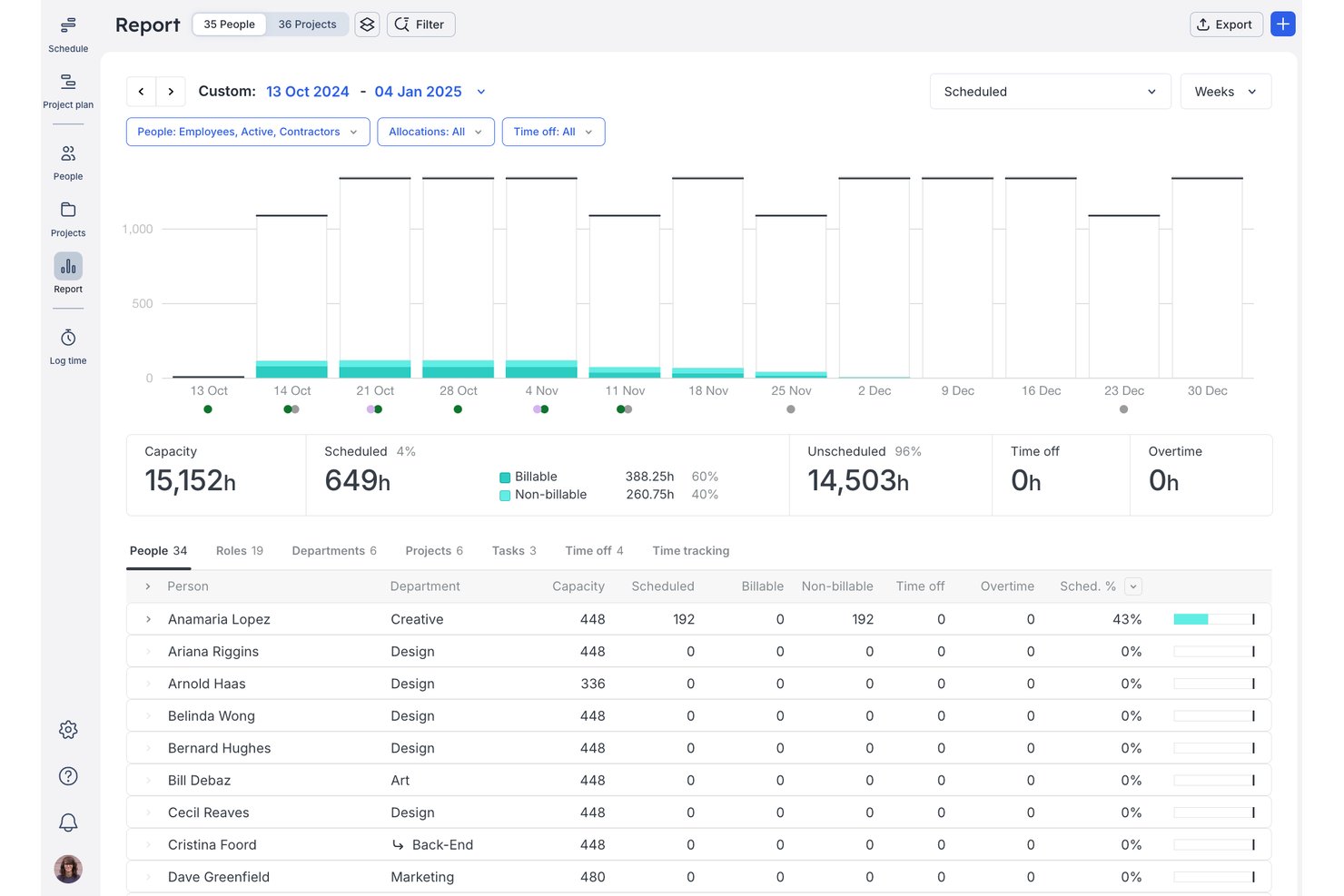
Float is a resource management platform for professional services teams that combines visual scheduling, capacity planning, time tracking, and utilization reporting.
Who Is Float Best For?
Float suits small-to-mid-size agencies and consulting firms where operations leads need a clear, real-time view of who's working on what across multiple client projects.
Why I Picked Float
I picked Float as one of the best because its live drag-and-drop timeline gives you an always-current view of every person, project, and allocation in one place. Colour-coded capacity bars flag over-allocated team members the moment you adjust a booking. Smart Assign then surfaces who's actually available based on skills, role, and remaining capacity, so you're not guessing when staffing a new project.
Float Key Features
- Multi-currency project support: Assign budgets and rates in up to five currencies for global projects.
- Prefilled and auto-logged timesheets: Capture actual hours worked and compare them to planned allocations.
- Role-based permission settings: Control access to project information and schedule management by user role.
- iOS and Android apps: Manage schedules, make updates, and view team allocations from mobile devices.
Float Integrations
Float offers native integrations with Asana, Jira, Trello, Google Calendar, Outlook Calendar, Slack, ClickUp, Teamwork, Basecamp, and Linear, and it connects with Zapier and has an API for custom integrations.
Pros and Cons
Pros:
- Smart Assign automates project staffing suggestions
- Colour-coded team capacity and availability views
- Real-time drag-and-drop scheduling board
Cons:
- Lacks skill proficiency and certification tracking
- No built-in HR or employee records

Ganttic
Best for visual planning across global teams
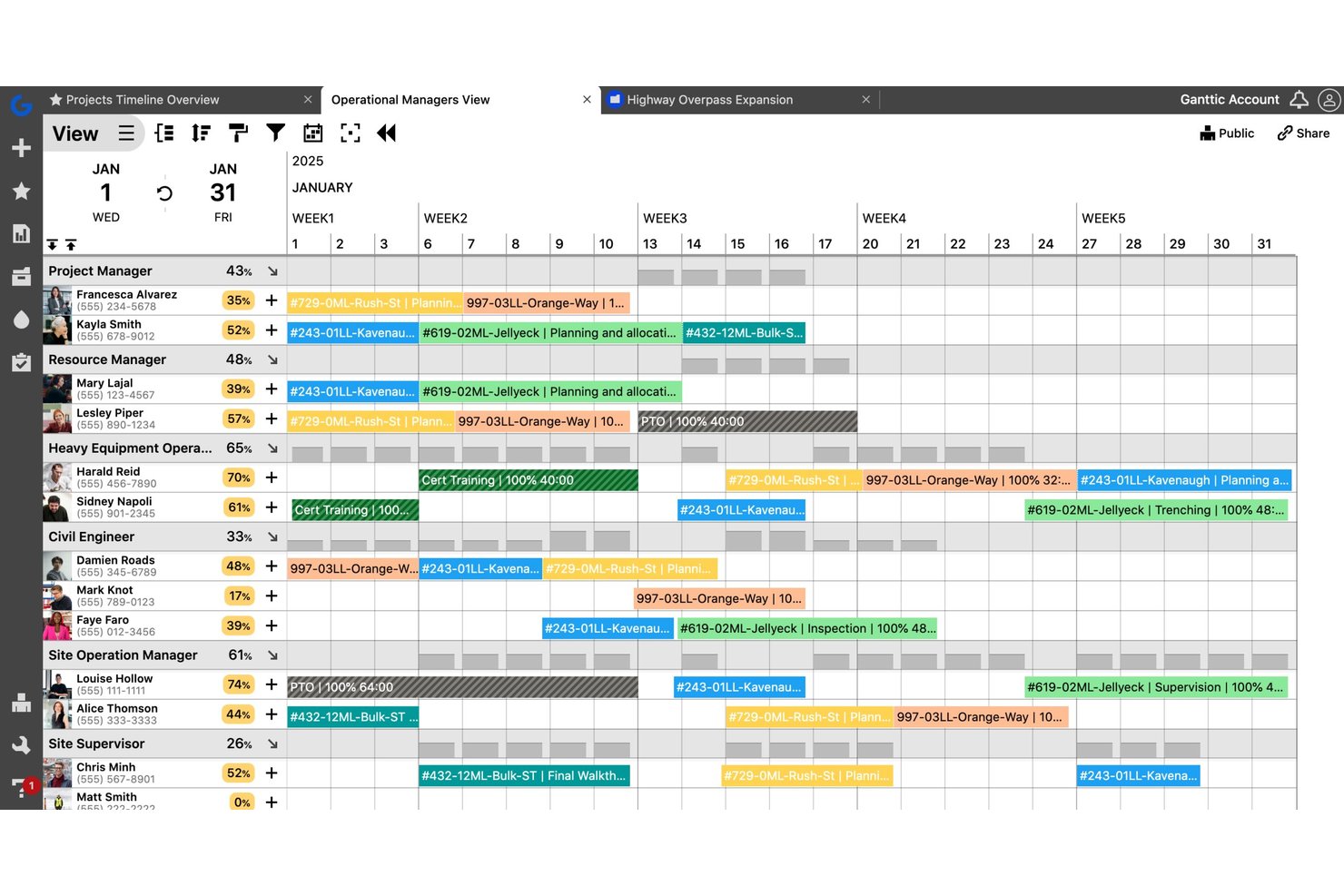
Ganttic is a visual resource planning tool that lets teams schedule people, equipment, and facilities across projects using drag-and-drop Gantt charts, capacity tracking, and utilization reporting.
Who Is Ganttic Best For?
Ganttic suits project managers and operations teams in industries like engineering, construction, and media who coordinate multiple concurrent projects across shared resources.
Why I Picked Ganttic
I picked Ganttic as one of the best because of how its dual-perspective Gantt view works in practice. I can flip between a resource-centric view and a project-centric view in the same interface, which is genuinely useful when coordinating teams across time zones. The ability to filter and group resources by custom fields, like region or department, keeps global planning organized without creating separate plans for each location.
Ganttic Key Features
- Automated utilization tracking: Track resource workload and utilization levels automatically across all projects and teams.
- Multi-resource and concurrent task scheduling: Assign multiple people or equipment to a single task while avoiding double-booking.
- Custom data fields for resources: Add unique fields to resources, projects, and tasks to support specific workflow requirements.
- API and integration options: Connect with Google Calendar, Outlook, Slack, and more using built-in connectors or the public API.
Ganttic Integrations
Ganttic offers native integrations with Google Calendar, Microsoft Outlook, and OneLogin. It connects with Zapier and provides an API for custom integrations.
Pros and Cons
Pros:
- Handles people and equipment scheduling together
- Flexible custom data fields for resources
- Visual Gantt-style resource planning interface
Cons:
- Limited approval and request workflows
- No native skills or competency tracking

Parallax
Best for aligning resources to revenue goals
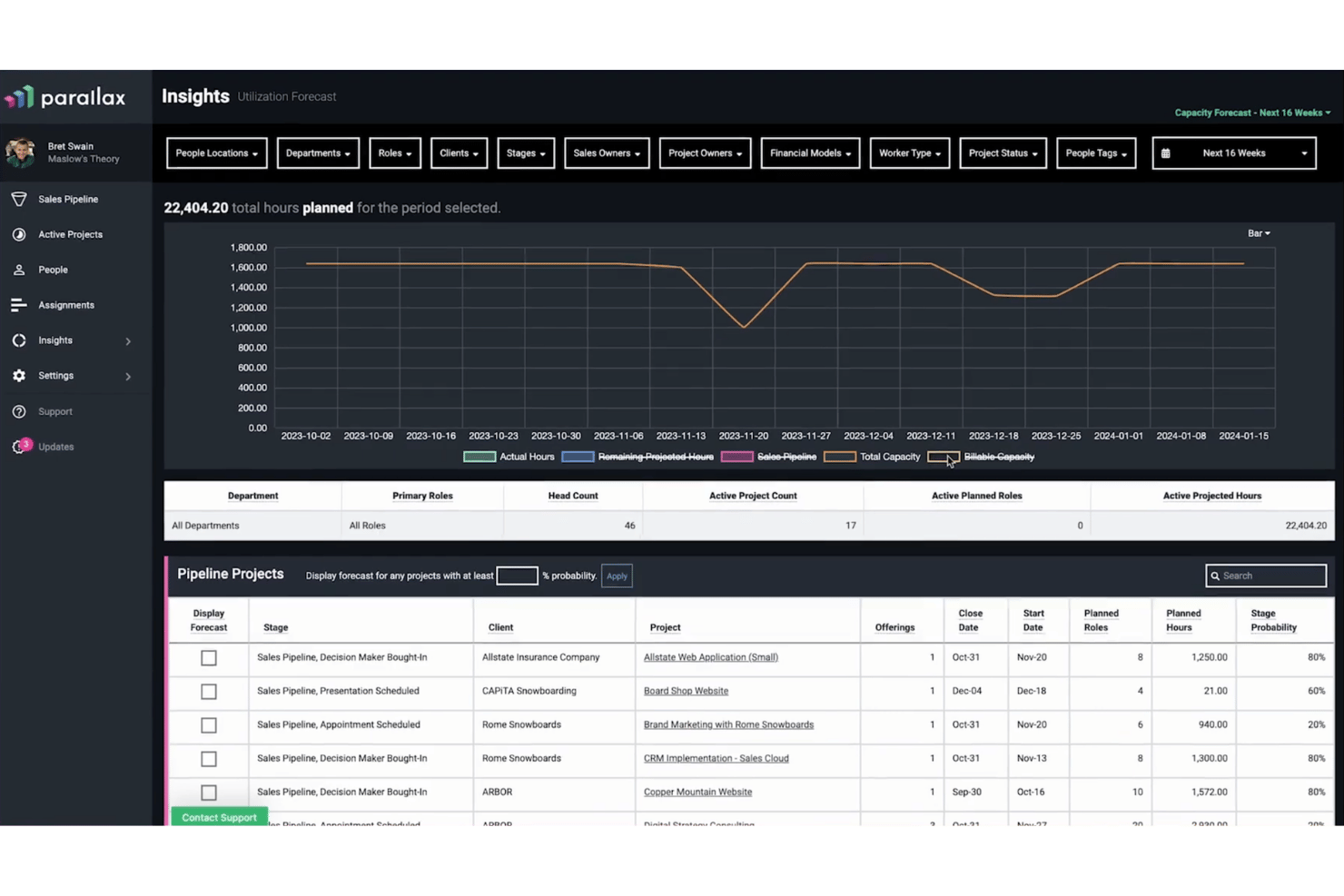
Parallax is a resource management and forecasting platform built for professional services firms, combining capacity planning, utilization tracking, staffing foresight, and project financial visibility in one place.
Who Is Parallax Best For?
Parallax is a strong fit for digital agencies and software consultancies that need to connect staffing decisions directly to project margins and revenue targets.
Why I Picked Parallax
I've included Parallax in my top picks because it's one of the few resource management tools that ties staffing decisions directly to revenue outcomes. I particularly like the Margin Control feature, which monitors project margins in real time and flags issues before they compound. Combine that with Staffing Foresight, which uses CRM pipeline data alongside active project load to give my team a forward-looking view of capacity and revenue in one place.
Parallax Key Features
- Visual workforce planner: See team capacity and workloads across multiple time horizons using colour-coded visualizations.
- Role and skill filtering: Filter workforce views by project role, skill set, or team for detailed resource matching.
- Integrated timesheets: Log actual hours worked directly within Parallax or through integrations like Harvest or Jira.
- Pipeline forecasting: Merge CRM pipeline data with active projects to forecast demand, capacity, and revenue.
Parallax Integrations
Parallax offers native integrations with Harvest, HubSpot, Asana, Jira, Microsoft Teams, Slack, NetSuite, and Salesforce Platform. An API is available for custom integrations.
Pros and Cons
Pros:
- Visualizes team bandwidth months in advance
- Connects forecasted demand to staffing plans
- Tracks utilization and capacity in real time
Cons:
- Custom report exports are not supported
- Limited depth for skill matrix tracking

Runn
Best for real-time scenario planning
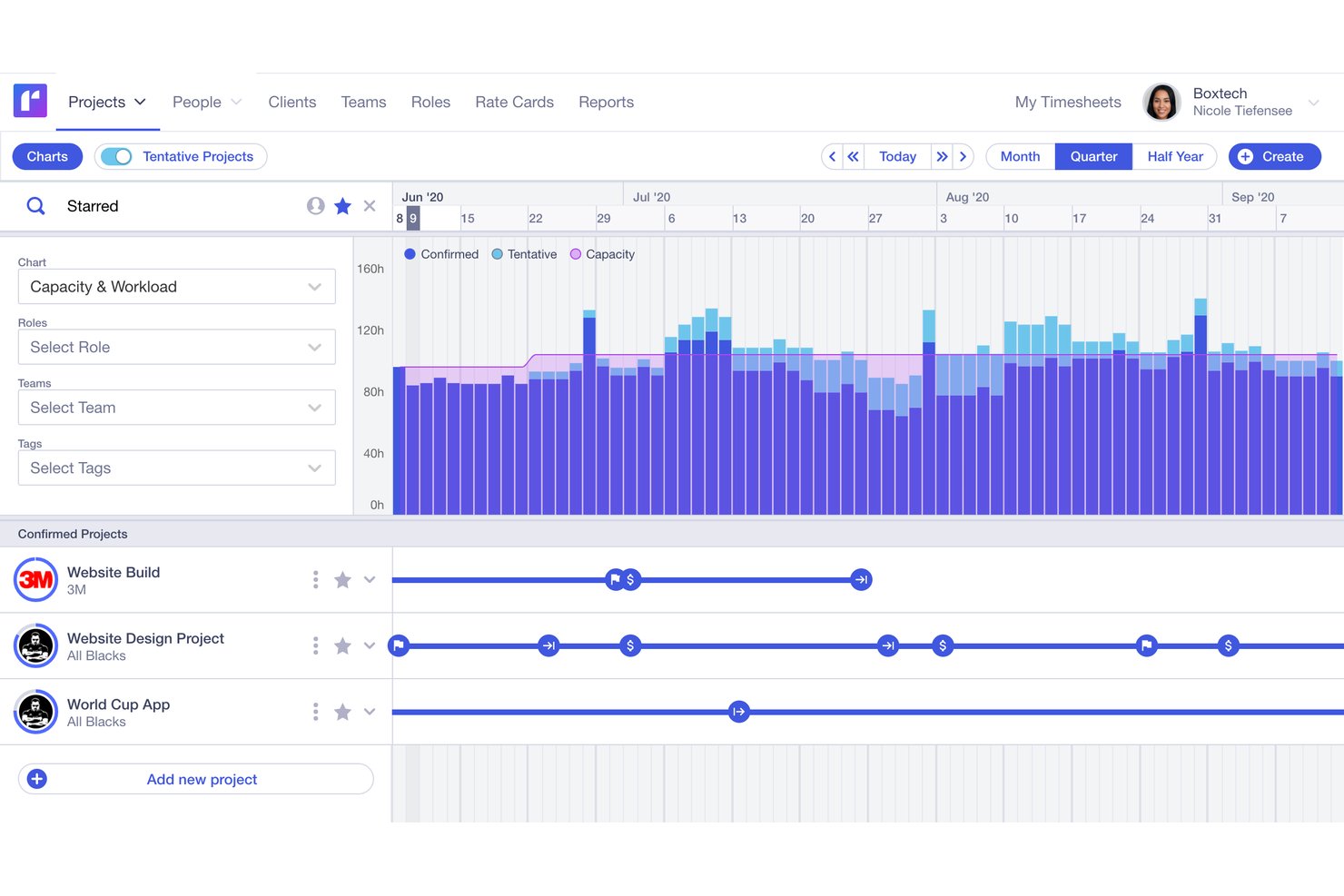
Runn is a resource management platform that integrates visual scheduling, capacity forecasting, utilization reporting, timesheet tracking, and project financials into one planning tool.
Who Is Runn Best For?
Runn is a strong fit for professional services firms, consulting agencies, and IT teams that need to manage project-based workforces across multiple concurrent engagements.
Why I Picked Runn
Runn earns its spot on my shortlist because of how it handles real-time what-if planning. I can build multiple saved scenarios side by side, swapping resources between tentative projects to see how capacity shifts before committing to any plan. The combination of placeholder resources and live capacity charts means my team can model a new client engagement against current workloads without touching the live schedule.
Runn Key Features
- Multi-view scheduling: Switch between monthly, quarterly, or half-yearly layouts to plan across different time horizons.
- Integration marketplace: Connect to HR systems like BambooHR and time trackers like Harvest through built-in integrations.
- Custom reporting dashboards: Build private dashboards with advanced filtering and export project data for further analysis.
- Project financials tracking: Manage budgets, rate cards, and compare planned versus actuals directly within the tool.
Runn Integrations
Runn offers native integrations with BambooHR, HiBob, Humaans, ADP Workforce Now, Workday, Jira, Harvest, and Clockify, and connects with Zapier. An API is available for custom integrations.
Pros and Cons
Pros:
- Placeholder resources for pipeline and hiring planning
- Visual scheduling across multiple time horizons
- Real-time scenario planning for project resources
Cons:
- No dedicated mobile app available
- Custom reports are difficult to configure

Mosaic
Best for AI-driven workload balancing
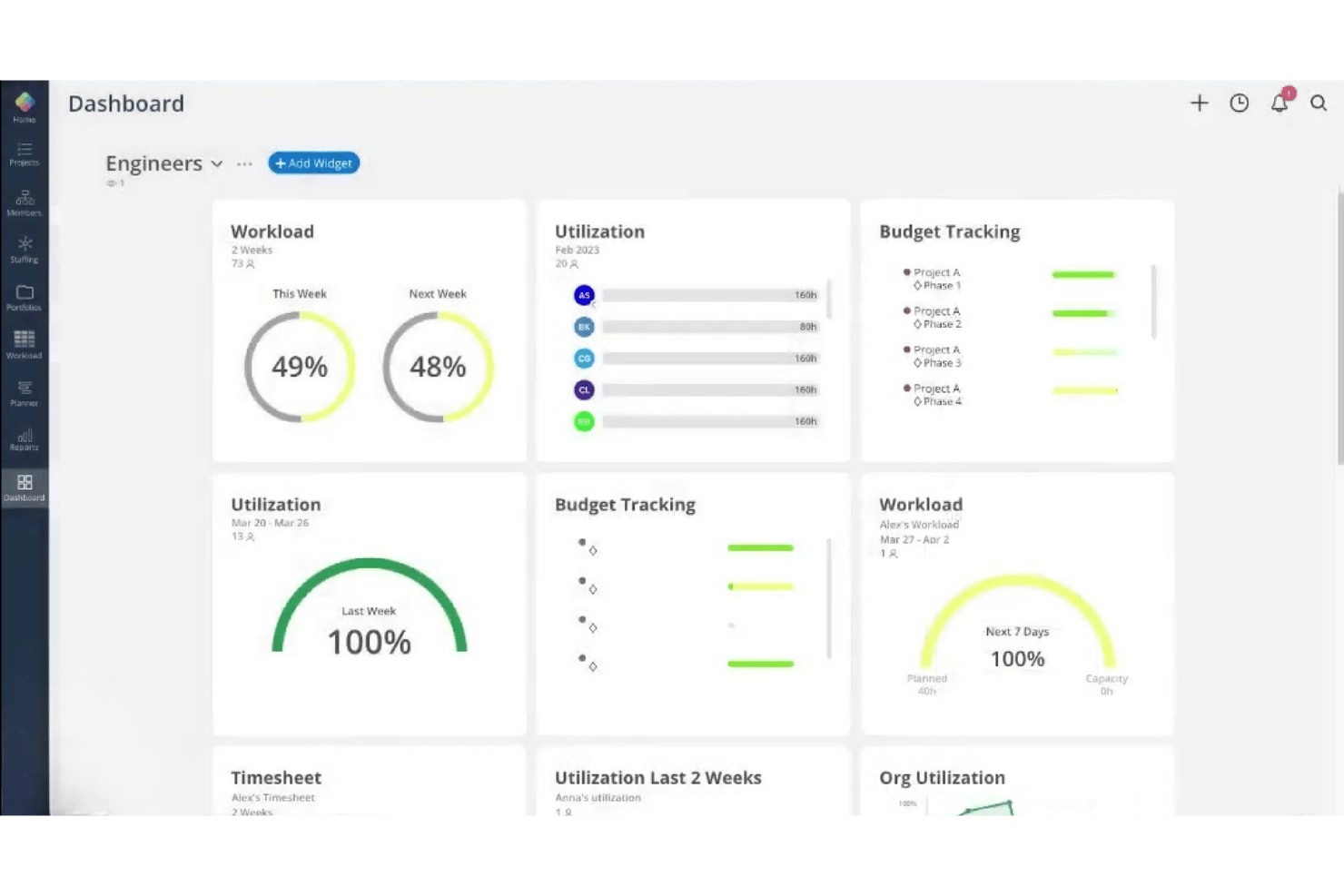
Mosaic is an AI-powered resource management platform built for project-based teams, combining resource allocation, capacity planning, workload forecasting, utilization reporting, and time tracking in one place.
Who Is Mosaic Best For?
Mosaic is a strong fit for small to midsize project-based firms in architecture, engineering, and creative services that need to manage team capacity across multiple concurrent projects.
Why I Picked Mosaic
I picked Mosaic as one of the best because its AI assistant, Chello, actively monitors project workloads and surfaces risks before they become problems. I like that it automatically flags deadline drift and chases missing updates, so I'm not manually checking every project thread. The automated rescheduling feature adjusts work plans in real time when priorities shift, keeping the whole team's workload in balance.
Mosaic Key Features
- Role-based project assignment: Assign team members to specific roles on projects according to skills and capacity.
- Gantt and Kanban view: Choose between multiple visual project views to manage timelines and task progress.
- Utilization and profit reporting: Monitor employee utilization rates alongside project profitability metrics in dashboard reports.
- Integrated time tracking: Log hours and manage timesheets within the same platform as resource scheduling and project planning.
Mosaic Integrations
Mosaic offers native integrations with Asana, Jira, Slack, Microsoft 365, Microsoft Outlook, Dropbox Business, Gmail, QuickBooks, Deltek Vision, Deltek Ajera, and Deltek Vantagepoint. An API is available for custom integrations.
Pros and Cons
Pros:
- Visual dashboards for utilization and forecasting
- Automated rescheduling when project priorities shift
- AI assistant proactively manages team workloads
Cons:
- Not tailored for HR-focused workforce planning
- Limited skills matrix for talent allocation
Annen programvare for ressursstyring
Her er noen flere alternativer for programvare for ressursstyring som ikke kom med på kortlisten min, men som likevel er verdt å se nærmere på:
- Kantata
For managing complex client deliverables
- Saviom
For advanced enterprise-level customization
- Hub Planner by Milient
For timesheets and approval workflows
- Wrike
For customizable workload views
- Celoxis
For integrated capacity planning and tracking
- Teamwork.com
For agency collaboration with clients
- Accelo
For unified client work management
- ClickTime
For tracking billable resource hours
- Birdview PSA
For project portfolio resource insights
- Resource Management by Smartsheet
For pre-built schedule templates


How I Evaluate Resource Management Software
I split my evaluation into core functionality every tool must nail—like capacity planning and utilization reporting—and the differentiators that make one platform worth choosing over another.
Core Functionality (Table Stakes For This List)
When I'm selecting tools for my list, I rank each one on a scale from 0 (does not offer the functionality) to 5 (excels in this area) for each core functionality listed below. Then, I calculate the tool's total score as a percentage. Each tool needs to achieve a minimum total score of 65% to be considered for inclusion.
- Resource Allocation & Scheduling: I look for drag-and-drop visual schedulers that flag conflicts when two projects compete for the same person during the same sprint.
- Capacity Planning: Each tool should show real-time capacity against upcoming demand so you can spot a bench surplus or staffing gap weeks ahead.
- Skills & Competency Tracking: I check whether you can search by certification, proficiency level, or role type to match the right person to incoming project needs.
- Utilization Reporting: Dashboards should break down billable vs. non-billable hours by team or individual so managers can act on utilization trends, not just view them.
- Time & Availability Tracking: I evaluate whether timesheets integrate PTO, holidays, and calendar sync to reflect true availability rather than just scheduled hours.
- Demand Forecasting: The platform should let you model future project pipelines with tentative allocations so hiring decisions stay ahead of actual demand.
Once I have a list of tools that meet the criteria, I consider what sets each platform apart.
Differentiating Factors (What Sets Vendors Apart)
Here's how I compare and contrast different vendors:
Standout Features
Capacity heatmaps matter because they let you spot overloaded or idle team members at a glance, which is far faster than scanning rows of data. I also look for scenario planning sandboxes where you can model a potential deal's staffing impact without touching live schedules. Financial forecasting rounds this out by tying staffing decisions directly to revenue and margin projections, so you can see whether pulling a developer off one project to cover another actually makes financial sense.
Beyond Features
Tech stack integrations are a big one—I check whether the platform syncs two-way with tools like Asana, Jira, or monday.com, plus accounting systems like QuickBooks or Xero. Pricing structure matters too, especially whether non-billable stakeholders like executives count as paid seats, which can inflate costs quickly as your team grows. I also evaluate reporting and executive visibility, since pre-built utilization and profitability reports save you from building dashboards from scratch every time leadership asks for an update.
Slik velger du programvare for ressursstyring
Det er lett å gå seg vill i lange funksjonslister og komplekse prisstrukturer. For å hjelpe deg med å holde fokus mens du går gjennom den unike prosessen din for valg av programvare, får du her en sjekkliste over faktorer du bør ha i tankene:
| Faktor | Hva du bør vurdere |
|---|---|
| Skalerbarhet | Vil programvaren fortsatt fungere for deg når arbeidsstyrken, prosjektmengden eller regionene dine utvides over tid? |
| Integrasjoner | Synkroniserer løsningen sømløst med plattformene dine for prosjektstyring, økonomi, HRIS og kalendere? |
| Tilpasningsmuligheter | Kan du tilpasse arbeidsflyter, roller eller visninger slik at de passer organisasjonsstrukturen din – ikke bare standardinnstillingene? |
| Brukervennlighet | Vil teamledere og ikke-tekniske brukere umiddelbart forstå hvordan de oppretter tidsplaner og kjører rapporter? |
| Implementering og innføring | Hvor lang tid tar det – fra registrering til planlegging av den første vakten – og hvilken opplæring tilbys? |
| Kostnad | Finnes det skjulte kostnader for tillegg, eller vil prisen øke kraftig hvis du legger til nye avdelinger? |
| Sikkerhetstiltak | Støtter løsningen personvernbehovene i bransjen din og gir den kontroll over hvem som får tilgang til sensitiv informasjon? |
| Interne ressursbehov | Har du tilstrekkelig intern IT- eller administrasjonskapasitet til å håndtere oppsett, brukertillatelser og løpende brukerstøtte? |
Hva er programvare for ressursstyring?
Programvare for ressursstyring er en digital plattform som hjelper organisasjoner med å tildele personer til prosjekter, følge med på tilgjengelighet og balansere arbeidsbelastningen basert på ferdigheter og behov. Disse verktøyene gir HR- og driftsteam sanntidsinnsikt i kapasitet, utnyttelsesgrad og planleggingskonflikter, slik at de kan planlegge fremover og unngå å overbelaste eller underutnytte medarbeidere.
Funksjoner i programvare for ressursstyring
Når du velger programvare for ressursstyring, bør du se etter følgende viktige funksjoner:
- Ressursplanlegging: Tildel personer til prosjekter, oppgaver eller skift ved hjelp av visuelle verktøy som kalendere eller dra-og-slipp-grensesnitt, slik at du raskt kan justere planene etter hvert som behovene endrer seg.
- Kapasitetsplanlegging: Følg med på teamets og enkeltpersoners kapasitet opp mot prosjektbehovene for å unngå overbelastning og identifisere hvor det kan være behov for ekstra hjelp eller ansettelser.
- Kompetanseoversikt: Oppretthold søkbare profiler med hver persons ferdigheter, sertifiseringer og erfaring, slik at det blir enkelt å finne den som passer best til enhver oppgave.
- Rapportering av ressursutnyttelse: Følg med på fakturerbare og ikke-fakturerbare timer, identifiser underutnyttede teammedlemmer og analyser arbeidsbelastningen med oversikter og detaljerte rapporter.
- Registrering av tid og tilgjengelighet: Registrer arbeidstid, ferier, helligdager og andre typer fravær for å få et korrekt bilde av når ansatte er tilgjengelige for oppgaver.
- Etterspørselsprognoser: Modellér kommende prosjektporteføljer eller forretningsbehov for å sikre at du har riktig bemanning og kompetansesammensetning klar før arbeidet kommer inn.
- Konfliktdeteksjon: Få automatiske varsler når to prosjekter konkurrerer om den samme ressursen, slik at du kan løse reservasjonskonflikter på forhånd.
- Tilpassbare tillatelser: Angi tilgangsnivåer og synlighet basert på rolle eller avdeling for å beskytte sensitiv informasjon og støtte ulike godkjenningsprosesser.
- Rapportering og analyse: Eksporter eller visualiser viktig innsikt om ressursutvikling, slik at HR- og driftsledere kan ta velinformerte beslutninger og kommunisere tydelig med interessenter.
Vanlige AI-funksjoner i programvare for ressursstyring
I tillegg til standardfunksjonene i programvare for ressursstyring som er nevnt ovenfor, tar mange av disse løsningene i bruk kunstig intelligens med funksjoner som:
- Automatisert ressurstildeling: Kunstig intelligens analyserer prosjektkrav, ferdigheter og tilgjengelighet for å foreslå de best egnede teammedlemmene til hver oppgave, noe som reduserer behovet for manuell planlegging.
- Prediktiv kapasitetsprognostisering: Maskinlæringsmodeller forutser fremtidige arbeidstopper eller kapasitetsmangler ved å analysere historiske data, slik at du kan planlegge ansettelser eller omfordelinger på forhånd.
- Intelligent konfliktløsning: Kunstig intelligens oppdager mulige planleggingskonflikter og anbefaler optimale justeringer, slik at du kan løse problemer før de påvirker prosjektets tidsplan.
- Analyse av kompetansegap: Kunstig intelligens vurderer nåværende og kommende prosjektbehov opp mot kompetanseoversikten for arbeidsstyrken din, fremhever mangler og foreslår målrettet opplæring eller rekruttering.
- Prognoser for utvikling i ressursutnyttelse: Algoritmer beregner forventede utnyttelsesgrader basert på tidligere mønstre, noe som muliggjør proaktiv balansering av arbeidsbelastningen og reduserer risikoen for utbrenthet eller perioder uten oppgaver.
Fordeler med programvare for ressursstyring
Implementering av programvare for ressursstyring gir flere fordeler for teamet og virksomheten din. Her er noen av fordelene du kan se frem til:
- Bedre prosjektfordeling: Tildel ansatte til de riktige prosjektene basert på ferdigheter, tilgjengelighet og forretningsbehov, og reduser feilmatchinger og dødtid.
- Bedre balanse i arbeidsbelastningen: Visuell planlegging og sanntidsvarsler om konflikter bidrar til å forhindre overbelastning, utbrenthet og for mye tid uten oppgaver i arbeidsstyrken.
- Nøyaktige kapasitetsprognoser: Bruk verktøy for kapasitetsplanlegging og etterspørselsmodellering til å samordne bemanningsnivåene med kommende prosjektporteføljer.
- Bedre oversikt for HR og ledelsen: Oversikter og rapporter om ressursutnyttelse gir HR, ledere og toppledelsen rask tilgang til data for bedre beslutninger.
- Forenklet etterlevelse og godkjenning: Innebygde tillatelser, tidsregistrering og revisjonsspor forenkler etterlevelse, godkjenninger og permisjonsadministrasjon.
- Datadrevne beslutninger: Analyse og tilpasset rapportering fremhever trender og mangler, og støtter smidige justeringer av strategiene dine for ressursstyring.
- Raskere innføring og implementering: Integrasjonsmuligheter og fleksible arbeidsflyter hjelper team med å gå raskt fra regneark til fullt digital ressursstyring med komplett oversikt.
Kostnader og priser for programvare for ressursstyring
Ved valg av programvare for ressursstyring må du forstå de ulike prismodellene og abonnementene som er tilgjengelige. Kostnadene varierer basert på funksjoner, teamstørrelse, tillegg og mer. Tabellen nedenfor oppsummerer vanlige abonnementer, gjennomsnittsprisene deres og typiske funksjoner som inngår i løsninger for ressursstyring:
Sammenligningstabell for abonnementer for programvare for ressursstyring
| Plantype | Gjennomsnittspris | Vanlige funksjoner |
|---|---|---|
| Gratisabonnement | $0 | Grunnleggende planlegging, begrenset antall brukerplasser, enkle utnyttelsesvisninger og standard kundestøtte. |
| Personlig abonnement | $5-$20/per bruker/måned | Individuell arbeidssporing, grunnleggende ressursallokering, dashbord for én bruker og grunnleggende rapporteringsverktøy. |
| Bedriftsabonnement | $15-$40/per bruker/måned | Teamplanlegging, verktøy for kapasitetsplanlegging, ferdighetssporing, integrasjoner og avanserte rapporteringsfunksjoner. |
| Storbedriftsabonnement | $40-$80/per bruker/måned | Tilpassede tillatelser, avansert analyse, prioritert kundestøtte, API-tilgang og sikkerhetsalternativer på foretaksnivå. |


Vanlige spørsmål om ressursstyringsprogramvare
Her er noen svar på vanlige spørsmål om ressursstyringsprogramvare:
Hvordan skiller ressursstyringsprogramvare seg fra prosjektstyringsprogramvare?
Ressursstyringsprogramvare fokuserer på å tildele personer, spore tilgjengelighet og administrere arbeidsmengde, mens prosjektstyringsprogramvare dekker bredere prosjektplanlegging, oppgavehåndtering og tidslinjer. Dedikert programvare for ressursplanlegging bidrar også til porteføljestyring og forebygger ressurskonflikter. Mange organisasjoner bruker begge deler sammen for å få full oversikt over driften.
Kan ressursstyringsprogramvare bidra til å redusere utbrenthet blant ansatte?
Ja, dedikert programvare for ressursplanlegging gir oversikt over arbeidsbelastningen gjennom en tydelig visning av arbeidsmengden, fremhever overbelastning og muliggjør proaktiv kapasitetsstyring. Ved å bruke et dedikert planleggingsverktøy kan teamet opprettholde balanserte arbeidsmengder, forbedre ressursutnyttelsen og redusere risikoen for utbrenthet og høy personalutskifting.
Hvilke typer team har størst nytte av ressursstyringsprogramvare?
Prosjektbaserte team, kreative byråer, konsulentselskaper og IT-avdelinger som håndterer flere prosjekter, tidslinjer og prosjektbudsjetter, har stor nytte av dette. Disse teamene er avhengige av en ressursplanlegger for å optimalisere tildelinger, forbedre fakturerbar utnyttelse og håndtere ressursprognoser sammen med bredere kapasitetsbehov.
Hvor vanskelig er det å implementere ressursstyringsprogramvare?
Implementeringen avhenger vanligvis av de nåværende prosessene og størrelsen på teamet. Mange leverandører tilbyr støtte ved migrering, opplæring og integrasjoner som kan gjøre overgangen fra regneark eller eldre verktøy enklere, samtidig som de sikrer skalerbarhet etter hvert som virksomheten vokser.
Integreres ressursstyringsprogramvare med HR- eller lønnssystemer?
Ja, mange løsninger integreres med HR-systemer, lønnssystemer og verktøy for tidsregistrering. Dette gjør det enkelt å importere ansattdata, synkronisere permisjonssaldoer og holde ressursplanleggingen nøyaktig og oppdatert.
Kan jeg tilpasse tillatelser for ulike brukerroller?
Ja, de fleste ressursstyringsplattformer lar deg kontrollere hvem som kan se, redigere eller administrere data etter avdeling, arbeidsfunksjon eller ansiennitet. Dette beskytter sensitiv forretningsinformasjon og samsvarer med godkjenningsflyter i den virkelige virksomheten.