

10 beste programvareløsninger for strategisk planlegging med KI vurdert i 2026

10 Beste AI-programvare for strategisk planlegging – kortliste


Det kan være en krevende oppgave å navigere i kompleksiteten rundt strategisk planlegging. Som HR-ekspert vet du hvor viktig det er å samkjøre teamets mål med den overordnede forretningsstrategien. Det er her AI-programvare for strategisk planlegging kommer inn, og gjør jobben enklere ved å tilby funksjoner som prediktiv analyse og automatisering av oppgaver.
Etter min erfaring kan disse verktøyene forbedre beslutningsprosessen din betydelig. De hjelper deg med å identifisere trender og forutse fremtidige utfordringer. Som en som tester og vurderer programvare uavhengig, har jeg samlet innsikt om de beste AI-løsningene for strategisk planlegging.
I denne artikkelen deler jeg mine beste anbefalinger, med fokus på AI-funksjonene deres. Du finner objektive, grundig undersøkte vurderinger som hjelper deg med å ta det beste valget for teamet ditt.
Why Trust Our Software Recommendations
Our team has been testing and reviewing software since 2012. As HR experts ourselves, we know how difficult—and important—it is to choose the right software.
For this guide, we evaluated tools using hands-on testing and independent research, scoring tools using our selection criteria. We also draw on insights from industry thought leaders and practicing HR experts.
Our reviews reflect our human editorial judgment, not a sales pitch.
Expert reviewers:
Sammenligningstabell for AI-programvare for strategisk planlegging
Denne sammenligningstabellen oppsummerer prisdetaljene for mine beste utvalgte AI-programvarer for strategisk planlegging:
| Tool | Best For | Trial Info | Price | ||
|---|---|---|---|---|---|
| 1 | Best for global workforce strategies | Free demo available | From $5/user/month | Website | |
| 2 | Best for customizable AI workflows | Free plan available; 14-day free trial | From $9/user/month (billed annually) | Website | |
| 3 | Best for complex modeling | Free demo available | Pricing upon request | Website | |
| 4 | Best for budget forecasts | Free demo available | Pricing upon request | Website | |
| 5 | Best for large enterprises | Free demo available | Pricing upon request | Website | |
| 6 | Best for financial planning | Free demo available | Pricing upon request | Website | |
| 7 | Best for product managers | 30-day free trial + free demo available | From $59/user/month (billed annually) | Website | |
| 8 | Best for predictive analytics | Free demo available | Pricing upon request | Website | |
| 9 | Best for visual dashboards | 30-day free trial + free demo available | Pricing upon request | Website | |
| 10 | Best for public sector planning | Free demo available | Pricing upon request | Website |

Vurdering av den beste AI-programvaren for strategisk planlegging
Nedenfor finner du mine detaljerte sammendrag av den beste AI-programvaren for strategisk planlegging som kom med på kortlisten min. Vurderingene mine gir et detaljert innblikk i de viktigste funksjonene, fordelene og ulempene, integrasjonene og ideelle bruksområdene for hvert verktøy, slik at du kan finne det beste alternativet for deg.

Deel HR
Best for global workforce strategies
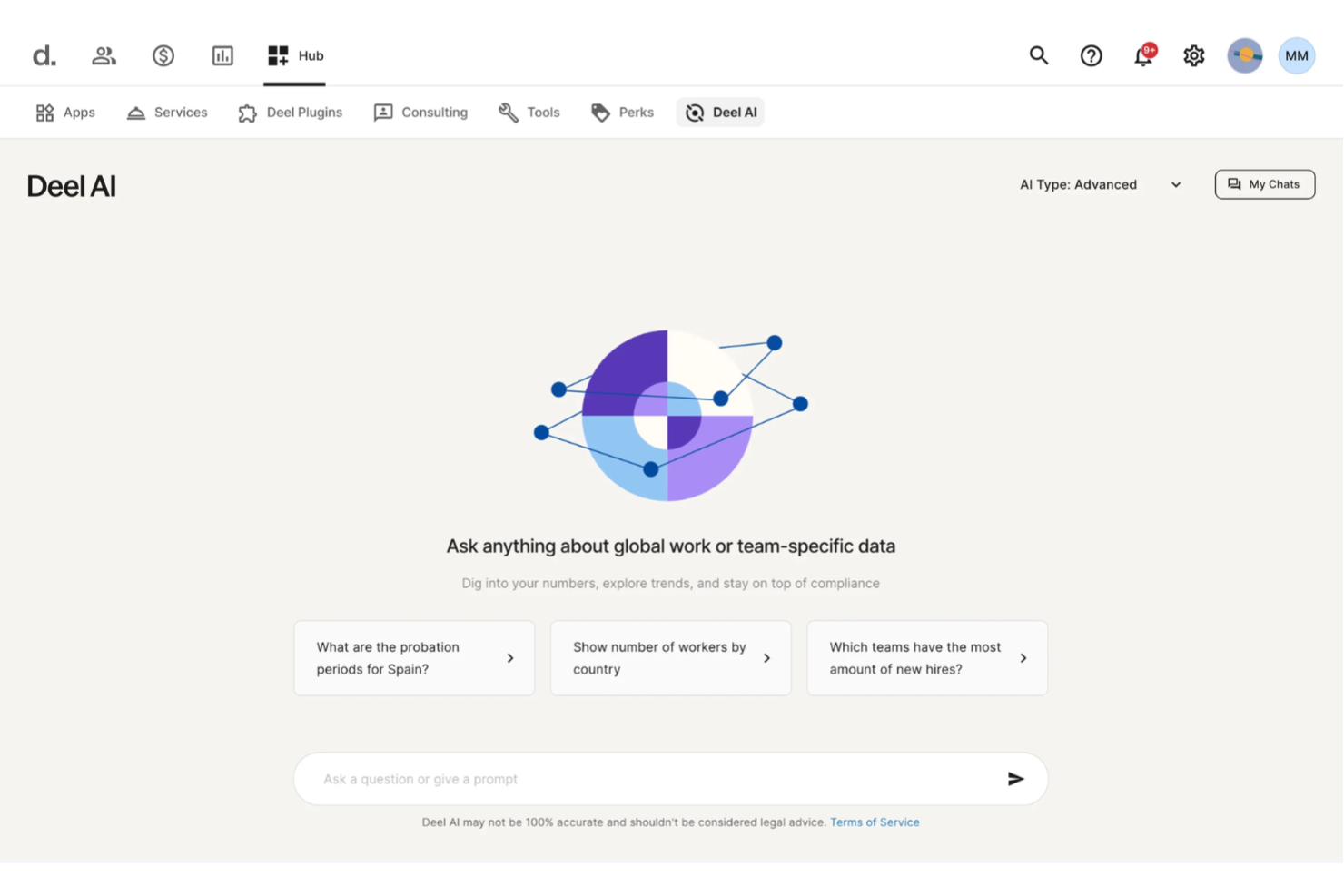
Deel AI helps you bring clarity to complex workforce decisions by combining your team’s data with expert-driven insights across 150+ countries. If you’re responsible for planning headcount, navigating global compliance, or shaping your organization’s long-term people strategy, you get an always-available assistant that interprets your context and surfaces information you’d otherwise spend hours searching for.
Why I Picked Deel
I picked Deel because its AI delivers context-aware workforce intelligence that supports strategic planning at both the operational and organizational levels. Deel AI understands where you are in the platform and brings forward summaries, key metrics, and compliance insights that help you evaluate risks and make decisions with more confidence. I also appreciate how it can analyze your internal data to create reports, highlight potential updates, and answer nuanced questions about your workforce in seconds. This makes it a strong fit for global teams looking for strategic workforce planning tools rooted directly in real HR and compliance realities.
Deel Key Features
In addition to the strategic insight capabilities I highlighted above, you’ll find these features useful:
- Global Payroll Management: Deel centralizes payroll processing across multiple countries, ensuring compliance with local tax laws.
- Localized Contract Generation: Automatically generate compliant contracts tailored to each country's legal requirements.
- Automated Compliance Monitoring: Continuously track and update compliance with local labor laws and regulations.
- HR Tools: Access a suite of HR functionalities that simplify onboarding, employee management, and performance tracking.
Deel Integrations
Integrations include SAP SuccessFactors, NetSuite, Google Workspace, QuickBooks, Slack, BambooHR, Xero, Greenhouse, Rippling, and Lever.
Pros and Cons
Pros:
- Salary and compliance intelligence improves long-term hiring strategies
- Context-aware guidance supports planning decisions directly in-platform
- AI generates strategic workforce insights from company data
Cons:
- Complex legal scenarios may still require external expert review
- Lacks scenario modeling tools found in dedicated planning platforms
New Product Updates from Deel HR

Deel Expands Stablecoin Wallet to 80+ Countries
Deel expands its Stablecoin Wallet to 80+ countries with dollar-backed balances and optional rewards. This gives eligible contractors more ways to hold and manage earnings inside Deel. For more information, visit Deel’s official site.
 .
.
Best for customizable AI workflows
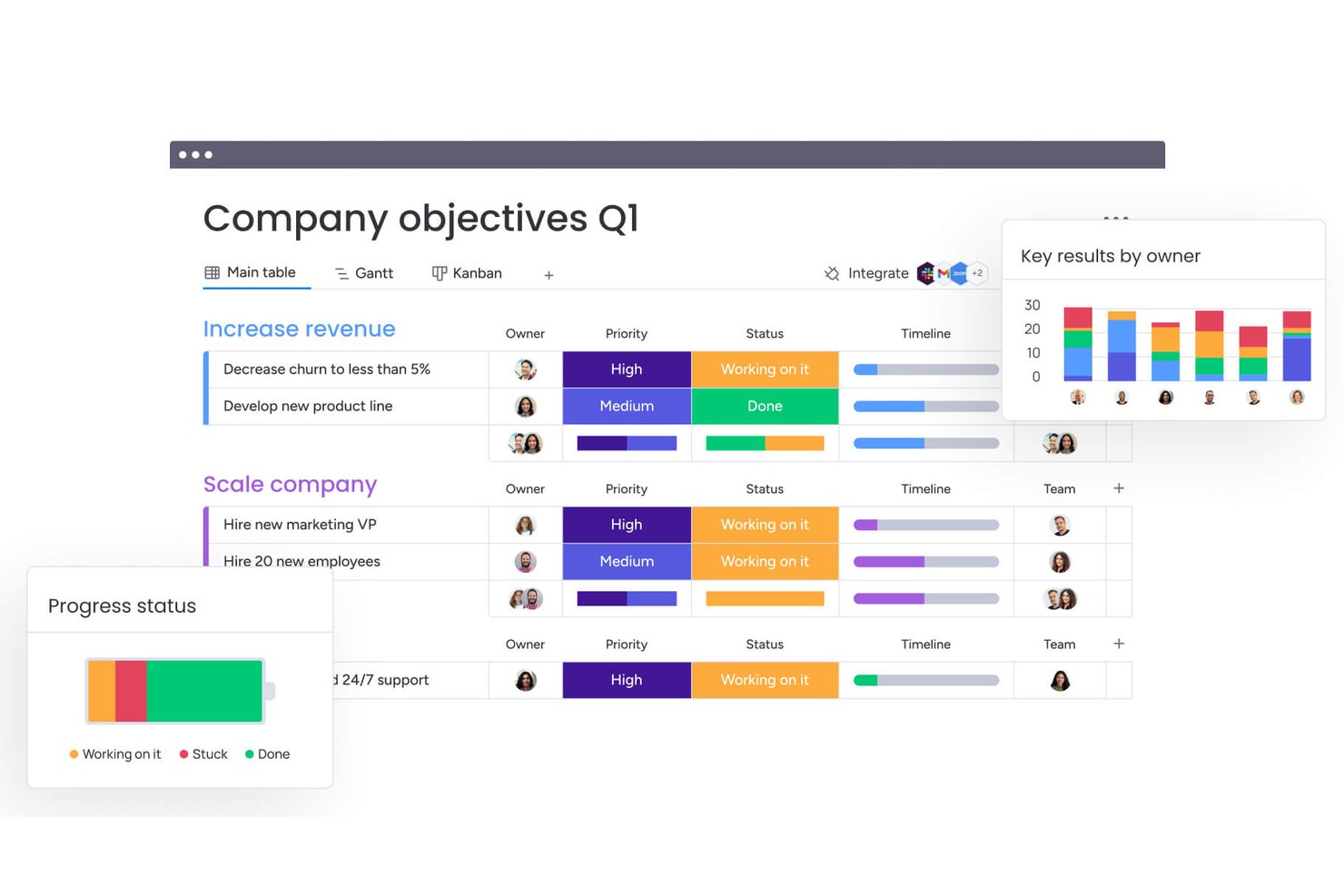
monday AI Workspace is a configurable work management platform that combines AI-powered project planning, workflow automation, portfolio tracking, and cross-team collaboration tools.
Who Is monday AI Workspace Best For?
It's a strong fit for mid-sized to enterprise teams that manage work across multiple departments and need flexible, AI-assisted planning without being locked into a rigid tool structure.
Why I Picked monday AI Workspace
monday AI Workspace earns its spot on my shortlist because no other planning tool gives me this level of control over how AI actually runs. The AI workflow builder lets me orchestrate agents around how my team tracks strategic initiatives, not the other way around. I also use AI columns to embed repeatable AI logic directly into boards, so updates, summaries, and risk flags surface automatically as work moves forward.
monday AI Workspace Key Features
- Portfolio management dashboards: Track project health, risks, and progress across multiple initiatives in one visual interface.
- Role-based permissions: Control who can view, edit, or manage sensitive workspaces and project boards.
- Resource allocation tools: Assign, monitor, and adjust team workloads across complex projects using built-in resource management.
- Template library: Access dozens of customizable templates for project planning, tracking, and reporting use cases.
monday AI Workspace Integrations
monday AI Workspace offers native integrations with Slack, Zoom, Google Workspace, Microsoft Teams, Outlook, Gmail, and GitHub. It also supports Zapier and provides an API for custom integrations.
Pros and Cons
Pros:
- Visual project and portfolio dashboards
- Embedded AI columns for task automation
- Customizable AI workflow builder for planning
Cons:
- Missing predictive analytics for HR data
- No native workforce scenario modeling
New Product Updates from monday AI Workspace
monday AI Workspace Adds Human Approval Routing
monday AI Workspace adds a human-in-the-loop approval block to AI Workflows, sending approval requests and routing workflow paths based on responses. For more information, visit monday AI Workspace's official site.

Anaplan
Best for complex modeling

Anaplan is a cloud-based planning and performance management platform designed for large enterprises. It offers advanced modeling capabilities to help you make data-driven decisions and optimize business performance.
Why I picked Anaplan: Anaplan is ideal for organizations that require complex modeling capabilities. Its AI features include predictive analytics and scenario planning, which allow your team to anticipate and adapt to changes.
The software’s flexibility enables you to customize models to meet your specific business needs. Its real-time data integration facilitates up-to-date insights for strategy planning.
Standout features & integrations:
Features include scenario planning, which helps you explore different business outcomes. The platform's real-time data integration keeps your models current and accurate. It also offers collaborative planning tools, enabling your team to work together with fewer workflow bottlenecks.
Integrations include Salesforce, Microsoft Excel, Workday HCM, Google Sheets, Tableau, Slack, Snowflake, and Docusign.
Pros and Cons
Pros:
- Built-in collaboration tools
- Advanced scenario planning with prescriptive and predictive AI
- Supports complex and customizable models
Cons:
- Requires internal model-building expertise
- Resource-intensive implementation

Prophix
Best for budget forecasts

Prophix is a corporate performance management software tailored for finance professionals seeking to enhance budgeting and forecasting processes. It leverages AI to provide insights into financial data, helping you optimize budget forecasts and make informed decisions.
Why I picked Prophix: Prophix's focus on budget forecasts is supported by AI-driven insights that enhance financial accuracy. It offers predictive analytics to anticipate financial trends and improve planning.
With features like automated reporting, your team can reduce manual tasks and focus on strategic analysis. This makes Prophix a wise choice for finance teams looking to refine their budgeting processes.
Standout features & integrations:
Features include automated financial reporting, which reduces manual work and errors. The platform offers dashboard visualization to give you a clear view of financial data. It also supports what-if analysis, allowing you to explore different financial scenarios.
Integrations include QuickBooks, Microsoft Dynamics 365, Sage, Oracle, NetSuite, SAP, Workday HCM, Salesforce, HubSpot, UKG Pro, ADP, and Xero.
Pros and Cons
Pros:
- Flexible budgeting methodologies
- Automated reporting reduces manual tasks and errors
- AI-accelerated budget cycle
Cons:
- Intricate reporting capabilities likely require training
- Technical setup expertise

Best for large enterprises

Workday Adaptive Planning is a sophisticated platform designed for financial and workforce planning, primarily serving large enterprises. It utilizes AI capabilities, such as predictive analytics, to forecast trends and support agile planning.
Why I picked Workday Adaptive Planning: Workday Adaptive Planning stands out for its suitability for large enterprises due to its predictive analytics, which aid in anticipating future trends and making informed decisions. It offers a user-friendly interface for creating dynamic models and scenarios, enhancing agility in planning.
The platform also emphasizes ethical AI practices, ensuring responsible use of technology. These features make it a valuable tool for large-scale strategic planning.
Standout features & integrations:
Features include an intuitive interface that simplifies the creation of dynamic models and scenarios. Its responsive planning allows you to adjust plans as circumstances evolve. The platform also promotes ethical technology use by incorporating responsible AI practices.
Integrations include Salesforce, NetSuite, Workday HCM, Microsoft Excel, Oracle, SAP, Slack, and Adaptive Insights.
Pros and Cons
Pros:
- Supports ethical AI practices
- User-friendly interface for agile planning
- Predictive analytics improve forecasting
Cons:
- Performance issues with large data volumes
- Time-consuming implementation

Planful
Best for financial planning

Planful is a financial planning and analysis software designed for finance teams and business planners. It provides AI-driven financial modeling and forecasting to help you make informed budgeting decisions.
Why I picked Planful: Planful excels in financial planning with its AI-powered modeling and forecasting capabilities. It offers scenario analysis to explore different financial outcomes and make informed decisions.
The platform’s AI tools provide insights into budgeting trends, helping your team optimize financial plans. This makes Planful a valuable tool for finance teams focused on strategic financial management.
Standout features & integrations:
Features include budgeting and forecasting tools that help you create accurate financial plans. The platform offers scenario analysis, allowing you to explore various financial outcomes. It also provides real-time financial reporting to keep your team updated on key metrics.
Integrations include NetSuite, QuickBooks, Salesforce, Microsoft Dynamics, Google Workspace, Oracle, SAP, Workday, Paylocity, and Sage Intacct.
Pros and Cons
Pros:
- Bias-reducing what-if projection forecasts
- Collaborative variance investigation
- Centralized source for all financial data
Cons:
- Requires frequent updates to align with regulatory landscape
- Dated user interface

Best for product managers

Aha Roadmaps is a strategic product management tool designed for product managers and teams to plan and execute product strategies effectively. It offers AI-driven features that help you prioritize tasks and align product goals with business objectives.
Why I picked Aha Roadmaps: Aha Roadmaps is tailored for product managers who need to define and manage product strategies. Its AI features help prioritize tasks based on strategic goals for effective product management.
The tool's roadmap visualization helps your team see the big picture and make better decisions. It also provides insights into market trends, aiding in strategic planning and execution.
Standout features & integrations:
Features include roadmap visualization, which gives you a clear view of your product's development path. The tool offers goal tracking to ensure your team's efforts align with strategic objectives. It also provides market insights, helping you stay informed about industry trends.
Integrations include Jira, Salesforce, Slack, Azure DevOps, Confluence, Trello, GitHub, Google Workspace, Microsoft Teams, and Zendesk.
Pros and Cons
Pros:
- 100+ built-in AI documentation templates
- Visual and interactive roadmapping
- Tailored for product management
Cons:
- Requires clear internal processes
- Interface can be overwhelming


Quantive StrategyAI is an AI-driven strategy management platform designed for executives and strategy leaders. It connects strategic plans to daily execution, utilizing predictive analytics and real-time insights to keep your team aligned with broader business goals.
Why I picked Quantive StrategyAI: Quantive StrategyAI excels in predictive analytics, setting it apart from other tools. It offers data-driven insights that allow you to anticipate future challenges and make informed decisions.
The platform's AI capabilities include real-time visibility and strategic agility, which are essential for effective decision-making. With these features, your team can manage Objectives and Key Results (OKRs) and Key Performance Indicators (KPIs) more efficiently.
Standout features & integrations:
Features include strategic planning tools that help you set clear objectives and track progress in a single platform. The tool provides real-time reporting, offering insights into your strategic initiatives. Its adaptability features allow you to adjust plans as market conditions change.
Integrations include Microsoft Teams, Slack, Jira, Trello, Asana, Salesforce, Google Workspace, Microsoft 365, HubSpot, and Zendesk.
Pros and Cons
Pros:
- OKRs and KPIs to business metrics
- Advanced scenario modeling Ability to link
- AI-powered strategy execution
Cons:
- Manual data entry for some functions
- Lack of multilingual support


Spider Strategies is a performance management software aimed at organizations seeking to enhance strategic execution through visual dashboards. It serves managers and executives by providing tools for tracking performance metrics and aligning them with strategic goals.
Why I picked Spider Strategies: Spider Strategies’ visual dashboards are a key feature, offering intuitive data representation to help you track performance metrics. Its AI capabilities provide insights into trends and patterns that aid strategic decision-making.
The software's focus on visual data enables your team to grasp complex information. This makes it ideal for organizations that prioritize clear, visual performance tracking.
Standout features & integrations:
Features include customizable dashboards that tailor data views to your needs. The platform supports real-time performance tracking, keeping you updated on key metrics. It also offers goal alignment tools to ensure your team stays focused on strategic objectives.
Integrations include Microsoft Excel, Power BI, Tableau, Google Sheets, and Salesforce.
Pros and Cons
Pros:
- Trend and pattern recognition and insights
- High level of customization for data visualization
- Intuitive visual dashboard design
Cons:
- Manual steps for complex calculations
- Lacks granular performance measures


Envisio is a strategy execution and performance management platform designed for public sector organizations. It helps you align strategic plans with operational activities, using AI to track performance metrics and ensure accountability.
Why I picked Envisio: Envisio is tailored for public sector planning, offering AI tools that enhance transparency and accountability. It provides automated performance tracking, which allows your team to monitor progress against strategic goals.
The platform's reporting features make it easy to communicate results to stakeholders. This focus on public sector needs makes Envisio a go-to solution for government agencies and similar organizations.
Standout features & integrations:
Features include strategic plan alignment to help your operations match your goals. The platform offers automated performance reports that keep your stakeholders informed. It also generates dashboards to give you a clear view of your progress.
Integrations include Microsoft Teams, Microsoft Power BI, Questica, Polco Track, Microsoft Excel, and Google Workspace.
Pros and Cons
Pros:
- Intuitive stakeholder reporting features
- Automated performance tracking enhances accountability
- Tailored for public sector organizations
Cons:
- Complexity for infrequent users
- Limited customization for private sector needs
Annen AI-programvare for strategisk planlegging
Her er noen andre alternativer innen AI-programvare for strategisk planlegging som ikke kom med på kortlisten min, men som likevel er verdt å se nærmere på:
- Board Intelligence
For board-level strategy execution
- Elate
For strategic alignment
- Wrike
For task automation
- Adobe Workfront
For creative project management
- AchieveIt
For cross-team alignment
- Miro
For interactive brainstorming
- monday CRM
For small team collaboration
- Lightcast
For labor market analytics
- Phocas
For data visualization
- Knovos Cascade
For government institutions
- Board
For integrated business planning


How I Evaluate AI Strategic Planning Software
I look for tools where AI does more than label dashboards—it should model workforce scenarios, forecast talent risks, and surface recommendations an HR leader can act on. From there, I split my evaluation into core functionality every tool needs to qualify and differentiating factors that separate the best fit for specific teams.
Core Functionality (Table Stakes For This List)
When I'm selecting tools for my list, I rank each one on a scale from 0 (does not offer the functionality) to 5 (excels in this area) for each core functionality listed below. Then, I calculate the tool's total score into a percentage. Each tool needs to achieve a minimum total score of 65% to be considered for inclusion.
- AI-Powered Scenario Modeling: I evaluate whether the tool can build and compare multiple workforce scenarios—like modeling the impact of a hiring freeze versus accelerated recruiting—using AI rather than manual inputs alone.
- Predictive Workforce Analytics: Strong tools use ML to forecast metrics like attrition risk or future skills demand, so I check for predictions that go beyond basic trendlines and include confidence indicators.
- Strategic Goal Alignment: I look for the ability to define HR objectives and have the platform map them to broader business goals, tracking whether initiatives like a new retention program are moving the right KPIs.
- AI-Generated Insights & Recommendations: Rather than static charts, the tool should surface actionable findings on its own—flagging an emerging flight risk in a key department, for example, and suggesting a response.
- HR Data Integration: Connecting to HRIS, ATS, HCM, and financial systems is essential, so I check for native connectors to platforms like Workday, SAP SuccessFactors, and Oracle HCM alongside open API access.
- Strategic Planning Workflows: The platform should offer purpose-built planning features such as initiative prioritization, roadmap building, and executive reporting—not just repurposed project management templates.
Once I have a list of tools that meet the criteria, I consider what sets each platform apart.
Differentiating Factors (What Sets Vendors Apart)
Here's how I compare and contrast different vendors:
Standout Features
A skills intelligence engine adds real value by mapping current workforce capabilities and recommending reskilling paths before gaps slow a strategic initiative. Financial impact modeling matters just as much—connecting a headcount scenario directly to P&L and budget projections gives HR leaders the language finance teams need to approve plans. I also evaluate whether a tool pulls in external labor market data, so internal forecasts reflect real talent supply and compensation benchmarks.
Beyond Features
AI transparency matters when your tool is predicting attrition or flagging flight risks—I check whether the vendor explains how its models reach conclusions and offers audit trails HR can share with leadership. Data security is closely tied; handling sensitive people data means I look for SOC 2 Type II compliance, role-based access controls, and regional data residency options. I also consider time-to-value, specifically whether a platform provides pre-built HR planning templates and dedicated onboarding support so teams aren't spending months before seeing results.
Slik velger du AI-programvare for strategisk planlegging
Det er lett å gå seg vill i lange funksjonslister og komplekse prismodeller. For å hjelpe deg med å holde fokus mens du går gjennom den unike prosessen din for valg av programvare, har jeg laget en sjekkliste over faktorer du bør ha i tankene:
| Faktor | Hva du bør vurdere |
|---|---|
| Skalerbarhet | Kan programvaren vokse sammen med organisasjonen din? Vurder om den håndterer økt datamengde og flere brukere uten at ytelsen svekkes. Se etter en skalerbar infrastruktur. |
| Integrasjoner | Fungerer den med de eksisterende verktøyene dine? Kontroller kompatibilitet med viktige systemer som CRM, ERP og plattformer for dataanalyse. Unngå flaskehalser i integrasjonene. |
| Tilpasningsmuligheter | Kan du tilpasse den til arbeidsflytene dine? Sørg for at den tillater endringer som passer til de unike prosessene dine. Vær oppmerksom på rigide systemer som begrenser fleksibiliteten. |
| Brukervennlighet | Er grensesnittet intuitivt? Vurder tilbakemeldinger fra brukere og erfaringer fra demonstrasjoner. Unngå verktøy med bratte læringskurver som kan hindre innføringen. |
| Implementering og oppstart | Hvor raskt kan løsningen settes opp? Evaluer støtten for den første implementeringen og opplæringen av brukerne. Se etter omfattende ressurser for oppstart for å minimere forstyrrelser. |
| Kostnad | Passer den inn i budsjettet ditt? Sammenlign prismodeller og skjulte kostnader. Se etter god verdi i forholdet mellom funksjoner og kostnad. Vær forsiktig med rimelige alternativer med begrensede funksjoner. |
| Sikkerhetstiltak | Er dataene dine beskyttet? Kontroller krypteringsstandarder, rutiner ved datainnbrudd og samsvar med regelverk som GDPR. Prioriter leverandører med sterke sikkerhetstiltak. |
Hva er AI-programvare for strategisk planlegging?
Programvare for strategisk planlegging med AI er et verktøy som bruker kunstig intelligens til å bistå i utviklingen og gjennomføringen av strategiske forretningsplaner. Disse verktøyene brukes vanligvis av ledere, mellomledere og strategispesialister for å forbedre beslutningstakingen og samordne teamets mål med virksomhetens overordnede mål. Prediktiv analyse, scenarioplanlegging og dataanalyse i sanntid bidrar til å forutse trender, evaluere ulike strategier og sikre informerte beslutninger. Samlet sett gir disse verktøyene betydelig verdi ved å forbedre effektiviteten og virkningen av prosessene for strategisk planlegging.
Funksjoner
Her er de viktigste funksjonene all god programvare for strategisk planlegging med AI bør ha:
- Prediktiv analyse: Analyserer historiske data for å forutsi fremtidige trender, slik at man kan ta beslutninger på forhånd.
- Scenarioplanlegging: Gjør det mulig for brukerne å evaluere ulike strategiske alternativer og deres mulige resultater.
- Dataanalyse i sanntid: Gir oppdatert innsikt som hjelper brukerne med å ta rettidige og informerte beslutninger.
- Automatisert rapportering: Genererer rapporter automatisk for å redusere manuelt arbeid og forbedre nøyaktigheten.
- Verktøy for målsamordning: Sikrer at teamets mål er samordnet med virksomhetens overordnede strategier.
- Tilpassbare oversikter: Tilbyr skreddersydde visninger av viktige nøkkeltall og data for ulike brukerbehov.
- Resultatoppfølging: Overvåker fremdriften mot strategiske mål og gir tilbakemeldinger om områder som kan forbedres.
- Datavisualisering: Gjør komplekse datasett om til visuelle formater som er enkle å forstå.
- Integrasjonsmuligheter: Kobler sømløst til eksisterende forretningsverktøy som CRM- og ERP-systemer.
- AI-drevet innsikt: Gir intelligente anbefalinger for strategiske justeringer og forbedringer.
Fordeler
Implementering av programvare for strategisk planlegging med AI gir flere fordeler for teamet og virksomheten din. Her er noen av fordelene du kan se frem til:
- Bedre beslutningstaking: Prediktiv analyse hjelper deg med å forutse trender og ta informerte valg.
- Økt effektivitet: Automatisert rapportering reduserer manuelle oppgaver og frigjør tid til strategiske aktiviteter.
- Bedre målsamordning: Verktøy for målsamordning sikrer at teamets innsats er samordnet med virksomhetens mål.
- Økt tilpasningsevne: Scenarioplanlegging gjør det mulig å raskt evaluere og justere strategier etter behov.
- Innsikt i sanntid: Dataanalyse i sanntid gir oppdatert informasjon for rettidige beslutninger.
- Tydelig kommunikasjon: Datavisualisering gjør kompleks informasjon enkel å forstå og dele.
- Strategiske anbefalinger: AI-drevet innsikt gir intelligente forslag til optimalisering av strategier.
Kostnader og priser
Valg av programvare for strategisk planlegging med AI krever en forståelse av de ulike prismodellene og abonnementene som er tilgjengelige. Kostnadene varierer ut fra funksjoner, teamstørrelse, tillegg og mer. Tabellen nedenfor oppsummerer vanlige abonnementer, gjennomsnittsprisene deres og typiske funksjoner som er inkludert i løsninger for strategisk planlegging med AI:
Sammenligningstabell for programvare for strategisk planlegging med AI
| Abonnementstype | Gjennomsnittspris | Vanlige funksjoner |
|---|---|---|
| Gratisabonnement | $0 | Grunnleggende resultatoppfølging, begrenset dataanalyse og brukerstøtte fra fellesskapet. |
| Personlig abonnement | $5-$25/bruker/måned | Tilpassbare oversikter, prediktiv analyse og brukerstøtte via e-post. |
| Forretningsabonnement | $30-$60/bruker/måned | Scenarioplanlegging, dataintegrasjon i sanntid, verktøy for målsamordning og brukerstøtte via telefon. |
| Virksomhetsabonnement | $70-$150/bruker/måned | Avansert AI-drevet innsikt, omfattende datavisualisering, dedikert kundeansvarlig og brukerstøtte døgnet rundt, alle dager. |
Vanlige spørsmål
Her er noen svar på vanlige spørsmål om programvare for strategisk AI-planlegging:
Hvilke HR-datakilder kan programvare for strategisk AI-planlegging analysere?
Programvare for strategisk AI-planlegging kan analysere et bredt spekter av HR-data, inkludert ansattopplysninger, lønn, ytelser, medarbeidersamtaler og demografiske data om arbeidsstyrken. Du kan vanligvis koble strategiprogramvaren til HRIS, ATS og andre HR-plattformer. Dette hjelper deg med å få dypere innsikt i trender, mangler og muligheter for utvikling av arbeidsstyrken.
Kan programvare for strategisk AI-planlegging bidra til langsiktige prognoser?
Ja, programvare for strategisk AI-planlegging kan bidra til langsiktige prognoser. Den bruker prediktiv analyse til å analysere historiske data og fremskrive fremtidige trender. Dette hjelper teamet ditt med å ta informerte beslutninger om ressursfordeling og strategiske initiativer. Bruk funksjoner for scenarioplanlegging til å utforske ulike utfall og justere planene dine deretter. Oppdater datagrunnlaget regelmessig for å sikre at prognosene forblir nøyaktige og relevante.
Støtter programvare for strategisk AI-planlegging overholdelse av arbeidslovgivning og forskrifter?
Ja, mange verktøy for strategisk AI-planlegging har funksjoner som bidrar til å overvåke overholdelse av arbeidslovgivningen, følge med på endringer i retningslinjer og varsle om potensielle risikoer. Dette kan støtte arbeidet med å oppfylle krav til dokumentasjon og rapportering. Bruk det likevel sammen med veiledning fra juridisk rådgiver eller samsvarsteamet ditt.
Hvor mye teknisk kompetanse trenger jeg for å bruke programvare for strategisk AI-planlegging?
Det meste av programvaren for strategisk AI-planlegging er utviklet for å være brukervennlig for HR-team, med intuitive grensesnitt og støtte ved oppstart. Du kan trenge noe grunnleggende kjennskap til dataanalyse eller integrasjoner, men omfattende teknisk kompetanse er vanligvis unødvendig. Mange plattformer tilbyr opplæringsressurser som hjelper deg med å komme i gang.