

10 beste programvarer for administrasjon av hybride arbeidsplasser i 2026

Beste programvare for administrasjon av hybride arbeidsplasser


Programvare for administrasjon av hybride arbeidsplasser gir deg verktøyene du trenger for å koordinere fleksible arbeidstider, bestille pulter og administrere kontorressurser på tvers av eksterne og fysisk tilstedeværende team. Hvis du leter etter den beste programvaren for administrasjon av hybride arbeidsplasser, ser du sannsynligvis etter måter å støtte de ansattes fleksibilitet på, holde oversikt over hvem som er på kontoret, og utnytte arbeidsplassen bedre.
I denne veiledningen finner du mine anbefalinger av de beste verktøyene for å hjelpe organisasjonen din med å administrere hybridarbeid, med en oversikt over viktige funksjoner slik at du kan sammenligne løsninger og finne det som passer dine behov.
Why Trust Our Software Recommendations
Our team has been testing and reviewing software since 2012. As HR experts ourselves, we know how difficult—and important—it is to choose the right software.
For this guide, we evaluated tools using hands-on testing and independent research, scoring tools using our selection criteria. We also draw on insights from industry thought leaders and practicing HR experts.
Our reviews reflect our human editorial judgment, not a sales pitch.
Expert reviewers:
Sammenligningstabell for programvare for administrasjon av hybride arbeidsplasser
Denne sammenligningstabellen oppsummerer prisopplysningene for mine beste anbefalinger av programvare for administrasjon av hybride arbeidsplasser:
| Tool | Best For | Trial Info | Price | ||
|---|---|---|---|---|---|
| 1 | Best for automated workplace experience workflows | Free plan + free demo available | From $500/month | Website | |
| 2 | Best for security and compliance-driven workplaces | Free demo available | From $5/bookable resource/month (billed annually) | Website | |
| 3 | Best for AI-driven office analytics | Free demo available | Pricing upon request | Website | |
| 4 | Best for full Microsoft Teams integration with AI assistant | Free demo available | From $99/month | Website | |
| 5 | Best for ultra-simple room and desk management | 30-day free trial available | From $51/month | Website | |
| 6 | Best for fast onboarding and setup | Free plan available | From €5.50/month (billed annually) | Website | |
| 7 | Best for Slack-based bookings | Free trial + free demo available | From $2.50/user/month (billed annually) | Website | |
| 8 | Best for planned team collaboration | Free demo available | Pricing upon request | Website | |
| 9 | Best for global coworking space access | 14-day free trial + free demo available | From $1.50/user/month (billed annually) | Website | |
| 10 | Best for managing large, multi-location workplaces | Free demo available | Pricing upon request | Website |

Anmeldelser av den beste programvaren for administrasjon av hybride arbeidsplasser
Nedenfor finner du mine detaljerte sammendrag av den beste programvaren for administrasjon av hybride arbeidsplasser som kom med på listen min. Anmeldelsene mine gir en detaljert gjennomgang av funksjonene, de beste bruksområdene og integrasjonene til hver plattform, slik at du kan finne den som passer best til dine behov.
elia
Best for automated workplace experience workflows
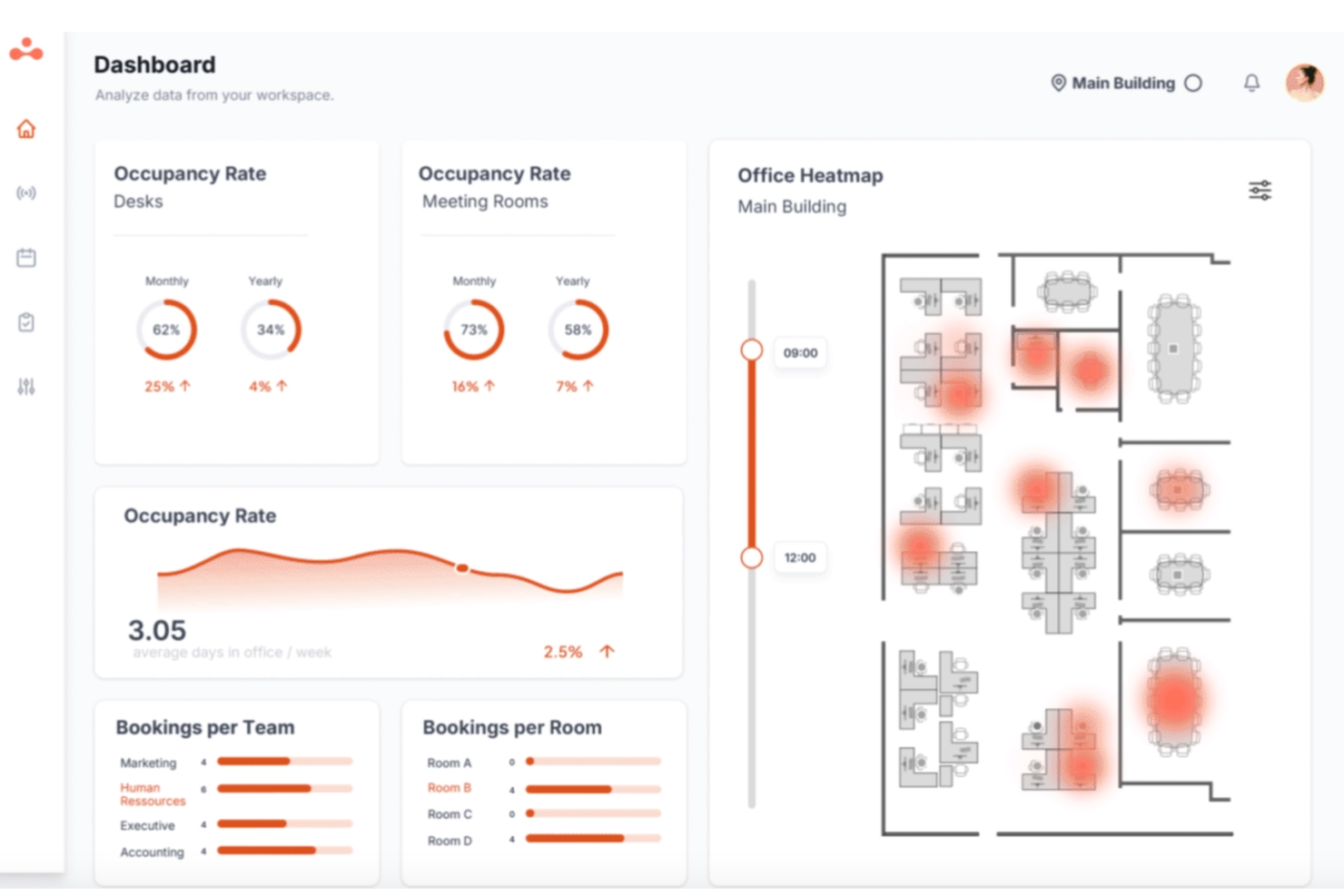
elia is a hybrid workplace management platform that brings together desk booking, room reservations, visitor management, occupancy tracking, and workplace automation tools for teams managing flexible office environments.
Who Is elia Best For?
elia is a good fit for facilities and workplace managers in mid-to-large organizations coordinating hybrid teams across multiple office locations.
Why I Picked elia
I picked elia as one of the best because its workplace automation module goes well beyond basic rule-setting. You can build workflows using customizable triggers, conditions, and actions, so something like automatically canceling a no-show desk booking and reassigning it, or sending visitor arrival alerts to the right host, runs without anyone touching it. I also like the execution logs feature, which gives you full visibility into when and how each automation ran, so you can troubleshoot or optimize without guessing.
elia Key Features
- Interactive floor plan booking: Book desks and rooms directly from a visual, real-time map of your office layout, showing live availability at a glance.
- Colleague presence dashboard: See which teammates are scheduled to come in on any given day, so employees can coordinate in-office time around the people they need to collaborate with.
- Occupancy analytics: Track real-time and historical workspace usage data to identify underutilized areas and make informed decisions about office capacity.
- Workplace request management: Submit and manage service requests (catering, IT, cleaning, maintenance) directly through the platform, with tasks routed to the right teams.
elia Integrations
elia offers native integrations with Microsoft 365, Google Workspace, Slack, and specific tools within those ecosystems, including Google Calendar, Microsoft Teams, and Microsoft Outlook.
Pros and Cons
Pros:
- Built-in visitor pre-registration and notifications
- Built-in IoT sensor occupancy tracking
- Flat-rate pricing regardless of user count
Cons:
- Limited status options beyond office or remote
- Mobile app less polished than desktop

Envoy
Best for security and compliance-driven workplaces
Envoy is a workplace management platform that covers visitor management, desk and room booking, employee scheduling, and physical access control across office locations.
Who Is Envoy Best For?
Envoy is a strong fit for companies in regulated industries like finance, healthcare, and government contracting, where visitor identity, access logs, and legal compliance are non-negotiable.
Why I Picked Envoy
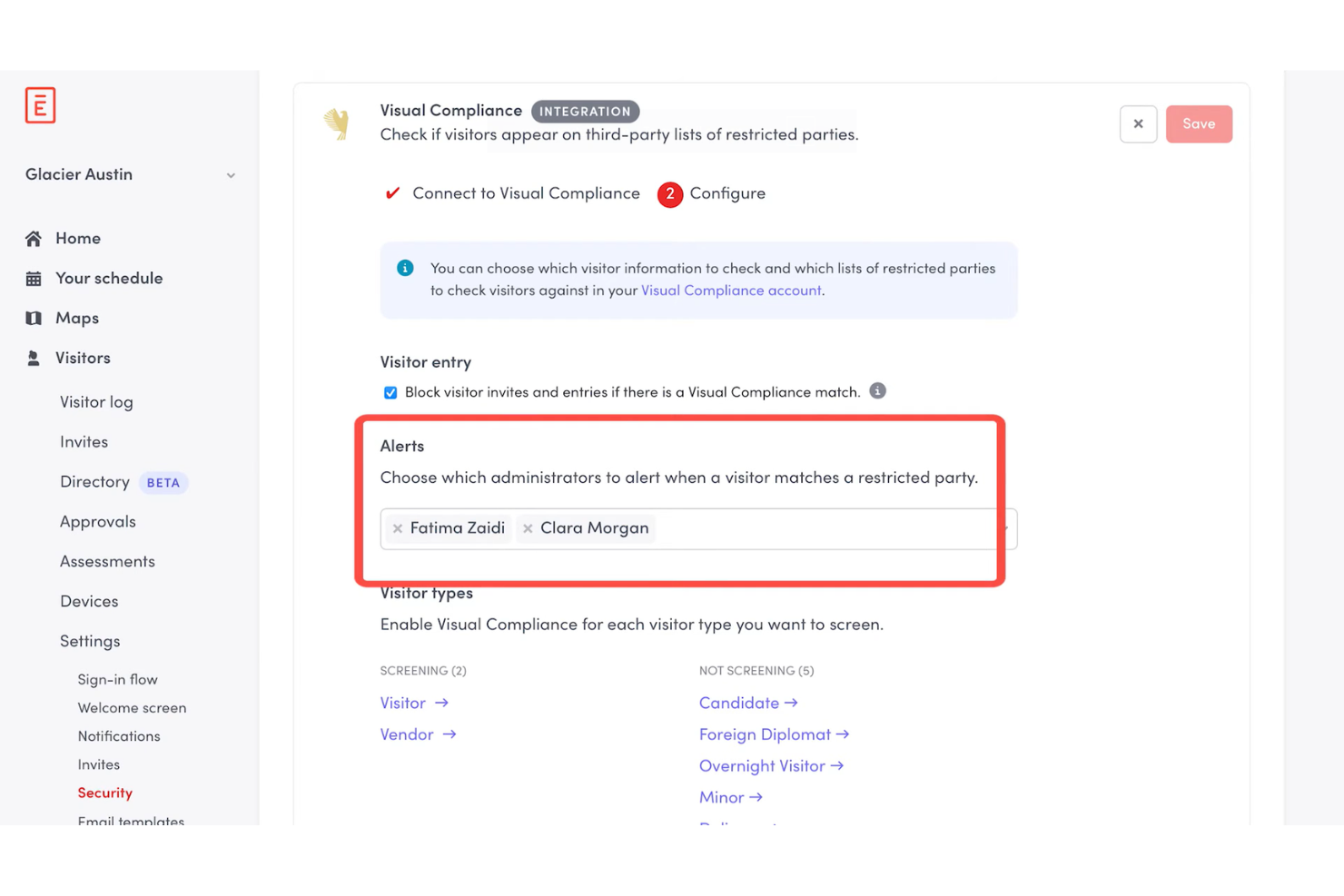
I picked Envoy as one of the best because of how seriously it takes physical security and regulatory compliance as core platform functions, not afterthoughts. The check-in flow can prompt visitors for citizenship information for ITAR screening or require them to watch a safety video for OSHA compliance, and Envoy automatically stores that data in audit-ready records you can export on a schedule. I also like the Visual Compliance integration, which screens visitors against restricted party watchlists in real time.
Envoy Key Features
- Room scheduling: Book meeting rooms directly from Outlook, Google Calendar, or the Envoy app, with automatic release for no-shows.
- Delivery management: Log incoming packages and notify recipients automatically so deliveries don't pile up unattended.
- Capacity limits: Set and enforce location-level or floor-level occupancy caps to control how many people can be on-site at once.
- Desk booking: Let employees reserve hot desks in advance or find available seats on arrival using an interactive floor map.
Envoy Integrations
Envoy offers 100+ integrations through its app directory, including Slack, Microsoft Teams, Google Calendar, Microsoft Outlook, Okta, Salesforce, Brivo, Kisi, Avigilon Alta, and DocuSign. It also connects with Zapier and provides an API for custom integrations.
Pros and Cons
Pros:
- Emergency notifications reach staff on-site
- Real-time occupancy tracking across locations
- Visitor check-in includes compliance screening
Cons:
- Key features locked behind premium tiers
- Device-pairing dropouts require manual troubleshooting
Robin
Best for AI-driven office analytics
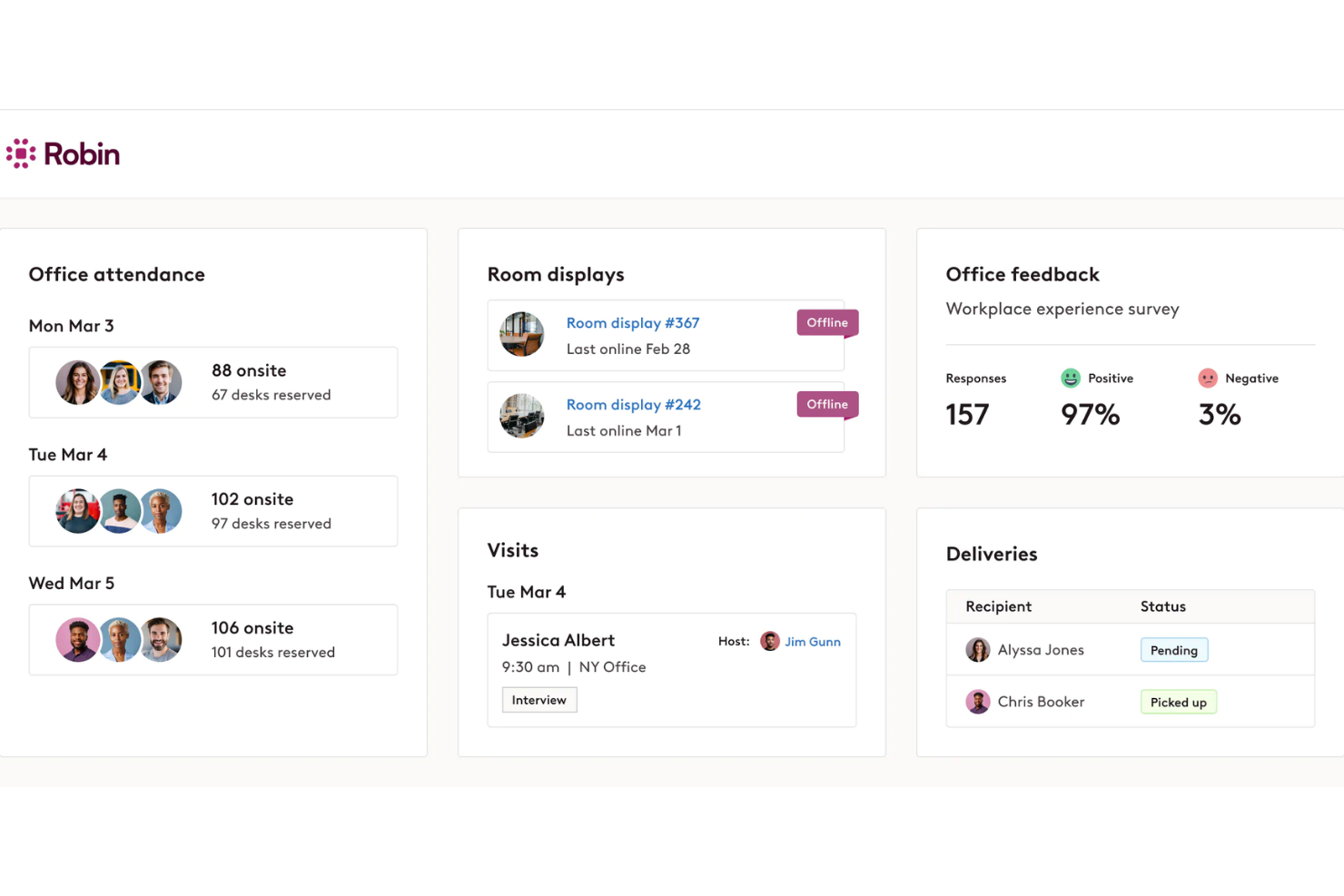
Robin is an AI-driven workplace operations platform covering desk and room booking, space management, visitor management, and occupancy analytics for hybrid office environments.
Who Is Robin Best For?
Robin is a strong fit for IT, facilities, and workplace operations teams at mid-size to enterprise companies that need data-driven tools to manage a flexible, hybrid office day-to-day.
Why I Picked Robin
I picked Robin as one of the best because of how it uses AI to move beyond basic occupancy reporting. Its AI assistant for analytics lets you ask plain-language questions about space usage and get back actionable answers for key insights such as which floors are consistently underused or what real estate you could consolidate. I also like the CollabScore feature, which measures how effectively teams are actually working together in person by combining desk proximity, meeting, and occupancy data.
Robin Key Features
- Desk booking: Reserve desks in advance or on the spot, with AI-powered suggestions based on your team's in-office schedule.
- Meeting services: Submit and manage catering, AV support, and room setup requests from within the room booking workflow.
- Visitor management: Pre-register guests, handle check-ins, and maintain visit logs from a single visitor management module.
- In-office policies: Set and communicate hybrid attendance policies, and let employees track their own in-office progress against those requirements.
Robin Integrations
Robin offers native integrations across the Microsoft ecosystem, including Microsoft Teams, Outlook, Exchange, Entra ID, Intune, and Microsoft 365, as well as Google Calendar and Google Workspace. It also integrates with Slack, Zoom, Okta, OneLogin, Rippling, and access control systems like Avigilon, Brivo, and Kisi. An API is available for custom integrations.
Pros and Cons
Pros:
- Interactive office maps show live availability
- Abandoned meeting protection frees unused rooms
- Occupancy data informs real estate decisions
Cons:
- One-way issue reporting
- Limited move management and space planning
YAROOMS
Best for full Microsoft Teams integration with AI assistant
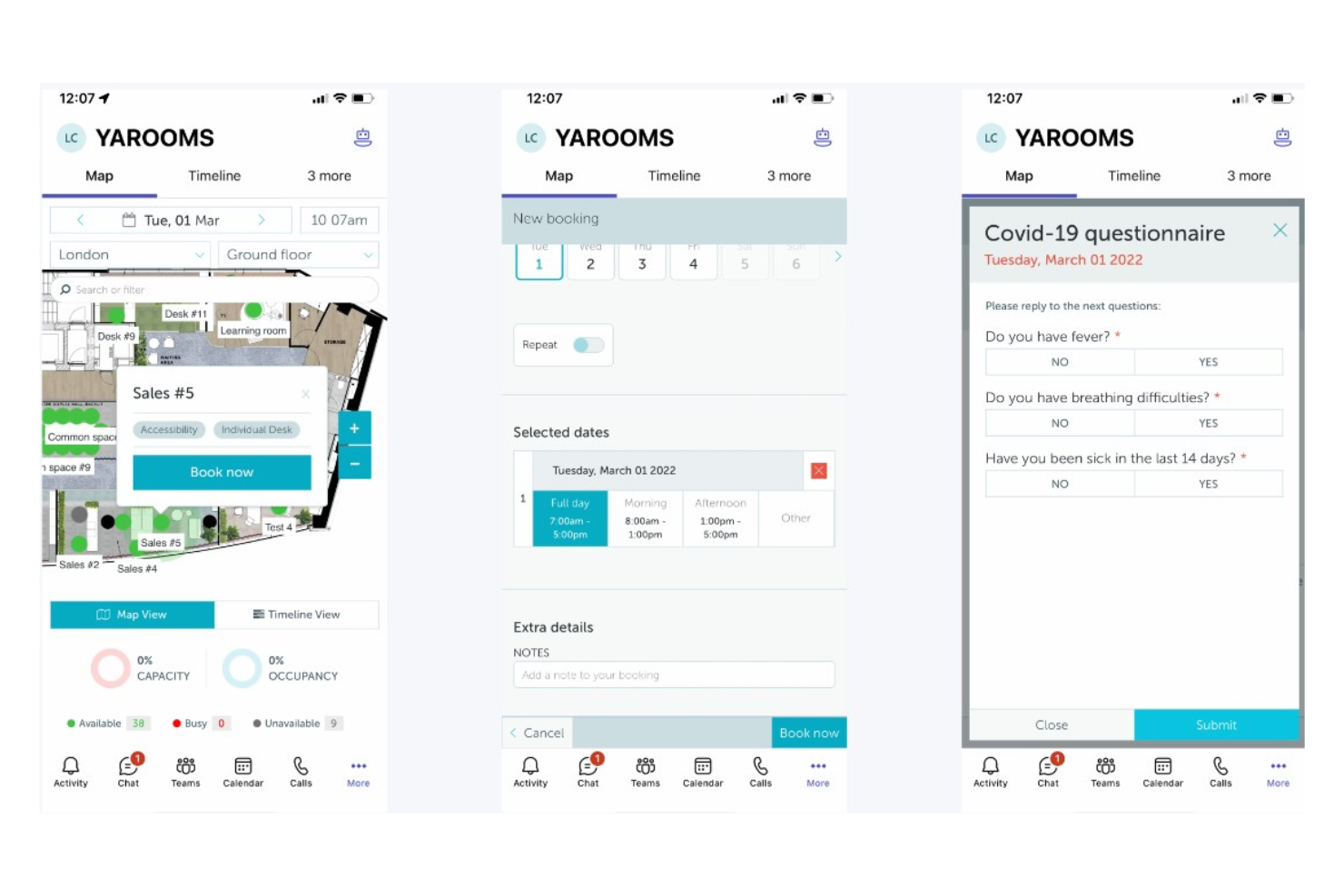
YAROOMS is a workplace management platform covering desk and room booking, hybrid work scheduling, visitor management, and workplace analytics, all operated through a native Microsoft Teams AI assistant called Yarvis.
Who Is YAROOMS Best For?
YAROOMS is a natural fit for mid-to-enterprise organizations already running Microsoft 365 that want workplace management built directly into their existing Teams environment.
Why I Picked YAROOMS
YAROOMS earns its spot on my shortlist because Yarvis, its AI assistant, lives natively inside Microsoft Teams, so employees can book a desk, find a free meeting room, or check a colleague's schedule without ever leaving the app they already use all day. I like that Yarvis handles natural-language requests, meaning someone can type "find me a room for three people Tuesday afternoon" and get bookable options back instantly. That level of Teams-native automation sets YAROOMS apart from tools that treat Microsoft 365 as just another calendar sync.
YAROOMS Key Features
- Hybrid work scheduling: Employees can set their weekly work location plan (office, home, or other) so teams can coordinate in-office days together.
- Interactive floor maps: Visual maps show real-time desk and space availability across floors, letting employees pick specific seats before arrival.
- Visitor management: Register visitors in advance, send automated arrival instructions, and log on-site guests for a full attendance record.
- Workplace analytics: Dashboards track space utilization, occupancy trends, and no-show rates across locations.
YAROOMS Integrations
YAROOMS offers native integrations across the Microsoft ecosystem, including Microsoft Teams, Microsoft 365, Outlook, and Azure AD, along with Google Calendar, Google Meet, Slack, Zoom, MappedIn, and SAML 2.0 for SSO. A REST API is also available for custom integrations.
Pros and Cons
Pros:
- Includes built-in workplace carbon dashboard
- Search function locates colleagues on floor plans
- Color-coded floor maps show live availability
Cons:
- Space limits per tier force unwanted upgrades
- Floorplan view is hard to use on iPhones

Joan
Best for ultra-simple room and desk management
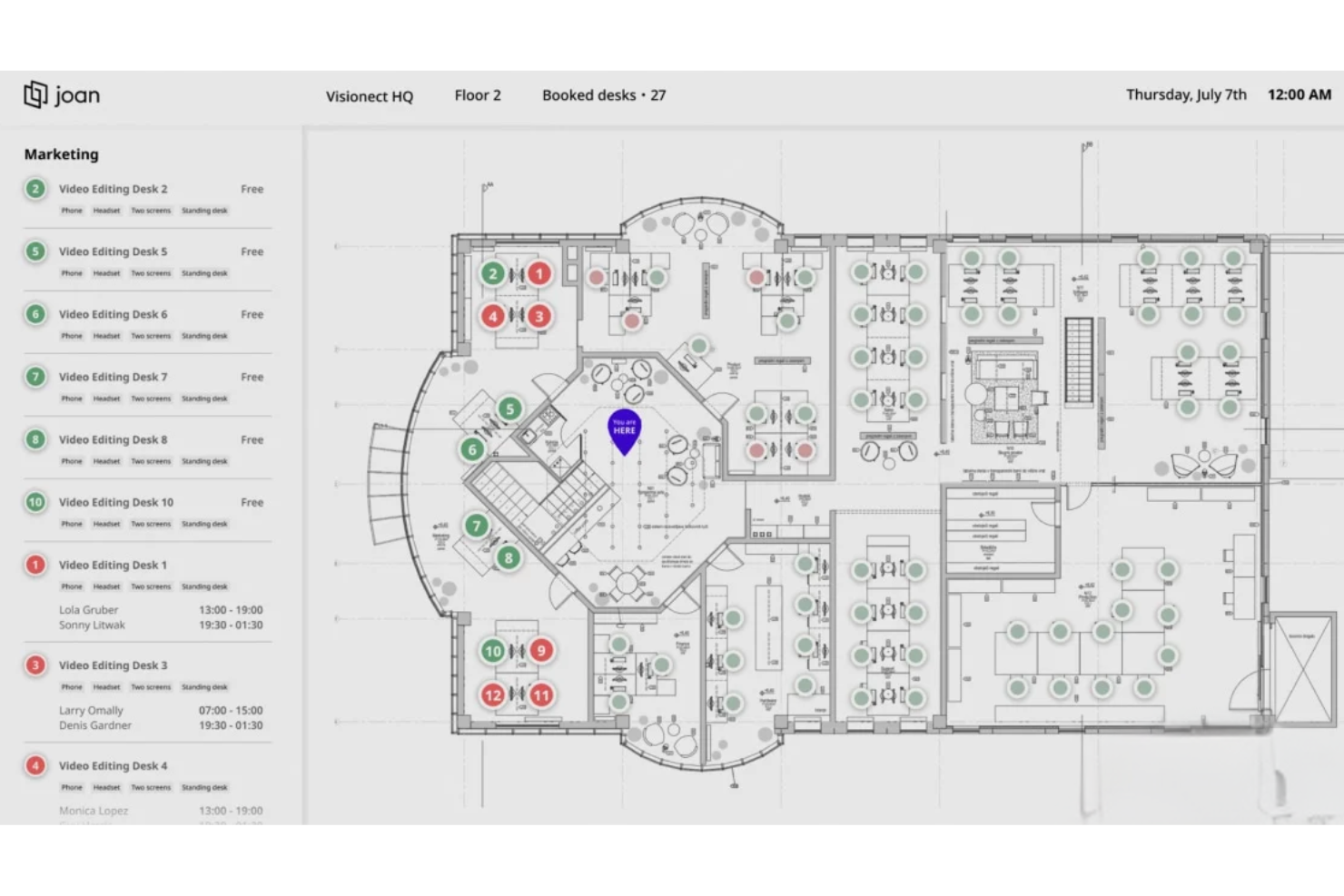
Joan is a workplace management platform covering room booking, desk booking, parking, visitor management, digital signage, and analytics, with its own line of cable-free e-Paper scheduling displays that set it apart from software-only tools.
Who Is Joan Best For?
Joan is a strong fit for small to mid-sized businesses that want a no-fuss way to manage meeting rooms and desks without an IT-heavy setup or training.
Why I Picked Joan
Joan is one of my top picks because I love how fast you can go from sign-up to a fully working room and desk booking setup. The MyJoan portal lets admins configure the entire workplace environment in minutes, and automatic check-in releases no-show rooms without anyone having to intervene. I also like that employees can book directly from Joan's physical e-Paper displays outside a room, removing any dependency on a separate app or calendar.
Joan Key Features
- Asset reservation: Let employees book company assets like equipment and parking spots alongside their desk or room.
- Floorplan overview: Display a live office layout so employees can see real-time desk and room availability across the floor.
- Indoor climate monitoring: Track office temperature and humidity data directly through Joan devices from within the analytics dashboard.
- Announcements: Send targeted messages to only the employees scheduled to be in the office on a given day.
Joan Integrations
Joan offers native integrations across the Microsoft ecosystem, including Microsoft 365, Microsoft Teams, Outlook, Exchange, and Azure AD, along with Google Workspace, Google Calendar, Slack, Zoom, Cisco Webex, Okta, JumpCloud, and iCal. It also connects with Zapier and IFTTT, and has an API for custom integrations.
Pros and Cons
Pros:
- Desk bookings are deployed within one week
- Automatic no-show room release saves space
- Cable-free e-Paper displays need no wiring
Cons:
- Battery drains fast on mesh Wi-Fi networks
- E-ink touchscreen response feels laggy

Dibsido
Best for fast onboarding and setup
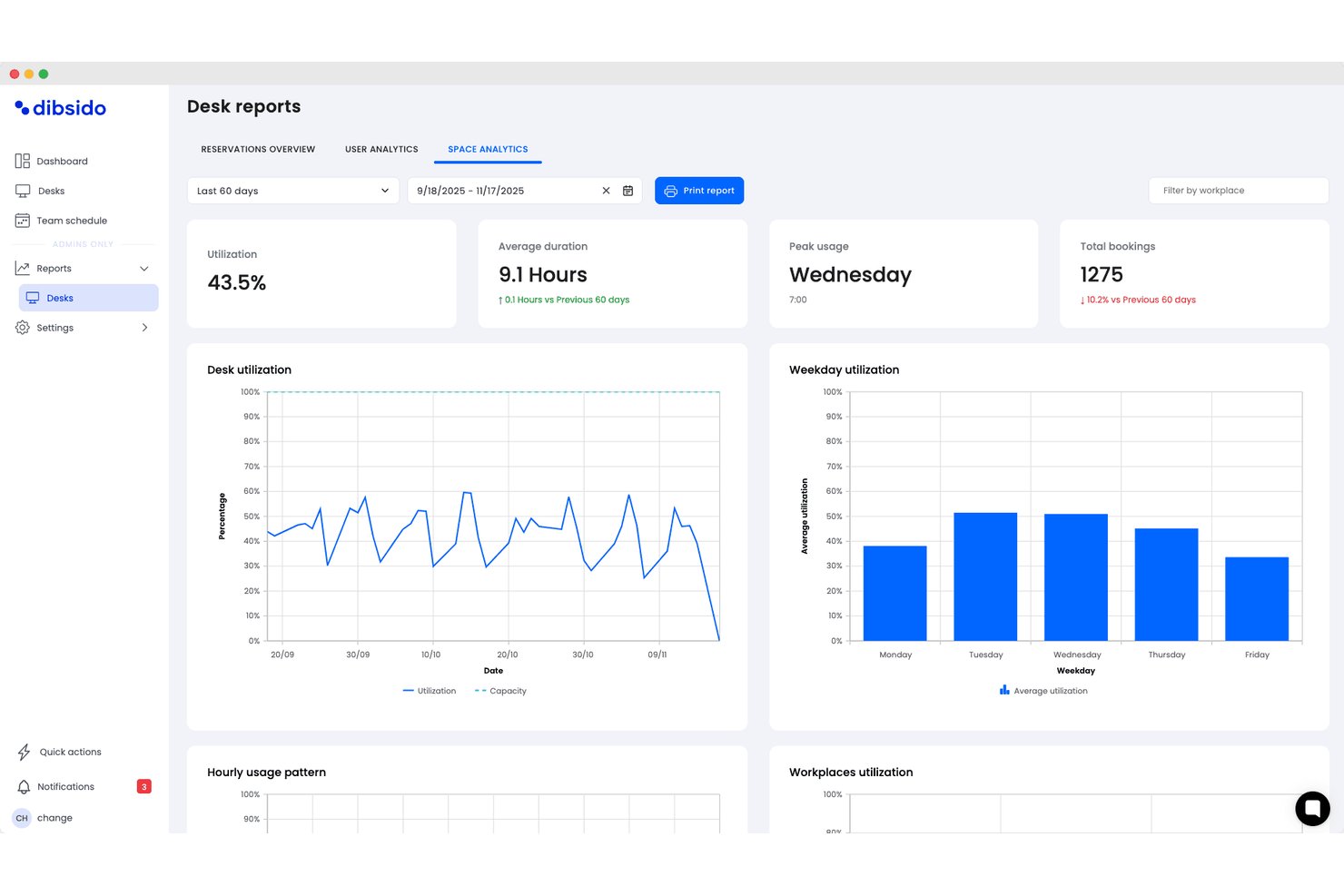
Dibsido is a hybrid workplace management software solution that provides tools for desk booking, meeting room scheduling, parking management, and interactive office maps with integrations for Microsoft, Google, and Slack.
Who Is Dibsido Best For?
Dibsido is a strong match for small to midsize organizations looking for quick and easy hybrid workplace management.
Why I Picked Dibsido
I picked Dibsido as one of the best because I can set up desk, meeting room, and parking bookings in minutes, even without training. In practice, my team uses their interactive floorplan to find and reserve spaces on day one.
Dibsido Key Features
- Microsoft Teams integration: Users can book desks and resources directly within their Microsoft Teams workspace.
- Parking spot management: Allocate, reserve, and manage parking spaces alongside desk and room bookings.
- Team schedule and visibility: View weekly attendance patterns showing who is in the office, working remotely, or on a custom status, complete with exportable attendance logs.
- Resource usage analytics: View usage data and trends to help optimize office layouts and resource planning.
Dibsido Integrations
Dibsido offers native integrations with Microsoft Teams and Slack, plus two-way calendar sync with Microsoft Outlook and Google Calendar. Enterprise SSO is supported through Microsoft Entra ID, Google Workspace, and SAML 2.0, with an API available for custom integrations.
Pros and Cons
Pros:
- Native mobile apps for iOS and Android
- Multilingual support for global hybrid teams
- Interactive floorplans for desk and parking selection
Cons:
- Fewer advanced facilities controls for enterprises
- Limited workflow automations compared to competitors

Officely
Best for Slack-based bookings
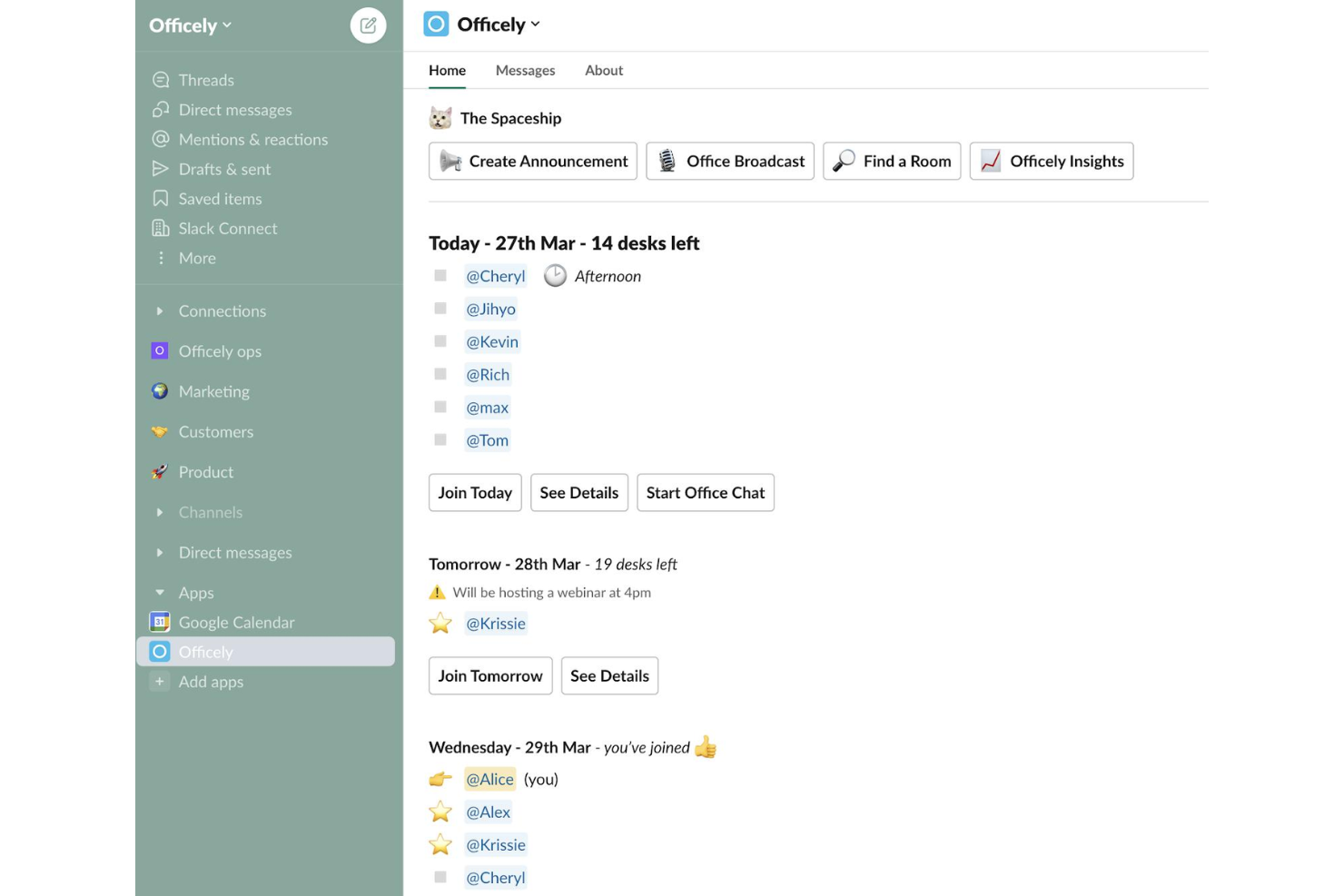
Officely is a hybrid office management tool that lives inside Slack and Microsoft Teams, handling desk booking, meeting room reservations, parking management, attendance tracking, and hybrid policy compliance.
Who Is Officely Best For?
Officely is a great fit for small to mid-sized companies that are already running on Slack or Microsoft Teams and want desk booking and attendance tracking without asking employees to adopt another standalone app.
Why I Picked Officely
I've included Officely in my top picks because no other tool embeds desk booking this deeply into Slack. Employees book a desk, check who's coming in, and get reminders without ever leaving Slack. I also like the neighborhood grouping feature, which lets teams cluster their bookings so people reliably sit near their colleagues on shared office days.
Officely Key Features
- Meeting room booking: Reserve meeting spaces directly inside Slack or Microsoft Teams, with live availability to prevent double bookings.
- Office usage analytics: Tracks daily attendance, capacity trends, and underused days in a single dashboard.
- Parking management: Lets employees reserve parking spaces alongside their desk bookings directly from Slack or Teams.
- Hybrid policy compliance tracking: Automatically logs attendance against your hybrid policy and surfaces compliance gaps by team.
Officely Integrations
Officely offers 30+ native integrations, primarily with HR systems and calendars, including Slack, Microsoft Teams, BambooHR, HiBob, Personio, Workday, Rippling, Deel, Google Calendar, and Microsoft Outlook. It also connects with Azure AD for identity management and SAP SuccessFactors for enterprise HR workflows.
Pros and Cons
Pros:
- Includes parking and meeting room reservations
- Real-time visibility into daily office attendance
- Zero onboarding needed inside Slack or Teams
Cons:
- Floor plan layouts are strictly 2D
- No built-in visitor management features

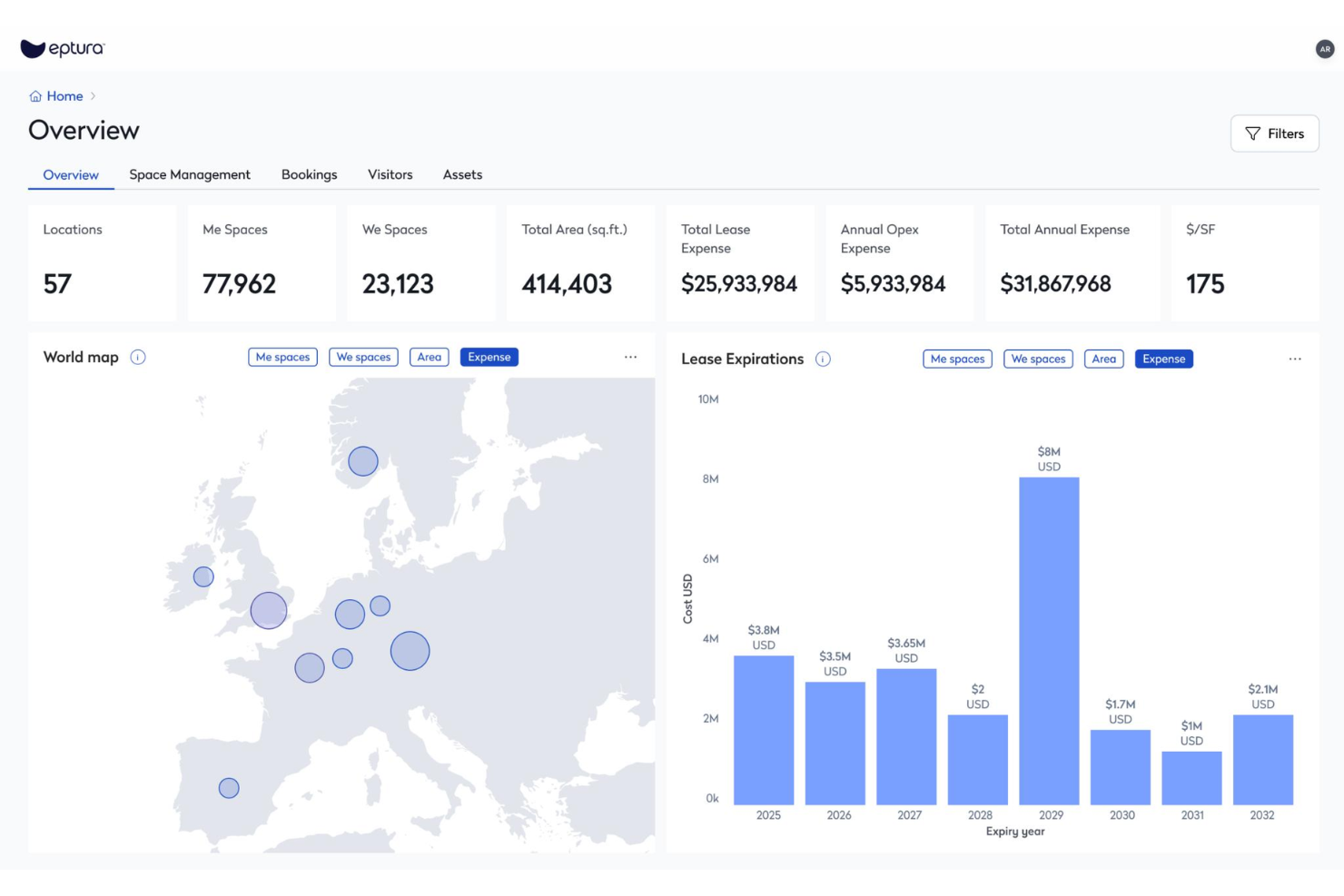
Eptura Workplace is a hybrid workplace management platform with desk booking, conference room scheduling, space planning, move management, and occupancy data tools built for multi-site organizations.
Who Is Eptura Best For?
Eptura Workplace is a strong fit for facilities and real estate teams managing large, distributed office portfolios across multiple regions or countries.
Why I Picked Eptura
Eptura Workplace earns its spot on my shortlist because of how it handles portfolio visibility across a large, distributed real estate footprint. I'm particularly impressed by the real estate performance dashboards, which give you a live view of occupancy, utilization, and space usage across every location at once. The scenario planning tools let you model layout changes and right-size underused sites before committing to anything. For teams managing dozens of offices globally, that kind of data-backed decision-making is hard to replicate in a lighter-weight tool.
Eptura Key Features
- Desk booking: Reserve individual workstations in advance so employees can plan in-office days around their team's schedule.
- Conference room scheduling: Book and manage meeting rooms across all your locations from a single interface.
- Touchless visitor experience: Check in guests without front-desk assistance using a self-serve, digital visitor flow.
- Wayfinding: Help employees and visitors navigate office layouts using interactive maps displayed on in-office devices.
Eptura Integrations
Eptura offers more than 30 native integrations, including the Microsoft ecosystem, Zoom, Salesforce, Dropbox, Azure, AWS, Power BI, and Slack. It integrates with Zapier, and an API is also available for custom integrations.
Pros and Cons
Pros:
- Unifies desk booking, rooms, and visitors in one platform
- Interactive floor plans show real-time seat availability
- Space and move modules support global portfolio management
Cons:
- Outlook room reservations don't always sync back
- Built-in reporting and analytics lack customization depth

FLYDESK
Best for global coworking space access
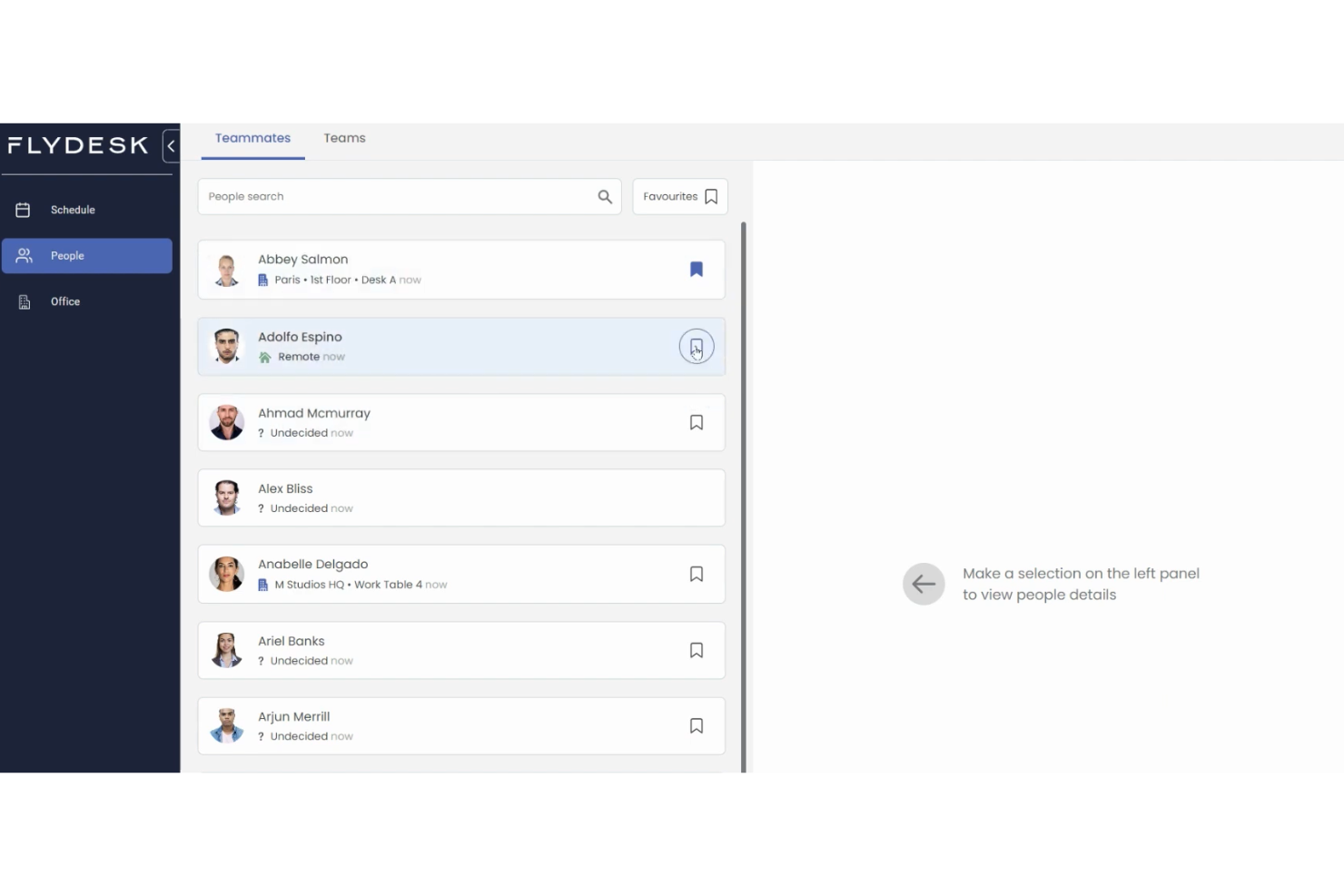
FLYDESK is a hybrid workplace management platform that covers desk booking, workplace scheduling, leave management, and on-demand access to coworking spaces and serviced offices worldwide.
Who Is FLYDESK Best For?
FLYDESK is a strong fit for globally distributed companies whose employees work across multiple countries and need flexible access to local office spaces.
Why I Picked FLYDESK
FLYDESK earns its spot on my shortlist because no other tool in this category pairs internal desk booking with a live global coworking network. Through FLYDESK Space, employees can instantly book desks, meeting rooms, and private offices across thousands of locations from 200+ workspace partners worldwide. I also like that this is built directly into the same platform your team uses for daily scheduling, so a traveling employee can swap their home-office day for a local coworking space without switching tools or submitting a separate request.
FLYDESK Key Features
- Weekly scheduling: Set your work location for each day of the week, office, remote, or off, so teammates always know where everyone will be working.
- Leave management: Submit, approve, and track time-off requests directly within the platform alongside daily scheduling.
- Working hours tracker: Log and monitor employee working hours as an optional add-on tied to your company's HR policy settings.
- Interactive floor map: Navigate a visual, clickable map of your office to see desk availability and book specific spots by location.
FLYDESK Integrations
FLYDESK offers a small set of native integrations focused on collaboration and calendars, including Slack, Microsoft Teams, Google Calendar, Microsoft Outlook, and Microsoft Teams Calendar. It also connects with HRIS platforms like BambooHR and Payfit to sync leave data with payroll workflows. Zapier and API support are not publicly listed.
Pros and Cons
Pros:
- Employees adopt it with minimal training
- Combines scheduling, desks, and leave tracking
- Built-in global coworking space booking
Cons:
- Lacks native integrations with office badge or access control systems
- Workspace analytics are lightweight compared to dedicated space-planning tools
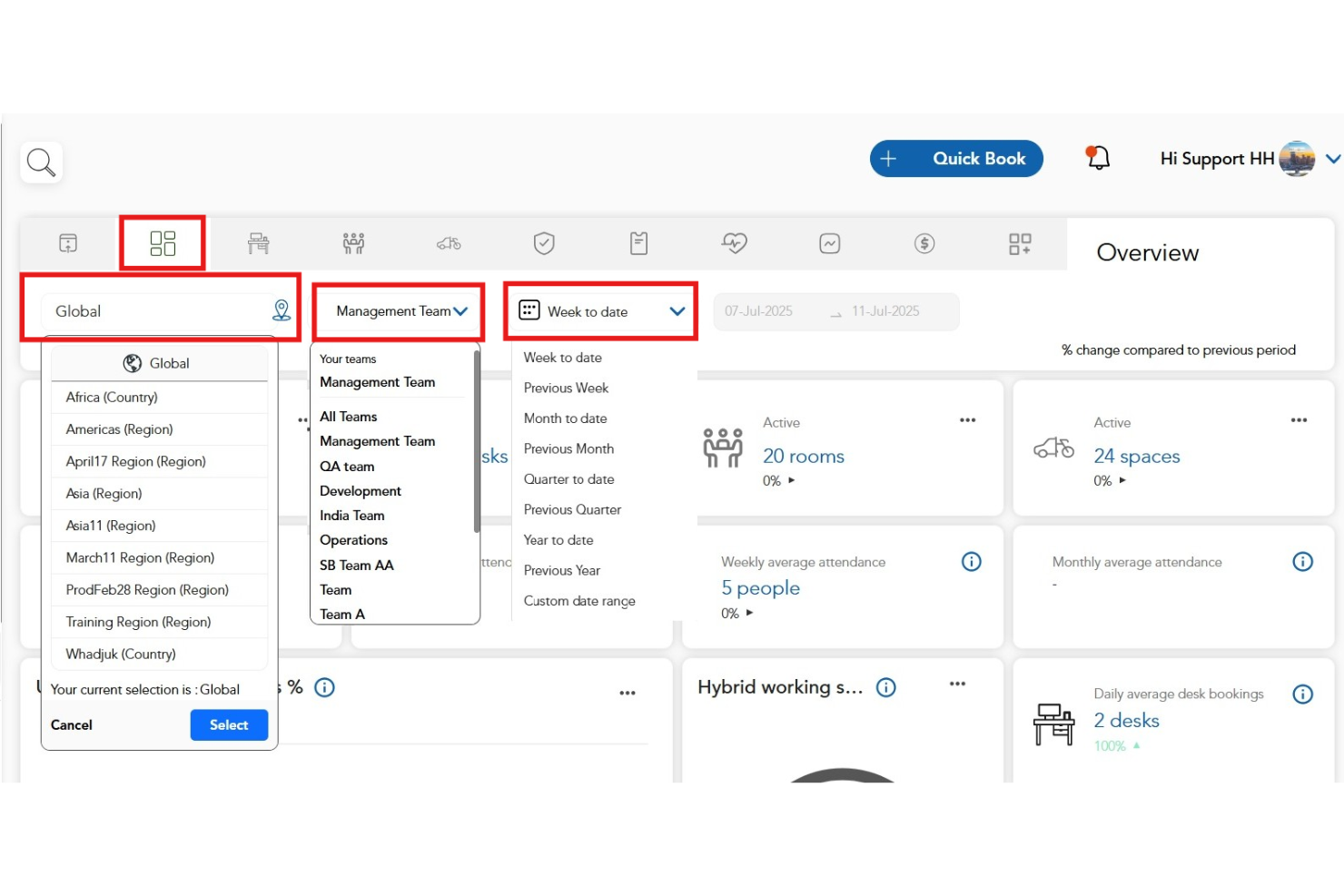
HybridHero is a workplace operating platform that brings desk booking, room management, visitor management, parking, HR, and multi-location space analytics into a single connected system built for enterprise organizations.
Who Is HybridHero Best For?
HybridHero is a strong fit for global enterprises with 500 or more employees managing hybrid teams across multiple office locations, particularly in industries like banking, construction, healthcare, and consulting.
Why I Picked HybridHero
HybridHero earns its spot on my shortlist because no other tool in this category handles genuine enterprise complexity across multiple locations as well. I particularly like the portfolio-level utilisation reporting, which gives workplace, finance, and real estate leaders a single data set across every office rather than siloed dashboards per location. The team neighbourhood feature also means large organizations can preserve team proximity even when managing hundreds of hot desks across floors and cities. I'd also point to the Switch Programme, which gets enterprises migrated and live within five business days.
HybridHero Key Features
- Visitor management: Run kiosk check-in, badge printing, host notifications, NDA capture, and full audit trail from one module.
- Parking management: Let employees reserve bays before arrival, with auto-release of unused spaces and EV charging support.
- Utilization heat maps: View peak day trends and no-show tracking across every module in one board-ready report.
- HR module: Connect hybrid schedules, attendance tracking, and team coordination in a single system alongside your desk and room data.
HybridHero Integrations
HybridHero offers native integrations across the Microsoft ecosystem, including Microsoft Outlook, Microsoft Teams, Office 365, and Azure AD, along with Google Workspace, Slack, Okta, and more. A REST API and webhooks are available for custom integrations with HRIS, access control, and internal systems.
Pros and Cons
Pros:
- Clone previous week's bookings instantly
- Supports 11 languages for global teams
- Built-in HR and parking modules included
Cons:
- Per-user pricing model inflates costs for true hybrid teams
- Mobile app lacks desk-occupant visibility
Annen programvare for administrasjon av hybride arbeidsplasser
Her er noen flere alternativer for programvare for administrasjon av hybride arbeidsplasser som ikke kom med på listen min, men som likevel er verdt å se nærmere på:
- Maptician
For real-time space planning
- Yoffix
For Microsoft 365 customization
- Skedda
For setting custom rules for booking access
- deskbird
For integration with Microsoft Teams
- Kadence
For AI-powered space planning features
- Tactic
In-app workplace requests handling
- Archie
For department-based neighborhood seating
- OfficeSpace
All-in-one AI agent platform
- Flowscape
For 3D office visualization tools


How I Evaluate Hybrid Workplace Management Software
I evaluate in two layers: the core capabilities a tool must have—like desk booking and schedule coordination—and the differentiators that separate viable options from the best fit.
Core Functionality (Table Stakes For This List)
When I'm selecting tools for my list, I rank each one on a scale from 0 (does not offer the functionality) to 5 (excels in this area) for each core functionality listed below. Then, I calculate the tool's total score into a percentage. Each tool needs to achieve a minimum total score of 65% to be considered for inclusion.
- Desk & Room Booking: I look for interactive floor plans where employees can visually pick a desk or meeting room, not just select from a dropdown list.
- Hybrid Schedule Management: Teams need a way to set weekly in-office and remote days, so I check whether managers can view and approve schedules at the team level.
- Office Attendance Tracking: I evaluate how each tool captures check-ins—whether through QR codes, badge taps, or geolocation—and how real-time the occupancy data is.
- Space Utilization Analytics: Good reporting shows which floors and neighborhoods sit half-empty on Fridays so workplace leaders can right-size their real estate footprint.
- Team Coordination Tools: I look for features that let employees see when their teammates plan to be on-site, making it easy to cluster office days for collaboration.
- HRIS & Calendar Integrations: Syncing with Google Calendar, Outlook, Slack, and HRIS platforms like Workday or BambooHR keeps scheduling data accurate without manual upkeep.
Once I have a list of tools that meet the criteria, I consider what sets each platform apart.
Differentiating Factors (What Sets Vendors Apart)
Here's how I compare and contrast different vendors:
Standout Features
Visitor management is a feature I pay close attention to—pre-registration, badge printing, and host notifications make a real difference when clients arrive at a hybrid office. I also evaluate smart building integrations, like IoT sensor connections that adjust lighting or climate based on real-time occupancy. Interactive wayfinding rounds out the on-site experience, helping employees navigate large or multi-floor offices to find their booked desk or locate a colleague.
Beyond Features
I check whether a platform fits the buyer's scale—a 50-person startup and a 10,000-employee enterprise with offices on three continents have very different needs around multi-location support and user provisioning. Mobile experience matters too, since employees book desks and check in from their phones, not a desktop. Compliance is another area I evaluate closely; I look for SOC 2 Type II certification, GDPR readiness, and role-based permissions that keep sensitive occupancy and HR data locked down to the right people.
Slik velger du programvare for administrasjon av hybride arbeidsplasser
Det er lett å gå seg vill i lange funksjonslister og komplekse prismodeller. For å hjelpe deg med å holde fokus mens du arbeider deg gjennom den unike prosessen med å velge programvare, får du her en sjekkliste over faktorer du bør ha i bakhodet:
| Faktor | Hva bør du vurdere? |
|---|---|
| Skalerbarhet | Kan programvaren støtte vekstplanene dine? Kan den håndtere en økning i antall brukere, lokasjoner eller datamengde? Se etter trinnvise abonnementer eller brukergrenser. |
| Integrasjoner | Kobler verktøyet seg til de eksisterende HRIS-, kalender- og meldingssystemene dine? Bekreft at det finnes integrasjoner innebygd i løsningen for Microsoft 365, Google Workspace eller Slack. |
| Tilpasningsmuligheter | Kan systemet tilpasses virksomhetens retningslinjer for hybridarbeid, godkjenningsflyter, soner eller bestillingsbegrensninger? Spør om tilpassede regler og nivåer for administratorkonfigurasjon. |
| Brukervennlighet | Er grensesnittet enkelt nok til at alle ansatte raskt kan ta det i bruk? Se etter tydelig navigasjon, mobilstøtte og enkle arbeidsflyter. |
| Implementering og opplæring | Hvilken støtte får du under utrullingen? Vurder tilgangen på ressurser for opplæring, hjelp med migrering og målrettet opplæring for administratorer og ansatte. |
| Kostnad | Hvordan samsvarer prismodellene med bruksmønstrene eller den forventede veksten din? Ta hensyn til skjulte kostnader som premiumfunksjoner, overskridelser eller nødvendige integrasjoner. |
| Sikkerhetstiltak | Hvilke kontroller finnes for personvern, SSO og tilgangsadministrasjon? Sørg for at leverandøren oppfyller organisasjonens krav til sikkerhet og samsvar. |
| Tilgjengelig brukerstøtte | Får du tilgang til rask hjelp hvis det oppstår problemer? Gå gjennom SLA-vilkårene, brukerstøttekanalene, åpningstidene og prosessene for eskalering. |
Hva er programvare for administrasjon av hybride arbeidsplasser?
Programvare for styring av hybride arbeidsplasser er en digital plattform utviklet for å administrere fleksible kontormiljøer ved å samordne skrivebordsbestillinger, reservasjoner av møterom, registrering av tilstedeværelse og hybride arbeidsplaner. Disse verktøyene hjelper HR- og arbeidsplassteam med å optimalisere arealbruken, støtte samarbeid mellom ansatte på kontoret og eksternt samt følge med på belegget i bygningen for å oppfylle sikkerhets- eller samsvarsmål.
Funksjoner i programvare for styring av hybride arbeidsplasser
Når du velger programvare for styring av hybride arbeidsplasser, bør du se etter følgende viktige funksjoner:
- Bestilling av skrivebord: Lar ansatte reservere skrivebord for bestemte dager eller tidspunkter, noe som bidrar til å sikre tilgjengelige arbeidsplasser og redusere konflikter i delte kontormiljøer.
- Administrasjon av møterom: Gjør det mulig å bestille, frigi og følge med på bruken av konferanserom, ofte med funksjoner for å administrere utstyr og tidsplaner slik at utnyttelsen av rommene maksimeres.
- Analyse av arealutnyttelse: Gir sanntidsdata og historiske data om hvordan arbeidsområder og møteområder brukes, slik at team kan optimalisere utforminger og retningslinjer.
- Administrasjon av hybride arbeidsplaner: Gjør det mulig for ansatte å angi hvilke dager de jobber eksternt eller på kontoret, noe som gir bedre oversikt på tvers av team og reduserer overfylte kontorer.
- Besøksadministrasjon: Registrerer innsjekkinger og godkjenninger av gjester, skriver ut adgangskort og logger besøk, noe som støtter sikkerhet og samsvar med sikkerhetsprotokoller.
- Integrasjon med kalendersystemer: Synkroniserer bestillinger, tidsplaner og bruk av møterom med plattformer som Microsoft 365 eller Google Workspace for å unngå dobbeltbestillinger og organisere planleggingen.
- Tilgang via mobilapp: Lar brukere bestille skrivebord og rom eller administrere tidsplaner fra smarttelefonene sine, noe som fremmer bruk og fleksibilitet på tvers av hybride team.
- Integrasjon med adgangskontroll: Kobler seg til byggets sikkerhets- eller adgangskortsystemer for å gi adgang bare til planlagte eller innsjekkede ansatte og besøkende.
- Soneinndeling og tillatelser: Lar administratorer fastsette bestillingsregler og tillatelser etter avdeling, team eller etasje, slik at områdene brukes som tiltenkt.
- Samsvar med helse- og kapasitetskrav: Tilbyr innebygde verktøy for å administrere trygge beleggsnivåer og håndheve retningslinjer for kontorhelse, for eksempel avstandskrav eller hygienekontroller.
Vanlige AI-funksjoner i programvare for styring av hybride arbeidsplasser
I tillegg til standardfunksjonene i programvare for styring av hybride arbeidsplasser som er nevnt ovenfor, tar mange av disse løsningene i bruk AI med funksjoner som:
- Smarte anbefalinger for arbeidsområder: Bruker AI til å foreslå ideelle skrivebord eller rom basert på de ansattes preferanser, bedriftens retningslinjer og nylige bestillingstrender, noe som bidrar til å maksimere arealutnyttelsen og de ansattes tilfredshet.
- Prediktiv kapasitetsplanlegging: Analyserer historiske bruksmønstre for å forutsi fremtidig etterspørsel etter skrivebord, møterom eller andre ressurser, slik at man proaktivt kan justere kontorløsninger og retningslinjer.
- Automatisert optimalisering av hybride arbeidsplaner: Anbefaler kontordager for team eller enkeltpersoner for å støtte samarbeid på tvers av team og redusere trengsel på kontoret, basert på innsikt fra tidligere arbeidsplaner og prosjektprioriteringer.
- Avviksdeteksjon for kontorbruk: Overvåker beleggsdata for å varsle administratorer om uvanlige mønstre, for eksempel dobbeltbestillinger, overfylte områder eller underutnyttede arealer, slik at problemer kan håndteres proaktivt.
- Bestillingsassistenter på naturlig språk: Lar brukere bestille områder eller oppdatere tidsplaner gjennom AI-drevne chatboter eller virtuelle assistenter, noe som forenkler opplevelsen og reduserer friksjon for de ansatte.
Fordeler med programvare for styring av hybride arbeidsplasser
Implementering av programvare for styring av hybride arbeidsplasser gir flere fordeler for teamet og virksomheten din. Her er noen av fordelene du kan se frem til:
- Bedre arealutnyttelse: Automatisert booking og analyse bidrar til å redusere ubrukt arbeidsplass og sørger for at hvert område utnyttes optimalt.
- Bedre teamsamarbeid: Felles oversikt over timeplaner, bookinger og tilstedeværelse på kontoret støtter samarbeid mellom ansatte som jobber på kontoret og eksternt.
- Redusert administrativ arbeidsmengde: Selvbetjente bookingverktøy og automatiserte godkjenningsprosesser reduserer behovet for manuell planlegging og administrative oppgaver for HR- og kontoransvarlige.
- Bedre medarbeideropplevelse: Enkle reservasjonssystemer, mobiltilgang og AI-drevne anbefalinger gjør det mer praktisk og fleksibelt å komme på kontoret.
- Bedre oversikt over etterlevelse og sikkerhet: Funksjoner for registrering av tilstedeværelse, helsekontroller og kapasitetsgrenser bidrar til å opprettholde regelverksetterlevelse og fremme sikkerhet på arbeidsplassen.
- Smart ressursplanlegging: Prediktiv analyse og rapportering gjør det mulig for ledere å ta datadrevne beslutninger om arealbehov og investeringer i kontoret.
- Effektiv besøksadministrasjon: Smidig innsjekking, sporing og sikkerhetskontroller gir gjester og innleide et profesjonelt og sikkert besøk.
Kostnader og priser for programvare for hybrid arbeidsplassadministrasjon
Ved valg av programvare for hybrid arbeidsplassadministrasjon er det viktig å forstå de ulike prismodellene og abonnementene som er tilgjengelige. Kostnadene varierer basert på funksjoner, teamstørrelse, tilleggstjenester og mer. Tabellen nedenfor oppsummerer vanlige abonnementer, gjennomsnittsprisene deres og typiske funksjoner som er inkludert i programvareløsninger for hybrid arbeidsplassadministrasjon:
Sammenligningstabell for programvare for hybrid arbeidsplassadministrasjon
| Abonnementstype | Gjennomsnittspris | Vanlige funksjoner |
|---|---|---|
| Gratisabonnement | $0 | Grunnleggende booking av skrivebord, begrenset antall brukerplasser, standard kundestøtte og tilgang til sentrale planleggingsfunksjoner. |
| Personlig abonnement | $5-$15 per bruker per måned | Booking av skrivebord og rom, støtte for én lokasjon, tilgang til mobilapp og grunnleggende rapporteringsverktøy. |
| Bedriftsabonnement | $15-$30 per bruker per måned | Administrasjon av flere lokasjoner, besøksadministrasjon, integrasjoner med kalenderplattformer og administratorkontroller. |
| Virksomhetsabonnement | $30-$50 per bruker per måned | Tilpassede arbeidsflyter, avansert analyse, prioritert kundestøtte, forbedret sikkerhet og dedikert introduksjon. |
Vanlige spørsmål om programvare for hybrid arbeidsplassadministrasjon
Her er noen svar på vanlige spørsmål om programvare for hybrid arbeidsplassadministrasjon:
Hvordan hjelper plattformer for hybrid arbeidsplassadministrasjon med planlegging av kontorarealer?
Disse plattformene bruker bookingdata og analyse av arealutnyttelse for å vise hvordan skrivebord og møterom faktisk brukes. Dette hjelper deg med å tilpasse utforming og retningslinjer slik at de bedre samsvarer med de ansattes behov.
Støtter programvare for hybrid arbeidsplassadministrasjon flere kontorlokasjoner?
Ja, de fleste løsninger har funksjoner for administrasjon av flere steder, slik at du kan angi unike regler, følge bruksmønstre og koordinere timeplaner på tvers av ulike kontorer eller etasjer.
Hvilke integrasjoner bør jeg se etter i programvare for hybrid arbeidsplassadministrasjon?
Se etter integrasjoner med kalendersystemer som Microsoft 365 eller Google Workspace, samarbeidsverktøy som Slack eller Teams og HRIS- eller adgangskontrollsystemene dine, slik at data flyter sømløst mellom plattformene.
Finnes det personvern- eller sikkerhetsutfordringer ved bruk av disse systemene?
Ja, disse verktøyene håndterer ofte sensitive opplysninger om ansatte og besøkende. Sørg for at leverandøren tilbyr kryptering, sterke tilgangskontroller og støtte for SSO, og at løsningen overholder relevante personvernlover.
Hvordan håndterer brukere vanligvis introduksjon til nye hybride arbeidsplassystemer?
Gode plattformer tilbyr introduksjonsressurser som interaktive omvisninger, videopplæring, maler og responsiv kundestøtte for å hjelpe deg med å komme raskt i gang og sikre at de ansatte tar verktøyet i bruk.