

10 beste programvarer for HR-dokumenthåndtering i 2026

Programvare for dokumenthåndtering i HR


Programvare for dokumenthåndtering i HR hjelper teamet ditt med å organisere, lagre og sikre personalregistre, retningslinjer og samsvarsdokumenter i ett digitalt system. Hvis du ser etter måter å redusere manuelt papirarbeid, forbedre revisjonsberedskapen eller holde sensitive filer tilgjengelige, men beskyttede, kan den rette plattformen utgjøre en stor forskjell.
Denne listen hjelper deg med å sammenligne de beste løsningene for dokumenthåndtering i HR i 2026, slik at du kan finne verktøy som passer til behovene dine for samsvar, arbeidsflytpreferanser og virksomhetens størrelse.
Hvorfor du kan stole på våre programvareanbefalinger
Teamet vårt har testet og anmeldt programvare siden 2012. Vi er selv HR-eksperter, så vi vet hvor vanskelig og hvor viktig det er å velge riktig programvare.
I denne guiden har vi vurdert verktøyene gjennom praktisk testing og uavhengig research og gitt dem poeng ut fra våre utvelgelseskriterier. Vi bygger også på innsikt fra ledende eksperter i bransjen og erfarne HR-eksperter.
Anmeldelsene våre bygger på vår egen redaksjonelle vurdering. De er ikke et salgsargument.
Ekspertanmeldere:
Sammenligningstabell over anmeldelser av programvare for dokumenthåndtering i HR
Denne sammenligningstabellen oppsummerer prisdetaljer for mine beste utvalg av programvare for dokumenthåndtering i HR.
| Tool | Best For | Trial Info | Price | ||
|---|---|---|---|---|---|
| 1 | Best for benefits document centralization | Free demo available | From $599/user/month | Website | |
| 2 | Best for global workforce onboarding | Free demo available | From $5/employee/month | Website | |
| 3 | Best as AI for business | Free demo available | From $8/user/month | Website | |
| 4 | Best for multi-entity HR file compliance | Free demo available | Pricing upon request | Website | |
| 5 | Best for real-time collaboration | Free plan + trial available | From $7/user/month (billed annually) | Website | |
| 6 | Best for small business onboarding | Free demo available | From $4/user/month + $50/month base fee | Website | |
| 7 | Best for secure cloud-based archiving | Free demo available | Pricing upon request | Website | |
| 8 | Best with enterprise collaboration tools | 14-day free trial | From CAD$21/user/month (billed annually) | Website | |
| 9 | Best for advanced search capabilities | 14-day free trial + free demo available | Pricing upon request | Website | |
| 10 | Best with integrated payroll management | Free demo available | Pricing upon request | Website |

Anmeldelser av programvare for dokumenthåndtering i HR
Nedenfor finner du mine detaljerte sammendrag av programvaren for dokumenthåndtering i HR som kom med på kortlisten min. Anmeldelsene mine gir en detaljert gjennomgang av funksjonene, de beste bruksområdene og integrasjonene til hver plattform, slik at du kan finne den beste løsningen for deg.

Best for benefits document centralization

If your HR team needs a single place to manage all benefits-related documents, Justworks is designed for you. The platform centralizes benefits enrollment forms, plan details, and compliance notices so nothing gets lost or overlooked. It’s especially useful for small and midsize businesses that want to simplify benefits administration and document access for employees.
Why I Picked Justworks
Centralizing benefits documents is a challenge for many HR teams, and Justworks addresses this need directly. I picked Justworks because it stores all benefits-related forms, plan summaries, and compliance notices in one secure location, making it easy for both HR and employees to find what they need. The platform also lets you manage enrollment documents and distribute required notices electronically, reducing paperwork and manual tracking. For organizations that want to keep benefits documentation organized and accessible, Justworks offers a focused solution.
Justworks Key Features
In addition to benefits document centralization, Justworks offers several other features for HR teams:
- Automated onboarding checklists: Assign and track required onboarding tasks and documents for new hires.
- E-signature support: Collect digital signatures on HR forms and agreements directly within the platform.
- Document expiration alerts: Receive notifications when important HR documents are nearing expiration or require updates.
- Employee self-service portal: Allow employees to access, download, and upload HR documents securely on their own.
Justworks Integrations
Integrations include Greenhouse, Ramp, Vouch, Lever, Brex, Electric, JazzHR, Trainual, Leapsome, and Vanta.
Pros and Cons
Pros:
- 24/7 expert HR consultant access
- Automated payroll tax filing storage
- PEO-integrated compliance document management
Cons:
- No built-in document editing capability
- Lacks granular document permission settings

Deel HR
Best for global workforce onboarding
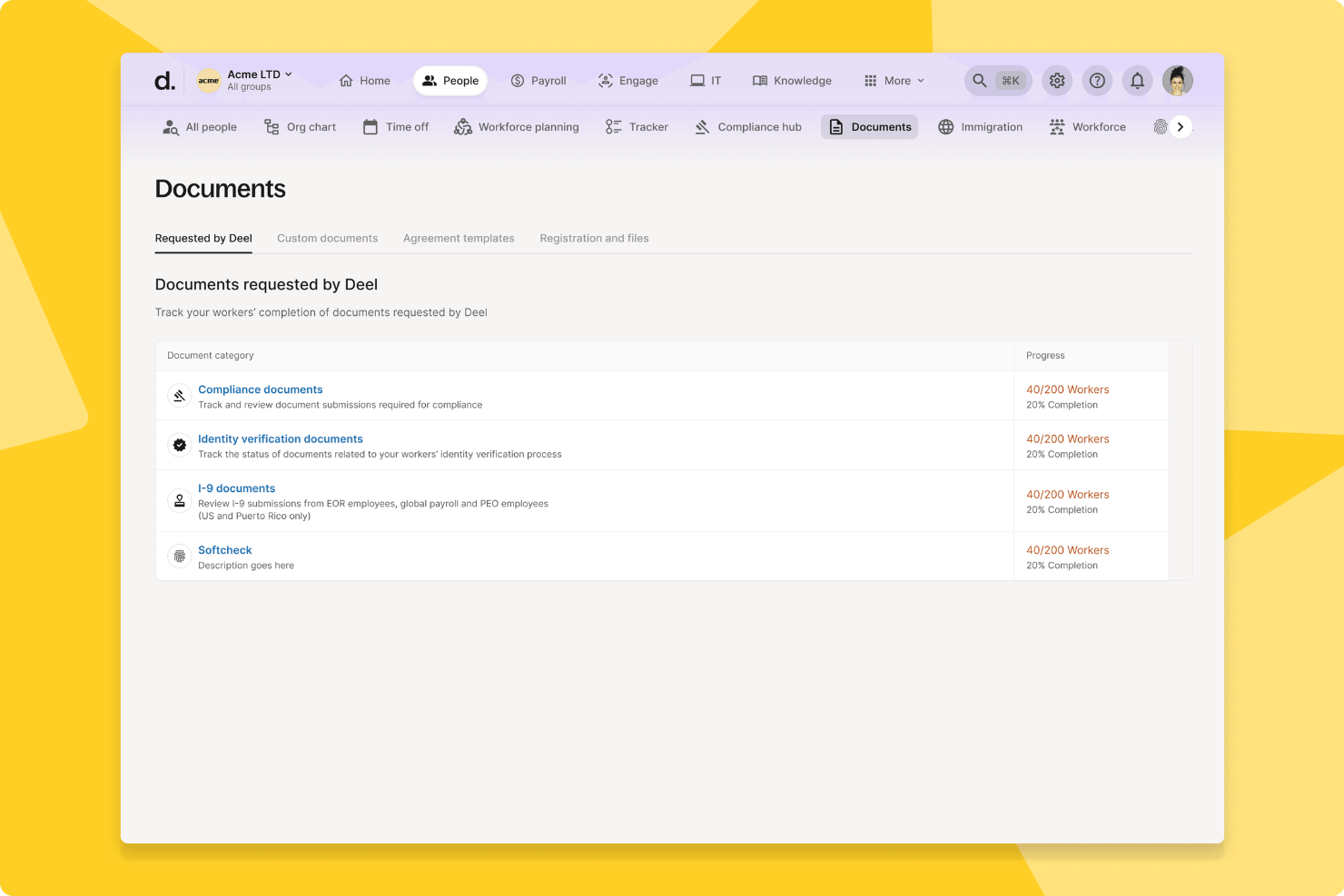
Deel HR is a global HR document management platform that centralizes employee records, automates compliance workflows, and supports international onboarding, contracts, and document storage for distributed teams.
Who Is Deel HR Best For?
Deel HR suits HR teams at multinational companies managing employee documents, onboarding, and compliance across multiple countries and regions.
Why I Picked Deel HR
I picked Deel HR as one of the best because my team can onboard employees in over 100 countries with localized document templates and compliance checks built in. I like that Deel HR automates document collection and e-signatures for new hires, so we never miss a required form. My team is able to track onboarding progress and store all employment agreements securely in one place.
Deel HR Key Features
- Role-based access controls: Set permissions for document visibility and editing by user role.
- Audit trails: Track every document action with time-stamped logs for compliance.
- Bulk document upload: Upload and organize multiple HR files at once for faster management.
- Custom document fields: Add and manage unique data fields to tailor records to your organization’s needs.
Deel HR Integrations
Deel HR offers native integrations with platforms like Workday, BambooHR, Greenhouse, HiBob, and QuickBooks. An API is available for custom integrations.
Pros and Cons
Pros:
- Provides audit trails for document activity
- Centralizes contractor and employee document storage
- Includes digital signature collection for HR files
Cons:
- Limited customization for document templates
- Bulk document upload can be slow
New Product Updates from Deel HR

Deel Expands Stablecoin Wallet to 80+ Countries
Deel expands its Stablecoin Wallet to 80+ countries with dollar-backed balances and optional rewards. This gives eligible contractors more ways to hold and manage earnings inside Deel. For more information, visit Deel’s official site.
 .
.
Best as AI for business
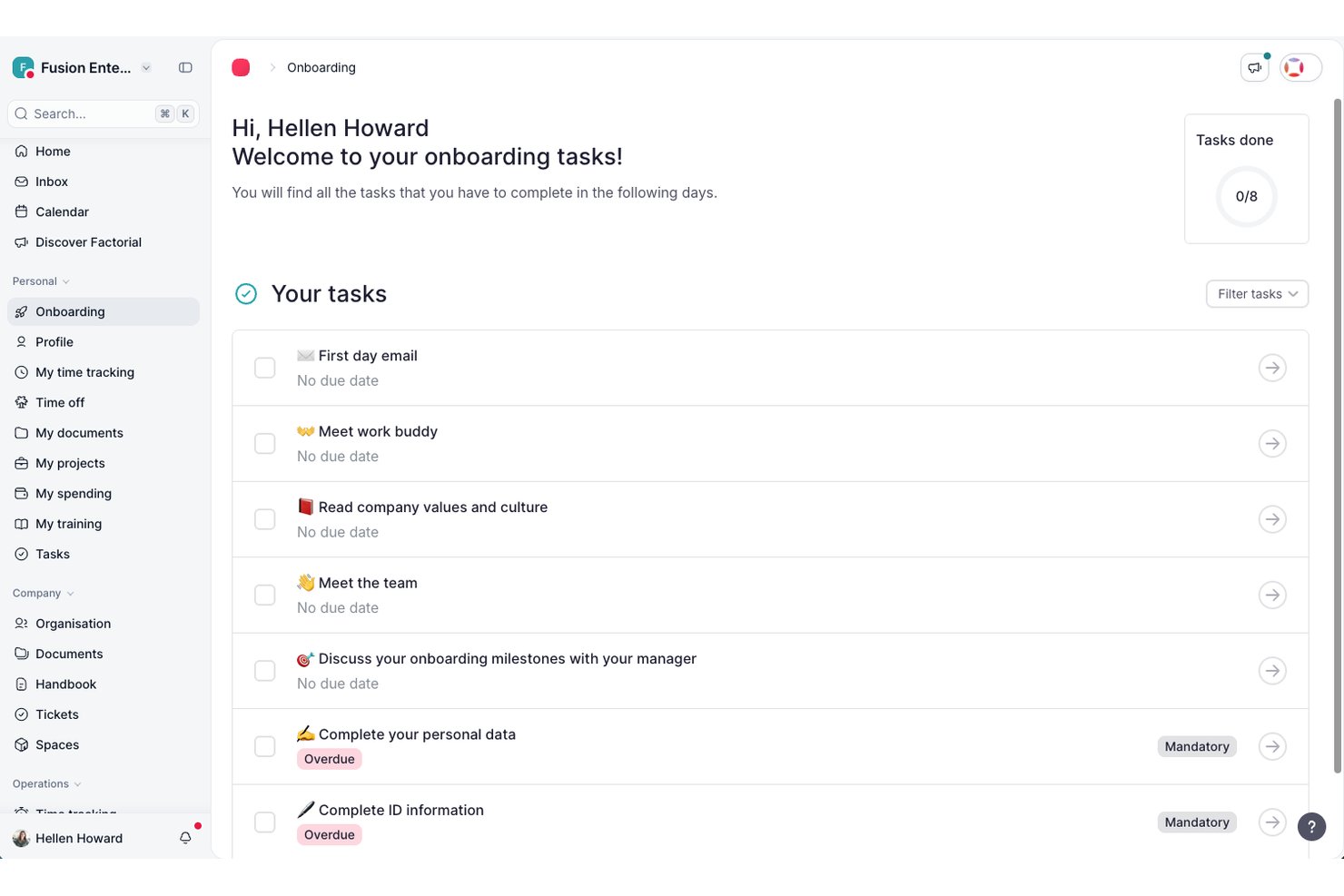
Factorial is an AI-powered HR platform that brings employee document storage, e-signatures, fillable PDFs, workflow automation, and role-based access controls together in one place.
Who Is Factorial Best For?
Factorial is a strong fit for small to mid-sized businesses that want a single AI-powered platform to manage HR, finance, and IT operations together rather than juggling separate tools.
Why I Picked Factorial
I've included Factorial in my top picks because its AI for business positioning goes beyond standard HR document tools, using AI to handle day-to-day operations like planning timetables, generating reports, and answering employee policy questions on demand. I particularly like how document generation pulls from existing HR data to auto-populate fillable PDFs, cutting out manual entry when creating offer letters or onboarding paperwork. Granular, folder-level access controls also let you restrict exactly who sees what, down to individual document types per role.
Factorial Key Features
- Legal e-signature: Send bulk e-signature requests via PDF upload, with support for multiple signature marks per document and email notifications to signers.
- Employee self-service document hub: Employees can upload, download, edit, share, and delete files directly from their personal document space on web or mobile.
- Onboarding and offboarding workflows: Ready-to-use workflow templates guide document collection and process steps for new hires and departing employees.
- Granular document deletion permissions: Administrators can configure deletion rights separately for different document types and folder locations, independent of broader edit permissions.
Factorial Integrations
Factorial offers marketplace integrations with Okta, Slack, LinkedIn, Recruitee, Google Workspace, Microsoft Azure, Microsoft Power BI, and DATEV LODAS. It also supports a public REST API, webhooks, SDKs, and Zapier.
Pros and Cons
Pros:
- AI answers employee policy questions
- Folder-level permissions protect sensitive records
- Employee self-service reduces routine HR requests
Cons:
- Complex workflows may require workarounds
- No documented retention schedules or alerts
Doxis
Best for multi-entity HR file compliance
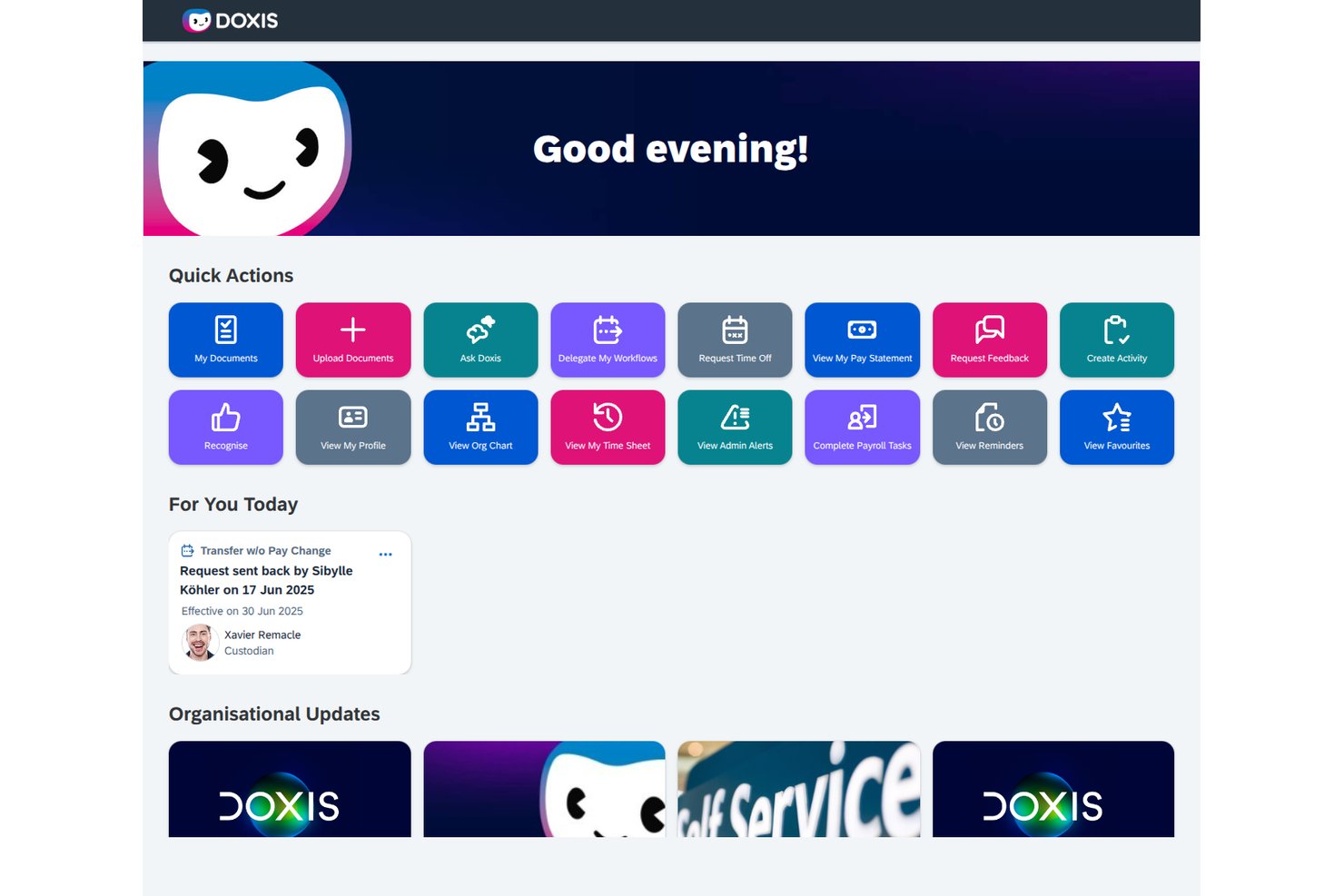
Doxis is an AI-first HR document management platform that centralizes digital personnel files, automates document workflows, and enforces retention and compliance rules across multiple entities and locations.
Who Is Doxis Best For?
Doxis is a strong fit for enterprise HR teams managing personnel files across multiple legal entities or countries, especially those already running SAP SuccessFactors or Workday.
Why I Picked Doxis
I picked Doxis as one of the best because it's built specifically for the complexity that comes with running HR across multiple legal entities or countries. Where most tools treat personnel files as a single structure, Doxis lets you configure document types, retention rules, and folder structures by country or legal entity, so a team in Germany and one in the Netherlands each get the right compliance rules applied automatically. I also like how its AI completeness checker flags missing or expiring documents per file, which matters when you're auditing dozens of entity-specific records at once.
Doxis Key Features
- HR eFile: Each employee gets a structured digital personnel file with a preset folder layout that holds contracts, payroll documents, training records, and performance reviews across the full employee lifecycle.
- BPMN 2.0 workflow builder: HR workflows for onboarding, approvals, and offboarding are built using low-code tools with conditional logic, multi-step approvals, and automated email or SMS notifications.
- Employee self-service portal: Employees can view their own file within an HR-defined time window, upload documents like sick notes, request certificates, and submit personal data changes with effective dates.
- Automated retention scheduling: Retention periods are set per document type and enforced automatically, with each deletion logged in the audit trail to support GDPR and GoBD compliance.
Doxis Integrations
Doxis offers documented integrations with SAP SuccessFactors, Workday, SAP HCM, ADP, Oracle PeopleSoft, and Microsoft Dynamics. Marketplace integrations include DocuSign, Adobe Acrobat Sign, FP Sign, MOXIS, and e-Sign Agent.
Pros and Cons
Pros:
- Teams can expand from department pilots
- Automated retention supports entity-specific compliance rules
- Reviewers praise adaptable electronic personnel records
Cons:
- HR signing often depends on external services
- Enterprise scope can overwhelm smaller HR teams
Best for real-time collaboration
Google Docs is a cloud-based document management platform that lets HR teams create, organize, and collaborate on employee files and HR documents in real time.
Who Is Google Docs Best For?
HR teams at small to midsize companies who need a simple, cloud-based solution for document collaboration and sharing.
Why I Picked Google Docs
I picked Google Docs as one of the best because my team can collaborate on HR files in real time, making updates and comments instantly visible. I like that we can control sharing permissions for sensitive documents and organize folders for onboarding, compliance, and employee records. In practice, that means HR staff can work together on policies or contracts without version confusion.
Google Docs Key Features
- Template gallery: Access pre-built templates for HR policies, onboarding checklists, and employee forms.
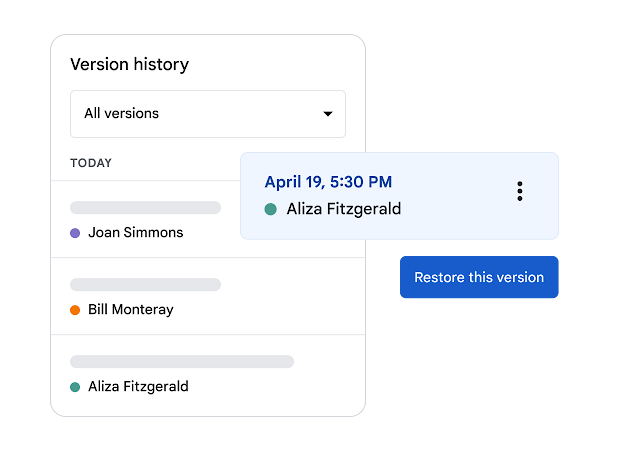
- Version history: Track document changes and restore previous versions as needed.
- Commenting and suggestions: Add comments or suggest edits without altering the original text.
- Mobile editing: Create and update HR documents from any mobile device.
Google Docs Integrations
Google Docs offers native integrations across the Google Workspace ecosystem, including Google Drive, Google Sheets, Google Slides, and Gmail. An API is available for custom integrations.
Pros and Cons
Pros:
- Cloud-based storage with automatic saving
- Simple permission settings for document access
- Easy sharing with internal and external users
Cons:
- Not designed for sensitive HR data security needs
- No built-in HR compliance or retention tools

Eddy
Best for small business onboarding
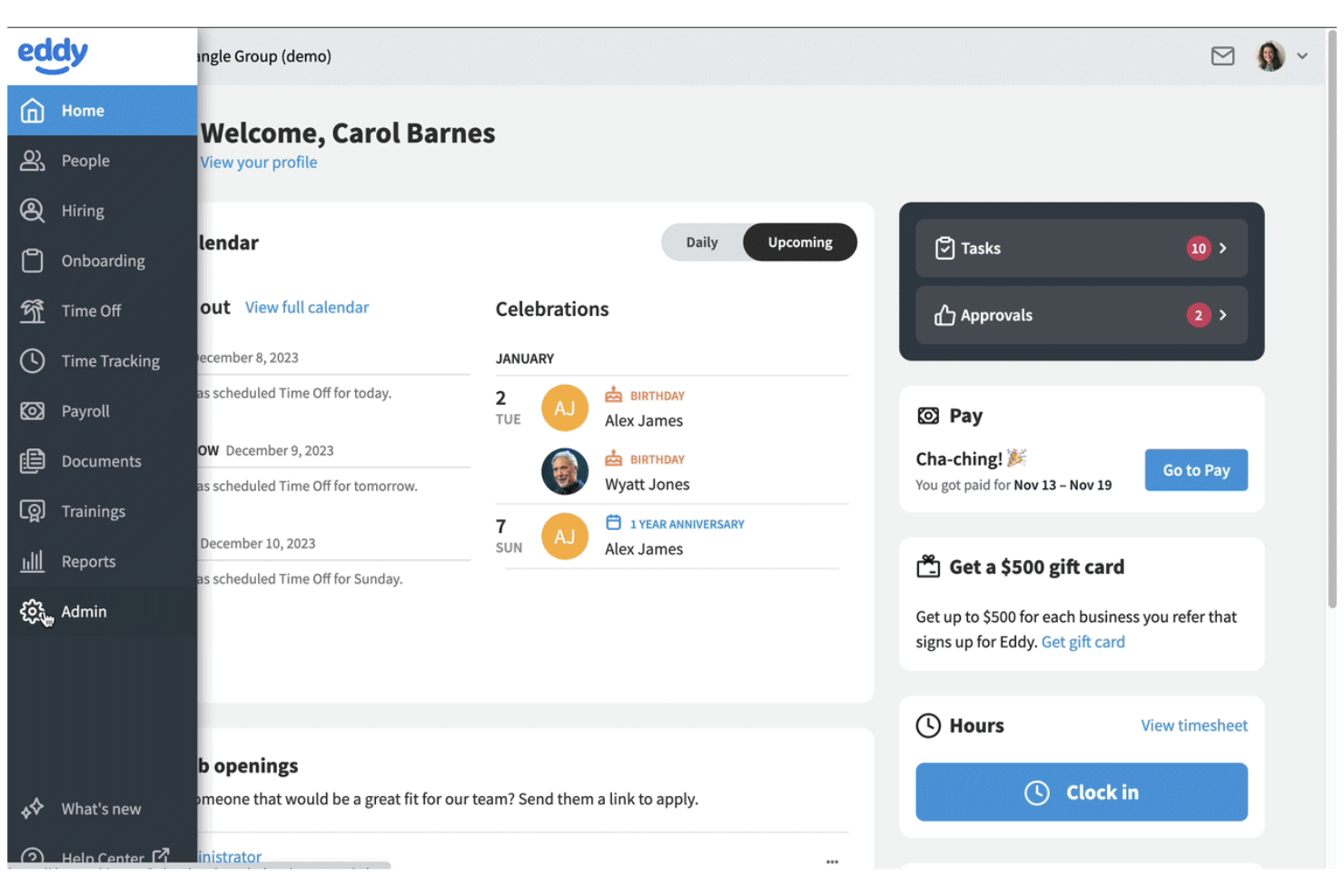
Eddy offers small businesses a way to centralize HR documents and onboarding tasks in one dashboard. It’s especially useful for teams that want to digitize paperwork, manage employee files, and automate onboarding without a complex setup. If you’re looking for a solution that simplifies document collection and compliance for new hires, Eddy is built with those needs in mind.
Why I Picked Eddy
For small businesses that want to simplify onboarding and document management, Eddy offers a focused set of tools. Its employee onboarding checklists let you assign, track, and store required documents for each new hire, making it easy to stay organized. I picked Eddy because it gives HR teams a way to manage employee files, collect digital signatures, and ensure compliance without extra complexity. If you need a straightforward platform to optimize onboarding paperwork and document storage, Eddy is designed with those priorities in mind.
Eddy Key Features
Some other features in Eddy that HR teams may find helpful include:
- Role-based document permissions: Control who can view, edit, or upload specific HR documents within the platform.
- Document expiration tracking: Set and monitor expiration dates for certifications, licenses, or other time-sensitive documents.
- Custom document templates: Create and reuse templates for recurring HR forms and agreements.
- Employee document request tool: Send requests for missing documents directly to employees and track responses.
Eddy Integrations
Integrations include SimplyInsured, Checkr, LinkedIn, Next, QuickBooks Online, SmartPay, 401GO, Indeed, Employee Navigator, and Express Evaluations.
Pros and Cons
Pros:
- Custom templates for recurring HR documents
- Digital signatures are included for HR forms
- Onboarding checklists automate document collection
Cons:
- Limited reporting on document activity history
- No bulk upload for employee documents
DocuWare
Best for secure cloud-based archiving
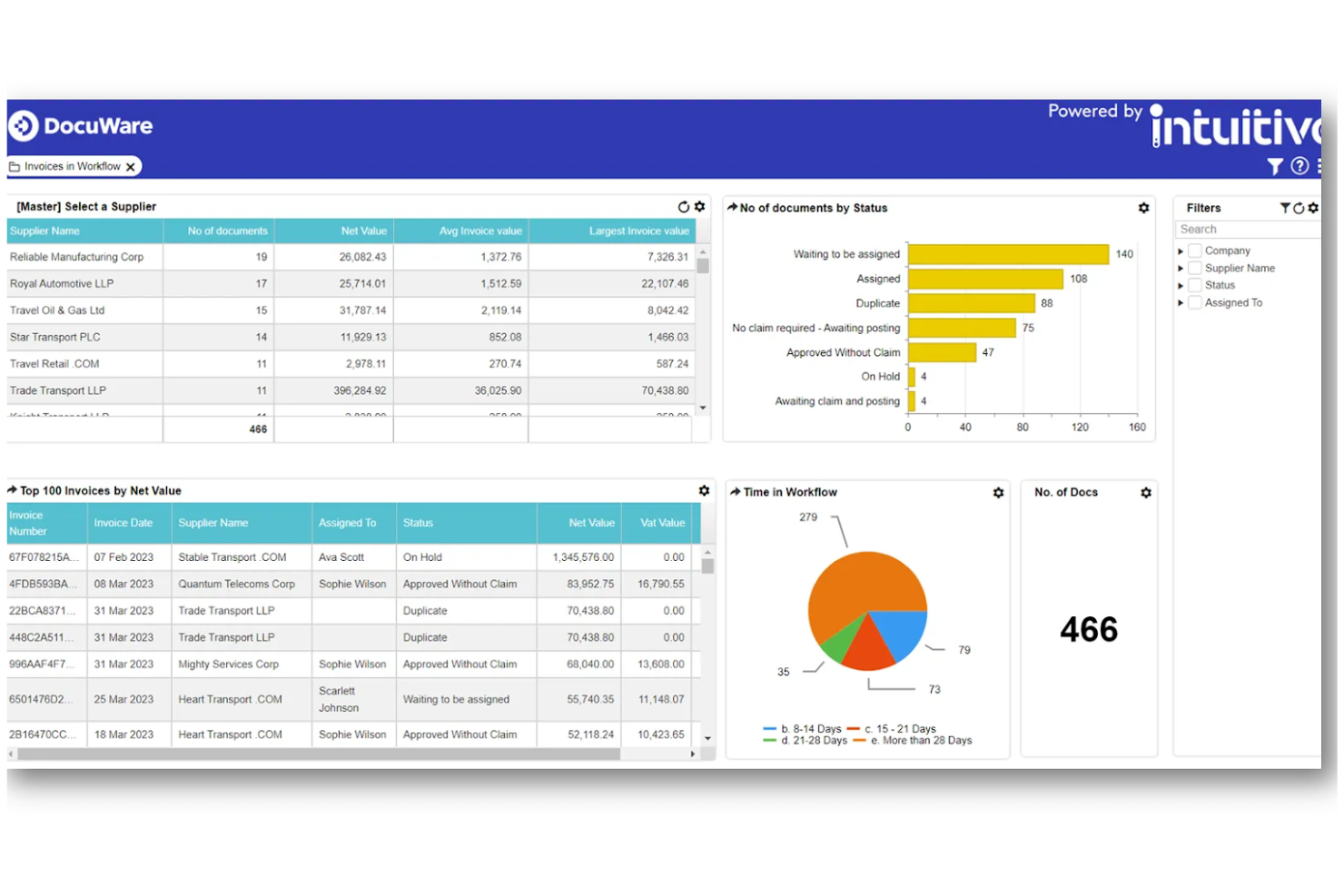
DocuWare offers HR teams a secure way to archive and manage sensitive employee documents in the cloud. It’s especially useful for organizations that need to meet strict compliance standards or handle confidential records across multiple locations. With advanced encryption and automated retention policies, DocuWare helps you keep HR files protected and organized.
Why I Picked DocuWare
When secure, cloud-based archiving is a top priority for HR, DocuWare offers a focused solution. I picked DocuWare because it uses advanced encryption and access controls to keep sensitive HR documents protected at every stage. Automated retention and deletion policies help HR teams stay compliant with regulations and internal policies. These features make DocuWare a strong choice for organizations that need to safeguard confidential employee records in the cloud.
DocuWare Key Features
Some other features in DocuWare that HR teams may find valuable include:
- Automated document workflows: Route HR documents for approvals, signatures, or reviews based on custom rules.
- Mobile access: View, upload, and manage HR files securely from mobile devices.
- Full-text search: Locate employee records and documents quickly using keyword searches.
- Template-based document creation: Generate standard HR forms and letters using pre-built templates.
DocuWare Integrations
Integrations include SAP, Microsoft Outlook, Sage, QuickBooks, SharePoint, Infor, Oracle, JD Edwards, Microsoft Dynamics, and Microsoft Teams.
Pros and Cons
Pros:
- Pre-filled W-4 and I-9 forms
- Full-text search across all uploaded documents
- Offers intelligent document indexing data
Cons:
- No built-in payroll system integration
- Limited offline access to documents
Box
Best with enterprise collaboration tools
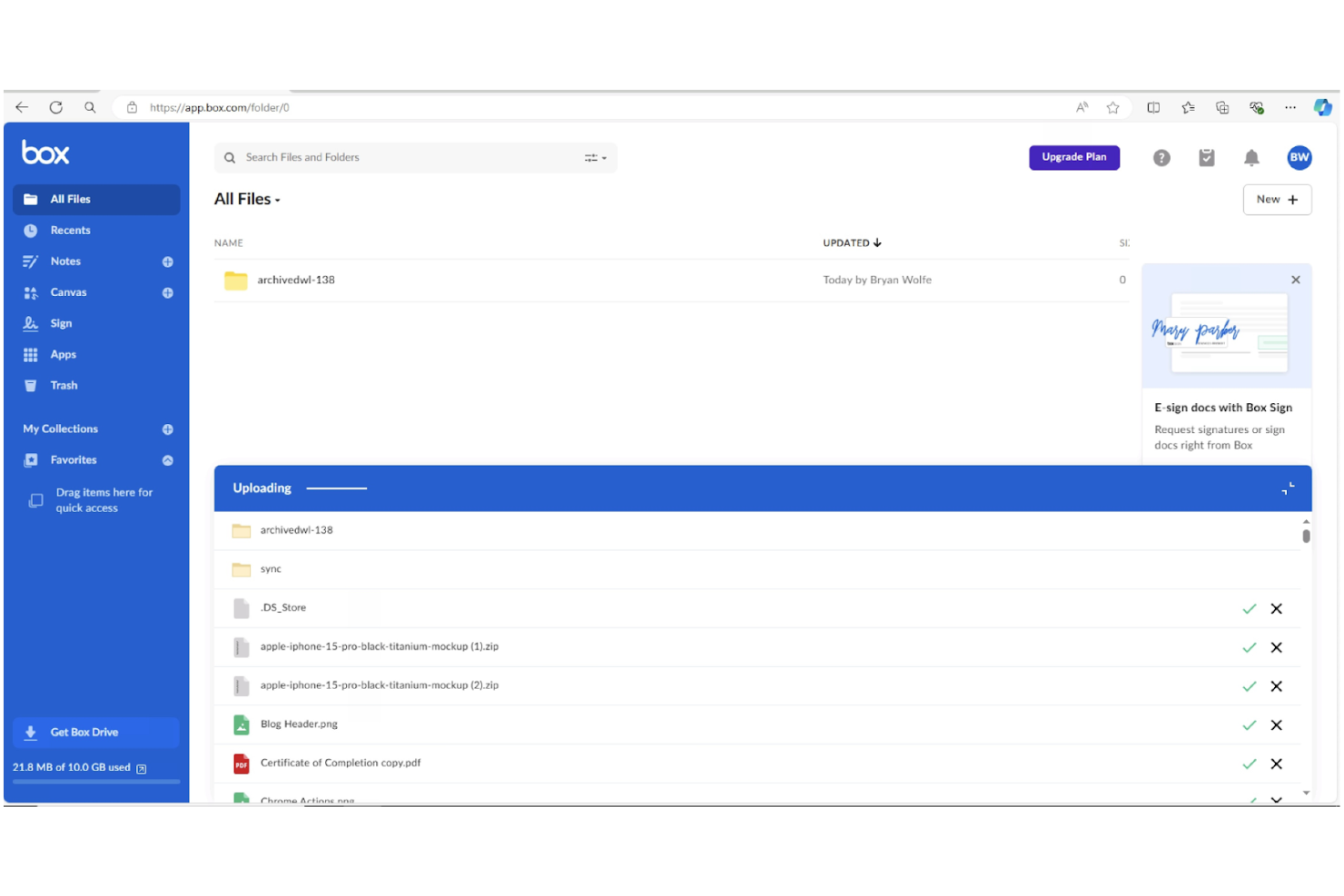
For HR teams that need to collaborate across departments or locations, Box offers a secure platform for managing and sharing sensitive employee documents. Its integration with popular enterprise tools makes it a strong fit for larger organizations with complex workflows. Box helps HR professionals centralize files, control access, and simplify document collaboration without sacrificing compliance.
Why I Picked Box
When HR teams need to collaborate with other departments or external partners, Box stands out for its enterprise-grade collaboration features. I picked Box because it allows multiple users to securely co-edit, comment on, and manage sensitive HR documents in real time. Its granular permission controls let you set access levels for different stakeholders, which is especially important for protecting confidential employee information. For organizations that rely on cross-functional teamwork and need to maintain strict document security, Box offers a flexible and scalable solution.
Box Key Features
Some other features that make Box useful for HR document management include:
- Automated workflow templates: Build and deploy repeatable document processes for tasks across the employee lifecycle like onboarding.
- Document version history: Track and restore previous versions of files as needed.
- Legal e-signature integration: Collect signatures directly within Box using Box Sign.
- Advanced search with metadata tagging: Locate documents quickly using custom tags and filters.
Box Integrations
Integrations include Microsoft 365, Google Workspace, Salesforce, Workday, Slack, Oracle NetSuite, Okta, Broadcom, Splunk, Adobe, and Palo Alto Networks.
Pros and Cons
Pros:
- Built-in e-signature tool for approvals
- Native 120+ file type preview support
- Granular AES 256-bit encryption controls
Cons:
- Bulk upload speeds can be inconsistent
- Complex external folder permission architecture
Revver
Best for advanced search capabilities
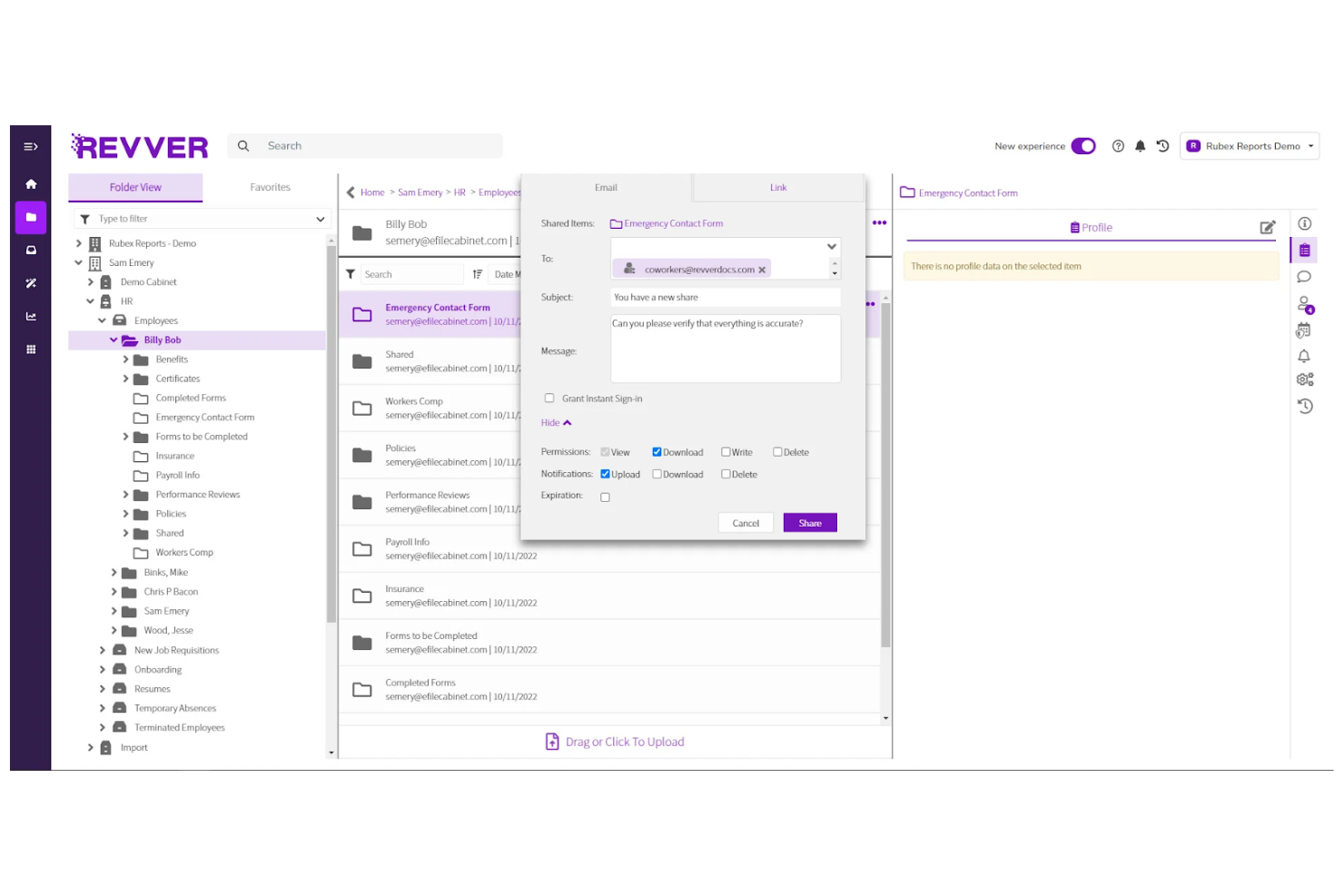
When you need to quickly locate HR documents across a large or complex repository, Revver offers advanced search tools that stand out. The platform is built for HR teams and organizations that manage high volumes of files and require precise, fast retrieval. Its search capabilities help reduce time spent hunting for policies, employee records, or compliance documents, making it a strong fit for teams with demanding document access needs.
Why I Picked Revver
Finding the right document quickly can be a challenge for HR operations, especially when managing thousands of files. I picked Revver because its advanced search capabilities let you filter by metadata, keywords, and document types, making it much easier to pinpoint exactly what you need. The platform also supports full-text search within documents, so you can locate specific information even if you don’t remember the file name. For HR professionals who need reliable, granular search tools to manage complex document libraries, Revver offers a clear advantage.
Revver Key Features
Some other features that make Revver useful for HR document management include:
- Automated document retention policies: Set rules for how long documents are stored and when they should be deleted.
- Role-based access controls: Assign permissions to users based on their role to protect sensitive HR files.
- Version history tracking: View and restore previous versions of documents as needed.
- Bulk upload and tagging: Upload multiple files at once and apply tags for easier organization.
Revver Integrations
Integrations include Microsoft 365, Google Drive, Microsoft Teams, Microsoft Outlook, Microsoft OneDrive, Google Docs, Google Sheets, Microsoft Word, and Microsoft PowerPoint.
Pros and Cons
Pros:
- 20TB top-tier storage capacity
- Dual-screen document version comparison tool
- Advanced search filters for complex queries
Cons:
- Limited workflow automation for HR approvals
- Lacks collaborative real-time document editing
Dayforce
Best with integrated payroll management
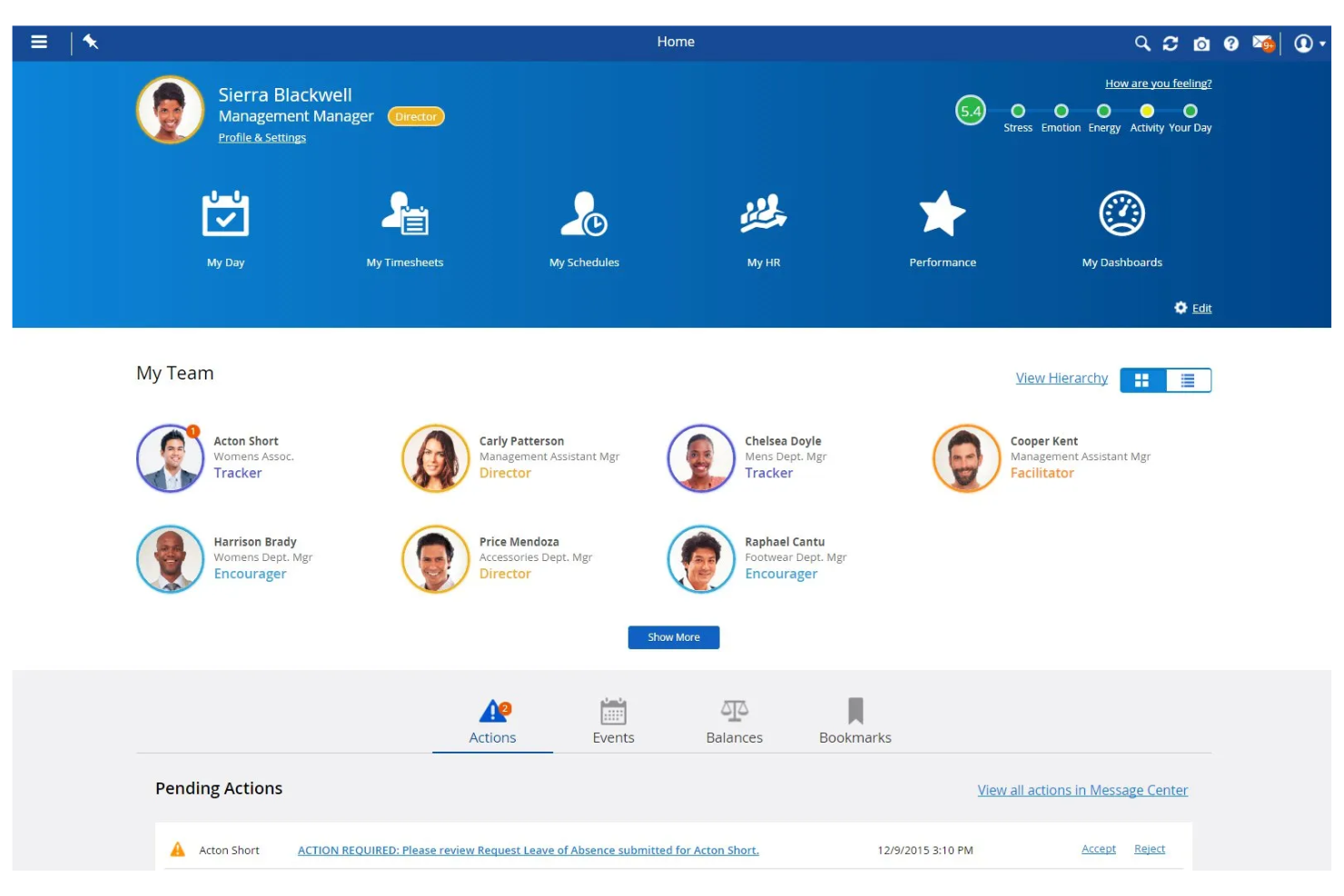
Dayforce stands out for HR teams that want document management tightly connected to payroll and workforce data. This all-in-one platform is a strong fit for organizations that need to manage sensitive employee files alongside payroll, benefits, and compliance records in one place. If you’re looking to reduce manual data entry and ensure payroll accuracy through integrated document workflows, Dayforce brings these capabilities together.
Why I Picked Dayforce
What sets Dayforce apart is its ability to connect HR document management directly with payroll processing. This integration means you can store, update, and access employee documents—like tax forms, contracts, and compliance records—right alongside payroll data, reducing the risk of errors and duplicate entries. I picked Dayforce because it automatically syncs document changes with payroll updates, which helps HR teams maintain accurate records for audits and reporting. For organizations where payroll accuracy and compliance are closely linked to document workflows, Dayforce offers a unified solution.
Dayforce Key Features
Some other features in Dayforce that HR teams may find valuable include:
- Automated document expiration alerts: Get notified when important HR documents are nearing expiration or require renewal.
- Role-based document access controls: Assign permissions so only authorized users can view or edit specific files.
- Bulk document upload and tagging: Upload multiple documents at once and tag them for easier organization and retrieval.
- Audit trail tracking: Monitor all document actions and changes for compliance and accountability.
Dayforce Integrations
Integrations include Salesforce, Microsoft Dynamics, Workday, SAP, Oracle, ADP, Kronos, QuickBooks, Ceridian, and Infor.
Pros and Cons
Pros:
- Document audit trails for all user actions
- AI-powered employee document self-service
- Global multi-currency payroll compliance storage
Cons:
- Frequent updates cause system instability
- Complex custom report creation interface
Annen programvare for dokumenthåndtering i HR
Her er noen flere alternativer for programvare for dokumenthåndtering i HR (DMS) som ikke kom med på kortlisten min, men som likevel er verdt å undersøke:
- PandaDoc
For e-signature document workflows
- Document Locator
With Microsoft Office integration
- DynaFile
For scanning paper records to digital
- WorkDocs
For automated compliance tracking
- Paycom
For employee self-service access
- Zoho People
For employee file organization
- OpenText
With large-scale document automation
- Hyland
For configurable retention policies


How I Evaluate HR Document Management Software
I split my evaluation into two layers: baseline capabilities a tool must have—like structured employee filing and compliant e-signatures—and the differentiators that separate the best from the rest.
Core Functionality (Table Stakes For This List)
When I'm selecting tools for my list, I rank each one on a scale from 0 (does not offer the functionality) to 5 (excels in this area) for each core functionality listed below. Then, I calculate the tool's total score into a percentage. Each tool needs to achieve a minimum total score of 65% to be considered for inclusion.
- Employee File Management: I look for a structured, employee-centric file system where documents are organized by profile—not just dumped into generic folders you have to sort through manually.
- Access Controls & Permissions: Sensitive files like disciplinary records or medical documentation need granular, role-based restrictions so only authorized personnel can view them.
- E-Signature & Document Workflows: I evaluate whether a tool supports native e-signatures and automated routing, like sending an offer letter for approval and then to the candidate for signing.
- Compliance & Retention Policies: I check for built-in retention schedules, audit trails, and regulatory support so your team can track I-9 expiration dates or honor GDPR erasure requests.
- Document Templates & Generation: Pre-built and customizable templates with merge fields matter—things like auto-populating an employment contract with a new hire's details from their profile.
- HRIS & Payroll Integration: The tool should connect with your existing HRIS or payroll platform so employee data flows between systems without duplicate entry or manual uploads.
Once I have a list of tools that meet the criteria, I consider what sets each platform apart.
Differentiating Factors (What Sets Vendors Apart)
Here's how I compare and contrast different vendors:
Standout Features
Automated onboarding packets are a big differentiator—I look for tools that bundle new-hire forms into sequenced kits with reminders so nothing slips through during someone's first week. A self-service employee portal also adds real value, giving staff direct access to pay stubs, policies, and personal documents without submitting an HR request. I also evaluate whether a platform uses AI or OCR to auto-classify uploaded files, which saves hours of manual tagging when you're migrating legacy records.
Beyond Features
Security certifications matter when you're storing sensitive employee data. I check for SOC 2 Type II or ISO 27001 compliance, plus encryption standards and SSO/MFA support. Integration depth is equally important—your document management tool should sync with your existing HRIS and payroll stack so employee records stay current without manual re-entry. I also evaluate implementation and migration support, especially bulk import options for teams transitioning from paper files or shared drives with thousands of legacy documents to organize.
Slik velger du programvare for dokumenthåndtering i HR
Det er lett å gå seg vill i lange funksjonslister og komplekse prisstrukturer. For å hjelpe deg med å holde fokus mens du går gjennom den unike prosessen din for valg av programvare, får du her en sjekkliste over faktorer du bør ha i tankene:
| Faktor | Hva bør du vurdere? |
|---|---|
| Skalerbarhet | Vil programvaren håndtere dokumentmengden din etter hvert som arbeidsstyrken vokser eller endrer seg over tid? |
| Integrasjoner | Kan verktøyet kobles direkte til HRIS, lønnssystemet eller andre sentrale systemer du allerede bruker? |
| Tilpasningsmuligheter | Kan du tilpasse dokumentarbeidsflyter, tillatelser og maler slik at de passer organisasjonens behov? |
| Brukervennlighet | Vil HR-medarbeidere og ansatte kunne navigere i og bruke systemet med minimal opplæring? |
| Implementering og innføring | Hvor lang tid tar det å flytte dokumenter og lære opp brukere? Finnes det ressurser for innføringen? |
| Kostnad | Er prisnivåene tydelige og forutsigbare? Vær oppmerksom på gebyrer per bruker, lagringsgrenser eller ekstra kostnader. |
| Sikkerhetstiltak | Tilbyr programvaren kryptering, tilgangskontroller og revisjonslogger for å beskytte sensitive data? |
| Krav til samsvar | Kan systemet støtte bransjens standarder for dokumentoppbevaring, personvern og revisjon? |
Hva er programvare for dokumenthåndtering i HR?
Programvare for dokumenthåndtering i HR er et digitalt system som lagrer, organiserer og sikrer personalregistre og HR-dokumenter på ett sentralisert sted. Disse plattformene hjelper HR-team med å administrere tilgangstillatelser, spore dokumentversjoner og sørge for samsvar med juridiske krav og virksomhetens retningslinjer.
Ved å digitalisere dokumentarbeidsflyter reduserer HR-team manuelt papirarbeid, forbedrer datasikkerheten og gjør det enklere for ansatte og ledere å finne og administrere viktige filer.
Funksjoner
Når du velger programvare for dokumenthåndtering innen HR, bør du se etter følgende nøkkelfunksjoner:
- Dokumentlagring: Samler alle HR-filer og -dokumenter i et sikkert, digitalt arkiv, slik at det blir enkelt å organisere og hente frem dokumenter etter behov.
- Tilgangskontroller: Lar deg angi tillatelser for hvem som kan vise, redigere eller dele bestemte dokumenter, og beskytter sensitiv medarbeiderinformasjon.
- Versjonssporing: Opprettholder en historikk over endringer i dokumenter, slik at du kan se hvem som har gjort oppdateringer og gå tilbake til tidligere versjoner ved behov.
- Dokumentdistribusjon: Gjør det mulig for HR å sende dokumenter til enkeltpersoner eller grupper, spore levering og bekrefte mottak eller kvittering.
- Støtte for elektroniske signaturer: Gjør det mulig for medarbeidere og ledere å signere elektronisk, noe som fremskynder godkjenninger og reduserer papirbruken.
- Revisjonsspor: Registrerer all dokumentaktivitet, inkludert visninger, redigeringer og nedlastinger, for å støtte samsvar med krav og interne revisjoner.
- Søkefunksjonalitet: Tilbyr søkeverktøy som raskt finner dokumenter etter nøkkelord, dato eller medarbeidernavn.
- Håndtering av oppbevaringsregler: Automatiserer arkivering og sletting av dokumenter basert på juridiske krav eller virksomhetens krav, og reduserer risikoen for manglende samsvar.
- Oppretting av egendefinerte skjemaer: Lar HR-team bygge og distribuere digitale skjemaer for introduksjon av nyansatte, oppdateringer av retningslinjer eller andre HR-prosesser.
- Mobil tilgang: Tilbyr sikker tilgang til dokumenter fra smarttelefoner eller nettbrett, og støtter HR-arbeid på avstand og på farten.
Fordeler
Implementering av programvare for dokumenthåndtering innen HR gir flere fordeler for teamet og virksomheten din. Her er noen av fordelene du kan se frem til:
- Bedre samsvar med krav: Automatiserte revisjonsspor, oppbevaringsregler og sporing av kvitteringer hjelper deg med å oppfylle juridiske krav og virksomhetens krav med mindre manuelt arbeid.
- Raskere gjenfinning av dokumenter: Sentralisert lagring og avanserte søkeverktøy gir enkel tilgang til medarbeideropplysninger og HR-filer når du trenger dem.
- Bedre datasikkerhet: Tilgangskontroller og kryptering beskytter sensitiv medarbeiderinformasjon mot uautorisert tilgang eller utilsiktet deling.
- Mindre papirarbeid: Digitale skjemaer, elektroniske signaturer og automatiserte arbeidsflyter reduserer manuelt papirarbeid og behovet for fysisk lagring.
- Bedre medarbeideropplevelse: Selvbetjent tilgang til dokumenter gjør medarbeiderne i stand til å finne og administrere egne opplysninger uten å måtte vente på HR.
- Forenklet introduksjon og avslutning av arbeidsforhold: Automatisert dokumentdistribusjon og egendefinerte skjemaer forenkler prosessen med å ta imot nyansatte eller håndtere fratredelser.
- Skalerbarhet for team i vekst: Skybasert lagring og fleksible tillatelser gjør at dokumenthåndteringssystemet kan vokse sammen med virksomheten din.
Kostnader og priser
Valg av programvare for dokumenthåndtering innen HR krever en forståelse av de ulike prismodellene og abonnementene som er tilgjengelige. Kostnadene varierer basert på funksjoner, teamstørrelse, tillegg og mer. Tabellen nedenfor oppsummerer vanlige abonnementer, gjennomsnittsprisene deres og typiske funksjoner som er inkludert i programvareløsninger for dokumenthåndtering innen HR:
Sammenligningstabell for abonnementer på programvare for dokumenthåndtering innen HR
| Abonnementstype | Gjennomsnittspris | Vanlige funksjoner |
|---|---|---|
| Gratisabonnement | $0 | Grunnleggende dokumentlagring, begrenset brukertilgang, enkelt søk og grunnleggende brukerstøtte. |
| Personlig abonnement | $5-$15/bruker/måned | Individuell dokumenthåndtering, støtte for elektroniske signaturer, grunnleggende tilgangskontroller og begrenset lagring. |
| Bedriftsabonnement | $15-$30/bruker/måned | Dokumentdeling i team, avanserte tillatelser, revisjonsspor, egendefinerte skjemaer og integrasjonsmuligheter. |
| Storbedriftsabonnement | $30-$60/bruker/måned | Ubegrenset lagring, avanserte verktøy for samsvar med krav, egendefinerte arbeidsflyter, dedikert brukerstøtte og SSO-muligheter. |
Vanlige spørsmål om programvare for HR-dokumenthåndtering
Her er svar på vanlige spørsmål om programvare for HR-dokumenthåndtering:
Hvordan bidrar systemer for HR-dokumenthåndtering til overholdelse av regelverk?
Systemer for HR-dokumenthåndtering bidrar til overholdelse av regelverk ved å automatisere oppbevaringsplaner, spore bekreftelser av dokumenter og opprettholde revisjonsspor. Disse funksjonene gjør det enklere å oppfylle juridiske krav, forberede seg til revisjoner og sikre at sensitive medarbeiderdata håndteres i samsvar med regelverket.
Kan programvare for HR-dokumenthåndtering integreres med andre HR-verktøy?
Ja, de fleste programmer for HR-dokumenthåndtering kan integreres med HRIS-, lønns- og onboardingplattformer. Integrasjoner reduserer manuell dataregistrering, holder medarbeideropplysninger konsistente og gjør det mulig for HR-team å administrere dokumenter i eksisterende arbeidsflyter.
Hva bør jeg se etter når jeg vurderer sikkerheten i programvare for HR-dokumenthåndtering?
Se etter funksjoner som kryptering, rollebaserte tilgangskontroller og detaljerte revisjonslogger. Disse sikkerhetstiltakene beskytter sensitive medarbeideropplysninger mot uautorisert tilgang og hjelper deg med å overvåke hvem som viser eller redigerer dokumenter.
Hvor lang tid tar det å implementere programvare for HR-dokumenthåndtering?
Implementeringstiden varierer, men de fleste skybaserte løsninger kan settes opp på alt fra noen dager til noen uker. Faktorer som påvirker tiden, er størrelsen på dokumentarkivet, integrasjonsbehov og tilgjengeligheten av ressurser for innføring, som opplæring og støtte ved migrering.
Er det mulig å migrere eksisterende papirdokumenter til et digitalt system for HR-dokumenthåndtering?
Ja, du kan digitalisere papirdokumenter ved å skanne og laste dem opp til systemet. Mange leverandører tilbyr migreringsstøtte eller samarbeider med skanningstjenester for å hjelpe deg med å konvertere og organisere eksisterende dokumenter.