

10 beste programvarer for mikrolæring anmeldt i 2026

10 Kortliste over den beste programvaren for mikrolæring


I dagens hektiske arbeidsmiljø kan det være vanskelig å holde teamet engasjert og informert. Tradisjonelle opplæringsmetoder kommer ofte til kort, noe som fører til manglende motivasjon og kunnskapshull. Det er her programvare for mikrolæring kommer inn, med korte og fokuserte læringsopplevelser.
Jeg vet hvilke HR-utfordringer du står overfor – å balansere effektiv opplæring med tidsbegrensninger er ingen enkel oppgave. Etter min erfaring kan fordelene med programvare for mikrolæring bidra til å bygge bro over dette gapet ved å tilby fleksible og tilgjengelige læringsløsninger.
I denne artikkelen deler jeg mine objektive og grundig undersøkte anbefalinger for den beste programvaren for mikrolæring som er tilgjengelig. Du får innsikt i funksjonene, fordelene og ulempene, samt hvor godt de passer til ulike teambehov. La oss finne den rette løsningen for teamet ditt.
Hvorfor du kan stole på våre programvareanbefalinger
Teamet vårt har testet og anmeldt programvare siden 2012. Vi er selv HR-eksperter, så vi vet hvor vanskelig og hvor viktig det er å velge riktig programvare.
I denne guiden har vi vurdert verktøyene gjennom praktisk testing og uavhengig research og gitt dem poeng ut fra våre utvelgelseskriterier. Vi bygger også på innsikt fra ledende eksperter i bransjen og erfarne HR-eksperter.
Anmeldelsene våre bygger på vår egen redaksjonelle vurdering. De er ikke et salgsargument.
Ekspertanmeldere:
Sammenligningstabell for programvare for mikrolæring
Denne sammenligningstabellen oppsummerer prisinformasjonen for mine beste anbefalinger av programvare for mikrolæring:
| Tool | Best For | Trial Info | Price | ||
|---|---|---|---|---|---|
| 1 | Best for customizable learning paths | Free plan + free demo available | From $119/month (billed annually) | Website | |
| 2 | Best with robust HR and webinar integrations | Free trial available | Pricing upon request | Website | |
| 3 | Best for monetizing course content | Free demo available | Pricing upon request | Website | |
| 4 | Best for rapid course creation | Free trial available | From $3.97/user/month (billed annually) | Website | |
| 5 | Best for collaborative learning | 30-day free trial + free demo available | From $8/user/month | Website | |
| 6 | Best for in-app guidance | Free trial available | Pricing upon request | Website | |
| 7 | Best for Salesforce integration | Free demo available | Pricing upon request | Website | |
| 8 | Best for AI-driven learning paths | Free demo available | Pricing upon request | Website | |
| 9 | Best for employee engagement | Not available | Pricing upon request | Website | |
| 10 | Best for enterprise-level solutions | 14-day free trial | Pricing upon request | Website |


Anmeldelse av den beste programvaren for mikrolæring
Nedenfor finner du mine detaljerte sammendrag av den beste programvaren for mikrolæring som kom med på kortlisten min. Anmeldelsene mine gir en detaljert gjennomgang av de viktigste funksjonene, fordeler & ulemper, integrasjoner og ideelle bruksområder for hvert verktøy, slik at du kan finne det som passer best for deg.

Best for customizable learning paths
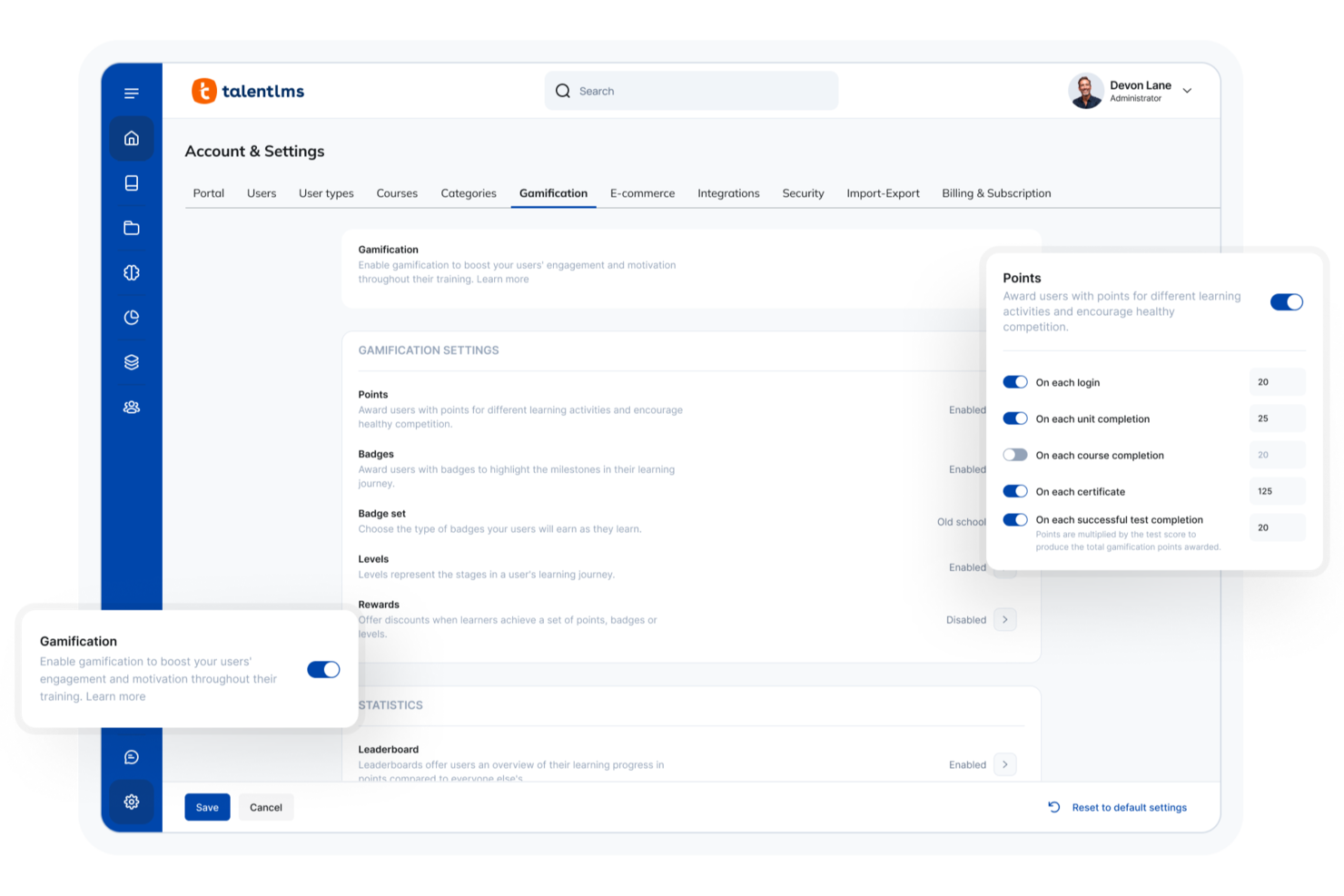
For professionals seeking a PMP microlearning software solution, TalentLMS offers a compelling option by simplifying the complexities of project management training. It provides a flexible, cloud-based platform designed to facilitate learning through short, focused courses, appealing to industries where continuous professional development is key. By addressing challenges such as time constraints and the need for ongoing skill updates, TalentLMS helps project managers and teams stay informed and efficient.
Why I Picked TalentLMS
I picked TalentLMS for its unique ability to cater to the microlearning needs of PMP candidates through its AI-driven course creation and a vast library of over 1,000 short courses. These features are particularly beneficial for those looking to break down complex project management concepts into digestible lessons. Additionally, TalentLMS's seamless integration with communication tools like Zoom and Microsoft Teams supports interactive, live training sessions, making it easier for teams to collaborate and learn in real-time.
TalentLMS Key Features
In addition to its standout microlearning capabilities, TalentLMS offers several features that enhance its usability for PMP training:
- TalentLibrary: Access over 1,000 curated courses on essential skills, ensuring a comprehensive learning experience.
- Mobile App Access: Enable learners to access courses anytime, anywhere, which is ideal for remote or on-the-go professionals.
- Customizable Learning Paths: Create personalized training journeys tailored to individual or team needs, improving engagement and outcomes.
- Reporting and Analytics: Utilize detailed insights into learning progress and effectiveness, essential for tracking PMP preparation.
TalentLMS Integrations
Integrations include Salesforce, BambooHR, Zoom, Microsoft Teams, GoToMeeting, Slack, Shopify, PayPal, Stripe, and Google Calendar.
Pros and Cons
Pros:
- Large ready-made course library
- Mobile-friendly, self-paced access
- Strong microlearning course structure
Cons:
- Interface depth has learning curve
- Advanced reporting can feel limited
New Product Updates from TalentLMS
TalentLMS Adds Learning Paths, AI Video, and Learner Experience Updates
TalentLMS introduced updates across learning management, content creation, and learner experience, including Learning Paths for Groups, AI video generation in TalentCraft, video bookmarking, and expanded administration tools. For more information, visit TalentLMS’s official site.
SkyPrep
Best with robust HR and webinar integrations
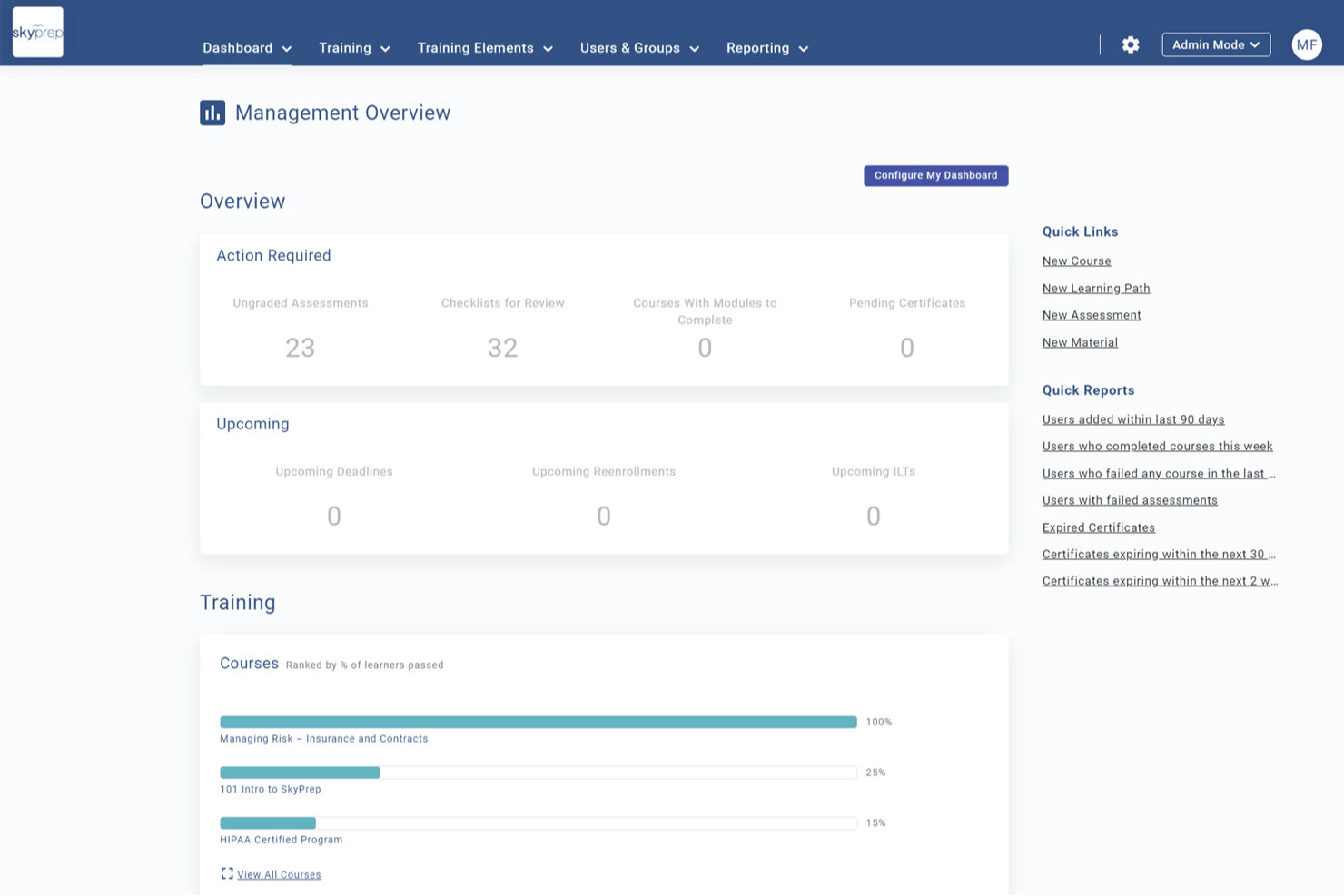
SkyPrep is a corporate LMS that supports microlearning delivery through mobile-friendly course authoring, gamification, compliance training, learning paths, and HR and webinar platform integrations.
Who Is SkyPrep Best For?
SkyPrep is a strong fit for HR and L&D teams at mid-sized organizations that run training across existing HR platforms like ADP Workforce Now or BambooHR.
Why I Picked SkyPrep
SkyPrep earns its spot on my shortlist because of how cleanly it connects microlearning delivery to existing HR systems. I like that learner rosters sync automatically from ADP Workforce Now or BambooHR, so new hires are enrolled in onboarding modules without any manual setup. I also use SkyPrep's Zoom and Microsoft Teams integrations to attach live webinar sessions directly to learning paths, keeping blended training in one trackable place.
SkyPrep Key Features
- SkyPrep Studio authoring: Build interactive microlearning courses using video, text, quizzes, and checklists within the platform.
- Gamification tools: Add points, badges, and leaderboards to increase engagement and motivation.
- Custom branding: White-label portals with your organization’s logo, custom colors, and personalized certificates.
- SOC II security compliance: Protect data and maintain regulatory standards with enterprise-grade security features.
SkyPrep Integrations
SkyPrep offers native integrations with ADP Workforce Now, BambooHR, Google Drive, Dropbox Business, Zoom, Microsoft Teams, Salesforce, Box, Microsoft Office 365, and connects with Zapier. An API is available for custom integrations.
Pros and Cons
Pros:
- White labeling allows custom branding
- Built-in webinar support for blended training
- HRIS sync automates learner enrollment
Cons:
- Analytics and reporting lack advanced filters
- No adaptive spaced repetition engine
Absorb
Best for monetizing course content
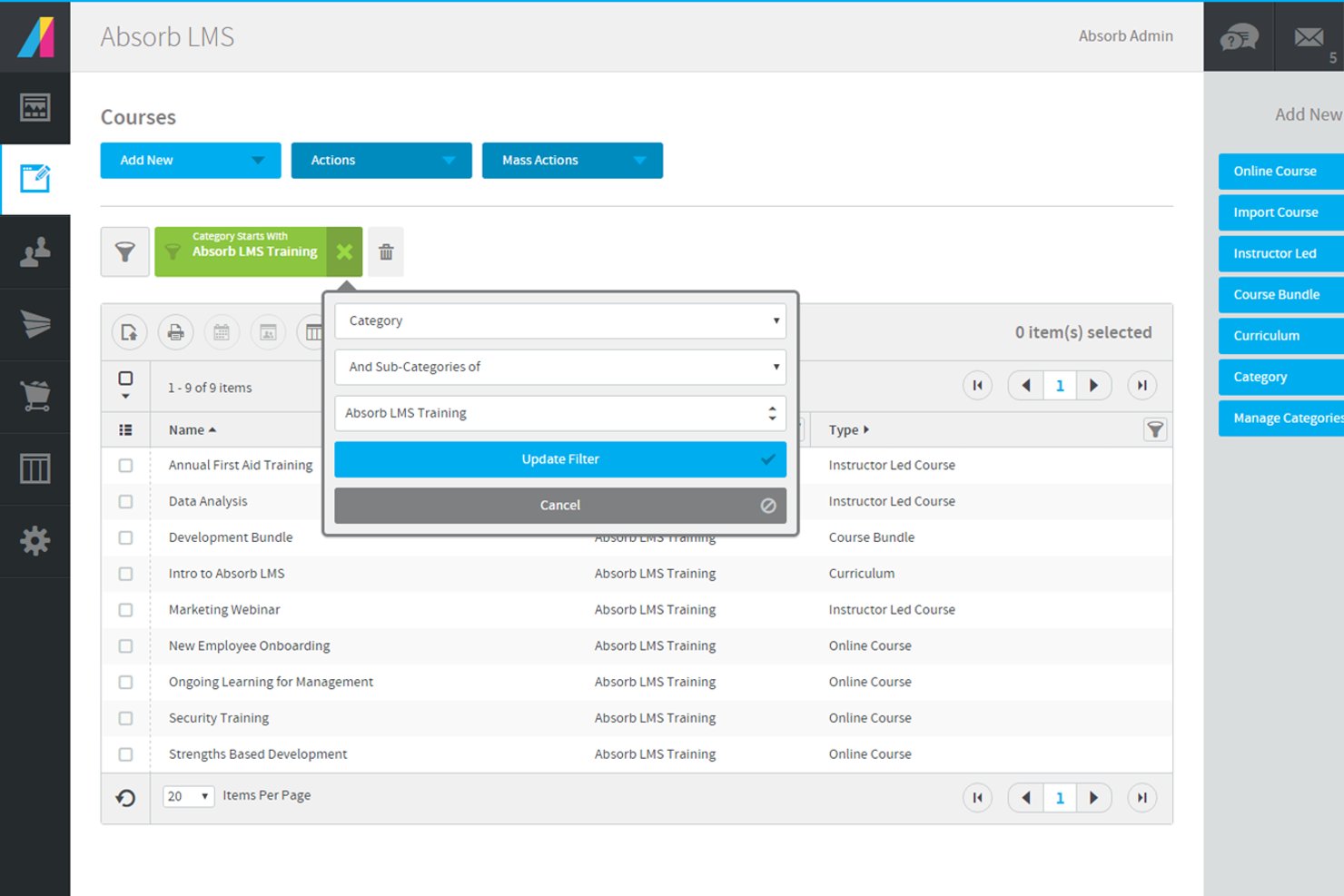
Absorb offers a flexible learning management system designed for organizations that need to deliver targeted, bite-sized training. It’s a strong fit for HR teams, training managers, and professional development leaders who want to support certification, compliance, and ongoing skills growth. The platform helps you create, manage, and track microlearning content that fits the fast-paced needs of project management professionals.
Who Is Absorb Best For?
Absorb is a strong choice for HR teams and training managers in mid-sized to large organizations that need to deliver and track professional microlearning and certification programs.
Why I Picked Absorb
For organizations that want to monetize their microlearning content, Absorb stands out with its built-in ecommerce capabilities. I picked it because you can set up a branded course storefront, manage payments, and offer self-service purchasing for learners. The platform supports multiple payment gateways and lets you bundle courses or offer discounts, which is especially useful for training providers or businesses selling PMP prep modules. This makes it easy to reach a wider audience and generate revenue directly from your microlearning programs.
Absorb Key Features
Some other features that make Absorb a strong option for pmp microlearning include:
- Microlearning module builder: Create and organize short, focused learning units that support just-in-time training for project management professionals.
- Mobile learning support: Learners can access courses and complete modules from any device, making it easy to fit training into busy schedules.
- Automated certification tracking: Monitor learner progress and automatically issue certificates for completed PMP-related courses or compliance requirements.
- Customizable reporting dashboards: Generate detailed reports on learner engagement, course completion, and assessment results to track the effectiveness of your microlearning programs.
Absorb Integrations
Integrations include ADP, BambooHR, Namely, Workday, SAP SuccessFactors, UKG Pro, Dayforce, Salesforce, HubSpot, and Zoom.
Pros and Cons
Pros:
- Built-in ecommerce for selling courses online
- Customizable reporting dashboards for tracking progress
- Automated certification tracking for compliance needs
Cons:
- Course authoring tools lack advanced interactivity
- Limited gamification features for engagement
New Product Updates from Absorb
Absorb Expands Instructor-Led Course Session Management
Absorb adds multi-class sessions, recurring classes, conflict indicators, and learner enrollment during setup for instructor-led courses. These updates give admins more control over scheduling and session management. For more information, visit Absorb’s official site.
 .
.
Best for rapid course creation
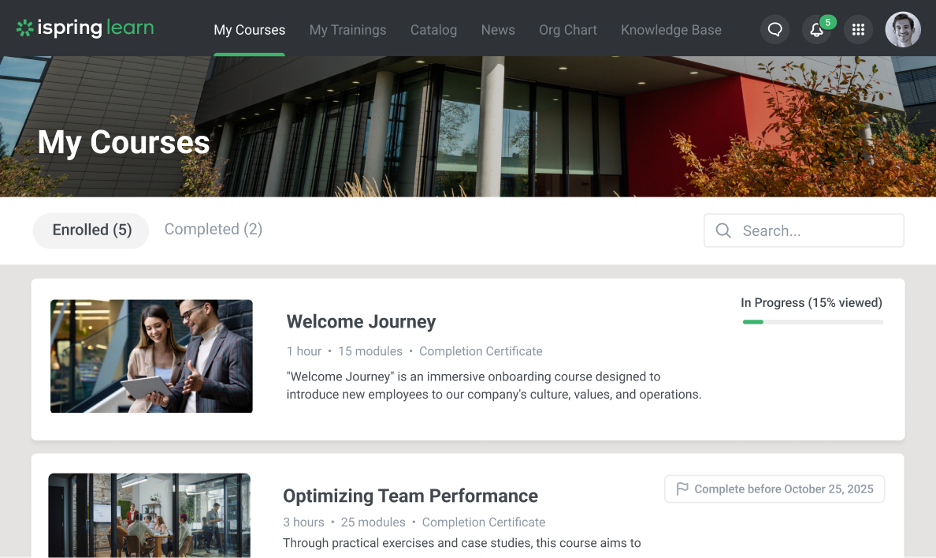
iSpring LMS is a learning management system designed to support the creation and delivery of training content, including short-form and modular learning formats. It provides tools for building courses, managing users, and tracking learner progress within a centralized platform.
Why I picked iSpring LMS: The platform includes tools for creating and delivering structured training content, including smaller learning modules. It supports course creation through built-in authoring tools and allows administrators to organize content into learning paths. Training progress can be monitored through reporting and tracking features.
Standout features & integrations:
Features include a mobile app for accessing training content on the go, customizable learning paths for organizing courses, and assessment tools for evaluating learner progress. The platform also supports multiple content formats and includes course authoring functionality, including AI-assisted content generation where available.
Integrations include Salesforce, Zoom, Microsoft Teams, LinkedIn Learning, Slack, and other third-party platforms.
Pros and Cons
Pros:
- Supports multiple content formats
- Includes PowerPoint-based content integration
- Great rapid course creation tools
Cons:
- Limited AI integration
- Minimal advanced customizations
New Product Updates from iSpring LMS

iSpring LMS Adds Multiple Observations to OJT Sessions
iSpring LMS now lets managers log multiple observations within one OJT session, grouping visits and auto-generating summary stats like averages, criterion results, and comparisons. For more information, visit iSpring LMS's official site.
Best for collaborative learning

360Learning is a collaborative learning platform designed to foster teamwork and knowledge sharing in organizations. It serves companies aiming to empower employees through peer learning and collaborative course creation.
Why I picked 360Learning: The platform emphasizes collaborative learning, allowing your team to create and share courses. You can leverage social learning features to engage employees in discussions and feedback. The tool facilitates peer reviews, helping ensure content quality and relevance. 360Learning's intuitive interface makes it easy for your team to contribute and learn from one another.
Standout features & integrations:
Features include customizable learning paths to suit different roles, gamification elements to promote motivation, and analytics to track learner engagement. The platform also offers a variety of interactive elements, including achievements, group challenges, user mentions, reactions, and more.
Integrations include Slack, Salesforce, Microsoft Teams, Google Workspace, Zoom, LinkedIn Learning, BambooHR, Workday, SAP SuccessFactors, and more.
Pros and Cons
Pros:
- Facilitates co-authoring courses
- Supports social learning interactions
- Encourages peer learning and collaboration
Cons:
- Initial setup can be time-consuming
- Requires active user participation
Whatfix
Best for in-app guidance

Whatfix is a digital adoption platform designed to provide in-app guidance and support for enterprise software users. It targets businesses aiming to improve software usage efficiency and employee productivity through contextual training.
Why I picked Whatfix: The platform excels in delivering in-app guidance, helping your team navigate complex software. It offers interactive walkthroughs that simplify user onboarding and training. You can create self-help widgets and task lists to support users in real time. Whatfix's analytics provide insights into how users interact with software, enabling you to optimize training content.
Standout features & integrations:
Features include customizable task lists that help users complete workflows efficiently, self-help widgets for on-demand assistance, and specialized AI agents to help create content, such as quizzes and flashcards, and support end users. These features ensure your team gets the support they need when they need it.
Integrations include Salesforce, SAP SuccessFactors, SurveyMonkey, Workday, Slack, Confluence, Amplitude, Google Analytics, and more.
Pros and Cons
Pros:
- Detailed user interaction analytics
- Customizable guidance features
- Real-time user support options
Cons:
- Requires ongoing content updates
- Initial setup may be complex

Spekit
Best for Salesforce integration

Spekit is a digital adoption platform that provides in-app guidance and training for Salesforce users. It is designed for teams looking to facilitate software adoption and support user efficiency through contextual learning.
Why I picked Spekit: This tool excels in Salesforce integration, offering in-app guidance directly within the platform. You can create bite-sized learning content that appears contextually to help users when they need it. The platform also provides analytics to track content usage and effectiveness, helping you refine your training materials.
Standout features & integrations:
Features include customizable content creation for tailored learning experiences and real-time updates to keep information current. These features help your team stay informed and efficient in their tasks.
Integrations include Salesforce, Slack, Microsoft Teams, Chrome, Outlook, LinkedIn, Zoom, Confluence, Jira, and Google Workspace.
Pros and Cons
Pros:
- Lightweight interface for quick launch
- Real-time content updates
- Strong Salesforce integration
Cons:
- Limited advanced customization
- Pop-up features may be distracting to some users
Docebo
Best for AI-driven learning paths

Docebo is a learning management system (LMS) designed for businesses seeking to augment their training programs with AI-powered solutions. It caters to enterprises looking to improve employee engagement and knowledge retention.
Why I picked Docebo: The platform offers AI-driven learning paths that adapt to your team's unique needs, providing personalized learning experiences. Key features include content curation, which helps in organizing and managing learning materials efficiently. Docebo's AI capabilities allow for personalized course recommendations, ensuring your team gets the most relevant content. Additionally, the platform's analytics provide insights into learner performance and engagement.
Standout features & integrations:
Features include gamified learning experiences that aim to boost engagement, e-commerce capabilities for selling courses, and community features that foster learner interaction. These features ensure a dynamic learning environment for your team.
Integrations include Salesforce, Zoom, Slack, Microsoft Teams, Google Analytics, Shopify, PayPal, Stripe, LinkedIn, Zendesk, and more.
Pros and Cons
Pros:
- Customizable learning experiences
- Flexible learning paths
- AI-driven content recommendations
Cons:
- Limited offline access
- Complex initial setup
eloomi
Best for employee engagement

eloomi is a learning and development platform aimed at supporting employee engagement and performance. It caters to organizations looking to streamline training, performance management, and feedback processes.
Why I picked eloomi: The platform is designed to boost employee engagement with interactive and personalized learning experiences. eloomi also provides tools for goal setting, performance reviews, and continuous feedback, fostering a culture of growth. Its user-friendly interface makes it easy for your team to access and navigate training materials.
Standout features & integrations:
Features include customizable learning paths that adapt to your team's needs, scaffolding for purposeful one-on-one conversations, and comprehensive analytics to track progress and engagement. The platform also supports multilingual content, making it suitable for global teams.
Integrations include Microsoft Teams, Sesame, Proliant, SAP SuccessFactors, BambooHR, Workday, Google Workspace, Okta, and more.
Pros and Cons
Pros:
- Tailored learning paths available
- Comprehensive performance review tools
- Helps develop routines for consistency
Cons:
- Pricing details are not transparent
- Limited offline functionality

Litmos LMS
Best for enterprise-level solutions

Litmos LMS is a cloud-based learning management system designed for large enterprises seeking comprehensive training solutions. It supports a wide range of industries by offering tools to manage and deliver high-quality training programs efficiently.
Why I picked Litmos LMS: The platform is tailored for enterprise use, providing scalability to support large teams and diverse training needs. It offers a wide variety of content formats, allowing your team to learn in ways that suit them best. Litmos LMS includes built-in reporting tools to track training effectiveness and compliance. The platform also supports blended learning, combining independent training with instructor-led sessions for a well-rounded approach.
Standout features & integrations:
Features include customizable branding to align with your organization's identity, gamification elements to support learner engagement, and mobile access for training on the go. The platform also supports automated notifications to keep your team informed of training updates.
Integrations include Salesforce, Zoom, Microsoft Teams, Google Workspace, SAP SuccessFactors, Okta, BambooHR, Dropbox, Shopify, and more.
Pros and Cons
Pros:
- Includes customizable branding options
- Supports blended learning approaches
- Scalable for large enterprises
Cons:
- Requires ongoing management
- Complex initial setup
Annen programvare for mikrolæring
Her er noen flere alternativer for programvare for mikrolæring som ikke kom med på kortlisten min, men som likevel er verdt å undersøke:
- SC Training
For mobile-first training
- HSI
For compliance training
- Axonify
For frontline employee training
- Coursebox AI
For AI content generation
- Tovuti LMS
For customizable dashboards
- Leapsome
For performance management
- 7taps
For quick-to-launch microlearning content
- Qstream
For spaced repetition techniques


How I Evaluate Microlearning Software
I look at microlearning tools across two layers: core requirements like mobile delivery and spaced repetition that every tool must meet, and differentiators like AI authoring or HRIS integrations.
Core Functionality (Table Stakes For This List)
When I'm selecting tools for my list, I rank each one on a scale from 0 (does not offer the functionality) to 5 (excels in this area) for each core functionality listed below. Then, I calculate the tool's total score into a percentage. Each tool needs to achieve a minimum total score of 65% to be considered for inclusion.
- Bite-Sized Content Authoring: I evaluate how well each tool lets you build short, focused lessons using video, quizzes, images, and text—like a 3-minute safety refresher for warehouse staff.
- Mobile-First Delivery: Whether a platform offers native iOS/Android apps with offline access matters, especially for frontline teams who learn on personal devices between shifts.
- Gamification & Engagement Mechanics: I look for points, badges, leaderboards, and streaks that motivate repeat participation—features that keep learners coming back daily.
- Spaced Repetition & Retention Tools: I check whether a platform reinforces knowledge over time, such as automatically resurfacing missed quiz questions to help reps retain product specs.
- Learner Analytics & Reporting: I look at whether admins can track completion rates, quiz scores, and engagement trends at both the individual and team level with exportable data.
- Content Library & Tech Integrations: Pre-built course libraries accelerate launch, so I evaluate catalog depth along with HRIS, LMS, and SSO connectors that fit into your existing stack.
Once I have a list of tools that meet this criteria, I consider what sets each platform apart.
Differentiating Factors (What Sets Vendors Apart)
Here's how I compare and contrast different vendors:
Standout Features
AI-powered authoring is a major differentiator. I evaluate whether a tool can turn an existing policy doc into a quiz-based microlesson without manual rebuilding. Personalized learning paths matter too—platforms that adapt content sequencing based on quiz performance or role help L&D managers avoid one-size-fits-all training. I also look for delivery through Slack or Microsoft Teams, since pushing a two-minute refresher where employees already work drives higher completion than redirecting them to a separate portal.
Beyond Features
Pricing structure matters a lot here. I check whether a vendor charges per-learner or uses tiered plans, since seasonal or frontline-heavy workforces can balloon costs fast. Compliance certifications like SOC 2 and GDPR readiness are worth evaluating, especially for HR teams in regulated industries handling sensitive employee data. I also consider deployment speed—platforms with pre-built course libraries and drag-and-drop authoring let a small HR team launch onboarding content within days rather than months.
Slik velger du programvare for mikrolæring
Det er lett å gå seg vill i lange lister over funksjoner og kompliserte prismodeller. For å hjelpe deg med å holde fokus mens du går gjennom den unike prosessen med å velge programvare, har jeg satt sammen en sjekkliste over faktorer du bør ha i tankene:
| Faktor | Hva du bør vurdere |
| Skalerbarhet | Kan programvaren vokse sammen med teamet ditt? Vurder om den kan håndtere flere brukere og mer innhold uten ytelsesproblemer. Tenk på fremtidig utvidelse og om programvaren kan støtte større eller mer komplekse operasjoner. |
| Integrasjoner | Kan programvaren kobles til de eksisterende verktøyene dine? Sjekk om den integreres med plattformer som Salesforce, Slack eller HR-systemet ditt for å sikre en smidig arbeidsflyt. Manglende integrasjon kan føre til datasiloer og ineffektivitet. |
| Tilpasningsmuligheter | Kan du tilpasse programvaren etter behovene dine? Se etter alternativer for å justere merkevareprofilering, arbeidsflyter og presentasjon av innhold. Fleksible tilpasningsmuligheter kan gjøre at programvaren passer bedre med organisasjonens unike prosesser og kultur. |
| Brukervennlighet | Er programvaren intuitiv? Vurder grensesnittet og brukeropplevelsen. Kompliserte systemer kan føre til lav adopsjonsgrad. Ta hensyn til tilbakemeldinger fra brukerne, og se etter en plattform som tilbyr enkel navigering og minimale opplæringskrav. |
| Implementering og innføring | Hvor raskt kan du komme i gang? Vurder ressursene og tiden som kreves for å implementere programvaren. Ta hensyn til tilgjengeligheten av opplæringsmateriell, støtte under oppsettet og hvor enkelt teamet ditt kan gå over til å bruke det nye verktøyet. |
| Kostnad | Hva er de totale eierkostnadene? Sammenlign prisplaner, inkludert skjulte gebyrer eller tilleggskostnader for oppgraderinger. Sørg for at løsningen holder seg innenfor budsjettet ditt, samtidig som den tilbyr de nødvendige funksjonene og den nødvendige støtten. |
| Sikkerhetstiltak | Hvordan beskytter programvaren dataene dine? Bekreft sikkerhetstiltak som kryptering, brukerautentisering og samsvar med regelverk som GDPR. Robuste sikkerhetsfunksjoner er avgjørende for å beskytte sensitiv informasjon og opprettholde tillit. |
| Tilgjengelig brukerstøtte | Hvilke alternativer for brukerstøtte tilbys? Vurder tilgjengeligheten av støtte døgnet rundt, responstider og kanaler som chat, e-post eller telefon. Pålitelig støtte kan være avgjørende når problemer oppstår, og sikrer minimale forstyrrelser i driften. |
Hva er programvare for mikrolæring?
Programvare for mikrolæring er et verktøy som er utviklet for å levere korte og fokuserte læringsopplevelser. Disse verktøyene brukes ofte av HR-medarbeidere, kursholdere og undervisere for å forbedre læring og kunnskapsbevaring. Funksjoner som mobiltilgang, analyse og interaktivt innhold bidrar til å engasjere deltakerne, følge fremdriften og tilpasse læringsløp. Alt i alt gjør disse verktøyene opplæringen mer effektiv og tilgjengelig for travle fagfolk.
Funksjoner
Når du velger programvare for mikrolæring, bør du se etter følgende viktige funksjoner:
- Levering av korte innholdselementer: Tilbyr korte, fokuserte læringsmoduler som er enkle å ta til seg og passer inn i travle timeplaner.
- Mobiltilgang: Gjør det mulig for deltakerne å få tilgang til opplæringsmoduler når de er på farten, noe som sikrer fleksibilitet og bekvemmelighet.
- Interaktivt innhold: Engasjerer brukerne gjennom quizer, spillifisering og multimedieelementer for å forbedre kunnskapsbevaring og motivasjon.
- Analyse og rapportering: Følger deltakernes fremdrift og prestasjoner og gir innsikt som kan forbedre opplæringens effektivitet.
- Tilpassbare læringsløp: Gjør det mulig å tilpasse innholdet til individuelle læringsbehov og mål.
- Integrasjonsmuligheter: Gjør det mulig å koble til eksisterende verktøy som CRM- eller HR-systemer for å sikre sømløs dataflyt og effektive arbeidsflyter.
- Oppdateringer i sanntid: Sikrer at deltakerne alltid har tilgang til den mest oppdaterte og relevante informasjonen.
- Sikkerhetstiltak: Beskytter sensitive data gjennom kryptering og samsvar med regelverk som GDPR.
- Verktøy for tilbakemeldinger og kommunikasjon: Legger til rette for løpende dialog mellom deltakere og instruktører for å støtte kontinuerlig forbedring.
Fordeler
Implementering av programvare for mikrolæring gir flere fordeler for teamet og virksomheten din. Her er noen av fordelene du kan se frem til:
- Økt engasjement: Interaktivt innhold og elementer av spillifisering bidrar til å holde deltakerne motiverte og involverte.
- Bedre kunnskapsbevaring: Levering av korte innholdselementer gjør det enklere for deltakerne å ta til seg og huske informasjon.
- Fleksibilitet: Mobiltilgang gjør det mulig for teamet å lære i sitt eget tempo, tilpasse opplæringen til timeplanene sine og ta hensyn til oppmerksomhetsspennet deres.
- Personlig tilpasset læring: Tilpassbare læringsløp skreddersyr opplæringen til individuelle læringsstiler og mål.
- Effektiv sporing: Analyse og rapportering gir innsikt i deltakernes fremdrift og fremhever områder som kan forbedres.
- Kostnadseffektivitet: Reduserer opplæringskostnadene ved å minimere tiden borte fra arbeidet og utnytte eksisterende verktøy gjennom integrasjoner.
- Bedre samsvar: Oppdateringer i sanntid og sikkerhetstiltak sikrer at teamet ditt holder seg informert og overholder regelverket.
Kostnader og priser
Å velge programvare for mikrolæring krever en forståelse av de ulike prismodellene og abonnementene som er tilgjengelige. Kostnadene varierer basert på funksjoner, teamstørrelse, tillegg og mer. Tabellen nedenfor oppsummerer vanlige abonnementer, gjennomsnittsprisene deres og typiske funksjoner som er inkludert i programvareløsninger for mikrolæring:
Sammenligningstabell for abonnementer på programvare for mikrolæring
| Abonnementstype | Gjennomsnittspris | Vanlige funksjoner |
| Gratisabonnement | $0/bruker/måned | Grunnleggende innholdstilgang, begrenset analyse og støtte fra fellesskapet. |
| Personlig abonnement | $5-$25/bruker/måned | Mobiltilgang, interaktivt innhold, tilpassbare læringsstier, flerspråklig innhold og grunnleggende rapportering. |
| Bedriftsabonnement | $25-$50/bruker/måned | Avansert analyse, integrasjonsmuligheter, personlig tilpasset læring og prioritert støtte. |
| Virksomhetsabonnement | $50-$100+/bruker/måned | Full tilpasning, dedikert kundeansvarlig, forbedrede sikkerhetstiltak og utvidede AI-verktøy. |
Vanlige spørsmål om programvare for mikrolæring
Her er noen svar på vanlige spørsmål om programvare for mikrolæring:
Hvordan skiller programvare for mikrolæring seg fra tradisjonelle LMS-plattformer?
Programvare for mikrolæring fokuserer på å levere korte, målrettede læringsopplevelser, mens tradisjonelle LMS-plattformer ofte tilbyr omfattende kursadministrasjon. Mikrolæringsverktøy er utviklet for å passe inn i travle timeplaner ved å tilby raske og engasjerende leksjoner som forbedrer læringsutbyttet. Denne tilnærmingen er ideell for team som trenger fleksible læringsalternativer uten å forplikte seg til lange kurs.
Kan programvare for mikrolæring brukes til introduksjon av nyansatte?
Ja, programvare for mikrolæring er et utmerket verktøy for introduksjon av nyansatte. Denne typen e-læring deler viktig informasjon opp i lettfattelige moduler, noe som gjør det enklere for nyansatte å ta til seg og huske informasjonen. Du kan opprette tilpassede introduksjonsstier som gradvis presenterer bedriftskultur, retningslinjer og opplæring knyttet til stillingen, slik at nyansatte føler seg mer komfortable og informerte fra første dag.
Passer programvare for mikrolæring for alle bransjer?
Ja, programvare for mikrolæring kan tilpasses ulike bransjer. Enten du jobber innen helsevesen, finans, detaljhandel eller utdanning, kan du tilpasse innholdet etter bransjespesifikke behov. Denne fleksibiliteten gjør det mulig for organisasjoner å ivareta krav til etterlevelse, kompetanseutvikling og kontinuerlig opplæring på en måte som samsvarer med deres unike driftsmål.
Hvordan måler jeg hvor effektiv programvare for mikrolæring er?
Du kan måle effektiviteten til organisasjonens mikrolæringsopplevelser ved å bruke analyseverktøy til å følge med på deltakernes fremgang og engasjement. Se etter måltall som fullføringsgrad, poeng på quizer og tilbakemeldinger for å vurdere forståelse og læringsutbytte. Ved å gjennomgå denne innsikten regelmessig kan du justere opplæringsmaterialet slik at det bedre oppfyller teamets læringsmål og forbedrer resultatene.