

11 beste AI-baserte HR-systemer vurdert i 2026

10 Kortliste over de beste AI HRMS


Det kan føles overveldende å håndtere HR-oppgaver, særlig når du skal holde styr på rekruttering, lønn og overholdelse av regelverk. Du trenger en løsning som gjør arbeidsmengden mindre og effektiviteten høyere. Det er her AI HRMS kommer inn, med verktøy som forenkler HR-prosessene dine og sparer deg for tid.
Etter å ha testet og vurdert programvare har jeg erfart at systemer for personaladministrasjon basert på kunstig intelligens (AI HRMS) kan utgjøre en stor forskjell. De hjelper deg med å håndtere oppgaver mer effektivt, slik at du kan konsentrere deg om behovene til teamet ditt.
I denne artikkelen deler jeg mine beste valg for AI HRMS, basert på grundig og objektiv research. Du får innsikt i funksjonene, fordelene og potensielle ulempene ved hvert alternativ. La oss utforske de beste løsningene for å forbedre HR-administrasjonen din.
Why Trust Our Software Recommendations
Our team has been testing and reviewing software since 2012. As HR experts ourselves, we know how difficult—and important—it is to choose the right software.
For this guide, we evaluated tools using hands-on testing and independent research, scoring tools using our selection criteria. We also draw on insights from industry thought leaders and practicing HR experts.
Our reviews reflect our human editorial judgment, not a sales pitch.
Expert reviewers:
Sammenligningstabell for AI HRMS
Denne sammenligningstabellen oppsummerer prisdetaljene for mine beste utvalgte AI HRMS:
| Tool | Best For | Trial Info | Price | ||
|---|---|---|---|---|---|
| 1 | Best for payroll integration | Not available | Pricing upon request | Website | |
| 2 | Best for contextual global HR insights | Free demo available | From $5/user/month | Website | |
| 3 | Best for conversational HR data queries | Free demo available | Pricing upon request | Website | |
| 4 | Best for performance management | Free demo available | From $4/user/month (billed annually) | Website | |
| 5 | Best for small businesses in U.S. and Europe | Free demo available | Pricing upon request | Website | |
| 6 | Best for user-friendly design | Free demo available + 14-day free trial | From $4/user/month (billed annually) | Website | |
| 7 | Best for open source AI-customization | Free plan available OR 30-day free trial | Pricing upon request | Website | |
| 8 | Best for payroll expertise | Free demo available | Pricing upon request | Website | |
| 9 | Best for global compliance | 30-day free trial | Pricing upon request | Website | |
| 10 | Best for recruitment features | Free demo available | From $299/month | Website |

Anmeldelse av de beste AI HRMS
Nedenfor finner du mine detaljerte sammendrag av de beste AI HRMS som kom med på kortlisten. Anmeldelsene mine gir en detaljert gjennomgang av de viktigste funksjonene, fordelene & ulempene, integrasjonene og ideelle bruksområdene for hvert verktøy, slik at du kan finne det beste alternativet for deg og teamet ditt.

Paycom
Best for payroll integration

Paycom’s AI-powered command engine iWant is built into its single-database HR and payroll platform. It lets users retrieve workforce data instantly through text or voice commands without navigating menus.
Why I picked Paycom: its AI-based platform iWant directly addresses a common issue in HR software—time wasted searching for information. It enables employees, managers, and executives to query data such as pay history, time-off balances, and training status simply by asking a question. This makes Paycom especially useful for organizations wanting quick, reliable access to workforce data without manual navigation.
Standout Features & Integrations:
Features include mobile and desktop access via Employee Self-Service and Manager on-the-Go, which come with reporting tools to gain insights into HR metrics, time and attendance tracking to manage employee hours, and a learning management system to support staff development. The software also offers performance management to set and track employee goals. Its document management feature helps store and manage HR documents securely.
Integrations are primarily delivered through Paycom's native HR and payroll suite, which includes built-in tools for talent management, time tracking, benefits administration, and employee self-service within a single database.
Pros and Cons
Pros:
- Reduces HR data requests from staff
- Easy access through voice or text commands
- Accurate results from their unified database
Cons:
- Limited customization options
- Complex user interface

Deel HR
Best for contextual global HR insights
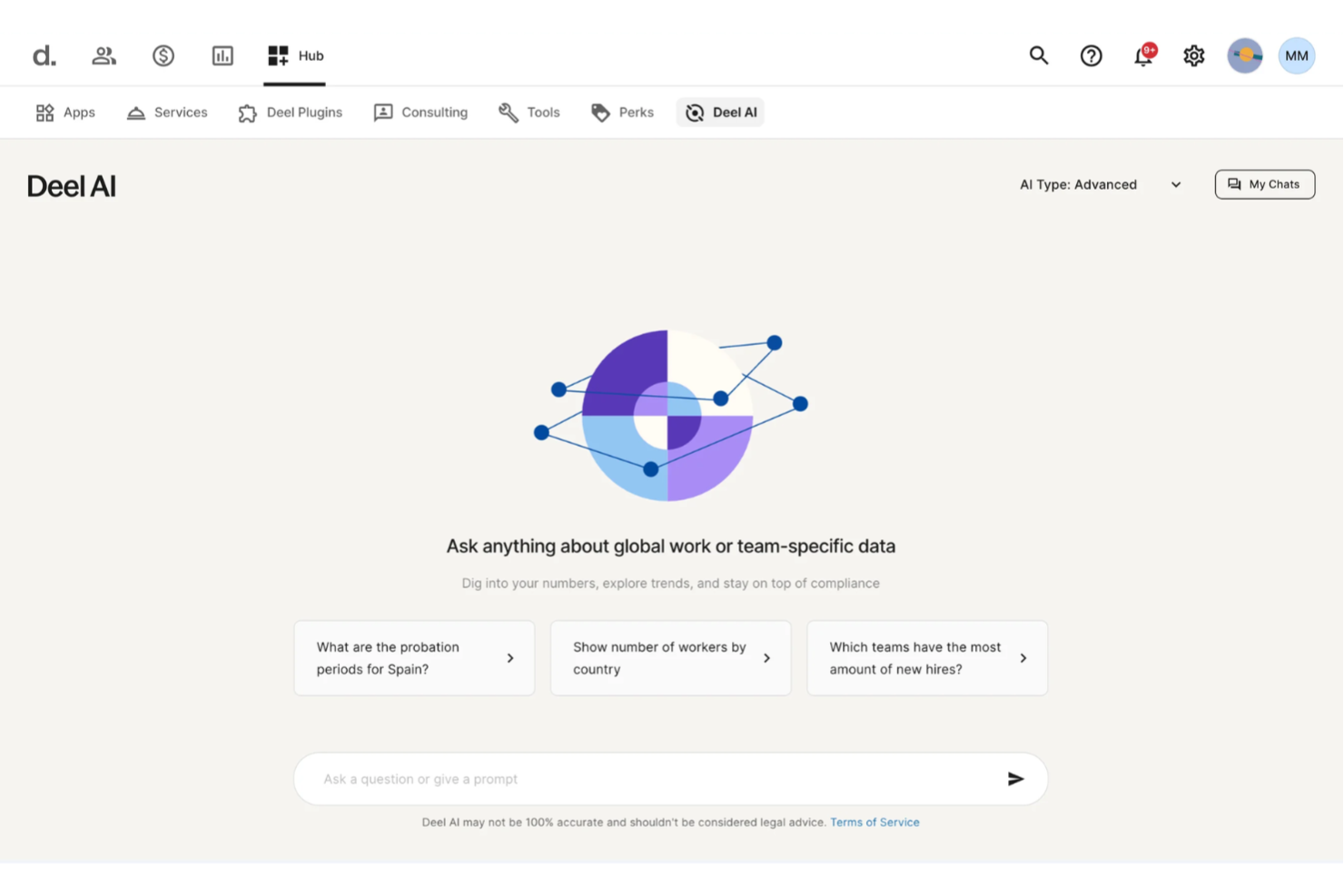
Expanding teams across regions becomes far easier when your HR system can instantly interpret regulations, surface insights from your people data, and answer complex questions without slowing you down. Deel AI gives you an HRMS enhanced with AI that supports your team around the clock, guiding you through payroll, policies, compliance, and everyday workforce needs.
Why I Picked Deel
I picked Deel because its AI is woven directly into the HRMS experience, acting as a legal and HR expert trained across 150+ countries. It offers contextual, page-aware guidance that summarizes what you’re viewing, highlights key data, and flags compliance considerations right inside the platform. I also appreciate that Deel AI lets you ask anything—from local employment rules to workforce insights—and pulls from an expert-built Knowledge Hub combined with your internal data. For teams looking for an AI HRMS that reduces manual searching and clarifies global HR decisions, this is a strong fit.
Deel Key Features
In addition to the AI-driven HR and compliance intelligence above, Deel offers several other features that enhance its appeal as an AI HRMS:
- Global Payroll Management: Processes payroll for employees and contractors in over 150 countries, allowing payments in multiple currencies.
- Employer of Record (EOR): Enables hiring in countries without local entities, handling all legal and compliance responsibilities.
- Contractor Management: Streamlines the hiring and payment processes for international contractors, including automated invoicing.
- Employee Self-Service Access: Provides employees with access to their payroll and HR information, enhancing transparency and engagement.
Deel Integrations
Deel integrates with popular platforms including QuickBooks, Xero, Greenhouse, BambooHR, NetSuite, Workday, Gusto, Lever, Slack, and SAP SuccessFactors.
Pros and Cons
Pros:
- AI answers talent and workforce questions using expert-sourced data
- Surfaces org insights and summaries directly from your team data
- Delivers guidance across 150+ country employment contexts
Cons:
- Heavy dependence on proprietary Knowledge Hub for accuracy
- AI guidance may require human review for complex legal scenarios
New Product Updates from Deel HR

Deel Expands Stablecoin Wallet to 80+ Countries
Deel expands its Stablecoin Wallet to 80+ countries with dollar-backed balances and optional rewards. This gives eligible contractors more ways to hold and manage earnings inside Deel. For more information, visit Deel’s official site.
 .
.
Best for conversational HR data queries
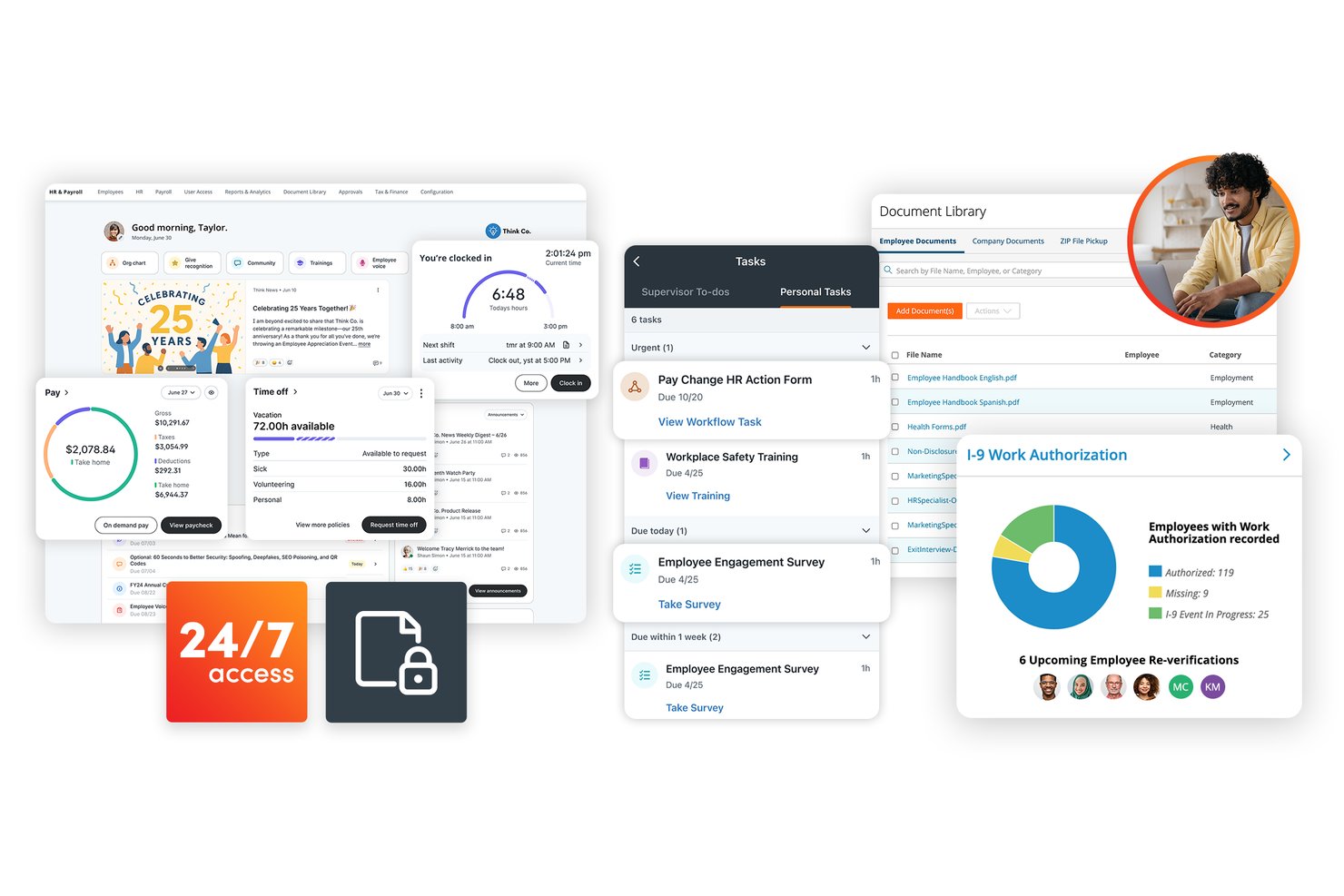
Paylocity is an AI-powered HR and payroll platform that covers the full employee lifecycle, including recruiting, onboarding, workforce management, benefits administration, performance, and employee engagement.
Who Is Paylocity Best For?
Paylocity suits mid-market HR teams that want to ask plain-language questions about workforce data and get instant, sourced answers without building a report from scratch.
Why I Picked Paylocity
Paylocity earns its spot on my shortlist because of how naturally it handles conversational HR data queries through its Answer & Insight Agent. I love that you can type a plain-language question about compensation trends or recruiting pipeline and get back a summary, a chart, and a direct link to the underlying data, all without touching a report builder. The Ignite AI layer adds retention-risk alerts and schedule forecasts that surface proactively, so you're not waiting until turnover becomes a problem.
Paylocity Key Features
- AI-assisted candidate screening: Paylocity's recruiting tools use AI to screen candidates, generate resume summaries, and match applicants to open roles.
- Ignite AI retention-risk alerts: The Ignite AI layer surfaces proactive alerts when employee data signals a retention risk, so managers can act before turnover happens.
- 360-degree performance feedback: Performance management tools support peer feedback, journals, and talent assessment templates to guide reviews and career development conversations.
- Compliance dashboard: A built-in HR compliance dashboard tracks compliance risks and provides interactive training to help teams stay on top of regulatory requirements.
Paylocity Integrations
Paylocity offers 350+ marketplace integrations, including Greenhouse, iCIMS, Slack, Google Workspace, Microsoft 365 (Entra ID), and Okta. It supports APIs, webhooks, EDI, and SFTP for custom integrations, with common API projects averaging 4–16 weeks.
Pros and Cons
Pros:
- AI-assisted candidate screening and matching
- Centralized payroll and HR records
- Source-linked conversational workforce answers
Cons:
- Support follow-up can be inconsistent
- Cross-module PTO balances can misalign
New Product Updates from Paylocity

Paylocity Expands Expense and Purchase Request Tools
Paylocity adds connected personal cards, smarter expense categorization, and a streamlined purchase request experience. This reduces manual entry and helps finance teams manage expenses and approvals more efficiently. For more information, visit Paylocity’s official site.
 .
.
Lattice
Best for performance management

Lattice is a performance management platform designed for companies focused on employee growth and development. It offers performance reviews, goal setting, and feedback mechanisms to help teams improve productivity and engagement.
Why I picked Lattice: combines proven performance management workflows with AI features that simplify reviews and strengthen feedback quality. The Lattice AI Agent automatically summarizes one-on-one notes, goals, and feedback to help managers write accurate reviews faster, while the AI Writing Assist tool refines tone and phrasing for clarity and fairness. Lattice’s focus on AI-assisted performance reviews and analytics makes it ideal for teams looking to reduce admin work while improving feedback quality and consistency.
Standout Features & Integrations:
Features include AI-powered review writing assistance, goal and OKR tracking, continuous feedback tools, people analytics dashboards, and DEIB insights. The platform supports customizable review cycles, real-time feedback, and development plans through its Grow module.
Integrations include Slack, Microsoft Teams, Google Workspace, BambooHR, Workday, ADP, Okta, Greenhouse, Zapier, and Lever.
Pros and Cons
Pros:
- Integrations with popular HR and communication tools
- People analytics and DEIB insights
- Continuous feedback and goal tracking
Cons:
- Some AI tools still rely on manual data entry
- Requires user training for advanced analytics
New Product Updates from Lattice

Lattice Introduces MCP Connector for AI Chat Tools
Lattice introduced Lattice MCP, a new connector that brings talent data into Claude, ChatGPT, and other LLM tools. The connector helps teams access performance context from reviews, 1:1 notes, feedback, goals, and updates within AI chat workflows. For more information, visit Lattice’s official site.
 .
.
Personio
Best for small businesses in U.S. and Europe

Personio is an HR management system best suited to small and medium-sized businesses that use smart workflows and data-driven features to automate everyday HR tasks. Personio is great for those small businesses looking to benefit from AI-assisted HR functions without requiring in-house technical setup or dedicated IT support.
Why I picked Personio: Personio focuses on making HR automation accessible to smaller organizations. Its workflows help reduce repetitive administrative work, while its centralized dashboard gives visibility into employee data, time-off, and payroll. Unlike enterprise AI platforms, Personio’s tools are designed to be simple to set up and maintain, allowing small HR teams (or even a single admin) to run processes efficiently.
Standout Features & Integrations:
Features include a self-service portal for employees to manage their data, a recruitment module to streamline hiring, and automated payroll calculations. You can also track employee performance and manage time off requests efficiently. The intuitive interface makes onboarding new team members straightforward.
Integrations include Slack, Microsoft Teams, Google Calendar, DATEV, Prescreen, Indeed, LinkedIn, Greenhouse, and Workable.
Pros and Cons
Pros:
- Clear, user-friendly interface
- Easy to set up and manage
- Centralized HR and payroll tools
Cons:
- Occasional performance issues
- Basic reporting and analytics

Best for user-friendly design

Access PeopleHR is an HR management platform aimed at small and medium-sized businesses. It focuses on core HR functions such as recruitment, employee records, and performance management, offering easy-to-use tools for efficient HR operations.
Why I picked Access PeopleHR: Access PeopleHR is a cloud-based HR and payroll platform built for small and medium-sized businesses. The system focuses on simplifying core HR processes like recruitment, employee records, and performance management. With its intuitive interface and new AI features, it helps teams manage HR workflows efficiently while reducing administrative time.
Standout Features & Integrations:
Features include an applicant tracking system to simplify recruitment, customizable reports to gain insights, and performance management tools to track employee progress. You can also access a time and attendance tracking feature to monitor staff hours. The software provides a self-service portal for employees to manage their own data.
Integrations include Microsoft Outlook, Google Calendar, Slack, Zapier, BambooHR, Indeed, LinkedIn, Xero, QuickBooks, and Sage.
Pros and Cons
Pros:
- Visual dashboards for insights
- Quick setup process
- Simple and intuitive interface
Cons:
- Limited advanced features
- Availability limited to the U.S., U.K., and Asia
Best for open source AI-customization

OrangeHRM is an HR management platform for small and medium-sized businesses that combines open-source flexibility with new AI-powered tools. With more than 5 million users worldwide, OrangeHRM continues to evolve its platform with intelligent automation and integrated HR modules.
Why I picked OrangeHRM: OrangeHRM is a good option for its balance of open-source adaptability and AI innovation. The platform allows businesses to tailor modules, workflows, and data fields while now integrating AI tools like the Citra chat assistant and AI-enabled helpdesk to automate employee support and HR queries. These additions make OrangeHRM particularly suitable for teams wanting customizable HR software that scales with their needs.
Standout Features & Integrations:
Features include an employee information database, time and attendance tracking, leave management, recruitment, and performance management. New modules such as Surveys, Roster, and Grievances enhance engagement, scheduling, and workplace fairness.
Integrations include ADP, QuickBooks, BambooHR, SAP, Microsoft Outlook, Google Calendar, Slack, LinkedIn, Indeed, and Zapier.
Pros and Cons
Pros:
- Extensive analytics and reporting tools
- Modular architecture for scalability
- Supports multiple HR functions in one platform
Cons:
- Limited built-in automation without add-ons
- Requires setup and technical configuration
ADP
Best for payroll expertise

ADP is a global HCM platform that combines payroll accuracy with advanced AI-powered workforce management. With more than 75 years of expertise, ADP’s payroll products are built for organizations of all sizes, offering payroll, benefits, compliance, and analytics in a single system.
Why I picked ADP: I chose ADP for its proven payroll reliability paired with new AI-enabled features that enhance efficiency and insight. Its ADP Assist platform uses artificial intelligence to detect payroll anomalies, answer HR questions in real time, and provide predictive workforce analytics. These tools allow HR leaders to spot trends, correct potential payroll errors before they occur, and access visualized insights instantly.
Standout Features & Integrations:
Features AI-assisted payroll error detection, conversational analytics, predictive workforce trend reporting, and global compliance monitoring. ADP Assist integrates across payroll, time, talent, benefits, and reporting modules, providing a unified experience.
Integrations include QuickBooks, Xero, BambooHR, Workday, Microsoft Dynamics, Salesforce, Oracle, Google Workspace, Slack, and SAP.
Pros and Cons
Pros:
- Integrated HR and payroll dashboards
- Predictive workforce analytics
- AI-powered payroll anomaly detection
Cons:
- Limited customization in the standard report option
- Requires training for new users
Best for global compliance

SAP SuccessFactors delivers enterprise-grade HR management with built-in AI for governance, compliance, and workforce automation. It supports global operations across talent, payroll, and analytics, ensuring consistent regulatory alignment across countries and industries.
Why I picked SAP SuccessFactors: This tool is ideal for organizations needing global compliance, addressing diverse regulatory requirements. Joule, SAP’s built-in AI assistant, automates workflows and provides insights that help maintain fairness, accuracy, and transparency in hiring and pay. Its localized payroll and governance controls support international labor standards, while workforce analytics enable compliance tracking and strategic planning.
Standout Features & Integrations:
Features AI-powered Joule agents for HR automation, localized payroll compliance tools, performance and goal management, compensation planning, and predictive analytics for workforce trends.
Integrations include Microsoft Azure, Google Workspace, LinkedIn, ADP, Kronos, IBM, SuccessFactors API, Salesforce, Concur, and Workday.
Pros and Cons
Pros:
- Updates on new labor and tax laws
- Regulatory workflows with regional data rules
- Global compliance for 100+ countries
Cons:
- Advanced features require licensing
- Complex user interface

Workable is a recruitment software solution designed for businesses of all sizes. It focuses on streamlining the hiring process, offering tools for job posting, candidate tracking, and interview scheduling.
Why I picked Workable: Its AI-driven recruitment tools go beyond traditional applicant tracking. The AI-powered sourcing engine identifies qualified candidates from a 400M+ profile database, while the Screening Assistant summarizes resumes and highlights best-fit applicants using semantic matching. Its AI job description generator, salary estimator, and Workable Assistant simplify setup and daily HR tasks, making it ideal for organizations focused on smart, data-led hiring.
Standout Features & Integrations:
Features include AI-assisted resume parsing and screening, automated interview scheduling, personalized candidate emails, and job description generation. The platform also supports onboarding workflows, performance reviews, and HR data management.
Integrations include LinkedIn, Indeed, Glassdoor, Monster, Slack, Google Workspace, Microsoft Outlook, Zapier, BambooHR, and Salesforce.
Pros and Cons
Pros:
- Centralized HR and recruitment data
- Intuitive and customizable hiring pipelines
- AI-driven candidate sourcing and screening
Cons:
- Occasional delays in system updates
- Limited customization in templates
- Workday Illuminate
For enterprise scalability
- Paycor
For workforce and HR analytics
- Keka HR
For context-aware AI automation in workflows


How I Evaluate AI HRMS
I look for platforms where AI does more than dress up static dashboards—it should automate real workflows, surface actionable workforce insights, and give employees genuine self-service tools. My evaluation splits into two layers: the core functionality a tool needs to make the list and the differentiating factors that separate good options from great ones.
Core Functionality (Table Stakes For This List)
When I'm selecting tools for my list, I rank each one on a scale from 0 (does not offer the functionality) to 5 (excels in this area) for each core functionality listed below. Then, I calculate the tool's total score into a percentage. Each tool needs to achieve a minimum total score of 65% to be considered for inclusion.
- Unified Employee Database: I check whether the platform serves as a true system of record—storing job history, compensation, documents, and org structure in one place rather than scattered modules.
- AI-Powered Automation: Each tool should use AI to handle repetitive work like onboarding task assignment, document generation, or approval routing instead of relying solely on static rule-based triggers.
- Core HR Modules: I look for payroll, benefits administration, time and attendance, and leave management bundled within the platform so HR teams aren't stitching together separate point solutions.
- Predictive People Analytics: Dashboards and reports should go beyond historical snapshots—I evaluate whether the tool forecasts attrition risk, flags engagement trends, or identifies skill gaps.
- AI Talent Management: From candidate matching in recruiting to AI-suggested development plans, I look at how deeply AI is embedded across hiring, performance reviews, and learning paths.
- Conversational AI Assistant: I evaluate whether employees and managers can ask questions, submit requests, or look up policies through a natural-language chatbot instead of navigating menus and forms.
Once I have a list of tools that meet this criteria, I consider what sets each platform apart.
Differentiating Factors (What Sets Vendors Apart)
Here's how I compare and contrast different vendors:
Standout Features
A skills intelligence engine is a major differentiator—I look for platforms that infer and map employee skills from job history and project data, then recommend internal mobility or upskilling paths. Sentiment and engagement AI also matter here. Tools that analyze pulse surveys and feedback signals to flag burnout risk give HR teams a real head start on retention. I also evaluate whether a platform offers agentic workflows that autonomously handle multi-step tasks like scheduling interviews or flagging compliance gaps without manual prompts.
Beyond Features
AI governance is top of mind when I evaluate these platforms. I check for bias auditing, model explainability, and clear opt-out controls—especially for sensitive decisions like performance scoring. Integration depth also matters: an AI HRMS needs to connect with your existing payroll, ATS, identity providers, and collaboration tools like Slack or Microsoft Teams. For growing or distributed teams, I look at multi-country compliance support, localized payroll, and multi-language capabilities to confirm the platform scales alongside your workforce.
Slik velger du AI HRMS
Det er lett å gå seg vill i lange funksjonslister og kompliserte prismodeller. For å hjelpe deg med å holde fokus mens du går gjennom den unike prosessen med å velge programvare, får du her en sjekkliste over faktorer du bør ha i bakhodet:
| Faktor | Hva du bør vurdere |
| Skalerbarhet | Kan programvaren vokse sammen med virksomheten din? Vurder om den kan håndtere en økning i antall brukere eller datamengde uten at ytelsen blir dårligere. Se etter en skalerbar arkitektur. |
| Integrasjoner | Kan den integreres med de eksisterende systemene dine? Kontroller om den er kompatibel med verktøy som lønnsprogramvare, CRM eller kommunikasjonsplattformer du allerede bruker. |
| Tilpasningsmuligheter | Kan du tilpasse programvaren til arbeidsflytene dine? Sørg for at den tilbyr alternativer for å justere innstillinger, dashbord og prosesser slik at de passer til dine spesifikke behov. |
| Brukervennlighet | Er programvaren brukervennlig? Vurder om grensesnittet er enkelt og intuitivt. Sørg for at teamet ditt kan navigere i det uten omfattende opplæring. |
| Implementering og introduksjon | Hvor lang tid vil oppsettet ta? Vurder tiden og ressursene som kreves for å komme i gang. Se etter leverandører som tilbyr støtte, opplæring og veiledninger for introduksjon. |
| Kostnad | Er prisene transparente og innenfor budsjettet ditt? Se etter skjulte gebyrer, og vurder kostnaden opp mot funksjonene som tilbys for å finne ut om du får valuta for pengene. |
| Sikkerhetstiltak | Beskytter løsningen dataene dine? Sørg for at programvaren har sterke sikkerhetstiltak som kryptering, regelmessige sikkerhetskopier og overholdelse av personvernregler. |
| Tilgjengelig kundestøtte | Kan du få hjelp når du trenger det? Kontroller om leverandøren tilbyr støtte døgnet rundt, og vurder kvaliteten på og kanalene for kundeservice som er tilgjengelige. |
Hva er AI HRMS?
AI HRMS er programvare som integrerer kunstig intelligens i systemer for personaladministrasjon for å automatisere og optimalisere HR-funksjoner. HR-medarbeidere, ledere og rekrutterere bruker vanligvis disse verktøyene for å forbedre beslutningstaking og effektivitet.
Automatisert databehandling, prediktiv analyse og funksjoner for medarbeiderengasjement støtter effektiv personalstyring og strategisk planlegging. Disse verktøyene gir samlet sett verdi ved å forbedre produktiviteten og redusere administrative byrder.
Funksjoner i AI HRMS
Når du velger AI HRMS, bør du se etter følgende viktige funksjoner:
- Automatisert databehandling: Effektiviserer håndteringen av medarbeiderdata og reduserer manuell registrering og feil.
- Prediktiv analyse: Bruker data til å forutsi trender og hjelpe HR med å ta informerte beslutninger.
- Verktøy for medarbeiderengasjement: Forbedrer kommunikasjonen og engasjementet i teamene og bidrar til et positivt arbeidsmiljø.
- Tilpassbare dashbord: Lar brukerne tilpasse grensesnittet slik at det viser relevante HR-måltall og innsikter.
- Integrasjonsmuligheter: Sikrer kompatibilitet med eksisterende systemer som lønnssystemer og CRM for smidig drift.
- Håndtering av regelverksetterlevelse: Bidrar til å opprettholde etterlevelse av arbeidslover og forskrifter og minimerer juridisk risiko.
- Ytelsesstyring: Følger medarbeidernes utvikling og legger til rette for medarbeidersamtaler for å øke produktiviteten.
- Mobil tilgjengelighet: Gir tilgang til HR-funksjoner på farten og støtter fjernarbeid og fleksibilitet.
- Registrering av arbeidstid og fremmøte: Overvåker medarbeidernes arbeidstid og fremmøte og forenkler lønnsbehandling og planlegging.
- AI-drevne innsikter: Gir verdifull innsikt i arbeidsstyrken og bidrar til strategisk planlegging og ressursfordeling.
Fordeler med AI HRMS
Implementering av AI HRMS gir flere fordeler for teamet og virksomheten din. Her er noen av fordelene du kan se frem til:
- Bedre beslutningstaking: Utnytter dataanalyse til å gi innsikt som støtter strategiske HR-beslutninger.
- Økt produktivitet: Automatiserer repetitive oppgaver slik at teamet kan fokusere på aktiviteter med høyere verdi.
- Bedre regelverksetterlevelse: Håndterer regulatoriske krav effektivt og reduserer risikoen for juridiske problemer.
- Økt engasjement: Bruker verktøy som styrker kommunikasjonen og moralen blant teammedlemmene.
- Skalerbarhet: Tilpasser seg virksomhetens vekst og håndterer økte datamengder og brukerbehov uten problemer.
- Kostnadsbesparelser: Reduserer administrative kostnader ved å optimalisere HR-prosesser og minimere feil.
- Støtte for fjernarbeid: Tilbyr mobil tilgang og fleksibilitet og legger til rette for fjernarbeid og hybride arbeidsmodeller.
Kostnader og priser for AI HRMS
Valg av AI HRMS krever en forståelse av de ulike prismodellene og abonnementene som er tilgjengelige. Kostnadene varierer basert på funksjoner, teamstørrelse, tillegg og mer. Tabellen nedenfor oppsummerer vanlige abonnementer, gjennomsnittsprisene deres og typiske funksjoner som er inkludert i AI HRMS-løsninger:
Sammenligningstabell for AI HRMS-abonnementer
| Abonnementstype | Gjennomsnittspris | Vanlige funksjoner |
| Gratisabonnement | $0 | Grunnleggende håndtering av medarbeiderdata, begrenset rapportering og grunnleggende kundestøtte. |
| Personlig abonnement | $10-$299 per bruker/måned | Håndtering av medarbeiderdata, grunnleggende lønnsbehandling og begrensede integrasjoner. |
| Bedriftsabonnement | $30-$599 per bruker/måned | Avansert analyse, ytelsessporing og mobil tilgang |
| Virksomhetsabonnement | $75-$600+ per bruker/måned | Full tilpasning, dedikert kundestøtte og omfattende håndtering av regelverksetterlevelse. |
Vanlige spørsmål om AI HRMS
Her er noen svar på vanlige spørsmål om AI HRMS: