

20 beste programvareløsninger for AI-drevet forretningsstrategi i 2026

Kortliste over den beste programvaren for forretningsstrategi med kunstig intelligens


Programvare for forretningsstrategi med kunstig intelligens bruker kunstig intelligens til å hjelpe deg med å planlegge, følge opp og tilpasse virksomhetens overordnede mål og tiltak. Hvis du ser etter smartere måter å håndtere strategi på, reagere på markedsendringer eller samordne team, kan disse plattformene hjelpe deg med å ligge foran. Her finner du de beste verktøyene for dataanalyse, scenariomodellering, konkurrentovervåking og resultatstyring – slik at du kan velge den riktige løsningen for å støtte de viktigste beslutningene dine i 2026.
Hvorfor du kan stole på våre programvareanbefalinger
Teamet vårt har testet og anmeldt programvare siden 2012. Vi er selv HR-eksperter, så vi vet hvor vanskelig og hvor viktig det er å velge riktig programvare.
I denne guiden har vi vurdert verktøyene gjennom praktisk testing og uavhengig research og gitt dem poeng ut fra våre utvelgelseskriterier. Vi bygger også på innsikt fra ledende eksperter i bransjen og erfarne HR-eksperter.
Anmeldelsene våre bygger på vår egen redaksjonelle vurdering. De er ikke et salgsargument.
Ekspertanmeldere:
Sammenligningstabell for programvare for forretningsstrategi med kunstig intelligens
Denne sammenligningstabellen oppsummerer prisopplysningene for mine beste utvalgte løsninger for programvare for forretningsstrategi med kunstig intelligens:
| Tool | Best For | Trial Info | Price | ||
|---|---|---|---|---|---|
| 1 | Best for prioritizing strategic initiatives | 30-day free trial + free demo available | From $9/user/month | Website | |
| 2 | Best for uncovering digital market trends | Free trial available | From $125/month | Website | |
| 3 | Best for modeling enterprise what-if scenarios | Free demo available | Pricing upon request | Website | |
| 4 | Best for large-scale project portfolio management | Free demo available | Pricing upon request | Website | |
| 5 | Best for monitoring competitors | Free demo available | Pricing upon request | Website | |
| 6 | Best for visualizing goal progress | Free demo available | Pricing upon request | Website | |
| 7 | Best for tracking strategic plan execution | Free trial + free demo available | Pricing upon request | Website | |
| 8 | Best for dynamic financial scenario modeling | Free demo available | Pricing upon request | Website | |
| 9 | Best for aligning teams with OKR frameworks | Free demo available | Pricing upon request | Website | |
| 10 | Best for analyzing market intelligence data | Free demo available | Pricing upon request | Website |
Anmeldelser av den beste programvaren for forretningsstrategi med kunstig intelligens
Nedenfor finner du mine detaljerte sammendrag av den beste programvaren for forretningsstrategi med kunstig intelligens som kom med på kortlisten min. Anmeldelsene mine gir en grundig gjennomgang av funksjonene, egenskapene og de beste bruksområdene for hver plattform, slik at du kan finne den som passer best for deg.

Aha!
Best for prioritizing strategic initiatives
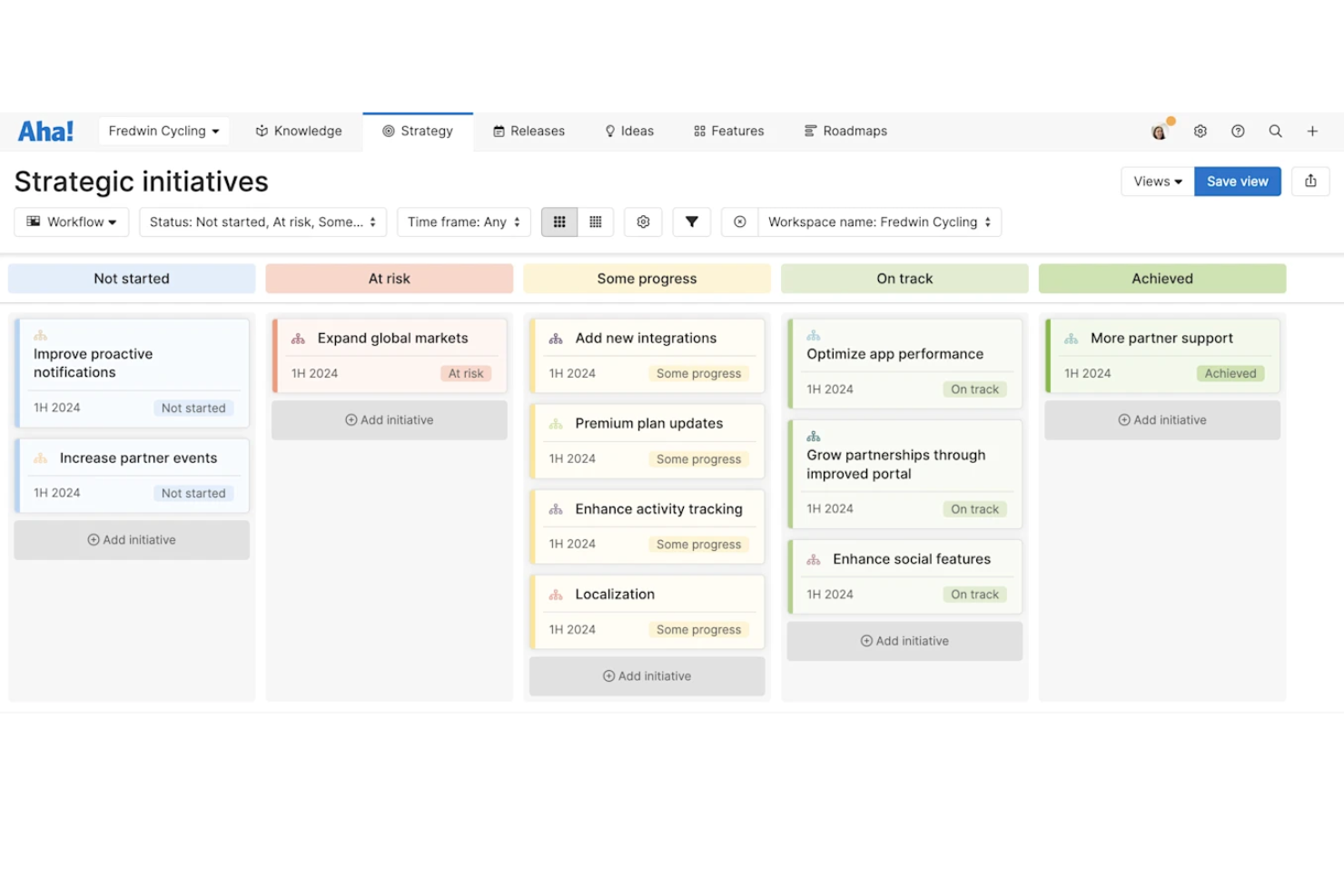
Aha! is a product management and business strategy platform for building strategic roadmaps, visualizing initiatives, prioritizing features, organizing goals, and connecting plans across teams.
Who Is Aha! Best For?
Product managers and strategy teams at mid-sized and large organizations who need to align business goals and manage cross-functional planning.
Why I Picked Aha!
I picked Aha! because I can map out product strategies, prioritize initiatives using visual scoring tools, and tie those decisions to my organization’s goals. I use its custom scorecards and initiative swimlanes to clarify what matters most.
Aha! Key Features
- Notes and whiteboards: Capture meeting notes and visualize ideas with whiteboard templates.
- Release planning: Organize, track, and ship product releases with custom workflows.
- Idea portals: Collect and manage feedback with secure, branded idea portals.
- Goal tracking: Set, share, and monitor progress against business goals in real time.
Aha! Integrations
Aha! offers native integrations with Jira, Salesforce, Azure DevOps, Slack, Microsoft Teams, Trello, Asana, GitHub, Google Analytics, and Google Drive, and provides an API for custom integrations.
Pros and Cons
Pros:
- Direct connection to epic backlogs
- Native roll-up metric worksheet calculation
- Automated strategic framework model drafting
Cons:
- Extensive workspace setup requirements
- Complex custom reporting query creation

Best for uncovering digital market trends

Similarweb is a digital market intelligence platform that provides AI-powered tools for analyzing website traffic, uncovering audience insights, benchmarking competitors, and tracking digital trends in real time.
Who Is Similarweb Best For?
Market researchers, digital marketing teams, and strategy leaders in ecommerce, media, and technology who need deep analysis of online competitors and emerging industry trends.
Why I Picked Similarweb
I picked Similarweb as one of the best for AI business strategy because I can analyze global website traffic patterns, benchmark competitors using up-to-date market data, and spot digital trends that influence strategic decisions.
Similarweb Key Features
- Keyword research tool: Identify top-performing keywords by channel and geography.
- Audience overlap reports: Analyze shared audiences between competitors and your own domains.
- Mobile app analysis: Track installs, engagement, and publisher metrics for mobile apps.
- Traffic acquisition channels: Break down site visits by paid, organic, referral, and social sources.
Similarweb Integrations
Similarweb offers native integrations with Google Analytics, Adobe Analytics, Salesforce, and HubSpot, and provides an API for custom integrations.
Pros and Cons
Pros:
- Custom segmentation for niche market research
- Deep insights into digital channel performance
- Advanced website traffic and audience analysis
Cons:
- Limited offline or in-app tracking capabilities
- Some metrics use estimated rather than actual data

Anaplan
Best for modeling enterprise what-if scenarios

Anaplan is a cloud-based business planning and modeling platform purpose-built for enterprises to connect data, simulate scenarios, and manage dynamic, AI-enabled business strategy workflows.
Who Is Anaplan Best For?
Large enterprises and finance teams managing complex planning, forecasting, and scenario modeling across global business units.
Why I Picked Anaplan
I picked Anaplan as one of the best for AI business strategy because I can build complex driver-based models, run unlimited what-if scenarios, and collaborate with stakeholders using real-time data and interactive visualizations.
Anaplan Key Features
- Connected planning modules: Integrate finance, sales, supply chain, and HR plans in one environment.
- User access controls: Assign permissions by role, function, or location for data security.
- Audit trail: Track every data change with detailed logs and timestamps.
- Version control: Store and compare different plan iterations across users and periods.
Anaplan Integrations
Anaplan offers native integrations with Salesforce, Tableau, Microsoft Power BI, and Informatica, and provides an API for custom integrations.
Pros and Cons
Pros:
- Built-in workflow management for approvals
- Real-time data sync across business units
- Handles complex cross-functional plans
Cons:
- Excel integration Limited in-app collaboration
- No Mac-compatible native
Best for large-scale project portfolio management
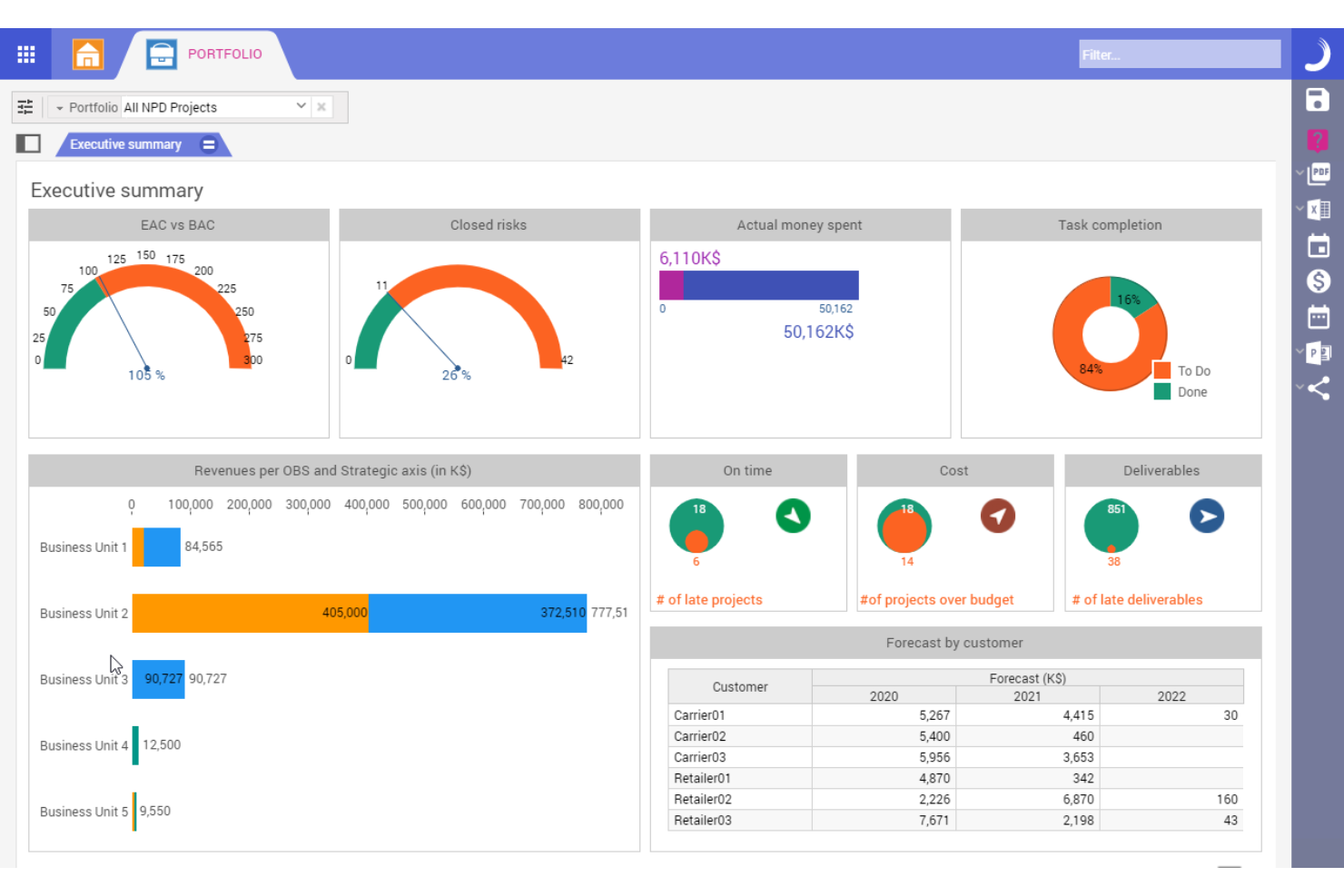
Planisware is an enterprise project portfolio management platform for AI-driven business strategy that centralizes project data, supports complex financial planning, integrates resource management, and offers advanced scenario modeling capabilities.
Who Is Planisware Best For?
Large enterprise PMOs and portfolio leaders in industries like pharmaceuticals, engineering, and manufacturing needing to align and oversee high-value, cross-regional project portfolios.
Why I Picked Planisware
I picked Planisware because I can oversee high-value project portfolios, manage global resources, and run what-if scenario analyses at scale. I use its configurable workflows and advanced financial controls to coordinate complex initiatives across business units.
Planisware Key Features
- Interactive Gantt charts: Visualize schedules, dependencies, and milestones across multiple projects.
- Real-time reporting: Build dynamic dashboards with drill-down capabilities for any metric.
- Resource scenario planning: Simulate headcount and skill allocations before committing.
- Stage-gate process support: Model and track gated workflows for new initiatives.
Planisware Integrations
Planisware offers native integrations with SAP, Oracle, Jira, Microsoft Project, and Primavera P6, and provides an API for custom integrations.
Pros and Cons
Pros:
- Highly configurable workflows for enterprise users
- Centralized portfolio financial controls
- Advanced scenario modeling for business strategy
Cons:
- Limited machine learning features
- Steep setup and onboarding requirements


Crayon is a competitive intelligence platform for AI business strategy that tracks, analyzes, and summarizes competitors' moves, online activity, product updates, and strategic decisions in one place.
Who Is Crayon Best For?
Marketing and product teams in mid-sized to large organizations that need real-time insights into competitor strategies and market shifts.
Why I Picked Crayon
I picked Crayon because I can track competitors’ moves across web, social, and product channels in real time. I use its dashboard to surface key intelligence trends, set up custom alerts, and review collected insights with my strategy team.
Crayon Key Features
- Insights feed: See a continuous stream of automatically collected competitive updates.
- Visual change tracking: Monitor competitors’ website changes with before-and-after views.
- Battlecard builder: Create and update sales battlecards from gathered intelligence.
- Team collaboration tools: Assign insights, comment, and share findings across your team.
Crayon Integrations
Crayon offers native integrations with Salesforce, Slack, Highspot, Microsoft Teams, Seismic, and Klue, with an API also available for custom integrations.
Pros and Cons
Pros:
- Customizable intelligence board and workflows
- Visual website change detection tools
- Competitor tracking updates in near real time
Cons:
- Limited predictive analytics for strategy planning
- Setup and configuration can be time-intensive
Best for visualizing goal progress

Profit.co is an AI-powered OKR management platform that helps teams create, align, monitor, and track objectives, key results, and performance metrics across departments.
Who Is Profit.co Best For?
HR leads and department managers at mid-to-large organizations who need structured, AI-driven goal setting and progress tracking across teams.
Why I Picked Profit.co
I picked Profit.co because I can visualize OKR progress using dashboards, heatmaps, and custom reporting. I like how AI suggestions help set measurable goals and track real-time progress, making it easy to spot alignment issues or priorities at a glance.
Profit.co Key Features
- Task management modules: Assign, track, and organize tasks linked to OKRs.
- Performance review workflows: Customize review cycles and feedback forms for employee evaluations.
- Automated check-ins: Schedule recurring progress updates and reminders for key results.
- KPI library: Access a range of predefined and customizable key performance indicators.
Profit.co Integrations
Profit.co offers native integrations with Microsoft Teams, Slack, Jira, Salesforce, HubSpot, Google Workspace, Office 365, BambooHR, and Zapier. An API is available for custom integrations.
Pros and Cons
Pros:
- Automated check-ins and reminders for progress
- Labeled metric check-in execution scorecards
- AI suggests measurable OKRs for teams
Cons:
- High enterprise plan configuration dependencies
- Restrictive user performance check-in history

Cascade
Best for tracking strategic plan execution

Cascade is an AI-enabled business strategy platform for organizing objectives, linking projects, managing progress, and centralizing key strategic information in one workspace.
Who Is Cascade Best For?
Strategy and operations leaders in mid-sized to large organizations who need a unified system to coordinate plans and monitor progress across teams.
Why I Picked Cascade
I picked Cascade as one of the best because it excels at tracking strategic plan execution. I use its visual strategy map and automated progress tracking to keep objectives, projects, and KPIs linked and transparent across every level of our organization.
Cascade Key Features
- AI-powered insights: Analyze performance metrics and surface trends using integrated AI tools.
- Role-based permissions: Control access to data, dashboards, and reports by user role.
- Automated reporting: Generate up-to-date strategy, project, and status reports with scheduled delivery.
- Collaboration boards: Share plans and updates with structured comments and file attachments within each workspace.
Cascade Integrations
Cascade offers native integrations with Snowflake, Microsoft 365, Google Workspace, Jira, Slack, Salesforce, HubSpot, and Asana. An API is available for custom integrations.
Pros and Cons
Pros:
- Automated tracking of plan progress
- Visual maps connect strategy to projects
- AI-driven suggestions for goal alignment
Cons:
- Goal hierarchy setup requires manual input
- Limited offline capabilities for field teams

Best for dynamic financial scenario modeling

Workday Adaptive Planning is a financial planning and analysis platform for teams seeking AI-driven budgeting, forecasting, scenario modeling, reporting, and collaboration within one system.
Who Is Workday Adaptive Planning Best For?
Financial teams at mid-sized and enterprise organizations that need agile, collaborative planning for complex budgeting and forecasting.
Why I Picked Workday Adaptive Planning
I picked Workday Adaptive Planning because I can quickly model multiple financial scenarios and forecast outcomes using its drag-and-drop interface. My team builds granular budgets, tracks KPIs, and adjusts plans in real time using its AI-powered analysis tools.
Workday Adaptive Planning Key Features
- Collaborative planning: Multiple users can work on the same plan in real time.
- Sheets and modeling engine: Customizable templates for department-level or organization-wide planning.
- Role-based access controls: Set permissions for users based on their responsibilities.
- Workflow management: Automate plan reviews and approvals to simplify the planning process.
Workday Adaptive Planning Integrations
Workday Adaptive Planning offers native integrations with Workday HCM, Microsoft Excel, Microsoft Power BI, and NetSuite, with an API available for custom integrations.
Pros and Cons
Pros:
- Strong audit trails for financial plan changes
- Granular user permissions for secure collaboration
- Scenario models update dynamically
Cons:
- Advanced reports require additional configuration
- Multi-currency support can be limited

Best for aligning teams with OKR frameworks
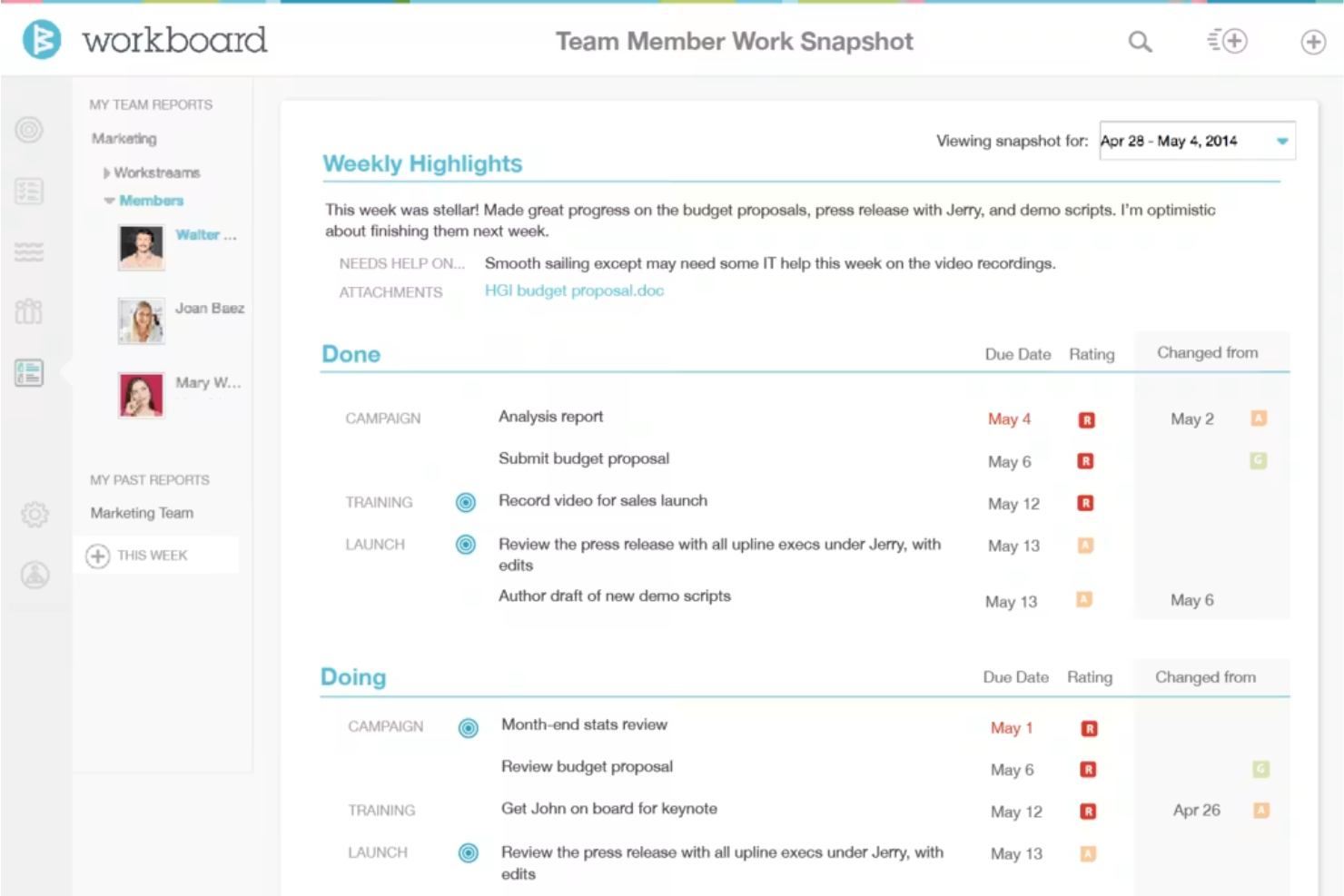
WorkBoard is an OKR and strategy execution platform designed for businesses that want to set, track, and manage objectives, align goals across teams, and view progress dashboards in one place.
Who Is WorkBoard Best For?
Large and mid-sized organizations with distributed teams looking to coordinate and measure objectives using the OKR methodology.
Why I Picked WorkBoard
I picked WorkBoard because I can set, align, and monitor OKRs across distributed teams, link objectives to real-time key results, and surface alignment gaps using built-in heatmaps and dashboards. I use its meeting management to keep teams focused on priorities.
WorkBoard Key Features
- Automated status updates: Schedule recurring updates to track objective and key result progress.
- Action item tracking: Assign, monitor, and update completion of team action items.
- OKR library: Access templates for common objectives and key results by function or industry.
- Business review workspaces: Create organized spaces for recurring business review meetings and reports.
WorkBoard Integrations
WorkBoard offers native integrations with Microsoft Teams, Slack, Jira, Salesforce, Asana, Excel, Google Sheets, and Workday, and provides an API for custom integrations.
Pros and Cons
Pros:
- Meets enterprise governance and reporting needs
- Automated MBR and QBR scorecard generation
- Real-time heatmaps reveal alignment issues
Cons:
- No standalone native mobile application
- Limited AI-driven insights for OKR suggestions

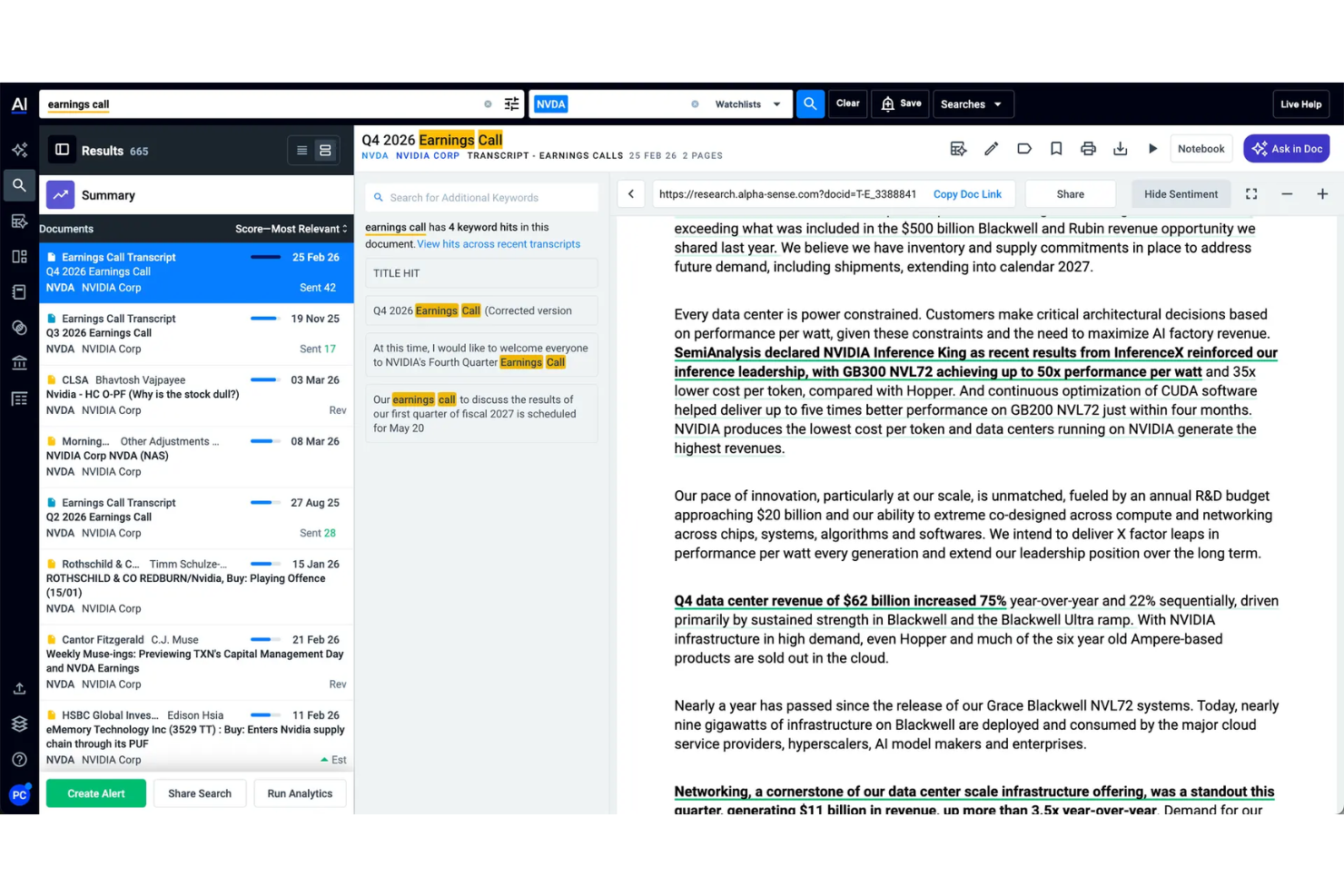
AlphaSense is an AI-powered market intelligence and research platform for business strategy teams to search, aggregate, and analyze financial documents, news, expert insights, and company filings.
Who Is AlphaSense Best For?
Research analysts and corporate strategy teams in finance or professional services who need to monitor market, industry, and competitor intelligence.
Why I Picked AlphaSense
I picked AlphaSense as one of the best because its AI searches and summarizes thousands of market reports, earnings transcripts, and analyst notes. I rely on its real-time monitoring and document comparison features to quickly analyze shifting market intelligence data.
AlphaSense Key Features
- Smart synonym recognition: Surfaces related concepts and terminology in research queries.
- Collaboration tools: Enables teams to comment and share annotated content.
- Customized alerts: Sends notifications for new documents matching saved search criteria.
- Saved search history: Provides quick access to past queries and results.
AlphaSense Integrations
AlphaSense offers native integrations with Sharepoint, OneNote, Evernote, Box, Egnyte, Google Drive, Dropbox, One Drive, and Amazon S3. It provides an API for custom integrations.
Pros and Cons
Pros:
- Real-time alerts for market changes
- Advanced filters for financial and ESG insights
- AI-powered search across industry documents
Cons:
- Occasional delays updating the latest filings
- Limited export options for data analysis
Annen programvare for forretningsstrategi med kunstig intelligens
Her er noen flere alternativer innen programvare for forretningsstrategi med kunstig intelligens som ikke kom med på kortlisten min, men som likevel er verdt å undersøke:
- ClearPoint Strategy
For automating performance reporting
- Workpath
For coordinating outcome-driven priorities
- LivePlan
For guided business plan creation
- Lattice
For performance feedback
- Upmetrics
For step-by-step strategy planning templates
- OnePlan
For integrating with Microsoft tools
- ChatGPT
For generating insights from text
- ThoughtSpot
For natural language data exploration
- PrometAI
For automating strategic document drafting
- ITONICS
For centralizing innovation management


How I Evaluate AI Business Strategy Software
Every tool here has to prove its AI drives real strategic output—like generating defensible scenarios or surfacing competitive shifts—not just dress up basic analytics. I split my evaluation into core functionality a tool needs to make the list and differentiating factors that set one vendor apart from another.
Core Functionality (Table Stakes For This List)
When I'm selecting tools for my list, I rank each one on a scale from 0 (does not offer the functionality) to 5 (excels in this area) for each core functionality listed below. Then, I calculate the tool's total score into a percentage. Each tool needs to achieve a minimum total score of 55% to be considered for inclusion.
- AI-Driven Strategic Analysis: I look for tools that go beyond summarization and actually produce tailored frameworks—like a SWOT grounded in your revenue data or a Porter's Five Forces built from live market signals.
- Scenario & Simulation Modeling: Each tool should let strategy teams model multiple what-if paths, such as simulating entry into a new market or projecting the impact of a pricing shift across regions.
- Market & Competitive Intelligence: I evaluate how well a platform ingests external data—competitor moves, industry trends, market sizing—and synthesizes it into insights you can act on during planning cycles.
- Strategic Roadmap Building: Tools earn higher marks when roadmaps connect directly to AI-generated insights and track initiative progress against KPIs rather than serving as static timeline views.
- Data Integration & Connectivity: Strong contenders connect to your CRM, ERP, and BI stack so the AI works with proprietary company data, not just generic inputs or manual uploads.
- Executive Reporting & Dashboards: I check whether a tool can generate board-ready narrative summaries and dynamic dashboards that surface AI-driven takeaways leadership can use without digging into raw data.
- Collaboration & Workflow: Strategy is a team sport, so I look for shared workspaces, comment threads, and review cycles that let cross-functional stakeholders contribute to and sign off on strategic plans.
- Enterprise Security & Governance: Given the sensitivity of strategic data, I evaluate each platform's security posture—SOC 2 compliance, SSO, role-based access controls, and audit logging are what I check first.
Once I have a list of tools that meet this criteria, I consider what sets each platform apart.
Differentiating Factors (What Sets Vendors Apart)
Here's how I compare and contrast different vendors:
Standout Features
Benchmarking intelligence stands out—I look for platforms that pull in external market and competitor data and cross-reference it with your internal metrics to ground strategy in real competitive context. Sentiment and culture analytics add depth when a tool uses NLP to correlate employee feedback signals with strategic performance outcomes. I also value platforms that auto-generate narrative strategy reports from underlying data, saving teams hours of manual slide-building before board reviews.
Beyond Features
AI governance and explainability matter a lot here—when a platform recommends a market entry or flags a competitive threat, strategy leaders need to understand the reasoning behind that output. I evaluate whether vendors document their models and offer audit trails for AI-generated recommendations. Implementation support is another key factor, especially for enterprises rolling these tools out across multiple business units where dedicated success teams and structured onboarding accelerate adoption. I also check integration depth with ERP and CRM systems, since strategy AI is only as good as the proprietary data feeding it.
Slik velger du programvare for forretningsstrategi med kunstig intelligens
Det er lett å gå seg vill i lange funksjonslister og komplekse prismodeller. For å hjelpe deg med å holde fokus mens du går gjennom den unike prosessen din for valg av programvare, får du her en sjekkliste over faktorer du bør ha i mente:
| Faktor | Hva du bør vurdere |
|---|---|
| Skalerbarhet | Vil verktøyet kunne håndtere den forventede veksten til teamet ditt og de strategiske behovene som utvikler seg, uten at du må bytte plattform? |
| Integrasjoner | Kan verktøyet kobles direkte til de viktigste plattformene dine, for eksempel HRIS-, analyse- eller produktivitetspakker? |
| Tilpasningsmuligheter | Kan du tilpasse rapporter, måleverdier og arbeidsflyter slik at de samsvarer med organisasjonens driftsmodell og mål? |
| Brukervennlighet | Er programvaren intuitiv nok til at ikke-tekniske brukere regelmessig kan oppdatere og tolke fremdriften i strategien? |
| Implementering og oppstart | Tilbyr leverandøren støtte ved migrering, ressurser for oppstart eller dedikerte suksesspesialister som kan fremskynde innføringen? |
| Kostnad | Er prisnivåene tydelige, og kan du forutse fremtidige kostnader etter hvert som antallet brukere, avdelinger eller scenarier øker? |
| Sikkerhetstiltak | Tilbyr plattformen nødvendig databeskyttelse og rollebaserte kontroller for å oppfylle både IT- og samsvarskrav? |
| Tilgjengelig kundestøtte | Hvilke kundestøttekanaler finnes – chat, telefon eller kundestøttesaker – og er tjenestenivåavtaler eller responstider egnet for behovene dine? |
Hva er programvare for forretningsstrategi med kunstig intelligens?
Programvare for forretningsstrategi med kunstig intelligens er et digitalt verktøy som bruker kunstig intelligens til å hjelpe organisasjoner med å fastsette, overvåke og tilpasse overordnede forretningsmål. Den samler målstyringen på ett sted, analyserer resultatdata i sanntid og gir anbefalinger for strategisk planlegging. Disse plattformene hjelper ledere med å visualisere fremdriften, gjøre datadrevne justeringer og samordne teamene med virksomhetens overordnede mål og prioriteringer.
Funksjoner i programvare for forretningsstrategi med kunstig intelligens
Når du velger programvare for forretningsstrategi med kunstig intelligens, bør du se etter følgende nøkkelfunksjoner:
- Håndtering av mål og nøkkelresultater: Lar deg sette, følge opp og oppdatere strategiske mål og målbare resultater, slik at alle kan se hvordan den daglige innsatsen bidrar til virksomhetens overordnede mål.
- Sanntidsbaserte analysedashbord: Presenterer oppdaterte visualiseringer og måltall for måloppnåelse, ressursfordeling og resultater, slik at du raskt kan ta informerte, datadrevne beslutninger.
- AI-drevne anbefalinger: Bruker maskinlæring til å foreslå tiltak, varsle om mål som ikke er i samsvar, eller påpeke risikoer basert på aktuelle data og nye trender.
- Automatiserte oppfølginger og påminnelser: Planlegger regelmessige varsler og påminnelser for å holde teamene ansvarlige og fokuserte på viktige milepæler.
- Generering av tilpassede rapporter: Lar brukere lage og dele detaljerte rapporter om strategiske resultater, tilpasset ulike interessenter og ledere.
- Oppfølging av oppgaver og initiativer: Lar deg tildele, overvåke og administrere de detaljerte prosjektene og aktivitetene som er knyttet til hvert strategiske mål eller resultat.
- Samarbeidsverktøy: Tilbyr meldinger i appen, kommentartråder eller dokumentdeling, slik at teamene kan koordinere arbeidet direkte i plattformen.
- Integrasjonsmuligheter: Kobler seg til viktige forretnings-, HR- og analysesystemer for å importere data og forenkle arbeidsflyter i hele organisasjonen.
- Tilgangskontroller basert på roller: Lar deg definere brukertillatelser og beskytte sensitiv informasjon, slik at de rette personene kan se og redigere strategiske data.
- KPI-biblioteker: Tilbyr et bibliotek med forhåndsdefinerte og tilpassbare nøkkelindikatorer for å bidra til standardisert måling og rapportering på tvers av team.
Fordeler med AI-programvare for forretningsstrategi
Implementering av AI-programvare for forretningsstrategi gir flere fordeler for teamet og virksomheten din. Her er noen av fordelene du kan se frem til:
- Bedre måltilpasning: Sørger for at alle fokuserer på felles mål gjennom sentralisert funksjonalitet for OKR-er og målsetting.
- Raskere beslutningstaking: Gir ledere sanntidsbaserte analysedashbord og AI-drevne anbefalinger for raske, databaserte valg.
- Større ansvarlighet: Holder teamene på rett spor med automatiserte oppfølginger, fremdriftsoppdateringer og tydelig tildelte oppgaver knyttet til virksomhetens mål.
- Bedre samarbeid: Samler prosjektdiskusjoner, dokumentdeling og innspill fra interessenter i én plattform for enklere samarbeid.
- Mer handlingsrettet innsikt: Bruker AI-analyse og tilpassede rapporter til å omdanne rådata om resultater til tydelig strategisk veiledning.
- Effektiv integrasjon: Kobler seg enkelt til andre HR-, forretnings- eller analyseplattformer for å sikre at data og arbeidsflyter forblir synkroniserte.
- Bedre oversikt og kontroll: Tilbyr rollebasert tilgang, tydelig oppfølging og KPI-biblioteker, slik at ledere trygt kan overvåke og justere strategier.
Kostnader og priser for AI-programvare for forretningsstrategi
Ved valg av AI-programvare for forretningsstrategi er det nødvendig å forstå de ulike prismodellene og abonnementene som er tilgjengelige. Kostnadene varierer basert på funksjoner, teamstørrelse, tillegg og mer. Tabellen nedenfor oppsummerer vanlige abonnementer, gjennomsnittsprisene deres og typiske funksjoner som er inkludert i løsninger for AI-programvare for forretningsstrategi:
Sammenligningstabell for abonnementer for AI-programvare for forretningsstrategi
| Abonnementstype | Gjennomsnittspris | Vanlige funksjoner |
|---|---|---|
| Gratisabonnement | $0 | Grunnleggende måloppfølging, begrenset antall brukere, nødvendig analyse og standard brukerstøtte. |
| Personlig abonnement | $5-$15/user/month | Målsetting, individuell analyse, oppgavehåndtering, begrensede integrasjoner og brukerstøtte via e-post. |
| Forretningsabonnement | $15-$40/user/month | Samarbeidsverktøy for team, avansert rapportering, automatisering av arbeidsflyter, utvidede integrasjoner og ressurser for oppstart. |
| Abonnement for store virksomheter | $40-$80/user/month | Tilpassbare dashbord, rollebasert tilgang, dedikert kundeansvarlig, avansert sikkerhet og brukerstøtte med SLA. |
Vanlige spørsmål om AI-programvare for forretningsstrategi
Her er svar på vanlige spørsmål om AI-programvare for forretningsstrategi:
Hvilke typer organisasjoner har størst nytte av AI-programvare for forretningsstrategi?
Alle organisasjoner som ønsker å samkjøre teamene sine, måle fremdrift mot strategiske mål og ta smartere, databaserte beslutninger, kan ha nytte av dette. Ledere kan bruke datadrevet innsikt til å bryte ned organisatoriske siloer og optimalisere ytelsen.\r\n\u003cul\u003e\r\n \t\u003cli\u003e\u003cstrong\u003eStore og raskt voksende virksomheter:\u003c/strong\u003e Disse verktøyene er spesielt verdifulle for å håndtere komplekse strategier og opprettholde ansvarlighet på tvers av team.\u003c/li\u003e\r\n \t\u003cli\u003e\u003cstrong\u003eSmå virksomhetsteam:\u003c/strong\u003e De kan bruke disse verktøyene til raskt å skalere driften og tilpasse forretningsmodellen til skiftende markedsbehov.\u003c/li\u003e\r\n\u003c/ul\u003e
Kan AI-programvare for forretningsstrategi integreres med andre HR- eller analysesystemer?
Ja, de fleste løsninger for AI-programvare for forretningsstrategi tilbyr integrasjoner med HR-systemer, prosjektstyringsverktøy, datavisualiseringsplattformer og mer. Dette kobler sammen ulike datakilder for å sentralisere informasjon, redusere dobbeltregistrering og gi dypere strategisk innsikt fra et samlet dashbord. Disse integrasjonene henter inn store datasett for å hjelpe selskaper med å dekke spesifikke forretningsbehov og analysere komplekse data gjennom automatisert dataanalyse.
Hvordan forbedrer AI tradisjonell planlegging av forretningsstrategi?
AI kan analysere store mengder data, oppdage trender og finne frem anbefalinger som det ville tatt mennesker mye lengre tid å avdekke. Moderne plattformer bruker avansert AI-teknologi for å optimalisere planleggingen betydelig ved å benytte:\r\n\u003cul\u003e\r\n \t\u003cli\u003e\u003cstrong\u003eAlgoritmer\u003c/strong\u003e og spesialiserte AI-modeller for å behandle informasjon og forutsi resultater.\u003c/li\u003e\r\n \t\u003cli\u003e\u003cstrong\u003eBehandling av naturlig språk\u003c/strong\u003e for å drive en intuitiv AI-assistent eller autonome AI-agenter som genererer nyttige resultater.\u003c/li\u003e\r\n \t\u003cli\u003e\u003cstrong\u003eGenerativ AI\u003c/strong\u003e for å levere AI-genererte sammendrag som hjelper team med å ta bedre og mer velinformerte beslutninger.\u003c/li\u003e\r\n\u003c/ul\u003e
Er AI-programvare for forretningsstrategi sikker nok for sensitive forretningsdata?
Ja, ledende plattformer tilbyr sterke sikkerhetstiltak som kryptering, rollebasert tilgangskontroll og funksjoner for regelverksetterlevelse for å beskytte strategiplanene og den konfidensielle informasjonen din. Fordi disse verktøyene i stor grad er avhengige av sensitive bedriftsdata, prioriterer leverandørene personvern for å sikre trygg bruk av AI. Kontroller alltid en leverandørs sikkerhetssertifiseringer før du tar i bruk nye AI-løsninger.
Hvor lang tid tar det å implementere AI-programvare for forretningsstrategi?
Implementeringen tar vanligvis fra noen dager til flere uker, avhengig av organisasjonens størrelse, kompleksitet og integrasjonsbehov. Verktøy som tilbyr kraftige AI-funksjoner i en brukervennlig løsning, bidrar til å fremskynde prosessen. Plattformer med innebygde ressurser for innføring, opplæringsmateriell og tydelige trinn for migrering gjør det enkelt å ta i bruk en detaljert AI-strategi raskt.