

De 10 beste programvarene for AI-screening av CV-er vurdert i 2026

10 Kortliste over den beste AI-programvaren for CV-gjennomgang


Det er vanskelig å finne de rette talentene, og det kan være overveldende å gå gjennom utallige CV-er. Du vil være sikker på at du ansetter de rette personene, men den enorme mengden kan virke avskrekkende.
AI-programvare for CV-gjennomgang kan hjelpe. Disse verktøyene bruker avanserte algoritmer til å identifisere de beste kandidatene, slik at du sparer tid og krefter. De analyserer CV-er raskt og fokuserer på ferdigheter og erfaring som er viktige for teamet ditt.
Jeg har gjennomgått og testet ulike verktøy for AI-basert CV-gjennomgang, og brukt min ekspertise innen HR-ledelse til å gi en objektiv analyse. I denne artikkelen deler jeg mine beste anbefalinger, med fokus på AI-funksjonene deres og hvordan de kan være nyttige for deg. La oss se nærmere på dem for å finne løsningen som passer dine behov.
Hvorfor du kan stole på våre programvareanbefalinger
Teamet vårt har testet og anmeldt programvare siden 2012. Vi er selv HR-eksperter, så vi vet hvor vanskelig og hvor viktig det er å velge riktig programvare.
I denne guiden har vi vurdert verktøyene gjennom praktisk testing og uavhengig research og gitt dem poeng ut fra våre utvelgelseskriterier. Vi bygger også på innsikt fra ledende eksperter i bransjen og erfarne HR-eksperter.
Anmeldelsene våre bygger på vår egen redaksjonelle vurdering. De er ikke et salgsargument.
Ekspertanmeldere:
Sammenligningstabell for AI-programvare for CV-gjennomgang
Denne sammenligningstabellen oppsummerer prisopplysningene for mine beste utvalgte programmer for AI-basert CV-gjennomgang:
| Tool | Best For | Trial Info | Price | ||
|---|---|---|---|---|---|
| 1 | Best for outcome-linked high-volume screening | Free demo available | Pricing upon request | Website | |
| 2 | Best for custom recruitment analytics | Free demo available | Pricing upon request | Website | |
| 3 | Best as AI for business | Free demo available | From $8/user/month | Website | |
| 4 | Best for custom resume evaluation workflows | Free plan + 14-day trial available | From $9/user/month (billed annually) | Website | |
| 5 | Best for multi-stage candidate screening | Free trial available | From $99/month | Website | |
| 6 | Best for talent matching | Free demo available | Pricing upon request | Website | |
| 7 | Best for intelligent resume analysis | No free trial available | Pricing upon request | Website | |
| 8 | Best for collaborative hiring | Free demo available | From $299/month | Website | |
| 9 | Best for recruiting companies | Free plan available | From $29.98/month (billed quarterly) | Website | |
| 10 | Best for conversational AI | Free demo available | Pricing upon request | Website |

Anmeldelse av den beste AI-programvaren for CV-gjennomgang
Nedenfor finner du mine detaljerte oppsummeringer av den beste AI-programvaren for CV-gjennomgang som kom med på kortlisten. Anmeldelsene mine gir et detaljert innblikk i de viktigste funksjonene, fordeler & ulemper, integrasjoner og ideelle bruksområder for hvert verktøy, slik at du kan finne det beste alternativet for deg.

Best for outcome-linked high-volume screening
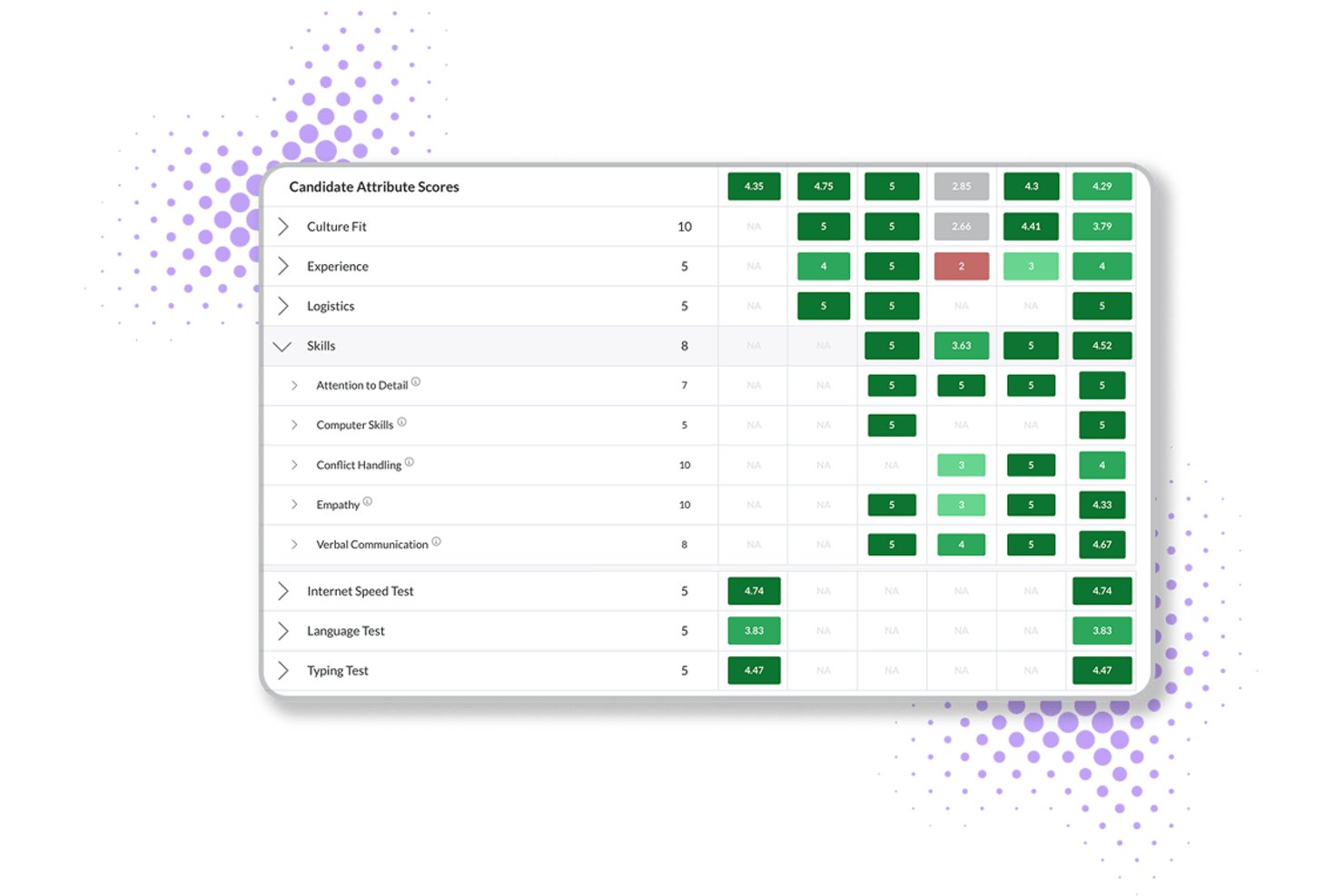
Journeyfront is an AI-powered ATS that combines resume scoring, behavioral assessments, predictive analytics, and hiring-class management for high-volume recruiting operations.
Who Is Journeyfront Best For?
Journeyfront is built for high-volume hiring teams in BPO, contact center, and warehouse environments that need to connect screening decisions to real post-hire outcomes.
Why I Picked Journeyfront
I picked Journeyfront as one of the best because it's the only tool on my list that closes the loop between screening decisions and real post-hire outcomes. Its AI Resume Review scores resumes against job-specific rubrics and feeds into a unified scorecard alongside assessments and interview results. In high-volume BPO or contact center hiring, that means a hiring class built in Journeyfront today can be traced back to 90-day retention and performance data tomorrow.
Journeyfront Key Features
- Predictive behavioral assessments: Candidates complete turnover-risk assessments that forecast 30, 60, 90, and 180-day attrition before a hire is made.
- AI-powered language testing: Built-in language proficiency tests use AI scoring aligned to CEFR levels, removing the need for a third-party language assessment tool.
- Fraud detection flagging: The platform automatically flags VPN use, duplicate IPs, and location changes to surface suspicious applicant activity during high-volume screening.
- Two-way SMS and WhatsApp messaging: Recruiters can send and receive candidate messages directly in the platform via SMS or WhatsApp without switching to a separate communication tool.
Journeyfront Integrations
Journeyfront lists an ecosystem of 400+ vendors, including Workday, Oracle, UKG Pro, BambooHR, Checkr, Sterling, SHL, and Versant. An Open API supports custom integrations, while ATS and HRIS integrations are available as add-ons.
Pros and Cons
Pros:
- Built-in fraud detection for high-volume hiring
- Explainable AI scores with human override
- Directly connects screening to post-hire outcomes
Cons:
- No public third-party bias audit available
- AI resume review feature still in beta

Best for custom recruitment analytics
Greenhouse is an enterprise recruitment platform that offers customizable AI-powered resume parsing, advanced candidate scoring tools, DE&I modules, and seamless integrations for organizations looking to optimize talent acquisition workflows.
Who Is Greenhouse Best For?
Greenhouse is a strong choice for large and mid-sized recruiting teams that need customizable workflows and deep integration with existing HR systems.
Why I Picked Greenhouse
I picked Greenhouse because I use its robust reporting suite to track every hiring step, build custom analytics dashboards, and drill into hiring funnel data for granular talent insights. The reporting API lets my team connect analytics straight into BI tools.
Greenhouse Key Features
- AI resume parsing: Extracts candidate data from multiple file types using natural language processing.
- Customizable candidate scorecards: Let hiring teams create evaluation templates based on job requirements.
- Structured interviewing workflows: Guides users through standardized interview processes for fair candidate assessments.
- Bulk candidate actions: Enable batch movement, communication, and dispositioning of large candidate pools.
Greenhouse Integrations
Greenhouse offers 400+ native integrations, including Workday, ADP, SAP SuccessFactors, Oracle, UKG, LinkedIn, DocuSign, Zoom, Slack, BambooHR, and Google Workspace. An API is available for custom integrations.
Pros and Cons
Pros:
- Powerful workflows for high-volume screening
- Advanced candidate scorecard configuration tools
- Custom analytics for every recruitment stage
Cons:
- Onboarding automation can feel complex
- Native AI matching requires third-party add-ons
New Product Updates from Greenhouse

Greenhouse Opens Candidate Insights and Talent Matching Assistants to Beta
Greenhouse opens Candidate Insights and Talent Matching assistants to beta for candidate questions and natural-language search. This helps recruiters review candidates and build searches faster. For more information, visit Greenhouse’s official site.
 .
Best as AI for business
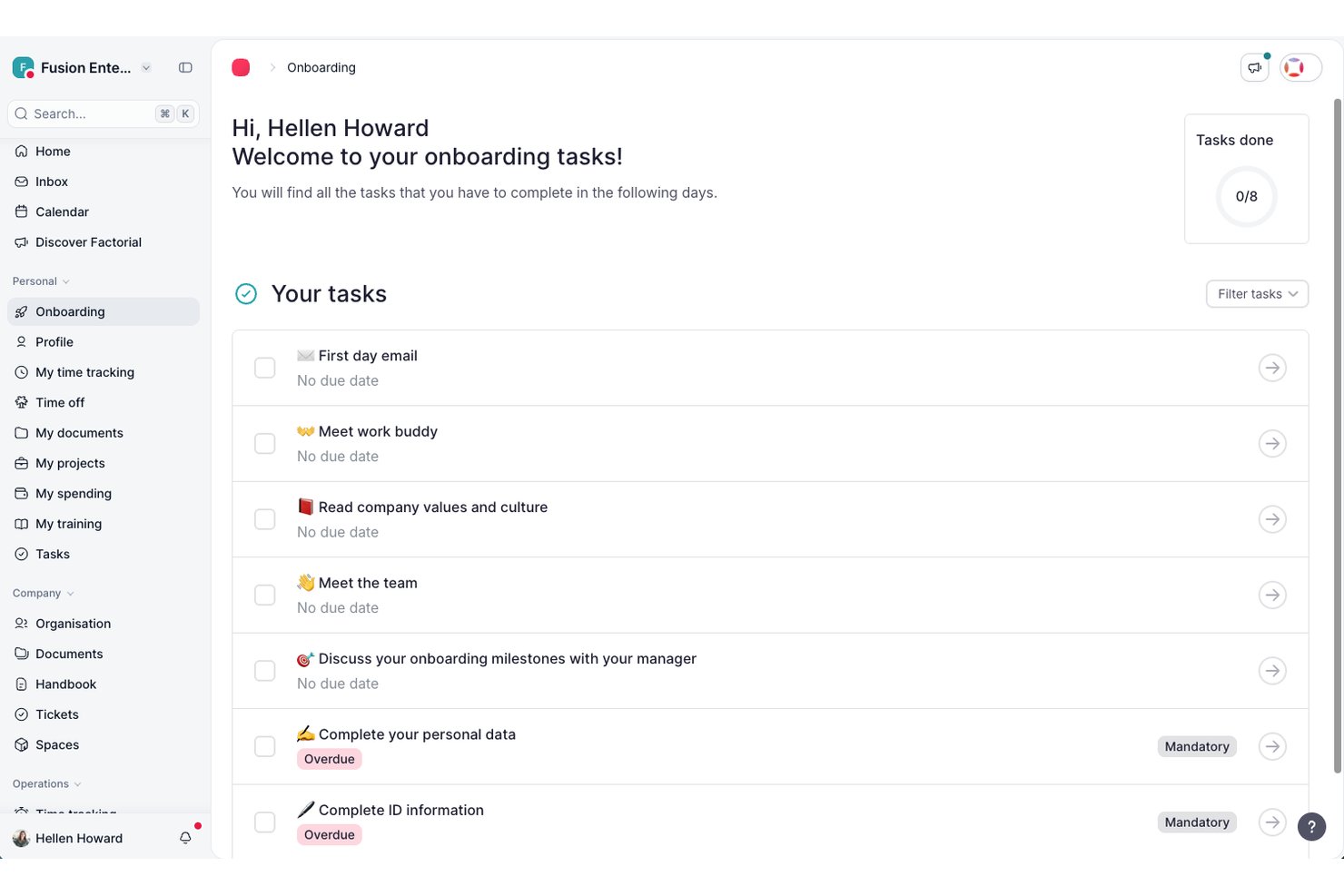
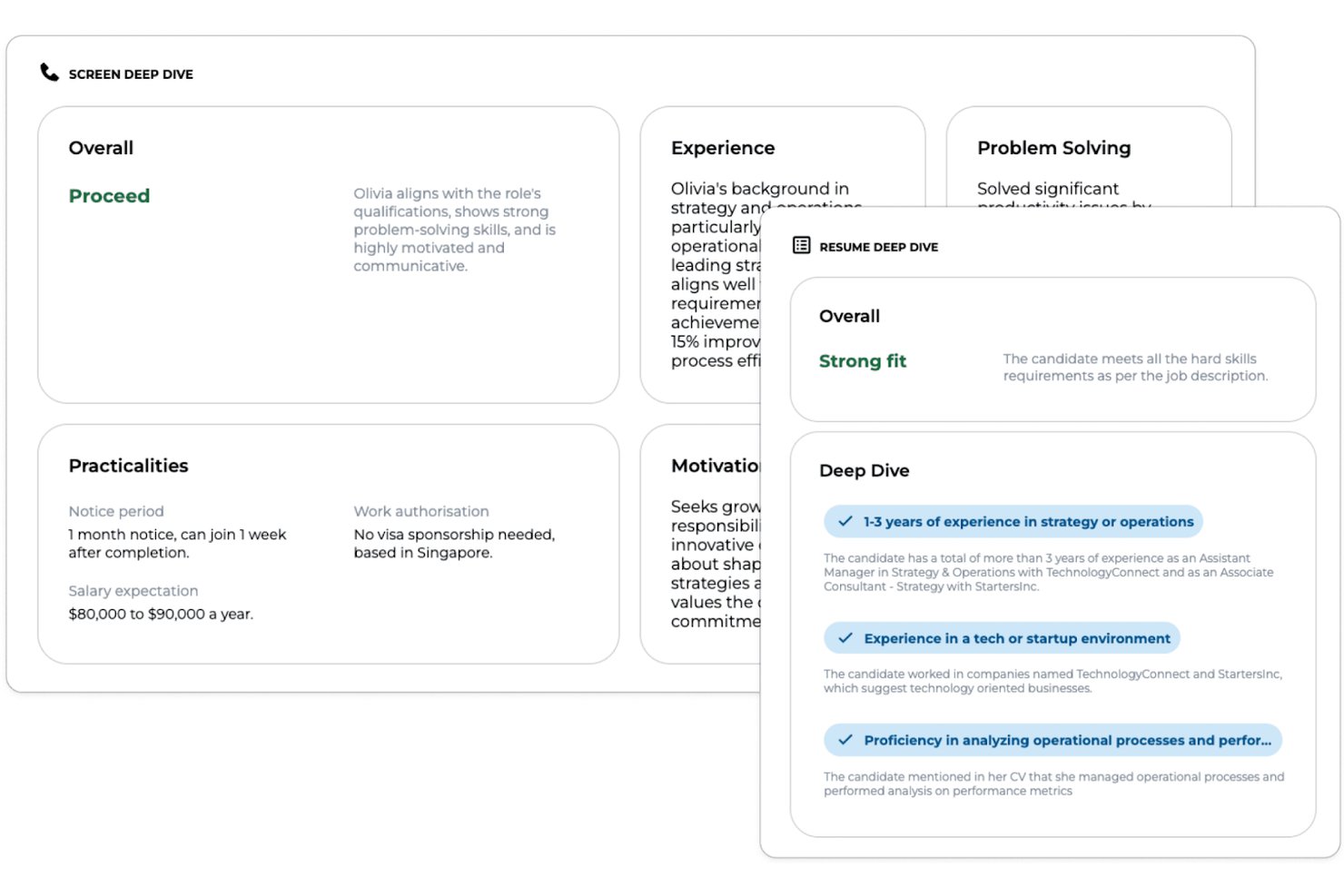
Factorial is a broad HR and business platform that uses AI to support recruitment workflows, including CV parsing, candidate filtering, and hiring-stage management within an integrated ATS.
Who Is Factorial Best For?
Factorial is a strong fit for HR managers and recruiters at small to mid-sized businesses who want AI-assisted hiring tools built into a broader people management platform.
Why I Picked Factorial
I've included Factorial in my top picks because it approaches hiring as one part of a broader AI-driven business operation rather than a standalone task. Its AI CV screening parses and filters candidate applications automatically, while AI candidate matching compares CVs against job requirements to surface the most relevant applicants. I also like that hiring pipelines are fully customizable per role, so AI evaluations are guided by specific criteria rather than generic logic.
Factorial Key Features
- AI job description generator: Uses AI to draft job descriptions based on the role you're hiring for, so you can get postings live faster.
- AI-powered phone screening: Factorial's AI call feature contacts candidates directly, evaluates the conversation against role-specific criteria, and generates a report for your review.
- Customizable hiring pipeline: Build and adjust recruitment stages per role, with automatic candidate emails triggered as applicants move between phases.
- Hiring-funnel analytics: Track metrics like time-to-hire, quality of hire, and offer acceptance rates across your active roles from a single dashboard.
Factorial Integrations
Factorial has marketplace integrations with Recruitee and LinkedIn, plus a two-way InfoJobs connection for job publishing and ATS workflows. It offers a public API, webhooks, SDKs, an MCP server, and Zapier support.
Pros and Cons
Pros:
- Shared evaluation notes support recruiter collaboration
- Role-specific AI calls generate evaluation reports
- Bulk CV parsing supports common document formats
Cons:
- No documented bias-screening controls
- Candidate recommendations lack transparent ranking scores

Best for custom resume evaluation workflows
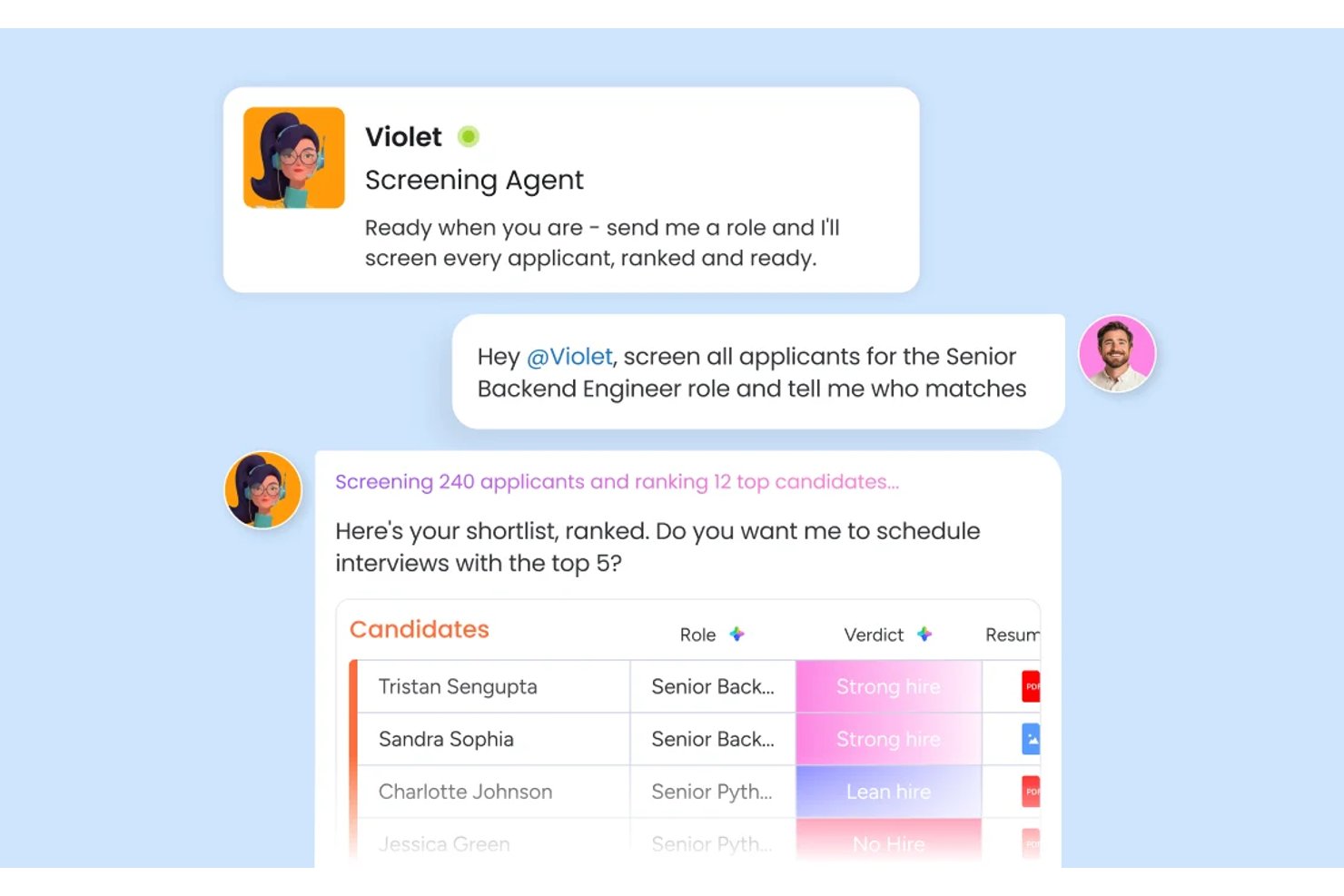
monday AI Workspace is a configurable work OS that lets recruiting teams build custom AI-powered candidate screening pipelines using automated resume parsing, candidate scoring, and cross-team hiring workflows.
Who Is monday AI Workspace Best For?
It's a strong fit for HR operations teams at mid-size organizations that want to build and own their recruiting workflows rather than conform to a rigid, pre-built ATS.
Why I Picked monday AI Workspace
I picked monday AI Workspace because of how much flexibility it gives my team to define what "qualified" actually means for each role. The Screening Agent scores every submission against criteria I set, and the AI Extract Info action pulls structured resume data directly into my board columns. What I find most useful is building custom AI actions in plain language, like prompting the tool to compare a resume against a specific job description and flag skill gaps automatically.
monday AI Workspace Key Features
- Interview coordination agent: Handles scheduling, reminders, and notifications for candidate interviews across global time zones.
- AI Sidekick: Provides an in-platform assistant to summarize candidate profiles and support decision-making in real time.
- Customizable hiring dashboards: Lets teams visualize pipeline status, stages, and team workload using drag-and-drop widgets.
- Automated communication workflows: Triggers templated emails and candidate status updates based on screening actions or candidate movements.
monday AI Workspace Integrations
monday AI Workspace offers hundreds of native integrations, including Slack, Google Workspace, Microsoft 365, Salesforce, Jira, GitHub, Zoom, Dropbox, HubSpot, and Zendesk. It also supports Zapier and provides an API for custom integrations.
Pros and Cons
Pros:
- Visual dashboard tracks pipeline status instantly
- AI supports multi-stage hiring workflows
- Customizable candidate scoring without code
Cons:
- Automation setup requires repeated manual prompts
- Can feel complex for small teams
New Product Updates from monday AI Workspace
monday AI Workspace Adds Human Approval Routing
monday AI Workspace adds a human-in-the-loop approval block to AI Workflows, sending approval requests and routing workflow paths based on responses. For more information, visit monday AI Workspace's official site.

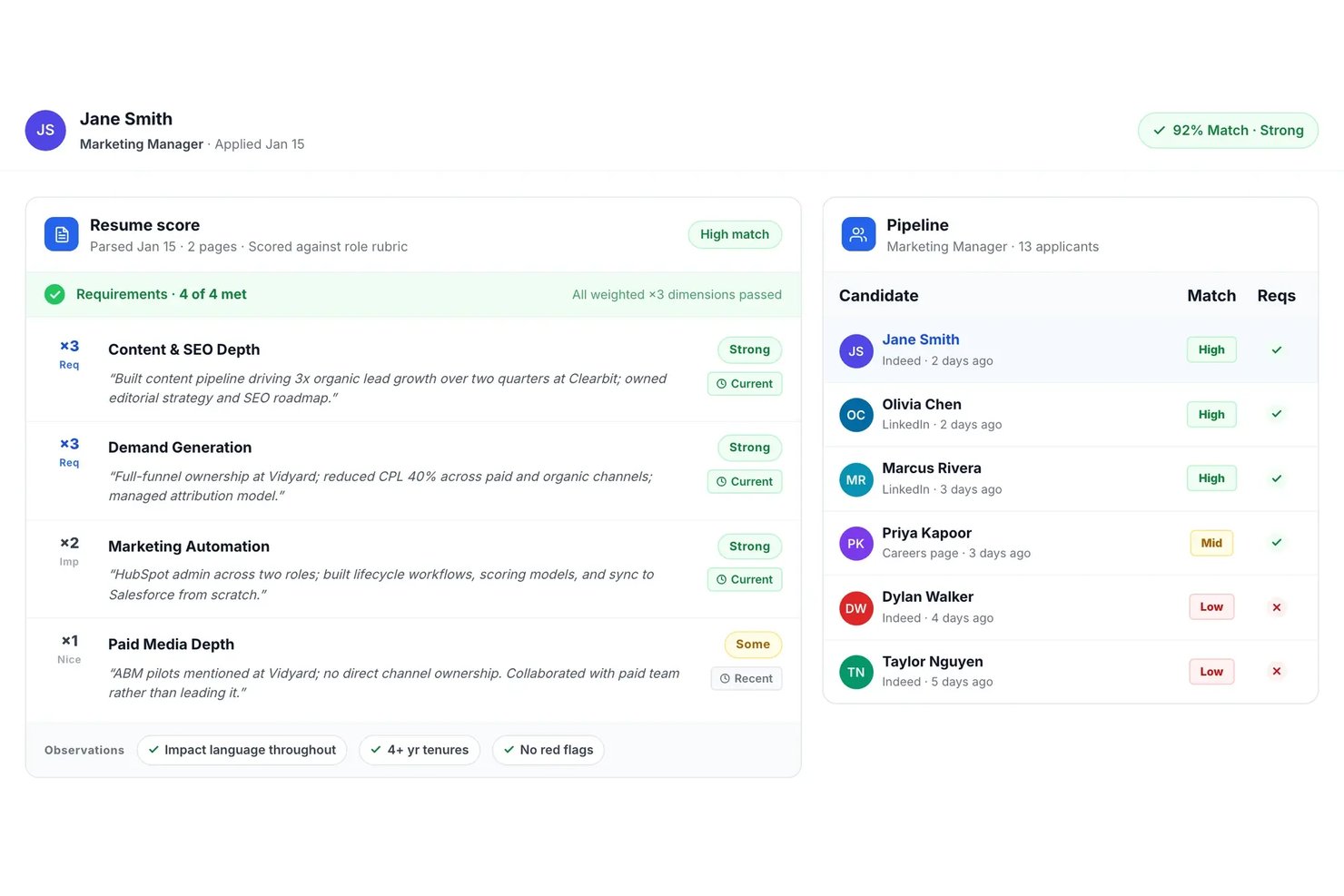
Truffle is an AI-driven resume screening platform that automatically parses, scores, ranks, and matches candidates to job descriptions with built-in multi-stage screening tools for high-volume recruiting teams.
Who Is Truffle Best For?
Truffle fits high-volume recruiters and HR teams at startups and mid-sized companies hiring for roles across multiple locations or business units.
Why I Picked Truffle
I picked Truffle as one of the best because I can launch one-click multi-stage candidate screening for every job. My team gets AI-powered ranking, instant structured shortlist summaries, and built-in async interview and skills screeners in a single flow.
Truffle Key Features
- Blind resume screening: Automatically hides candidates’ personal identifiers to support unbiased evaluation.
- Evidence-linked AI match scores: Presents match scores that include direct links to supporting resume details and criteria.
- Bulk resume uploading: Allows users to upload and process hundreds of resumes simultaneously for each role.
- ATS and HRIS integrations: Connects with major systems like Ashby, Breezy HR, and more through Zapier and open API.
Truffle Integrations
Truffle offers native integrations with Ashby, Breezy HR, and Indeed, and connects with Zapier. An open API is available for custom integrations.
Pros and Cons
Pros:
- Fast bulk processing for high-volume roles
- Built-in async skills and interview screening
- Automated shortlist with evidence-linked AI scores
Cons:
- No multilingual resume parsing support
- Limited advanced reporting and analytics tools
Best for talent matching

Eightfold AI caught my attention because it uses AI to deeply analyze candidate skills and experience, focusing on real job fit instead of just keyword matching. This platform is a match for companies with high-volume or complex hiring needs, where surfacing the strongest, most relevant talent quickly really matters.
I appreciate how it maps existing skills to open roles and internal mobility paths for clearer talent decisions.
Eightfold AI’s Best For
- Large organizations with high-volume resume screening needs
- Companies prioritizing talent matching and internal mobility
Eightfold AI’s Not Great For
- Small companies with basic screening requirements
- Teams wanting deep, customizable workflow automation
What sets Eightfold AI apart
Eightfold AI is built around the idea that skills and actual experience should drive hiring, not just matching keywords on a resume. In practice, it sifts through large volumes of applicants and brings forward people who have proven abilities that align with open roles. Unlike basic screening tools or recruiting features in something like Workday, Eightfold expects you to trust its AI to surface relevant candidates you might miss with manual filtering.
Tradeoffs with Eightfold AI
Eightfold AI optimizes for automated skill-based matching, but you give up detailed manual control and customization over the screening process. If you want to tweak how every filter works, you'll probably feel limited.
Pros and Cons
Pros:
- Centralizes workforce planning data
- Makes hiring decisions more diverse
- AI uncovers full candidate potential
Cons:
- Best with structured HR
- Complex for small organizations

Alex
Best for intelligent resume analysis

Alex lands on my list because of how well it uses AI to break down resumes into structured, relevant insights. I picked it after seeing its natural language processing sift out meaningful skills and experience patterns that basic keyword scanners miss.
What I like is that Alex recognizes job-specific context, so you get more accurate talent matches when screening high volumes of diverse resumes. This makes it stand out for teams who want deeper, more intelligent resume analysis, not just faster filtering.
Alex’s Best For
- High-volume recruiters screening diverse candidate pools
- HR teams needing context-aware resume parsing and insights
Alex’s Not Great For
- Companies with narrow, highly specialized hiring needs
- Teams wanting detailed reference or background checks
What sets Alex apart
Alex approaches resume screening with a context-driven analysis model instead of simple keyword matching or rule-based scoring. Unlike tools like Lever or Greenhouse that stick to more surface-level filtering, Alex interprets whole resume narratives and ties skills back to job needs in practical, job-specific ways.
I often see recruitment teams using it to improve relevance when handling large, varied candidate pools.
Tradeoffs with Alex
Alex optimizes for intelligent context parsing, but you lose access to some advanced sourcing or referral management tools, so it isn’t great when internal mobility or referrals drive most of your hires.
Pros and Cons
Pros:
- Supports multilingual candidate interviews
- Built in fraud detection tools
- Automates high volume interviews
Cons:
- Advanced features need configuration
- Pricing not publicly available

Workable stands out for me when hiring gets collaborative and resume volumes get overwhelming. I like how its AI filters candidate pools and highlights strong matches right inside your collaborative hiring pipelines. Teams are able to comment, rate, and move candidates forward together, all in one place.
I appreciate how candidate scoring is transparent and integrates with real team feedback, which cuts down on back-and-forth review cycles.
Workable’s Best For
- Collaborative hiring teams screening high volumes of resumes
- Organizations wanting AI-driven candidate scoring with transparent team input
Workable’s Not Great For
- Companies handling infrequent or one-off hiring
- Teams needing deep sourcing or candidate relationship management
What sets Workable apart
Workable builds the hiring process around collaboration and transparency rather than just automation. Unlike something like Lever, which focuses heavily on pipeline analytics, Workable expects you to pull multiple stakeholders into candidate evaluations and shortlisting directly in the platform. This tends to work best when you want hiring managers and interviewers embedded in resume review and feedback, not just recruiters.
Tradeoffs with Workable
Workable optimizes for collaborative hiring, but advanced candidate sourcing or deep recruitment marketing capabilities are less visible. You lose out if your process depends on outreach and long-term talent pipelines.
Pros and Cons
Pros:
- Teams collaborate more effectively
- AI aids sourcing and screening
- Unified hiring and HR platform
Cons:
- Need manual setup for integrations
- Features vary by plan tier


Jobscan earns its spot for how it automates resume screening with recruiter-quality keyword and skills matching. When agencies face high volumes or tricky client needs, I see them using Jobscan’s ATS optimization to align resumes with each job’s real requirements.
I like that I can run side-by-side comparisons showing exactly how well a candidate’s resume matches the must-haves. This focus on concrete fit speeds up shortlisting when accuracy matters most.
Jobscan’s Best For
- Recruiting firms processing high-volume candidate pools
- Agencies needing precise ATS-driven resume matching
Jobscan’s Not Great For
- Internal HR teams screening limited applicant numbers
- Companies wanting deep AI interview or assessment features
What sets Jobscan apart
Jobscan is designed around matching resumes to job descriptions using recruiter-style logic, rather than just filtering on broad keywords as you find in basic ATS tools. In practice, this works best for agencies or hiring teams dealing with huge applicant pools who need objective, skills-based matches surfaced before deeper review.
Unlike LinkedIn Recruiter, which centers on search and relationship-building, Jobscan zeroes in on optimizing each resume for an exact role and its real requirements.
Tradeoffs with Jobscan
Jobscan optimizes for accurate, high-volume screening, but you give up broader candidate engagement or interview workflow features, which means you’ll need another tool for end-to-end recruiting.
Pros and Cons
Pros:
- Offers resume and LinkedIn analysis
- Includes ATS-friendly resume builder
- Helps identify missing keywords
Cons:
- Limited features for recruiters
- Focuses on individual applicants


Paradox is my pick here because of the conversational AI that’s built into its screening and scheduling experience. When I evaluate AI resume screening tools for high-volume hiring, what sets Paradox apart is how it uses AI chat to screen candidates in real time, answer questions, and move qualified people straight to the next step. I like that teams can automate early engagement and uncover strong-fit candidates without adding extra steps or delays.
Paradox’s Best For
- High-volume recruiting teams using AI chat for screening
- Organizations automating early candidate screening and scheduling
Paradox’s Not Great For
- Companies needing advanced skills assessments
- Teams that require detailed manual resume reviews
What Sets Paradox Apart
Paradox is unique because it builds the entire screening experience around conversational AI. Instead of expecting recruiters to review resumes directly, the system runs guided chat-based interviews that mimic the give-and-take of a recruiter conversation. I see this work well when organizations want to automate high-volume resume screens but still give candidates the sense of a two-way interaction.
Tradeoffs with Paradox
Paradox optimizes for fast, automated screening using natural language, but you lose the depth and nuance of traditional résumé analysis, which means some details or context may get missed at the earliest stage.
Pros and Cons
Pros:
- Works across time zones
- Instant interview scheduling
- Applications accessible through multiple platforms
Cons:
- Human recruiters still needed to manage final steps
- Chat flows require setup
Annen AI-programvare for CV-gjennomgang
Her er noen flere alternativer for AI-programvare for CV-gjennomgang som ikke kom med på kortlisten min, men som likevel er verdt å se nærmere på:
- Harver
For volume hiring
- Covey
For candidate engagement
- Pesto
For tech recruitment
- HaiTalent
For fast track hiring
- ResumeScreening.ai
For real-time feedback
- Brainner
For automated candidate ranking
- Zoho Recruit
For customizable workflows
- Manatal
For social media recruitment


How I Evaluate AI Resume Screening Software
Any tool on this list needs to do more than slap an "AI" label on basic keyword filters—it has to genuinely reduce screening time and surface better-fit candidates from high-volume applicant pools. I split my evaluation into core functionality every tool must have to qualify, and differentiating factors that separate good options from great ones.
Core Functionality (Table Stakes For This List)
When I'm selecting tools for my list, I rank each one on a scale from 0 (does not offer the functionality) to 5 (excels in this area) for each core functionality listed below. Then, I calculate the tool's total score into a percentage. Each tool needs to achieve a minimum total score of 65% to be considered for inclusion.
- AI-Powered Resume Parsing: I check whether the tool can extract structured data—skills, job titles, education, certifications—from resumes across formats like PDF and DOCX with high accuracy.
- Candidate Scoring & Ranking: Each tool should generate AI-driven match scores and ranked shortlists, so recruiters reviewing 500+ applicants can quickly focus on the top candidates.
- Semantic Job Description Matching: I look for matches that go beyond keyword overlap to understand context, like recognizing that a "people operations lead" aligns with an "HR manager" role.
- Bias Mitigation Controls: Features like blind screening, demographic anonymization, or explainable scoring help me gauge how seriously a platform addresses fairness in automated decisions.
- Bulk Resume Processing: High-volume hiring teams need to screen thousands of resumes per role, so I evaluate whether the tool handles large batches without slowdowns or manual workarounds.
- ATS and HRIS Integration: The tool should connect with platforms like Greenhouse, Workday, or iCIMS so screened candidates flow directly into existing recruiting workflows.
Once I have a list of tools that meet this criteria, I consider what sets each platform apart.
Differentiating Factors (What Sets Vendors Apart)
Here's how I compare and contrast different vendors:
Standout Features
Skills inference is a big differentiator—tools that identify unstated competencies from a candidate's work history surface talent that pure keyword matching would miss. I also evaluate whether a platform lets recruiting teams train custom AI models on their own hiring data and success profiles. Predictive hiring analytics add another layer, giving talent acquisition managers visibility into quality-of-hire trends and pipeline health over time.
Beyond Features
Compliance and AI governance matter a lot here—I check whether vendors publish bias audits and support evolving regulations like the EU AI Act or NYC Local Law 144. Hiring volume fit is equally important, since a tool built for enterprise BPO recruiting often won't suit a mid-market team filling a handful of specialized roles. I also look at time-to-value, including how quickly teams can calibrate scoring models and connect to their existing ATS.
Slik velger du AI-programvare for CV-gjennomgang
Det er lett å gå seg vill i lange funksjonslister og komplekse prismodeller. For å hjelpe deg med å holde fokus mens du går gjennom den unike prosessen din for valg av programvare, har jeg laget en sjekkliste over faktorer du bør ha i tankene:
| Faktor | Hva du bør vurdere |
| Skalerbarhet | Kan programvaren vokse sammen med bedriften din? Sørg for at den kan håndtere økte mengder CV-er uten ytelsesproblemer etter hvert som ansettelsesbehovene dine øker. |
| Integrasjoner | Fungerer den sammen med de eksisterende systemene dine? Kontroller at den er kompatibel med ATS, HRIS og andre viktige verktøy for å unngå forstyrrelser i arbeidsflyten. |
| Tilpasningsmuligheter | Kan du tilpasse den til behovene dine? Se etter alternativer for å justere innstillinger, arbeidsflyter og rapporter slik at de samsvarer med ansettelsesprosessene dine. |
| Brukervennlighet | Er grensesnittet intuitivt? Et brukervennlig design reduserer opplæringstiden og antallet feil, noe som kommer teamets produktivitet til gode fra første dag. |
| Implementering og opplæring | Hvor lang tid tar det å komme i gang? Vurder tiden og ressursene som kreves for oppsett, opplæring og datamigrering. |
| Kostnad | Passer den inn i budsjettet ditt? Sammenlign prisplaner og vær oppmerksom på skjulte gebyrer. Sørg for at funksjonene rettferdiggjør kostnaden for teamet ditt. |
| Sikkerhetstiltak | Er kandidatenes data beskyttet? Se etter kryptering, overholdelse av personvernregler og regelmessige sikkerhetsoppdateringer for å beskytte sensitiv informasjon. |
| Tilgjengelig kundestøtte | Er hjelp tilgjengelig når du trenger det? Se etter kundestøtte døgnet rundt og dedikerte kundeansvarlige som kan hjelpe til i kritiske situasjoner. |
Hva er AI-programvare for CV-gjennomgang?
Programvare for AI-basert CV-gjennomgang er et verktøy som automatiserer prosessen med å gjennomgå og evaluere jobbsøkeres CV-er ved hjelp av kunstig intelligens. HR-ansvarlige og rekrutterere bruker disse verktøyene til raskt å identifisere kvalifiserte kandidater, redusere tiden det tar å ansette og effektivisere rekrutteringen.
Funksjoner som søkeordanalyse, kandidatvurdering og automatisert filtrering bidrar til å matche kandidater med jobbkrav, noe som forbedrer rekrutteringsprosessen.
Alt i alt sparer disse verktøyene tid og forbedrer kvaliteten på ansettelsene ved å utnytte AI-funksjoner.
Funksjoner
Her er de viktigste funksjonene all god programvare for AI-basert CV-gjennomgang bør ha:
- Søkeordanalyse: Identifiserer relevante søkeord i CV-er for å matche kandidater med stillingsbeskrivelser på en effektiv måte.
- Kandidatvurdering: Rangerer automatisk kandidater basert på kvalifikasjonene deres og hvor godt de passer til rollen, noe som sparer tid i utvelgelsesprosessen.
- Automatisert filtrering: Filtrerer bort ukvalifiserte kandidater ved hjelp av forhåndsdefinerte kriterier, slik at rekrutterere kan fokusere på de beste talentene.
- Ferdighetsvurderinger: Evaluerer kandidatenes tekniske ferdigheter og mellommenneskelige ferdigheter gjennom AI-drevet testing, slik at man sikrer at de passer til jobben.
- Prediktiv analyse: Gir innsikt i kandidatenes potensial og fremtidige prestasjoner, og bidrar til velinformerte ansettelsesbeslutninger.
- Tilpassbare arbeidsflyter: Gjør det mulig for team å tilpasse rekrutteringsprosessen etter sine spesifikke behov, noe som forbedrer effektiviteten.
- Tilbakemeldinger i sanntid: Gir umiddelbare tilbakemeldinger på CV-er og hjelper kandidater med å forbedre søknadene sine.
- Analyse av mangfold og inkludering: Analyserer ansettelsespraksis for å fremme en mangfoldig og inkluderende arbeidsstyrke.
- CV-tolking: Henter ut og organiserer informasjon fra CV-er raskt, noe som reduserer behovet for manuell dataregistrering.
- Planlegging av intervjuer: Automatiserer planleggingen av intervjuer og forenkler koordineringen mellom kandidater og rekrutterere.
Fordeler
Implementering av programvare for AI-basert CV-gjennomgang gir flere fordeler for teamet og virksomheten din. Her er noen av fordelene du kan se frem til:
- Tidsbesparelser: Automatiserer prosessen med å gjennomgå CV-er, slik at teamet ditt får mer tid til andre viktige oppgaver.
- Bedre kandidatkvalitet: Bruker AI-funksjoner som kandidatvurdering for å sikre at bare de best egnede kandidatene blir vurdert.
- Bedre beslutningstaking: Gir prediktiv analyse som gir innsikt i kandidatenes potensial og bidrar til bedre ansettelsesvalg.
- Redusert skjevhet: Fremmer rettferdige ansettelser ved å bruke AI-drevne kriterier som minimerer menneskelig skjevhet i utvelgelsesprosessen.
- Kostnadseffektivitet: Reduserer kostnaden per ansettelse ved å automatisere oppgaver og forbedre effektiviteten til rekrutteringsstrategiene.
- Skalerbarhet: Håndterer enkelt økte mengder CV-er, noe som gjør løsningen egnet for virksomheter i vekst med økende rekrutteringsbehov.
- Bedre kandidatopplevelse: Gir tilbakemeldinger i sanntid og effektiv kommunikasjon, noe som forbedrer den helhetlige opplevelsen for jobbsøkere.
Kostnader og priser
Ved valg av programvare for AI-basert CV-gjennomgang er det viktig å forstå de ulike prismodellene og abonnementene som er tilgjengelige. Kostnadene varierer basert på funksjoner, teamstørrelse, tillegg og mer. Tabellen nedenfor oppsummerer vanlige abonnementer, gjennomsnittsprisene deres og typiske funksjoner som er inkludert i løsninger for AI-basert CV-gjennomgang:
Sammenligningstabell for abonnementer for AI-basert CV-gjennomgang
| Abonnementstype | Gjennomsnittspris | Vanlige funksjoner |
| Gratisabonnement | $0 | Grunnleggende CV-tolking, begrenset kandidattilpasning og begrenset tilgang til analyser. |
| Personlig abonnement | $29.99 - 299/bruker/måned | Søkeordanalyse, kandidatvurdering og grunnleggende rapporteringsverktøy. |
| Bedriftsabonnement | $100-$359/bruker/måned | Avansert filtrering, ferdighetsvurderinger og integrasjon med ATS-systemer. |
| Virksomhetsabonnement | $199- $500/bruker/måned | Tilpassbare arbeidsflyter, prediktiv analyse og dedikert kundestøtte. |
Vanlige spørsmål
Her er noen svar på vanlige spørsmål om programvare for AI-basert CV-screening:
Hvor transparente er beslutningene ved AI-basert CV-screening?
De fleste verktøy forklarer ikke fullt ut hvorfor en kandidat rangeres høyere eller lavere, og det kan være frustrerende. Se etter plattformer som viser hvilke ferdigheter eller nøkkelord som påvirket beslutningene. Dette hjelper teamet ditt med å forstå begrunnelsen til AI-en og bygge tillit til anbefalingene dens.
Hva skjer hvis AI-verktøyet ditt undervurderer en sterk kandidat?
Selv de beste verktøyene kan overse talenter med uvanlig bakgrunn eller kreative CV-er. Du bør alltid legge inn en menneskelig «ekstra vurdering» for søkere som kan falle gjennom. Det er et godt sikkerhetsnett.
Hvor nøyaktige er disse AI-verktøyene sammenlignet med vurdering utført av mennesker?
De er raske og konsekvente, men de er ikke perfekte. For stor avhengighet av nøkkelord eller maler kan føre til at gode kandidater blir oversett. Du bør kombinere AI med menneskelig vurdering.
Tilpasser verktøyet seg over tid, eller må du stadig kalibrere det på nytt?
Ja, de tilpasser seg. Men etter hvert som arbeidsmarkedet og ferdighetene utvikler seg, bør også kriteriene dine gjøre det. Du bør gjennomgå og oppdatere innstillingene, terskelverdiene og filtrene minst annenhver måned for å holde dem oppdaterte.
Hva med CV-er som ikke ser standardiserte ut eller følger et typisk format – kan AI fortsatt fange dem opp?
Ikke alltid. Hvis en CV har en kreativ utforming, bruker uvanlig formatering eller mangler forventede nøkkelord, kan AI-en få problemer med å tolke den riktig. Ved mer uvanlige ansettelser kan det fortsatt være lurt å ha en menneskelig kontrollør.