

De 10 beste programvarene for EMS-vaktplanlegging i 2026

Beste programvare for EMS-vaktplanlegging


Programvare for EMS-vaktplanlegging hjelper akuttmedisinske tjenester med å organisere vakter, administrere tilgjengelighet og koordinere bemanning på tvers av lokasjoner. Hvis du leter etter den beste programvaren for EMS-vaktplanlegging, står du sannsynligvis overfor utfordringer med endringer i vakter i siste liten, håndtering av overtid eller med å holde teamet samlet – spesielt når liv står på spill. I denne veiledningen finner du pålitelige løsninger som hjelper deg med å forenkle vaktplanleggingen, redusere manuelle feil og sørge for at EMS-driften fungerer problemfritt. Jeg går gjennom hva hvert verktøy er best på, slik at du raskt kan finne det som passer best for byråets behov.
Hvorfor du kan stole på våre programvareanbefalinger
Teamet vårt har testet og anmeldt programvare siden 2012. Vi er selv HR-eksperter, så vi vet hvor vanskelig og hvor viktig det er å velge riktig programvare.
I denne guiden har vi vurdert verktøyene gjennom praktisk testing og uavhengig research og gitt dem poeng ut fra våre utvelgelseskriterier. Vi bygger også på innsikt fra ledende eksperter i bransjen og erfarne HR-eksperter.
Anmeldelsene våre bygger på vår egen redaksjonelle vurdering. De er ikke et salgsargument.
Ekspertanmeldere:
Sammenligningstabell for programvare for EMS-vaktplanlegging
Denne sammenligningstabellen oppsummerer prisdetaljene for mine beste utvalgte programmer for EMS-vaktplanlegging:
| Tool | Best For | Trial Info | Price | ||
|---|---|---|---|---|---|
| 1 | Best for mobile-first shift management | Free trial available | From $2.50/user/month | Website | |
| 2 | Best for managing complex shift rotations | Free demo available | Pricing upon request | Website | |
| 3 | Best for communication tools within scheduling | Free trial + free plan available | From $1.70/user/month (billed annually) | Website | |
| 4 | Best for all-in-one operations management | Free demo available | Pricing upon request | Website | |
| 5 | Best for advanced overtime management | Free demo available | Pricing upon request | Website | |
| 6 | Best for multi-location staff coordination | Not available | Pricing upon request | Website | |
| 7 | Best for integration with incident reporting | Free demo available | Pricing upon request | Website | |
| 8 | Best for customizable crew scheduling templates | Free demo available | Pricing upon request | Website | |
| 9 | Best for automated compliance with labor rules | Free demo available | Pricing upon request | Website | |
| 10 | Best for unified personnel and asset scheduling | Free demo available | Pricing upon request | Website |
Anmeldelser av den beste programvaren for EMS-vaktplanlegging
Nedenfor finner du mine detaljerte sammendrag av den beste programvaren for EMS-vaktplanlegging som kom med på listen min. Anmeldelsene mine gir et detaljert innblikk i funksjonene, de beste bruksområdene og integrasjonene til hver plattform, slik at du kan finne den som passer best for deg.

Best for mobile-first shift management
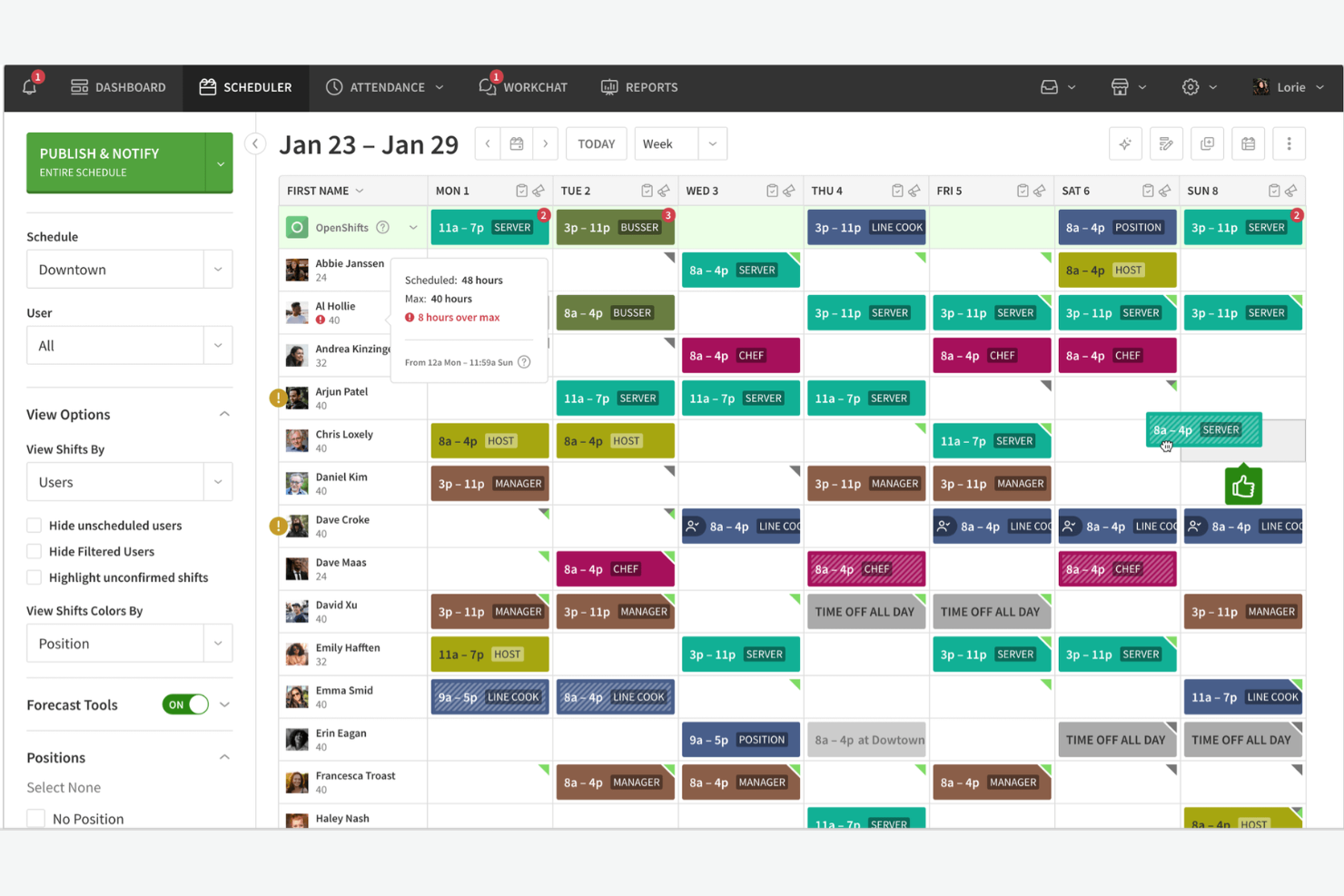
When I Work is EMS scheduling software designed for shift-based teams, offering features like real-time schedule updates, time-off requests, team messaging, and mobile access for emergency service organizations.
Who Is When I Work Best For?
When I Work is a good fit for EMS teams and emergency service organizations that need mobile-first shift scheduling and communication.
Why I Picked When I Work
I picked When I Work as one of the best because I can manage shift swaps, time-off requests, and last-minute schedule changes right from my phone. I like that my team gets instant notifications and can message each other directly in the app. In practice, that means we keep everyone in the loop and handle emergencies without missing a beat.
When I Work Key Features
- Labor forecasting: Predicts staffing needs based on historical data and trends.
- GPS clock-in: Lets staff clock in and out from approved locations using their mobile devices.
- Payroll export: Exports timesheets directly to payroll providers for processing.
- Multiple location management: Manages schedules and staff across different stations or sites.
When I Work Integrations
When I Work offers native integrations with QuickBooks, ADP, Gusto, Square, Paychex, Namely, BambooHR, Google Workspace, and Zapier. An API is also available for custom integrations.
Pros and Cons
Pros:
- Built-in team messaging for urgent coordination
- GPS clock-in helps verify staff locations
- Real-time alerts for shift updates and swaps
Cons:
- Limited reporting for compliance tracking
- No built-in fatigue or overtime monitoring

Aladtec
Best for managing complex shift rotations
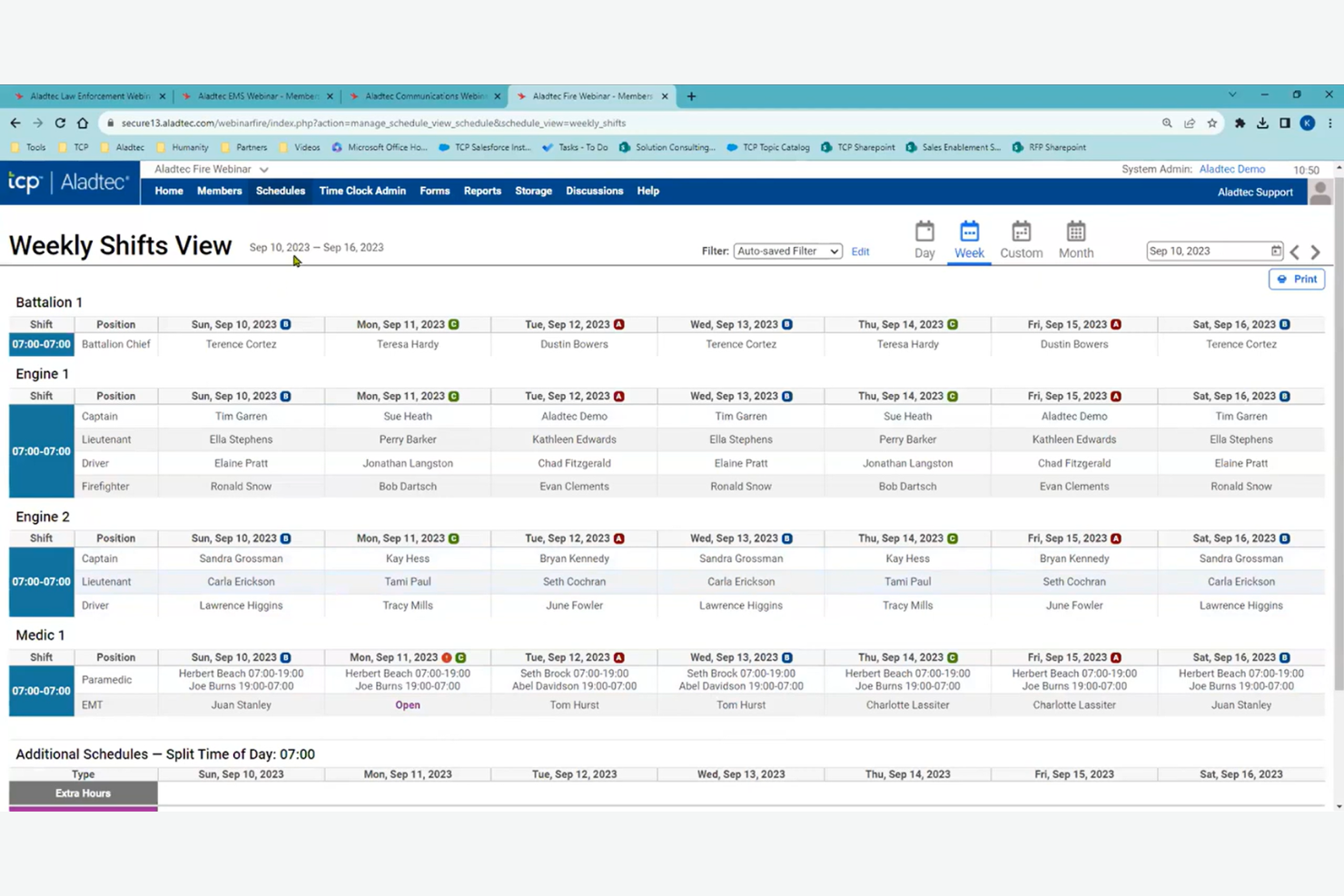
Aladtec is an EMS scheduling software platform designed for public safety teams that need automated shift scheduling, time-off management, and real-time communication tools tailored to complex staffing needs.
Who Is Aladtec Best For?
Aladtec suits EMS agencies and public safety departments that need to coordinate complex shift patterns and manage large, distributed teams.
Why I Picked Aladtec
I picked Aladtec as one of the best because it handles complex shift rotations that are common in EMS agencies. I like how the system lets me build custom rotation templates and automate recurring schedules for 24/7 coverage. My team is able to manage last-minute swaps and track certifications right within the platform.
Aladtec Key Features
- Time-off requests: Staff can submit and track time-off requests directly in the platform.
- Shift bidding: Team members can bid on open shifts based on their availability and qualifications.
- Mobile app access: Users can view schedules, swap shifts, and receive notifications from any device.
- Document management: Store and share important certifications, licenses, and policy documents securely.
Aladtec Integrations
Aladtec offers native integrations with TimeClock Plus and Humanity Schedule, and provides an API for custom integrations.
Pros and Cons
Pros:
- Offers mobile app for on-the-go access
- Tracks certifications and license expirations
- Handles 24/7 and rotating shift patterns
Cons:
- Limited native integration with external ePCRs
- No built-in payroll processing features

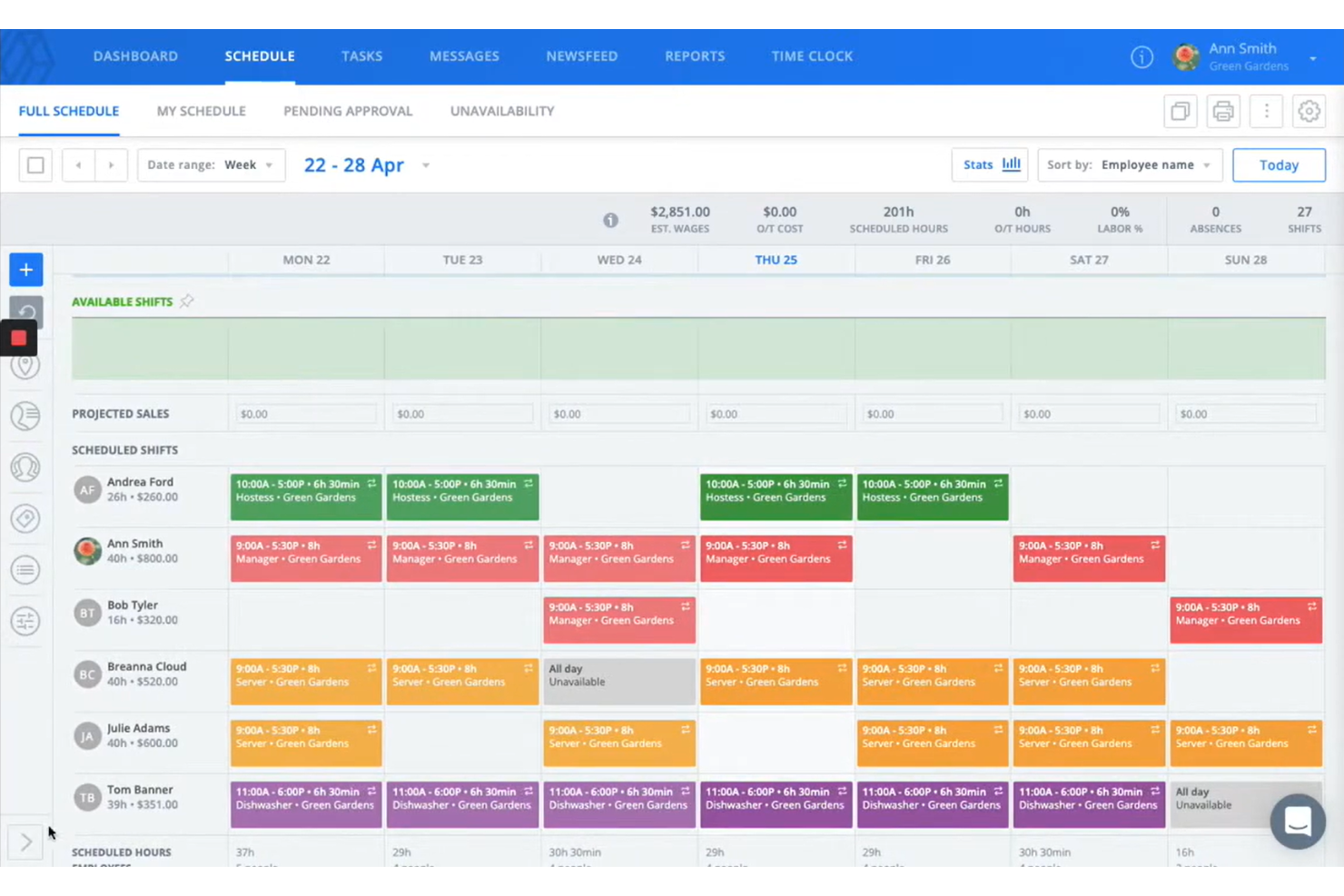
Sling is EMS scheduling software that combines shift planning, time tracking, and built-in team messaging to help emergency services manage schedules and communicate in one place.
Who Is Sling Best For?
Sling is a good fit for EMS teams and emergency service organizations that need to coordinate schedules and internal communication.
Why I Picked Sling
I picked Sling as one of the best because I can manage shift assignments and send group messages or urgent updates to my EMS team in the same platform. I like that I can create announcements, set up tasks, and use private or group chat to keep everyone informed about schedule changes. My team uses the newsfeed feature to post critical updates and reminders, so nothing gets missed during busy shifts.
Sling Key Features
- Shift swapping: Lets team members swap shifts directly in the app.
- Time clock: Tracks employee clock-ins and clock-outs for each shift.
- Labor cost tracking: Monitors scheduled and actual labor costs in real time.
- Availability management: Allows staff to set and update their availability preferences.
Sling Integrations
Sling offers native integrations with ADP, Gusto, Square, Shopify, and Zapier, and also provides an API for custom integrations.
Pros and Cons
Pros:
- Integration with payroll providers
- Mobile app for on-the-go schedule changes
- Labor cost tracking linked to scheduling
Cons:
- No direct integration with dispatch systems
- Limited reporting and analytics for EMS needs

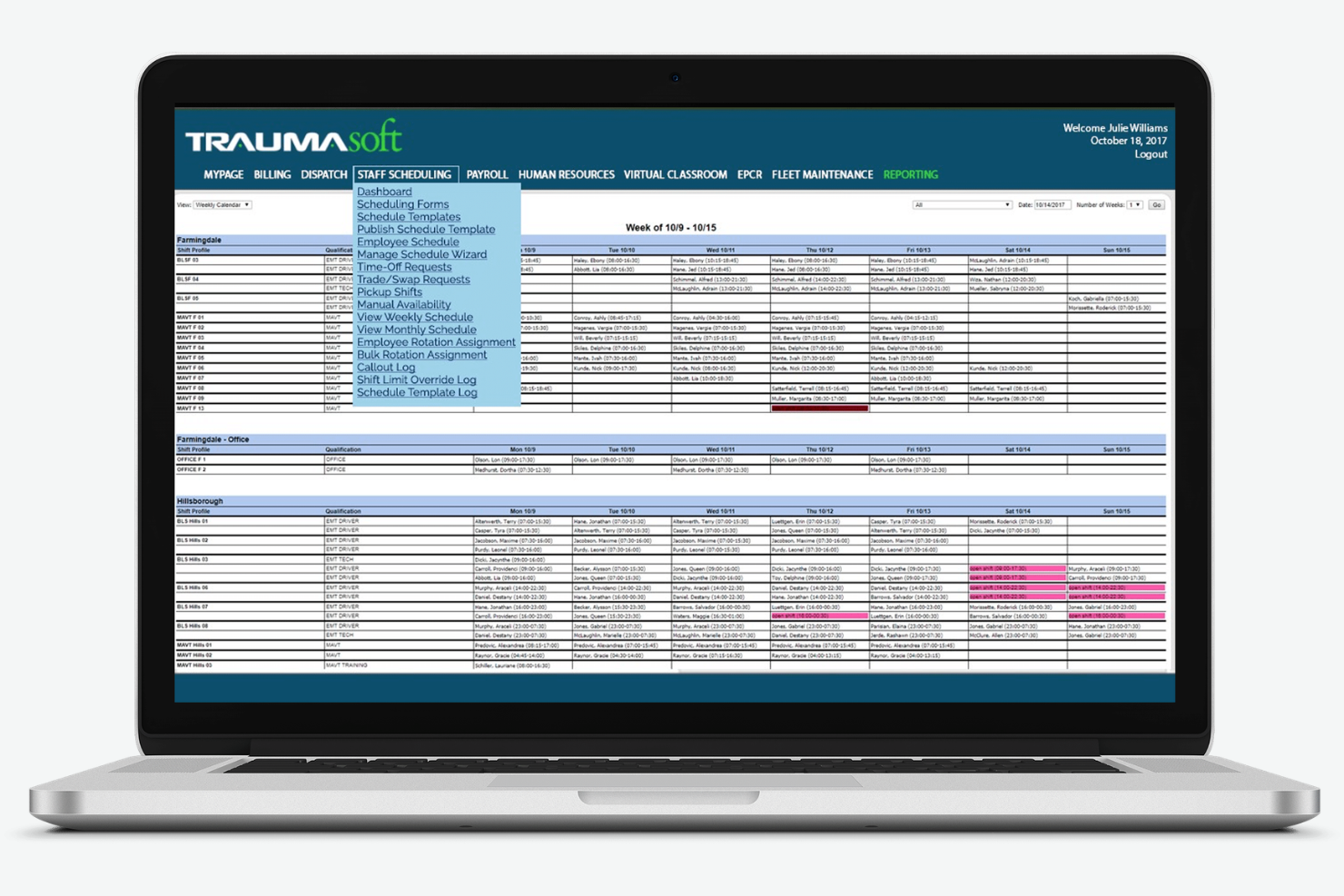
Traumasoft is EMS scheduling software that combines crew scheduling, time tracking, payroll, and resource management in a single platform designed for ambulance and emergency service providers.
Who Is Traumasoft Best For?
Traumasoft is a good fit for EMS agencies and ambulance services that want to manage scheduling, payroll, and operations from one platform.
Why I Picked Traumasoft
I picked Traumasoft as one of the best because I can handle crew scheduling, time tracking, and payroll all in one place without switching between systems. I like that my team can manage vehicle assignments and track certifications directly from the same dashboard. In practice, that means we keep operations, compliance, and scheduling tightly connected.
Traumasoft Key Features
- Automated shift notifications: Sends instant alerts to staff about new or changed shifts.
- Open shift bidding: Lets employees view and claim available shifts directly in the system.
- Certification tracking: Monitors staff credentials and expiration dates for compliance.
- Mobile scheduling access: Allows crews to view and manage schedules from any device.
Traumasoft Integrations
Traumasoft offers native integrations with QuickBooks, Sage, and Zoll, and provides an API for custom integrations.
Pros and Cons
Pros:
- Weekly software updates for features
- Centralized personnel records and education tracking
- Unified CAD and billing platform integration
Cons:
- Customization requests often face long backlogs
- Interface requires extensive technical setup

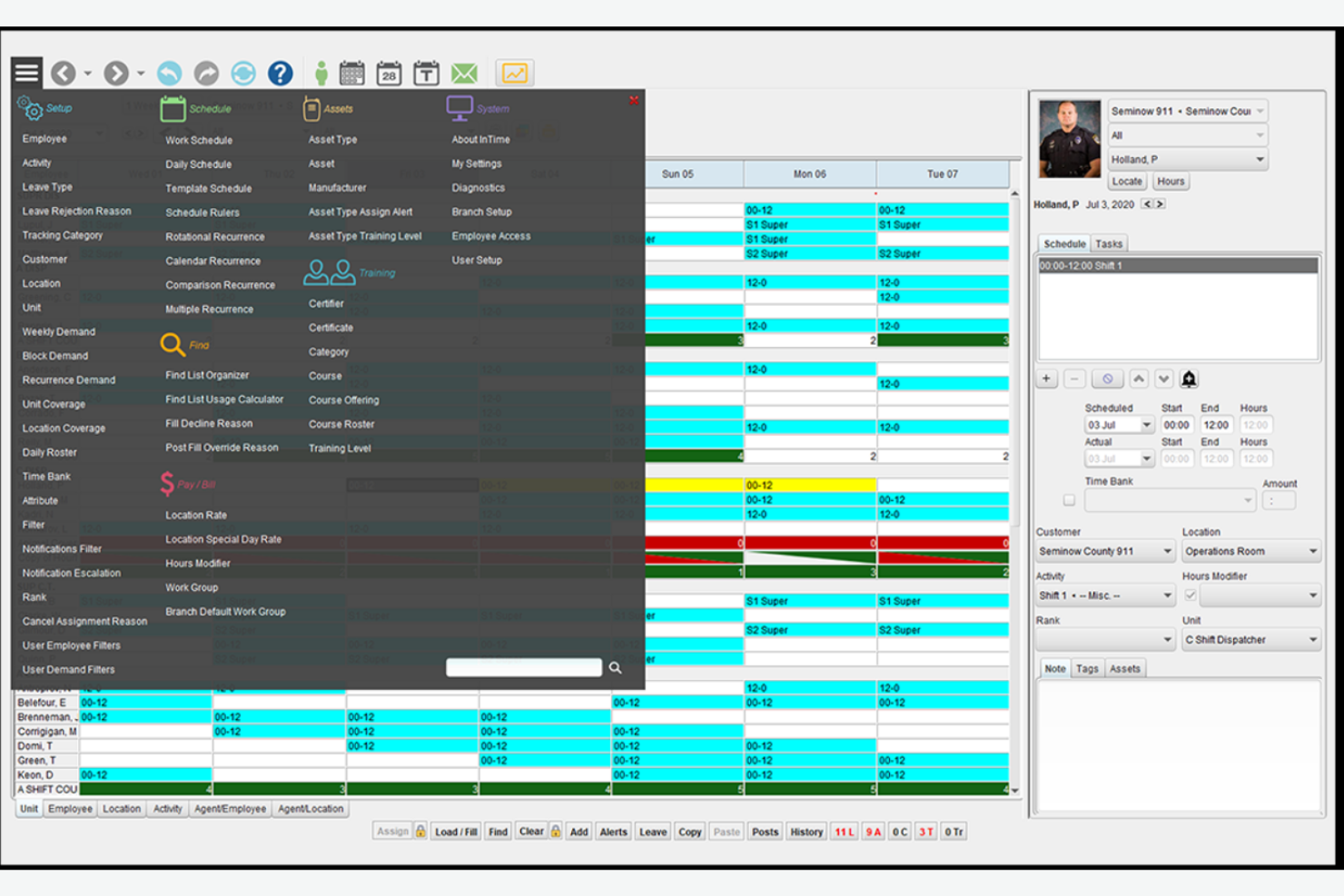
inTime is EMS scheduling software built for public safety teams, offering automated shift scheduling, overtime management, compliance tracking, and real-time communication tools tailored to complex staffing needs.
Who Is inTime Best For?
inTime is a strong fit for large EMS agencies and public safety departments that need advanced scheduling and overtime controls.
Why I Picked inTime
I picked inTime as one of the best because I can automate overtime assignments and set complex rules for union and agency policies. I like that my team can track overtime costs in real time and flag potential compliance issues before they become problems. In practice, that means we avoid burnout and stay within budget while keeping shifts covered.
inTime Key Features
- Shift bidding: Lets staff bid on open shifts directly in the platform.
- Automated shift reminders: Sends notifications to staff before their scheduled shifts.
- Integrated time clock: Tracks employee hours and attendance within the system.
- Document management: Stores and shares certifications, licenses, and training records.
inTime Integrations
inTime offers native integrations with UKG, ADP, and Microsoft 365, and provides an API for custom integrations.
Pros and Cons
Pros:
- Supports multi-location and multi-role scheduling
- Built-in document management for certifications
- Overtime rules engine supports union contracts
Cons:
- No direct integration with CAD systems
- Shift bidding lacks advanced automation options

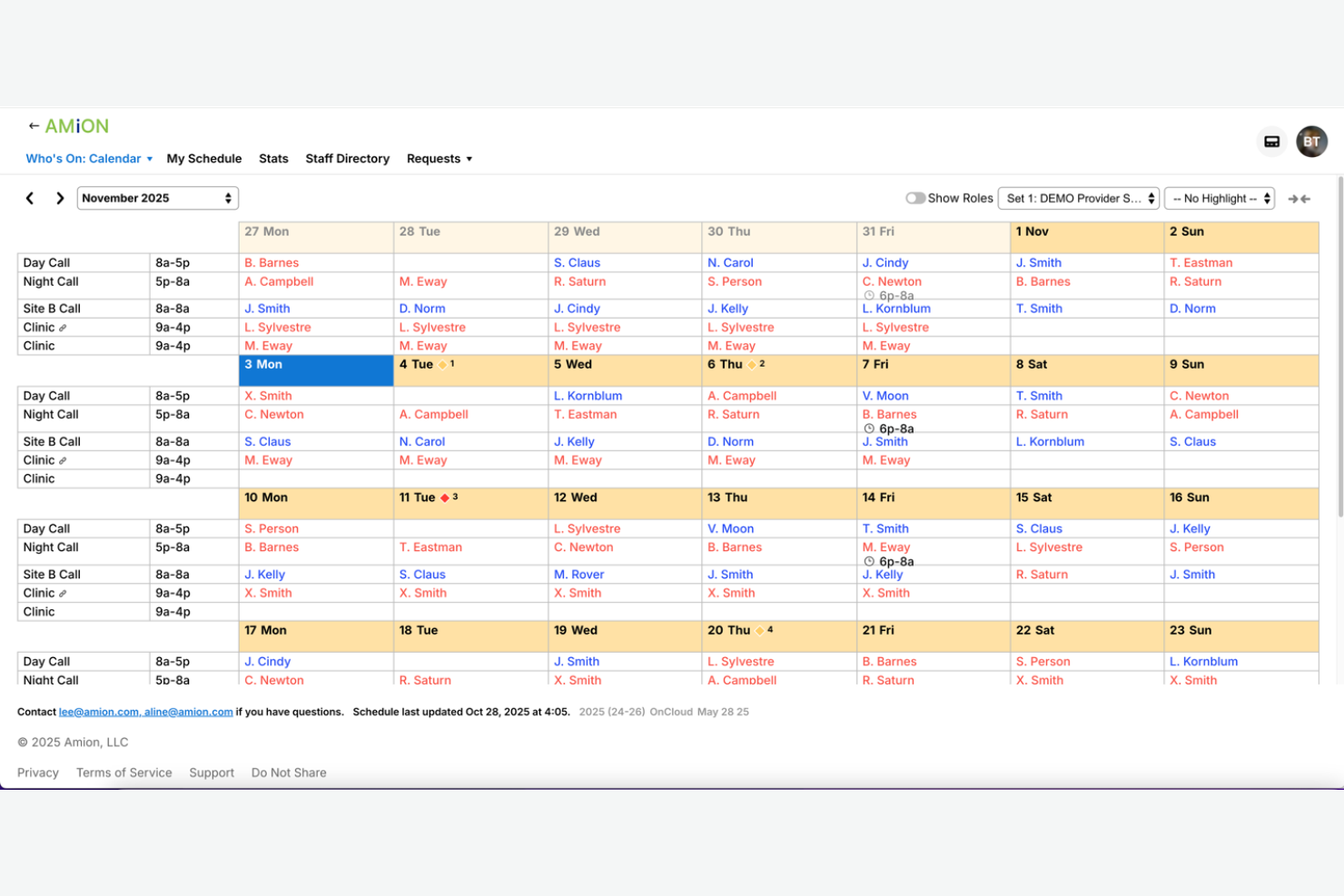
Amion is EMS scheduling software designed for healthcare and emergency teams, offering centralized shift planning, on-call management, and real-time updates for organizations with complex, multi-site staffing needs.
Who Is Amion Best For?
Amion is a good fit for EMS organizations and healthcare groups managing staff across multiple locations or departments.
Why I Picked Amion
I picked Amion as one of the best because I can coordinate schedules for teams working at multiple hospitals or EMS stations in one place. I like that I can set up location-based rules and quickly reassign staff between sites when coverage changes. My team uses Amion’s real-time updates and on-call tracking to keep everyone in sync, even when shifts span different facilities.
Amion Key Features
- Shift swap requests: Staff can request and approve shift swaps directly in the platform.
- Vacation and time-off tracking: Track and manage staff vacation and time-off requests in one place.
- Automated schedule publishing: Instantly publish finalized schedules to all staff members.
- Mobile access: Staff can view and manage schedules from any mobile device.
Amion Integrations
Amion offers native integrations with QGenda, TigerConnect, and Epic, and provides an API for custom integrations.
Pros and Cons
Pros:
- Customizable rules for department-specific needs
- Integrates with Epic and TigerConnect
- Supports on-call and shift swap management
Cons:
- Setup process can be time-consuming for large teams
- Interface feels outdated compared to competitors

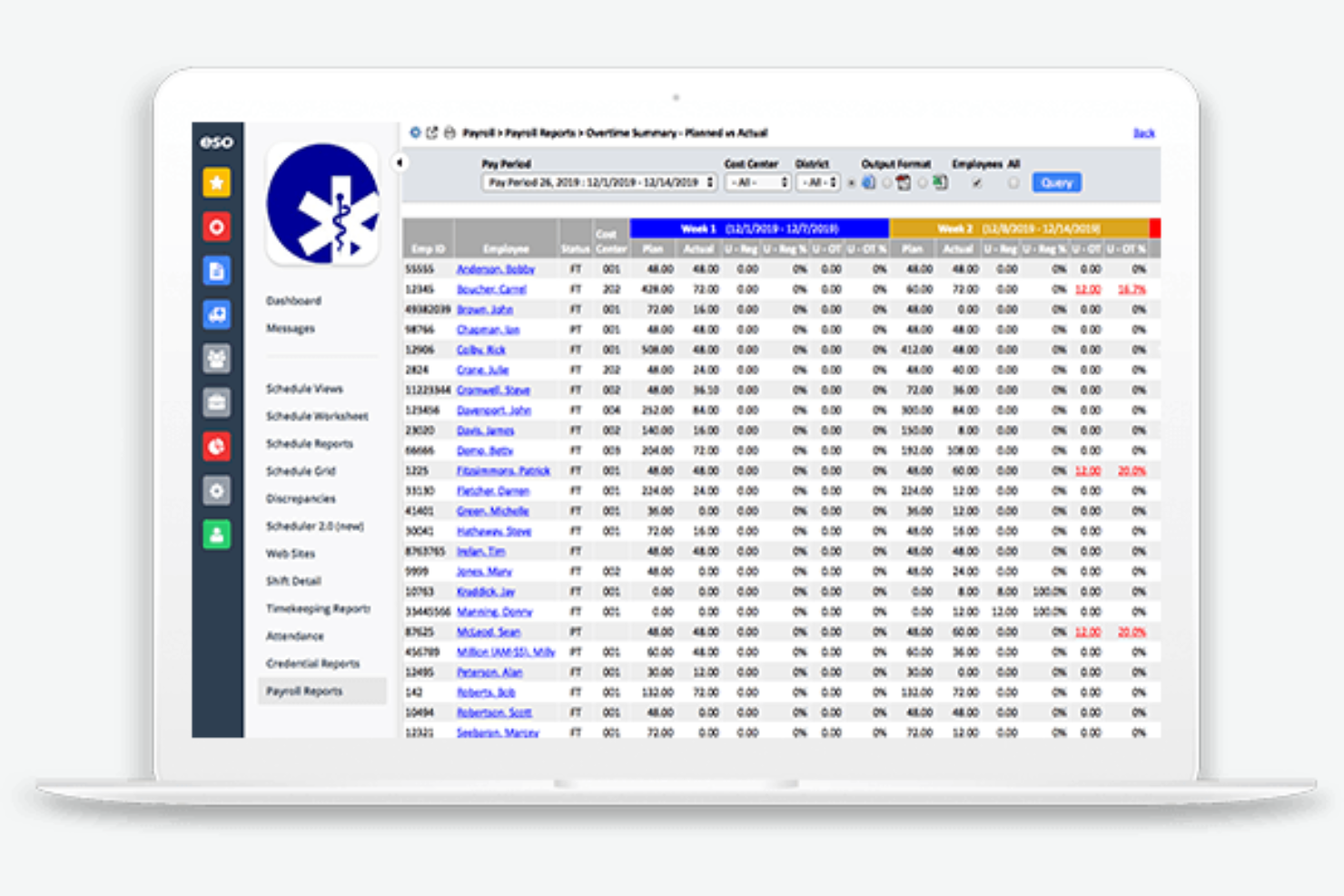
ESO Scheduling is EMS scheduling software designed for public safety teams that need automated shift management, real-time communication, and built-in compliance tracking for complex staffing environments.
Who Is ESO Scheduling Best For?
ESO Scheduling fits EMS agencies and fire departments that need to coordinate staffing and incident data in one system.
Why I Picked ESO Scheduling
I picked ESO Scheduling as one of the best because I can link scheduling directly with incident reporting, which saves my team time and reduces errors. I like that I can pull incident data into shift records and track staff assignments alongside response outcomes. My team uses the built-in compliance tools to ensure every shift meets regulatory requirements.
ESO Scheduling Key Features
- Automated shift assignments: Assign shifts based on rules, availability, and qualifications.
- Mobile access: Staff can view and manage schedules from any device.
- Time-off request management: Employees submit and track time-off requests within the platform.
- Certification tracking: Monitor staff certifications and receive alerts before expirations.
ESO Scheduling Integrations
ESO Scheduling offers native integrations with ESO EHR, ESO Fire Incidents, and other ESO Suite products, and provides an API for custom integrations.
Pros and Cons
Pros:
- Direct bidirectional integration with ESO ePCR
- Dynamic dashboards for real-time staffing snapshots
- Integrates scheduling with incident reporting tools
Cons:
- High entry cost for small departments
- Occasional performance lag on mobile web

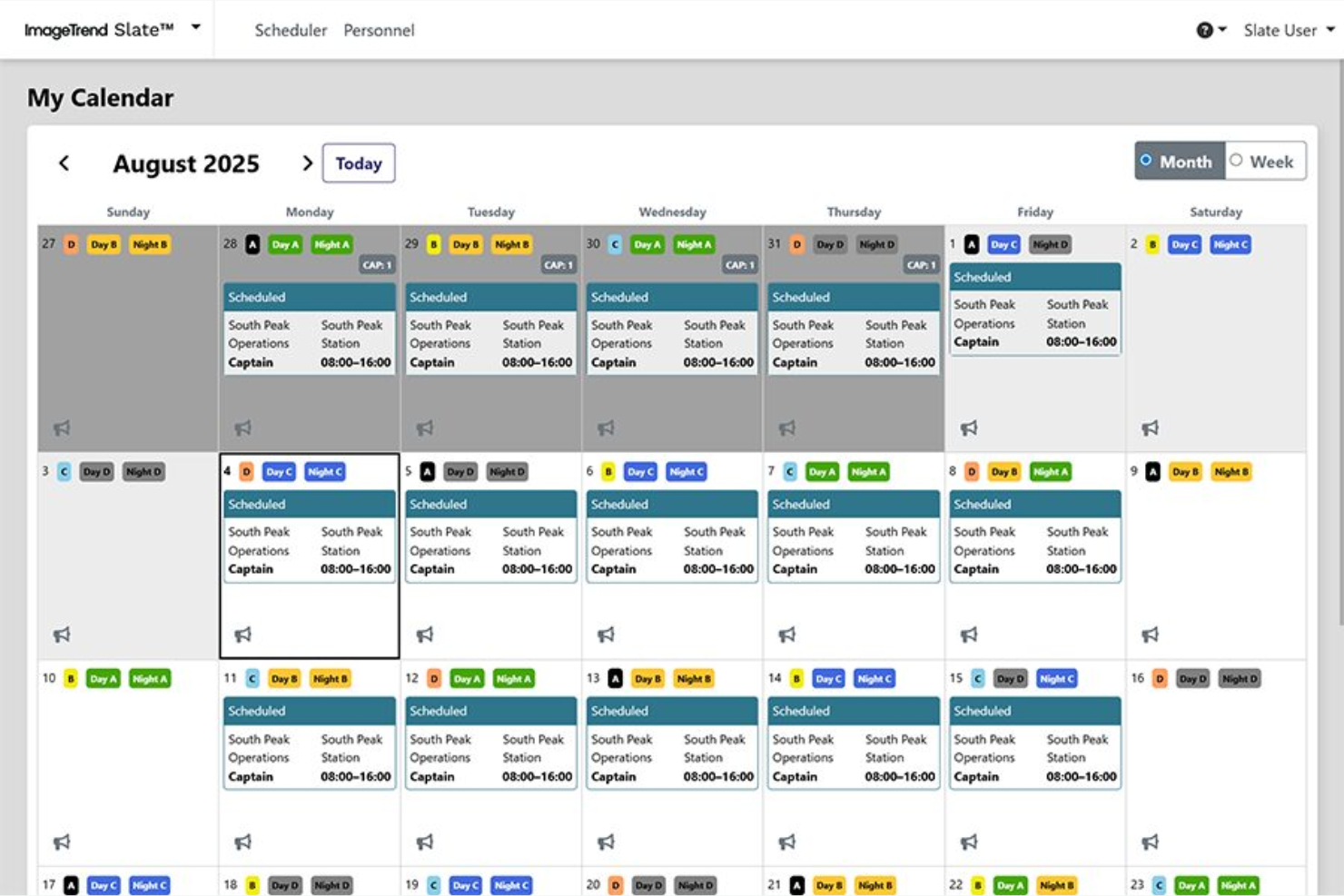
ImageTrend Slate is EMS scheduling software that helps public safety teams manage complex shift patterns, automate crew assignments, and track certifications in one centralized platform.
Who Is ImageTrend Slate Best For?
ImageTrend Slate is a good fit for EMS agencies and fire departments that need flexible scheduling for large, multi-shift teams.
Why I Picked ImageTrend Slate
I picked ImageTrend Slate as one of the best because I can build and reuse custom crew scheduling templates for different shift patterns and station needs. I like that my team can quickly adjust templates for holidays or special events without starting from scratch. The drag-and-drop interface lets me assign staff to shifts and roles in seconds, which is a huge time-saver during schedule changes.
ImageTrend Slate Key Features
- Automated shift notifications: Sends instant alerts to staff about new or changed shifts.
- Certification tracking: Monitors staff credentials and expiration dates.
- Time-off request management: Lets employees submit and track time-off requests within the platform.
- Reporting dashboard: Provides real-time visibility into staffing levels and scheduling trends.
ImageTrend Slate Integrations
ImageTrend Slate offers native integration with ImageTrend Elite for bidirectional data sync between scheduling and incident reporting, and an API is available for custom integrations.
Pros and Cons
Pros:
- Tiered notifications for emergency vacancy filling
- Native data syncing with ImageTrend Elite
- Automated shift bidding based on seniority
Cons:
- Complexity in managing non-traditional sub-groups
- Best features require ImageTrend ecosystem

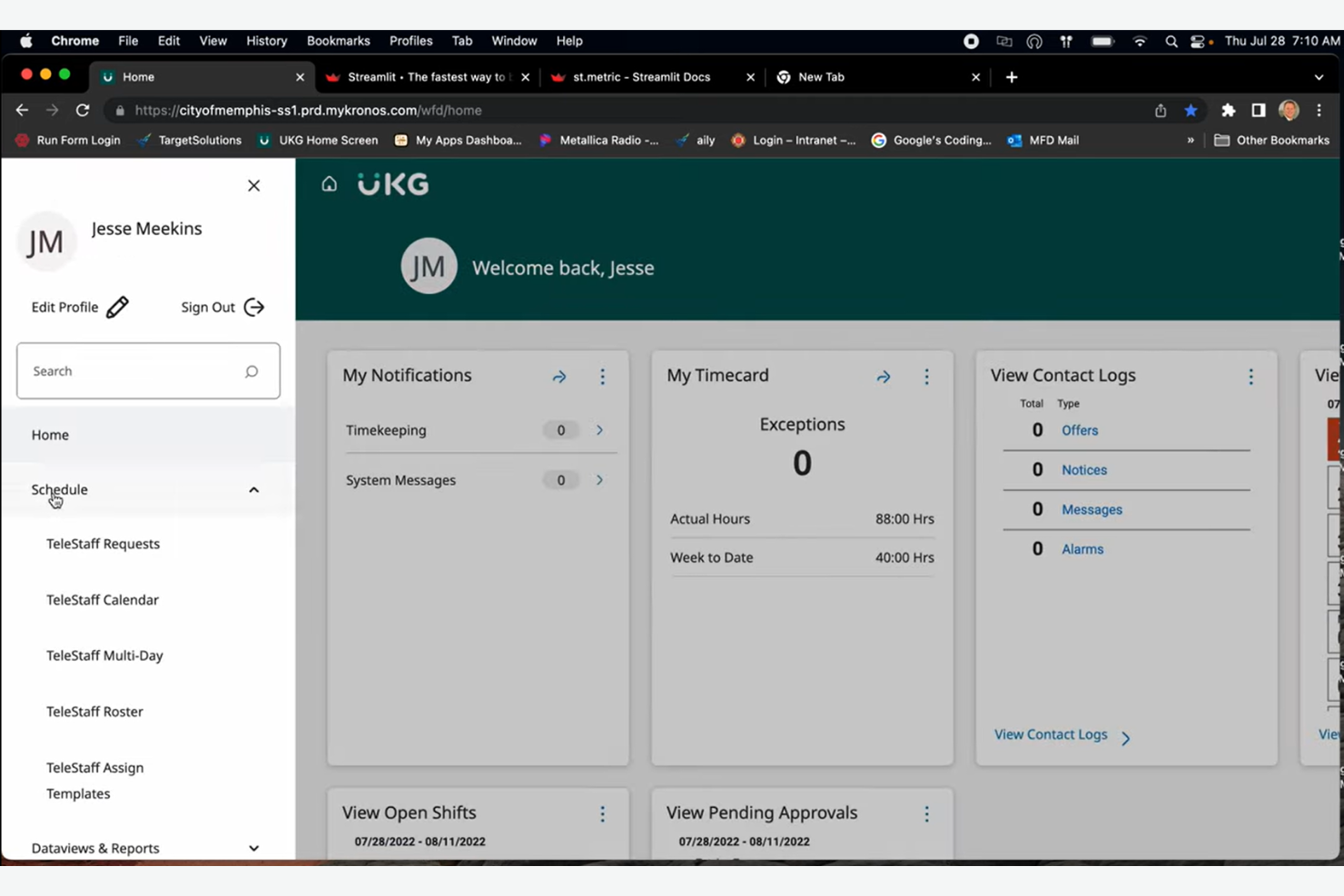
UKG TeleStaff Cloud is EMS scheduling software built for public safety agencies, offering automated shift scheduling, overtime management, and real-time compliance tracking in one platform.
Who Is UKG TeleStaff Cloud Best For?
UKG TeleStaff Cloud is a strong fit for large public safety agencies and EMS organizations that need automated scheduling and labor compliance.
Why I Picked UKG TeleStaff Cloud
I picked UKG TeleStaff Cloud as one of the best because I can automate complex labor rule compliance and scheduling for my EMS teams. I like that it automatically enforces union rules, overtime policies, and fatigue management in real time. My team uses the system’s audit trails and configurable workflows to stay audit-ready and reduce manual scheduling errors.
UKG TeleStaff Cloud Key Features
- Automated shift bidding: Lets staff bid on open shifts directly in the platform.
- Mobile scheduling access: Allows users to view and manage schedules from any device.
- Real-time notifications: Sends instant alerts for schedule changes and approvals.
- Certification tracking: Monitors employee credentials and expiration dates for compliance.
UKG TeleStaff Cloud Integrations
Integrations are not publicly listed.
Pros and Cons
Pros:
- Real-time overtime and fatigue management
- Handles complex public safety shift rotations
- Automates union and labor rule compliance
Cons:
- Significant one-time implementation fees
- Limited native integrations with HR platforms

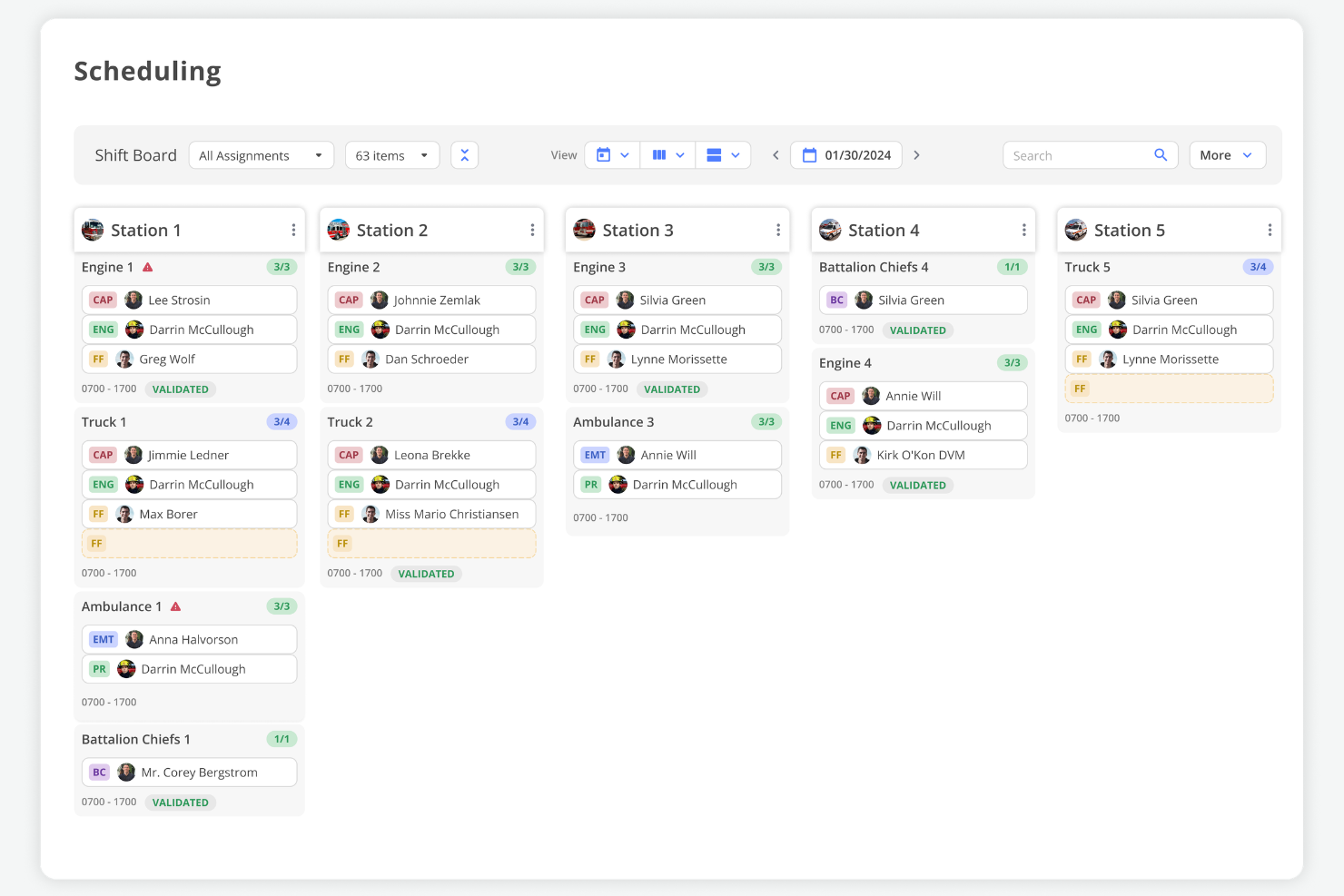
First Due is EMS scheduling software that combines personnel, apparatus, and asset scheduling in one platform, offering real-time shift management, automated workflows, and integrated resource tracking for public safety agencies.
Who Is First Due Best For?
First Due is a good fit for public safety agencies that need to coordinate both personnel and equipment scheduling in one system.
Why I Picked First Due
I picked First Due as one of the best because I can manage both personnel and apparatus schedules in a single dashboard. I like that my team can assign shifts, track vehicle availability, and coordinate asset usage without switching tools. In practice, that means we avoid double-booking resources and keep our EMS operations running smoothly.
First Due Key Features
- Automated shift bidding: Lets staff request and bid on open shifts directly in the platform.
- Real-time notifications: Sends instant alerts for schedule changes, approvals, and shift openings.
- Certification tracking: Monitors employee credentials and expiration dates for compliance.
- Mobile access: Allows users to view and manage schedules from any device.
First Due Integrations
First Due offers native integrations with ESO, ImageTrend, CentralSquare, Tyler Technologies, and Emergency Reporting, and provides an API for custom integrations.
Pros and Cons
Pros:
- Click-not-code setup for non-technical admins
- External links for sharing real-time staffing
- Drag-and-drop shift board for rapid adjustments
Cons:
- Mobile app lacks deep reporting views
- Fewer advanced HR analytics than competitors
Annen programvare for EMS-vaktplanlegging
Her er noen flere alternativer for programvare for EMS-vaktplanlegging som ikke kom med på listen min, men som likevel er verdt å undersøke:
- Hero Schedule
For rapid shift swapping
- PowerTime
For time tracking with policy integration
- WhenToWork
For instant shift notifications
- Connecteam
For mobile onboarding of new staff
- Agendrix
For visual drag-and-drop scheduling
- eSchedule
For multi-agency scheduling support
- AngelTrack
For integrated crew credential tracking
- Pace Scheduler
For configurable time-off management
- Ninth Brain
For compliance-driven scheduling workflows
- Vector Scheduling
For real-time shift bidding


How I Evaluate EMS Scheduling Software
I evaluate EMS scheduling tools in two layers: baseline must-haves like 24/7 rotation support and cert tracking, and the differentiators that set the best options apart.
Core Functionality (Table Stakes For This List)
When I'm selecting tools for my list, I rank each one on a scale from 0 (does not offer the functionality) to 5 (excels in this area) for each core functionality listed below. Then, I calculate the tool's total score into a percentage. Each tool needs to achieve a minimum total score of 65% to be considered for inclusion.
- 24/7 Shift Rotation Scheduling: I check whether a platform supports EMS-specific rotation patterns like 24/48, Kelly, and Pitman schedules out of the box rather than forcing workarounds.
- Credential & Certification Tracking: Each tool should store and monitor paramedic and EMT certifications with expiration alerts so schedulers avoid assigning uncertified staff to a rig.
- Shift Bidding & Trade Management: I look for self-service shift swaps, giveaways, and open-shift bidding with approval workflows that let supervisors maintain control over coverage.
- Time-Off & Leave Management: PTO, sick leave, and FMLA requests should route through automated approvals that factor in minimum staffing thresholds before granting time off.
- Overtime & Payroll Integration: The tool should handle FLSA-compliant overtime calculations, including public safety work period rules, and export payroll-ready data to systems like Kronos or ADP.
- Mobile Access & Notifications: Field crews need a native mobile app where they can view schedules, respond to open-shift callouts, and submit trade requests without calling the station.
Once I have a list of tools that meet the criteria, I consider what sets each platform apart.
Differentiating Factors (What Sets Vendors Apart)
Here's how I compare and contrast different vendors:
Standout Features
An automated callout engine can save schedulers hours by contacting off-duty staff in priority order until someone accepts an open shift. I also evaluate fatigue management rules—tools that flag or block assignments violating maximum consecutive hours help agencies reduce burnout risk. Unit and apparatus assignment matters too. The best platforms let you schedule crews alongside specific rigs and station positions so each ambulance goes out with the right staffing mix.
Beyond Features
Agency size matters here. A volunteer department with 20 members has very different needs than a metro agency running 50+ units across multiple stations, so I check whether a platform scales in both directions. Ecosystem integrations also weigh heavily—connectivity with CAD and ePCR systems like ESO or ImageTrend keeps scheduling data aligned with operations. I evaluate onboarding support too, since migrating years of rotation history and seniority data from spreadsheets or legacy tools like Telestaff takes hands-on guidance.
Slik velger du programvare for EMS-vaktplanlegging
Det er lett å gå seg vill i lange funksjonslister og kompliserte prismodeller. For å hjelpe deg med å holde fokus mens du arbeider deg gjennom den unike prosessen med å velge programvare, får du her en sjekkliste over faktorer du bør ha i mente:
| Faktor | Hva du bør vurdere |
| Skalerbarhet | Vil programvaren håndtere den nåværende og fremtidige teamstørrelsen, inkludert sesongmessig eller rask vekst? |
| Integrasjoner | Kan den kobles direkte til lønns-, HR-, utrykings- eller tidsregistreringssystemene dine uten omveier? |
| Tilpasningsmuligheter | Kan du tilpasse regler for vaktplanlegging, varsler og arbeidsflyter slik at de passer byråets unike behov? |
| Brukervennlighet | Vil de ansatte og lederne dine ta den i bruk raskt, eller vil det kreve omfattende opplæring og støtte? |
| Implementering og innføring | Hvor lang tid vil det ta å komme i gang, og hvilke ressurser eller hvilken støtte trenger du under utrullingen? |
| Kostnad | Er alle kostnadene tydelige på forhånd, inkludert oppsett, støtte og gebyrer per bruker? Passer det inn i budsjettet ditt? |
| Sikkerhetstiltak | Tilbyr leverandøren datakryptering, tilgangskontroller og samsvar med personvernlover for helsesektoren? |
| Tilgjengelig kundestøtte | Er direkte kundestøtte tilgjengelig når du trenger den, spesielt om natten, i helgene eller ved nødsituasjoner? |
Hva er programvare for EMS-vaktplanlegging?
Programvare for EMS-vaktplanlegging er et digitalt verktøy som er utviklet for å hjelpe organisasjoner innen akuttmedisinske tjenester med å administrere bemanningsplaner, vaktfordeling og behov for dekning. Den samler vaktplanlegging, tidsregistrering og kommunikasjon på ett sted, noe som gjør det enklere å koordinere team, håndtere endringer i siste liten og sikre samsvar med arbeidsregler. Denne programvaren støtter både administratorer og feltpersonell i å opprettholde pålitelig og fleksibel bemanningsdekning.
Funksjoner i programvare for EMS-vaktplanlegging
Ved valg av planleggingsprogramvare for EMS bør du se etter følgende viktige funksjoner:
- Vaktplanlegging: Lar deg opprette, tildele og justere vakter for EMS-personell, slik at alle roller og tidsluker er dekket.
- Registrering av arbeidstid og oppmøte: Overvåker når de ansatte stempler inn og ut, slik at du kan kontrollere arbeidede timer og håndtere lønn nøyaktig.
- Bytte av vakter: Gjør det mulig for ansatte å be om og godkjenne vaktbytter, noe som gjør det enklere å håndtere endringer i siste liten eller manglende dekning.
- Tilgjengelighetsstyring: Gjør det mulig for de ansatte å angi ønskede arbeidstider og datoer de ikke er tilgjengelige, slik at planleggingskonflikter reduseres.
- Mobiltilgang: Tilbyr en mobilapp eller en responsiv nettportal slik at de ansatte kan se vaktplaner, be om endringer og motta oppdateringer mens de er på farten.
- Automatiske varsler: Sender varsler og påminnelser om kommende vakter, ledige vakter eller endringer i vaktplanen, slik at alle holdes informert.
- Sporing av arbeidskostnader: Beregner planlagte og faktiske arbeidskostnader, slik at du kan holde deg innenfor budsjettet og følge med på overtid.
- Oppfølging av kvalifikasjoner: Lagrer og overvåker de ansattes sertifiseringer og utløpsdatoer for lisenser, slik at krav i regelverket overholdes.
- Rapportering og analyse: Tilbyr innebygde rapporter om planleggingsmønstre, overtid og bemanningstrender for å støtte datadrevne beslutninger.
- Lønnsintegrasjon: Kobler seg direkte til lønnssystemer for å forenkle lønnsberegninger og redusere manuell dataregistrering.
Fordeler med planleggingsprogramvare for EMS
Implementering av planleggingsprogramvare for EMS gir flere fordeler for teamet og virksomheten din. Her er noen av fordelene du kan se frem til:
- Bedre vaktdekning: Automatisk planlegging og oppdateringer i sanntid bidrar til å sikre at alle vakter er bemannet, og at manglende dekning reduseres til et minimum.
- Raskere håndtering av endringer: Mobiltilgang og umiddelbare varsler gjør det mulig for teamene å håndtere vaktbytter i siste liten eller nødsituasjoner uten forsinkelser.
- Redusert administrativ arbeidsmengde: Automatisk tidsregistrering, lønnsintegrasjon og kvalifikasjonsstyring reduserer mengden manuelle planleggingsoppgaver.
- Bedre regelverksetterlevelse: Innebygd oppfølging av kvalifikasjoner og håndheving av arbeidsregler hjelper deg med å overholde bransjeregler og lisenskrav.
- Bedre kommunikasjon i teamet: Integrert meldingsfunksjonalitet og varsler holder alle informert om endringer i vaktplanen, ledige vakter og viktige oppdateringer.
- Større åpenhet: De ansatte kan se vaktplanene sine, registrere tilgjengelighet og følge med på arbeidede timer, noe som fremmer rettferdighet og ansvarlighet.
- Datadrevne beslutninger: Funksjoner for rapportering og analyse gir innsikt i bemanningstrender, overtid og arbeidskostnader, slik at planleggingen kan forbedres.
Kostnader og priser for planleggingsprogramvare for EMS
Ved valg av planleggingsprogramvare for EMS er det nødvendig å forstå de ulike prismodellene og abonnementene som er tilgjengelige. Kostnadene varierer basert på funksjoner, teamstørrelse, tilleggstjenester og mer. Tabellen nedenfor oppsummerer vanlige abonnementer, gjennomsnittsprisene deres og typiske funksjoner som er inkludert i løsninger for planleggingsprogramvare for EMS:
Sammenligningstabell for abonnementer for planleggingsprogramvare for EMS
| Abonnementstype | Gjennomsnittspris | Vanlige funksjoner |
| Gratisabonnement | $0 | Grunnleggende vaktplanlegging, begrenset antall brukerplasser, mobiltilgang og grunnleggende varsler. |
| Personlig abonnement | $5–$15/bruker/måned | Individuell planlegging, tidsregistrering, forespørsler om vaktbytte og tilgang til mobilapp. |
| Bedriftsabonnement | $15–$30/bruker/måned | Teamplanlegging, rapportering, lønnsintegrasjon, oppfølging av kvalifikasjoner og automatiske varsler. |
| Virksomhetsabonnement | $30–$50/bruker/måned | Avansert analyse, tilpassede integrasjoner, verktøy for regelverksetterlevelse, dedikert brukerstøtte og administrasjon av flere lokasjoner. |
Vanlige spørsmål om planleggingsprogramvare for EMS
Her er noen svar på vanlige spørsmål om planleggingsprogramvare for EMS:
Hvordan hjelper planleggingsprogramvare for EMS med endringer i vakter i siste liten?
Planleggingsprogramvare for EMS gjør det mulig å varsle ansatte raskt om ledige vakter, godkjenne forespørsler om vaktbytte og oppdatere vaktplanen i sanntid. Dette hjelper deg med å fylle hull raskt og holde teamet av paramedisinere og EMT-er informert, selv under nødsituasjoner eller ved uventet fravær. Ved å automatisere varslinger optimaliserer du tiden som brukes på logistikk, i stedet for å foreta manuelle telefonsamtaler.
Kan planleggingsprogramvare for EMS spore ansattes sertifiseringer og lisensutløp
Ja, de fleste planleggingsprogrammer for EMS inkluderer sporing av kvalifikasjoner. Du kan lagre sertifiseringsdetaljer, angi påminnelser om kommende utløpsdatoer og sørge for at bare kvalifiserte beredskapsarbeidere settes opp i bestemte roller eller på bestemte vakter. Dette er spesielt nyttig for virksomheter som også samarbeider med politiet om tverrfaglige arrangementer.
Er det mulig å integrere planleggingsprogramvare for EMS med lønns- og HR-systemer?
Ja, mange planleggingsverktøy for EMS tilbyr integrasjoner med lønns- og HR-plattformer. Dette reduserer manuell dataregistrering, bidrar til å automatisere lønnsberegninger (inkludert PTO-opptjening) og holder ansattopplysninger oppdatert på tvers av systemene. Overgangen til et skybasert miljø sikrer at data om arbeidsstyring er tilgjengelige overalt.
Hva bør jeg vurdere når jeg velger planleggingsprogramvare for EMS for en liten virksomhet?
Se etter en løsning som er brukervennlig, passer budsjettet ditt, er sikker og ikke krever mye teknisk oppsett. Sørg for at den dekker de viktigste behovene i planleggingsprosessen din og tilbyr rask og effektiv støtte, særlig hvis du ikke har et eget IT-team.
I tillegg til sikkerhet bør du se etter selvbetjeningsfunksjoner. Disse gjør det mulig for ansatte å sjekke arbeidsplanene sine, be om fri eller ta på seg ekstra arbeid direkte fra mobile enheter, noe som er avgjørende for planleggingsbehovene til et moderne beredskapsteam.
Hvor sikker er planleggingsprogramvare for EMS når det gjelder lagring av sensitive ansattopplysninger?
De fleste anerkjente planleggingsprogrammer for EMS bruker kryptering, tilgangskontroller og samsvarstiltak for å beskytte sensitive data. Kontroller alltid at leverandøren oppfyller personvernstandarder for helsesektoren og tilbyr tydelig sikkerhetsdokumentasjon.