

De 10 beste verktøyene for organisasjonsdesign med kunstig intelligens, vurdert i 2026

Kortliste over de beste AI-verktøyene for organisasjonsdesign


Organisasjonsdesign er en av de utfordringene som ser enkel ut på papiret, men som føles uendelig kompleks i praksis. Mellom det å holde team samkjørte, optimalisere bemanningen og overholde stadig skiftende regelverk kan det føles som om du prøver å løse et puslespill som hele tiden endrer seg.
Det er her AI-drevne verktøy for organisasjonsdesign kommer inn. De hjelper deg med å visualisere strukturer, identifisere ineffektivitet og ta smartere beslutninger basert på reelle data. Med riktig plattform kan du modellere nye teamsammensetninger, forutse fremtidige behov og oppdage kompetansegap før de blir hindringer.
Jeg har personlig testet og vurdert en rekke av disse verktøyene for å finne dem som faktisk leverer. I denne artikkelen finner du mine beste anbefalinger for programvare for AI-basert organisasjonsdesign – med innsikt i deres fremste funksjoner, bruksområdene de passer best til, og hvordan de kan støtte teamet ditt enten du skalerer opp, omstrukturerer eller ganske enkelt prøver å jobbe smartere.
Hvorfor du kan stole på våre programvareanbefalinger
Teamet vårt har testet og anmeldt programvare siden 2012. Vi er selv HR-eksperter, så vi vet hvor vanskelig og hvor viktig det er å velge riktig programvare.
I denne guiden har vi vurdert verktøyene gjennom praktisk testing og uavhengig research og gitt dem poeng ut fra våre utvelgelseskriterier. Vi bygger også på innsikt fra ledende eksperter i bransjen og erfarne HR-eksperter.
Anmeldelsene våre bygger på vår egen redaksjonelle vurdering. De er ikke et salgsargument.
Ekspertanmeldere:
Sammenligningstabell for AI-verktøy for organisasjonsdesign
Denne sammenligningstabellen oppsummerer prisdetaljene for mine beste utvalgte AI-verktøy for organisasjonsdesign:
| Tool | Best For | Trial Info | Price | ||
|---|---|---|---|---|---|
| 1 | Best for org insights that inform design | Free demo available | From $5/user/month | Website | |
| 2 | Best for creative teams | Free plan available | From $16/user/month | Website | |
| 3 | Best for hiring teams | Free demo available | From $299/month | Website | |
| 4 | Best for brainstorming & idea mapping | Free trial available | From $0/month | Website | |
| 5 | Best for data compliance | Free demo available | Pricing upon request | Website | |
| 6 | Best for diagram variety | Free plan available | From $6.58/month | Website | |
| 7 | Best for role clarity | 22-day free trial | From $72/month for 3 users (billed annually) | Website | |
| 8 | Best for legal professionals | Free trial available | From $5/month | Website | |
| 9 | Best for collaborative team events | Free plan + 14-day free trial available | From $8/user/month (billed annually) | Website | |
| 10 | Best for visual collaboration | Free plan + 7-day free trial available | From $9/month (billed annually) | Website |

Anmeldelser av de beste AI-verktøyene for organisasjonsdesign
Nedenfor finner du mine detaljerte sammendrag av de beste AI-verktøyene for organisasjonsdesign som kom med på kortlisten min. Anmeldelsene mine gir en detaljert oversikt over de viktigste funksjonene, fordeler og ulemper, integrasjoner og ideelle bruksområder for hvert verktøy, slik at du kan finne det som passer best for deg.

Deel HR
Best for org insights that inform design
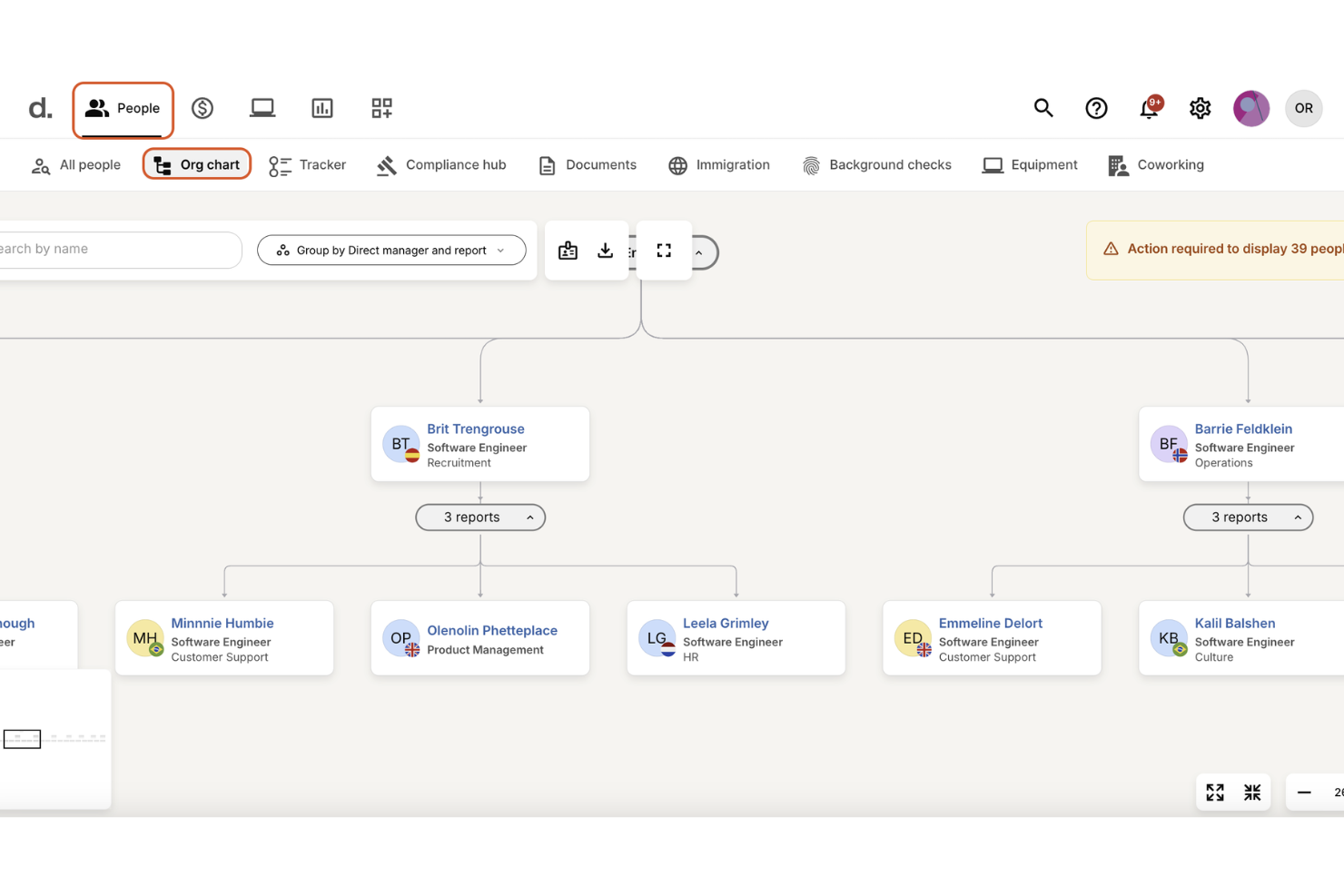
Building a well-structured organization becomes simpler when you have an AI assistant that understands your team’s data and global employment rules. With Deel AI, you get an always-on expert that can surface workforce insights, flag compliance considerations, and answer HR questions instantly, helping you shape org structures grounded in real information rather than assumptions. If you’re redesigning teams, expanding globally, or trying to understand how roles and policies interact across regions, Deel gives you clarity right when you need it.
Why I Picked Deel
I picked Deel because its AI is directly tied to your workforce data and global compliance intelligence, offering context-aware guidance as you build or refine your org structure. You can ask questions about team composition, policies, or payroll impact, and Deel AI pulls from its expert-built Knowledge Hub to give you accurate answers in seconds. I appreciate how it surfaces real-time insights where you're working — such as summaries and key data on org pages — so you can make decisions without switching between tools. For teams managing distributed or international org design, these capabilities reduce uncertainty and anchor decisions in transparent, localized information.
Deel Key Features
In addition to its AI capabilities, I also found several other features beneficial for organizational design:
- Org charts: Visualize company structure, roles, and reporting relationships to understand how teams connect across regions.
- Workflow automation: Trigger lifecycle workflows — onboarding, relocations, promotions, and more — based on data changes that influence org structure.
- People analytics: Analyze workforce patterns, headcount, and costs to inform restructuring or hiring decisions.
- Roles, permissions & approval flows: Configure how responsibilities and decision rights are distributed throughout the organization.
Deel Integrations
Integrations include Slack, QuickBooks, Xero, Greenhouse, BambooHR, Okta, Gusto, Rippling, Workday, and ADP.
Pros and Cons
Pros:
- Compliance reminders appear when employees relocate or roles shift
- Org charts visualize roles and reporting lines across locations
- AI provides instant org insights directly tied to workforce data
Cons:
- Complex restructures still require external legal or HR validation
- Org modeling lacks scenario simulation found in dedicated design tools
New Product Updates from Deel HR

Deel Expands Stablecoin Wallet to 80+ Countries
Deel expands its Stablecoin Wallet to 80+ countries with dollar-backed balances and optional rewards. This gives eligible contractors more ways to hold and manage earnings inside Deel. For more information, visit Deel’s official site.
 .
.
FigJam
Best for creative teams

FigJam is an online collaborative whiteboard tool designed for creative teams who need to brainstorm and plan visually. It caters to designers, product teams, and educators by enabling visual collaboration and interactive workshops.
Why I picked FigJam: It's perfect for creative teams with its intuitive interface and real-time collaboration. You can sketch, share ideas, and iterate quickly with your team. FigJam's extensive library of templates and interactive components helps facilitate creative processes. This makes it easy for your team to bring ideas to life visually.
Standout features & integrations:
Features include an intuitive sketching tool that lets you draw and annotate ideas with ease. The real-time collaboration feature allows your team to work together on boards simultaneously. FigJam also offers a library of interactive components to enhance your brainstorming sessions.
Integrations include Slack, Microsoft Teams, Zoom, Google Drive, Dropbox, Jira, Asana, Trello, Microsoft Office 365, and Confluence.
Pros and Cons
Pros:
- Ideal for visual brainstorming
- Supports interactive components
- Intuitive sketching tools
Cons:
- Can be overwhelming for new users
- Limited offline capabilities

Workable is an AI-powered HR platform that connects hiring, onboarding, and organizational management in one system. It uses AI to optimize workforce structure, from sourcing and placing the right talent to maintaining real-time org charts and tracking performance, time, and payroll data across the employee lifecycle.
Why I picked Workable: The features can help organizations design and evolve their workforce using AI insights. The platform automatically parses resumes, identifies strong metrics and skill gaps, and matches candidates to roles that fit organizational needs. Once hired, employees are integrated into a live HR information system that updates role histories, compensation, and team structure dynamically, useful for leaders managing growth or restructuring.
Standout features & integrations:
Features include an AI content engine that generates job descriptions, salary bands, and interview kits matched with dynamic organizational chart creation that reflects real-time employee data. Managers can track performance through 360° reviews and use reporting structures and org chart tools to analyze workforce composition and productivity trends.
Integrations include LinkedIn, Indeed, Google Workspace, Microsoft Office 365, Slack, BambooHR, ADP, Xero, Zoom, and Greenhouse.
Pros and Cons
Pros:
- Customizable evaluation tools
- 360° performance and review tools
- Dynamic org chart and HR data hub
Cons:
- Requires internet for full functionality
- Limited customization in lower plans


MyMap.AI helps teams visualize and organize information automatically using AI. It generates mind maps, flowcharts, and org charts from text or prompts, helping users analyze ideas, summarize research, and plan projects visually.
Why I picked MyMap.AI: It uses generative AI to convert written or structured input into organized visual maps. You can summarize documents, map workflows, or create organizational structures in seconds. It’s useful for educators, researchers, and teams that need to organize complex information quickly.
Standout features & integrations:
Features include AI-generated mind maps, auto-structured org charts, and flowchart visualization. It supports various use cases such as summarizing essays, mapping relationships, or illustrating project hierarchies.
Integrations include Google Maps, ArcGIS, Tableau, Power BI, QGIS, Mapbox, Salesforce, Microsoft Excel, Dropbox, and Slack.
Pros and Cons
Pros:
- Supports creative brainstorming
- Visual task boards
- Combines mind mapping and task management
Cons:
- Requires internet for full use
- Limited advanced features


Nakisa helps enterprises design and visualize complex organizational structures with built-in compliance and AI-driven insights. Its platform combines workforce analytics, data governance, and intelligent modeling to support secure, compliant org design at scale.
Why I picked Nakisa: It integrates compliance standards with AI-powered organizational design. Its Decision Intelligence platform uses agentic artificial intelligence to support scenario modeling, while built-in audit controls, role-based access, and data encryption ensure compliance with ISO, SOC, and GDPR standards. Nakisa’s visual design tools make it easier to plan future structures confidently.
Standout features & integrations:
Features include org modeling, compliance reporting, audit-ready data exports, and access-controlled design environments. Nakisa’s Decision Intelligence layer helps simulate structural changes and analyze their impact in real time.
Integrations include SAP, Oracle, Workday, SuccessFactors, Microsoft Teams, Slack, Salesforce, LinkedIn, BambooHR, and ADP.
Pros and Cons
Pros:
- Secure data handling
- Secure role-based data management
- Audit-ready compliance features
Cons:
- Requires technical configuration
- Complex initial setup


Edraw.AI is a versatile diagramming tool designed for professionals needing a wide range of diagram types. It caters to educators, IT professionals, and project managers by offering tools for creating flowcharts, mind maps, and organizational charts.
Why I picked Edraw.AI: It excels in providing diverse diagram options, making it ideal for teams needing variety. You can create everything from simple flowcharts to complex network diagrams. Edraw.AI's library of templates and symbols supports a wide range of industries and use cases. This variety helps your team visualize data and processes effectively.
Standout features & integrations:
Features include a vast library of templates that cover different diagram types, from business to technical diagrams. The tool offers a drag-and-drop interface, which simplifies the creation process. Edraw.AI also supports vector graphics for high-quality diagrams.
Integrations include Microsoft Office, Google Workspace, Dropbox, OneDrive, Box, PDF, Visio, and HTML.
Pros and Cons
Pros:
- Supports vector graphics
- Extensive template library
- Wide range of diagram options
Cons:
- Needs internet for full functionality
- Limited customization for complex diagrams


Functionly is an AI-powered organizational design platform that helps teams visualize structures, clarify responsibilities, and align roles with strategic goals. It combines automated data integration with AI-driven modeling tools to reveal how roles, reporting lines, and accountabilities connect across your organization.
Why I picked Functionly: It uses AI to turn complex org data into clear, adaptable role maps. Its AI assistant identifies overlaps, skill gaps, and accountability gaps, then suggests structural changes that fix or alternative designs. Scenario planning allows HR leaders and executives to model restructures, test different workforce setups, and forecast headcount and costs before making changes, making it ideal for companies focused on clarity and adaptability in workforce design.
Standout features & integrations:
Features include OrgPilot AI for automated design recommendations, dynamic org charts that update in real time, and templates for industry-specific structures and roles. Its integration of data sources keeps org charts automatically in sync with live HR and payroll systems, reducing manual updates. Teams can collaborate on multiple scenarios, compare options, and track reporting depth, spans, and accountability metrics.
Integrations include BambooHR, ADP, Gusto, Zenefits, QuickBooks, Google Workspace, Microsoft 365, Slack, Asana, and Trello.
Pros and Cons
Pros:
- Easy team structure visualization
- AI-driven org and role mapping
- Flexible templates for different org models
Cons:
- Not suitable for very small teams
- Limited customization in basic plans


Lexchart uses AI to automatically create detailed hierarchy and company structure charts. It helps users map organizational and legal entity relationships across complex corporate structures, making it ideal for firms that manage multiple entities or need clear ownership visibility.
Why I picked Lexchart: It combines AI-driven chart generation with secure data handling. It automates legal entity and hierarchy mapping, helping professionals visualize complex structures quickly. Law firms, finance teams, and compliance officers can use it to clarify relationships between subsidiaries, partners, and stakeholders.
Standout features & integrations:
Features include AI-powered chart creation, legal entity mapping, secure data encryption, and multi-factor authentication for controlled access. Users can export charts in PDF, PNG, or SVG formats and collaborate by sharing editable or view-only versions.
Integrations include Clio, PracticePanther, MyCase, NetDocuments, iManage, Dropbox, Google Drive, OneDrive, Box, and SharePoint.
Pros and Cons
Pros:
- Visualizes legal relationships
- Customizable templates
- Handles large, complex structures
Cons:
- Advanced features may need training
- May require domain knowledge
Miro
Best for collaborative team events

Miro is an AI-enabled visual workspace designed to facilitate collaborative team events such as strategy workshops, retrospectives, and design sessions. It helps distributed teams plan, align, and co-create organizational initiatives in real time– from defining structure and priorities to mapping future workflows.
Why I picked Miro: It’s built for teams that rely on collaboration to design and refine organizational systems. Its AI tools turn visual brainstorming into structured insights, making workshops more productive. Facilitators can run interactive sessions with real-time co-editing, AI summaries, and live voting, while templates support org mapping, decision frameworks, and transformation planning.
Standout features & integrations:
Features include AI-powered facilitation tools (like Sidekicks for summarizing and restructuring content), real-time collaboration, and prebuilt org chart templates for workshops, strategy alignment, and org planning. Miro supports hybrid teams through voting, timers, and breakout-style participation controls.
Integrations include Slack, Microsoft Teams, Zoom, Google Drive, Dropbox, Jira, Asana, Trello, Microsoft Office 365, and Confluence.
Pros and Cons
Pros:
- ISO 42001-certified AI security and compliance
- Extensive library of org and workshop templates
- Strong facilitation tools (voting, timers, breakout flows)
Cons:
- May lag with large boards
- Can be overwhelming for new users
New Product Updates from Miro
Miro Adds Japan Data Residency for Enterprise Customers
Miro has introduced Japan data residency for enterprise customers, offering in-region storage for production data, backups, and metadata, plus in-region compute infrastructure. For more information, visit Miro's official site.

Lucidchart
Best for visual collaboration

Lucidchart is a cloud-based diagramming tool that helps teams visualize processes, company structure, and workflows. Its AI features let users generate diagrams, brainstorm ideas, and summarize visuals automatically. The platform supports both Lucidchart (diagramming) and Lucidspark (ideation) in one platform.
Why I picked Lucidchart: It combines traditional diagramming with AI automation and team-based features. Users can use org chart tools for flow charts, and project diagrams instantly from text prompts, making it useful for teams managing Agile workflows or visualizing data-driven structures and strategic planning
Standout features & integrations:
Features include intelligent diagramming, which helps you create clear visuals with ease. The AI-powered diagram generation speeds up your workflow by suggesting layouts. Data linking ensures your diagrams are always up-to-date with the latest information. AI-powered diagram generation from text input and collaborative AI for brainstorming and sorting out ideas and initiatives are also strong features.
Integrations include Google Workspace, Microsoft 365, BambooHR, Salesforce, Slack, Atlassian, AWS, Dropbox, GitHub, and Box.
Pros and Cons
Pros:
- Revision history available
- Easy data linking
- Strong diagramming capabilities
Cons:
- Advanced features require paid plans
- Limited offline access
Andre AI-verktøy for organisasjonsdesign
Her er noen flere alternativer for AI-verktøy for organisasjonsdesign som ikke kom med på kortlisten min, men som likevel er verdt å se nærmere på:


How I Evaluate AI Org Design Tools
Every tool on this list needs to deliver real AI value—not just a chatbot bolted onto a static org chart builder, but AI that actually generates, optimizes, and pressure-tests organizational structures. I split my evaluation into core functionality every tool must have to qualify and differentiating factors that separate the best fits from the rest.
Core Functionality (Table Stakes For This List)
When I'm selecting tools for my list, I rank each one on a scale from 0 (does not offer the functionality) to 5 (excels in this area) for each core functionality listed below. Then, I calculate the tool's total score into a percentage. Each tool needs to achieve a minimum total score of 65% to be considered for inclusion.
- AI-Driven Org Modeling: I look for AI that goes beyond autofill—it should generate and recommend structures based on inputs like headcount targets, functional groupings, and strategic goals.
- Scenario Simulation: Each tool should let you build multiple "what-if" restructures and compare them side by side, with AI surfacing cost and headcount impacts across scenarios.
- Interactive Org Visualization: Real-time, drag-and-drop org charts matter here. I check whether changes to reporting lines or team groupings update the visual instantly.
- Workforce Structure Analytics: Strong tools surface spans of control, layering depth, and cost distribution with AI-generated flags on structural inefficiencies worth addressing.
- HRIS Data Integration: I evaluate whether the tool connects to platforms like Workday, SuccessFactors, or BambooHR to pull live employee and reporting data without manual uploads.
- Skills & Role Mapping: The tool should use AI to tie skills and competencies to roles within proposed structures, helping you spot capability gaps before a reorg goes live.
Once I have a list of tools that meet the criteria, I consider what sets each platform apart.
Differentiating Factors (What Sets Vendors Apart)
Here's how I compare and contrast different vendors:
Standout Features
Predictive attrition modeling is a big differentiator—I want to see AI that flags retention risks within a proposed structure before leadership signs off. Benchmarking intelligence adds another layer, letting you validate spans and layers against industry norms rather than gut instinct. I also look for collaborative workspaces where HR, finance, and executives can co-edit and comment on scenarios together, which speeds up alignment during time-sensitive reorgs.
Beyond Features
AI transparency matters a lot in this space. When HR leaders present a reorg to the C-suite, they need to explain why the AI recommended a specific structure—so I check whether the tool provides clear reasoning behind its suggestions. Data security is equally important since restructuring plans contain sensitive headcount and compensation details; I look for SOC 2 Type II compliance and role-based access controls. Implementation speed also factors in, especially for orgs navigating urgent M&A timelines where a months-long setup isn't realistic.
Slik velger du et AI-verktøy for organisasjonsdesign
Det er lett å gå seg vill i lange funksjonslister og komplekse prismodeller. For å hjelpe deg med å holde fokus mens du går gjennom din unike prosess for valg av programvare, får du her en sjekkliste over faktorer du bør ha i tankene:
| Faktor | Hva du bør vurdere |
|---|---|
| Skalerbarhet | Vil verktøyet vokse sammen med teamet ditt? Vurder om det kan håndtere flere brukere og større organisasjonsstrukturer etter hvert som virksomheten utvides. Se etter verktøy som kan skaleres uten ytelsesproblemer. |
| Integrasjoner | Fungerer det sammen med systemene du allerede bruker? Sjekk om det kan integreres med HR-systemer, kommunikasjonsverktøy og annen programvare du allerede bruker, slik at du unngår avbrudd i arbeidsflyten. |
| Tilpasningsmuligheter | Kan du tilpasse det etter behovene dine? Sørg for at verktøyet lar deg tilpasse diagrammer og oppsett slik at de passer til din spesifikke organisasjonsstruktur og profilering. |
| Brukervennlighet | Er det brukervennlig for alle? Se etter intuitive grensesnitt som krever minimal opplæring. En bratt læringskurve kan bremse teamets bruk av verktøyet. |
| Implementering og innføring | Hvor enkelt er det å komme i gang? Vurder innføringsprosessen, tilgjengelige opplæringsressurser og støtten under implementeringen. En smidig innføring kan fremskynde brukernes adopsjon. |
| Kostnad | Ligger det innenfor budsjettet ditt? Sammenlign prisplaner og vurder de totale eierkostnadene, inkludert skjulte gebyrer. Sørg for at det passer budsjettet ditt uten at funksjonaliteten svekkes. |
| Sikkerhetstiltak | Hvor sikre er dataene dine? Sørg for at verktøyet overholder personvernregler og tilbyr funksjoner som kryptering og tilgangskontroller for å beskytte sensitiv informasjon. |
Hva er verktøy for organisasjonsdesign med kunstig intelligens?
Verktøy for organisasjonsdesign med kunstig intelligens er programvareløsninger som hjelper organisasjoner med å opprette og administrere organisasjonsstrukturer. HR-fagfolk, teamledere og bedriftsledere bruker vanligvis disse verktøyene for å sikre tydelige roller og bedre samkjøring i teamet.
Funksjoner som oppretting av organisasjonskart, rolletildeling og samarbeidsverktøy bidrar til å visualisere strukturer, håndtere endringer og forbedre kommunikasjonen i teamet. Samlet sett gir disse verktøyene verdifull innsikt og effektivisering i arbeidet med å administrere og videreutvikle organisatoriske rammeverk.
Funksjoner
Her er de viktigste funksjonene all god programvare for organisasjonsdesign med kunstig intelligens bør ha:
- Oppretting av organisasjonskart: Bidrar til å visualisere teamstrukturer og hierarkier, slik at det blir enkelt å forstå rapporteringslinjer og organisatorisk dynamikk.
- Rolletildeling: Gjør det mulig å definere og tildele roller tydelig, slik at alle vet hva de har ansvar for.
- Samarbeidsverktøy: Legger til rette for teamarbeid ved at flere brukere kan arbeide med organisasjonsdesign samtidig.
- Tilpassbare maler: Tilbyr forhåndsdesignede maler som kan tilpasses spesifikke organisatoriske behov og visuelle profiler.
- Scenarioplanlegging: Gjør det mulig for brukere å teste ulike organisasjonsstrukturer og strategier før endringer gjennomføres.
- Sanntidsoppdateringer: Holder organisasjonskart oppdaterte ved automatisk å gjenspeile endringer etter hvert som de skjer.
- Dataintegrasjon: Kobler seg til eksisterende HR- og forretningssystemer for å hente inn nøyaktig og oppdatert informasjon.
- Tilgangskontroller: Gir sikkerhet ved at administratorer kan kontrollere hvem som kan se eller redigere organisatoriske data.
- Visualiseringsverktøy: Forbedrer forståelsen ved å tilby grafiske fremstillinger av komplekse data og strukturer.
- Opplæringsressurser: Tilbyr veiledninger, guider og støtte for å sikre at brukerne kan utnytte alle funksjonene effektivt.
Fordeler
Implementering av verktøy for organisasjonsdesign med kunstig intelligens gir flere fordeler for teamet og virksomheten din. Her er noen av fordelene du kan se frem til:
- Bedre tydelighet: Tydelig definerte roller og ansvarsområder bidrar til at alle vet hvilke oppgaver de har, og hvor de passer inn i organisasjonen.
- Bedre samarbeid: Samarbeidsverktøy i sanntid gjør det mulig for team å arbeide effektivt sammen med organisasjonsdesign, noe som forbedrer kommunikasjon og teamarbeid.
- Bedre informerte beslutninger: Scenarioplanlegging og dataintegrasjon gir innsikt som hjelper deg med å ta bedre strategiske beslutninger om organisasjonsstrukturen.
- Økt effektivitet: Automatiserte oppdateringer og tilpassbare maler sparer tid ved å redusere manuelt arbeid og forenkle designprosessen.
- Bedre samkjøring: Visualiseringsverktøy bidrar til å samkjøre teamets mål med organisasjonens målsettinger, slik at alle arbeider mot de samme resultatene.
- Sikkerhet: Tilgangskontroller beskytter sensitiv informasjon ved at du kan styre hvem som kan se eller redigere organisatoriske data.
- Enkel tilpasning: Muligheten til raskt å justere strukturer og strategier holder organisasjonen smidig og i stand til å reagere på endringer.
Kostnader og priser
Ved valg av verktøy for organisasjonsdesign med kunstig intelligens er det viktig å forstå de ulike prismodellene og abonnementene som er tilgjengelige. Kostnadene varierer ut fra funksjoner, teamstørrelse, tilleggstjenester og mer. Tabellen nedenfor oppsummerer vanlige abonnementer, deres gjennomsnittlige prisintervall og typiske funksjoner som er inkludert i løsninger for organisasjonsdesign med kunstig intelligens:
Sammenligningstabell for verktøy for organisasjonsdesign med kunstig intelligens
| Abonnementstype | Gjennomsnittspris | Vanlige funksjoner |
|---|---|---|
| Gratisabonnement | $0 | Grunnleggende kartoppretting, begrenset antall maler og brukerstøtte fra fellesskapet. |
| Personlig abonnement | $3-$25/bruker/måned | Flere maler, rolletildelinger, grunnleggende integrasjoner og brukerstøtte via e-post. |
| Bedriftsabonnement | $8-$300/bruker/måned | Avansert kartlegging, samarbeid i sanntid, tilpasset profilering og prioritert brukerstøtte. |
| Virksomhetsabonnement | $15-$500/bruker/måned | Fullstendige integrasjoner, scenarioplanlegging, avanserte sikkerhetsfunksjoner og dedikert kundeansvar. |
Vanlige spørsmål
Her er noen svar på vanlige spørsmål om verktøy for organisasjonsutforming med KI:
Hva er hovedformålet med verktøy for organisasjonsutforming med KI?
Hovedformålet med verktøy for organisasjonsutforming med KI er å hjelpe organisasjoner med å visualisere og administrere strukturen sin. Med disse verktøyene kan du opprette organisasjonskart, definere roller og forstå rapporteringshierarkier. De er nyttige ved omstrukturering, håndtering av endringer og for å sikre at alle kjenner ansvarsområdene sine. Dette kan forbedre kommunikasjonen og effektiviteten i teamet ditt.
Kan verktøy for organisasjonsutforming med KI integreres med annen programvare?
Ja, mange verktøy for organisasjonsutforming med KI kan integreres med annen programvare. De kobles ofte til HR-systemer, kommunikasjonsplattformer og verktøy for datahåndtering. Denne integrasjonen effektiviserer dataflyten og sørger for at organisasjonskartene dine er oppdaterte. Se etter verktøy som tilbyr integrasjoner med de spesifikke systemene teamet ditt allerede bruker.
Er verktøy for organisasjonsutforming med KI egnet for små bedrifter?
Ja, verktøy for organisasjonsutforming med KI kan være egnet for små bedrifter. De bidrar til å tydeliggjøre teamroller og forbedre kommunikasjonen, noe som er avgjørende for organisasjoner i vekst. Se etter verktøy som tilbyr fleksible priser og skaleringsmuligheter, slik at de kan vokse sammen med virksomheten din. Noen verktøy tilbyr også funksjoner som er spesielt utviklet for mindre team.
Hvordan velger jeg riktig verktøy for organisasjonsutforming med KI for teamet mitt?
Når du skal velge riktig verktøy for organisasjonsutforming med KI, må du vurdere teamets behov og budsjett. Ta hensyn til faktorer som skalerbarhet, brukervennlighet og integrasjonsmuligheter. Test noen alternativer gjennom gratis prøveperioder eller demonstrasjoner for å se hvilket som passer best. Sørg for at verktøyet er tilpasset de eksisterende arbeidsflytene dine og planene for fremtidig vekst.