

En arbetsgivare på uppdrag i USA är en tredje part som juridiskt anställer arbetstagare och hanterar löner, skatteavdrag och arbetsgivaradministration. Den här modellen gör det möjligt för företag att anställa utan att först etablera en amerikansk juridisk enhet, även om delstatliga krav, förmåner och övergångar för anställda fortfarande kräver noggrant övervägande.
Den här jämförelsen utvärderar leverantörer utifrån efterlevnad av amerikanska regler, löne- och förmånsadministration, support, priser samt möjligheter att övergå till en PEO eller den egna juridiska enheten.
Varför du kan lita på våra programvarurecensioner
6,700+
Reviews
20
Industry experts
16+
Evaluation factors
14
Years
Vårt team har testat och recenserat programvara sedan 2012. Som HR-experter själva vet vi hur svårt — och viktigt — det är att välja rätt programvara.
För den här guiden utvärderade vi verktyg genom praktisk testning och oberoende research, och betygsatte verktygen enligt våra urvalskriterier. Vi drar även nytta av insikter från branschens tankeledare och praktiserande HR-experter.
Våra recensioner speglar vårt mänskliga redaktionella omdöme, inte ett säljbudskap.
Expertgranskare:
- Phil GrayCOO
 Kim BehnkeHR Tech-redaktör & analytiker
 Josh BarkerPeople Ops Manager

Jämförelsetabell: arbetsgivare på uppdrag i USA
Jämför priser och specifikationer sida vid sida för de arbetsgivare på uppdrag i USA som kom med på min kortlista.
| Tool | Best For | Trial Info | Price | ||
|---|---|---|---|---|---|
| 1 | Best for hiring without payroll pre-funding | Free demo available | From $579/employee/month | Website | |
| 2 | Best for no-minimum, flat-fee global hiring | Free demo available | From $199/employee/month | Website | |
| 3 | Best for a same-platform move to PEO | Free demo available | From $699/employee/month | Website | |
| 4 | Best for contractor-to-employee-to-entity moves | Not available | From $599/employee/month | Website | |
| 5 | Best for contractor-to-employee transitions | Free demo available | From $399/employee/month | Website | |
| 6 | Best for tying hiring to app and device access | Free demo available | Pricing upon request | Website | |
| 7 | Best for moving from no US entity to PEO | Free demo available | From $599/employee/month | Website | |
| 8 | Best for US hiring via its own legal entity | Free demo available | From $549/employee/month | Website | |
| 9 | Best for 50-state compliance intelligence | Free demo available | From $599/employee/month | Website | |
| 10 | Best for termination liability coverage | Free demo available | From $499/employee/month | Website |


Omdömen om arbetsgivare på uppdrag i USA
Nedan finns mina detaljerade sammanfattningar av de bästa arbetsgivarna på uppdrag i USA som kom med på min kortlista. Mina omdömen omfattar priserna för varje EOR-tjänst, support för efterlevnad av amerikanska regler och alternativ för övergång av anställda, så att du kan hitta det alternativ som passar bäst.
 Best for hiring without payroll pre-funding
- Free demo available
- From $579/employee/month
Visit WebsiteCustomer Rating:4.9/5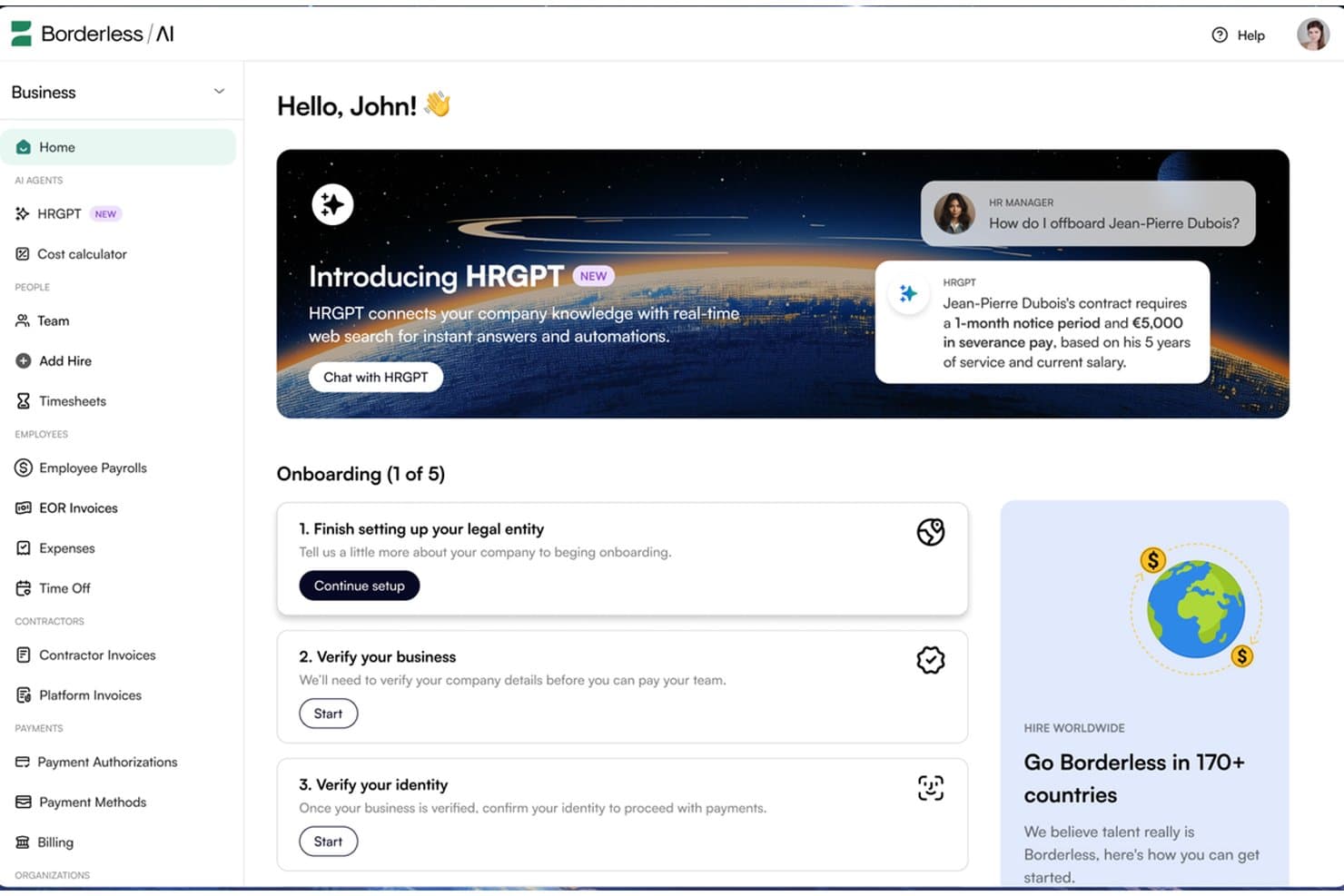
Borderless AI's HRGPT agent automates HR tasks like offboarding in real time. Borderless AI is an employer of record platform that uses AI-driven contract generation, multi-state payroll processing, and compliance monitoring to support hiring across more than 170 countries. It offers US employment services through owned entities and does not require payroll pre-funding.
Who Is Borderless AI Best For?
Borderless AI is a strong fit for startups and lean HR teams that need to hire US-based employees quickly without providing payroll funding far in advance.
Why I Picked Borderless AI
I included Borderless AI for its payroll funding arrangement, which allows businesses to run US payroll without pre-funding it 30 days in advance. This can help startups manage cash flow while expanding their teams. Its AI-generated, state-specific at-will contracts support onboarding in as little as 24 hours. The platform also handles federal and state tax withholding, filings, and state leave programs such as California's SDI and Colorado's FAMLI without requiring businesses to establish their own entities.
Borderless AI Key Features
- AI contract generator: Produces state-specific at-will employment agreements in minutes, with IP assignment and confidentiality clauses included.
- Contractor and EOR dashboard: Manage contractors and full-time employees through a single platform, with guidance for contractor-to-employee conversions.
- AI HR agents: HRGPT answers HR and labor law questions, while Alberni handles entity, legal, and contract operations. Both are included at no additional cost across all plans.
- SOC 2 Type II compliance: The platform uses AES-256 encryption at rest, TLS 1.3 in transit, role-based access controls, and audit trails for AI agent actions.
Borderless AI Integrations
Borderless AI offers a native ADP Workforce Now integration and a marketplace integration through Paychex Marketplace. It also lists integrations with Workday, BambooHR, and Greenhouse, alongside an API for custom connections.
Pros and Cons
Pros:
- Reviewers praise responsive support and timely payments
- Onboarding can begin within 24 hours
- Does not require payroll pre-funding
Cons:
- Contractor administration uses a separate management product
- AI-generated contracts still require legal review
Learn more about Borderless AI: Best for no-minimum, flat-fee global hiring
- Free demo available
- From $199/employee/month
Visit WebsiteCustomer Rating:4.9/5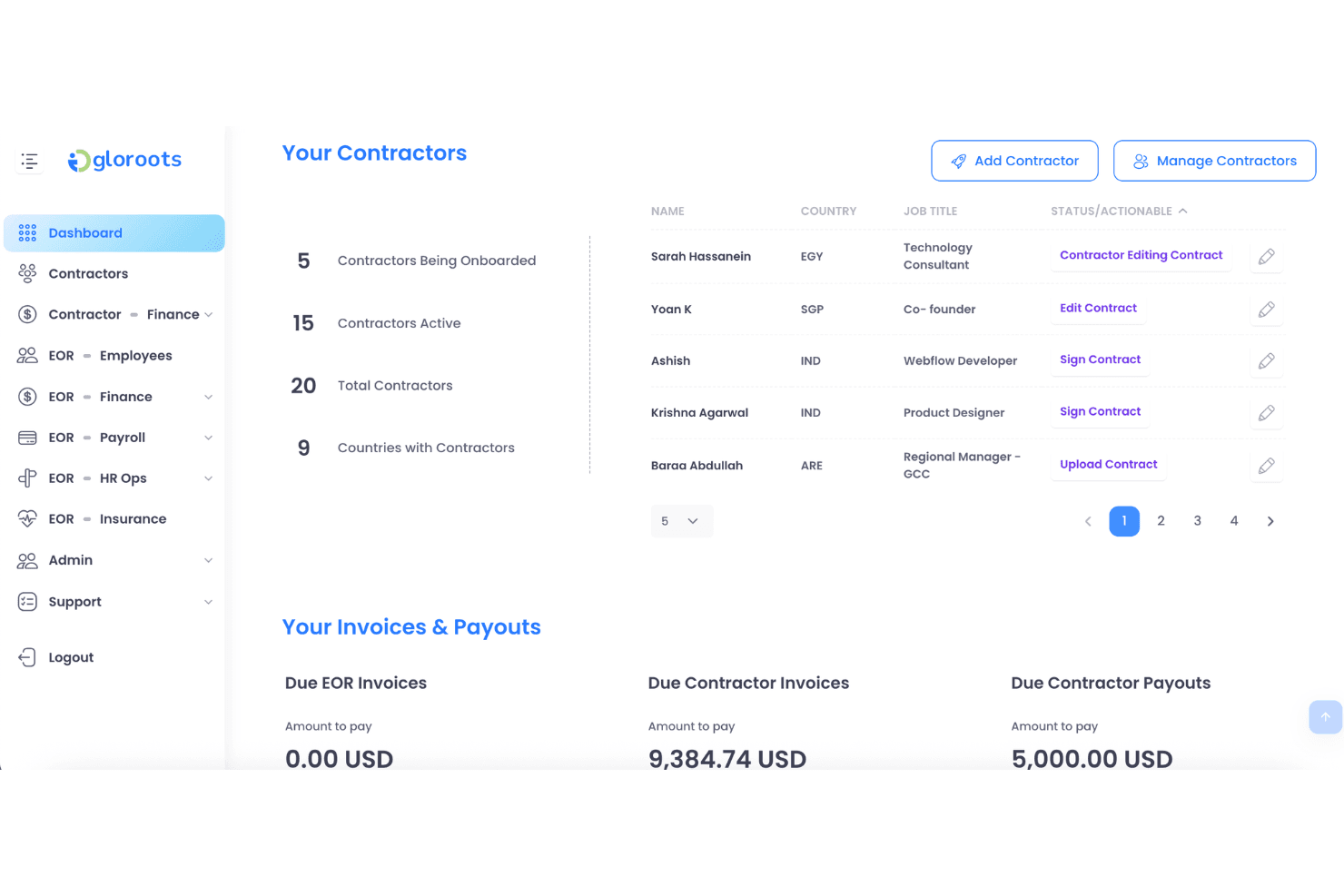
Gloroots lets users manage contractors and track invoices in one dashboard. Gloroots is a global employer of record platform that handles US payroll, benefits administration, contract generation, and multi-state compliance across all 50 states without requiring businesses to establish a local entity.
Who Is Gloroots Best For?
Gloroots is a strong fit for startups and small teams hiring their first international employees without minimum headcount requirements or long-term contracts.
Why I Picked Gloroots
I picked Gloroots for its published starting price of $199 per employee per month, with no minimum headcount requirement or long-term contract. I particularly like that it issues W-2s under its own EIN, handles FICA, FUTA, and SUI remittances, and supports state-specific final-pay deadlines, including California's same-day requirement. For businesses hiring their first US employees, Gloroots also offers ACA-compliant benefits and 401(k) administration, helping smaller teams manage employment requirements without moving to a higher service tier.
Gloroots Key Features
- State-tailored employment agreements: Generates employment contracts tailored to state requirements, including California AB5 provisions and New York wage notice rules, with IP assignment clauses included.
- Contractor of Record product: Allows businesses to engage contractors through Gloroots as the legal contracting entity, with misclassification liability protection at $99 per contractor per month.
- Equity vesting tax tracking: Tracks employee vesting schedules to support the calculation and withholding of applicable taxes when equity vests.
- Misclassification risk checker: A built-in eight-question tool that assesses worker classification risks before hiring decisions are made.
Gloroots Integrations
Native integrations are not clearly documented. Gloroots offers an API for custom integrations, while its USA EOR page states that it connects with major HRIS and payroll systems without naming specific platforms.
Pros and Cons
Pros:
- State-specific contracts address local requirements
- Payroll includes W-2s and tax remittances
- Reviewers praise responsive onboarding support
Cons:
- EOR service does not establish a client-owned US entity
- Contractor classification protection requires Contractor of Record
Learn more about Gloroots:
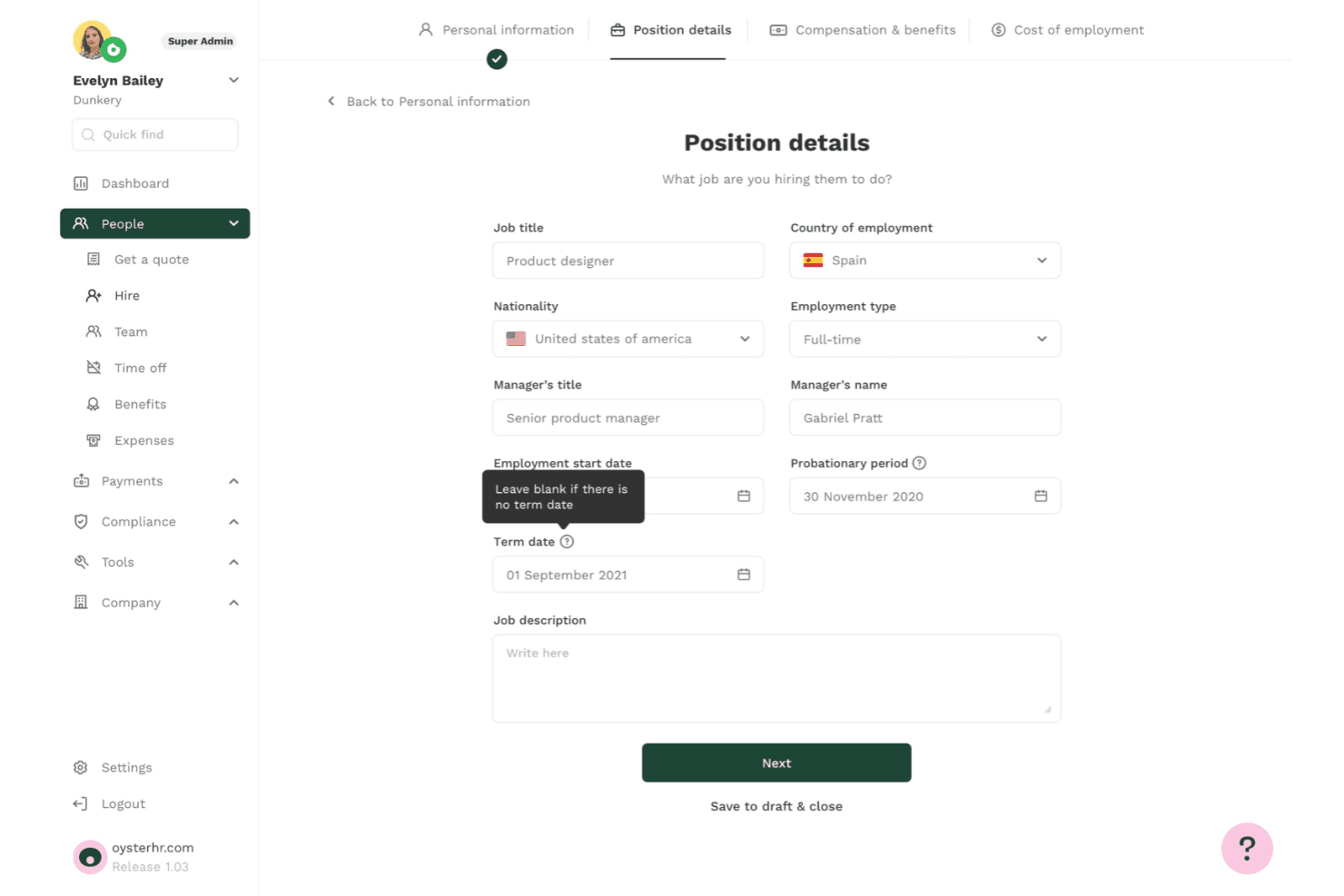
Oyster lets users define job titles, employment type, and term dates when hiring. Oyster is an employer of record platform covering all 50 US states. It handles compliant hiring, automated payroll, benefits administration, contract generation, and contractor conversions without requiring businesses to establish a local entity.
Who Is Oyster Best For?
Oyster is a strong fit for companies considering a US PEO that want to begin with EOR services and transition to co-employment on the same platform as they grow.
Why I Picked Oyster
I included Oyster for its combination of US EOR and PEO services, allowing businesses to start hiring across all 50 states without a legal entity and later transition to co-employment on the same platform. Its contract generation process includes state-specific at-will clauses and IP agreements, helping businesses prepare employment documentation more efficiently. Oyster also offers a 401(k) arrangement with a stated 3% employer contribution for US hires, providing an additional retirement benefit.
Oyster Key Features
- Four-tier health plan selection: Choose from Essential, Competitive I, Competitive II, or Best-In-Class ACA-compliant health plans, with options covering dental, vision, mental health, and maternity care.
- Contractor misclassification risk tool: Oyster Shell assesses contractor misclassification risks and includes up to $500,000 in aggregate protection coverage.
- State-specific payroll compliance: Payroll applies federal and state withholding, FICA, wage and hour rules, and final-pay requirements across all 50 states, including states with stricter regulations, such as California and New York.
- Equity management with Carta integration: Manage equity through the platform with built-in tax guidance and synchronize equity data through its Carta integration.
Oyster Integrations
Oyster offers integrations with Xero, QuickBooks, BambooHR, HiBob, Greenhouse, Ashby, Slack, Carta, Concur, and Zapier. It also provides an API for custom payroll, time-off, and expense data connections.
Pros and Cons
Pros:
- State-specific contracts support hiring across all 50 states
- Offers a stated 3% employer 401(k) contribution
- Reviewers praise clear onboarding timelines
Cons:
- Timesheets do not automatically sync with payroll
- Platform lacks native applicant tracking
Learn more about Oyster: Best for contractor-to-employee-to-entity moves
- Not available
- From $599/employee/month
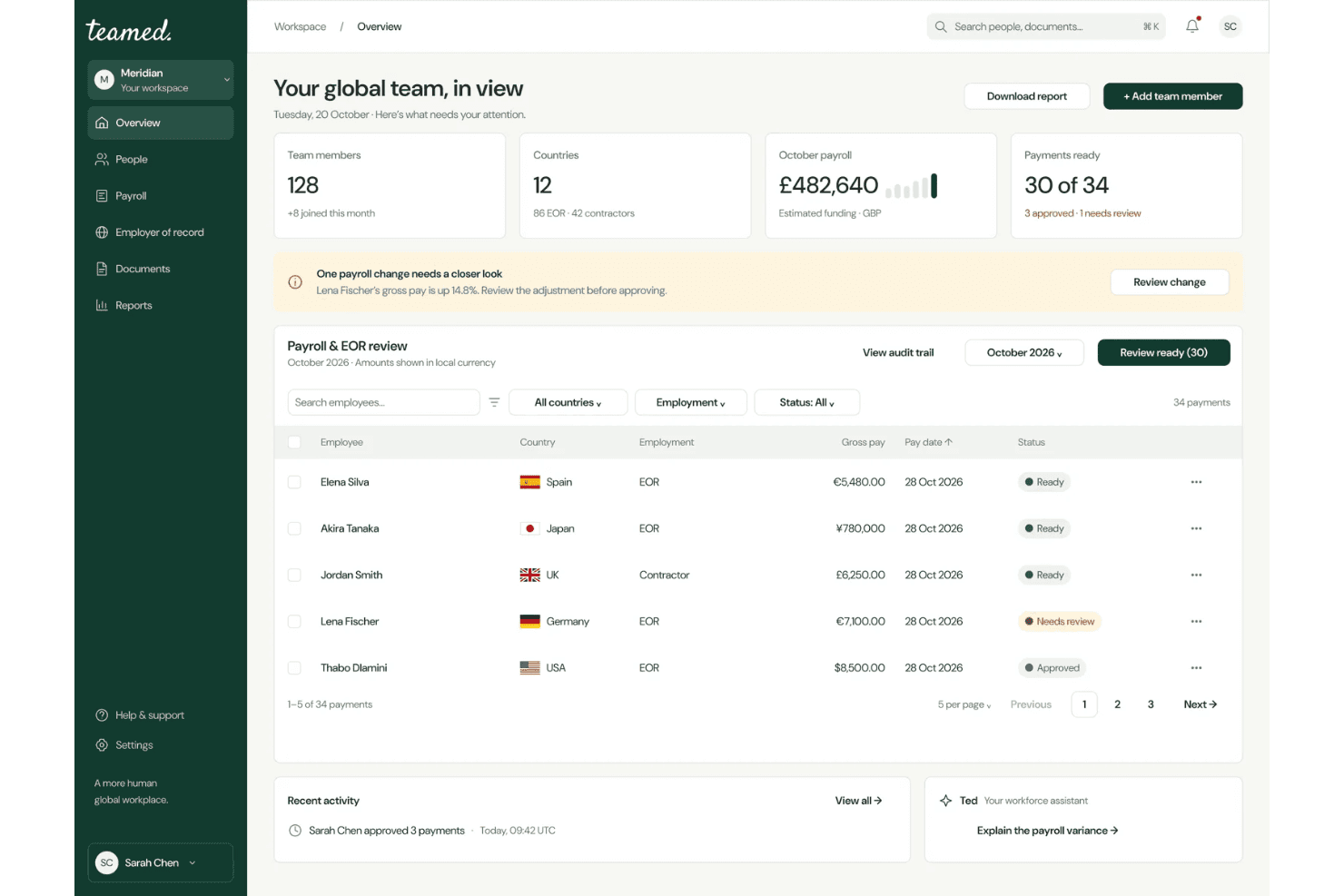
Teamed centralizes global payroll and EOR management in one dashboard. Teamed is an employer of record platform that supports US hiring across all 50 states through its own legal entity. It handles payroll, tax filings, benefits administration, and contractor-to-employee conversions through a centralized dashboard.
Who Is Teamed Best For?
Teamed is a strong fit for companies that need to move workers through the full employment lifecycle, from contractor to EOR employee and eventually to employment under their own US entity, without switching platforms.
Why I Picked Teamed
I picked Teamed for its support for moving workers through different employment arrangements, from contractor to EOR employee and eventually to employment under a company's own US entity. Contractor-to-employee conversions are managed through a single dashboard. When you're ready to establish a local entity, Teamed's GEMO service supports the setup of a US C-Corp or LLC and the migration of employees. Its built-in crossover calculator also helps businesses estimate when establishing an entity may become more cost-effective than continuing with EOR services.
Teamed Key Features
- 50-state hiring guides: State-specific compliance guides cover taxes, worker classification, paid leave, termination rules, and wage requirements across all 50 states.
- Payroll variance alerts: Automated alerts identify payroll discrepancies before processing closes, giving teams an opportunity to address errors.
- Contractor misclassification protection: Guard and Protect add-ons provide misclassification liability coverage, with Guard offering up to $10,000 per case at $130 per contractor per month.
- Named country specialist support: Every account receives a dedicated specialist, with a claimed 15-minute initial response time and 24/5 availability without ticket queues.
Teamed Integrations
Teamed lists 19 integrations, including Personio, BambooHR, HiBob, Workday, Greenhouse, Okta, Xero, QuickBooks, and Zapier. Only Personio has publicly available synchronization documentation. Teamed does not provide a public API, and its integration team configures other connections during onboarding.
Pros and Cons
Pros:
- Named specialists provide direct support
- Contractor-to-entity transitions can avoid repeated onboarding
- Owned US entity supports hiring across all 50 states
Cons:
- EOR service does not establish a client-owned entity
- Entity migration requires a separate GEMO engagement
Learn more about Teamed: Best for contractor-to-employee transitions
- Free demo available
- From $399/employee/month
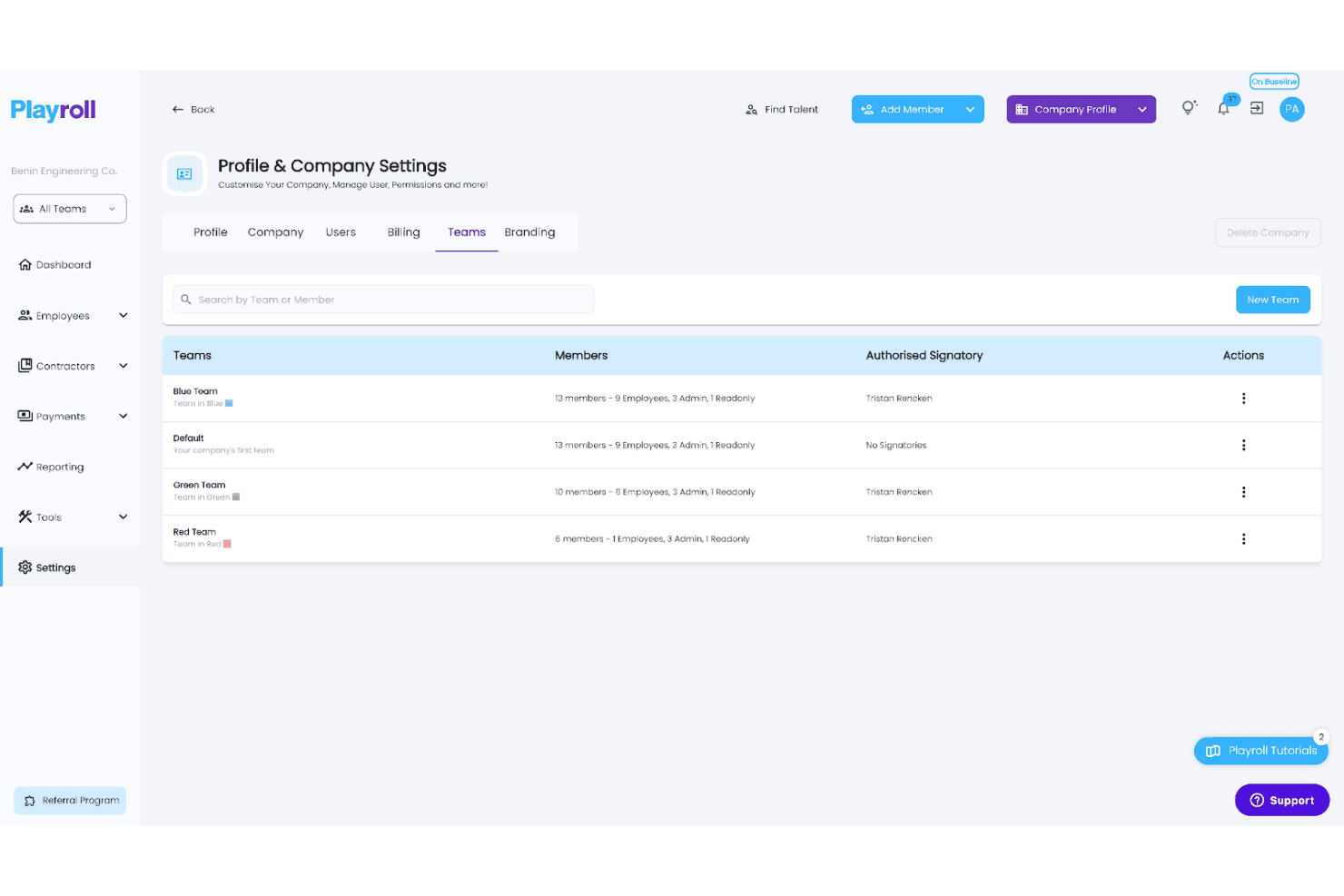
Playroll lets users organize employees into color-coded teams with assigned signatories. Playroll is a global employer of record platform that supports US and international hiring without requiring businesses to establish local entities. Its services include automated payroll, tax filings, benefits administration, and contractor-to-employee conversions across more than 180 countries.
Who Is Playroll Best For?
Playroll is a strong fit for companies looking to convert existing contractors into full-time employees, particularly those hiring across multiple countries.
Why I Picked Playroll
I picked Playroll for its structured contractor-to-employee conversion service. When you're ready to transition a contractor to full-time employment, Playroll guides you through a four-step process that includes a free misclassification audit, a documented transition plan, and onboarding through its EOR service. This process covers at-will employment agreements with FLSA classification requirements included. I also like that each converted employee receives a dedicated Employee Success Manager at no additional cost.
Playroll Key Features
- Automated biweekly payroll: Playroll processes US payroll biweekly, handling federal, state, and local tax withholding, FUTA and SUTA payments, and W-2 issuance across all 50 states.
- At-will contract generation: Generate US employment agreements in approximately five minutes, with FLSA classification, EEOC language, and optional arbitration clauses included.
- Multi-state compliance monitoring: Playroll tracks changes to federal and state employment laws, including minimum wage updates and paid leave requirements, and applies relevant changes to payroll.
- Dedicated Employee Success Manager: Every employee hired through Playroll receives an assigned Employee Success Manager at no additional cost.
Playroll Integrations
Playroll offers three documented integrations: BambooHR, HiBob, and Expensify. It also supports custom integrations through its API.
Pros and Cons
Pros:
- State-specific hiring guides cover all 50 states
- Offers free contractor misclassification audits
- Provides dedicated Employee Success Managers
Cons:
- Employee hiring depends on country-specific onboarding requirements
- EOR service does not include candidate recruitment
Learn more about Playroll: Best for tying hiring to app and device access
- Free demo available
- Pricing upon request
Visit WebsiteCustomer Rating:4.9/5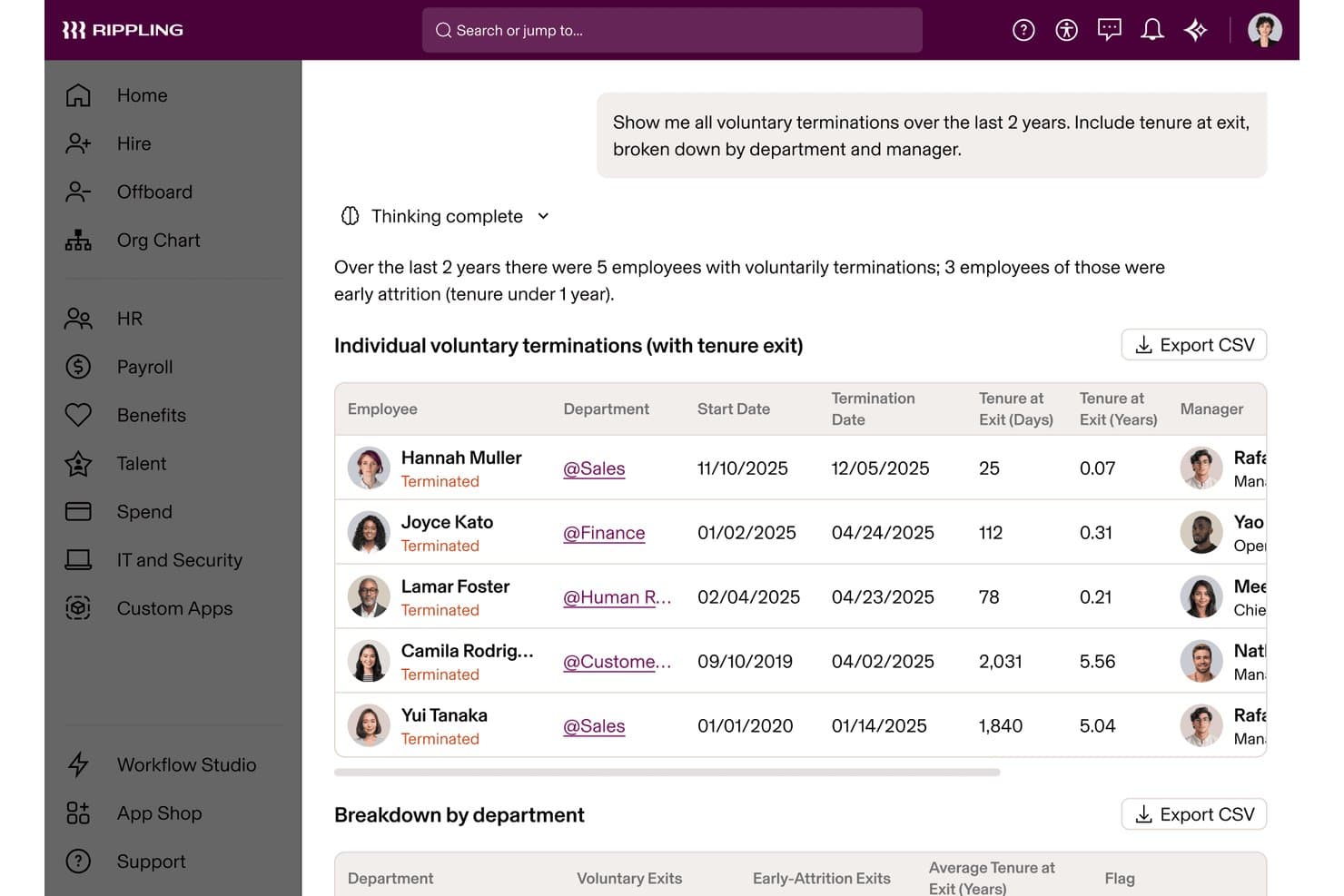
Rippling's AI surfaces voluntary termination trends by tenure and department. Rippling is an employer of record platform registered in all 50 US states. It handles payroll processing, tax filing, benefits administration, compliance monitoring, and employee onboarding alongside native IT provisioning for app and device access.
Who Is Rippling Best For?
Rippling is a strong fit for tech-forward companies that need to connect employee onboarding directly with app permissions and device provisioning from day one.
Why I Picked Rippling
I picked Rippling for its ability to connect employee onboarding directly with IT provisioning. When you hire someone through Rippling's EOR service, you can manage app access and device enrollment through the same workflow. This helps new hires in states where you have no legal entity receive configured laptops and access to Slack, Zoom, and Google Workspace on their first day. I also like its Misclassification Risk Analyzer, which flags potentially problematic contractor arrangements before they become legal issues.
Rippling Key Features
- Compliance 360 alerting: Real-time alerts flag minimum wage changes, overtime rules, sick leave updates, and pay schedule requirements across all 50 states.
- Multi-entity flexibility: Move workers between contractor, EOR, PEO, and own-entity arrangements without repeating onboarding or duplicating employee records.
- Automated payroll tax filing: Rippling calculates and remits federal, state, and local payroll taxes, including FICA, state unemployment taxes, and local withholding.
- Contractor-to-employee conversion: A dedicated workflow helps businesses move contractors to full-time employee status, with a Misclassification Risk Analyzer included in the process.
Rippling Integrations
Rippling offers more than 600 ready-made integrations, including Greenhouse, Slack, Microsoft 365, Salesforce, Zoom, NetSuite, QuickBooks Online, Fidelity, and Vanguard. Its developer platform and API also support custom integrations.
Pros and Cons
Pros:
- More than 600 ready-made software integrations
- Compliance 360 flags state wage and leave changes
- IT provisioning is built into employee onboarding
Cons:
- Employee IT provisioning requires Rippling's IT tools
- Some international EOR hires use partner entities
 Best for moving from no US entity to PEO
- Free demo available
- From $599/employee/month
Visit WebsiteCustomer Rating:4.9/5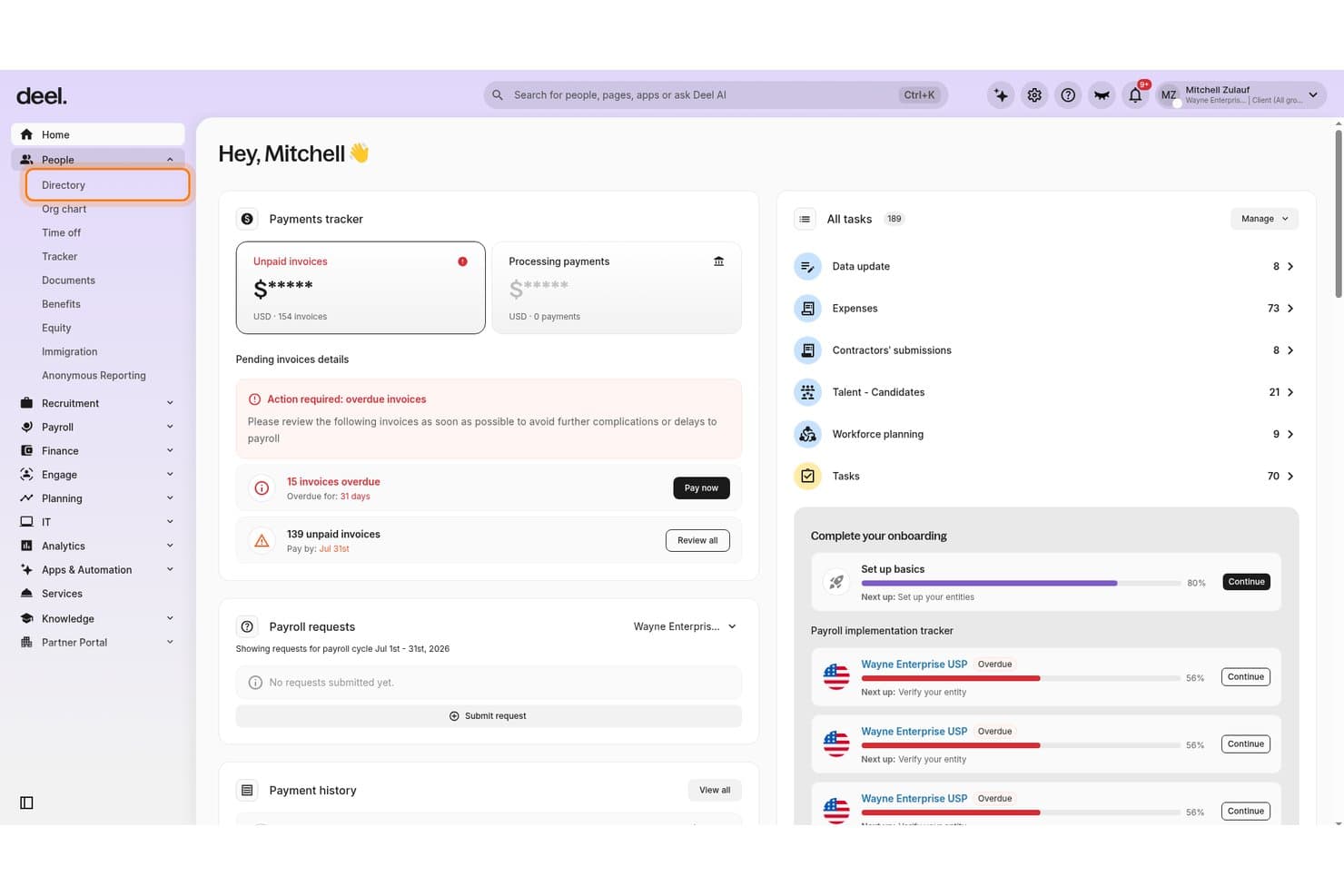
Deel Hire centralizes payments, tasks, and onboarding in one dashboard. Deel Hire is a US employer of record solution that manages employment contracts, multi-state payroll, tax filings, benefits administration, and compliance monitoring across all 50 states without requiring businesses to establish their own US legal entity.
Who Is Deel Hire Best For?
Deel Hire is a strong fit for companies without a US legal entity that want a clear path from EOR employment to co-employment through a PEO once they establish their own entity.
Why I Picked Deel Hire
I picked Deel Hire for its built-in path to PEO co-employment once a company establishes its own entity. Its "Change Worker Type" workflow allows businesses to convert contractors to EOR employees in as little as 24 hours, with pre-filled contract data carried over automatically. When you're ready to transition to a PEO, Deel's help center provides a structured migration guide covering employment continuity, PTO handling, and benefits re-enrollment under your own entity.
Deel Hire Key Features
- Continuous compliance monitoring: Deel's Compliance Monitor tracks wage rules and tax law changes across all 50 states and sends alerts before those changes affect payroll.
- AI Worker Classifier: An AI-powered tool that reviews worker classifications and flags potential misclassification risks before they become legal issues.
- Automated multi-state tax filing: Deel handles federal, state, and local tax withholding and files Form 941 and applicable state returns on your behalf.
- Offboarding Assistant: A structured termination workflow that identifies legal obligations, calculates offboarding costs, and drafts required documentation for review by Deel's legal team.
Deel Hire Integrations
Deel Hire offers integrations with Greenhouse, Ashby, BambooHR, HiBob, Personio, QuickBooks, Xero, NetSuite, and Employee Navigator. Its API supports custom connections for hiring, payroll, HRIS, accounting, employee lifecycle changes, and device management.
Pros and Cons
Pros:
- PEO migration guide covers employment continuity
- Offboarding Assistant estimates termination costs
- Change Worker Type reuses contractor contract data
Cons:
- Benefits re-enrollment is required during migration
- PEO transition requires a US legal entity
Learn more about Deel Hire: Best for US hiring via its own legal entity
- Free demo available
- From $549/employee/month
Visit WebsiteCustomer Rating:4.8/5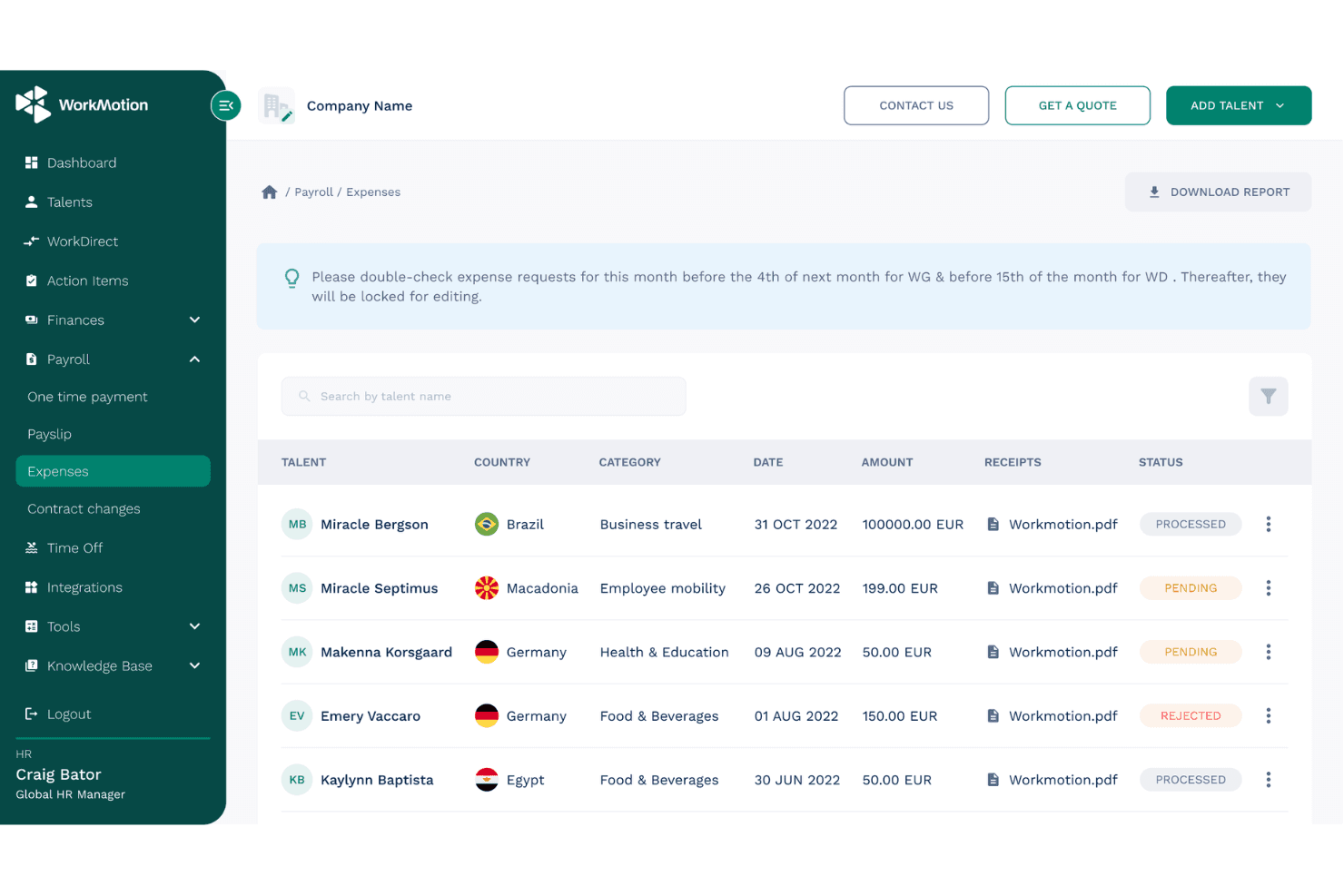
WorkMotion lets users track and manage employee expense requests globally. WorkMotion is a global employer of record platform that enables companies to hire and manage employees across more than 160 countries. It handles payroll, multi-state compliance, benefits administration, and contract generation without requiring businesses to establish local legal entities.
Who Is WorkMotion Best For?
WorkMotion is a strong fit for globally distributed companies that want to hire US employees without establishing their own US legal entity.
Why I Picked WorkMotion
I picked WorkMotion for its use of its own US legal entity rather than relying on third-party partners, providing a more direct employment arrangement. Its services cover multi-state payroll tax remittance, including federal income tax, Social Security, Medicare, FUTA, and state unemployment taxes. WorkMotion also updates state-specific employment contracts to reflect changes in local regulations, helping businesses manage hiring requirements across all 50 states through one platform.
WorkMotion Key Features
- Wanda AI assistant: Ask country-specific labor law and HR questions through the platform or Slack, with responses based on WorkMotion's internal HR data.
- Employment cost calculator: Estimate per-employee hiring costs by country using salary and bonus inputs, with a breakdown of salary, allowances, and social contributions.
- Expense management: Employees submit expenses through the platform, which applies country-specific tax rules and flags taxable amounts for HR review and approval.
- HR system integrations: Connect WorkMotion with BambooHR, Workday, HiBob, Personio, and ADP Workforce Now to automate data exchange with your existing HR systems.
WorkMotion Integrations
WorkMotion integrates with BambooHR, Workday, HiBob, Personio, ADP Workforce Now, and UKG Pro for HR data exchange. An API is also available for custom integrations.
Pros and Cons
Pros:
- Reviewers praise payroll timeliness and support
- Multi-state contracts are updated to reflect changing laws
- Own US entity supports direct employment accountability
Cons:
- EOR does not transfer legal employment to the client
- Candidate sourcing requires its Direct Hiring service
Learn more about WorkMotion: 9Best for 50-state compliance intelligence
G-P
- Free demo available
- From $599/employee/month
Visit WebsiteCustomer Rating:4.5/5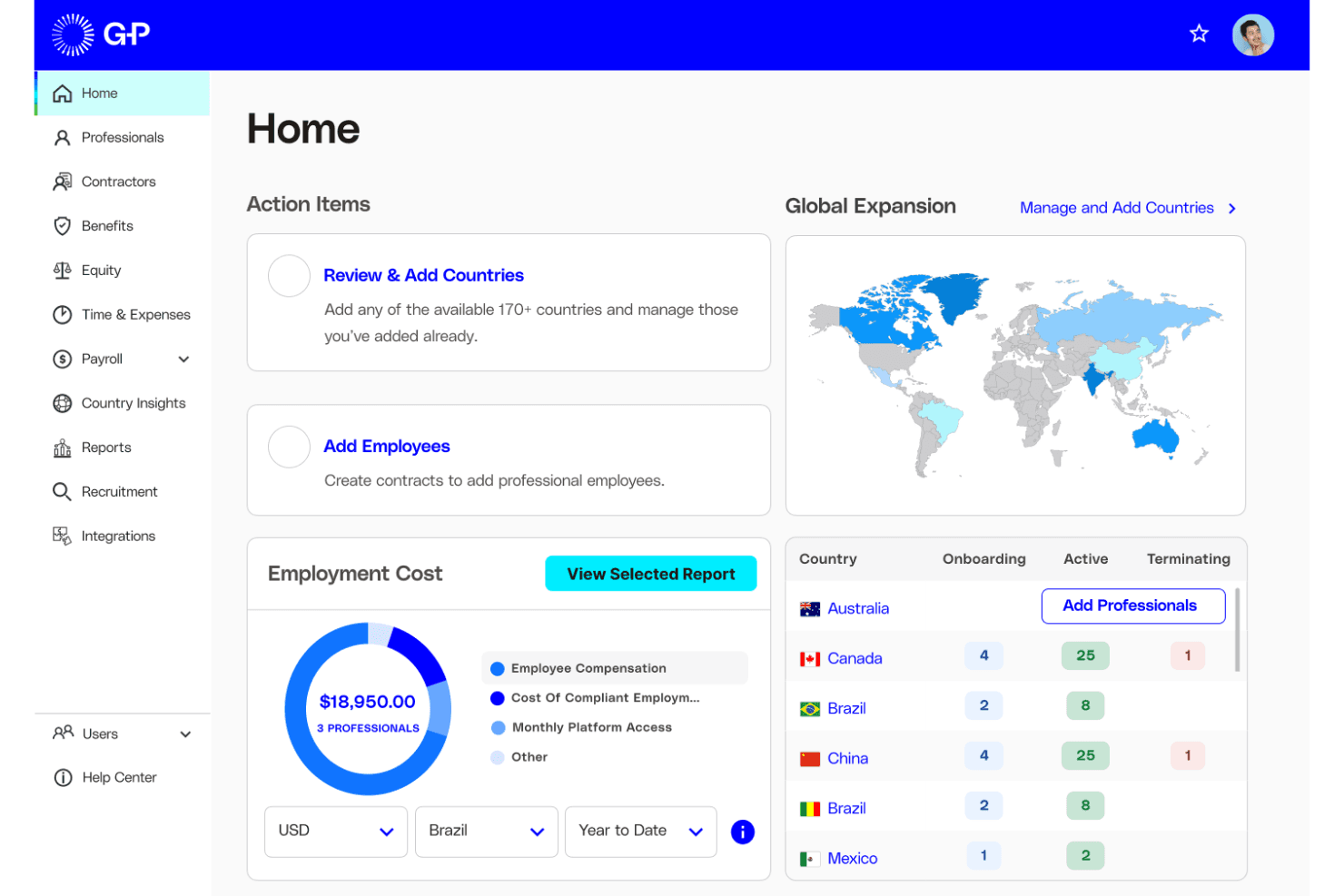
G-P helps users manage global hiring costs and workforce across countries. G-P is an employer of record platform with a wholly owned US legal entity that handles multi-state payroll, tax filings, benefits administration, and AI-powered compliance monitoring across all 50 states.
Who Is G-P Best For?
G-P is a strong fit for mid-market and enterprise HR teams managing multi-state hiring across the US without establishing a local entity.
Why I Picked G-P
I picked G-P for its approach to 50-state compliance tracking through its AI assistant, Gia. Gia draws on more than 100,000 vetted articles and 1,500 government sources to help identify regulatory changes across all 50 states. I also like its Classification Engine, which assesses whether workers should be classified as employees or contractors. This is particularly useful for companies hiring across multiple states with different classification requirements.
G-P Key Features
- Multi-currency payroll processing: G-P processes payroll in more than 150 currencies, handling federal, state, and local tax withholding, FUTA, SUTA, and applicable state filings.
- ACA-compliant benefits administration: Manage medical, dental, vision, 401(k), FMLA, and state paid leave enrollment through a single dashboard, with COBRA support during offboarding.
- Automated termination and offboarding: G-P manages final pay according to state deadlines, ADEA-reviewed severance agreements, and COBRA continuation notices.
- HRIS integrations: Native connections with Workday, SAP SuccessFactors, BambooHR, UKG Pro, HiBob, and Personio help synchronize employee data across existing HR systems.
G-P Integrations
G-P integrates with Workday, SAP SuccessFactors, BambooHR, UKG Pro, UKG Ready, HiBob, Personio, ADP Workforce Now, Paylocity, and Microsoft Entra ID. Its API also supports custom integrations.
Pros and Cons
Pros:
- Benefits administration includes 401(k) and COBRA support
- Owned US entity supports nationwide hiring
- Gia helps identify compliance requirements across all 50 states
Cons:
- Background screening is not included in standard EOR
- Visa assistance is not part of core EOR services
Learn more about G-P: Best for termination liability coverage
- Free demo available
- From $499/employee/month
Visit WebsiteCustomer Rating:4.4/5
Papaya Global tracks employer costs by country, category, and cost center. Papaya Global is an employer of record platform that offers EOR, PEO, ASO, and payroll-only services across more than 180 countries. Its US-specific services cover all 50 states and include automated tax filings, benefits administration, and contractual termination liability coverage.
Who Is Papaya Global Best For?
Papaya Global is a strong fit for midsize and enterprise companies managing multi-state or global workforces that need contractual termination liability coverage alongside payroll and benefits administration.
Why I Picked Papaya Global
I included Papaya Global for its contractual termination liability guarantee, which distinguishes its offering from many other EOR providers. When a termination becomes complicated, Papaya provides contractual protections intended to limit certain legal defense costs and financial exposure, subject to its terms. It also supports upfront severance calculations to help businesses plan termination expenses and avoid payment delays. I like that the platform combines all-50-state coverage with compliance monitoring across more than 10,000 federal, state, and local tax jurisdictions, which is particularly useful for businesses operating across states with different final-pay requirements.
Papaya Global Key Features
- Multi-model US employment support: Choose from EOR, PEO, ASO, or payroll-only service models to match your business structure across all 50 states.
- Automated tax filings: Papaya automates tax filings across more than 10,000 federal, state, and local jurisdictions, with a claimed 99.9% filing accuracy rate.
- Benefits enrollment and administration: Enroll US employees in healthcare, dental, life insurance, and 401(k) plans through partner providers, with compliance support throughout the process.
- Global equity management: A dedicated equity team administers equity plans for EOR workers, applying relevant local tax requirements across supported countries.
Papaya Global Integrations
Papaya Global offers documented integrations with Workday, HiBob, BambooHR, SAP SuccessFactors, Eqip, and OneData. It also provides API access for custom data flows and supports importing pre-payroll data from HRIS, ERP, and Excel files.
Pros and Cons
Pros:
- Reviewers praise responsive account managers
- Automates tax filings across more than 10,000 jurisdictions
- Offers contractual termination liability coverage
Cons:
- Termination liability coverage has contractual exclusions
- Some employment services depend on local partners
Learn more about Papaya Global:
Andra arbetsgivare på uppdrag i USA
Här är några ytterligare alternativ som inte kom med på min kortlista men som ändå kan vara värda att undersöka:
- 11Payoneer Workforce ManagementBest for $199-per-employee starting pricing
- 12RemoteBest for EOR-to-US PEO without switching
- 13TriNetBest for US firms with an entity seeking PEO
- 14RivermateBest for 24/7 help and a named manager
- 15MultiplierBest for hiring one with no minimum headcount
- 16Safeguard GlobalBest for US hiring and global expansion
- 17InsperityBest for mid-size teams wanting Workday PEO
- 18Remote PeopleBest for moving hiring in-house as you grow
- 19CompunnelBest for linking recruiting with employment
How I Evaluate Employers of Record in the USA
I split my evaluation into three parts. First, core functionality—which carries the most weight—means the provider must own US legal entities and run compliant payroll across states. Then I look for standout features like contractor-to-EOR conversion workflows. Finally, I consider support quality and pricing transparency.
Core Functionality (Table Stakes for This List)
When I'm selecting tools for my list, I score each one on a scale from 0 (does not offer the functionality) to 5 (excels in this area) for each core functionality listed below. I then convert the total into a percentage to help assess each tool's overall fit, with extra weight on any functionalities I've deemed essential.
- Legal Entity & Compliance (Essential): I check whether the provider owns US entities across states or relies on third parties, and how it tracks evolving federal and state labor laws.
- Payroll Processing (Essential): I evaluate how the platform handles multi-state tax withholding, filings, and remittances, especially for employees working across state lines.
- Benefits Administration: I look for access to health insurance, retirement plans, and statutory leave options that are competitive enough to attract US-based talent.
- Contract Generation & Management: State-specific employment agreements matter here, so I check whether contracts auto-adjust for jurisdiction and manage onboarding documents.
- Multi-State Employment Support: I evaluate how well the provider handles compliance differences between states with distinct wage, leave, and reporting requirements.
- Termination & Offboarding Support: Final pay timing varies by state, so I look at how the provider manages compliant terminations, last-check calculations, and required documentation.
Once I have a list of tools that meet the criteria, I consider what sets each platform apart.
Differentiating Factors (What Sets Vendors Apart)
Here's how I compare and contrast different vendors:
Standout Features
I look for contractor-to-EOR conversion workflows that let you move a 1099 worker to W-2 status without gaps in pay or coverage—essential when reclassification risk is on the line. PEO/EOR hybrid flexibility matters just as much, because a team that outgrows EOR needs a clean path to direct employment. I also evaluate real-time compliance alerts, since state wage and leave laws shift often and late updates can mean penalties.
Beyond Features
I check whether pricing is a flat per-employee fee or a percentage of payroll, since percentage models make costs hard to predict as salaries rise. Customer support structure matters just as much—during a time-sensitive termination in a state with same-day final-pay rules, having a dedicated US employment law advisor beats waiting on a generic support ticket. I also evaluate native integrations with common HRIS and ATS platforms, because re-keying employee data between systems during onboarding creates errors and slows down hiring.
Så väljer du en arbetsgivare på uppdrag i USA
Välj en arbetsgivare på uppdrag i USA genom att bekräfta dess täckning av delstater, löneansvar samt process för avslut eller övergång.
| Om din prioritet är … | Leta efter … |
|---|---|
| Om din prioritet är …Efterlevnad i varje delstat | Leta efter …En skriftlig lista över de delstater där leverantörens juridiska enhet anställer arbetstagare |
| Om din prioritet är …Korrekt lönehantering och slutlön | Leta efter …En tydlig fördelning av ansvar för skatteavdrag, rapportering och slutlön |
| Om din prioritet är …Förutsägbara kostnader | Leta efter …En specificerad prislista som omfattar tjänster, förmåner, etablering och avslut |
| Om din prioritet är …En framtida övergång till direktanställning | Leta efter …Skriftliga övergångssteg, krav på anställda och avgifter för övergång till en PEO eller din juridiska enhet |
Så granskar du din kortlista
- Bekräfta de anställande juridiska enheterna: Be om ett dokument som anger den juridiska enhet som skulle anställa din arbetstagare i varje planerad delstat.
- Kartlägg löneuppgifterna: Be om ett exempel på en lönekalender och en ansvarsmatris som omfattar skatteavdrag, skattedeklarationer och inbetalningar.
- Granska den totala kostnaden: Be om en specificerad prislista som skiljer mellan tjänsteavgifter, kostnader för förmåner, startavgifter och avslutningsavgifter.
- Testa stödet vid avslut: Skicka in ett ärende med ett hypotetiskt avslutningsdatum och en delstat och be sedan om skriftlig vägledning om slutlön och obligatoriska dokument.
- Välj er verksamhetsmodell: Jämför ett upplägg där leverantören är registrerad arbetsgivare med en planerad övergång till en PEO eller till en egen juridisk enhet. Använd den skriftliga övergångsklausulen för att avgöra vilket alternativ som passar era rekryteringsplaner.
Vad är registrerade arbetsgivare i USA?
En registrerad arbetsgivare i USA är en tredje part som juridiskt anställer en arbetstagare och hanterar löner, skatteavdrag och personaladministration. Detta upplägg gör det möjligt för organisationen att anställa arbetstagare utan att först etablera en juridisk enhet i USA. Leverantören hanterar arbetsgivaransvaret, medan organisationen styr arbetstagarens dagliga arbetsuppgifter. Delstatsregler, förmåner och planer på att flytta arbetstagare till den egna juridiska enheten kräver fortfarande noggrann uppmärksamhet.
Funktioner
Här är de viktigaste funktionerna jag letar efter hos en registrerad arbetsgivare i USA:
- Juridisk anställning och regelefterlevnad: Leverantören anställer arbetstagare genom ett etablerat juridiskt anställningsupplägg och hanterar tillämpliga federala krav samt krav på delstats- och lokal nivå. Detta gör det möjligt för företag att anställa utan att först etablera en egen juridisk enhet i USA.
- Löne- och skatteadministration: Leverantören beräknar löner, gör skatteavdrag från löner, lämnar in obligatoriska deklarationer och betalar in skatter till berörda myndigheter. Kontrollera hur leverantören hanterar löneutbetalningsscheman, korrigeringar och anställda som arbetar över delstatsgränser.
- Förmånsadministration: Leverantören hanterar berättigade förmåner, såsom sjukförsäkring och pensionsplaner, och förklarar tillgängliga alternativ och kostnader. Detta hjälper företag att förstå de anställdas rätt till förmåner och arbetsgivarens bidrag.
- Anställningsavtal och introduktion: Leverantören upprättar anställningsavtal som är anpassade till delstaten och samlar in obligatoriska blanketter och uppgifter om de anställda. Ett strukturerat introduktionsflöde hjälper anställda att slutföra dokumentationen före sina startdatum.
- Stöd i flera delstater: Leverantören tillämpar anställningsregler utifrån var de anställda utför sitt arbete, inklusive delstatsspecifika krav på lön och ledighet. Detta är särskilt viktigt för distansarbetande anställda som arbetar i olika delstater eller flyttar.
- Hantering av ledighet och frånvaro: Leverantören följer berättigad ledighet och betald ledighet i enlighet med tillämpliga policyer och bestämmelser. Bekräfta hur ansökningar, saldon och lönejusteringar hanteras.
- Avslut och avveckling: Leverantören samordnar avslutsdokumentation, beräkningar av slutlön och obligatoriska meddelanden utifrån den anställdes plats. Bekräfta vem som fastställer tidsfristerna för slutlön och kommunicerar med anställda som slutar.
- Löne- och anställningsregister: Plattformen lagrar lönespecifikationer, skatteblanketter, anställningsavtal och relaterade register för behöriga användare. Dessa register hjälper HR-team att besvara frågor från anställda och förbereda sig inför revisioner.
Fördelar
Enligt min erfarenhet erbjuder EOR-tjänster i USA flera praktiska fördelar, bland annat:
- Anställning utan egen juridisk enhet: Ett EOR:s amerikanska anställningsupplägg gör det möjligt för företag att anställa medarbetare utan att först etablera en egen juridisk enhet i USA.
- Löneadministration: Leverantörshanterade löneberäkningar, skatteavdrag, deklarationer och inbetalningar minskar den administrativa arbetsbördan för interna löneteam.
- Regelefterlevnad på delstatsnivå: Stöd i flera delstater hjälper företag att tillämpa platsspecifika krav på lön, ledighet och rapportering när personalstyrkan växer.
- Tillgång till förmåner: Förmånsadministrationen ger berättigade anställda tillgång till alternativ som sjukförsäkring och pensionsplaner.
- Strukturerad introduktion: Anställningsavtal anpassade till delstaten och insamling av dokument hjälper anställda att slutföra obligatoriska handlingar före sina startdatum.
- Stöd vid avslut av anställning: Samordning av uppsägningar, beräkningar av slutlön och obligatoriska meddelanden hjälper företag att följa tillämpliga delstatsspecifika förfaranden.
Priser
Priserna för EOR varierar beroende på leverantör, servicenivå och var den anställde befinner sig. De flesta leverantörer tar ut en månadsavgift per anställd, medan löner, förmåner, arbetsgivaravgifter och andra kostnader faktureras separat. Även om kostnadsfria EOR-planer är ovanliga erbjuder många leverantörer demonstrationer eller konsultationer. Tabellen nedan jämför typiska startprisintervall och de tjänster du kan förvänta dig på varje nivå.
Jämförelsetabell för planer för registrerade arbetsgivare i USA
| Plantyp | Vägledande pris | Vanliga funktioner |
|---|---|---|
| PlantypKostnadsfria provperioder och demonstrationer | Vägledande prisGratis | Vanliga funktionerProduktdemonstrationer, inledande konsultationer, genomgångar av plattformen och uppskattningar av anställningskostnader |
| PlantypEOR-tjänster till lägre kostnad | Vägledande pris$199–$399 per anställd/månad | Vanliga funktionerAnställningsavtal, lönehantering, skatteavdrag, grundläggande efterlevnadsstöd och introduktion av anställda |
| PlantypEOR-tjänster i mellanprissegmentet | Vägledande pris$400–$699 per anställd/månad | Vanliga funktionerLönehantering i flera delstater, administration av förmåner, övervakning av efterlevnad, introduktion av anställda och stöd vid avslut av anställning |
| PlantypDyrare/anpassade EOR-tjänster | Vägledande pris$700+ per anställd/månad eller anpassad prissättning | Vanliga funktionerAnpassade anställningsarrangemang, dedikerad kundansvarig, avancerat efterlevnadsstöd och skräddarsydda arbetskraftslösningar |
Vanliga frågor
Här finns svar på vanliga frågor om arbetsgivare i USA:
Kan en amerikansk EOR anställa medarbetare i alla delstater?
Inte nödvändigtvis. En EOR:s täckning beror på i vilka delstater den lagligen kan anställa medarbetare och hantera löneadministration. Täckningen kan också variera beroende på medarbetarens plats, roll och leverantörens bolags- eller licensieringsarrangemang. Innan ni undertecknar ett avtal bör ni begära skriftlig bekräftelse på täckning för varje delstat där medarbetare kommer att arbeta, inklusive planerade flyttar. Fråga vilken juridisk enhet som kommer att anges i anställningsavtal och lönebesked. Bekräfta täckningen på nytt innan en medarbetare flyttar, eftersom en flytt kan påverka skatteavdrag, registreringar, förmåner och tillämplig arbetsrätt
Vem är ansvarig om en EOR gör ett löne- eller regelefterlevnadsfel?
Ansvaret beror på avtalet, felets art och tillämplig lag. Ett EOR-arrangemang eliminerar inte alla kundens skyldigheter. Leverantören hanterar vanligtvis avtalade löneanmälningar och den administrativa hanteringen av anställningen, medan er organisation fortsätter att leda det dagliga arbetet och tillhandahålla korrekt information om medarbetare och ersättning. Avtalet bör ange vem som rättar anmälningar, finansierar uteblivna löner eller skatter, meddelar medarbetare och betalar tillämpliga straffavgifter eller räntor. Begär tydliga tidsramar för eskalering och bevis på skatteinbetalningar. Vid betydande problem bör ni omgående rådfråga er juridiska rådgivare eller skatterådgivare i stället för att anta att EOR-tjänsteavgiften täcker alla uppkomna förluster.
Kan man byta från en EOR-leverantör till en annan utan att avsluta anställningen?
Ja, företag kan vanligtvis byta EOR-leverantör, men övergången kräver en dokumenterad plan för anställning och löneadministration. Beroende på avtalsarrangemangen och tillämpliga krav kan den befintliga leverantören behöva avsluta anställningen innan den nya leverantören utfärdar ett anställningsavtal. Innan ni väljer övergångsdatum bör ni samordna slutliga löner, datum då förmåner upphör och börjar gälla, skatteregister, intjänad ledighet och kommunikationen med medarbetarna. Bekräfta om övergången påverkar anställningstid, rätten till förmåner, aktie- eller incitamentsarrangemang eller immigrationssponsring. Be båda leverantörerna dokumentera sina ansvarsområden och tillämpliga avgifter, och informera medarbetarna tydligt om alla förändringar.