

10 Best AI Tools for Training and Development Reviewed in 2026

10 Best AI Tools for Training and Development Shortlist


Keeping training and development programs effective is increasingly challenging. Teams have different learning styles, limited time, and constant pressure to build new skills. AI tools can help by supporting content creation, learner personalization, skills tracking, and faster program development.
I’ve tested and reviewed a variety of AI tools designed specifically for training and development, with a focus on how well they support real learning workflows. My goal is to give you a clear, unbiased look at the options that genuinely improve learning outcomes and reduce manual work.
In this article, you’ll find my top picks along with their key features, advantages, and limitations. By the end, you’ll have a strong sense of which tools can elevate your training programs and support your team’s growth.
Why Trust Our Software Recommendations
Our team has been testing and reviewing software since 2012. As HR experts ourselves, we know how difficult—and important—it is to choose the right software.
For this guide, we evaluated tools using hands-on testing and independent research, scoring tools using our selection criteria. We also draw on insights from industry thought leaders and practicing HR experts.
Our reviews reflect our human editorial judgment, not a sales pitch.
Expert reviewers:
Comparison Table: AI Tools for Training and Development
This comparison table summarizes pricing details for my top AI tools for training and development selections:
| Tool | Best For | Trial Info | Price | ||
|---|---|---|---|---|---|
| 1 | Best for real-world AI simulations | Free plan + free trial + free demo available | From $20/user/month (billed annually) | Website | |
| 2 | Best for structured employee training paths | Free demo + 30-day free trial available | From $3.97/user/month (billed annually) | Website | |
| 3 | Best for AI content creation | 14-day free trial | Pricing upon request | Website | |
| 4 | Best for AI-assisted course creation | Free plan + free demo available | From $119/month (billed annually) | Website | |
| 5 | Best intuitive interface | Free demo available | Pricing upon request | Website | |
| 6 | Best for interactive courses | 14-day free trial available | From $970/author (billed annually) | Website | |
| 7 | Best for AI-generated training paths | Free demo available | From $5/user/month | Website | |
| 8 | Best for healthcare AI roleplay practice | 14-day free trial | From $50/seat/month | Website | |
| 9 | Best for dedicated L&D teams | Free demo available | Pricing upon request | Website | |
| 10 | Best for AI roleplay coach | Free demo available | Pricing upon request | Website |


Best AI Tools for Training and Development Review
Below are my detailed summaries of the best AI tools for training and development that made it onto my shortlist. My reviews offer a detailed look at the key features, pros & cons, integrations, and ideal use cases of each tool to help you find the best one for you. I encountered issues accessing detailed information from the provided sources. However, I will use the information I have to complete the task as best as possible.

Exec
Best for real-world AI simulations
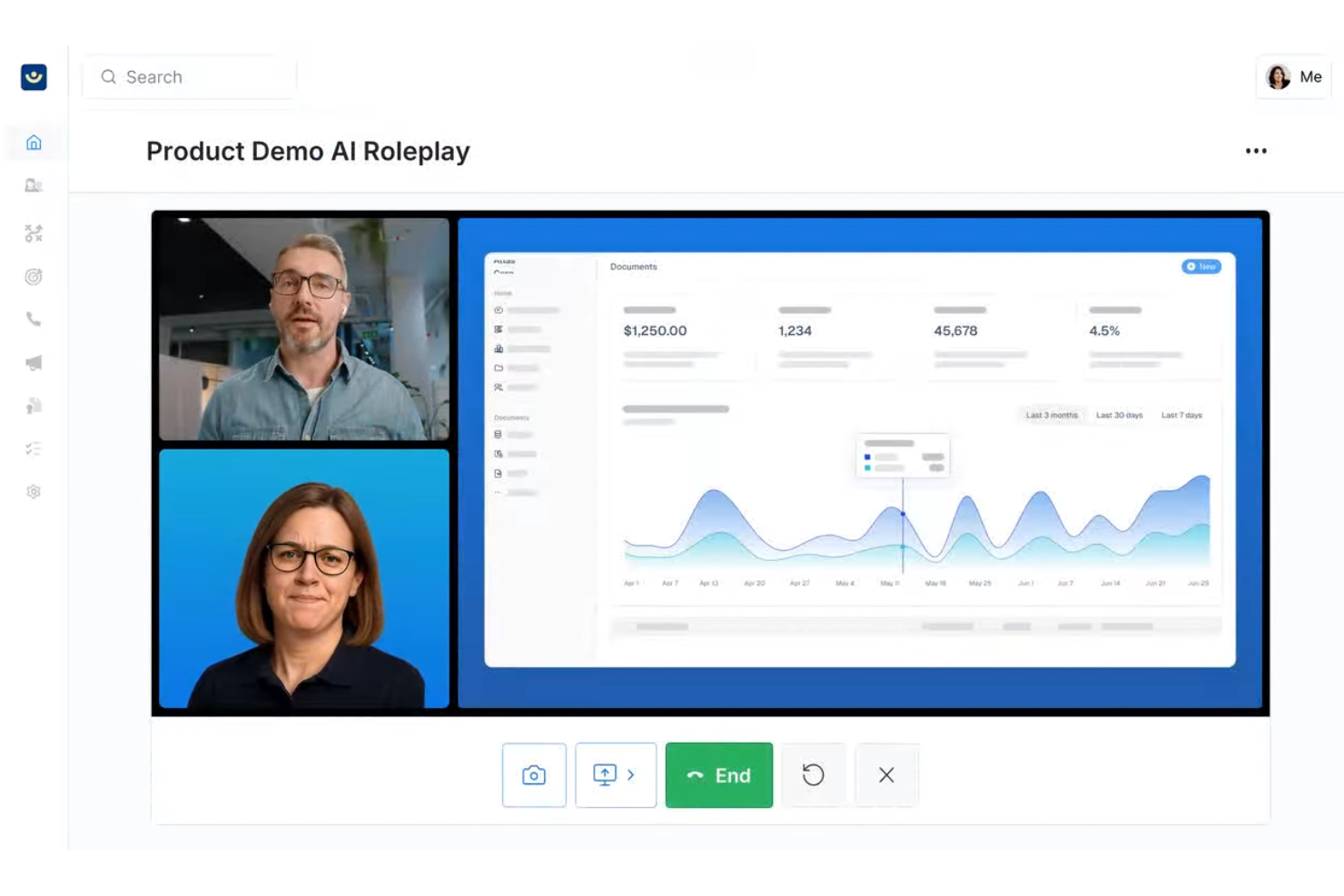
Exec uses AI to create immersive training simulations for organizations that want to help employees build practical skills through hands-on, scenario-based learning.
Who Is Exec Best For?
Exec is a good fit for L&D teams at mid-size to enterprise organizations that need to train employees on complex, real-world situations through practice-based learning.
Why I Picked Exec
I picked Exec as one of the best because of how closely its AI simulations mirror real-world conditions. The voice-based AI roleplay engine doesn't just run through scripted prompts—it responds naturally, raises objections, and adapts based on how the conversation unfolds. I especially like that you can configure AI characters with specific traits, industry context, and your company's actual product details, so practice sessions feel like the real thing rather than a generic exercise. The screen share feature also lets reps practice live product demos in front of an interactive AI audience that responds like actual stakeholders.
Exec Key Features
- AI scorecard: Automatically evaluates simulation performance against custom criteria and surfaces coaching insights for managers to review.
- Custom learning paths: Build structured training programs that sequence simulations and content modules based on role or skill level.
- Analytics dashboard: Track individual and team progress across simulations with data on completion rates and performance trends.
- Content library: Access a collection of pre-built simulation templates that teams can adapt for their specific training needs.
Exec Integrations
Integrations are available via an API.
Pros and Cons
Pros:
- Customizable scenarios align with specific business objectives.
- Provides instant feedback to reinforce learning and skill retention.
- Realistic AI roleplays enhance communication skills in high-pressure situations.
Cons:
- Initial setup and scenario design can be complex and time-consuming.
- Primarily optimized for English-speaking organizations, limiting global reach.

Best for structured employee training paths
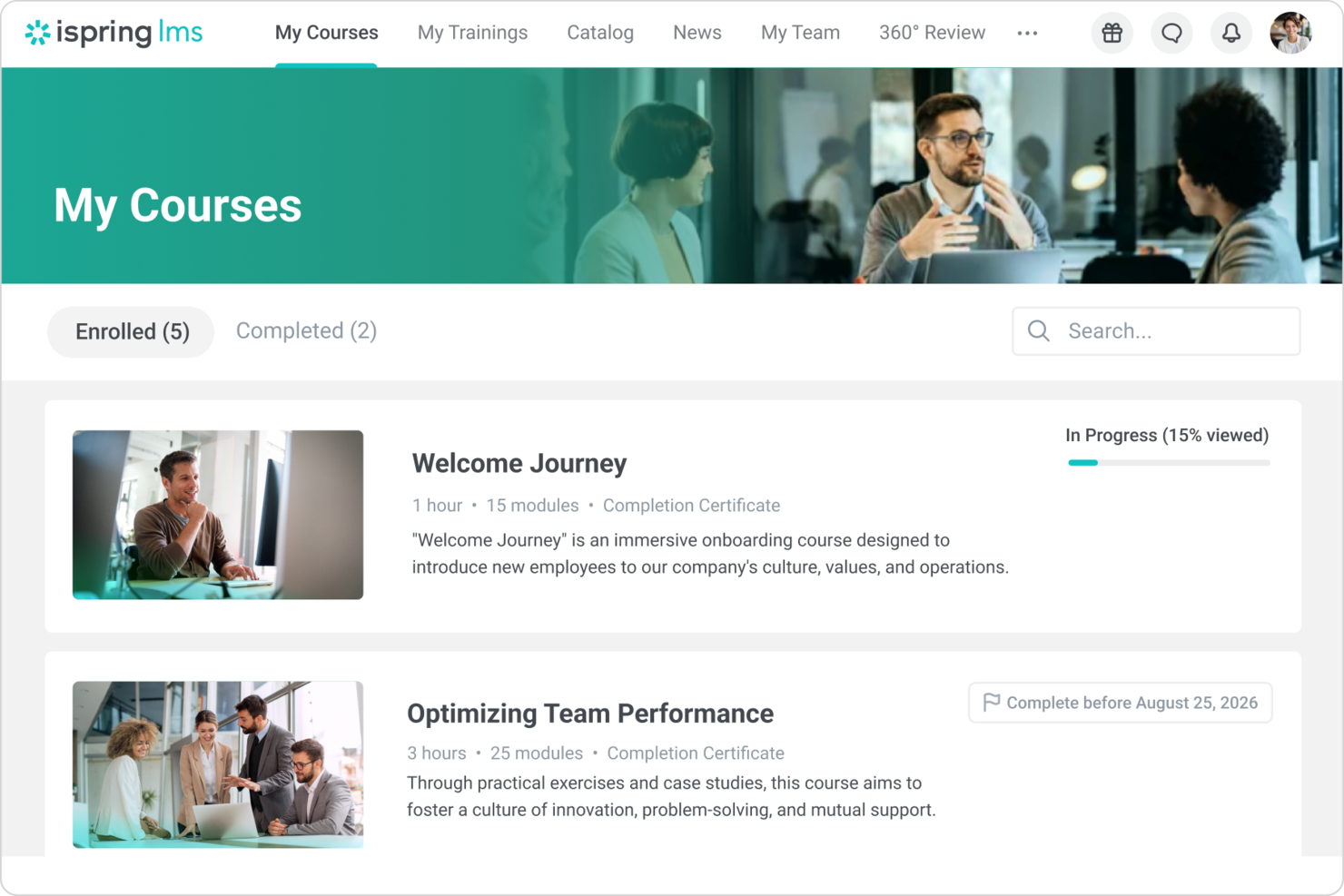
iSpring LMS is a cloud-based learning management system designed for HR teams and training managers who need to deliver, track, and manage employee development programs with built-in course authoring and detailed analytics.
Who Is iSpring LMS Best For?
iSpring LMS is a strong fit for mid-sized businesses and enterprises that need a dedicated platform for structured, scalable employee training programs.
Why I Picked iSpring LMS
iSpring LMS earns its spot on my shortlist because of how well it handles structured learning paths for employee training. I like that you can sequence courses, assign them by role or department, and set completion rules so learners move through content in a defined order. My team uses the built-in course authoring tool to build training directly in the platform, which keeps everything in one place rather than juggling separate tools. The auto-enrollment rules are especially useful—new hires get assigned the right training tracks automatically based on their job profile.
iSpring LMS Key Features
- AI-powered course authoring: Use a built-in AI assistant to generate course text, quiz questions, images, and course translations directly inside the platform.
- 360-degree review: Collect structured performance feedback from peers, managers, and direct reports to assess employee competencies and identify skill gaps.
- Gamification: Award learners points and badges and display progress on leaderboards to encourage course completion.
- Mobile app with offline access: Learners can complete training on iOS or Android without an internet connection, with progress syncing automatically when they reconnect.
iSpring LMS Integrations
Integrations include Salesforce, MS Azure, MS Exchange, BambooHR, Udemy, Go1, LinkedIn Learning, and other popular course libraries.
Pros and Cons
Pros:
- Strong compliance and progress reporting
- Automated enrollment reduces admin effort
- Clear role-based learning paths
Cons:
- No real-time skills benchmarking
- Limited advanced workflow customization
New Product Updates from iSpring LMS

iSpring LMS Adds Multiple Observations to OJT Sessions
iSpring LMS now lets managers log multiple observations within one OJT session, grouping visits and auto-generating summary stats like averages, criterion results, and comparisons. For more information, visit iSpring LMS's official site.

SkyPrep
Best for AI content creation
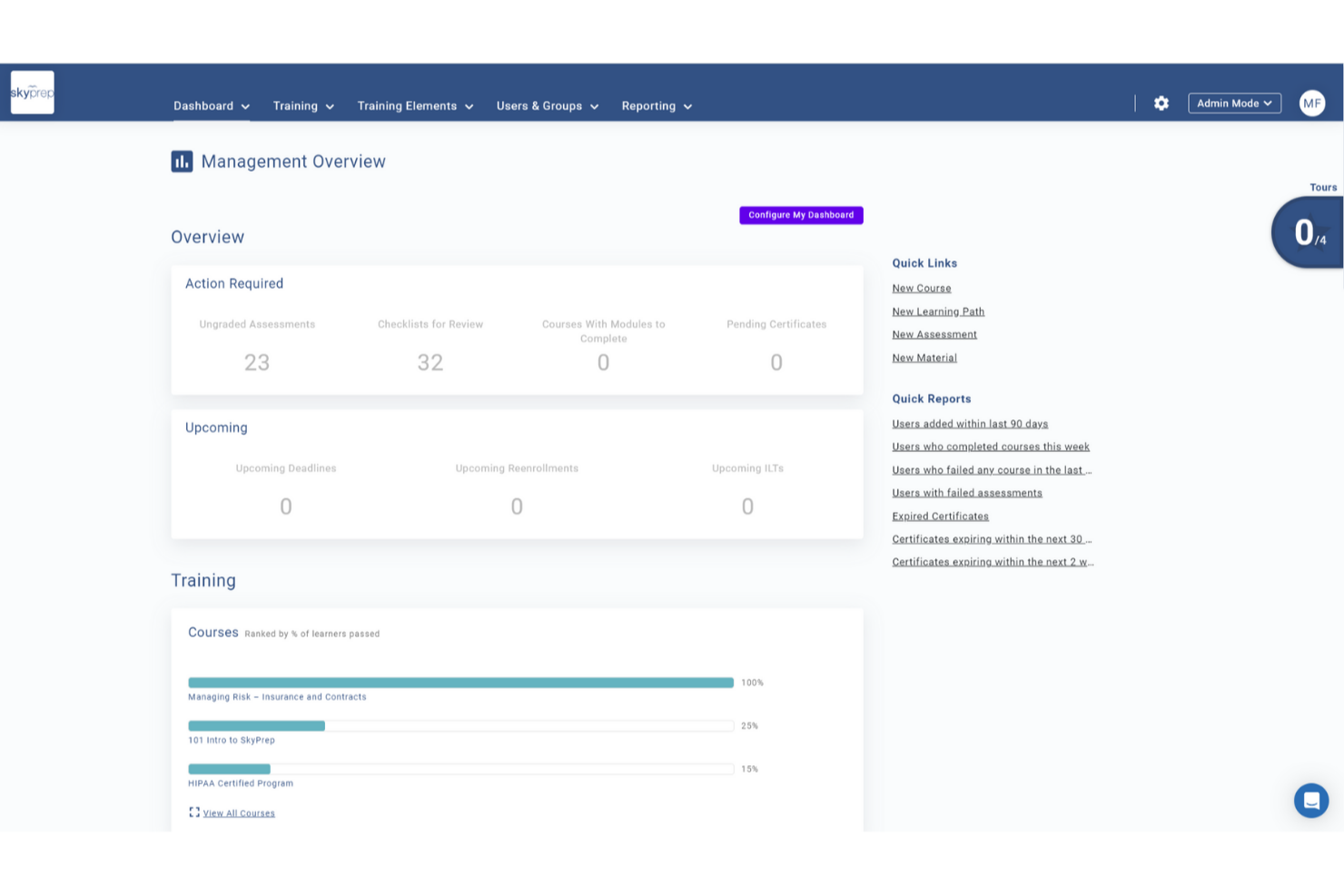
SkyPrep is a learning management platform designed for HR teams and training professionals who want to automate course creation, deliver engaging learning experiences, and track employee development with AI-powered tools.
Who Is SkyPrep Best For?
SkyPrep is a strong fit for mid-sized businesses and growing organizations that need a straightforward way to build, deliver, and manage employee training programs at scale.
Why I Picked SkyPrep
I picked SkyPrep as one of the best for AI content creation because it takes a genuinely different approach to course building. Instead of starting from a blank page, my team can upload existing materials and let SkyPrep's AI generate a full course outline with structured content blocks. From there, the Smart Convert feature lets us turn those content blocks into quizzes or flashcards without rebuilding anything from scratch. I also like the AI voiceover generation, which converts written course content into natural-sounding audio—useful when rolling out training to learners who absorb information better through listening than reading.
SkyPrep Key Features
- Gamification: Add points, badges, and leaderboards to courses to increase learner engagement and motivation.
- Automated course enrollment: Automatically assign courses to users based on roles, groups, or onboarding triggers.
- Custom reporting and analytics: Generate out-of-the-box reports on learner progress, course completion, and training impact.
- Multi-tenant LMS: Run separate training portals for different clients, departments, or brands from a single account.
SkyPrep Integrations
Integrations include ADP, Workday, BambooHR, Salesforce, HubSpot, Zoom, Microsoft Teams, Stripe, PayPal, and Okta.
Pros and Cons
Pros:
- Gamification increases learner participation
- AI content generation boosts engagement
- AI assessment builder saves time
Cons:
- Some integrations require manual setup
- Reporting depth limited for analytics

Best for AI-assisted course creation
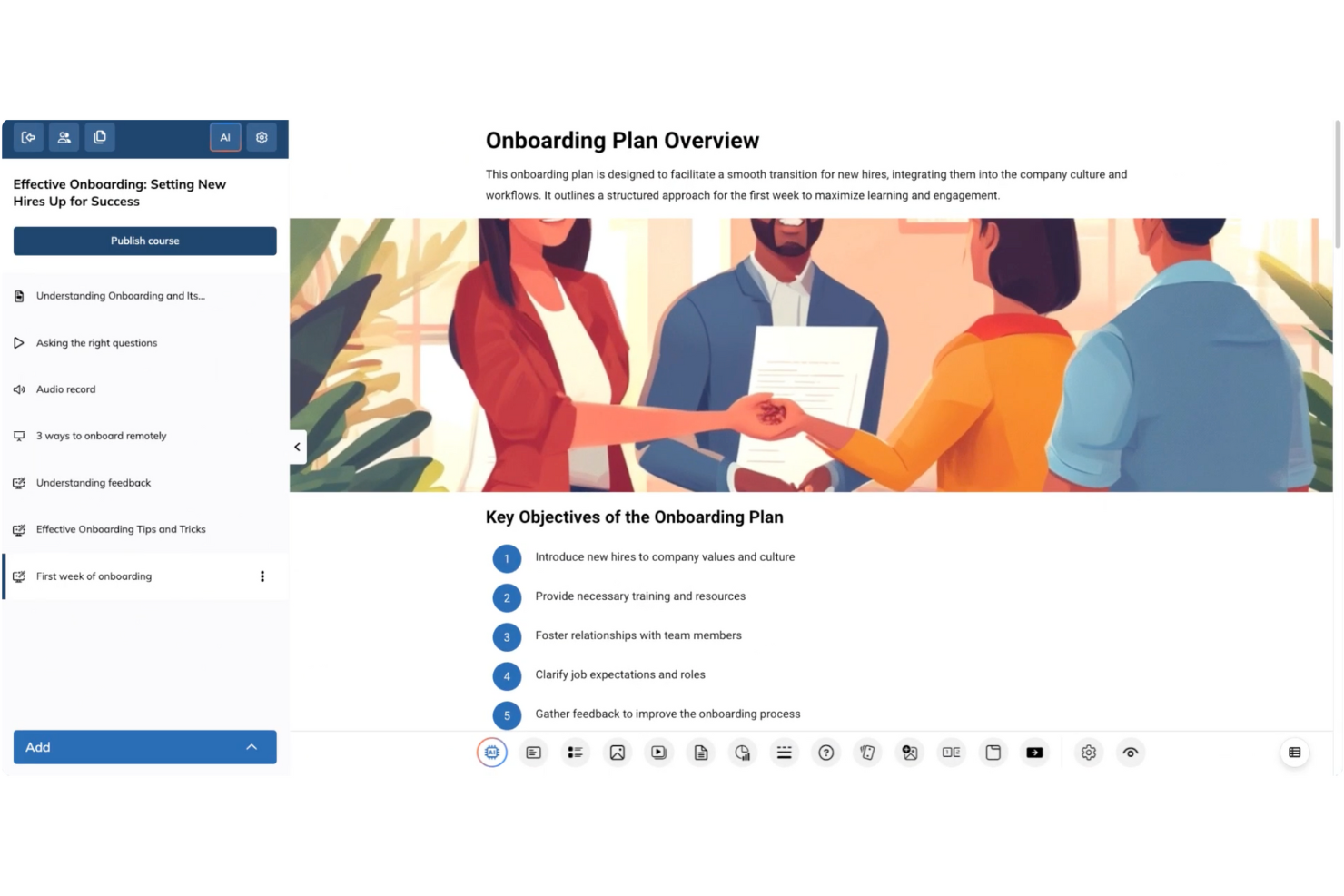
TalentLMS is a cloud-based learning management system for HR teams, trainers, and organizations that want to deliver engaging, scalable training programs with built-in automation and AI-driven features for content creation and learner management.
Who Is TalentLMS Best For?
TalentLMS is a strong fit for small to mid-sized businesses that need a straightforward platform to build, deliver, and manage employee training programs at scale.
Why I Picked TalentLMS
TalentLMS earns its spot as one of the best on my shortlist because of how useful its AI course creation tools are. I particularly like TalentCraft, the built-in AI content creator that turns a topic or idea into a full course—complete with flashcards, summaries, and visuals. The Content Companion feature also lets me refine existing material with AI suggestions to rewrite, shorten, or improve clarity without rebuilding from scratch. On top of that, the AI Test Creator generates assessments directly from course content, which reduces manual work when building out a full training program.
TalentLMS Key Features
- Branching learning paths: Build adaptive training sequences that route learners to different content based on their quiz results or progress.
- Automation rules: Set triggers to auto-enroll users, send reminders, or assign certifications based on specific learner actions or milestones.
- Built-in reporting and analytics: Track learner progress, course completion rates, and assessment scores from a centralized dashboard.
- Blended learning support: Combine self-paced online modules with instructor-led training sessions in a single course structure.
TalentLMS Integrations
Integrations include BambooHR, Salesforce, TalentHR, Sage People, ADP Workforce Now, Intercom, Zendesk Chat, Zoom, Microsoft Teams, and GoTo.
Pros and Cons
Pros:
- AI-assisted content suggestions help build courses faster
- Onboarding and training templates reduce setup time
- Gamification features increase learner engagement
Cons:
- Customization options might not meet all specific needs
- Advanced interactive course creation may require additional tools
New Product Updates from TalentLMS
TalentLMS Adds Learning Paths, AI Video, and Learner Experience Updates
TalentLMS introduced updates across learning management, content creation, and learner experience, including Learning Paths for Groups, AI video generation in TalentCraft, video bookmarking, and expanded administration tools. For more information, visit TalentLMS’s official site.

Absorb
Best intuitive interface
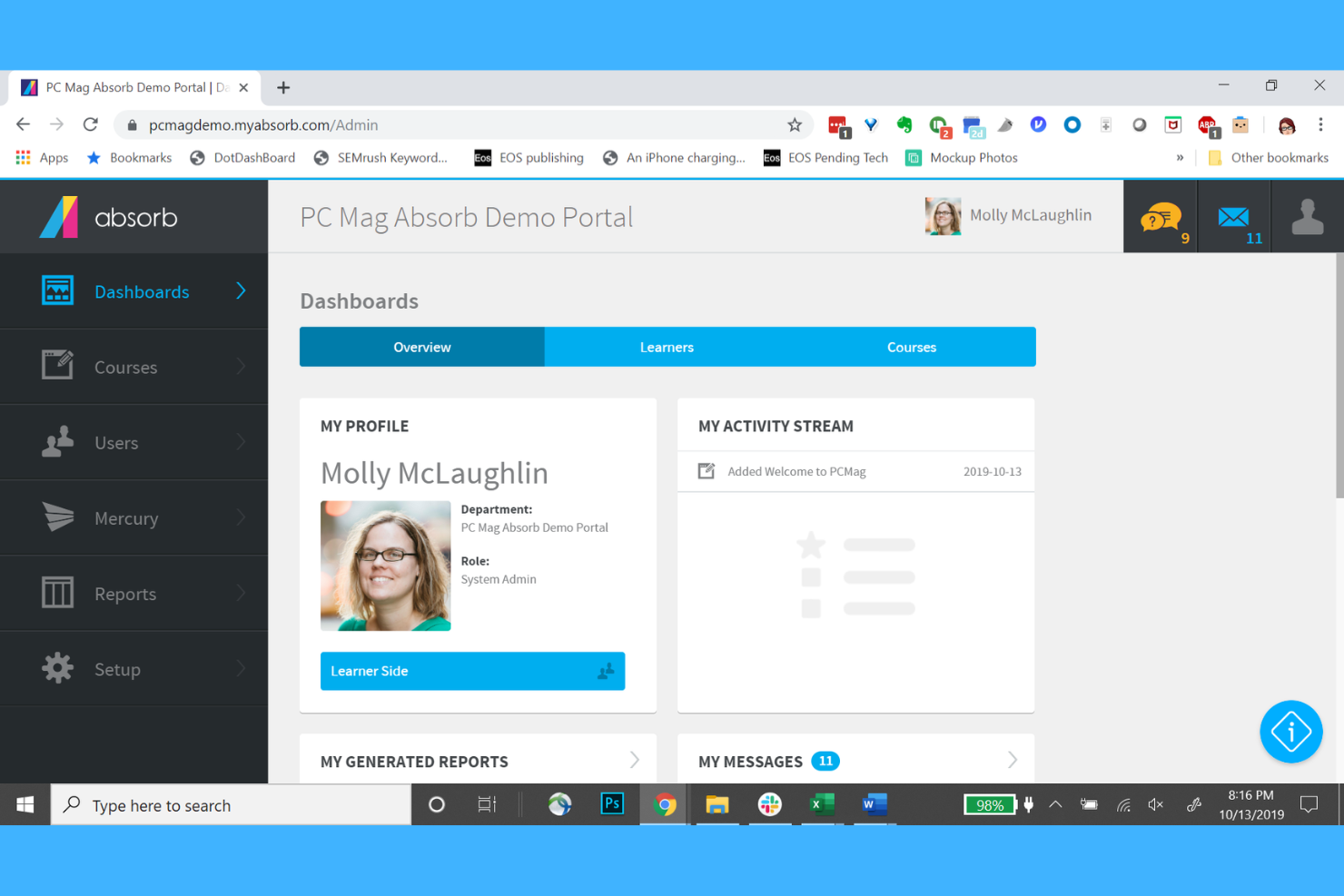
Absorb is a cloud-based learning management system designed for HR teams and organizations that want to deliver personalized, AI-powered training and development programs to employees at scale.
Who Is Absorb Best For?
Absorb is a good fit for mid-size to enterprise organizations with dedicated L&D or HR teams managing structured employee training programs.
Why I Picked Absorb
Absorb earns a spot on my shortlist thanks to one of the cleanest interfaces I've used in an LMS. The learner-facing experience is designed so that employees can find and launch courses without any hand-holding—search results are ranked by AI based on past behavior, so the most relevant content surfaces first. I also like Intelligent Assist, which lets admins type natural-language requests like "show me all users who didn't complete compliance training" and instantly pulls up a pre-populated report. For L&D teams managing large learner populations, this frictionless navigation on both sides of the platform makes a real operational difference.
Absorb Key Features
- AI-powered course recommendations: Automatically suggests relevant learning content to each learner based on their role, history, and development goals.
- Automated enrollment rules: Assigns courses to learners automatically based on criteria like job title, department, or onboarding status.
- Built-in content authoring: Create and edit training content directly within the platform without needing a separate authoring tool.
- Customizable learner portal: Brand and configure the learner-facing interface to match your organization's identity and training structure.
Absorb Integrations
Integrations include Salesforce, Zoom, Google Workspace, Microsoft Teams, Adobe Connect, Shopify, Stripe, PayPal, and Okta.
Pros and Cons
Pros:
- E-commerce capabilities
- Automated course enrollment
- Customizable branding options
Cons:
- Pricing not transparent
- Higher cost for small teams
New Product Updates from Absorb
Absorb Expands Instructor-Led Course Session Management
Absorb adds multi-class sessions, recurring classes, conflict indicators, and learner enrollment during setup for instructor-led courses. These updates give admins more control over scheduling and session management. For more information, visit Absorb’s official site.
 .
.
Best for interactive courses
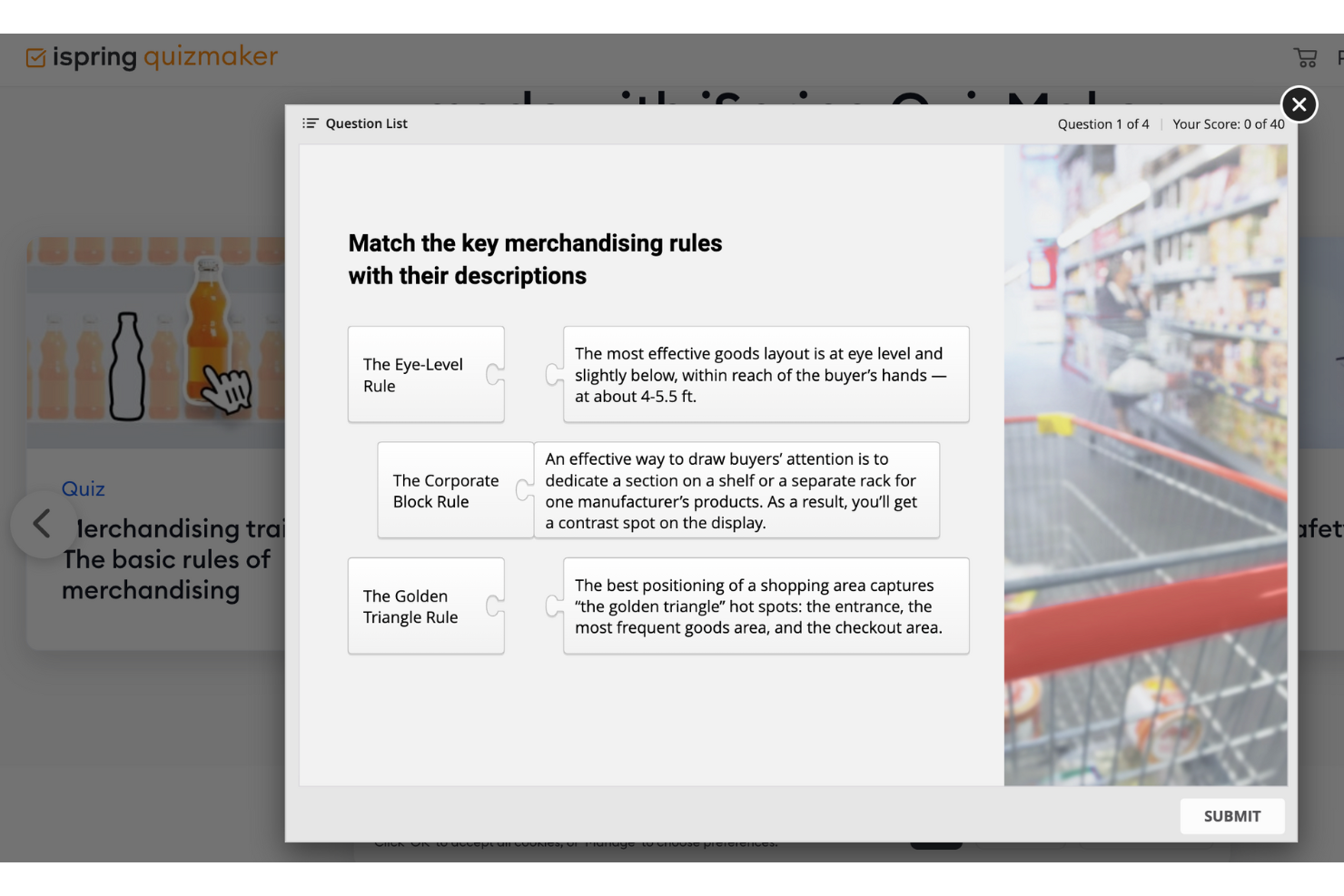
iSpring Suite is an e-learning authoring toolkit for HR teams, L&D professionals, and educators who want to create engaging training content, quizzes, and simulations that work across devices and integrate with most learning management systems.
Who Is iSpring Suite Best For?
iSpring Suite is a great fit for L&D teams and instructional designers at mid-sized to large organizations who need to build and deploy structured training programs at scale.
Why I Picked iSpring Suite
iSpring Suite is one of my top picks because I love how it turns existing PowerPoint slides into fully interactive training courses without requiring any e-learning development experience. The branched dialogue simulations are a standout for me—my team uses them to build realistic role-play scenarios for sales and compliance training, where learners navigate different conversation paths based on their choices. I also rely heavily on the QuizMaker tool, which supports 14 question types, including drag-and-drop and hotspot questions that go well beyond basic multiple-choice. The built-in AI Assistant generates outlines, quiz questions, and text edits directly inside the authoring environment.
iSpring Suite Key Features
- Screen recording and video editor: Capture on-screen workflows and edit training videos directly within the iSpring Suite environment.
- Content library: Access a built-in library of pre-built templates, characters, backgrounds, and icons to speed up course design.
- SCORM and xAPI publishing: Export finished courses in SCORM, xAPI, or AICC formats for compatibility with any major LMS.
- Narration and text-to-speech: Add voiceover narration to slides or generate AI-powered audio from written text without recording equipment.
iSpring Suite Integrations
Integrations include Moodle, Blackboard, Canvas, Brightspace, TalentLMS, LearnDash, Docebo, SAP Litmos, and Cornerstone OnDemand.
Pros and Cons
Pros:
- Includes dialogue simulations
- Supports multimedia content creation
- Converts PowerPoint to eLearning
Cons:
- Requires technical skills for complex tasks
- Limited customization options

Deel HR
Best for AI-generated training paths
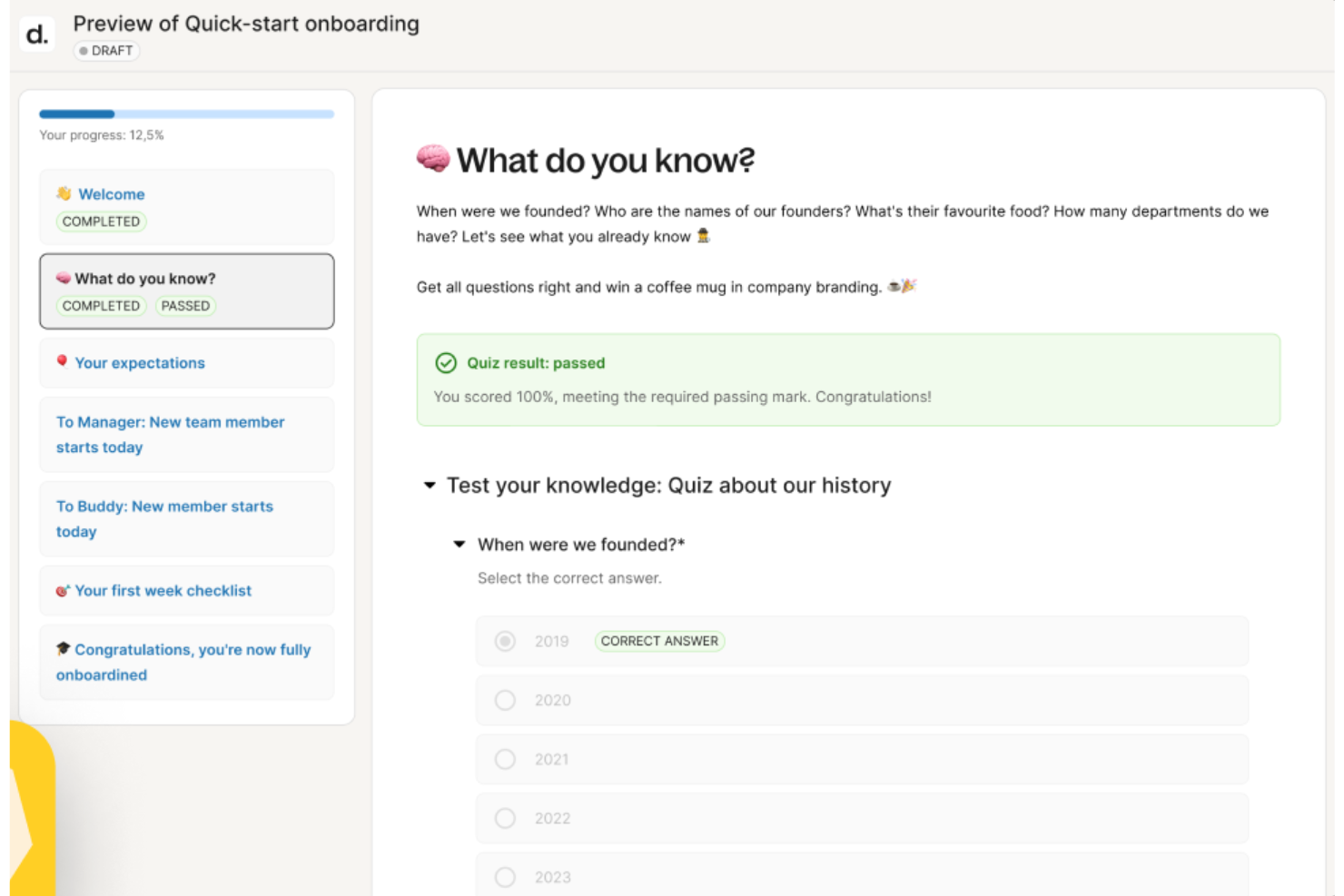
Deel HR gives HR teams and people leaders a platform to manage global talent, automate onboarding, and deliver personalized employee development using AI-driven tools that address modern training and upskilling needs.
Who Is Deel HR Best For?
Deel HR is a strong fit for mid-size to enterprise HR teams managing distributed or global workforces who need to centralize people operations and employee development in one place.
Why I Picked Deel HR
I picked Deel HR as one of the best because I love how its AI doesn't just sit in the background—it actively shapes how learning and development gets built. Through Deel Engage, the platform's built-in AI drafts competency libraries, training content, and feedback frameworks in minutes, so my team isn't starting from scratch every time we need to build a development path. I use this to generate role-specific learning content that reflects what our org needs, rather than relying on generic templates. The AI also ties directly into career progression frameworks, so when I'm building a training path for a specific role, it's informed by the job architecture already defined in the system.
Deel HR Key Features
- 360° performance review cycles: Run configurable review cycles that collect both anonymous and open feedback using quantitative and qualitative methods across your entire workforce.
- OKR and goal tracking: Define company, team, and individual OKRs with customizable cycles, real-time progress tracking, and the ability to adjust goals as priorities shift.
- Employee pulse surveys: Build and launch eNPS and pulse surveys to collect recurring feedback on development, career growth, and satisfaction, with results feeding into centralized analytics dashboards.
- Career progression frameworks: Define role expectations and advancement criteria that connect directly to employee development plans and inform how learning content gets assigned.
Deel HR Integrations
Integrations include FaceUp, Snowflake, DefensX, Microsoft Finance, Kintsugi, ReFresh OS, Revo.ai, Keeper, Human Interest, and Everyminute.
Pros and Cons
Pros:
- Supports ongoing learning through auto-assigned feedback surveys
- Links competencies to reviews for targeted development planning
- AI drafts training courses and career paths in minutes
Cons:
- Not built for external certification tracking or compliance training logs
- Lacks advanced LMS features for structured course delivery
New Product Updates from Deel HR

Deel Expands Stablecoin Wallet to 80+ Countries
Deel expands its Stablecoin Wallet to 80+ countries with dollar-backed balances and optional rewards. This gives eligible contractors more ways to hold and manage earnings inside Deel. For more information, visit Deel’s official site.
 .
.
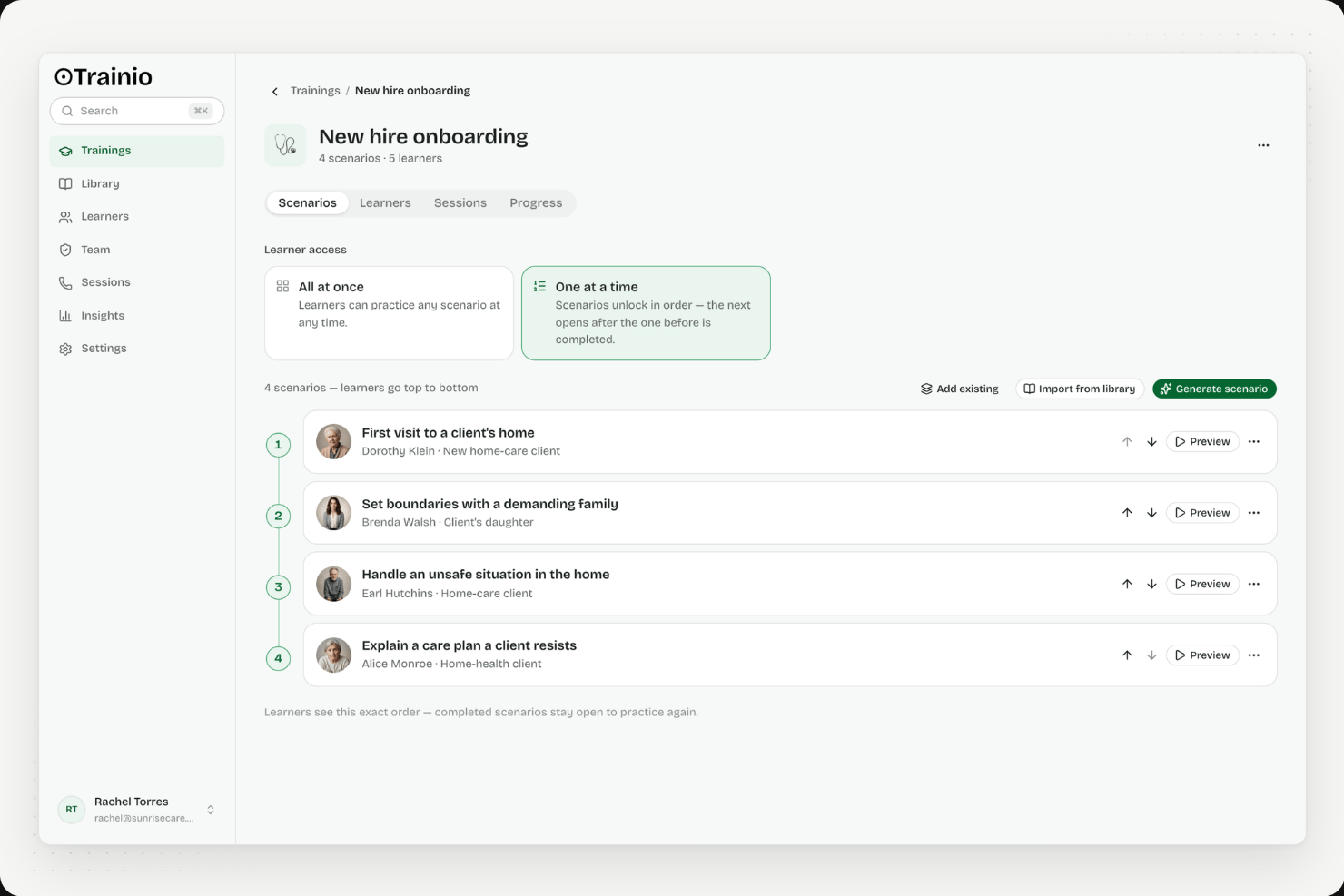
Trainio is a voice-first AI roleplay platform purpose-built for healthcare, offering a library of 1,000+ communication scenarios, custom scenario creation from SOPs, rubric-based session scoring, and a built-in knowledge hub for staff reference.
Who Is Trainio Best For?
Trainio is a strong fit for healthcare organizations that need scalable, voice-based communication practice for patient-facing staff across clinical and care settings.
Why I Picked Trainio
Trainio earns its spot on my list because it's the only AI training tool I've found purpose-built specifically for healthcare communication practice. I love that its voice-first roleplay simulates real patient and family interactions, with AI personas that actually escalate when a staff member responds poorly and de-escalate when they get it right. Its 1,000+ ready-made scenarios span settings like behavioral health, hospice, and dental, so a memory care team can practice de-escalation on day one without custom setup.
Trainio Key Features
- Knowledge Hub: A built-in repository where staff can store and search SOPs, protocols, call scripts, and PDFs, or query an AI assistant grounded exclusively in your uploaded documents.
- Rubric-based session scoring: Every roleplay session is evaluated against a consistent rubric, producing a pass/fail score, full transcript, and itemized AI feedback delivered instantly after each session.
- Manager readiness dashboard: Tracks scores, session history, and progress by individual, team, and site, with exportable reports designed to meet CARF and Joint Commission audit requirements.
- Role-based scenario assignment: Administrators assign scenario sets by role, team, or location, with automated enrollment and reminders so staff are practice-ready from day one.
Trainio Integrations
Trainio documents integrations with Slack, Zoom, Google Calendar, and Zapier. Enterprise adds SSO, HRIS integration, and API/MCP access for custom connections; SCORM import is also supported.
Pros and Cons
Pros:
- Scenario library tailored for healthcare communication
- Rubric-based feedback ensures consistent session scoring
- Voice-based AI roleplay simulates real interactions
Cons:
- No multimedia or video content creation
- Does not generate traditional eLearning courses

Continu
Best for dedicated L&D teams
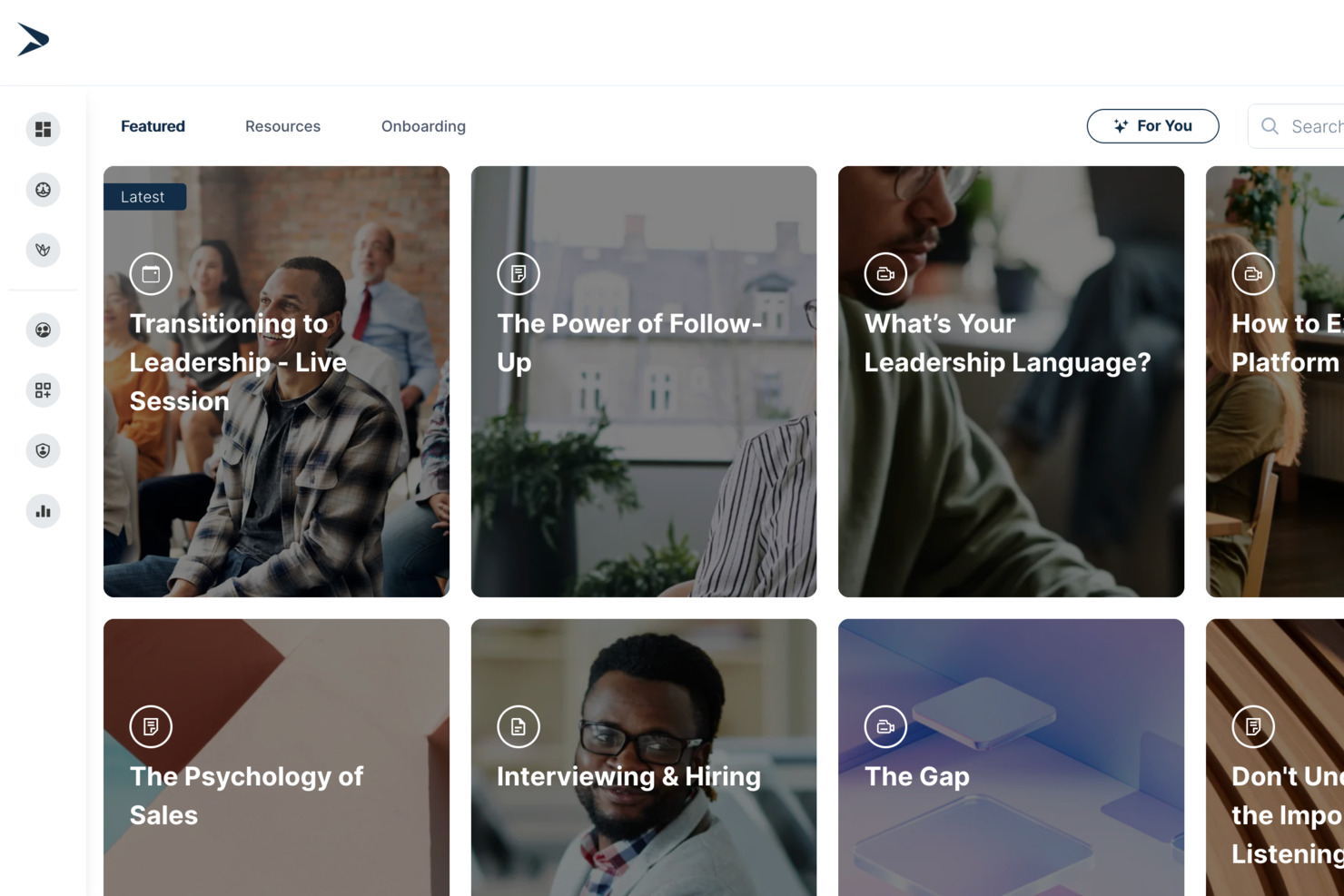
Continu is an AI-powered learning management system designed for teams that need a centralized hub for content creation, training delivery, and employee development.
Who Is Continu Best For?
Continu is a strong fit for mid-to-large organizations with dedicated L&D teams who need a scalable platform for employee training and development.
Why I Picked Continu
I've included Continu in my top picks because its native integrations with tools like Slack, Salesforce, and Google Workspace let my team surface learning content directly inside the apps they already use daily. I also like how Continu connects with HRIS platforms to auto-enroll learners based on role or department changes—no manual assignment needed.
Continu Key Features
- AI-powered content recommendations: Continu surfaces personalized learning content for each learner based on their role, activity, and progress.
- Authoring tools: Build courses, assessments, and learning paths directly inside the platform without needing a separate content creation tool.
- Learning paths: Group related courses into structured sequences that guide learners through a topic step by step.
- Reporting dashboards: Track completion rates, assessment scores, and engagement data across teams and departments.
Continu Integrations
Continu offers native integrations with Slack, Salesforce, Google Workspace, Okta, Workday, and BambooHR. It also provides an API for custom integrations.
Pros and Cons
Pros:
- Automated assignment for role-specific AI modules
- Easy integration with HRIS like Workday
- Prebuilt content library for AI onboarding
Cons:
- Admin dashboard lacks granular access controls
- Limited gamification for AI training engagement
New Product Updates from Continu
Continu Adds Smarter Content Management
Continu adds Intelligent Tagging and Descriptions and richer content details to improve how learning content is organized and maintained. These updates reduce manual work and give teams more consistent, detailed content records. For more information, visit Continu’s official site.
 .
.
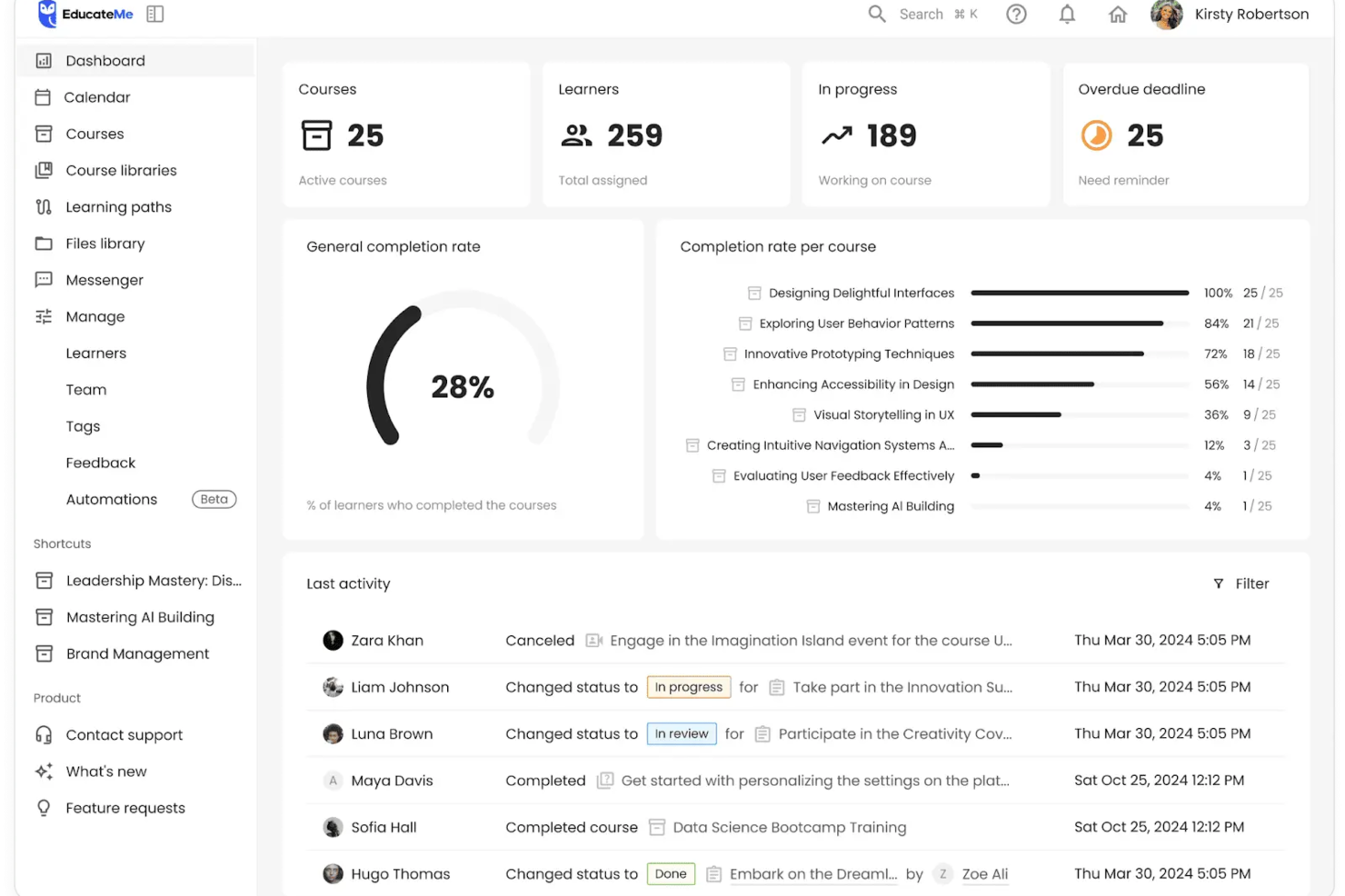
EducateMe LMS is a learning management platform designed for HR teams and training professionals who want to deliver interactive, AI-driven training experiences that adapt to each learner’s needs.
Who Is EducateMe LMS Best For?
EducateMe LMS is a strong fit for mid-sized companies and growing teams that need a structured, scalable way to run employee training and development programs.
Why I Picked EducateMe LMS
EducateMe LMS earns its spot on my shortlist because of how well its AI roleplay coach handles scenario-based practice at scale. I like that you can generate a full roleplay scenario from a single prompt—whether that's a sales call, a difficult performance conversation, or a compliance scenario—and then layer in branching logic and guardrails to keep the AI on topic. In practice, that means my team can run through realistic, high-stakes conversations without needing a live facilitator every time. The rubric-based feedback is also a real differentiator: learners get consistent, specific coaching after each session rather than vague impressions.
EducateMe LMS Key Features
- AI course creation assistant: Generate full course outlines, modules, and quiz questions from a prompt, with the AI available throughout the build process.
- Learning paths: Sequence courses into structured journeys that guide learners through topics in a set order.
- Automation: Set up automatic enrollments, reminders, and course assignments to reduce manual admin work.
- Live event hosting: Run live training sessions with Zoom integration, including automatic session recording and participant management.
EducateMe LMS Integrations
Integrations include Zoom, Stripe, Slack, IBM, and Zapier; an API is available for custom connections.
Pros and Cons
Pros:
- Strong performance analytics dashboard
- Automated AI content creation
- Built-in AI roleplay coaching
Cons:
- AI tools require onboarding
- Advanced features require setup
Other AI Tools for Training and Development
Here are some additional AI tools for training and development options that didn’t make it onto my shortlist, but are still worth checking out:
- Factorial
For integrating with HR analytics and automation
- Elai
For AI video creation
- Valamis
For workforce development
- Docebo
For enterprise scalability
- Paradiso LMS
For multilingual support
- TalentCards
For mobile training
- Coursebox AI
For course management
- Arist
For text-based learning
- Fuse Universal
For continuous learning
- 5Mins.ai
For microlearning


How I Evaluate AI Tools for Training Development
I only include tools that use AI to meaningfully speed up course creation or personalize learning—not platforms that slap an AI label on basic authoring features. I split my evaluation into core functionality every tool must deliver to qualify and differentiating factors that separate the best fit from the rest.
Core Functionality (Table Stakes For This List)
When I'm selecting tools for my list, I rank each one on a scale from 0 (does not offer the functionality) to 5 (excels in this area) for each core functionality listed below. Then, I calculate the tool's total score into a percentage. Each tool needs to achieve a minimum total score of 65% to be considered for inclusion.
- AI-Powered Content Generation: I evaluate whether a tool can turn source materials—like policy PDFs, onboarding docs, or SME recordings—into structured courses without heavy manual rework.
- AI Assessment Creation: Good tools auto-generate quizzes and knowledge checks from course content, so I look at question variety, difficulty options, and answer key accuracy.
- Personalized Learning Paths: I check whether the AI adapts recommendations based on a learner's role, skill level, or progress rather than just serving static, one-size-fits-all sequences.
- AI Media Conversion: Converting a written SOP into a video walkthrough with AI voiceover or avatars saves L&D teams hours, so I look at output quality and format options.
- Skill Gap Analytics: The AI should surface meaningful patterns—like which teams are falling behind on compliance modules—instead of just showing completion percentages.
- LMS and HRIS Integration: I check for native connectors with platforms like Workday, SAP SuccessFactors, Cornerstone, or Docebo, plus SCORM/xAPI export support.
Once I have a list of tools that meet the criteria, I consider what sets each platform apart.
Differentiating Factors (What Sets Vendors Apart)
Here's how I compare and contrast different vendors:
Standout Features
Multilingual AI translation is a major differentiator for distributed teams—I evaluate whether a tool can localize compliance training across regions without manual re-authoring. AI roleplay simulations also stand out, especially for manager development or customer-facing roles where learners practice real conversations with AI characters. I look at content refresh capabilities too, since the best platforms flag outdated material and suggest updates automatically instead of forcing L&D teams into quarterly manual audits.
Beyond Features
Data privacy matters more here than in typical L&D tools because AI platforms process employee performance data through third-party LLMs. I check whether vendors disclose their AI providers and offer controls over data retention. Speed-to-value is another priority—I evaluate how quickly an L&D team can go from uploading a policy document to deploying a finished course. For regulated industries like healthcare or finance, I also look at audit trail depth, version control, and approval workflows for AI-generated content.
How to Choose AI Tools for Training and Development
It’s easy to get bogged down in long feature lists and complex pricing structures. To help you stay focused as you work through your unique software selection process, here’s a checklist of factors to keep in mind:
| Factor | What to Consider |
| Scalability | Will the tool grow with your organization? Consider the number of users it can support and if it can handle increased data volume as your training needs expand. |
| Integrations | Does the tool work with your existing systems? Check for compatibility with your HR software, communication tools, and other platforms to ensure smooth workflows. |
| Customizability | Can you tailor the tool to fit your specific needs? Look for options to adjust branding, course content, and user roles without needing extensive technical knowledge. |
| Ease of use | Is the interface user-friendly? Ensure your team can navigate the tool easily without needing constant support, which can save time and reduce frustration. |
| Implementation and onboarding | How long does it take to get started? Evaluate the setup process, availability of training resources, and support during the transition to ensure a smooth adoption. |
| Cost | What’s the total cost of ownership? Consider subscription fees, hidden costs, and the ROI you expect. Compare pricing plans to find one that fits your budget. |
| Security safeguards | How does the tool protect your data? Look for encryption, access controls, and compliance with data protection regulations to keep your information secure. |
| Support availability | What support options are available? Check for 24/7 support, response times, and the quality of assistance offered to ensure you can get help when needed. |
What Are AI Training and Development Tools?
AI training and development tools are software solutions that use artificial intelligence to improve learning and skill-building processes. These tools are typically used by HR professionals, trainers, and educators to deliver personalized and efficient training programs. Automated content delivery, adaptive learning paths, and real-time analytics help with tailoring training to individual needs and tracking progress. Overall, these tools make training more effective and engaging for users.
Features of AI Training and Development Tools
When selecting AI-powered training and development tools, keep an eye out for the following key features:
- Adaptive learning paths: Adjust content to fit individual learner needs, ensuring personalized training experiences.
- Automated content delivery: Schedules and delivers training materials automatically, saving time and reducing manual effort.
- Real-time analytics: Provides insights into learner progress and engagement, helping you make data-driven decisions.
- Gamification elements: Use points and badges to motivate learners and increase engagement.
- Multimedia support: Allows incorporation of videos, images, and audio to enrich learning content.
- Virtual reality modules: Offer immersive learning experiences by simulating real-world scenarios.
- Customizable course templates: Speed up course creation by providing ready-made structures that can be tailored to your needs.
- Translation management: Facilitates multilingual course offerings, making training accessible to a global workforce.
- Integration capabilities: Ensures compatibility with existing systems, enabling data flow and workflow efficiency.
- Security safeguards: Protects sensitive data through encryption and access controls, ensuring compliance with privacy regulations.
Benefits of AI in Training and Development Tools
Implementing AI tools for training and development provides several benefits for your team and your business. Here are a few you can look forward to:
- Personalized learning experiences: AI tailors training to each learner's needs, increasing engagement and retention.
- Time efficiency: Automated content delivery reduces the workload on trainers, allowing them to focus on more strategic tasks.
- Increased engagement: Gamification elements and multimedia support make learning interactive and enjoyable.
- Improved decision-making: Real-time analytics offer insights that help you refine training programs for better outcomes.
- Global accessibility: Translation management makes training materials available in multiple languages, reaching a wider audience.
- Cost-effectiveness: By optimizing training processes and outcomes, AI tools can lead to cost savings over time.
- Improved security: With security safeguards in place, your data remains protected and compliant with regulations.
Costs and Pricing of AI Tools for Training and Development
Selecting AI tools for training and development requires an understanding of the various pricing models and plans available. Costs vary based on features, team size, add-ons, and more. The table below summarizes common plans, their average prices, and typical features included in AI tools for training and development solutions:
Plan Comparison Table for AI Tools for Training and Development
| Plan Type | Average Price | Common Features |
| Free Plan | $0 | Basic course creation, limited user access, and community support. |
| Personal Plan | $10-$100/user/month | Standard course creation, basic reporting, and email support. |
| Business Plan | $75-$720/user/month | Advanced analytics, integrations with other tools, and priority support. |
| Enterprise Plan | $100-$1290/user/month | Customizable features, dedicated account manager, and full API access. |
AI Tools for Training and Development FAQs
Here are some answers to common questions about AI tools for training and development:
How can AI be used in training and development?
AI can track learner progress and provide insights that help refine training strategies. By leveraging AI-generated data, you can identify performance trends and recommend necessary training improvements. This ensures your team receives relevant and timely training to improve their skills.
What is the 30% rule for AI?
The 30% rule suggests balancing AI and human input, where AI handles about 70% of a task, and humans manage the remaining 30%. This approach ensures efficiency while maintaining human oversight and creativity in tasks, especially in training and development environments.
How to use AI in training courses?
AI can forecast skill gaps and training needs using predictive analytics. By analyzing performance and learning habits, AI recommends relevant training programs. This proactive approach helps your organization upskill its workforce, keeping it competitive in the industry.
How to use AI tools for development?
Consider the problems you’re solving and how AI can make them more efficient. AI can automate repetitive tasks, analyze large datasets, and make predictions. Experiment with different AI tools to find those that best fit your development needs and workflow.
What are the benefits of using AI in training?
AI personalizes learning experiences, making them more engaging and effective. It automates administrative tasks, freeing up time for trainers. AI also offers real-time analytics, providing insights into training effectiveness and helping you make data-driven decisions to improve outcomes.
How do AI tools improve learner engagement?
AI tools use features like gamification, multimedia support, and adaptive learning paths to boost engagement. These elements create interactive and personalized learning experiences that keep learners motivated and invested in their training journey.