

10 Best AI Tools Reviewed in 2026

10 Best AI Tools Shortlist


AI is no longer a nice-to-have. It’s becoming a core part of how teams innovate, make decisions, and stay competitive. I’ve been testing and reviewing modern software, and I’ve seen which AI tools truly make an impact and which ones fall short.
This article explores the best AI tools across categories like writing, automation, analytics, and collaboration, giving you a clear look at what’s available and which tools are worth adopting. Let’s take a look at the AI capabilities that can help you stay ahead.
Why Trust Our Software Recommendations
Our team has been testing and reviewing software since 2012. As HR experts ourselves, we know how difficult—and important—it is to choose the right software.
For this guide, we evaluated tools using hands-on testing and independent research, scoring tools using our selection criteria. We also draw on insights from industry thought leaders and practicing HR experts.
Our reviews reflect our human editorial judgment, not a sales pitch.
Expert reviewers:
AI Tools Comparison Table
This comparison table summarizes pricing details for my top AI tools selections:
| Tool | Best For | Trial Info | Price | ||
|---|---|---|---|---|---|
| 1 | Best for AI-powered global HR and payroll | Free demo available | From $599/user/month | Website | |
| 2 | Best for AI-powered project risk identification | Free plan + 14-day free trial available | From $9/user/month (billed annually) | Website | |
| 3 | Best for AI knowledge discovery | Free demo available | Pricing upon request | Website | |
| 4 | Best for end-to-end AI recruitment automation | Free demo available | Pricing upon request | Website | |
| 5 | Best for AI governance policy automation | Free demo available | Pricing upon request | Website | |
| 6 | Best with real-time data integrations | 7-day free trial + free plan + free demo available | From $32/month (billed annually) | Website | |
| 7 | Best for AI-based human-like, unscripted answers | Free plan available; 7-day free trial | From $24.17/month (billed annually) | Website | |
| 8 | Best for office document assistance | Free plan available | From $21/user/month (billed annually) | Website | |
| 9 | Best for integrating AI into creative workflows | Free plan available | From $9.99/month | Website | |
| 10 | Best for video interview AI | Free demo available | Pricing upon request | Website |


Best AI Tools Review
Below are my detailed summaries of the best AI tools that made it onto my shortlist. My reviews offer a detailed look at the key features, pros & cons, integrations, and ideal use cases of each tool to help you find the best one for you.

Deel HR
Best for AI-powered global HR and payroll
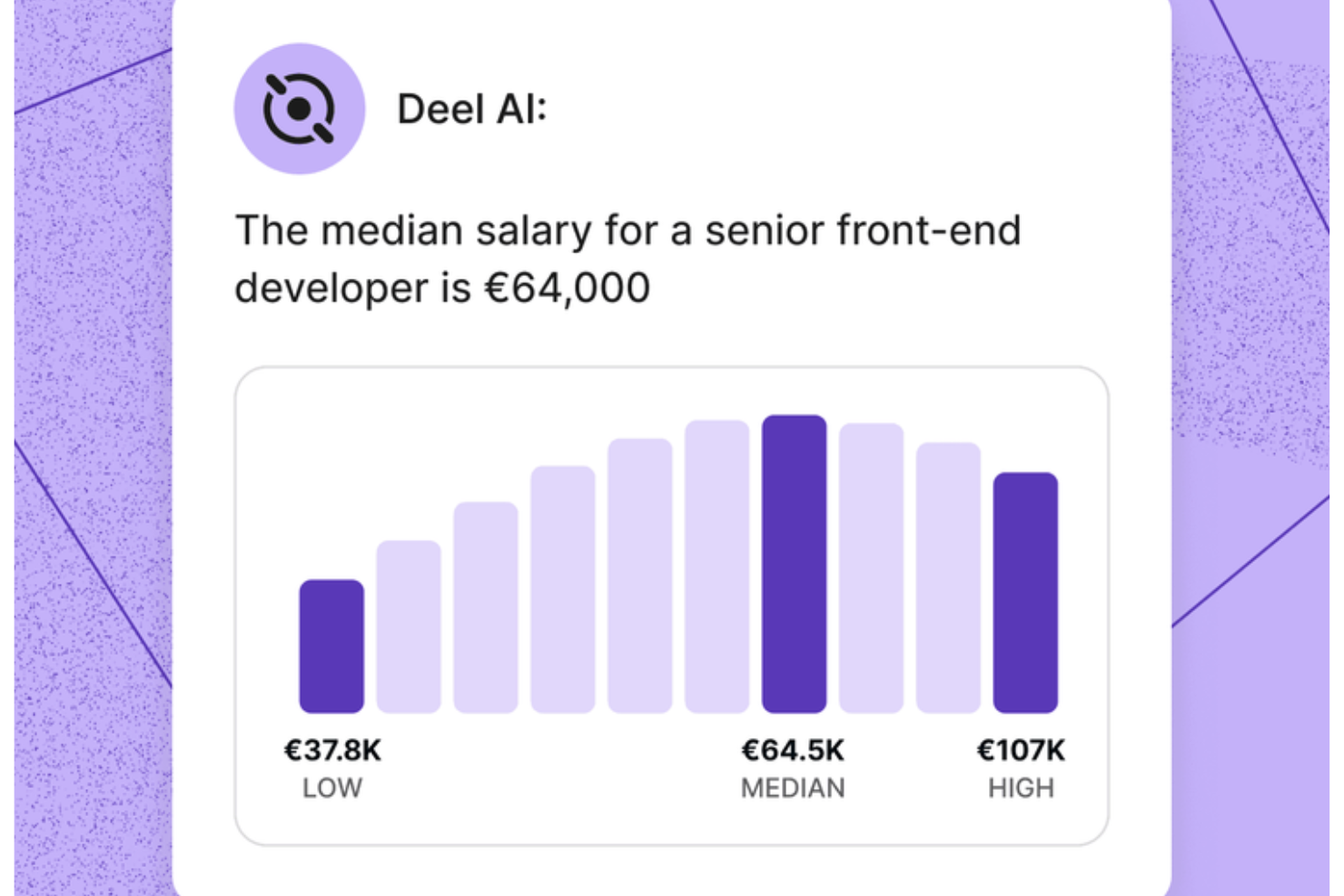
Your HR team gets an always-available expert when you use Deel AI, giving you instant clarity on workforce questions and global compliance without slowing down your workflows. If you manage a distributed or fast-growing team, the tool helps you navigate HR complexity by combining your internal data with guidance from experts across 150+ countries.
Why I Picked Deel
I picked Deel because it gives you an AI tool that responds with actionable HR and legal guidance grounded in your actual workforce data. The contextual AI layer recognizes where you are in the platform and surfaces summaries, key details, or compliance considerations without extra searching. I also appreciate that the tool draws from Deel’s globally vetted Knowledge Hub, allowing you to ask about payroll, regulations, policies, or team insights and get immediate answers. For teams that want an AI tool that can handle domain-specific HR and global compliance questions with reliable accuracy, this stands out.
Deel Key Features
In addition to the AI guidance I mentioned above, Deel offers several other key features:
- Automated Payroll Processing: This feature allows your team to manage payroll across multiple countries with automated calculations for salaries and taxes.
- Localized Contract Generation: You can create contracts tailored to local laws, ensuring compliance with regional employment standards.
- Employee Self-Service Portals: Employees can access their payroll information and manage their personal details, enhancing transparency and engagement.
- Contractor Onboarding: Deel provides customizable onboarding workflows, streamlining the hiring process and ensuring compliance with local regulations.
Deel Integrations
Deel integrates with popular platforms including QuickBooks, Xero, Greenhouse, BambooHR, NetSuite, Workday, Gusto, Lever, Slack, and SAP SuccessFactors.
Pros and Cons
Pros:
- AI answers talent and workforce questions using expert-sourced data
- Surfaces org insights and summaries directly from your team data
- Delivers guidance across 150+ country employment contexts
Cons:
- Heavy dependence on proprietary Knowledge Hub for accuracy
- AI guidance may require human review for complex legal scenarios
New Product Updates from Deel HR

Deel Expands Stablecoin Wallet to 80+ Countries
Deel expands its Stablecoin Wallet to 80+ countries with dollar-backed balances and optional rewards. This gives eligible contractors more ways to hold and manage earnings inside Deel. For more information, visit Deel’s official site.
 .
.
Best for AI-powered project risk identification
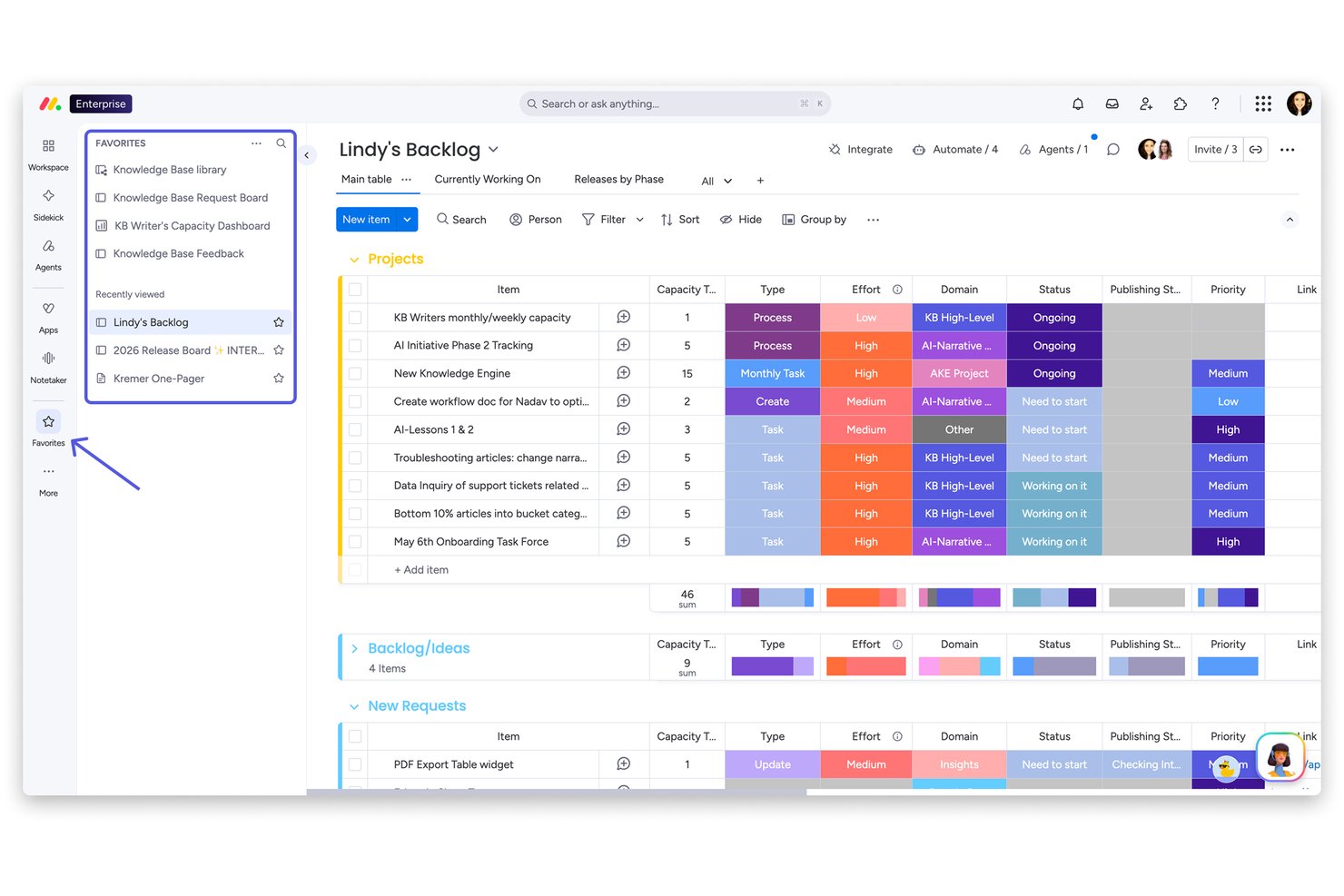
monday AI Workspace is an AI-native work management platform that embeds AI agents, workflow automation, and predictive project analysis across task management, portfolio tracking, and team collaboration.
Who Is monday AI Workspace Best For?
It's a strong fit for mid-size to enterprise teams managing multiple projects simultaneously who need portfolio-level visibility and proactive risk monitoring.
Why I Picked monday AI Workspace
I picked monday AI Workspace as one of the best because its Portfolio Risk Insights feature does something genuinely different: the AI scans every linked project board daily and generates a prioritized risk list, ranked by severity. When a risk surfaces, I can notify the project owner directly from the view, and the AI pre-fills an update summarizing the issue with links to the relevant tasks. The overview bar also tracks risk trends across the whole portfolio at a glance.
monday AI Workspace Key Features
- AI workflow builder: Build and customize automated processes using AI logic blocks and plain language prompts.
- AI-powered data columns: Add smart columns to boards that automatically summarize, analyze, or extract text from project data.
- Sidekick AI assistant: Get in-app AI answers, task suggestions, and board setup tips directly from a conversational assistant.
- Native integrations marketplace: Connect with tools like Slack, HubSpot, and Google Drive using pre-built, instantly deployable integrations.
monday AI Workspace Integrations
monday AI Workspace offers native integrations with Slack, Salesforce, HubSpot, Google Drive, Zendesk, GitHub, and Active Directory. It also supports Zapier and provides an API for custom integrations.
Pros and Cons
Pros:
- Portfolio view surfaces cross-project issues
- Multiple AI agents assist task management
- AI proactively flags at-risk projects
Cons:
- Lacks AI-powered talent matching capabilities
- No HR-specific AI analytics features
New Product Updates from monday AI Workspace
monday AI Workspace Adds Human Approval Routing
monday AI Workspace adds a human-in-the-loop approval block to AI Workflows, sending approval requests and routing workflow paths based on responses. For more information, visit monday AI Workspace's official site.
Coveo
Best for AI knowledge discovery
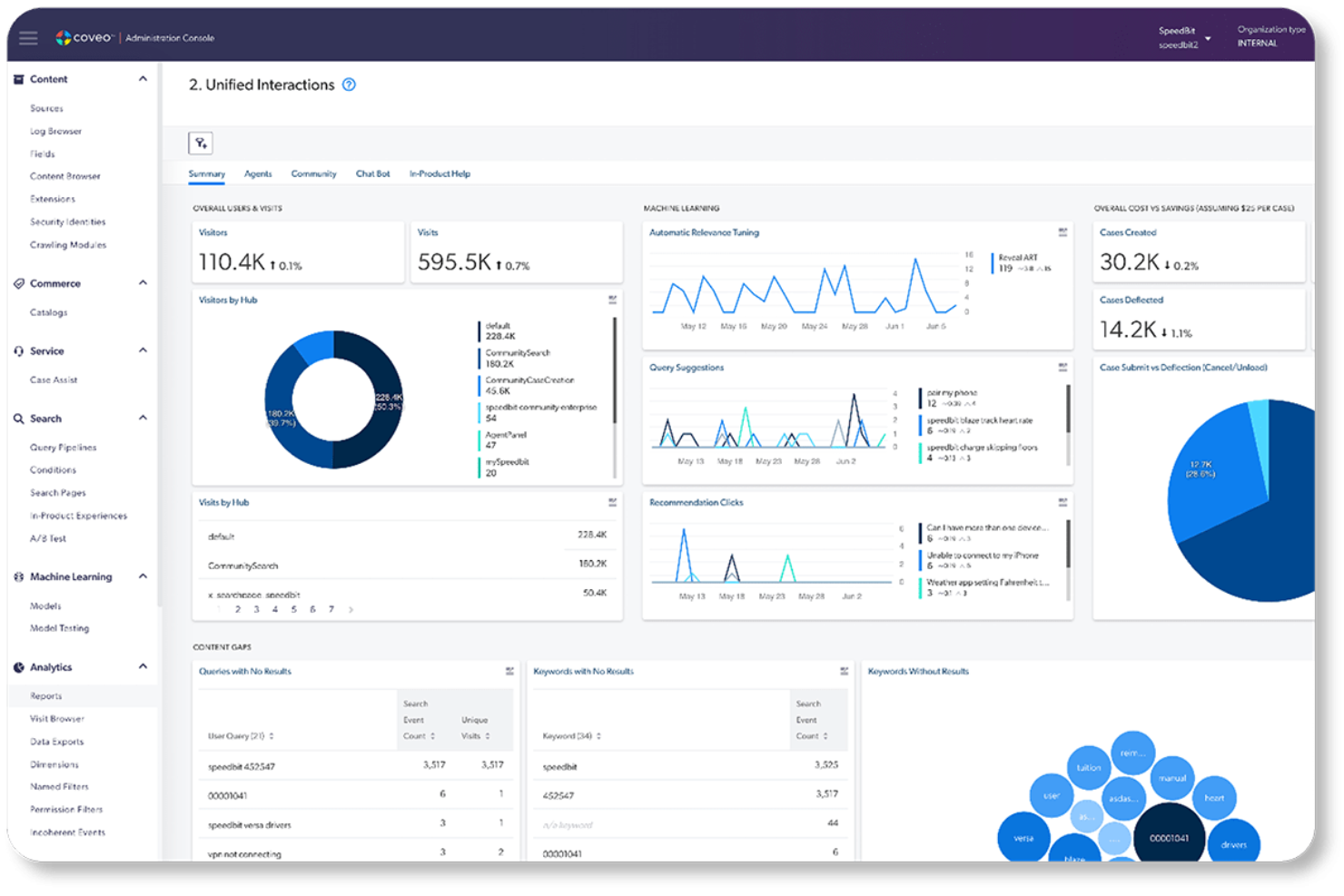
Coveo is an AI-powered enterprise search and relevance platform that unifies knowledge across business systems, delivering personalized search results, content recommendations, and generative AI answers across service, commerce, and workplace environments.
Who Is Coveo Best For?
Coveo is a strong fit for large enterprises in sectors like high tech, financial services, and healthcare that manage complex, fragmented knowledge ecosystems across multiple systems and channels.
Why I Picked Coveo
Coveo earns its spot on my shortlist because of how it handles knowledge discovery across fragmented enterprise systems. I particularly like Automatic Relevance Tuning, which learns from real user behaviour to continuously sharpen results without any manual intervention. The Passage Retrieval API also stands out, surfacing the exact excerpt a user needs rather than just pointing to the source document.
Coveo Key Features
- Unified search index: Centralizes content from multiple sources, making enterprise knowledge easily discoverable.
- Pre-built enterprise connectors: Integrates with systems like Salesforce, ServiceNow, and Office 365 for seamless search experiences.
- Dynamic navigation experience: Adjusts filters and navigation based on user behaviour for smarter content discovery.
- Query pipeline management: Lets admins design, test, and optimize search logic and ranking strategies through a visual interface.
Coveo Integrations
Coveo offers native integrations with Salesforce, ServiceNow, Zendesk, Microsoft 365, Google Drive, Dropbox, SAP, Sitecore, Amazon S3, and Jira. An API is available for custom integrations.
Pros and Cons
Pros:
- Generative AI answers surface precise content excerpts
- Unifies knowledge discovery across fragmented enterprise systems
- Self-learning relevance tuning requires no manual updates
Cons:
- Query pipeline configuration overwhelms non-technical admins
- Initial setup demands significant IT involvement

Joveo is an AI recruitment platform that combines programmatic job advertising, AI-powered career sites, conversational candidate screening, interview scheduling, and hiring analytics in one system.
Who Is Joveo Best For?
Joveo is a strong fit for talent acquisition teams at mid-to-large enterprises, staffing firms, and RPOs that manage high-volume hiring across multiple channels.
Why I Picked Joveo
Joveo earns its spot as one of the best on my shortlist because it covers the entire recruiting funnel in a single AI-driven platform, from ad placement to candidate interviews. I particularly like MOJO Pro's ability to reallocate job ad spend across hundreds of publishers in real time, cutting wasted budget without manual work. The conversational AI screener handles candidate questions, application support, and interview scheduling automatically, so my team isn't manually managing each touchpoint.
Joveo Key Features
- AI career site builder: Instantly generate branded career pages and landing pages using generative AI prompts.
- Talent campaign manager: Launch and track multi-channel campaigns via web, email, and SMS from one dashboard.
- Analytics chat assistant: Chat directly with your recruitment data to uncover insights and performance trends.
- 100+ ATS integrations: Connect with leading applicant tracking systems such as Workday, iCIMS, and Greenhouse.
Joveo Integrations
Joveo offers native integrations with leading ATS platforms including Workday, Greenhouse, SmartRecruiters, and iCIMS. An API is available for custom integrations.
Pros and Cons
Pros:
- Conversational AI handles screening and scheduling
- End-to-end funnel covered in one platform
- AI dynamically reallocates job ad spend automatically
Cons:
- Setup requires significant configuration time
- Reporting customization options feel limited
Best for AI governance policy automation

Trustible is a purpose-built AI governance platform covering use case inventory, risk triage, impact assessments, and compliance mapping across frameworks like the EU AI Act and NIST AI RMF.
Who Is Trustible Best For?
Trustible is a strong fit for compliance officers, risk managers, and AI governance leads at mid-size to large enterprises in regulated industries.
Why I Picked Trustible
I picked Trustible as best for AI governance policy automation because its rules-based intake engine automatically scores every AI use case submission, tiers it by risk, and routes it to the right reviewer without manual sorting. Low-risk use cases can be auto-approved in minutes, while high-risk ones land in a structured review queue with pre-loaded context. I also like that the underlying risk taxonomies and mitigation libraries are maintained by Trustible's own governance experts, so the policies driving those automated decisions stay current as regulations shift.
Trustible Key Features
- Centralized AI inventory: Maintain a single registry of all AI use cases, models, agents, and vendors across your organization.
- Post-deployment monitoring: Schedule periodic reviews and attestation workflows to track AI systems after they go live.
- Audit-ready evidence export: Generate timestamped governance records and export compliance packages in PDF or Excel on demand.
- Executive compliance dashboards: View framework readiness scores, control coverage, and portfolio-wide risk distribution in board-ready reports.
Trustible Integrations
Trustible's Enterprise tier includes integrations into existing AI and GRC stacks, but specific native integrations are not clearly documented on the vendor's website. During implementation, Trustible's team connects your systems as part of the onboarding process. Zapier and API support are not clearly documented.
Pros and Cons
Pros:
- Expert-curated AI risk and mitigation taxonomies
- Agentic workflows auto-triage low-risk use cases
- Maps controls across 10+ regulatory frameworks
Cons:
- Pricing requires contacting the sales team
- No publicly listed native integrations

Chatbase
Best with real-time data integrations
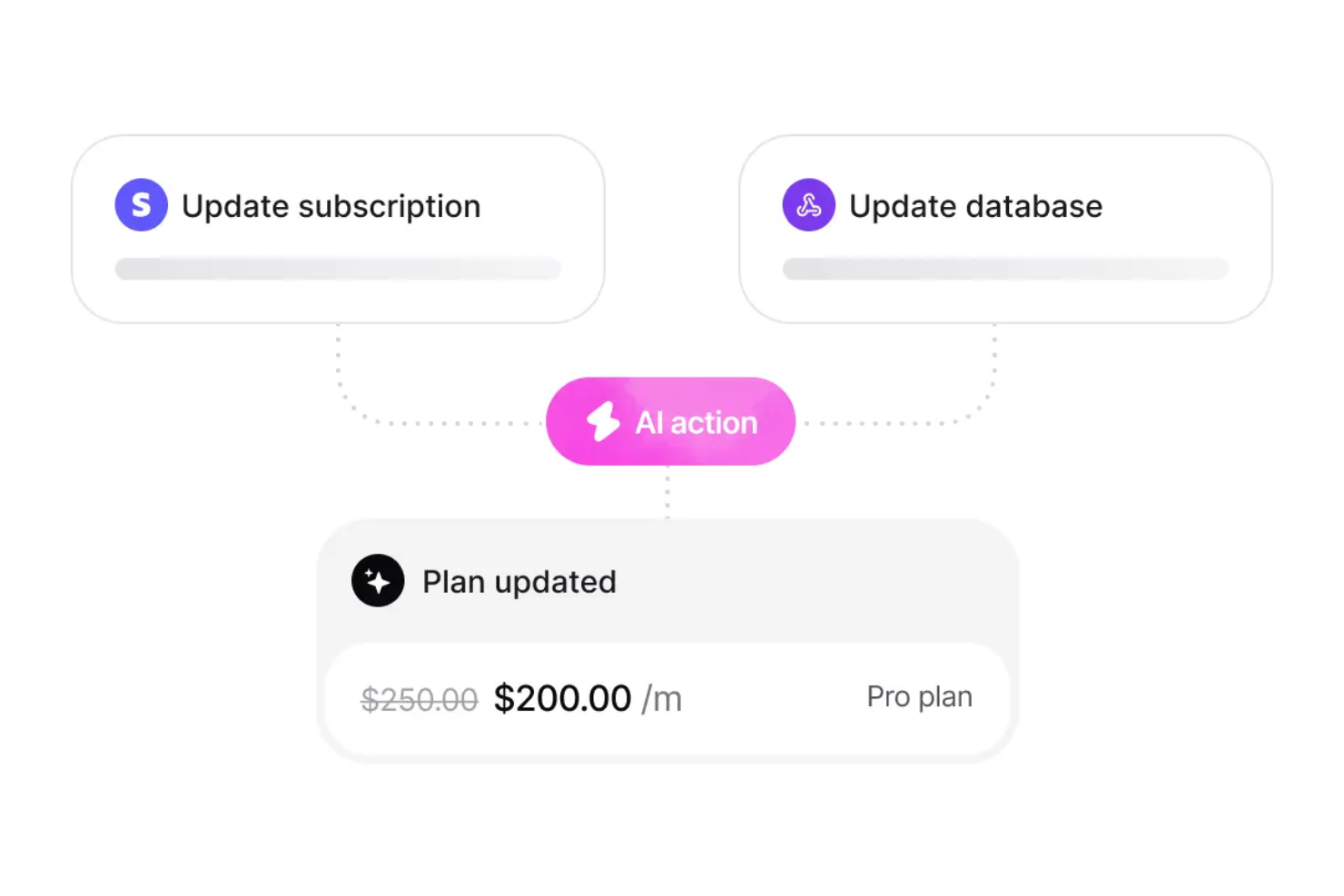
Chatbase is an AI chatbot platform that lets you build, train, and deploy custom chatbots using your own data, with features for real-time integrations, multilingual support, and advanced security controls.
Who Is Chatbase Best For?
Chatbase is a good fit for teams and businesses that need to deploy AI chatbots using their own data across multiple channels and languages.
Why I Picked Chatbase
I picked Chatbase as one of the best because I can connect my chatbots directly to live databases and APIs, letting them answer questions with up-to-the-minute information. My team uses Chatbase to build bots that pull real-time data from internal systems, so users always get current responses. I also like that I can set up custom triggers and actions based on live data changes, which is something I haven’t found in most other AI chatbot platforms.
Chatbase Key Features
- No-code chatbot builder: Build and customize chatbots using a drag-and-drop interface without writing code.
- Multilingual support: Deploy chatbots that can interact in multiple languages for global audiences.
- Custom knowledge base uploads: Import documents, PDFs, and website content to train your chatbot on specific data.
- Advanced analytics dashboard: Monitor chatbot performance and user interactions with detailed analytics and reporting tools.
Chatbase Integrations
Chatbase offers native integrations with Zendesk, Notion, Slack, Stripe, Salesforce, Cal.com, Calendly, WhatsApp, Messenger, Make, and Zapier. An API is available for custom integrations.
Pros and Cons
Pros:
- Visual no-code chatbot builder included
- Custom knowledge base uploads for training
- Offers GDPR and SOC 2 compliance features
Cons:
- No built-in voice assistant support
- Occasional delays in real-time data syncing
Tidio
Best for AI-based human-like, unscripted answers
Tidio is a versatile AI-powered customer service platform designed to enhance your team's interaction with clients. It caters to small to medium-sized businesses across industries like eCommerce and finance, helping you automate customer interactions and streamline support processes. By integrating AI-driven chatbots and live chat functionalities, Tidio enables your business to handle customer inquiries effectively, reduce low-level support tasks, and improve overall customer satisfaction.
Why I Picked Tidio
I picked Tidio because of its unique ability to automate customer service interactions through its Lyro AI Agent. This feature provides human-like, unscripted answers to common customer queries, which helps reduce the workload on your support team. Additionally, Tidio's AI tools like Flows allow for the automation of structured tasks, such as lead qualification and cart abandonment reminders, further enhancing your customer engagement efforts. These features make Tidio a valuable tool for businesses looking to optimize their customer service with AI-driven solutions.
Tidio Key Features
Aside from its AI-driven automation capabilities, Tidio offers several other features that can benefit your team:
- Live Chat: Engage with customers in real-time to provide immediate assistance and improve user experience.
- Ticketing System: Manage and prioritize customer inquiries efficiently through a structured support process.
- Proactive Automation Tools: Automate follow-up messages and interactions to keep your audience engaged and informed.
- Analytics and Tracking: Gain insights into customer interactions and support performance to make data-driven decisions.
Tidio Integrations
Integrations include Salesforce, Zendesk, Shopify, WhatsApp, WordPress, Instagram, Messenger, Zapier, and Intercom.
Pros and Cons
Pros:
- Multichannel inbox centralizes chat, email, and social
- Supports 120+ integrations including Shopify and HubSpot
- AI chatbot resolves routine inquiries automatically
Cons:
- Free tier lacks effectiveness due to feature restrictions
- AI usage limits apply on lower-tier plans

Best for office document assistance

Microsoft Copilot is an AI assistant integrated into Microsoft 365, designed to help users with document creation, editing, and data analysis. It helps professionals and teams in their daily office tasks.
Why I picked Microsoft Copilot: It's tailored for office document assistance, providing features like smart text suggestions and automated data insights. These AI functionalities help you draft documents and analyze spreadsheets faster. Copilot's integration with Microsoft 365 apps makes it a natural fit for businesses already using these tools. You can rely on it to streamline your workflow and reduce manual tasks.
Standout features & integrations:
Features include real-time collaboration, advanced grammar checking, and task automation. You can work with your team on documents simultaneously, and the tool also helps you automate repetitive tasks.
Integrations include Microsoft Word, Microsoft Excel, Microsoft PowerPoint, Microsoft Outlook, Microsoft Teams, OneDrive, SharePoint, Dynamics 365, Azure, and Power BI.
Pros and Cons
Pros:
- Provides smart text suggestions
- Automates repetitive office tasks
- Full integration with Microsoft 365
Cons:
- May lack deep insight and nuance for complex tasks
- Limited to the Microsoft ecosystem

Best for integrating AI into creative workflows

For businesses seeking to enhance their creative workflows, Adobe Firefly offers a compelling solution. Designed to streamline content production, Firefly is particularly appealing to enterprises aiming to scale their creative output without sacrificing quality or brand compliance. By leveraging generative AI, it addresses challenges in ideation, editing, and bulk production, making it a valuable tool for marketing, HR, and sales teams.
Why I Picked Adobe Firefly
I picked Adobe Firefly for its unique ability to integrate generative AI directly into existing creative workflows, particularly through tools like Adobe Photoshop and Illustrator. This integration allows your team to accelerate content production by automating ideation and bulk editing tasks while maintaining brand consistency using custom AI models. Firefly's seamless integration with Adobe's ecosystem ensures that your creative team can focus on strategic work, enhancing both productivity and creativity.
Adobe Firefly Key Features
In addition to its integration with Adobe's ecosystem, Firefly offers several key features:
- Content Production: Streamlines ideation and bulk editing, ensuring high-quality, brand-compliant content.
- Custom Models: Enables businesses to train AI on their brand assets, maintaining a consistent visual identity.
- Administrative Controls: Provides tools for managing user access and ensuring compliance with brand policies.
- Subscription-Based Licensing: Offers flexible licensing options that include IP indemnification and full rights to generated content.
Adobe Firefly Integrations
Integrations include Adobe Photoshop, Adobe Illustrator, Adobe Express, Adobe Creative Cloud, Adobe Experience Manager, Adobe Stock, Adobe Acrobat, Adobe Premiere Pro, Adobe After Effects, and Adobe InDesign.
Pros and Cons
Pros:
- AI-powered background replacement
- Camera motion control tools
- Prompt-based generative video editing
Cons:
- Subscription required for full features
- Limited five-second video outputs
HireVue
Best for video interview AI

Hirevue is a digital interviewing platform that leverages AI to streamline the hiring process for recruiters and HR professionals. It focuses on video interviews and assessments, providing valuable insights into candidate suitability.
Why I picked Hirevue: It specializes in video interview AI, offering features like AI-driven candidate assessments and automated interview scheduling. The platform analyzes candidate responses to identify key traits and skills. Hirevue's ability to automate and enhance the interview process sets it apart from traditional methods.
Standout features & integrations:
Features include customizable interview templates, candidate assessment tools, and real-time analytics. You can tailor interviews to match your company's needs. The assessment tools provide insights into candidate performance, helping you make informed hiring choices.
Integrations include Workday, Greenhouse, iCIMS, SAP SuccessFactors, Oracle Taleo, ADP, Lever, SmartRecruiters, BambooHR, and Jobvite.
Pros and Cons
Pros:
- Automates interview scheduling
- Provides AI-driven candidate insights
- Supports global recruiting with multilingual video assessments
Cons:
- Limited customization for specific industries
- Expensive for smaller organisations
Other AI Tools
Here are some additional AI tool options that didn’t make it onto my shortlist, but are still worth checking out:
- Eightfold AI
For talent matching AI
- Paradox
For recruitment chatbots
- Degreed
For AI learning pathways
- Leapsome
For performance management AI
- Trupeer
For AI-powered script generation
- Carly AI
For transforming communication into events
- Lindy
For AI-driven personal assistants
- Leena AI
For HR chatbot automation
- Lattice AI
For employee feedback analysis
- Synthesia
For AI video creation


How I Evaluate AI Tools
Every tool on this list has to deliver AI that actually moves the needle—whether that's surfacing attrition risks before they become resignations or cutting days off your hiring cycle through intelligent candidate matching. I split my evaluation into core functionality every tool must have to qualify and differentiating factors that separate good options from great ones.
Core Functionality (Table Stakes For This List)
When I'm selecting tools for my list, I rank each one on a scale from 0 (does not offer the functionality) to 5 (excels in this area) for each core functionality listed below. Then, I calculate the tool's total score into a percentage. Each tool needs to achieve a minimum total score of 65% to be considered for inclusion.
- AI-Powered Talent Matching: I look for ML-driven candidate scoring that goes beyond keyword matching—tools should infer skills from context and rank applicants against role criteria.
- Predictive People Analytics: The tool should forecast real HR outcomes like flight risk or headcount needs, not just display historical dashboards with an "AI" label.
- Generative AI Content Creation: I check whether the tool generates usable HR content (job descriptions, offer letters, policy drafts) and lets you edit tone and context.
- Conversational AI Assistant: A good AI assistant handles questions like "How many PTO days do I have left?" by pulling live data, not just linking to a static FAQ page.
- Intelligent Workflow Automation: I evaluate whether automations adapt based on inputs—like routing onboarding tasks by department and role—rather than following rigid if/then rules.
- Bias Detection & Fairness Controls: Tools should flag biased language in job posts or scoring patterns in evaluations and provide auditable logs that HR teams can actually review.
Once I have a list of tools that meet this criteria, I consider what sets each platform apart.
Differentiating Factors (What Sets Vendors Apart)
Here's how I compare and contrast different vendors:
Standout Features
Explainable AI outputs matter a lot here—when a tool flags someone as a flight risk or passes on a candidate, HR teams need to understand why. I also look for skills intelligence engines that map employee capabilities and recommend internal mobility paths, saving teams from hiring externally when the right person already exists. Sentiment analysis is another differentiator, especially tools that parse pulse surveys and open-ended feedback to catch engagement dips before they show up in turnover numbers.
Beyond Features
Compliance and responsible AI governance weigh heavily in my evaluation—I check whether vendors document bias audits and support regulations like the EU AI Act or NYC Local Law 144. HRIS integrations also matter because an AI tool that doesn't connect to your existing Workday, BambooHR, or ADP instance creates data silos that undermine every insight it generates. I also consider data privacy posture, particularly whether employee data is used to train foundation models and whether regional data residency options exist.
How to Choose AI Tools
It’s easy to get bogged down in long feature lists and complex pricing structures. To help you stay focused as you work through your unique software selection process, here’s a checklist of factors to keep in mind:
| Factor | What to Consider |
| Scalability | Can the tool grow with your needs? Look for solutions that handle increased data and users without performance drops. Check for scalability options. |
| Integrations | Does it work with your existing systems? Ensure compatibility with your current tools to avoid disruptions and maximize efficiency. |
| Customizability | Can you tailor it to fit your processes? Look for flexibility in settings and configurations to match your specific workflows. |
| Ease of use | Is it user-friendly for your team? Test the interface and navigation. A steep learning curve can hinder adoption. |
| Implementation and onboarding | How quickly can you get started? Evaluate the resources and support available for a smooth transition, such as training and setup assistance. |
| Cost | Does it fit your budget? Compare pricing plans against your budget and consider the total cost, including potential hidden fees. |
| Security safeguards | Are data protection measures in place? Check for encryption, access controls, and compliance with data regulations to protect sensitive information. |
| Support availability | Will you have reliable help when needed? Look for 24/7 support options and assess the quality of customer service provided. |
What Are AI Tools?
AI tools are software applications that use artificial intelligence, including machine learning, natural language processing, predictive analytics, and automation, to perform tasks that normally require human effort. They help teams analyze data, generate content, make decisions, and complete routine work faster and more accurately.
Unlike traditional software, which follows fixed rules, AI tools learn from data. This allows them to adapt over time, identify patterns, and improve the quality of their recommendations or outputs. They’re used by a wide range of professionals across HR, marketing, engineering, operations, customer support, and executive leadership because they unlock efficiency gains and surface insights that would be hard to spot manually.
Common types of AI tools include:
- Generative AI tools (e.g., ChatGPT, Claude) that create text, images, or video
- AI assistants (e.g., Copilot, Gemini) that help with writing, research, and office tasks
- Analytics and insight tools that uncover patterns in large datasets
- Recruitment and HR AI tools that assess candidates and support performance management
- Automation and workflow tools that handle repetitive tasks or trigger actions across systems
Together, these tools help organizations streamline operations, personalize experiences, improve decision-making, and scale work that traditionally required large amounts of time and manual effort. As AI becomes more embedded in everyday software, these tools are increasingly viewed as essential components of modern workplace tech stacks.
Features of AI Tools
When selecting AI tools, keep an eye out for the following key features:
- Natural language processing: Enables tools to understand and respond to human language, making conversations with an AI bot or writing tool more intuitive and helpful.
- Predictive analytics: Uses data and machine learning to forecast trends, improve planning, and support decision-making across content, marketing, and operations.
- Machine learning capabilities: Allows AI to improve accuracy and performance as it processes more data, whether that’s text, audio, or images.
- Automated task handling: AI can handle actions like transcription, transcribe notes, or generate summaries from podcasts and AI meeting recordings, which helps teams save time.
- Data visualization: Creates visual reports and charts that help users interpret results faster without digging through raw data or text documents.
- Sentiment analysis: Helps identify emotional tone in customer feedback, reviews, or social content, allowing teams to react quickly and appropriately.
- Customizable AI models: Give businesses flexibility to adapt features for specific uses, whether they need high-quality image editing, text-to-speech, or automated content generation.
- Real-time insights: Provides immediate feedback during tasks like live transcription, performance tracking, or meeting assistant summaries.
- Integration support: Ensures tools work well with platforms like Google AI, Google Gemini, Adobe, or other services your team already uses to manage workflows or publish web pages.
- Security safeguards: Protects private information and meeting data through encryption, access control, and compliance standards.
- Creative capabilities: Some AI tools include extras like AI image generators, video editing, or the ability to generate images using platforms, which are helpful for teams producing visual content alongside their text-based work.
Benefits of AI Tools
Implementing AI tools provides several benefits for your team and your business. Here are a few you can look forward to:
- Increased efficiency: Powerful AI can automate repetitive tasks, helping your team save time and focus on higher-value work. Productivity tools and task management features make everyday workflows faster and more effective.
- Improved decision-making: AI systems powered by real-time data and predictive analysis help you make smarter decisions with greater accuracy. Whether you're evaluating campaigns or optimizing operations, AI gives you clearer insights.
- Enhanced communication: AI writing and natural language technology assist with customer support, content creation, and automated responses. This makes communication faster and more consistent across social media, chat interfaces, and internal messaging.
- Personalized experiences: AI content generation and customizable models allow you to tailor messages, offers, and user journeys based on individual preferences. This leads to more relevant interactions and higher engagement.
- Better data understanding: Visualization tools turn complex information into clear reports and dashboards, allowing teams to interpret performance, trends, and search engine data without extensive analysis.
- Reduced bias: AI-based decision processes can help reduce subjective human judgment in tasks like hiring, customer service, or content moderation, promoting fairer outcomes.
- Cost savings: Automating workflows, content production, and routine processes helps cut labor costs and improves output quality. The latest AI advancements, such as image editing and AI video generators, also reduce the need for external tools or creative outsourcing.
Costs and Pricing of AI Tools
Selecting AI tools requires an understanding of the various pricing models and plans available. Costs vary based on features, team size, add-ons, and more. The table below summarizes common plans, their average prices, and typical features included in AI tools solutions:
Plan Comparison Table for AI Tools
| Plan Type | Average Price | Common Features |
| Free Plan | $0 | Basic automation, limited data analysis, and essential integrations. |
| Personal Plan | $5-$300/user/month | Advanced analytics, customizable settings, and priority support. |
| Business Plan | $30-$600/user/month | Comprehensive reporting, team collaboration tools, and enhanced security options. |
| Enterprise Plan | Custom Pricing | Full customization, dedicated account management, and enterprise-grade security. |
AI Tools FAQs
Here are some answers to common questions about AI tools:
What compatibility issues can AI tools have with my tech stack?
When introducing AI tools into your workflow, it’s important to confirm they work with your current systems and automations. Some AI apps and AI platforms connect easily through APIs, but older software or custom setups may require more technical effort. Before adopting an AI product, review integration requirements, data formats, and whether the tool supports no-code connections or requires developer support. This is especially important for teams using AI agents, LLMs, or large language models across multiple platforms.
Can AI tools handle sensitive data securely?
Yes, many AI platforms include security features to protect sensitive information, including encryption, access controls, and compliance standards like GDPR. When evaluating generative AI or AI chatbot solutions, request documentation on data retention, privacy policies, and certification. Always confirm whether any free AI tier or cloud-based service meets your organization’s security needs before deployment.
What should I consider when evaluating the ROI of AI tools?
To measure ROI, look at the value gained from automating repetitive work and improving productivity. Track how AI reduces manual tasks, speeds up writing or content workflows, and supports areas like SEO, research, and decision-making. Consider both time savings and output quality. Case studies and customer feedback can help you understand how similar teams are using AI tools to improve performance and lower operational costs.
What are the common concerns or limitations of AI tools?
AI tools are powerful, but they do come with limitations that buyers should understand before adopting them. The biggest challenges include accuracy issues, where AI may generate incorrect or incomplete results and still present them confidently. Many tools also raise data privacy and security considerations, especially when they require access to internal files, messages, or customer information. Organizations must confirm how data is stored, processed, and protected.
You may also encounter integration gaps, bias in outputs, and ongoing oversight needs, since teams must regularly review AI-generated work for quality and fairness. Additionally, AI tools can introduce hidden costs through usage-based pricing or add-ons. Understanding these limitations helps you evaluate where AI fits into your workflow and what safeguards you may need in place.