

10 Best Contractor Onboarding Software Reviewed in 2026

Best Contractor Onboarding Software Shortlist


Managing contractors can be time-consuming. You face challenges, such as compliance, paperwork, and keeping track of multiple projects. Contractor onboarding software can ease these burdens, helping you focus on what truly matters—your team and projects.
I've independently tested and reviewed various software options, choosing the ones that truly work. In my experience, finding the right tool is invaluable. You’ll discover unbiased, well-researched insights here.
In this article, I'll guide you through the best employee onboarding solutions available. You'll get a clear view of deliverables, benefits, and each tool's distinctive features. Get ready to make an informed decision that boosts your efficiency and supports your team.
Why Trust Our Software Recommendations
Our team has been testing and reviewing software since 2012. As HR experts ourselves, we know how difficult—and important—it is to choose the right software.
For this guide, we evaluated tools using hands-on testing and independent research, scoring tools using our selection criteria. We also draw on insights from industry thought leaders and practicing HR experts.
Our reviews reflect our human editorial judgment, not a sales pitch.
Expert reviewers:
Contractor Onboarding Software Comparison Table
This comparison table summarizes pricing details for my top contractor onboarding software selections:
| Tool | Best For | Trial Info | Price | ||
|---|---|---|---|---|---|
| 1 | Best for compliant global onboarding | Free demo available | From $199/employee/month | Website | |
| 2 | Best for centralized onboarding flow | Free demo available | From $599/employee/month | Website | |
| 3 | Best for freelance management | Free demo available | Pricing upon request | Website | |
| 4 | Best for modular HR solutions | Free trial available | Pricing upon request | Website | |
| 5 | Best for small businesses | Free demo available | From $49/month + $6/user/month | Website | |
| 6 | Best for construction site tracking | Free demo available | Pricing upon request | Website | |
| 7 | Best for construction onboarding | Free demo available | Pricing upon request | Website | |
| 8 | Best for gig economy management | Free demo available | Pricing upon request | Website | |
| 9 | Best for digital onboarding | Free plan available | From $150/month | Website | |
| 10 | Best for user onboarding tours | 14-day free trial | From $174/month (billed annually) | Website |

Best Contractor Onboarding Software Review
Below are my detailed summaries of the best contractor onboarding software that made it onto my shortlist. My reviews offer a detailed look at the key features, pros and cons, integrations, and ideal use cases of each tool to help you find the best one for you.

Best for compliant global onboarding
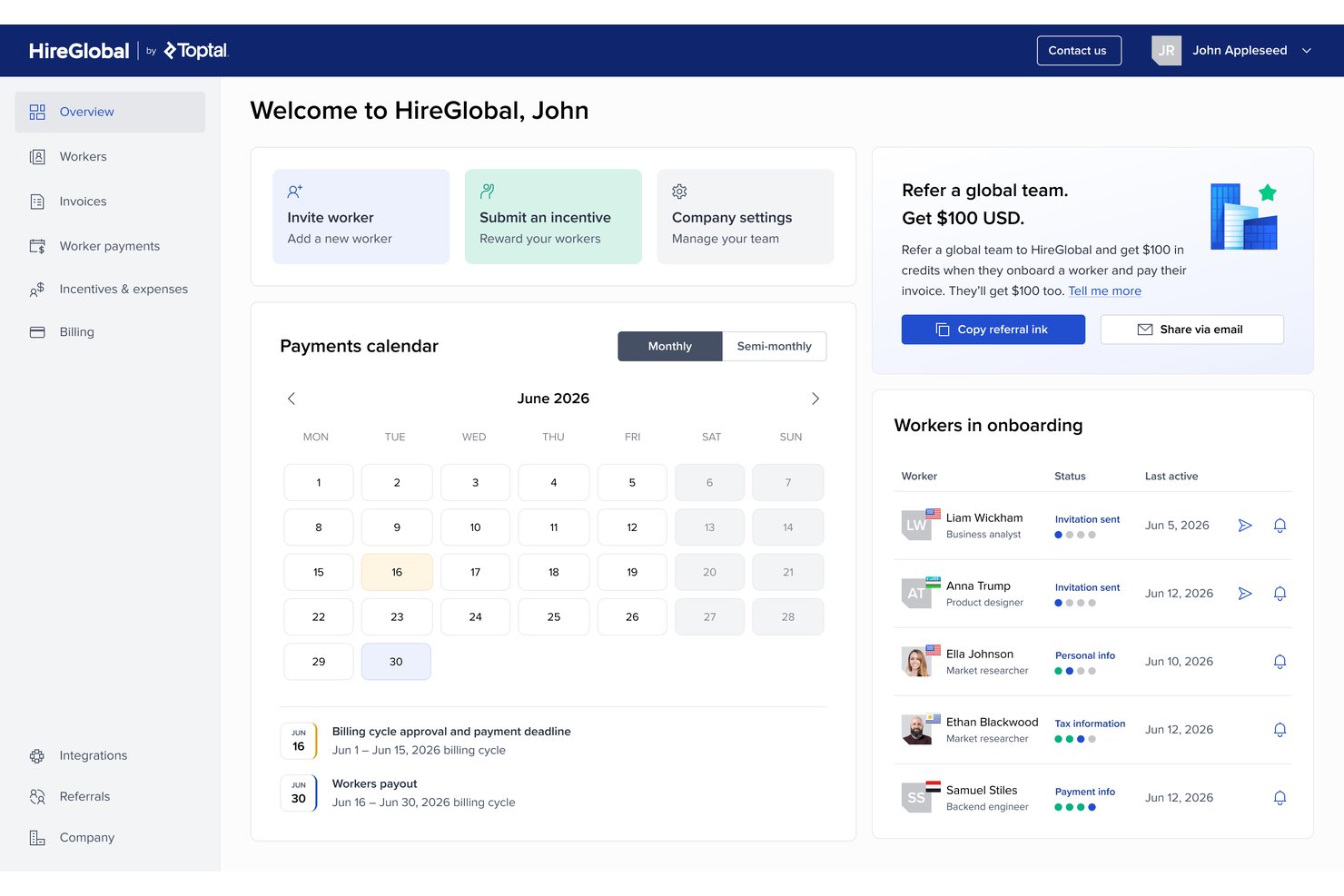
HireGlobal is a global contractor onboarding and workforce compliance platform by Toptal that handles contractor payments, worker classification, Agent of Record agreements, and employer of record services across 180+ countries.
Who Is HireGlobal Best For?
HireGlobal is a strong fit for contingent workforce managers who need to onboard contractors across multiple countries while minimizing misclassification risk.
Why I Picked HireGlobal
HireGlobal earns its spot on my shortlist because its Virtual EOR model does something I haven't seen elsewhere: it pairs compliant AOR contracts with $1M of per-worker financial indemnification against misclassification. I also like that the platform guides each worker into the right engagement tier, whether that's basic contractor management, AOR, or full EOR, without requiring a platform switch. That built-in contractor-to-EOR conversion path, backed by 40+ in-house lawyers across 180+ countries, is what makes it my pick for compliant global onboarding.
HireGlobal Key Features
- Consolidated invoicing: Clients pay one invoice, and HireGlobal distributes individual payments to each contractor across 180+ countries.
- TopTracker integration: Contractors log time, generate invoices, and receive payment within 48 hours through a native connection to Toptal's free time-tracking tool.
- Four-tier engagement model: Workers can be engaged under contractor management, AOR, Virtual EOR, or traditional EOR, with the ability to move between tiers without switching platforms.
- SOC 2-compliant data isolation: Each client gets an isolated virtual environment with end-to-end encryption and client-specific data separation.
HireGlobal Integrations
HireGlobal has one documented native integration, TopTracker, for time tracking, timesheets, invoicing, and payments. It also uses Hyperwallet for payment processing and KYC, but no native HRIS, accounting, API, or Zapier integrations are publicly documented.
Pros and Cons
Pros:
- Covers 180+ countries with in-house legal expertise
- Built-in upgrade path from contractor to EOR
- Unique $1M indemnification against misclassification risk
Cons:
- Lacks customizable, self-service contract templates
- No native integrations with HR systems
Best for centralized onboarding flow

Deel is a global payroll and compliance platform designed for businesses managing international contractors and remote employees. Its main users are companies looking to simplify hiring and payroll across different countries while ensuring compliance with local regulations.
Why I picked Deel: It excels in global compliance, offering tools to navigate complex international hiring laws. Deel provides localized contract templates, making it easy to manage legal agreements in various jurisdictions. With automated tax calculations, you can ensure your team complies with local tax requirements. Additionally, Deel facilitates multicurrency payments, allowing you to pay contractors in their preferred currency without hassle.
Standout features and integrations:
Features include automated document management that helps you keep track of contracts and legal documents efficiently. The platform provides a centralized dashboard for tracking payments, making it easy to manage finances across multiple countries. Deel also offers compliance support, giving you access to legal experts for guidance on international hiring laws.
Integrations include QuickBooks, BambooHR, Workday, SAP SuccessFactors, Lever, and more.
Pros and Cons
Pros:
- Supports multi-currency payments
- Localized contract templates available
- Handles international tax calculations
Cons:
- Limited HR capabilities
- Complex for small businesses

Best for freelance management

TalentDesk is a freelance management platform designed to streamline the hiring and management of freelancers and contractors. Its main users are companies that rely on a flexible workforce and need efficient tools for payment processing, project management, and compliance.
Why I picked TalentDesk: It simplifies freelance management with features tailored to hiring and paying contractors. You can handle payments in multiple currencies, making international transactions straightforward. TalentDesk offers project management tools that help you track progress and collaborate with freelancers effectively. Additionally, its compliance features ensure that all legal requirements are met when managing a diverse workforce.
Standout features & integrations:
Features include automated invoicing that reduces the administrative burden on your team. The platform provides a centralized dashboard for managing all freelance contracts, making it easy to keep track of documents and deadlines. TalentDesk also offers time tracking tools that help you monitor work hours and ensure accurate billing.
Integrations include QuickBooks, Xero, Microsoft Dynamics, Oracle, and more.
Pros and Cons
Pros:
- Ensures compliance with regulations
- Offers project management tools
- Centralizes contract management
Cons:
- Exclusively for freelance/project-based work
- Too project-focused for onboarding needs

Arcoro
Best for modular HR solutions

Arcoro is a modular HR software solution designed for construction and field service industries that improves workforce management and compliance. Its main users are HR teams and managers who need flexible tools for talent management, onboarding, and compliance tracking.
Why I picked Arcoro: It offers modular HR solutions, allowing you to choose and integrate only the features you need. This flexibility is ideal for businesses with specific HR requirements. Arcoro includes compliance management tools, helping you maintain industry standards and compliance requirements. Additionally, its talent management features streamline recruitment and onboarding processes, making it easier to manage your workforce effectively.
Standout features and integrations:
Features include performance management that helps you track and improve employee productivity. The platform offers learning management tools, enabling you to deliver training programs efficiently. Arcoro also provides reporting and analytics, giving you insights into workforce trends and metrics.
Integrations include Sage, Viewpoint Vista, Procore, Foundation, and more.
Pros and Cons
Pros:
- Supports performance management
- Supports recruitment processes
- Customizable modular approach
Cons:
- Limited customer support
- Complex user interface


Gusto is a payroll and human resources (HR) software solution designed for small businesses, offering payroll processing, benefits management, and HR tools. Its main users are small business owners and HR teams seeking efficient payroll and HR management.
Why I picked Gusto: It caters specifically to small businesses with features that simplify payroll and benefits management. Gusto offers automated payroll processing, making it easy to manage pay schedules and tax forms. The platform includes employee benefits administration, allowing you to offer health insurance and retirement plans. Additionally, Gusto provides tools for managing HR tasks, including onboarding and meeting compliance requirements, ensuring your business stays organized.
Standout features and integrations:
Features include automated tax filing, which ensures your business remains compliant with tax regulations. The software offers employee self-service, allowing your team to access their pay and benefits information easily. Gusto also includes time tracking tools, helping you manage employee hours efficiently.
Integrations include QuickBooks Online, Xero, FreshBooks, Clover, Deputy, When I Work, Trainual, ZipBooks, and more.
Pros and Cons
Pros:
- Includes HR management tools
- Automated tax filing
- Offers employee benefits administration
Cons:
- Learning curve for new users
- Not ideal for large companies


SmartBarrel is a biometric time tracking and attendance solution tailored for the construction industry that provides accurate time tracking and efficient payroll management. Its main users are construction managers and contractors who need to manage labor costs and ensure precise attendance records.
Why I picked SmartBarrel: It specializes in construction site tracking with features, such as facial verification, that eliminate time theft and buddy punching. The system operates with cellular connectivity, providing real-time visibility of on-site personnel without relying on Wi-Fi. SmartBarrel's portable time clock and automatic data flow to payroll systems ensure efficiency in managing labor costs. Additionally, its quick setup and easy-to-use project management tools make it ideal for construction projects that demand precision and reliability.
Standout features and integrations:
Features include a portable time clock that provides flexibility in tracking attendance across various sites. The system also offers expense management, helping you keep track of project costs efficiently. SmartBarrel's productivity tracking tools give you insights into contractor performance and workforce efficiency, aiding in better project planning.
Integrations include Procore, Sage, Foundation, Viewpoint, CMiC, and more.
Pros and Cons
Pros:
- Provides real-time visibility
- Operates without Wi-Fi
- Eliminates time theft
Cons:
- Occasional updates needed
- Requires stable cellular connectivity


GoContractor is a construction onboarding software designed for the construction industry that simplifies worker onboarding and subcontractor safety training. Its main user base includes construction managers and established and new contractors looking to enhance safety and productivity on job sites.
Why I picked GoContractor: It offers a unique approach to construction onboarding, with features such as self-registration that allow subcontractors to easily register and upload necessary documents. The software provides customizable training options, ensuring workers receive role-specific and language-appropriate onboarding. Document monitoring alerts you when qualifications or training are about to expire, keeping compliance in check. Additionally, its user-friendly design caters to construction workers who might not be tech-savvy.
Standout features and integrations:
Features include self-registration for subcontractors, allowing them to upload documents with ease. The system also offers training management, enabling you to update requirements and generate compliance reports efficiently. Access control ensures only compliant workers gain site access, enhancing safety and compliance.
Integrations include Procore, Triax, Trimble, Field Control Analytics, and more.
Pros and Cons
Pros:
- User-friendly for non-tech users
- Customizable training options
- Saves time on onboarding
Cons:
- Initial setup can be complex
- Prone to app crashes


Openforce is a contractor management software tailored for the gig economy, helping businesses manage their independent contractor workforce efficiently. Its main users include companies that rely heavily on gig workers, providing solutions for compliance risks, payment processing, and onboarding.
Why I picked Openforce: It specializes in managing gig economy workers, offering features designed to simplify the contractor onboarding process and compliance. The platform automates payment processing, making it easy to manage multiple contractors and pay schedules. With compliance monitoring, you can ensure your contractors meet all necessary legal requirements. Additionally, it offers customizable contractor onboarding processes, allowing you to tailor the experience to your specific business needs.
Standout features and integrations:
Features include automated payment processing that helps you handle contractor payments efficiently. The platform offers compliance tracking, ensuring your contractors meet all legal obligations. Openforce also provides customizable onboarding workflows, allowing you to create a tailored experience for each contractor.
Integrations are not publicly listed.
Pros and Cons
Pros:
- Customizable onboarding workflows
- Automates compliance tracking
- Tailored for the gig economy
Cons:
- Limited offline capabilities
- Can be complex to set up


Online Onboarding is a web-based onboarding system that lets you set up online workflows for new starters before they arrive at work. It handles tax forms, training, and required documentation in one place to help your organization get employees, contractors, and other workers job-ready, safe, and compliant.
Why I picked Online Onboarding: If you want to move your onboarding into a single online flow, Online Onboarding enables you to build custom workflows that cover tasks before day one and through the probation period. You can upload your existing orientation content, turn it into online courses, and deliver it through an onboarding portal or mobile app so people can work at their own pace.
Standout features and integrations:
Features include ready-to-go onboarding courses you can edit and personalize so you don’t have to build every course from scratch. Your team can use templates and an onboarding library to set up different journeys, including new hire onboarding, new product onboarding, and new client onboarding from the same place.
Integrations are not publicly listed.
Pros and Cons
Pros:
- Keeps your onboarding records in one place
- Covers both prestart tasks and probation workflows
- Supports layered safety and compliance onboarding content
Cons:
- Workflows may be complex
- Configuration options might feel overwhelming at first
UserGuiding
Best for user onboarding tours

UserGuiding is a digital adoption platform designed for creating user onboarding experiences that guide users through software applications. Its main users are product managers and customer success teams looking to improve user engagement and product adoption.
Why I picked UserGuiding: It offers intuitive user onboarding tours that help guide new users through software applications, reducing the learning curve. The platform provides tools to create interactive guides and tooltips without needing coding skills. With UserGuiding, you can segment users and tailor onboarding experiences to different user groups. Additionally, its analytics features allow you to track user interactions and optimize onboarding processes effectively.
Standout features and integrations:
Features include the ability to create interactive guides that enhance user understanding of your software. The platform offers tooltips that provide additional context and support to users as they navigate your application. UserGuiding also includes user segmentation, enabling you to customize onboarding experiences based on user profiles.
Integrations include Google Analytics, Segment, Mixpanel, Intercom, HubSpot, Slack, Salesforce, and more.
Pros and Cons
Pros:
- Supports user segmentation
- No coding skills required
- Easy creation of interactive guides
Cons:
- High cost
- Limited to digital product onboarding
Other Contractor Onboarding Software
Here are some additional contractor onboarding software options that didn’t make it onto my shortlist, but are still worth checking out:
- Remote
For hiring remote teams
- Oyster HR
For international compliance
- Workday
For enterprise HR management
- Venn Software
For secure remote work
- Focus People
For disability recruitment


How I Evaluate Contractor Onboarding Software
I look at these tools in two layers: the baseline functionality a platform must cover, and the differentiators that matter when you're scaling across countries or managing classification risk.
Core Functionality (Table Stakes For This List)
When I'm selecting tools for my list, I rank each one on a scale from 0 (does not offer the functionality) to 5 (excels in this area) for each core functionality listed below. Then, I calculate the tool's total score into a percentage. Each tool needs to achieve a minimum total score of 65% to be considered for inclusion.
- Contractor Classification Compliance: I check whether the platform helps you assess worker status before a contract goes out, especially when you're engaging the same role across multiple jurisdictions.
- Tax & Legal Document Collection: Each tool should automate the collection and validation of tax forms and legal agreements rather than relying on manual email chains and shared folders.
- Digital Contracts & E-Signature: I evaluate whether contract templates adapt to the contractor's location and whether e-signature is native or requires a separate tool like DocuSign or Adobe Sign.
- Identity & Background Verification: Verifying a contractor's identity and right-to-work status should happen inside the onboarding flow, not as a disconnected step handed off to a third party.
- Self-Service Contractor Portal: I look for a dedicated portal where contractors complete tasks, upload documents, and track progress on their own without back-and-forth messages.
- Multi-Country Onboarding Support: The platform should handle localized contracts, currencies, and compliance requirements so you can onboard a contractor in one country using the same workflow as another.
Once I have a list of tools that meet this criteria, I consider what sets each platform apart.
Differentiating Factors (What Sets Vendors Apart)
Here's how I compare and contrast different vendors:
Standout Features
Integrated payments matter a lot here. When a platform handles multi-currency payouts and invoicing natively, your finance team doesn't need to reconcile contractor payments through a separate AP tool. I also evaluate whether a vendor offers an EOR or AOR conversion path. If a contractor engagement triggers classification concerns, the ability to shift that worker into a compliant employment structure without switching platforms saves real headaches. Misclassification risk scoring is another differentiator I look for, especially tools that flag high-risk engagements before the contract is signed.
Beyond Features
Integrations are a big one. If your HRIS and accounting tools don't sync with the onboarding platform, you end up maintaining duplicate contractor records across systems. I check for native connectors to tools like BambooHR, Workday, QuickBooks, and NetSuite. Compliance posture also carries weight—SOC 2 Type II and GDPR readiness tell me the vendor takes contractor PII seriously. Pricing transparency matters too. Some platforms charge per contractor per month, while others bundle fees in ways that get expensive when you scale up seasonal or project-based workers.
How to Choose Contractor Onboarding Software
It’s easy to get bogged down in long feature lists and complex pricing structures. To help you stay focused as you work through your unique software selection process, here’s a checklist of factors to keep in mind:
| Factor | What to Consider |
|---|---|
| Scalability | Can the software grow with your company? Evaluate if it can handle an increasing number of contractors without performance issues. Consider future growth and avoid tools that might limit your expansion. |
| Integrations | Does it work with your existing systems? Check for compatibility with your current HR, payroll, and other essential software. Lack of integration can lead to data silos and extra manual work. |
| Customizability | Can you tailor it to your processes? Look for options to adjust workflows, branding, and fields to fit your specific needs. Avoid rigid systems that force you to change your established processes. |
| Ease of use | Is it user-friendly? Ensure that both your team and contractors can navigate it easily. A complex interface can slow down onboarding and lead to frustration. |
| Implementation and onboarding | How quickly can you get it up and running? Assess the time and resources needed for setup. Consider tools that offer comprehensive support and training during the transition. |
| Cost | Is it within your budget? Compare pricing structures, including hidden fees. Look for flexible pricing models that align with your usage and scale. |
| Security safeguards | How does it protect your data? Ensure the software complies with data protection regulations and offers encryption, access controls, and regular security audits. |
| Compliance requirements | Does it meet legal standards? Ensure the software helps maintain compliance with industry and local regulations. Meeting requirements can help mitigate fines and legal issues. |
What Is Contractor Onboarding Software?
Contractor onboarding software is a tool designed to manage the process of bringing contractors into a company efficiently. HR professionals, project managers, and hiring managers typically use these tools to ensure compliance and improve the onboarding experience. Automated workflows, compliance tracking, and document management help with organizing information, reducing errors, and speeding up the onboarding process. Overall, these tools save time and enhance the efficiency of managing contractor relationships.
Features
When selecting contractor onboarding software, keep an eye out for the following key features:
- Automated workflows: Automate repetitive tasks to streamline the onboarding process, reducing manual errors and saving time.
- Compliance tracking: Automatically monitoring certifications and legal requirements, ensuring all contractors meet legal and company standards.
- Document management: Easily store, organize, and retrieve contractor documents, ensuring all necessary paperwork is up-to-date and accessible.
- Customizable templates: Tailor onboarding documents and forms to fit your company's specific needs, ensuring consistency and professionalism.
- Real-time reporting: Access up-to-date data and insights on contractor status and onboarding progress, aiding in informed decision-making.
- Mobile access: Allow contractors to complete onboarding tasks on their mobile devices, increasing convenience and flexibility.
- Multi-language support: Offer onboarding materials in multiple languages to a diverse workforce, enhancing communication and understanding.
- Integration capabilities: Connect with existing HR, payroll, and project management systems to ensure a cohesive workflow.
- Security features: Protect sensitive contractor information with encryption, access controls, and regular security audits.
- Training modules: Offer role-specific training to contractors, ensuring they are prepared and knowledgeable before starting work.
Benefits
Implementing contractor onboarding software provides several benefits for your team and your business. Here are a few you can look forward to:
- Time savings: Automate repetitive tasks and reduce manual data entry, freeing up your team's time for more strategic work.
- Improved compliance: Automatically track certifications and legal requirements, helping you avoid penalties and ensure contractors meet industry standards.
- Enhanced organization: Store and manage documents in one place, making it easy to access and update contractor information as needed.
- Better communication: Use customizable templates and multi-language support to ensure clear and effective communication with contractors.
- Increased flexibility: Mobile access allows contractors to complete onboarding tasks anytime, anywhere, accommodating diverse schedules and locations.
- Informed decision-making: Real-time reporting provides insights into onboarding progress and contractor status, helping you make data-driven decisions.
- Prepared workforce: Training modules equip contractors with the necessary knowledge and skills before they start, boosting productivity from day one.
Costs & Pricing
Selecting contractor onboarding software requires an understanding of the various pricing models and plans available. Costs vary based on features, team size, add-ons, and more. The table below summarizes common plans, their average prices, and typical features included in contractor onboarding software solutions:
Plan Comparison Table for Contractor Onboarding Software
| Plan Type | Average Price | Common Features |
|---|---|---|
| Free Plan | $0 | Basic document management, limited user access, and basic reporting. |
| Personal Plan | $5-$25/user/month | Document management, compliance tracking, automated workflows, and mobile access. |
| Business Plan | $30-$60/user/month | Advanced reporting, integration capabilities, customizable templates, and security features. |
| Enterprise Plan | $65-$100/user/month | Full integration support, real-time analytics, personalized onboarding pathways, and dedicated customer support. |
Contractor Onboarding Software FAQs
Here are some answers to common questions about contractor onboarding software:
How is data migration from existing contractor systems handled?
Data migration imports contractor records, documents, and compliance data into the new platform from spreadsheets or legacy systems during implementation. Vendors may offer import templates, assisted setup, or paid implementation services. Clarify who owns data cleaning, what fields will be covered, and how long the migration will take.
How can I encourage contractors to adopt a new onboarding system?
Contractor adoption improves when you clearly explain benefits, keep the experience mobile-friendly, and minimize duplicate data entry. Share simple step-by-step instructions, provide support channels, and run a small pilot to gather feedback. Align deadlines with project milestones and let key foremen or vendor contacts champion the new process on site.
Which internal stakeholders should be involved in implementation?
Successful implementation involves HR, legal, IT, and operational leaders who rely on contractors day to day. HR defines workflows and policies, legal reviews contracts and compliance language, and IT manages integrations and security. Project or site managers provide practical requirements, test real scenarios, and closely reinforce new processes with teams.
How can I measure the return on investment from contractor onboarding software?
To measure return on investment, track onboarding cycle times, error rates, and time spent on manual data entry before and after implementation. Monitor compliance gaps, rework due to missing documents, and payroll or access issues. Assign dollar values to saved hours and avoided risks, then compare against subscription and implementation costs annually.