

10 Best On Premise Employee Monitoring Software Reviewed In 2026

Best On-Premise Employee Monitoring Software Shortlist


Maintaining visibility into productivity, security, and compliance becomes more complex when monitoring data must remain within your own infrastructure. That’s why many IT and HR teams look for on-premise employee monitoring software—tools installed on local servers that give organizations complete control over how activity data is collected, stored, and managed. These platforms help track device usage, monitor application and web activity, and flag potential risks without sending information to a vendor’s cloud environment.
Selecting the right on-premise solution comes down to balancing visibility with privacy and operational oversight. I’ve reviewed a range of tools for local deployment, from lightweight activity trackers to more advanced insider risk and data loss prevention systems. This guide highlights the best options available today and explains how each one supports different monitoring, compliance, and security needs.
Why Trust Our Software Recommendations
Our team has been testing and reviewing software since 2012. As HR experts ourselves, we know how difficult—and important—it is to choose the right software.
For this guide, we evaluated tools using hands-on testing and independent research, scoring tools using our selection criteria. We also draw on insights from industry thought leaders and practicing HR experts.
Our reviews reflect our human editorial judgment, not a sales pitch.
Expert reviewers:
On-Premise Employee Monitoring Software Comparison Table
The table below compares pricing details for my top on-premises employee monitoring software selections.
| Tool | Best For | Trial Info | Price | ||
|---|---|---|---|---|---|
| 1 | Best for filtering web access on-prem | 14-day free trial | From $6.67/user/month (billed annually) | Website | |
| 2 | Best for air-gapped on-premise deployments | 14-day free trial | Pricing upon request | Website | |
| 3 | Best for air-gapped insider threat detection | Free demo available | Pricing upon request | Website | |
| 4 | Best for forensic-depth keystroke monitoring | 30-day free trial | Pricing upon request | Website | |
| 5 | Best for GDPR compliance | 30-day free trial | Pricing upon request | Website | |
| 6 | Best for video recording | Free demo + 14-day free trial available | From $7/user/month (billed annually) | Website | |
| 7 | Best for insider threat forensics on-prem | Not available | Pricing upon request | Website | |
| 8 | Best for PAM-led on-prem monitoring | Free trial available | Pricing upon request | Website | |
| 9 | Best for real-time monitoring | 7-day free trial | Pricing upon request | Website | |
| 10 | Best for detailed analytics | Free demo + 7-day free trial available | From $8/user/month (billed annually) | Website |
Best On-Premise Employee Monitoring Software Review (Activity Tracking, Time Tracking, and Productivity Monitoring)
Below are my detailed summaries of the best on-premises employee monitoring software on my shortlist. My reviews offer a detailed look at the key features, pros & cons, integrations, and ideal use cases for each tool, helping you find the best one for you.

Best for filtering web access on-prem
My Evaluation Score
- On-Premise Deployment
- Adequate
- Activity & Usage Tracking
- Strong
- Endpoint Agent Deployment
- Adequate
- Admin Reporting & Dashboards
- Strong
- Local Data Storage & Control
- Adequate
- Access Controls & Permissions
- Adequate
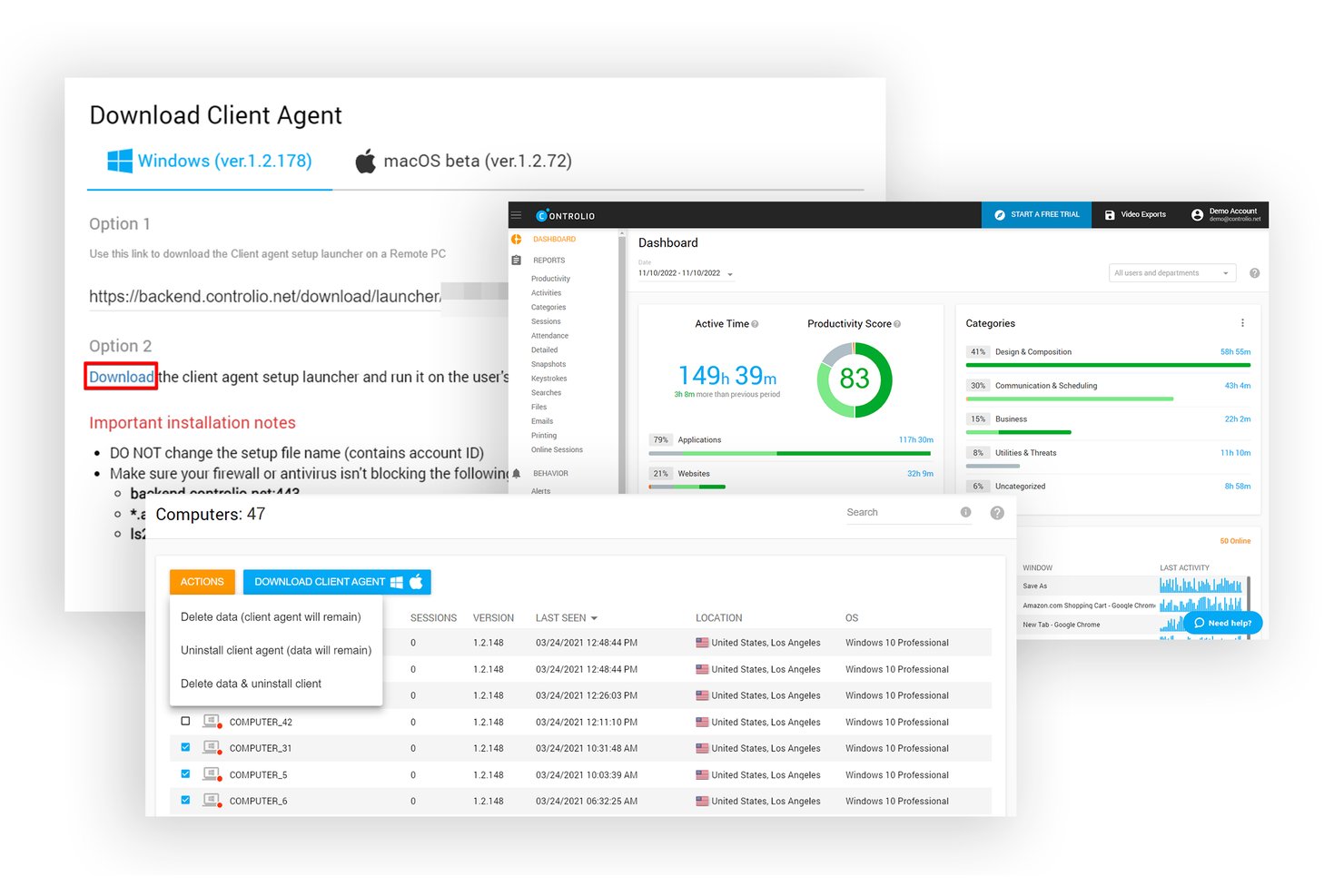
Controlio is an employee monitoring platform that tracks app and website usage, captures continuous screen video, applies web filtering and behavior rules, and supports cloud, private cloud, or on-premise deployment.
Who Is Controlio Best For?
Controlio is a strong fit for operations and call center managers who need continuous screen recording and web filtering controls within an on-premise environment.
Why I Picked Controlio
I picked Controlio as one of the best because its behavior rules engine puts web filtering controls directly in your hands, on your own infrastructure. You can set rules for specific websites, app categories, and removable media, then get an alert the moment a rule is triggered. I also love that on-premise deployment starts at just 10 users, so you don't need a massive rollout to keep monitoring data off third-party servers entirely.
Controlio Key Features
- Continuous video screen recording: Captures employee screens as ongoing video footage rather than periodic screenshots, so you get full context for any session you review.
- Stealth or visible agent mode: Deploy the endpoint agent either hidden from the system tray and Task Manager or visible to employees, depending on your monitoring policy.
- AI-based productivity scoring: Automatically categorizes app and website activity as productive or distracting and generates a productivity score for each user and department.
- Active Directory sync: Syncs with your existing AD on-premise (Advanced plan and up) to keep user and department data consistent without manual updates.
Controlio Integrations
Controlio offers Active Directory sync and SSO on Advanced and higher plans, plus a REST API for custom integrations. Native HRIS, SIEM, payroll, and project-tool integrations aren’t clearly documented.
Pros and Cons
Pros:
- Reviewers praise clear reports and timelines
- Web filtering rules trigger alerts
- Continuous video captures full sessions
Cons:
- Windows and macOS endpoints only
- On-premise architecture remains underdocumented

Best for air-gapped on-premise deployments
My Evaluation Score
- On-Premise Deployment
- Strong
- Activity & Usage Tracking
- Strong
- Endpoint Agent Deployment
- Adequate
- Admin Reporting & Dashboards
- Strong
- Local Data Storage & Control
- Strong
- Access Controls & Permissions
- Adequate
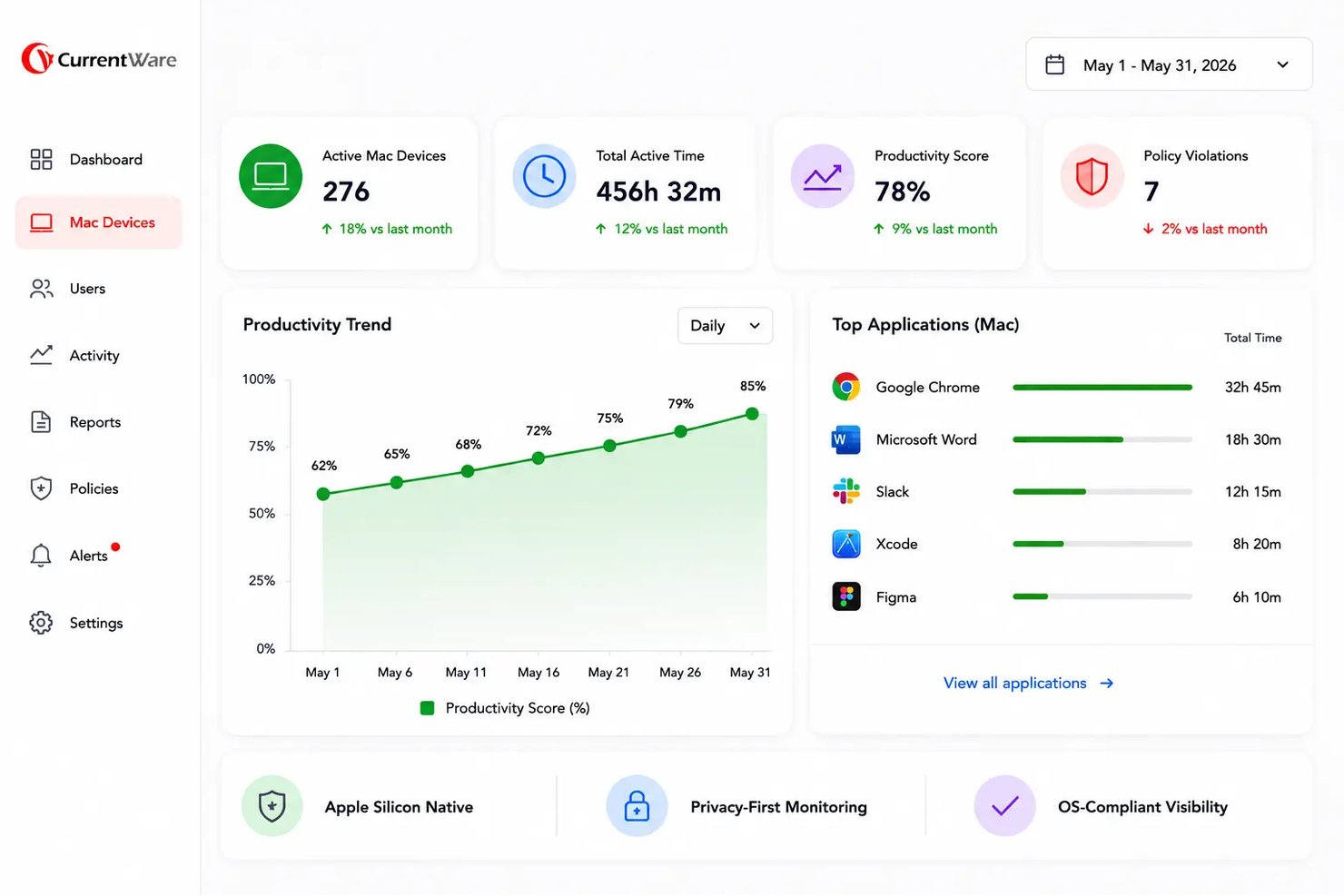
BrowseReporter by CurrentWare is an on-premise employee monitoring tool that tracks website and application usage, active and idle time, bandwidth consumption, AI-tool activity, and screenshots across Windows and macOS endpoints.
Who Is BrowseReporter Best For?
BrowseReporter is a strong fit for IT security and compliance teams in regulated industries that need full control over their monitoring data and can't rely on cloud infrastructure.
Why I Picked BrowseReporter by CurrentWare
BrowseReporter earns its spot on my shortlist because it's one of the few tools I've found that genuinely supports air-gapped deployments, running entirely on your own SQL Server with no cloud dependency required. I like that offsite mode works without any internet access, which matters for defense contractors or healthcare networks where data can't leave the building. Its AI-tool tracking (covering ChatGPT and Copilot usage) and OCR-searchable screenshots add real investigative depth without requiring keystroke logging.
BrowseReporter Key Features
- Active Directory sync: Import users and sync organizational units directly from Active Directory into the web console.
- Mouse jiggler detection: Identifies and excludes activity from mouse jigglers and auto-clickers so productivity data stays accurate.
- Scheduled report delivery: Automatically email productivity, usage, and risk reports to HR, IT, or compliance teams on a set schedule.
- Software license tracking: Reports on application usage across your workforce so you can identify unused or overlapping software licenses.
BrowseReporter Integrations
BrowseReporter has a native Active Directory integration for user and organizational-unit syncing. It also supports SAML, OIDC, CEF, SIEM connections, Power BI templates, and shared access to BrowseControl, AccessPatrol, and enPowerManager.
Pros and Cons
Pros:
- Reviewers praise detailed web activity tracking
- OCR-searchable screenshots aid incident investigations
- Air-gapped deployment keeps monitoring data onsite
Cons:
- Advanced analytics stop short of behavior modeling
- Windows and macOS endpoints only
My Evaluation Score
- On-Premise Deployment
- Excels
- Activity & Usage Tracking
- Excels
- Endpoint Agent Deployment
- Strong
- Admin Reporting & Dashboards
- Strong
- Local Data Storage & Control
- Strong
- Access Controls & Permissions
- Limited
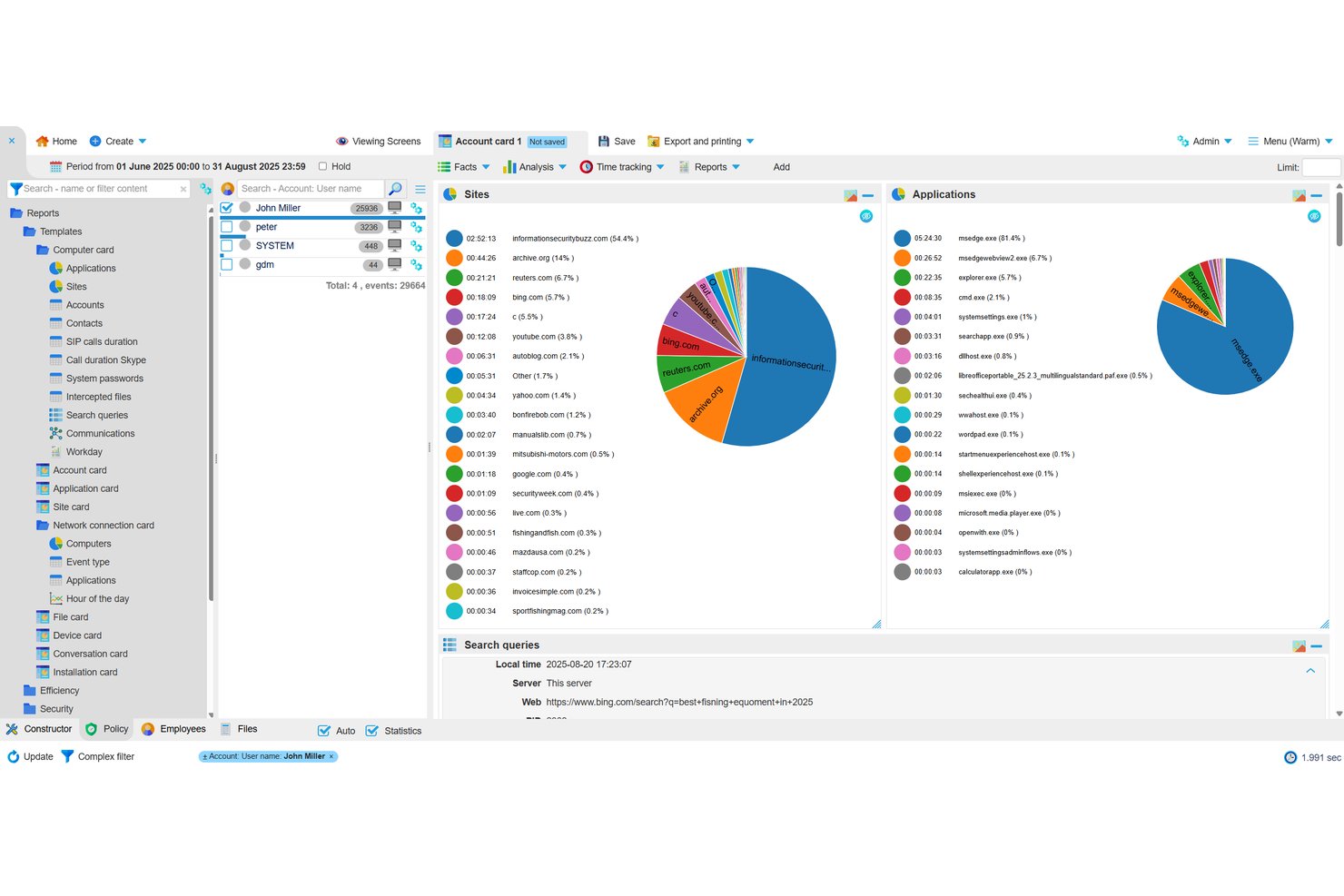
StaffCop Enterprise is a fully self-hosted employee monitoring platform that captures keystroke logging, screen recording, file activity, USB control, and web and app usage, alongside built-in DLP and user behavior analytics.
Who Is StaffCop Best For?
StaffCop Enterprise is a strong fit for IT security teams in regulated or high-security environments that need fully self-hosted monitoring with no cloud dependency.
Why I Picked StaffCop
StaffCop earns its spot on my shortlist because it's one of the few monitoring tools built specifically to run in fully isolated, air-gapped environments, with zero reliance on a vendor cloud. I particularly like its UEBA module, which builds a behavioral baseline per user and flags anomalies, so your security team catches insider threats before data leaves the building. Paired with USB device control and file shadow copies, it's a serious forensic setup for high-security environments.
StaffCop Key Features
- Screen recording and session video: Records desktop sessions and indexes footage by app, website, file, and keystroke for forensic review.
- OCR-based content search: Scans captured screens for text using keyword, wildcard, and RegEx queries to surface policy violations.
- SIEM integration via Syslog: Sends policy-triggered events to your SIEM in real time, so StaffCop alerts feed directly into your existing security workflows.
- Active Directory sync: Assigns monitoring policies and agent configurations by AD or ALD Pro group, supporting both one-time and scheduled directory syncs.
StaffCop Integrations
StaffCop supports integrations with Microsoft Active Directory, ALD Pro, SIEM platforms via Syslog, PostgreSQL, Prometheus, Grafana, and Node Exporter. It also supports Postgres Pro 16 for database deployment.
Pros and Cons
Pros:
- Combines DLP with behavioral analytics
- Captures detailed forensic activity evidence
- Supports air-gapped monitoring deployments
Cons:
- Lacks documented role-based access controls
- Night-shift activity may log incorrectly

My Evaluation Score
- On-Premise Deployment
- Strong
- Activity & Usage Tracking
- Excels
- Endpoint Agent Deployment
- Adequate
- Admin Reporting & Dashboards
- Strong
- Local Data Storage & Control
- Minimal
- Access Controls & Permissions
- Adequate
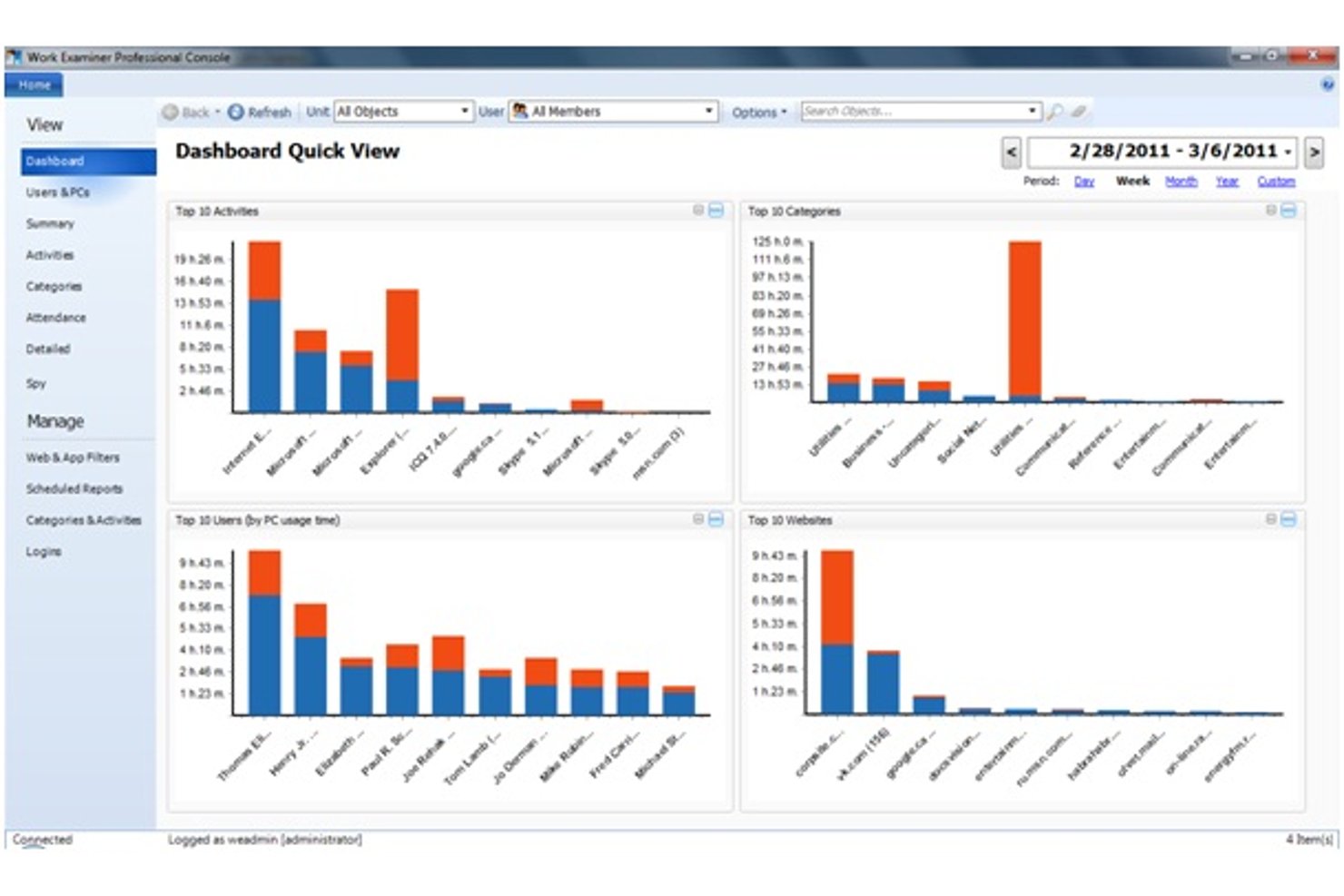
Work Examiner is a self-hosted employee monitoring solution that tracks app and website usage, captures keystrokes, emails, and instant messages, records screenshots, and logs USB and print activity across Windows and macOS endpoints.
Who Is Work Examiner Best For?
Work Examiner is a strong fit for IT security teams and operations supervisors at small to mid-size companies that need forensic-depth, self-hosted monitoring without relying on cloud infrastructure.
Why I Picked Work Examiner
Work Examiner earns its spot on my shortlist because the keystroke logging goes deeper than most tools I've tested: it captures every keystroke across all programs, including passwords, and you can scope capture to specific apps to avoid noise. I also like that it records email bodies and attachments (Exchange, Gmail, Outlook) alongside IM conversations and live screenshots, giving security teams a complete forensic trail when investigating a policy breach. All of that data stays on your own server, with no cloud dependency.
Work Examiner Key Features
- Web and app filtering: Block or redirect specific sites, set time-limited access allowances, and apply keyword-based content filtering across HTTP and HTTPS traffic.
- Active Directory sync: Sync users, groups, and organizational units from your existing AD structure directly into Work Examiner across all editions.
- USB and print activity logging: Track and log all USB device connections and print jobs across monitored endpoints for data loss prevention.
- Scheduled report delivery: Export productivity, attendance, and activity reports to PDF, CSV, or XLS, and set them to deliver automatically by email on a schedule.
Work Examiner Integrations
Work Examiner offers native Active Directory synchronization for users, groups, and organizational units. Controlio also includes a REST API with limited-lifetime tokens for custom integrations.
Pros and Cons
Pros:
- USB, print, and screenshot evidence collection
- Local storage supports internal data control
- Forensic-depth keystroke and message capture
Cons:
- Compliance controls remain insufficiently documented
- Windows-only agents limit endpoint coverage

My Evaluation Score
- On-Premise Deployment
- Strong
- Activity & Usage Tracking
- Excels
- Endpoint Agent Deployment
- Strong
- Admin Reporting & Dashboards
- Adequate
- Local Data Storage & Control
- Strong
- Access Controls & Permissions
- Limited
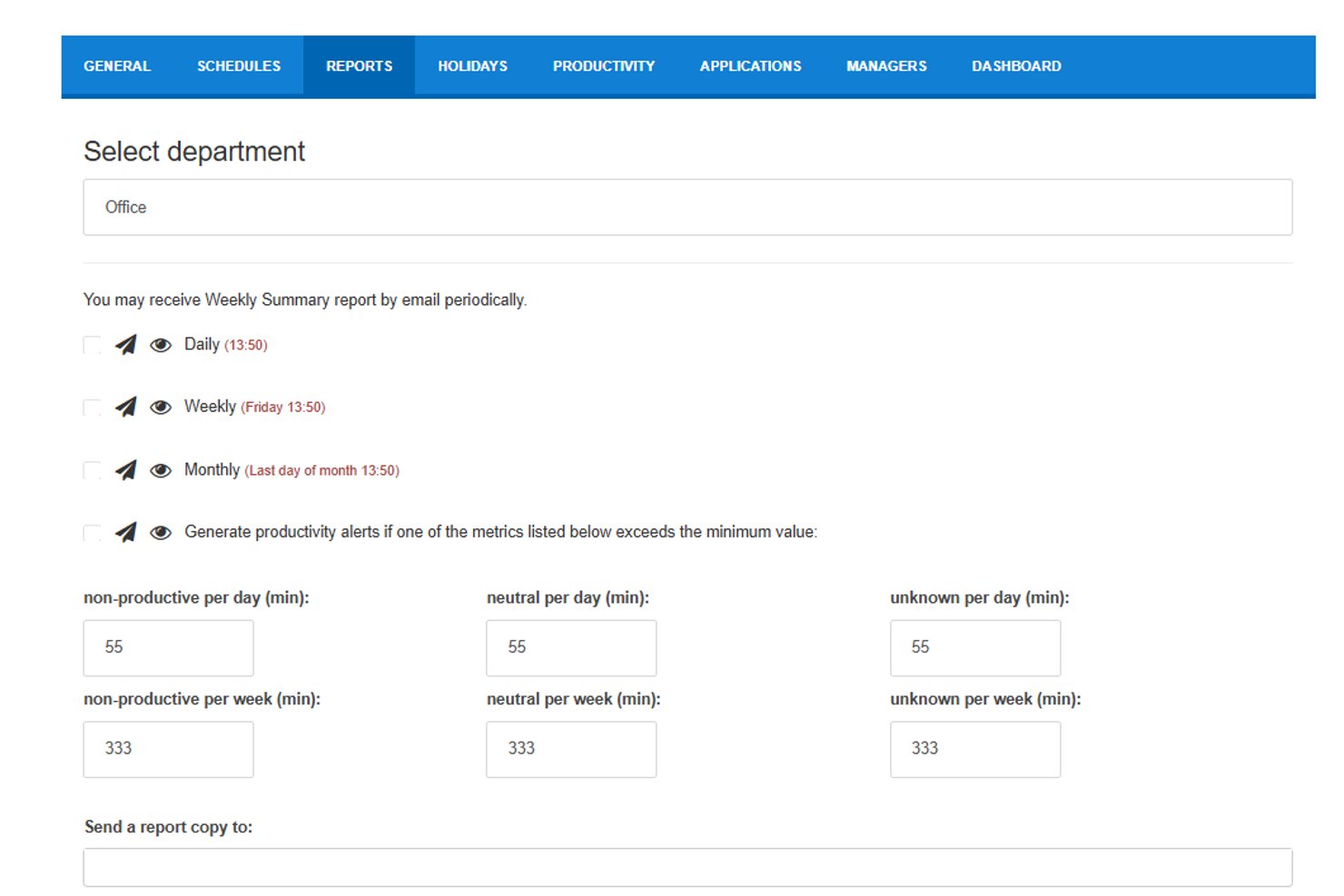
StaffCounter is a self-hosted employee monitoring solution that tracks application usage, websites, keystrokes, screenshots, and chat activity across Windows, Mac, Linux, and Android endpoints, with a built-in DLP module and behavior analysis engine.
Who Is StaffCounter Best For?
StaffCounter is a strong fit for compliance officers and IT security teams that need employee monitoring data stored entirely within their own infrastructure.
Why I Picked StaffCounter
StaffCounter earns its spot on my shortlist because its on-premise architecture is built specifically around GDPR data sovereignty, not retrofitted from a cloud product. I like that all monitoring data, including keystrokes, screenshots, and DLP flags, stays encrypted within your own infrastructure and never touches a vendor server. The open-source Windows agent and PHP server code mean your security team can audit exactly what's being collected and how it's stored.
StaffCounter Key Features
- Virtual appliance deployment: Ships as a pre-configured OVF/OVA or Docker image that runs on VMware ESXi, VirtualBox, KVM, Hyper-V, and XEN.
- User behavior analysis engine: Monitors for rule violations and sends automatic email alerts when thresholds are breached, such as excessive time on unproductive sites.
- Cross-platform endpoint agents: Installs on Windows, Mac, Linux, and Android devices, with settings managed centrally from the web console.
- Data Leak Prevention module: Tracks unauthorized changes to sensitive files and flags policy violations across monitored endpoints.
StaffCounter Integrations
Native integrations are not clearly documented. StaffCounter provides an API for custom integrations and supports connections with ERP systems and other internal systems.
Pros and Cons
Pros:
- Covers Windows, Mac, Linux, and Android
- Supports DLP alerts and behavior analysis
- Keeps monitoring data inside your infrastructure
Cons:
- Lacks documented role-based access controls
- Requires internal IT maintenance and backups

Best for video recording
My Evaluation Score
- On-Premise Deployment
- Strong
- Activity & Usage Tracking
- Excels
- Endpoint Agent Deployment
- Strong
- Admin Reporting & Dashboards
- Strong
- Local Data Storage & Control
- Strong
- Access Controls & Permissions
- Strong
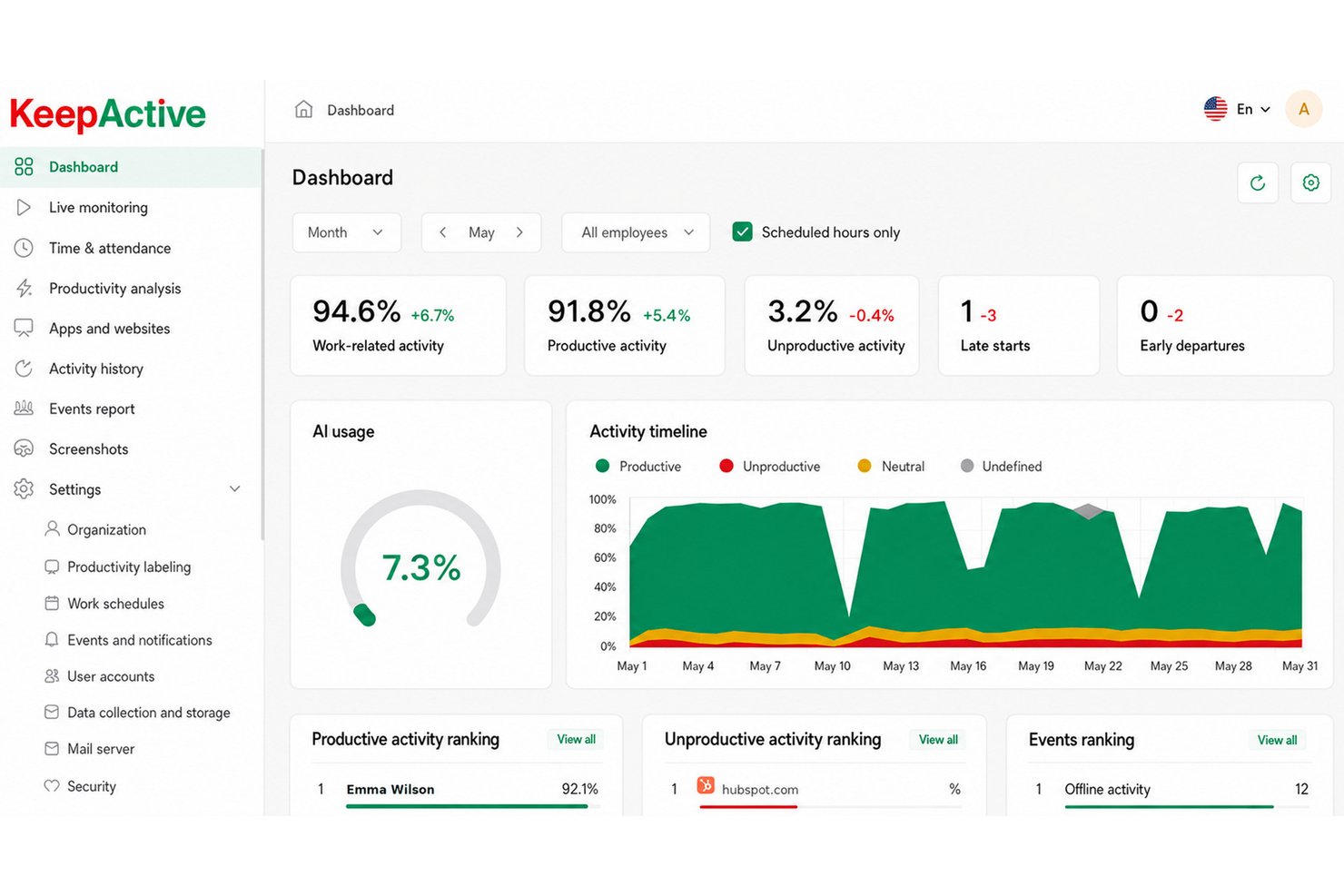
KeepActive (formerly Kickidler) is a self-hosted employee monitoring platform that combines activity tracking, screen and audio recording, keystroke logging, and data loss prevention across Windows, macOS, and Linux endpoints.
Who Is KeepActive Best For?
KeepActive is a strong fit for IT security teams and operations supervisors who need deep, on-premise video and audio surveillance with insider-threat detection built in.
Why I Picked KeepActive
KeepActive earns its spot on my shortlist because its video recording depth goes well beyond what most on-premise tools offer. I particularly like the encrypted forensic "black box," which continuously records both screen and microphone in encrypted form, so you have a tamper-resistant record if an incident is ever disputed. Event-based video recording and live webcam streaming round that out, giving security teams a full visual audit trail without relying on cloud storage.
KeepActive Key Features
- Keystroke logging: Captures every keystroke on monitored endpoints, with the DLP tier adding typed-text capture, clipboard logging, and keystroke-dynamics analysis.
- SIEM and Syslog integration: Forwards security events to your existing SIEM setup, letting IT teams centralize alerts alongside other infrastructure data.
- Risk scoring: Assigns each employee a risk score using three analysis methods, with automatic alerts for unusual behavior like mass file copying or deletions.
- Active Directory sync: Mirrors your org structure, deploys the Grabber agent to AD machine groups, and maps manager permissions to existing AD hierarchy.
KeepActive Integrations
KeepActive offers native integrations with Active Directory, SIEM/Syslog, Telegram, and VK Teams. It also provides an API for custom integrations and supports report delivery to FTP and Dropbox.
Pros and Cons
Pros:
- Strong insider-threat detection and DLP
- Deep video and audio surveillance
- Encrypted black box preserves forensic recordings
Cons:
- macOS and Linux DLP is limited
- Offline deployment requires separate local edition
Best for insider threat forensics on-prem
My Evaluation Score
- On-Premise Deployment
- Strong
- Activity & Usage Tracking
- Excels
- Endpoint Agent Deployment
- Strong
- Admin Reporting & Dashboards
- Strong
- Local Data Storage & Control
- Strong
- Access Controls & Permissions
- Strong
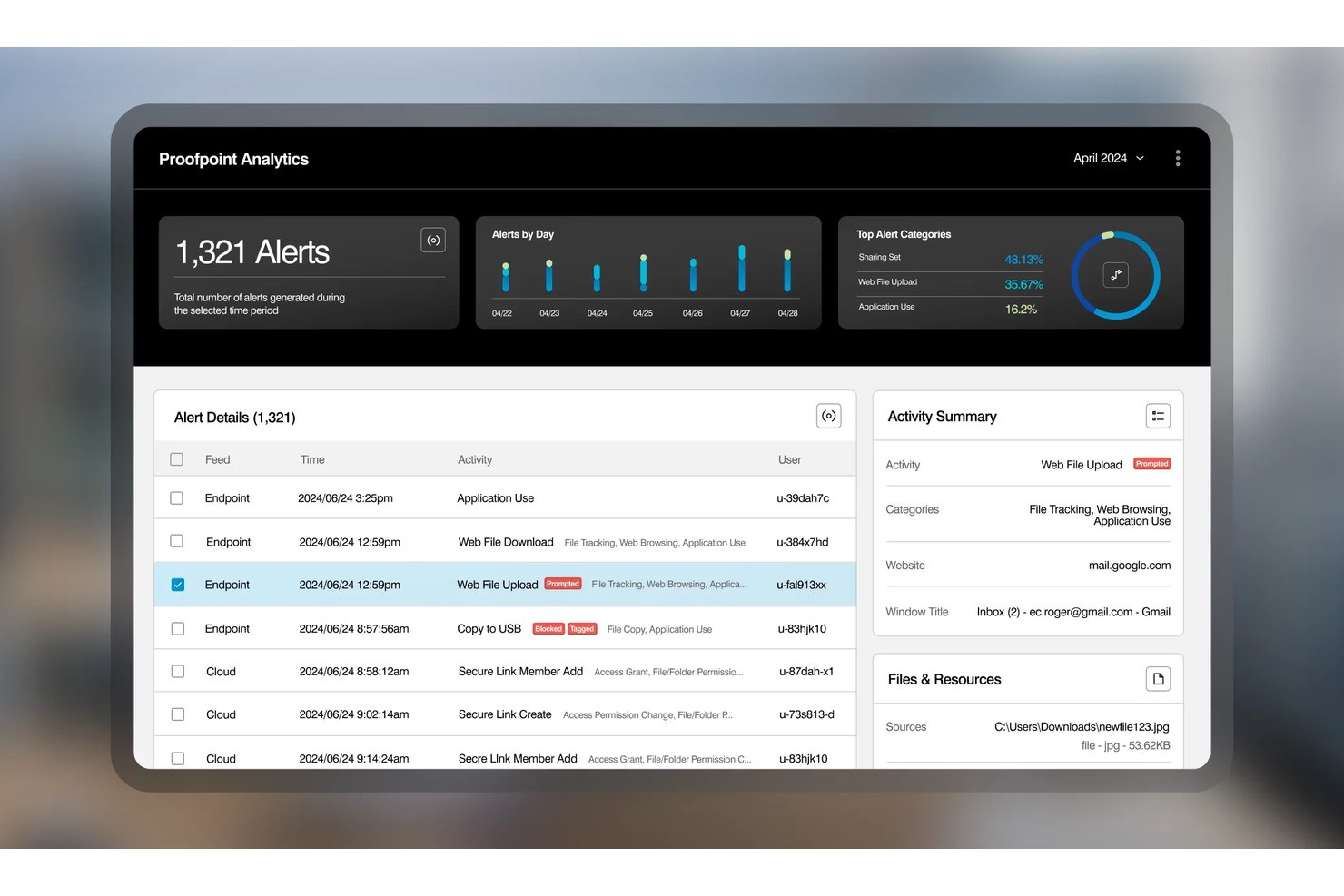
Proofpoint ITM On-Prem is a self-hosted insider threat management platform that captures session video replay, keystroke logging, file activity, USB transfers, database queries, and Unix commands across Windows, Mac, and legacy Unix systems.
Who Is Proofpoint Best For?
Proofpoint ITM On-Prem is a strong fit for IT security teams in regulated industries that need deep forensic visibility into insider threats across on-premise infrastructure.
Why I Picked Proofpoint
Proofpoint ITM On-Prem earns its spot on my list because the forensic depth it offers on self-hosted infrastructure is unmatched. I'm particularly impressed by session video replay paired with keystroke logging and SQL query capture, which means a security team can reconstruct exactly what a database admin did during a suspicious session. It also supports legacy Unix systems like AIX, Solaris, and HP-UX, covering infrastructure most on-prem monitoring tools simply ignore.
Proofpoint Key Features
- Unix command capture: Records commands run on legacy Unix systems including AIX, Solaris, and HP-UX, giving security teams full visibility into non-Windows server activity.
- Role-based console access: Assigns permissions to console users through LDAP/Active Directory integration, with LDAPS encryption for secure admin authentication.
- User risk scoring: Tracks policy violations per user and generates a running risk score through the built-in intelligence module.
- SIEM integration via REST API: Sends activity and alert data to external SIEM tools, connecting on-premise monitoring data to your broader security stack.
Proofpoint Integrations
Proofpoint ITM On-Prem integrates with Elastic, Active Directory, Microsoft Information Protection, and IT ticketing systems, plus a REST API for sending activity and alert data to SIEM tools.
Pros and Cons
Pros:
- Protects sensitive investigations with replay access controls
- Captures legacy Unix commands and database queries
- Reconstructs incidents with session video replay
Cons:
- Offers limited workforce productivity analytics
- Requires substantial SQL Server administration

Syteca
Best for PAM-led on-prem monitoring
My Evaluation Score
- On-Premise Deployment
- Excels
- Activity & Usage Tracking
- Strong
- Endpoint Agent Deployment
- Strong
- Admin Reporting & Dashboards
- Adequate
- Local Data Storage & Control
- Strong
- Access Controls & Permissions
- Strong
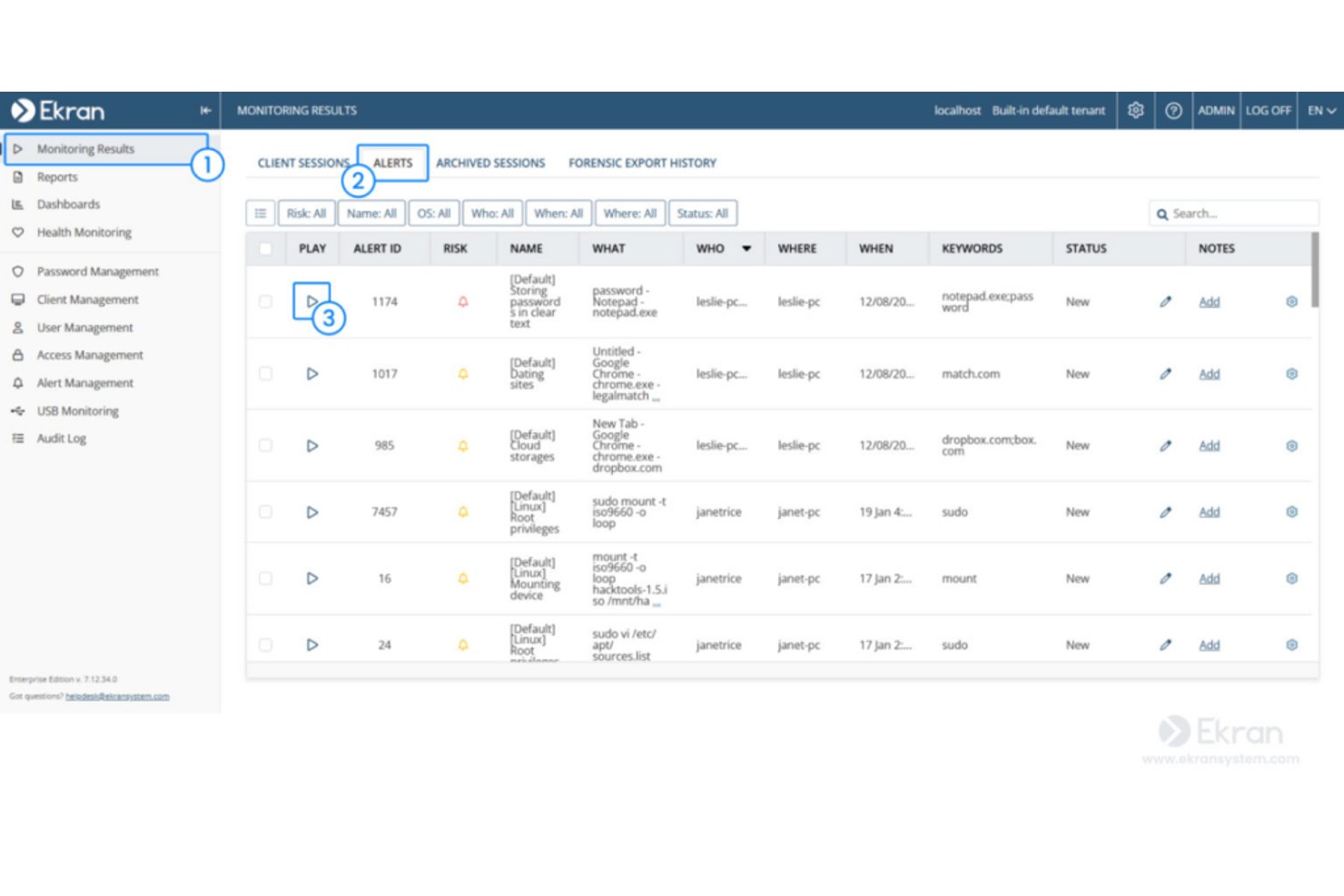
Syteca is an on-premises privileged access management (PAM) and insider threat platform that combines user activity monitoring, session recording, keystroke logging, behavior-based alerts, and access controls across Windows, macOS, and Linux endpoints.
Who Is Syteca Best For?
Syteca is a strong fit for IT security teams and compliance officers in mid-to-large organizations that need PAM-integrated monitoring deployed entirely within their own infrastructure.
Why I Picked Syteca
Syteca earns its spot on my shortlist because its PAM-first architecture makes it one of the few on-prem monitoring tools that ties privileged access control directly to session recording. I like that when a privileged user connects to a critical endpoint, Syteca can require manual approval, issue a one-time password, and simultaneously record every keystroke and clipboard action in a tamper-proof forensic format. If something looks wrong, real-time alerts can automatically kill the session or block the user before damage is done.
Syteca Key Features
- Compliance framework alignment: Maps activity data to HIPAA, SOC 2, ISO 27001, GDPR, PCI DSS, and NIST 800-53 for audit readiness.
- Multi-tenant architecture: Runs separate, independent environments for different business units or locations under one platform.
- USB device management: Detects and controls USB device connections to prevent unauthorized data transfers on monitored endpoints.
- Sensitive data masking: Automatically redacts passwords and other sensitive strings from session recordings before they're stored.
Syteca Integrations
Syteca supports integrations with Active Directory, AWS, Azure, and Microsoft Windows Virtual Desktop, plus SIEM, ticketing, and SSO systems. It also supports connectivity with external security and access-management environments.
Pros and Cons
Pros:
- Blocks risky sessions through real-time alerts
- Records keystrokes, screens, and clipboard activity
- Fully on-premises with local database control
Cons:
- Requires customer-managed servers and database
- Productivity reporting trails dedicated workforce tools

My Evaluation Score
- On-Premise Deployment
- Strong
- Activity & Usage Tracking
- Excels
- Endpoint Agent Deployment
- Strong
- Admin Reporting & Dashboards
- Strong
- Local Data Storage & Control
- Strong
- Access Controls & Permissions
- Adequate
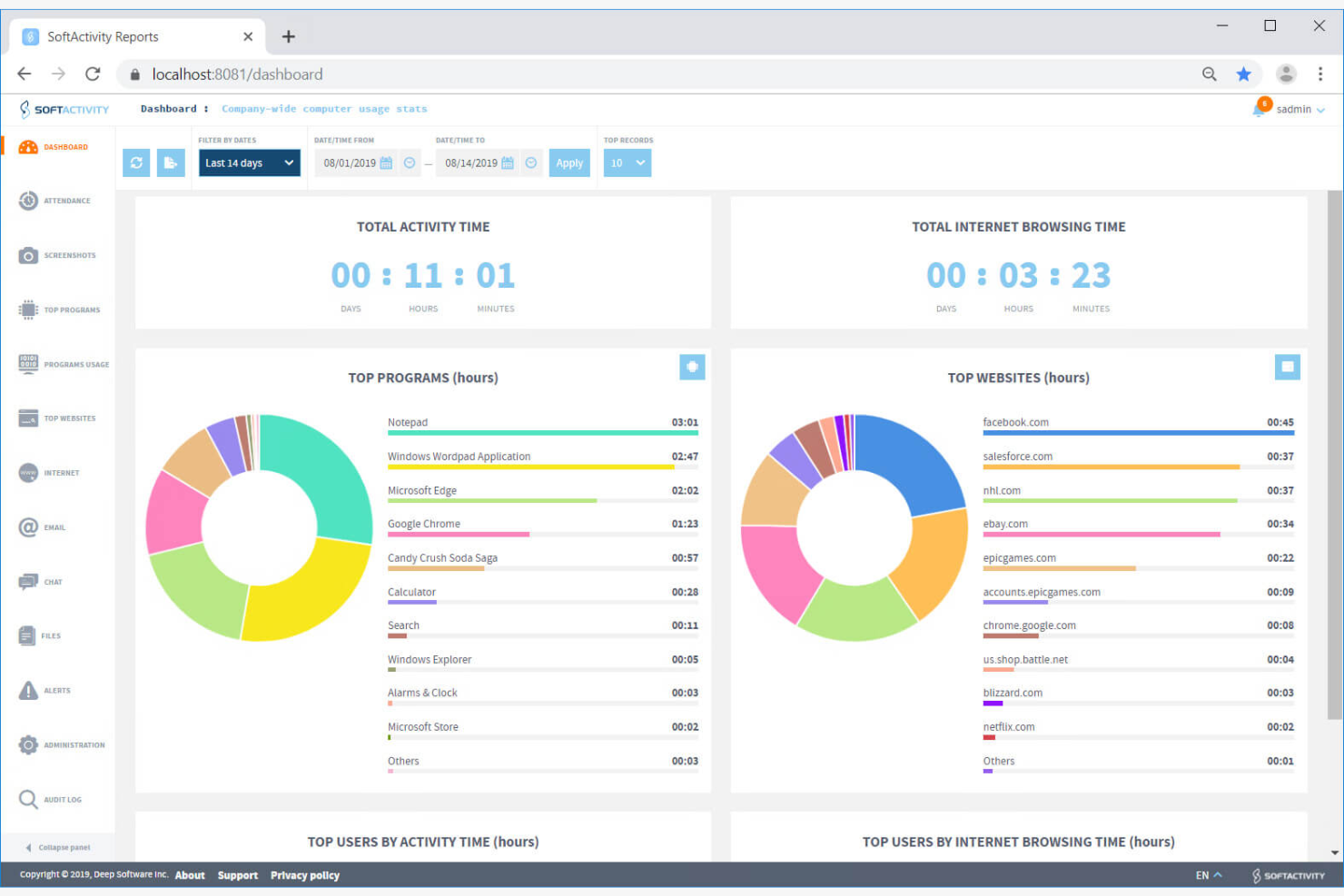
SoftActivity Monitor is an on-premise employee monitoring software that tracks application usage, website activity, file operations, keystrokes, and live screen views across company-owned Windows devices.
Who Is SoftActivity Best For?
SoftActivity Monitor is a strong fit for IT security administrators and compliance officers who need forensic-depth monitoring on Windows devices within a fully self-managed, on-premise infrastructure.
Why I Picked SoftActivity
SoftActivity earns its spot on my shortlist because its real-time monitoring capabilities are genuinely hard to beat in an on-premise setup. I love that you can pull up live screen views of multiple employee desktops simultaneously, essentially running CCTV-style visibility across your entire Windows fleet from a single console. Paired with IntelliSnap screenshots triggered by user actions, you get a precise, timestamped record of exactly what happened and when.
SoftActivity Key Features
- Keystroke logging: Captures keystrokes across monitored Windows devices in multiple languages, including English, Spanish, Japanese, Chinese, and Cyrillic scripts.
- File activity tracking: Logs read, write, delete, rename, and move operations across local, network, USB, and external drives.
- User behavior analytics: Flags unusual activity patterns on monitored devices to help surface potential insider threats.
- Remote actions console: Lets admins view running processes, close apps, log users off, and reboot or shut down machines directly from the console.
SoftActivity Integrations
Integrations include Microsoft Active Directory, Microsoft Entra ID, PostgreSQL, Microsoft Outlook, Microsoft Exchange, Citrix XenApp, and Windows Remote Desktop Services. No API or HRIS integrations are clearly documented.
Pros and Cons
Pros:
- Reviewers praise helpful technical support
- Detailed file and USB audit trails
- Live multi-screen views aid supervision
Cons:
- Antivirus exclusions can require troubleshooting
- Windows-only coverage excludes other endpoints

Insightful
Best for detailed analytics
My Evaluation Score
- On-Premise Deployment
- Strong
- Activity & Usage Tracking
- Strong
- Endpoint Agent Deployment
- Minimal
- Admin Reporting & Dashboards
- Strong
- Local Data Storage & Control
- Adequate
- Access Controls & Permissions
- Strong
Insightful is an on-premise employee monitoring and workforce analytics platform that tracks app and website usage, screenshots, time and attendance, and real-time activity across your workforce.
Who Is Insightful Best For?
Insightful is a strong fit for enterprise IT and operations teams that need detailed productivity analytics and security controls running on their own infrastructure.
Why I Picked Insightful
Insightful earns its spot on my shortlist because its analytics depth is genuinely hard to match in an on-premise setup. I like that the real-time overview and capacity analysis give operations teams a live read on workforce utilization across teams, not just individual headcount. Its Insider Threat Detection and Irregular Behavior Alerts run locally on your own servers, so you're getting behavioral intelligence without routing sensitive data through a third party.
Insightful Key Features
- Active Directory integration: Syncs your on-premise user directory with Insightful to automate employee onboarding and access management.
- Role-based access control: Assigns admin, manager, and client permission levels so only authorized users can view sensitive workforce data.
- Automatic time mapping: Captures and categorizes how time is spent across tasks and projects without requiring manual input from employees.
- Three-tier on-premise deployment: Scales from single-tier setups for 250–2,000 users to high availability configurations for workforces exceeding 10,000 users.
Insightful Integrations
Insightful integrates with Active Directory, BigQuery, and Snowflake, and offers a developer API for custom integrations with BI tools, data warehouses, and SIEM systems.
Pros and Cons
Pros:
- Security controls support sensitive monitoring programs
- Local deployment preserves workforce data control
- Detailed analytics support operational oversight
Cons:
- No confirmed keystroke logging limits investigations
- Periodic internet access prevents air-gapped operation
New Product Updates from Insightful
Insightful Expands MCP and HRIS Integrations
Insightful adds OAuth connections for ChatGPT and Microsoft Copilot Studio through its MCP Server, while HRIS integrations gain manager scope syncing in Beta. These updates expand AI access and automate permission management. For more information, visit Insightful’s official site.
 .
.Other On-Premise Employee Monitoring Software
Here are some additional on-premises employee monitoring software options that didn’t make it onto my shortlist, but are still worth checking out:
- Apploye
For budget-friendly plans
- Teramind
For data loss prevention
- WorkTime
For small businesses
- Time Champ
For Active Directory agent rollout
- Veriato
For AI-driven productivity risk scoring


How I Evaluate On-Premise Employee Monitoring Software
I split my evaluation into two layers: the core requirements a tool must meet to qualify and the differentiators—like data sovereignty controls and HR policy alerting—that separate vendors.
Core Functionality (Table Stakes For This List)
When I'm selecting tools for my list, I rank each one on a scale from 0 (does not offer the functionality) to 5 (excels in this area) for each core functionality listed below. Then, I calculate the tool's total score into a percentage. Each tool needs to achieve a minimum total score of 65% to be considered for inclusion.
- On-Premise Deployment Options: I check whether the software runs entirely on your own servers and infrastructure, including support for air-gapped environments with no external data transmission.
- Employee Activity Tracking: The tool should capture app usage, website visits, and active/idle time per workstation so HR teams can review daily work patterns across departments.
- Screen & Screenshot Monitoring: I look for automated screenshot intervals, event-triggered captures, and screen recording—features that give investigators visual evidence during policy reviews.
- Productivity Reporting & Dashboards: Reports should categorize tracked activity into productive vs. unproductive buckets, with filtering by team, role, or time period for performance reviews.
- Local Data Storage & Access Controls: I evaluate whether monitoring data stays on-premise with role-based permissions, so only authorized HR or compliance staff can view sensitive employee records.
- Policy & Alert Configuration: Custom rule-building matters here—for example, triggering an alert when an employee accesses restricted sites or exceeds idle thresholds during shift hours.
Once I have a list of tools that meet the criteria, I consider what sets each platform apart.
Differentiating Factors (What Sets Vendors Apart)
Here's how I compare and contrast different vendors:
Standout Features
When HR needs to investigate policy violations discreetly, stealth mode operation matters. Tools like Teramind and Veriato can run agents invisibly so employees aren't alerted during an active investigation. User behavior analytics is another feature I evaluate closely—baseline tracking that flags anomalies like sudden file transfer spikes or off-hours logins helps compliance officers spot risks early. Keystroke logging rounds this out by giving investigators searchable records of typed input during misconduct reviews.
Beyond Features
Data sovereignty is a major consideration—I check whether vendors support configurable retention policies and employee consent workflows that align with your organization's privacy obligations. Deployment requirements also vary widely; some tools need specific Windows Server environments while others support Linux, so I evaluate compatibility with your existing infrastructure. HR system integrations matter too, particularly whether the platform connects with your HRIS or Active Directory for automatic user provisioning and org-level reporting.
How to Choose On-Premise Employee Monitoring Software
It’s easy to get bogged down in long feature lists and complex pricing structures. To help you stay focused as you work through your unique software selection process, here’s a checklist of factors to keep in mind:
| Factor | What to Consider |
|---|---|
| Scalability | Will the software grow with your team? Consider the maximum number of users it supports and whether it can handle increased data without performance issues. |
| Integrations | Does it connect with your existing tools? Check for compatibility with your team's most-used software, like project management or communication platforms. |
| Customizability | Can you tailor the software to fit your needs? Look for options to customize dashboards, reports, and alerts to align with your specific workflows and policies. |
| Ease of use | How intuitive is the software? Consider the learning curve and whether your team can easily navigate the interface without extensive training or support. |
| Implementation and onboarding | How smooth is the transition? Evaluate the time and resources needed to set up the software and whether the vendor offers training materials or support during onboarding. |
| Cost | Is the pricing transparent and within your budget? Compare the cost against the features offered and check for hidden fees or flexible payment plans. |
| Security safeguards | How secure is your data? Ensure the software offers encryption, access controls, and compliance with data protection regulations to safeguard sensitive information. |
| Compliance requirements | Does it meet industry standards? Verify if the software complies with regulations like GDPR or HIPAA, which might be necessary for your business operations. |
What Is On Premise Employee Monitoring Software?
On premise employee monitoring software is a tool installed on a company's local servers to track and analyze employee activities and productivity. IT managers, HR professionals, and team leaders generally use these tools to ensure data security and improve workforce efficiency. Features like activity tracking, time monitoring, and web filtering help with managing productivity and safeguarding sensitive information. Overall, these tools provide businesses with the ability to maintain control over their data and enhance operational oversight.
Features
When selecting on-premises employee monitoring software, keep an eye out for the following key features:
- Activity tracking: Monitors employee actions on devices to help identify productivity patterns and ensure compliance with company policies.
- Time monitoring: Tracks work hours and attendance, providing insights into employee time management and efficiency.
- Web filtering: Controls and restricts access to specific websites, preventing distractions and enhancing focus.
- Data encryption: Protects sensitive information by encrypting data, ensuring that it remains secure from unauthorized access.
- Real-time alerts: Notifies managers of suspicious or unauthorized activities, allowing for quick intervention and risk mitigation.
- Customizable reporting: Offers tailored reports to fit specific business needs, aiding in data-driven decision-making.
- Screen recording: Captures visual records of employee desktop activities, providing evidence for audits or investigations.
- Keystroke logging: Records keystrokes to monitor data input and detect potential security threats.
- Project tracking: Helps manage and monitor project progress, ensuring resources are allocated effectively and deadlines are met.
- GPS location tracking: Tracks the location of mobile employees, ensuring accountability and optimizing field operations.
Benefits
Implementing on-premises employee monitoring software provides several benefits for your team and your business. Here are a few you can look forward to:
- Enhanced security: Protects sensitive company data through features like data encryption and real-time alerts, reducing the risk of breaches.
- Improved productivity: Increases employee focus by monitoring activities and web usage, helping to identify and eliminate distractions.
- Accurate time management: Tracks work hours and attendance, enabling better planning and efficient resource allocation.
- Customized insights: Provides tailored reports and analytics, allowing managers to make informed decisions based on specific business needs.
- Regulatory compliance: Helps ensure adherence to industry regulations with features like activity tracking and data protection measures.
- Better accountability: Encourages employees to maintain productivity and transparency with monitoring features like screen recording and keystroke logging.
Costs & Pricing
Selecting on-premises employee monitoring software requires an understanding of the various pricing models and plans available. Costs vary based on features, team size, add-ons, and more. The table below summarizes common plans, their average prices, and typical features included in on premise employee monitoring software solutions:
Plan Comparison Table for On-Premise Employee Monitoring Software
| Plan Type | Average Price | Common Features |
|---|---|---|
| Free Plan | $0 | Basic activity tracking, limited reporting, and restricted user access. |
| Personal Plan | $5-$15/user/month | Time tracking, web filtering, and basic data encryption. |
| Business Plan | $20-$35/user/month | Advanced reporting, screen recording, and integrated project tracking. |
| Enterprise Plan | $40-$60/user/month | Comprehensive security measures, real-time alerts, and full customization options. |
On-Premise Employee Monitoring Software FAQs
Here are some answers to common questions about on-premises employee monitoring software:
What is the difference between on-premises and cloud-based employee monitoring software?
On-premise software is installed on your organization’s own servers, giving you full control over data storage and access. This can be important for companies with strict security or compliance requirements. Cloud-based software is hosted on a vendor’s infrastructure and generally offers more straightforward setup and scaling, but requires trust in the provider’s data-handling practices.
How do I ensure compliance with privacy laws when using monitoring software?
You can support compliance by setting clear policies, obtaining informed employee consent where required, and communicating what data is collected and why. It’s also important to configure monitoring settings to limit unnecessary data capture, review policies regularly, and consult legal guidance when operating in highly regulated industries.
How often should I update my on-premises employee monitoring software?
Regular updates help maintain security, stability, and compatibility. Most vendors release security patches every few months and major version updates once or twice per year, especially for tools that include behavior analytics, screen recording, or real-time monitoring components. Because on-premise systems don’t update automatically, it’s a good practice to schedule quarterly maintenance windows, review available patches, and coordinate with your IT team to apply updates across all monitored devices. This approach helps protect against vulnerabilities, ensures accurate activity tracking, and keeps the system aligned with evolving security and compliance requirements.