

Yapay zekâ ofis alanı yönetim yazılımları, çalışma alanlarının nasıl kullanıldığını ve yönetildiğini planlamanıza, rezerve etmenize ve optimize etmenize yardımcı olmak için yapay zekâyı kullanır. Rezervasyonu kolaylaştıran, doluluk verilerini iyileştiren ve hibrit ya da esnek çalışmaya uyum sağlayan araçlar arıyorsanız doğru yerdesiniz. Doğru çözüm, işletmenizin değişen çalışan ihtiyaçlarını karşılamasına, ofis alanını daha verimli kullanmasına ve veriye dayalı daha iyi kararlar almasına yardımcı olabilir. Aşağıda, hibrit iş yeri hedefleriniz için en iyi yapay zekâ aracını güvenle seçebilmeniz amacıyla uzmanların seçimlerini ve temel ayrıntıları bulacaksınız.
Why Trust Our Software Recommendations
6,700+
Reviews
20
Industry experts
16+
Evaluation factors
14
Years
Our team has been testing and reviewing software since 2012. As HR experts ourselves, we know how difficult—and important—it is to choose the right software.
For this guide, we evaluated tools using hands-on testing and independent research, scoring tools using our selection criteria. We also draw on insights from industry thought leaders and practicing HR experts.
Our reviews reflect our human editorial judgment, not a sales pitch.
Expert reviewers:
- Phil GrayCOO
 Kim BehnkeHR Tech Editor & Analyst
 Josh BarkerPeople Ops Manager

Yapay Zekâ Ofis Alanı Yönetim Yazılımları Karşılaştırma Tablosu
En iyi yapay zekâ ofis alanı yönetim yazılımı seçimlerimin fiyatlandırma ayrıntılarını bu karşılaştırma tablosunda özetliyorum:
Sorted by: Default
| Tool | Starting Price | Website | |
|---|---|---|---|
Best for predictive space scenario modeling | Not rated | Pricing upon request Free demo available | Website |
Best for mapped safety and service workflows | 4.7 out of 5 | $500/month Free demo available | Book Demo |
Best for touchless desk check-in | 4.3 out of 5 | Pricing upon request Free demo available | Website |
Best for real-time occupancy insights | 4.8 out of 5 | $5/bookable resource/month Free demo available | Website |
Best for space efficiency recommendations | 4.6 out of 5 | $5/user/month Free trial + free demo available | Book Demo |
Best for flexible desk and room reservations | 4.5 out of 5 | Pricing upon request Free demo available | Website |
Best for sensor-driven workspace analytics | 4.6 out of 5 | Pricing upon request Free demo available | Website |
Best for AI-powered workplace assistance | 4.5 out of 5 | $99/month Free demo available | Website |
Best for Microsoft ecosystem integration | 4.6 out of 5 | $8.55/license/month Free demo available | Website |
Best for hybrid work scheduling integration | Not rated | Pricing upon request Free demo available | Website |


En İyi Yapay Zekâ Ofis Alanı Yönetim Yazılımı İncelemeleri
Kısa listeme giren en iyi yapay zekâ ofis alanı yönetim yazılımlarına ilişkin ayrıntılı özetlerimi aşağıda bulabilirsiniz. İncelemelerim gerçek dünya vaka çalışmalarından yararlanır ve her platformun özelliklerine, yeteneklerine ve entegrasyonlarına ayrıntılı bir bakış sunarak sizin için en uygun olanı bulmanıza yardımcı olur.
 Best for predictive space scenario modeling
- Free demo available
- Pricing upon request

VergeSense offers scenario modeling that factors growth, attendance, hybrid work, and cost to optimize space planning. VergeSense is an AI-powered office space management platform that uses occupancy intelligence and predictive planning tools for scenario modeling, capacity forecasting, and portfolio-level space optimization.
Who Is VergeSense Best For?
VergeSense suits corporate real estate and workplace teams at large enterprises managing complex, multi-site office portfolios.
Why I Picked VergeSense
VergeSense is one of my top picks because I love how its Predictive Planning tool handles the "what if" questions that come up constantly in space planning. I can upload a floor plan and run scenario models against real occupancy data, testing headcount growth, hybrid attendance shifts, or consolidation plans before committing to anything. Unlike others, the Large Spatial Model draws from more than 200M sq ft of real workplace behavior across 200+ enterprises, so scenario outputs aren't based on industry averages. I've also found the CFO-ready reporting genuinely useful when I need to defend a footprint decision to leadership.
VergeSense Key Features
- Infinity Area Sensor: A proprietary sensor that captures zone-level occupancy data across open areas, meeting rooms, and neighborhoods, eliminating the need for individual desk sensors.
- Signs of Life detection: A passive occupancy detection method that identifies space use independently of booking data or badge swipes, reducing data gaps.
- Multi-source data integration: Combines occupancy signals from Wi-Fi, badge systems, and desk booking platforms into a single analytics layer for a unified view.
- Capacity threshold alerts: Notifies teams when space utilization crosses set thresholds so they can address over- or under-used areas in real time.
VergeSense Integrations
VergeSense offers dozens of native integrations including Accruent EMS, Archibus by Eptura, Aruba, Cisco Meraki, CBRE Host, Cloudbooking, Condeco by Eptura, Crestron, Microsoft Places, ServiceNow, and Appspace. An open API is also available for custom integrations.
Pros and Cons
Pros:
- Ingests data from Wi-Fi, badges, and sensors
- Delivers consistent measurement across multiple sites
- Sensor accuracy exceeds 95% for occupancy detection
Cons:
- Hardware installation increases upfront cost and extends lead time
- Camera-based sensors require extensive privacy reviews
Learn more about VergeSense: 2Best for mapped safety and service workflows
elia
- Free demo available
- From $500/month
Visit WebsiteCustomer Rating:4.7/5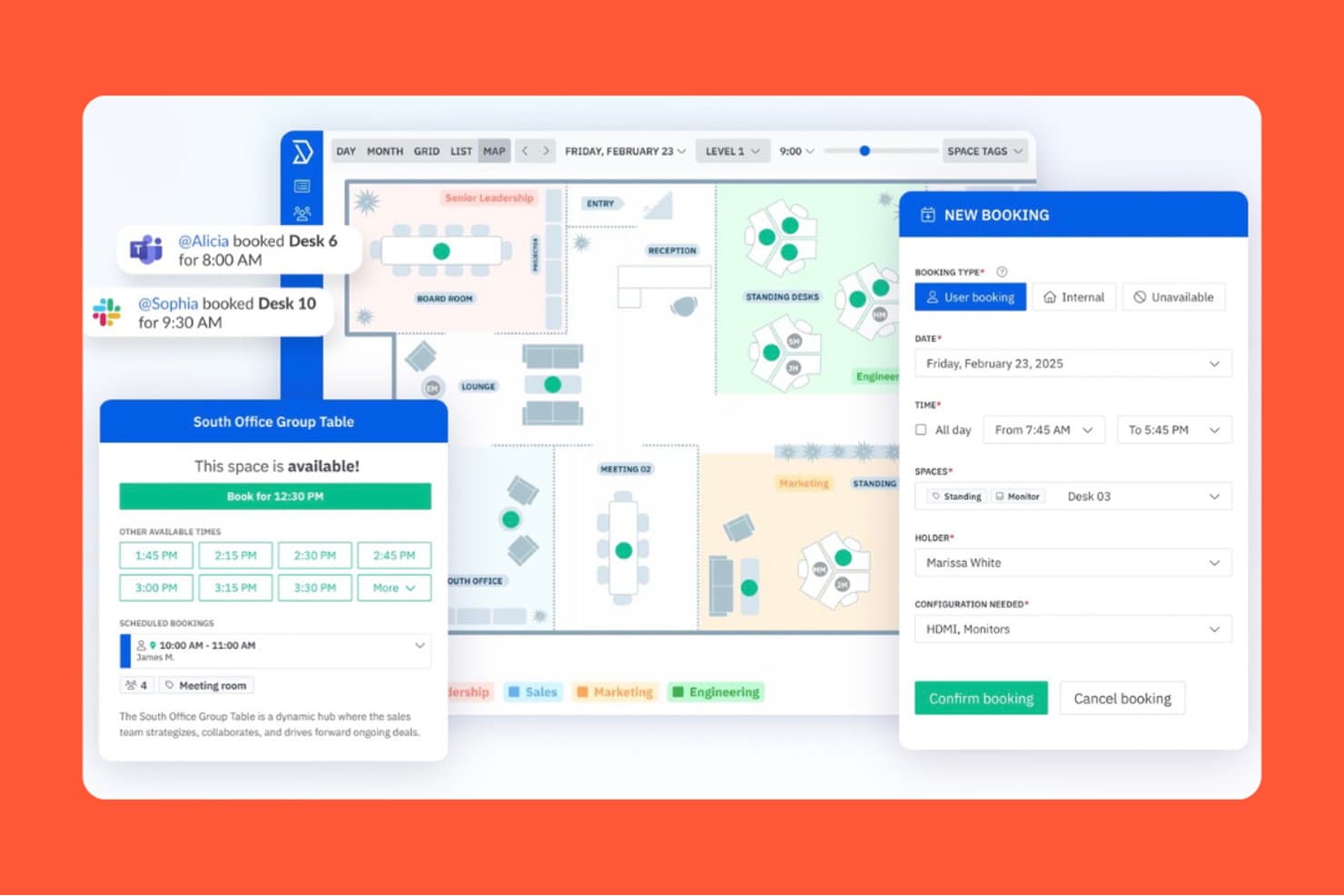
elia lets users book desks and rooms via an interactive office map. elia is a workplace operations platform that covers desk and room booking, visitor management, occupancy tracking, service requests, health and safety workflows, and workplace automation across office environments.
Who Is elia Best For?
elia fits mid-sized offices that need to manage desk and room bookings alongside safety workflows and service requests in a single platform.
Why I Picked elia
I've included elia in my top picks because it handles safety workflows and service requests alongside space management in a way most desk-booking tools don't. I particularly like the health and safety module: it maps first responder locations on live floor plans, routes incident alerts with location details, and tracks certification renewals automatically. The request management layer lets employees submit a maintenance or catering ticket directly from the floor plan, linked to their active booking, so service teams always know exactly where and when something is needed.
elia Key Features
- Interactive floor plan booking: Employees can browse a live office map and reserve desks or rooms using filters for location, capacity, and available assets.
- Colleague presence visibility: Employees can see which coworkers are planning to come in and book nearby workstations directly from the floor plan.
- Occupancy heatmaps: Visual heatmaps display usage patterns across desks, zones, and floors over time.
- Workflow automation builder: Teams can create custom workflows with triggers, conditions, and actions to automate recurring workplace processes like reminders and task assignments.
elia Integrations
elia offers integrations across the Microsoft ecosystem, including Microsoft 365, Microsoft Teams, and Outlook, plus Google Workspace, Google Calendar, and Slack. Enterprise adds API access and a custom integration builder for IoT and software connections.
Pros and Cons
Pros:
- Occupancy heatmaps inform space planning
- Colleague visibility helps teams coordinate office days
- Mapped incident alerts locate on-site responders
Cons:
- Some reviewers report inconsistent occupancy counts
- No documented AI-driven desk allocation
Learn more about elia: Best for touchless desk check-in
- Free demo available
- Pricing upon request
Visit WebsiteCustomer Rating:4.3/5
Hybrid Hero's meeting room display lets employees scan a QR code to book or check into available rooms directly from the touchscreen, helping streamline shared workspace scheduling. HybridHero is an AI-powered workplace management platform that covers desk booking, meeting room scheduling, visitor management, parking, and space utilization analytics across hybrid office environments.
Who Is Hybrid Hero Best For?
HybridHero is a strong fit for mid-to-large organizations managing hybrid work schedules across multiple office locations or floors.
Why I Picked Hybrid Hero
I picked HybridHero as one of the best for touchless desk check-in because of how well it closes the gap between a booking and actual attendance. Employees scan a QR code at the desk to confirm they're there, and if no check-in happens within a set window (say, 15 minutes), the desk auto-releases back into the available pool. I also like that every missed check-in is tracked as a no-show in the utilisation reporting, so you're building a real picture of desk demand, not just booking data.
Hybrid Hero Key Features
- AI booking assistant: Book a desk using natural-language prompts through the HybridHero AI chat interface, without navigating menus.
- Interactive floor plans: View real-time desk availability across floors and select a specific seat directly from a visual map.
- Heat map analytics: See which zones and desks are used most frequently through color-coded occupancy heat maps.
- Office neighborhood management: Assign desks or zones to specific teams so groups consistently sit in the same area.
Hybrid Hero Integrations
HybridHero offers native integrations with Microsoft Outlook, Microsoft Teams, Google Workspace, Slack, Okta, and Azure Active Directory. It also supports SSO through SAML and OpenID Connect. A REST API and webhooks are available for custom integrations with HRIS, access control, and internal systems.
Pros and Cons
Pros:
- Week cloning speeds up repeat bookings
- Includes parking and visitor management
- Built-in no-show auto-release for desks
Cons:
- Page load times can be slow
- Mobile app lacks full web features
Learn more about Hybrid Hero: Best for real-time occupancy insights
- Free demo available
- From $5/bookable resource/month (billed annually)
Visit WebsiteCustomer Rating:4.8/5
Envoy tracks workplace occupancy, attendance, and space usage. Envoy is an office space management platform for workplace teams, offering automated desk reservations, visitor management, workplace capacity tools, and real-time occupancy tracking for modern workplaces.
Who Is Envoy Best For?
Facility managers and workplace teams at mid-sized or larger offices who need real-time insights into space usage and on-site occupancy.
Why I Picked Envoy
I picked Envoy as one of the best because I can see real-time occupancy insights on every floor, track desk and meeting room usage by the hour, and set thresholds for workplace capacity. I like being able to monitor traffic spikes and adjust space policies quickly.
Envoy Key Features
- Visitor management dashboard: Register and track guests from a single interface.
- Desk booking system: Reserve, release, or assign desks across multiple locations.
- Employee mobile app: Manage bookings, check-ins, and notifications on iOS and Android.
- Touchless sign-in process: Enable QR code or mobile-based entry to shared workspaces.
Envoy Integrations
Envoy offers 100+ integrations through its app directory, including Slack, Microsoft Teams, Google Calendar, Microsoft Outlook, Okta, Salesforce, Brivo, Kisi, Avigilon Alta, and DocuSign. It also connects with Zapier and provides an API for custom integrations.
Pros and Cons
Pros:
- Mobile app enables booking and check-in
- Customizable floor maps reflect workspace bookings
- Real-time occupancy data by desk and room
Cons:
- Requires investing in workplace hardware
- Set up time for complex workplace layouts
 Best for space efficiency recommendations
- Free trial + free demo available
- From $5/user/month (billed annually)
Visit WebsiteCustomer Rating:4.6/5
deskbird helps users find workspaces with filters and desk attributes. deskbird is an AI-powered office space management platform that offers workspace booking, usage analytics, office occupancy tracking, and smart recommendations for optimizing physical workspace allocation.
Who Is deskbird Best For?
deskbird fits offices with hybrid work models needing a system for workspace scheduling and actionable insights to maximize use of physical space.
Why I Picked deskbird
I picked deskbird as one of the best because I use its AI-based analytics to audit seat occupancy and receive automatic space efficiency recommendations. I get daily and long-term insights, and the platform flags underused areas to help me make informed changes.
deskbird Key Features
- Interactive floor plan: Users can view and select available spaces directly on a digital office map.
- Mobile app booking: Book desks and rooms using the deskbird mobile app for iOS and Android.
- Hybrid work planning: Schedule in-office and remote workdays within the platform.
- Visitor management: Register and track office visitors using integrated workflows.
deskbird Integrations
deskbird offers 50+ native integrations including Microsoft 365, Outlook, Google Workspace, Microsoft Teams, Sage, Rippling, UKG Pro, HiBob, Gusto, Dayforce, ADP, Workday, and Slack. An API is available for custom integrations.
Pros and Cons
Pros:
- Mobile booking for desks and meeting rooms
- Interactive office floorplans for easy navigation
- AI generates actionable workspace efficiency insights
Cons:
- Some analytics features are locked to higher plans
- No native IoT sensor hardware
 Best for flexible desk and room reservations
- Free demo available
- Pricing upon request
Visit WebsiteCustomer Rating:4.5/5
Robin displays meeting room schedules across office spaces and floors. Robin is a space management platform offering AI-powered hot-desking options, room bookings, office maps, analytics, and shared workspace coordination.
Who Is Robin Best For?
Facilities and workplace teams at hybrid offices that need on-demand desk and meeting room scheduling.
Why I Picked Robin
I picked Robin as one of the best because I can set up flexible desk and conference room reservations, manage daily shifts, and configure office maps that update as bookings change. I use Robin’s scheduling rules to automate space assignments for hybrid and remote teams.
Robin Key Features
- Interactive office floor plans: Visualize workspace availability and seating layouts in real time.
- Visitor management: Register, track, and manage guest access directly from the platform.
- Workplace analytics dashboard: Display usage patterns and space utilization metrics for all locations.
- Mobile app booking: Reserve desks or rooms from iOS and Android devices.
Robin Integrations
Robin offers native integrations across the Microsoft ecosystem, including Microsoft Teams, Outlook, Exchange, Entra ID, Intune, and Microsoft 365, as well as Google Calendar and Google Workspace. It also integrates with Slack, Zoom, Okta, OneLogin, Rippling, and access control systems like Avigilon, Brivo, and Kisi. An API is available for custom integrations.
Pros and Cons
Pros:
- Mobile app supports on-the-go reservations
- Real-time occupancy and workplace analytics
- Customizable office maps update with bookings
Cons:
- Some features only available on higher tiers
- Setup for large offices takes time
Learn more about Robin: Best for sensor-driven workspace analytics
- Free demo available
- Pricing upon request
Visit WebsiteCustomer Rating:4.6/5
Spacewell offers a dashboard with metrics, charts, and summaries. Spacewell is an AI-driven office space management platform that delivers workspace utilization monitoring, desk and room booking, occupancy insights, and automated facility operations management.
Who Is Spacewell Best For?
Facility managers in large corporate offices or multi-site enterprises who need robust workspace monitoring and analytics.
Why I Picked Spacewell
I picked Spacewell as one of the best because I use its IoT sensor integrations to gather real-time workspace occupancy and environmental metrics. I rely on its granular analytics dashboards for seat-level and meeting room utilization tracking.
Spacewell Key Features
- Desk and room booking system: Lets employees reserve workspaces and meeting rooms through a self-service portal.
- Cleaning and maintenance scheduling: Automates assignment and tracking of cleaning and service tasks.
- Live floor plan visualization: Shows current occupancy and activity across office zones in an interactive map.
- Occupant feedback modules: Collects real-time feedback from employees about workspace conditions.
Spacewell Integrations
Spacewell offers native integrations with Oracle, SAP, ServiceNow, Freshservice, Workday, Jira, and Microsoft 365. Google Workspace, AutoCAD, and more. An API is available for custom integrations.
Pros and Cons
Pros:
- Detailed workplace environmental monitoring
- Sensor-based alerts for inefficient space usage
- Real-time heatmapping of workspace occupancy
Cons:
- Workflow customization options are limited
- Initial setup may require technical assistance
Learn more about Spacewell: Best for AI-powered workplace assistance
- Free demo available
- From $99/month
Visit WebsiteCustomer Rating:4.5/5
YAROOMS offers workspace maps with search, filters, and booking tools. YAROOMS is an AI-driven office space management platform that combines resource booking, workspace analytics, hybrid work planning, and environmental monitoring into an all in one system.
Who Is YAROOMS Best For?
YAROOMS is a strong fit for facilities and workplace managers at mid-sized to large organizations seeking advanced AI support for space management and resource coordination.
Why I Picked YAROOMS
I picked YAROOMS as one of the best because I use its AI-powered assistant, YARVIS, to automate booking requests and respond to employee questions in real time. I rely on its natural language interface and policy-driven recommendations to manage workspace access and optimize resource usage.
YAROOMS Key Features
- Workplace analytics dashboard: Tracks workspace utilization and user activity in real time.
- Hybrid work scheduling: Lets users coordinate in-office and remote workdays.
- Interactive floor plans: Lets users visualize workspace layouts and check availability before booking.
- Room and desk booking: Allows employees to reserve meeting rooms and desks directly from the platform.
YAROOMS Integrations
YAROOMS offers native integrations across the Microsoft ecosystem, including Microsoft Teams, Microsoft 365, Outlook, and Azure AD, along with Google Calendar, Google Meet, Slack, Zoom, MappedIn, and SAML 2.0 for SSO. A REST API is also available for custom integrations.
Pros and Cons
Pros:
- Tracks environmental metrics like CO2 and air quality
- Desk and room mapping is interactive and clear
- AI assistant processes requests in natural language
Cons:
- Mobile app lacks offline booking
- Lacks passive occupancy sensor hardware
Learn more about YAROOMS: Best for Microsoft ecosystem integration
- Free demo available
- From $8.55/license/month (billed annually)
Visit WebsiteCustomer Rating:4.6/5
Microsoft Places integrates desk booking and scheduling in Outlook. Microsoft Places is a smart workplace management platform that helps organizations manage hybrid workspaces, enable desk and room booking, coordinate in-office schedules, and visualize workplace occupancy through integration with Microsoft 365.
Who Is Microsoft Places Best For?
Microsoft Places is well-suited for medium-to-large organizations using Microsoft 365 who want to manage hybrid office occupancy and space coordination across locations.
Why I Picked Microsoft Places
I picked Microsoft Places as one of the best because I can manage workspace reservation, team schedules, and space utilization directly within the Microsoft 365 ecosystem. I rely on it to sync bookings with Outlook and Teams, keeping all workplace data centralized.
Microsoft Places Key Features
- AI-powered occupancy forecasting: Provides workspace usage predictions using real-time and historical data
- Interactive workplace maps: Lets users visualize office layouts to locate rooms and desks
- Hybrid work scheduling: Lets employees coordinate in-office and remote days with integrated workspace reservations.
- Presence detection integration: Updates workspace availability automatically based on user presence data
Microsoft Places Integrations
Microsoft Places has native integrations across the Microsoft ecosystem, including Microsoft 365, Outlook, Teams, and Azure. An API is available for custom integrations.
Pros and Cons
Pros:
- Direct calendar sync with Outlook and Teams
- AI-powered occupancy forecasts assist planning
- Floor plan mapping is customizable and detailed
Cons:
- Features closely tied to Microsoft 365 subscriptions
- Limited analytics unless using advanced Microsoft licenses
Learn more about Microsoft Places:

Eptura combines desk and meeting room scheduling in one workspace. Eptura is a workplace management platform designed for hybrid offices, offering features such as desk and room booking, visitor management, workplace analytics, asset tracking, and space planning.
Who Is Eptura Best For?
HR and facilities teams at enterprise or multi-location companies who want unified management of hybrid workspaces and scheduling.
Why I Picked Eptura
I picked Eptura as one of the best because I can coordinate hybrid work schedules with desk and room booking that syncs across employee calendars and floor plans. I also like how the scheduling automation reduces manual work for my team.
Eptura Key Features
- Interactive floor plan mapping: Visualize workspace layouts and desk assignments in real time.
- Visitor management system: Register guests, track entry, and automate sign-ins.
- Asset tracking dashboard: Monitor and manage office equipment locations and usage.
- Workplace analytics reporting: Analyze occupancy, space usage, and trends with built-in reports.
Eptura Integrations
Eptura offers more than 30 native integrations, including the Microsoft ecosystem, Zoom, Salesforce, Dropbox, Azure, AWS, Power BI, and Slack. It integrates with Zapier, and an API is also available for custom integrations.
Pros and Cons
Pros:
- Mobile booking and check-in functionality
- Custom floor plans reflect actual workspace layouts
- Real-time view of desk and room occupancy
Cons:
- Reporting modules can be difficult to use
- Setup can be complex for large offices
Learn more about Eptura:
Diğer Yapay Zekâ Ofis Alanı Yönetim Yazılımları
Kısa listeme girmeyen ancak yine de incelemeye değer bazı ek yapay zekâ ofis alanı yönetim yazılımı seçeneklerini burada bulabilirsiniz:
- 11MapticianBest for dynamic office mapping
- 12eliaBest for automated occupancy tracking
- 13annyBest for granular permission controls
- 14OfficeSpaceBest for customizing workplace layouts
- 15SkeddaBest for interactive floorplan scheduling
- 16WorkInSyncBest for centralized resource booking
- 17KadenceBest for real-time occupancy scheduling
- 18TacticBest for hybrid team coordination
- 19JoanBest for meeting room display integration
- 20ArchieBest for workplace visitor management
How I Evaluate AI Office Space Management Software
I look for platforms where AI does more than label a dashboard—it should actively predict occupancy, suggest smarter desk assignments, and surface real estate savings your team can act on. My evaluation splits into two layers: core functionality every tool needs to make the list, and differentiating factors that separate good options from great ones.
Core Functionality (Table Stakes For This List)
When I'm selecting tools for my list, I rank each one on a scale from 0 (does not offer the functionality) to 5 (excels in this area) for each core functionality listed below. Then, I calculate the tool's total score into a percentage. Each tool needs to achieve a minimum total score of 65% to be considered for inclusion.
- AI-Driven Space Optimization: I look for platforms where ML models analyze patterns across seating zones, floors, and shifts to recommend consolidation or layout changes.
- Intelligent Desk & Room Booking: The booking engine should surface smart suggestions—like assigning desks near teammates already scheduled to be in the office that day.
- Occupancy Analytics & Forecasting: I evaluate whether the tool goes beyond historical dashboards to predict future demand, such as forecasting peak days by department.
- Employee-Facing Experience Interface: A mobile or web app that lets employees search for open desks, locate colleagues, and book rooms on the go is what I check for here.
- HR & Workplace System Integrations: Connectors to HRIS platforms, calendar tools like Outlook and Google Calendar, and collaboration apps like Slack or Teams keep data in sync.
- Interactive Floor Plans & Wayfinding: I look for dynamic, visual maps that show real-time availability and let employees tap a desk or room to book it directly from the layout.
Once I have a list of tools that meet this criteria, I consider what sets each platform apart.
Differentiating Factors (What Sets Vendors Apart)
Here's how I compare and contrast different vendors:
Standout Features
Team coordination AI is a big one for me—I check whether a platform can suggest optimal in-office days based on who's collaborating on shared projects. Scenario planning tools also carry weight, especially for HR leaders modeling what happens to space needs after a hiring surge or a return-to-office policy shift. I also look for conversational AI assistants that let employees book a desk or find a colleague through Slack or Teams without leaving their workflow.
Beyond Features
Data privacy matters here because these platforms collect sensitive employee presence and location data. I evaluate whether vendors offer GDPR and SOC 2 compliance alongside configurable anonymization settings. Scalability is another factor I weigh—an HR team managing five offices across different regions needs multi-site dashboards, localized time zones, and flexible licensing that grows with headcount. I also consider onboarding support, since floor plan digitization and sensor setup can stall rollout without a dedicated implementation team.
Yapay Zekâ Ofis Alanı Yönetim Yazılımı Nasıl Seçilir?
Uzun özellik listeleri ve karmaşık fiyatlandırma yapıları arasında kaybolmak kolaydır. Kendinize özgü yazılım seçim sürecinizi yürütürken odaklanmanızı korumanıza yardımcı olmak için göz önünde bulundurmanız gereken faktörleri içeren bir kontrol listesi hazırladık:
| Faktör | Nelere Dikkat Edilmeli? |
|---|---|
| FaktörÖlçeklenebilirlik | Nelere Dikkat Edilmeli?Sistem, büyük yükseltmeler veya artan karmaşıklık olmadan mevcut ve gelecekteki ofis konumlarınızı, ekip büyüklüklerinizi ya da çalışma alanı düzenlerindeki değişiklikleri destekleyecek mi? |
| FaktörEntegrasyonlar | Nelere Dikkat Edilmeli?Platform, hâlihazırda kullandığınız erişim kontrolü, İK veya BT sistemlerine bağlanıyor mu? Yalnızca API iddialarını değil, doğrulanmış entegrasyonları arayın. |
| FaktörÖzelleştirilebilirlik | Nelere Dikkat Edilmeli?Doluluk kurallarını, çalışma alanı bölgelerini ve raporlama panolarını kuruluşunuzun kendine özgü iş akışlarını ve politikalarını yansıtacak şekilde uyarlayabiliyor musunuz? |
| FaktörKullanım kolaylığı | Nelere Dikkat Edilmeli?Çalışanlar ve yöneticiler aracı asgari eğitimle benimseyebilecek mi? Yaygın görevlerin hızlı ve anlaşılır olup olmadığını görmek için demolar isteyin. |
| FaktörUygulama ve işe alıştırma | Nelere Dikkat Edilmeli?Kurulum ne kadar sürüyor ve tedarikçi işe alıştırma için hangi kaynakları sağlıyor? Veri taşıma desteği, şablonlar ve uygulamalı rehberlik sunulup sunulmadığını kontrol edin. |
| FaktörMaliyet | Nelere Dikkat Edilmeli?Fiyatlandırma kademeleri yalnızca kullanıcı sayılarına göre değil, beklenen kullanımınızla uyumlu mu? Sensör donanımı, taban alanı veya ek analizlerle ilgili ilave ücretlere dikkat edin. |
| FaktörGüvenlik önlemleri | Nelere Dikkat Edilmeli?Araç, doluluk verilerini anonimleştiriyor veya güvence altına alıyor ve gizlilik düzenlemelerine uyuyor mu? Bölgenize veya sektörünüze uygun standartları ve sertifikaları doğrulayın. |
| FaktörDestek erişilebilirliği | Nelere Dikkat Edilmeli?Tedarikçi hangi destek kanallarını ve hizmet saatlerini sunuyor? Talep üzerine sorun giderme desteğine veya birden fazla saat diliminde yardıma ihtiyaç duyup duymayacağınızı değerlendirin. |
Yapay Zekâ Ofis Alanı Yönetim Yazılımı Nedir?
Yapay zekâ ofis alanı yönetimi yazılımı, çalışma alanı doluluğunu gerçek zamanlı olarak izlemek, analiz etmek ve yönetmek için yapay zekâ kullanan dijital bir platformdur. Bu araçlar, ofis kullanımı hakkında otomatik içgörüler sunar, rezervasyon ve kaynak tahsisini destekler ve ekiplerin verimlilik için yerleşimleri optimize etmesine yardımcı olur. Genellikle doluluk analizleri, kapasite uyarıları ve çalışma alanı rezervasyonu araçları gibi özellikler içerir.
Yapay Zekâ Ofis Alanı Yönetimi Yazılımının Özellikleri
Yapay zekâ ofis alanı yönetimi yazılımı seçerken aşağıdaki temel özelliklere dikkat edin:
- Gerçek zamanlı doluluk izleme: Odaların ve çalışma alanlarının o anki kullanımını izlemek ve görüntülemek için sensörler veya yapay zekâ algoritmaları kullanır; tesis ekiplerinin hızlı bir şekilde bilinçli kararlar almasına yardımcı olur.
- Otomatik çalışma alanı rezervasyonu: Çalışanların merkezi bir sistem üzerinden masa veya toplantı odası rezerve etmesini sağlar; maliyetli çifte rezervasyonları önler ve kaynak tahsisini optimize eder.
- Doluluk analizleri panosu: Ofis planlamasına yön vermek için alan kullanım eğilimleri, kullanım oranları ve en yüksek doluluk zamanları hakkında ayrıntılı görselleştirmeler ve raporlar sunar.
- Kapasite uyarıları: Odalar veya alanlar güvenli ya da belirlenmiş kapasitelere yaklaştığında veya bu kapasiteleri aştığında bildirim göndererek iş yeri güvenliği yönergelerine uyumu destekler.
- Özelleştirilebilir çalışma alanı bölgeleri: Yöneticilerin, kurumsal ihtiyaçları veya departman yerleşimlerini yansıtmak üzere daha büyük ofisler ya da yerleşkeler içindeki farklı alanları tanımlamasına, ayarlamasına ve izlemesine olanak tanır.
- Gizlilik kontrolleri: Sensörler aracılığıyla toplanan kişisel bilgileri anonimleştirmek veya sınırlandırmak için özellikler sunarak gizlilik düzenlemelerine uyumu güvence altına alır.
- Bina sistemleriyle entegrasyon: Daha yüksek verimlilik için doluluk verilerini tesis kaynaklarıyla eşleştirmek üzere HVAC, aydınlatma veya erişim kontrol sistemlerine bağlanır.
- Akıllı talep tahmini: Gelecek haftalar için alan ihtiyaçlarını tahmin etmek üzere geçmiş verileri kullanır ve değişken çalışan sayılarının planlanmasındaki belirsizliği ortadan kaldırır.
- Mobil uygulama erişimi: Hareket hâlindeyken çalışma alanı rezervasyonu yapmayı, giriş işlemini ve analizleri görüntülemeyi mümkün kılarak uzaktan ve mobil çalışanlar için esnekliği artırır.
- Otomatik raporlama araçları: Kullanım, uyumluluk veya denetim raporlarını çok az manuel müdahaleyle düzenli bir programa göre oluşturur ve dağıtır.
Yapay Zekâ Ofis Alanı Yönetimi Yazılımının Faydaları
Yapay zekâ ofis alanı yönetimi yazılımını uygulamak ekibiniz ve işletmeniz için çeşitli faydalar sağlar. Yararlanabileceğiniz avantajlardan bazıları şunlardır:
- Optimize edilmiş çalışma alanı kullanımı: Gerçek zamanlı doluluk izleme ve analizler kullanım modellerini ortaya çıkararak ofis alanını nasıl tahsis edeceğiniz konusunda daha iyi kararlar almanıza yardımcı olur.
- Zaman kazandıran otomasyon: Otomatik rezervasyon ve kapasite uyarıları, rezervasyonları ve uyumluluk görevlerini yöneterek tesis ekiplerinin manuel iş yükünü azaltır.
- Geliştirilmiş çalışan deneyimi: Merkezi rezervasyon ve net uygunluk durumu, çalışanların çalışma alanlarını veya toplantı odalarını bulup rezerve etmesini kolaylaştırır.
- Gelişmiş güvenlik ve uyumluluk: Kapasite kontrolleri ve raporlama araçları, doluluğu güvenli sınırlar içinde tutmanıza ve güncel uyumluluk kayıtlarını korumanıza yardımcı olur.
- Daha akıllı kaynak planlaması: Yapay zekâ destekli tahmin, tüm gayrimenkul portföyünüz genelindeki gelecekteki alan ihtiyaçlarını öngörmek için geçmiş verileri kullanır.
- Artan maliyet verimliliği: Az kullanılan alanları belirlemek ve boşa harcanan alanı ortadan kaldırmak, genel giderlerin ve işletme maliyetlerinin azaltılmasına yardımcı olabilir.
- Veriye dayalı karar alma: Kapsamlı raporlama ve özelleştirilebilir panolar, paydaşların ofis stratejilerini tahminler yerine gerçeklere dayandırmasını sağlar.
Yapay Zekâ Ofis Alanı Yönetimi Yazılımının Maliyetleri ve Fiyatlandırması
Yapay zekâ ofis alanı yönetimi yazılımı seçmek, mevcut çeşitli fiyatlandırma modellerinin ve planların anlaşılmasını gerektirir. Maliyetler özelliklere, ekip büyüklüğüne, eklentilere ve daha fazlasına göre değişir. Aşağıdaki tablo, yapay zekâ ofis alanı yönetimi yazılımı çözümlerinde yaygın planları, bunların ortalama fiyatlarını ve genellikle içerilen özellikleri özetlemektedir:
Yapay Zekâ Ofis Alanı Yönetimi Yazılımı İçin Plan Karşılaştırma Tablosu
| Plan Türü | Ortalama Fiyat | Yaygın Özellikler |
|---|---|---|
| Plan TürüÜcretsiz Plan | Ortalama Fiyat$0 | Yaygın ÖzelliklerTemel doluluk takibi, manuel rezervasyon sistemi, sınırlı analizler ve e-posta desteği. |
| Plan TürüKişisel Plan | Ortalama Fiyat$5-$15/kullanıcı/ay | Yaygın ÖzelliklerMasa veya oda rezervasyonları, kullanım analizleri, temel raporlama, mobil uygulama erişimi ve sohbet desteği. |
| Plan Türüİşletme Planı | Ortalama Fiyat$20-$40/kullanıcı/ay | Yaygın ÖzelliklerOtomatik rezervasyon, gerçek zamanlı doluluk verileri, entegrasyonlar, yönetici kontrolleri ve kapasite uyarıları. |
| Plan TürüKurumsal Plan | Ortalama Fiyat$50-$100/kullanıcı/ay | Yaygın ÖzelliklerÖzel iş akışları, gelişmiş analizler, API erişimi, kurumsal güvenlik ve özel destek. |
Yapay Zekâ Destekli Ofis Alanı Yönetim Yazılımı Hakkında SSS
Yapay zekâ destekli ofis alanı yönetim yazılımı hakkında sık sorulan bazı soruların yanıtları şunlardır:
Yapay zekâ destekli ofis alanı yönetim yazılımı doluluk verilerini nasıl kullanır?
Yapay zekâ destekli ofis alanı yönetim yazılımı, gerçek zamanlı ve geçmiş kullanım modellerini analiz etmek için sensörlerden veya sistem oturum açma bilgilerinden doluluk verileri toplar. Bu, ekibinizin alanların ne sıklıkla kullanıldığını belirlemesine, yeterince kullanılmayan bölgeleri tespit etmesine ve ofis yerleşimleri ile kaynak tahsisleri hakkında bilinçli kararlar almasına yardımcı olur.
Bu araçlar hibrit veya esnek çalışma düzenlerini desteklemeye yardımcı olabilir mi?
Evet, çoğu yapay zekâ destekli ofis alanı yönetim çözümü, çalışanların önceden masa rezerve etmesini, tesiste kimin çalıştığını görmesini ve alan uygunluğunu takip etmesini sağlayarak hibrit çalışmayı destekler. Bu esneklik, ofiste çalışma programlarının koordine edilmesine yardımcı olur ve kapasite politikalarına uyulmasını sağlar.
Çalışanları ve yöneticileri bu platformlara dahil etmek zor mudur?
Hayır, dahil olma süreci genellikle basittir. Çoğu platform, kullanıcıların hızlı bir şekilde başlamasına yardımcı olmak için etkileşimli ürün tanıtımları, eğitim videoları ve şablonlar sunar. Yöneticiler çoğu zaman çalışan listelerini içe aktarabilir, kat planlarını yapılandırabilir ve çok az BT desteğiyle politikalar belirleyebilir.
Bu araçlarda hangi entegrasyonları aramalıyım?
Takvimler, erişim kontrol sistemleri, İK platformları ve bina yönetim sistemleriyle entegrasyonları arayın. Bu bağlantılar rezervasyonların otomatikleştirilmesine, kullanıcı verilerinin senkronize edilmesine ve çalışma alanı kullanımının diğer iş süreçleriyle ilişkilendirilmesine yardımcı olur.
Bu sistemler doluluk takibiyle ilgili gizlilik endişelerini nasıl ele alır?
Önde gelen çözümlerin çoğu, verilerin anonimleştirilmesi ve hassas bilgilere erişimin sınırlandırılması gibi gizlilik kontrolleri sunar. Özellikle sıkı veri koruma yasalarının geçerli olduğu bölgelerde faaliyet gösteriyorsanız, kurum içi politikalara ve yasal düzenlemelere uyumu sağlamak için gizlilik özelliklerini mutlaka inceleyin.