

Çalışan programlarını yönetmek, özellikle büyük işletmelerde zor olabilir. Kendinizi bitmek bilmeyen elektronik tablolarla uğraşırken, son dakika değişiklikleriyle başa çıkmaya çalışırken ve herkesi memnun etmeye uğraşırken bulabilirsiniz. İşte kurumsal çalışan çizelgeleme yazılımları burada devreye girerek zamandan tasarruf etmenize ve stresi azaltmanıza yardımcı olur.
İK yönetimi sektöründe yıllarca çalıştım ve yazılımları bağımsız olarak test edip inceledim. Bu makalede, piyasadaki en iyi çizelgeleme araçları için öne çıkan seçimlerimi paylaşacağım. Buradaki bazı seçenekler özel çizelgeleme araçlarıyken, diğerleri tahmin, iş gücü analitiği ve uyumluluk kontrollerini içeren kapsamlı iş gücü yönetimi paketleridir.
Bu çözümlerin ekibinize nasıl fayda sağlayabileceğine dair tarafsız ve iyi araştırılmış bir değerlendirme edineceksiniz. Yazının sonunda, hangi yazılımın ihtiyaçlarınıza uygun olduğunu net bir şekilde anlayacak ve çizelgeleme sürecini ilgili herkes için daha sorunsuz hâle getirebileceksiniz.
Why Trust Our Software Recommendations
6,700+
Reviews
20
Industry experts
16+
Evaluation factors
14
Years
Our team has been testing and reviewing software since 2012. As HR experts ourselves, we know how difficult—and important—it is to choose the right software.
For this guide, we evaluated tools using hands-on testing and independent research, scoring tools using our selection criteria. We also draw on insights from industry thought leaders and practicing HR experts.
Our reviews reflect our human editorial judgment, not a sales pitch.
Expert reviewers:
- Phil GrayCOO
 Kim BehnkeHR Tech Editor & Analyst
 Josh BarkerPeople Ops Manager

Kurumsal Çalışan Çizelgeleme Yazılımları Karşılaştırma Tablosu
Aşağıdaki tablo, kurumsal çalışan çizelgeleme yazılımları için öne çıkan seçimlerimin fiyatlandırma ayrıntılarını karşılaştırmaktadır.
Sorted by: Default
| Tool | Starting Price | Website | |
|---|---|---|---|
Best for AI-driven demand forecasting scheduling | 4.6 out of 5 | $500/month Free demo available | Website |
Best with customizable workflow automation | 4.3 out of 5 | Pricing upon request Free demo available | Website |
Best for payroll integration | 4.5 out of 5 | $50/user/month 30-day free trial + free demo available | Website |
Best for shift swapping | 4.6 out of 5 | $5/user/month 30-day free trial + free demo available | Website |
Best for HR integration | 4.3 out of 5 | Pricing upon request Free demo available | Website |
Best for large companies | Not rated | Pricing upon request Free demo available | Website |
Best for compliance tracking | Not rated | Pricing upon request Free demo available | Website |
Best for healthcare professionals | Not rated | Pricing upon request Free plan + free demo available | Website |
Best for quick onboarding | Not rated | $379/month 14-day free trial + free plan available | Website |
Best for distributed frontline orgs | 4.6 out of 5 | Pricing upon request Free plan + 14-day free trial available | Website |


En İyi Kurumsal Çalışan Çizelgeleme Yazılımları İncelemeleri
Aşağıda, kısa listeme giren en iyi kurumsal çalışan çizelgeleme yazılımlarının ayrıntılı özetlerini bulabilirsiniz. İncelemelerim, size en uygun olanı bulmanıza yardımcı olmak için her aracın temel özelliklerine, artılarına ve eksilerine, entegrasyonlarına ve ideal kullanım alanlarına ayrıntılı bir bakış sunuyor.
 Best for AI-driven demand forecasting scheduling
- Free demo available
- From $500/month
Visit WebsiteCustomer Rating:4.6/5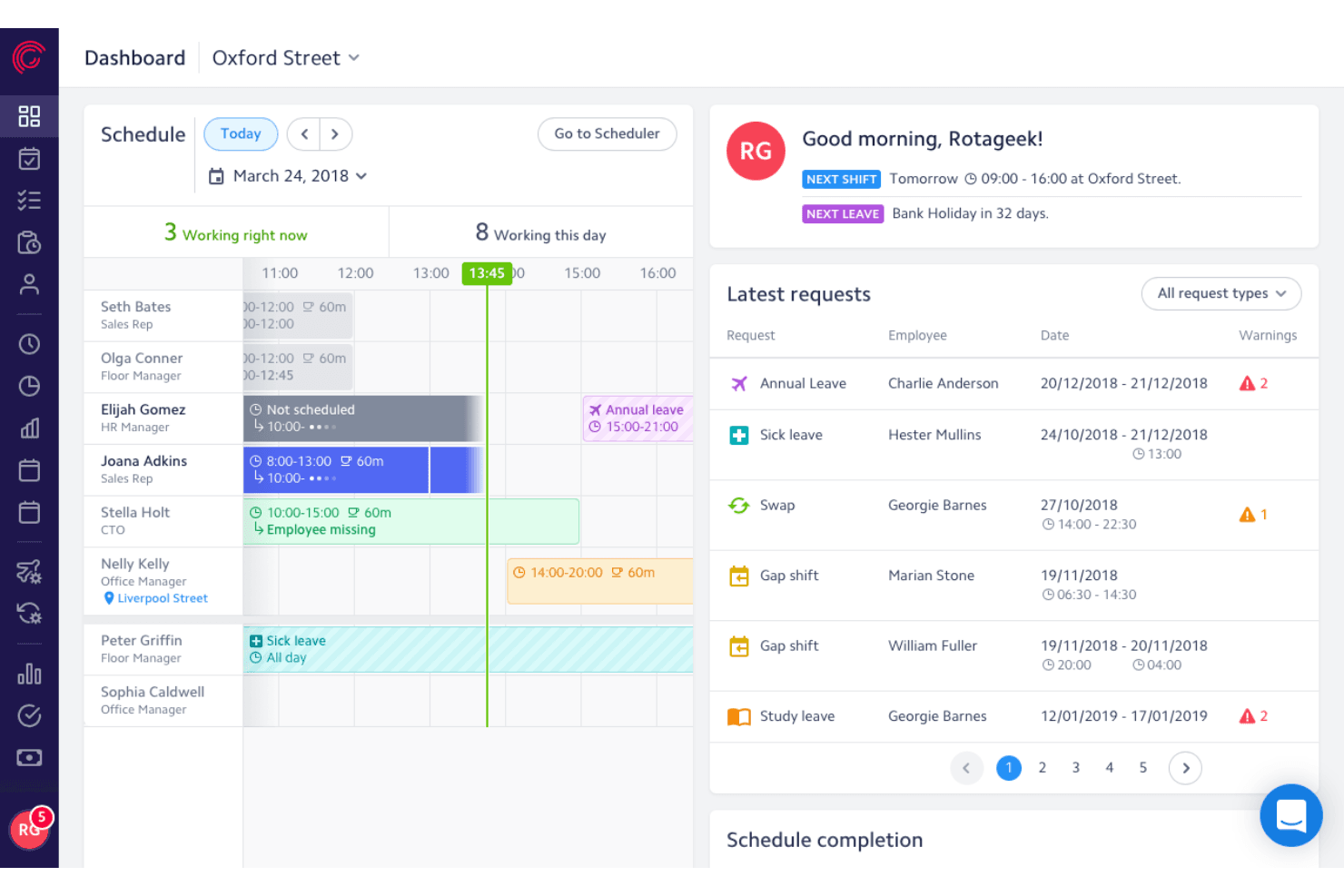
Rotageek lets users manage schedules and leave requests in one dashboard. Rotageek is an AI-powered enterprise employee scheduling platform that combines demand forecasting, auto-scheduling, shift management, compliance rule enforcement, and employee self-service into a single workforce management solution.
Who Is Rotageek Best For?
Rotageek is a strong fit for multi-site retail, hospitality, and healthcare organizations that need AI-driven demand forecasting to align staffing with real operational data.
Why I Picked Rotageek
Rotageek earns its spot on my list because its AI-driven demand forecasting operates at a level of precision I rarely see: 15-minute increment predictions trained on sales, footfall, weather, and live event data. I love that the Auto Scheduling engine takes that forecast and generates a fully optimized, compliant schedule in roughly 30 seconds, testing millions of shift combinations before surfacing a fit-to-demand score so managers can see exactly how close staffing aligns to real need before publishing.
Rotageek Key Features
- Shift broadcasting: Open shifts are pushed to eligible employees across multiple locations based on their skills and availability.
- Skills and certification tracking: Employee skills and credentials are linked directly to shift activities, so only qualified staff get assigned to roles requiring specific competencies.
- Fatigue and fairness analyzer: Built-in rules monitor consecutive shifts, rest periods, and distribution of unpopular shifts like weekends and late nights to flag imbalances before publishing.
- Native time and attendance: Employees clock in and out via mobile or web with geo-fencing, photo capture, and auto-populated timesheets ready for payroll export.
Rotageek Integrations
Documented integrations include ADP, Oracle, SAP, Sage, IRIS, Zellis, ESR, and Locum's Nest. Rotageek also supports REST APIs, webhooks, SFTP, and SSO for custom or legacy connectivity.
Pros and Cons
Pros:
- Fatigue and fairness tools help prevent burnout
- Shift marketplace enables internal gig-style shift pickup
- AI auto-scheduling predicts demand in 15-minute increments
Cons:
- No self-service free trial available
- No HIPAA compliance for US healthcare
Learn more about Rotageek: Best with customizable workflow automation
- Free demo available
- Pricing upon request
Visit WebsiteCustomer Rating:4.3/5
Paylocity offers employee scheduling features including shift tracking, clock-in/clock-out functionality, and time-off management integrated within its HR platform. Paylocity offers a unified platform for managing complex employee scheduling needs in large organizations. It’s designed for HR teams and operations leaders who need to coordinate shifts, track time, and ensure compliance across multiple locations or departments. With features that address workforce management challenges at scale, Paylocity helps enterprises streamline scheduling and adapt to changing labor demands.
Who Is Paylocity Best For?
Paylocity suits large organizations and HR teams that need to automate complex, multi-step scheduling and approval workflows.
Why I Picked Paylocity
I picked Paylocity because its workflow automation tools let you design and automate complex scheduling processes that many enterprise organizations require. You can set up custom approval chains, automate notifications for shift changes, and trigger compliance checks based on your own rules. I appreciate how these automation features reduce manual work for HR and operations teams managing large, distributed workforces. This level of customization is especially valuable for companies with unique scheduling policies or multi-location operations.
Paylocity Key Features
Some other features that make Paylocity useful for enterprise scheduling include:
- Mobile self-service tools: Employees can view schedules, request time off, and swap shifts directly from their mobile devices.
- Advanced analytics dashboards: HR and managers can access real-time data on attendance, overtime, and scheduling trends.
- Built-in compliance management: The platform monitors scheduling rules and labor law requirements to help reduce compliance risks.
- Time and attendance tracking: Paylocity captures clock-in and clock-out data and syncs it with scheduling and payroll modules.
Paylocity Integrations
Integrations include Microsoft Entra, Google Workspace, Okta, various applicant tracking systems, job boards, benefits providers, 401(k) and retirement providers, point of sale systems, background check services, and ERP platforms. Paylocity also offers an API for custom integrations.
Pros and Cons
Pros:
- Built-in compliance tracking for labor laws
- Mobile app allows shift swaps and approvals
- Customizable scheduling workflows for complex organizations
Cons:
- Fewer industry-specific scheduling templates available
- No free plan for ongoing use
 Best for payroll integration
- 30-day free trial + free demo available
- From $50/user/month
Visit WebsiteCustomer Rating:4.5/5
TimeTrex integrates scheduling, time tracking, and payroll. TimeTrex is a workforce management tool that caters to businesses that need integrated scheduling, time tracking, and payroll processing. It's suitable for companies looking to streamline these functions into one platform.
Why I picked TimeTrex: TimeTrex offers payroll integration, allowing you to manage employee scheduling and payroll in one place. You can track employee hours accurately and ensure that payroll is processed without errors. This makes it ideal for businesses aiming to simplify workforce management.
Standout features and integrations:
Features include automated timesheet calculations that reduce manual entry, customizable reporting tools to gain insights into workforce data, and a mobile app for managing schedules on the go.
Integrations include QuickBooks, ADP, Paychex, Sage, and more.
Pros and Cons
Pros:
- Customizable reporting tools
- Steeper learning curve
- Reporting tools lack ease of use
Cons:
- Payroll integration
- Automated timesheet calculations
Learn more about TimeTrex: Best for shift swapping
- 30-day free trial + free demo available
- From AUD $5/user/month
Visit WebsiteCustomer Rating:4.6/5
Deputy assists with flexible scheduling, time tracking, and shift swaps. Deputy is a workforce management tool designed for businesses that need flexible scheduling and time tracking. It's ideal for industries such as retail and hospitality where shift swapping is common.
Why I picked Deputy: Deputy offers features that let employees easily trade shifts with each other. You can manage schedules and track time with minimal hassle. The tool's flexibility supports businesses with fluctuating staffing needs. It simplifies communication between managers and staff, keeping everyone informed.
Standout features and integrations:
Features include task management to assign and track tasks, compliance tools to ensure labor law adherence, and a mobile app for managing schedules and timesheets on the go.
Integrations include Xero, ADP, QuickBooks, Square, Gusto, Zapier, BambooHR, NetSuite, and more.
Pros and Cons
Pros:
- Task management included
- Simplifies staff communication
- Supports fluctuating staffing needs
Cons:
- Costs rise with team size
- Limited customization
Learn more about Deputy:

Workday allows companies to connect HR, scheduling, and workforce management. Workday is an enterprise-level software solution designed for human capital management and financial management. It serves large businesses looking to integrate HR processes with their scheduling and workforce management.
Why I picked Workday: Workday excels in HR integration, offering features that connect scheduling with payroll and talent management. You can manage employee data, payroll, and scheduling from one platform. This integration helps streamline HR operations and improve data accuracy. The tool also provides insights into workforce performance and costs.
Standout features and integrations:
Features include workforce planning that helps you optimize staffing levels, performance management to track employee progress, and real-time analytics for informed decision-making.
Integrations include Salesforce, Slack, ServiceNow, Okta, SAP, Oracle, ADP, and more.
Pros and Cons
Pros:
- Enhances data accuracy
- Supports performance management
- HR integration capabilities
Cons:
- Requires technical expertise
- Lengthy implementation process
Learn more about Workday:

ADP WorkForce Suite optimizes scheduling and labor analytics. ADP WorkForce Suite provides tools for workforce management and caters primarily to large enterprises. It focuses on scheduling, time tracking, and labor analytics to help businesses optimize their workforce.
Why I picked ADP WorkForce Suite: ADP WorkForce Suite is designed for large-scale operations, offering extensive scheduling options and analytics. It can handle complex scheduling needs, ensuring your workforce is used efficiently. The tool's analytics provide insights into labor costs and productivity. It supports compliance with labor regulations, making it a great fit for large enterprises.
Standout features and integrations:
Features include labor analytics that offer insights into workforce efficiency, compliance management to adhere to labor laws, and mobile-friendly access for managing schedules on the go.
Integrations include SAP, Oracle, QuickBooks, Sage, Xero, and more.
Pros and Cons
Pros:
- Mobile-friendly access
- Supports compliance management
- Strong labor analytics
Cons:
- Requires user training
- Initial setup time-consuming
Learn more about ADP WorkForce Suite:

TCP Software manages scheduling, tracking, and compliance in various industries. TCP Software is an enterprise solution focused on employee scheduling and time tracking. The company has products designed for industries such as education, healthcare, and public safety, helping manage complex pay rules and compliance.
Why I picked TCP Software: TCP Software excels in compliance tracking and managing complex pay rules, with features like dynamic scheduling and automated time tracking. It integrates with ERP, HCM, and payroll systems to ensure your scheduling and payroll processes are aligned.
Standout features and integrations:
Features include dynamic scheduling that adjusts to your team's needs, automated time tracking to reduce errors, and compliance management to keep your business aligned with regulations.
Integrations include Oracle, ADP, Workday, QuickBooks, Sage, BambooHR, Paychex, and more.
Pros and Cons
Pros:
- Enhances payroll accuracy
- Strong compliance management
- Dynamic scheduling capabilities
Cons:
- Lack of pricing transparency
- Complexity for new users
Learn more about TCP Software: Best for healthcare professionals
- Free plan + free demo available
- Pricing upon request

Intrigma is a scheduling solution for healthcare, focusing on shift planning. Intrigma is a scheduling solution tailored for the healthcare industry, focusing on shift planning and workforce management. It helps healthcare providers manage staff schedules efficiently.
Why I picked Intrigma: Intrigma is designed specifically for healthcare, offering features such as automatic shift assignments and compliance tracking. The software can handle complex scheduling requirements, ensuring shifts align with skill levels and certifications. The tool's focus on healthcare means it understands the intricacies of medical staff scheduling. It allows you to optimize staffing levels while maintaining compliance with industry regulations.
Standout features and integrations:
Features include automatic shift assignments that consider staff availability, compliance tracking to meet healthcare standards, and secure electronic data exchange through the system's API.
Integrations include Google Calendar, Epic, Outlook, Allscripts, McKesson, Kronos, ADP, and more.
Pros and Cons
Pros:
- Supports complex schedules
- Compliance tracking
- Tailored for healthcare needs
Cons:
- Setup can be time-consuming
- Limited to the healthcare industry
Learn more about Intrigma: Best for quick onboarding
- 14-day free trial + free plan available
- From $379/month

TixTime helps enterprises coordinate employee schedules across time zones. TixTime is an employee scheduling platform designed for organizations with distributed teams that operate across multiple regions. It focuses on reducing scheduling errors caused by time zone differences and improving coordination for large, geographically dispersed workforces.
Why I picked TixTime: TixTime stands out for its automatic time zone conversion, which helps prevent scheduling conflicts for global teams. Managers can coordinate availability across regions without manual adjustments, reducing miscommunication and missed shifts. This makes TixTime a good fit for organizations that need fast, reliable scheduling without complex workforce management requirements.
Standout features and integrations:
Features include automatic time zone conversion to eliminate cross-region scheduling errors, push notifications to keep employees informed of schedule changes, employee self-service access for availability updates, and mobile access so teams can view schedules from anywhere.
Integrations include Google Calendar, Microsoft Outlook, Slack, Zoom, QuickBooks, ADP, Paychex, Xero, BambooHR, and Salesforce.
Pros and Cons
Pros:
- Simple, quick setup
- Employee self-service for availability and schedule access
- Automatic time zone conversions for global teams
Cons:
- Fewer customization options than enterprise WFM platforms
- Limited advanced workforce management features
Learn more about TixTime: Best for distributed frontline orgs
- Free plan + 14-day free trial available
- Pricing upon request
Visit WebsiteCustomer Rating:4.6/5
Connecteam is a mobile-first scheduling and workforce communication platform. Connecteam is designed for organizations with large, distributed frontline teams that need simple scheduling, time tracking, and communication—without the complexity of full workforce management suites.
Why I picked Connecteam: Connecteam works well for enterprises that prioritize mobility and speed over advanced labor forecasting or union rule engines. Managers can create and adjust shifts, track hours, and send real-time updates directly from a mobile app, while employees can access schedules and tasks on the go. This makes it a strong option for field-based, retail, and frontline teams that rely on fast coordination rather than complex scheduling logic.
Standout features and integrations:
Features include a GPS-enabled time clock for location-based attendance tracking, task management tools for assigning and monitoring frontline work, and an employee directory that centralizes contact details and roles for easy team communication.
Integrations include QuickBooks, Gusto, Xero, Square, Zapier, and more.
Pros and Cons
Pros:
- Real-time updates
- Shift management
- Mobile app accessibility
Cons:
- Requires regular app updates
- Limited offline functionality
Learn more about Connecteam:
Diğer Kurumsal Çalışan Çizelgeleme Yazılımları
İşte kısa listeme giremeyen ancak yine de göz atmaya değer bazı ek kurumsal çalışan çizelgeleme yazılımı seçenekleri:
- 11VerintBest for predictive modeling
- 12UKGBest for a global workforce
- 13HomebaseBest for hourly teams
- 14When I WorkBest for small enterprises
- 15ZendeskBest for customer support teams
- 16ApployeBest for remote workforce management
- 17Workforce.comBest for call center scheduling
- 18Zoho ShiftsBest for budget-friendly scheduling
- 19AgendrixBest for employee engagement
Related Reviews
How I Evaluate Enterprise Employee Scheduling Software
I split my evaluation into core requirements—like multi-location scheduling and a labor rules engine—and differentiators that matter when you're managing thousands of employees across shifts.
Core Functionality (Table Stakes For This List)
When I'm selecting tools for my list, I rank each one on a scale from 0 (does not offer the functionality) to 5 (excels in this area) for each core functionality listed below. Then, I calculate the tool's total score into a percentage. Each tool needs to achieve a minimum total score of 65% to be considered for inclusion.
- Enterprise Shift Scheduling: I evaluate whether a platform can handle multi-location, multi-department scheduling with templates, auto-scheduling, and bulk actions for thousands of employees.
- Labor Forecasting & Optimization: Predicting staffing demand matters, so I check for forecasting tools that use historical data or business drivers to align coverage with labor budgets.
- Compliance & Labor Rules Engine: I look for a configurable rules engine that enforces overtime limits, break requirements, and predictive scheduling laws across multiple jurisdictions.
- Employee Self-Service Mobile Access: Frontline workers need to swap shifts, set availability, and request time off from their phones, so I evaluate the depth of native mobile functionality.
- Time & Attendance Integration: Tracking actual hours against scheduled shifts is essential. I check for native time tracking or certified integrations with major time clock systems.
- HRIS & Payroll Integrations: Scheduling data needs to flow into payroll and HR systems, so I look for pre-built connectors to platforms like Workday, ADP, UKG, or SAP.
Once I have a list of tools that meet this criteria, I consider what sets each platform apart.
Differentiating Factors (What Sets Vendors Apart)
Here's how I compare and contrast different vendors:
Standout Features
AI-powered auto-scheduling is a major differentiator. Platforms that generate optimized schedules using demand forecasts, employee preferences, and compliance rules save schedulers hours of manual work each week. I also evaluate skills and certification tracking, which matters for teams in healthcare or manufacturing where an expired credential can create real liability. Advanced labor analytics round things out by giving HR leaders visibility into overtime trends, schedule adherence, and labor cost variance across the organization.
Beyond Features
Implementation and change management are big ones for enterprise buyers. Rolling out a scheduling platform to thousands of frontline workers requires phased deployment plans, dedicated support teams, and training resources for both managers and employees. I also look at industry vertical fit, since a platform built for retail with POS-driven demand forecasting won't serve a hospital system the same way one with EMR integrations will. Compliance and data governance matter too, especially for organizations operating across multiple regions with different labor laws and data residency requirements.
Kurumsal Çalışan Çizelgeleme Yazılımı Nasıl Seçilir?
Uzun özellik listeleri ve karmaşık fiyatlandırma yapılarına kendinizi kaptırmanız kolaydır. Kendinize özgü yazılım seçme sürecinizde ilerlerken odağınızı korumanıza yardımcı olmak için şu faktörleri göz önünde bulundurun:
| Faktör | Göz Önünde Bulundurulması Gerekenler |
|---|---|
| FaktörÖlçeklenebilirlik | Göz Önünde Bulundurulması GerekenlerYazılım ekibinizle birlikte büyüyebilir mi? İşletmeniz büyürken daha fazla çalışanı veya konumu sorunsuz bir şekilde yönetip yönetemediğini değerlendirin. |
| FaktörEntegrasyonlar | Göz Önünde Bulundurulması GerekenlerMevcut sistemlerinizle, örneğin bordro veya İK yazılımınızla bağlantı kurabiliyor mu? Kesintileri önlemek için mevcut teknoloji yığınınıza uyduğundan emin olun. |
| FaktörÖzelleştirilebilirlik | Göz Önünde Bulundurulması GerekenlerYazılımı kendinize özgü iş akışınıza uyacak şekilde ayarlayabilir misiniz? Geliştiriciye ihtiyaç duymadan özellikleri ihtiyaçlarınıza göre uyarlamanıza olanak tanıyan araçları arayın. |
| FaktörKullanım kolaylığı | Göz Önünde Bulundurulması GerekenlerArayüz, ekibinizdeki herkes için sezgisel mi? Kapsamlı eğitim gerektiren veya gezinmesi kullanışsız hissettiren yazılımlardan kaçının. |
| FaktörUygulama ve işe alıştırma | Göz Önünde Bulundurulması GerekenlerÇalışır duruma gelmesi ne kadar sürüyor? Operasyonlarınızı geciktirebilecek uzun kurulum süreçlerine dikkat edin. Eğitim kaynakları sunulup sunulmadığını da kontrol edin. |
| FaktörMaliyet | Göz Önünde Bulundurulması GerekenlerFiyatlandırma bütçenize uygun mu? Gizli ücretlere veya fiyatına kıyasla değer sunmayan planlara karşı dikkatli olun. Yıllık ve aylık faturalandırmayı karşılaştırın. |
| FaktörGüvenlik önlemleri | Göz Önünde Bulundurulması GerekenlerVerilerinizi nasıl koruyor? Şifrelemeyi, veri yasalarına uyumluluğu ve güvenlik protokollerini ne sıklıkla güncellediklerini doğrulayın. |
| FaktörDestek erişilebilirliği | Göz Önünde Bulundurulması GerekenlerSağlayıcı ne tür bir destek sunuyor? Operasyonlarınız günün her saati devam ediyorsa 7/24 destek arayın ve birden fazla destek kanalı sunup sunmadıklarını kontrol edin. |
Kurumsal Çalışan Çizelgeleme Yazılımı Nedir?
Kurumsal çalışan planlama yazılımı, çeşitli sektörlerdeki büyük ekiplerin planlamasını yönetmek ve otomatikleştirmek için kullanılan bir araçtır. İnsan kaynakları yöneticileri, operasyon liderleri ve ekip yöneticileri bu araçları genellikle vardiyaları planlamak ve iş gücü ihtiyaçlarını yönetmek için kullanır. Otomatik planlama, zaman takibi ve uyumluluk yönetimi özellikleri; planlama çakışmalarını azaltmaya, iş hukuku uyumluluğunu sağlamaya ve genel üretkenliği artırmaya yardımcı olur. Bu araçlar, iş gücü yönetimini daha kolay ve verimli hâle getiren değerli içgörüler ve kontrol imkânı sunar.
Özellikler
Kurumsal çalışan planlama yazılımı seçerken aşağıdaki temel özelliklere dikkat edin:
- Otomatik planlama: Zaman kazanmak ve hataları azaltmak için çalışma programlarını otomatik olarak oluşturun ve ayarlayın.
- Zaman takibi: Uygun bordro işlemlerini ve iş hukuku uyumluluğunu sağlamak için çalışanların çalışma sürelerini doğru şekilde takip edin.
- Vardiya değişimi: Planlama çakışmalarını azaltmak ve esnekliği artırmak için çalışanların vardiyalarını kolayca değiştirmesine olanak tanıyın.
- Uyumluluk yönetimi: Hukuki riskleri en aza indirmek için işletmenizin iş düzenlemelerine ve standartlarına uymasını sağlayın.
- Mobil erişim: Kolaylık ve esneklik sağlamak için çalışanların programlarını görüntülemesine ve akıllı telefonlarından giriş-çıkış yapmasına olanak tanıyın.
- Gerçek zamanlı güncellemeler: Ekibinizin bilgilendirilmesini ve uyum içinde çalışmasını sağlamak için anlık program değişiklikleri ve anlık bildirimler sunun.
- Bordro entegrasyonu: Ücret işlemlerini kolaylaştırmak ve idari iş yükünü azaltmak için planlamayı bordro sistemlerine sorunsuz şekilde bağlayın.
- Özelleştirilebilir raporlama: İş gücü üretkenliği ve planlama özelliklerinin verimliliği hakkında içgörü elde etmek için amaca özel raporlar oluşturun.
- Çalışanların kendi işlemlerini yönetmesi: Ekip üyelerinin uygunluk durumlarını ve taleplerini yönetmesine olanak tanıyarak onları yetkilendirin ve idari görevleri azaltın.
- Görev yönetimi: Operasyonel verimliliği ve sorumluluğu sağlamak için görevleri planlamayla birlikte atayın ve takip edin.
Faydalar
Kurumsal çalışan planlama yazılımının uygulanması, ekibiniz ve işletmeniz için çeşitli faydalar sağlar. Yararlanabileceğiniz bazı faydalar şunlardır:
- Verimlilik artışı: Otomatik planlama özellikleri ve zaman takibi zaman kazandırır ve manuel hataları azaltarak ekibinizin daha önemli görevlere odaklanmasını sağlar.
- Geliştirilmiş uyumluluk: Uyumluluk yönetimi, işletmenizin iş düzenlemelerine uymasını sağlayarak hukuki sorun riskini en aza indirir.
- Artırılmış esneklik: Vardiya değişimi ve mobil cihazlar, çalışanların programları üzerinde daha fazla kontrol sahibi olmasını sağlayarak morali yükseltir ve devamsızlığı azaltır.
- Maliyet tasarrufu: Bordro entegrasyonu ve doğru zaman takibi, fazla ödemelerin önlenmesine ve iş gücü maliyetlerinin optimize edilmesine yardımcı olur.
- Artırılmış şeffaflık: Gerçek zamanlı güncellemeler ve raporlama, planlama ve iş gücü dinamikleri hakkında net bir görünürlük sağlayarak karar alma süreçlerini iyileştirir.
- Çalışanların yetkilendirilmesi: Kendi işlemlerini yönetmeye yönelik özellikler, ekip üyelerinin çalışma sürelerini ve taleplerini yönetmesine olanak tanıyarak sahiplenme ve sorumluluk duygusunu geliştirir.
- Daha iyi iletişim: Görev yönetimi ve bildirimler, daha sorunsuz operasyonları teşvik ederek herkesin bilgilendirilmesini ve uyum içinde çalışmasını sağlar.
Maliyetler ve Fiyatlandırma
Kurumsal çalışan planlama yazılımını seçmek, mevcut çeşitli fiyatlandırma modellerinin ve planların anlaşılmasını gerektirir. Maliyetler; özelliklere, ekip büyüklüğüne, eklentilere ve diğer unsurlara göre değişir. Aşağıdaki tablo, kurumsal çalışan planlama yazılımı çözümlerinde yaygın olarak sunulan planları, bunların ortalama fiyatlarını ve tipik özelliklerini özetlemektedir:
Kurumsal Çalışan Planlama Yazılımı İçin Plan Karşılaştırma Tablosu
| Plan Türü | Ortalama Fiyat | Yaygın Özellikler |
|---|---|---|
| Plan TürüÜcretsiz Plan | Ortalama Fiyat$0 | Yaygın ÖzelliklerTemel planlama, zaman takibi ve sınırlı raporlama. |
| Plan TürüKişisel Plan | Ortalama Fiyat$5-$25/kullanıcı/ay | Yaygın ÖzelliklerGelişmiş planlama, mobil erişim ve vardiya değişimi. |
| Plan Türüİşletme Planı | Ortalama Fiyat$25-$50/kullanıcı/ay | Yaygın ÖzelliklerUyumluluk yönetimi, bordro entegrasyonu ve özelleştirilebilir raporlama. |
| Plan TürüKurumsal Plan | Ortalama Fiyat$50+/kullanıcı/ay | Yaygın ÖzelliklerTam özelleştirme, özel destek ve gelişmiş analizler. |
Kurumsal Çalışan Planlama Yazılımı SSS
Kurumsal çalışan planlama yazılımı hakkında sık sorulan bazı soruların yanıtları:
Bir tedarikçinin müşteri desteğinde nelere dikkat etmeliyim?
7/24 destek, sohbet ve telefon gibi birden fazla kanal ve hızlı yanıt veren bir destek ekibi sunan tedarikçileri arayın. Kapsamlı bir bilgi tabanına sahip olup olmadıklarını ve kişiselleştirilmiş destek seçenekleri sunup sunmadıklarını kontrol edin. Bu faktörler, ihtiyaç duyduğunuzda yardım almanızı sağlayarak ekibiniz için kesinti süresini en aza indirir. Kullanıcı dostu bir arayüz ve mobil cihaz desteği de çalışanlarınız için erişilebilirliği ve kullanım kolaylığını artırabilir.
Yazılımı uygulamak için teknik becerilere ihtiyacım var mı?
Hayır, kurumsal çalışan planlama yazılımlarının çoğu kullanım kolaylığı için tasarlanmıştır; ancak bazı teknik kurulumlar gerekebilir. Tedarikçiler genellikle kurulum kılavuzları ve eğitim kaynakları dahil olmak üzere uygulama desteği sağlar. Teknoloji konusunda deneyimli değilseniz güçlü işe alıştırma desteği ve anlaşılır belgeler sunan bir tedarikçi seçin.
Planlama yazılımıyla veri güvenliğini nasıl sağlayabilirim?
Yazılımın şifreleme kullandığından ve GDPR gibi veri koruma düzenlemelerine uyduğundan emin olun. Tedarikçilere güvenlik protokollerini ve bunları ne sıklıkla güncellediklerini sorun. Ekibinizin bilgilerini korumak için verilerinize kimlerin eriştiğini ve nasıl korunduğunu bilmeniz önemlidir. Coğrafi sınırlandırma gibi gelişmiş özellikler de çalışan devamlılığını izlemek için ek güvenlik sağlayabilir.
Planlama yazılımı mevcut sistemlerimle entegre olabilir mi?
Evet, birçok planlama aracı bordro, insan kaynakları ve iletişim sistemleriyle entegrasyonlar sunar. Yazılımın entegrasyon özelliklerini kontrol edin ve mevcut araçlarınıza bağlandığından emin olun. Yerel entegrasyonlar, manuel veri girişini azaltır ve platformlar arasında tutarlı bilgiler sağlayarak zamandan ve emekten tasarruf etmenizi sağlar. Mevcut çözümlerinizle açık vardiyaları ve devamlılık takibini desteklediğinden emin olun.
Planlama yazılımı çalışan bağlılığını nasıl artırabilir?
Planlama yazılımı, çalışanlara vardiyaları üzerinde izin isteme veya vardiyaları kolayca değiştirme gibi daha fazla kontrol sağlayarak çalışan bağlılığını artırabilir. Bu esneklik, çalışanlara görüşlerine değer verdiğinizi gösterir ve katı programların yarattığı hayal kırıklığını azaltmaya yardımcı olur. Ayrıca yöneticilerin çalışma saatlerini adil bir şekilde dağıtmasına yardımcı olarak morali ve çalışanları elde tutmayı iyileştirebilir. Çalışan uygunluğu ve doğru zamanda planlama için bildirimler gibi özellikler de bağlılığı ve iletişimi artırabilir.
Büyüyen bir ekip için planlama yazılımını ölçeklendirirken nelere dikkat etmeliyim?
Ekibiniz büyüdükçe birden fazla konumu, departmanı veya rolü yönetmek gibi artan karmaşıklığı kaldırabilecek yazılımları arayın. İşlevsellikten veya performanstan ödün vermeden ölçeklenebildiğinden emin olun. Ayrıca iş gücünüz büyüdükçe iş gücü maliyetleri, devamlılık ve vardiya düzenleri gibi temel ölçümleri takip etmek için yazılımın raporlama özelliklerini değerlendirmeniz gerekir. Değişen ihtiyaçlarınızı karşılamak için diğer iş gücü yönetimi yazılımlarıyla kolayca entegre olabildiğinden emin olun.