

İK alanında çalışmak çoğu zaman işe alım, çalışan bağlılığı ve uyumluluğu aynı anda yönetmek anlamına gelir ve bu durum hızla bunaltıcı hâle gelebilir. AI yönetim yazılımı tekrarlayan görevleri otomatikleştirerek, verileri analiz ederek ve bilinçli kararları destekleyerek iş yükünü hafifletmeye yardımcı olur.
Yıllarca İK yazılımlarını test edip incelemem sayesinde ekiplerin zamandan tasarruf etmesine ve daha verimli çalışmasına gerçekten yardımcı olan özellikleri öğrendim. Bu makalede, İK süreçlerinizi kolaylaştırabilecek ve günlük iş yükünüzü daha kolay yönetmenizi sağlayabilecek en iyi AI yönetim araçlarını ele alacağım.
Why Trust Our Software Recommendations
6,700+
Reviews
20
Industry experts
16+
Evaluation factors
14
Years
Our team has been testing and reviewing software since 2012. As HR experts ourselves, we know how difficult—and important—it is to choose the right software.
For this guide, we evaluated tools using hands-on testing and independent research, scoring tools using our selection criteria. We also draw on insights from industry thought leaders and practicing HR experts.
Our reviews reflect our human editorial judgment, not a sales pitch.
Expert reviewers:
- Phil GrayCOO
 Kim BehnkeHR Tech Editor & Analyst
 Josh BarkerPeople Ops Manager

AI Yönetim Yazılımları Karşılaştırma Tablosu
Bu karşılaştırma tablosu, en iyi AI yönetim yazılımı seçimlerim için fiyatlandırma ayrıntılarını özetlemektedir:
Sorted by: Default
| Tool | Starting Price | Website | |
|---|---|---|---|
Best as AI for business | 4.4 out of 5 | $8/user/month Free trial + Free demo available | Website |
Best for AI-powered multi-country HR management | 4.8 out of 5 | $5/user/month Free demo available | Website |
Best for creating custom employee portals | 4.6 out of 5 | $9/user/month Free plan + 14-day trial available | Book Demo |
Best for AI-powered pulse checks on employee sentiment | 4.3 out of 5 | Pricing upon request Free demo available | Website |
Best for AI-powered people management | 4.4 out of 5 | $416.58/month Free demo available | Website |
Best for AI-powered workforce planning insights | 4.3 out of 5 | Pricing upon request Free demo available | Website |
Best for teams needing AI workforce insights | 4.4 out of 5 | Pricing upon request Free demo available | Website |
Best for AI-assisted global compliance | Not rated | Pricing upon request 30-day free trial + free demo | Website |
Best for AI-automated HR queries | Not rated | Pricing upon request Free demo available | Website |
Best for AI onboarding tools | Not rated | Pricing upon request Free demo available | Website |


En İyi AI Yönetim Yazılımları İncelemesi
Aşağıda, kısa listeme giren en iyi AI yönetim yazılımlarına ilişkin ayrıntılı özetlerimi bulabilirsiniz. İncelemelerim, sizin için en iyisini bulmanıza yardımcı olmak amacıyla her aracın temel özelliklerine, artılarına ve eksilerine, entegrasyonlarına ve ideal kullanım alanlarına ayrıntılı bir bakış sunmaktadır.
 Best as AI for business
- Free trial + Free demo available
- From $8/user/month
Visit WebsiteCustomer Rating:4.4/5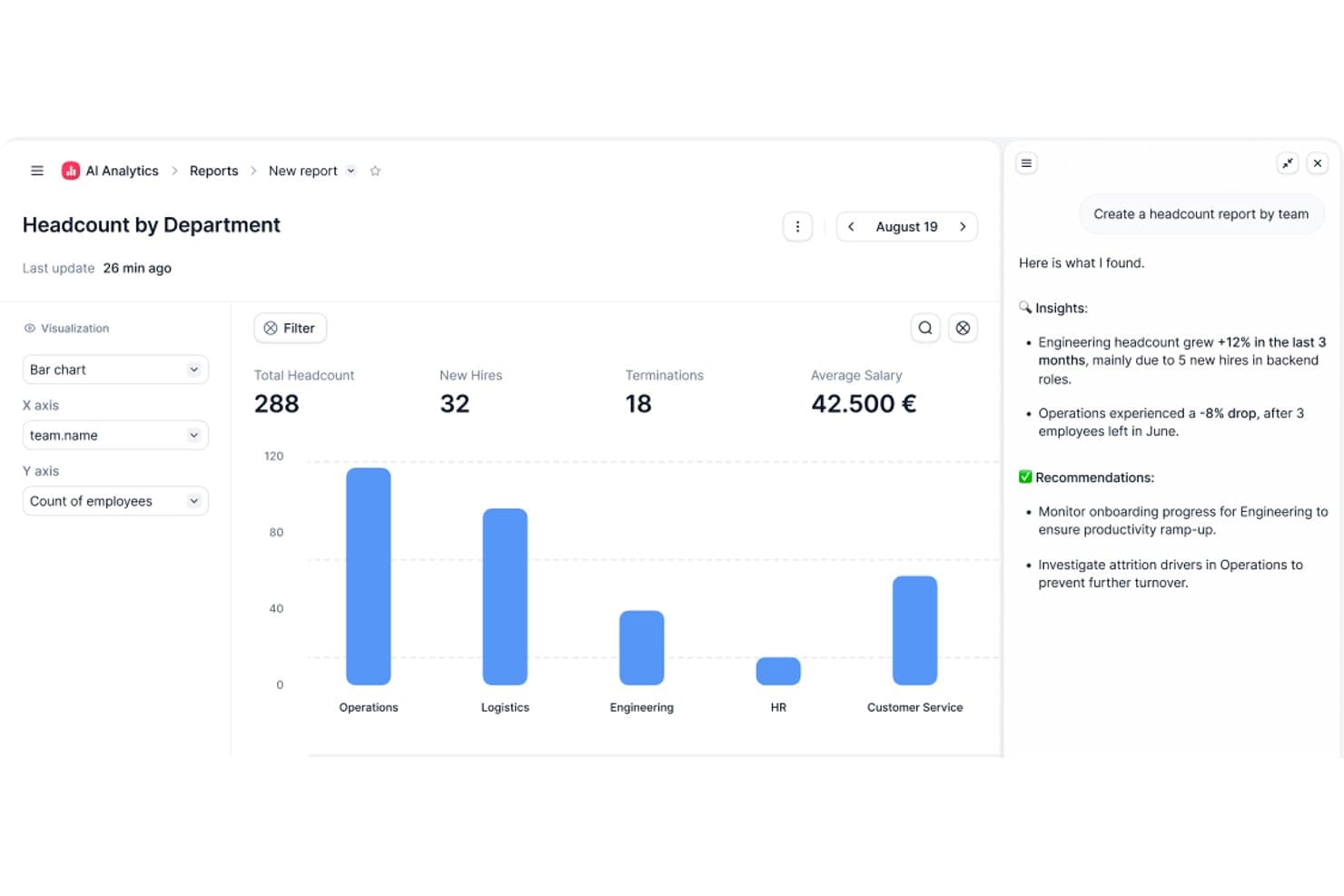
Factorial's AI Analytics generates headcount reports with insights and recommendations. Factorial is an AI-powered HR and business management platform that covers HR, finance, and IT operations—handling tasks like scheduling, reporting, document management, and employee policy queries through its built-in AI agent, One.
Who Is Factorial Best For?
Factorial is a strong fit for HR teams at growing small and mid-sized businesses that want a single platform to handle HR, finance, and IT operations alongside an AI assistant.
Why I Picked Factorial
I picked Factorial as one of the best because it's built around the idea of AI handling the operational busywork that slows HR teams down every day. Its built-in AI agent, One, can plan timetables, generate reports from live data, and answer employee questions about company policies directly from the handbook. I especially like how One connects across HR, finance, and IT in a single platform, so there's no switching between tools to get a full picture.
Factorial Key Features
- AI-assisted candidate screening: One can screen candidates, call applicants, and draft job descriptions directly within the recruitment workflow.
- Expense capture with OCR: AI-powered OCR extracts receipt details automatically and fills expense fields when employees submit expenses.
- Performance reviews and 9-box grid: Teams can run 180- and 360-degree reviews and use a 9-box grid to assess talent and identify development opportunities.
- Shift scheduling automation: Managers can build automated, bulk, and rotating shift schedules and notify employees of last-minute changes.
Factorial Integrations
Factorial offers marketplace integrations with Microsoft Business Central, Google Workspace, Slack, Microsoft Azure, Microsoft Power BI, LinkedIn, Recruitee, and Okta. It also provides a public API, webhooks, SDKs, and access to hundreds of tools through Zapier.
Pros and Cons
Pros:
- Leave approvals and onboarding cut admin work
- AI helps plan timetables and generate reports
- One answers policy questions from company handbooks
Cons:
- Limited AI governance and model oversight
- Complex workflows can require workarounds
 Best for AI-powered multi-country HR management
- Free demo available
- From $5/user/month
Visit WebsiteCustomer Rating:4.8/5
Deel manages global payroll and compliance for remote teams with AI features. Deel is a global payroll and compliance platform designed for businesses managing remote teams across various countries. It simplifies international hiring by managing payroll, taxes, and compliance, with AI-driven features to improve accuracy and efficiency.
Why I picked Deel: It automates global payroll compliance using AI capabilities for automated tax calculations, compliance alerts, and continuous regulatory monitoring. Its AI capabilities focus on ensuring compliance with international payroll regulations. Deel's AI-driven analytics help you understand payroll trends and optimize payment processes. These features ensure your team can manage international payroll with confidence and ease.
Standout Features & Integrations:
Features include AI-supported compliance alerts, automated invoice generation, and global payroll processing across 150+ countries. It also has customizable contract templates, automated invoicing, and a user-friendly dashboard.
Integrations include QuickBooks, Xero, Netsuite, BambooHR, Gusto, Rippling, Greenhouse, Lever, Slack, and Workday.
Pros and Cons
Pros:
- Customizable contract templates
- Automated tax calculations
- AI-driven compliance checks
Cons:
- Fewer integration options than competitors
- Limited offline functionality
 Best for creating custom employee portals
- Free plan + 14-day trial available
- From $9/user/month (billed annually)
Visit WebsiteCustomer Rating:4.6/5
monday AI Workspace offers a workspace home view for employees. monday AI Workspace is a flexible work management platform that uses AI agents, workflow automation, and customizable boards to support HR processes like recruitment, onboarding, and employee management.
Who Is monday AI Workspace Best For?
It's a strong fit for HR operations teams at mid-sized companies that need to build and manage custom workflows without a dedicated HR software suite.
Why I Picked monday AI Workspace
monday AI Workspace earns its spot on my shortlist because of how far you can push its customization for HR use cases. I particularly like the Vibe app builder, which lets me turn a specific HR need (like a new hire portal or a policy request hub) into a working custom app without writing a single line of code. Paired with AI columns that automate repetitive data entry directly within boards, I can build portals that actively process work, not just display it.
monday AI Workspace Key Features
- AI-powered meeting notetaker: Automatically creates actionable summaries from HR meetings and syncs notes into workflows.
- Time tracking and attendance tools: Enables HR teams to monitor employee hours and attendance directly from custom boards.
- Sidekick AI assistant: Offers context-aware suggestions and can run automated HR tasks through conversational prompts.
- Custom automation builder: Lets users create multi-step automated actions for HR processes, including candidate screening and onboarding.
Monday AI Workspace Integrations
Monday AI Workspace offers native integrations with Slack, Google Workspace, Microsoft Teams, Zoom, Outlook, Asana, GitHub, and Salesforce. It also supports Zapier and provides an API for custom integrations.
Pros and Cons
Pros:
- Workflow templates for HR ticketing and requests
- AI automations handle high-volume onboarding tasks
- Custom portal builder supports complex HR processes
Cons:
- Lacks native payroll and benefits management
- No predictive analytics for attrition or engagement
Learn more about monday AI Workspace: Best for AI-powered pulse checks on employee sentiment
- Free demo available
- Pricing upon request
Visit WebsiteCustomer Rating:4.3/5
Paylocity manages HR, payroll, and benefits with AI-driven capabilities. Paylocity is a cloud-based HR and payroll software tailored for small to medium-sized businesses. It provides tools for payroll processing, talent management, and benefits administration, with AI capabilities to improve user experience and decision-making.
Why I picked Paylocity: It offers a user-friendly interface that simplifies HR tasks. The AI-driven analytics provide insights into workforce trends and help you make informed HR decisions. Paylocity's automation features reduce manual workload, allowing your team to focus on strategic activities. Additionally, its AI tools facilitate employee engagement and feedback collection.
Standout Features & Integrations:
Features include automated payroll processing, customizable reports, and employee self-service portals. These features help your team manage HR functions efficiently and keep employees informed.
Integrations include QuickBooks, Xero, Salesforce, ADP, BambooHR, Slack, Gusto, Wrike, Microsoft Teams, and Google Workspace.
Pros and Cons
Pros:
- Easy-to-use interface
- Automation reduces manual tasks
- AI-driven workforce analytics
Cons:
- Lack of pricing transparency
- Limited options for non-standard employees
 Best for AI-powered people management
- Free demo available
- From $416.58/month (billed annually)
Visit WebsiteCustomer Rating:4.4/5
Workleap enhances employee engagement and performance management with AI. Workleap is an AI-driven talent management platform designed for small to medium-sized businesses. It focuses on employee engagement, performance management, and AI-driven people insights across HR workflows.
Why I picked Workleap: It excels in providing small businesses with tailored AI solutions for talent management. The platform offers AI-generated insights to improve employee engagement and performance tracking. Its customizable performance reviews and compensation management tools are ideal for businesses looking to maintain equitable pay structures.
Standout Features & Integrations:
Features include AI summaries of engagement data, customizable performance review cycles, and compensation analytics supported by market benchmarks. real-time engagement insights, customizable performance management reviews, and pulse surveys to detect early signs of disengagement.
Integrations include QuickBooks, Slack, Microsoft Teams, BambooHR, Gusto, Greenhouse, Lever, Xero, Google Workspace, and ADP.
Pros and Cons
Pros:
- User-friendly interface
- Customizable performance reviews
- AI-driven engagement insights
Cons:
- Advanced customization may require additional setup
- Full functionality requires technical knowledge
Learn more about Workleap: Best for AI-powered workforce planning insights
- Free demo available
- Pricing upon request
Visit WebsiteCustomer Rating:4.3/5
Workday supports workforce planning and financial management with AI insights. Workday is a cloud-based financial and human capital management software designed for medium to large enterprises. It helps organizations with workforce planning, talent management, and financial analysis, offering AI-driven insights to improve operational efficiency.
Why I picked Workday: It excels in providing real-time analytics, offering users immediate insights into workforce trends. Workday's AI features include predictive analytics that help forecast HR needs and optimize talent management strategies. The platform's machine learning capabilities improve data-driven decision-making by identifying patterns and anomalies. Its real-time data processing ensures your team can make timely and informed decisions.
Standout Features & Integrations:
Features include AI-supported talent management, real-time workforce analytics, and performance insights embedded across HR and finance workflows, intuitive workforce planning tools, all in one talent management solutions, and detailed financial reporting capabilities.
Integrations include Salesforce, Microsoft Azure, Slack, ServiceNow, Okta, ADP, SAP, Oracle, IBM, and Google Workspace.
Pros and Cons
Pros:
- Complete financial reporting
- Predictive analytics for HR needs
- Real-time data processing
Cons:
- Customization requires technical support
- Feature overload causes navigation issues
Learn more about Workday: 7Best for teams needing AI workforce insights
UKG
- Free demo available
- Pricing upon request
Visit WebsiteCustomer Rating:4.4/5
UKG optimizes workforce management and payroll with AI-driven tools. UKG is a complete human capital management solution tailored for businesses of all sizes. It focuses on workforce management, payroll, and HR service delivery, offering AI-driven tools to optimize employee experiences and operational efficiency.
Why I picked UKG: It provides AI capabilities that improve workforce management. The AI-driven scheduling tools help your team to optimize shift planning and reduce labor costs. Its predictive analytics offer insights into workforce trends and employee productivity. Additionally, UKG's AI-powered chatbots assist in automating routine HR queries, freeing up your team's time for more strategic tasks.
Standout Features & Integrations:
Features include advanced workforce analytics, time and attendance tracking, and employee self-service portals. The mobile app gives employees access to time tracking and timely notifications for action items related to HR.
Integrations include ADP, SAP, Oracle, Microsoft Azure, Salesforce, Workday, Kronos, SuccessFactors, Clickup, Google Workspace, and Slack.
Pros and Cons
Pros:
- Employee self-service portals
- Predictive workforce analytics
- AI-driven scheduling tools
Cons:
- Require ongoing training
- Limited reporting and HR process tools
Learn more about UKG: Best for AI-assisted global compliance
- 30-day free trial + free demo
- Pricing upon request

SAP SuccessFactors HCM simplifies global HR management and compliance with AI insights. SAP SuccessFactors HCM is a cloud-based human capital management solution tailored for businesses seeking to improve HR processes. It primarily serves enterprises aiming to manage global compliance and simplify HR activities with AI-driven insights.
Why I picked SAP SuccessFactors HCM: The tool excels in offering AI capabilities that assist in global compliance management. It features AI-assisted writing and translation tools that simplify communication across multilingual teams. The platform's AI-driven analytics provide insights into compliance risks and employee engagement trends, providing the data necessary for multiple stakeholders to anticipate workforce needs and optimize HR strategies.
Standout Features & Integrations:
Features include complete employee self-service options, AI-driven performance management, and advanced talent acquisition tools. These features are designed to empower your team to manage tasks efficiently and make informed decisions.
Integrations include SAP ERP, Microsoft Teams, LinkedIn, Slack, Concur, Docusign, SuccessFactors Learning, Kronos, Google Workspace, and Salesforce.
Pros and Cons
Pros:
- Predictive workforce analytics
- Multilingual support with AI translation
- AI-driven compliance insights
Cons:
- Upper tiers lack pricing transparency
- Maintenance requires additional resources
Learn more about SAP SuccessFactors HCM:

Leena AI automates HR processes and improves employee support with AI insights. Leena AI is an AI-powered HR assistant designed to simplify HR processes for mid-sized to large enterprises. It focuses on automating employee queries, onboarding, and policy management, offering value through its AI-driven support and insights.
Why I picked Leena AI: It specializes in automating HR queries, making it efficient for large teams. The platform's AI chatbots handle routine employee questions, reducing your HR team's workload. Its AI-driven onboarding tools ensure a smooth experience for new hires. Additionally, Leena AI offers analytics that help you improve employee engagement and satisfaction.
Standout Features & Integrations:
Features include automated policy management, real-time query resolution, and onboarding assistance. It also connects with leading project management tools to keep work aligned across operations and HR.
Integrations include SAP SuccessFactors, Trello, Workday, BambooHR, ADP, Microsoft Teams, Slack, Google Workspace, Salesforce, and Kronos.
Pros and Cons
Pros:
- Automated policy management
- Efficient onboarding tools
- AI-driven query resolution
Cons:
- Requires initial setup and training
- May not cover all complex queries
Learn more about Leena AI:

Humaans simplifies team management and onboarding with AI-driven efficiency. Humaans is a modern HR software solution aimed at startups and small businesses. It focuses on simplifying team management, onboarding, and employee data management, with AI features that improve operational efficiency.
Why I picked Humans: It offers intuitive team management capabilities, making it ideal for small businesses. The platform's AI-driven onboarding tools help your team simplify new hire processes. Its automated reminders ensure compliance and keep employee records up-to-date. Additionally, AI analytics provide insights into team dynamics and performance.
Standout Features & Integrations:
Features include automated document management, customizable onboarding workflows, centralized employee data storage, and delegating tasks that would otherwise require manual follow-ups by AI agents.
Integrations include Slack, Google Workspace, Microsoft Teams, BambooHR, QuickBooks, Xero, Lever, Greenhouse, Zoom, and Okta.
Pros and Cons
Pros:
- Centralized data management
- Automated compliance reminders
- Intuitive onboarding process
Cons:
- Limited customization
- Lacks advanced reporting options
Learn more about Humaans:
Diğer AI Yönetim Yazılımları
Kısa listeme giremeyen ancak yine de göz atmaya değer bazı ek AI yönetim yazılımı seçenekleri şunlardır:
- 11PraisidioBest for AI-driven employee retention analytics
- 12RipplingBest for unified automation across HR and IT
- 13HR AcuityBest for analyzing employee relations with AI
- 14PaycomBest for integrated payroll and HR data
- 15ClearCoBest for talent acquisition
- 16LeapsomeBest for continuous feedback
- 17LatticeBest for performance reviews
- 18SloneekBest for small team management
How I Evaluate AI Management Software
Every tool on this list has to deliver real AI value for HR teams—not just bolt a chatbot onto a legacy HRIS. I split my evaluation into two layers: the core functionality a tool needs to make the list, and the differentiators that set one apart.
Core Functionality (Table Stakes For This List)
When I'm selecting tools for my list, I rank each one on a scale from 0 (does not offer the functionality) to 5 (excels in this area) for each core functionality listed below. Then, I calculate the tool's total score into a percentage. Each tool needs to achieve a minimum total score of 65% to be considered for inclusion.
- AI-Powered Workflow Automation: I look for AI that actually handles multi-step HR tasks—like auto-routing onboarding checklists or triaging employee requests—rather than simple rule-based triggers.
- Predictive People Analytics: The platform should surface forward-looking insights, such as flagging flight-risk employees or forecasting hiring needs, with clear reasoning behind each prediction.
- Natural Language Interface: Whether it's a chatbot answering benefits questions or a copilot drafting offer letters, I evaluate how well the conversational AI handles real HR queries beyond scripted FAQs.
- Intelligent Talent Matching: I check whether the AI can meaningfully match candidates to roles or recommend internal moves based on skills, not just keyword overlap on a resume.
- HR Data Integration: A tool needs to connect with the systems HR teams already use—HRIS, ATS, payroll—so its AI models work from real, up-to-date people data rather than siloed inputs.
- Responsible AI Governance: Bias audits, explainability features, and compliance controls matter here. I look for tools that document how their models make decisions and support regulatory requirements.
Once I have a list of tools that meet this criteria, I consider what sets each platform apart.
Differentiating Factors (What Sets Vendors Apart)
Here's how I compare and contrast different vendors:
Standout Features
A skills intelligence graph is a big differentiator—I look for platforms that map employee competencies and skill adjacencies to drive internal mobility and succession planning. Sentiment and engagement AI also matter, especially tools that analyze pulse surveys or collaboration signals to flag burnout before it turns into attrition. I check whether a platform offers a generative AI copilot that can draft job descriptions, review summaries, or policy documents directly within HR workflows.
Beyond Features
AI governance and compliance posture is one of the first things I evaluate—I want to see published bias audit reports and clear documentation on how models make decisions, especially for hiring. Data privacy matters just as much; I check whether a vendor offers data residency options and transparent policies on whether customer data trains shared models. I also consider implementation support, since rolling out AI in HR requires change management resources like training programs and prompt libraries to drive adoption.
AI Yönetim Yazılımı Nasıl Seçilir?
Uzun özellik listeleri ve karmaşık fiyatlandırma yapıları arasında kaybolmak kolaydır. Kendinize özgü yazılım seçim süreciniz üzerinde çalışırken odağınızı korumanıza yardımcı olmak için göz önünde bulundurmanız gereken faktörleri aşağıda bir kontrol listesi hâlinde bulabilirsiniz:
| Faktör | Nelere Dikkat Edilmeli? |
| Ölçeklenebilirlik | Yazılım işletmenizle birlikte büyüyebilir mi? Aracın, performans sorunları yaşamadan artan kullanıcı veya veri sayısını işleyip işleyemeyeceğini değerlendirin. |
| Entegrasyonlar | Bordro veya CRM gibi mevcut sistemlerinizle entegre oluyor mu? Kesintileri önlemek için ekibinizin hâlihazırda kullandığı araçlarla uyumluluğunu kontrol edin. |
| Özelleştirilebilirlik | Yazılımı iş akışlarınıza uyacak şekilde özelleştirebilir misiniz? Gösterge panellerini, raporları ve ayarları şirketinizin süreçlerine uyacak şekilde değiştirme seçeneklerini arayın. |
| Kullanım Kolaylığı | Arayüz ekibiniz için sezgisel mi? Kullanıcıların kapsamlı bir eğitim veya sık desteğe ihtiyaç duymadan verimli bir şekilde gezinebildiğini değerlendirin. |
| Uygulama ve Kullanıma Alma | Kurulum ve ekibinizin eğitimi ne kadar sürecek? Sorunsuz bir geçiş için gereken kaynakları ve sağlayıcının bu aşamada destek sunup sunmadığını değerlendirin. |
| Maliyet | Gizli ücretler veya değişken maliyetler var mı? Kurulum ücretleri, aylık ödemeler ve ek özellikler için olası maliyetler dâhil olmak üzere toplam maliyeti anladığınızdan emin olun. |
| Güvenlik Önlemleri | Yazılım hassas verileri koruyor mu? Bilgileri güvende tutmak için veri şifreleme ve kullanıcı erişim kontrollerine ilişkin sektör standartlarını karşıladığını doğrulayın. |
| Destek Kullanılabilirliği | Gerektiğinde yardıma erişilebiliyor mu? Yardımın her zaman erişilebilir olmasını sağlamak için sağlayıcının 7/24 destek sunup sunmadığını ve sohbet, e-posta veya telefon gibi hangi kanalları kullandığını kontrol edin. |
AI Yönetim Yazılımı Nedir?
Yapay zekâ yönetim yazılımı, İK işlevlerini otomatikleştirmek ve iyileştirmek için yapay zekâ kullanan bir araç kategorisidir. Bu araçlar genellikle İK uzmanları, yöneticiler ve ekip liderleri tarafından karar alma süreçlerini ve operasyonel verimliliği iyileştirmek için kullanılır.
Tahmine dayalı analizler, yapay zekâ destekli sohbet robotları ve otomatik veri işleme; işe alım süreçlerini optimize etmeye, çalışanların sorularını yönetmeye ve iş gücü eğilimlerini analiz etmeye yardımcı olur. Genel olarak bu araçlar, zamandan tasarruf sağlayan ve İK sonuçlarını iyileştiren değerli içgörüler ve otomasyon sunar.
Yapay Zekâ Yönetim Yazılımının Özellikleri
Yapay zekâ yönetim yazılımı seçerken aşağıdaki temel özelliklere dikkat edin:
- Tahmine dayalı analizler: İş gücü eğilimlerini öngörmek ve gelecekteki İK ihtiyaçlarını planlamaya yardımcı olmak için yapay zekâ kullanır.
- Yapay zekâ destekli sohbet robotları: Rutin İK sorularını otomatikleştirerek zamandan tasarruf sağlar ve İK ekiplerinin iş yükünü azaltır.
- Otomatik işe alıştırma: Yeni çalışanlara gerekli adımlarda rehberlik eden yapay zekâ araçlarıyla işe alıştırma sürecini basitleştirir.
- Gerçek zamanlı veri işleme: Hızlı karar alma için anında içgörüler ve analizler sunar.
- Özelleştirilebilir panolar: Kullanıcıların veri görüntülerini belirli iş ihtiyaçlarına ve tercihlerine göre uyarlamasına olanak tanır.
- Çalışan bağlılığı analizleri: İyileştirme alanlarını belirlemek ve çalışanların moralini yükseltmek için bağlılık verilerini analiz eder.
- Uyumluluk yönetimi: Sektör düzenlemelerine ve standartlarına uyumu izlemek ve güvence altına almak için yapay zekâ kullanır.
- Otomatik performans takibi: Çalışan performans ölçütlerini takip eder ve değerlendirmeler ile gelişim için içgörüler sunar.
- Veri güvenliği özellikleri: Hassas İK verilerini şifreleme ve erişim denetimleriyle korur.
- Entegrasyon olanakları: İşlevselliği geliştirmek için mevcut İK ve iş sistemlerine kolayca bağlanır.
Yapay Zekâ Yönetim Yazılımının Faydaları
Yapay zekâ yönetim yazılımının uygulanması ekibiniz ve işletmeniz için çeşitli faydalar sağlar. Yararlanabileceğiniz birkaç fayda şunlardır:
- İyileştirilmiş karar alma: Yapay zekâ destekli analizler, bilinçli İK kararlarını hızlı bir şekilde almanıza yardımcı olan içgörüler sunar.
- Zaman tasarrufu: Otomatikleştirilmiş süreçler manuel görevleri azaltarak stratejik faaliyetler için zaman kazandırır.
- Geliştirilmiş uyumluluk: Yapay zekâ araçları düzenlemeleri izler ve bunlara uyumu güvence altına alarak uyumluluk risklerini azaltır.
- Daha iyi çalışan bağlılığı: Analizler bağlılık sorunlarını belirleyerek bunları proaktif şekilde ele almanıza olanak tanır.
- Artırılmış verimlilik: Sohbet robotları ve otomatik işe alıştırma gibi yapay zekâ özellikleri İK işlevlerini basitleştirir.
- Maliyet azaltma: Rutin görevlerin otomatikleştirilmesi, manuel İK süreçleriyle ilişkili operasyonel maliyetleri azaltır.
- Ölçeklenebilirlik: Yapay zekâ araçları işletmenizle birlikte büyüyerek artan veri ve kullanıcı taleplerini zahmetsizce karşılayabilir.
Yapay Zekâ Yönetim Yazılımının Maliyetleri ve Fiyatlandırması
Yapay zekâ yönetim yazılımı seçmek, mevcut çeşitli fiyatlandırma modellerini ve planları anlamayı gerektirir. Maliyetler özelliklere, ekip büyüklüğüne, eklentilere ve daha fazlasına bağlı olarak değişir. Aşağıdaki tablo, yapay zekâ yönetim yazılımı çözümlerinde yaygın planları, ortalama fiyatlarını ve genellikle sunulan özellikleri özetlemektedir:
Yapay Zekâ Yönetim Yazılımı İçin Plan Karşılaştırma Tablosu
| Plan Türü | Ortalama Fiyat | Yaygın Özellikler |
| Ücretsiz Plan | $0 | Temel analizler, sınırlı kullanıcı desteği ve temel İK işlevleri. |
| Kişisel Plan | $5-$1,000/kullanıcı/ay | Gelişmiş analizler, yapay zekâ destekli sohbet robotları ve otomatik işe alıştırma araçları. |
| İşletme Planı | $70-$2,000/kullanıcı/ay | Özelleştirilebilir panolar, entegrasyon olanakları ve geliştirilmiş güvenlik önlemleri. |
| Kurumsal Plan | $100-$10,000/kullanıcı/ay | Tam yapay zekâ olanakları, özel destek ve eksiksiz uyumluluk yönetimi. |
Yapay Zekâ Yönetim Yazılımı SSS
Yapay zekâ yönetim yazılımı hakkında sık sorulan soruların bazı yanıtlarını burada bulabilirsiniz:
Yapay zekâ yönetim yazılımının ölçeklenebilirliğini nasıl değerlendiririm?
Ölçeklenebilirliği değerlendirmek için işletmeniz büyüdükçe yazılımın artan veri ve kullanıcı sayısını karşılayıp karşılayamayacağını göz önünde bulundurun. Kullanıma göre ayarlanan bulut tabanlı altyapı ve esnek fiyatlandırma planları gibi özellikleri arayın. Tedarikçilerden, yazılımı kullanarak operasyonlarını başarıyla ölçeklendirmiş benzer büyüklükteki şirketlere ait örnek olay incelemeleri veya referanslar isteyin.
Yapay zekâ yönetim yazılımı mevcut İK sistemleriyle entegre olabilir mi?
Evet, çoğu yapay zekâ yönetim aracı entegrasyon özellikleri sunar. Bordro, CRM ve iletişim araçları gibi mevcut sistemlerinizle uyumluluğu kontrol edin. Tedarikçiler genellikle API’ler veya önceden oluşturulmuş bağlayıcılar sağlar. Entegrasyonların nasıl çalıştığını görmek ve sorunsuz bir geçiş sağlamak için bir demo isteyin.
Yapay zekâ yönetim yazılımında veri güvenliğiyle ilgili neleri göz önünde bulundurmalıyım?
Güçlü veri şifreleme, kullanıcı erişim denetimleri ve GDPR gibi düzenlemelere uyumluluk sunan yazılımlara öncelik verin. Tedarikçilere güvenlik sertifikalarını ve veri koruma önlemlerini sorun. Yazılımın şirketinizin güvenlik gereksinimlerini karşıladığından emin olmak için bir güvenlik denetimi gerçekleştirmeyi veya bir uzmana danışmayı değerlendirin.
Yapay zekâ yönetim yazılımı çalışan bağlılığına nasıl yardımcı olabilir?
Yapay zekâ araçları, eğilimleri ve iyileştirilmesi gereken alanları belirlemek için bağlılık verilerini analiz edebilir. Duygu analizi ve geri bildirim araçları gibi özellikler çalışan memnuniyeti hakkında içgörüler sağlar. İş yüklerini ayarlamak veya iletişim kanallarını geliştirmek gibi çalışanların moralini ve üretkenliğini artıran değişiklikleri uygulamak için bu içgörülerden yararlanın.
Yapay zekâ yönetim yazılımını özel ihtiyaçlarımıza uyacak şekilde özelleştirmek mümkün mü?
Evet, birçok yapay zekâ yönetim çözümü özelleştirme seçenekleri sunar. Süreçlerinize uyacak şekilde gösterge tablolarını, raporları ve iş akışlarını değiştirmenize olanak tanıyan yazılımları arayın. Özelleştirme teknik uzmanlık gerektirebilir; bu nedenle tedarikçinin bu görevler için sunduğu destek düzeyini doğrulayın.