

Konaklama sektörüne yönelik bordro yazılımları; otellerin, restoranların ve diğer hizmet işletmelerinin saatlik çalışanlar ile bahşiş alan personel için bordroyu, bahşişleri ve mevzuata uygunluğu yönetmesine yardımcı olur. Vardiya değişikliklerini, karmaşık ücret kurallarını ve sektöre özgü zorlukları yönetecek araçlar arıyorsanız doğru yerdesiniz. Bu rehber, ekibiniz için en uygun seçeneği belirlerken nelere dikkat etmeniz gerektiğini vurgular; böylece bordro işlemlerini kolaylaştırabilir ve misafirlerinize hizmet vermeye odaklanabilirsiniz.
Why Trust Our Software Recommendations
6,700+
Reviews
20
Industry experts
16+
Evaluation factors
14
Years
Our team has been testing and reviewing software since 2012. As HR experts ourselves, we know how difficult—and important—it is to choose the right software.
For this guide, we evaluated tools using hands-on testing and independent research, scoring tools using our selection criteria. We also draw on insights from industry thought leaders and practicing HR experts.
Our reviews reflect our human editorial judgment, not a sales pitch.
Expert reviewers:
- Phil GrayCOO
 Kim BehnkeHR Tech Editor & Analyst
 Josh BarkerPeople Ops Manager

Konaklama Sektörü için Bordro Yazılımları Karşılaştırma Tablosu
Aşağıdaki tabloda, konaklama sektörü için en iyi bordro yazılımı seçimlerimin fiyatlandırma ayrıntıları karşılaştırılmaktadır.
Score legend (out of 5)
- Excellent4.5–5
- Good4–4.4
- Average3–3.9
- Below average2–2.9
- Poor1–1.9
Sorted by: Default
| Tool | Starting Price | Website | |||||||
|---|---|---|---|---|---|---|---|---|---|
Best for fast new hire payroll onboarding | 3.2 out of 5 | 2 | 4 | 4 | 2 | 3 | 4 | $49/month Free trial + free demo available | Book Demo |
Best for complex shift and overtime pay rules | 2.5 out of 5 | 1 | 3 | 2 | 1 | 4 | 4 | $50/user/month 30-day free trial + free demo available | Website |
Best for custom labor cost reporting | 3.3 out of 5 | 2 | 3 | 5 | 2 | 4 | 4 | Pricing upon request Free demo available | Website |
Best for hourly staff onboarding in hospitality | 3.3 out of 5 | 3 | 3 | 4 | 3 | 3 | 4 | $99/month Free plan + 30-day free trial + free demo available | Website |
Best for restaurant scheduling and payroll sync | 3.8 out of 5 | 4 | 3 | 4 | 5 | 3 | 4 | $44.99/month Free plan + 14-day free trial + free demo available | Website |
Best for hospitality compliance tracking | 3.7 out of 5 | 3 | 3 | 3 | 4 | 5 | 4 | Pricing upon request Free demo available | Website |
Best for enterprise multi-property payroll at scale | 3.3 out of 5 | 2 | 4 | 4 | 2 | 4 | 4 | Pricing upon request Not available | Website |
Best for all-in-one restaurant management | 4.2 out of 5 | 5 | 4 | 3 | 5 | 4 | 4 | Pricing upon request Free demo available | Website |
Best for multi-role overtime pay in restaurants | 3.3 out of 5 | 2 | 4 | 4 | 2 | 4 | 4 | Pricing upon request Free demo available | Website |
Best for workforce analytics in hospitality | 3.2 out of 5 | 3 | 3 | 3 | 4 | 2 | 4 | Pricing upon request Free demo available | Website |


Konaklama Sektörü için Bordro Yazılımı İncelemeleri
Aşağıda, kısa listeme giren konaklama sektörü için en iyi bordro yazılımlarının ayrıntılı özetlerini bulabilirsiniz. İncelemelerim, size en uygun seçeneği bulmanıza yardımcı olmak için her yazılımın özelliklerine, en iyi kullanım alanlarına ve entegrasyonlarına ayrıntılı bir bakış sunar.
 Best for fast new hire payroll onboarding
- Free trial + free demo available
- From $49/month
Visit WebsiteCustomer Rating:4.6/5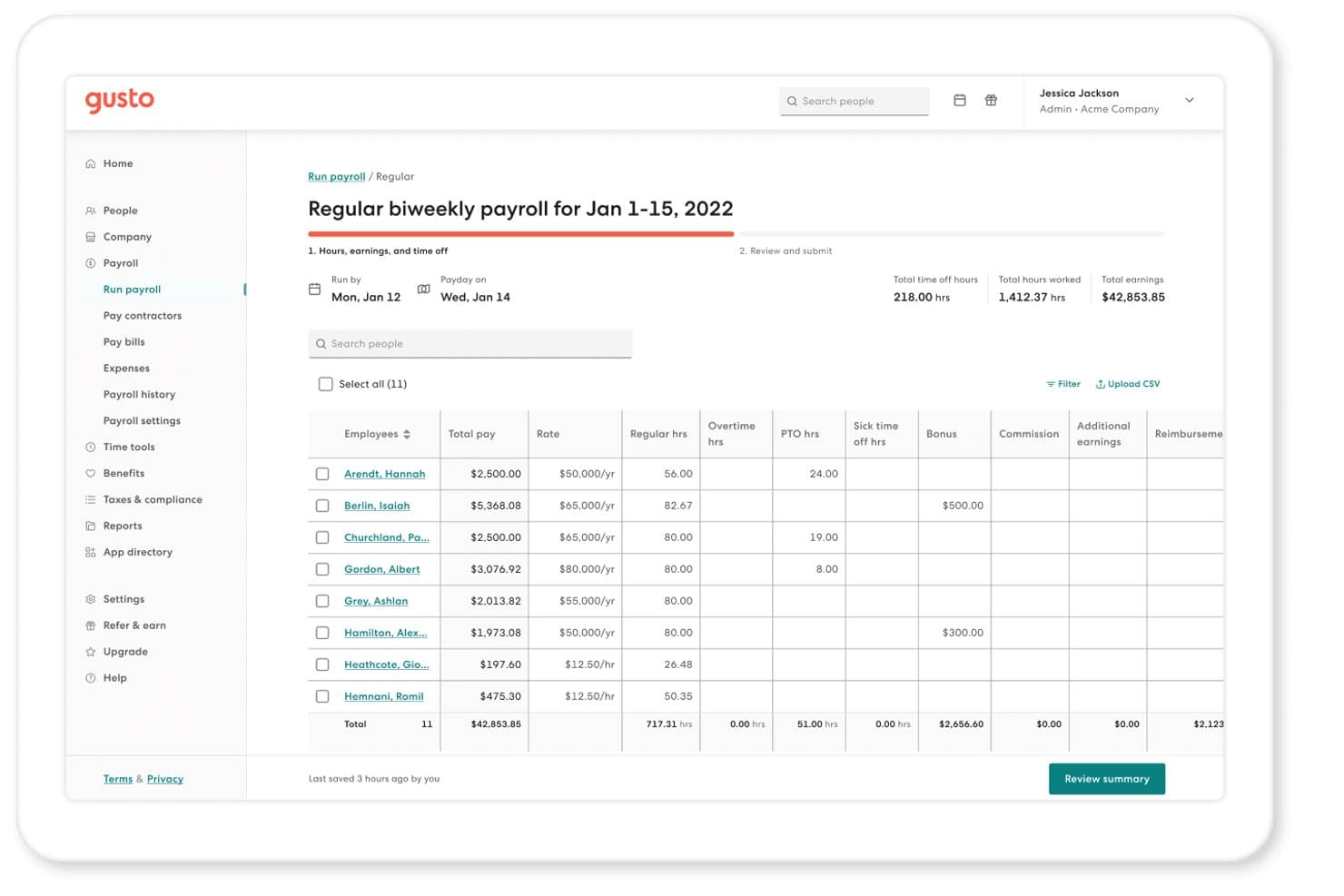
Gusto lets hospitality managers run biweekly payroll with hours and earnings tracked per employee. Gusto is a payroll platform that handles full-service tax filing, multi-rate pay, tip wage management, time tracking, and employee self-service onboarding for hourly and salaried workforces.
Who Is Gusto Best For?
Gusto is a strong fit for small, single-location restaurants or boutique hotels that prioritize fast, self-service onboarding and clear pricing over deep hospitality-specific POS integrations.
Why I Picked Gusto
I've included Gusto in my top picks because its self-service onboarding genuinely solves one of hospitality's biggest payroll headaches: getting new hires paid fast during a rush hire. New employees enter their own W-4, direct deposit, and I-9 details, and Gusto generates the I-9 automatically on acceptance. I also like its weighted-average overtime calculation, which handles a server-bartender split week without manual math.
Gusto Key Features
- Seasonal employee deactivation: Inactive employees aren't billed, and a built-in rehire workflow lets you reactivate seasonal staff each season without re-entering their details.
- Tip credit top-up automation: When tipped employees earn less than minimum wage, Gusto automatically adjusts their gross pay and flags the correction during the payroll run.
- State daily overtime rules: Gusto applies California, Alaska, Colorado, Nevada, and Kentucky daily and 7th-day overtime rules automatically when hours are recorded by workweek.
- Earned wage access via Clair: Employees can access up to 50% of their earned pay between pay periods, with free standard transfers and no interest charged.
Gusto Integrations
Gusto lists 152 integrations, including 7shifts, Homebase, Deputy, When I Work, Clover, Lightspeed/Upserve, talech, and SpotOn Teamwork. It lacks listed Toast, Square, Oracle Micros, or hotel PMS integrations.
Pros and Cons
Pros:
- Seasonal rehire workflows preserve employee details
- Weighted overtime handles multiple hospitality roles
- Self-service onboarding gets new hires paid faster
Cons:
- Multi-EIN payroll requires separate company profiles
- Tip pooling still requires manual calculations
 Best for complex shift and overtime pay rules
- 30-day free trial + free demo available
- From $50/user/month
Visit WebsiteCustomer Rating:4.5/5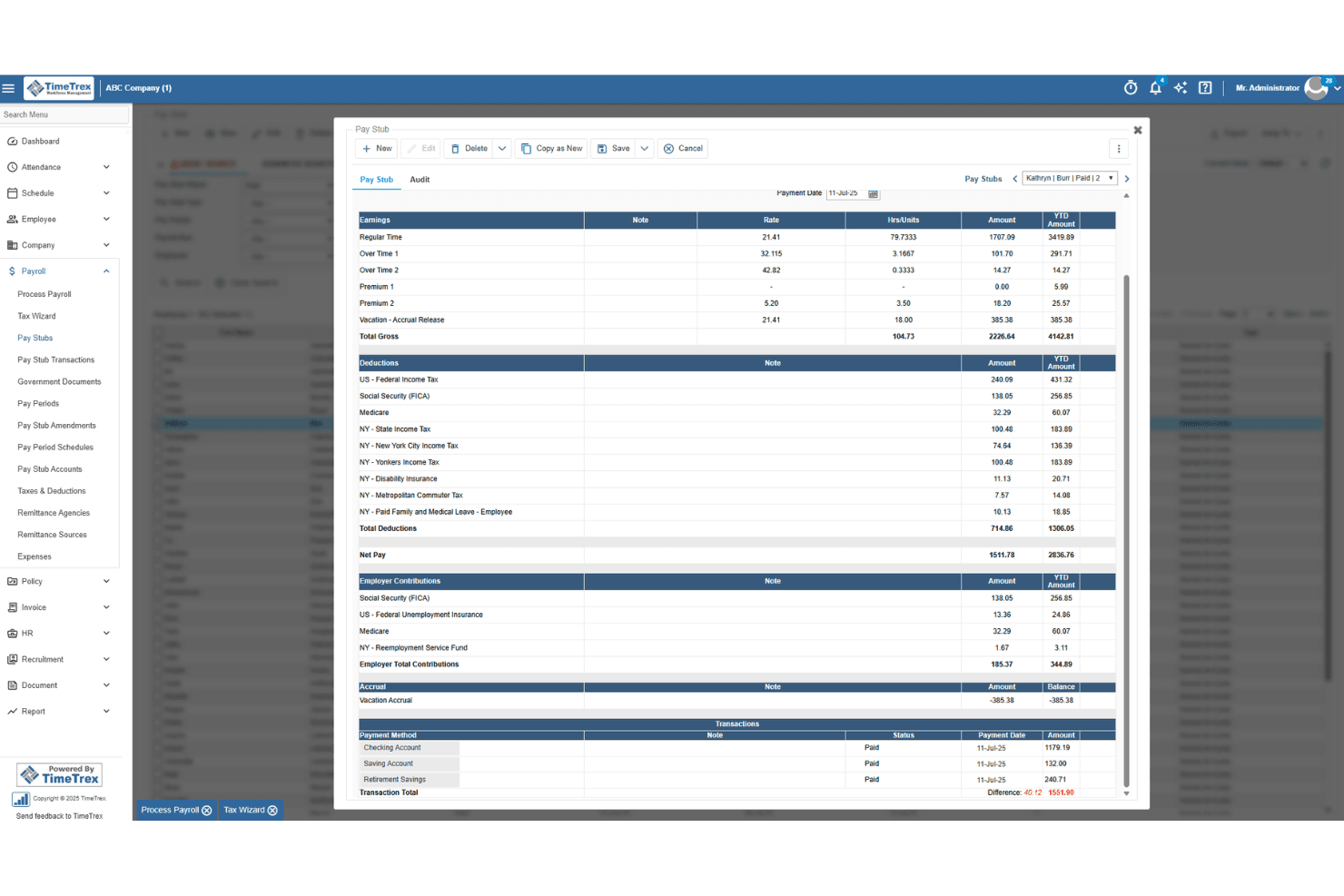
TimeTrex generates detailed pay stubs with earnings, deductions, and taxes. TimeTrex is a workforce management platform that combines payroll, time and attendance, scheduling, and HR tools, with a rules engine built to handle complex pay structures across multiple roles, rates, and locations.
Who Is TimeTrex Best For?
TimeTrex suits hospitality operators managing employees across multiple roles and locations who need a flexible rules engine to handle complex overtime and shift differential pay.
Why I Picked TimeTrex
I picked TimeTrex as one of the best because its rules engine handles the kind of pay complexity hospitality operators deal with daily. I'm particularly impressed by Secondary Wage Groups and Pay Formula Policies, which let a single employee earn different rates across roles automatically, say $30/hr in the kitchen and $25/hr in events. It also calculates blended overtime across those multiple roles and applies jurisdiction-specific rules like California daily overtime without manual workarounds.
TimeTrex Key Features
- Multi-jurisdiction overtime engine: Automatically applies daily, weekly, and consecutive-day overtime rules based on the employee's work location, including California and Fair Workweek jurisdictions.
- Geofenced and biometric time punching: Employees clock in via GPS-geofenced mobile punches or facial-recognition terminals, keeping location-based attendance accurate across properties.
- Drag-and-drop shift scheduling: Build and adjust schedules visually, with open-shift bidding and automatic blocking of bids that would trigger overtime.
- Job costing across cost centers: Tracks labor costs across up to four cost-center levels, letting multi-property operators see spending broken down by department, location, or role.
TimeTrex Integrations
TimeTrex documents integrations with ADP, QuickBooks, Sage, Paychex, Ceridian, CompuPay, Surepay, Vensure, and Chris21. Its RESTful API supports custom connections, but no native hospitality POS integrations are documented.
Pros and Cons
Pros:
- Tracks labor with biometric and geofenced punches
- Applies location-specific overtime rules automatically
- Handles blended overtime across multiple roles
Cons:
- Tax filing coverage varies by jurisdiction
- Requires manual handling for tip pooling
Learn more about TimeTrex: Best for custom labor cost reporting
- Free demo available
- Pricing upon request
Visit WebsiteCustomer Rating:4.3/5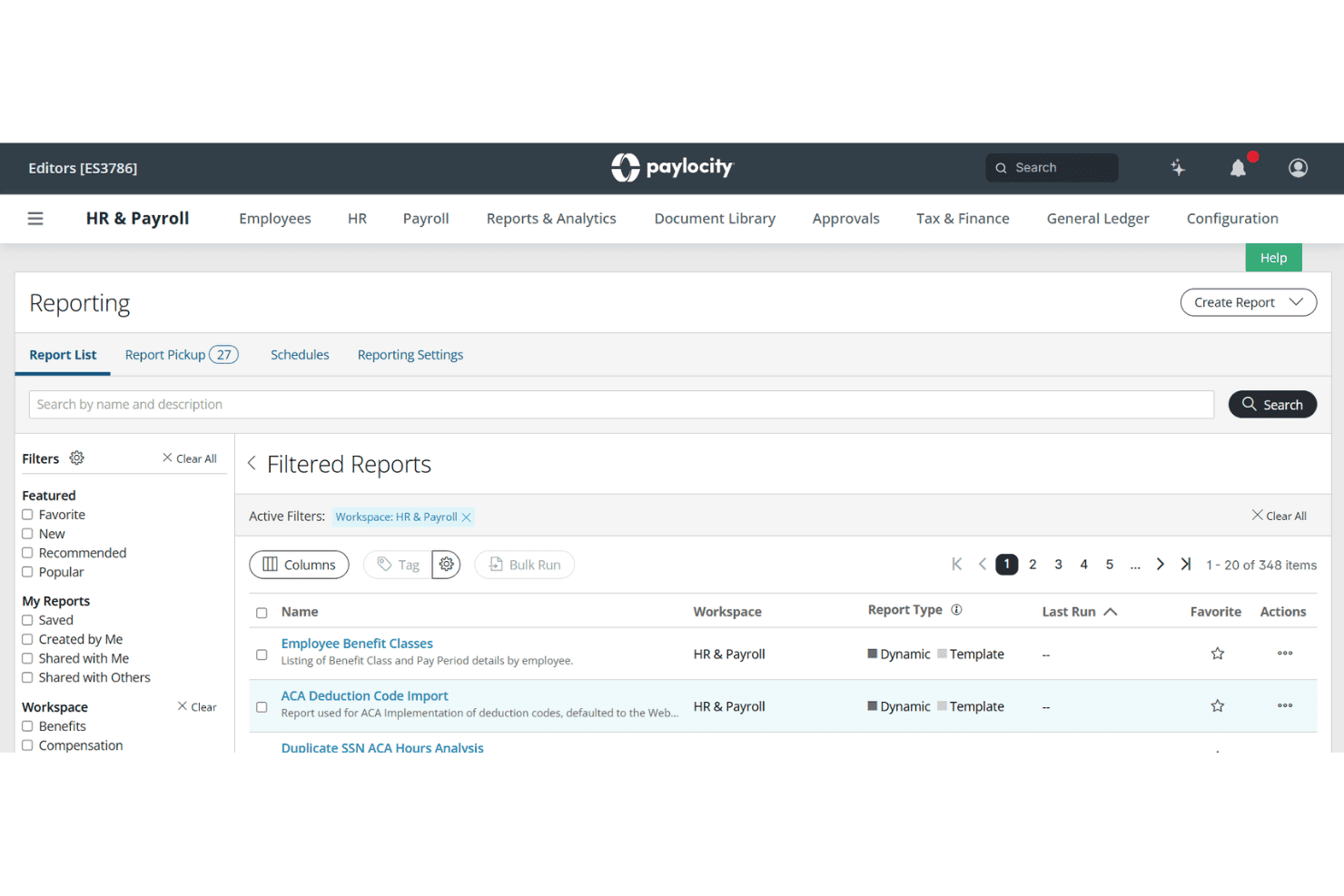
Paylocity offers a comprehensive Reporting module with filtered report lists, workspaces, and scheduling options within its HR & Payroll platform. Paylocity is a payroll and HR platform that covers payroll processing, time and attendance, scheduling, hiring, and workforce analytics, with multi-location labor cost tracking built for large hourly and variable-pay workforces.
Who Is Paylocity Best For?
Paylocity is a strong fit for hotel groups and multi-location restaurant operators that need detailed labor cost reporting across properties, roles, and cost centers.
Why I Picked Paylocity
Paylocity earns its spot on my shortlist because of how far its labor cost reporting goes. I love that GL mapping flows directly from time data into payroll, so hours logged across roles and locations land in the right cost centers without manual cleanup. Workforce Analytics layers on top with custom dashboards, position-level data, and peer benchmarks pulled from 35,000+ companies, giving multi-property operators a real picture of where labor spend sits.
Paylocity Key Features
- On Demand Pay: Employees can request same-day access to earned wages, with requests made by 2 PM CT funded the same day.
- AI scheduling: Automatically recommends shifts based on staff history, skills, certifications, budgets, and sales forecasts.
- Biometric and geofenced time collection: Supports fingerprint, face recognition, and location-based clock-in for distributed hourly workforces.
- TipHaus integration: Syncs POS and tip data directly into payroll to automate tip pooling, allocation, and wage compliance.
Paylocity Integrations
Paylocity lists 400+ enterprise integrations, including marketplace connections with TipHaus, Toast, Square, 7shifts, and Sage Intacct. Custom connections are available through open APIs, EDI, and SFTP.
Pros and Cons
Pros:
- Biometric clocks support distributed hourly teams
- Same-day earned wage access aids retention
- Custom labor reporting by role and location
Cons:
- Support availability misses hospitality weekends
- Tip pooling requires separate workflow
 Best for hourly staff onboarding in hospitality
- Free plan + 30-day free trial + free demo available
- From $99/month (billed annually)
Visit WebsiteCustomer Rating:4.2/5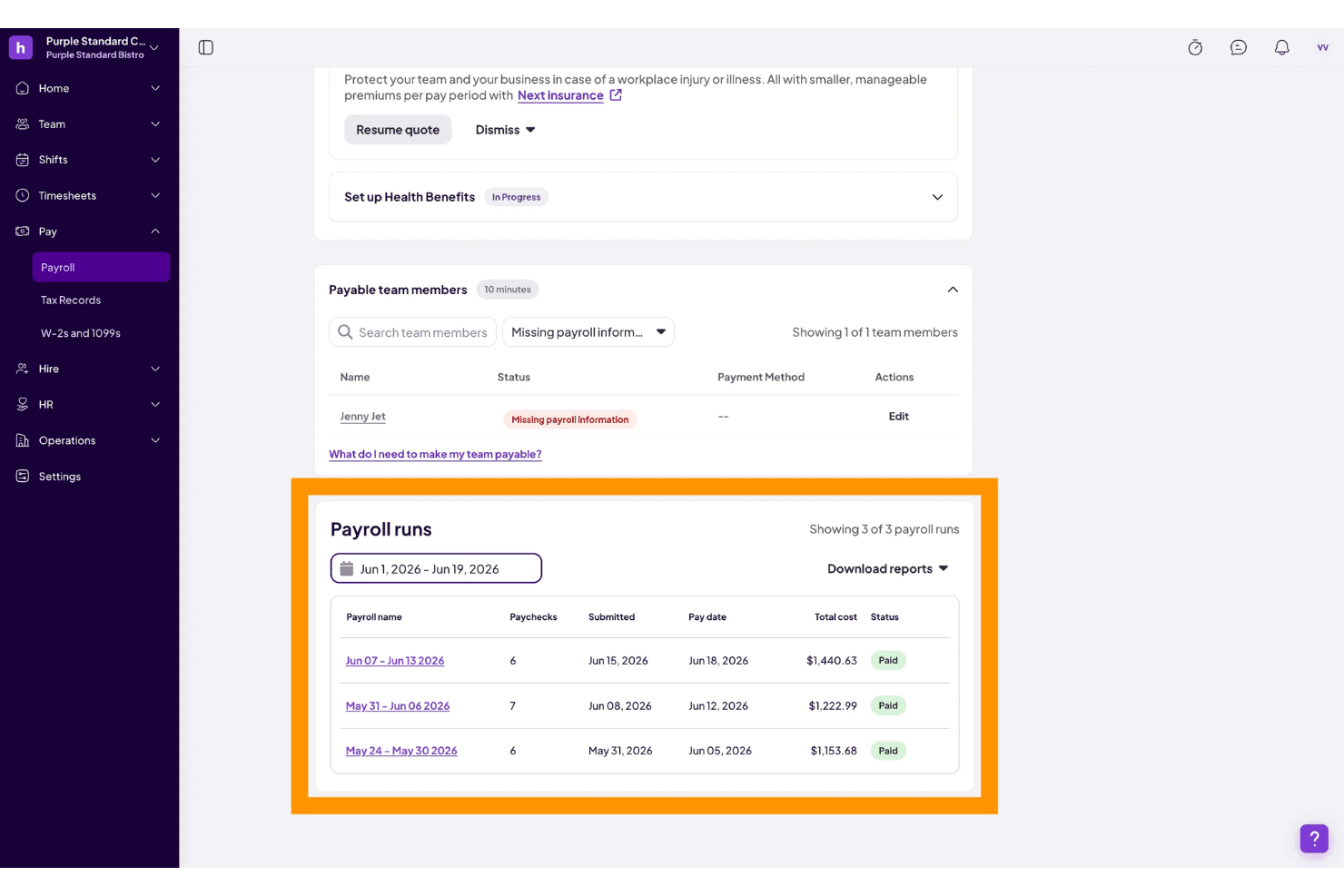
Homebase offers a payroll runs dashboard showing three completed pay periods with total costs, pay dates, and paid statuses for a restaurant business. Homebase is a payroll and workforce management platform built for hourly teams, combining time tracking, scheduling, tip management, and automated tax filing with native POS integrations for hospitality businesses.
Who Is Homebase Best For?
Homebase suits small to mid-sized restaurant and retail operators who pay hourly staff and want scheduling, time tracking, and payroll in one place.
Why I Picked Homebase
I picked Homebase as one of the best because its employee self-onboarding flow handles W-4s, I-9s, and direct deposit setup in one place, which matters enormously when you're cycling through seasonal staff mid-season. Hours logged on the time clock feed directly into payroll without re-entry, so a new server's first week of shifts shows up in the next pay run automatically. I also like the Payroll Assistant, which flags missed clock-outs and break issues before they turn into payroll errors.
Homebase Key Features
- Tip management add-on: Centralizes tip pooling and distribution processes with data pulled from POS systems.
- Multi-location payroll: Lets you process payroll for all locations on the same run using a single EIN and schedule.
- Automated wage and hour compliance: Tracks overtime, breaks, and local laws for hourly hospitality staff.
- POS integrations: Connects directly with Toast, Square, Clover, Shopify, and Revel for synced hours, sales, and tip data.
Homebase Integrations
Homebase offers native integrations with Toast, Square, Clover, Shopify, and Revel for POS connectivity, and with QuickBooks Online for accounting. An API is available for custom integrations.
Pros and Cons
Pros:
- Same-day pay available for hourly workers
- Built-in tip pooling for tipped employees
- Hourly staff onboarding is fast and paperless
Cons:
- Limited multi-state payroll compliance support
- Tip management requires a paid add-on
 Best for restaurant scheduling and payroll sync
- Free plan + 14-day free trial + free demo available
- From $44.99/month
Visit WebsiteCustomer Rating:4.7/5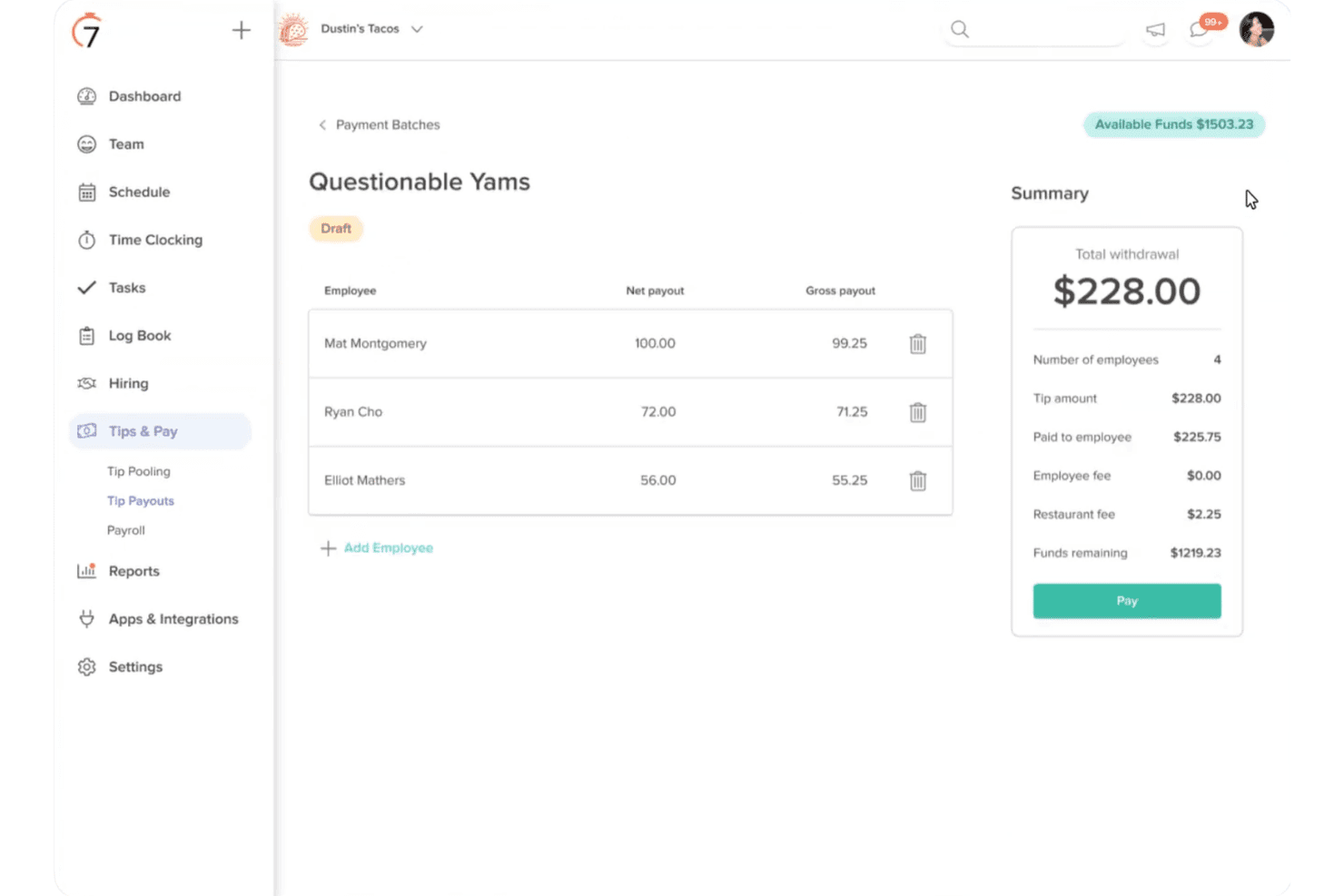
7shifts offers a Tip Payouts feature that allows restaurant managers to create payment batches, assign net and gross payouts per employee, and review a summary of total withdrawals and fees before processing. 7shifts is a restaurant-focused payroll and workforce management platform that combines scheduling, time tracking, tip pooling, and full-service payroll processing in a single system built specifically for food service operations.
Who Is 7shifts Best For?
7shifts suits independent restaurants and small multi-location restaurant groups that already use its scheduling tools and want payroll to run from the same system.
Why I Picked 7shifts
I picked 7shifts as one of the best because the scheduling-to-payroll sync is genuinely tight: timesheets and tips flow from the floor into a payroll run in one step, cutting out the manual export-import cycle most restaurant operators deal with. I particularly like how tip pooling calculates splits by hours worked across roles automatically, and how blended overtime pulls from an employee's total pay across all their positions. Both features do real work during a busy week with mixed hourly and tipped staff.
7shifts Key Features
- Digital employee onboarding: New hires complete I-9 and E-Verify paperwork digitally, with the whole process taking around 10 minutes per employee.
- Multi-position pay rates: Employees can hold multiple roles with different pay rates, which carry through automatically from timesheets into payroll.
- On-demand pay via Clair: Employees can access earned wages and tips before payday at no cost to the employer.
- Location-level overtime rules: Daily, weekly, and consecutive-day overtime thresholds can be configured separately per location to match local labor law requirements.
7shifts Integrations
7shifts offers native integrations with Toast, Square, Clover, Lightspeed, TouchBistro, Revel, Aloha, Qu, Cake, and GoTab, plus QuickBooks for accounting. It also provides an API and partner marketplace for custom connectivity.
Pros and Cons
Pros:
- Digital onboarding supports fast seasonal hiring
- Blended overtime covers multiple employee positions
- Tip pooling calculates by hours and roles
Cons:
- Doesn't support broader hotel operations
- No confirmed Form 8027 filing
Learn more about 7shifts: Best for hospitality compliance tracking
- Free demo available
- Pricing upon request
Visit WebsiteCustomer Rating:4.5/5
Netchex allows users to configure payroll groups, set pay period dates, and define payroll details like monthly run type and holiday hours before starting payroll. Netchex is a hospitality payroll and HR platform that handles multi-location payroll, tip tracking, wage compliance, hourly workforce onboarding, and POS integrations across restaurant and hotel operations.
Who Is Netchex Best For?
Netchex is a strong fit for multi-location hospitality operators—from hotel groups to restaurant franchises—that need to manage tip compliance, blended overtime, and hourly workforce onboarding across properties.
Why I Picked Netchex
I've included Netchex in my top picks because it handles hospitality compliance tracking in a way that's genuinely built for the industry's complexity. I particularly like how it automates state-by-state tip credit configurations and calculates minimum wage shortfalls by pay period, so if a tipped employee's base pay plus tips falls short, the system catches it automatically. Blended overtime across multiple roles within a single pay run is another feature I find compelling for operators running staff across departments.
Netchex Key Features
- Multi-location payroll management: Run payroll across multiple properties and EINs from a single login, with per-location and combined totals available in one view.
- POS integration: Connects with 14–23 restaurant POS platforms—including Toast, Oracle MICROS, and Aloha—to import employee hours and tips directly into payroll.
- Digital onboarding: New hires complete I-9, W-4, and direct deposit setup before their first shift, with e-signatures and E-Verify built in.
- ACA tracking: Automatically tracks ACA hours for variable-schedule and seasonal staff to support eligibility determinations across pay periods.
Netchex Integrations
Netchex offers 14–23 documented restaurant POS and back-office integrations, including Toast, Aloha, Oracle MICROS, Restaurant365, 7shifts, and Oracle OPERA PMS. It also connects with QuickBooks Online and supports GL exports to Sage and NetSuite.
Pros and Cons
Pros:
- Responsive implementation and support teams
- Supports multi-property payroll from one login
- Handles blended overtime across roles
Cons:
- Reporting feels dated and clunky
- Tip pooling capabilities remain unclear
Learn more about Netchex: Best for enterprise multi-property payroll at scale
- Not available
- Pricing upon request
Visit WebsiteCustomer Rating:4.3/5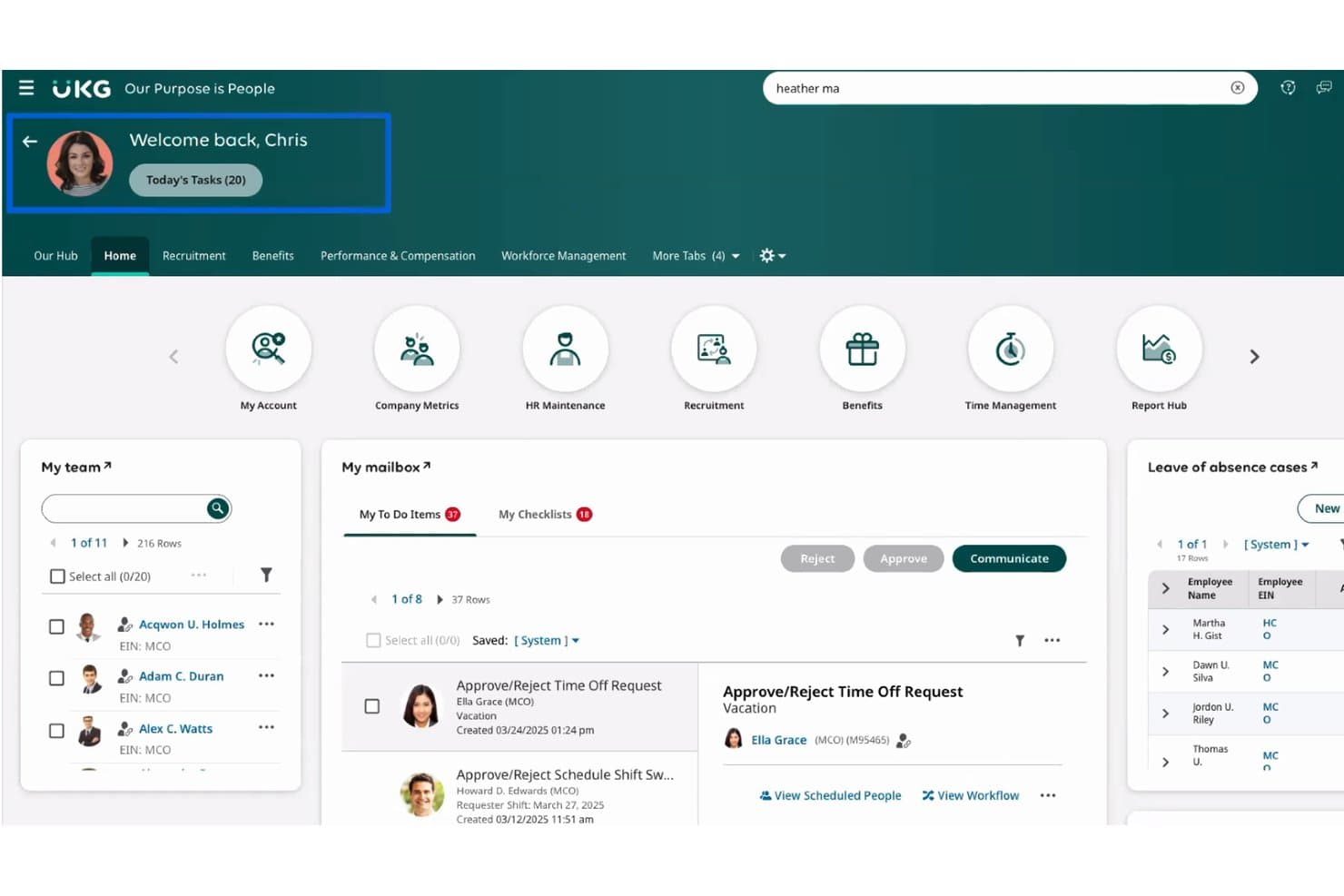
UKG Pro centralizes HR tasks, team management, and time-off approvals. UKG Pro is an enterprise HCM suite that covers payroll, HR, time and attendance, and workforce scheduling, with built-in support for multi-rate pay, weighted-average overtime, and multi-entity payroll runs across large, multi-property operations.
Who Is UKG Pro Best For?
UKG Pro is built for enterprise hotel groups and large multi-property operators that need to run payroll across thousands of hourly workers, multiple EINs, and dozens of locations in a single pass.
Why I Picked UKG Pro
I picked UKG Pro as one of the best because it's the only tool on my list that can run payroll across thousands of hourly workers, dozens of properties, and multiple EINs in a single pass. I love how it handles weighted-average overtime natively, so when a housekeeper at an Aimbridge property works across two roles in one week, the blended rate calculates automatically. Its managed tax filing and multi-jurisdiction wage rule enforcement mean a finance director at a 50-property hotel group isn't manually reconciling state tax tables each pay period.
UKG Pro Key Features
- Rapid Hire: A high-volume hiring tool that automates up to 90% of sourcing, screening, scheduling, and onboarding via a mobile, text-based candidate flow.
- UKG Wallet: An earned wage access feature that gives hourly employees on-demand access to earned pay, including a fee-free prepaid card for unbanked workers.
- Bryte AI alerts: AI-driven monitoring that flags overtime risk, understaffing, and fatigue issues before they affect your payroll or scheduling.
- Managed tax filing: Fully managed federal and state tax filing, including W-2 and 1099 distribution, amended returns, and new-hire reporting across all your locations.
UKG Pro Integrations
UKG Pro offers marketplace integrations via Flexspring for NCR Aloha, Oracle MICROS, Toast, Lightspeed, TouchBistro, Revel, e-Restaurant, and POS Nation, plus a Toast partnership. 7shifts connects through a manual CSV time-and-attendance export rather than live sync.
Pros and Cons
Pros:
- Reviewers praise consolidated reporting and payroll processing
- Supports multi-property payroll and multi-EIN structures
- Handles weighted-average overtime across multiple roles
Cons:
- Reviewers report slow tax and ticket support
- Native tip pooling remains unconfirmed
Learn more about UKG Pro: Best for all-in-one restaurant management
- Free demo available
- Pricing upon request
Visit WebsiteCustomer Rating:4.2/5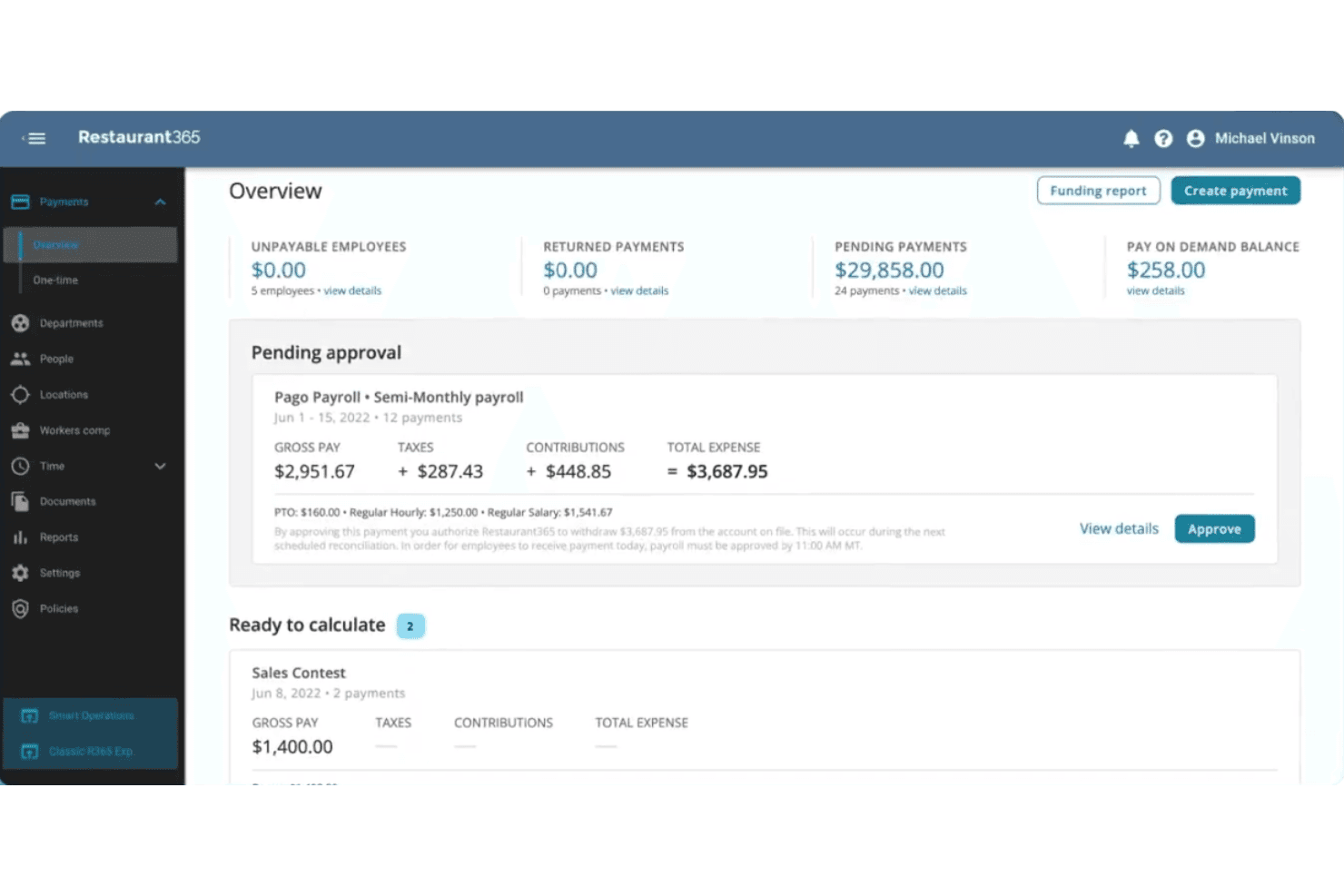
Restaurant365 offers a Payments Overview dashboard that displays pending approvals, payroll summaries, and pay-on-demand balances for restaurant operators. Restaurant365 is a restaurant-specific back-office platform with built-in payroll that connects POS labor data, tip automation, scheduling, time and attendance, HR, and accounting in one system.
Who Is Restaurant365 Best For?
Restaurant365 is a strong fit for multi-location restaurant groups that want payroll, tip management, scheduling, and accounting all running in one connected system.
Why I Picked Restaurant365
I picked Restaurant365 as one of the best because it's the only platform I've seen where tip automation, payroll, and accounting all run inside the same system built exclusively for restaurants. When a tipped employee's punch is edited, tip distributions recalculate automatically and lock once approved, with everything posting directly to the GL. I also love that it handles FICA tip credit tracking and Form 8027 reporting natively, which saves multi-location groups real time at year-end.
Restaurant365 Key Features
- Blended overtime calculation: Computes weighted average overtime rates for employees working multiple jobs in a single workweek, including a dedicated California calculation method.
- Bilingual employee self-service app: Lets employees view schedules, swap shifts, access paystubs, and update W-4s in both English and Spanish on iOS and Android.
- Multi-entity payroll setup: Supports separate payroll companies, funding accounts, and tax profiles per legal entity, with multi-state and multi-EIN configurations.
- Form 8027 reporting: Builds IRS Form 8027 reports by location using POS sales data and GL categories, with support for combining multiple reports into one electronic filing.
Restaurant365 Integrations
Restaurant365 documents 100+ POS integrations, including Toast, Square, NCR Aloha, Oracle MICROS, and PAR Brink, plus labor-only connections to 7shifts, Deputy, UKG/Kronos, and Paycom. It also supports custom integrations through an open API.
Pros and Cons
Pros:
- Payroll journals post directly to accounting
- Handles complex hospitality overtime rules
- Tip distributions recalculate after punch edits
Cons:
- After-hours support can be difficult
- Rehires require payroll onboarding again
Learn more about Restaurant365: Best for multi-role overtime pay in restaurants
- Free demo available
- Pricing upon request
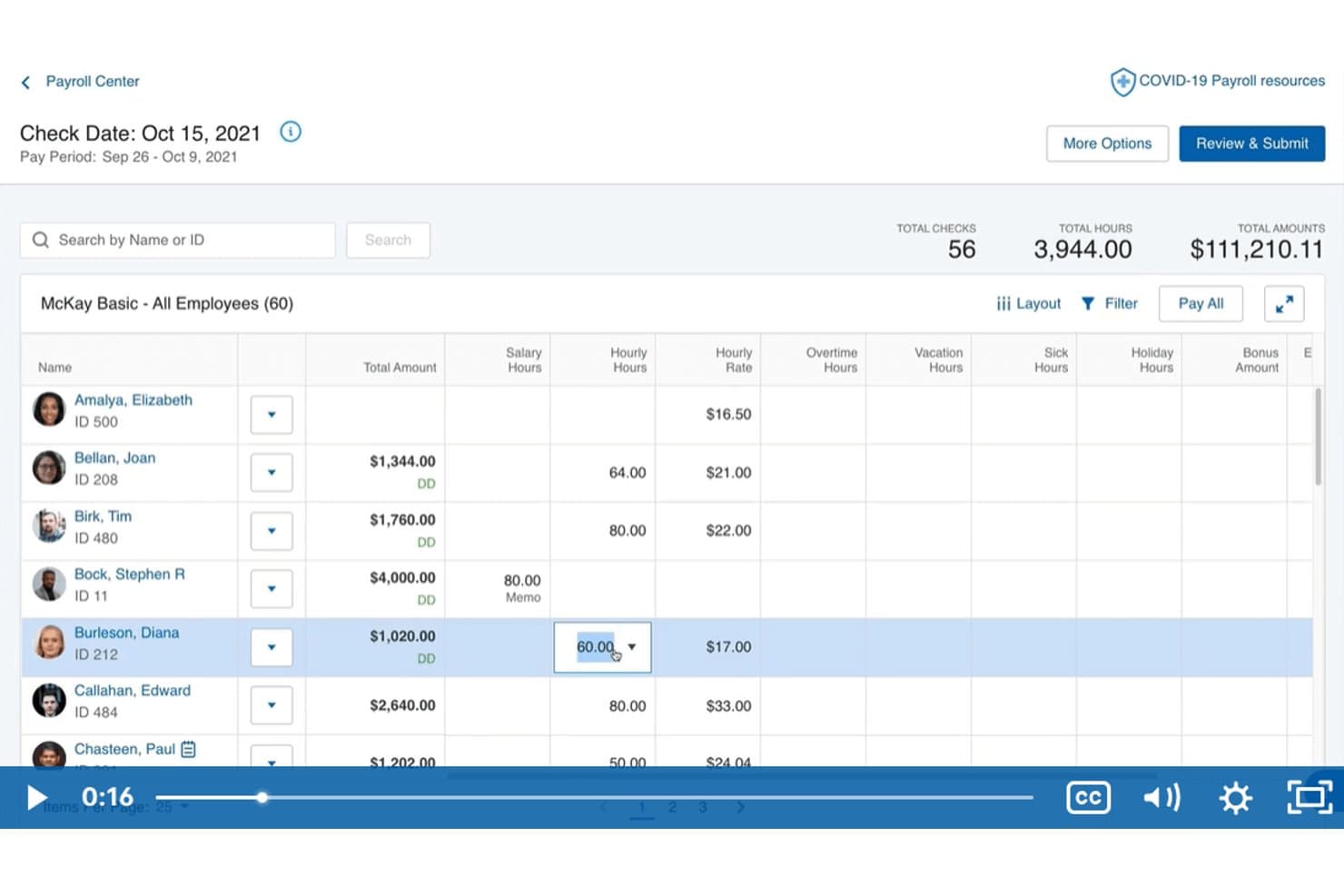
Paychex lets hospitality managers review employee hours and pay in one view. Paychex is a payroll and HR platform that handles multi-location time tracking, weighted overtime, shift differentials, wage compliance, and tax filing for hourly and variable-schedule workforces in hospitality.
Who Is Paychex Best For?
Paychex is a strong fit for multi-unit restaurant operators who need to manage weighted overtime, shift differentials, and variable pay rates across multiple locations.
Why I Picked Paychex
I picked Paychex as one of the best because it handles weighted overtime across multiple roles natively, which is exactly what restaurant operators need when one employee works prep cook hours one week and line cook hours the next. Paychex Flex Time calculates blended overtime rates automatically and tracks shift differentials per labor level. The Hunger Thirst Group runs seven restaurants through Paychex and cut payroll processing from three days to eight hours per pay period.
Paychex Key Features
- Bilingual mobile app: Employees can clock in and out, view pay stubs, request time off, and update direct deposit in English or Spanish.
- FICA tip credit calculator: A built-in calculator helps restaurant operators identify and claim the FICA tip tax credit on qualifying tipped wages.
- California meal-penalty tracking: Paychex Flex Time automatically tracks missed meal and rest breaks to support California labor law compliance.
- Same-day ACH direct deposit: Paychex supports same-day ACH payroll payments so hourly staff get paid faster without waiting for a standard processing window.
Paychex Integrations
Paychex has documented integrations with 7shifts, When I Work, Connecteam, SwyftOps, and Mindbody, plus marketplace integrations for Altametrics/eRestaurant and Delaget. It also offers an open API for custom integrations.
Pros and Cons
Pros:
- Bilingual apps support frontline self-service
- Restaurant case study reports faster processing
- Weighted overtime supports multiple restaurant roles
Cons:
- Reviewers report inconsistent support follow-up
- Tip pooling depends on partner solutions
Learn more about Paychex :
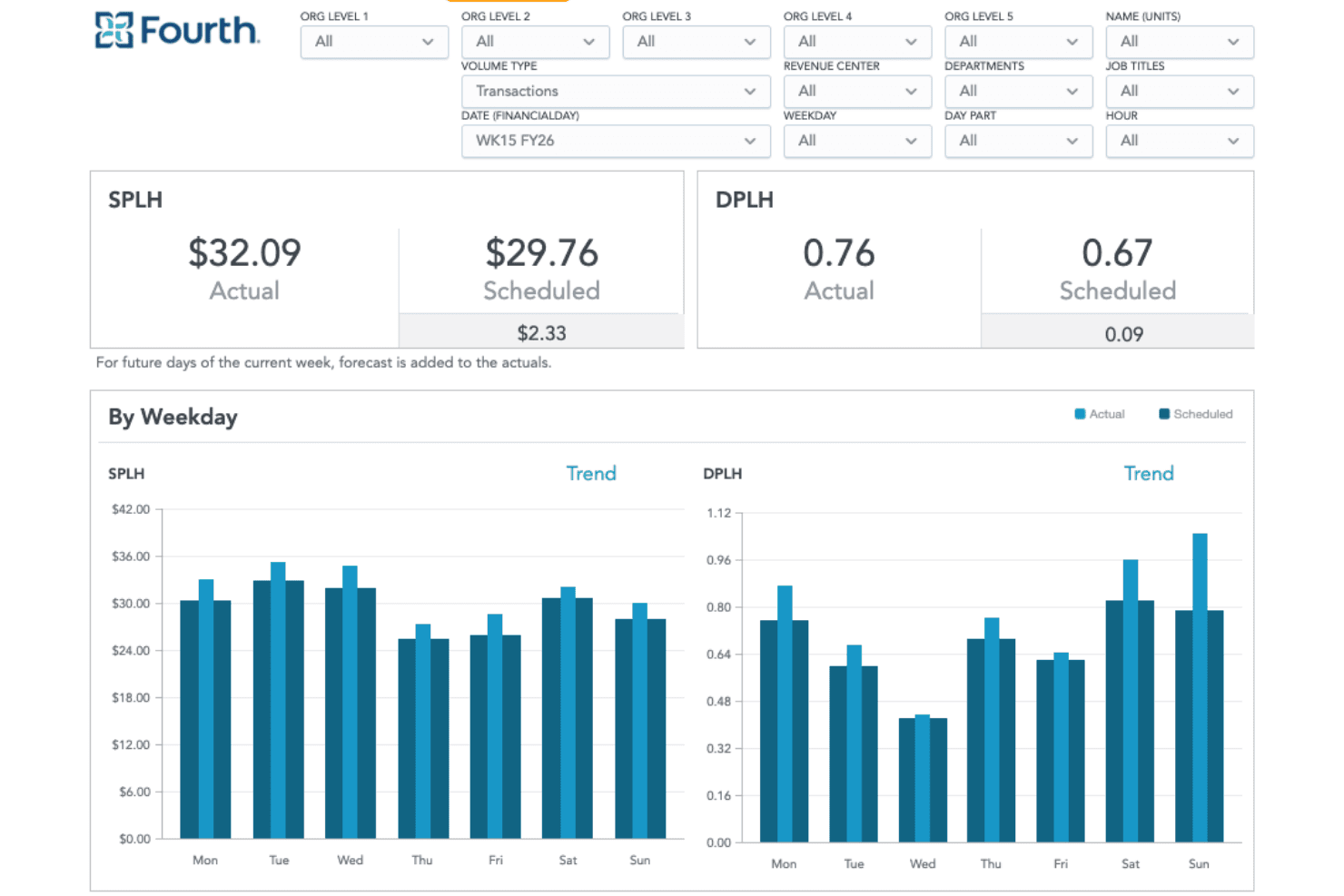
Fourth offers a workforce analytics dashboard showing SPLH and DPLH metrics with actual vs. scheduled comparisons across weekdays. Fourth is a hospitality-focused workforce management and payroll platform that combines payroll processing, tip management, scheduling, time and attendance, earned wage access, and workforce analytics.
Who Is Fourth Best For?
Fourth fits multi-location restaurant operators who need scheduling, tip management, and payroll to work together without stitching separate tools together.
Why I Picked Fourth
Fourth earns its spot on my shortlist because of how deeply its workforce analytics are built for hospitality operations. I particularly like Fourth iQ, which pulls 7+ years of historical data to forecast labor demand by department, letting operators like hotel finance teams track daily and weekly labor KPIs without building reports from scratch. Paired with 50+ KPI dashboards that roll up across locations, it's the kind of labor visibility I'd want if I were managing a multi-unit restaurant group or a property like the Four Seasons Park Lane.
Fourth Key Features
- Tip pooling rules engine: Calculates tip pools and tip-outs daily by role, day part, and location using rules you set, with manager approval before payout.
- Earned wage access: Employees can draw up to 50% of earned wages after each shift at no cost to you as the employer.
- PeopleMatter onboarding: Tracks applicants and processes new hires with connections to Indeed, Snagajob, and other job boards.
- Multi-jurisdiction tax filing: Fourth calculates, files, and pays federal, state, and local payroll taxes across multiple jurisdictions on your behalf.
Fourth Integrations
Fourth offers 15+ documented POS integrations, including Toast, Aloha, Lightspeed U Series, PAR Brink, Simphony, and Revel, plus native HotSchedules and WebClock scheduling and time tracking. An API supports custom integrations.
Pros and Cons
Pros:
- Workforce analytics forecasts labor demand
- Payroll handles multi-jurisdiction tax filing
- Tip pooling supports role-based payout rules
Cons:
- Blended overtime calculations aren't documented
- Hotel-specific payroll details remain limited
Learn more about Fourth:
Konaklama Sektörü için Diğer Bordro Yazılımları
Kısa listeme giremeyen ancak yine de değerlendirmeye değer bazı ek konaklama sektörü bordro yazılımı seçenekleri şunlardır:
- 11Toast PayrollBest for tip calculation and POS integration
- 12Workforce.comBest for shift-based wage rule enforcement
- 13PaycorBest for restaurant-focused labor law compliance
- 14ADP Workforce NowBest for multi-location operator payroll and pay cards
- 15Square PayrollBest for hourly teams on Square's ecosystem
- 16ADP TotalSourceBest for PEO-backed multi-state hospitality payroll
- 17WorkstreamBest for QSR multi-location hourly payroll
- 18Hybrid PayrollBest for multi-property pay rate management
How I Evaluate Payroll Software for Hospitality
I split my evaluation into core requirements—like tip pooling, POS integration, and wage compliance—and the differentiators that separate a hospitality-ready platform from a generic payroll tool.
Core Functionality (Table Stakes for This List)
When I'm selecting tools for my list, I rank each one on a scale from 0 (does not offer the functionality) to 5 (excels in this area) for each core functionality listed below. I then calculate the tool's total score as a percentage, using 65% as a benchmark to help assess its overall fit for the list.
- Tip Management: I look for automated tip pooling, tip-out calculations, and tip credit tracking that flow directly into payroll runs without manual spreadsheet work.
- POS & Scheduling Integrations: The platform should connect natively with hospitality POS and scheduling tools so hours and tip data sync without CSV exports.
- Multi-Rate & Multi-Location Pay: I evaluate whether a server working as a host at a second location can be paid both rates in a single payroll run.
- Hospitality Wage Compliance: Automated tipped minimum wage rules, FLSA tip credit calculations, and overtime tracking across jurisdictions are what I check for here.
- Hourly & Variable Workforce Payroll: High-turnover teams need fast onboarding, variable schedule support, and the ability to process seasonal hires in bulk.
- Tax Filing & Direct Deposit: I look for automated multi-jurisdiction tax filings alongside flexible pay options like same-day or on-demand pay for hourly workers.
Once I have a list of tools that meet the criteria, I consider what sets each platform apart.
Differentiating Factors (What Sets Vendors Apart)
Here's how I compare and contrast different vendors:
Standout Features
Blended overtime calculation is a big differentiator. When a bartender also works host shifts at a different rate, the platform should automatically calculate the correct weighted overtime. I also evaluate same-day and on-demand pay options, which help reduce turnover among hourly staff who value flexible access to earned wages. Multi-location wage rules matter too—I look for a single dashboard that manages varying pay rates and overtime thresholds across properties.
Beyond Features
Pricing structure matters a lot in hospitality because headcount swings seasonally. I look for per-employee pricing that adjusts month to month, plus transparent fees for off-cycle runs and year-end filings. High-turnover support is equally important—bulk onboarding, rehire workflows, and multilingual self-service apps make a real difference when you're staffing up for peak season. I also evaluate compliance depth, especially around tipped wage reporting and ACA tracking for variable-hour employees.
Konaklama Sektörü için Bordro Yazılımı Nasıl Seçilir?
Seçtiğiniz bordro yazılımının bahşiş yönetimini, ücret mevzuatına uygunluğu ve konaklama sektörüne yönelik vardiya planlamasını işletmenizin ihtiyaçlarına uygun şekilde yönettiğinden nasıl emin olabilirsiniz?
| Önceliğiniz... | Şu özelliklere sahip yazılımları önceliklendirin... |
|---|---|
| Önceliğiniz...Entegre bahşiş havuzu ve bahşiş dağıtımı | Şu özelliklere sahip yazılımları önceliklendirin...Otomatik bahşiş yönetimi araçları |
| Önceliğiniz...Birden fazla lokasyon veya tesis | Şu özelliklere sahip yazılımları önceliklendirin...Çoklu lokasyon ücret kuralları ve kontrol panelleri |
| Önceliğiniz...Değişken çalışma programları veya sezonluk işe alım | Şu özelliklere sahip yazılımları önceliklendirin...Hızlı toplu işe alım desteği |
| Önceliğiniz...Kapsamlı POS ve vardiya planlama entegrasyonu | Şu özelliklere sahip yazılımları önceliklendirin...Mevcut POS sisteminizle yerel senkronizasyon |
| Önceliğiniz...Konaklama sektörü iş yasalarına uygunluk | Şu özelliklere sahip yazılımları önceliklendirin...Yerleşik ücret uygunluğu raporlaması |
Kısa Listenizi Nasıl Değerlendirmelisiniz?
- Örnek bir bahşiş dağıtım raporu isteyin: Yakın tarihli bir ödeme dönemi için havuzda toplanan bahşişlerin ve kredilerin nasıl hesaplandığını gösteren dışa aktarılmış bir dosya talep edin.
- Canlı bir bordro denemesi yapın: Gerçek veya anonimleştirilmiş verileri kullanarak birden fazla rolü, ücret oranını ve tesisi kapsayan en az bir bordro işlemi gerçekleştirin.
- Konaklama sektörü mevzuatına uygunluk belgelerini isteyin: Ücret ve bahşiş alan çalışanlara ilişkin mevzuata uygunluğun nasıl korunduğunu ve güncellendiğini ayrıntılı olarak açıklayan güncel bir belge veya yardım merkezi makalesi talep edin.
- POS entegrasyonunu test edin: Gerçek POS veya vardiya planlama sisteminizi bir sanal test ortamında yazılıma bağlayın ve iki iş günü içinde doğru senkronizasyonun gerçekleştiğini kontrol edin.
- Hepsi bir arada desteği ile niş uzmanlıkları karşılaştırın: Hepsi bir arada bir İK/bordro çözüm paketine mi, yoksa konaklama sektörü konusunda daha derin uzmanlığa sahip özel bir çözüme mi ihtiyacınız olduğuna karar verin.
Konaklama Sektörü için Bordro Yazılımı Nedir?
Konaklama sektörü için bordro yazılımı, oteller, restoranlar ve konaklama işletmeleri için bordro, bahşiş yönetimi ve mevzuata uyumu otomatikleştiren özel bir platformdur. Saatlik, bahşişli ve mevsimlik personelin ücretlerini yönetir, karmaşık ücret oranlarını ele alır, POS ve vardiya planlama sistemleriyle entegre olur ve konaklama sektörüne özgü iş gücü düzenlemelerine uymanıza yardımcı olur; böylece birden fazla konumda farklı vardiyalarda ve görevlerde çalışan ekiplerinize doğru ödeme yapabilirsiniz.
Konaklama Sektörü için Bordro Yazılımının Özellikleri
Konaklama sektörü için bordro yazılımı seçerken aşağıdaki temel özelliklere dikkat edin:
- Bahşiş yönetimi: Bahşiş kredileri, bahşiş dağıtımının otomatikleştirilmesi ve IRS Form 8027 uyumluluğu da dahil olmak üzere ortak havuzdaki veya bireysel bahşişleri hesaplar, dağıtır ve raporlar.
- Birden fazla konum için bordro: Birkaç mülkte veya birimde çalışan personelin bordrosunu işler ve konuma özel ücret oranlarını ve uyumluluk kurallarını destekler.
- Değişken ücret oranları: Aynı çalışan için birden fazla iş rolünü yönetir; her bordro döneminde doğru oranları ve birleştirilmiş fazla mesai hesaplamalarını otomatik olarak uygular.
- POS ve vardiya planlama entegrasyonları: Bordro doğruluğu için çalışma saatlerini, satışları ve vardiya ayrıntılarını otomatik olarak senkronize etmek üzere konaklama sektöründeki POS ve vardiya planlama sistemlerine bağlanır.
- Mevsimlik ve toplu işe alım: Gelişmiş belge toplama ve çalışanların kendi kurulumlarını yapabilmesiyle mevsimlik, geçici veya yüksek sayıda yeni çalışanın kolayca eklenmesini sağlar.
- Konaklama sektörü ücret uyumluluğu: Konaklama sektörüne özgü bahşişli çalışanlar için asgari ücret, FLSA bahşiş kredileri, fazla mesai ve yerel iş gücü düzenlemeleriyle uyumluluğu korur.
- Otomatik vergi beyannamesi işlemleri: Otomatik beyanlar, W-2 formları ve yıl sonu raporlaması da dahil olmak üzere federal, eyalet ve yerel bordro vergilerini yönetir.
- Doğrudan para yatırma ve ödeme seçenekleri: Konaklama çalışanları arasında yaygın olan daha hızlı ödeme döngüsü ihtiyaçlarını karşılamak için aynı gün, ertesi gün veya kazanılmış ücret erişimi sunar.
- Çalışan self servis portalı: Çalışanların İK desteği olmadan maaş bordrolarını görüntülemesine, kişisel bilgilerini yönetmesine ve bahşiş dağılımlarını incelemesine olanak tanır.
- Role dayalı erişim denetimleri: Hassas verileri korumak ve karmaşık kuruluş yapılarını desteklemek için bordro görünürlüğünü konuma, departmana veya iş rolüne göre sınırlar ya da verir.
Konaklama Sektörü için Bordro Yazılımının Faydaları
Konaklama sektörü için bordro yazılımını uygulamak, ekibiniz ve işletmeniz açısından çeşitli faydalar sağlar. Yararlanabileceğiniz bazı avantajlar şunlardır:
- Doğru bahşiş yönetimi: Otomatik hesaplamalar, dağıtımlar ve raporlamalar hataları en aza indirir ve bahşiş havuzu ile bahşiş kredisi kurallarına tam uyumu destekler.
- Sadeleştirilmiş ücret uyumluluğu: Yerleşik araçlar, birden fazla konumdaki karmaşık iş yasalarını, bahşişli çalışanlar için asgari ücretleri ve birleştirilmiş fazla mesai gerekliliklerini takip etmenize yardımcı olur.
- Daha hızlı bordro döngüleri: POS ve vardiya planlama sistemlerinizle gerçek zamanlı entegrasyonlar, değişken çalışma saatleri ve yüksek çalışan devir oranı olsa bile bordronun doğru ve hızlı bir şekilde hazırlanabilmesini sağlar.
- Yüksek hacimli işe alımın kolaylaştırılması: Self servis portalları ve toplu işe alım iş akışları, İK ekibinizi yavaşlatmadan mevsimlik veya geçici personeli işe almanıza olanak tanır.
- Merkezi raporlama: Birden fazla konumu kapsayan panolar ve otomatik uyumluluk raporları, mülkleriniz genelindeki iş gücü maliyetlerini, fazla mesaiyi ve vergi yükümlülüklerini tek bir görünümde sunar.
- Esnek ödeme seçenekleri: Aynı gün ödeme veya kazanılmış ücret erişimi gibi özellikler, çalışanlara ne zaman ödeme alacakları konusunda daha fazla kontrol sunarak çalışanların elde tutulmasını ve motivasyonunu artırır.
- Azaltılmış manuel iş yükü: Otomatik veri senkronizasyonu, vergi beyannamesi işlemleri ve çalışan self servisi, İK ve yöneticilerin evrak işleri yerine hizmete odaklanması için zaman kazandırır.
Konaklama Sektörü için Bordro Yazılımının Maliyetleri ve Fiyatlandırması
Konaklama sektörü için bordro yazılımı seçmek, mevcut çeşitli fiyatlandırma modellerini ve planları anlamayı gerektirir. Maliyetler özelliklere, ekip büyüklüğüne, eklentilere ve daha fazlasına göre değişir. Aşağıdaki tablo, konaklama sektörü için bordro yazılımı çözümlerinde yaygın planları, ortalama fiyatlarını ve genellikle sunulan özellikleri özetlemektedir:
Konaklama Sektörü için Bordro Yazılımı Plan Karşılaştırma Tablosu
| Plan Türü | Ortalama Fiyat | Yaygın Özellikler |
|---|---|---|
| Plan TürüÜcretsiz Plan | Ortalama Fiyat$0 | Yaygın ÖzelliklerTemel bordro işlemleri, sınırlı çalışan sayısı ve basit bahşiş raporlama. |
| Plan TürüKişisel Plan | Ortalama Fiyat$5–$15/kullanıcı/ay | Yaygın ÖzelliklerKüçük ekipler için bordro, temel uyumluluk araçları ve manuel bahşiş girişi. |
| Plan Türüİşletme Planı | Ortalama Fiyat$15–$30/kullanıcı/ay | Yaygın ÖzelliklerBirden fazla konum için bordro, otomatik bahşiş havuzu, POS entegrasyonları ve temel vergi beyannameleri. |
| Plan TürüKurumsal Plan | Ortalama Fiyat$30–$50+/kullanıcı/ay | Yaygın ÖzelliklerGelişmiş uyumluluk raporlaması, özel işe alım süreci, özel destek ve teknoloji altyapısındaki sistemler arasında kapsamlı entegrasyonlar. |
Konaklama ve Yiyecek-İçecek Sektörü için Bordro Yazılımı SSS
Konaklama ve yiyecek-içecek sektörü için bordro yazılımı hakkında sık sorulan bazı soruların yanıtları:
Konaklama ve yiyecek-içecek sektörü için bordro yazılımı bahşiş havuzunu ve bahşiş kredilerini yönetebilir mi?
Evet, çoğu çözüm bahşiş havuzunu, bahşiş dağıtımı hesaplamalarını ve bahşiş takibini otomatikleştirir; ayrıca IRS ve iş kanunlarına uyumluluk için bahşiş kredisi eşiklerini izler. Bu, her çalışanın doğru miktarı almasını ve denetimler için doğru bordro ve vergi kayıtlarının bulunmasını sağlar.
Bu platformlar birden fazla konumu ve tesisi nasıl destekler?
Otel bordro yazılımı genellikle konuma göre birden fazla ücret oranı, fazla mesai kuralı ve iş gücü maliyeti raporlaması belirlemenize olanak tanır. Bu sayede, mülk yönetim sisteminizle birlikte farklı yargı bölgelerinde faaliyet gösterirken bile vergi mevzuatına uyumluluğu ve bordroyu tek bir panodan yönetebilirsiniz.
POS veya vardiya planlama verilerini bordroyla manuel olarak senkronize etmem gerekir mi?
Hayır, önde gelen konaklama ve yiyecek-içecek sektörü bordro yazılımları popüler POS sistemlerine ve çalışan vardiya planlama platformlarına doğrudan bağlanır; çalışma saatlerinin, satışların ve bahşiş verilerinin manuel giriş veya yükleme olmadan otomatik olarak senkronize edilmesini sağlar. Bu, sıkı veri güvenliğini korurken zaman hırsızlığını azaltır.
Personelimiz birden fazla işte veya rolde çalışıyorsa ne olur?
Bu platformlar genellikle karma fazla mesaiyi ve değişken ücret oranlarını destekler; bir çalışanın ödeme dönemi boyunca üstlendiği her rol için doğru ücreti uygular ve fazla mesai ödemesini doğru şekilde hesaplar.
En iyi restoran bordro yazılımı nasıl seçilir?
Karma rolleri yönetmek için yerleşik bahşiş havuzu otomasyonu ve çift oranlı ücret hesaplamaları sunan çözümleri arayın. Manuel veri girişi hatalarını önlemek için POS sisteminiz ve zaman takibi araçlarınızla doğrudan senkronize olan bir platform seçmelisiniz. Yazılımın vergi beyannamelerini otomatik olarak hazırladığından, FICA bahşiş kredilerini hesapladığından ve değişen yerel iş kanunlarını takip ettiğinden emin olun. Son olarak, ekip üyelerinizin maaş bordrolarını kontrol edebilmesi ve kazançlarını görüntüleyebilmesi için mobil uygulaması olan bir sistem seçin.