

Bulut bordro yazılımı, bordroyu bulutta yönetmenize, otomatikleştirmenize ve takip etmenize olanak tanır; böylece bordroyu doğru şekilde yürütebilir ve ekibinizin çalıştığı her konumda mevzuata uyumlu kalabilirsiniz. En iyi bulut bordro yazılımını arıyorsanız, manuel işlemlerin yarattığı zorluklar olmadan karmaşık ödeme döngülerini, vergi kurallarını ve çalışan türlerini yönetebilen araçlara ihtiyacınız vardır.
Bu rehberde, 2026 yılı için en önemli ihtiyaçları karşılayan gerçek dünya seçeneklerini bulacaksınız: birleştirilmiş İK ve bordro verileri, küresel mevzuat uyumluluğu, doğruluk için otomasyon ve her büyüklükte veya yapıdaki ekipler için esnek destek. İşletmeniz için doğru seçeneği karşılaştırmak ve belirlemek üzere bu listeyi kullanın.
Why Trust Our Software Recommendations
6,700+
Reviews
20
Industry experts
16+
Evaluation factors
14
Years
Our team has been testing and reviewing software since 2012. As HR experts ourselves, we know how difficult—and important—it is to choose the right software.
For this guide, we evaluated tools using hands-on testing and independent research, scoring tools using our selection criteria. We also draw on insights from industry thought leaders and practicing HR experts.
Our reviews reflect our human editorial judgment, not a sales pitch.
Expert reviewers:
- Phil GrayCOO
 Kim BehnkeHR Tech Editor & Analyst
 Josh BarkerPeople Ops Manager

Bulut Bordro Yazılımı Karşılaştırma Tablosu
Aşağıdaki tabloda en iyi bulut bordro yazılımı seçimlerimin fiyatlarını ve temel özelliklerini karşılaştırın.
Score legend (out of 5)
- Excellent4.5–5
- Good4–4.4
- Average3–3.9
- Below average2–2.9
- Poor1–1.9
Sorted by: Default
| Tool | Starting Price | Website | |||||||||||
|---|---|---|---|---|---|---|---|---|---|---|---|---|---|
Best for global payroll across all worker types | Not rated | 5 | 5 | 5 | 5 | 5 | 5 | Not rated | Not rated | Not rated | Not rated | $29/user/month Free demo available | Website |
Best for payroll-linked app and device access | Not rated | 3 | Not rated | 4 | Not rated | Not rated | Not rated | 3 | 3 | 4 | 3 | $35/user/month + $89/month platform fee Free demo available | Website |
Best for embedded benefits tied to payroll runs | Not rated | 5 | 5 | 5 | 5 | 4 | 4 | Not rated | Not rated | Not rated | Not rated | $49/month Free trial + free demo available | Book Demo |
Best for built-in time tracking | Not rated | 4 | Not rated | 4 | Not rated | Not rated | Not rated | 4 | 3 | 2 | 3 | $50/user/month 30-day free trial + free demo available | Website |
Best for enterprise global payroll at scale | Not rated | 5 | 4 | 5 | 5 | 5 | 5 | Not rated | Not rated | Not rated | Not rated | Pricing upon request Free demo available | Website |
Best for real-time payroll across global teams | Not rated | 5 | 5 | 5 | 5 | 5 | 5 | Not rated | Not rated | Not rated | Not rated | Pricing upon request Free demo available | Website |
Best for HCM-native payroll with global reach | Not rated | 5 | 5 | 5 | 5 | 5 | 5 | Not rated | Not rated | Not rated | Not rated | Pricing upon request Not available | Website |
Best for Workday-native global payroll ops | Not rated | 5 | 5 | 5 | 4 | 5 | 5 | Not rated | Not rated | Not rated | Not rated | $20/user/month Free demo available | Website |
Best for payroll across 60-country compliance | Not rated | 5 | 5 | 5 | 5 | 5 | 5 | Not rated | Not rated | Not rated | Not rated | Pricing upon request 30-day free trial | Website |
Best for unified HR-to-payroll with global reach | Not rated | 5 | 5 | 5 | 5 | 5 | 5 | Not rated | Not rated | Not rated | Not rated | $8/user/month Free trial + free demo available | Book Demo |


En İyi Bulut Bordro Yazılımı İncelemeleri
Aşağıda kısa listeme giren en iyi bulut bordro yazılımlarına ilişkin ayrıntılı özetlerimi bulabilirsiniz. İncelemelerim, her platformun özelliklerine, mevzuat uyumluluğu yeteneklerine ve en uygun kullanım alanlarına ayrıntılı bir bakış sunarak sizin için en iyi seçeneği bulmanıza yardımcı olur.
 Best for global payroll across all worker types
- Free demo available
- From $29/user/month
Visit WebsiteCustomer Rating:4.9/5
Deel centralizes payslips, payments, and tasks in one dashboard. Deel Payroll is a cloud-native payroll platform that handles global payroll, US payroll, contractor payments, and employer of record services across 150+ countries and all 50 US states from a single system.
Who Is Deel Payroll Best For?
Deel Payroll is a strong fit for HR and payroll teams managing a mix of employees, contractors, and EOR workers across multiple countries from a single platform.
Why I Picked Deel Payroll
Deel Payroll earns its spot on my shortlist because no other platform I've seen handles employees, contractors, EOR workers, and PEO arrangements across 150+ countries from a single pay run. I particularly like the Payroll Detective feature, which uses AI to flag anomalies and unusual entries before a run closes, catching errors that manual review would likely miss. On top of that, Anytime Pay lets EOR employees draw up to 50% of earned wages before payday, with no fees or manager approvals required.
Deel Payroll Key Features
- Payroll Connect: View and manage Deel payroll alongside legacy third-party payrolls in a single consolidated dashboard during phased transitions.
- Worker misclassification tool: An AI-powered assessment that flags contractor vs. employee classification risk with reported 90% accuracy.
- Unlimited off-cycle payroll runs: Run additional pay cycles outside your standard schedule at no extra charge, with automatic recalculation triggered by last-minute adjustments.
- Compliance Hub: A real-time monitoring center that tracks changing labor and tax laws across jurisdictions and sends proactive alerts to administrators.
Deel Payroll Integrations
Deel Payroll offers 68+ native integrations, including Workday, SAP SuccessFactors, Oracle HCM, BambooHR, NetSuite, QuickBooks, Xero, Employee Navigator, Okta, and Expensify. It also provides an open API and Workflow Builder for custom connections and automations.
Pros and Cons
Pros:
- Unlimited off-cycle payroll runs included
- AI flags payroll errors before processing
- Manages global payroll for all worker types
Cons:
- Reported payroll issues in certain countries
- US payroll pricing lacks transparency
Learn more about Deel Payroll: 2Best for payroll-linked app and device access
Warp
- Free demo available
- From $35/user/month + $89/month platform fee
Visit WebsiteCustomer Rating:4.4/5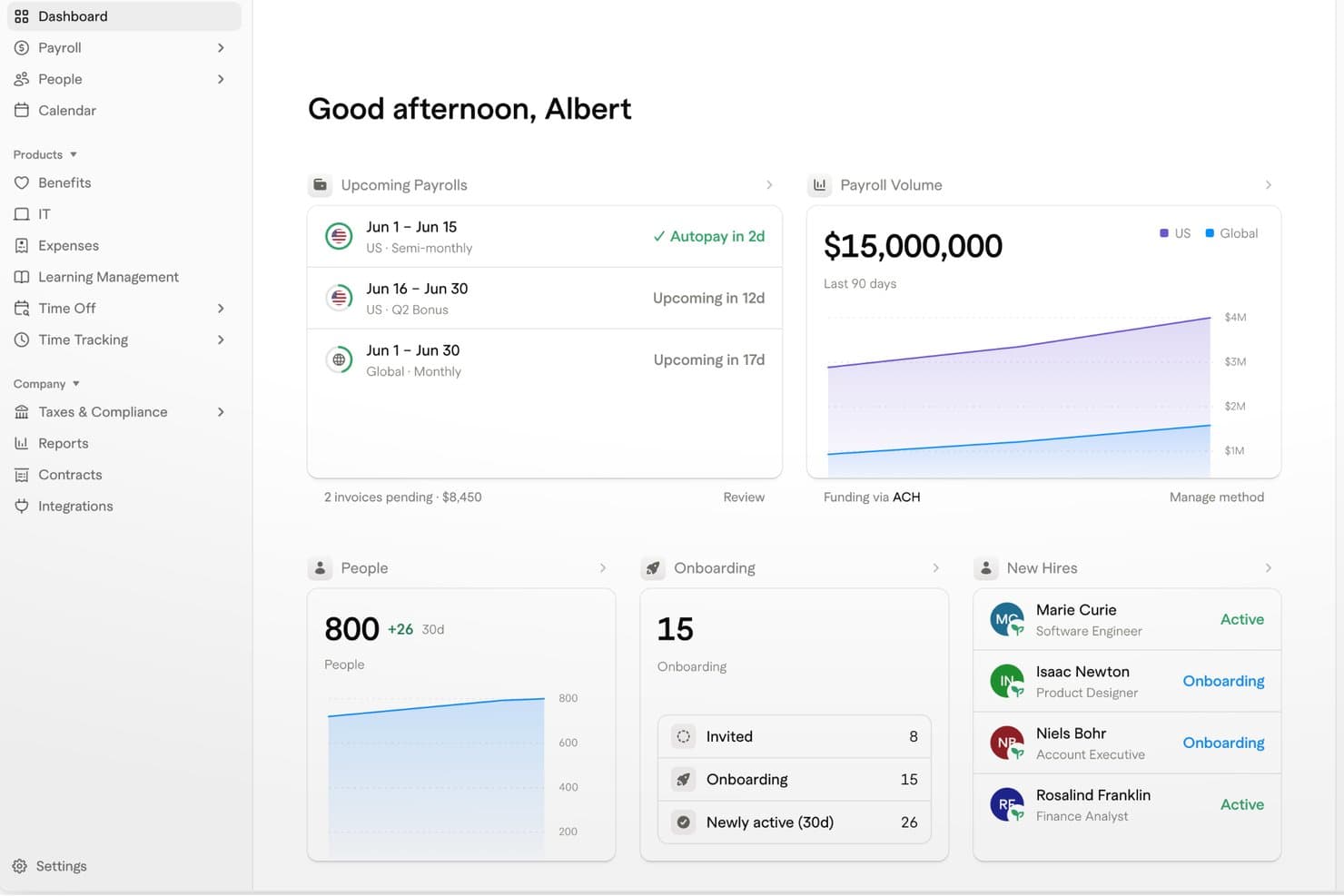
Warp provides a unified HR dashboard for payroll, people, and onboarding. Warp is a cloud payroll platform that combines automated payroll processing, tax compliance, benefits administration, HRIS, and IT provisioning—including app and device access management—in a single system.
Who Is Warp Best For?
Warp is a strong fit for small to mid-sized businesses that want payroll, HR, benefits, and IT provisioning managed from a single platform.
Why I Picked Warp
I've included Warp in my top picks because it's the only cloud payroll platform I've seen that ties payroll directly to IT provisioning, so when you hire or offboard someone, their app access and devices move in sync with their payroll status. Warp's Fabric layer provisions or revokes Google Workspace accounts, Okta SSO, and connected apps automatically at the moment of hire or termination. Its AI agent also checks for payroll anomalies before each run and handles tax notices end-to-end, resolving 80% automatically.
Warp Key Features
- Multi-schedule AutoPay: Supports multiple pay schedules, off-cycle runs, and automated recurring payroll with no manual initiation required.
- Global contractor payments: Pays contractors in local currencies across 150+ countries, with 95% of payments arriving the same day funds leave your Warp balance.
- Benefits administration: Manages medical, dental, vision, 401(k), HSA, FSA, and commuter benefits through Warp's in-house licensed brokerage with 30+ carriers.
- SOC 2 Type II security: Encrypts data at rest with AES-256 and in transit with TLS 1.2+, with role-based access control and MFA available across all plans.
Warp Integrations
Warp offers native integrations with QuickBooks, Xero, NetSuite, Rillet, Ashby, Lever, Checkr, Human Interest, Okta, and Google Workspace. It also provides REST, webhook, TypeScript, Python, and Go APIs for custom integrations, plus 6,500+ app connections through Okta.
Pros and Cons
Pros:
- AI flags anomalies and handles tax notices
- Payroll-triggered app and device access
- Payroll automation earns positive user feedback
Cons:
- Reporting exports and formats remain unclear
- Some reviewers report bugs
Learn more about Warp: Best for embedded benefits tied to payroll runs
- Free trial + free demo available
- From $49/month
Visit WebsiteCustomer Rating:4.6/5
Gusto lets users manage employee hours, earnings, and payroll in one place. Gusto is a cloud payroll platform that combines automated payroll runs, full-service tax filing, employee self-service, and natively embedded benefits administration for small and mid-size businesses.
Who Is Gusto Best For?
Gusto is a strong fit for small and mid-size businesses that want health insurance, 401(k), and workers' comp enrollment managed in the same place as payroll.
Why I Picked Gusto
I picked Gusto as one of the best cloud payroll options because it natively embeds health insurance, 401(k), FSA/HSA, and workers' comp enrollment directly into the payroll run itself. When an employee changes their benefits election, the deduction updates automatically, with no manual syncing between separate systems. I also rate Gusto's AutoPilot highly: once configured, it executes recurring pay runs without any manual trigger, which is hard to replicate at this price point.
Gusto Key Features
- Full-service tax filing: Gusto automatically calculates, withholds, and files federal, state, and local payroll taxes in all 50 states, including year-end W-2 and 1099 forms.
- On-demand pay via Clair: Employees can access their earned wages between pay periods with no interest or fees through Gusto's Clair integration.
- Multi-state payroll support: The Plus and Premium plans handle payroll tax calculations and filings across all 50 U.S. states simultaneously, including local tax jurisdictions.
- Custom report builder: A drag-and-drop report builder lets you create tailored payroll summaries, workforce cost breakdowns, and tax liability reports exportable as CSV or PDF.
Gusto Integrations
Gusto offers 20+ software integrations, including QuickBooks Online, Xero, FreshBooks, Hubstaff, Homebase, Clover, and Expensify. It also provides an open API and Gusto Embedded Payroll for custom payroll integrations.
Pros and Cons
Pros:
- Employees get on-demand pay via Clair
- Embedded benefits deductions update with payroll changes
- AutoPilot fully automates recurring payroll runs
Cons:
- Customer support sometimes slow or inconsistent
- Multi-state payroll requires a higher tier
 Best for built-in time tracking
- 30-day free trial + free demo available
- From $50/user/month
Visit WebsiteCustomer Rating:4.5/5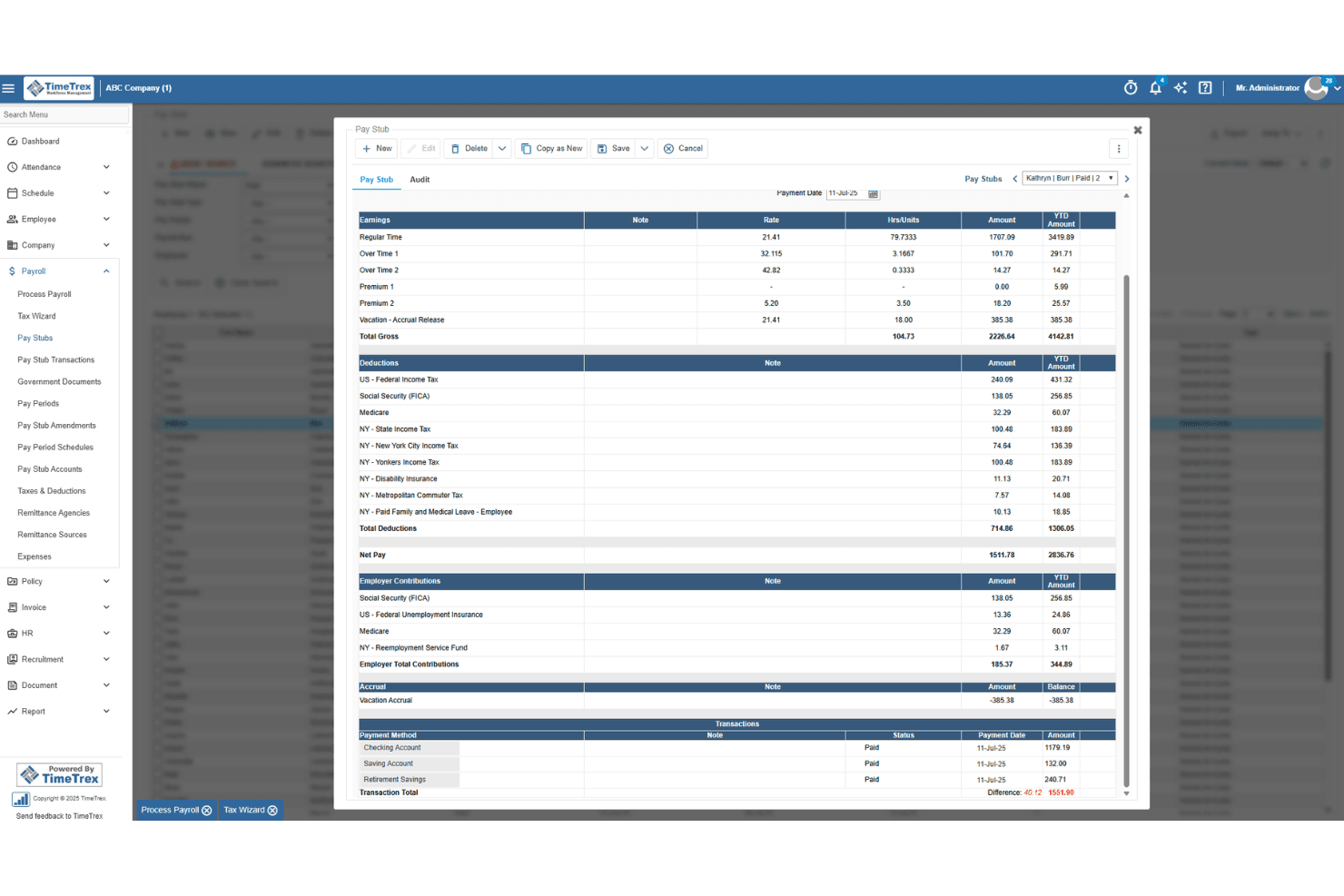
TimeTrex generates detailed pay stubs with earnings, deductions, and taxes. TimeTrex is a workforce management and cloud payroll platform that combines time tracking, scheduling, attendance, HR, and payroll processing in a single system.
Who Is TimeTrex Best For?
TimeTrex is a strong fit for small businesses managing hourly or shift-based teams who need time tracking and payroll to work as one system.
Why I Picked TimeTrex
TimeTrex earns its spot on my shortlist because the payroll run calculates directly from schedule and punch data, so there's no manual entry step between what your team worked and what they get paid. I particularly like how overtime, bonuses, and multi-state wages are all handled in the same engine that drives your shift schedules. Features like geofencing, biometric clock-ins, and job costing across multiple cost centers make it especially practical for businesses running crews across different sites or shifts.
TimeTrex Key Features
- Direct deposit notifications: Employees receive an email or SMS alert when funds are deposited, with a direct link to their pay stub.
- Audit trail with snapshots: Every payroll edit, view, or deletion is logged with before-and-after data snapshots for recordkeeping and compliance review.
- Job costing across cost centers: TimeTrex tracks labor costs across up to four cost-center levels, useful for businesses running multiple sites or crews.
- 1099-NEC contractor tracking: Contractors are tracked alongside W-2 employees in the same system, with 1099-NEC support built into the payroll engine.
TimeTrex Integrations
TimeTrex documents integrations with ADP, Intuit QuickBooks, Sage, Paychex, Surepay, Ceridian, CompuPay, Tyler Technologies, Vensure, Accero, Chris21, the IRS, and about 45 state revenue departments. A RESTful API supports custom integrations.
Pros and Cons
Pros:
- Reviewers frequently praise responsive customer support
- Real-time timesheets help verify employee hours
- Payroll calculates directly from shift punches
Cons:
- Reviewers report a dated, hard-to-navigate interface
- Employers handle payroll tax filing themselves
Learn more about TimeTrex: Best for enterprise global payroll at scale
- Free demo available
- Pricing upon request

Oracle Fusion Cloud Payroll manages Mexico profit sharing (PTU) calculations. Oracle Fusion Cloud Payroll is a cloud-native payroll engine built into the Oracle Fusion HCM suite, offering gross-to-net processing, multi-jurisdiction tax compliance, employee self-service, and native payroll support across 60+ countries.
Who Is Oracle Fusion Cloud Payroll Best For?
Oracle Fusion Cloud Payroll is built for large enterprises running Oracle Fusion HCM that need to manage payroll across multiple countries and legal entities from a single platform.
Why I Picked Oracle Fusion Cloud Payroll
Oracle Fusion Cloud Payroll earns its spot on my shortlist because it's one of the only platforms that can run payroll natively across 60+ countries from a single, unified engine—no middleware, no reconciliation across disconnected systems. I particularly like the AI Payroll Run Analyst, which monitors active payroll runs, flags anomalies like duplicate payments or calculation errors, and surfaces fixes before a pay run is finalized. The platform also processes payroll for 16M+ employees monthly, so if your organization spans dozens of legal entities and countries, it's built for exactly that scale.
Oracle Fusion Cloud Payroll Key Features
- Retroactive pay processing: Handles retroactive pay calculations with effective-dated transactions, including controls for retroactive overpayment and recovery on earnings elements.
- Global Payroll Interface (GPI): A bi-directional integration framework that connects Oracle Fusion HCM data with third-party payroll processors for countries beyond the 60+ with native support.
- Payroll costing and GL integration: Posts payroll journals and cost distributions directly to Oracle Fusion Cloud ERP finance modules, including accounts payable, general ledger, and project costing.
- Court Order Processing Agent: An AI agent that automates the intake and processing of income withholding orders, reducing manual handling for payroll and HR teams.
Oracle Fusion Cloud Payroll Integrations
Oracle Fusion Cloud Payroll offers native integrations with Oracle Fusion Cloud HR, Time and Labor, Absence, Benefits, ERP, General Ledger, and Project Costing. It also connects with ADP, Dayforce, Neeyamo, and Ramco through Global Payroll Interface, plus DailyPay and Tapcheck through Oracle Cloud Marketplace, with REST APIs for custom integrations.
Pros and Cons
Pros:
- Deep HCM and ERP data unification
- Payroll natively supports 60+ countries
- Advanced AI for payroll anomaly detection
Cons:
- Implementation is lengthy and complex
- Not designed for small businesses
Learn more about Oracle Fusion Cloud Payroll: Best for real-time payroll across global teams
- Free demo available
- Pricing upon request
Visit WebsiteCustomer Rating:4.3/5
Dayforce surfaces payroll errors and variances on a central dashboard. Dayforce is a cloud-native HCM and payroll platform that handles payroll processing, tax compliance, workforce management, benefits administration, and global multi-jurisdiction payroll across 200+ countries on a single unified data model.
Who Is Dayforce Best For?
Dayforce is a strong fit for mid-market and enterprise HR and payroll teams managing complex, multi-jurisdiction workforces across multiple countries.
Why I Picked Dayforce
I picked Dayforce as one of the best because its continuous calculation engine genuinely sets it apart for global payroll teams. Instead of batch-processing at period-end, it runs payroll simulations in real time throughout the pay period, so your team catches errors before they become pay run problems. Layer in Dayforce Co-Pilot's AI anomaly detection, which flags irregularities like duplicate entries or unusual hour spikes mid-cycle, and you get a level of real-time oversight that's rare across 200+ countries on a single contract.
Dayforce Key Features
- Dayforce Wallet: Employees can access earned wages before payday via a fee-free Mastercard-enabled pay card or direct transfer to a personal bank account.
- Integration Studio: A built-in, low-code integration tool with event-driven APIs and pre-built connectors for systems like Workday, SAP, Oracle, and Microsoft Dynamics 365.
- Pay Run Management: Tracks multi-state tax thresholds, generates compliance risk assessments, and produces audit-ready payroll reports across jurisdictions.
- Managed Payroll Services: Dayforce's team can run payroll operations on your behalf, handling end-to-end pay run execution for organizations that need operational support.
Dayforce Integrations
Dayforce offers native integrations with Workday, SAP SuccessFactors, Oracle HCM, ADP, UKG, Microsoft Dynamics 365, and Microsoft Azure Active Directory. Integration Studio and an open API support custom connections.
Pros and Cons
Pros:
- AI anomaly detection for payroll errors
- Global compliance support for 200+ countries
- Real-time payroll calculations across pay periods
Cons:
- Implementation process is lengthy and complex
- Customer support often slow to resolve issues
Learn more about Dayforce: Best for HCM-native payroll with global reach
- Not available
- Pricing upon request
Visit WebsiteCustomer Rating:4.3/5
UKG Pro centralizes payroll processing across multiple pay groups and countries. UKG Pro is a cloud-native HCM platform that combines payroll processing, tax filing, benefits administration, time tracking, and global payroll management across 160+ countries in a single system.
Who Is UKG Pro Best For?
UKG Pro is built for mid-market and enterprise organizations that need payroll, HR, benefits, time tracking, and global workforce management running on a single platform.
Why I Picked UKG Pro
I picked UKG Pro as one of the best because it's the rare payroll platform that lives fully inside a native HCM suite, meaning payroll deductions, benefits enrollment, and time data all flow together without a single manual sync. I especially like Bryte AI, which monitors every pay run in real time and flags anomalies before payroll is finalized. UKG One View extends that same payroll engine across 160+ countries without requiring you to replace local payroll providers.
UKG Pro Key Features
- Smart Tax Search: Automatically recommends the correct tax setup for employees based on their work and home jurisdictions, reducing multi-state filing errors.
- Garnishment deduction wizard: Guides payroll teams through wage garnishment processing within the same pay run workflow.
- Predict My Pay: A self-service paycheck modeling tool that lets employees estimate their take-home pay after taxes and deductions before payday.
- UKG Wallet earned wage access: Lets employees withdraw accrued wages before their scheduled payday via a dedicated mobile app, including a Visa payroll card option.
UKG Pro Integrations
UKG Pro offers Marketplace integrations through a 400+ partner network, including ADP, Workday, SAP, Oracle, Okta, ServiceNow, DocuSign, and Microsoft Teams. It also provides a REST API and general ledger export for custom payroll and accounting connections.
Pros and Cons
Pros:
- Global payroll coverage across 160+ countries
- Earned wage access through UKG Wallet
- Real-time AI payroll anomaly detection
Cons:
- Complex reporting tools need technical expertise
- Crowded interface requires frequent user guidance
Learn more about UKG Pro: Best for Workday-native global payroll ops
- Free demo available
- From $20/user/month
Visit WebsiteCustomer Rating:4.3/5
CloudPay's dashboard helps users track payroll tasks by status and due date. CloudPay is a managed global cloud payroll platform built around multi-country payroll processing, automated compliance, HCM integrations, and employee pay access across 130+ countries and 110+ currencies.
Who Is CloudPay Best For?
CloudPay is a strong fit for midmarket and enterprise teams running Workday as their HCM and needing a payroll layer that spans multiple countries without stitching together regional vendors.
Why I Picked CloudPay
I picked CloudPay as one of the best because it's the most mature Workday-native global payroll option I've come across. Its PECI-certified integration with Workday has been active since 2012, and the September 2024 Workday Global Payroll Connect launch tightens that relationship further, pushing bi-directional payroll data across 130+ countries without manual handoffs. CloudPai, its AI reconciliation layer, catches errors before pay runs finalize, which matters when you're managing payroll across dozens of entities simultaneously.
CloudPay Key Features
- Pay on-Demand: Employees can access earned wages before payday instantly via the CloudPay app, with payments delivered in approximately 30 seconds through Visa Direct.
- Robotic Data Validation: Automated RPA scans each payroll run for errors and omissions before pay is finalized, flagging issues across multi-country payrolls.
- Global payroll calendar: A multi-country workflow tool that syncs payroll deadlines and sends automated notifications to reduce missed cutoffs across jurisdictions.
- General ledger file automation: Post-payroll GL files are automatically generated and pushed to connected finance systems like NetSuite, Dynamics 365, and Sage.
CloudPay Integrations
CloudPay has native integrations with Workday, SAP SuccessFactors, Oracle HCM Cloud, HiBob, BambooHR, UKG Pro, ADP, NetSuite, Microsoft Dynamics 365, and Sage. It also offers an open API and general ledger file automation.
Pros and Cons
Pros:
- AI-powered error detection before pay runs
- On-demand pay with instant Visa Direct payments
- Workday-native payroll operations across 130+ countries
Cons:
- Limited self-service customization for employees
- Admin interface feels outdated for some users
Learn more about CloudPay: Best for payroll across 60-country compliance
- 30-day free trial
- Pricing upon request

SAP SuccessFactors configures new hire payroll tax tasks by country. SAP SuccessFactors Employee Central Payroll is an enterprise cloud payroll platform that handles gross-to-net calculations, continuous payroll monitoring, multi-country tax compliance, and employee self-service across a globally localized payroll engine.
Who Is SAP SuccessFactors Employee Central Payroll Best For?
It's built for large, multinational enterprises that need a single payroll platform to manage compliance across dozens of countries simultaneously.
Why I Picked SAP SuccessFactors Employee Central Payroll
SAP SuccessFactors Employee Central Payroll earns its spot on my shortlist because no other platform I've seen handles payroll compliance at this scale, covering 60 countries with over 100 in-country product managers maintaining localized tax rules and statutory reporting. I particularly like the Payroll Control Center, which monitors payroll data continuously throughout the pay period, catching errors before a run finalizes rather than after. The built-in AI anomaly detection flags calculation inconsistencies in real time, which matters enormously when you're running payroll across dozens of jurisdictions simultaneously.
SAP SuccessFactors Employee Central Payroll Key Features
- Payroll simulation tools: Run pre-cycle simulations to validate pay calculations before committing to a live payroll run.
- Retroactive payroll calculation: Process late changes to prior pay periods without disrupting current or future pay cycles.
- Regulatory Change Manager: Tracks incoming compliance and regulatory updates and maps them to the affected business processes within your payroll setup.
- Alumni self-service access: Former employees can access their pay slips and tax documents through a configurable post-employment self-service portal.
SAP SuccessFactors Employee Central Payroll Integrations
SAP SuccessFactors Employee Central Payroll offers native integrations with Employee Central, Time Management, Benefits, Compensation, and SAP S/4HANA. SAP Business Accelerator Hub APIs, SAP BTP, and SAP Store marketplace integrations such as DailyPay and Payactiv support custom connectivity and earned wage access.
Pros and Cons
Pros:
- Continuous payroll monitoring before pay runs
- AI-powered anomaly detection for payroll errors
- Global payroll compliance for 60 countries
Cons:
- Long implementation and migration timelines
- Requires SAP Employee Central module
Learn more about SAP SuccessFactors Employee Central Payroll: 10Best for unified HR-to-payroll with global reach
Rippling
- Free trial + free demo available
- From $8/user/month
Visit WebsiteCustomer Rating:4.9/5
Rippling lets users review and manage employee reimbursements during payroll. Rippling is a cloud payroll platform that combines automated pay runs, multi-jurisdiction tax filing, employee self-service, and built-in HR, benefits, and IT management in a single unified system.
Who Is Rippling Best For?
Rippling is a strong fit for growing and mid-market companies that need HR, IT, and payroll to operate from a single system—especially those managing employees across multiple countries.
Why I Picked Rippling
Rippling earns its spot on my shortlist because it's the only cloud payroll platform where HR and payroll genuinely share one data layer, not just a sync. When someone gets a promotion, their new salary, updated tax withholdings, and benefits deductions adjust automatically in the next pay run without any manual input. I also love the payroll comparison tool, which flags discrepancies in gross pay and deductions before a run is approved, and the AI anomaly detection, which catches overtime irregularities across a workforce running payroll in multiple countries simultaneously.
Rippling Key Features
- Workflow Studio: A no-code automation builder that lets you create custom triggers across payroll, HR, IT, and finance events—like auto-provisioning software access when a new hire's payroll is set up.
- Unlimited off-cycle payroll runs: Run bonus payments or corrections as often as needed in U.S. domestic jurisdictions at no extra charge.
- Custom report builder: Generate headcount, labor cost, and compensation reports using pre-built templates or build your own with no-code filters and formulas.
- Employer of Record (EOR) service: Rippling acts as the legal employer in 185+ countries, handling local employment contracts, payroll, tax filings, and in-country benefits compliance.
Rippling Integrations
Rippling offers 650+ native app integrations, including QuickBooks, NetSuite, Xero, Slack, Microsoft Teams, Google Workspace, Okta, and Tapcheck. It also provides an open API and Workflow Studio for custom connections and no-code workflows.
Pros and Cons
Pros:
- Unified HR, payroll, and IT system
- Employer of record in 185+ countries
- Built-in AI flags payroll anomalies pre-run
Cons:
- Employees cannot contact support directly
- Payroll module requires HRIS subscription
Diğer Bulut Bordro Yazılımları
Kısa listeme giremeyen ancak yine de göz atmaya değer bazı ek bulut bordro yazılımı seçenekleri şunlardır:
- 11PaylocityBest for mid-market AI-assisted payroll audits
- 12Paychex FlexBest for AI-driven payroll anomaly detection
- 13TriNetBest for SMB payroll under PEO co-employment
- 14RUN Powered by ADPBest for small business tax compliance guarantee
- 15BambooHRBest for HR-to-payroll on one employee record
- 16Papaya GlobalBest for AI-driven global payroll compliance
- 17PaycorBest for payroll automation with on-demand pay access
- 18QuickBooks PayrollBest for QBO-native payroll and accounting sync
- 19PaycomBest for employee-driven payroll error prevention
- 20RemoteBest for owned-entity payroll across 100+ countries
Related Reviews
How I Evaluate Cloud Payroll Software
I split my evaluation into baseline criteria every tool must meet—like automated tax filing and multi-jurisdiction support—and the differentiators, like AI anomaly detection and embedded benefits, that separate good from great.
Core Functionality (Table Stakes For This List)
When I'm selecting tools for my list, I rank each one on a scale from 0 (does not offer the functionality) to 5 (excels in this area) for each core functionality listed below. I then calculate the tool's total score into a percentage, using 75% as a benchmark to help assess its overall fit for the list.
- Cloud-based access: I check for full browser and mobile app access so admins and employees can run or review payroll from anywhere, not just a desktop.
- Automated payroll processing: Each tool should handle wage calculations, deductions, and pay runs with minimal manual input across multiple pay schedules and disbursement methods.
- Tax filing and compliance: I evaluate whether the platform automates tax withholdings, filings, and year-end forms like W-2s or regional equivalents, and keeps pace with changing tax law.
- Employee self-service portal: The portal should let employees view pay stubs, download tax documents, update direct deposit details, and access pay history on their own.
- HR and accounting integrations: I look for native connections to popular HRIS, time-tracking, benefits, and general ledger platforms, plus an open API for custom workflows.
- Multi-jurisdiction support: Tools need to handle payroll across multiple states, provinces, or countries with localized tax rules, multi-currency pay, and region-specific compliance built in.
Once I have a list of tools that meet the criteria, I consider what sets each platform apart.
Differentiating Factors (What Sets Vendors Apart)
Here's how I compare and contrast different vendors:
Standout Features
I look for AI anomaly detection that flags duplicate payments or misclassifications before a pay run finalizes—catching a ghost employee or a tax code mismatch after the fact is expensive. On-demand pay is another differentiator I evaluate, since letting employees access earned wages early directly reduces turnover in hourly workforces. I also check how each platform handles embedded benefits administration, where health insurance and retirement plan deductions sync natively with payroll so you're not reconciling two systems every cycle.
Beyond Features
I evaluate each vendor's total cost of ownership, including off-cycle pay run fees and multi-state filing charges that inflate the sticker price. Implementation speed matters too—I check whether a platform offers guided data migration and parallel payroll runs so you're not flying blind on your first live cycle. I also look for tax penalty guarantees, since vendors willing to reimburse filing errors signal real confidence in their compliance engine.
Bulut Bordro Yazılımı Nasıl Seçilir?
Ekibinizin ihtiyaç duyduğu ölçekte ve hızda doğruluk, mevzuat uyumluluğu ve kullanım kolaylığı sağlayacak bir bulut bordro çözümünü şu şekilde seçebilirsiniz:
| Önceliğiniz... | Şunları arayın... |
|---|---|
| Önceliğiniz...Birden fazla bölgede bordro yürütmek | Şunları arayın...Otomatik çoklu yargı alanı vergi güncellemeleri ve bildirimleri |
| Önceliğiniz...Bordro hatalarından kaçınmak | Şunları arayın...Ödeme işlemlerinden önce yerleşik anormallik tespiti ve hata işaretleme |
| Önceliğiniz...Çalışanları hızlıca işe almak | Şunları arayın...Manuel veri girişini en aza indiren self servis araçları |
| Önceliğiniz...Karmaşık çalışan türlerini yönetmek | Şunları arayın...Çalışanlar, yükleniciler ve geçici çalışanlar için esnek ödeme kuralları |
| Önceliğiniz...İK ve finansla kolay entegrasyon | Şunları arayın...İKYS'niz ve muhasebe sistemleriniz için önceden oluşturulmuş bağlayıcılar |
Kısa Listenizi Nasıl Değerlendirirsiniz?
- Mevzuat uyumluluğu motorunu test edin: Üç farklı ülke veya bölgede canlı vergi hesaplamalarını gösteren bir demo talep edin.
- Anormallik tespitini doğrulayın: Sistemin hataları veya yinelenen kayıtları nasıl işaretlediğini gösteren örnek bir ödeme işlemi raporu isteyin.
- İşe alıştırma hızını kontrol edin: Bir deneme süreci başlatın ve doğrudan para yatırma kurulumu ile vergi formları da dahil olmak üzere beş yeni çalışanın tamamen işe alıştırılmasının ne kadar sürdüğünü ölçün.
- Entegrasyon kapsamını doğrulayın: Bordronun HRIS ve genel muhasebe defteriyle senkronize edilmesine yönelik belgelenmiş iş akışlarını talep edin; her ikisini de kullanan gerçek bir referans müşterisi göstermelerini isteyin.
- Ödün filtresi: Yerleşik küresel uyumluluğun (daha yüksek güvence, daha yavaş güncellemeler) mı yoksa API öncelikli genişletilebilirliğin (daha hızlı, daha fazla kendin yap yaklaşımı) mı risk ve hız toleransınızla daha iyi örtüştüğüne karar verin.
Bulut Bordro Yazılımı Nedir?
Bulut bordro yazılımı, çalışan ücretlerini çevrim içi olarak işlemek, yönetmek ve takip etmek için kullanılan tarayıcı tabanlı bir sistemdir. Ücret hesaplamalarını, vergi bildirimlerini, yan hak kesintilerini ve uyumluluk güncellemelerini otomatik olarak gerçekleştirir. Ekipler bu yazılımı çalışanlara birden fazla konumda ödeme yapmak, değişen bordro yasalarını takip etmek ve personele ücret belgelerine her yerden erişim sağlamak için kullanır. Bu, manuel veri girişini azaltır, bordro hatalarını sınırlar ve uyumluluk riskini en aza indirir.
Bulut Bordro Yazılımının Özellikleri
Bulut bordro yazılımı seçerken aşağıdaki temel özelliklere dikkat edin:
- Bulut tabanlı erişim: İnternet bağlantısı olan herhangi bir cihazdan oturum açmanızı sağlar. Bordro yöneticileri ve çalışanlar, her konumdan ücret bilgilerini inceleyebilir, onaylayabilir ve indirebilir; bu da hibrit ve dağınık çalışma ekiplerini destekler.
- Otomatik bordro işleme: Her ödeme döneminde ücretleri, kesintileri ve vergileri hesaplar. Bu, ödeme günlerinin programa uygun gerçekleşmesini sağlar ve her dönem için manuel veri girişini azaltır.
- Vergi bildirimi ve uyumluluk: İlgili her yargı bölgesindeki bordro vergilerini otomatik olarak toplar, keser ve bildirir. Bu güncellemeler yerel, bölgesel ve ulusal vergi yasalarındaki değişikliklere ayak uydurarak uyumluluk riskini en aza indirir.
- Çalışanların kendi işlemlerini yapabildiği portal: Çalışanlara ücret bordrolarını, vergi belgelerini ve ödeme geçmişini görüntüleyebilecekleri güvenli oturum açma imkânı sunar. Personel ayrıca banka bilgileri gibi verileri güncelleyebilir; böylece İK ekipleri küçük veri değişiklikleriyle daha az zaman harcar.
- İK ve muhasebe entegrasyonları: Popüler HRIS, zaman takip, yan hak platformları ve muhasebe yazılımlarıyla doğrudan bağlantı kurar. Bordro verilerini genel muhasebe defterleri ve çalışan kayıtlarıyla senkronize ederek mutabakat çalışmalarını ve manuel hataları azaltır.
- Birden fazla yargı bölgesi desteği: Farklı eyaletlerde, illerde veya ülkelerde çalışan iş gücünün bordrosunu yönetir; konuma göre doğru vergi kurallarını, ödeme sıklıklarını ve mevzuat bildirimlerini uygular.
- Talep üzerine ücret erişimi: Çalışanların kazandıkları ücretlerin bir bölümüne ödeme gününden önce erişmesine olanak tanır. Bu, kazançlarına daha erken erişmesi gerekebilecek saatlik ve sözleşmeli çalışanları desteklemeye yardımcı olur.
- Anormallik tespiti ve hata işaretleme: Yinelenen ödemeleri, olağandışı bordro kayıtlarını veya sınıflandırma uyumsuzluklarını belirlemek için yapay zekâ ya da kural tabanlı sistemler kullanır. Bu, yanlışlıkla fazla ödeme yapılması veya uyumsuzluk riskini azaltır.
- Yerleşik yan hak yönetimi: Sağlık sigortası, emeklilik ve diğer yan hak kesintilerini doğrudan bordroyla senkronize eder; böylece katkı payları ve kesintiler normal ücretle birlikte otomatik olarak hesaplanır.
- Mobil uygulama desteği: Hem bordro yöneticilerinin hem de çalışanların hareket hâlindeyken bordro verilerini onaylayabilmesi, inceleyebilmesi ve bunlara erişebilmesi için özel bir mobil uygulama sunar; bu da ücret yönetimini daha erişilebilir hâle getirir.
Bulut Bordro Yazılımının Faydaları
Bulut bordro yazılımını uygulamak ekibiniz ve işletmeniz için çeşitli faydalar sağlar. Yararlanabileceğiniz birkaç avantaj şunlardır:
- Her konumdan erişim: Bulut tabanlı erişim, bordro yöneticilerinin ve çalışanların ücret bilgilerini herhangi bir cihazdan incelemesine, onaylamasına ve indirmesine olanak tanır; uzaktan ve dağınık ekipleri destekler.
- Otomatik bordro çalıştırmaları: Otomatik ücret hesaplamaları, kesintiler ve ücret bordroları her ödeme dönemindeki manuel çalışmayı azaltır ve ödeme günlerinin programa uygun gerçekleşmesine yardımcı olur.
- Yerleşik uyumluluk: Vergi bildirimi ve uyumluluk özellikleri, değişen yerel, bölgesel ve ulusal yasalara otomatik olarak ayak uydurarak birden fazla yargı bölgesini kapsayan bordrolardaki uyumluluk risklerini en aza indirir.
- Çalışanların kendi işlemlerini yapabilmesi: Güvenli çalışan portalları, personelin ücret bordrolarını ve vergi formlarını görüntülemesine ve basit değişiklikler için İK'ya başvurmadan kişisel bilgilerini güncellemesine olanak tanır.
- Entegre İK ve muhasebe: Önceden oluşturulmuş bağlayıcılar ve API desteği, bordro verilerini doğrudan İKYS'niz, zaman takip, yan haklar ve muhasebe sistemlerinizle senkronize etmenizi sağlayarak mutabakat çalışmalarını en aza indirir.
- Erken ücret erişimi: Talep üzerine ödeme sayesinde çalışanlar, kazandıkları ücretlerin bir bölümüne ödeme gününden önce erişebilir; bu seçenek saatlik ve geçici çalışanlardan oluşan iş gücünü destekler.
- Hata önleme ve tespit: Yapay zekâ tabanlı anormallik tespiti, işleme alınmadan önce yinelenen ödemeleri, olağandışı kayıtları veya sınıflandırma uyuşmazlıklarını işaretleyerek maliyetli bordro hataları riskini azaltır.
Maliyetler ve Fiyatlandırma
Bulut bordro yazılımını seçmek, mevcut çeşitli fiyatlandırma modellerinin ve planların anlaşılmasını gerektirir. Maliyetler özelliklere, ekip büyüklüğüne, eklentilere ve diğer unsurlara göre değişir. Aşağıdaki tabloda, bulut bordro yazılımı çözümlerindeki yaygın planlar, bunların ortalama fiyatları ve tipik olarak içerdikleri özellikler özetlenmiştir:
Plan Karşılaştırma Tablosu
| Plan Türü | Ortalama Fiyat | Yaygın Özellikler |
|---|---|---|
| Plan TürüÜcretsiz Plan | Ortalama Fiyat$0 | Yaygın ÖzelliklerTemel bordro işlemleri, sınırlı çalışan self servis hizmetleri, temel vergi hesaplamaları ve e-posta desteği. |
| Plan TürüKişisel Plan | Ortalama Fiyat$10-$25/kullanıcı/ay | Yaygın ÖzelliklerStandart bordro işlemleri, doğrudan para yatırma, standart vergi beyannamesi gönderimi, self servis portalı ve sınırlı entegrasyonlar. |
| Plan Türüİşletme Planı | Ortalama Fiyat$25-$50/kullanıcı/ay | Yaygın ÖzelliklerOtomatik vergi beyannamesi gönderimi, birden fazla yargı bölgesi desteği, gelişmiş entegrasyonlar, talep üzerine ödeme ve mobil uygulama erişimi. |
| Plan TürüKurumsal Plan | Ortalama Fiyat$50-$100/kullanıcı/ay | Yaygın ÖzelliklerÖzel bordro iş akışları, özel hesap yönetimi, geliştirilmiş uyumluluk, entegre yan haklar ve API erişimi. |