

Perakende iş gücü yönetimi yazılımı, mağazalarınız için vardiya planlamasını, devam durumunu ve iş gücü ihtiyaçlarını tek bir yerden yönetmenize yardımcı olur. Vardiyaları yönetmenin, çalışan bağlılığını artırmanın, saatlik çalışanlara ilişkin uyumluluk gerekliliklerini takip etmenin ve ön saflardaki ekiplerinizi desteklemenin daha akıllı bir yolunu arıyorsanız doğru yerdesiniz. Değişen müşteri trafiğini karşılamak, genel müşteri deneyimini geliştirmek ve çalışanların bağlılığını korumak konusunda bu kadar fazla baskı varken doğru aracı bulmak büyük fark yaratabilir. Bu kılavuzda 2026 için hangi yazılımların öne çıktığını görecek, böylece perakende operasyonlarınız ve ekibinizin ihtiyaçları için en uygun seçimi yapabileceksiniz.
Why Trust Our Software Recommendations
6,700+
Reviews
20
Industry experts
16+
Evaluation factors
14
Years
Our team has been testing and reviewing software since 2012. As HR experts ourselves, we know how difficult—and important—it is to choose the right software.
For this guide, we evaluated tools using hands-on testing and independent research, scoring tools using our selection criteria. We also draw on insights from industry thought leaders and practicing HR experts.
Our reviews reflect our human editorial judgment, not a sales pitch.
Expert reviewers:
- Phil GrayCOO
 Kim BehnkeHR Tech Editor & Analyst
 Josh BarkerPeople Ops Manager

Perakende İş Gücü Yönetimi Yazılımları Karşılaştırma Tablosu
Aşağıdaki tablo, en iyi perakende iş gücü yönetimi yazılımı seçimlerim için fiyatlandırma ayrıntılarını karşılaştırmaktadır.
Sorted by: Default
| Tool | Starting Price | Website | |
|---|---|---|---|
Best for AI scheduling with earned wage access | 4.6 out of 5 | $500/month Free demo available | Website |
Best for SMB retail scheduling and shift ops | 4.2 out of 5 | $99/month Free plan + 30-day free trial + free demo available | Website |
Best for quick frontline shift swapping | 4.6 out of 5 | $5/user/month 30-day free trial + free demo available | Website |
Best for integrating workforce insights with payroll | 4.3 out of 5 | Pricing upon request Free demo available | Website |
Best for combining frontline communication with tasks | 4.4 out of 5 | Pricing upon request Free demo available | Website |
Best for real-time workforce data unification | 4.2 out of 5 | Pricing upon request Free demo available | Website |
Best for highly configurable labor rules | 3.9 out of 5 | Pricing upon request Free demo available | Website |
Best for adaptive demand forecasting in stores | 4.4 out of 5 | Pricing upon request Free demo available | Website |
Best for global hourly compliance | Not rated | Pricing upon request Free trial + free demo available | Website |
Best mobile scheduling for floor teams | Not rated | Pricing upon request Free demo available | Website |


En İyi Perakende İş Gücü Yönetimi Yazılımı İncelemeleri
Aşağıda, kısa listeme giren en iyi perakende iş gücü yönetimi yazılımlarına ilişkin ayrıntılı özetlerimi bulabilirsiniz. İncelemelerim, size en uygun seçeneği bulmanıza yardımcı olmak için her platformun özelliklerini, en uygun kullanım alanlarını ve entegrasyonlarını ayrıntılı biçimde ele almaktadır.
 Best for AI scheduling with earned wage access
- Free demo available
- From $500/month
Visit WebsiteCustomer Rating:4.6/5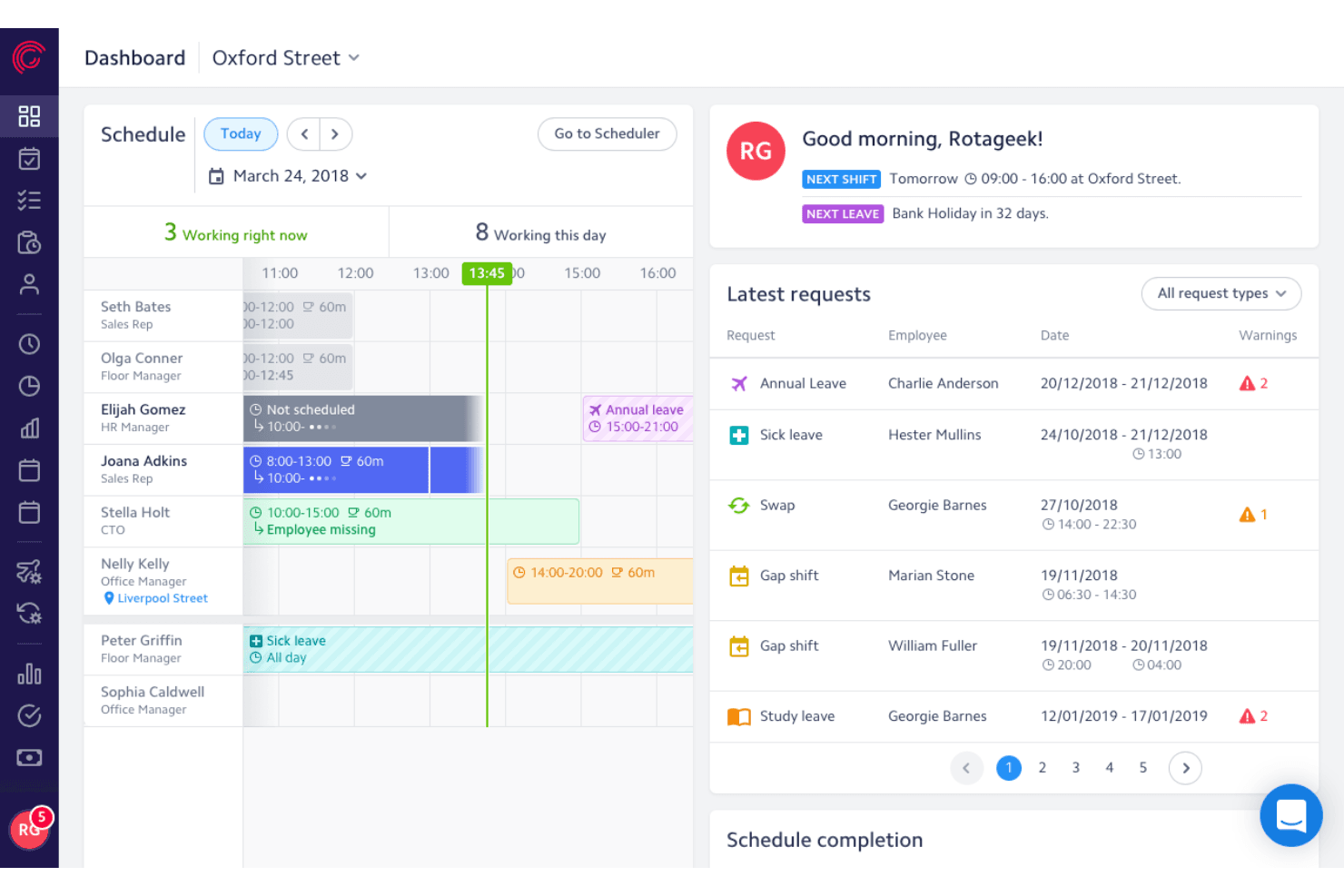
Rotageek lets users manage schedules and leave requests in one dashboard. Rotageek is a retail workforce management platform with AI-driven shift scheduling, ML-based demand forecasting in 15-minute increments, time and attendance tracking, and earned wage access integrations.
Who Is Rotageek Best For?
Rotageek is a strong fit for mid-market to enterprise retailers in the UK and Europe managing hourly workforces across multiple locations.
Why I Picked Rotageek
Rotageek earns its spot on my shortlist because of how tightly its AI scheduling engine connects to earned wage access partners like Wagestream and Hastee. I love that Auto Scheduling generates compliant rotas in roughly 30 seconds while factoring in demand forecasts built on 15-minute ML increments, pulling in real footfall data from RetailNext. That combination means hourly associates get schedules that reflect actual store traffic, and they can access earned pay between paydays without HR lifting a finger.
Rotageek Key Features
- Labour modelling: Run "what-if" scenarios to test how volume changes, new store hours, or cost pressures affect headcount before committing to a plan.
- Multi-location schedule view: See and manage rotas across individual stores or as a merged view, making it easy to spot gaps and overstaffing across your entire estate.
- Geo-fenced time clock: Employees clock in and out via the mobile app with location verification and photo capture, creating a clear audit trail for wage and hour compliance.
- Natural language workforce insights: Query your labor data in plain language and get instant AI-backed answers without waiting on a BI team to pull reports.
Rotageek Integrations
Rotageek supports integrations with RetailNext, Wagestream, Hastee, Level, Zellis, ADP, SAP, Oracle, Sage, and Yoobic. It also supports custom connectivity through APIs, webhooks, and SFTP transfers.
Pros and Cons
Pros:
- Demand forecasting uses real footfall data
- Earned wage access built for hourly staff
- AI auto-scheduling generates rotas in seconds
Cons:
- Occasional mobile app stability issues
- No explicit US labor law compliance
Learn more about Rotageek: Best for SMB retail scheduling and shift ops
- Free plan + 30-day free trial + free demo available
- From $99/month (billed annually)
Visit WebsiteCustomer Rating:4.2/5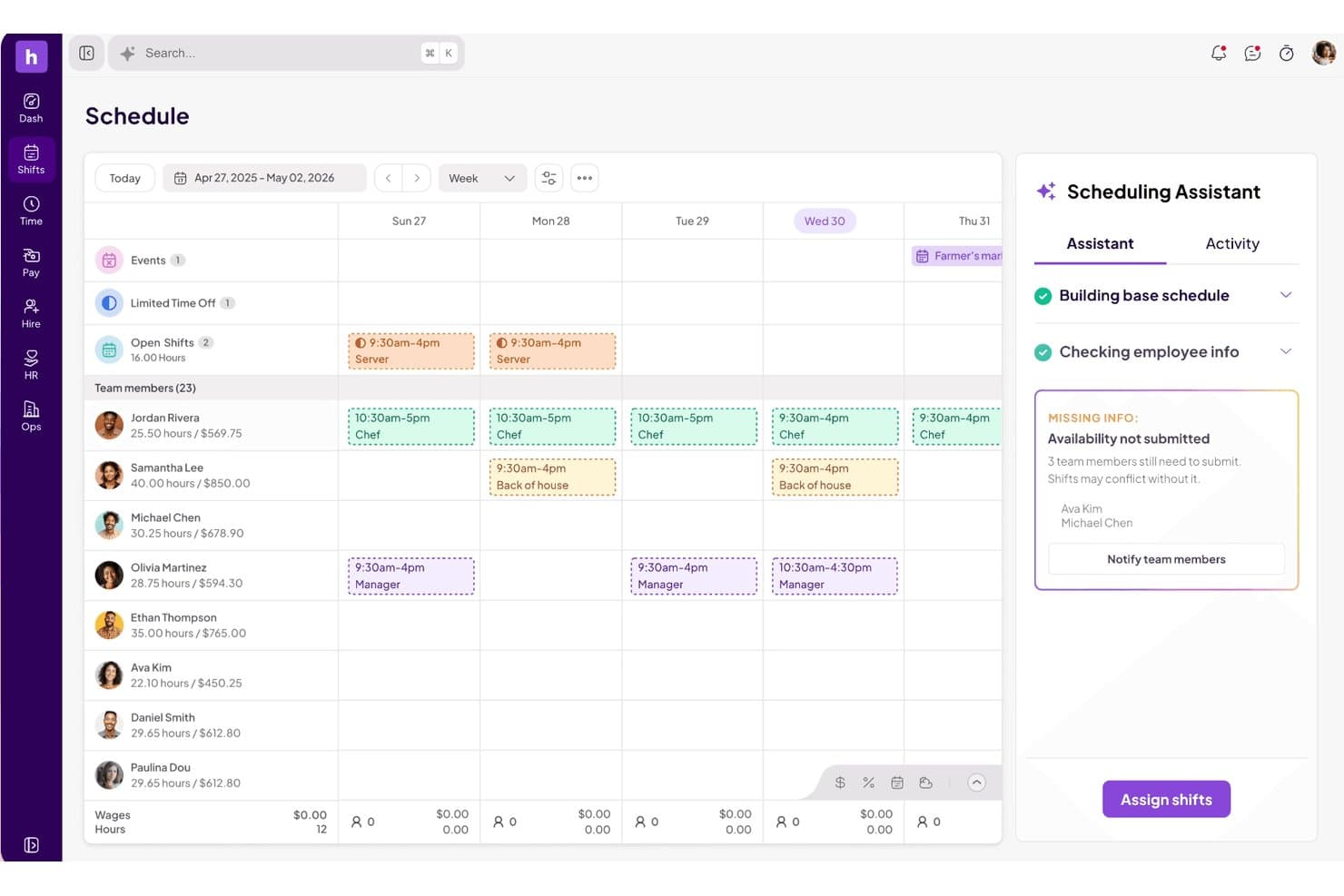
Homebase's AI Scheduling Assistant flags missing availability to prevent shift conflicts. Homebase is a workforce management platform built for hourly teams that combines shift scheduling, time and attendance tracking, team communication, and labor cost monitoring in one mobile-first system.
Who Is Homebase Best For?
Homebase fits store operations managers and people ops leads at small-to-mid-sized retail businesses who need scheduling, time tracking, and team communication in one mobile-first tool.
Why I Picked Homebase
Homebase earns its spot on my shortlist because it's purpose-built for the kind of hourly shift environment small retail teams actually run on. I love that the AI Scheduling Assistant can generate a full week's schedule in seconds and even digitize an existing paper schedule from a photo upload. Pair that with real-time labor cost versus sales tracking pulled directly from your POS, and store managers can make smarter coverage calls mid-shift without leaving the floor.
Homebase Key Features
- Geofenced time clock: Employees clock in only when physically on-site, with photo capture and unique PINs to prevent buddy punching.
- Shift trade and cover requests: Team members can request or claim open shifts directly in the mobile app, with manager approval required before changes go live.
- In-app team messaging: Managers can message individuals, role-based groups, or the full team without sharing personal phone numbers, with read receipts on announcements.
- Performance and attendance tracking: Late alerts, no-show tracking, and per-employee performance notes give managers a running record of attendance patterns over time.
Homebase Integrations
Homebase offers native integrations with Square, Toast, Clover, Shopify, Lightspeed, PAR POS, GoDaddy, Gusto, ADP RUN, and QuickBooks Online Plus. POS connections sync sales and labor data for scheduling and cost tracking.
Pros and Cons
Pros:
- Real-time labor cost tracking from POS data
- Mobile app supports shift trades and covers
- AI auto-scheduling digitizes paper schedules
Cons:
- Labor demand forecasting lacks foot-traffic inputs
- No predictive scheduling compliance features
 Best for quick frontline shift swapping
- 30-day free trial + free demo available
- From AUD $5/user/month
Visit WebsiteCustomer Rating:4.6/5
Deputy offers mobile shift swaps with schedule and request tracking. Deputy is a retail workforce management platform that offers employee scheduling, time tracking, attendance, shift swapping, and tasking tools designed for fast-moving retail environments.
Who Is Deputy Best For?
Retailers and restaurant chains with hourly staff who need quick shift adjustments and a mobile-friendly scheduling solution.
Why I Picked Deputy
I picked Deputy as one of the best because I see frontline teams use its mobile shift swapping daily, where managers approve swaps in seconds, and staff can pick up extra shifts instantly, keeping retail coverage flexible and responsive.
Deputy Key Features
- Timesheet approvals: Managers review and approve digital timesheets for payroll processing.
- Break planning: Schedule legally compliant meal and rest breaks for staff.
- Labor cost reporting: View real-time wage costs compared to sales data.
Deputy Integrations
Deputy offers native integrations with ADP, Gusto, QuickBooks Online, Xero, Square, BambooHR, Paychex, Netsuite, CloudPayroll, MYOB, and Zapier. An API is available for custom integrations.
Pros and Cons
Pros:
- Real-time attendance and location tracking
- Smart scheduling based on sales data
- Fast mobile shift swapping for retail teams
Cons:
- Strict break-enforcement blocks early clock-ins
- Manual data-mapping errors or API disconnects can stall exports
Learn more about Deputy: Best for integrating workforce insights with payroll
- Free demo available
- Pricing upon request
Visit WebsiteCustomer Rating:4.3/5
Workday breaks down labor cost, salary, and overtime insights by country. Workday is a retail workforce management platform designed for staff scheduling, attendance tracking, workforce analytics, and integration with finance, HR, and broader WFM functions.
Who Is Workday Best For?
Workday suits large retail organizations and HR teams that need unified workforce, HR, and payroll management across multiple locations.
Why I Picked Workday
I picked Workday as one of the best because I can pull workforce and payroll data together at the right time in real time. I use its unified reporting to align staffing metrics with payroll processes, which makes labor and compensation analysis much more actionable.
Workday Key Features
- Mobile time tracking: Allows employees to clock in and out through a mobile app.
- Absence management: Tracks all types of employee leave and automates approvals.
- Labor compliance monitoring: Monitors labor law compliance for multiple regions and business units.
Workday Integrations
Workday offers native integrations with platforms like Salesforce, Microsoft 365, Oracle, ADP, and Okta, and provides an API for custom integrations.
Pros and Cons
Pros:
- Advanced compliance monitoring for retail operations
- Automates scheduling based on real-time demand
- Consolidates HR, payroll, and staffing data
Cons:
- User friction with mobile UX and session timeouts
- System configuration can be time-consuming
Learn more about Workday: Best for combining frontline communication with tasks
- Free demo available
- Pricing upon request
Visit WebsiteCustomer Rating:4.4/5
WorkJam offers task steps, store updates, and team communication channels. WorkJam is a retail workforce management platform that brings together frontline employee communication, task management, shift scheduling, and training in one mobile-first solution.
Who Is WorkJam Best For?
Frontline retailers and multi-site operation managers who need to unify communications, task execution, and shift management in a mobile platform.
Why I Picked WorkJam
I picked WorkJam as one of the best because I can connect frontline teams through chat, announcements, and task checklists tied directly to daily workflows. My team uses its mobile task management so employees get clear instructions alongside schedule updates.
WorkJam Key Features
- Surveys and polls: Managers can gather feedback directly from frontline staff.
- Microlearning modules: Deliver short, targeted training sessions within the app.
- Recognition and rewards: Enable managers to acknowledge employee achievements digitally.
WorkJam Integrations
WorkJam offers native integrations with Google Cloud, UKG, Microsoft Teams, Azure Services, ADP, Blue Yonder, Honeywell, Xoxoday, and more. An API is available for custom integrations.
Pros and Cons
Pros:
- Real-time communication with task assignments
- Mobile-first microlearning for frontline staff
- Shift swapping and open shift claiming in-app
Cons:
- App lag during heavy media loads
- Configuring workflows can require vendor support
Learn more about WorkJam: Best for real-time workforce data unification
- Free demo available
- Pricing upon request
Visit WebsiteCustomer Rating:4.2/5
Dayforce shows workforce insights, time review issues, and shift fixes. Dayforce is a cloud-based retail workforce management software that combines scheduling, time and attendance, payroll, and HR functionality with centralized data management.
Who Is Dayforce Best For?
Dayforce is well-suited for large retailers and HR teams managing distributed hourly workforces needing unified workforce data across locations.
Why I Picked Dayforce
I picked Dayforce because I need real-time workforce data across all my retail locations, not after the fact. My team uses the single HR/payroll database to track attendance, scheduling, and pay updates as they happen.
Dayforce Key Features
- Self-scheduling tools: Employees can select and swap available shifts directly in the app.
- Mobile clock-in: Staff can clock in or out using their mobile devices with geo-fencing.
- Compliance rule engine: Built-in rules enforce labor laws and company policies for every location.
Dayforce Integrations
Dayforce offers native integrations with Workday, Oracle, and SAP SuccessFactors. An API is available for custom integrations.
Pros and Cons
Pros:
- Mobile app enables shift changes and approvals
- Payroll and HR data unified in one system
- Real-time scheduling and time tracking tools
Cons:
- Initial setup can be time-intensive
- Customization often requires vendor involvement
Learn more about Dayforce: Best for highly configurable labor rules
- Free demo available
- Pricing upon request
Visit WebsiteCustomer Rating:3.9/5
Infor shows timesheets with clock times, work codes, and labor tracking. Infor is a workforce management software for retailers that combines labor forecasting, scheduling, time tracking, real-time analytics, and attendance management in a modular suite.
Who Is Infor Best For?
Infor suits large retail organizations and operations leaders managing complex labor scheduling and compliance requirements across multiple locations.
Why I Picked Infor
I picked Infor because I can fine-tune labor rules at the region, role, or union level and match the realities of retail compliance. My team uses workload modeling and rule-based scheduling, so we don’t get limited by one-size-fits-all templates.
Infor Key Features
- Time and attendance tracking: Captures punches and exceptions in real time.
- Mobile self-service portal: Lets employees view schedules, swap shifts, and request time off.
- Compliance monitoring dashboard: Flags potential violations of work hours, breaks, or overtime rules.
Infor Integrations
Native integrations are not publicly listed. Infor provides an API for custom integrations.
Pros and Cons
Pros:
- Mobile app supports employee shift swaps
- Flexible scheduling for complex workforces
- Extensive labor and compliance rule engine
Cons:
- Custom configurations requires heavy IT administrative overhead
- Reporting setup can be time-consuming
Learn more about Infor : Best for adaptive demand forecasting in stores
- Free demo available
- Pricing upon request
Visit WebsiteCustomer Rating:4.4/5
Legion offers demand forecasting with item trends and labor planning insights. Legion is a cloud-based retail workforce management platform with features for staff scheduling, demand forecasting, labor optimization, time tracking, and real-time communications.
Who Is Legion Best For?
Legion suits large retailers and multi-location businesses that need AI-powered demand forecasting and optimized scheduling for hourly store staff.
Why I Picked Legion
I picked Legion because I see its adaptive demand forecasting handles fluctuating store traffic with high precision. I use its machine learning models to align staffing to predicted peaks, and the automated schedule builder supports quick realignment on short notice.
Legion Key Features
- Time and attendance management: Track employee hours and attendance using web or mobile access.
- Mobile app for staff: Employees can view schedules, request shifts, and receive notifications.
- Compliance monitoring tools: Built-in controls flag potential labor law or policy violations.
Legion Integrations
Legion offers native integrations with ADP, SAP SuccessFactors, and Workday, and provides an API for custom integrations.
Pros and Cons
Pros:
- Mobile shift swapping for hourly staff
- Automated compliance with labor regulations
- Adaptive scheduling powered by AI
Cons:
- Occasional location-tracking (geofencing) errors
- Enterprise-level rollouts can face delays during complex data integrations
Learn more about Legion:

SAP offers time sheets with policy alerts and approvals. SAP Workforce Management is an enterprise workforce management platform that offers advanced scheduling, time and attendance tracking, labor compliance, and global workforce analytics for retail organizations.
Who Is SAP Best For?
Large global retailers and HR teams managing complex hourly workforces across multiple countries and compliance requirements.
Why I Picked SAP
I picked SAP because I need built-in compliance with global labor regulations for my international retail teams. I regularly configure complex pay rules and automate wage calculations across multiple regions. I rely on SAP’s audit and reporting tools to meet changing requirements.
SAP Key Features
- Shift planning tools: Build, adjust, and visualize workforce schedules for retail teams.
- Mobile manager dashboards: Enable on-the-go management and real-time decision-making from mobile devices.
- Employee self-service portal: Let staff request time off, view schedules, and swap shifts.
SAP Integrations
SAP Workforce Management offers native integrations with SAP SuccessFactors and SAP S/4HANA and has native integrations across the Microsoft ecosystem, including Microsoft 365 and Azure. An API is available for custom integrations.
Pros and Cons
Pros:
- Scalable for multi-country enterprise deployments
- Detailed scheduling and shift planning options
- Advanced global compliance management tools
Cons:
- User friction stemming from slow loading times
- Configuration requires SAP technical expertise
Learn more about SAP: Best mobile scheduling for floor teams
- Free demo available
- Pricing upon request

Zebra offers mobile team chats, to-dos, and task instructions for floor staff. Zebra Technologies Workcloud Workforce Optimization Suite is a retail workforce management software that offers mobile scheduling, time and attendance, labor forecasting, and analytics for retail floor teams.
Who Is Zebra Technologies Best For?
Store operations leaders and regional managers in large retail chains needing advanced mobile shift scheduling and labor oversight for floor-based teams.
Why I Picked Zebra Technologies
I picked Zebra Technologies because my team can manage floor staff schedules from our phones and track attendance in real time. I like how the tool lets us send shift updates instantly and match labor to forecasted demand with built-in analytics.
Zebra Technologies Key Features
- Compliance tracking: Enforce labor policies and manage certifications for staff.
- Employee self-service portal: Let employees request time off and manage availability.
- Multi-location support: Manage scheduling and reporting across several retail locations.
Zebra Technologies Integrations
Zebra Technologies Workcloud Workforce Optimization Suite offers native integrations with Oracle, SAP SuccessFactors, Tulip, Scalefusion, SOTI Connect, TinyMDM, Clyd EMM, and more. An API is available for custom integrations.
Pros and Cons
Pros:
- Mobile app designed for shift workers
- Smart labor forecasting for in-store operations
- Shift swapping is supported within the platform
Cons:
- Security protocols trigger frequent user logouts
- Workflow setup can require technical assistance
Learn more about Zebra Technologies:
Diğer Perakende İş Gücü Yönetimi Yazılımları
Kısa listeme giremeyen ancak yine de göz atmaya değer bazı ek perakende iş gücü yönetimi yazılımı seçenekleri şunlardır:
- 11QuinyxBest AI-driven platform for shift scheduling
- 12Blue Yonder Best for omnichannel labor forecasting
- 13ADP Workforce NowBest for all-in-one payroll integration
- 14Oracle HCM CloudBest for global labor compliance tracking
- 15ConnecteamBest mobile scheduling for frontline operations
- 16UKGBest analytics for large enterprise teams
- 17When I WorkBest for hourly shift swaps and drops
How I Evaluate Retail Workforce Management Software
I split my evaluation into baseline criteria—like multi-location scheduling and labor cost tracking—and differentiators that separate tools built for retail from generic workforce platforms.
Core Functionality (Table Stakes For This List)
When I'm selecting tools for my list, I rank each one on a scale from 0 (does not offer the functionality) to 5 (excels in this area) for each core functionality listed below. Then, I calculate the tool's total score into a percentage. Each tool needs to achieve a minimum total score of 65% to be considered for inclusion.
- Retail Shift Scheduling: I check whether the tool handles multi-location, role-based scheduling—like splitting coverage between cashiers, floor staff, and back-of-house across a dozen stores.
- Labor Demand Forecasting: Forecasting should pull from retail-specific signals like sales volume and seasonal trends, not just repeat last week's schedule with minor edits.
- Time & Attendance Tracking: I evaluate how clock-in/out, break tracking, and pay rule enforcement work for hourly associates—especially across shift types and store locations.
- Mobile Employee Self-Service: Frontline retail workers need to swap shifts, set availability, and request time off from their phones, so I look for a purpose-built mobile experience.
- Labor Cost Management: I look for real-time visibility into labor spend vs. sales and budget targets, so store managers can course-correct staffing mid-week instead of after the fact.
- Compliance & Labor Law Support: The tool should enforce rules like predictive scheduling, minor labor restrictions, and mandated break periods based on configurable location-level policies.
Once I have a list of tools that meet the criteria, I consider what sets each platform apart.
Differentiating Factors (What Sets Vendors Apart)
Here's how I compare and contrast different vendors:
Standout Features
AI-powered auto-scheduling is a major differentiator. I look for tools that balance labor budgets, employee preferences, and demand forecasts to generate schedules managers can publish with minimal edits. Earned wage access is another feature I evaluate, since giving hourly associates early access to earned pay can meaningfully reduce turnover. I also consider built-in team communication, which lets store managers push announcements or task updates directly to associates' phones instead of relying on group texts.
Beyond Features
Retail-specific integrations matter a lot here. I check whether the platform connects natively to POS systems and payroll providers, since that's what drives sales-based scheduling and clean pay runs. Scalability is another factor I evaluate closely—a tool that works for five stores should also handle a franchise network with location-specific rules and seasonal hiring spikes. Pricing structure counts too. Per-employee-per-month models with modular packaging give retailers more flexibility, especially when headcount swings dramatically between peak and off-peak seasons.
Perakende İş Gücü Yönetimi Yazılımı Nasıl Seçilir?
Uzun özellik listeleri ve karmaşık fiyatlandırma yapıları arasında kaybolmak kolaydır. Kendinize özgü yazılım seçimi sürecinizde ilerlerken odağınızı korumanıza yardımcı olmak için göz önünde bulundurmanız gereken faktörleri aşağıda bir kontrol listesi olarak sıraladım:
| Faktör | Dikkat Edilmesi Gerekenler |
|---|---|
| FaktörÖlçeklenebilirlik | Dikkat Edilmesi GerekenlerOnlarca veya yüzlerce mağazaya ulaştığınızda yazılım hâlâ ihtiyaçlarınıza uygun olacak mı? Esnek kullanıcı sınırları ve çoklu site yönetimi özelliklerini arayın. |
| FaktörEntegrasyonlar | Dikkat Edilmesi GerekenlerİK, bordro ve POS sistemlerinize yerel olarak bağlanabiliyor mu? Özel geçici çözümlere ihtiyaç duymamak için tedarikçi belgelerini doğrulayın. |
| FaktörÖzelleştirilebilirlik | Dikkat Edilmesi GerekenlerMağazanızın kendine özgü iş gücü yasaları veya anlaşmaları için kuralları, rolleri ve uyumluluk uyarılarını yapılandırabiliyor musunuz? |
| FaktörKullanım kolaylığı | Dikkat Edilmesi GerekenlerSaatlik çalışanlar ve mağaza yöneticileri yazılımı hızlıca öğrenebilecek mi? Teknik olmayan kullanıcıların temel iş akışlarını test edebilmesi için canlı demolar veya deneme sürümleri talep edin. |
| FaktörKurulum ve işe alıştırma | Dikkat Edilmesi GerekenlerYazılımın kullanıma hazır hâle gelmesi ne kadar sürüyor? Veri aktarımı desteği, yönetici eğitimi ve standart kullanıma sunma süreleri hakkında bilgi alın. |
| FaktörMaliyet | Dikkat Edilmesi GerekenlerFiyatlandırma aktif kullanıcı, konum veya modül sayısına mı dayanıyor? Nelerin dahil olduğunu, nelerin ek ücrete tabi olduğunu öğrenin ve toplam yıllık harcamayı hesaplayın. |
| FaktörGüvenlik önlemleri | Dikkat Edilmesi GerekenlerÇalışan verileri ve puantaj kayıtları nasıl korunuyor? Rol tabanlı erişim, şifreleme, denetimler ve tedarikçinin uyumluluk sertifikaları hakkında bilgi alın. |
| FaktörUyumluluk gereklilikleri | Dikkat Edilmesi GerekenlerSistem, şehrinize, eyaletinize veya ülkenize özgü çalışma mevzuatını izliyor mu? Yasalardaki değişiklikler için otomatik güncellemeleri kontrol edin. |
Perakende İş Gücü Yönetimi Yazılımı Nedir?
Perakende iş gücü yönetimi yazılımı; perakendeciler için vardiya planlamasını, zaman takibini, iş gücü mevzuatına uyumluluğu ve görev atamalarını otomatikleştirmek üzere tasarlanmış bir araçtır. Bu platformlar saatlik çalışanları yönetmenize, birden fazla konumdaki operasyonları desteklemenize ve çalışma yasalarına uyumluluğu sağlamanıza yardımcı olur. Bu yazılımı kullanmak, çalışanların uygunluk durumuna ilişkin görünürlüğünüzü artırır, vardiya planlama çakışmalarını azaltır ve perakende ekiplerinin günlük iş gücü yönetimini kolaylaştırır.
Perakende İş Gücü Yönetimi Yazılımının Özellikleri
Perakende iş gücü yönetimi yazılımı seçerken aşağıdaki temel özelliklere dikkat edin:
- Otomatik planlama: Vardiya kapsamının sağlanmasına ve manuel planlama ihtiyacının azaltılmasına yardımcı olmak için satış tahminlerine, çalışanların uygunluk durumuna ve iş kurallarına göre personel çalışma programları oluşturur.
- Çalışma süresi ve devam takibi: Çalışanların işe girişlerini, molalarını ve çalıştıkları saatleri kaydederek yöneticilerin doğru bordro verilerini tutmasına ve fazla mesaiyi izlemesine yardımcı olur.
- Mobil erişim: Yöneticilerin ve çalışanların mobil cihazlarından çalışma programlarını görüntülemelerine, vardiya değiş tokuşu yapmalarına ve izin talep etmelerine olanak tanıyarak hareket hâlinde esnek iş gücü yönetimini destekler.
- İş gücü mevzuatına uyum izleme: Düzenlemeye tabi molaları, fazla mesaiyi ve çalışma saati sınırlarını takip ederek iş mevzuatının veya mağaza politikalarının olası ihlallerini işaretler ve denetime her zaman hazır olmanızı sağlar.
- Bordro entegrasyonu: Çalışma süresi ve devam verilerini doğrudan bordro sisteminize bağlayarak veri girişi hatalarını azaltır ve bordro işleme süresinden tasarruf sağlar.
- Vardiya değiş tokuşu ve teklif verme: Çalışanların belirlenen kurallar dâhilinde mevcut vardiyaları değiştirmesine, bırakmasına veya bu vardiyalar için teklif vermesine olanak tanıyarak personel eksikliği kaynaklı acil durumları en aza indirir ve son dakika değişikliklerini karşılar.
- Tahmin ve talep planlaması: Yoğun sezonlarda, kampanyalarda veya tatillerde personel ihtiyaçlarını öngörmenize yardımcı olmak için geçmiş verileri ve öngörülen satışları kullanır.
- Görev ve iletişim araçları: Yalnızca planlamanın ötesinde koordinasyon sağlamak için günlük kontrol listelerini merkezileştirir, görevler atar ve yöneticilerle personel arasında mesajlaşmayı mümkün kılar.
- Raporlama ve analiz: Yöneticilerin bilinçli personel kararları almasına yardımcı olmak için iş gücü maliyetleri, programa uyum, çalışan devamlılığı ve diğer ölçütler hakkında içgörüler sunar.
- Role dayalı izinler: Yöneticilerin, amirlerin ve çalışanların pozisyonlarına göre yalnızca ilgili verileri ve iş akışlarını görüp bunlar üzerinde işlem yapmasını sağlayarak erişimi kontrol etmenize olanak tanır.
Perakende İş Gücü Yönetimi Yazılımının Faydaları
Perakende iş gücü yönetimi yazılımını uygulamak ekibiniz, işletmeniz ve genel operasyonel verimliliğiniz için çeşitli faydalar sağlar. Yararlanmayı bekleyebileceğiniz birkaç fayda şunlardır:
- Basitleştirilmiş planlama: Otomatik sistemler, iş talebi ve çalışanların uygunluk durumuyla uyumlu, hatasız çalışma programları oluşturur.
- İş gücü mevzuatına uyum güvencesi: Yerleşik uyum izleme özellikleri, mağazanızın ilgili iş, mola ve fazla mesai düzenlemelerine uymasını sağlamaya yardımcı olur.
- Gerçek zamanlı ekip koordinasyonu: Mobil araçlar ve mesajlaşma özellikleri, yöneticilerin ve personelin birden fazla konumda bağlantıda kalmasını ve hızlı yanıt vermesini sağlar.
- Azaltılmış bordro hataları: Entegre çalışma süresi ve devam verileri, doğru bilgileri doğrudan bordroya aktararak maliyetli manuel veri girişi hatalarını ortadan kaldırır.
- Daha hızlı vardiya kapsamı: Vardiya değiş tokuşu ve teklif verme özellikleri, çalışanların yönetici müdahalesi olmadan vardiyaları karşılamasını veya değiştirmesini sağlar.
- Uygulanabilir iş gücü içgörüleri: Raporlama ve analiz özellikleri, iş gücü maliyetlerini optimize etmek ve devamlılık veya üretkenlik eğilimlerini belirlemek için ihtiyaç duyduğunuz verileri sunar.
- Daha iyi çalışan deneyimi: Kendi kendine hizmet veren planlama ve iletişim araçları, personele daha fazla kontrol ve esneklik sağlayarak çalışanların elde tutulmasını ve bağlılığını destekler.
Perakende İş Gücü Yönetimi Yazılımının Maliyetleri ve Fiyatlandırması
Perakende iş gücü yönetimi yazılımı seçmek, mevcut çeşitli fiyatlandırma modellerini ve planları anlamayı gerektirir. Maliyetler özelliklere, ekip büyüklüğüne, eklentilere ve daha fazlasına göre değişir. Aşağıdaki tablo, perakende iş gücü yönetimi yazılımı çözümlerinde yaygın planları, ortalama fiyatlarını ve genellikle sunulan özellikleri özetlemektedir:
Perakende İş Gücü Yönetimi Yazılımı Plan Karşılaştırma Tablosu
| Plan Türü | Ortalama Fiyat | Yaygın Özellikler |
|---|---|---|
| Plan TürüÜcretsiz Plan | Ortalama Fiyat$0 | Yaygın ÖzelliklerTemel planlama, sınırlı kullanıcı sayısı, temel çalışma süresi takibi ve e-posta desteği. |
| Plan TürüKişisel Plan | Ortalama Fiyat$5-$10/kullanıcı/ay | Yaygın ÖzelliklerPlanlama araçları, mobil erişim, çalışma süresi ve devam takibi, sınırlı raporlama ve vardiya değiş tokuşu işlevi. |
| Plan Türüİşletme Planı | Ortalama Fiyat$15-$25/kullanıcı/ay | Yaygın ÖzelliklerGelişmiş planlama, bordro entegrasyonu, uyum izleme, analiz ve birden fazla konum desteği. |
| Plan TürüKurumsal Plan | Ortalama Fiyat$30-$50/kullanıcı/ay | Yaygın ÖzelliklerÖzel kurallar, özel hesap yönetimi, gelişmiş entegrasyonlar, işe alıştırma araçları, öncelikli destek ve özel raporlar. |
Perakende İş Gücü Yönetimi Yazılımı SSS
Perakende iş gücü yönetimi yazılımı hakkında sık sorulan bazı soruların yanıtları:
Perakende iş gücü yönetimi yazılımı iş gücü maliyetlerini azaltmaya nasıl yardımcı olur?
Talebi öngörerek, programları otomatikleştirerek ve gereksiz fazla mesaiyi veya yetersiz personel çalıştırmayı önlemek için çalışma saatlerini takip ederek iş gücü maliyetlerini azaltmaya yardımcı olur. Bu kontroller, vardiyaları optimize etmenizi ve uyumluluk cezalarından kaçınmanızı sağlar.
Perakende iş gücü yönetimi yazılımı birden fazla lokasyona sahip işletmeleri yönetebilir mi?
Evet, perakende iş gücü yönetimi yazılımlarının çoğu, birden fazla mağaza lokasyonunda programları, raporlamayı ve uyumluluğu merkezi bir sistem üzerinden yönetmeye yönelik araçlar sunar. Bu sayede bölge yöneticileri personeli denetleyebilir ve kaynakları daha kolay tahsis edebilir.
Yeni kullanıcılar için tipik işe alıştırma süreleri nelerdir?
Yeni perakende vardiya planlama yazılımı için tipik işe alıştırma süresi birkaç gün ile birkaç hafta arasında değişir. Süreler; veri aktarımına, ekip büyüklüğüne, mevcut iş akışlarının karmaşıklığına ve eğitim kaynaklarının veya sağlayıcı desteğinin bulunabilirliğine bağlıdır.
Perakende iş gücü yönetimi yazılımı saatlik çalışanlar için kullanıcı dostu mudur?
Evet, birçok platform saatlik çalışanların programlarını kontrol etmesine, vardiya değiş tokuşu yapmasına ve yöneticilerle iletişim kurmasına olanak tanıyan kullanımı kolay mobil uygulamalarla tasarlanmıştır. Bu self servis yaklaşımı, personelin araçla günlük olarak etkileşime girmesine yardımcı olur.
Perakende ekipleri için hangi entegrasyon seçenekleri önemlidir?
Önemli entegrasyon seçenekleri arasında bordro sistemleri, İK platformları ve satış noktası yazılımları bulunur. Bu sistemleri senkronize etmek manuel veri girişini azaltır, programlama doğruluğunu sağlar ve çalışan kayıtlarının güncel tutulmasına yardımcı olur.