

Sağlık hizmetleri bordro yazılımı, tıbbi kuruluşlarda ve bakım tesislerinde bulunan benzersiz ücret kurallarını, uyumluluk gerekliliklerini ve iş gücü karmaşıklıklarını yönetmek üzere tasarlanmıştır. İnsan kaynakları alanında çalışıyor ve yetki belgesi takibini otomatikleştiren, değişken ücret oranlarını destekleyen ve hem klinisyenler hem de yöneticiler için bordro işlemlerini zahmetsiz hâle getiren araçlara ihtiyaç duyuyorsanız doğru yerdesiniz. Bu kılavuz, en iyi seçenekleri ayrıntılı şekilde ele alır; böylece karşılaştırma yapabilir, size en uygun seçeneği bulabilir ve bordro sorunları hakkında endişelenmeye daha az zaman ayırabilirsiniz.
Why Trust Our Software Recommendations
6,700+
Reviews
20
Industry experts
16+
Evaluation factors
14
Years
Our team has been testing and reviewing software since 2012. As HR experts ourselves, we know how difficult—and important—it is to choose the right software.
For this guide, we evaluated tools using hands-on testing and independent research, scoring tools using our selection criteria. We also draw on insights from industry thought leaders and practicing HR experts.
Our reviews reflect our human editorial judgment, not a sales pitch.
Expert reviewers:
- Phil GrayCOO
 Kim BehnkeHR Tech Editor & Analyst
 Josh BarkerPeople Ops Manager

Sağlık Hizmetleri Bordro Yazılımı Karşılaştırma Tablosu
Bu karşılaştırma tablosu, en iyi sağlık hizmetleri bordro yazılımı seçimlerimin fiyatlandırma ayrıntılarını özetlemektedir:
Score legend (out of 5)
- Excellent4.5–5
- Good4–4.4
- Average3–3.9
- Below average2–2.9
- Poor1–1.9
Sorted by: Default
| Tool | Starting Price | Website | |||||||
|---|---|---|---|---|---|---|---|---|---|
Best for unified HR, payroll, and IT management | 3.5 out of 5 | 4 | 3 | 4 | 4 | 3 | 3 | $8/user/month Free trial + free demo available | Book Demo |
Best for multi-state health and biotech teams | 3.3 out of 5 | 5 | 3 | 3 | 2 | 4 | 3 | $35/user/month + $89/month platform fee Free demo available | Website |
Best for automating complex healthcare pay rates | 3.7 out of 5 | 4 | 4 | 4 | 3 | 3 | 4 | Pricing upon request Free demo available | Website |
Best for small practice compliance automation | 2.8 out of 5 | 4 | 3 | 2 | 2 | 3 | 3 | $49/month Free trial + free demo available | Book Demo |
Best for open-source to full payroll migration | 3.2 out of 5 | 3 | 3 | 3 | 4 | 3 | 3 | $50/user/month 30-day free trial + free demo available | Website |
Best for tracing ledger changes across EINs | 3.5 out of 5 | 4 | 3 | 3 | 4 | 3 | 4 | Pricing upon request Free demo available | Book Demo |
Best for staffing around patient demand | 3.8 out of 5 | 4 | 4 | 4 | 3 | 3 | 5 | Pricing upon request Not available | Website |
Best for retroactive pay corrections | 3.7 out of 5 | 3 | 4 | 4 | 4 | 3 | 4 | Pricing upon request Free demo available | Website |
Best for switching between practice companies | 3.3 out of 5 | 4 | 3 | 4 | 2 | 3 | 4 | Pricing upon request Free demo available | Website |
Best for ABA payroll using CentralReach exports | 3.8 out of 5 | 4 | 4 | 4 | 4 | 3 | 4 | $29/month Free demo available | Website |
Best for credential-linked shift eligibility | 3.5 out of 5 | 4 | 4 | 3 | 3 | 3 | 4 | Pricing upon request Free demo available | Website |
Best for post-acute payroll by legal entity | 3.8 out of 5 | 3 | 4 | 4 | 4 | 4 | 4 | Pricing upon request Free demo available | Website |


Sağlık Hizmetleri Bordro Yazılımı İncelemeleri
Aşağıda, kısa listeme giren en iyi sağlık hizmetleri bordro yazılımlarının ayrıntılı özetlerini bulabilirsiniz. İncelemelerim, size en uygun seçeneği bulmanıza yardımcı olmak için her yazılımın özelliklerine, uyumluluk yeteneklerine ve en uygun kullanım alanlarına ayrıntılı bir bakış sunmaktadır.
 Best for unified HR, payroll, and IT management
- Free trial + free demo available
- From $8/user/month
Visit WebsiteCustomer Rating:4.9/5
Rippling payroll run showing an employee's hours, taxes, and reimbursements. Rippling is an HR, payroll, and IT platform that handles shift differentials, blended pay rates, multi-state tax filing, and scheduling-to-payroll sync for healthcare organizations ranging from single-location practices to multi-entity medical groups.
Who Is Rippling Best For?
Rippling is a strong fit for healthcare HR teams managing payroll, IT, and workforce operations across multiple locations or entities from a single platform.
Why I Picked Rippling
Rippling earns its spot on my shortlist because it's one of the few platforms that genuinely unifies HR, payroll, and IT under one roof, which matters a lot when you're managing clinicians across multiple locations or entities. I love that shift differentials, blended pay rates, and multi-state tax filing all run through the same system that handles onboarding and scheduling, so approved hours sync directly into payroll without manual re-entry. Cross-entity payroll under different EINs, with workforce reporting across locations, makes it especially practical for growing medical groups.
Rippling Key Features
- Pay-run comparison tool: Reviews changes in gross pay, taxes, and deductions between the current and previous pay run before you approve it.
- Multi-entity payroll across EINs: Runs payroll for separate legal entities under different EINs from a single platform, with cross-entity workforce reporting.
- Custom pay types: Supports both default and custom one-off or recurring pay types to handle varied compensation structures across clinical roles.
- Employee self-service for pay documents: Gives current and former employees direct access to pay stubs, W-2s, and 1099s without going through HR.
Rippling Integrations
Rippling lists 600+ out-of-the-box integrations, including Xero, QuickBooks, NetSuite, WellSky, and eClinicalWorks. Its Payroll page separately cites 650+ integrations; API availability and specific data flows aren’t documented.
Pros and Cons
Pros:
- Compares pay runs before approval
- Syncs approved shifts into payroll
- Handles differentials and blended clinical pay
Cons:
- Some users report payout delays or errors
- Implementation can complicate payroll migration
 2Best for multi-state health and biotech teams
Warp
- Free demo available
- From $35/user/month + $89/month platform fee
Visit WebsiteCustomer Rating:4.4/5
Warp centralizes payroll, people, and onboarding in one dashboard. Warp is a payroll and HR platform that handles payroll processing, automated tax filing, multi-state compliance, benefits administration, and workforce management for healthcare and life sciences teams.
Who Is Warp Best For?
Warp is a strong fit for healthcare and biotech organizations that operate across multiple states and need automated tax compliance without the overhead of a legacy HR system.
Why I Picked Warp
I picked Warp as one of the best because it's built specifically with multi-state health and biotech teams in mind, covering payroll compliance across all 50 states on its Pro and Enterprise plans. I love how it automates state tax registrations end to end, identifying required agencies, submitting applications, and storing credentials in a single dashboard, which matters when a telehealth or dental group is expanding into new states quickly. Its AI-driven tax notice resolution handles 80% of notices automatically, so compliance bottlenecks don't pile up on your plate.
Warp Key Features
- Benefits administration: Manages medical, dental, and vision enrollment, renewals, qualifying life-event processing, and COBRA workflows through Warp's in-house licensed brokerage.
- Tax notice resolution: Automatically triages, investigates, and generates responses for payroll tax notices, resolving 80% of notices without manual intervention.
- Time tracking add-on: Lets employees clock in and out via mobile or web, with geo-fencing, manager approvals, and automatic syncing to payroll for overtime calculation.
- Employee onboarding portal: Collects tax documents, direct-deposit details, and benefits elections through a self-service flow that most new hires complete in under 10 minutes.
Warp Integrations
Warp offers documented integrations with QuickBooks, Xero, NetSuite, Rillet, Human Interest, Vestwell, Ashby, Lever, Checkr, and Next Insurance. It also provides REST APIs, webhooks, and SDKs for custom integrations.
Pros and Cons
Pros:
- Healthcare workflows cover clinician onboarding
- Supports payroll across all 50 states
- Reviewers praise automated state-tax handling
Cons:
- No documented shift-differential automation
- Clinical time tracking costs extra
Learn more about Warp: Best for automating complex healthcare pay rates
- Free demo available
- Pricing upon request
Visit WebsiteCustomer Rating:4.3/5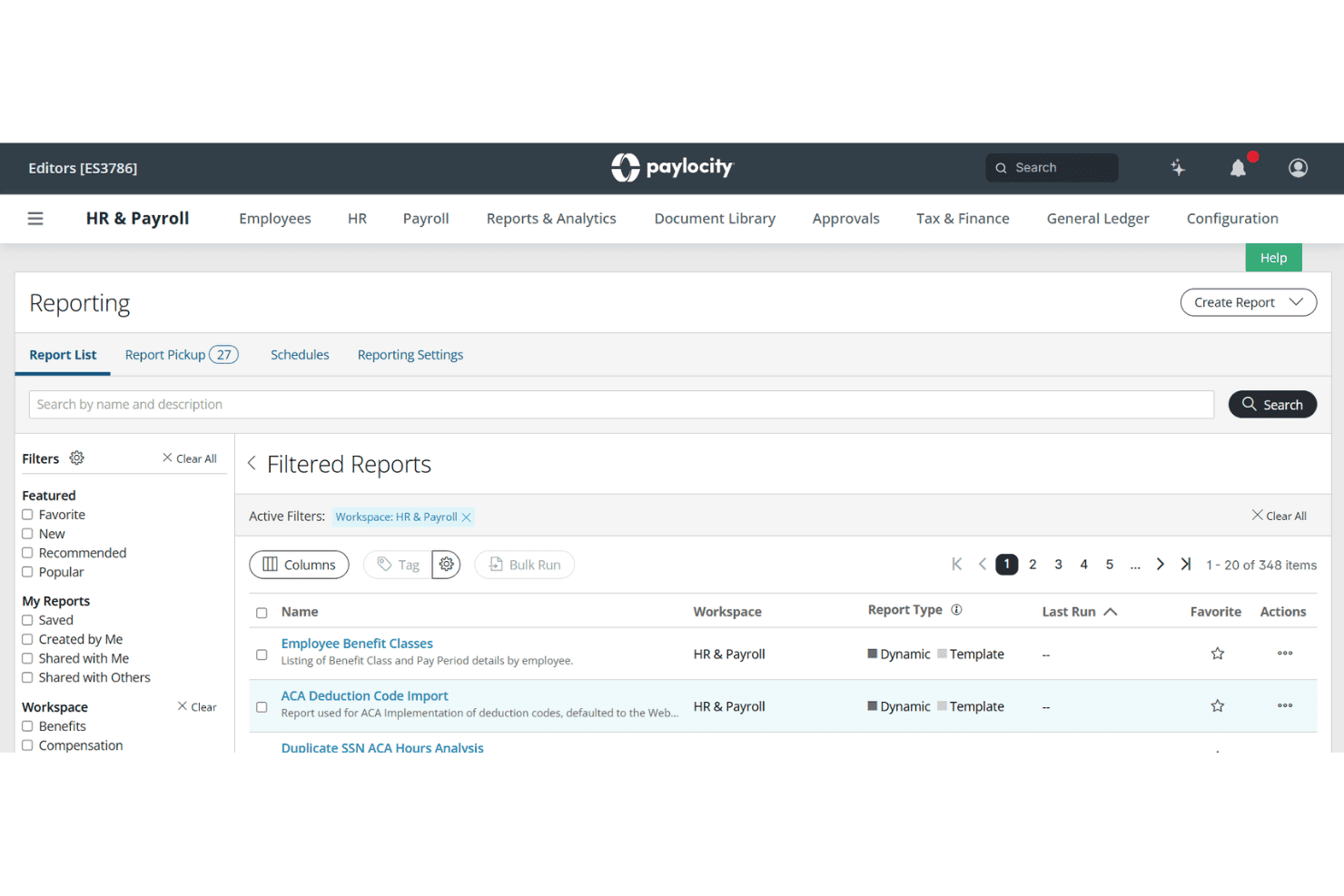
Paylocity lets users filter and browse 348 HR & Payroll reports easily. Paylocity is an HCM platform that handles payroll, time and labor, scheduling, and compliance for healthcare organizations managing clinical staff across multiple facilities, roles, and pay rates.
Who Is Paylocity Best For?
Paylocity fits mid-sized hospitals, medical groups, and long-term care networks with complex, multi-facility payroll needs and small-to-mid HR teams managing it.
Why I Picked Paylocity
I picked Paylocity as one of the best because it handles shift differentials, hazard pay, and credential-based scheduling inside a single payroll engine. In practice, that means I can configure automated pay rules for nights, weekends, and on-call shifts without manual rate adjustments each pay period. I also like that PBJ compliance reporting is built directly into the platform, which is a CMS requirement in long-term care settings that many general payroll tools simply don't address.
Paylocity Key Features
- PBJ compliance dashboard: Tracks and generates required Payroll-Based Journal reports for skilled nursing and long-term care facilities.
- Mobile time collection: Lets clinical staff clock in and out using mobile apps, kiosks, or smart geofencing.
- Multi-state payroll tax engine: Automates compliance with varying state and local tax regulations for dispersed healthcare teams.
- Credential expiration tracking: Monitors employee license statuses and blocks scheduling or payroll if credentials expire.
Paylocity Integrations
Paylocity offers over 350 native integrations, including United Healthcare, Equifax, BlueCross BlueShield, DocuSign, benefitexpress, Indeed, State of California EDD, and supports custom integrations through its API.
Pros and Cons
Pros:
- Tracks credential expirations and blocks payroll automatically
- FLSA 8/80 overtime rule is built in
- Automates shift differential pay without manual overrides
Cons:
- Reporting customization requires IT support to configure
- Implementation takes longer for multi-facility organizations
 Best for small practice compliance automation
- Free trial + free demo available
- From $49/month
Visit WebsiteCustomer Rating:4.6/5
Gusto lets users review and run biweekly payroll with hours and earnings. Gusto is a payroll and HR platform built for small healthcare practices, combining automated payroll runs, shift scheduling, time tracking, benefits administration, and compliance tools for clinical staff.
Who Is Gusto Best For?
Gusto suits practice administrators at small-to-mid-sized clinics managing teams of salaried, hourly, and per-diem clinical staff under one roof.
Why I Picked Gusto
I've included Gusto in my top picks because it handles the compliance heavy-lifting that trips up small practices most often. Built-in ACA and EEO-1 reporting run automatically alongside payroll, and HIPAA compliance training is folded directly into the onboarding flow. Gusto also files federal, state, and local taxes automatically every payroll cycle, so there's no manual filing or missed deadlines.
Gusto Key Features
- Flexible shift scheduling: Build and assign clinical shifts up to six months in advance, with coverage safeguards by role or location.
- Integrated time tracking: Employees can clock in using the Gusto Wallet app or a secure tablet kiosk with PIN and geofencing.
- Automated pay for contractors: Run payroll for hourly, salaried, per diem, and 1099 contractors in the same payroll cycle.
- Custom PTO policies: Set and track paid time off, sick leave, and holiday policies specific to your healthcare practice.
Gusto Integrations
Gusto offers native integrations with QuickBooks, Xero, 7shifts, Homebase, Deputy, When I Work, and Zapier. An API is available for custom integrations.
Pros and Cons
Pros:
- Supports per diem and 1099 contractor payroll
- Built-in ACA and EEO-1 compliance reporting
- Automated tax filing across all jurisdictions
Cons:
- No native EHR or credentialing system integrations
- Limited scheduling depth for large clinical teams
 Best for open-source to full payroll migration
- 30-day free trial + free demo available
- From $50/user/month
Visit WebsiteCustomer Rating:4.5/5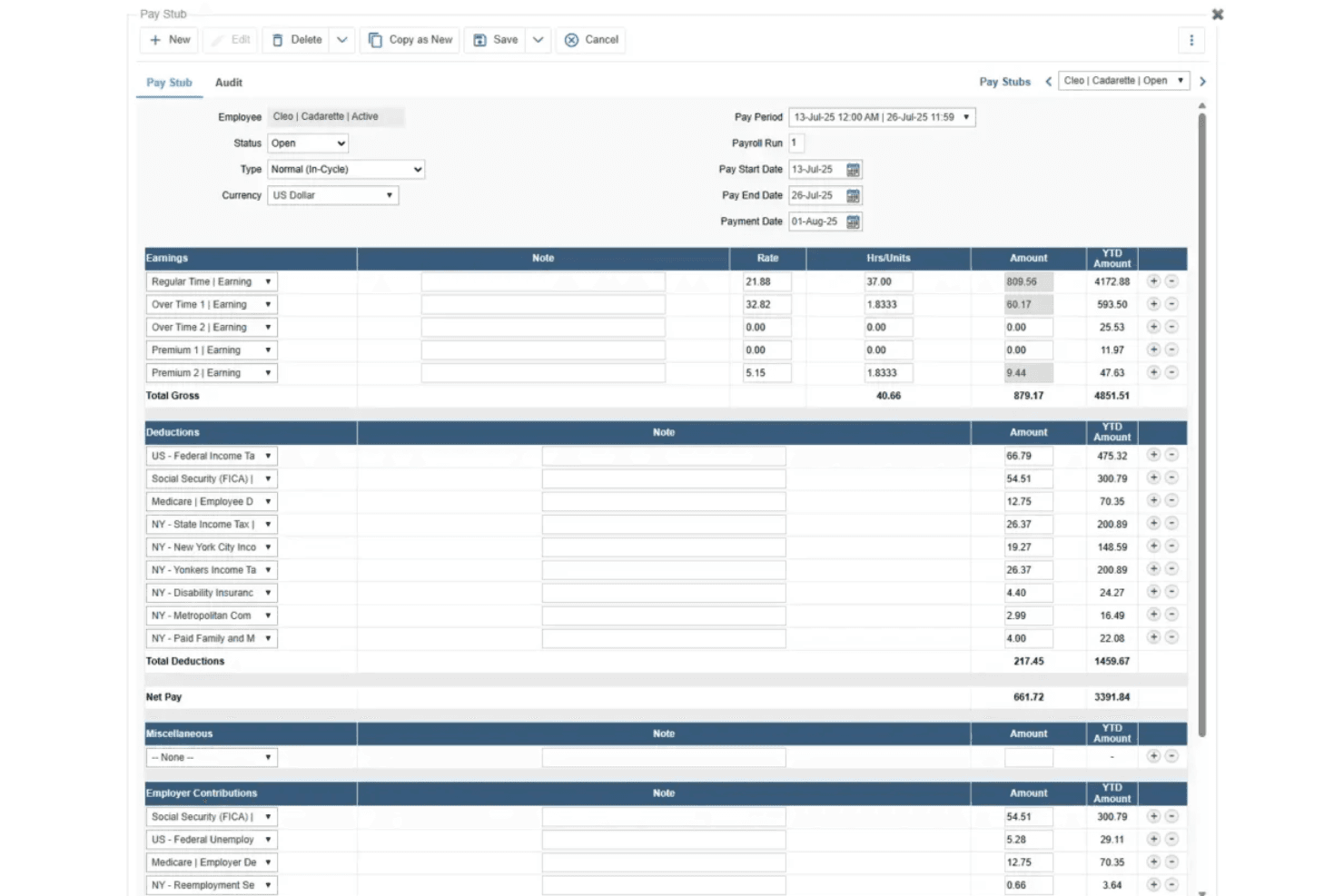
TimeTrex generates detailed pay stubs with earnings, deductions, and net pay. TimeTrex is a workforce management and payroll platform that combines time and attendance, shift scheduling, multi-rate wage calculation, tax filing, and HR tools, with built-in support for healthcare-specific needs like 8/80 overtime, shift differentials, and CMS Payroll-Based Journal exports.
Who Is TimeTrex Best For?
TimeTrex is a strong fit for long-term care facilities and hospitals that need configurable overtime, shift differential rules, and CMS PBJ compliance in one system.
Why I Picked TimeTrex
I've included TimeTrex in my top picks because it's the clearest path for healthcare organizations still running on the open-source Community Edition who need to migrate into a fully managed payroll environment without rebuilding their entire workflow. I particularly like its native 8/80 overtime engine and stackable shift differential policies, which let you layer evening, weekend, and callback premiums on the same hours without manual workarounds. The built-in CMS Payroll-Based Journal XML export is another feature I find genuinely useful for long-term care facilities that need to meet federal staffing submission requirements directly from their payroll system.
TimeTrex Key Features
- Secondary wage groups: Assign different pay rates to the same employee based on branch, department, job, or task, with those rates feeding automatically into overtime and premium calculations.
- Geofenced mobile clock-in: Let field-based and home health workers punch in and out via GPS-verified locations, supporting EVV-style verification for home health and hospice care.
- License and qualification tracking: Store license type, number, issue date, and expiry date for each employee, with a Qualification Summary Report to monitor upcoming expirations across your workforce.
- On-site deployment option: Host TimeTrex on your own infrastructure to keep employee and payroll data behind your firewall, a useful option for healthcare organizations with strict data control requirements.
TimeTrex Integrations
Documented integrations and payroll exports include Meditech, ADP, Paychex, Ceridian Insync, Millennium/Qqest, and QuickBooks. TimeTrex also offers a REST API for custom connections, but no certified connectors for UKG, Workday, Symplr, or QGenda are documented.
Pros and Cons
Pros:
- Responsive support helps complicated payroll setups
- Native PBJ exports support long-term care
- Configurable 8/80 and stacked differentials
Cons:
- No credential-linked pay or expiry blocks
- Dated interface complicates daily payroll work
Learn more about TimeTrex: Best for tracing ledger changes across EINs
- Free demo available
- Pricing upon request
Visit WebsiteCustomer Rating:4.3/5
Paycom's Report Center centralizes payroll and HR reporting tools. Paycom is a payroll and HR management platform that unifies scheduling, time tracking, tax filing, and multi-entity general ledger reporting within a single database built to support healthcare organizations.
Who Is Paycom Best For?
Paycom suits finance and payroll teams in multi-entity healthcare organizations that need clear visibility into who changed what across general ledger entries and EINs.
Why I Picked Paycom
I picked Paycom as one of the best because GL Concierge gives finance teams something genuinely hard to find: a clear audit trail showing exactly what changed in a general ledger entry and who made that change, consolidated across multiple EINs. That matters in healthcare, where multi-entity structures are common and payroll errors can ripple across facilities. I also like that Beti catches those errors upstream, flagging issues and notifying employees to resolve them before payroll is ever submitted.
Paycom Key Features
- Certification management: Alerts employees at least 30 days before a license or certification expires, lets them upload credentials, and gives designated approvers a review workflow with reportable status.
- Automated tax filing: Debits payroll taxes, remits them by their due dates, and files quarterly federal and state returns—including Forms 941 and 940—online.
- Shift scheduling tools: Supports templated and custom schedules, group assignments, shift exchanges, and rule-based automatic approval or denial of shift-swap requests.
- Beti error flagging: Identifies payroll errors before submission and notifies employees so they can resolve the issues ahead of payday.
Paycom Integrations
Paycom doesn't have any native integrations with third-party tools. It can export mapped general ledger reports for import into an accounting system, but API availability and named third-party connections aren't documented.
Pros and Cons
Pros:
- Beti flags errors before payroll submission
- GL change tracking identifies who changed entries
- Shared workforce data reduces duplicate entry
Cons:
- Some users report delayed paychecks
- Time-clock glitches can delay corrections
 Best for staffing around patient demand
- Not available
- Pricing upon request
Visit WebsiteCustomer Rating:4.3/5
UKG Pro lets users configure Time Off Properties across Pay Calc versions. UKG Pro is an HCM suite that brings together HR, payroll, workforce scheduling, and time and attendance tracking, with features built for shift-based, multi-entity, and union-driven healthcare environments.
Who Is UKG Pro Best For?
UKG Pro is a strong fit for mid-to-large healthcare organizations managing shift-based workforces across multiple facilities, union agreements, and care settings.
Why I Picked UKG Pro
I picked UKG Pro because its scheduling engine is built specifically to flex around patient volume, not just headcount, which is a meaningful distinction in healthcare payroll. When census shifts, UKG Pro uses workforce data to match staff skills and preferences to patient needs in real time, so your pay rules for float-in, float-out, and agency labor actually reflect what happened on the floor. I also like that it handles weighted-average overtime and shift differentials across multiple positions in a single payroll run, which is exactly what you need when nurses pick up shifts across units.
UKG Pro Key Features
- Automated Payroll-Based Journal reporting: Generates PBJ reports for post-acute and senior living organizations, reducing manual reporting work for regulatory submissions.
- Earned wage access via UKG Wallet: Lets employees access a portion of earned pay before their scheduled pay date, powered by Payactiv.
- Multi-entity payroll processing: Supports multiple EINs and pay groups within a single payroll run, with consolidated general-ledger export across facilities.
- MedTrainer integration: Syncs employee data from UKG Pro to MedTrainer to support healthcare credentialing, education, and compliance documentation workflows.
UKG Pro Integrations
UKG Pro offers marketplace integrations including MedTrainer for employee data sent to healthcare credentialing workflows and UKG Wallet, powered by Payactiv, for earned wage access. UKG Pro APIs and webhooks support custom connections to scheduling and timekeeping systems.
Pros and Cons
Pros:
- Automates post-acute PBJ reporting
- Handles varied union paygroups
- Calculates weighted overtime across positions
Cons:
- Employee transfers between entities can be cumbersome
- Payroll files can fail during server issues
Learn more about UKG Pro: Best for retroactive pay corrections
- Free demo available
- Pricing upon request
Visit WebsiteCustomer Rating:4.2/5
Dayforce displays payroll calculation statuses and error tracking in one dashboard. Dayforce is an HCM platform that connects payroll, HR, time and attendance, scheduling, and talent management in a unified system built to handle the complex pay structures and workforce demands of healthcare organizations.
Who Is Dayforce Best For?
Dayforce is a strong fit for HR directors and payroll administrators at mid-to-large healthcare networks managing complex shift-based pay across multiple facilities.
Why I Picked Dayforce
I picked Dayforce as one of the best because its retroactive pay handling is genuinely built for the messy realities of healthcare payroll. When a nurse's rate changes after a pay period closes, Dayforce recalculates the locked time record and routes the difference into the next pay run through its Retro Pay Management workflow, where administrators can approve, defer, or reject each adjustment before it commits. The FLSA Overtime Adjustment Rule also automatically recalculates overtime when a past-period bonus is applied, which matters when nondiscretionary bonuses land after the pay period they were earned.
Dayforce Key Features
- Shift premium rule configuration: Administrators can set up shift premiums using a multiplier, incremental rate, or separate premium amount, with eligibility scoped by job, department, or location.
- Demand-based scheduling: The scheduling engine generates shift assignments based on business demand, labor budgets, worker availability, and pay rates to help control staffing costs.
- Earned wage access via Dayforce Wallet: Employees can draw on earned wages before payday through Dayforce Wallet, which is included with Dayforce Payroll at no additional cost to employers.
- Certification expiration alerts: Configurable alert jobs notify administrators and managers a set number of days before and after an employee's certification expires.
Dayforce Integrations
Dayforce Exchange lists 131 marketplace results, including HireRight, Docusign, Emburse, AdminaHealth, Go1, and VidCruiter. Dayforce also provides REST and OpenAPI services for custom integrations.
Pros and Cons
Pros:
- Overtime rules account for multi-job rates
- Configured shift premiums handle varied clinical differentials
- Retro adjustments route differences into next payroll
Cons:
- Complex reporting and rollout draw user criticism
- Cross-midnight premiums need careful rule setup
Learn more about Dayforce: Best for switching between practice companies
- Free demo available
- Pricing upon request
Visit WebsiteCustomer Rating:4.1/5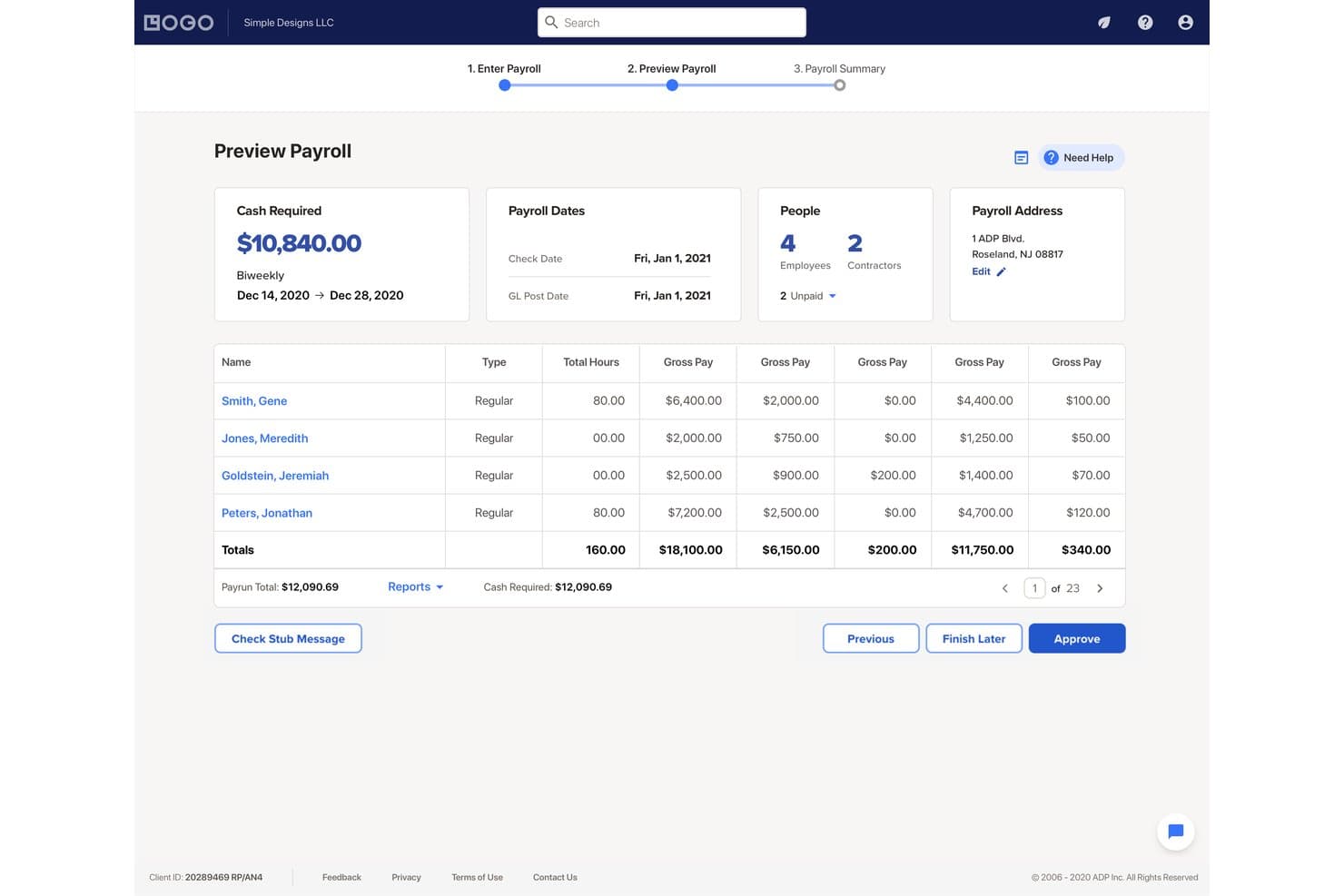
RUN Powered by ADP lets users preview payroll totals before approving. RUN Powered by ADP is a small-business payroll and HR platform that handles payroll processing, multi-jurisdiction tax filing, multi-company management, and employee payment across hourly, salaried, and contractor workforce types.
Who Is RUN Powered by ADP Best For?
RUN Powered by ADP suits small healthcare businesses managing payroll across multiple practice locations or legal entities from a single login.
Why I Picked RUN Powered by ADP
I've included RUN Powered by ADP in my top picks because its Multi-Company Access lets you switch between separate practice entities from a single login, which is a real advantage when you're managing payroll across multiple clinic locations or legal entities. I like that it supports multi-jurisdiction tax filing natively, so employees working across state lines in the same pay period don't require manual workarounds. The mobile app carries that same multi-company switching capability, so you can move between entities without logging out and back in.
RUN Powered by ADP Key Features
- Payroll tax filing: Calculates, files, deposits, and reconciles payroll taxes across federal, state, and local jurisdictions, and handles related tax-agency inquiries.
- AI-powered payroll inspector: Flags potential payroll errors before you submit, reducing the risk of costly corrections after the fact.
- New-hire onboarding: Lets new employees complete W-4s, direct deposit details, and other paperwork electronically before their first day.
- State Unemployment Insurance management: Reviews state unemployment accounts for erroneous charges, monitors experience rates, and handles state correspondence on your behalf.
RUN Powered by ADP Integrations
RUN Powered by ADP offers native integrations with QuickBooks, Xero, Wave, Creative Solutions, and Clover POS. Marketplace integrations include Connecteam, 7shifts, Employee Navigator, and DailyPay; API availability isn’t documented.
Pros and Cons
Pros:
- Payroll previews help review multiple pay rates
- Handles payroll across multiple state jurisdictions
- Switch between practice companies without relogging
Cons:
- Healthcare shift differentials need manual payroll review
- Timecard errors can require manual correction
Learn more about RUN Powered by ADP®: Best for ABA payroll using CentralReach exports
- Free demo available
- From $29/month
Visit WebsiteCustomer Rating:4.7/5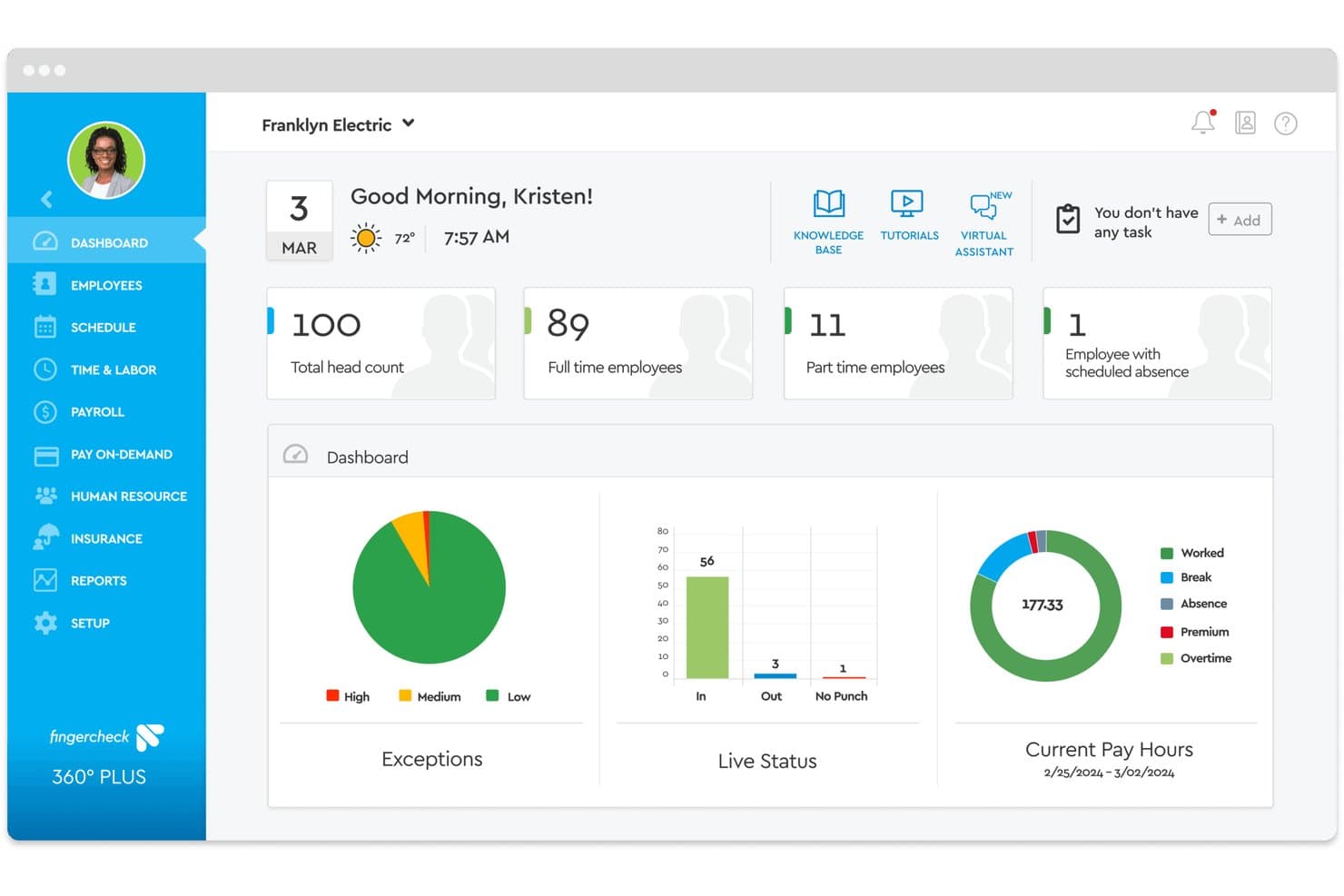
Fingercheck centralizes employee headcount, scheduling, and payroll hours in one dashboard. Fingercheck is a payroll and workforce management platform built for healthcare organizations that combines scheduling, time tracking, credential management, PBJ reporting, and multi-state payroll in one system.
Who Is Fingercheck Best For?
Fingercheck fits ABA therapy providers, physician groups, and skilled nursing facilities that want scheduling, credentialing, and payroll in one place.
Why I Picked Fingercheck
I picked Fingercheck as one of the best because it's the only tool on my list that directly maps CentralReach exports into payroll-ready imports, preserving rates by job, role, and earning code without manual rekeying. I also like that the same platform handles scheduling, punch data, and PBJ reporting, so hours flow from clock-in to CMS-ready report without leaving the system. Credential expiration alerts and a compliance dashboard round out what ABA and skilled nursing operators need in one place.
Fingercheck Key Features
- Census- and HPPD-based staffing: Set care standards or HPPD targets and let the system calculate required headcount and skill mix by unit and shift.
- Payroll-Based Journal reporting: Generate PBJ reports for CMS using hours and punches directly from payroll, with job titles mapped to CMS codes.
- Credential expiration alerts: Receive in-app and email reminders before staff licenses or certifications lapse, with a compliance dashboard showing who is cleared, expiring, or overdue.
- Weighted overtime calculation: Configure a blended-rate overtime calculation for employees working multiple jobs or shifts at different pay rates within the same workweek.
Fingercheck Integrations
Fingercheck offers native integrations with CentralReach, QuickBooks, Sage, Rent Manager, and Sapphire Background Check. Its REST API supports GET, POST, PUT, and DELETE operations for custom integrations.
Pros and Cons
Pros:
- Credential alerts flag expiring clinical licenses
- Shift premiums handle mixed-rate healthcare shifts
- Tracked hours carry into payroll
Cons:
- Tax-filing support can feel inconsistent
- Custom workforce reports offer limited filtering
Learn more about Fingercheck: 11Best for credential-linked shift eligibility
Netchex
- Free demo available
- Pricing upon request
Visit WebsiteCustomer Rating:4.5/5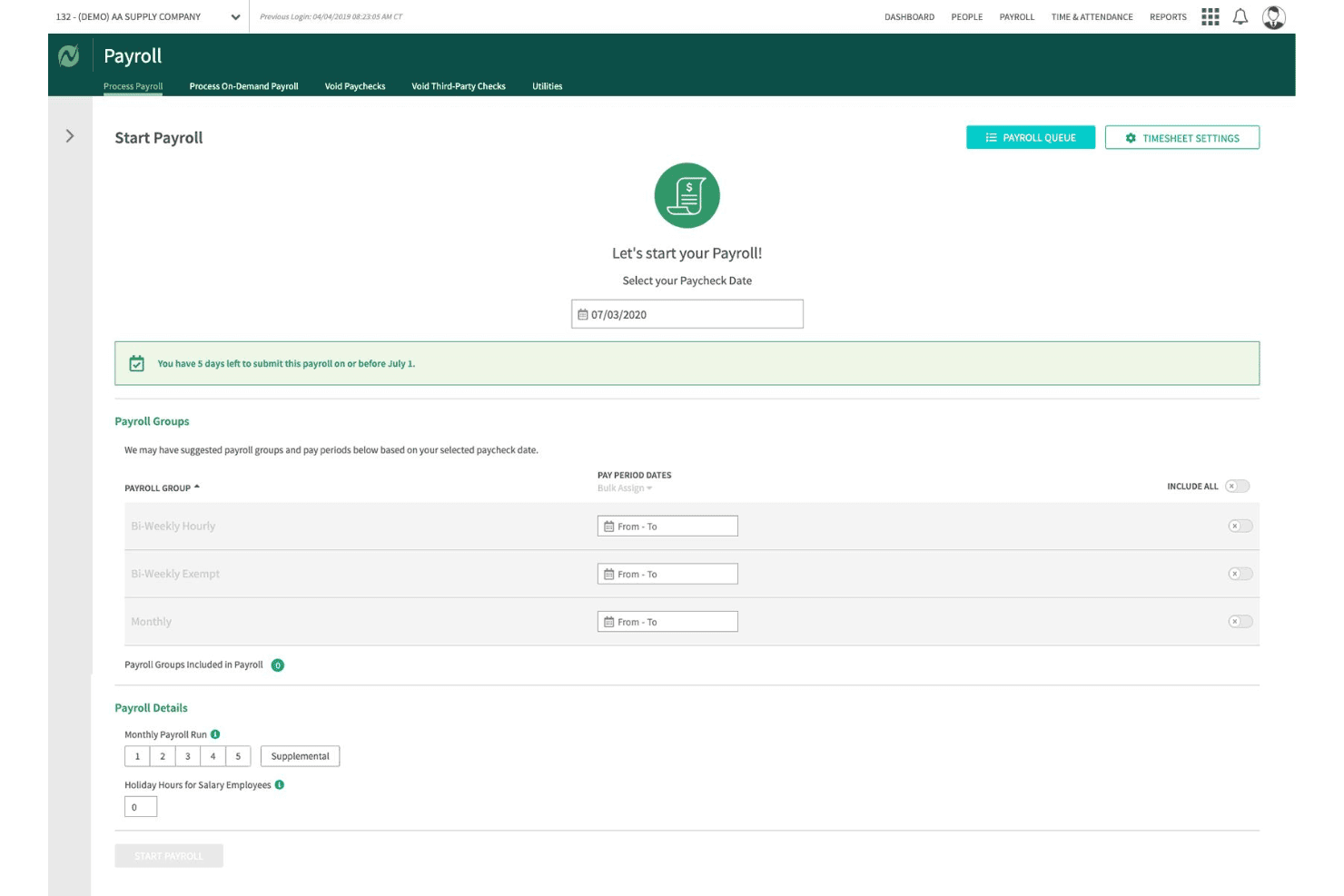
Netchex lets users configure payroll groups and schedules before processing. Netchex is a payroll and HR platform built for healthcare organizations that handles shift differentials, credential tracking, multi-facility payroll, ACA compliance, and time and attendance in a single connected system.
Who Is Netchex Best For?
Netchex is a strong fit for multi-facility healthcare organizations that need credential expiration tracking connected directly to shift eligibility and payroll.
Why I Picked Netchex
Netchex earns its spot on my shortlist because of how directly it connects credential tracking to shift eligibility and payroll. I particularly like that the credential dashboard sends alerts at 30, 60, and 90 days before a license expires and can flag a staff member as ineligible for a shift before the schedule is even published. Combined with a Universal ID record that follows employees across facilities, it's genuinely useful for multi-site healthcare teams managing float staff with varying certification requirements.
Netchex Key Features
- Multi-rate pay calculation: Netchex handles day/night differentials, weekend premiums, on-call rates, per diem, and certification-based pay within a single payroll run.
- ACA tracking and filing: The platform monitors coverage obligations for full-time, PRN, part-time, and variable-hour employees and generates Forms 1094-C and 1095-C automatically.
- FlexPay earned wage access: Employees can access up to 50% of wages already earned in the current pay period, with standard ACH delivery at no cost or instant transfer for a flat fee.
- Universal ID employee record: A single employee record follows staff across facilities, supporting cross-location scheduling, pay, and eligibility management from one account.
Netchex Integrations
Netchex lists 156+ integration partners across nine categories, including Statewise, WellSky, TCP Software, Employee Navigator, and QuickBooks; 109 are API integrations. It also offers versioned APIs and webhooks for custom connectivity.
Pros and Cons
Pros:
- Multi-facility records support shared staff
- Flexible pay schedules fit medical practices
- Credential alerts flag ineligible shifts
Cons:
- Tax corrections can take weeks
- Clock errors disrupt long clinical shifts
Learn more about Netchex: Best for post-acute payroll by legal entity
- Free demo available
- Pricing upon request

Viventium guides users through each payroll run with deadline alerts. Viventium is a healthcare HCM platform built for post-acute care organizations, combining payroll, HR, time and attendance, scheduling, and benefits administration with healthcare-specific pay calculations.
Who Is Viventium Best For?
Viventium is a strong fit for post-acute care organizations—home care, hospice, skilled nursing, and senior living—that need payroll built around healthcare-specific pay structures like wage parity, blended-rate overtime, and multi-entity filing by legal entity.
Why I Picked Viventium
I picked Viventium as one of the best because it's the only platform I've seen that structures payroll around legal entities from the ground up—each location files under its own EIN, with tax liability consolidated across sites automatically. I also love how it handles healthcare-specific pay calculations like blended-rate overtime, wage parity, and CDPAP structures, which most general payroll tools simply don't support. One user cut a 1,700-employee payroll run from four hours to 30 minutes after moving to Viventium.
Viventium Key Features
- 50-state HR compliance resources: Access state-specific law alerts, policy templates, and HR guidance updated for healthcare labor regulations across all U.S. jurisdictions.
- Credential expiration tracking: Monitor credentialing status and receive expiration-date alerts to keep caregiver licenses and certifications current.
- On-demand pay via Tapcheck: Let employees access accrued earned wages 24/7 before payday, with advances reconciled automatically at the next payroll run.
- Payroll Based Journal reporting: Generate PBJ reports required for skilled nursing and senior living organizations to meet federal staffing-data submission requirements.
Viventium Integrations
Viventium lists 12 product partners, including Tapcheck, TimeClock Plus, AxisCare, KanTime, CentralReach, SimiTree, Human Interest, and Vault Verify. It also offers an API for custom integrations and transfers benefits data to more than 600 carriers.
Pros and Cons
Pros:
- Users report faster payroll runs at scale
- Healthcare payroll handles wage parity and overtime
- Legal-entity payroll aligns filings with EINs
Cons:
- Some cite slow setup and rushed training
- Report filters and formatting frustrate payroll teams
Learn more about Viventium:
Diğer Sağlık Hizmetleri Bordro Yazılımları
Kısa listeme girmeyen ancak yine de göz atmaya değer bazı ek sağlık hizmetleri bordro yazılımı seçeneklerini burada bulabilirsiniz:
- 13TriNetBest for PEO-based HR and payroll outsourcing
- 14PaycorBest for healthcare implementation guidance
- 15Patriot SoftwareBest for clinics with intermittent staff
- 16GreenshadesBest for facility-level payroll accounting
- 17Asure SoftwareBest for AI help with payroll and HR tasks
- 18isolvedBest for AI-assisted payroll anomaly review
- 19EmpeonBest for payroll-to-Sage Intacct workflows
- 20Smartlinx Best for ACA reporting from workforce data
- 21Oracle Fusion Cloud PayrollBest for cross-border pay standardization
- 22Workday PayrollBest for 14-day FLSA healthcare periods
- 23AscentisBest for payroll admins auditing time imports
How I Evaluate Healthcare Payroll Software
I split my evaluation into three parts, giving the most weight to core needs: calculate shift differentials and overtime, and connect worked hours to payroll. Next, I look for differentiators such as float-pool pay rules and credential alerts. Finally, I consider implementation support, healthcare expertise, and total cost.
Core Functionality (Table Stakes For This List)
When I'm selecting tools for my list, I score each one on a scale from 0 (does not offer the functionality) to 5 (excels in this area) for each core functionality listed below. I then convert the total into a percentage to help assess each tool's overall fit, with extra weight on any functionalities I’ve deemed essential.
- Shift-Based Pay (Essential): I look for automated calculations that account for night, weekend, and holiday differentials alongside overtime across varied clinical roles.
- Regulatory Compliance (Essential): I evaluate how tools support labor and wage rules across jurisdictions, including overtime requirements and applicable union agreements.
- Time & Attendance: I check how scheduling and time-tracking connections transfer approved hours, including shift changes, into payroll.
- Tax Filing & Reporting: I assess tax calculations, filings, remittances, and reports across the jurisdictions where staff work.
- Multi-Entity Payroll: I look for centralized payroll across facilities or legal entities, with consolidated reporting and appropriate access controls.
- Wage Disbursement: I compare direct deposit and other electronic payment options, including how teams schedule payments for different employee groups.
Once I have a list of tools that meet the criteria, I consider what sets each platform apart.
Differentiating Factors (What Sets Vendors Apart)
Here's how I compare and contrast different vendors:
Standout Features
I evaluate how each platform handles float pool and per diem pay rules, since staff floating between units often trigger different differential rates that need automatic adjustment. Retroactive pay automation matters just as much—when a union contract is ratified mid-cycle, I check whether the system recalculates affected checks without manual workarounds. I also look at how credential expiration alerts connect to pay eligibility, flagging a lapsed license before a nurse works a shift your organization can't bill for.
Beyond Features
I evaluate whether a vendor assigns implementation specialists with direct healthcare payroll experience—someone who understands parallel payroll runs during go-live so 24/7 staff aren't left waiting on a check. Scalability matters too: I check if a platform supports acute care, long-term care, and outpatient entities under one instance without re-platforming after an acquisition. I also look at total cost of ownership, including whether custom differential rules, multi-state tax filings, and union rule updates carry added fees.
Sağlık Hizmetleri Bordro Yazılımı Nasıl Seçilir
Doğru sağlık hizmetleri bordro yazılımını seçmek, kuruluşunuzun kendine özgü ücret kurallarını, uyumluluk risklerini ve entegrasyon ihtiyaçlarını sağlık hizmetleri insan kaynakları süreçlerinin gerçeklerine uygun olarak geliştirilmiş araçlarla eşleştirmeye bağlıdır.
| Önceliğiniz... | Şunları arayın... |
|---|---|
| Önceliğiniz...Vardiya farklarının güvenilir şekilde yönetilmesi | Şunları arayın...Gece, hafta sonu ve nöbetçi vardiyalar için ayrıntılı ücret kuralı yapılandırması |
| Önceliğiniz...Birden fazla tesisin bordrosunu ve transferleri yönetmek | Şunları arayın...Bölüm veya birime göre çoklu tesis kurulumu ve maliyet merkezi tahsisi |
| Önceliğiniz...İş gücü maliyetlerinin gerçek zamanlı kontrolü | Şunları arayın...Tesis veya klinik birime göre fazla mesai ve prim takibi |
| Önceliğiniz...EHR/HRIS veri akışı | Şunları arayın...Planlama ve yetki belgesi sistemleriyle çift yönlü entegrasyonlar |
Kısa Listenizi Nasıl Değerlendirmelisiniz
- Yetki belgesi yönetimini test edin: Süresi dolmuş lisansları yükleyin ve sistemin 24 saat içinde bordro işlemlerini engelleyip engellemediğini kontrol edin.
- Ücret kuralları belgelerini isteyin: Üç veya daha fazla vardiya türünü kapsayan karmaşık fark hesaplama mantığı için örnek bir yapılandırma talep edin.
- Entegrasyonları deneyin: Veri doğruluğunu ve çift yönlü senkronizasyonu doğrulamak için planlama veya HRIS platformunuzla 7 günlük bir deneme yapın.
- Fazla mesai uyumluluğuna ilişkin kanıt isteyin: Aracın FLSA 8/80 fazla mesai hesaplamasını desteklediğini doğrulayan yazılı bir madde alın.
- Hazır kullanım kolaylığı ile kapsamlı sağlık hizmetleri özelleştirmesi arasında seçim yapın: Hızlı kurulum küçük ekipler için cazip olabilir; ancak sendika ve vardiya kuralları karmaşık olan tesisler yapılandırma esnekliğine ihtiyaç duyabilir.
Sağlık Hizmetleri Bordro Yazılımı Nedir?
Sağlık hizmetleri bordro yazılımı; hastaneler, klinikler ve birden fazla tesiste çalışan bakım ekipleri için ücret hesaplamalarını, vardiya farklarını, yetkinlik temelli ücretleri ve iş hukuku uyumluluğunu otomatikleştirmek üzere oluşturulmuş özel bir sistemdir. Bu platformlar, İK ve bordro yöneticilerinin karmaşık ücret kurallarını, sendika sözleşmelerini, birden fazla iş kodunu ve planlama veya yetkinlik doğrulama sistemleriyle entegrasyonu yönetmesine yardımcı olurken sağlık kuruluşlarına özgü mevzuata uyumu da sağlar.
Sağlık Hizmetleri Bordrosu ile Standart Bordro Arasındaki Temel Farklar
Sağlık hizmetleri bordrosu, standart bordroyla aynı temel süreci izler; ancak genellikle daha karmaşık planlama, ücret oranı ve fazla mesai gerekliliklerine sahiptir.
| Bordro alanı | Standart bordro | Sağlık hizmetleri bordrosu |
|---|---|---|
| Bordro alanıÇalışma programları | Standart bordroGenellikle sabit veya öngörülebilir programlara dayanır. | Sağlık hizmetleri bordrosuÇoğunlukla gece, hafta sonu, dönüşümlü vardiya, çağrı üzerine çalışma ve değişken programları içerir. |
| Bordro alanıÜcret oranları | Standart bordroÇalışanların genellikle bir temel ücret oranı vardır. | Sağlık hizmetleri bordrosuBir çalışanın rolüne, vardiyasına, departmanına veya tesisine göre farklı ücret oranları olabilir. |
| Bordro alanıVardiya farkları | Standart bordroDaha az yaygındır. | Sağlık hizmetleri bordrosuGece, hafta sonu, tatil günleri veya doldurulması zor vardiyalar için yaygındır. |
| Bordro alanıFazla mesai | Standart bordroMuaf olmayan çalışanlar için genellikle 40 saatten sonra hesaplanır. | Sağlık hizmetleri bordrosuBirden fazla oranı, vardiya primlerini ve uygun sağlık hizmetleri işverenleri için FLSA'nın 8 ve 80 fazla mesai sistemini içerebilir. |
| Bordro alanıÇalışan türleri | Standart bordroGenellikle tam zamanlı ve yarı zamanlı çalışanlara odaklanır. | Sağlık hizmetleri bordrosuTam zamanlı, yarı zamanlı, PRN, günlük, geçici ve sözleşmeli çalışanları içerebilir. |
| Bordro alanıÇalışma süresi takibi | Standart bordroStandart işe giriş ve işten çıkış verileri yeterli olabilir. | Sağlık hizmetleri bordrosuÇağrı üzerine çalışma süresinin, geri çağırma saatlerinin, eğitimin, tesisler arasındaki seyahatin ve planlanan vardiyalar dışındaki çalışmanın hesaba katılması gerekebilir. |
| Bordro alanıKonumlar | Standart bordroGenellikle tek bir iş yeri veya yargı bölgesi içinde yönetilir. | Sağlık hizmetleri bordrosuÇalışanlar birden fazla tesiste, departmanda veya eyalette çalışabilir. |
| Bordro alanıPlanlama entegrasyonu | Standart bordroYararlıdır ancak her zaman gerekli değildir. | Sağlık hizmetleri bordrosuProgramlar, çalışma saatleri ve ücret kodları bordro hesaplamalarını doğrudan etkilediği için çoğunlukla kritiktir. |
Yaygın Sağlık Hizmetleri Bordrosu Zorlukları
Sağlık hizmetleri bordrosu, çalışanların değişken programlarda çalışması, farklı ücretler kazanması veya roller ve konumlar arasında geçiş yapması nedeniyle karmaşık hale gelir. Bir hemşire, teknisyen veya başka bir çalışan farklı vardiyalarda çalışabilir, birden fazla ücret kazanabilir, fazla mesai yapabilir ya da aynı ücret dönemi içinde farklı konumlarda çalışabilir.
- Birden fazla ücret oranı: Hemşireler, teknisyenler ve diğer personel; rollerine, vardiyalarına, departmanlarına veya tesislerine göre farklı ücretler kazanabilir.
- Vardiya, çağrı üzerine çalışma ve geri çağırma ücreti: Gece çalışmaları, hafta sonları, tatil günleri, çağrı üzerine çalışma dönemleri ve geri çağırmaların tümü farklı ücret kuralları gerektirebilir.
- Karmaşık fazla mesai: Vardiya farkları, isteğe bağlı olmayan ikramiyeler ve birden fazla saatlik ücret, fazla mesai için normal ücret oranının hesaplanma şeklini etkileyebilir.
- Değişken programlar: PRN, günlük, yarı zamanlı ve dönüşümlü çalışanlar her ücret döneminde çok farklı saatlerde çalışabilir; bu da doğru çalışma süresi takibini kritik hale getirir.
- Birden fazla rol ve tesis: Çalışanlar aynı hafta içinde farklı işlerde veya konumlarda çalışabilir ve fazla mesai hesaplanırken bu saatlerin birleştirilmesi gerekebilir.
- Farklı çalışan türleri: Sağlık kuruluşları genellikle çalışanları yüklenicilerle birlikte çalıştırır; bu da bordro vergileri ve raporlama açısından doğru çalışan sınıflandırmasını önemli hale getirir.
Planlama ve çalışma süresi takibini bordroyla birleştirebilen ve doğru ücret oranlarını, primleri ve fazla mesai kurallarını otomatik olarak uygulayabilen bordro yazılımlarını tercih edin.
Özellikler
Her iyi sağlık hizmetleri bordro yazılımının sahip olması gereken temel özellikler şunlardır:
- Vardiya farkı ücreti: Doğru ücretlendirmeyi sağlamak için önceden belirlenmiş kurallara göre gece, hafta sonu, tatil ve çağrı üzerine çalışma vardiyalarının ücretini otomatik olarak hesaplar.
- Çoklu ücret ve çoklu rol desteği: Bir ödeme dönemi içinde birden fazla rolde veya departmanda çalışan personele farklı ücretler üzerinden ödeme yapmanızı ve gerektiğinde fazla mesaiyi birleştirmenizi sağlar.
- Zaman ve devam entegrasyonu: 7/24 sağlık hizmeti operasyonlarında maaşlı, saatlik, günlük ücretli veya sözleşmeli personelin çalışma saatlerini izlemek için giriş-çıkış sistemleriyle ya da planlama araçlarıyla senkronize olur.
- İş hukuku ve sendika uyumluluğu: Yemek molası cezalarını ve zorunlu fazla mesai hesaplamalarını otomatikleştirirken FLSA, ACA, eyalet kurallarını ve sendika anlaşmalarını uygular.
- Yetki belgesi ve lisans takibi: Süre sonlarını izler ve ücretlendirmeyi ya da vardiya uygunluğunu sertifikalara bağlayarak bordro işlenmeden önce sorunlar hakkında sizi uyarır.
- Otomatik geriye dönük ücret düzenlemeleri: Sendika görüşmeleri, kademe artışları veya geçmiş ödeme dönemlerinde ödenmemiş primlerin düzeltilmesi için geriye dönük ödemeleri işler.
- Sağlık hizmetleri İKYS ve EHR entegrasyonu: Bordroyu İK, planlama ve klinik sistemlerle birbirine bağlayarak veri akışını kolaylaştırır ve yinelenen veri girişini en aza indirir.
- Maliyet merkezi ve tesis tahsisi: Bütçeleme ve mevzuata ilişkin raporlamada şeffaflık sağlamak için iş gücü maliyetlerini departmana, birime veya tesise göre dağıtır.
- Personel için self-servis portalları: Çalışanların tek bir erişilebilir platform üzerinden maaş bordrolarını görüntülemesine, yetki belgelerini güncellemesine, izin talep etmesine ve doğrudan para yatırma işlemlerini yönetmesine olanak tanır.
- Özelleştirilebilir raporlama ve analiz: Denetimler, hibe uyumluluğu, geri ödeme veya verimlilik analizi için departman, birim ve maliyet raporlaması düzeyinde içgörüler oluşturur.
Sağlık Hizmetlerinde Bordro için Uyumluluk Gereklilikleri
Sağlık kuruluşları, diğer ABD işverenleriyle aynı temel federal bordro yasalarına uyar; ancak düzensiz çalışma programları, birden fazla ücret ve farklı çalışan türleri, bu gerekliliklerin doğru şekilde uygulanmasını zorlaştırabilir.
Dikkat edilmesi gereken başlıca alanlar:
- Asgari ücret ve fazla mesai: Adil Çalışma Standartları Yasası (FLSA) kapsamında, kapsama giren muaf olmayan çalışanlara genel olarak bir çalışma haftasında 40 saati aşan çalışmalar için normal ücretlerinin 1,5 katı oranında fazla mesai ödenir.
- 8 ve 80 fazla mesai kuralı: Belirli hastaneler ve yatılı bakım kuruluşları, sabit 14 günlük bir dönem kullanabilir ve bir günde sekiz saati veya 14 günlük dönemde 80 saati aşan çalışmalar için fazla mesai ödeyebilir. Etkilenen çalışanlarla çalışma gerçekleştirilmeden önce bir anlaşma veya mutabakat yapılması da dahil olmak üzere belirli FLSA gereklilikleri geçerlidir.
- Çalışılan saatlerin doğru kaydedilmesi: Bordro sistemi, gerektiğinde planlanan vardiyaların dışındaki ücretlendirilebilir süreleri de kaydetmelidir; buna vardiya öncesi veya sonrası belirli görevler, toplantılar, eğitimler ve işle ilgili olarak tesisler arasındaki seyahatler dahildir.
- Çalışan sınıflandırması: PRN, geçici veya sözleşmeli statünün bir kişiyi otomatik olarak bağımsız yüklenici yaptığını varsaymayın. IRS; davranışsal kontrol, mali kontrol ve çalışma ilişkisinin niteliği gibi faktörleri değerlendirir. Yanlış sınıflandırma, işvereni istihdam vergilerinden sorumlu bırakabilir.
- Bordro vergileri: İşverenlerin genel olarak federal gelir vergisini ve çalışanların Sosyal Güvenlik ile Medicare vergilerini kesmesi, Sosyal Güvenlik ve Medicare için işveren payını ödemesi ve federal işsizlik vergisini hesaba katması gerekir. Eyalet ve yerel bordro gereklilikleri de geçerli olabilir.
- Eyalet ücret ve çalışma saati kuralları: Federal yasa yalnızca temel gereklilikleri belirler. Eyaletler daha yüksek asgari ücretler veya ek fazla mesai gereklilikleri getirebilir; bu nedenle birden fazla eyalette faaliyet gösteren sağlık kuruluşlarının, gereklilikleri çalışanın konumuna göre uygulayabilen bordro yazılımlarına ihtiyacı vardır.
- Bordro kayıtlarının tutulması: FLSA kapsamında işverenlerin genel olarak bordro kayıtlarını en az üç yıl, çalışma çizelgeleri ve çalışma programları gibi ücretleri hesaplamak için kullanılan kayıtları ise en az iki yıl saklaması gerekir.
- ACA raporlaması: Sağlık kuruluşları, yalnızca sağlık hizmeti sağlayıcısı oldukları için otomatik olarak özel ACA bordro kurallarına tabi değildir. Ancak önceki yılda tam zamanlı eşdeğerler dahil olmak üzere ortalama en az 50 tam zamanlı çalışanı bulunan işverenler genel olarak Geçerli Büyük İşveren kapsamına girer ve işverenin ortak sorumluluğuna ve bilgi raporlamasına ilişkin gerekliliklere tabi olur.
- OSHA gereklilikleri: Sağlık hizmetleri işverenleri, geçerli OSHA iş yeri güvenliği ve kayıt tutma kurallarına uymalıdır. Bunlar bordro gereklilikleri değildir; ancak bordro yazılımı İK, eğitim, olay takibi veya çalışan tazminatı özelliklerini içerdiğinde iş gücü sistemleriyle kesişebilir.
Yazılım satın alanlar için temel özellikler yapılandırılabilir ücret kuralları, birden fazla eyalet desteği, doğru zaman takibi ve açık bordro kayıtlarıdır.
Faydalar
Sağlık hizmetleri bordro yazılımını uygulamak, ekibiniz ve işletmeniz için çeşitli faydalar sağlar. Yararlanmayı bekleyebileceğiniz bazı faydalar şunlardır:
- Karmaşık ücret hesaplamalarında doğruluk: Vardiya farklarını, harmanlanmış fazla mesaiyi ve yetkinliğe dayalı ücret oranlarını otomatikleştirerek manuel hataları ve maaş anlaşmazlıklarını azaltır.
- Mevzuat ve sendika uyumluluğu takibi: FLSA, ACA ve sendika sözleşmesi kurallarına uyumunuzu korur; eyalet ve federal yükümlülükleri otomatik olarak uygulayarak hukuki riski azaltır.
- İK ekipleri için zaman tasarrufu: Entegre planlama, zaman takibi ve self servis işlevleriyle çift veri girişini ortadan kaldırır ve ekip kapasitesini daha yüksek değer sağlayan görevlere ayırır.
- Ölçeklenebilir çok tesisli yönetim: Birden fazla tesis, EIN ve bordro ile maliyet tahsisini destekler; böylece bordro sorunları yaşamadan büyüyebilir veya yeniden yapılandırabilirsiniz.
- Kimlik bilgileri ve lisans güncellemelerinde hız: Yeni sertifikaları veya lisans durumu değişikliklerini ücret ve uygunluk eşiklerine anında yansıtarak personel gereksinimlerini karşılamanıza yardımcı olur.
- İş gücü maliyetlerine ilişkin görünürlüğün iyileştirilmesi: Fazla mesaiyi, birim maliyetlerini ve verimliliği takip etmek için ayrıntılı, gerçek zamanlı analizler sunarak daha iyi personel planlama ve bütçeleme kararlarını destekler.
- Geliştirilmiş çalışan deneyimi: Çalışanlara ücret bilgilerine ve kimlik bilgilerine self servis erişim sunarak memnuniyeti artırır ve İK taleplerini azaltır.
Maliyetler ve Fiyatlandırma
Sağlık hizmetleri bordro yazılımı seçerken mevcut çeşitli fiyatlandırma modellerini ve planları anlamak gerekir. Maliyetler özelliklere, ekip büyüklüğüne, eklentilere ve daha birçok unsura göre değişir. Aşağıdaki tablo, sağlık hizmetleri bordro yazılımı çözümlerinde yaygın planları, ortalama fiyatlarını ve genellikle sunulan özellikleri özetlemektedir:
Sağlık Hizmetleri Bordro Yazılımı için Plan Karşılaştırma Tablosu
| Plan Türü | Ortalama Fiyat | Yaygın Özellikler |
|---|---|---|
| Plan TürüÜcretsiz Plan | Ortalama Fiyat$0 | Yaygın ÖzelliklerTemel bordro işlemleri, sınırlı çalışan sayısı, basit vardiya farkları ve temel destek. |
| Plan TürüBireysel Plan | Ortalama Fiyat$8–$18/kullanıcı/ay | Yaygın ÖzelliklerStandart bordro, zaman takibi, vardiya farkları, self servis portalı ve e-posta desteği. |
| Plan Türüİşletme Planı | Ortalama Fiyat$18–$35/kullanıcı/ay | Yaygın ÖzelliklerGelişmiş vardiya ücreti, birden fazla ücret oranına sahip roller, HRIS entegrasyonları, kimlik bilgileri takibi ve uyumluluk otomasyonu. |
| Plan TürüKurumsal Plan | Ortalama Fiyat$36–$60/kullanıcı/ay | Yaygın ÖzelliklerÖzel entegrasyonlar, sendika/geçmişe dönük ücret, raporlama, çok tesisli kurulum ve özel destek. |
SSS
Sağlık hizmetleri bordro yazılımı hakkında sık sorulan bazı soruların yanıtlarını burada bulabilirsiniz:
Bordro yazılımını mı yoksa dış kaynaklı bordro hizmetini mi seçmeliyim?
Ekibiniz bordroyu kurum içinde yönetmek istiyorsa ve esas olarak hesaplamaları, vergileri, bildirimleri ve raporlamayı otomatikleştirme konusunda yardıma ihtiyaç duyuyorsa bordro yazılımını seçin.
Bordro yönetiminin daha büyük bir kısmını bir hizmet sağlayıcının üstlenmesini istiyorsanız dış kaynaklı bordro hizmetini değerlendirin.
Kliniğim tatillerde açık kalıyorsa tatil ücreti nasıl uygulanır?
Federal yasa, bir çalışanın tatil gününde çalışması nedeniyle sağlık hizmeti işverenlerinin ücretli tatil veya yalnızca bu nedenle primli ücret ödemesini zorunlu kılmaz. Tatil ücreti genellikle istihdam politikalarınız, toplu iş sözleşmeniz veya geçerli eyalet yasaları tarafından belirlenir.
Kliniğiniz normal ücretin 1,5 katı veya 2 katı gibi bir tatil primi ödüyorsa bordro sisteminiz bu oranı uygun vardiyalara otomatik olarak uygulayabilmelidir.
Çalışanları ve bağımsız yüklenicileri bordroda nasıl ele almalıyım?
Bordro ve vergi amaçları açısından çalışanlarla bağımsız yüklenicileri ayrı tutun. Çalışanların gelir vergisi, Sosyal Güvenlik ve Medicare kesintileri genellikle bordro üzerinden yapılırken bağımsız yüklenicilerden genellikle istihdam vergileri kesilmez ve bu kişilere bunun yerine Form 1099-NEC verilebilir.
Bir kişiyi yalnızca PRN, geçici veya vardiya başına ücret alıyor diye yüklenici olarak sınıflandırmayın. IRS; davranışsal kontrol, mali kontrol ve çalışma ilişkisinin niteliği gibi unsurları değerlendirir. Yanlış sınıflandırma, kuruluşunuzun ödenmemiş istihdam vergilerinden sorumlu olmasına yol açabilir.
Yarı zamanlı, PRN ve günlük ücretli sağlık personelinin izin ücreti nasıl ele alınır?
Federal yasa, yarı zamanlı, PRN veya günlük ücretli çalışanlar da dahil olmak üzere ücretli izin verilmesini zorunlu kılmaz. Bu çalışanların PTO veya izin ücreti kazanıp kazanmayacağı kuruluşunuzun politikasına, iş sözleşmesine ve geçerli eyalet ya da yerel gerekliliklere bağlıdır.
Farklı çalışan grupları için farklı PTO kuralları varsa herkese tek bir politika uygulamak yerine çalışan türüne, konuma veya kıdeme göre ayrı birikim politikaları atayabilen bir bordro yazılımı arayın.
Sağlık hizmetleri bordro yazılımı sendikalı ve sendikasız çalışanları yönetebilir mi?
Evet; yazılım farklı çalışan grupları için farklı ücret kurallarını ve kesintileri destekliyorsa bunu yapabilir.
Sendikalı çalışanlar için şu ayarları yapılandırmanız gerekebilir:
- Sözleşmeye özel ücret oranları
- Vardiya ve fazla mesai kuralları
- Yan hak katkıları
- Sendika aidatları
- Toplu iş sözleşmesine dayalı ücret artışları
Sendikasız çalışanlar aynı sistem içinde ayrı bordro politikalarını izleyebilir. Yetkilendirilmiş bir aidat kesintisi düzenlemesi geçerli olduğunda işverenler sendika aidatlarını da kesebilir; bu nedenle yazılımın bu kesintileri doğru şekilde yönetebilmesi ve ilgili yerlere aktarması gerekir.
Sağlık hizmetleri bordro yazılımı birden fazla konumu veya tesisi yönetebilir mi?
Evet. Birden fazla konuma sahip bir sağlık hizmetleri kuruluşu için çalışanları ve çalışma saatlerini belirli kliniklere, tesislere, departmanlara ve maliyet merkezlerine atamanıza, aynı zamanda bordroyu merkezi olarak yönetmenize olanak tanıyan bir yazılım arayın.
Yararlı özellikler şunları içerir:
- Konum düzeyinde iş gücü maliyeti raporlaması
- Eyalet ve yerel vergi desteği
- Konumlar arasında çalışan çalışanlar
- Ayrı departmanlar ve maliyet merkezleri
- Kuruluş genelinde birleştirilmiş raporlama
- Tesisler ayrı tüzel kişiler olarak faaliyet gösterdiğinde birden fazla EIN desteği
Konumlar farklı tüzel kişilere aitse yazılımın her tesisi tek bir işveren olarak ele almak yerine bunların bordro bildirimlerini ve EIN’lerini ayrı tutabildiğinden emin olun.
Bordro yazılımı, personel devir oranı yüksek sağlık kuruluşlarına nasıl yardımcı olabilir?
Sık işe alım ve işten ayrılmalar, yeni çalışanların eklenmesinden son ücretin işlenmesine kadar daha fazla bordro işi oluşturur. Bordro yazılımı; işe alım sürecini, çalışan kayıtlarını, zaman takibini, bordroyu ve işten ayrılma işlemlerini birbirine bağlayarak manuel işi azaltabilir.
Şunları yönetmenize yardımcı olan özellikleri arayın:
- Yeni işe alınanların bordro kurulumu ve vergi formları
- Doğrudan ödeme kaydı
- İstihdam durumundaki değişiklikler
- PTO bakiyeleri ve ödemeleri
- Son maaş çekleri
- Bordro kayıtları ve yıl sonu formları
Birden fazla eyalette faaliyet gösteriyorsanız son ücret kurallarına özellikle dikkat edin. Federal yasa derhâl son maaş çekinin verilmesini zorunlu kılmaz; ancak bazı eyaletler işten ayrılan veya işine son verilen çalışanlar için daha kısa süreler belirler.
Sağlık hizmetleri bordro yazılımı mevzuata uyuma nasıl yardımcı olur?
Bu sistemler iş yasaları, sendika sözleşmeleri, FLSA 8/80 fazla mesai kuralı ve yetkinlik gereklilikleriyle uyumlu ücret politikalarını uygular. Bu, sağlık hizmetleri ortamlarında uyumsuzluk cezaları ve denetim sorunları riskinizi azaltır.
Sağlık hizmetleri bordro yazılımı zaman ve devamlılık veya planlama araçlarıyla entegre olur mu?
Evet, önde gelen çözümler saat kaydediciler, iş gücü yönetimi ve planlama uygulamalarıyla bağlantı kurarak saatleri, vardiyaları ve iş verilerini doğrudan bordroya aktarır. Entegrasyon, tutarsızlıkların önlenmesine ve bordro işlemlerinin basitleştirilmesine yardımcı olur.
Sağlık hizmetleri bordro yazılımı yetkinlik ve lisans yönetimini nasıl destekler?
Sağlık hizmetleri bordro yazılımı sertifikaları izler, süreleri dolmadan önce sizi uyarır ve gerekli bir lisansın süresi dolarsa bordroyu veya vardiya atamalarını engelleyebilir. Bu, personel uyumluluğunu ve güvenlik standartlarını korumanıza yardımcı olur.