

Open-Source-Lohnabrechnungssoftware bietet Funktionen für die Lohnabrechnung auf Grundlage von Quellcode, den Sie einsehen und je nach Lizenz anpassen oder selbst hosten können. Die Optionen reichen von Lohnabrechnungsmodulen innerhalb von HR- und ERP-Plattformen bis hin zu Tools, die Entgeltabrechnung mit Zeiterfassungsdaten verbinden oder Lohnabrechnungsfunktionen in ein anderes Produkt integrieren. Vergleichen Sie die Lohnabrechnungsfunktionen, die Unterstützung lokaler Compliance-Anforderungen, die Integrationen und die Einrichtungsvoraussetzungen jedes Tools, bevor Sie entscheiden, ob es zu Ihren HR-Abläufen und technischen Ressourcen passt.
Warum Sie unseren Software-Bewertungen vertrauen können
6,700+
Reviews
20
Industry experts
16+
Evaluation factors
14
Years reviewing software
Unser Team testet und bewertet Software seit 2012. Als HR-Experten wissen wir selbst, wie schwierig – und wichtig – es ist, die richtige Software auszuwählen.
Für diesen Leitfaden haben wir Tools mithilfe von praktischen Tests und unabhängiger Recherche bewertet und dabei unsere Bewertungskriterien angewendet. Zudem greifen wir auf Erkenntnisse von Branchenvordenkern und praktizierenden HR-Experten zurück.
Unsere Bewertungen spiegeln unser menschliches redaktionelles Urteilsvermögen wider, keine Verkaufsstrategie.
Expertenprüfer:
- Phil GrayCOO
 Kim BehnkeHR-Tech-Redakteurin & Analystin
 Josh BarkerPeople-Ops-Manager

Vergleichstabelle: Open-Source-Lohnabrechnungssoftware
Vergleichen Sie Preise und technische Daten der Open-Source-Lohnabrechnungssoftware, die es auf meine Auswahlliste geschafft hat, direkt miteinander.
Score legend (out of 5)
- Excellent4.5–5
- Good4–4.4
- Average3–3.9
- Below average2–2.9
- Poor1–1.9
Sorted by: Default
| Tool | Starting Price | Website | |||||||
|---|---|---|---|---|---|---|---|---|---|
Best for linking payroll with ERP accounting | 4.0 out of 5 | 4 | 4 | 5 | 4 | 3 | 4 | Pricing upon request Free plan available | Website |
Best for salary workflows in a connected ERP | 3.2 out of 5 | 4 | 3 | 5 | 3 | 1 | 3 | Free Free open-source framework | Website |
Best for DIY payroll around a self-hosted ERP | 3.0 out of 5 | 5 | 1 | 5 | 2 | 1 | 4 | Free software Free plan + free demo available | Website |
Best for self-hosting with setup support | 3.2 out of 5 | 3 | 3 | 4 | 4 | 2 | 3 | Pricing upon request Free demo available | Website |
Best for payroll tied to wider ERP operations | 3.7 out of 5 | 5 | 3 | 5 | 3 | 2 | 4 | Free Free open-source framework | Website |
Best for workforce costs in a wider ERP | 3.2 out of 5 | 3 | 3 | 4 | 3 | 2 | 4 | Free Free plan + free demo available | Website |
Best for India-specific payroll compliance | 4.2 out of 5 | 4 | 4 | 5 | 4 | 4 | 4 | $5/month Free plan + 14-day free trial available | Website |
Best for embedding payroll in your product | 3.8 out of 5 | 4 | 4 | 4 | 4 | 3 | 4 | Free framework Free open-source framework | Website |
Best for free, unlimited-user self-hosted HR | 3.8 out of 5 | 4 | 4 | 4 | 4 | 4 | 3 | $7/user/month Free plan + 30-day free trial available | Website |
Best for payroll tied to staff schedules | 3.2 out of 5 | 3 | 4 | 1 | 3 | 4 | 4 | $50/month 30-day free trial + free demo available | Website |


Bewertungen von Open-Source-Lohnabrechnungssoftware
Nachfolgend finden Sie meine Zusammenfassungen der besten Open-Source-Lohnabrechnungssoftware, die es auf meine Auswahlliste geschafft hat. In meinen Bewertungen betrachte ich die Lohnabrechnungsfunktionen, die Compliance-Unterstützung und die Einrichtungsvoraussetzungen jeder Softwareoption, damit Sie die passende Lösung finden.
 Best for linking payroll with ERP accounting
- Free plan available
- Pricing upon request
Visit WebsiteCustomer Rating:4.2/5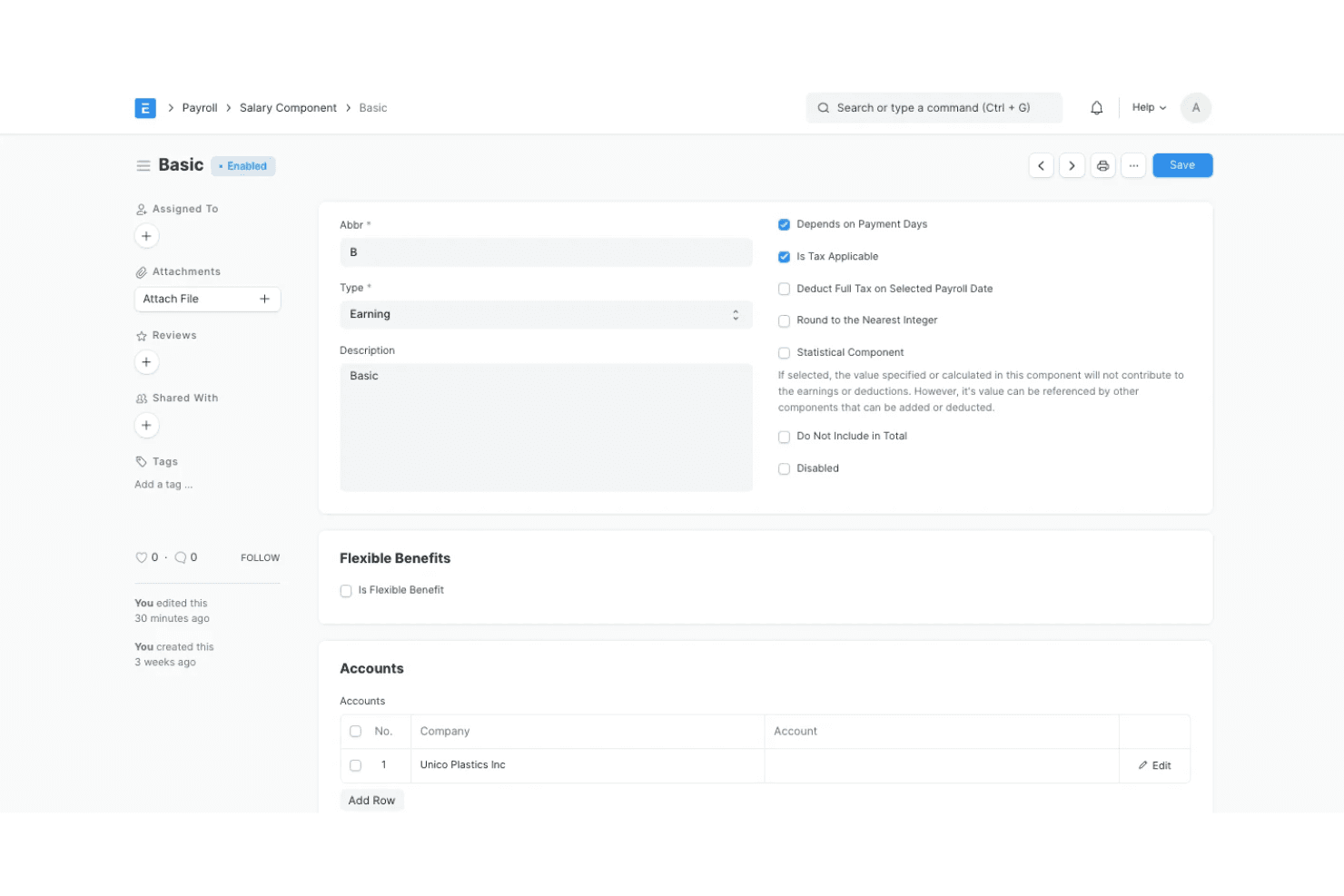
ERPNext's Payroll module lets you configure salary components such as Basic pay, including tax and account settings. ERPNext is an open-source ERP platform that, when used with the separate Frappe HR application, covers payroll processing, salary structure configuration, tax slab setup, bulk payroll processing, and direct accounting integration across HR, finance, and operations modules.
Who Is ERPNext Best For?
ERPNext is a strong fit for small businesses and IT teams that want to manage payroll, accounting, and HR within a single open-source platform they can fully control.
Why I Picked ERPNext
I picked ERPNext because it connects payroll processing directly with its accounting module. When you submit salary slips, ERPNext automatically creates the corresponding accrual journal entries, keeping payroll payable accounts up to date without manual reconciliation. I also like that you can configure salary structures with custom components and tax slabs, then process bulk payroll across branches or departments through a single payroll entry.
ERPNext Key Features
- Salary structure configuration: Define salary components, formulas, and tax slabs, then assign structures to individual employees or groups.
- Timesheet-based payroll: Calculate employee pay from submitted timesheets using the hourly rate defined in the salary structure.
- Salary slip email delivery: Automatically email password-protected salary slip PDFs to each employee's preferred email address.
- Role-based payroll access: Control who can process payroll and post accounting entries using HR Manager and Accounts User role permissions.
ERPNext Integrations
ERPNext has 398 marketplace apps, including Google Sheets Data Sync, Banking, Biostar Biometric Integration, and WhatsApp Integration. Its RESTful API supports custom integrations.
Pros and Cons
Pros:
- Supports encrypted payslip delivery
- Processes department-specific payroll batches
- Automatically posts payroll accruals
Cons:
- Non-Indian tax rules vary
- Accounting mappings need validation
Learn more about ERPNext: Best for salary workflows in a connected ERP
- Free open-source framework
- Free (self-hosted)
Visit WebsiteCustomer Rating:4.1/5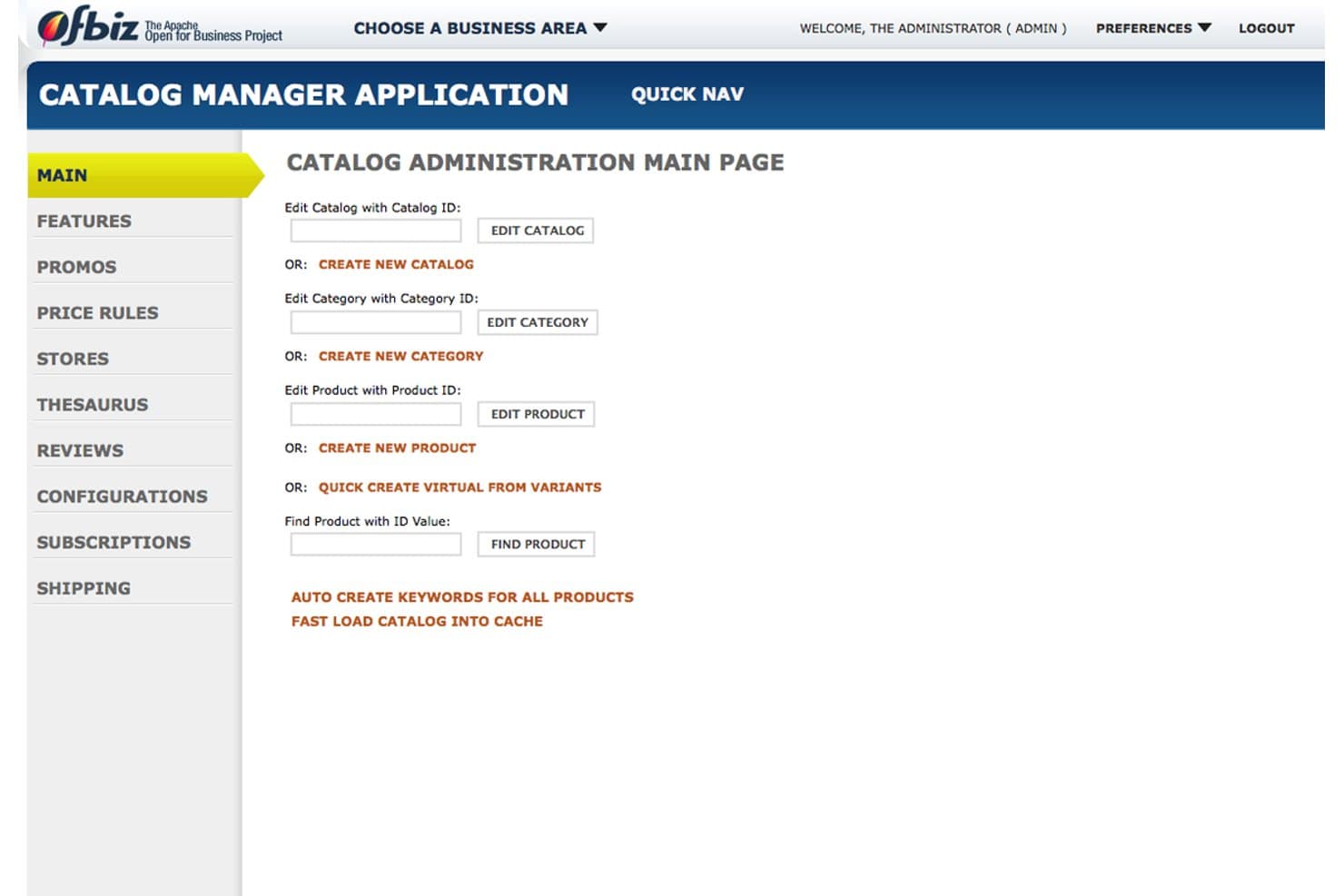
The Apache OFBiz Catalog Manager main page, for editing catalogs, categories and products. Apache OFBiz is an open-source, Java-based ERP framework with an HR module that handles salary calculations, pay grade management, payslip generation, and payroll invoice processing through an integrated accounting system.
Who Is Apache OFBiz Best For?
Apache OFBiz is a good fit for developer-led teams that need to build and maintain a self-hosted ERP with salary workflows closely connected to accounting and HR.
Why I Picked Apache OFBiz
I picked Apache OFBiz because its salary workflows operate within an integrated HR and accounting environment rather than as a separate application. You can define pay grades and salary steps linked to job position types, calculate salaries using direct amounts or grade-and-step structures, and process payroll invoices through the Accounting module's invoice lifecycle, from creation to general ledger posting and payment. I find this workflow particularly useful for teams that need payroll and general ledger records to remain synchronized without manual data transfers.
Apache OFBiz Key Features
- Pay grade and salary step configuration: Define pay grades and salary steps linked to job position types, with rates specified by year, month, week, or hour.
- HR and accounting module integration: Process payroll invoices through the Accounting module's invoice lifecycle, including creation, general ledger posting, and payment.
- Entity and service engine architecture: Build and extend custom business logic at the data model and service levels without being restricted by a fixed application structure.
- On-premises self-hosting: Deploy OFBiz on your own infrastructure across supported Windows or Unix-based environments to maintain control over payroll data.
Apache OFBiz Integrations
Apache OFBiz does not document native integrations with named external vendors. It provides APIs and connects HR salary workflows with its built-in Accounting module for custom integrations.
Pros and Cons
Pros:
- Processes integrated payroll invoices
- Supports flexible Java customization
- Configures graded salary steps
Cons:
- Payroll history uses invoices
- Statutory withholding setup undocumented
Learn more about Apache OFBiz: Best for DIY payroll around a self-hosted ERP
- Free plan + free demo available
- Free software (payroll add-on from €180)
Visit WebsiteCustomer Rating:4.5/5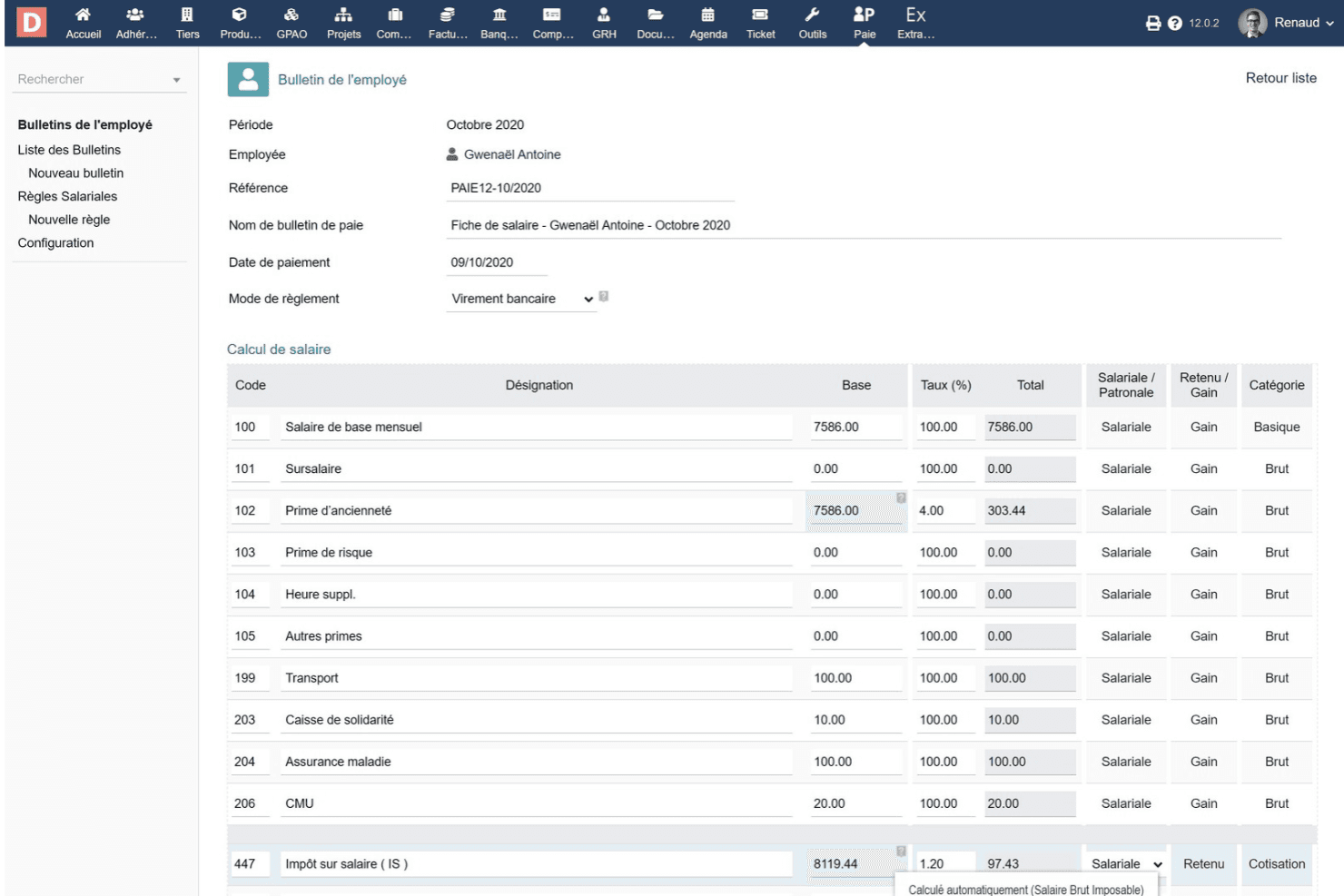
Dolibarr's payroll module generating an employee payslip with salary lines and social contributions. Dolibarr is an open-source ERP and CRM suite that covers HR, finance, billing, timesheets, and expense management. Its built-in Salaries module records salary payments, while full gross-to-net payroll calculations require a separately purchased add-on, such as Odoo Payroll for Dolibarr.
Who Is Dolibarr Best For?
Dolibarr is a good fit for technically inclined small business owners and developers who want a self-hosted, open-source ERP foundation that they can extend with custom payroll logic.
Why I Picked Dolibarr
I picked Dolibarr because it provides a self-hosted ERP environment that businesses can extend to accommodate their payroll requirements. The core Salaries module handles salary payment recording, while the separately purchased Odoo Payroll for Dolibarr add-on provides configurable gross-to-net calculations using custom salary rules, structures, and formula-based logic. This flexibility is useful for businesses with compensation arrangements that do not fit standard payroll structures, although the additional module cost and local compliance requirements must be considered.
Dolibarr Key Features
- Employee and user management: Create employee profiles, organize users into groups and hierarchies, and assign role-based permissions across the system.
- Leave request tracking: Employees submit leave requests through the platform, supervisors approve or decline them, and the system automatically updates leave balances.
- Timesheet recording: Record time by day, week, month, project, or task, and convert logged hours into monetary values using each employee's configured hourly rate.
- REST API and module builder: Access REST APIs through an embedded API explorer and use the low-code Module Builder to extend or customize the application without writing everything from scratch.
Dolibarr Integrations
Dolibarr offers native LDAP integration for user authentication and synchronization. Its REST API, triggers, hooks, and external modules support custom connections with HR, accounting, and payroll systems.
Pros and Cons
Pros:
- Extends payroll through add-ons
- Records employee salary payments
- Supports modular ERP customization
Cons:
- Add-on compliance needs validation
- Native payroll excludes calculations
Learn more about Dolibarr: Best for self-hosting with setup support
- Free demo available
- Pricing upon request
Visit WebsiteCustomer Rating:3/5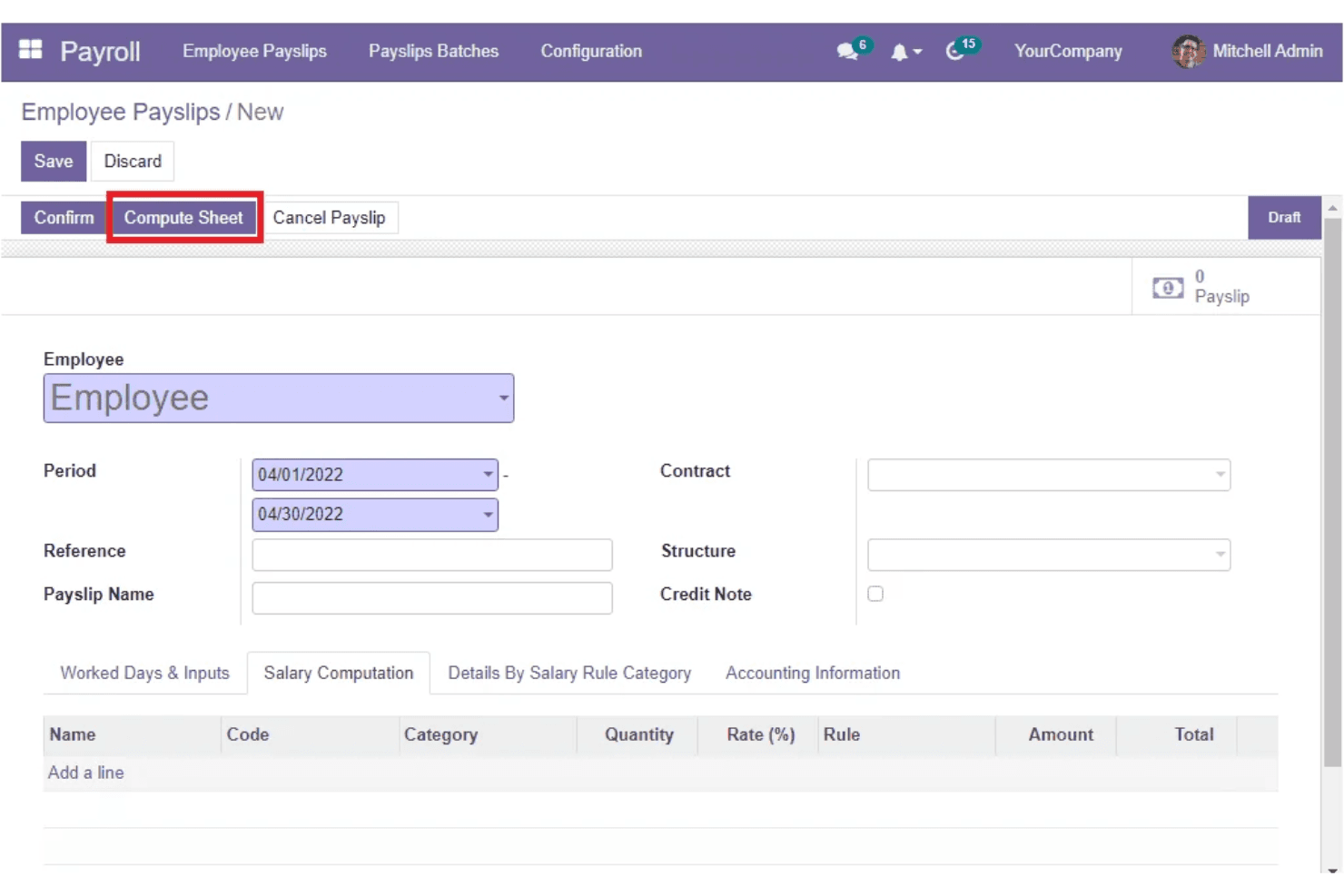
Payroll app screen for creating an employee payslip and computing the salary sheet. Open HRMS is an open-source HR and payroll management system built on Odoo that covers payroll processing, attendance, leave management, recruitment, appraisals, and employee records.
Who Is Open HRMS Best For?
Open HRMS is a strong fit for small businesses and IT teams that want a self-hosted, open-source HR and payroll system they can deploy on their own infrastructure and customize at the code level.
Why I Picked Open HRMS
I've included Open HRMS in my top picks because it's designed for teams that want to manage payroll on their own infrastructure without ongoing software licensing fees. I particularly like that it offers vendor-backed implementation packages, allowing organizations to access support when setting up Odoo. Its payroll module also handles salary structures, configurable deduction rules, and batch payslip generation, supporting gross-to-net payroll processing once an active employee contract is in place.
Open HRMS Key Features
- Payslip batch generation: Group employees under the same salary structure and generate their payslips together in a single batch.
- Biometric attendance integration: Connect fingerprint-reading and facial recognition devices to capture attendance data that feeds directly into payroll calculations.
- Employee loan management: Configure loan policies, manage approvals, and automatically deduct repayments from employee payslips.
- HR reporting suite: Generate reports covering attendance, leave, payroll, and expenses, with filtering and drill-down options for detailed analysis.
Open HRMS Integrations
Open HRMS has documented native integrations with biometric devices, including fingerprint-reading and facial recognition devices, for attendance tracking. Native third-party integrations and API availability are not clearly documented.
Pros and Cons
Pros:
- Includes vendor-backed implementation assistance
- Connects biometric attendance devices
- Generates batch employee payslips
Cons:
- Deployment guidance lacks detail
- Jurisdictional payroll modules vary
Learn more about Open HRMS: Best for payroll tied to wider ERP operations
- Free open-source framework
- Free (self-hosted)
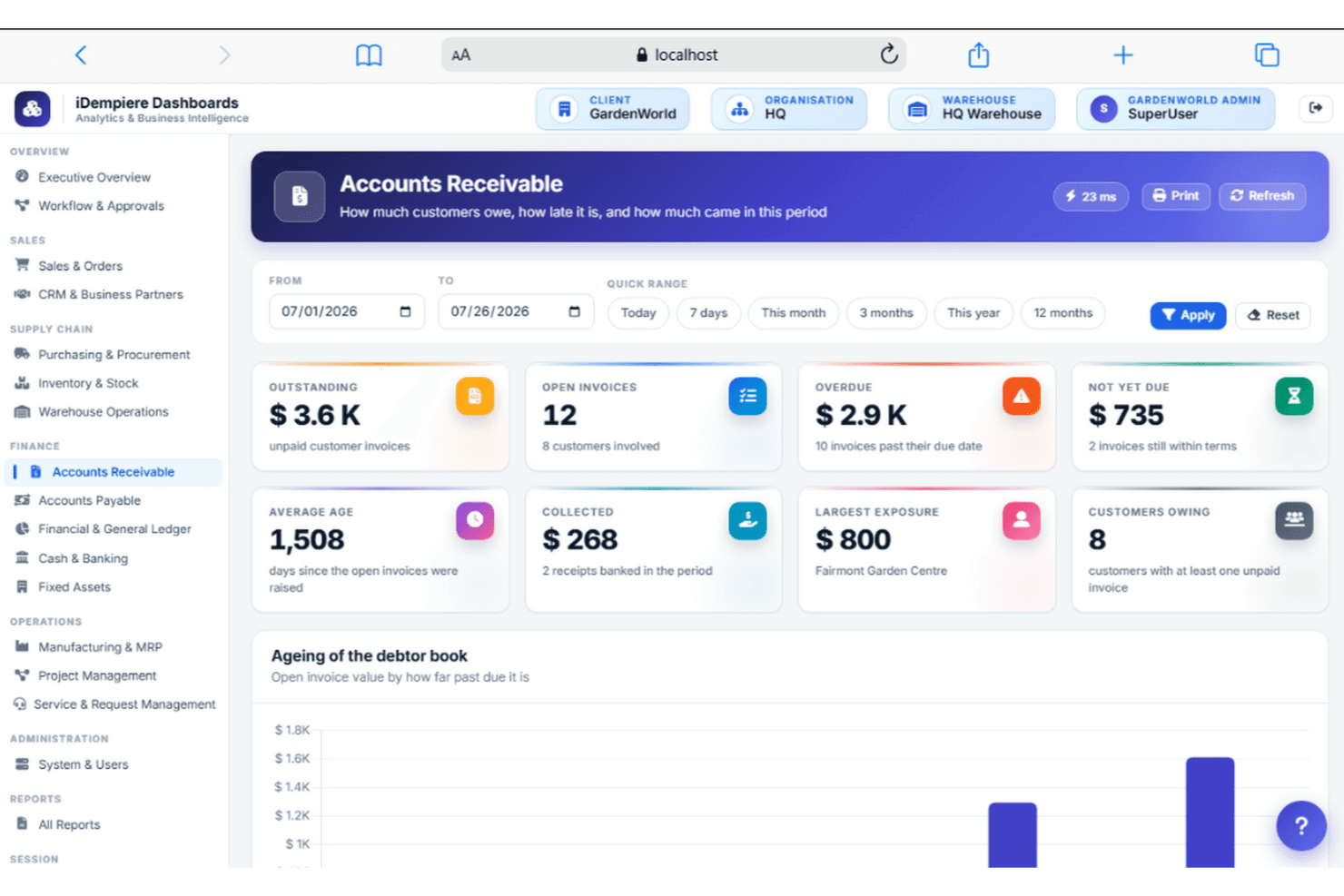
The iDempiere Accounts Receivable dashboard, showing outstanding invoices, overdue amounts and debtor ageing. iDempiere is an open-source ERP platform that connects payroll processing, HR, accounting, procurement, inventory, and manufacturing within a single self-hosted system.
Who Is iDempiere Best For?
iDempiere is a strong fit for IT teams and developers who need payroll integrated with a broader ERP system and have the technical expertise to configure and self-host it.
Why I Picked iDempiere
I picked iDempiere because its payroll functionality can operate within a comprehensive ERP platform that also handles accounting, procurement, and manufacturing. Through the CDSoftware Payroll plugin, payroll calculations connect directly with iDempiere's financial accounting system, allowing payroll and journal entries to remain synchronized without manual exports. I also like that the plugin supports multi-currency payroll attributes and employee loan management with accounting functionality, which is useful for organizations managing different compensation structures.
iDempiere Key Features
- Role-based access controls: Assign permissions at the organization, table, column, and record levels to restrict access to sensitive payroll information.
- REST and SOAP APIs: Connect iDempiere to external HR, finance, or reporting tools using built-in REST and optional SOAP/XML web services.
- Payroll report generation: Generate standard reports, including payment receipts, employee directories, work certificates, and assignment and deduction summaries.
- On-premises deployment: Self-host iDempiere on Linux, Windows, or macOS servers, maintaining control over where payroll data is stored.
iDempiere Integrations
Documented integrations include Snowflake, dbt, Tableau, 3CX, OpenEMR, Availity, and TriZetto. iDempiere also supports REST and SOAP/XML web services for custom payroll and ERP integrations.
Pros and Cons
Pros:
- Accommodates multicurrency payroll attributes
- Supports granular record permissions
- Connects payroll with accounting
Cons:
- Localization depends on extensions
- Payroll requires external plugins
Learn more about iDempiere: Best for workforce costs in a wider ERP
- Free plan + free demo available
- Free (self-hosted)
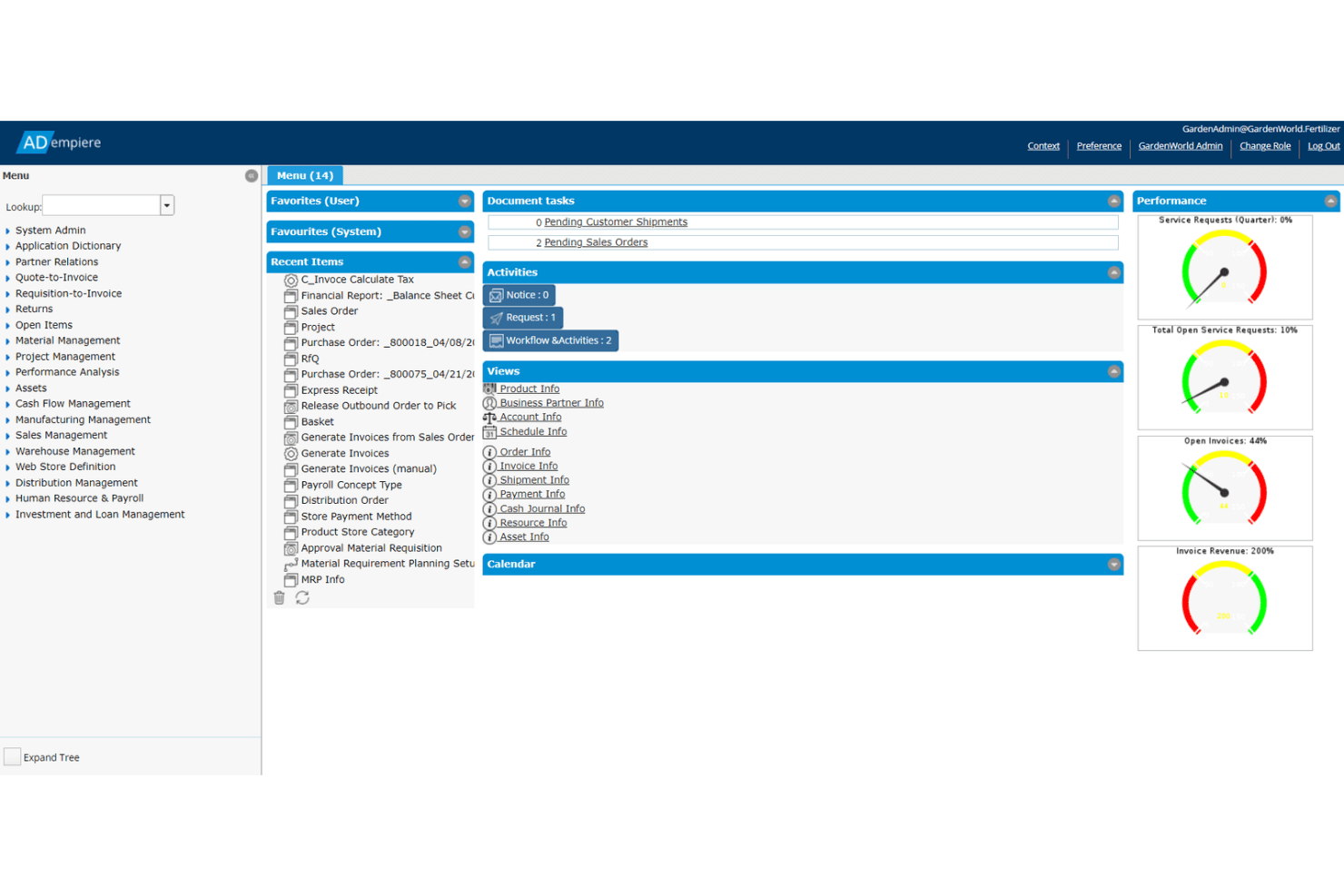
The ADempiere main dashboard with menu navigation, recent items, pending tasks and performance gauges. ADempiere is an open-source ERP with a built-in payroll module that handles payroll rules, calculations, payroll movement processing, and accounting integration through a self-hosted, GPL-2.0-licensed platform.
Who Is ADempiere Best For?
ADempiere works best for IT-led teams that need payroll integrated with a broader ERP and have the technical resources to configure and maintain a self-hosted, open-source system.
Why I Picked ADempiere
I picked ADempiere because it integrates payroll with a comprehensive ERP, allowing workforce costs to be managed alongside purchasing, accounting, and inventory in a single system. I find its payroll rules engine particularly useful because you can define custom payroll concepts, configure stop values for individual employees or payroll runs, and post final amounts through Accounts Payable without leaving the platform. The JSR 223 scripting API also allows teams to create custom calculation logic for payroll rules, which is helpful when standard deduction structures do not match an organization's pay policies.
ADempiere Key Features
- Payroll report generation: Generate salary-change, employee-dependent, employee-detail, and bank-account-detail reports directly from the payroll module.
- Payroll process selection criteria: Filter payroll runs by department, job type, employee status, salary structure, shift group, and more than a dozen other criteria.
- Accounts Payable posting: Post final payroll amounts through the built-in Accounts Payable model using ADempiere's standard accounting framework.
- JasperReports integration: Build and generate custom payroll report templates using JasperReports, which is embedded in ADempiere's reporting engine.
ADempiere Integrations
ADempiere does not clearly document native third-party integrations. Its payroll module connects internally with Accounts Payable, commission calculations, and payment selection within the ERP.
Pros and Cons
Pros:
- Customizes JasperReports payroll templates
- Filters detailed payroll runs
- Executes scripted payroll calculations
Cons:
- Payroll scripting needs maintenance
- Prebuilt compliance rules sparse
Learn more about ADempiere: Best for India-specific payroll compliance
- Free plan + 14-day free trial available
- From $5/month (hosting; software free)
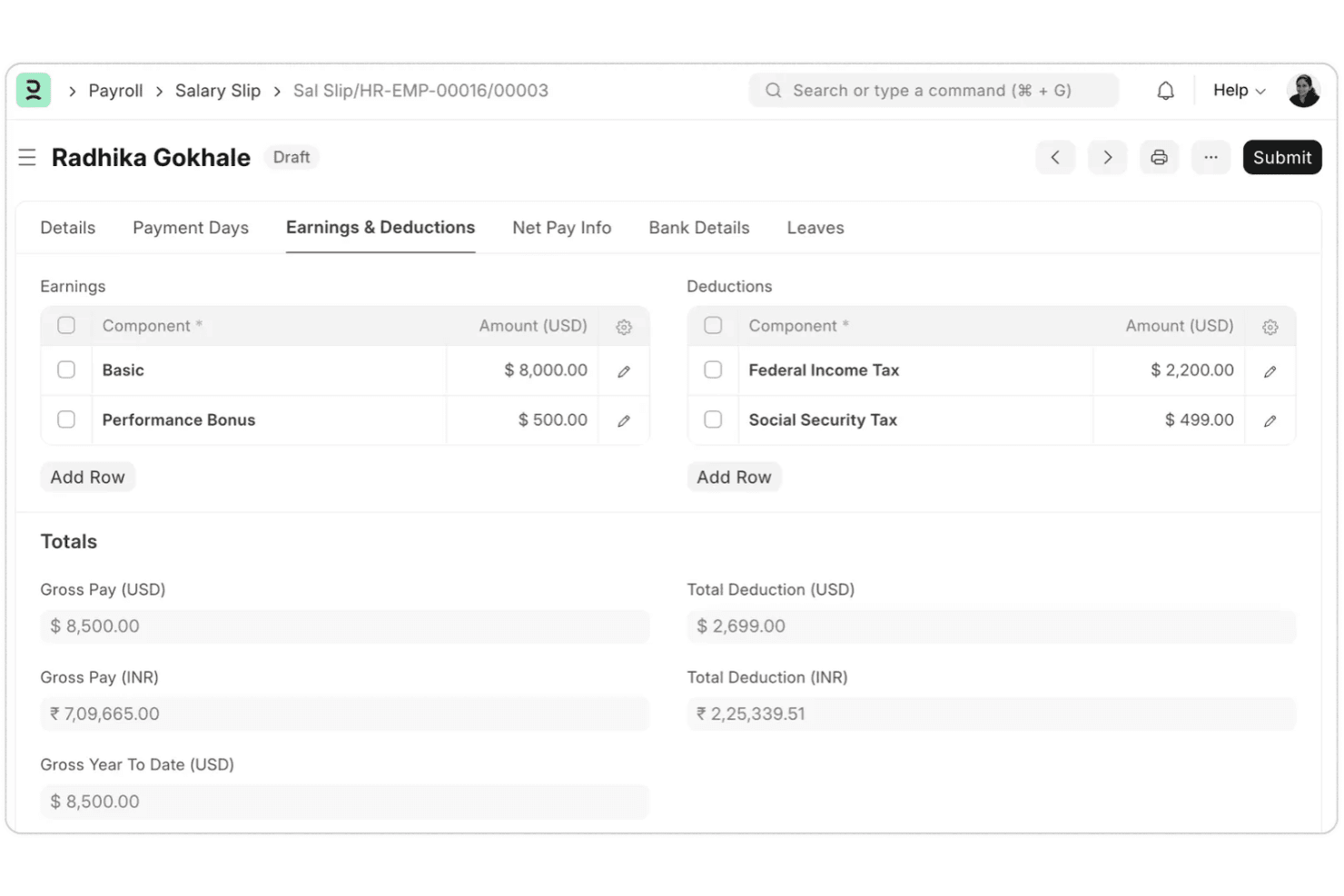
Frappe HR's salary slip screen lists earnings, deductions, and totals for an employee in draft status. Frappe HR is an open-source HR and payroll platform with dedicated modules for salary structures, statutory deductions, attendance, leave, expense claims, and employee lifecycle management.
Who Is Frappe HR Best For?
Frappe HR is a strong fit for India-based HR and payroll teams that need built-in statutory compliance support covering Provident Fund (PF), Employees' State Insurance (ESI), Professional Tax, and Labour Welfare Fund requirements across multiple states.
Why I Picked Frappe HR
I've included Frappe HR in my top picks because it offers built-in statutory compliance support for India's complex payroll deductions. The India Payroll module covers Professional Tax across more than 15 states, Labour Welfare Fund requirements across 14 states, ESI wage ceilings, and PF configuration, including voluntary contributions. I also like that employees can compare the old and new tax regimes, declare exemptions, and save their selected regime to their salary structure assignments.
Frappe HR Key Features
- Salary structure builder: Create rule-based salary structures with earnings, deductions, conditions, and formulas for different employee groups.
- Multi-currency payroll: Process payroll in a foreign currency and view gross and net totals in both that currency and your company's base currency.
- Timesheet-based payroll: Set hourly rates linked to project or task timesheets and process separate payroll entries for time-based compensation.
- Income tax declarations and proofs: Collect employee exemption declarations and supporting documents to incorporate into payroll tax calculations.
Frappe HR Integrations
Frappe HR has native integrations with ERPNext and Frappe Lending, along with REST API and webhook support for custom integrations.
Pros and Cons
Pros:
- Compares employee taxation regimes
- Configures voluntary PF contributions
- Supports Indian statutory deductions
Cons:
- Conditional formulas require configuration
- International tax localization limited
Learn more about Frappe HR: Best for embedding payroll in your product
- Free open-source framework
- Free framework (commercial regulations priced separately)
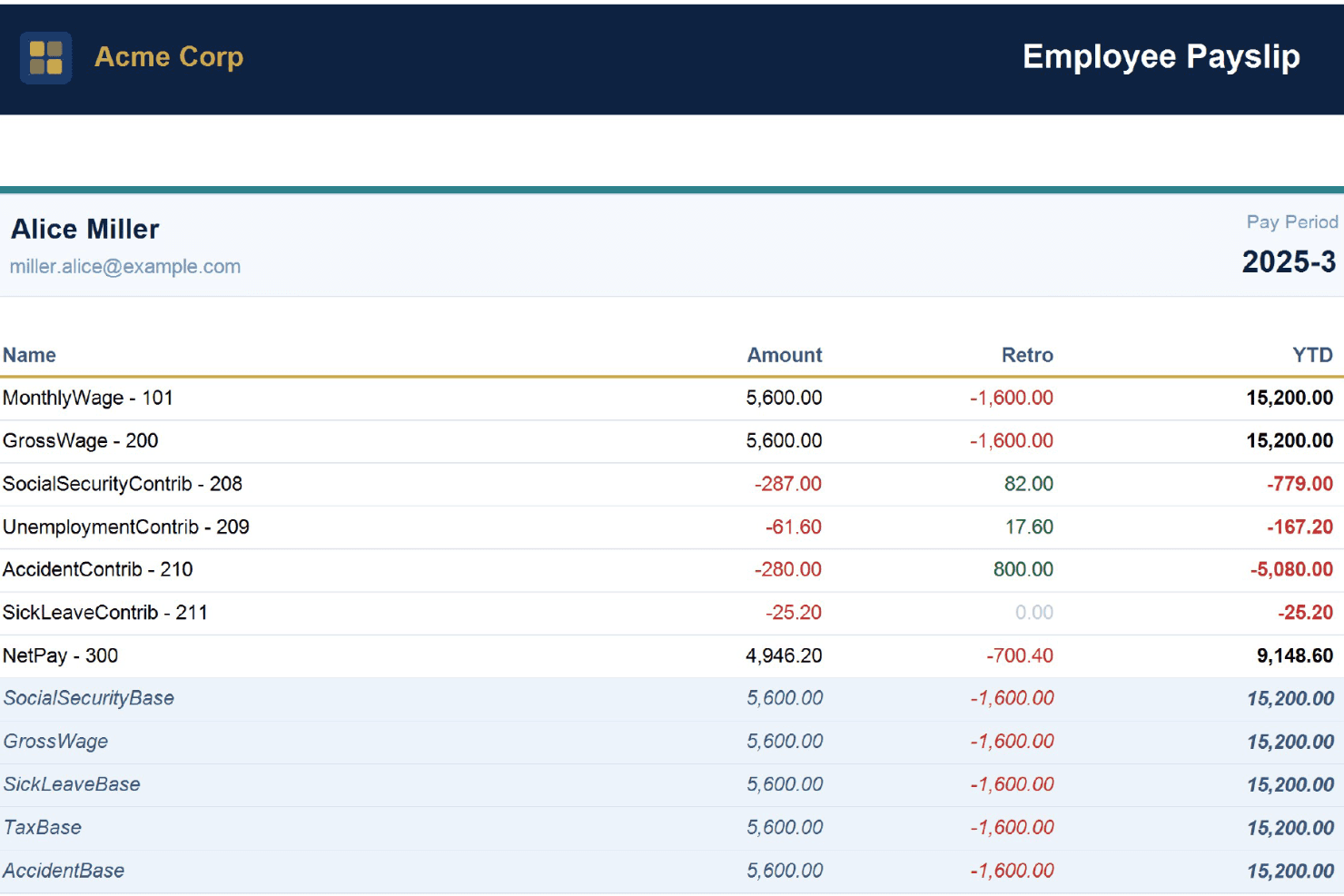
Sample employee payslip showing wages, statutory contributions, net pay and year-to-date totals. Payroll Engine is an open-source, self-hosted payroll framework built on .NET that handles gross-to-net calculations, retroactive payroll processing, multi-tenant regulation layers, forecasting, and report generation through a REST API and C# scripting model.
Who Is Payroll Engine Best For?
Payroll Engine is designed for developers and software teams that need to embed payroll processing logic directly into a custom application or platform.
Why I Picked Payroll Engine
I picked Payroll Engine because it's purpose-built for embedding payroll logic into custom products rather than operating as a standalone payroll application. I find its composable regulation layer model particularly useful because teams can combine country, company, and tenant-level rules, version them, and extend them with C# scripts or no-code actions to accommodate different pay structures. The retroactive payroll engine also handles past-dated corrections without requiring manual workarounds, which is valuable for product teams building payroll functionality into their platforms.
Payroll Engine Key Features
- Composable regulation layers: Combine country, company, and tenant-level payroll rules that can be versioned, inherited, and shared across tenants.
- Payroll forecasting: Run named what-if payroll scenarios against live regulations and employee data without affecting production results.
- Lifecycle test framework: Define JSON-based tests covering case input, payroll processing, and report output, with CI/CD pipeline support.
- Multi-format report output: Generate payslips and summaries using culture-specific templates and export them as XML, Excel, or PDF files.
Payroll Engine Integrations
Payroll Engine does not provide native integrations. It supports custom connectivity through its OpenAPI 3.1 REST API, webhooks, and .NET Client SDK.
Pros and Cons
Pros:
- Versions complex regulatory layers
- Handles retroactive payroll corrections
- Embeds payroll into applications
Cons:
- Compliance packs require licensing
- Requires custom application development
Learn more about Payroll Engine: Best for free, unlimited-user self-hosted HR
- Free plan + 30-day free trial available
- From $7/user/month
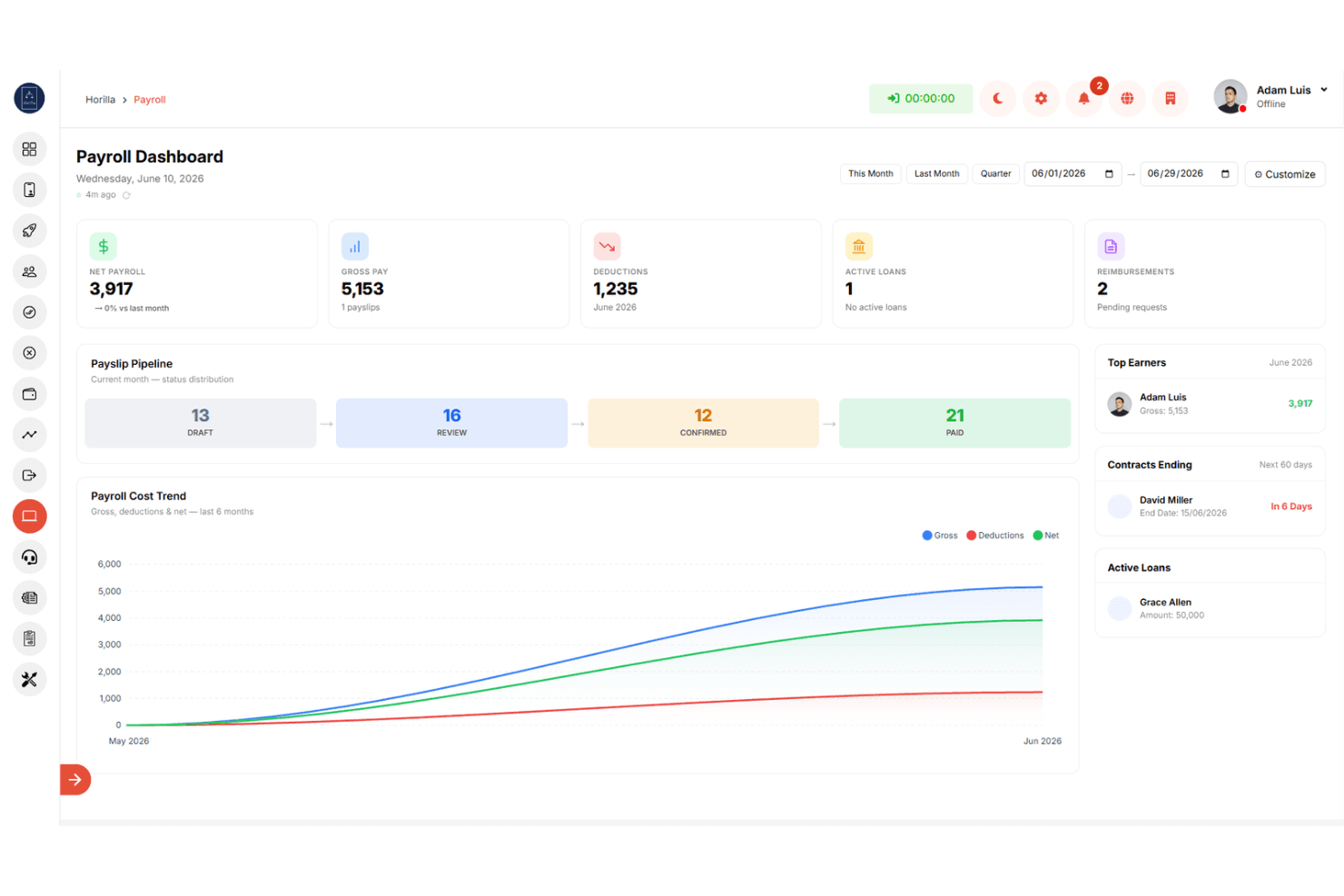
Horilla's payroll dashboard tracks net pay, deductions, payslip status and six-month cost trends in one view. Horilla is an open-source HR and payroll platform that covers the employee lifecycle, including payroll calculations, attendance tracking, leave management, recruitment, and onboarding, through a single self-hosted or cloud-deployed system.
Who Is Horilla Best For?
Horilla is a strong fit for small businesses and technical teams that want a comprehensive HR and payroll system without paying per-user licensing fees for its self-hosted open-source edition.
Why I Picked Horilla
I picked Horilla because it allows organizations to self-host an HR and payroll system for an unlimited number of users without ongoing software licensing fees. The payroll module handles gross-to-net calculations, statutory components such as PF and TDS, configurable tax brackets, and automatic loan recovery across pay cycles. I also like that attendance data flows directly into payroll, reducing the need for manual reconciliation when overtime or mid-month starts affect employee compensation.
Horilla Key Features
- Pay structure configuration: Create multiple salary structures and assign them by grade, department, or individual employee.
- Loan and advance tracking: Record employee loans and advances with automatic repayment schedules spread across future pay cycles.
- Payslip status workflow: Move payslips through draft, review, confirmed, and paid statuses, with bulk generation and CSV or PDF exports.
- Employee self-service portal: Allow employees to view their payslips, leave balances, attendance records, and submitted documents without requiring HR assistance.
Horilla Integrations
Horilla offers native integrations with LDAP, Google Drive, and WhatsApp, along with LinkedIn and Google Meet for HR workflows. Its REST API supports custom integrations through JWT authentication and Swagger/OpenAPI documentation. No accounting or ERP connectors are documented.
Pros and Cons
Pros:
- Tracks individual payslip statuses
- Automates employee loan recovery
- Offers unlimited self-hosted users
Cons:
- Payroll trend analysis limited
- Accounting connectors remain absent
Learn more about Horilla: 10Best for payroll tied to staff schedules
TimeTrex
- 30-day free trial + free demo available
- From $50/month
Visit WebsiteCustomer Rating:4.5/5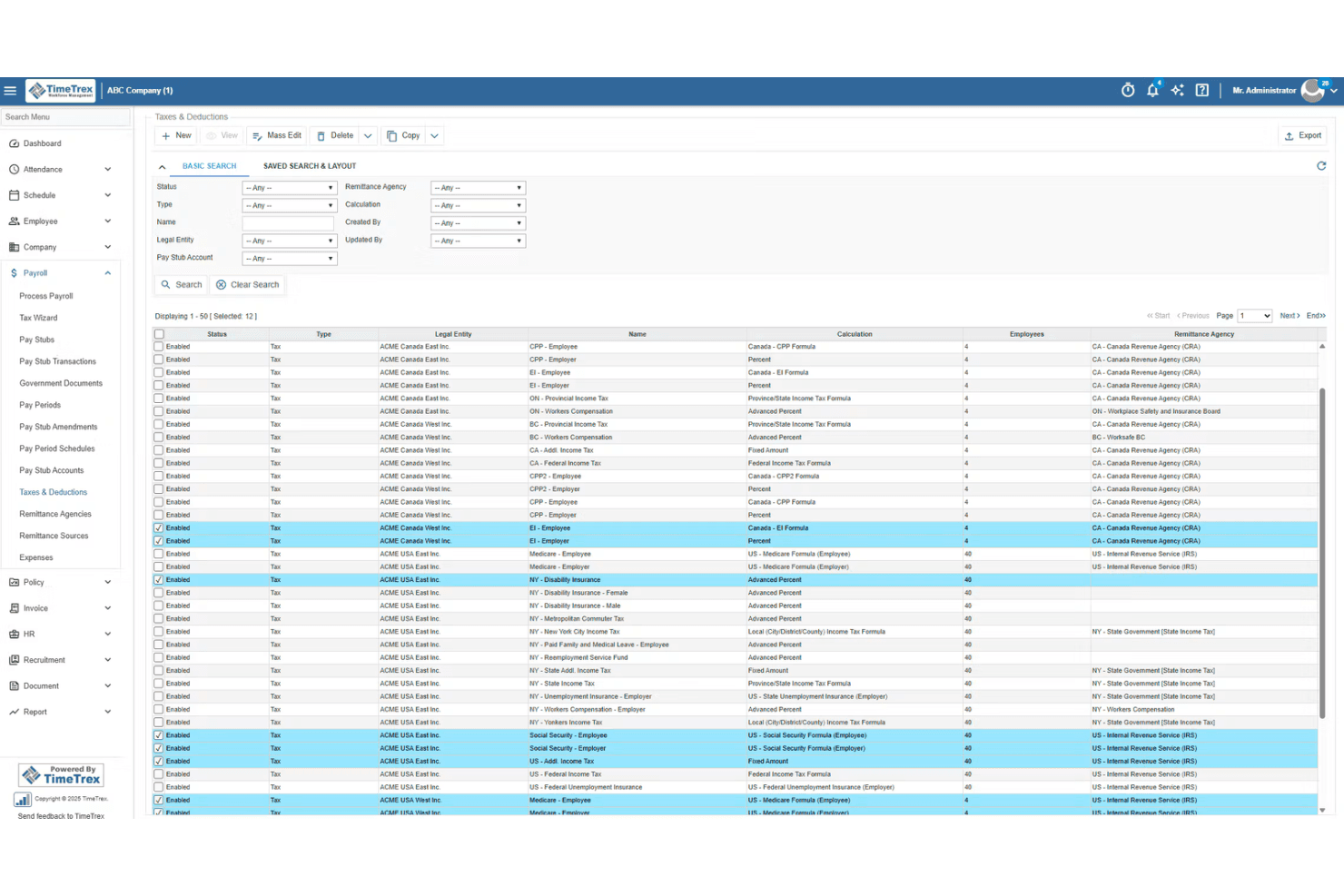
TimeTrex's Taxes & Deductions screen lists payroll tax entries by legal entity, calculation method, and remittance agency. TimeTrex is a workforce management platform with an on-premises deployment option that combines payroll processing, tax calculations, time and attendance tracking, and employee scheduling in a single system.
Who Is TimeTrex Best For?
TimeTrex is a strong fit for payroll managers who need time tracking and employee scheduling data to feed directly into payroll calculations.
Why I Picked TimeTrex
I've included TimeTrex in my top picks because its payroll engine connects directly with employee scheduling and time-tracking data. When a shift runs longer than planned or an employee clocks out early, that information feeds into payroll calculations without requiring manual data entry. I particularly like its automated scheduling capabilities and support for federal, state, and local payroll tax calculations. Its open-source Community Edition includes core scheduling and payroll functionality, although advanced features may vary by edition.
TimeTrex Key Features
- Payroll deductions management: Calculates and tracks deductions for benefits, taxes, and wage garnishments within each payroll run.
- Payroll tax calculations: Calculate federal, state, and local payroll taxes using configured tax rules, with jurisdiction-specific filing requirements needing separate verification.
- Employee self-service portal: Allows employees to access pay stubs, update personal information, and submit time-off requests directly.
- RESTful API and webhooks: Connects TimeTrex to external accounting, HR, and payroll systems through documented APIs and webhooks.
TimeTrex Integrations
TimeTrex offers integrations with Intuit QuickBooks, Sage, ADP, Paychex, Ceridian, the IRS, and the Canada Revenue Agency. It also provides a RESTful API, webhooks, and SDKs for custom connections.
Pros and Cons
Pros:
- Supports multi-state payroll calculations
- Identifies scheduling overtime risks
- Converts tracked shifts automatically
Cons:
- Deployment needs infrastructure management
- Advanced features vary by edition
Learn more about TimeTrex:
Weitere Open-Source-Lohnabrechnungssoftware
Hier sind einige zusätzliche Optionen, die es nicht auf meine Auswahlliste geschafft haben, die sich aber dennoch zu prüfen lohnen:
- 11PHP PayrollBest for varied pay types and local rules
- 12webERPBest for ERP users adding employee records
- 13PayrollBest for India-specific compliance outputs
- 14OCA PayrollBest for date-based tax rule changes
- 15Coati PayrollBest for payroll-linked vacation accruals
- 16JantaHRBest for legally cited payroll rule changes
- 17CworkBest for accountant-assisted Thai payroll
- 18AccountedBest for Swedish bureau pay runs via API
- 19DeduktoBest for South African tax in AI workflows
- 20Euron Open HRMSBest for managing payroll within HR workflows
How I Evaluate Open Source Payroll Software
I split my evaluation into three parts. Core functionality carries the most weight—I look for tools that can calculate gross-to-net pay and support configurable tax and compliance rules. I also check for standout features like multi-country localization, then consider total cost of ownership beyond the software itself.
Core Functionality (Table Stakes for This List)
When I'm selecting tools for my list, I score each one on a scale from 0 (does not offer the functionality) to 5 (excels in this area) for each core functionality listed below. I then convert the total into a percentage to help assess each tool's overall fit, with extra weight on any functionalities I've deemed essential.
- Open-Source Codebase (Essential): I check whether the source code is published under a recognized open-source license and whether the project has active maintainers and contribution channels.
- Payroll Calculation Engine (Essential): Each tool needs to compute gross-to-net pay across deductions, withholdings, and varied pay types like overtime, bonuses, and multiple pay schedules.
- Tax and Compliance Configuration: I look for configurable tax rules and statutory contributions that HR teams can adapt to their jurisdictions without waiting on a vendor update.
- Payslip and Report Generation: Tools should produce formatted payslips and summary reports that payroll managers can share with employees or use during audits.
- Self-Hosting Capability: I evaluate how well-documented the deployment process is, whether the project offers containers or install scripts, and how much technical effort setup requires.
- Integration and Extensibility: APIs, modules, or plugins that connect payroll to time-tracking, HR, or accounting systems matter here, since payroll rarely operates in isolation.
Once I have a list of tools that meet the criteria, I consider what sets each platform apart.
Differentiating Factors (What Sets Vendors Apart)
Here's how I compare and contrast different vendors:
Standout Features
I look for a modular plugin architecture that lets you add country-specific tax packs without touching the core code. For example, ERPNext and iDempiere both use module systems, but I check how easy it is to swap in a new localization pack when you expand to another region. Audit trail and versioning capabilities also matter—detailed logs of every payroll change help during internal reviews and regulatory checks. I evaluate whether employee self-service portals give staff direct access to payslips and tax documents, which reduces routine requests for HR teams.
Beyond Features
I check how often a project's GitHub repository receives commits and how active its forums are, since a stagnant codebase means you'll wait longer for compliance patches. Total cost of ownership matters too—hosting, developer hours for customization, and paid support tiers can quickly offset the savings of a free license. I also evaluate how clearly each tool documents deployment, because a platform like ERPNext with detailed install guides gets teams running far faster than one with sparse documentation. Finally, open-source payroll shifts regulatory responsibility to you, so I look for projects where community-maintained tax updates are released and reviewed promptly.
So wählen Sie Open-Source-Lohnabrechnungssoftware aus
Wählen Sie ein System, indem Sie Ihre Rechtsordnung, Ihre technischen Kapazitäten und Ihre Verantwortung für Änderungen an den Lohnabrechnungsregeln mit dem abgleichen, was das Projekt dokumentiert und unterstützt.
| Wenn Ihre Priorität … ist | Achten Sie auf … |
|---|---|
| Wenn Ihre Priorität … istLokale Compliance | Achten Sie auf …Veröffentlichte Angaben zum Geltungsbereich und datierte Aktualisierungen der Regeln |
| Wenn Ihre Priorität … istKontrolle über Code und Daten | Achten Sie auf …Eine anerkannte Lizenz und dokumentierte Voraussetzungen für das Selbsthosting |
| Wenn Ihre Priorität … istNachvollziehbare Änderungen an der Lohnabrechnung | Achten Sie auf …Aufbewahrte Änderungsprotokolle und einen klaren Prozess zur Prüfung von Anpassungen |
| Wenn Ihre Priorität … istPlanbare Gesamtbetriebskosten | Achten Sie auf …Schätzungen für Hosting, Wartung, Anpassungen und Compliance-Arbeiten |
So prüfen Sie Ihre Auswahlliste
- Fordern Sie Nachweise zur Compliance an: Bitten Sie um ein datiertes Dokument, in dem die unterstützten Rechtsordnungen, die abgedeckten gesetzlichen Regeln und die für Aktualisierungen verantwortliche Stelle aufgeführt sind.
- Führen Sie drei Testfälle durch: Verwenden Sie anonymisierte Zahlen für reguläres Entgelt, Überstunden und einen einmaligen Bonus. Vergleichen Sie die Brutto-Netto-Ergebnisse mit Berechnungen, die Ihre Lohnbuchhaltungsfachkraft überprüft hat.
- Prüfen Sie die Lizenz: Speichern Sie den Lizenztext des Projekts und bestätigen Sie, dass Ihre geplanten Änderungen, Ihr Hosting und Ihre Weitergabe den Vorgaben entsprechen.
- Testen Sie den Bereitstellungsaufwand: Befolgen Sie die Installationsanleitung in einer Testumgebung, halten Sie die Einrichtungszeit fest und notieren Sie alle Abhängigkeiten, für die kostenpflichtiger Support oder Spezialistenarbeit erforderlich ist.
- Legen Sie Ihre Entscheidungskriterien fest: Entscheiden Sie sich nur dann für Codekontrolle und Anpassbarkeit, wenn Sie eine verantwortliche Person benennen können, die Änderungen an den Lohnabrechnungsregeln mindestens vierteljährlich prüft. Andernfalls sollten Sie ein Projekt bevorzugen, bei dem die Verantwortung für Aktualisierungen klar dokumentiert ist.
Was ist Open-Source-Lohnabrechnungssoftware?
Open-Source-Lohnabrechnungssoftware ist Lohnabrechnungssoftware, deren Quellcode unter einer Open-Source-Lizenz öffentlich verfügbar ist. Je nach Lizenz und System können Sie ihn einsehen, ändern oder selbst hosten. Die Lohnabrechnungsfunktionen unterscheiden sich, prüfen Sie daher, ob ein Tool die für Ihre Organisation erforderlichen Entgeltberechnungen, Compliance-Regeln und Berichte unterstützt.
Funktionen
Hier sind die wichtigsten Funktionen, auf die ich bei Open-Source-Lohnabrechnungssoftware achte:
- Gehaltsabrechnungen: Berechnet das Brutto-zu-Netto-Gehalt unter Berücksichtigung von Vergütungen, Abzügen und Einbehalten. Dies bietet Payroll-Teams eine einheitliche Möglichkeit, jeden Abrechnungslauf zu verarbeiten.
- Steuerliche und gesetzliche Vorschriften: Wendet konfigurierbare Steuersätze und erforderliche Beiträge für unterstützte Rechtsordnungen an. Prüfen Sie, wie Vorschriften aktualisiert werden und wer für die Überprüfung von Änderungen verantwortlich ist.
- Abrechnungszeiträume und Vergütungsarten: Unterstützt wiederkehrende Abrechnungszeiträume und Vergütungen wie Überstunden, Boni sowie Stunden- oder Gehaltslöhne. Diese Optionen helfen dabei, unterschiedliche Beschäftigungsmodelle abzudecken.
- Mitarbeiter-Gehaltsdaten: Speichert Angaben wie Vergütung, Steuerinformationen, Zahlungspräferenzen und Abzüge. Präzise Datensätze liefern die für Gehaltsberechnungen erforderlichen Informationen.
- Gehaltsabrechnungen und Mitarbeiterzugriff: Erstellt detaillierte Gehaltsabrechnungen mit Angaben zu Vergütungen, Abzügen und Nettogehalt. Ein Mitarbeiterportal kann es Beschäftigten ermöglichen, ihre Dokumente einzusehen oder herunterzuladen.
- Gehaltsabrechnungsberichte: Fasst Gehaltskosten, Abzüge und Zahlungssummen zur Überprüfung oder Dokumentation zusammen. Berichte können Teams dabei helfen, Abrechnungsläufe abzugleichen und sich auf Prüfungen vorzubereiten.
- Eingaben zu Arbeitszeit und Anwesenheit: Importiert oder erfasst Arbeitsstunden, Überstunden und Abwesenheiten, die für Gehaltsberechnungen verwendet werden. Prüfen Sie, ob das System mit Ihren Zeiterfassungstools verbunden werden kann oder eine manuelle Eingabe erfordert.
- Integrationen und Erweiterbarkeit: Verbindet die Gehaltsabrechnung über APIs, Module oder Plugins mit Personal-, Buchhaltungs- oder Zeiterfassungssystemen. Dies hilft Teams, doppelte Dateneingaben in verschiedenen Systemen zu reduzieren.
- Änderungshistorie: Zeichnet Anpassungen an Gehaltsdaten und Berechnungen auf, einschließlich der Person, die die jeweilige Änderung vorgenommen hat, sofern dies unterstützt wird. Eine gespeicherte Historie hilft Teams, Korrekturen zu überprüfen und Abweichungen zu untersuchen.
Vorteile
Hier sind einige gängige Vorteile, die Sie von Open-Source-Software für die Gehaltsabrechnung erwarten können:
- Kontrolle über Code und Daten: Eine anerkannte Open-Source-Lizenz kann Ihrem Team ermöglichen, den Code zu prüfen oder zu ändern und Gehaltsdaten selbst zu hosten.
- Flexibilität bei Gehaltsabrechnungsregeln: Konfigurierbare Abzüge, Einbehalte und Vergütungsarten können Ihnen dabei helfen, Berechnungen an die Anforderungen Ihrer Organisation an die Gehaltsabrechnung anzupassen.
- Rechtsordnungsspezifische Einrichtung: Lokalisierungsmodule oder konfigurierbare Regeln können lokale Anforderungen unterstützen, sofern Ihr Team den Abdeckungsumfang überprüft und Aktualisierungen pflegt.
- Flexibilität bei den Kosten: Eine kostenlose Lizenz kann Softwarekosten senken und Ihnen gleichzeitig die Möglichkeit geben, selbst zu entscheiden, wie viel Sie für Hosting, Anpassungen und Support ausgeben.
- Nachvollziehbarkeit der Gehaltsabrechnung: Wenn eine Änderungshistorie unterstützt wird, können Anpassungsprotokolle Ihrem Team dabei helfen, Korrekturen zu überprüfen und sich auf Prüfungen vorzubereiten.
- Verbundene Arbeitsabläufe: APIs, Module oder Plugins können die Gehaltsabrechnung mit Personal-, Buchhaltungs- oder Zeiterfassungssystemen verbinden, sofern die Software diese Integrationen unterstützt.
Preise
Open-Source-Software für die Gehaltsabrechnung kann kostenlos heruntergeladen und selbst gehostet werden. Für Implementierung, Hosting, Wartung und Support können jedoch zusätzliche Kosten anfallen. Die Preise hängen von Ihrer Bereitstellungsmethode, den technischen Anforderungen sowie den benötigten kostenpflichtigen Modulen oder Diensten ab.
Vergleichstabelle für Tarife von Open-Source-Software für die Gehaltsabrechnung
| Tarifart | Übliche Preise | Übliche Funktionen |
|---|---|---|
| TarifartKostenloser Tarif | Übliche Preise$0 Softwarelizenz | Übliche FunktionenKernfunktionen, Self-Hosting und Community-Support. Einrichtung und Wartung werden in der Regel intern übernommen. |
| TarifartHosting-Tarif | Übliche PreiseJe nach Anbieter unterschiedlich | Übliche FunktionenVerwaltetes Hosting, Backups, Softwareaktualisierungen und grundlegender Support, abhängig vom Anbieter. |
| TarifartGeschäftstarif | Übliche PreiseAbonnement oder individuelles Angebot | Übliche FunktionenZusätzlicher Support, Integrationen, Konfiguration der Gehaltsabrechnung und optionale Compliance-Module. |
| TarifartUnternehmenstarif | Übliche PreiseIndividuelle Preisgestaltung | Übliche FunktionenErweiterte Anpassungsmöglichkeiten, Unterstützung bei der Implementierung, dedizierter Support und Funktionen für mehrere Einheiten, sofern verfügbar. |
Häufig gestellte Fragen
Einige Antworten auf häufige Fragen zu Open-Source-Software für die Gehaltsabrechnung:
Kann Open-Source-Software für die Gehaltsabrechnung mehrere Länder unterstützen?
Einige Open-Source-Systeme für die Gehaltsabrechnung unterstützen mehrere Länder, aber die Abdeckung hängt von der Software und ihren Lokalisierungsmodulen ab. Prüfen Sie, ob die Einkommensteuern, gesetzlichen Beiträge, Berichtsformate und Abrechnungsregeln jedes Landes dokumentiert und gepflegt werden. Ein System, das Gehaltsabrechnungen in einem Land berechnen kann, verarbeitet nicht automatisch die Anforderungen eines anderen Landes. Testen Sie vor der Auswahl Beispielberechnungen für jede Rechtsordnung, in der Sie Mitarbeitende beschäftigen. Klären Sie, wer die Regeln aktualisiert, wie die Aktualisierungen geprüft werden und was geschieht, wenn sich eine Regel zwischen planmäßigen Veröffentlichungen ändert.
Benötige ich einen Entwickler, um Open-Source-Software für die Gehaltsabrechnung zu betreiben?
Nicht immer, aber Sie benötigen jemanden mit den Fähigkeiten, Ihr ausgewähltes System zu installieren, zu konfigurieren und zu warten. Einige Projekte bieten Installationsanleitungen oder Optionen für die Bereitstellung in Containern, während andere mehr praktische technische Arbeit erfordern. Ihr Team benötigt außerdem jemanden, der für Abrechnungsregeln, Softwareaktualisierungen, Backups und Zugriffsberechtigungen verantwortlich ist. Testen Sie die Installation in einer Testumgebung und dokumentieren Sie den erforderlichen Zeitaufwand sowie die benötigte fachkundige Unterstützung. Dieser Test vermittelt ein klareres Bild des laufenden Arbeitsaufwands als der Lizenzpreis allein.
Reicht und zahlt Open-Source-Software für die Gehaltsabrechnung Steuern automatisch ein?
Manchmal, aber Funktionen zur Gehaltsabrechnung garantieren weder die automatische Einreichung von Steuererklärungen noch automatische Zahlungen. Prüfen Sie in der Produktdokumentation, welche spezifischen Übermittlungsformate, Einreichungsprozesse und Zahlungsfunktionen in Ihrer Rechtsordnung unterstützt werden. Ihr Team muss möglicherweise Berichte exportieren, Formulare über ein Behördenportal einreichen oder Zahlungen separat veranlassen. Vergleichen Sie vor der Verarbeitung einer echten Gehaltsabrechnung die Berechnungen der Software mit von einer Fachkraft für Gehaltsabrechnung geprüften Zahlen. Klären Sie außerdem, wer regulatorische Änderungen überwacht und Aktualisierungen prüft, bevor sie sich auf die Vergütung der Mitarbeitenden auswirken.
Wie kann ich Mitarbeiterdaten beim eigenen Hosting von Gehaltsabrechnungssoftware schützen?
Schützen Sie Gehaltsabrechnungsdaten durch kontrollierten Zugriff, sichere Backups und einen dokumentierten Prozess für Softwareaktualisierungen. Beschränken Sie den Zugriff auf Mitarbeitende, die Gehaltsabrechnungsinformationen benötigen, und überprüfen Sie Berechtigungen, wenn jemand die Rolle wechselt oder das Unternehmen verlässt. Verschlüsseln Sie Daten während der Übertragung und im Ruhezustand, sofern Ihre Infrastruktur dies unterstützt, und testen Sie regelmäßig, ob Backups wiederhergestellt werden können. Führen Sie Aufzeichnungen über Zugriffe und Änderungen, sofern Ihr System dies unterstützt. Ihre Organisation bleibt dafür verantwortlich, die geltenden Datenschutz- und Sicherheitsanforderungen einzuhalten. Beziehen Sie daher Ihre IT- und Compliance-Teams vor der Bereitstellung ein.