

Las 10 mejores aplicaciones de gestión de personal en 2026

Lista de aplicaciones de gestión de la fuerza laboral


Una aplicación de gestión de la fuerza laboral es un software que ayuda a tu equipo a gestionar la programación, la asistencia, el seguimiento del tiempo y la planificación laboral en un solo lugar. Si estás buscando la mejor aplicación de gestión de la fuerza laboral, probablemente necesites una forma fiable de coordinar turnos, gestionar el cumplimiento normativo y mantenerte al día con las cambiantes demandas del lugar de trabajo. Elegir la herramienta adecuada puede ayudarte a apoyar a tu personal, reducir el trabajo manual y adaptarte a los nuevos desafíos de la fuerza laboral. En esta guía encontrarás una comparación clara de las mejores aplicaciones de gestión de la fuerza laboral para que puedas seleccionar con confianza la opción que mejor se adapte a las necesidades de tu organización.
Por qué confiar en nuestras reseñas de software
Nuestro equipo lleva probando y evaluando software desde 2012. Como expertos en RR. HH., sabemos lo difícil —y lo importante— que es elegir el software adecuado.
Para esta guía, evaluamos las herramientas mediante pruebas prácticas e investigación independiente, puntuando las herramientas según nuestros criterios de selección. También nos basamos en la experiencia de líderes de opinión del sector y de profesionales de RR. HH. en activo.
Nuestras reseñas reflejan nuestro criterio editorial humano, no un discurso de ventas.
Revisores expertos:
Resumen de las mejores aplicaciones de gestión de la fuerza laboral
Este cuadro comparativo resume los detalles de precios de mis principales selecciones de aplicaciones de gestión de la fuerza laboral para ayudarte a encontrar la mejor opción para tu presupuesto y las necesidades de tu empresa.
| Tool | Best For | Trial Info | Price | ||
|---|---|---|---|---|---|
| 1 | La mejor opción para contratar en más de 150 países | Demo gratuita disponible | Desde $5/empleado/mes | Website | |
| 2 | Ideal gracias a su API abierta y sus amplias integraciones de RR. HH. | Demostración gratuita disponible | Desde $8/usuario/mes | Website | |
| 3 | Ideal para integración con relojes biométricos | Prueba gratuita de 30 días + demo gratis disponible | Desde $50/mes | Website | |
| 4 | La mejor para análisis de fuerza laboral global | Demostración gratuita disponible | Precio a consultar | Website | |
| 5 | Ideal para herramientas de cumplimiento configurables | Demo gratuita disponible | Precio bajo solicitud | Website | |
| 6 | Mejor para cálculos de nómina en tiempo real | Demostración gratuita disponible | Precios bajo solicitud | Website | |
| 7 | Mejor para supervisión de personal en múltiples ubicaciones | Demostración gratuita disponible | Precios bajo solicitud | Website | |
| 8 | Lo mejor para una gestión intuitiva de ausencias | Prueba gratuita disponible | Desde $10/empleado/mes | Website | |
| 9 | Mejor para flujos de trabajo unificados de RR.HH. e IT | Demo gratuita disponible | Precio a consultar | Website | |
| 10 | Ideal para flujos de trabajo de incorporación automatizados | Demostración gratuita + plan gratuito disponible | Desde $49/mes + $6/usuario/mes | Website |
Opiniones sobre aplicaciones de gestión de la fuerza laboral
A continuación se incluyen mis resúmenes detallados de las mejores aplicaciones de gestión de la fuerza laboral que llegaron a mi lista de preseleccionadas. Mis opiniones ofrecen un análisis detallado de las funciones, los casos de uso más adecuados y las integraciones de cada plataforma para ayudarte a encontrar la mejor opción para ti.

Deel HR
La mejor opción para contratar en más de 150 países
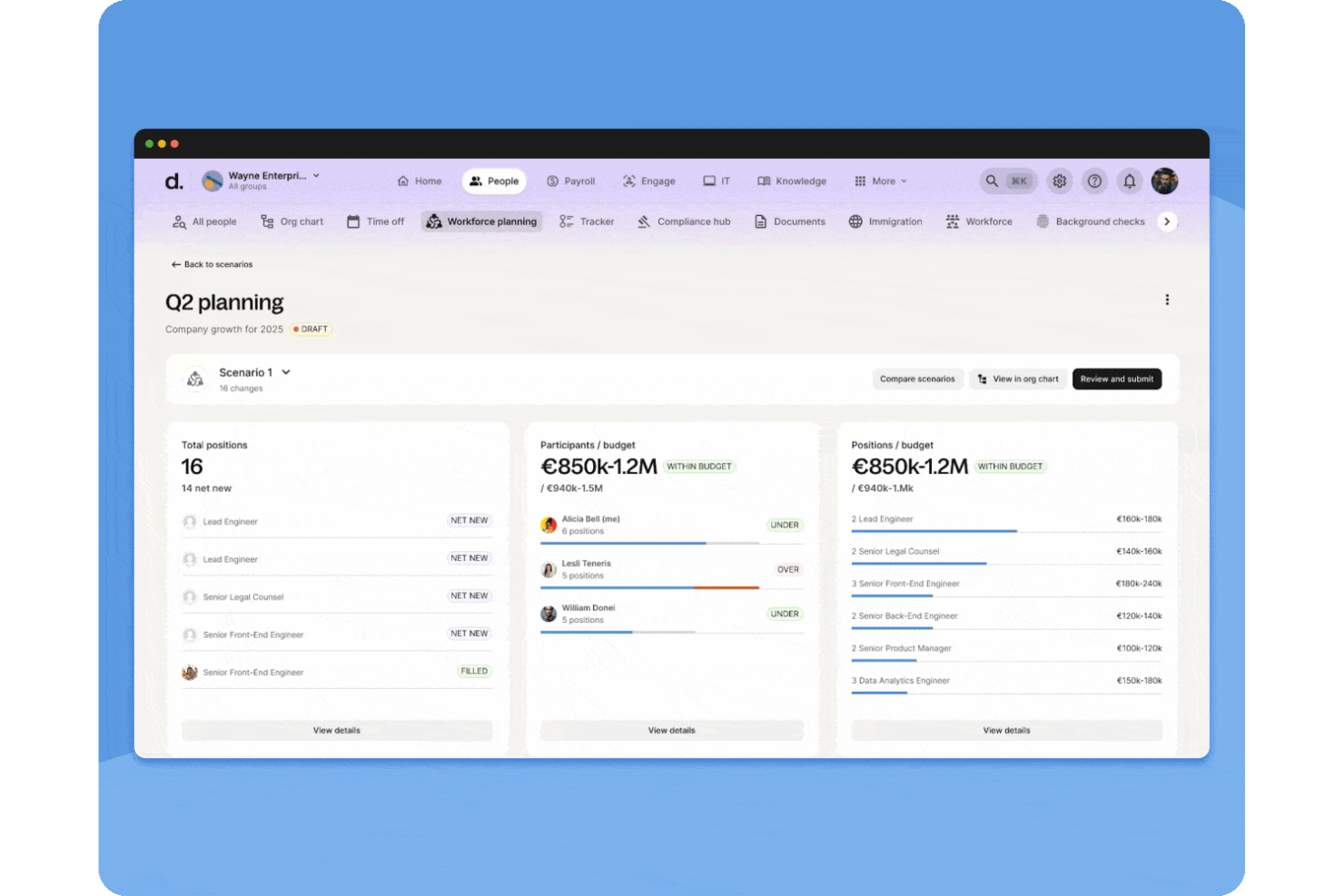
Deel HR es una plataforma de gestión de personal que reúne herramientas de contratación global, nómina, cumplimiento normativo, HRIS y gestión del rendimiento para equipos distribuidos.
¿Para quién es más adecuado Deel HR?
Deel HR es ideal para equipos de recursos humanos y líderes empresariales que gestionan empleados internacionales, contratistas y nóminas en varios países.
Por qué elegí Deel HR
Elegí Deel HR como uno de los mejores porque puedo contratar empleados o contratistas en más de 150 países casi al instante. Mi equipo utiliza la incorporación automatizada de Deel HR y la generación de contratos localizados para acelerar la contratación internacional. También confío en sus verificaciones de cumplimiento dentro de la plataforma para evitar retrasos al expandirnos a nuevos mercados.
Características clave de Deel HR
- Gestión global de nómina: Ejecuta la nómina de empleados y contratistas en múltiples países desde un solo panel de control.
- Seguimiento de ausencias: Gestiona y aprueba solicitudes de permiso de empleados con políticas personalizables.
- Gestión de documentos: Almacena, organiza y accede de manera segura a documentos de RRHH dentro de la plataforma.
- Informes de HRIS: Genera análisis de fuerza laboral e informes de cumplimiento para tu equipo global.
Integraciones de Deel HR
Las integraciones nativas no están claramente documentadas. Deel HR proporciona una API para integraciones personalizadas.
Pros and Cons
Pros:
- Nómina automatizada para equipos internacionales
- HRIS centralizado con herramientas de gestión del rendimiento
- Flujos de incorporación personalizados para diferentes países
Cons:
- Las funciones de informes carecen de opciones avanzadas de personalización
- Las funciones de gestión de gastos son básicas en comparación con la competencia
New Product Updates from Deel HR

Deel Expands Stablecoin Wallet to 80+ Countries
Deel expands its Stablecoin Wallet to 80+ countries with dollar-backed balances and optional rewards. This gives eligible contractors more ways to hold and manage earnings inside Deel. For more information, visit Deel’s official site.
 .
.
Ideal gracias a su API abierta y sus amplias integraciones de RR. HH.
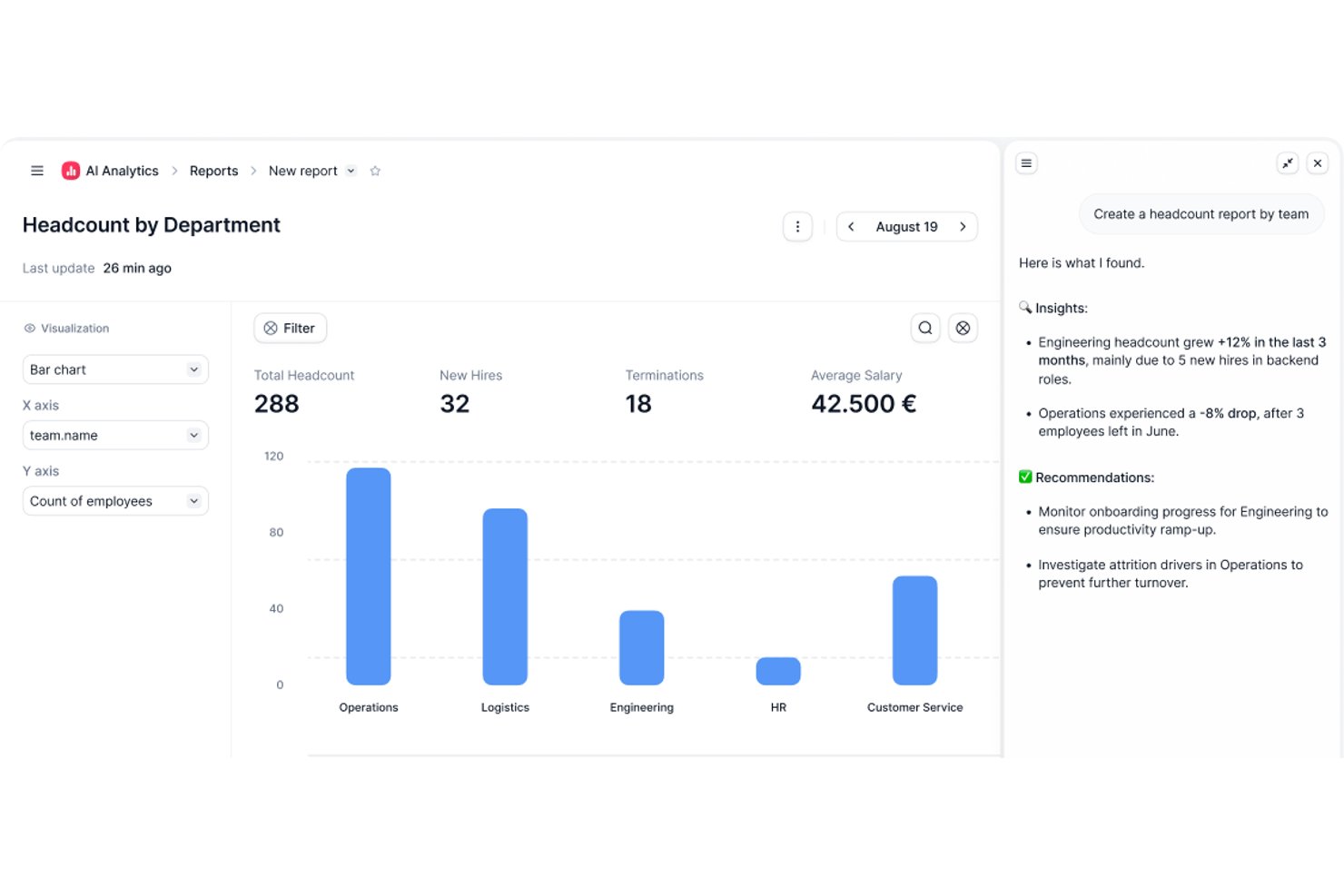
Factorial es una plataforma de RR. HH. y gestión de la plantilla que combina la programación de turnos, el seguimiento del tiempo y la asistencia, la gestión de ausencias y el autoservicio de los empleados con un amplio catálogo de integraciones y una API abierta.
¿Para quién es más adecuado Factorial?
Factorial es una opción excelente para pequeñas y medianas empresas que necesitan una plataforma unificada de RR. HH. y gestión de la plantilla sin la complejidad de los sistemas empresariales.
Por qué elegí Factorial
Factorial está en mi lista de finalistas porque su API abierta lo distingue para los equipos de RR. HH. que ya utilizan herramientas como Sage, DATEV o Slack y necesitan que los datos de la plantilla fluyan entre ellas sin exportaciones manuales. Me gusta especialmente que el catálogo de integraciones incluya dispositivos biométricos de registro de entrada (ZKTeco, Suprema), lo que significa que los registros de entrada de los turnos se incorporan directamente al seguimiento del tiempo sin necesidad de un sistema independiente. La API abierta también permite crear conexiones personalizadas con cualquier herramienta interna de la que ya dependa tu empresa.
Características principales de Factorial
- Módulo de gestión de turnos: Crea y asigna turnos masivos, rotativos o automatizados en distintos equipos y ubicaciones.
- Políticas de ausencia configurables: Establece políticas ilimitadas de tiempo libre y permisos con validaciones inteligentes y visibilidad en el calendario.
- Evaluaciones de desempeño de 360 grados: Realiza evaluaciones de desempeño estructuradas que incluyan comentarios, competencias y seguimiento analítico.
- Encuestas de compromiso de los empleados: Lanza encuestas eNPS y encuestas rápidas de equipo en la aplicación para recopilar datos sobre la percepción y la participación de la plantilla.
Integraciones de Factorial
Factorial ofrece integraciones nativas con Sage, DATEV, Slack, Zapier, ZKTeco y Suprema, además de una API abierta para crear integraciones personalizadas.
Pros and Cons
Pros:
- Asignación masiva de turnos en varias ubicaciones
- El seguimiento de ausencias se sincroniza directamente con los horarios de los turnos
- Registro de entrada mediante GPS a través de la aplicación móvil nativa
Cons:
- La personalización de informes es limitada para análisis complejos
- La previsión de la demanda de personal está relativamente poco desarrollada

TimeTrex
Ideal para integración con relojes biométricos

TimeTrex es una plataforma de gestión de personal que combina el seguimiento de tiempo y asistencia, la programación de empleados, el procesamiento de nómina y la gestión de recursos humanos en un solo sistema, con opciones de implementación tanto en la nube como en las instalaciones.
¿Para quién es ideal TimeTrex?
TimeTrex es una excelente opción para empresas medianas con empleados por horas o turnos que necesitan seguimiento del tiempo, programación y nómina integrados en una sola plataforma.
Por qué elegí TimeTrex
TimeTrex es una de mis elecciones principales porque me encanta la integración de relojes biométricos directamente en su propia plataforma. Admite registros de entrada por reconocimiento facial, lo que en mi equipo utilizamos para eliminar el fichaje por compañeros sin depender de hardware o software de terceros. TimeTrex también combina los datos biométricos con geovallado, de modo que las entradas y salidas se verifican tanto por identidad como por ubicación, lo que resulta especialmente útil para gestionar empleados por horas deslocalizados o en campo.
Principales características de TimeTrex
- Programación de empleados con función arrastrar y soltar: Cree horarios de turnos simples o rotativos de varias semanas y publíquelos directamente a los empleados en la plataforma.
- Procesamiento de nómina integrado: Gestione la nómina con cálculos automáticos de impuestos federales, estatales y locales, y soporte para deducciones como beneficios y embargos salariales.
- Costeo de trabajos: Asigne el tiempo de los empleados a trabajos o centros de costos específicos para poder rastrear el costo laboral al detalle.
- Gestión de registros de RRHH: Almacene y gestione cualificaciones de empleados, evaluaciones de desempeño e información personal en un perfil centralizado del empleado.
Integraciones de TimeTrex
TimeTrex ofrece integraciones con plataformas de nómina y contabilidad, como ADP, QuickBooks, Sage, Paychex y Surepay, así como Ceridian, CompuPay, Tyler Technologies y Vensure Employer Services. También proporciona una API para integraciones personalizadas.
Pros and Cons
Pros:
- Motor de reglas flexible para políticas complejas
- Disponible edición de código abierto gratuita
- Registra horas de empleados hasta el minuto
Cons:
- Configuración inicial compleja para funciones avanzadas
- La interfaz de usuario parece muy anticuada
New Product Updates from TimeTrex
TimeTrex Adds Quick Punch App With Offline and QR Support
TimeTrex adds a new Quick Punch app, offline punching, QR code scanning, punch images, configurable messages, and punch warnings or lockouts to improve employee clock-ins across browsers and local computers. For more information, visit TimeTrex’s official site.
 .
.
Workday
La mejor para análisis de fuerza laboral global

Workday es una plataforma de gestión de fuerza laboral diseñada para organizaciones con equipos complejos y distribuidos. Es ideal para líderes de RR. HH. y profesionales de operaciones que necesitan herramientas unificadas para gestionar horarios globales, costos laborales y cumplimiento normativo. Si buscas coordinar una gran fuerza laboral en múltiples regiones, Workday integra programación, control de tiempo y análisis en un solo sistema.
¿Para quién es mejor Workday?
Workday es ideal para grandes empresas y organizaciones multinacionales que necesitan gestionar operaciones de fuerza laboral y análisis en varios países.
Por qué elegí Workday
Lo que me atrajo de Workday para la gestión de la fuerza laboral son sus avanzadas capacidades de análisis global de personal. La plataforma unifica datos en tiempo real de programación, control de tiempo y gestión de costos laborales, facilitando la detección de tendencias y la solución de problemas en diversos países o unidades de negocio. Me gusta que los paneles de análisis de Workday permitan a los equipos de RR. HH. y operaciones profundizar en los indicadores de personal por región, departamento o función. Este nivel de detalle es especialmente valioso para organizaciones que deben tomar decisiones basadas en datos sobre personal, cumplimiento y asignación de recursos a escala global.
Funciones clave de Workday
Otras funciones que hacen de Workday una opción destacada para la gestión de personal incluyen:
- Herramientas de programación automatizada: Los gerentes pueden crear, ajustar y publicar horarios de empleados según reglas de negocio y demandas laborales.
- Control de tiempo por móvil: Los empleados pueden fichar entrada y salida, solicitar días libres y ver sus horarios desde dispositivos móviles.
- Gestión de ausencias: La plataforma registra todo tipo de licencias, incluyendo vacaciones, bajas por enfermedad y políticas personalizadas.
- Supervisión del cumplimiento: Workday ayuda a las organizaciones a mantenerse al día con las regulaciones laborales y políticas internas mediante alertas automáticas y registros de auditoría.
Integraciones de Workday
Las integraciones incluyen ADP, Salesforce, Microsoft Teams, ServiceNow, Okta, Slack, SAP, Oracle, DocuSign y Cornerstone OnDemand.
Pros and Cons
Pros:
- Reglas de cumplimiento robustas
- Alta seguridad de datos
- Seguimiento complejo de la fuerza laboral
Cons:
- Tiempos de implementación largos
- Requiere administrador dedicado

Ideal para herramientas de cumplimiento configurables
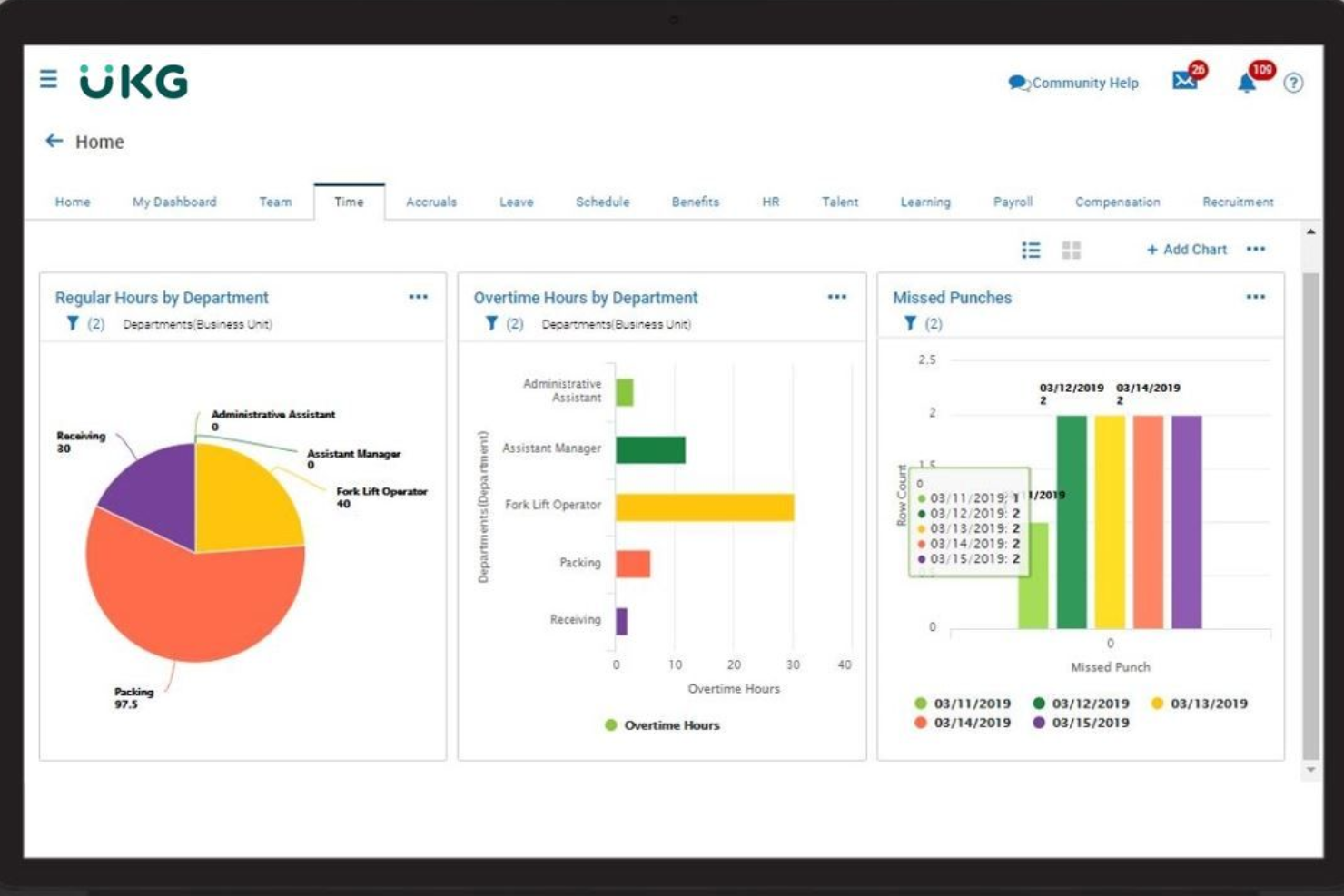
UKG Ready es una plataforma de gestión de personal diseñada para organizaciones que necesitan herramientas flexibles de RRHH, control de tiempo y nómina en un solo lugar. Es una opción sólida para equipos de recursos humanos en sectores con necesidades complejas de programación y cumplimiento normativo, como la atención sanitaria, la manufactura y el sector público. Si buscas una solución que se adapte a leyes laborales cambiantes y reglas comerciales únicas, UKG Ready ofrece la capacidad de configuración necesaria para apoyar tus requisitos.
¿Para quién es mejor UKG Ready?
UKG Ready es ideal para organizaciones medianas a grandes en industrias reguladas que necesitan herramientas de gestión de cumplimiento y personal configurables.
Por qué elegí UKG Ready
Lo que me atrajo de UKG Ready es el alto nivel de personalización de sus herramientas de cumplimiento para la gestión de la fuerza laboral. La plataforma permite configurar reglas personalizadas para el control del tiempo, la programación y las políticas de pago para adaptarse a los requisitos únicos de tu organización y a las regulaciones en constante cambio. Me gusta que se puedan automatizar alertas y flujos de trabajo para cuestiones como pago de horas extras, cumplimiento de descansos y seguimiento de certificaciones, lo que ayuda a reducir la supervisión manual. Para equipos de RRHH que gestionan cumplimientos complejos en varias ubicaciones o jurisdicciones, la flexibilidad de UKG Ready destaca.
Funciones clave de UKG Ready
Otras funciones que hacen de UKG Ready una sólida opción de gestión de personal incluyen:
- Portal de autoservicio para empleados: Los empleados pueden consultar horarios, solicitar tiempo libre y actualizar su información personal directamente desde la plataforma.
- Acceso a través de la app móvil: Gerentes y personal pueden gestionar aprobaciones, programación y seguimiento de tiempo desde sus dispositivos móviles.
- Gestión documental: Almacena, organiza y comparte documentos de RRHH de forma segura dentro del sistema.
- Herramientas de gestión del desempeño: Establece objetivos, realiza evaluaciones y sigue el progreso de los empleados todo en un mismo lugar.
Integraciones de UKG Ready
Las integraciones incluyen QuickBooks, NetSuite, ADP, Employee Navigator, TurboTax, Indeed, DocuSign, Boomi, OpenSesame y HireRight.
Pros and Cons
Pros:
- Excelente sincronización de reglas sindicales
- Potente análisis de costos laborales
- Sólido soporte biométrico
Cons:
- La implementación es larga
- Retrasos en los tickets de soporte

Dayforce
Mejor para cálculos de nómina en tiempo real

Dayforce es una plataforma de gestión de la fuerza laboral diseñada para organizaciones que necesitan recursos humanos, nómina y control de tiempo unificados en un solo sistema. Es una excelente opción para equipos de RR. HH. en industrias con personal por hora o turnos, como el comercio minorista, la salud y la manufactura. Si buscas simplificar el cumplimiento normativo y gestionar programaciones complejas, Dayforce reúne las herramientas que necesitas en una única plataforma.
¿Para Quién es Mejor Dayforce?
Dayforce es ideal para organizaciones medianas y grandes de sectores como comercio minorista, salud y manufactura, que requieren nómina unificada y gestión de la fuerza laboral.
Por Qué Elegí Dayforce
Lo que destaca de Dayforce es su capacidad para calcular la nómina en tiempo real a medida que los datos de los empleados cambian durante el período de pago. Esto significa que los equipos de RR. HH. y nómina pueden ver al instante el impacto de los cambios de horario, las horas extra o las solicitudes de ausencia en los costos de nómina, lo que ayuda a reducir errores y sorpresas al final de cada ciclo. También me gusta que Dayforce combine el control horario y la nómina en un solo sistema, por lo que no es necesario reconciliar datos entre plataformas separadas. Para organizaciones con reglas de pago complejas o ajustes frecuentes en los turnos, este enfoque en tiempo real para la gestión de nóminas es una gran ventaja.
Funciones Clave de Dayforce
Además de los cálculos de nómina en tiempo real, Dayforce ofrece varias otras funciones que apoyan la gestión de la fuerza laboral:
- Herramientas de programación automatizadas: Los gerentes pueden crear, ajustar y publicar horarios de empleados basándose en reglas comerciales y demanda laboral.
- App móvil de autoservicio: Los empleados pueden ver sus horarios, solicitar ausencias e intercambiar turnos directamente desde sus dispositivos móviles.
- Gestión de cumplimiento: La plataforma monitorea las leyes laborales y políticas internas, alertando a los gerentes sobre posibles incidentes de incumplimiento.
- Análisis e informes: Los usuarios pueden acceder a paneles e informes para rastrear tendencias laborales, asistencia y productividad.
Integraciones de Dayforce
Las integraciones incluyen Emburse, VidCruiter, DocuSign, Go1, HireRight, AdminaHealth, TELUS Health, Okta, Microsoft 365 y Oracle.
Pros and Cons
Pros:
- Base de datos todo en uno
- Gestión de alto volumen
Cons:
- Buena programación de turnos
- Atención al cliente lenta
- Portal administrativo complejo

ADP
Mejor para supervisión de personal en múltiples ubicaciones
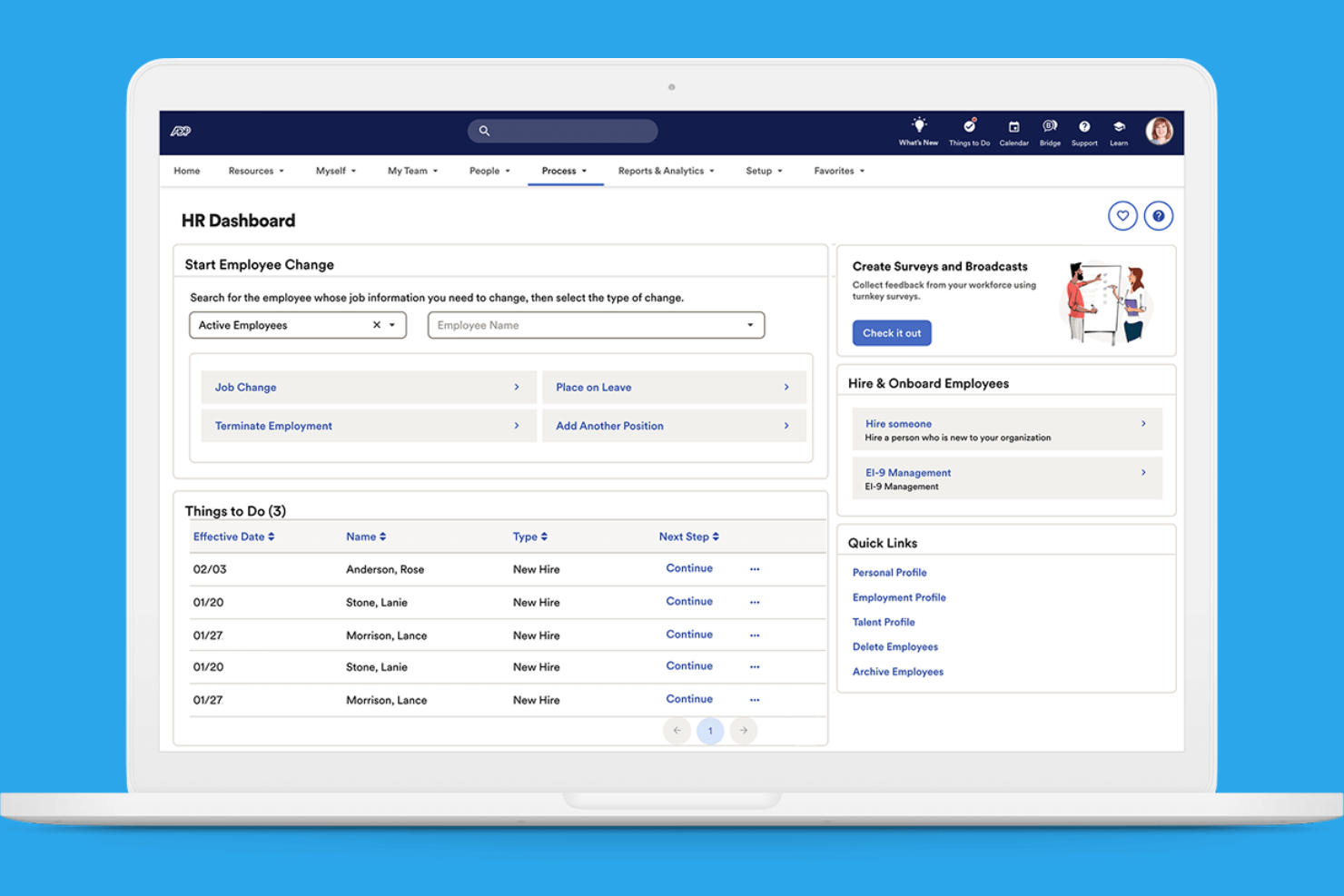
ADP ofrece un conjunto de herramientas de gestión de la fuerza laboral diseñadas para organizaciones con necesidades de personal complejas. Es una opción sólida para los equipos de RR.HH. que gestionan empleados en varias ubicaciones o jurisdicciones. Si necesitas supervisión centralizada y seguimiento detallado de la mano de obra, ADP proporciona funciones para ayudarte a coordinar y controlar a tu personal.
¿Para quién es mejor ADP?
ADP es adecuado para organizaciones grandes o con múltiples ubicaciones que necesitan supervisión centralizada de la fuerza laboral y gestión de cumplimiento normativo.
Por qué elegí ADP
Lo que hace destacar a ADP en la gestión de la fuerza laboral es su capacidad para gestionar la supervisión en varias ubicaciones y jurisdicciones. Elegí ADP porque ofrece paneles centralizados para el seguimiento de costes laborales, asistencia y cumplimiento en tiempo real, incluso cuando tu plantilla está distribuida. Las herramientas de programación y control de tiempo de la plataforma están diseñadas para adaptarse a estructuras organizativas complejas, lo que te permite establecer reglas y políticas específicas por ubicación. Para los equipos de RR.HH. que necesitan coordinar personal, informes y cumplimiento en diferentes sedes, las funciones de gestión multiubicación de ADP son especialmente valiosas.
Principales funciones de ADP
Otras funciones que hacen de ADP una sólida opción para la gestión del personal incluyen:
Procesamiento de nómina automatizado: ADP calcula y procesa la nómina en función de los datos de tiempo y asistencia, lo que reduce la entrada manual.
Portal de autoservicio para empleados: Los empleados pueden ver sus recibos de pago, actualizar información personal y gestionar solicitudes de tiempo libre directamente.
Alertas de cumplimiento: El sistema notifica a los equipos de RR.HH. sobre cambios regulatorios y posibles problemas de cumplimiento.
Herramientas de informes personalizables: Los usuarios pueden generar informes detallados sobre métricas de la fuerza laboral, nómina y asistencia para una mejor toma de decisiones.
Integraciones de ADP
Las integraciones incluyen QuickBooks, Xero, Wave, allGeo, Synerion, ClockShark, GP, Trusaic, Points North y Wex.
Pros and Cons
Pros:
- Enorme lista de integraciones
- Plataforma altamente segura
- Excelentes herramientas de cumplimiento
Cons:
- La app móvil tiene fallos
- Demasiado complejo para pymes


Si buscas una aplicación de gestión de personal que centralice los datos sobre las personas y los procesos de RR. HH. en un solo lugar, BambooHR merece ser considerado. Está diseñada para pequeñas y medianas empresas que desean centralizar los registros de empleados, automatizar los flujos de trabajo de RR. HH. y simplificar las tareas diarias del área. Los equipos de RR. HH. y los gerentes utilizan BambooHR para gestionar todo, desde la incorporación de nuevos empleados hasta la gestión del desempeño, en una sola plataforma fácil de navegar.
¿Para quién es mejor BambooHR?
BambooHR es una opción sólida para pequeñas y medianas empresas que desean centralizar la gestión de RR. HH. y automatizar el seguimiento de las ausencias.
Por qué elegí BambooHR
Lo que distingue a BambooHR en la gestión de personal es la forma en que maneja la gestión de ausencias con claridad y flexibilidad. Lo elegí porque la plataforma permite a los empleados solicitar días libres directamente en el sistema, mientras que los gerentes pueden aprobar o rechazar solicitudes con solo unos clics. El calendario integrado se actualiza automáticamente para reflejar las ausencias, facilitando que los equipos vean quién no está disponible y planifiquen la cobertura. Este enfoque ayuda a reducir el seguimiento manual y los malentendidos sobre las licencias, un reto común para los equipos de RR. HH.
Funciones clave de BambooHR
Otras funciones que hacen que BambooHR sea útil para la gestión de personal incluyen:
- Portal de autoservicio para empleados: Los empleados pueden actualizar su información personal, ver recibos de pago y acceder a documentos de la empresa sin intervención de RR. HH.
- Flujos de trabajo de incorporación: Automatiza las tareas de incorporación y asigna listas de verificación a los nuevos empleados para garantizar un inicio sin inconvenientes.
- Herramientas de gestión del desempeño: Establece objetivos, realiza evaluaciones y recopila retroalimentación dentro de la plataforma para apoyar el desarrollo del personal.
- Almacenamiento de documentos y firmas electrónicas: Almacena de manera segura los documentos de RR. HH. y recolecta firmas electrónicas para formularios y acuerdos importantes.
Integraciones de BambooHR
Las integraciones incluyen Slack, Greenhouse, Culture Amp, Lattice, Remote, 15Five, Lever, DocuSign, QuickBooks y ADP Workforce Now.
Pros and Cons
Pros:
- El portal de autoservicio para empleados actualiza los registros al instante
- Los ciclos de evaluación del desempeño son totalmente configurables
- Firmas electrónicas integradas para los flujos de documentos de RR. HH.
Cons:
- No dispone de programación ni planificación de turnos integrada
- Los roles y permisos personalizados están restringidos
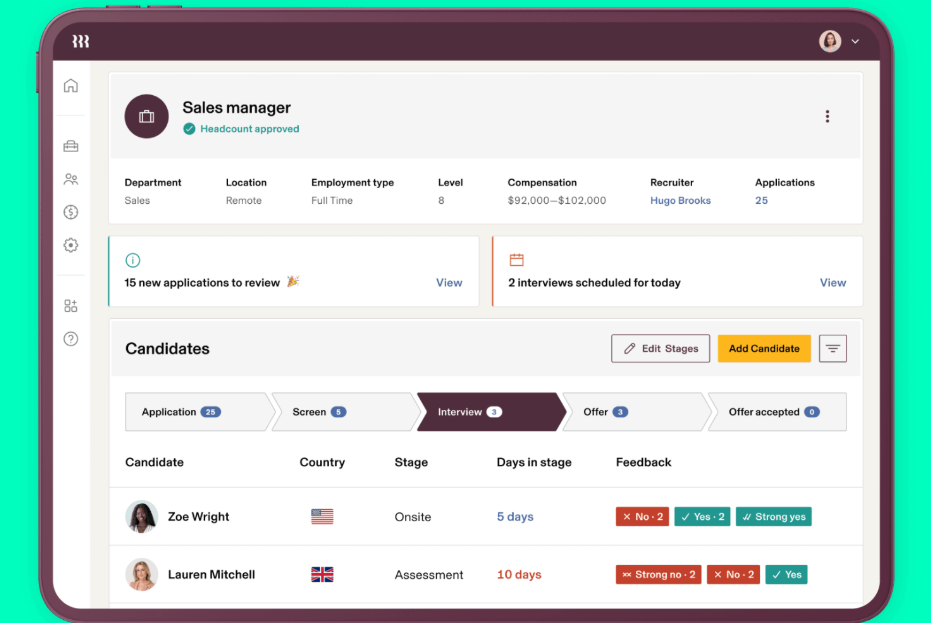
Rippling reúne la gestión de RR.HH., IT y la fuerza laboral en una sola plataforma. Es adecuado para empresas que desean gestionar los datos de los empleados, la nómina y la provisión de dispositivos desde un único panel. Si buscas reducir el trabajo manual y mantener las operaciones de personal estrechamente conectadas, Rippling ofrece un enfoque unificado.
¿Para quién es Rippling?
Rippling es ideal para organizaciones medianas y grandes que necesitan gestionar tanto los procesos de RR.HH. como los de IT desde una sola plataforma.
Por qué elegí Rippling
Lo que me atrajo de Rippling para la gestión de la fuerza laboral es cómo conecta los flujos de trabajo de RR.HH. e IT en un solo lugar. La plataforma te permite incorporar empleados configurando automáticamente la nómina, los beneficios e incluso la provisión de dispositivos y el acceso a software, todo desde un panel unificado. Considero que este enfoque centralizado es especialmente valioso para organizaciones que necesitan coordinar las operaciones de personal con la gestión tecnológica. Al centralizar estos procesos, Rippling ayuda a reducir transferencias manuales y mantiene los datos de los empleados consistentes entre los sistemas de RR.HH. e IT.
Funciones clave de Rippling
Otras características útiles de Rippling para la gestión de la fuerza laboral incluyen:
- Control de tiempo y asistencia: Los empleados pueden registrar su entrada y salida, controlar sus horas y los administradores pueden aprobar partes de horas directamente en la plataforma.
- Procesamiento global de nómina: Ejecuta la nómina para empleados y contratistas en varios países con herramientas de cumplimiento integradas.
- Automatización personalizada de flujos de trabajo: Crea flujos de trabajo automatizados para aprobaciones, notificaciones y tareas de RR.HH. sin necesidad de programación.
- Gestión de documentos de empleados: Almacena, organiza y comparte documentos de RR.HH. de forma segura, con control de versiones y permisos de acceso.
Integraciones de Rippling
Las integraciones incluyen Slack, Google Workspace, Microsoft 365, Salesforce, QuickBooks Online, Xero, Asana, Zoom, Jira y HubSpot.
Pros and Cons
Pros:
- Automatiza la incorporación tanto en RR.HH. como en IT
- Ofrece herramientas personalizables de automatización de flujos de trabajo
- Admite nómina global y necesidades de cumplimiento
Cons:
- La nómina requiere módulos adicionales de pago
- Las funciones de informes son limitadas para análisis

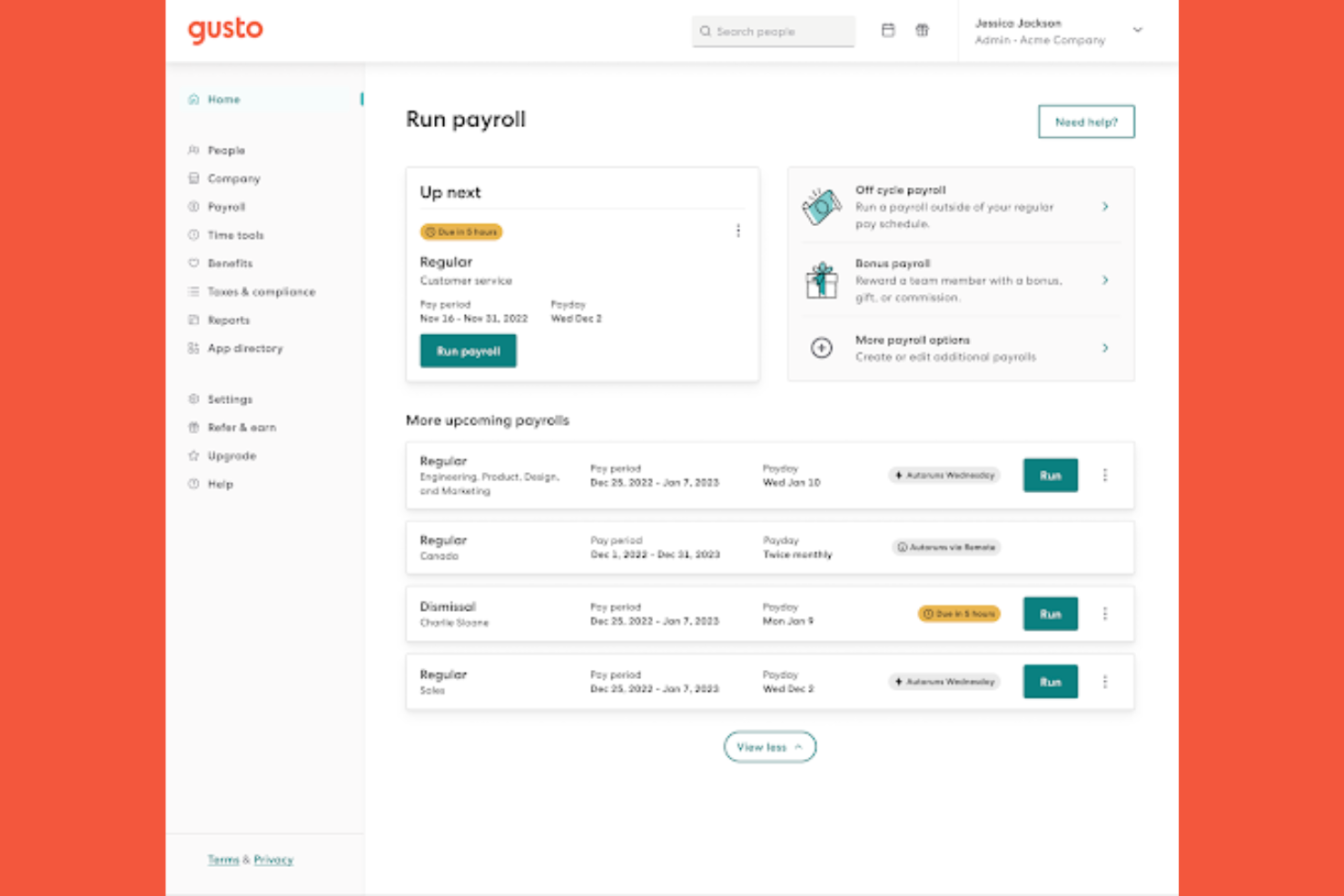
Gusto ofrece una plataforma de gestión de personal diseñada para pequeñas y medianas empresas que quieren simplificar los procesos de RR. HH. El software reúne la gestión de nóminas, la administración de beneficios y la gestión de empleados en un solo lugar. Si buscas una solución que reduzca las tareas manuales de RR. HH. y ayude a mantener organizado a tu equipo, vale la pena considerar Gusto.
¿Para quién es mejor Gusto?
Gusto es una buena opción para pequeñas y medianas empresas que quieren automatizar las tareas de RR. HH. y de incorporación.
Por qué elegí Gusto
Lo que me atrajo de Gusto para la gestión de personal es la forma en que automatiza y personaliza los flujos de trabajo de incorporación. La plataforma permite crear listas de verificación de incorporación personalizadas, enviar cartas de oferta digitales y recopilar firmas electrónicas, todo desde un único panel. También valoro que Gusto configure automáticamente a las nuevas contrataciones en las nóminas y los beneficios, lo que reduce la introducción manual de datos y los riesgos de incumplimiento. Para los equipos de RR. HH. que quieren hacer que la incorporación sea más fluida y coherente, las herramientas de automatización de Gusto son especialmente valiosas.
Características principales de Gusto
Otras características que convierten a Gusto en una buena opción de gestión de personal incluyen:
Control del tiempo: Los empleados pueden registrar su entrada y salida, realizar un seguimiento de las horas y sincronizar los datos de tiempo directamente con la nómina.
Gestión del tiempo libre remunerado: La plataforma permite configurar, aprobar y realizar un seguimiento de las políticas y solicitudes de tiempo libre remunerado.
Organigrama y directorio: Gusto genera automáticamente un organigrama visual y un directorio de empleados con función de búsqueda.
Almacenamiento de documentos: Almacena y gestiona de forma segura documentos importantes de RR. HH. dentro de la plataforma.
Integraciones de Gusto
Las integraciones incluyen 15Five, 7Shifts, Accelo, Amalgam, Analytics by Syft, Aplos, ApplicantPro, Ardius, Arvo y Asana.
Pros and Cons
Pros:
- Excelente para equipos pequeños
- Interfaz móvil clara
- Control del tiempo sencillo
Cons:
- Enrutamiento complejo limitado
- Reglas de cumplimiento básicas
Otras aplicaciones de gestión de la fuerza laboral
Estas son algunas opciones adicionales de aplicaciones de gestión de la fuerza laboral que no llegaron a mi lista de preseleccionadas, pero que aún vale la pena considerar:
- Connecteam
Ideal para la programación de empleados desde el móvil
- Workforce.com
Mejor para previsión laboral basada en turnos
- Paylocity
Ideal para reglas personalizables de control horario
- CommunityWFM
Ideal para la precisión en la previsión de centros de contacto


Cómo evalúo las aplicaciones de gestión de fuerza laboral
Divido mi evaluación en requisitos básicos—programación de turnos, control de tiempo, cumplimiento laboral—y diferenciadores que revelan cuáles herramientas realmente valen la pena.
Funcionalidad principal (Requisitos indispensables para esta lista)
Cuando selecciono herramientas para mi lista, califico cada una en una escala de 0 (no ofrece la funcionalidad) a 5 (destaca en esta área) para cada función principal indicada abajo. Luego, calculo la puntuación total de la herramienta en porcentaje. Cada herramienta necesita alcanzar una puntuación total mínima del 75% para ser considerada para su inclusión.
- Programación de empleados: Busco herramientas que vayan más allá de la simple introducción de turnos—cosas como editores de arrastrar y soltar, programación automática por rol o habilidad, y publicación en varias ubicaciones.
- Control de tiempo y asistencia: Ya sea fichaje desde el móvil, modo quiosco o registros geolocalizados, evalúo la variedad de métodos de captura y cómo se señalan las excepciones.
- Pronóstico laboral y planificación de la demanda: Las buenas herramientas vinculan las proyecciones de personal con factores de negocio como el tráfico peatonal o el volumen de pedidos, no solo con horas históricas registradas.
- Gestión de ausencias y permisos: Reviso cómo cada plataforma gestiona el seguimiento de acumulaciones, flujos de aprobación y la visibilidad de las ausencias del equipo durante el proceso de planificación de turnos.
- Gestión del cumplimiento laboral: Esto incluye reglas de horas extra, control de pausas obligatorias y soporte para leyes laborales específicas de cada región—analizo qué tan automático es el cumplimiento de estas normas por parte de la herramienta.
- Autoservicio móvil para empleados: Los empleados deben poder ver sus horarios, solicitar cambios y pedir días libres desde sus teléfonos, sin intervención del gerente en cada paso.
Una vez que tengo una lista de herramientas que cumplen con los criterios, considero qué distingue a cada plataforma.
Factores diferenciadores (Lo que distingue a los proveedores)
Así es como comparo y distingo a los diferentes proveedores:
Características destacadas
La programación automática impulsada por IA es un gran diferenciador—evalúo si la herramienta puede generar horarios optimizados usando habilidades, disponibilidad y patrones de demanda sin intervención manual intensiva. Las analíticas laborales avanzadas también son importantes. Los mejores paneles permiten profundizar en tendencias de horas extra y costo laboral por ubicación para detectar problemas rápidamente. También reviso las funciones de gestión de fatiga, como alertas cuando los empleados están programados en demasiados turnos consecutivos, lo cual es especialmente valioso en entornos de salud y hospitalidad.
Más allá de las funcionalidades
Las integraciones con sistemas HRIS y de nómina son una de las primeras cosas que reviso. Una aplicación de gestión de fuerza laboral que sincroniza las horas directamente con sistemas como ADP, Workday o BambooHR, le ahorra al equipo de recursos humanos la entrada manual de datos cada ciclo de pago. También importa el ajuste al sector—una herramienta diseñada para rotaciones en salud funciona muy diferente a una diseñada para tiendas minoristas. Además, considero la escalabilidad, específicamente si la plataforma soporta jerarquías multiubicación, permisos basados en roles y gestión de zonas horarias para organizaciones que operan en distintas regiones.
Cómo elegir aplicaciones de gestión de la fuerza laboral
Es fácil perderse entre largas listas de funciones y estructuras de precios complejas. Para ayudarte a mantenerte centrado mientras avanzas en tu proceso específico de selección de software, aquí tienes una lista de factores que debes tener en cuenta:
| Factor | Qué debes considerar |
|---|---|
| Escalabilidad | ¿La aplicación podrá adaptarse al tamaño de tu equipo a medida que crezca, incluidos varios centros o departamentos? |
| Integraciones | ¿Se conecta de forma nativa con tus sistemas de nómina, HRIS y control horario sin necesidad de middleware adicional? |
| Personalización | ¿Puedes adaptar los flujos de trabajo, los permisos y los informes para que coincidan con las políticas de tu organización? |
| Facilidad de uso | ¿Los gerentes y el personal de primera línea la adoptarán rápidamente o la formación y el soporte supondrán un obstáculo? |
| Implementación e incorporación | ¿Cuánto tiempo se tardará en ponerla en marcha y qué recursos o asistencia del proveedor se necesitan? |
| Coste | ¿Los niveles de precios son claros y se ajustan a tus patrones de uso y limitaciones presupuestarias? |
| Medidas de seguridad | ¿El proveedor ofrece acceso basado en roles, cifrado de datos y cumplimiento de las normas pertinentes? |
| Requisitos de cumplimiento | ¿La aplicación puede gestionar automáticamente tus leyes laborales específicas, normas sindicales o requisitos del sector? |
¿Qué son las aplicaciones de gestión de la fuerza laboral?
Una aplicación de gestión de la fuerza laboral es una herramienta de software que ayuda a las organizaciones a programar, registrar y gestionar las horas de trabajo, la asistencia y los turnos de los empleados. Estas aplicaciones centralizan tareas como el seguimiento del tiempo, la planificación de turnos, las solicitudes de permisos y el control de los costes laborales. Al automatizar los procesos rutinarios relacionados con la fuerza laboral, favorecen el cumplimiento de la normativa laboral y ayudan a los gerentes a optimizar los niveles de personal para satisfacer las necesidades de la empresa.
Funciones
Al seleccionar una aplicación de gestión de la fuerza laboral, presta atención a las siguientes características clave:
- Programación de turnos: Permite a los gerentes crear, asignar y ajustar los turnos de los empleados, garantizando una cobertura adecuada y minimizando los conflictos de horarios.
- Seguimiento del tiempo y la asistencia: Registra cuándo los empleados fichan su entrada y salida, contabiliza las horas trabajadas y ayuda a prevenir el robo de tiempo o el fichaje por compañeros.
- Gestión de permisos: Permite a los empleados solicitar tiempo libre y a los gerentes aprobar o rechazar las solicitudes, con actualizaciones automáticas de los horarios y los saldos acumulados.
- Seguimiento de los costos laborales: Supervisa los gastos salariales en tiempo real, ayudando a los gerentes a mantenerse dentro del presupuesto e identificar riesgos de horas extra.
- Gestión del cumplimiento: Señala posibles infracciones de las leyes laborales, las normas sindicales o las políticas de la empresa, favoreciendo el cumplimiento legal y normativo.
- Autoservicio para empleados: Permite al personal consultar los horarios, solicitar cambios y gestionar su disponibilidad directamente desde una aplicación web o móvil.
- Integración con la nómina: Sincroniza los datos de las hojas de horas con los sistemas de nómina para reducir la introducción manual de datos y garantizar pagos precisos y puntuales.
- Acceso móvil: Proporciona funcionalidad desde cualquier lugar tanto para gerentes como para empleados, ofreciendo soporte a equipos remotos o que trabajan sobre el terreno.
- Informes y análisis: Genera información sobre la asistencia, los costos laborales y las tendencias de programación para fundamentar las decisiones de planificación de la fuerza laboral.
- Notificaciones y alertas: Envía recordatorios y actualizaciones automatizados sobre cambios de turnos, aprobaciones o problemas de cumplimiento para mantener a todos informados.
Beneficios
Implementar una aplicación de gestión de la fuerza laboral ofrece varios beneficios para tu equipo y tu empresa. Estos son algunos de los que puedes esperar:
- Mayor precisión en la programación: La planificación automatizada de turnos y las actualizaciones en tiempo real ayudan a reducir los errores y garantizan la cobertura adecuada para cada turno.
- Mayor confianza en el cumplimiento: Las comprobaciones y alertas de cumplimiento integradas ayudan a mantenerte alineado con las leyes laborales, las normas sindicales y las políticas internas.
- Reducción de la carga administrativa: El seguimiento centralizado del tiempo, la gestión de permisos y la integración con la nómina minimizan la introducción manual de datos y el papeleo.
- Mayor compromiso de los empleados: Las herramientas de autoservicio permiten al personal gestionar sus horarios, solicitar tiempo libre e intercambiar turnos, aumentando la satisfacción y la flexibilidad.
- Mejor control de los costos laborales: El seguimiento de los costos laborales en tiempo real y las alertas de horas extra ayudan a los gerentes a tomar decisiones informadas y evitar sobrepasar el presupuesto.
- Incorporación y adopción más rápidas: Las interfaces intuitivas y los recursos guiados de incorporación ayudan a los nuevos usuarios a familiarizarse rápidamente y empezar a obtener valor antes.
- Información práctica sobre la fuerza laboral: Las funciones de informes y análisis ofrecen visibilidad sobre los patrones de asistencia, los costos laborales y las tendencias de programación para respaldar la planificación estratégica.
Costos y precios
Seleccionar una aplicación de gestión de la fuerza laboral requiere comprender los distintos modelos de precios y planes disponibles. Los costos varían según las funciones, el tamaño del equipo, los complementos y otros factores. La tabla siguiente resume los planes habituales, sus precios promedio y las funciones que suelen incluir las soluciones de aplicaciones de gestión de la fuerza laboral:
Tabla comparativa de planes para aplicaciones de gestión de la fuerza laboral
| Tipo de plan | Precio promedio | Funciones habituales |
|---|---|---|
| Plan gratuito | $0 | Programación básica de turnos, seguimiento limitado del tiempo y autoservicio para empleados de equipos pequeños. |
| Plan personal | $4-$8/usuario/mes | Programación de turnos, seguimiento del tiempo y la asistencia, gestión de permisos e informes básicos. |
| Plan empresarial | $9-$18/usuario/mes | Programación avanzada, herramientas de cumplimiento, integración con la nómina, acceso móvil y paneles de análisis. |
| Plan corporativo | $20-$45/usuario/mes | Flujos de trabajo personalizados, acceso a API, seguridad avanzada, asistencia dedicada y gestión de múltiples ubicaciones. |
Preguntas frecuentes sobre aplicaciones de gestión de personal
Aquí tienes algunas respuestas a preguntas frecuentes sobre las aplicaciones de gestión de personal:
¿Cómo ayudan las aplicaciones de gestión de personal con el cumplimiento normativo?
Las aplicaciones de gestión de personal ayudan con el cumplimiento normativo al realizar un seguimiento automático de las leyes laborales, las reglas sobre horas extra y los requisitos de descanso. Alertan a los responsables sobre posibles infracciones y generan registros listos para auditorías, lo que reduce el riesgo de errores costosos o sanciones.
¿Pueden las aplicaciones de gestión de personal integrarse con los sistemas de nóminas?
Sí, la mayoría de las aplicaciones de gestión de personal se integran con los sistemas de nóminas más populares. Esto permite transferir directamente los datos de las hojas de horas y la asistencia, reducir la introducción manual de datos y ayudar a garantizar un procesamiento de nóminas preciso y puntual.
¿Son adecuadas las aplicaciones de gestión de personal para equipos remotos o móviles?
Sí, muchas aplicaciones de gestión de personal ofrecen acceso móvil y seguimiento mediante GPS. Esto facilita la gestión de equipos remotos, de campo o híbridos, ya que permite a los empleados fichar, consultar sus horarios y solicitar permisos desde cualquier lugar.
¿Qué debo tener en cuenta al elegir una aplicación de gestión de personal para una organización grande?
Para las organizaciones grandes, conviene tener en cuenta la escalabilidad, la compatibilidad con varias ubicaciones, la seguridad avanzada y las opciones de flujos de trabajo personalizados. También hay que comprobar que ofrezca informes completos, capacidades de integración y atención al cliente especializada para gestionar necesidades complejas.
¿Cuánto tiempo se tarda en implementar una aplicación de gestión de personal?
El tiempo de implementación varía, pero la mayoría de las aplicaciones de gestión de personal basadas en la nube pueden configurarse en unos días o varias semanas. Entre los factores que influyen se encuentran la migración de datos, las necesidades de integración y la complejidad de los requisitos de programación y cumplimiento normativo.