

Las 10 mejores herramientas de IA para el entorno laboral analizadas en 2026

Lista de las mejores herramientas de IA para el trabajo


Trabajar en Recursos Humanos implica equilibrar constantemente las personas, el rendimiento y la productividad mientras se intenta tomar decisiones más inteligentes y rápidas. Por eso las herramientas de IA están cambiando la forma de trabajar de los equipos. Se encargan de las tareas repetitivas, extraen información útil de los datos y mejoran la comunicación para que puedas centrarte en lo que realmente importa: tu gente.
Después de años probando y analizando software de Recursos Humanos, he comprobado cómo las herramientas de IA adecuadas pueden aligerar tu carga de trabajo y mejorar tus resultados. En este artículo, compartiré las principales herramientas de IA para el trabajo que merece la pena explorar, qué las diferencia y cómo pueden ayudar a tu equipo a trabajar de forma más eficiente.
Por qué confiar en nuestras reseñas de software
Nuestro equipo lleva probando y evaluando software desde 2012. Como expertos en RR. HH., sabemos lo difícil —y lo importante— que es elegir el software adecuado.
Para esta guía, evaluamos las herramientas mediante pruebas prácticas e investigación independiente, puntuando las herramientas según nuestros criterios de selección. También nos basamos en la experiencia de líderes de opinión del sector y de profesionales de RR. HH. en activo.
Nuestras reseñas reflejan nuestro criterio editorial humano, no un discurso de ventas.
Revisores expertos:
Tabla comparativa de herramientas de IA para el trabajo
Esta tabla comparativa resume los detalles de precios de mi selección de las mejores herramientas de IA para el trabajo:
| Tool | Best For | Trial Info | Price | ||
|---|---|---|---|---|---|
| 1 | Mejor para la generación de contenido con IA | Plan gratuito disponible | Desde $79/mes (facturado anualmente) | Website | |
| 2 | Ideal para chat de atención al cliente | Prueba gratuita de 14 días + demo gratis + plan gratuito disponible | Desde $45/espacio de trabajo/mes | Website | |
| 3 | Ideal para la edición de documentos | Plan gratuito disponible | Desde $21/usuario/mes (facturado anualmente) | Website | |
| 4 | Ideal para la resolución de problemas complejos | Plan gratuito + demo gratis disponible | Desde $20/mes | Website | |
| 5 | Mejor para IA conversacional | Plan gratuito disponible | Desde $8/mes | Website | |
| 6 | Otter.ai | Plan gratuito + demo gratis disponible | Desde $8.33/usuario/mes (facturado anualmente) | Website | |
| 7 | Ideal para la creación de arte con IA | Prueba gratuita disponible | Desde $10/mes | Website | |
| 8 | Ideal para obtener ideas basadas en IA | Plan gratuito disponible | Desde $20/mes | Website | |
| 9 | Ideal para tomar notas de llamadas | Plan gratuito + demo gratuita disponible | Desde $10/usuario/mes (facturado anualmente) | Website | |
| 10 | Ideal para la automatización de flujos de trabajo | Plan gratuito disponible | Desde $30/mes (facturado anualmente) | Website |
Análisis de las mejores herramientas de IA para el trabajo
A continuación encontrarás mis resúmenes detallados de las mejores herramientas de IA para el trabajo que han llegado a mi lista de selección. Mis análisis ofrecen una visión detallada de las características principales, ventajas e inconvenientes, integraciones y casos de uso ideales de cada herramienta para ayudarte a encontrar la más adecuada para ti.

Mejor para la generación de contenido con IA
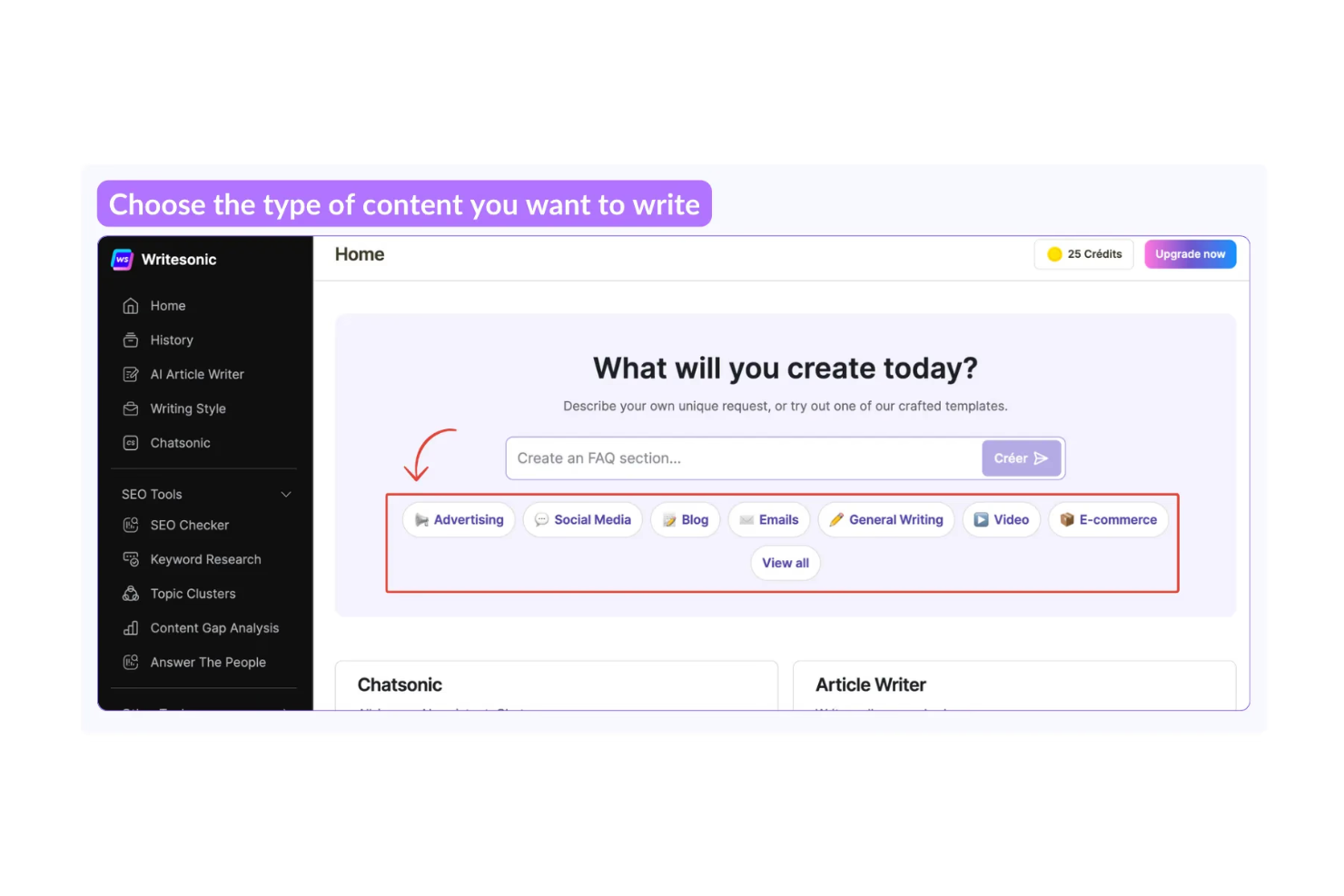
WriteSonic es una herramienta de generación de contenido con IA dirigida a profesionales de marketing, redactores y empresas que buscan crear contenido escrito de alta calidad de manera eficiente. Ofrece valor al proporcionar asistencia de escritura impulsada por IA para diversos tipos de contenido, desde publicaciones de blog hasta subtítulos para redes sociales.
Por qué elegí WriteSonic: Esta herramienta es perfecta para la generación de contenido con IA, ofreciendo funciones como redacción automática de artículos y creación personalizada de contenido. Sus capacidades de IA permiten que tu equipo genere contenido atractivo y relevante de forma rápida. Con funcionalidades como la optimización de contenido y el soporte de varios idiomas, WriteSonic satisface diferentes necesidades de redacción. Estas características la convierten en una excelente opción para equipos que buscan mejorar su proceso de creación de contenido.
Funciones destacadas e integraciones:
Funciones incluyen escritura de artículos impulsada por IA, plantillas de contenido personalizables y traducción de idiomas. Resulta útil para escalar la producción de contenido y mantener la coherencia en diversas plataformas. La función de traducción amplía tu alcance al permitir que el contenido sea accesible en varios idiomas.
Las integraciones incluyen WordPress, Zapier, HubSpot, Shopify, Google Docs, Trello, Slack, Mailchimp, Asana y Buffer.
Pros and Cons
Pros:
- Genera contenido de alta calidad rápidamente
- Ofrece funciones de optimización de contenido
- Soporta múltiples idiomas
Cons:
- Puede requerir aprendizaje para la personalización
- Dependencia excesiva de indicaciones específicas para obtener contenido de calidad

Crisp
Ideal para chat de atención al cliente
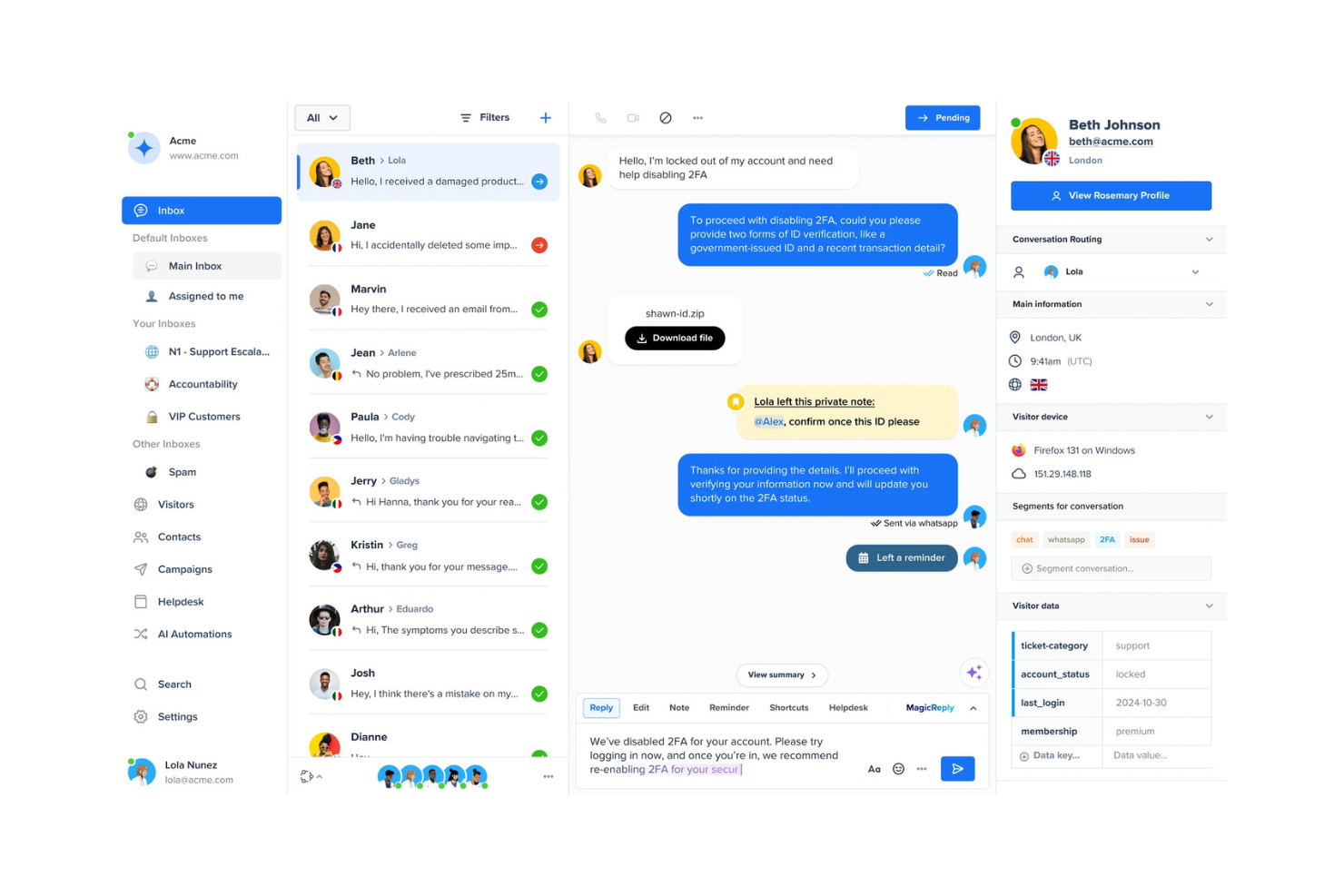
Crisp es una plataforma de chat de atención al cliente dirigida a empresas que buscan mejorar su comunicación con los clientes mediante chat en vivo y mensajería automatizada. Aporta valor al ofrecer chatbots impulsados por IA que ayudan a gestionar las consultas y procesos de soporte al cliente.
Por qué elegí Crisp: Crisp está diseñado para el chat de atención al cliente, ofreciendo funciones como chat en vivo y chatbots impulsados por IA que pueden gestionar eficazmente las consultas de los clientes. Su capacidad para automatizar respuestas y brindar soporte en tiempo real lo convierte en una herramienta valiosa para mejorar la satisfacción del cliente.
Con funciones de IA como el análisis de sentimientos y el enrutamiento de chats, tu equipo puede asegurarse de que los clientes reciban la asistencia adecuada de forma rápida. Estas capacidades hacen de Crisp una opción sólida para empresas que buscan optimizar sus operaciones de soporte al cliente.
Características destacadas e integraciones:
Características incluyen chat en vivo, mensajería automatizada y capacidades de co-navegación. Tu equipo puede interactuar con los clientes directamente en tu sitio web, proporcionando soporte instantáneo y aumentando la interacción. La capacidad de co-navegación permite a tu equipo de soporte guiar a los usuarios en tiempo real, mejorando la experiencia de soporte.
Integraciones incluyen Slack, WordPress, Shopify, Mailchimp, HubSpot, Google Analytics, Facebook Messenger, Telegram, WhatsApp y Twilio.
Pros and Cons
Pros:
- Brinda soporte al cliente en tiempo real
- Ofrece chatbots impulsados por IA
- Incluye análisis de sentimientos
Cons:
- Puede requerir configuración técnica
- Funcionalidades avanzadas limitadas

Ideal para la edición de documentos
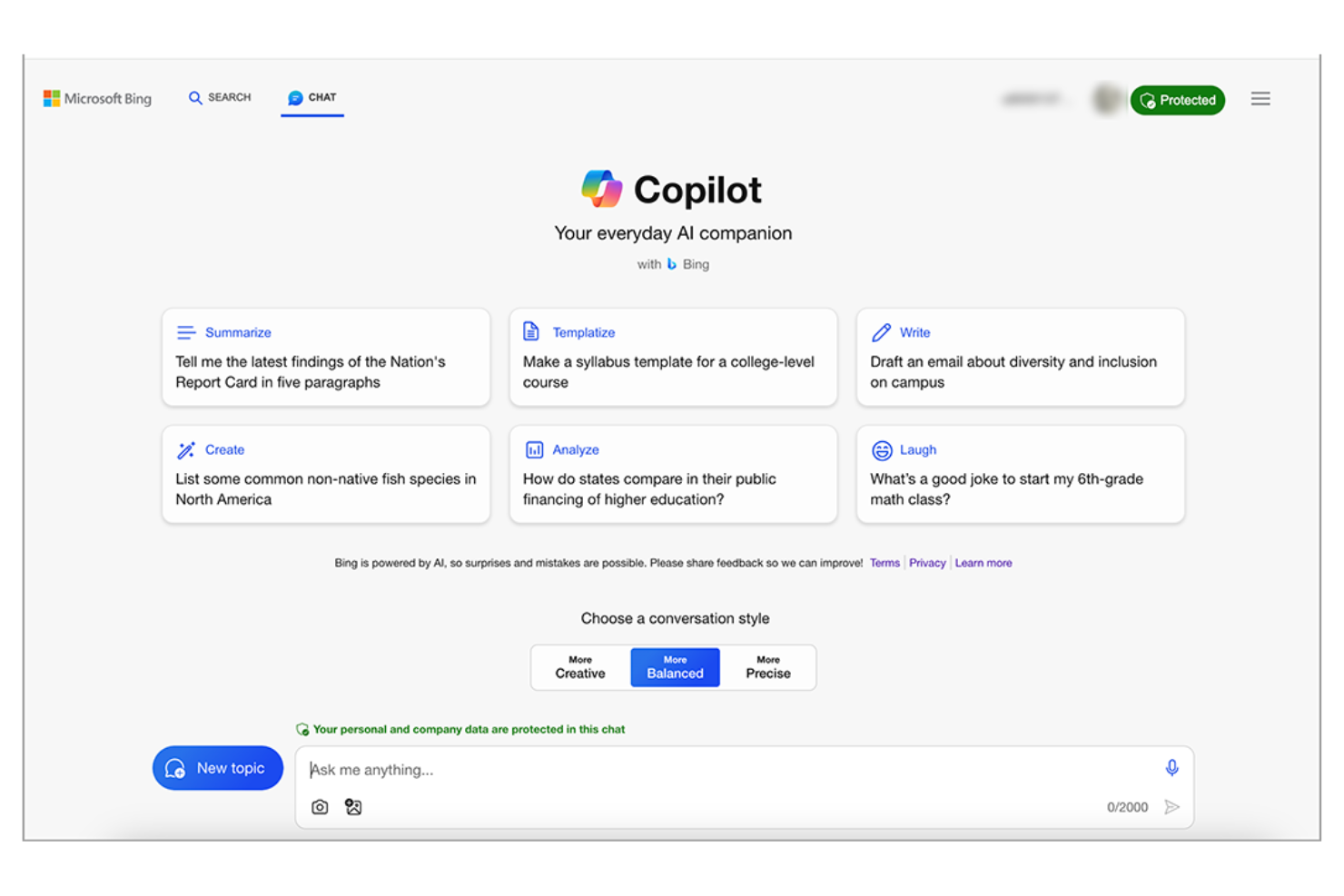
Microsoft Copilot es una herramienta impulsada por inteligencia artificial diseñada para asistir en la edición de documentos y la creación de contenido, orientada principalmente a profesionales y equipos empresariales. Mejora la productividad al integrar capacidades de inteligencia artificial generativa en las aplicaciones de Microsoft Office, ayudando a los usuarios con tareas como redactar, editar y resumir documentos.
Por qué elegí Microsoft Copilot: Esta herramienta facilita la edición de documentos al aprovechar la inteligencia artificial para ofrecer sugerencias inteligentes y automatizar tareas repetitivas. Con funciones como revisiones de gramática y estilo impulsadas por IA, tu equipo puede producir contenido pulido de manera eficiente. Su capacidad para generar resúmenes y obtener ideas a partir de datos la distingue para quienes se enfocan en la precisión y calidad del contenido. Estas funciones la convierten en una herramienta esencial para equipos que buscan mejorar la gestión de documentos.
Funciones destacadas e integraciones:
Funciones incluyen sugerencias de gramática y estilo, resumen automatizado de contenido y colaboración en tiempo real. Tu equipo puede beneficiarse de su capacidad para simplificar los flujos de trabajo de documentos y mejorar la calidad de los textos escritos.
Integraciones incluyen Microsoft Word, Excel, PowerPoint, Outlook, OneNote, SharePoint, Teams, OneDrive, Azure y Dynamics 365.
Pros and Cons
Pros:
- Mejora la calidad de los documentos
- Ofrece sugerencias inteligentes de contenido
- Se integra con la suite de Microsoft Office
Cons:
- Limitado al ecosistema de Microsoft
- Requiere aprendizaje para funciones avanzadas

Ideal para la resolución de problemas complejos
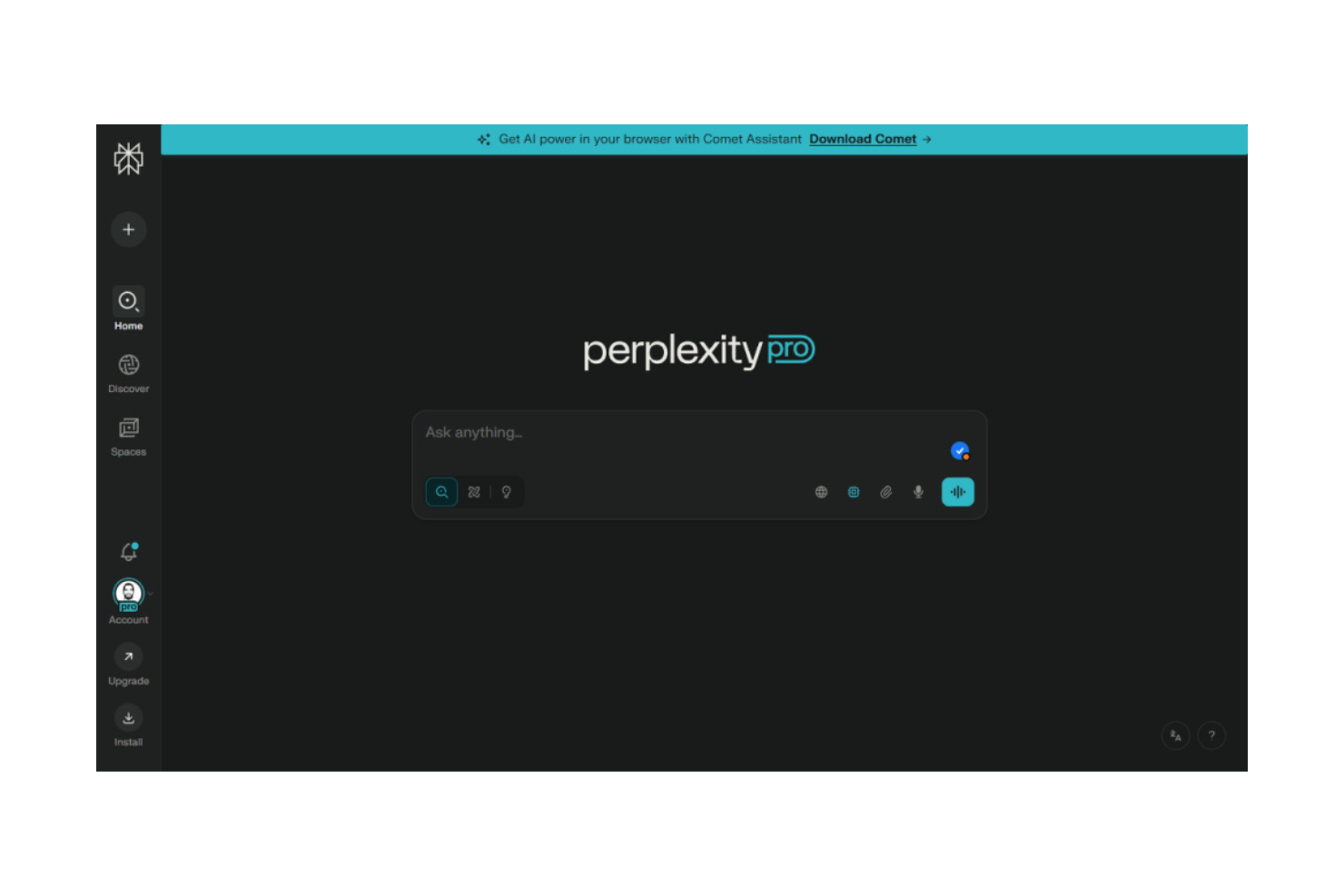
Perplexity AI es una herramienta estilo motor de búsqueda que utiliza inteligencia artificial para responder a tus preguntas en lenguaje natural y obtener datos en vivo de la web. Está diseñada para personas que necesitan investigar, encontrar hechos o profundizar en temas mediante la carga de documentos y preguntas de seguimiento.
Por qué elegí Perplexity AI: Perplexity AI te ayuda a abordar preguntas complejas combinando el razonamiento de IA con búsquedas web en tiempo real. Te permite cargar archivos como PDF o imágenes y analizarlos junto a datos en tiempo real. Tu equipo también puede cargar hojas de cálculo o documentos para obtener conclusiones más rápidamente. Con su modalidad Labs, puedes explorar temas más a fondo y probar diferentes modelos. Esto lo hace útil cuando necesitas respuestas más detalladas y reflexivas.
Características destacadas e integraciones:
Las características incluyen la capacidad de cargar y analizar documentos como PDF o imágenes. Ofrece el modo Perplexity Labs, donde puedes experimentar con consultas avanzadas y diferentes modelos de IA. Brinda resultados de búsquedas en la web en tiempo real con citas, para que obtengas respuestas con enlaces a las fuentes.
Las integraciones incluyen acceso a la API mediante Sonar y soporte nativo para aplicaciones web, iOS, Android y herramientas empresariales (a través de Enterprise Pro).
Pros and Cons
Pros:
- Gestiona tanto tus archivos como la búsqueda web a la vez
- Permite que tu equipo elija modelos avanzados para un razonamiento más profundo
- Te da respuestas con enlaces a las fuentes para que puedas verificar
Cons:
- Los niveles superiores pueden ser costosos para muchos usuarios
- Puede ofrecer más de lo que necesitas si solo haces consultas básicas

ChatGPT
Mejor para IA conversacional
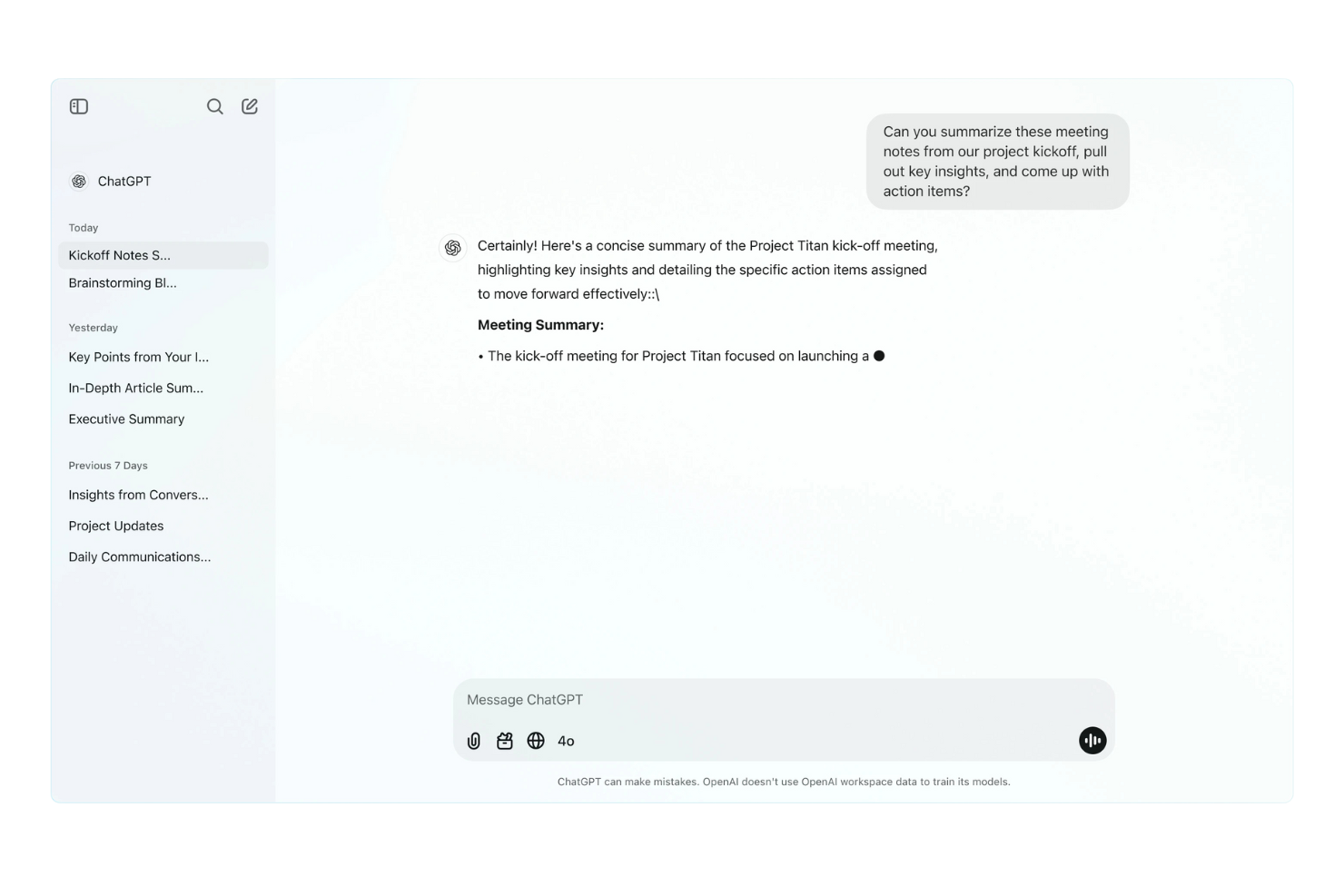
ChatGPT es una herramienta conversacional impulsada por IA que utilizan principalmente empresas e individuos para generar respuestas de texto similares a las humanas. Está dirigida a quienes buscan mejorar la comunicación, automatizar interacciones de atención al cliente y apoyar tareas creativas gracias a sus avanzadas capacidades de procesamiento del lenguaje.
Por qué elegí ChatGPT: ChatGPT es especialmente eficaz proporcionando IA conversacional, lo que lo hace ideal para automatizar soporte al cliente y aumentar la interacción de los usuarios. Su comprensión del lenguaje natural permite a tu equipo crear diálogos atractivos y contextuales. Puedes aprovechar su capacidad para generar contenido creativo y asistir en sesiones de lluvia de ideas. Los conocimientos impulsados por IA de esta herramienta la convierten en una opción destacada para equipos enfocados en la comunicación y la creatividad.
Funciones destacadas e integraciones:
Funciones incluyen la capacidad de generar texto a partir de indicaciones, soporte para varios idiomas y opciones de personalización de tono y estilo. Lo encontrarás útil para crear contenido, responder consultas e incluso redactar correos electrónicos, lo que puede ahorrar tiempo y esfuerzo a tu equipo.
Integraciones incluyen Microsoft Teams, Slack, Zapier, Salesforce, Zendesk, Trello, Asana, HubSpot, Zoom y Google Workspace.
Pros and Cons
Pros:
- Compatible con varios idiomas
- Tono y estilo personalizables
- Ideal para la generación de contenido creativo
Cons:
- Limitado a interacciones por voz y texto
- Requiere conexión a internet para acceder

Otter.ai
Otter.ai
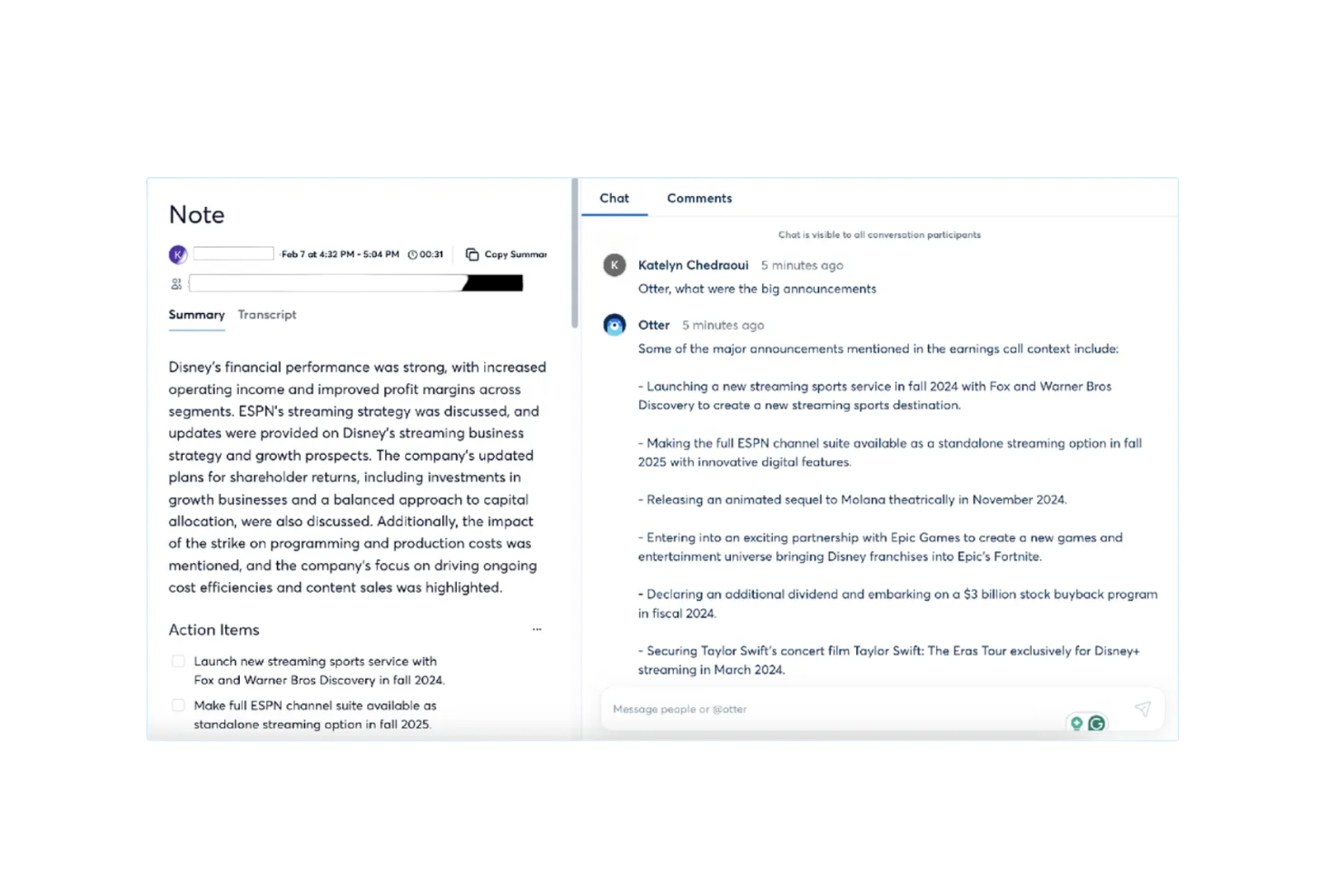
Otter.ai es un asistente de reuniones impulsado por IA que ofrece transcripciones en vivo, resúmenes automáticos y seguimiento de tareas. Está dirigido principalmente a profesionales de negocios y equipos que buscan aumentar la productividad y mejorar la gestión de reuniones mediante sus capacidades basadas en IA.
Por qué elegí Otter.ai: Esta herramienta destaca por proporcionar transcripciones y resúmenes de reuniones precisos, lo que la hace ideal para equipos que necesitan registros detallados. Con funciones como transcripción en vivo y seguimiento de tareas, tu equipo puede captar fácilmente los puntos clave y las tareas asignadas. Su capacidad para integrarse con plataformas como Zoom mejora su utilidad para reuniones virtuales. Estas funcionalidades la convierten en una herramienta valiosa para optimizar la comunicación y la gestión de proyectos.
Características destacadas e integraciones:
Funciones incluyen resúmenes automáticos de reuniones, seguimiento de tareas y agentes especializados para diferentes sectores como ventas y educación. Tu equipo se beneficiará de la capacidad de ahorrar tiempo automatizando la toma de notas y resumiendo las discusiones.
Integraciones incluyen Google Meet, Zoom, Dropbox, Google Calendar, Google Docs, HubSpot, Jira, Notion, Salesforce, Slack y Asana.
Pros and Cons
Pros:
- Transcripciones en vivo precisas
- Resúmenes automáticos de reuniones
- Mejora la productividad en reuniones virtuales
Cons:
- Precisión inconsistente en la transcripción con acentos
- Bajo reconocimiento de interlocutores en reuniones complejas

Ideal para la creación de arte con IA

Midjourney es una herramienta de generación de arte por IA diseñada para artistas, diseñadores y profesionales creativos que buscan explorar nuevas posibilidades visuales. Ofrece valor al proporcionar avanzadas capacidades de IA para crear obras de arte únicas e imaginativas con facilidad.
Por qué elegí Midjourney: Midjourney destaca en la creación de arte con IA, permitiendo a tu equipo generar contenido visual impresionante sin esfuerzo. Sus algoritmos impulsados por IA ayudan a producir diseños intrincados y piezas artísticas que se adaptan a diversas necesidades creativas. Puedes experimentar con diferentes estilos y técnicas, lo que lo hace perfecto para la exploración artística. Estas características lo convierten en una opción destacada para quienes buscan maneras innovadoras de potenciar sus proyectos creativos.
Características destacadas e integraciones:
Características incluyen estilos de arte personalizables, la capacidad de generar imágenes en alta resolución y una interfaz fácil de usar. Tu equipo apreciará la flexibilidad para ajustar estilos y experimentar con diferentes expresiones artísticas. La salida en alta resolución garantiza que tus creaciones sean adecuadas para diversas aplicaciones, desde pantallas digitales hasta medios impresos.
Integraciones incluyen Adobe Photoshop, Adobe Illustrator, CorelDRAW, Canva, Procreate, Sketch, Figma, Blender, GIMP y Krita.
Pros and Cons
Pros:
- Genera arte de alta calidad
- Ofrece estilos de arte personalizables
- Admite salida en alta resolución
Cons:
- Puede requerir un periodo de aprendizaje
- Desafíos al generar detalles precisos

Claude
Ideal para obtener ideas basadas en IA
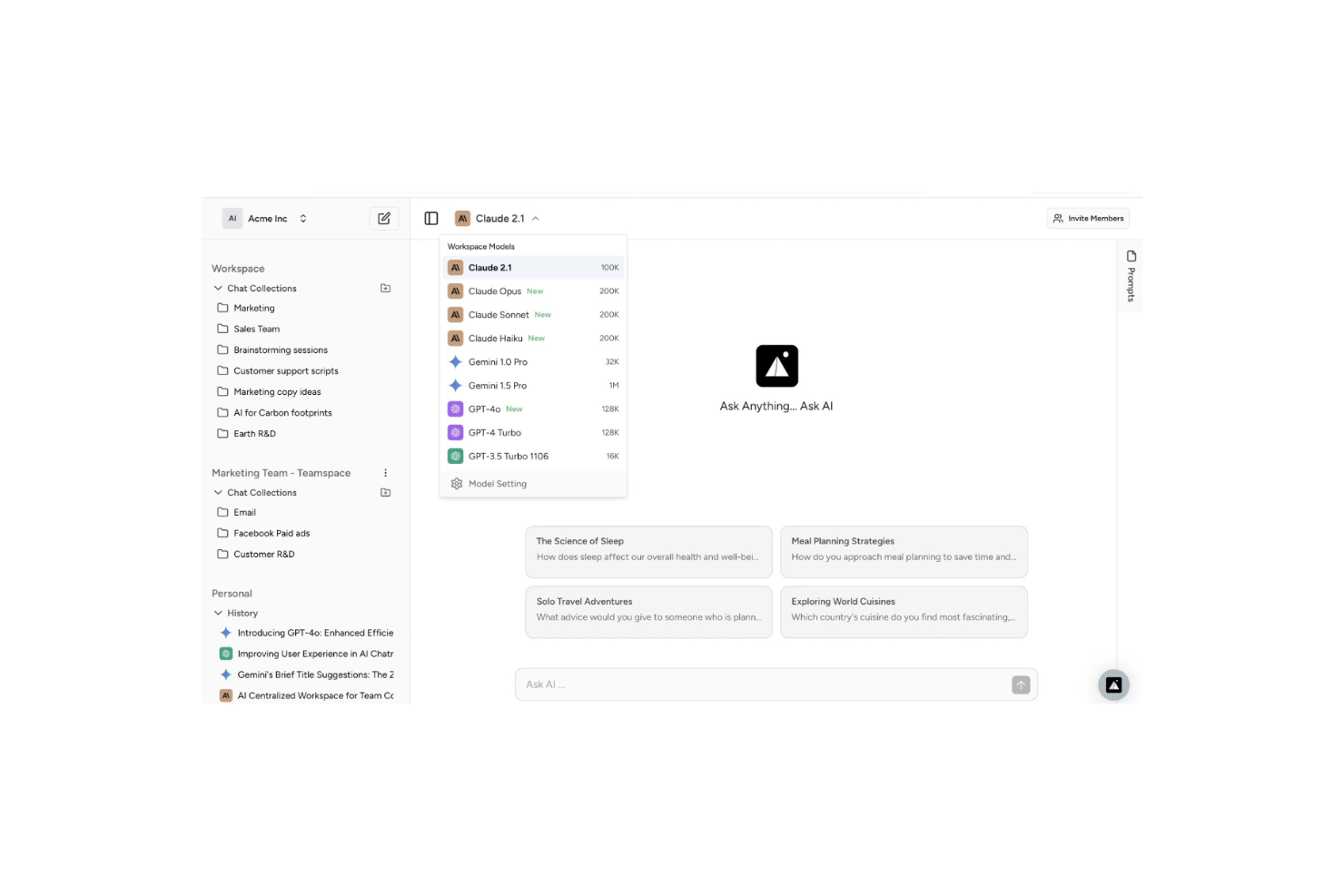
Claude es una plataforma de IA conversacional desarrollada por Anthropic que te permite subir documentos, imágenes o texto para generar ideas, resúmenes o respuestas en lenguaje natural. Es utilizada por profesionales de diferentes áreas que necesitan trabajar con grandes volúmenes de texto, datos o archivos y analizarlos rápidamente.
Por qué elegí Claude: Claude te da capacidades de análisis más profundas que las herramientas típicas. Ofrece funciones como comprensión de archivos, análisis de documentos de contexto extenso y varios modelos de IA (Haiku, Sonnet, Opus) que se adaptan a diferentes cargas de trabajo. Puedes subir un PDF o establecer indicaciones personalizadas, y entonces Claude detectará patrones, conexiones o resúmenes que podrías pasar por alto. Gracias a este enfoque en el razonamiento avanzado, tu equipo consigue más que un simple chat: obtiene una IA que ayuda a interpretar contenido complejo.
Características destacadas e integraciones:
Características incluyen la capacidad de subir y analizar documentos e imágenes. Maneja contextos de texto muy extensos, por lo que no necesitas dividirlos manualmente. Permite elegir entre diferentes modelos según la complejidad y rapidez de la tarea.
Integraciones incluyen Google Workspace, Microsoft 365, Slack, GitHub, Notion, Zoom, Figma, Dropbox y Asana.
Pros and Cons
Pros:
- Alta capacidad para analizar documentos extensos
- Selección flexible de modelos para diferentes complejidades
- Salida con análisis profundo, más allá de respuestas simples
Cons:
- Algunas funciones pueden requerir configuración avanzada por parte de tu equipo
- Los límites de uso pueden ser una limitación con alto volumen

Ideal para tomar notas de llamadas
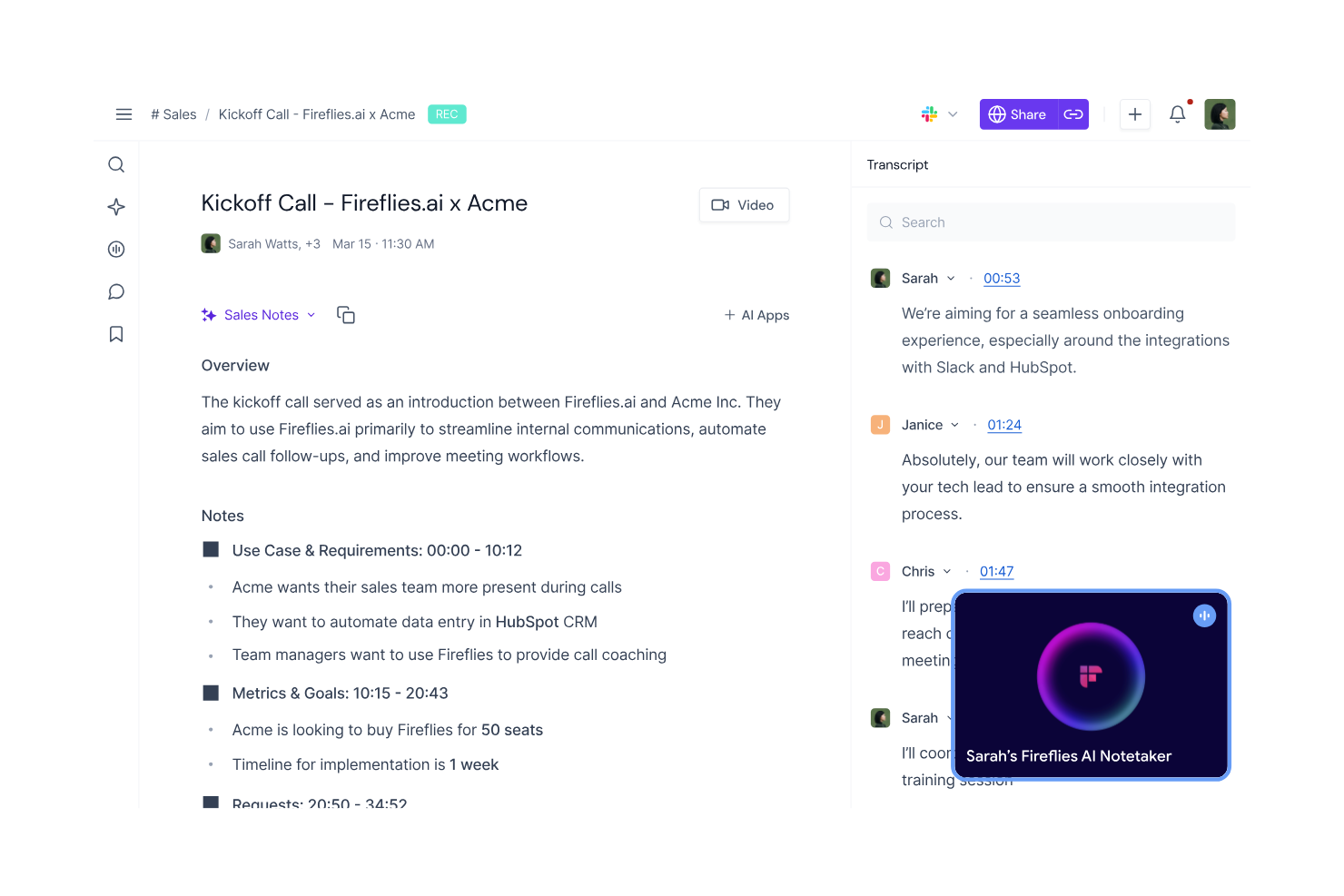
Fireflies.ai es una herramienta impulsada por IA diseñada para transcribir y analizar reuniones, dirigida a empresas y equipos que necesitan tomar notas y analizar reuniones de manera eficiente. Ayuda a los usuarios automatizando el proceso de transcripción y proporcionando información a partir de llamadas grabadas, lo que mejora la productividad y la colaboración.
Por qué elegí Fireflies.ai: Fireflies.ai está creada para tomar notas de llamadas de manera eficiente, ofreciendo transcripción automatizada y extracción de palabras clave para capturar cada detalle con precisión. Sus funcionalidades de IA te ayudan a grabar, organizar y resumir reuniones sin esfuerzo manual. La plataforma también incluye un panel de análisis de sentimiento y destacados de puntos clave, lo que facilita a tu equipo revisar discusiones y actuar rápidamente. Estas capacidades la convierten en una solución práctica para mejorar la gestión y el seguimiento de reuniones.
Funciones destacadas e integraciones:
Funciones incluyen reconocimiento de voz, posibilidad de buscar y filtrar transcripciones, y plantillas de reuniones personalizables. Resulta útil para localizar rápidamente información importante dentro de las transcripciones, ahorrando tiempo y mejorando la eficiencia.
Integraciones incluyen Zoom, Microsoft Teams, Google Meet, Slack, Salesforce, HubSpot, Asana, Trello, Zapier y Dropbox.
Pros and Cons
Pros:
- Automatiza la transcripción de reuniones
- Proporciona análisis de sentimiento
- Destaca los puntos clave de la reunión
Cons:
- Funciones limitadas de colaboración en tiempo real
- El procesamiento de transcripciones puede ser lento


Gumloop es una plataforma de automatización con IA diseñada para una amplia variedad de funciones empresariales, incluyendo marketing, ventas, operaciones, ingeniería y soporte. Ofrece una interfaz de arrastrar y soltar que permite a los usuarios automatizar flujos de trabajo integrando datos, aplicaciones y capacidades de IA para mejorar la gestión del tiempo.
Por qué elegí Gumloop: Gumloop demuestra ser altamente competente en la automatización de flujos de trabajo, proporcionando una interfaz fácil de usar para crear flujos de trabajo complejos sin necesidad de programar. Su capacidad para integrarse con más de 110 aplicaciones la hace versátil para diversas necesidades empresariales. Las funciones de IA de la plataforma, como la extracción de datos y la toma de decisiones, contribuyen a que los procesos sean eficientes y consistentes. Estas capacidades la convierten en una herramienta ideal para equipos que buscan automatizar tareas manuales (como listas de tareas) y mejorar la eficiencia operativa.
Características destacadas e integraciones:
Características incluyen una interfaz de arrastrar y soltar, toma de decisiones impulsada por IA y herramientas de gestión de datos. Tu equipo puede automatizar tareas repetitivas y centrarse en trabajos más estratégicos. La capacidad de la plataforma para integrarse con numerosas aplicaciones permite una mejor automatización del flujo de trabajo.
Integraciones incluyen Google Sheets, Salesforce, HubSpot, Slack, Microsoft Teams, Dropbox, Trello, Asana, Zapier y Mailchimp.
Pros and Cons
Pros:
- Soporta una amplia variedad de aplicaciones
- Interfaz intuitiva de arrastrar y soltar
- Mejora la automatización de flujos de trabajo
Cons:
- Puede requerir tiempo de configuración inicial
- Ecosistema de integraciones más pequeño
Otras herramientas de IA para el trabajo
Estas son algunas opciones adicionales de herramientas de IA para el trabajo que no han llegado a mi lista de selección, pero que merece la pena consultar:
- Zoom AI Companion
Mejor para reuniones virtuales
- AI on Google Search
Ideal para mejorar la búsqueda
- IBM Watson Discovery
Mejor para análisis de datos impulsados por IA


Cómo Evalúo las Herramientas de IA para el Lugar de Trabajo
Toda herramienta en esta lista debe aportar un valor genuino de IA—no solo un chatbot añadido a una plataforma heredada, sino capacidades que realmente reduzcan la carga de trabajo de RRHH y revelen conocimientos que de otro modo pasarían desapercibidos. Divido mi evaluación en dos capas: la funcionalidad central que una herramienta debe tener para calificar (como automatización impulsada por IA, analítica predictiva y búsqueda inteligente) y los factores diferenciadores que distinguen las buenas opciones de las excelentes.
Funcionalidad Central (Lo Mínimo para Esta Lista)
Al seleccionar herramientas para mi listado, califico cada una en una escala del 0 (no ofrece la funcionalidad) al 5 (destaca en esta área) por cada funcionalidad central que se detalla a continuación. Luego, calculo la puntuación total de la herramienta en un porcentaje. Cada herramienta debe obtener una puntuación total mínima del 65% para ser considerada para su inclusión.
- Asistente Generativo de IA: Evalúo si la herramienta ofrece un real copiloto de IA generativa que pueda redactar descripciones de puestos, resumir ciclos de retroalimentación o responder preguntas sobre políticas—no solo un chatbot con guión.
- Automatización de Flujos de Trabajo con IA: La herramienta debe automatizar procesos de RRHH de varios pasos como secuencias de incorporación o aprobaciones de permisos utilizando lógica de IA, superando ampliamente simples reglas "si-entonces".
- Analítica Predictiva & Perspectivas: Busco predicciones impulsadas por ML sobre métricas como riesgo de fuga, cuellos de botella en contrataciones o tendencias de compromiso—los dashboards con solo gráficos históricos no son suficientes.
- Búsqueda Inteligente & Recuperación de Conocimiento: Reviso si empleados y personal de RRHH pueden hacer preguntas en lenguaje natural y obtener respuestas precisas, citando fuentes extraídas de políticas, manuales o documentos de beneficios.
- Integraciones con Sistemas de RRHH: Cada herramienta debe conectarse con HRIS, ATS y plataformas de nómina que los equipos ya usan—herramientas como Workday, BambooHR, Greenhouse o ADP—para que la IA funcione con datos reales de la fuerza laboral.
- Gobernanza de IA de Nivel Empresarial: Busco acceso basado en roles, registro de auditorías, opciones de residencia de datos y políticas claras de manejo de datos de IA que cumplan con el estándar para gestionar información sensible de empleados.
Una vez tengo una lista de herramientas que cumplen con este criterio, considero qué distingue a cada plataforma.
Factores Diferenciadores (Qué Distingue a los Proveedores)
Así es como comparo y contrasto diferentes proveedores:
Características Destacadas
La IA agente es un gran diferenciador—busco herramientas en las que la IA pueda completar autónomamente tareas de varios pasos como programar un ciclo completo de entrevistas o generar una lista corta de candidatos internos para un puesto vacante. El análisis de sentimientos y compromiso también pesa. Algunas plataformas analizan respuestas de encuestas de pulso y patrones de comunicación para señalar riesgos de agotamiento antes de que se reflejen en entrevistas de salida. Además, evalúo si una herramienta incluye un motor de inteligencia de habilidades que mapea las competencias de los empleados con puestos vacantes y rutas de aprendizaje, lo que añade verdadero valor para equipos enfocados en movilidad interna.
Más Allá de las Características
La privacidad de datos y el cumplimiento de la IA tienen mucho peso en este ámbito. Valoro si los proveedores ofrecen auditoría de sesgos en modelos de contratación y políticas transparentes sobre cómo se gestiona la información de empleados durante el entrenamiento de IA. La rapidez de implementación también importa—algunas plataformas ofrecen casos de uso preconstruidos que permiten a los equipos operar en semanas, mientras que otras requieren meses de configuración personalizada. También reviso la claridad de los precios, especialmente si el proveedor cobra por empleado, por usuario o según el volumen de uso de la IA, ya que los modelos poco claros pueden volver impredecibles los costos al escalar la plantilla.
Cómo elegir herramientas de IA para el trabajo
Es fácil perderse entre largas listas de funciones y complejas estructuras de precios. Para ayudarte a mantener la atención mientras avanzas en tu proceso específico de selección de software, aquí tienes una lista de factores que debes tener en cuenta:
| Factor | Qué debes tener en cuenta |
|---|---|
| Escalabilidad | ¿La herramienta crece con tu equipo? Busca soluciones capaces de gestionar un mayor volumen de datos y usuarios sin perder rendimiento. |
| Integraciones | ¿Se conecta con tus sistemas actuales? Comprueba que sea compatible con el software que ya utilizas para evitar interrupciones en los flujos de trabajo. |
| Personalización | ¿Puedes adaptar la herramienta a tus necesidades? Asegúrate de que te permita ajustar la configuración y los flujos de trabajo para adaptarlos a tus procesos. |
| Facilidad de uso | ¿Es fácil de usar para tu equipo? Ten en cuenta la curva de aprendizaje y si tu equipo puede adoptar la herramienta fácilmente sin una formación exhaustiva. |
| Implementación e incorporación | ¿Con qué rapidez puedes empezar? Evalúa el tiempo y los recursos necesarios para la configuración y la formación, así como si el proveedor ofrece asistencia durante esta fase. |
| Coste | ¿Se ajusta a tu presupuesto? Compara los modelos de precios y busca costes ocultos. Considera el valor que aporta frente a su coste. |
| Medidas de seguridad | ¿Están protegidos tus datos? Asegúrate de que la herramienta cumpla las normas de seguridad y ofrezca funciones como el cifrado y los controles de acceso. |
| Disponibilidad de asistencia | ¿Recibirás ayuda cuando la necesites? Comprueba el horario y los canales de asistencia del proveedor, y considera la calidad y rapidez de respuesta de su servicio de atención al cliente. |
¿Qué son las herramientas de IA para el trabajo?
Las herramientas de IA para el trabajo son soluciones de software que utilizan inteligencia artificial para mejorar la productividad y la eficiencia en entornos empresariales. Estas herramientas suelen ser utilizadas por profesionales de Recursos Humanos, responsables y líderes de equipo para automatizar tareas, mejorar la toma de decisiones y facilitar la comunicación.
Funciones como el procesamiento del lenguaje natural, el análisis de datos y las capacidades predictivas ayudan a automatizar tareas repetitivas, proporcionar información útil y mejorar la colaboración. En general, estas herramientas ofrecen un valor significativo al ahorrar tiempo, reducir errores y mejorar la eficiencia en el entorno laboral.
Funciones
Al seleccionar herramientas de IA para el entorno laboral, presta atención a las siguientes funciones clave:
- Procesamiento del lenguaje natural: Permite que la herramienta comprenda y responda al lenguaje humano, haciendo que la comunicación con los usuarios sea más eficaz.
- Análisis predictivo: Analiza los datos para predecir tendencias y resultados, lo que ayuda a tomar mejores decisiones y a planificar.
- Transcripción automatizada: Convierte el lenguaje hablado en texto, ahorrando tiempo y mejorando la precisión de las notas de reuniones y la documentación.
- Integración de datos: Permite que la herramienta se conecte con otros sistemas y bases de datos, garantizando un flujo de datos y un acceso fluidos entre plataformas.
- Análisis de sentimientos: Evalúa el texto para determinar el sentimiento que expresa, ayudando a los usuarios a comprender las emociones de los clientes o empleados.
- Automatización de tareas: Automatiza las tareas repetitivas, liberando tiempo para que los usuarios se concentren en actividades más estratégicas.
- Información en tiempo real: Proporciona información y análisis actualizados, permitiendo responder rápidamente a los cambios y las oportunidades.
- Flujos de trabajo personalizables: Permite a los usuarios adaptar los procesos para satisfacer sus necesidades específicas, mejorando la eficiencia y la productividad.
- Chatbots basados en IA: Ofrecen asistencia e interacción automatizadas, mejorando el servicio y la implicación de los clientes.
- Funciones de seguridad: Garantizan la protección de los datos y el cumplimiento de los estándares del sector, protegiendo la información confidencial.
Beneficios
La implementación de herramientas de IA para el entorno laboral ofrece varios beneficios para tu equipo y tu empresa. Estos son algunos de los que puedes esperar:
- Mayor productividad: La automatización de tareas repetitivas permite que tu equipo se concentre en un trabajo más estratégico, aumentando la productividad general.
- Mejor toma de decisiones: El análisis predictivo y la información en tiempo real proporcionan datos valiosos que ayudan a tu equipo a tomar decisiones fundamentadas rápidamente.
- Comunicación mejorada: El procesamiento del lenguaje natural y los chatbots basados en IA facilitan una comunicación eficaz, tanto internamente como con los clientes.
- Ahorro de tiempo: La transcripción automatizada y la automatización de tareas ahorran tiempo en las tareas manuales, lo que permite a tu equipo asignar su tiempo de forma más eficiente.
- Mejor interacción con los clientes: El análisis de sentimientos y los chatbots basados en IA mejoran las interacciones con los clientes, lo que se traduce en una mayor satisfacción y fidelidad.
- Flexibilidad de personalización: Los flujos de trabajo personalizables garantizan que las herramientas se adapten a las necesidades específicas de tu empresa, mejorando la eficiencia operativa.
- Seguridad de los datos: Las funciones de seguridad integradas protegen la información confidencial y garantizan el cumplimiento de los estándares del sector.
Costes y precios
Para seleccionar herramientas de IA para el entorno laboral es necesario comprender los distintos modelos de precios y planes disponibles. Los costes varían en función de las funciones, el tamaño del equipo, los complementos y otros factores. La tabla siguiente resume los planes habituales, sus precios medios y las funciones que suelen incluir las soluciones de herramientas de IA para el entorno laboral:
Tabla comparativa de planes para herramientas de IA para el entorno laboral
| Tipo de plan | Precio medio | Funciones habituales |
|---|---|---|
| Plan gratuito | $0 | Automatización básica de tareas, almacenamiento de datos limitado y asistencia estándar. |
| Plan personal | $5-$25/usuario/mes | Automatización avanzada de tareas, análisis predictivo y asistencia por correo electrónico. |
| Plan empresarial | $30-$75/usuario/mes | Flujos de trabajo personalizados, integraciones con aplicaciones de terceros y asistencia prioritaria. |
| Plan para empresas | $100-$200/usuario/mes | Personalización completa, gestor de cuenta exclusivo y funciones de seguridad prémium. |
Preguntas frecuentes sobre las herramientas de IA para el trabajo
Aquí tienes algunas respuestas a preguntas frecuentes sobre las herramientas de IA para el trabajo:
¿Pueden varios departamentos utilizar la misma herramienta de IA con una sola cuenta?
Sí, la mayoría de las plataformas de IA para el trabajo permiten que varios departamentos operen con una sola cuenta de organización. Cada equipo puede tener su propio espacio de trabajo para gestionar proyectos y datos por separado. Los permisos basados en roles ayudan a controlar quién puede ver, editar o compartir información específica.
¿Pueden las herramientas de IA para el trabajo mejorar la productividad del equipo?
Sí, las herramientas de IA para el trabajo pueden mejorar significativamente la productividad del equipo. Automatizan tareas repetitivas, proporcionan información basada en datos y facilitan una mejor comunicación. Al reducir el esfuerzo manual, tu equipo puede centrarse en actividades estratégicas y en la toma de decisiones. Busca herramientas con funciones como la automatización de tareas, el análisis predictivo y la colaboración en tiempo real para maximizar las mejoras de productividad.
¿Qué medidas de seguridad debo buscar en una herramienta de IA para el trabajo?
Asegúrate de que la herramienta cumpla las normas de seguridad del sector y ofrezca funciones como cifrado, controles de acceso y actualizaciones de seguridad periódicas. Comprueba si el proveedor ofrece políticas de protección de datos y cumple normativas como el RGPD. Es fundamental proteger la información confidencial, así que elige una herramienta que dé prioridad a la seguridad y ofrezca prácticas de seguridad transparentes.
¿Cómo se integran las herramientas de IA para el trabajo con otros programas?
La mayoría de las herramientas de IA para el trabajo ofrecen funciones de integración con programas populares, como sistemas CRM, plataformas de comunicación y herramientas de gestión de proyectos. Comprueba las opciones de integración de la herramienta y su compatibilidad con tus sistemas actuales. Una integración fluida garantiza que los datos circulen correctamente entre las plataformas, reduce la introducción manual de datos y mejora la eficiencia general.
¿Qué tipo de asistencia puedo esperar de los proveedores de herramientas de IA para el trabajo?
La asistencia varía según el proveedor, pero normalmente puedes esperar opciones como asistencia por correo electrónico, chat o teléfono. Algunos proveedores ofrecen asistencia las 24 horas, los 7 días de la semana, mientras que otros tienen un horario limitado. Busca proveedores que ofrezcan documentación completa, recursos de formación y un equipo de asistencia ágil. Una buena asistencia puede marcar una diferencia significativa en la experiencia de tu equipo con la herramienta.