

Los 10 mejores programas de impuestos empresariales para simplificar la presentación en 2026

Selección de los mejores programas de impuestos empresariales


Gestionar los impuestos de una empresa puede resultar abrumador con facilidad. Con tantas normativas, plazos y posibles deducciones, es fácil sentirse perdido, especialmente cuando los cálculos manuales te exponen a errores, sanciones u oportunidades perdidas de ahorrar dinero. Sabes que necesitas un programa de impuestos empresariales para automatizar los cálculos, cumplir la normativa y maximizar las deducciones, pero con tantas opciones disponibles, ¿cómo encuentras el adecuado?
Por suerte, he investigado numerosas herramientas fiscales para empresas con el fin de ayudar a las compañías a agilizar las nóminas, el cumplimiento tributario y la elaboración de informes. En esta guía, simplificaré el proceso de investigación, destacando los mejores programas de impuestos empresariales para ahorrarte tiempo, reducir los errores y mantener tu empresa preparada para sus obligaciones fiscales durante todo el año.
Por qué confiar en nuestras reseñas de software
Nuestro equipo lleva probando y evaluando software desde 2012. Como expertos en RR. HH., sabemos lo difícil —y lo importante— que es elegir el software adecuado.
Para esta guía, evaluamos las herramientas mediante pruebas prácticas e investigación independiente, puntuando las herramientas según nuestros criterios de selección. También nos basamos en la experiencia de líderes de opinión del sector y de profesionales de RR. HH. en activo.
Nuestras reseñas reflejan nuestro criterio editorial humano, no un discurso de ventas.
Revisores expertos:
¿Qué es un programa de impuestos empresariales?
Un programa de impuestos empresariales es una solución digital diseñada para ayudar a las empresas a gestionar y presentar sus impuestos. Automatiza los cálculos fiscales, garantiza el cumplimiento de la legislación tributaria y ayuda a identificar deducciones y créditos fiscales.
Su objetivo es simplificar el complejo proceso de preparación de impuestos, reducir el riesgo de errores y ahorrar tiempo. Proporciona información actualizada sobre la normativa fiscal, lo que facilita que las empresas cumplan sus obligaciones. Al utilizar un programa de impuestos empresariales, las compañías pueden gestionar eficazmente sus responsabilidades fiscales, lo que se traduce en informes financieros más precisos y una mejor gestión financiera.
Resumen de los mejores programas de impuestos empresariales
Esta tabla comparativa resume los detalles básicos de cada uno de los mejores programas de impuestos empresariales que he seleccionado. Consulta lado a lado los detalles de precios y la disponibilidad de pruebas gratuitas o demostraciones para encontrar el mejor programa según tu presupuesto y las necesidades de tu empresa.
| Tool | Best For | Trial Info | Price | ||
|---|---|---|---|---|---|
| 1 | Mejor para ayuda contextual | Plan gratuito disponible | Desde $29.99/presentación | Website | |
| 2 | Mejor para propietarios de pequeñas empresas canadienses | Plan gratuito disponible | Desde $29.99/declaración | Website | |
| 3 | Mejor para empresas medianas | Demostración gratuita disponible | Precios bajo solicitud | Website | |
| 4 | Ideal para negocios de comercio electrónico | Demo gratuita disponible | Precios a pedido | Website | |
| 5 | Mejor para contratistas independientes | Plan gratuito disponible | Desde $22.99/presentación | Website | |
| 6 | La mejor opción para el cumplimiento del impuesto sobre ventas en comercio electrónico | Prueba gratuita de 30 días | Desde $19/mes | Website | |
| 7 | Mejor experiencia de usuario | Plan gratuito disponible | Desde $99/presentación | Website | |
| 8 | Ideal para informes integrados | Demo gratuita disponible | Desde $10/mes | Website | |
| 9 | Mejor para la automatización | Demo gratuita disponible | Precios a solicitud | Website | |
| 10 | Ideal para funciones que ahorran tiempo | Prueba gratuita disponible | Desde $449/año | Website |
Análisis de los mejores programas de impuestos empresariales
Aquí tienes una breve descripción de cada programa de impuestos empresariales que ha entrado en mi lista de los 10 mejores, con una captura de pantalla, sus funciones destacadas, ventajas y desventajas y detalles de precios. Sigue leyendo para encontrar opciones adicionales recomendadas al final de la lista.

TaxAct
Mejor para ayuda contextual
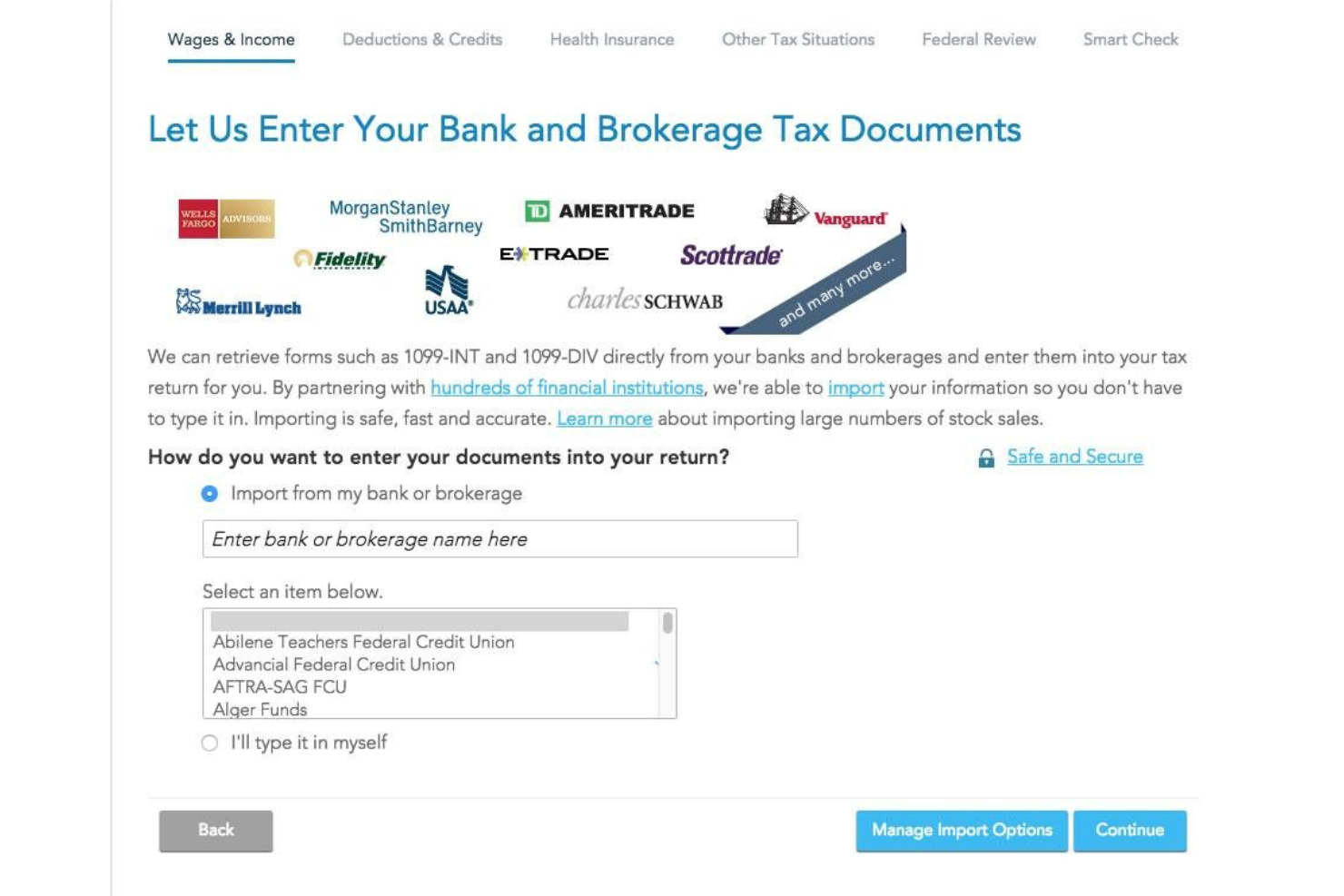
TaxAct es un software de impuestos empresariales que te permite presentar tus impuestos por tu cuenta, mientras proporciona ayuda contextual en cada paso del proceso de declaración.
Por qué elegí TaxAct: Seleccioné TaxAct para mi lista de los 10 principales porque te brinda consejos útiles sobre cómo calcular y presentar correctamente tus impuestos ante el IRS. El software ofrece una excelente experiencia de usuario e incluso cuenta con una aplicación móvil, lo que te permite presentar tus impuestos usando solo tu dispositivo móvil.
Características y integraciones destacadas de TaxAct:
Características destacadas incluyen la presentación electrónica, el cálculo de deducciones y créditos fiscales, soporte ilimitado y gratuito de expertos en impuestos, importación de documentos y aplicación móvil. Me gusta la aplicación móvil de TaxAct porque te permite subir documentos tomando fotos con la cámara de tu teléfono.
Integraciones incluyen varias soluciones de nómina, como QuickBooks, Sage Online, Xero, TaxDome y Wave.
Pros and Cons
Pros:
- Permite importar tus documentos fiscales de otros proveedores para minimizar errores de presentación
- Proceso fácil de carga de documentos
- Soporte ilimitado
Cons:
- Los declarantes no pueden cambiar a un plan más económico una vez que inician la declaración de impuestos
- La función de búsqueda de la base de conocimientos podría ser más precisa

Mejor para propietarios de pequeñas empresas canadienses
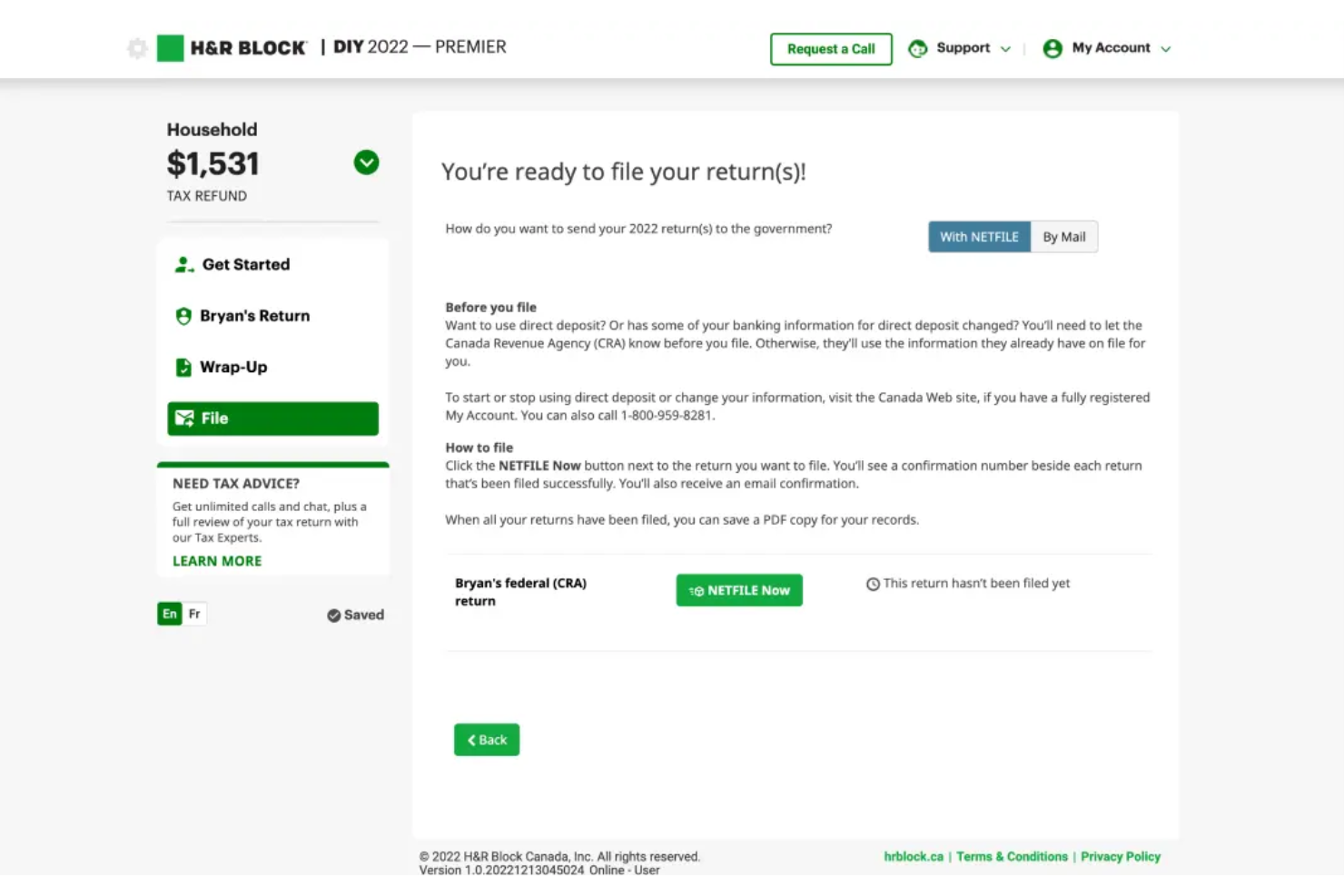
H&R Block es un proveedor de software de soluciones fiscales empresariales que ayuda a los propietarios de pequeñas empresas canadienses a presentar sus declaraciones de impuestos, ya sea que tengan empresas unipersonales o pequeñas corporaciones.
Por qué elegí H&R Block: Elegí H&R Block porque su proceso de declaración es fluido y facilita a los propietarios de pequeñas empresas recordar posibles deducciones o exenciones fiscales federales. Los nuevos usuarios pasan por una serie de preguntas para determinar su situación fiscal, mientras que los usuarios recurrentes tienen su información rellenada automáticamente a partir de la declaración del año fiscal anterior.
Características destacadas e integraciones de H&R Block:
Las características destacadas incluyen soporte para criptomonedas, calculadoras de donaciones, asistencia en caso de auditoría, presentación de impuestos con servicio completo, importación automática de documentos y soporte en vivo. Me gusta la función de soporte en vivo de H&R Block porque te brinda sesiones ilimitadas de chat o de uso compartido de pantalla con contadores públicos certificados (CPAs), lo que te permite recibir asesoramiento fiscal sobre cómo maximizar tus deducciones o créditos fiscales relevantes para tu sector.
H&R Block se integra con CoinTracker, un proveedor de software fiscal para criptomonedas.
Pros and Cons
Pros:
- Ofrece una buena selección de formularios entre los que elegir
- Versión gratuita sólida para declaraciones simples
- Garantía de precisión
Cons:
- El verificador de errores puede resaltar problemas previamente corregidos como si aún existieran
- Algunos errores de verificación no ofrecen explicaciones detalladas

Mejor para empresas medianas

InsightSoftware es una solución de gestión de impuestos empresariales que permite a las empresas medianas navegar por complejas regulaciones fiscales y simplificar su proceso de declaración mediante la automatización.
Por qué elegí InsightSoftware: Seleccioné InsightSoftware porque ayuda a las empresas medianas con necesidades fiscales complejas a automatizar sus procesos fiscales mientras reduce el riesgo de una auditoría. La plataforma recoge datos de aplicaciones de terceros y los agrega para ayudarte a descubrir información relevante y tomar decisiones estratégicas respecto a tu situación financiera.
Funciones destacadas e integraciones de InsightSoftware:
Funciones destacadas incluyen cálculo de impuestos, generación de reportes, soporte para auditorías, un repositorio fiscal, flujos de trabajo automatizados y un portal de autoservicio. Me gusta la función de cálculo de impuestos de la plataforma porque es rápida y te permite obtener cálculos precisos, tanto actuales como diferidos, por estado.
Las integraciones incluyen decenas de herramientas empresariales, como Oracle ERP Cloud, Oracle PeopleSoft, Microsoft 365 Business Central, SAP Business One, NetSuite, Deltek Vision Cloud, Epicor CMS, Infor CloudSuite Financials, Sage y QuickBooks Online.
Pros and Cons
Pros:
- Consolida toda tu información fiscal, simplificando tus reportes financieros
- Solución flexible y personalizable
- Te permite crear plantillas personalizadas de reportes
Cons:
- Automatización limitada para cálculos de crédito fiscal de la renta y pérdidas operativas netas
- La plataforma puede presentar lentitud al importar grandes volúmenes de datos

Avalara
Ideal para negocios de comercio electrónico
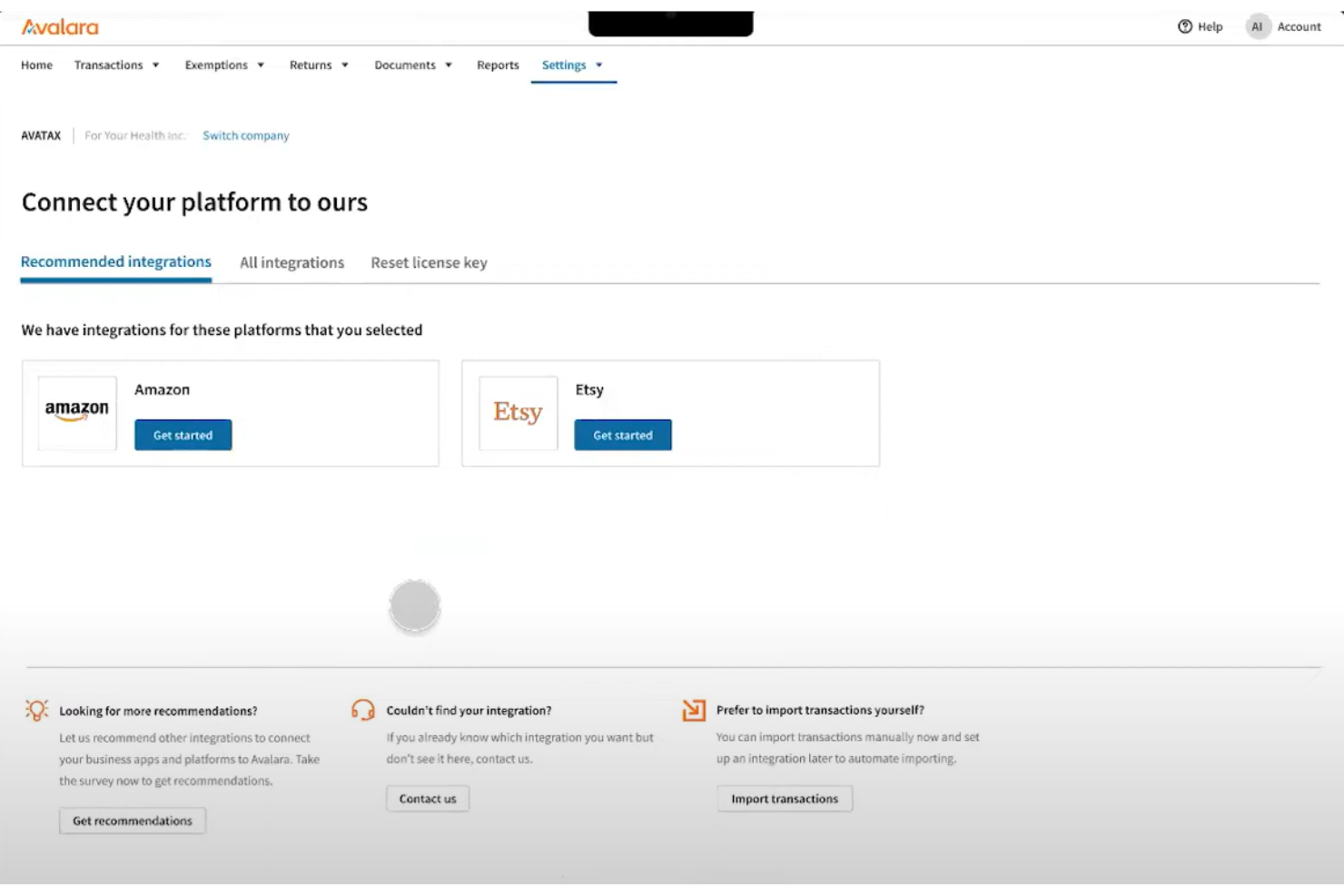
Avalara es una plataforma de impuestos empresariales que ayuda a los negocios de comercio electrónico en Norteamérica a reportar su inventario y presentar sus impuestos.
Por qué elegí Avalara: Avalara entró en mi lista gracias a sus integraciones nativas con plataformas y mercados de comercio electrónico. El software extrae datos directamente de tu herramienta de comercio electrónico y los utiliza para completar tus formularios fiscales, facilitando el cálculo de las tasas impositivas según tu jurisdicción local.
Características destacadas e integraciones de Avalara:
Funciones destacadas incluyen facturación electrónica, perfiles empresariales, reportes consolidados, gestión de documentos, presentación de declaraciones de impuestos, una base de conocimientos y alertas personalizadas. Me gusta la función de alertas personalizadas de Avalara porque te notifica cuando debes actuar en diferentes jurisdicciones fiscales, lo que la convierte en una de las mejores opciones de software fiscal para negocios que operan en varios estados o provincias.
Integraciones incluyen más de 1,200 asociaciones de integración con plataformas de comercio electrónico, soluciones de nómina, herramientas de pago y CRMs, como Sage, Magento, NetSuite, Microsoft Dynamics, Shopify Plus, Stripe Invoicing, Zuora, QuickBooks, WooCommerce, Amazon Seller y Salesforce.
Pros and Cons
Pros:
- La función de búsqueda te permite encontrar la información adecuada en las preguntas frecuentes de la plataforma
- Te ayuda a presentar declaraciones estatales y federales precisas
- Gran selección de tutoriales y materiales de formación para negocios de comercio electrónico
Cons:
- Los usuarios principiantes pueden encontrar la plataforma abrumadora
- Puede ser más costoso que otros programas de software fiscal para pequeñas empresas

Mejor para contratistas independientes
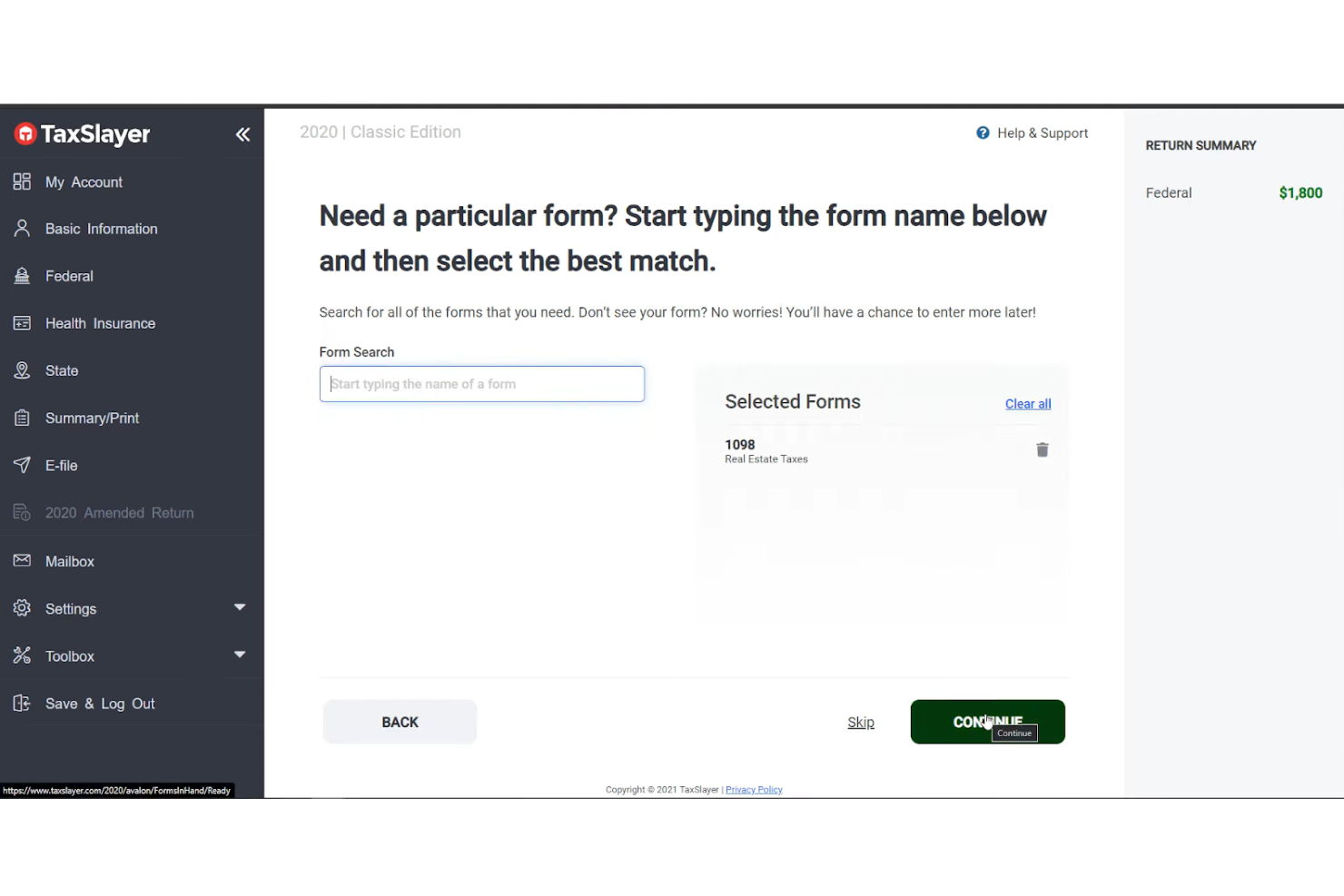
TaxSlayer es un software de impuestos empresariales que permite a los trabajadores autónomos encontrar las deducciones y créditos a los que pueden calificar, asegurando que presentes tu declaración de impuestos correctamente.
Por qué elegí TaxSlayer: Incluí a TaxSlayer en mi lista gracias a su solución sólida para trabajadores independientes. La plataforma te guía en el proceso de ingresar tus ingresos y gastos comerciales para que puedas obtener más deducciones. Y si no logras entender el proceso, el software ofrece soporte ilimitado por correo electrónico, chat y teléfono.
Funciones destacadas e integraciones de TaxSlayer:
Funciones destacadas incluyen defensa en auditorías, presentación electrónica, formularios W-2, 1099, una base de conocimientos, la capacidad de importar declaraciones estatales previas y servicios de consulta fiscal para autónomos. Me gustan los recordatorios automáticos de TaxSlayer porque te ayudan a estar al tanto de tus pagos de impuestos, lo que te permite evitar penalizaciones.
Integraciones incluyen varias soluciones de nómina y CRM, como QuickBooks Online, TaxDome, Xero, TaxJar y Zendesk.
Pros and Cons
Pros:
- La app móvil te permite declarar tus impuestos desde cualquier lugar
- El seguimiento de la devolución de impuestos te ayuda a saber cuándo esperarla
- Garantía de reembolso máximo
Cons:
- No cuenta con un calculador de donaciones
- Puede ser un reto aprovechar el portal del cliente al máximo

TaxCloud
La mejor opción para el cumplimiento del impuesto sobre ventas en comercio electrónico

TaxCloud es un servicio de gestión de impuestos sobre las ventas diseñado para negocios de comercio electrónico, que proporciona cálculos en tiempo real de las tasas de impuestos en más de 13,000 jurisdicciones de Estados Unidos. Automatiza el proceso de recaudación de impuestos en el punto de transacción, la presentación de informes y el pago, con una promesa de precisión del 100%, posicionándose como una solución líder para el cumplimiento del impuesto sobre ventas en comercio electrónico.
Por qué elegí TaxCloud: Elegí TaxCloud como software de impuestos para negocios después de evaluar sus completas capacidades de cumplimiento. Lo que hace que TaxCloud destaque es su combinación de una plataforma de autoservicio respaldada por un equipo de TaxGeeks experimentados, lo cual brinda tanto autonomía como soporte experto para las empresas. Creo que TaxCloud es la mejor opción para el cumplimiento del impuesto sobre ventas en comercios electrónicos debido a su comprobado historial de precisión y un servicio al cliente excepcional.
Funciones destacadas e integraciones de TaxCloud
Las funciones destacadas incluyen servicios de presentación y remisión de impuestos sobre las ventas para empresas. Esta característica única reduce aún más la carga de cumplimiento para las empresas al automatizar el proceso, a menudo complejo y que requiere mucho tiempo, de presentar las declaraciones de impuestos sobre ventas y remitir los pagos a las autoridades estatales. TaxCloud se encarga de todo el proceso de presentación, desde preparar las declaraciones hasta enviarlas a las jurisdicciones fiscales correspondientes, lo que puede ahorrar a las empresas un tiempo y recursos significativos.
Las integraciones incluyen Ability Commerce, BigCommerce, QuickBooks, Square, Stripe, Shopify, WooCommerce, Odoo, Volusion, Cart.com, Oracle NetSuite, Acumatica, Sage y Magento.
Pros and Cons
Pros:
- Base de datos con tasas y normativas fiscales actualizadas
- Integraciones con diversas herramientas de comercio electrónico
- Recaudación automática del impuesto sobre las ventas
Cons:
- Puede ser demasiado básico para grandes empresas
- Limitaciones de volumen de transacciones en los planes inferiores

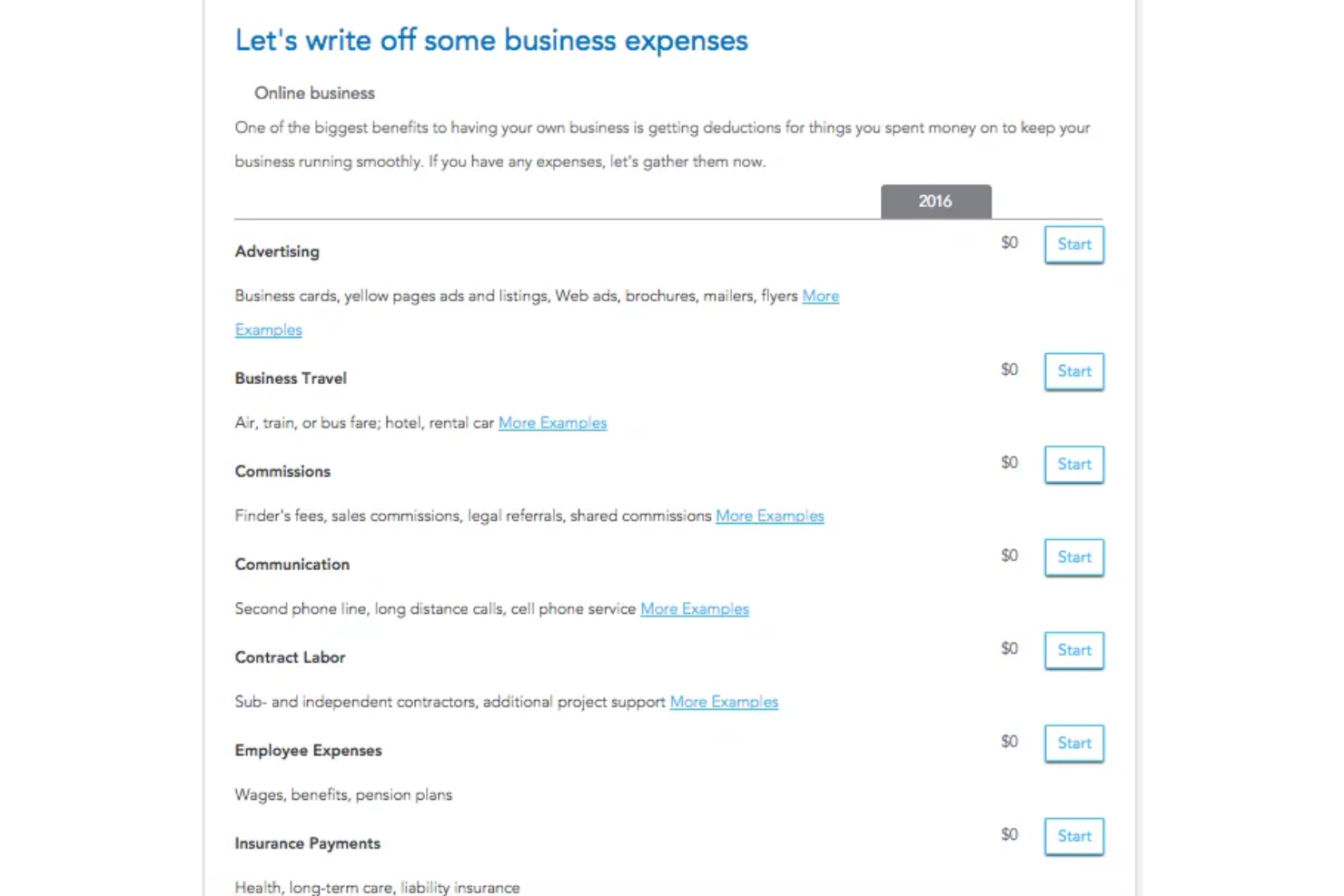
Intuit TurboTax es un proveedor popular de preparación de impuestos empresariales que te permite presentar tus impuestos por tu cuenta o con la ayuda de un experto.
Por qué elegí Intuit TurboTax: Intuit TurboTax está en mi lista de los 10 mejores gracias a la experiencia de usuario que ofrece. Presentar impuestos con TurboTax es como tener una entrevista a fondo con un especialista en impuestos. El software crea un proceso paso a paso que te permite subir documentos para que puedas reportar los ingresos de tu negocio, calcular tus impuestos, deducir gastos empresariales y almacenar tus declaraciones de impuestos federales o estatales.
Características destacadas e integraciones de Intuit TurboTax:
Características destacadas incluyen importación de documentos, soporte para criptomonedas, calculadora de donaciones, cálculos de impuestos para propiedades en alquiler, uso compartido de pantalla bajo demanda y soporte por chat o teléfono. Me gusta la función de asistente en vivo de la plataforma porque te permite conectarte con un experto y determinar a qué deducciones y créditos es elegible tu negocio.
Intuit TurboTax se integra con docenas de soluciones de software de nómina y recursos humanos, incluyendo ADP, Ceridian Dayforce, Paycom, Gatekeeper, PayrollMaxx, Gusto, QuickBooks, Paycor, Paylocity y UKG Pro.
Pros and Cons
Pros:
- Muy fácil de usar
- Interfaz limpia y sencilla
- Gran servicio de atención al cliente
Cons:
- La versión freemium solo está disponible para declaraciones de impuestos simples
- La versión gratuita no puede manejar deducciones detalladas

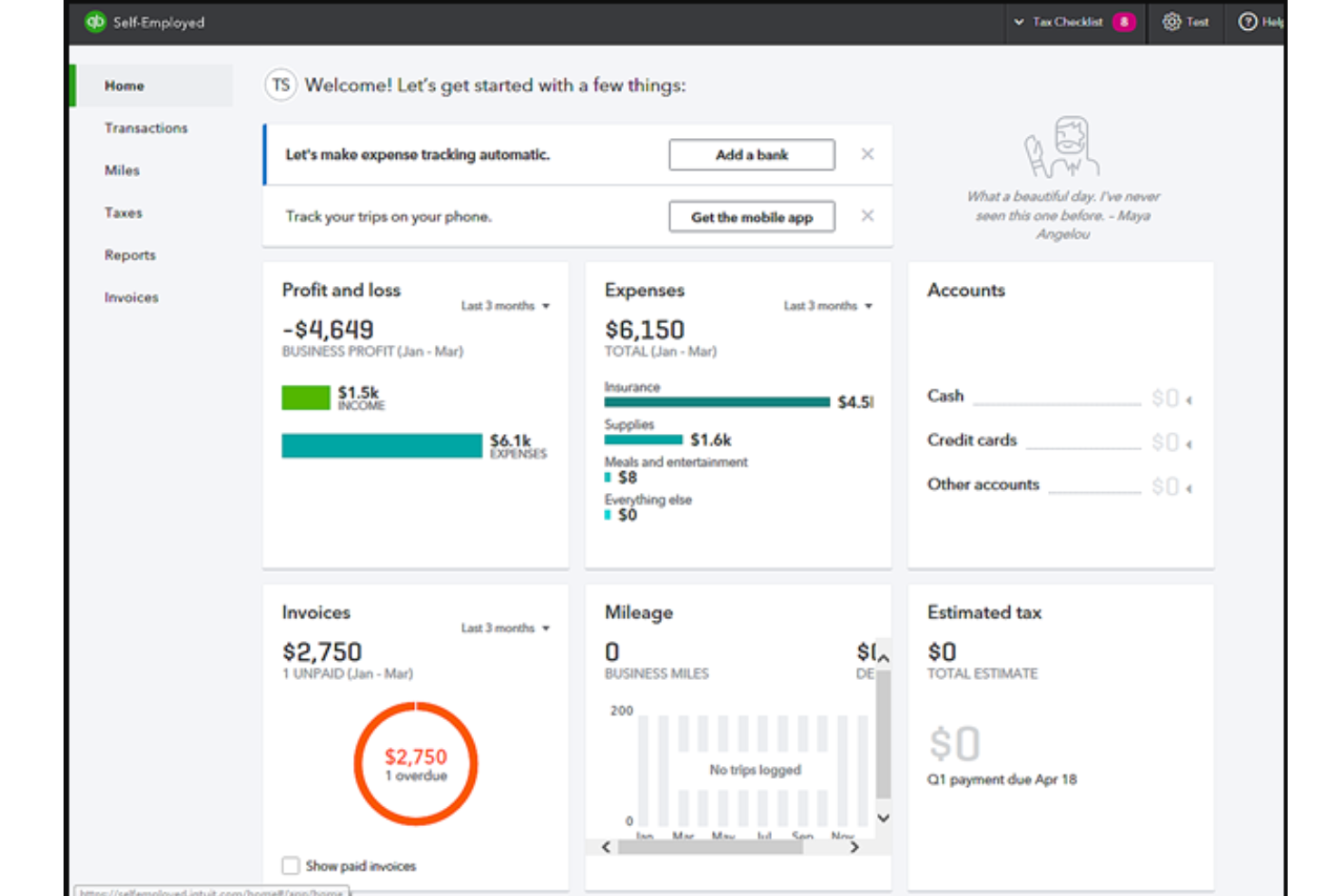
QuickBooks Self-Employed es un software de preparación de impuestos empresariales que ayuda a autónomos y contratistas a estimar y presentar sus impuestos.
Por qué elegí QuickBooks Self-Employed: QuickBooks Self-Employed entró en mi lista de los 10 mejores gracias a sus informes integrados. Estos informes ayudan a las personas que dependen del trabajo por encargo a ver cómo va su negocio en cada trimestre fiscal, para que puedan aprovechar oportunidades como reembolsos o créditos fiscales. La plataforma también facilita la organización de tus recibos, por lo que las LLC de un solo miembro pueden rastrear sus gastos y preparar sus formularios Schedule C.
Funciones y integraciones destacadas de QuickBooks Self-Employed:
Funciones destacadas incluyen seguimiento de gastos, seguimiento de kilometraje, estimaciones de impuestos, presentación estatal y federal, y reportes integrados. Me gusta el seguimiento de kilometraje de la plataforma porque te permite categorizar tus viajes relacionados con el trabajo utilizando el GPS de tu teléfono.
Las integraciones incluyen más de 700 soluciones, entre ellas Etsy, PayPal, Square, Amazon Business, eBay, Amazon Seller, Shopify, Gusto, Float y Expensify.
Pros and Cons
Pros:
- Simplifica el seguimiento de tus gastos
- Te permite automatizar parte de la declaración de impuestos
- Facilita la organización y almacenamiento de tus recibos
Cons:
- El proceso de onboarding podría mejorarse
- Puede ser complicado encontrar un recibo en todos tus archivos guardados

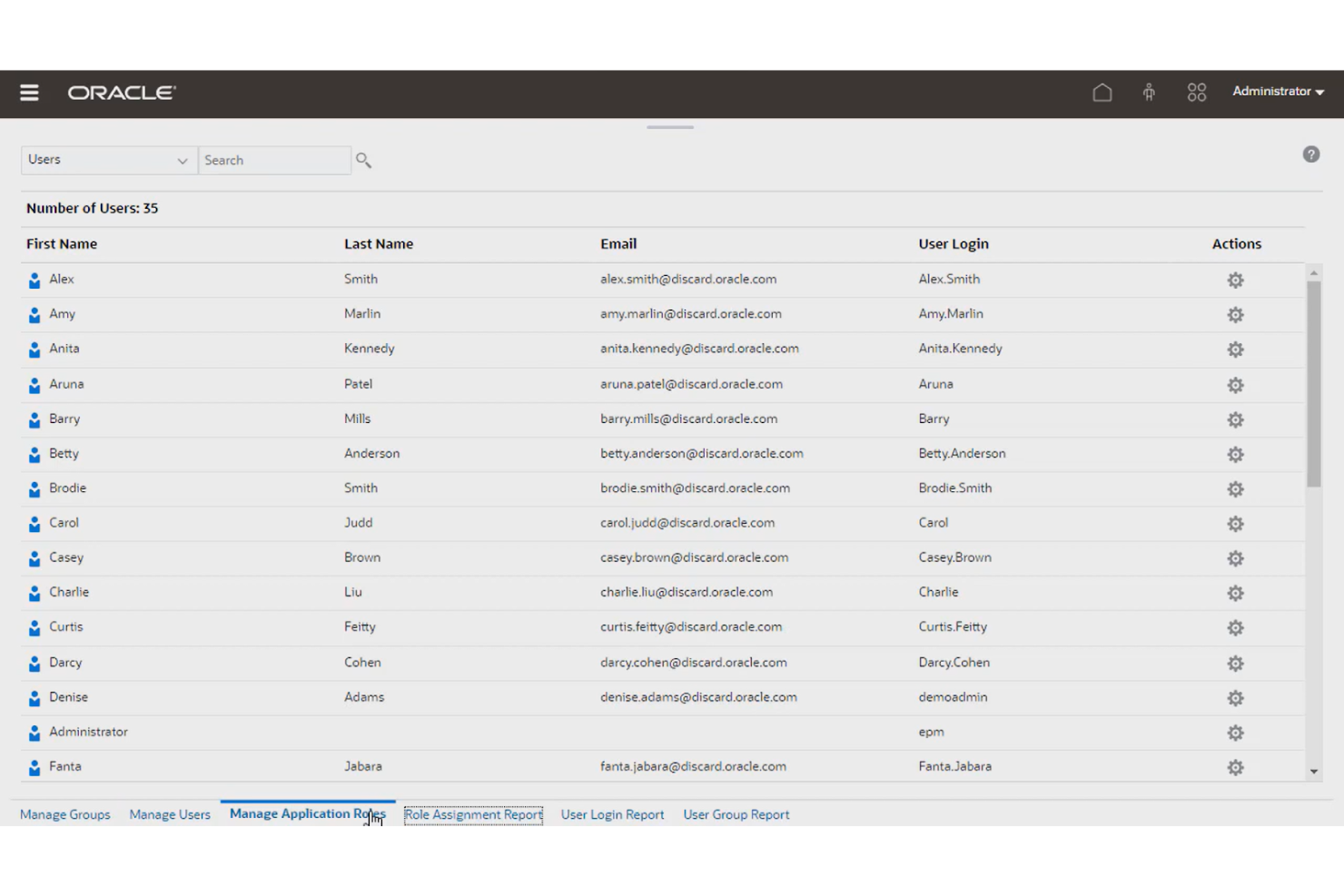
Oracle Cloud EPM Tax Reporting es una solución de preparación de impuestos que te permite automatizar y acelerar el proceso de reporte empresarial.
Por qué elegí Oracle Cloud EPM Tax Reporting: Elegí Oracle Cloud EPM Tax Reporting porque puede ayudarte a automatizar varias tareas involucradas en la presentación de informes fiscales, como la extracción de datos, el cálculo de impuestos y la preparación de los mismos. La solución lee los datos de tu declaración de impuestos, rellena automáticamente los formularios y calcula los impuestos. La plataforma se basa en una amplia biblioteca de reglas para cálculos fiscales que garantizan precisión en cada jurisdicción, ayudándote a evitar multas o sanciones.
Características destacadas e integraciones de Oracle Cloud EPM Tax Reporting:
Características destacadas incluyen informes país por país, cálculos de provisiones fiscales, importaciones automáticas, cálculos de créditos por investigación y desarrollo (I+D), y monitoreo de tareas. Me gusta la función de monitoreo de tareas de Oracle Cloud EPM Tax Reporting porque permite asignar responsables, fechas de vencimiento y estados para cada procedimiento, facilitando la coordinación del equipo.
Integraciones incluyen otras aplicaciones empresariales de Oracle, como Oracle Cloud Financials, Oracle Cloud Planning, Oracle Cloud Tax Engine, Oracle Cloud Data Integrator, y aplicaciones de terceros como SAP BusinessObjects, Microsoft Power BI, Qlik Sense y TIBCO Spotfire
Pros and Cons
Pros:
- Fácil de integrar con software de cumplimiento fiscal
- Importa automáticamente la información de tu declaración de impuestos para mayor precisión
- Exporta provisiones fiscales y balances de prueba a tu software de cumplimiento
Cons:
- Tiene una curva de aprendizaje
- Sin opción para crear reglas personalizadas de cálculos

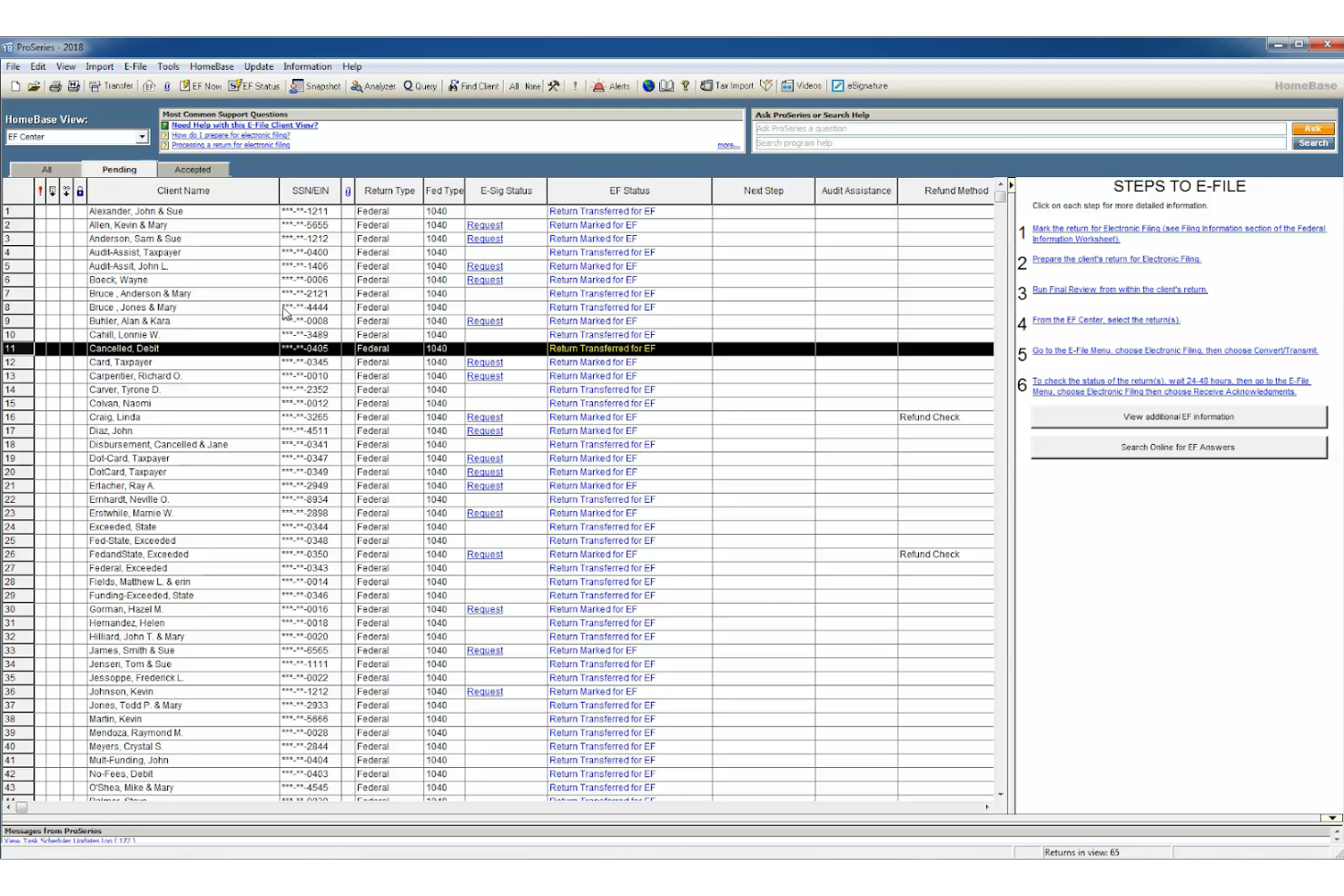
ProSeries Tax es un software fiscal empresarial que ayuda a los propietarios de negocios en Norteamérica a ahorrar tiempo al presentar sus impuestos gracias a funciones dedicadas.
Por qué elegí ProSeries Tax: ProSeries Tax entró en mi lista de los 10 mejores gracias a sus funciones para ahorrar tiempo, como hojas de entrada rápida, una función de búsqueda basada en palabras clave, importaciones automáticas de datos y orientación para el ingreso de declaraciones fiscales. La solución es amigable para usuarios primerizos y ofrece un flujo de trabajo guiado en el que puedes confiar para declarar tus impuestos federales y estatales.
Funciones y integraciones destacadas de ProSeries Tax:
Funciones destacadas incluyen un portal de capacitación personalizado, presentación electrónica, importaciones automáticas, seminarios web sobre el software, incorporación guiada, una base de conocimientos y consejos de la comunidad. Me gusta el portal de capacitación personalizado de la plataforma porque te permite acceder a tutoriales y videos adaptados a tus necesidades y nivel de habilidad.
Integraciones incluyen software de firma electrónica y soluciones de nómina, como DocuSign, QuickBooks Online Payroll, ADP Workforce Now, Gusto, SurePayroll y Paychex Flex.
Pros and Cons
Pros:
- Herramientas de diagnóstico y verificación de errores completas
- La interfaz es fácil de usar y navegar
- Herramienta útil para profesionales fiscales que gestionan múltiples clientes
Cons:
- Opciones de personalización limitadas para los informes
- La interfaz puede presentar retardos a veces
Otros programas de impuestos empresariales
Estas son otras excelentes soluciones fiscales para empresas que encontré durante mi investigación. No tenía espacio para hacer un análisis completo de cada una, pero aun así merecen consideración:
- UltraTax CS
Mejor para escenarios fiscales complejos
- Intuit ProFile Tax
La mejor para soporte comunitario
- Vertex
Ideal para la gestión de impuestos sobre arrendamientos
- Deel HR
Ideal para pagar equipos globales


Otros análisis de programas financieros
¿Te interesa gestionar las finanzas de tu organización? Estos son otros recursos valiosos de People Managing People que pueden interesarte:
- Programas de nóminas
- Empresas de nóminas para gestionar tus nóminas
- Programas de nóminas para pequeñas empresas
- Servicios de nóminas para pequeñas empresas
- Programas de nóminas gratuitos para presupuestos ajustados
Cómo Evalúo el Software de Impuestos para Empresas
Divido mi evaluación del software de impuestos empresariales en dos capas: la base—presentación en múltiples jurisdicciones, generación de W-2/1099—y los diferenciadores que separan una plataforma de otra.
Funcionalidad Principal (Requisitos Esenciales Para Esta Lista)
Cuando selecciono herramientas para mi lista, califico cada una en una escala de 0 (no ofrece la funcionalidad) a 5 (destaca en este aspecto) para cada funcionalidad principal indicada abajo. Luego, calculo la puntuación total de la herramienta como un porcentaje. Cada herramienta debe lograr una puntuación mínima total del 65% para ser considerada.
- Cálculo de Impuestos sobre Nómina: Verifico si la herramienta calcula automáticamente los impuestos del empleador y empleados en todos los tipos de salario, elecciones de retención y deducciones antes de impuestos.
- Generación y Presentación Electrónica de Formularios Fiscales: Cada herramienta debe generar y presentar electrónicamente formularios clave como W-2, 1099, 940 y 941 directamente ante agencias federales y estatales.
- Cumplimiento de Impuestos Multijurisdicción: Evalúo qué tan bien una plataforma gestiona reglas impositivas de múltiples estados y localidades, especialmente para equipos remotos distribuidos en diversas jurisdicciones.
- Integración con HRIS y Nómina: La herramienta debe sincronizar datos de empleados, registros salariales y deducciones con plataformas como Workday, BambooHR, ADP o Gusto.
- Informes Fiscales de Fin de Año: Busco flujos de trabajo para conciliaciones, manejo de corrección de W-2c y acceso en autoservicio de los empleados a documentos fiscales de fin de año.
- Gestión de Depósitos y Remesas: La programación y seguimiento automatizado de depósitos de impuestos a agencias federales, estatales y locales es un área clave que evalúo.
Una vez que tengo una lista de herramientas que cumplen con estos criterios, considero qué distingue a cada plataforma.
Factores de Diferenciación (Qué Hace Únicos a los Proveedores)
Así es como comparo y contrasto los diferentes proveedores:
Características Destacadas
Una garantía contra penalizaciones fiscales transfiere el riesgo financiero fuera de tu equipo en caso de errores al presentar, lo que es especialmente importante durante los períodos de alto volumen a fin de año. También busco portales de autoservicio para empleados donde puedan descargar sus propios W-2 y actualizar elecciones de W-4 sin intervención de RRHH. Las alertas de cumplimiento en tiempo real son otro diferenciador que evalúo: notificaciones proactivas sobre cambios de tasas o fechas límite ayudan a los equipos de RRHH a anticiparse en lugar de apresurarse a ponerse al día.
Más Allá de las Funcionalidades
Evalúo qué tan bien una plataforma escala según la composición de la fuerza laboral—soportar empleados W-2, contratistas 1099 y configuraciones multinacionales bajo el mismo techo es fundamental cuando la estructura organizativa crece. La preparación para auditorías es otro factor que considero cuidadosamente, especialmente si la herramienta mantiene registros de presentaciones inmutables y soporta flujos de trabajo para responder a notificaciones de agencias. También considero el soporte durante la implementación, ya que migrar a mitad de año implica conciliar datos del trimestre anterior, y contar con un especialista en impuestos dedicado durante la incorporación puede evitar costosos vacíos en la presentación.
Costes y precios de las herramientas fiscales para empresas
Es importante seleccionar un software fiscal para empresas que se adapte al tamaño de tu empresa, a la complejidad de tus impuestos y a tu presupuesto. A continuación se ofrece un desglose de las opciones de precios habituales para el software fiscal para empresas, incluida una opción gratuita para necesidades fiscales sencillas y planes premium para empresas que requieren funciones avanzadas.
Tabla comparativa de planes para software fiscal para empresas
| Nombre del plan | Rango de precios | Ideal para | Funciones habituales |
|---|---|---|---|
| Plan gratuito | $0 | Empresarios individuales con declaraciones básicas | Presentación básica de impuestos federales, seguimiento de ingresos y gastos, deducciones limitadas, asistencia en línea |
| Plan básico | $20 - $50 al año | Autónomos y pequeñas empresas | Presentación de impuestos federales y estatales, optimización de deducciones, seguimiento de gastos, atención al cliente |
| Plan estándar | $100 - $200 al año | Pequeñas empresas en crecimiento con múltiples deducciones | Deducciones avanzadas, presentación en varios estados, asistencia en auditorías fiscales, integración con software de contabilidad |
| Plan premium | $250 - $400 al año | Empresas medianas y grandes que necesitan asesoramiento experto | Preparación fiscal integral, asistencia de un CPA, integración de impuestos sobre nóminas, defensa en auditorías, presentaciones estatales ilimitadas |
| Plan empresarial | $500+ al año | Corporaciones y empresas con estructuras fiscales complejas | Informes personalizados, compatibilidad con varias entidades, profesionales fiscales dedicados, herramientas avanzadas de cumplimiento |
Según tus necesidades, es posible que puedas empezar con un plan gratuito o básico. Sin embargo, si tus impuestos son complejos o requieren asistencia experta, recomiendo optar por una opción premium o empresarial.
Preguntas frecuentes
¿Quieres saber más sobre el software fiscal para empresas? Aquí tienes respuestas a algunas preguntas habituales que tienen los lectores sobre este tema.
¿Cuáles son las ventajas de utilizar software fiscal para empresas?
El software fiscal para empresas te ofrece tranquilidad al presentar tus impuestos, ya que minimiza los errores de presentación. Estas soluciones también te ahorran tiempo al calcular tus gastos empresariales y pueden ayudarte a hacer un seguimiento de tus costes de nómina y a reducir tus impuestos.
¿Cuál es el mejor software fiscal para una pequeña empresa?
Encontrar el mejor software fiscal para pequeñas empresas depende de tus necesidades y preferencias específicas. Estos son algunos factores que debes tener en cuenta:
- Coste anual: Asegúrate de que el coste del software se ajuste a tu presupuesto. Recuerda añadir también las tasas de presentación estatales al coste total.
- Características y funcionalidades: No todos los programas para empresas son iguales. Busca soluciones que se ajusten a tus preferencias, como las que ofrecen compatibilidad con diferentes estructuras empresariales, formularios, anexos, gestión de nóminas de pequeñas empresas y situaciones fiscales.
- Facilidad de uso: La interfaz de usuario del software, como la navegación, el diseño y las opciones de ayuda, puede influir considerablemente en lo fácil que será utilizarlo.
- Atención al cliente: Asegúrate de que el proveedor ofrezca un buen servicio de atención al cliente y asistencia técnica, como ayuda por teléfono, chat, correo electrónico o en persona.
- Integraciones del software: Las herramientas que ofrecen integraciones nativas con otras soluciones que utilizas habitualmente, como tu herramienta de gestión de nóminas, tu software de planificación de recursos empresariales (ERP) y otras, pueden ayudarte a ahorrar tiempo al calcular tus impuestos.
¿Qué tipos de gastos empresariales debo controlar como empresario individual?
Como empresario individual, puedes deducir muchos gastos ordinarios y necesarios en los que incurras al gestionar tu negocio. Estos son algunos tipos habituales de gastos empresariales que debes controlar:
- Gastos de oficina: Como alquiler, suministros, material, gastos de envío, mobiliario, equipos y mantenimiento
- Gastos de viaje: Pueden incluir billetes de avión, alojamiento, comidas, alquiler de vehículos, kilometraje, peajes y aparcamiento
- Gastos de entretenimiento: Pueden incluir comidas y entradas para eventos de clientes
- Gastos de publicidad y marketing: Como sitios web, redes sociales y publicidad en línea, o publicidad fuera de línea
- Gastos de servicios y honorarios profesionales: Siempre que pagues honorarios de contabilidad, servicios jurídicos, consultoría y externalización
- Gastos de seguros: Los costes habituales de los seguros incluyen las primas de seguros de responsabilidad civil, propiedad, salud e incapacidad
- Gastos de impuestos y licencias: Pueden incluir tu impuesto sobre la renta, impuesto de autónomos, impuesto sobre las ventas, impuesto sobre bienes inmuebles y licencias empresariales
- Gastos de formación: Como matrículas, libros, tasas, material y cursos o seminarios que mejoren tus habilidades o conocimientos en tu campo
¿Qué sigue?
Si estás investigando software fiscal para empresas, conecta con un asesor de SoftwareSelect para recibir recomendaciones gratuitas.
Rellenas un formulario y mantienes una breve conversación en la que profundizan en tus necesidades específicas. Después recibirás una lista corta de programas que puedes revisar. Incluso te ayudarán durante todo el proceso de compra, incluidas las negociaciones de precios.